rear lights AUDI Q7 2012 Owner´s Manual
[x] Cancel search | Manufacturer: AUDI, Model Year: 2012, Model line: Q7, Model: AUDI Q7 2012Pages: 342, PDF Size: 86.42 MB
Page 64 of 342
62 Clear vis ion
• Press one of the switches ~~ to tu rn the
right or left reading light on or off~
fig. 60.
For vehicles w ith third row seating*, the lug
gage compartment light can be switched on
and off with the button'*' and used as a read
ing light
~fig. 61. The rear lid has to be
closed.
The lights in the l uggage compartment and in
the rear lid sw itch on and off automatically
when the lid is opened and closed .
@ Tips
If the rear lid remains open longer than 10
minutes, the luggage compartment lights
turn off a utomatically to prevent the vehi
cle battery from discharging.
Ambience lighting
App lies to vehicles: with amb ience light ing
The ambience lighting con be adjusted in the
MMI .
• Se lect: Funct ion button ICARI > Cont ro l bu t
ton
Systems * > Ambience lighting. Or
• Se lect: Funct ion button
ICARI > Contro l but
ton
Car systems* > Vehicle settings > Inte
rior lighting .
When the vehicle is unlocked, t he standard
lighting turns on automatically and dims after
approx. 2 minutes, and when the ignition is
turned o n it switches off immediately .
The following interior lighting is
controlled :
-Front footwe ll
- Rea r footwell
- Front door panel
- Re ar doo r panel
Vision
Sun visors
Using the sun visors makes driving safer .
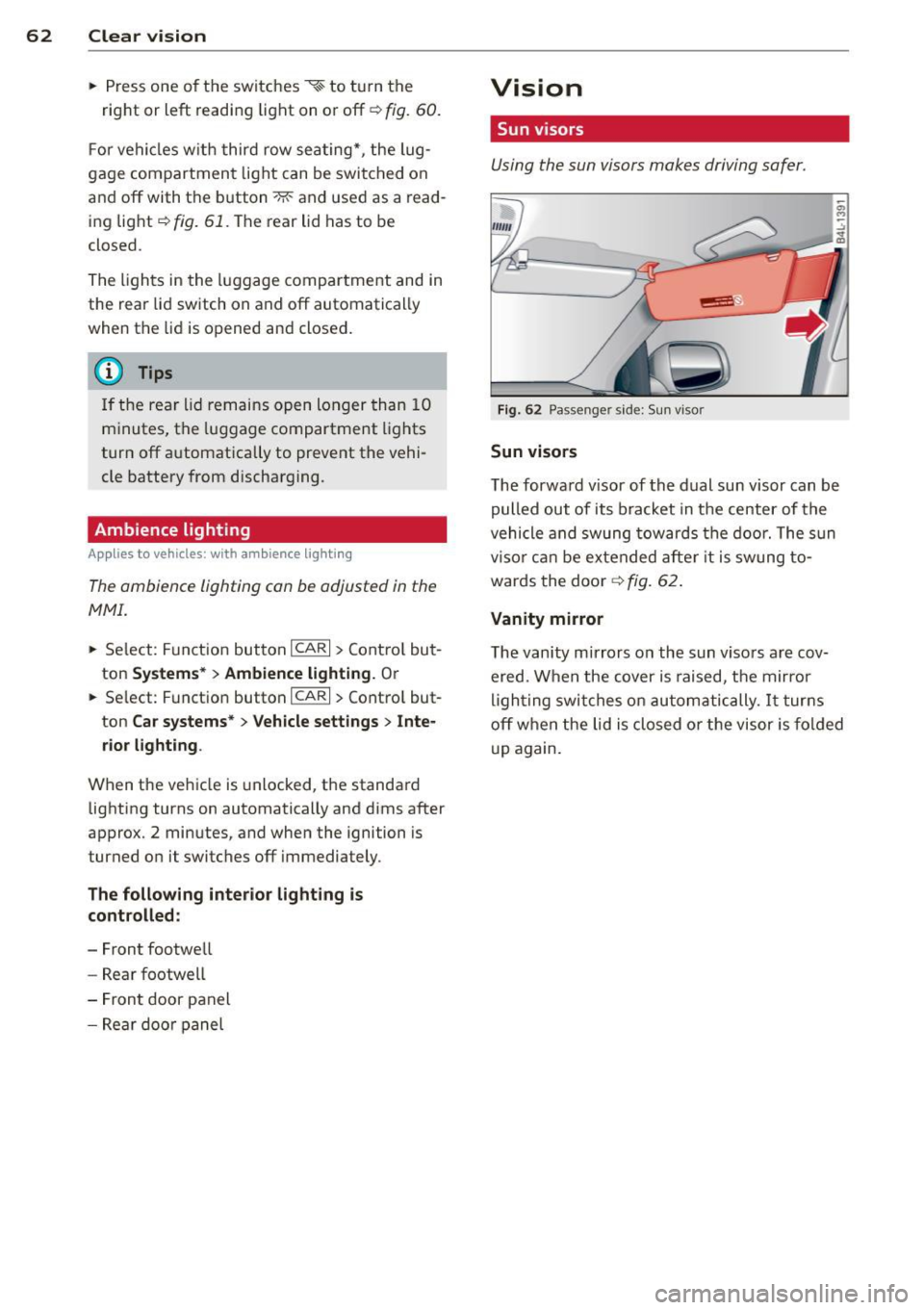
Fig. 62 Passe nger side: Su n visor
Sun visors
The forwa rd v isor of the dual sun visor can be
pulled out of its bracket in the center of the
vehicle and swung tow ards the doo r. The s un
vi so r ca n be e xtended afte r it is swung to
wards the doo r
~fig. 62.
Vanity mirror
The van ity mirrors on the sun viso rs are cov
ered. When the cover is raised, the mirror
l igh ting swit ches on au tom atic ally.
It tur ns
off when the lid is closed or the visor is fo ld ed
u p again.
Page 71 of 342
Dimming the mirrors
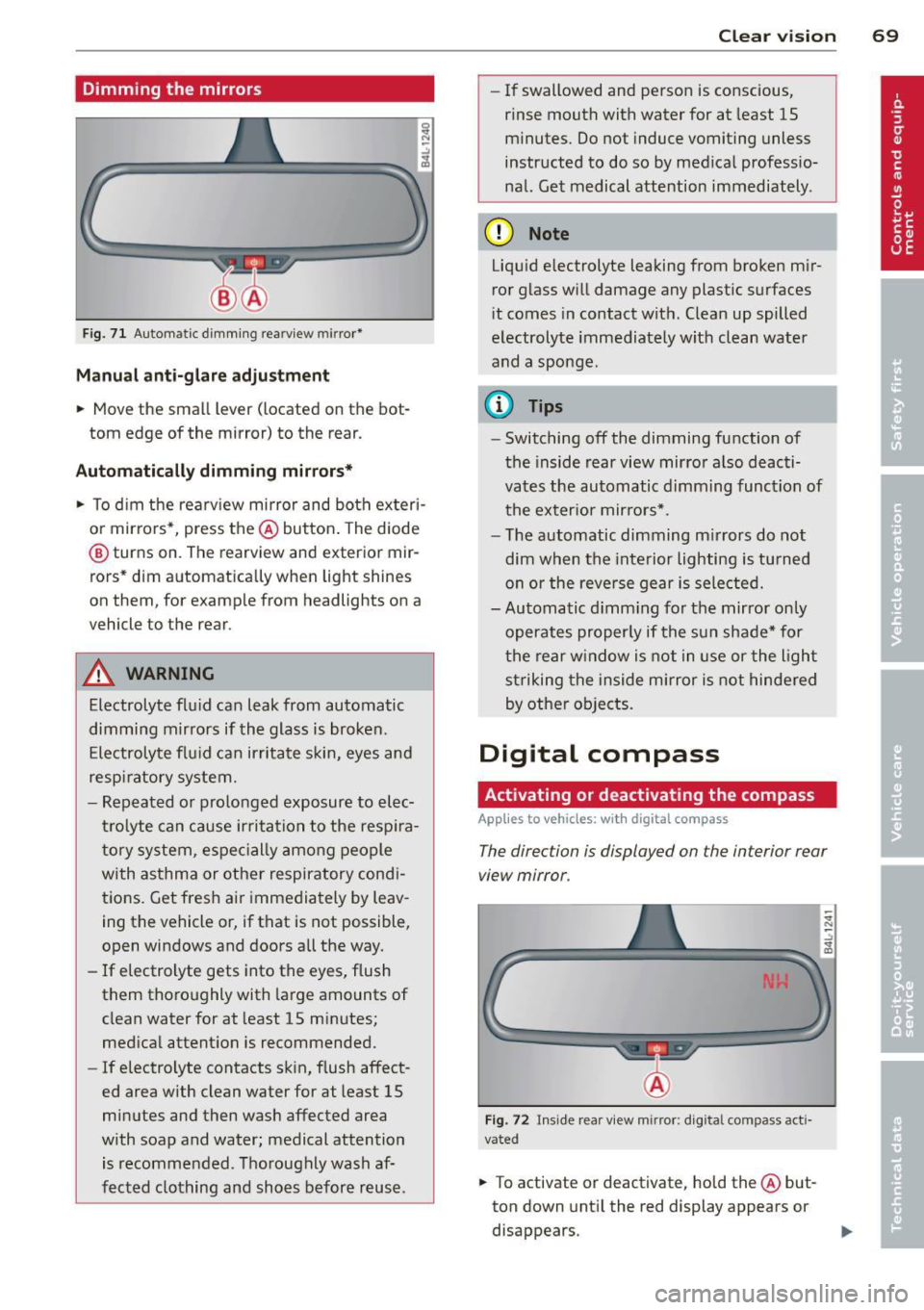
Fig. 71 Automatic d imm ing rearv iew mir ror*
Manu al ant i-glar e adjustment
.. Move the small lever (located on the bot
tom edge of the mirror) to the rear.
Automatically dimming mirror s*
.. To d im the rearview mirror and both ex teri
o r mirro rs*, press the @button . The diode
@ turns on. The rearview and exterior mir
rors* dim a utomatically when light shines
on them, for example from headlights on a
vehicle to the rear .
&_ WARNING
Electrolyte flu id can leak from automatic
dimming mirrors if the glass is broken.
Electrolyte flu id can irritate s kin, eyes and
respi ratory system.
- Repeated or prolonged exposure to elec
tr olyte can cause ir ritation to the resp ira
tory system, espec ially among people
with asthma or other respiratory cond i
tions. Get fres h air immedia tely by leav
ing the vehicle or, if that is not possible,
open windows and doors a ll the way.
- If electrolyte gets into the eyes, flush
them thoroughly with large amounts of
clean water for at least 15 m inutes;
med ica l attent ion is recommended.
- If electrolyte contacts skin , flush affect
ed area with clean water for at least 15
minutes and then wash affected area
w ith soap and water; medical attention
is recommended. T ho roughly wash af
fected clothing and sho es before reuse.
Clear vi sion 69
- If swallowed and perso n is conscious,
rinse mouth with water for at least 15
m inutes. Do not induce vomiting unless
instructed to do so by med ica l professio·
nal. Get medical attention immediately .
(D Note
Liquid e lectrolyte leaking from broken m ir
ror glass w ill damage any plastic surfaces
i t comes in contact wit h. Clea n up spilled
electrolyte immediately w it h clean water
and a sponge.
@ Tips
- Switching off the dimming function of
the inside rear view mir ro r also deacti·
vates the automatic dimming function of t he exter ior mirro rs*.
- T he automatic dimming m irrors do not
dim when the inte rior lighting is tu rned
on or the reve rse gear is sele cted.
- Automatic d imm ing fo r the mirror only
operates proper ly if the sun shade* for
t he re ar w indow is not in use or the ligh t
st riking the inside mirror is not hindered
by othe r objects.
Digital compass
Activating or deactivating the compass
App lies to vehicles: with digital compass
The direction is displayed on the interior rear
view mirror .
Fig. 72 Inside rear view mirror: digita l compass act i·
vated
.. To activate or deactivate, hold the @but
ton down unt il the red display appears or
disappears .
Page 122 of 342
120 Adapti ve crui se control
_&. WARNING
-
Following other vehicles too closely in
creases the risk of a crash and serious per
sonal injury .
- Following other vehicles too closely, par
ticu larly at higher speeds increases the
risk of coll is ions and serious personal in
jury.
- Setting short distances to the traffic
ahead reduces the time and distance
available to bring your vehicle to a safe
stop and makes it even more necessary
to pay close attention to traffic .
- Always select a speed and distance to
traffic ahead that is safe and appropriate
under the prevailing traff ic, road, weath
er and lighting conditions.
- Never rely on the distance control fea
ture of ACC a lone to prevent rear-end col
lis ions. Always be prepared to b rake and
take evasive act io n to avoid co llisions
and other ac cident situations.
- Never allow the clos ing speed between
yo u a nd other vehicles to be so h igh that
the adaptive cruise control may not be
able to slow your vehicle safe ly . If clos
ing speed is too high, yo u m ust app ly the
brakes yourself to reduce the risk of a
rear-end crash.
- Always select a greater following dis
tance to the veh icle ahead on wet roads
than on dry roads.
- Always read and heed the information
and WARNINGS
¢ &. in Description on
page 113.
(D Tips
The distance setting is reset to the factory
default
DIS TANCE 3 the next time the ig
nition is turned on.
Driver information
Displays in the instrument cluster
Applies to veh icles: w ith adaptive cruise contro l
Depending on the driving situation, driver in
formation is displayed in the instrument clus
ter .
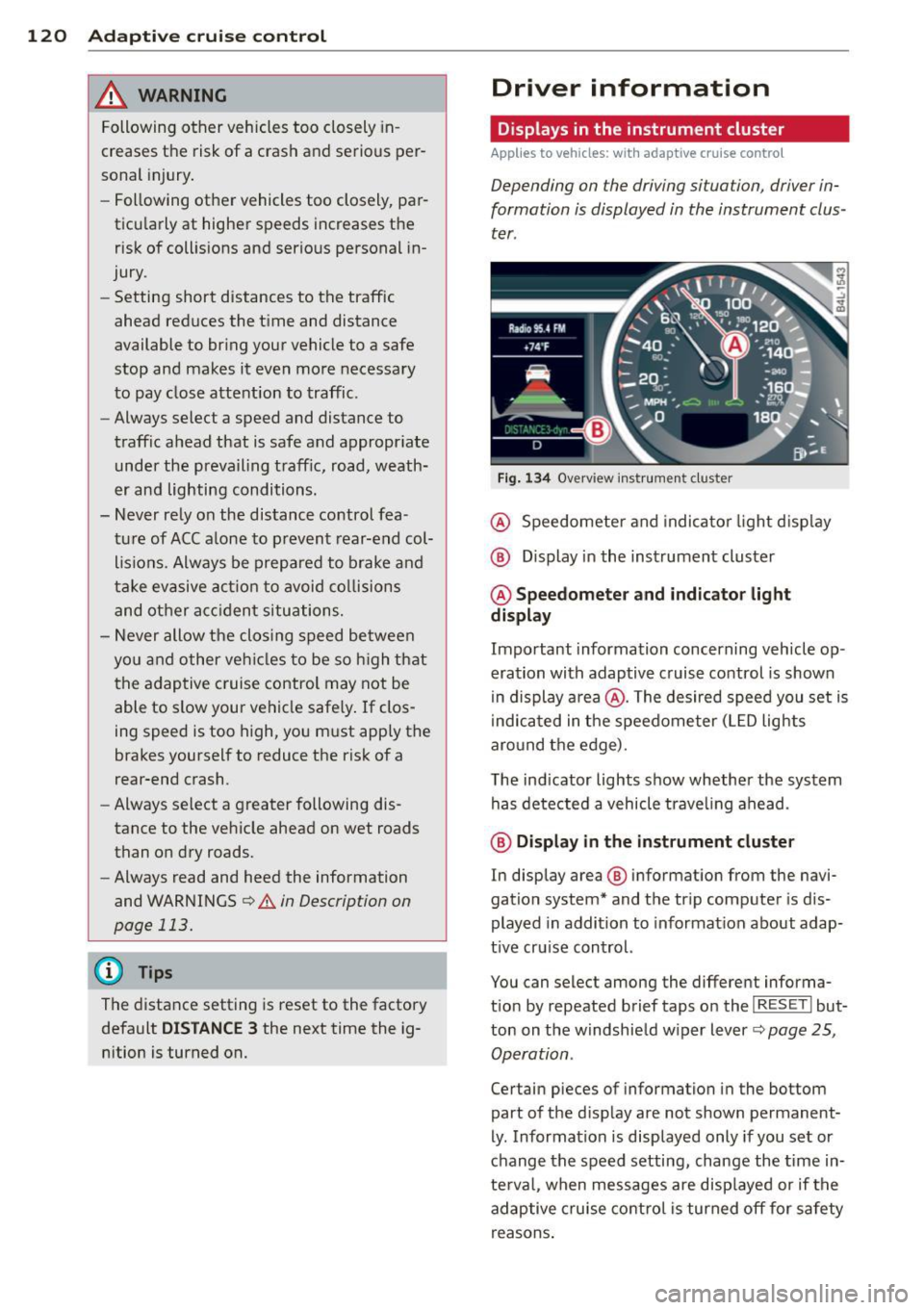
Fig . 1 34 Overview ins tr u me nt cluster
@ Speedometer and indica to r li ght d isp lay
@ Display in the instrument cluster
@ Speedometer and indi cato r light
display
Important information concerning vehicle op
eration with adaptive cruise control is shown
in display a rea @. The desired speed you set is
i ndica ted in the speedometer (L ED lights
aro und the edge).
T he ind icator lights show whether the system
has detected a vehicle trave ling ahead .
@ Display in the in strument cluster
In display area @ information from the navi
gation system* and the tr ip computer is dis
played in addition to informat ion about adap
t ive cru ise control.
You can select among the different informa
t io n by repeated brief taps on the
I RESET I but
ton on the w indshie ld w iper lever
c::> page 25,
Operation .
Certain pieces of information in the bottom
part of the d isplay are not shown permanent
ly . Information is displayed only if you set or
change the speed setting, change the time in
te rva l, when messages are disp layed or if the
adaptive cruise contro l is turned off for safety
reasons .
Page 123 of 342

Display in the speedometer
Applies to vehicles: with adaptive cruise control
Fig. 135 D isplay in t he s pee domete r
Des ired spe ed
The desired speed set by the driv er is dis
p layed by a red L ED.
If the desi red speed was set between two
lines on the speedometer using the
I SE TI but
ton, the two closest light emitting diodes will
come on <=>
fig. 135.
The system a llows only speeds to be set be
tween 20 to 95 mph (30 to 150 km/h) to be
set. This speed range is faint ly illuminated in
the speedometer (L ED lights).
Ind icator light s (symbol s)
-- Open road:
T he ind icator light _
shows that ACC is active and that no moving
veh icle has been detected with in range of
the radar sensor up ahead in your lane of
your lane of travel. Your speed is adjusted according to the speed of the vehicle up
front . ACC acce lerates and brakes automati
ca lly within the system's capab ilities .
-- Driver int ervention prompt : The
red flashing warning light- means
Request for dri ver to assum e co ntr ol. You
as the dr iver must s low the vehicle with the
f oot brake. The symbol - tells you
t h at the adaptive cruise control is not able
to slow the vehicle down enough to keep a
e nough distance to the vehicle in front of
you. A warning tone will also sound when
Ad apti ve crui se control 121
the symbol appears. For more information
about the driver intervention prompt
r::!) page 124.
_& WARNING
Improper use of the adaptive cruise con
trol features and inattent ion can lead to a
crash and serious personal injury.
- Never allow the closing speed between
you and othe r vehicles to be so high that
the adaptive cruise control may not be ab le to slow your vehicle safely . If clos
ing speed is too high, you must apply the
brakes yo urself to reduce the risk of a
rear-end crash.
- Always select a greater following d is
tance to the vehicle up ahead on wet
roads than on dry roads.
- Always read and heed the info rmation
and WARNINGS <=>
& in Description on
page 113 .
(D Tips
-If you use the accelerator to go faste r
t han t he speed of the vehicle ahead of
you , the dr iver intervention prompt will
not be accompan ied by a warn ing tone.
- If the speed you previously set is exceed
ed, the indicator light in the speedome
ter will switch off.
Display in the instrument cluster
Appl ies to vehicles: wit h adaptive cruise control
F ig. 136 D isp lay in the in strument clust er
-
Scroll through the available information dis
plays by br iefly tapp ing the
I RES ET! button at
the end of the windshield wipe r lever . You can ..,.
Page 131 of 342

Audi side assist Lane Change Assistant
Description
App lies to vehicles: with side assist
The side assist helps you when changing
lanes .
AUDT U7
Fig. 147 Rear b umper: Pos it ion of radar sensors (not
v isib le on outside)
Fig . 148 Signal light on the outside mirror -driver 's
s ide
,.._ en ;! ..:, .. (D
Side assist uses radar sensors (not visib le on
outside) ¢
fig. 147 to help the driver check
b lind spots, and see what is happen ing in traf
fic beh ind the veh icle
¢ page 130, fig. 150.
Signal lights are bu ilt into both outside m ir
r ors ¢
fig. 148. The signal light on the left
outside mirror assists when moving over into
the left lane and the signal light on the r igh t
ou tside mirror assists when moving over in to
the right lane .
The s ignal light comes on to tell you that side
assis t has detec ted a vehicle on tha t side and
that t he position of this othe r vehicle should
be taken into account if yo u were to change
lanes . This is called the
informatio nal st age
sign al¢
page 131. The informat ional stage
Aud i side assist 129
signal is designed so that you notice it on ly
when you are looking in the outside mirror.
When yo u activate the turn signal and side as
s ist de tects a vehicle in a no table location, the
corresponding signal on the outside mi rror
flashes briefly and brightly several times. This
is the
a lert stage signal ¢ page 131 .
Activating and deactivating
Applies to vehicles: wit h side assist
Fi g. 14 9 Drive r's doo r: Side assist button
Activating
.,. Press the ¢
fig. 149 button. The ind icator
on the b utton lights up.
Deactivating
.,. Press the button again. The indicator light
on the button goes out .
The system works at speeds faster than
19 mph (30 km/h) .
A WARNING
-Imp roper reliance on the side assist sys
tem can cause collis ions and serio us pe r
sonal injury:
- Never rely on ly on side assist when
changing lanes.
- Always check rear view mirrors to make
su re that it is safe to change lanes.
- Side assist canno t detect all veh icles un
de r all conditions- danger of accident!
- Side assist cannot detect vehicles in time
to a lert you w hen they app roac h from
behind at very hig h speed, or fall drop
back very qu ickly.
~
Page 134 of 342
132 Audi side assist
@ Informational stage signal lights up
A fast approaching veh icle - in the left-hand
l ane for examp le - was detected by the sen
sors . Although this vehicle is sti ll far away, it
should be taken into account if you were to
change lanes, due to the considerable differ
ence in speed. The informational stage signal
on the outside m irror lights up
c::;, page 131.
@ Alert stage signal flashes
If you activate your turn signal in driving sit
uation @, the signal briefly f lashes repeated
ly. Side ass ist is alerting you to a veh icle that
you may not have noticed.
@ Tips
- The faster a vehicle approaches from the
rear, the sooner the signal on the outside
mirror lights up. Side assist will signa l,
at the latest, when a detected vehicle en
ters your "blind spot" .
- When vehicles approach very quickly,
changing lanes can be dangerous even if
the signal on the outside mirror does not
light up.
Driving situation: Slowly approaching
vehicles
Applies to vehicles : wi th side assist
@
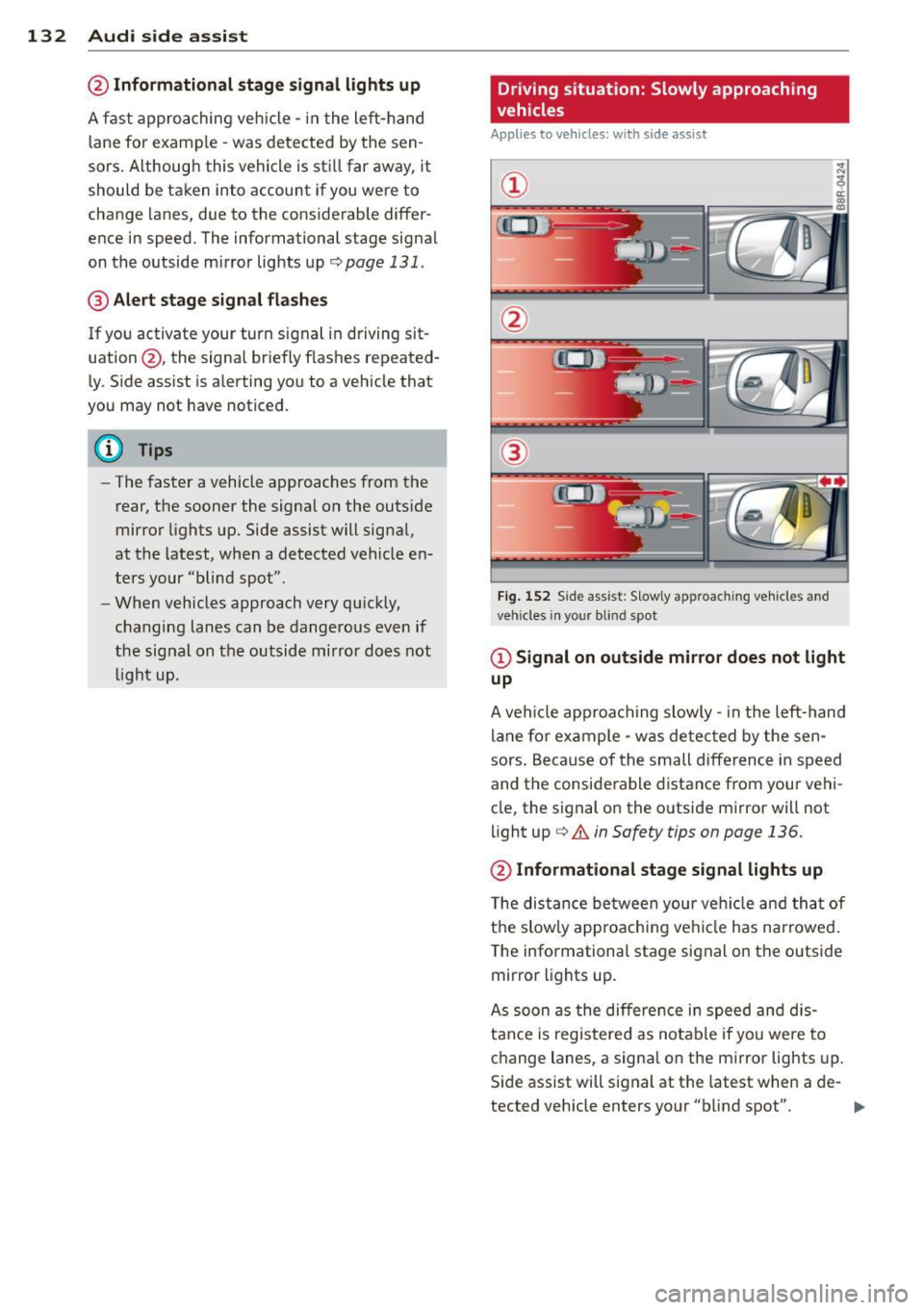
Fig. 152 Side assist: S low ly approac hing veh icles and
veh icles in yo ur blind spot
@ Signal on outside mirror does not light
up
A vehicle approaching slowly -in the left-hand
lane for example - was detec ted by the sen
sors. Because of the small d ifference in speed
and the considerable distance from your vehi
cle, the signal on the outside mirror will not
light up
c::;, &. in Safety tips on page 136.
@ Informational stage signal lights up
The distance between your vehicle and that of
the slow ly approaching vehicle has narrowed .
The informationa l stage signal on the outside
mirror lights up.
As soon as the differe nce in speed and dis
tance is registered as notable if you were to
change lanes, a signa l on the mirror lights up.
Side assist will signal at the latest when a de-
tected vehicle enters your "b lind spot". .,,.
Page 135 of 342
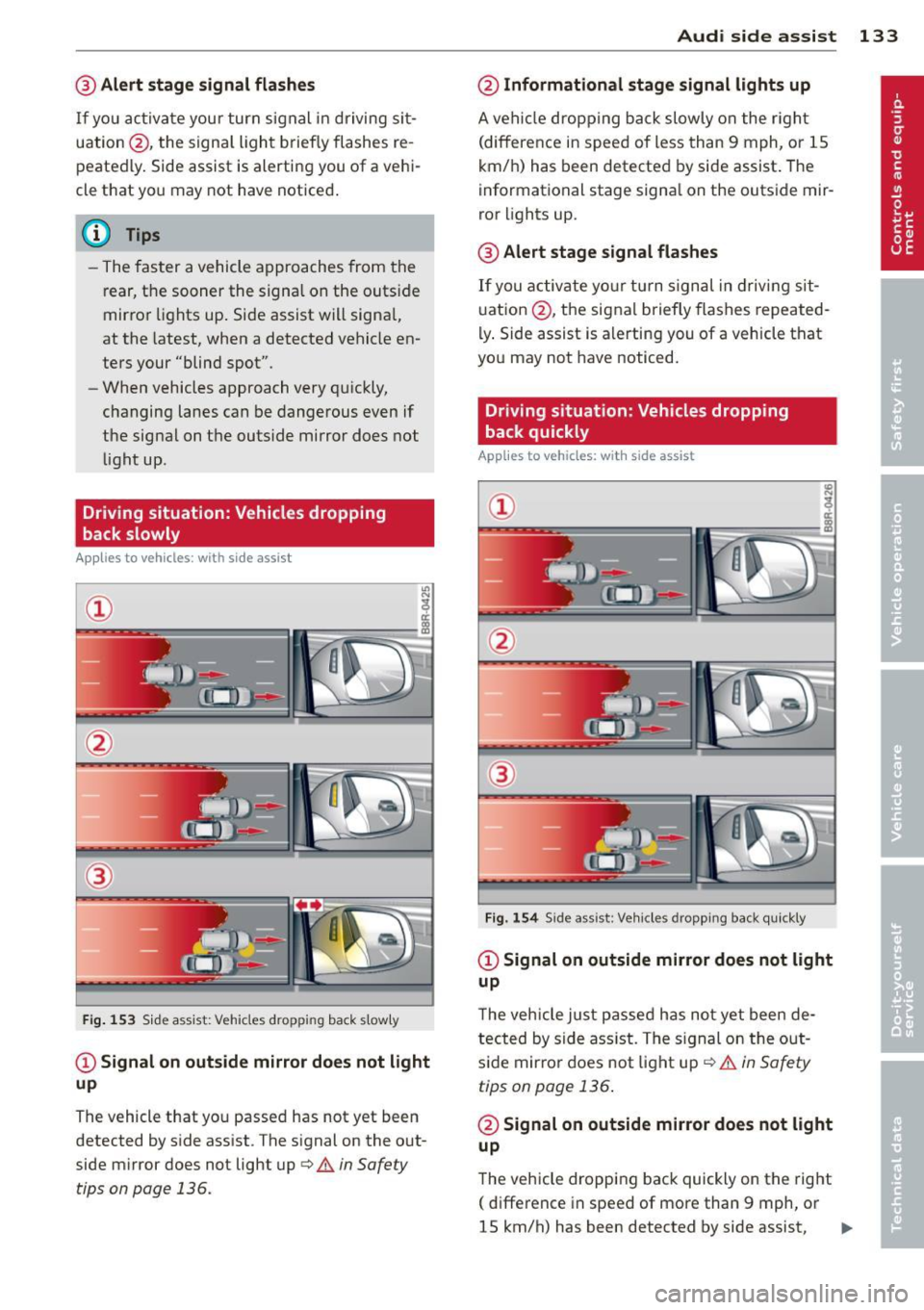
@ Alert stage signal flashes
If you activate your turn signal in driving sit
uation @, the signa l light briefly flashes re
peatedly. Side assist is alerting you of a vehi
cle that you may not have noticed .
@ Tips
-The faster a vehicle approaches from the
rear, the sooner the signa l on the outside
mirror lights up. Side assist will signa l,
at the latest, when a detected vehicle en
ters your "blind spot".
- When vehicles approach very quickly,
changing lanes can be dangerous even if
the signal on the outside mirror does not
light up.
Driving situation: Vehicles dropping
back slowly
Applies to vehicles: with side assist
®
Fig . 153 Side assist: Vehicles dropp ing back s lowly
CD Signal on outs ide mirror does not light
up
The vehicle that you passed has not yet been
detected by side assist . The signal on the out
side mirror does not light up
q .& in Safety
tips on page 136.
Audi side assist 133
@ Informational stage signal lights up
A vehicle dropping back slowly on the r ight
(difference in speed of less than 9 mph, or lS
km/h) has been detected by side assist. The
informational stage signa l on the outside mir
ror lights up.
@ Alert stage signal flashes
If you activate yo ur turn signal in driving sit
uation @, the signal briefly flashes repeated
ly. Side assist is alerting you of a vehicle that
you may not have noticed.
Driving situation: Vehicles dropping
back quickly
Applies to vehicles: with side assist
®
Fig. 154 Side assist: Veh icles dropp ing back quickly
CD Signal on outside mirror does not light
up
T he vehicle just passed has not yet been de
tected by side ass ist. The sign al on the out
side mirror does not light up
q .& in Safety
tips on page 136 .
@ Signal on outside mirror does not light
up
The vehicle dropping back quickly on the right
( difference in speed of more than 9 mph, or
lS km/h) has been detected by side assist,
1J1>
Page 148 of 342
146 Parking system
Switching on and off
Applies to vehicles: with Audi parking system plus w ith
rea rview camera
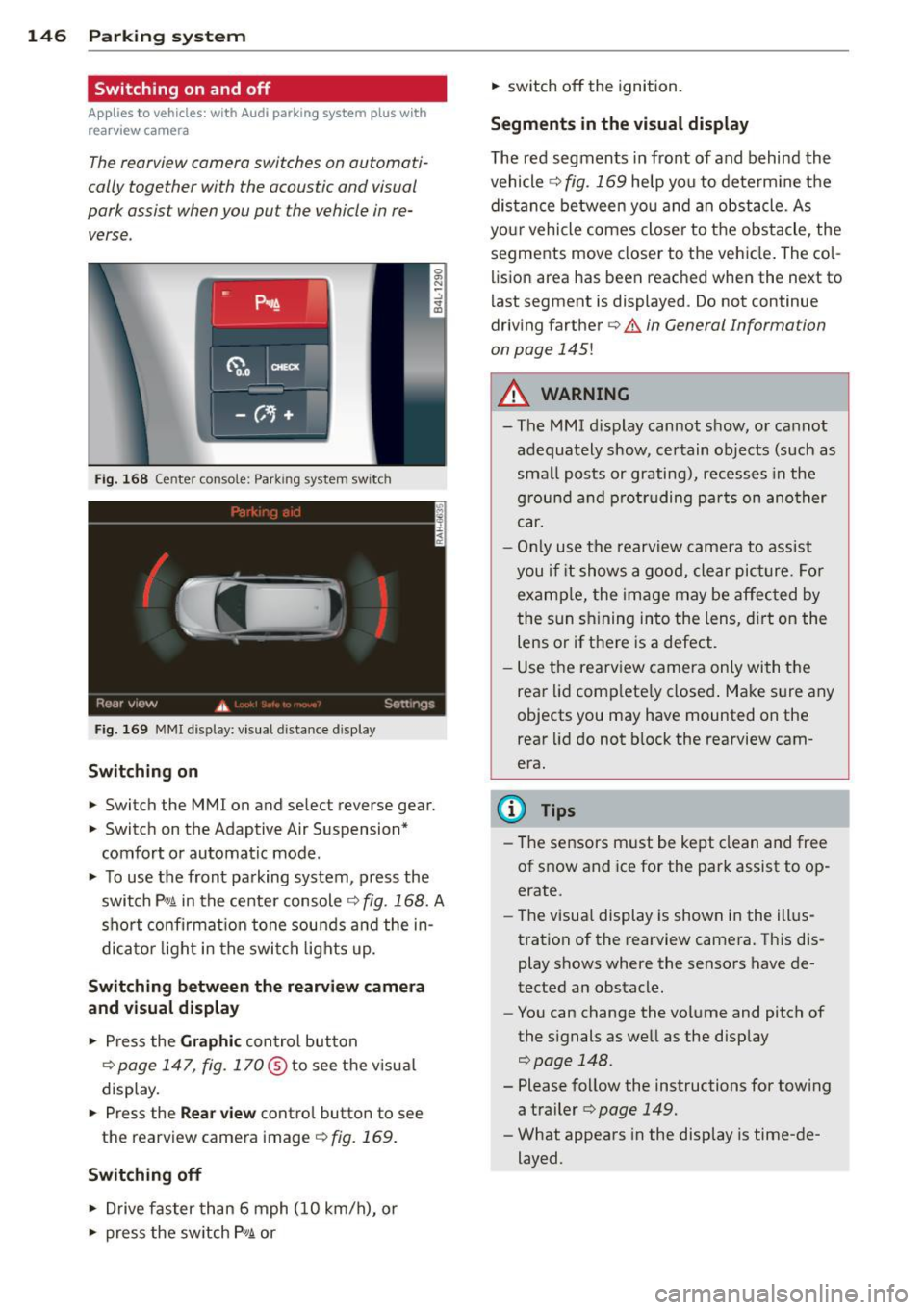
The reorview camera switches on automati
cally together with the acoustic and visual
pork assist when you put the vehicle in re verse .
Fig. 168 Ce nter console: Park ing system switc h
Fig. 169 MMI display: visual d istance d isplay
Switching on
> Switch the MMI on and se lect reverse gear.
> Switc h on the Adaptive Air Suspension*
comfort or automatic mode.
> To use the front pa rking system , press the
switch P"1t in the center console
c:> fig. 168. A
short confirmat ion tone sou nds a nd the in
di ca to r li ght in the swi tch lights up.
Switching betwe en the r earview camera
and visual display
> Press the Graphi c control button
¢
page 147, fig. 170@to see the v isua l
display.
> Press the Rea r view contro l button to see
the rearview camera image
<=:> fig. 169.
Switching off
> Drive faster than 6 mph (10 km/h), or
> press the sw itch P 1t or
> switch off the ignition.
Segm ents in the visual display
The red segments in fro nt of and behind the
vehicle
<=:> fig. 169 help you to determ ine t he
distan ce between yo u and an obstacle. As
your vehicle comes close r to the obstacle, the
segments move closer to the vehicle . The co l
lision area has been reached when the next to
l ast segment is displayed . Do not continue
driving farther ¢
& in General Information
on page
145!
A WARNING
-
- The MMI d isplay cannot show, or ca nnot
adequately show, certain objects (such as
sma ll posts or grating), recesses in the
g rou nd a nd p rot ruding pa rts on ano ther
car.
- Onl y use t he rearview camera to ass ist
you i f it shows a good, clear pic ture. For
examp le, the image may be affec ted by
the sun s hining into the lens, d irt on the
lens or if there is a defect.
- Use the rearv iew came ra only wi th the
rear lid comp lete ly closed . Make s ure any
objects you may have mounted on the
rear lid do not b lock the rearview cam
era.
(D Tips
- The sensors m ust be kept clean and free
of snow and ice for the park assist to op
erate.
- The visua l display is shown in the ill us
tration of the rearview camera. Th is dis
play shows where the sensors have de
tected an obstacle.
- You can change the volume and pitch of
the s ignals as we ll as the disp lay
c:> page 148.
- Please follow the instructions for tow ing
a trailer
c:> page 149.
- What appears in the display is time-de
layed.
Page 237 of 342

Trailer towing Driving with a trailer
General information
Your Audi was designed primarily for passen
ger transportation .
If you plan to tow a trailer, p lease remember
that the additional load will affect durability,
economy and performance .
Trailer towing not on ly places more stress on
the vehicle, it also calls for more concentra
tion from the driver.
F or this reason, always fo llow the operating
and driving instructions provided and use
common sense.
(D Note
If you are going to tow a trai ler, you must
activate the trailer operation mode
q page 154, Towing a trailer.
Technical requirements
Traile r hitch
Use a weight-carrying hitch conforming to the
gross trailer weight. The hitch must be suita ble for your vehicle and trailer and must be
mounted securely on the vehicle's chassis at a
technically sound location. Use only a trailer
hitch with a removable ball mount. A lways
check with the trai ler hitch manufacturer to
make sure that you are using the correct
hitch.
Do not use a bumper hitch.
The hitch must be installed in such a way that
it does not interfere with the impact-absorb
i ng bumper system. No mod ifications should
be made to the vehicle exhaust and brake sys
tems . From time to time, check that all hitch
mounting bo lts remain securely fastened.
When you are not towing a trailer, remove the
trai ler hitch ball mount. This prevents the
hitch from causing damage should your veh i
cle be struck from behind~.&.
Trailer towing 235
Trailer brakes
If your trailer is equipped with a brak ing sys
tem, check to be sure that it conforms to all
regulations.
T he trailer hydraulic bra ke system must not be
directly connected to the vehicle's hydraulic
brake system
q .& .
Safety chains
Always use safety chains between your veh icle
and the trai le r.
Trailer lights
Trailer lights must meet all regulations. Be
sure to check with your authorized Audi dealer
for correct wiring, sw itches, and relays.
M irr ors
If you are unable to see the traffic behind you
using the regular outside mirrors, then you
must install extended mirrors.
It is important
that you always have clear v is ion to the rear.
_&. WARNING
- If a trailer has electrical brakes please
note that these brakes are not activated
by the factory-fitted control unit -risk of
accident!
- After removing the trailer hitch, do not
store it in you r vehicle. In case of sudden
brak ing, the hitch could fly forward and
injure you or your passengers.
- The Gross Vehicle Weight Rating for your
Audi Q7 vehicle, found on the safety
compliance labe l on the driver's side 8 -
pillar, must never be exceeded under any
circumstances. Exceeding the Gross Vehi
cle Weight Rating of your vehicle is likely
to damage your veh icle, and such dam
age will not be covered by your Limited New Vehicle Warranty. Exceeding the
Gross Vehicle Weight Rat ing will a lso
change the performance and handling
characteristics of your vehicle, which
could cause a crash resulting in serious
injury or death.
-
•
•
Page 272 of 342
2 70 Chec king and filling
should only be disconnected from the vehicle
e lectrical system when absolutely necessary
for repairs.
Vehicles not driven for long periods
If you do not drive your vehicle over a pe riod
of several days or weeks, electrical compo
nents are gradually cut back or switched off.
This reduces energy consumption and main
tains starting capab ility over a longer period
c;, page225.
Take into consideration that when you un lock
your vehicle, some convenience functions, such as the interior lights or the power seat
adjustment, may not be available. The con
venience functions will be available again
when you turn on the ignition and start the
engine .
Winter operation
During the winter months, battery capacity
tends to decrease as temperatures drop . This
is because more power is also consumed while
starting, and the headlights, rear window de
fogger, etc., are used more often .
Avoid unnecessary power consumption, par
ticularly in city traffic or when traveling only
short d istances . Let your authorized Audi
dealer check the capacity of the vehicle bat
tery before w inte r sets in
¢ page 271. A well
cha rged battery w ill not only prevent starting
p rob lems when the weather is cold, but will
a lso last longer.
(D Tips
If your vehicle is left standing for several
weeks at extremely low temperatures, the
vehicle battery should be removed and
stored where it will not freeze . This wi ll
prevent it from being damaged and having
to be replaced.
Working on the battery
Be especially careful when working on or near
the battery.
The battery is located under the driver 's seat.
Before you check anyth ing under the driver 's
seat,
read and heed all WARNINGS c:;, _&.
Always heed the safety warnings, when work
ing on the vehicle battery or the vehicle elec
trical system to prevent injury.
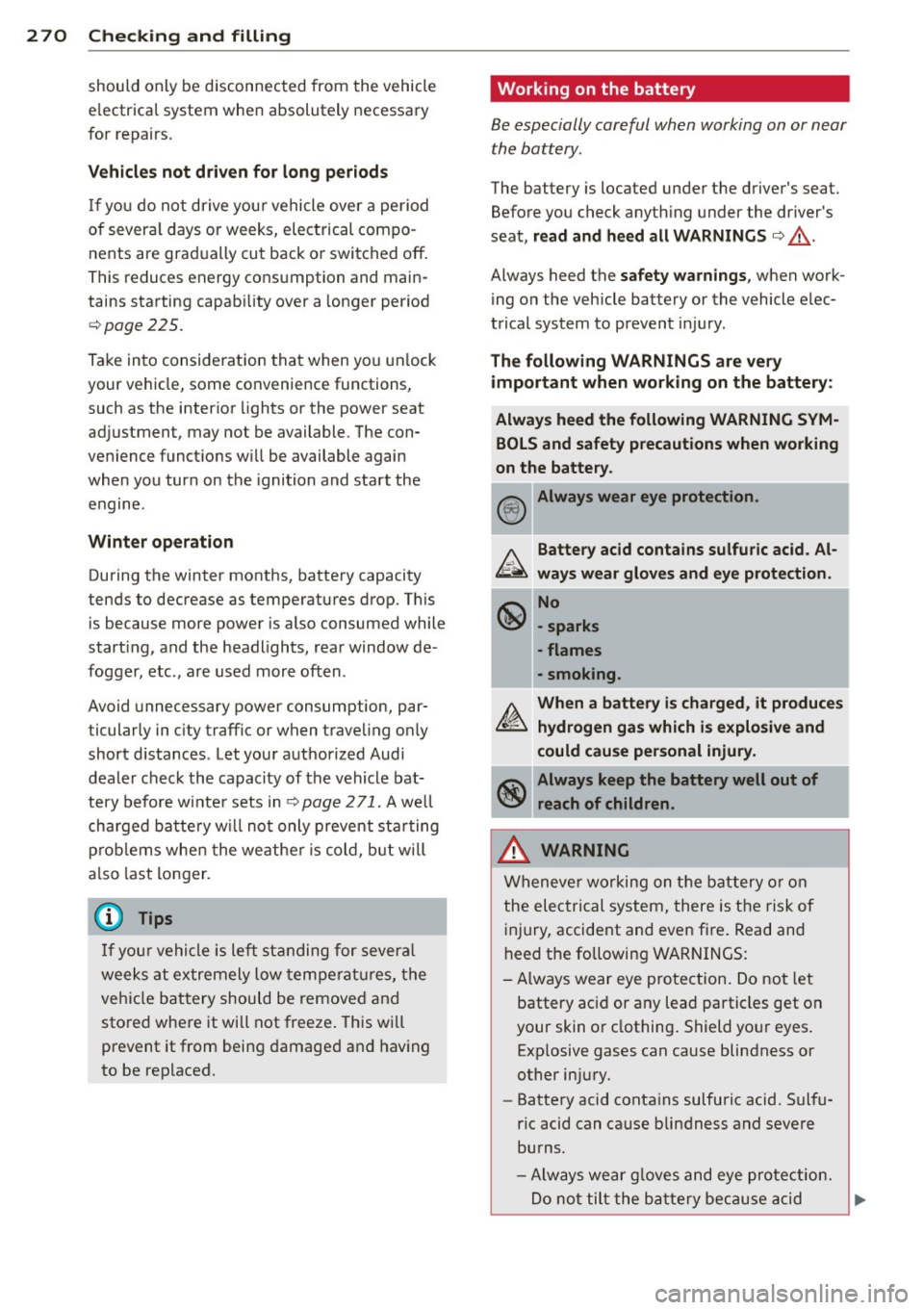
The following WARNINGS are very
important when working on the battery:
Always heed the following WARNING SYM BOLS and safety precautions when working
on the battery.
@!) Always wear eye protection .
b.. Battery acid contains sulfuric acid . Al
~ ways wear gloves and eye protection.
~ No
\!:51 -sparks
- flames
- smoking.
A. When a battery is charged, it produces
~ hydrogen gas which is explosive and
could cause personal injury.
~ Always keep the battery well out of
~ reach of children.
,&. WARNING
Whenever working on the battery or on
the electrical system, there is the risk of
injury, accident and even fire . Read and
heed the following WARNINGS:
- Always wear eye protection. Do not let
battery ac id or any lead particles get on
your skin or clothing. Shield your eyes .
Exp losive gases can cause blindness or
other injury.
- Battery acid contains sulfuric acid. Sulfu
ric acid can cause blindness and severe
burns.
- Always wear g loves and eye protection.
-
Do not tilt the battery because acid ~