steering wheel AUDI Q7 2012 Owner´s Manual
[x] Cancel search | Manufacturer: AUDI, Model Year: 2012, Model line: Q7, Model: AUDI Q7 2012Pages: 342, PDF Size: 86.42 MB
Page 115 of 342

Adaptive cruise control Speed and distance
control system
Description
Applies to vehicles: with adaptive cruise cont rol
The adaptive cruise control driver assistance
program is a combined speed and distance
control system .
Fig . 126 Front bu mper: Pos itio n of r adar sen sor (not
vi sibl e from out side)
Adapt ive cruise control can he lp ma ke driv ing
more relaxed and less tiring , particularly dur
i n g long trips on interstates or other hig hways
that are genera lly st raight. The system can al
so ass ist in stop and go traffic .
The adaptive cruise co ntrol works within a
speed range be tween 0 and 95 mph (150 km/
h). Set ACC to maintain a constant , legal trav
el speed between 20 and 95 mph (30 -150
km/h) that is appropriate for prevailing traffic
conditions. Select a following distance to the
veh icle ahead and ACC will adjust your speed
to maintain that d istance down to a stop . At a
speed below 20 mph (30 km/h), the min imum
speed setting of 20 mph (30 km/h) will be se l ected automati ca lly.
Adaptive cruise control has technical limita
tions that you must know, so p lease read th is
section carefully , understand how the system
wo rks and use it properly at a ll times.
How does it work?
You can operate the adaptive cruise control
using the lever on the steering wheel column
c::> page 116, How is the speed stored? and
Ad apti ve crui se control 11 3
c::> page 118, How is the distance (time inter
val) set? .
Driver information
Important information is brought up in the
speedomete r and in the instr ument clus ter
display as the vehicle is being driven
c::> page 120, Driver informat ion .
What is important for you to know
The adaptive cru ise contro l is set w ith system
spe cified lim its; that is, as a driver, you will
have to adjus t the speed and distance to the
vehicle ahead in some instances
c:> page 124,
Driver intervention prompt
and c::> page 125,
System limitations.
A WARNING
Imp roper use of the adaptive cruise con
trol can cause collisions, other accidents
and serious personal injury.
- Always remember that the adaptive cru ise contro l has limits -it will not slow
the vehicle down or ma inta in the set d is
tance when you dr ive towards an obsta
cle or someth ing o n or nea r the road that
is not movi ng, such as ve hicles stopped
in a tra ffic jam, a sta lled or d is ab led vehi
cle.
- Always remembe r that the adaptive
cru ise con tro l canno t detect a vehi cle
that is driving towards yo u in your traffic
lane and that it cannot detect narrow ve
hicles suc h as motorcycles and bicycles .
- Never drive a t speeds that are too fast
for traffic, road and weather conditions .
- Never fo llow a vehicle so closely that you
cannot stop yo ur vehicle safely. The
adapt ive cruise control cannot s low or
brake the vehicle safely when yo u follow
a nother vehicle too close ly. Always re
member that the adaptive cruise control
has a braking power t hat is o nly about
30% of the veh icle's maxim um braking
ab ility. The automat ic bra king f unctio n
cannot bring the vehicle to a s udden o r
-
emerge ncy stop . Always be p repared to IIJ,.
Page 143 of 342
To upshift
• Push the selec tor leve r forw ard to the pl us
pos ition
0 ¢ fig. 160 .
To downshift
• Push the lever to the m in us position Q .
When acce lerating, the transm iss ion w ill au
tomatically sh ift into the next gear before the
e ngine reaches its maxim um RPM .
If you app ly a light throttle when accelerat
ing , tiptronic ® will automatically shift from
1st to 2nd gear to save fuel. If you apply a
h eavy thrott le, the transmission will stay in
1st gear unt il n ear maximum R PM is reached,
or until the d river sh ifts i nto 2nd gear .
If you take your foot off the accelerator peda l
when dr iv ing down a steep incli ne , tiptronic ®
will downshift from th e se lected gear into the
n ex t lowe r gear until it reaches 1st gea r,
b ased on ro ad s peed and eng ine RPM . A uto
mat ic downshifting is in ter rupted as soon as
you apply t he thrott le again.
@ Tips
- Wh en you sh ift i nto the next lower ge ar,
t h e transm iss io n will dow nshi ft only
whe n there is no possibility of over-rev
v ing the engine.
- When t he kick -down comes on, t he
transmission will s hift down to a lower
gear, depending on ve hicle and engine
speeds .
- tiptron ic® is inoperative w hen the trans
mission is in the fail-sa fe mode.
Autom atic transm ission 141
Steering wheel with tiptronic ®
Applies to vehicles: w ith t iptronic-steering wheel
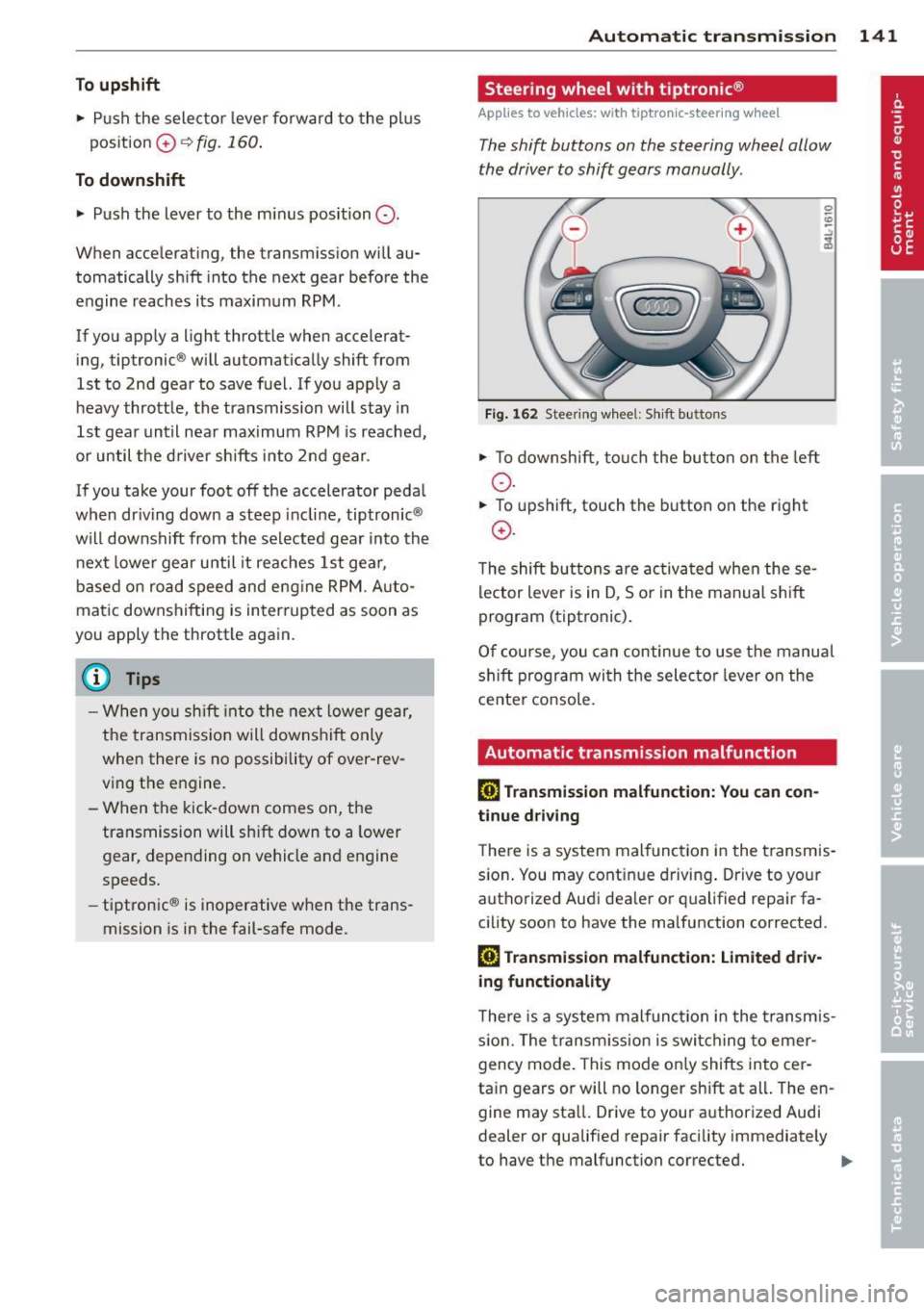
T he shift buttons on the steering wheel allow
the driver to shift gears manually .
Fig. 162 Steering w hee l: S hift b utt ons
• To down shi ft, tou ch the bu tton on t he left
o .
• To upshift, touch the button on the right
0 .
The shift bu tton s a re activ at ed when these
lector lever is in D, So r in the manual s hift
program (tiptronic) .
O f c ourse , you can c ontinue to use the manu al
s hift p rogram wi th the selecto r leve r on the
cente r co nsole.
Automatic transmission malfunction
[O] Transmission malfunction: You can con
tinue driv ing
T he re is a system mal func tion in the t ransmis
s io n. You may cont inue dr iving . Drive to your
a u tho rized Aud i dea ler o r qualified repa ir fa
cility soon to have the ma lfunction corrected.
[O] Transmis sion malfunction: Limited driv
ing functionality
T he re is a system mal func tion i n the t ransmis
s io n. The transm iss ion is swi tching to emer
gency mode. This mode o nly shifts into cer
ta in gears o r will no longer shift at all . The en
gine may sta ll. Drive to your a uthorized Audi
dealer or qualified repair facility immediately
to have the malfunction correcte d.
IJJ,,
Page 149 of 342
Reverse Parking
Applies to vehicles: with Audi parking system plus w ith
rea rview camera
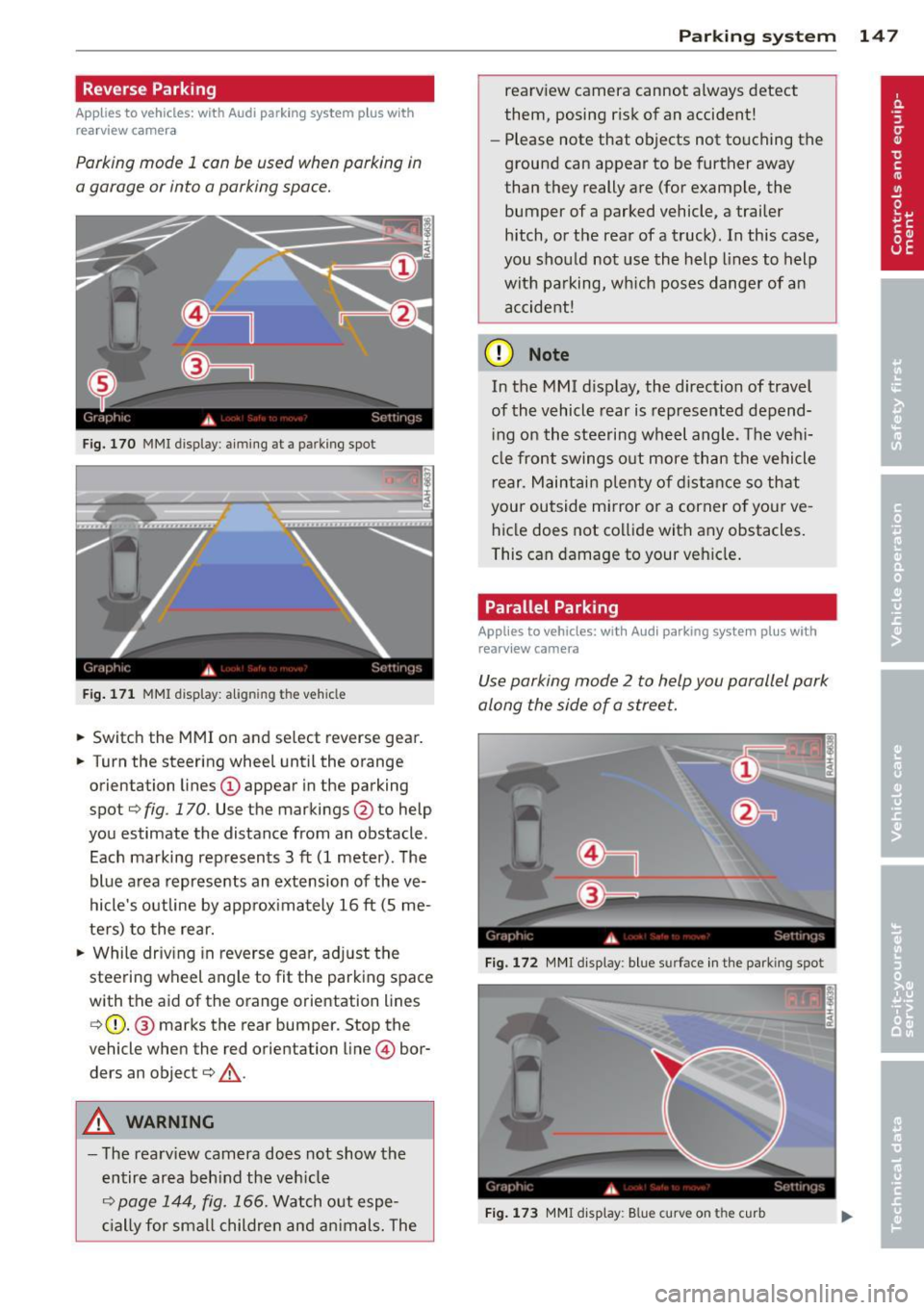
Parking mode 1 can be used when parking in
a garage or into a parking space.
Fig. 170 MMI display: aiming at a park ing spot
Fig. 171 MMI display: aligning the vehicle
• Switch the MMI on and select reverse gear.
• Turn the steering wheel until the orange
orientation lines
(D appear in the parking
spot¢
fig. 170. Use the markings @to help
you estimate the distance from an obstacle .
Each marking represents 3
ft (1 meter). The
blue area represents an extension of the ve
hicle's outline by approximately 16
ft (5 me
ters) to the rear.
• While driving in reverse gear, adjust the
steering wheel angle to fit the parking space
with the aid of the orange orientation lines ¢ (D. @ marks the rear bumper. Stop the
vehicle when the red orientation line© bor
ders an object¢
,A.
A WARNING
-The rearv iew camera does not show the
entire area beh ind the veh icle
¢
page 144, fig. 166. Watch out espe
cially for smal l children and animals. The
Parking system 147
rearview camera cannot always detect
them, posing risk of an accident!
- Please note that objects not touching the
ground can appear to be further away
than they really are (for example, the bumper of a parked vehicle, a trailer
hitch, or the rear ofa truck). In this case,
you shou ld not use the help lines to help
with parking, which poses danger of an accident!
(D Note
In the MMI d isplay, the direction of travel
of the vehicle rear is represented depend
ing on the steering wheel angle. The vehi
cle front swings out more than the vehicle
r ear. Maintain plenty of distance so that
your outside mirror or a corner of your ve
hicle does not collide with any obstacles.
This can damage to your vehicle.
Parallel Parking
Applies to vehicles: wit h Aud i parking syste m plus with
rearv iew camera
Use parking mode 2 to help you parallel park
along the side of a street.
Fig. 172 MMI display: blue surface in the park ing spot
Fig. 173 MMI display: Blue curve on the curb
Page 150 of 342

148 Parking system
The following steps app ly only when there is
no obstacle such as a wall near the parking
spot. Otherwise, please read the informat ion
prov ided in the "Parking Next to Obstacles"
section.
.. Activate the turn signal.
.. Position your vehicle parallel to the edge of
the street, approximately 3 ft (1 meter)
from a parked vehicle.
.. Switch the MM I on and se lect reverse gear .
The parking aid turns o n and parking mode
1 appears on the disp lay .
.. Press the cont ro l butto n
(D c:> fig. 172 on
t h e M MI con trol conso le. Par kin g mode 2
appears .
.. Back up and align yo ur vehicle so the b lue
area @ borders on the rear end of the vehi
cle or on the parking spot line. The bl ue area
represents an extension of the veh icle's out
li ne by approximate ly 16 ft (5 meters) to the
rear . The long side of the blue area should
be o n the cu rb. The entire blue area must fit
into the parking spot .
.. Wi th the veh icle stopped, turn the s teer ing
wheel to the right as far as it w ill go.
.. Back into the park ing spot until the blue
c ur ve to uches the curb
i::> fig. 173. Stop the
vehicle.
.. With the veh icle stopped, turn the steer ing
wheel to the left as far as it will go.
.. Co nti nue to back in to the parking spot until
the veh icle is parked para llel to the curb .@
marks the rear bumper . Stop the vehicle
when the red orientation line@ borders an
obje ct
i::> & -Keep an eye on the front of
yo ur vehicle while doing this
i::> 0 .
Parking n ext to obstacles
When t here is an obstacle (such as a wall)
next to the pa rk ing spot, choose a spot w ith
mo re space on t he sides. Pos ition the long
side of the blue area so that there is sufficie nt
sp ace from the curb. The area m ust no t be on
the c urb. Yo u will also need to start turning
the steering wheel much earlier. There should
be a suffic ient amo unt of space between the
curb and the b lue curve, and the blue c urve
i:> fig. 173 mus t not touch the curb.
A WARNING
-The rearview camera does not show the
entire area behind the vehicle
i:> page 144, fig . 166 . Watch out espe
cially fo r small ch ild ren and anima ls . T he
rea rv iew came ra cannot a lways detec t
them, posing ris k of an acciden t!
- P lease note that objects not touching the
g round can appear to be further away
t han they really are (for examp le, the
bumper of a par ked vehicle, a trai ler
hitch, or the rea r of a truck) . In this case,
you shou ld not use the help lines to help
with parking, wh ic h poses danger of an
accident!
(D Note
In the MMI display, the direction of travel
of the vehicle rear is represented depend
i ng on the steering wheel angle . The vehi
cle front swings out more than the vehicle rear . Maintain plenty of dista nce so that
your outside mi rror or a corner of you r ve
hicle does not col lide with any obstacles.
This can damage to your ve hicle .
(D Tips
The left o r right orie ntation lines and su r
faces will be disp layed, depending on t he
tu rn s ignal being used .
Adjusting the display
and warning tones
Applies to vehicles: wi th rear park ass ist/A ud i parking sys
tem plus with rearview camera
The display* and warning tones can be ad
justed in the MMI.
.. Select: Function b utton I CAR !> Control but
t on
Sy stems * > Parking sy stem . Or
.. Sele ct: Func tion button
I CA R!> Con trol but
t on
Car sy stems * > Driver as sist > Parking
aid.
Display*
-Off -when the par king system is switched
off, only a udible s ignals a re g iven .
Page 163 of 342
.. Instruct passengers to adjust the head re
straints according to their height.
.. Make sure to use the right child restraint
correctly to protect children
c:> page 200,
Child Safety .
.. Sit properly in your seat and make sure that
your passenge rs do the same
c:> page 71,
General recommendations .
.,. Fasten your safety belt and wear it properly.
Also ins truc t your passengers to fasten their
safety belts properly
c:> page 170.
What impairs driving safety?
Safe driving is directly related to the condi
tion of the vehicle, the driver as well as the
driver's ability to concentrate on the road
without being distracted.
The driver is respons ible for the safety of the
vehicle and a ll of its occupants . If your ability
to drive is impaired, safety risks for everybody
in the vehicle increase and you also become a
hazard to everyone else on the road
c:> .&,. .
Therefore:
.. Do not let yoursel f be distracted by passen
gers or by using a cellular telephone .
.. NEVER drive when your driving ability is im
paired (by medications, alcohol, drugs, etc.).
.. Observe all traffic laws, rules of the road
and speed limits and plain common sense .
.,. ALWAYS adjust your speed to road, traffic
and weather cond it ions .
.. Take frequent breaks on long trips. Do not
drive for more than two hours at a stretch.
.. Do NOT drive when you are tired, under
pressure or when you are stressed .
A WARNING
Impaired driving safety increases the risk
of serious personal injury and death when
ever a veh icle is being used.
Driving Safely 161
Proper occupant
seating positions
Proper seating position for the driver
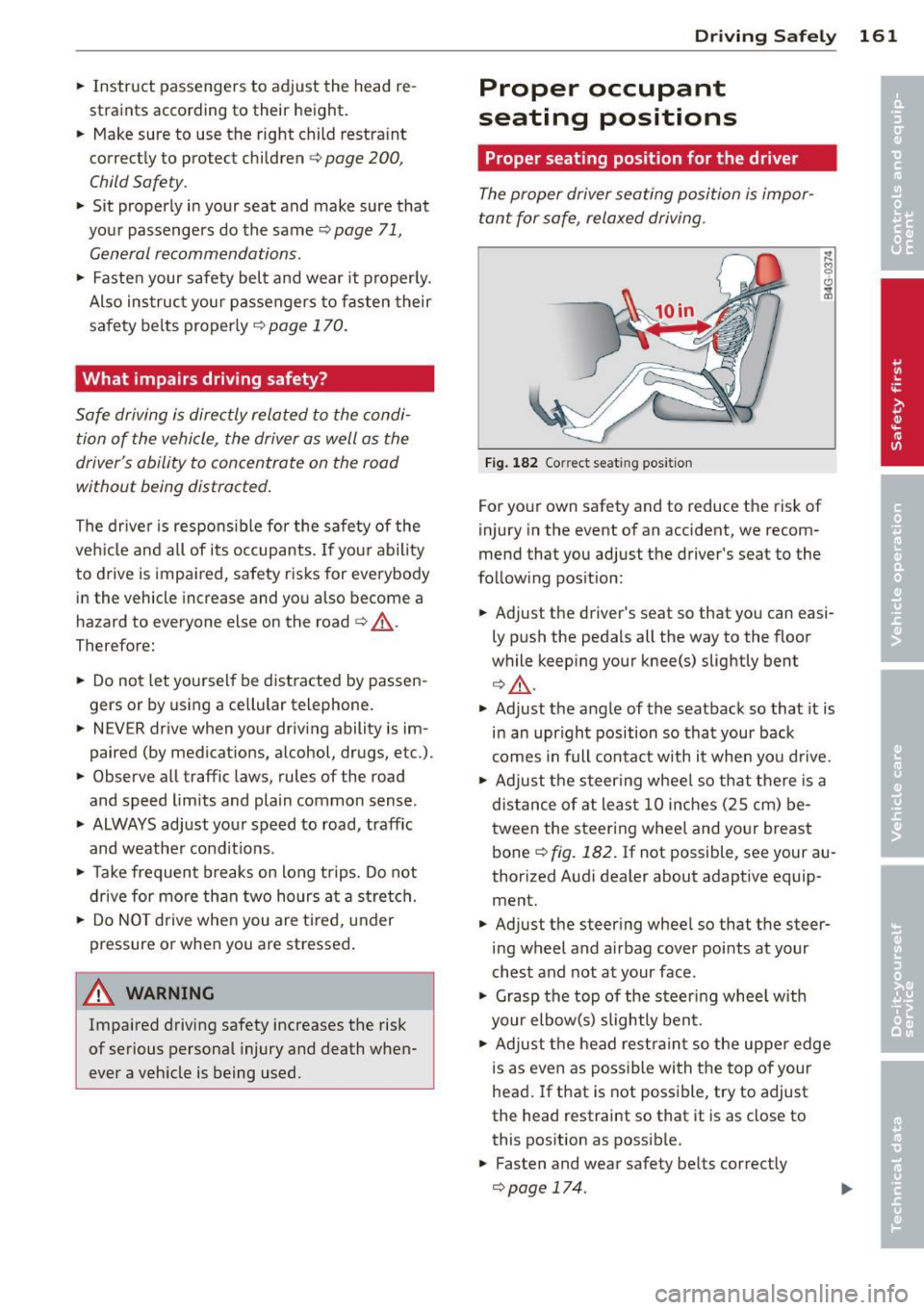
The proper driver seating position is impor
tant for safe, relaxed driving.
Fig. 182 Correct seat ing pos it ion
For your own safety and to reduce the risk of
injury in the event of an accident, we recom
mend that you adjust the driver's seat to the
follow ing position:
.. Adjust the driver's seat so that you can easi
ly push the pedals all the way to the floor
wh ile keeping your knee(s) slightly bent
c:> .&,. .
.. Adjust the angle of the seatback so that it is
in an upr ight position so that your back
comes in full contact w ith it when you drive .
.. Adjust the steering wheel so that there is a
distance of at least 10 inches (25 cm) be
tween the steering wheel and yo ur breast
bone ~
fig. 182. If not possible, see your au
thorized Audi dealer about adaptive equip
ment .
.. Adjust the steer ing wheel so that the steer
ing wheel and airbag cover points at your
chest and not at your face.
.,. Grasp the top of the steer ing whee l with
your elbow(s) slightly bent.
.. Adjust the head restraint so the upper edge
is as even as possible with the top of your
head. If that is not poss ible, try to adjust
the head restraint so that it is as close to
this position as possible .
.. Fasten and wear safety belts correctly
c:>page 174.
Page 164 of 342
162 Driving Safely
• Always keep both feet in the footwell so
that you are in control of the vehicle at all
times.
For detailed information on how to adjust the
driver's seat, see
¢ page 72.
A WARNING
Drivers who are unbelted, out of position
or too close to the airbag can be seriously
injured by an airbag as it unfolds. To help
reduce the risk of serious personal injury:
- Always adjust the driver's seat and the
steering wheel so that there are at least
10 inches (25 cm) between your breast
bone and the steering wheel.
- Always hold the steering wheel on the
outside of the steering wheel rim with
your hands at the 9 o'clock and 3 o'clock positions to help reduce the risk of per
sonal injury if the driver's airbag inflates.
- Never hold the steering wheel at the
12 o'clock position or with your hands at
other positions inside the steering wheel
rim or on the steering wheel hub. Hold
ing the steering wheel the wrong way
can cause serious injuries to the hands,
arms and head if the driver's airbag de
ploys.
- Pointing the steering wheel toward your
face decreases the ability of the supple
mental driver 's airbag to protect you in a
collision .
- Always sit in an upright position and nev
er lean against or place any part of your
body too close to the area where the air
bags are located.
- Before driving, always adjust the front
seats and head restraints properly and
make sure that all passengers are prop
erly restrained.
- Never adjust the seats while the vehicle
is moving . Your seat may move unexpect
edly and you could lose control of the ve
hicle.
- Never drive with the backrest reclined or
tilted far back! The farther the backrests
are tilted back, the greater the risk of in- jury due to incorrect positioning of the
safety belt and improper seating posi
tion.
- Children must always ride in child safety
seats ¢
page 200. Special precautions
apply when installing a child safety seat
on the front passenger seat¢
page 179 .
Proper seating position for the front
passenger
The proper front passenger seating position
is important for safe, relaxed driving .
For your own safety and to reduce the risk of
injury in the event of an accident, we recom
mend that you adjust the seat for the front
passenger to the following position :
• Adjust the angle of the seatback so that it is
in an upright position and your back comes
in full contact with it whenever the vehicle is
moving .
• Adjust the head restraint so the upper edge
is as even as possible with the top of your
head. If that is not possible, try to adjust
the head restraint so that it is as close to
this position as possible ¢
page 163.
• Keep both feet flat on the floor in front of
the front passenger seat .
• Fasten and wear safety belts correct
ly ¢
page 174 .
For detailed information on how to adjust the
front passenger's seat, see ¢
page 71.
A WARNING
-Front seat passengers who are unbelted,
out of position or too close to the airbag
can be seriously injured or killed by the air
bag as it unfolds. To help reduce the risk of
serious personal injury:
- Passengers must always sit in an upright
position and never lean against or place
any part of their body too close to the
area where the airbags are located.
- Passengers who are unbelted, out of po
sition or too close to the airbag can be
seriously injured by an airbag as it
Page 174 of 342
172 Safety belts
What happens to occupants not wearing
safety belts?
In crashes unbelted occupants cannot stop themselves from flying forward and being in
jured or killed. Always wear your safety belts!
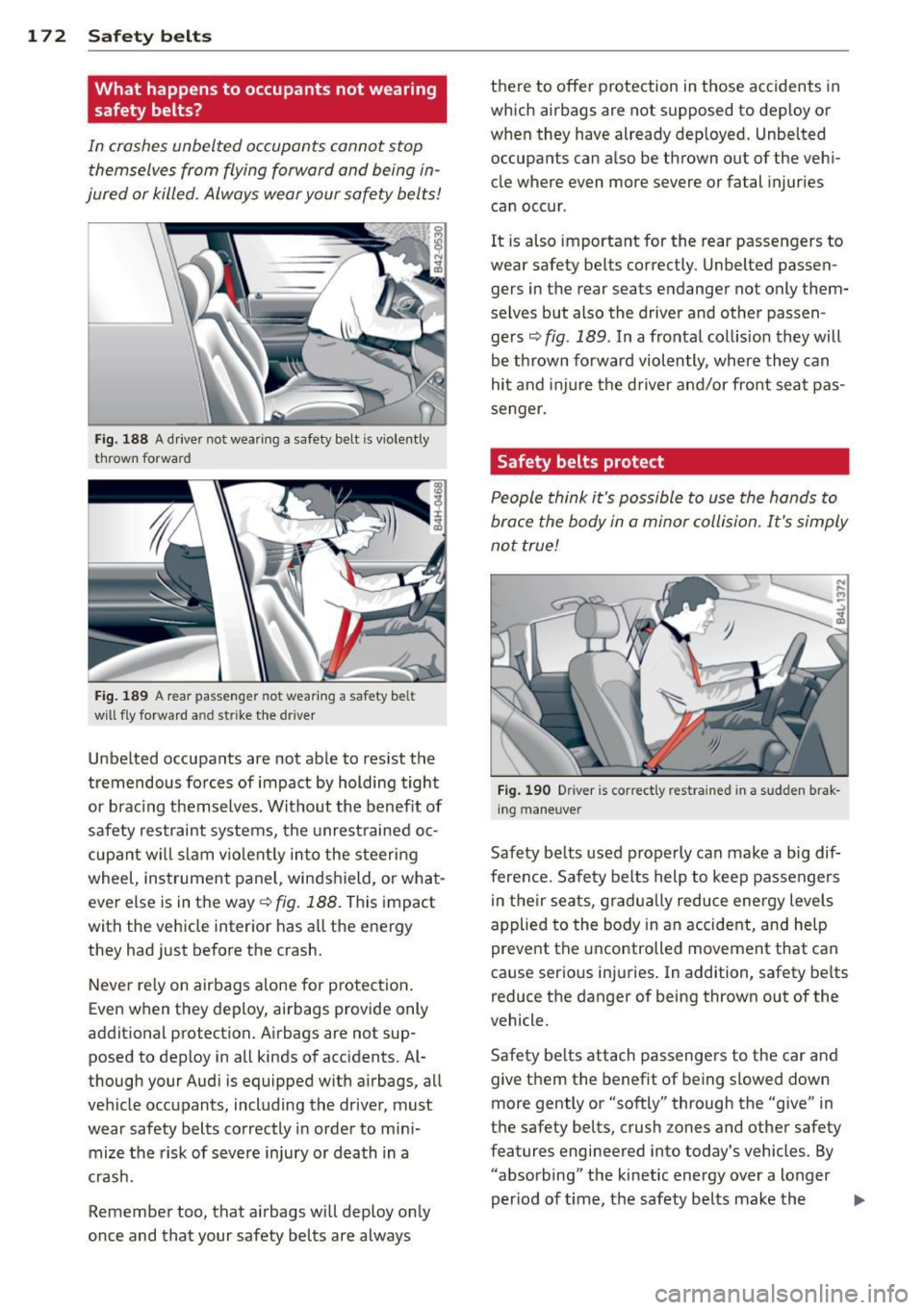
Fig. 188 A driver not wearing a safety belt is violently
thrown forward
Fig. 189 A rear passenger not wearing a safety belt
will fly forward and strike the drive r
Unbelted occupants are not able to resist the
tremendous forces of impact by holding tight
or bracing themselves. Without the benefit of
safety restraint systems, the unrestrained oc
cupant will slam violently into the steering
wheel, instrument panel, windshield, or what
ever else is in the way
q fig. 188. This impact
with the vehicle interior has all the energy
they had just before the crash.
Never rely on airbags alone for protection.
Even when they deploy, airbags provide only
additional protection. Airbags are not sup posed to deploy in all kinds of accidents. Al
though your Audi is equipped with airbags, all
vehicle occupants, including the driver, must
wear safety belts correctly in order to mini
mize the risk of severe injury or death in a
crash.
Remember too, that airbags will deploy only
once and that your safety belts are always there to offer protection in those accidents
in
which airbags are not supposed to deploy or
when they have already deployed. Unbelted occupants can also be thrown out of the vehi
cle where even more severe or fatal injuries
can occur .
It is also important for the rear passengers to
wear safety belts correctly. Unbelted passen
gers in the rear seats endanger not only them
selves but also the driver and other passen gers¢
fig. 189. In a frontal collision they will
be thrown forward violently, where they can
hit and injure the driver and/or front seat pas
senger.
Safety belts protect
People think it's possible to use the hands to
brace the body in a minor collision. It's simply
not true!
Fig. 190 Driver is correctly restra ined in a sudden brak
ing maneuver
Safety belts used properly can make a big dif
ference. Safety belts help to keep passengers
in their seats, gradually reduce energy levels
applied to the body in an accident, and help
prevent the uncontrolled movement that can
cause serious injuries. In addition, safety belts
reduce the danger of being thrown out of the
vehicle.
Safety belts attach passengers to the car and
give them the benefit of being slowed down
more gently or "softly" through the "give" in
the safety belts, crush zones and other safety
features engineered into today's vehicles. By
"absorbing" the kinetic energy over a longer
period of ti me, the safety belts make the
lilJJ,
Page 181 of 342
Airbag system Important things to know
Importance of wearing safety belts and
sitting properly
Airbags are only supplemental restraints. For
airbags to do their job , occupants must al
ways properly wear their safety belts and be
in a proper seating position.
For your safety and the safety of your passen
gers, before driving off, always:
"" Adjust the dr iver's seat and steering wheel
properly ¢
page 161,
"" Adjust the front passenger's seat properly
¢page 72 ,
"" Wear safety be lts properly ¢
page 173,
"" Always properly use the proper child re-
straint to protect chi ldren ¢
page 200.
In a collision, airbags must inflate within the blink of an eye and with considerable force .
The supplemental airbags can cause injuries if
the driver or the front seat passenger is not
seated properly . T herefore in order to help the
a irbag to do its job, it is important, both as a
driver and as a passenge r to s it properly at all
times.
By keeping room between your body and the
steer ing wheel and the front of the passenger
compartment, the airbag can inflate fully and
comp letely and provide supplemental protec
tion in certain frontal collisions ¢
page 161,
Proper occupant seating positions.
F or detai ls
on the operation of the seat adjustment con
trols ¢
page 72.
It's especially important that children a re
properly restrained ¢
page 200.
There is a lot that the driver and the passen
gers can and must do to help the individual
safety features installed in your Aud i work to
gether as a system.
Proper seat ing pos ition is important so that
the front airbag on the driver s ide can do its
job. If yo u have a physical impa irment or con-
A irbag system 179
dition that prevents yo u from sitting properly
on the driver seat with the safety belt properly
fastened and reach ing the peda ls, or if you
have concerns with regard to the function or
operation of the Advanced Airbag System,
please contact your author ized Audi dealer or
qualified workshop, or call Audi Customer Re
l ations at 1-800-822-2834 for poss ible modi
ficat io ns to your veh icle.
When the airbag system dep loys, a gas gener
ator will fill the a irbags, break open the pad
ded covers, and inflate between the steer ing
whee l and the dr iver and between the instru
ment pane l and the front passenger. The a ir
bags will deflate immediately after dep loy
ment so that the front occupants can see
through the windshield again without inter
ruption .
All of th is takes place in the blink of an eye, so
fast that many people don't even realize that
the airbags have deployed. The airbags a lso
inflate with a great dea l of force and nothing
should be in their way when they deploy.
Front airbags in combination with properly
worn safety belts slow down and lim it the oc
cupant's forward movement . T ogether they
help to prevent the driver and front seat pas
senger from h itti ng pa rts of the inside of the
vehicle while reducing the forces acting on the
occupant during the crash . In this way they
help to reduce the risk of injury to the head
and upper body in the crash. Airbags do not
protect the arms or the lower parts of the
body.
Both front airbags will not inflate in all fronta l
collisions . The triggering of the airbag system
depends on the vehicle de ce leration rate
caused by the collision and regis te red by the
electron ic control unit. If th is rate is below
the reference value programmed into the con
trol unit, the airbags will not be trigge red ,
even though the car may be bad ly damaged as
a res ult of the co llision . Ve hicl e damage, re
pair costs or even the lack of veh icle damage
is not necessarily an indication of whether an
airbag should inflate or not . .,. •
•
Page 182 of 342
180 Airbag sys tem
Since the cir cumstances will vary considerab ly
between one collision and anot her, it is not
possib le to def ine a range of vehicle speeds
that will cover every possible k ind and angle
of impact t hat will always trigger the a irbags.
Important factors include, for example, the
nature (hard or soft) of the object which the
car h its, the ang le of impact, vehicle speed,
etc. The front airbags will also not inflate in
side or rea r collisions, or in ro ll-overs .
Always remember : Airbags will deploy only
once, and only in certa in k inds of co llisions.
Your safety belts are always there to offer pro
tection in those s ituations in which airbags
a re not supposed to deploy, or when they have
a lready deployed; for example, when your ve
hicle strikes or is struck by another vehicle af
ter the first co llision.
This is jus t one of the reasons why an a irbag is
a supplementary restra int and is not a substi
tute fo r a safety belt . The airbag system
works most effect ively when used with the
safety belts. Therefore, always properly wear
your safety belts¢
page 170.
A WARNING
Sitting too close to the steer ing whee l or
instrument panel will dec rease the effec
t iveness of the airbags and will increase
the risk of personal injury in a collision .
- Never sit closer than 10 inches (2S cm)
to the stee ring wheel or instrument pan
el.
- If you cannot sit more than 10 inches
( 2 5 cm) from the s teer ing whee l, investi
gate whethe r adap tive equipmen t may
be available to help you reach the pedals
and increase your seating distance from
the steering wheel.
- If you are unrestrained, lean ing fo rward,
sitting sideways or out of position in any
way, your risk of in jury is much higher.
- You will also receive serio us injuries and
cou ld even be killed if you are up against
the airbag or too close to it when it in
flates - even with an Advanced Airbag. -
To reduce the risk of injury when an a ir
bag inflates, always wear safety be lts
properly ¢
page 174, Safety belts.
-Always make certain that ch ildren age 12
or younger always ride in the rear seat. If
children are not properly restrained, they
may be severe ly injured or killed when an
ai rbag inflates.
- Never let children ride unrestrained or
improperly restrained in the vehicle. Ad
just the front seats prope rly .
- Never ride with the back rest reclined.
- Always sit as far as possible from the
steer ing whee l or the instrument pane l
¢page 161.
-Always sit upright with your back against
the backrest of your seat .
- Never p lace your feet on the instrument
panel or on the seat. Always keep both
feet on the floor in front of the seat to
help prevent serio us in ju ries to the legs
and h ips if the airbag inflates.
- Never recline the front passenger 's seat
to transport objects , Items can a lso
move into the a rea of the s ide airbag or
the front a irbag du ring bra king or in a
sudden maneuve r. Objects nea r the air
bags can become projectiles and cause
in jur y when an airbag inflates.
A WARNING ~
Airbags that have deployed in a crash must
be replaced.
- Use on ly orig ina l equipment airbags ap
proved by Aud i and installed by a trained
technician who has the necessary too ls
and d iagnost ic equipment to properly re
p lace any airbag in your vehicle and as
sure system effectiveness in a crash .
- Never permit salvaged or recycled air
bags to be installed in your vehicle.
Page 186 of 342
184 Airbag system
conditions is impossible in all conceiva
ble situations that may happen during
the useful life of your vehicle.
- The Advanced Airbag System can deploy
in accordance with the "low risk" option
under the U.S. Federal Standard if a child
that is heavier than the typical one-year
old child is on the front passenger seat
and the other conditions for airbag de
ployment are met.
-Accident statistics have shown that chil
dren are generally safer in the rear seat
area than in the front seating position.
- For their own safety, all children, espe
cially 12 years and younger, should al
ways ride in the back properly restrained
for their age and size.
Advanced front airbag system
Your vehicle is equipped with a front Advanced
Airbag System in compliance with United
States Federal Motor Vehicle Safety Standard
208 as applicable at the time your vehicle was
manufactured.
The front Advanced Airbag System supple ments the safety belts to provide additional
protection for the driver's and front passeng
er's heads and upper bodies in frontal crashes .
The airbags inflate only in frontal impacts
when the vehicle deceleration is high enough.
The front Advanced Airbag System for the
front seat occupants is not a substitute for
your safety belts. Rather, it is part of the over
all occupant restraint system in your vehicle.
Always remember that the airbag system can
only help to protect you, if you are sitting up
right , wearing your safety belt and wearing it
properly. This is why you and your passengers
must always be properly restrained, not just
because the law requires you to be.
The Advanced Airbag System in your vehicle has been certified to meet the "low risk" re
quirements for 3 and 6 year-old children on
the passenger side and very small adults on
the driver side. The low risk deployment crite
ria are intended to help reduce the risk of in- jury through interaction with the front airbag
that can occur, for example, by being too close to the steering wheel and instrument
panel when the airbag inflates.
In addition, the system has been certified to
comply with the "suppression" requirements
of the Safety Standard, to turn off the front
airbag for infants 12 months old and younger
who are restrained on the front passenger
seat in child restraints that are listed in the Standard
~ page 202, Child restraints and
Advanced Airbags .
"Suppression" requires the front airbag on the
passenger side to be turned off if:
- a child up to about one year of age is re
strained on the front passenger seat in one
of the rear-facing or forward-facing infant
restraints listed in Federal Motor Vehicle
Safety Standard 208 with which the Ad
vanced Airbag System in your vehicle was
certified. For a listing of the child restraints
that were used to certify your vehicle's com
pliance with the US Safety Standard
~page 202,
-weight less than a threshold level stored in
the control unit is detected on the front pas
senger seat.
When a person is detected on the front pas senger seat, weighing more than the total
weight of a child that is about 1 year old re
strained in one of the rear-facing or forward
facing infant restraints (listed in Federal Mo
tor Vehicle Safety Standard 208 with which
the Advanced Airbag System in your vehicle
was certified), the front airbag on the passen ger side may or may not deploy.
The
PASSENGER AIR BAG OFF light comes on
when the electronic control unit detects a to
tal weight on the front passenger seat that re quires the front airbag to be turned off. If the
PASSENGER AIR BAG OFF light does not
come on, the front airbag on the passenger
side has not been turned off by the control
unit and can deploy if the control unit senses
an impact that meets the conditions stored in
its memory.
ll-