wheel AUDI Q7 2012 Owner´s Manual
[x] Cancel search | Manufacturer: AUDI, Model Year: 2012, Model line: Q7, Model: AUDI Q7 2012Pages: 342, PDF Size: 86.42 MB
Page 103 of 342
When the regulator is in the O position, the
seat ventilation is switched off. The range of
adjustment is between 1 and 6.
Heated rear seats~
Applies to vehicles: with heated rear seats
The seat cushions and seatbacks of the two
outer rear seats can be heated electrically.
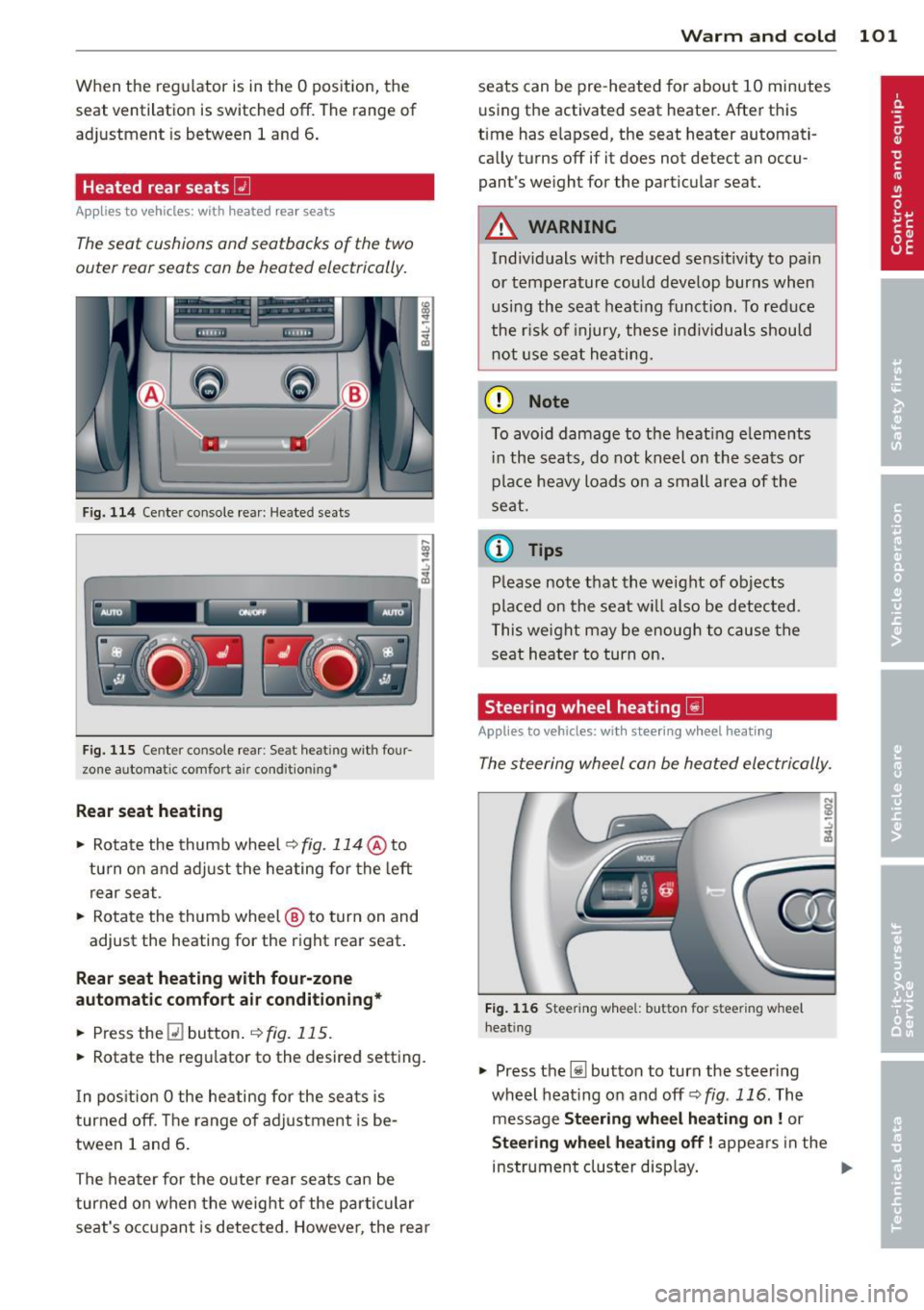
F ig. 114 Ce nter console rea r: Heated sea ts
i
-..:,
---------------<%
F ig. 1 15 Ce nter console rear : Se at heat ing with four
zone automat ic comfort a ir cond it ion ing•
Rear seat he ating
• Rotate the thumb wheel ~fig. 114 @to
turn on and adjust the heating for the left
rear seat .
• Rotate the thumb wheel @ to turn on and
adjust the heating for the right rear seat.
Rear seat heating w ith four-zone
automatic comfo rt air conditioning *
• Press the Q] button . ~ fig. 115.
• Rotate the regu lator to the desired setting .
I n pos ition O the heating for the seats is
turned off . T he range of ad justment is be
tween 1 and 6 .
The heater for the outer rear seats can be
turned on when the weight of the parti cular
seat's occ upant is detected. Howeve r, the rea r
Warm and cold 101
seats can be pre-heated for about 10 minutes
using the activated seat heater. After this
time has e lapsed, the seat heater automati
ca lly turns off if it does not detect an occu
pant's weight for the particular seat.
A WARNING
Individuals wit h reduced se ns itiv ity to pa in
or temperature could develop burns when
usi ng the seat heat ing funct ion . To reduce
the r isk of injury, these ind ividuals shou ld
not use se at hea ting.
(D Note
To avoid damage to the heat ing e lements
i n the seats, do not kneel on the seats or
place heavy loads o n a sma ll a rea of the
seat.
© Tips
P lease not e that the weight of objects
placed on the seat wi ll also be detected .
This weight may be enough to cause the
seat heater to turn on .
Steering wheel heating~
Applies to vehicles: with steering wheel heating
The steering wheel can be heated electrically.
F ig . 1 16 Steer ing wheel: button for steering whee l
heat ing
• Press the [j] button to turn the steer ing
whe el heat ing on and
off <=>fig . 116. The
message
Steering wheel h eating on! or
Steering wheel heating off! appears in the
instrument cluster disp lay. ..,.
Page 104 of 342
102 Warm and cold
A nearly constant temperature is maintained
when the steering wheel heating is switched
on.
The last setting selec ted for the stee ring
wheel heating (on or off) is automatically
saved when the vehicle is shut off and is as
signed to the remote key.
Page 105 of 342
On the road
Steering
Manually adjustable steering wheel
Applies to vehicles: with manu ally adjustable steering
w hee l
The height and reach of the steering wheel
can be adjusted.
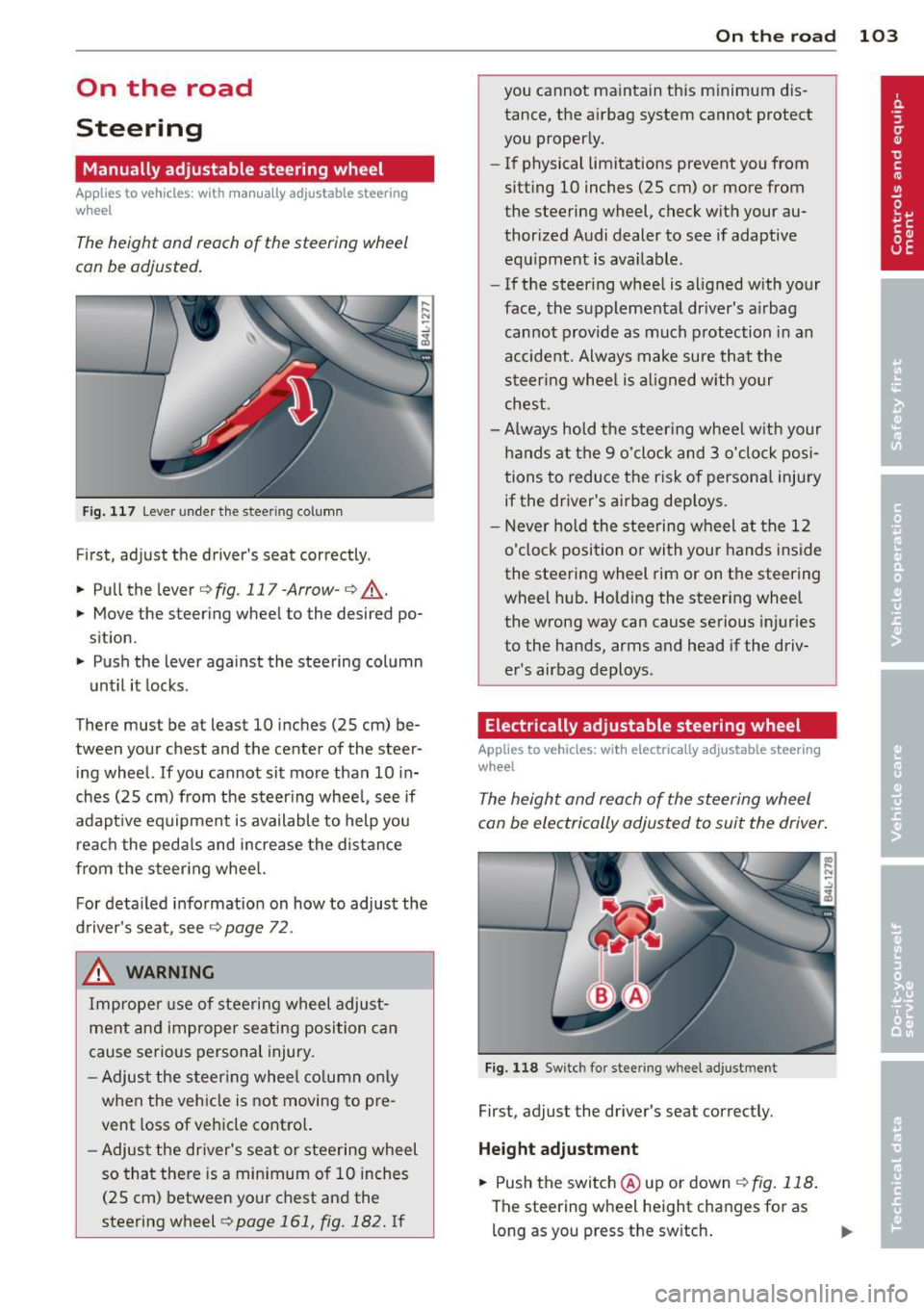
Fig. 117 Lever under the steer ing column
First, adjust the driver's seat correctly .
.. Pull the lever
c:>fig . 117-Arrow-c:> ,A .
.. Move the steering wheel to the desired po
sition.
.. Push the lever against the steering column
unt il it locks.
There must be at least 10 inches (25 cm) be
tween your chest and the center of the steer
ing wheel.
If you cannot sit more than 10 in
ches (25 cm) from the steering wheel, see if
adapt ive equipment is available to help you
reach the pedals and increase the distance
from the steering wheel.
For detailed information on how to adjust the
driver's seat, see
c:> page 72.
& WARNING
Improper use of steering wheel adjust
meht and improper seating position can
cause serious personal injury.
- Adjust the steering wheel column only
when the veh icle is not moving to pre
vent loss of vehicle control.
-
-Adjust the driver's seat or steering wheel
so that there is a minimum of 10 inches
(25 cm) between your chest and the
steering wheel
c:> page 161, fig. 182. If
On the road 103
you cannot maintain this minimum dis
tance, the airbag system cannot protect
you properly.
- If physical limitations prevent you from
sitting 10 inches (25 cm) or more from
the steering wheel, check with your au
thorized Audi dealer to see if adaptive
equipment is available.
- If the steering wheel is aligned with your
face, the supplemental dr iver's a irbag
cannot provide as much protection in an
accident. Always make sure that the
steering wheel is aligned with your
chest.
- Always hold the steer ing wheel w ith your
hands at the 9 o'clock and 3 o'clock posi
tions to reduce the risk of personal injury
if the driver's airbag dep loys .
- Never hold the steering wheel at the 12
o'clock position or with your hands inside
the steering wheel rim or on the steering
wheel hub. Holding the steering wheel
the wrong way can cause serious injuries
to the hands, arms and head if the driv
er's airbag deploys.
Electrically adjustable steering wheel
App lies to vehicles: with electrically adjustable steering
w heel
The height and reach of the steering wheel
can be electrically adjusted to suit the driver.
Fig. 118 Switch for stee ring wheel adjustment
First, adjust the driver's seat correctly.
Height adjustment
.. Push the switch @ up or down c:>fig. 118.
The steering wheel height changes for as
long as you press the sw itch. ..,.
Page 106 of 342
104 On the road
Reach adjustm ent
.. Push the sw itch @forward or bac kward
¢ fig. 118 . The steering whee l reach
changes for as long as yo u press the switch.
There must be at least 10 inches (25 cm) be
tween you r chest and the center of the steer
ing wheel. If you cannot sit more than 10 in
ches (25 cm) from the steering whee l, see if
adaptive equipment is available to help you
reach the pedals and increase the distance
from the steer ing wheel.
F or detai led informat ion on how to adjust the
driver's seat, see
¢ page 72.
The stee ring wheel can be adjusted even when
the ignition is turned
Off. For ve hicles with
seat memory, the individ ual positions for the
steering whee l can be stored along with the
seat posit ion.
A WARNING
Improper use of steering wheel adjust
ment and improper seating position can
cause se rious personal injury.
- Adjust the steer ing whee l co lumn on ly
when the veh icle is not moving to pre
vent loss of veh icle cont ro l.
- Adjust the driver's seat or steering wheel
so that the re is a min imum of 10 inches
(25 cm) between your chest and the
steeri ng wheel
¢ page 161, fig . 182. If
yo u ca nnot ma int ain this min imum d is
tan ce, the airbag system c annot pro tect
yo u properly.
- If phys ica l limitations prevent yo u from
sitting 10 inches (25 cm) or more from
the steering wheel, check with yo ur au
tho rized Audi dea le r to see if adaptive
equipment is availab le.
- If the steering wheel is aligned with your
face, the supp lemental driver's airbag
cannot prov ide as much protect ion in an
acc ident. A lways make sure that the
steeri ng wheel is aligned with your
chest.
- Always hold the steering wheel with your
hands at the 9 o'clock and 3 o'clock posi- tions to reduce the risk of persona
l injury
if the dr iver's airbag dep loys .
- Never hold the steering wheel at the 12
o'clock position or with your hands inside
the steering wheel rim or on the steering
wheel hub. Holding the steering wheel
the wrong way can cause serious injuries
to the hands, arms and head if the driv
er's airbag deploys.
Easy entry feature
The easy entry feature makes it easier to en
ter and exit the vehicle by automatically ad
justing the steering wheel.
Press the button @¢ page 103, fig. 118 to
turn the easy entry feature on or
off.
When the easy entry feature is turned on (but
ton depressed), the steering wheel moves up
to the parked pos ition when the ignit ion is
turned
off. After you enter the vehicle, the
stee ring wheel moves to the sto red pos it ion
as soon as you tu rn o n the ignition.
Easy ent ry feature on vehicles w ith
memory seat*
For t he stored steering wheel pos ition to be
re called, the dr iver's seat memory m ust be
swi tched on
(ION/OF F I swi tch in dep ressed po
s it ion).
If the easy ent ry feature is switched
off, t h e
stee ring wheel moves to the sto red pos ition
a s soon as you press the sea t memo ry bu tton.
Page 107 of 342

Ignition lock and ignition switch
Ignition key positions
The engine con be started or turned off with
the ignition key.
Fig. 119 Igni tion switch pos it io n s
Position @
The ignition key can be inserted into the igni
tion switch in this position . This automatically
unlocks the steering column lock . When the
ignition key is removed, the steering column
lock is automatically locked
Q .&. .
Switching the ignition on/preheating (D
Turn the ignition key to this position and re
lease it. On vehicles with a d iesel engine*, the
system can preheat in this position .
Starting the engine@
The engine starts with the key in this position.
Major electrical loads are temporarily turned
off.
Ignition off@
Turn the ignition key to this position and re
lease it.
A WARNING ,~ ~
- Never remove the key from the ign ition
lock whi le the vehicle is moving. The
steering wheel will lock, causing loss of
control.
- If you have to leave your vehicle, even for
just a minute, always remove the ignition key and take it with you. This is especially
important if you are going to leave chil-
On the road 105
dren unattended in the vehicle. The chil
dren could start the engine or use other
vehicle controls. Unsupervised use of ve
hicle controls (for example, power win
dows) can cause ser ious personal inju
ries.
(D Note
- If the I symbol in the display blinks,
there is a malfunction in the electronic
steering column lock . Follow the instruc
tions in
Q page 33, i Steering malfunc
tion .
-If the . symbol in the display blinks,
there is a malfunction in the electronic
ignition lock . Fol low the instructions in
Q page 34, .Pe Ignition lock malfunction.
a) Tips
-If you release the ignition key in position
@, the key automatically returns to posi
tion (!).
- If you open the driver's door when the ig
nition is sw itched on, a buzzer sounds
and the message
Ignition is on appears
in the instrument cluster display. Please
switch the ignition off.
- T o prevent malfunctions in the ign ition
lock, remove any dirt or deposits from
the key bit so that they do not enter the
ignition lock.
Ignition key safety lock
The ignition key con only be removed when
the selector lever is in the "P" (Pork) position.
After turning off the ignition, the ignition key
can only be removed from the ignition lock
when the selector lever is in the "P" (Park) po
sition. After you have removed the key, these lector lever is locked and cannot be moved.
Page 112 of 342
110 On the road
The parking brake warning light. (USA)/ .
(CON) illuminates when the parking brake is
set and you switch on the ignition.
_& WARNING
-
Always release the parking brake com
pletely. A partially engaged brake will
overheat the rear brakes, reduce their ef
fectiveness and cause excessive wear. This could lead to brake failure and an accident .
(D Note
Only after the vehicle has come to com plete stop, should you firmly set the park
ing brake and move the selector lever into
"P".
Parking
To prevent a parked vehicle from rolling
away, there are a few things you should do .
When you park your vehicle, do the
following
• Stop the vehicle using the brake pedal.
• Apply the parking brake firmly .
• Move the selector lever into the
P position
~ &.
• Switch off the engine and remove the igni-
tion key from the ignition lock.
When you park your vehicle on hills, do
the following
• Stop the vehicle using the brake pedal.
• Apply the parking brake firmly.
• If you are parking headed downhill, turn
the front wheels
toward the curb.
• If you are parking headed uphill, turn the
front wheels
away from the curb.
• Move the selector lever into the
P position.
• Switch off the engine and remove the igni
tion key from the ignition lock.
_& WARNING
This is how you can reduce the risk of in
jury when leaving your vehicle. -
Never park the vehicle where it can come
in contact with dry grass, spilled fuel or
any other flammable materials.
- When parking on hills, always turn the
wheels so that the front wheels will first
roll into the curb, if the vehicle should
start to roll.
- Never allow anyone - especially small
children - to remain in the vehicle when
it is locked. locked doors make it more
difficult for rescuers to access the pas
senger compartment in the event of an
emergency. Danger to life!
- Never leave children unsupervised in the
vehicle. Children could release the park
ing brake or move the gearshift lever out
of gear. The vehicle could start to roll
away and cause an accident.
- No matter what the season is, the tem
perature in a parked vehicle can reach
dangerous levels.
@ Note
-Please exercise care when you park your
vehicle in parking areas with parking bar
riers or curbs. Parking barriers and curbs
vary in height and could damage your
bumper and related components as the
front of your vehicle moves over a barrier or curb that is too high, as you park or as
you back out of a parking spot. In order to be sure that no such damage can oc
cur, you may wish to stop short of having
the front tires of your car touch the park
ing barrier or curb.
- Please also exercise exceptional care
when you drive up or down steep ramps
or drive over curbs or other obstacles, for
which the vehicle is not designed, be
cause components of the vehicle close to
the ground, such as bumper covers, spoilers and suspension and exhaust sys
tem components, may become dam aged.
Starting on hills
Hill Hold makes it easier to start on hills.
Page 115 of 342

Adaptive cruise control Speed and distance
control system
Description
Applies to vehicles: with adaptive cruise cont rol
The adaptive cruise control driver assistance
program is a combined speed and distance
control system .
Fig . 126 Front bu mper: Pos itio n of r adar sen sor (not
vi sibl e from out side)
Adapt ive cruise control can he lp ma ke driv ing
more relaxed and less tiring , particularly dur
i n g long trips on interstates or other hig hways
that are genera lly st raight. The system can al
so ass ist in stop and go traffic .
The adaptive cruise co ntrol works within a
speed range be tween 0 and 95 mph (150 km/
h). Set ACC to maintain a constant , legal trav
el speed between 20 and 95 mph (30 -150
km/h) that is appropriate for prevailing traffic
conditions. Select a following distance to the
veh icle ahead and ACC will adjust your speed
to maintain that d istance down to a stop . At a
speed below 20 mph (30 km/h), the min imum
speed setting of 20 mph (30 km/h) will be se l ected automati ca lly.
Adaptive cruise control has technical limita
tions that you must know, so p lease read th is
section carefully , understand how the system
wo rks and use it properly at a ll times.
How does it work?
You can operate the adaptive cruise control
using the lever on the steering wheel column
c::> page 116, How is the speed stored? and
Ad apti ve crui se control 11 3
c::> page 118, How is the distance (time inter
val) set? .
Driver information
Important information is brought up in the
speedomete r and in the instr ument clus ter
display as the vehicle is being driven
c::> page 120, Driver informat ion .
What is important for you to know
The adaptive cru ise contro l is set w ith system
spe cified lim its; that is, as a driver, you will
have to adjus t the speed and distance to the
vehicle ahead in some instances
c:> page 124,
Driver intervention prompt
and c::> page 125,
System limitations.
A WARNING
Imp roper use of the adaptive cruise con
trol can cause collisions, other accidents
and serious personal injury.
- Always remember that the adaptive cru ise contro l has limits -it will not slow
the vehicle down or ma inta in the set d is
tance when you dr ive towards an obsta
cle or someth ing o n or nea r the road that
is not movi ng, such as ve hicles stopped
in a tra ffic jam, a sta lled or d is ab led vehi
cle.
- Always remembe r that the adaptive
cru ise con tro l canno t detect a vehi cle
that is driving towards yo u in your traffic
lane and that it cannot detect narrow ve
hicles suc h as motorcycles and bicycles .
- Never drive a t speeds that are too fast
for traffic, road and weather conditions .
- Never fo llow a vehicle so closely that you
cannot stop yo ur vehicle safely. The
adapt ive cruise control cannot s low or
brake the vehicle safely when yo u follow
a nother vehicle too close ly. Always re
member that the adaptive cruise control
has a braking power t hat is o nly about
30% of the veh icle's maxim um braking
ab ility. The automat ic bra king f unctio n
cannot bring the vehicle to a s udden o r
-
emerge ncy stop . Always be p repared to IIJ,.
Page 128 of 342

126 Adaptive cruise control
Lane changes by other vehicles
Applies to vehicles: with adaptive cruise control
Fig. 142 A vehicle changes la nes
Vehicles that cut into your lane a short dis
tance in front of you cannot be detected by
ACC until they are in sensor range .
Vehicles that are difficult to detect
Applies to vehicles: with adaptive cruise control
Fig . 143 Two-wheeled vehicle driving ahead
Some vehicles moving up ahead in your lane
of travel are difficult to detect, for example
two-wheeled vehicles, vehicles with high
ground clearance, loads sticking out the back.
Vehicles like this are often detected late or in
some situations not at all .
Stationary vehicles
Applies to vehicles: with adaptive cruise contro l
Fig. 144 Tu rnin g and s tat ionary ve hicle
Fig. 145 Sheer ing out and stat ionary veh icle
If a vehicle that has been detected by ACC ex
its the highway or sheers out into the neigh
boring travel lane, and there is a stationary
vehicle ahead of that vehicle, ACC w ill not de
tect or react to that stationary vehicle
¢fig . 144 and ¢ fig. 145 .
Audi braking guard
Description
Applies to vehicles: with adaptive cruise control
Audi braking guard warns you of a possible
collision with a moving vehicle up ahead.
Fig . 146 D isplay in the instrument cluste r
Page 139 of 342
Automatic transmission
tiptronic ®
General information
Your vehicle is equipped with an electronically
controlled automatic transmission. Upshifting
and downshifting takes p lace
automatically.
The transmission is also equipped with tip
tronic ®. It allows the driver to shift gears
manually if desired ¢ page 140.
Driving the automatic transmission
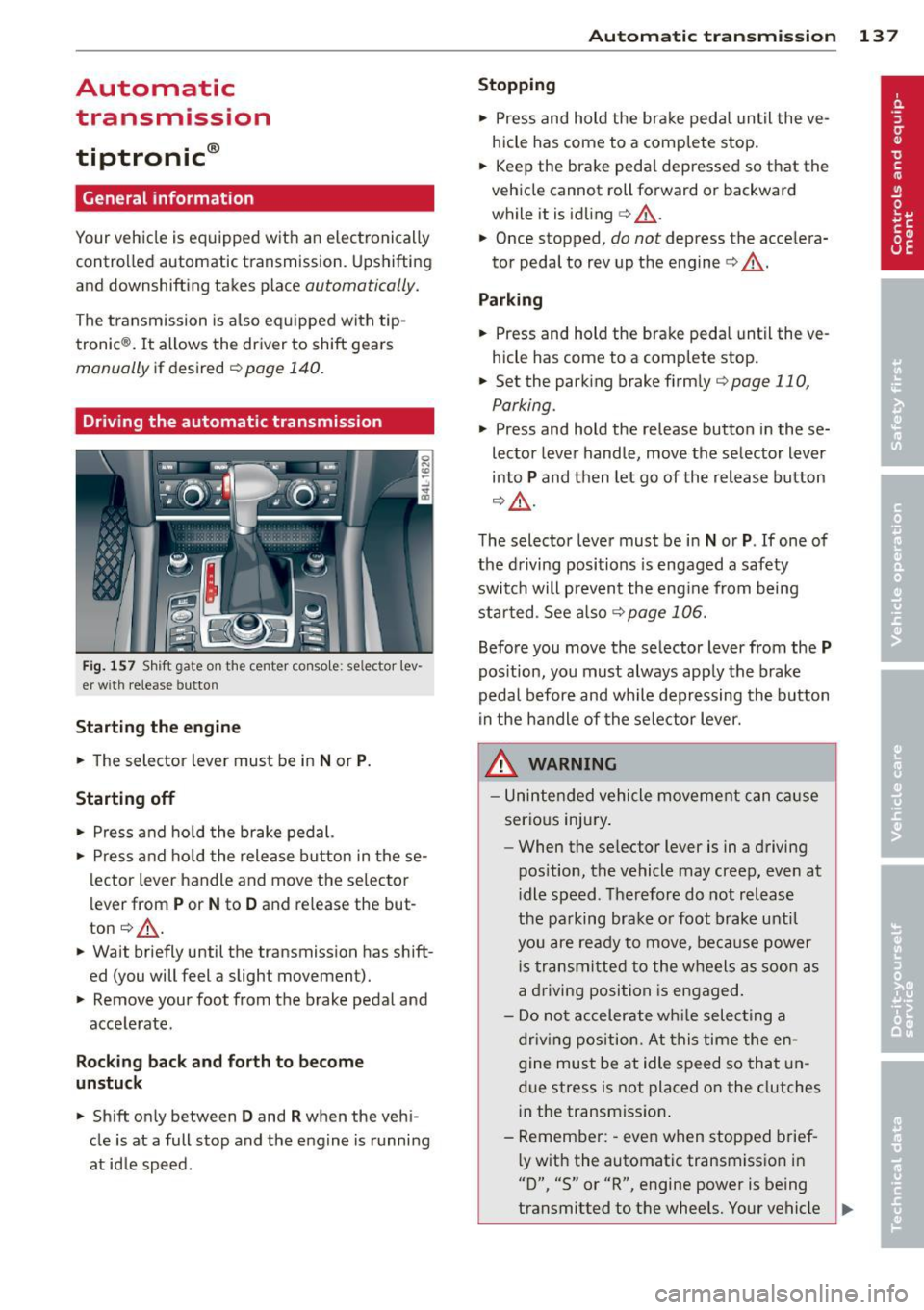
Fig. 157 Shift gate o n the center console : se lector lev
er with release button
Starting the engine
.. The selector lever must be in Nor P.
Starting off
.. Press and hold the brake pedal.
.. Press and hold the release button in these
lector lever handle and move the selector
lever from
P or N to D and release the but
ton ¢.&,. .
.. Wait briefly until the transmission has shift
ed (you will feet a slight movement).
.. Remove your foot from the brake pedal and
accelerate.
Rocking back and forth to become
unstuck
.. Shift only between D and R when the vehi
cle is at a full stop and the engine is running
at id le speed.
Autom atic transm ission 13 7
Stopping
.. Press and hold the brake pedal until the ve
hicle has come to a complete stop.
.. Keep the brake pedal depressed so that the
vehicle cannot roll forward or backward
while it is idling
c> .&,. .
.. Once stopped,
do not depress the accelera
tor pedal to rev up the engine
c> .&, .
Parking
.. Press and hold the brake peda l until the ve
hicle has come to a comp lete stop.
.. Set the parking brake firmly
¢page 110,
Parking .
.. Press and hold the release button in these
lector lever handle, move the selector lever
into
P and then let go of the release button
¢ .&,.
The selector lever must be in Nor P. If one of
the driving positions is engaged a safety
switch will p revent the eng ine from being
started . See also
<=>page 106.
Before you move the selector lever from the P
position, you must always apply the brake
pedal before and while depressing the button
in the handle of the selector lever.
A WARNING
-Unintended vehicle movement can cause
serious injury .
- When the se lector lever is in a driving
pos ition, the vehicle may creep, even at
i dle speed . Therefore do not release
the parking brake o r foot brake until
you are ready to move, because power
i s transmitted to the wheels as soon as
a driving position is engaged .
- Do not accelerate while selecting a
driving position. At this time the en
gine must be at idle speed so that un
due stress is not placed on the clutches
in the transmission .
- Remember: -even when stopped brief-
l y with the automatic transmission in
"D", "S" or "R", engine power is being
transmitted to the wheels. Your vehicle
~
Page 143 of 342
To upshift
• Push the selec tor leve r forw ard to the pl us
pos ition
0 ¢ fig. 160 .
To downshift
• Push the lever to the m in us position Q .
When acce lerating, the transm iss ion w ill au
tomatically sh ift into the next gear before the
e ngine reaches its maxim um RPM .
If you app ly a light throttle when accelerat
ing , tiptronic ® will automatically shift from
1st to 2nd gear to save fuel. If you apply a
h eavy thrott le, the transmission will stay in
1st gear unt il n ear maximum R PM is reached,
or until the d river sh ifts i nto 2nd gear .
If you take your foot off the accelerator peda l
when dr iv ing down a steep incli ne , tiptronic ®
will downshift from th e se lected gear into the
n ex t lowe r gear until it reaches 1st gea r,
b ased on ro ad s peed and eng ine RPM . A uto
mat ic downshifting is in ter rupted as soon as
you apply t he thrott le again.
@ Tips
- Wh en you sh ift i nto the next lower ge ar,
t h e transm iss io n will dow nshi ft only
whe n there is no possibility of over-rev
v ing the engine.
- When t he kick -down comes on, t he
transmission will s hift down to a lower
gear, depending on ve hicle and engine
speeds .
- tiptron ic® is inoperative w hen the trans
mission is in the fail-sa fe mode.
Autom atic transm ission 141
Steering wheel with tiptronic ®
Applies to vehicles: w ith t iptronic-steering wheel
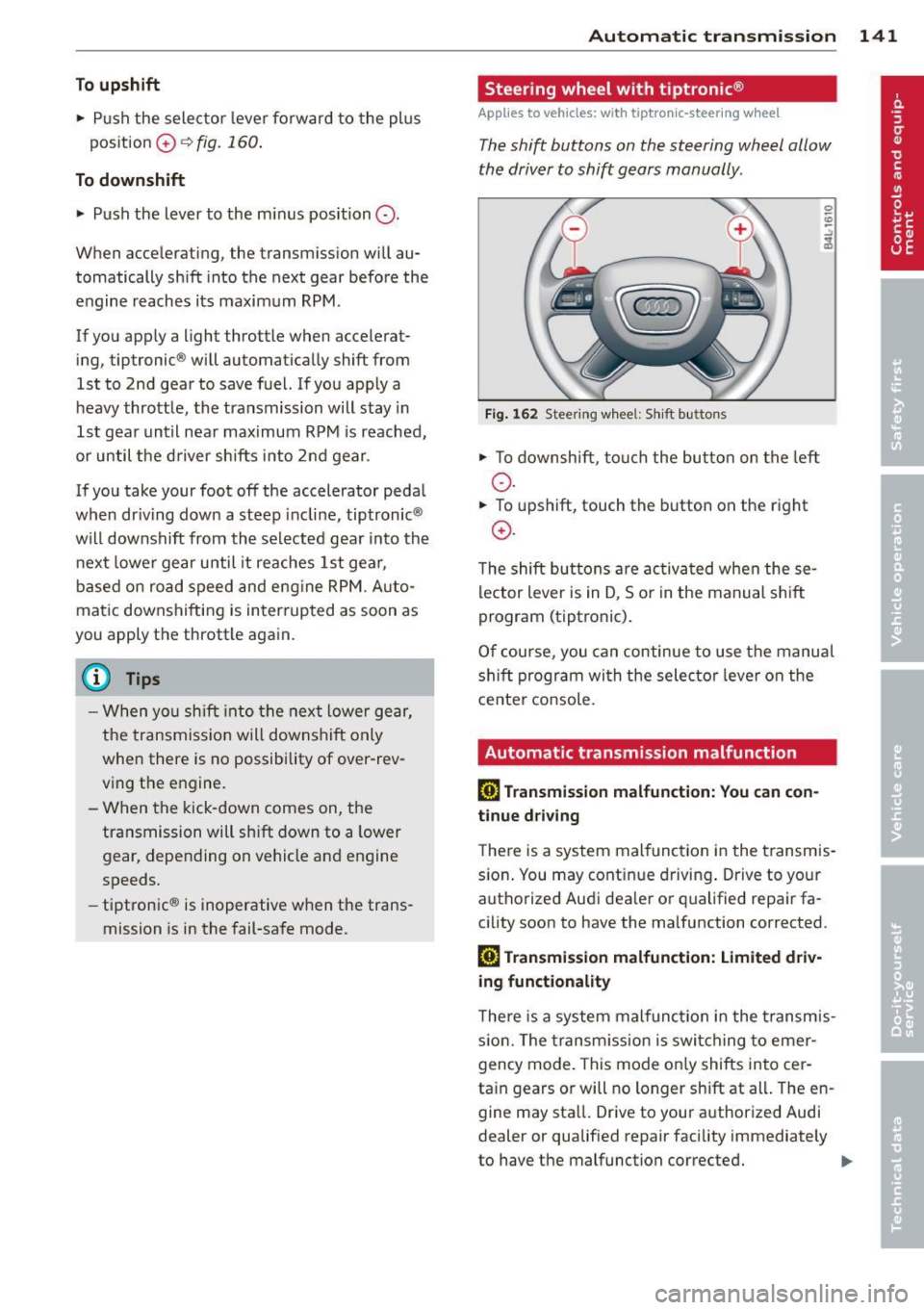
T he shift buttons on the steering wheel allow
the driver to shift gears manually .
Fig. 162 Steering w hee l: S hift b utt ons
• To down shi ft, tou ch the bu tton on t he left
o .
• To upshift, touch the button on the right
0 .
The shift bu tton s a re activ at ed when these
lector lever is in D, So r in the manual s hift
program (tiptronic) .
O f c ourse , you can c ontinue to use the manu al
s hift p rogram wi th the selecto r leve r on the
cente r co nsole.
Automatic transmission malfunction
[O] Transmission malfunction: You can con
tinue driv ing
T he re is a system mal func tion in the t ransmis
s io n. You may cont inue dr iving . Drive to your
a u tho rized Aud i dea ler o r qualified repa ir fa
cility soon to have the ma lfunction corrected.
[O] Transmis sion malfunction: Limited driv
ing functionality
T he re is a system mal func tion i n the t ransmis
s io n. The transm iss ion is swi tching to emer
gency mode. This mode o nly shifts into cer
ta in gears o r will no longer shift at all . The en
gine may sta ll. Drive to your a uthorized Audi
dealer or qualified repair facility immediately
to have the malfunction correcte d.
IJJ,,