key AUDI Q7 2012 Owner´s Manual
[x] Cancel search | Manufacturer: AUDI, Model Year: 2012, Model line: Q7, Model: AUDI Q7 2012Pages: 342, PDF Size: 86.42 MB
Page 126 of 342
124 Adaptive cruise control
control is turned off . A warning tone also
sounds as a reminder.
ACC off: manual control !
The text message ACC off: manual control !
appears after the vehicle has been brought to
a standstill by the adaptive cruise control. In
this case you must depress the brake pedal to
prevent the vehicle from rolling . A warning
tone sounds as a reminder .
Selector lever position !
The text message Selector lever position ! ap
pears when the selector lever is moved to po
sition
N . In this position, adaptive cruise con
trol is not available .
Driver intervention prompt
Applies to vehicles: with adaptive cruise co ntrol
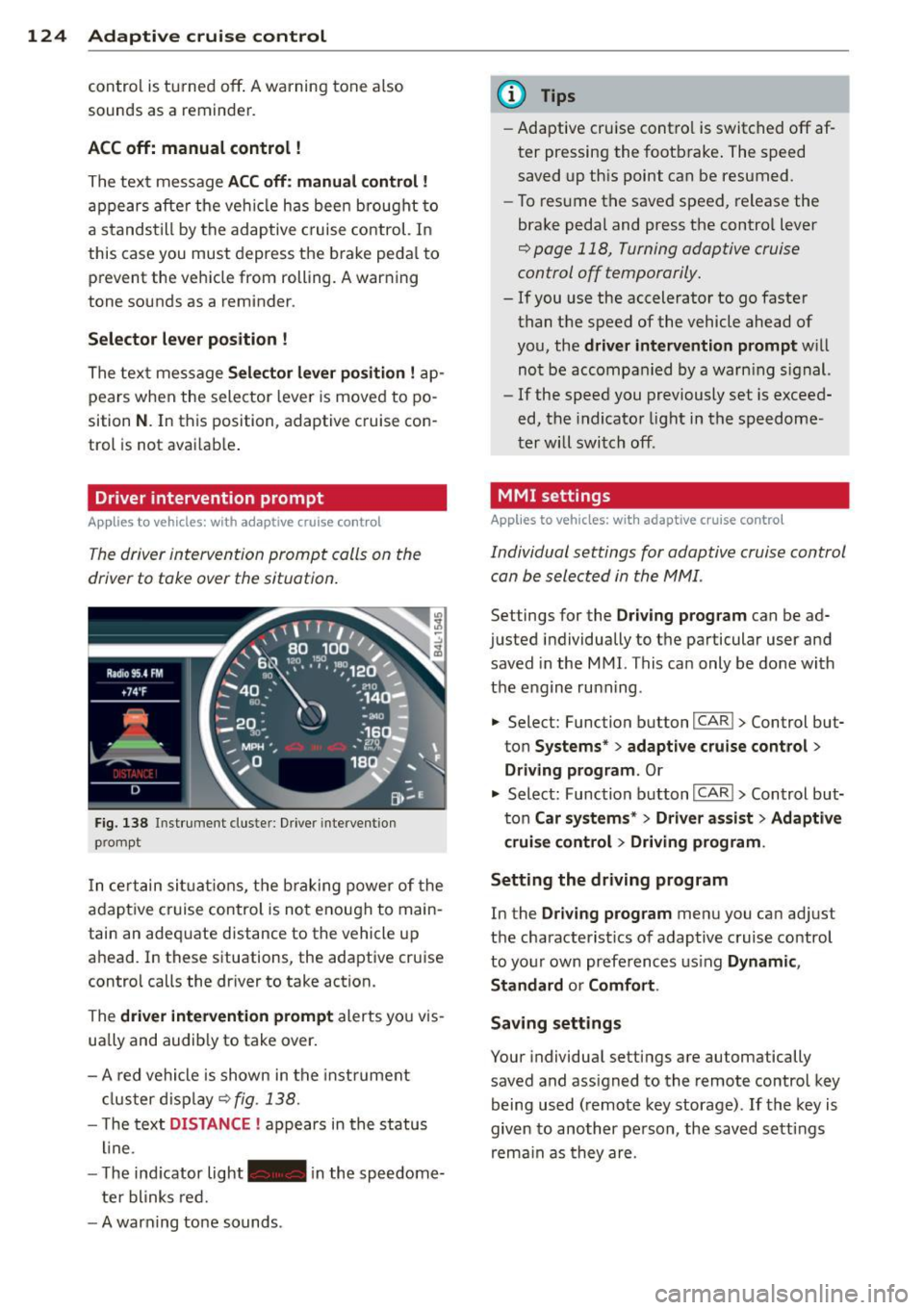
The driver intervention prompt calls on the
driver to toke over the situation.
Fig. 138 Inst rument clus te r: Driv er in tervent ion
p romp t
In certain situations, the braking power of the
adapt ive cr uise control is not enough to main
tain an adequate distance to the vehicle up
ahead . In these situat ions, the adaptive cruise
contro l calls the dr iver to take action.
The
driver intervention prompt alerts you vis
ually and audib ly to take over.
- A red vehicle is shown in the instrument
cluster display ¢
fig. 138.
- T he text DISTANCE ! appears in the status
line .
- T he indicator light- in the speedome
ter blinks red.
- A warning tone sounds .
(D Tips
-Adaptive cruise contro l is switched off af
ter pressing the footbrake. The speed
saved up this point can be resumed.
- To resume the saved speed, release the
brake pedal and press the control lever
¢ page 118, Turning adaptive cruise
control off temporarily.
- If you use the accelerator to go faster
than the speed of the vehicle ahead of
you, the
driver intervention prompt w ill
not be accompanied by a warn ing s ign al.
- If the speed you previously set is exceed
ed, the indicator light in the speedome
ter will switch off.
MMI settings
Applies to vehicles: wit h adaptive cruise contro l
Individual settings for adaptive cruise control
can be selected in the MMI.
Settings for the Driving program can be ad
justed individually to the particular user and
saved in the MMI. This can only be done with
the engine ru nning .
• Select: Function button
I CAR !> Control but
ton
Systems * > adaptive cruise control >
Driving program . Or
.,. Select: Function b utton I CAR !> Control but
ton
Car systems* > Driver a .ssist > Adaptive
cruise control
> Driving program .
Setting the driving program
In the Driving program menu you can adjus t
the characterist ics of adaptive cruise control
to your own preferences using
Dynamic,
Standard
o r Comfort .
Saving settings
Your individual settings are automatically
saved and ass igned to the remote control key
being used (remote key storage) .
If the key is
given to another person , the saved settings
remain as they are .
Page 130 of 342

128 Adapti ve crui se co ntrol
-The radar sensor's function and range
can be reduced by rain, snow and heavy
spray. Moving vehicles up ahead may not be promptly detected or may not be de
tected at all.
- Always pay careful attention to the traf
fic s ituation and be ready to intervene
and be ready to take complete control
whenever necessary.
- Reflective surfaces includ ing crash barri
ers or tunnel entrances may impair the
function of the radar sensor.
Settings in the MMI
Applies to vehicles: with adaptive cruise control
T he settings of the Audi braking guard are
performed in the MMI.
._ Select : Funct ion button ICARI > Control but
ton Systems * > Audi brak ing guard . Or
._ Select : Funct ion button
ICARI > Control but
ton Car system s* > Driver as sist> Audi
braking guard .
- System -the Audi braking guard system can
be switched
On and Off .
-Earl y warning - the acoustic warning and
the messages can be switched
On and Off .
(D) Tips
When handing over the keys to another pe rson, the prev ious settings are adopted
if the Audi braking guard is act ivated
~ page 43.
Driver's information in the instrument
cluster display
Applies to vehicles: with adaptive cruise co ntrol
braking gua rd activated
This message appears whe n the Audi braking
guard applies the b rakes during a second
stage (acute) warning .
braking gua rd off
This message appears whe n the system has
been deact ivated v ia the MMI. This message also appears briefly at each beginning of a trip
if the system is switched off.
T his message a lso appears when the system is
not availab le because of a ma lf u nct ion or if
E SC is switched to the Off road
mode ~
page 219. The system can no longer
warn of an impending coll is ion .
Page 136 of 342
134 Audi side assist
but is not considered notable in the event of a
l ane change, because it is dropping back so
qu ickly. The s ignal on the outside m irror does
not light up¢.&.
in Safe ty tips on page 136.
@ Signal on outs ide mirror does not light
up
If you activate your turn signal in driving sit
uation @, the signa l st ill does not light up on
the outside mirror¢.&.
in Safe ty tips on
page 136 .
MMI settings
Applies to vehicles: with side assist
The basic brightness se tting of the signal on
t he ou tside mirror can be adjusted via the
MMI .
.. Select : Function button ICARI > Contro l but
ton
Systems* > Audi side assist . Or
.. Select : Function button
ICARI > Control but
ton
Car systems* > Driver assist > Audi side
assist.
The brightne ss of the signal light for both the
in format ional and alert stages is automatical
ly adjusted to amb ient light conditions. In ad
d ition, you can adjust the
basic brightness
sepa rately, via the brigh tness function.
Wh ile making the adjustment, the new
brightness setting is displayed briefly . The
brightness displayed is that of the informa
tional stage signal. The alert stage signal
brightness is linked to the informational stage
signal brightness.
The informational stage signal br ightness
should be adjusted so that you not ice the sig
nal illuminat ion when yo u loo k in the outside
mirror, but not when you look forward
through the windshield.
I n very dark or l ight surroundings , the auto
mat ic brightness setting adjusts signal light
brightness to maximum or minimum intensi
ty, as needed. In circumstances such as these,
you may not notice any change in the bright
ness on the outside mirror when ad justing the
basic brightness .
You may not notice the change until lighting
conditions are normal again.
(D Tips
-Side ass ist is not active when the basic
brightness is adjusted . The s ignal light
comes on briefly to help you make the
adjustment .
- Yo ur settings are automatically stored
and assigned to the remote contro l key
being used.
· General information '
App lies to vehicles : wit h side assist
Side assist has limits and canno t detect vehi
cles under all road and weather condit ions .
Please remember system limitations and nev
er rely on the system , especially when :
- driving through curves¢
page 134,
-lanes are of different widths¢ page 135.
' When driving through curves
Applies to vehicles: wit h side assist
Side assist cannot detect vehicles in curves
with a turning rad ius of less than 328 feet
(100 m).
When driving through a curve, it is poss ible
that side assi st m ay reg ister a veh icle two
lanes over, and the signal on the outside mir
ror will light up.
Page 141 of 342
the foot brake before and while moving the lever to
D o ut of N .
In ce rt a in circumst ances i t may be advan ta
geous to tempor arily swi tch to the manu al
shift p ro g ram to manually se lect gear ratios
to matc h specif ic dr iving conditions
r::!) page 140.
S - Sport position
Select this pos ition for sport ie r perfo rmance.
I n t his posi tion , the transm iss ion w ill not up
shift as soon, allowing the vehicle to use the increased power avai lab le at higher engine
speeds to achieve live lier acce lerat ion.
W hen the ve hicle is st ationary o r at speeds
be low 3 mph (5 km/h), you must a lways a pply
the foot brake before and while moving t he
l ever to
S out of N .
A WARNING
Read and follow a ll WARNI NGS <=> & in
Driving th e automatic transmission on
page 137.
(D Note
-
Coast ing downh ill with the transmission in
N and the engine not running w ill result in
damage to the automatic transmiss io n
and possibly t he catalytic converte r.
Automatic Shift Lock (ASL)
The Automa tic Shift Lock safeguards you
against accidentally shifting into a forward or
the reverse gear and causing th e vehicle to
move unintentionally .
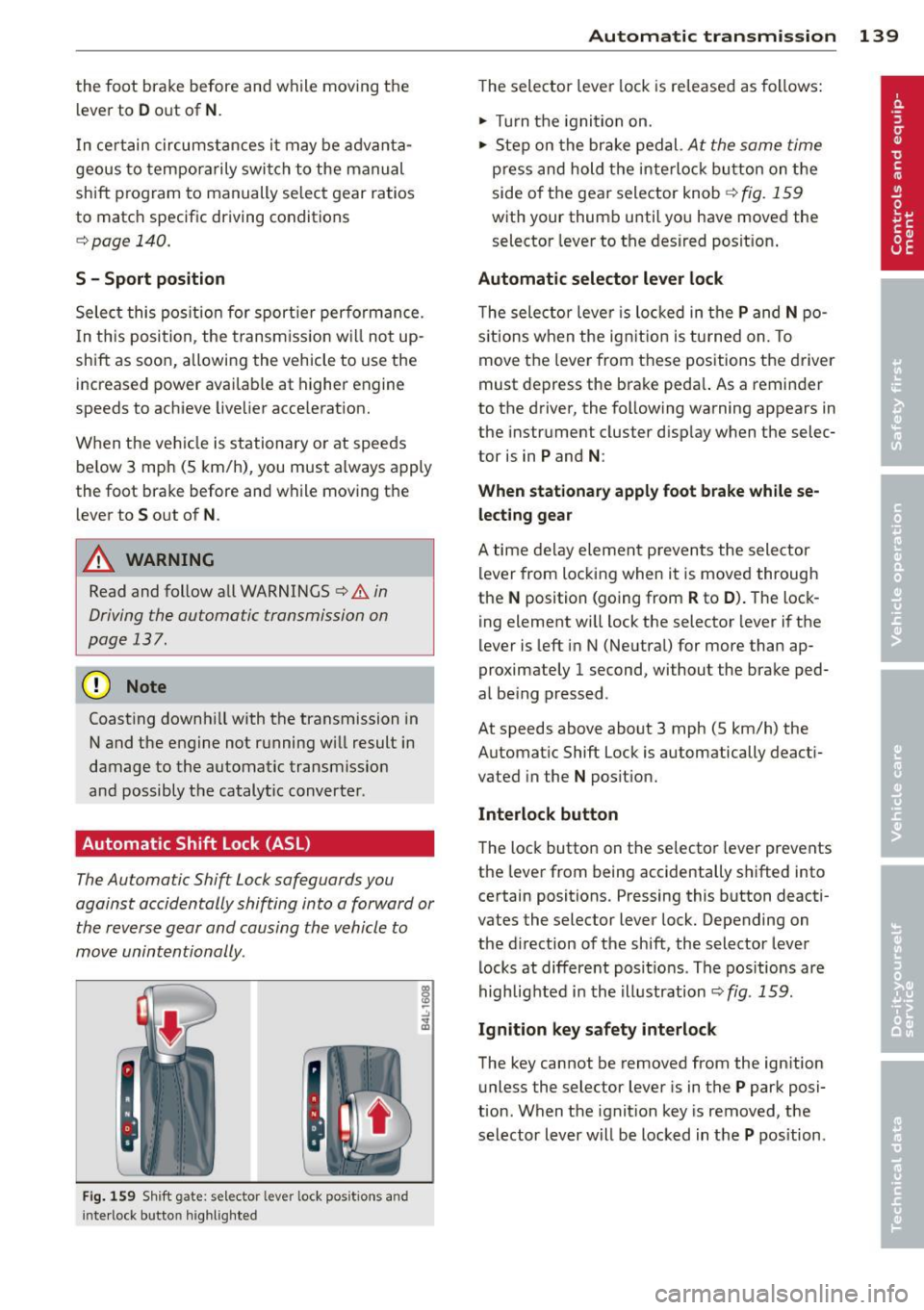
Fig. 159 Shift gate: s elec tor lever lock pos itions and
i n te rl ock bu tt on highli ght ed
Autom atic transm ission 139
T he selector lever lock is re leased as follows:
.. Turn t he igni tion on .
.. Ste p on the bra ke pedal.
At the same time
press and hold the inte rlock bu tton on the
side o f the gea r sele ctor knob
r::!) fig . 159
w ith your thum b until yo u have moved the
selector leve r to the desired posit ion .
Automatic selector lever lock
The selecto r leve r is lo cked in the P and N po
s itions w hen the ig nitio n is tu rned on. To
move t he lever from these posit ions the driver
must de press the brake peda l. As a remin der
to the d river, the following warning appears in
the instr ument cluster d isp lay w hen the selec
tor is in
P and N :
When stationary apply foot brake while se
lecting gear
A time de lay eleme nt preven ts the sele ctor
l ever from locking when it is moved through
the
N position (going from R to D ). T he lock
ing element wi ll lock the selector lever i f the
lever is left i n N (Ne utral) for more than ap
proximately 1 second, without the brake ped
al be ing pressed .
At speeds above about 3 mph (5 km/h) the
Automat ic Shift Lock is automatically deact i
vated in the
N posit ion.
Interlock button
The loc k button on t he selecto r lever prevents
the lever from being accidentally s hifted into
certain positions. Pressing this b utton deacti
vates the selector lever lock. Depending on
the d irection of the shift, the selector lever
l ocks at differe nt pos it io ns. Th e pos itions are
highlig hted i n the i llustration
r::!) fig . 159.
Ignition key safety interlock
The key cannot be removed from the ign ition
u nless the selector lever is in t he
P park posi
tion . When the ignit ion key is removed, t he
selector lever w ill be locked in t he
P pos ition.
Page 144 of 342
142 Automatic transmission
(D Note
If the transmission switches to emergency
mode, you should take the vehicle to an
authorized Audi dealership as soon as pos
sible to have the condition corrected.
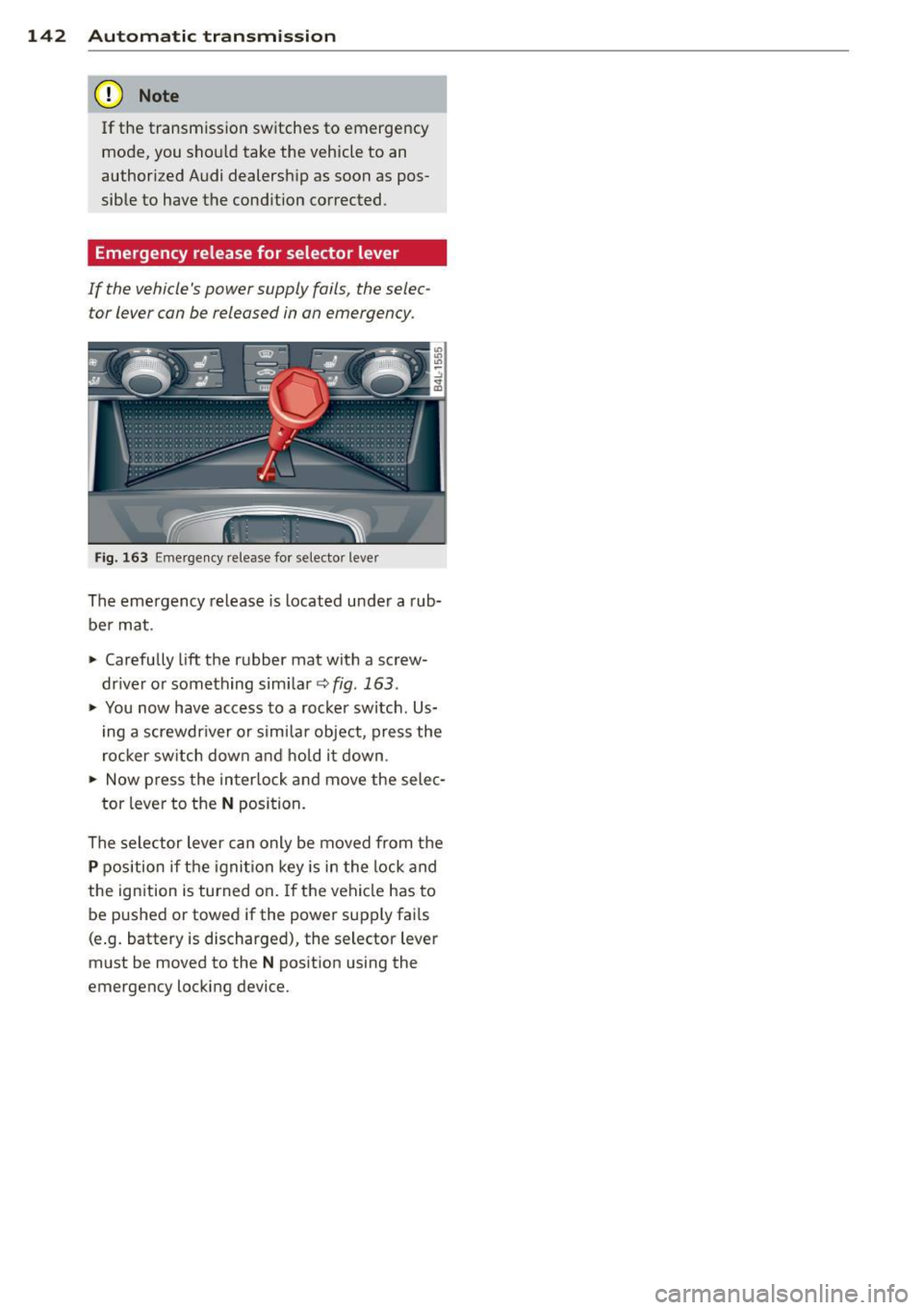
Emergency release for selector lever
If the vehicle's power supply fails, the selec tor lever can be released in an emergency .
Fig. 163 Emergency release fo r selecto r lever
The emergency release is located under a rub
be r mat .
.,. Carefully
lift the rubber mat with a screw
driver or something similar~
fig. 163 .
.,. You now have access to a rocker switch . Us
ing a screwdr iver or similar object, press the
rocker switch down and hold it down .
.,. Now press the interlock and move the selec-
tor lever to the
N position.
The selector lever can only be moved from the
P position if the ignition key is in the lock and
the ignition is turned on . If the vehicle has to
be pushed or towed if the power supply fai ls
(e .g. battery is discharged), the selector lever
must be moved to the
N position using the
emergency locking device.
Page 151 of 342
-On -when the parking system is switched
on, either the visual display or the picture
from the rearview camera is disp layed .
Warning tones
- Front volume* -
front sensor vo lume
- Front frequency* -front sensor frequency
-Rear volume -rear sensor volume
-Rear frequency -rear sensor frequency
-In -ca r entertainment fader/Music volume
while parking -
when the parking system is
switched on, the volume of the active audio source is lowered.
The newly adjusted value is briefly heard from
the signal generator.
(D} Tips
- The warning tones can also be adjusted
direct ly by the v isual disp lay* or the pic
ture from the rearview camera*. Simply
press the
Settings* control button .
- Changed settings are activated when
parking system is switched on aga in.
- The settings are automatically stored
and ass igned to the remote control key.
Trailer hitch
Applies to vehicles: with rear park assist/Audi parking sys·
tem plus with rearview camera and trailer hitch
For vehicles with a factory installed trai ler
hitch, or a trai ler hitch installed according to
factory specifications, the parking system rear
sensors do not come on whenever you shift in
to reverse gear or when you press the P
11,
switch*. If you install a hitch yourself, th is
function may not work . In general the follow
limitations may come up:
Rear park assist*
There is no warning for distances to the rear.
Audi parking system plus with rearview
came ra*
There is no warning for distances to the rear .
The front sensors remain activated. The visual
display switches to the trailer towing mode.
The picture from the rearview camera will not
Parking system 149
show the orientation lines nor the blue surfa
ces.
Error messages
Applies to vehicles: with rear park assist/Audi parking sys
tem plus with rearview camera
There is an error in the system if the LED on
the
P" 1! switch* is blinking and you hear a con
tinuous alarm for a few seco nds after switch
ing on the park ing system or when the park
ing system is already activated. Have your au
thorized Audi dea ler correct the error .
(D Tips
If the error is not corrected before you
switch off the ignition, when you switch on
the parking system again, the LED in the
p,,1, switch* will blink .
Page 159 of 342
Programming the Homelink®
transmitter
A pplies to vehicles: with Home link® universa l remote
co ntrol
The transmitter is programmed in two phas·
es. For rolling code transmitters, a third
phase is also necessary .
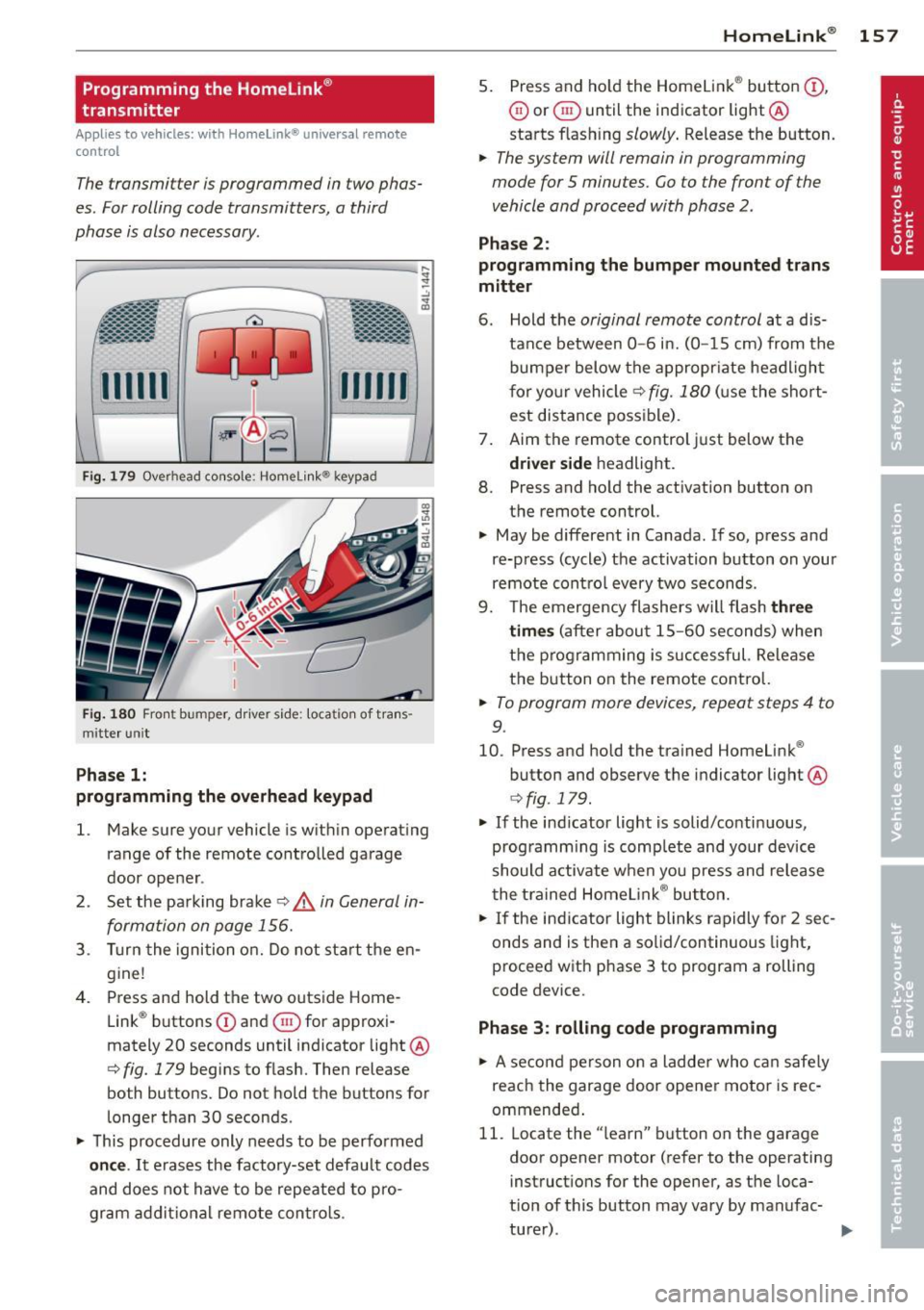
.- :-::::: . ... ........ -. ----· . ...... ........ .l
-·-·-· -·-· -·..: ··-· ---- -·- ·· ..._~ -- · ····
111111
-
Fi g. 1 79 Overhead console: Homelink ® keypad
Fig. 1 80 Front bumper, d rive r side: loca tion of tra ns
mitter un it
Pha se 1:
programming the o verhead keypad
l. Make sure your vehicle is wit hin ope rating
range of the remote controlled garage
door ope ner .
2 . Set the pa rking brake
c:> .& in General in
formation on page 156.
3 . Turn the ignition o n. D o not sta rt the en
g ine!
4. Press and hold the two outs ide Home
Link ® buttons
(D and ® for approxi
mately 20 seconds until indicator light @
c:> fig. 179 begins to flash. Then release
both buttons. Do not hold the buttons for
l onger than 30 seconds .
~ This procedure only needs to be perfo rmed
on ce .
It erases the factory-set default codes
and does not have to be repeated to p ro
gram ad dit io na l remote contro ls .
Homelink ® 15 7
5. Press and ho ld the Homelink ® button (D ,
0 or ® until the indicator light@
starts flash ing
slowly . Release the button.
~ The system will remain in programming
mode for 5 minutes.
Go to the front of the
vehicle and proceed with phase 2 .
Phase 2 :
programming the bumper mounted trans
mitter
6 . Hold the
original remote control at a d is
tance between
0 -6 in. (0 -15 cm) from the
bumper below the appropr iate headligh t
f or yo ur vehicle
c:> fig. 180 (u se the short
est distance possible) .
7 . Aim the remote control just below the
driver s ide headlight.
8. Press and ho ld the activation button on
the remote control.
~ May be different in Canada. If so, press and
re-press (cycle) the activation button on your
remote cont ro l every two seconds .
9. The emergency flashers w ill flash
three
time s
(a fter about 15 -60 seconds) when
the programming is successful. Re lease
t h e button on the remote contro l.
~ To program more devices, repeat steps 4 to
9.
10. Press and hold the trained Homelink ®
button and observe the indicator light @
c:>fig . 179 .
~ If the indicator light is solid/contin uous,
programm ing is comp lete and your device
should a ctivate when you press and release
t he t rained Homelink ® bu tton.
~ If the ind icator light blinks rapidly for 2 sec
onds and is then a solid/continuous light,
proceed w ith phase 3 to program a rolling
code device.
Phase
3: rolling code programming
~ A se con d person o n a ladde r who c an safe ly
reach the garage door opener motor is rec
ommended .
11. Locate the "learn" button on the garage
door opener motor (refer to the operating
instruct ions for the opener, as the loca·
t ion of t his button may vary by manufac-
turer) . .,.
Page 160 of 342
158 Homelin k®
12. Press and release the learn button on the
garage door opener motor.
• Note: once the button is pressed, there are
30 seconds in which to initiate the next
step.
13 . On the Homelink ® keypad inside the vehi
cle, firmly p ress a nd hold the Homelink ®
button previously p rogramm ed in phases
1 and 2 for two seconds and release. Re
pea t this sequence
twi ce .
• Some vehi cles may require the p ress/hold/
release sequence up to t hree times to com
plete the training p rocess.
• HomeLink ® should now activate your rolling
code equipped device.
If t h e 5 minute time limit is exceeded, the
emergen cy flashers will flash one time to in
d icate that the process has been terminated.
In th is case, repeat steps 4 through 9.
If t he emergency flashers do not flas h
three
times (after about 15-60 seconds), program
ming was not successful. In this case, repeat
steps 4 through 9.
Remote control units for ga rage doo r openers
in Canada are set to stop transmitting radio
frequency signals after two seconds. This time
may not be sufficient for the Homelink ® sys
tem to learn the radio frequency s ignal. Per
form all other steps as described above .
Operating the Homelink® transmitter
App lies to vehicles: with Home link® universa l remote
co ntrol
The HomeLink ® transmitter works in the
some manner as the original hondheld re mote control that come with the system.
- ·······-··
········-·· •••••• . -.-.----·-·..: ··-·-·-·-·-··
··-·-·-·-·-·· .. -.... - - - ~-. -
fillTI ffUll
-
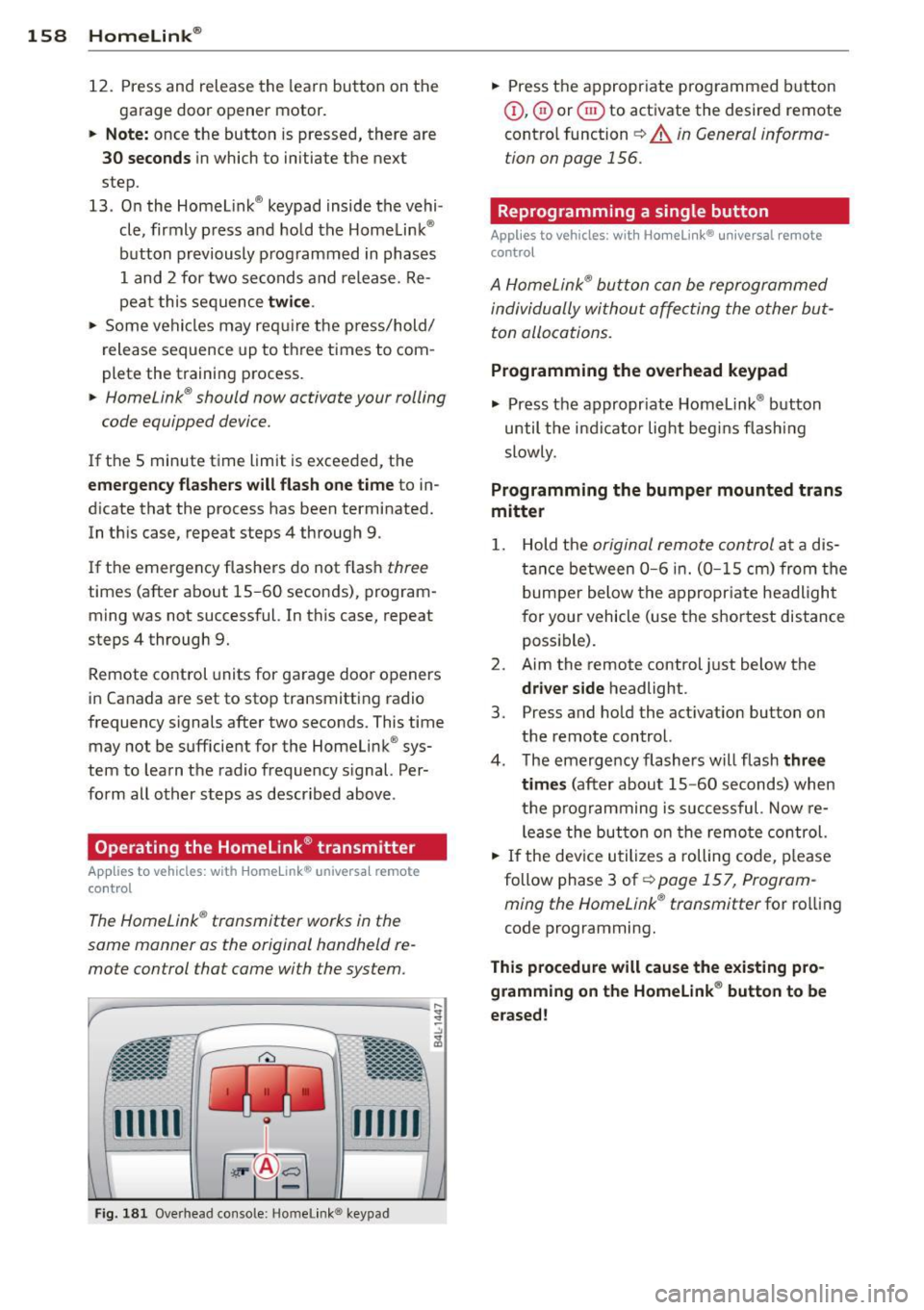
Fi g. 18 1 Overhead co nsole: Homelink ® keypad
• Press the appropr iate programmed b utton
(D , ® or@ to activate the desired remote
cont ro l function
~ A in General informa
tion on page 156.
Reprogramming a single button
Applies to vehicles: wit h Ho meli nk® uni versal remote
contro l
A HomeLink ® button can be reprogrammed
individually wi thou t affe cting the o ther but
ton allocations .
Programming the overhead keypad
.. Press the appropr iate Homelink ® button
until the i ndicator light begi ns flashi ng
slowly .
Programming the bumper mounted trans
mitter
1. Hold the original remote control at a dis
tance between 0-6 i n. (0 -15 cm) from the
bum pe r below the appropr iate headlight
f or yo ur vehicle (use the shor test dis tance
possible).
2. Aim the remote control just below the
driver s ide headlight .
3. Press and ho ld the act ivation button on
the remote control.
4 . The emergency flashers w ill flash
three
tim es
(after about 15 -60 seconds) when
the p rog ramming is successful. Now re
l ease the button on the remo te control.
.. If the dev ice utilizes a rolling code, p lease
follow phase 3 of¢
page 157, Program
ming the Home Link ® transmitter
for ro lling
code programming.
This procedure will cause the existing pro
gramming on the Homelink ® button to be
erased !
Page 161 of 342
Erasing the programming of the
Homelink® transmitter
Applies to vehicles: with Homelink® unive rsal remote
control
When you erase the programming, the pro
gramming on all three of the transmitter channels with be lost!
.,. Perform steps 1 to 4 as described on
¢page 157, Phase 1: program
ming the overhead keypad .
When completed, the Homelink ® system will
be in the programming mode and is then
ready to learn the codes for remote controlled
devices .
@ Tips
-Programmed buttons cannot be erased
individually.
- For security reasons you are advised to
erase the programming of the Home Link ® system before yo u sell your vehicle. Homelink
® 159
Page 175 of 342
forces on the body more "tolerable" and less likely to cause injury.
Although these examples are based on a fron
tal collision , safety belts can also substantial
ly reduce the risk of injury in other kinds of
crashes. So, whether you're on a long trip or
just going to the corner store, always buckle
up and make sure others do, too. Accident sta
tistics show that vehicle occupants properly
wearing safety belts have a lower risk of being
injured and a much better chance of surviving
an accident . Properly using safety belts also
greatly increases the ability of the supplemen
tal airbags to do their job in a collision. For
this reason, wearing a safety belt is legally re
quired in most countries including much of
the United States and Canada.
Although your Audi is equipped with airbags ,
you still have to wear the safety belts provid
ed. Front airbags, for example, are activated
only in some frontal collisions. The front air
bags are not activated in all frontal collisions,
in side and rear collisions, in roll overs or in
cases where there is not enough deceleration
through impact to the front of the vehicle .
The same goes for the other airbag systems in
your Audi. So, always wear your safety belt
and make sure everybody in your vehicle is
properly restrained!
Important safety instructions about
safety belts
Safety belts must always be correctly posi
tioned across the strongest bones of your
body.
.,. Always wear safety belts as illustrated and
described in this chapter.
.,. Make sure that your safety belts are always
ready for use and are not damaged.
A WARNING
Not wearing safety belts or wearing them
improperly increases the risk of serious
personal injury and death. Safety belts can
work only when used correctly .
Safety belts 173
-Always fasten your safety belts correctly
before driving off and make sure all pas
sengers are correctly restrained.
- For maximum protection, safety belts
must always be positioned properly on
the body .
- Never strap more than one person, in cluding small children, into any belt .
- Never place a safety belt over a child sit
ting on your lap.
- Always keep feet in the footwell in front
of the seat while the vehicle is being driv
en.
- Never let any person ride with their feet
on the instrument panel or sticking out
the window or on the seat.
- Never remove a safety belt while the ve hicle is moving. Doing so will increase
your risk of being injured or killed .
- Never wear belts twisted.
- Never wear belts over rigid or breakable
objects in or on your clothing, such as
eye glasses, pens, keys, etc., as these
may cause injury.
- Never allow safety belts to become dam aged by being caught in door or seat
hardware .
- Do not wear the shoulder part of the belt
under your arm or otherwise out of posi
tion .
- Several layers of heavy clothing may in
terfere with correct positioning of belts
and reduce the overall effectiveness of
the system .
- Always keep belt buckles free of anything
that may prevent the buckle from latch
ing securely .
- Never use comfort clips or devices that
create slack in the shoulder belt. Howev
er, special clips may be required for the
proper use of some child restraint sys
tems .
- Torn or frayed safety belts can tear, and
damaged belt hardware can break in an
accident. Inspect belts regularly. If web-
bing, bindings, buckles, or retractors are .,..
L,_ _______________ _J
•
•