reset AUDI Q7 2013 Owner´s Manual
[x] Cancel search | Manufacturer: AUDI, Model Year: 2013, Model line: Q7, Model: AUDI Q7 2013Pages: 348, PDF Size: 87.72 MB
Page 100 of 348
98 Warm and cold
Synchronizin g rear ai r conditioni ng: By
pressing and holding the regulator on the rear
left side, the temperature setting of the rear
left side can be switched to the rear r ight side
and v ice versa. The new temperature is shown
in the display .
Turning on and off~
App lies to vehicles: with four -zone automat ic comfort a ir
co nd it io nin g
Tu rning the clim ate co ntro l on
"' Press the !ON /OFF I button , or
"' Press the
!AU TO I button.
Tu rning the climate con trol off
"' Press the !ON /O FF I button to swi tch the cli
mate control off and to b lock the air supply
from the outside .
The air conditioner turns back on when you
press the
temp eratu re reg ula tor or one of the
buttons .
{D) Tips
If the power child safety lock is on, the
rea r air condi tioning control element wi ll
not operate . In this case, dashes" ••• " wi ll
appear in the air condit ion ing control ele
ment d isp lay.
Automat ic mode in rear~
Applies to vehicles: with four-zone automat ic comfort a ir
co nd it io nin g
The automatic mode is the standard setting
for all seasons.
"' Se lect temperature between 60 °F (+16 °C)
and
84 °F (+28 °().
"' Press the
!AUTO I button.
Automatic operation ensu res constant tem
pe ratures in the inter io r and dehum idifies the
a ir i nside the vehicle. Ai r temperature, vo lume
and d istr ibu tion a re con trolled a utomat ically
to reach or maintain the desired inter ior tem
perat ure as quickly as possible . Fl uctuations
in exterior t emperat ure and the effects of temperature from the position of the s
un are
compensated for automatically .
T his operating mode works on ly in the adj ust
able temperature range, from
60 ° F (+ 16 °C )
to
84 °F ( + 28 °C) . If a temperature below 60
°F (+ 16 °C) is se lected, LO appears in the dis
play . At temperatures above
84 ° F (+ 28 °(),
HI is displayed . At bot h extreme sett ings, cli
mate control runs contin uously at maximum
cooling o r heating power . There is no temper
ature regulat ion.
Setting rear temperature
App lies to vehicles: wit h four-zone auto matic comfort air
conditio ning
The temperature can be separately adjusted
for the rear left and right sides .
"' Rotate the regulator to the left to red uce
the temperature, or to the r ight to increase
the temperature .
T he selected temperature appea rs on the cl i
mate control display.
Rear fan~
Appl ies to vehicles : wit h four-zone auto matic co mfo rt air
condition ing
The automatically preset fan speed can be re
duced or increased .
"' Press the~ butto n.
"' Rotate the regulator to the des ired fan
speed.
The climate control system automatically reg u lates fan speed depending on inter ior tem
perature. You ca n adjust the volume of air p ro
duced by the fan to your own requirements .
(D Tips
It is possible that the fan speed may
change automatically. This occurs to en
su re that the des ired temperature setting
i s reached as quickly as possible.
Page 114 of 348
112 On the road
The cruise control cannot maintain a con
stant speed when driving downhill. The ve
hicle will accelerate under its own weight.
Downshift to a lower gear or use the
brakes to slow down.
Changing speed
.. To increase/decrease the speed in incre
ments , tap the lever in the
010 direction
~p age 111, fig. 124.
.. To increase/decrease the speed qu ickly,
hold the lever in the
010 direction until
the desired speed is displayed.
You can also press the accelerator pedal down
to increase your speed, e .g. if you want to
pass someone . The speed yo u saved earlier
will resume as soon as you release the acceler
ator peda l.
If , however, you exceed your saved speed by
5 mph (10 km/h) for longer than 5 minutes,
the cruise contro l will turn off temporarily.
The symbol will go out but the saved speed
will be retained.
Presetting your speed
You con preset your desired speed while the
vehicle is not moving .
.. Turn on the ignition .
.. Pu ll lever into position
(D ¢ page 111,
fig.
124 .
.. Press the lever in the
0 or 0 direction to
increase or decrease your speed .
.. Releasethelevertosavethatspeed.
This funct ion makes it possible, for example,
to save the speed you want before driving on
the highway . Once on the highway, activate
the cruise contro l by pull ing the lever toward
(D .
Switching the system off
Temporary deactivation
.. Press the brake pedal, or ..
Press the leve r into position @(not clicked
into place)
¢ page 111, fig. 124, or
.. Drive for longer than 5 minutes at more
than 5 mph (10 km/h) above the stored
speed.
Switching off completely
.. Press lever into position @(clicked into
p lace), or
.. Switch the ignition off .
The system retains the saved speed if you de
activate the cruise control temporarily . To re
sume the saved speed, re lease the brake ped
al and pull the lever to pos it ion
(D .
Switching the ignition off erases the saved
speed.
A WARNING
You sho uld only return to the saved speed
if it is not too fast for the c urrent traffic
conditions -risk of an accident!
Page 122 of 348
120 Adapti ve crui se control
_&. WARNING
-
Following other vehicles too closely in
creases the risk of a crash and serious per
sonal injury .
- Following other vehicles too closely, par
ticu larly at higher speeds increases the
risk of coll is ions and serious personal in
jury.
- Setting short distances to the traffic
ahead reduces the time and distance
available to bring your vehicle to a safe
stop and makes it even more necessary
to pay close attention to traffic .
- Always select a speed and distance to
traffic ahead that is safe and appropriate
under the prevailing traff ic, road, weath
er and lighting conditions.
- Never rely on the distance control fea
ture of ACC a lone to prevent rear-end col
lis ions. Always be prepared to b rake and
take evasive act io n to avoid co llisions
and other ac cident situations.
- Never allow the clos ing speed between
yo u a nd other vehicles to be so h igh that
the adaptive cruise control may not be
able to slow your vehicle safe ly . If clos
ing speed is too high, yo u m ust app ly the
brakes yourself to reduce the risk of a
rear-end crash.
- Always select a greater following dis
tance to the veh icle ahead on wet roads
than on dry roads.
- Always read and heed the information
and WARNINGS
¢ &. in Description on
page 113.
(D Tips
The distance setting is reset to the factory
default
DIS TANCE 3 the next time the ig
nition is turned on.
Driver information
Displays in the instrument cluster
Applies to veh icles: w ith adaptive cruise contro l
Depending on the driving situation, driver in
formation is displayed in the instrument clus
ter .
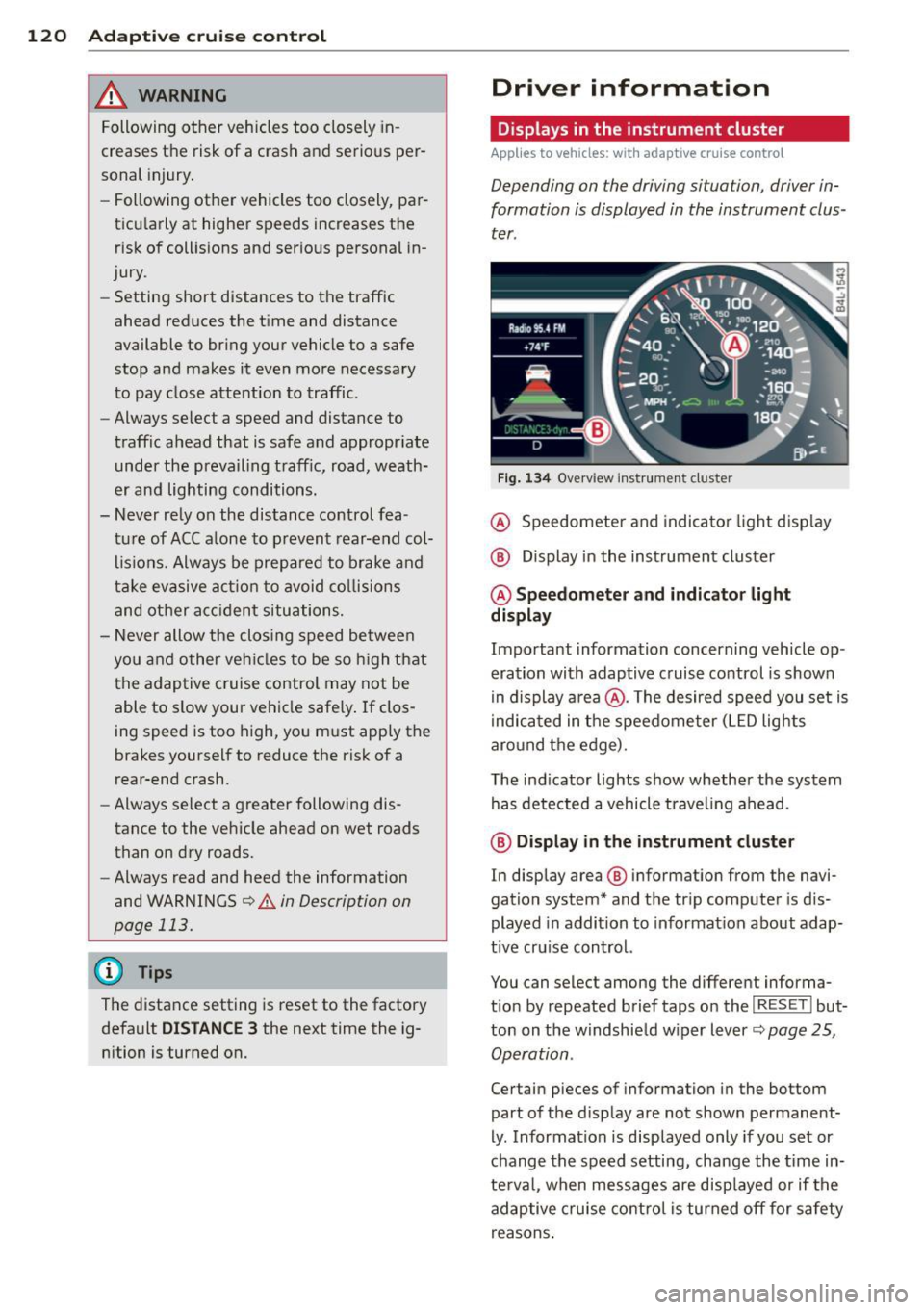
Fig . 1 34 Overview ins tr u me nt cluster
@ Speedometer and indica to r li ght d isp lay
@ Display in the instrument cluster
@ Speedometer and indi cato r light
display
Important information concerning vehicle op
eration with adaptive cruise control is shown
in display a rea @. The desired speed you set is
i ndica ted in the speedometer (L ED lights
aro und the edge).
T he ind icator lights show whether the system
has detected a vehicle trave ling ahead .
@ Display in the in strument cluster
In display area @ information from the navi
gation system* and the tr ip computer is dis
played in addition to informat ion about adap
t ive cru ise control.
You can select among the different informa
t io n by repeated brief taps on the
I RESET I but
ton on the w indshie ld w iper lever
c::> page 25,
Operation .
Certain pieces of information in the bottom
part of the d isplay are not shown permanent
ly . Information is displayed only if you set or
change the speed setting, change the time in
te rva l, when messages are disp layed or if the
adaptive cruise contro l is turned off for safety
reasons .
Page 123 of 348
Display in the speedometer
Applies to vehicles: with adaptive cruise control
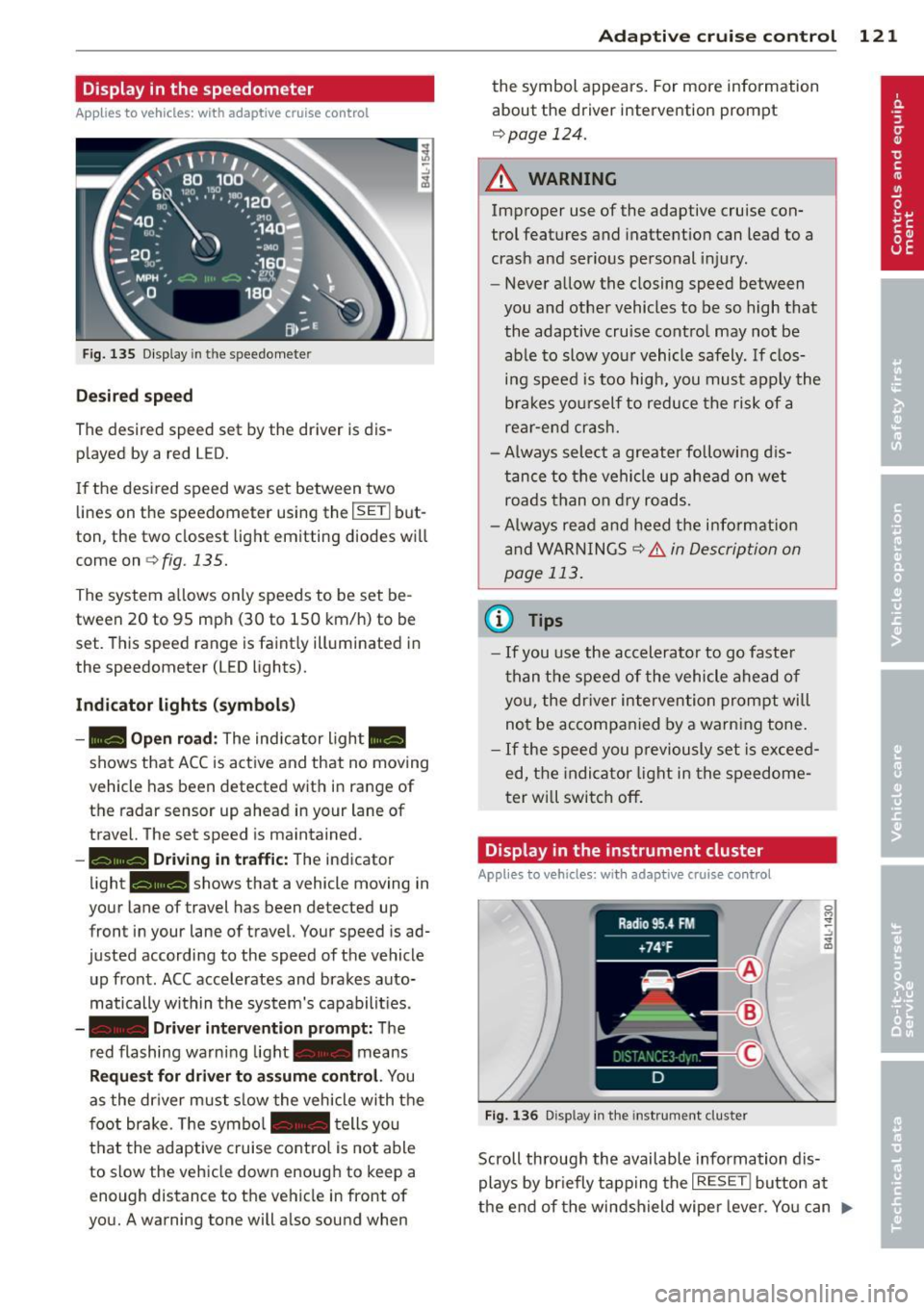
Fig. 135 D isplay in the speedomete r
Des ired spe ed
The desired speed set by the driver is dis
p layed by a red LED.
If the desi red speed was set between two
lines on the speedometer using the
I SETI but
ton, the two closest light emitting diodes will
come on <=>
fig. 135.
The system a llows only speeds to be set be
tween 20 to 95 mph (30 to 150 km/h) to be
set. This speed range is faint ly illuminated in
the speedometer (LED lights).
Ind icator light s (symbol s)
-- Open road :
The indicator light _
shows that ACC is active and that no moving
vehicle has been detected with in range of the radar sensor up ahead in your lane of
travel. The set speed is maintained.
- - Driving in tr aff ic: The indicator
light - shows that a vehicle moving in
your lane of travel has been detected up
front in your lane of travel. Your speed is ad
justed according to the speed of the vehicle
up front . ACC accelerates and brakes auto
matically within the system's capabilit ies .
-- Driver int erv ent ion prompt: The
red flashing warning light- means
Reque st for dri ver to assum e co ntr ol. You
as the dr iver must slow the vehicle with the
f oot brake. The symbol - tells you
t h at the adaptive cruise co ntrol is not able
to slow the vehicle down enough to keep a
enough distance to the vehicle in front of
you. A warning tone will also sound when
Ad apti ve crui se control 121
the symbol appears. For more information
about the driver intervention prompt
r::!) page 124.
_& WARNING
Improper use of the adaptive cruise con
trol features and inattention can lead to a
crash and serious personal injury.
- Never allow the closing speed between
you and othe r vehicles to be so high that
the adaptive cruise contro l may not be
able to slow your vehicle safely. If clos
ing speed is too high, you must apply the
brakes yo urself to reduce the risk of a
rear-end crash.
- Always select a greater following d is
tance to the vehicle up ahead on wet
roads than on dry roads.
- Always read and heed the information
and WARNINGS <=>
& in Description on
page 113 .
(D Tips
-If you use the accelerator to go faste r
t han t he speed of the vehicle ahead of
you, the dr iver intervention prompt will
not be accompan ied by a warn ing tone.
- If the speed you previously set is exceed
ed, the indicator light in the speedome
ter will switch off.
Display in the instrument cluster
Appl ies to vehicles: wit h adaptive cruise control
F ig. 136 D isp lay in the instrument cluster
-
Scroll through the available information dis
plays by br iefly tapp ing the
I RESET ! button at
the end of the windshield wipe r lever. You can ..,.
Page 160 of 348
158 Adapti ve Air Suspens ion
fi lled out, the vehicle is at high level 2 and has
the greatest amount of ground clearance pos
sib le.
While the vehicle is being raised or lowered,
the target level is indicated by an arrow@
c::> fig. 187 or a white border @ c::> fig. 188 . The
arrow/border disappears aga in when the vehi
cle is at the target level.
Limitations to MMI s etting s
Please note that not eve ry dr iving mode can
be selected in every d riving situation . For ex
ample, it is not possible to switch to "lift"
mode at speeds above 12 mph (20 km/h) .
This mode is then shown
greyed out in the
MMI Display.
The vehicle can only be lowered when
all of
the vehicle's doors are closed. If one door is
open, all driving modes whose level sett ing is
belo w the current vehicle level appear
greyed
out
i n the MMI Display. If a door is opened
while the veh icle is being lowered, the lower
ing p rocess is interrupted u ntil all doors are
closed again .
If the system is temporar ily unava ilable due
to, for instance, an empty compressed air
tank, the driving modes that cannot be set ap pear
greyed out in the MM I Disp lay. As soon
as the system is available again, the driv ing
modes can once more be selected in the dis
p lay .
(D} Tips
- Fo r addition al in forma tion on the driv ing
modes
c:;> page 155, Chassis controls.
- When the compressed air tank is empty,
the compressor c an be switched on by
starting the engine . The Adaptive Air
Suspension is once again available, after
waiting a few minutes .
- To prevent over load, the system switches
off tempera rily if seve ral adj ustments
are made in a row. The Adaptive Air Sus
pension is once again available, after
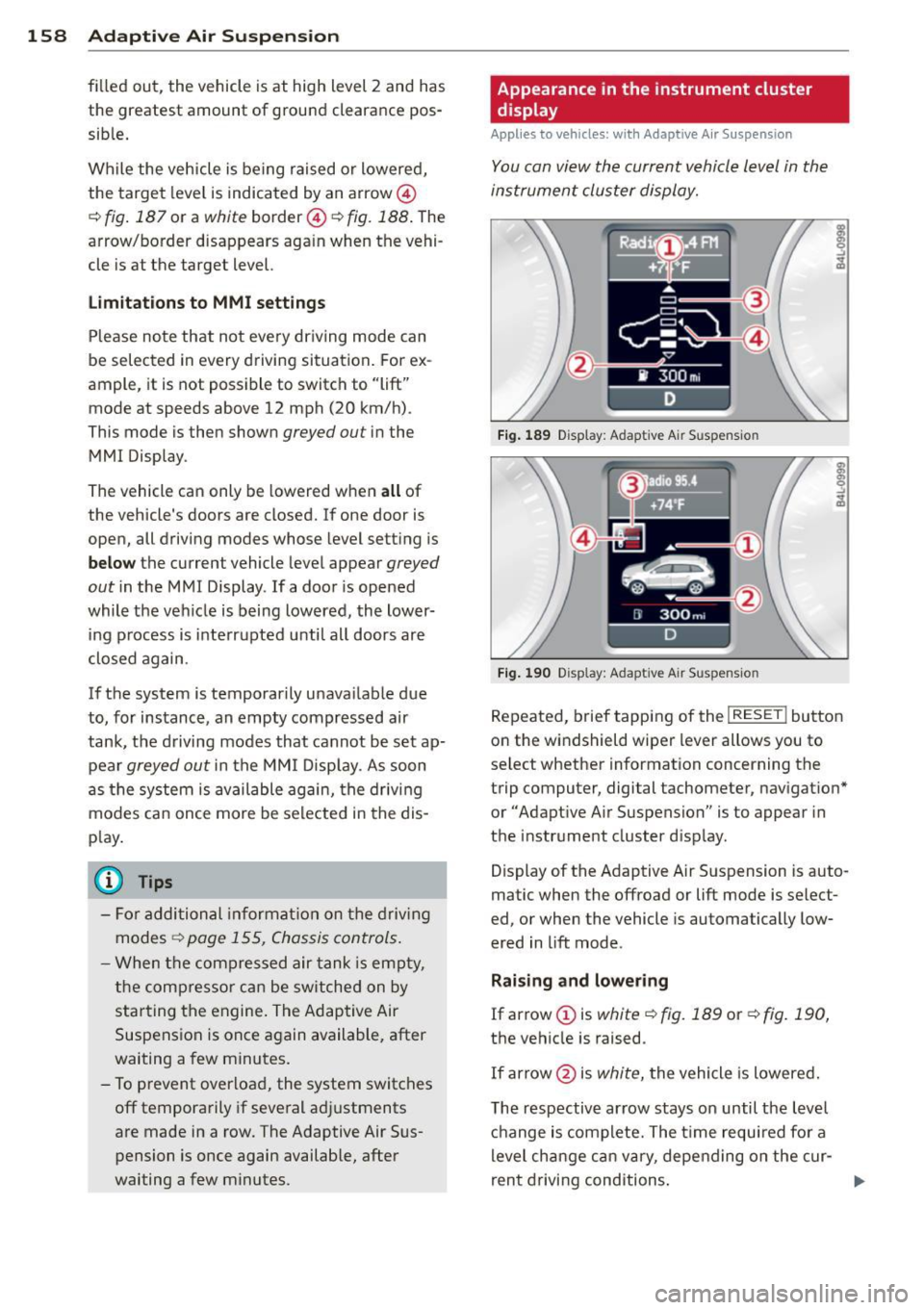
waiting a few minutes. Appearance in the instrument cluster
display
Applies to veh
icles: w ith Adapt ive A ir Suspens ion
You can view th e current vehicle l evel in the
instrument cluster display.
Fi g. 1 89 Display: Adaptive Air Suspension
F ig . 190 Display: Adaptive Air Suspension
Repeated, brief tapping of the I RESET ! button
on the windshield wiper lever allows you to
se lect whether information concerning the
trip computer, digital tachometer, nav igat ion*
or "Adapt ive A ir Suspension" is to appear in
t h e instrument cluster d isp lay .
Display of the Adaptive A ir S uspension is auto
matic when the offroad or lift mode is select
ed, or when the vehicle is automatically low
ered in lift mode.
Rai sing and lowe ring
If arrow
(J) is white c::> fig. 189 or c::> fig . 190,
the vehicle is raised.
If arrow @is
white, the vehicle is lowered .
The respective arrow stays on until the level ch ange is complete. The time requ ired fo r a
level change can vary, depending on the cur-
ren t drivi ng conditions . ..,_
Page 301 of 348
TPMS malfunction indicator is combined with
the low tire pressure tellta le . When the sys
tem detects a malf unct ion, the te lltale will
flash for approximately one minute and then remain cont inuously illuminated. This se
quence will continue upon subsequent vehicle
start-ups as long as the malfunction ex ists .
When the malfunct ion indicator is illuminat
ed, the system may not be able to detect or
sig nal low t ire pressure as intended . TPMS
malfunct ions may occur for a variety of rea
sons, including the installat ion of rep lace
ment or alternate tires o r whee ls on the veh i
cle that prevent the TPMS from funct io ni ng
p roperly. Always check the TPM S malfunct ion
tellta le after replacing one or more tires or
wheels on your vehicle to ensure that the re p lacement or a lternate tires and wheels allow
the TPMS to continue to function properly.
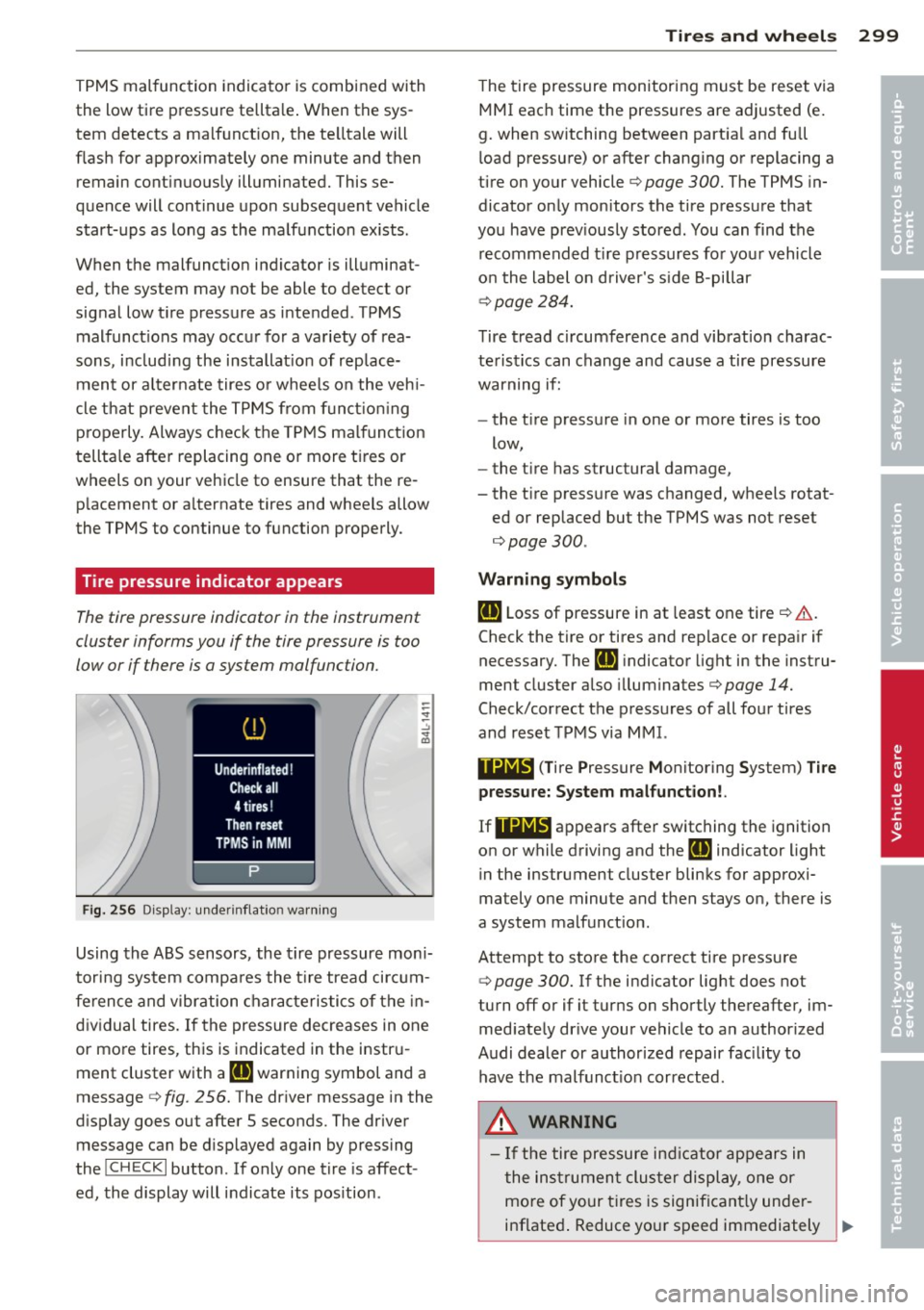
Tire pressure indicator appears
The tire pressure indicator in the instrument
cluster informs you if the tire pressure is too
low or if there is a system malfunction.
Fi g. 25 6 Display: under inflat io n warn ing
Using the ABS sensors, the tire pressure mon i
tori ng system compa res the t ire tread ci rcum
fe rence and vibration characteristics of the in
dividual tires. If the pressure decreases in one
or more tires, this is indicated in the instr u
ment cluster with a
IE warning symbol and a
message
c:> fig . 256. The driver message in the
d isplay goes out after 5 seconds. The driver
message can be d isplayed again by pressing
the
! CHECK I button . If only one tire is affect
ed, the display will indicate its pos ition .
Tire s an d wheel s 2 99
The t ire pressure monitoring must be reset via
MMI each time the pressures are adjusted (e.
g. when switching between part ia l and full
l oad pressure) or after changing or replacing a
tire on your vehicle
c:> page 300. The TPMS in
dicator on ly monitors the tire pressure that
you have prev iously stored . You can find the
recommended t ire pressures for you r vehicle
o n the label on driver's s ide 8-pillar
¢ page 284.
Tire tread circumference and vibration charac
teristics can change and cause a tire pressure
warning if:
- the t ire pressure in one or more tires is too
low,
- the t ire has structural damage,
- the t ire press ure was changed, wheels rotat-
ed or replaced but the TPMS was not reset
¢page 300.
Warni ng symbo ls
IE Loss of pressure in at least one tire ¢ &..
Check the tire or tires and rep lace or repa ir if
necessary. The
Rt] i ndicator light in the instru
ment cluster also illuminates¢
page 14.
Check/correct the p ressures of all four tires
and reset TPMS via MMI.
••NIB (T ire Pressure Monitoring System) Tir e
pressure: System malfunct ion!.
If llilW appears
after switching the ignition
on or while driving and the
IE indicator light
in the instrument cluster blinks for approxi
mately one minute and then stays on, there is
a system malfunct ion.
Attempt to store the correct tire pressure
¢
page 300. If the indicator light does not
turn off or if it turns on shortly thereafter, im med iate ly dr ive your vehicle to an author ized
Audi dealer or authorized repair fac ility to
have the malfunct ion corrected.
_&, WARNING
- If the tire pressure ind icator appears in
the ins trument cluster display, one or
mo re of your t ires is significant ly under
inflated . Reduce your speed immediately ..,
•
•
Page 302 of 348
300 Tire s and whee ls
and avoid any hard steering or braking
maneuvers. Stop as soon as possible and
check the tires and their pressures. In
flate the tire pressure to the proper pres
sure as indicated on the vehicle's t ire
pressure label~
page 284 . Driving on a
significantly under-inflated tire causes
the tire to overheat and can lead to tire
failure. Under-inflation also is likely to impair the vehicle's handling and stop
ping ability.
- T he driver is responsible for ma inta ining
the correct tire pressures . You must
check the tire pressures regular ly.
- Under certain conditions (such as a spor
ty driving style, winter conditions or unpaved roads), the pressure monitor ind i
cator may be de layed.
- Ask your authorized Audi dealer if run
flat tires may be used on your veh icle.
Your vehicle registration becomes invalid if you use these tires when not permit
ted . Damage to your veh icle or acc idents
could also result .
(D Tips
-The tire pressure monitoring system
stops working when there is an ESC/ABS
malfunction .
- Using snow chains may result in a system
malfunction.
- The tire pressure monitoring system on
your Audi was developed using t ires with
the "AO" or "RO" identification on the
tire sidewall
Q page 291 . We recom
mend using these t ires.
Reset tire pressure monitoring system
If the tire pressure is adjusted , wheels are ro
tated or changed, the TPMS must be reset via
MMI.
.. Before resetting the TPMS, the current pres
sures of all four tires must correspond to
the specified val ues. Adjust the tire pressure
and reset the pressure i n the t ire p ressu re monitoring system according to the load
you are carrying
Q page 284.
.. Turn on the ign ition.
.. Select:
!CAR ! function button> Systems *
contro l bu tto n > Tire p ressure monitoring >
S tor e now . Or
.. Select :
!CAR ! function button> Car sy s
tems *
contro l button > Se rvicing & che cks >
Tire pres sure monitoring > Sto re tir e pre s
s ure s.
(D Tips
Do not sto re the tire pressure if there are
snow cha ins on the tire.
Page 335 of 348
_______________________________ ___:I~n ~d ~e:.::x 333
Cleaning
A lcantara (synthetic suede) ... .. .. .. . 254
Eng ine compartment ... ... .. .. .. .. . 255
Exhaust tail p ipes ......... .. .. .. .. . 250
Fabrics and fabr ic coverings .. .. .. .. . 251
Instrument panel .............. .... 252
Inter ior . . . . . . . . . . . . . . . . . . . . . . . . . . 2 5 1
L eather .. ............ ...... .... .. 253
M MI con tro l conso le ...... .. .. .. .. . 251
M MI d isp lay ............. .... .. ... 2 51
Pl asti c and v inyl ....... ... .. .. .. ... 248
P lastic parts . ..... .... ... .. .. .. ... 252
Safety belts . ... .. .... ... .. .. .. ... 254
tr im strips . .. ........... .. .. .. ... 248
Trim str ips . ............. .... .. ... 248
C lean ing and pro tect ion .. ... .. .. .. .. . 2 45
Climate control . . . . . . . . . . . . . . . . . . . . . . 91
Synchron izing ............... ... ... . 92
Warm and cold ........... .... .. .. .. 9 1
Climate controls Air cond itioner o n/off ..... .. .. .. .. .. 93
A ir distribution .............. .... ... 94
A ir outlets ................. .... ... 96
A ir outlets (rear) ......... .. .. .. .. .. 96
A ir r eci rcula tion .......... .... .. .. .. 95
AUTO (st and ard setti ng) ... .. .. .. .. .. 94
B asic settings . . . . . . . . . . . . . . . . . . . . . . 99
Controls . . . . . . . . . . . . . . . . . . . . . . . . . . 92
Defrosting/defogging .. ... .. .. .... .. 94
Descr ipt ion . ............. .... .. .... 91
Energy management ...... .. .. .. .. .. 91
Fa n ... .. .. .. ........ ... .. ... ... .. 94
Front seat vent ilation ........ .... .. 100
H eated seats, front .............. .. 100
K ey coded sett ing ......... .. .. .. .. .. 9 1
Recirculation mode (autom atic) . . . . . . . 99
Recommended se tt ings . ... .. .. .... .. 91
Residua l heat ... .. .... ... .. .. .. .... 93
Sett ing t he temperature ... .. .. .. .. .. 94
Supp lementary heater ..... .. .. .. .. . 100
Synchroni zat ion . . . . . . . . . . . . . . . . . . . . 99
Turn ing on and off ........ .. .. .. .. .. 93
Using climate control economically . . . . 97
C lock ..... .. .. ... .. ..... ... .. .. .... 11
Closing Panor ami c slid ing su nroof .. .. .. .. .. .. S5
Coat hooks . . . . . . . . . . . . . . . . . . . . . . . . . 89
Cold tire inflat ion pressure ... .. .. .. .. . 284 Compass mir
ro r . . . . . . . . . . . . . . . . . . . . . 69
Compliance ....... .. ............... 328
Consume r Information . . . . . . . . . . 172, 325
Contacting N HTSA . . . . . . . . . . . . . . . . . . 172
Convenience key ... .. ................ 49
D river messages .. .. .......... .... . 108
Locking vehicl e . . . . . . . . . . . . . . . . . . . . . 50
START bu tton .. .. ................. 10 7
Star ting engi ne .. ............. .. .. 10 7
S TOP b utton ..... ... .. .. ..... ... .. 108
Switching engine off . .. ..... ... .. .. 108
Switching on ignition . .. ..... ... .. .. 107
Un locking vehicle . ................. . 49
Co nvertib le child sa fety se ats 212
Convertib le locking retractor
Act ivati ng ... .. .. .. . .. ... ... .. .. .. 217
Deact ivat ing . .. .. .. ............... 218
U si ng to secure a child safety seat 2.15, 217
Coolant system .. .. ................. 271
Cooling box in glove compa rtment ... .. . 88
Cooling System Expansion tank . .. .. . ... ...... ... .. 272
Cornering light . . . . . . . . . . . . . . . . . . . . . . 59
Cruise cont ro l
Changing speed .. .. . ... .... ... .. .. 112
Presetting your spe ed .. ..... ... .. .. 112
Switching off .. .. .. ............... 112
Switching on . .. .. .... .... ....... .. 111
Warning/ind ica tor lights .......... .. . 18
also refer to Adaptive cruise control ... 113
C ruising range . . . . . . . . . . . . . . . . . . . . . . . 24
(upholder . . . . . . . . . . . . . . . . . . . 78 , 85 , 86
D
Damp ing
r e fer to Adapt ive A ir Suspension . 155, 157
Data ......... .. .. .. . ... ....... .... 322
Dat a recorder . .. .. .. .. .... .... ..... 225
Date d isp lay . . . . . . . . . . . . . . . . . . . . . . . . 11
Daytime running lights. .. ..... ... . 57 , 58
De clara ti on of compliance
Adaptive cruise cont rol .. ....... .. .. 32 8
Audi s ide ass ist .... . .. ..... ... .. .. 328
Ce ll phone package .. ... .... ... .. .. 328
Convenience key .... . .. ..... ... .. .. 328
E lectronic immob ilizer ... .. ......... 328
•
•
Page 342 of 348
34 0 Index
Rear light
Defective .. ... . ...... ... ... ..... .. 23
Rear operation Four-zone automatic comfort a ir condi -
tioning .. .... ............ ... .... . 100
Rear seats
Adjusting seat ............... .. .... 75
E ntry ass ist ............ .. .. .. .. .. .. 75
F old ing seatback up and down .. .... .. 76
Rearview camera
refer to Parking systems . . . . . . . . . . . . 144
Rear view mirro r . . . . . . . . . . . . . . . . . . . . . 69
Rear w indow defogger . . . . . . . . . . . . . . . . 95
Red symbols . . . . . . . . . . . . . . . . . . . . . . . . 31
Refue lling ... ... .. ..... ... .. .. .... . 259
Gasoline inhibitor flap ... .. .. .... .. . 259
Release lever for hood ............... 264
Remote control garage door opener
( H omelink ®) .............. .. .. .. .. . 161
Remote control key . . . . . . . . . . . . . . . . . . . 38
Unloc king and locking ... .. .. ... ... .. 43
Remote rear lid release ..... .. .. .... .. 45
Repair manua ls .............. .. .... . 325
Repai rs
Airbag system . .. ..... ... .. .. .... . 198
Replacing a fus e ............ ... .. .. . 309
Replacing light bulbs ................ 312
Replacing tires and whee ls ... .. .. .... . 292
Report ing Safety Defects . . . . . . . . 172, 173
Reset b utton .... . ...... ... .. .. .... .. 1 2
R esidua l heat . . . . . . . . . . . . . . . . . . . . . . . 9 2
Retractor . . . . . . . . . . . . . . . . . . . . . . . . . . 179
Rims Cast alloy ... .. .. ..... ... .. .. .... . 250
Roof rac k . . . . . . . . . . . . . . . . . . . . . . . . . . . 83
L oading .... ... .......... .. .. .. .. .. 84
M ount ing loca tions ................. 84
Roof weight .................... ... .. 84
Rule of behavior offroad ... .. .. .. .. ... 238
s
Safe driving hab its . ..... ... .. .. .... . 165
Safety belt he ight ad justmen t .. .. .. .. . 18 1 Safety be
lt pos ition . . . . . . . . . . . . . . . . . 180
Safety be lt height adjustment ... .. .. 181
Safety be lts worn by pregnant women . 180
Safety be lt p re tensioner .......... .. .. 182
Se rv ice and d isposa l ............... 182
Safety be lts . . . . . . . . . . . . . . . . . . . . . . . . 179
clean ing ..... ... ................ . 254
Danger to passengers who do not wear a
sa fe ty belt ................... .... 17 7
F asten ing . .. ................. .. .. 179
Improperly wo rn ... ... ..... ... .. .. 182
Not worn ..... .. .. .... .... ... .. .. 177
Safety be lt position . . . . . . . . . . . . . . . . 180
Safety instr uctions . . . . . . . . . . . . . . . . . 178
Securing child safety seats .......... 215
Spec ial considerations for pregnant
women .......... ............... . 180
U nfastening ..... ................ . 181
Wa rning/ind icator light ............. 17S
Why YOU MUST wear them .......... 175
Worn p roperly ................ .. .. 177
Safety be lt warning light . . . . . . . . . 18, 175
Safety compliance sticker ..... ... .. .. 320
Safety eq uipme nt .. ................ . 165
Safety features for occupant restraint and
protection ...... ............ ....... 165
Safety guidelines Seat adjustment .................... 71
Sa fe ty i nstr uctions
E ngine compar tment ........... .... 264
f o r side cu rtain airbags . ..... ... .. .. 204
for using child safety seats . ... .. .. .. 208
for using safety belts . ... .... ... .. .. 178
Monitoring the Advanced Airbag Sys-
tem ............................. 197
Sa fety lock
Ignition key, a utomatic transmission .. 105
Safety systems Warning/ind icator lights .......... .. . 16
Seat adjustment Driver's seat . . . . . . . . . . . . . . . . . . . . . . . 71
D rive r's seat memo ry . . . . . . . . . . . . . . . . 73
Front passenger's seat . . . . . . . . . . . . . . . 72
Fron t seats ................... ..... 71
He ad restrai nts . . . . . . . . . . . . . . . 76, 168
Power . ... .... .. .. ... .. ..... ... .. . 72
Page 344 of 348
342 Index
Supplementary heater
Climate controls . . . . . . . . . . . . . . . . . . .
100
Suspension
refer to Adaptive Air Suspension . lSS , 157
Switches
Emergency flashers . . . . . . . . . . . . . . . . .
60
Rear window defogger . . . . . . . . . . . . . . . 95
Symbo ls
Red . .. .. .. ............. .. .. .. ... .
31
Yellow . .. .. ..... ..... ..... .. .... .. 34
Synchronization
Climate controls . . . . . . . . . . . . . . . . . . . .
99
Four- zone automatic comfort air condi-
tioning .. .... ........... .. .. .. .. .
100
Synchron izing climate control . ... .. .. . . 92
T
Tachometer . . . . . . . . . . . . . . . . . . . . . . . . . 11
Tank flap
Unlock ing the fuel filler flap by hand ..
261
TOI clean diese l
refer to Ad Blue ........... .. .. .. .. . 261
Tec hnical mod ifications ... .. .. .. .. .. . 328
Temperature
Climate controls . . . . . . . . . . . . . . . . . . . .
94
Four-zone automatic comfort a ir condi-
tioning .. ............... .. .. .... ..
98
Setting for the driver's and front pas
senger's side . . . . . . . . . . . . . . . . . . . . . .
94
Tether anchors ................ .. ... 222
Tether strap .. .... ..... ... .. .. .... . 222
The first 1,000 miles (1 ,500 km) a nd after-
wards . .. .. .. ... .......... .. .. .. .. .
234
Tie-down rings .. .. ..... ... .. .. .. .. .. 80
Tie-downs . . . . . . . . . . . . . . . . . . . . . . . . . 172
Tips fo r the environment
Saving fue l . . . . . . . . . . . . . . . . . . . . . . . .
84
Using the air conditioner only when nee-
essary ..... ... .. ..... ... .. .. .... . .
t. t . ® 1p
rornc ... ... ... .... ... ... ... .. .
Automatic Shift Lock (ASL) . .. .. .. .. .
D riving .. .... ............. .. .... .
Dynamic shift program ............ .
E mergency mode .... ... .. .. .. .... .
Kick -down . .... . ...... ... ... ..... .
97
137
139
137
140
141
140
Manua l shift program .. ... ... ... . .. 140
Se lector lever .... ... .. ..... ... .. .. 138
T ire pressu re .... .. ............. .... 286
Tire pressure monitoring system ....... 298
Loss of air pressure . . . . . . . . . . . . 18, 299
Malfunction . .. .................. . 299
Resetting tire pressures ............. 300
Tires .............................. 280
Service life .. .. .. ............. .. .. 290
speed rating letter code ........ .. .. 292
Tire manufacturing date ............ 292
Tire specifications ................. 292
Tread depth . .. .. ... ...... .... .... 290
Uniform tire quality grading ... .. .. .. 294
Winter tires ... .. ............. .... 295
Tires/Wheels
Low aspect ratio tires ...............
297
Tire p ressure monitoring system . 18, 298
Tires and veh icle load limits ........... 288
Tires and wheels
Checking tire pressure .. ... ... .. .. ..
286
Co ld tire inflation pressure . ... ... . .. 284
Dimensions .. .. .. ............. .. .. 291
General notes .. .. ... ...... .... .... 280
Glossary of tire and loading term inolo-
gy .......... ....................
281
New t ires and wheels . .. ....... ... .. 291
Replac ing ........................ 292
Snow cha ins ... .. ............. .... 296
T ires and veh icle load limits ......... 288
Wheel bolts ..... ... .. ..... ... .. .. 297
Winter tires ..... ... .. ..... ... .. .. 295
T ire service life .. .. ................ . 290
Tools ............................. 301
T orn o r frayed safety belts . . . . . . . . . . . . 178
Touch -up paint .. .. ................ . 249
Towing
Front eyelet . . . . . . . . . . . . . . . . . . . . . .
317
Rear eyelet .. .. .. ... ...... .... .... 317
Tow truck procedures ............... 316
TPMS
Tire pressure monitoring system ... ..
299
Tra ile r tow ing . .. .. ... ...... .... .... 241
Operating instr uctions ........ .. .. .. 242
Parking systems . ... .... .... ... .. .. 153
Technical requirements . . . . . . . . 241, 243