towing AUDI Q7 2013 Owner´s Manual
[x] Cancel search | Manufacturer: AUDI, Model Year: 2013, Model line: Q7, Model: AUDI Q7 2013Pages: 348, PDF Size: 87.72 MB
Page 161 of 348

Displaying the vehicle level
The current vehicle leve l is shown with seg
ments fi lled out in the segment disp lay @. If
on ly the bottom segment is filled out, the ve
hicle is at highway leve l. If all segments are
fi lled out, the vehicle is at high level 2 and has
the greatest amount of ground clearance pos
sible.
While the vehicle is being raised or lowered,
the target level is indicated by an arrow @
¢
fig. 189 or a white border @¢ fig. 190. The
arrow/border disappears aga in when the vehi
cle is at the target level.
Jacking mode when changing a flat tire
Applies to vehicles: with Adaptive Air Suspension
This mode must be activated in the MMI be
fore raising the vehicle with a jack or on a ve
hicle lift.
.,. Select: ICARI funct ion button> ! SETUP I
function button > Jacking mode . Or
.,. Select:
I CARI funct ion button > Car sys
tems *
control button > Servicing & checks >
Air susp.: tire change .
The vehicle jack mode must be activated be
fore changing a wheel so that the automatic
control processes fo r the a ir suspension do
not make lift ing with the vehicle jack more dif
ficult.
The check lamp
II in the instrument cluster
d isplay illuminates in vehicle jack mode.
0) Tips
The vehicle jack mode is switched off auto
mat ically at speeds above 9 mph (15 km/
h).
Towing a trailer
Appl ies to vehicles: with towing hitch and Adaptive Air
Suspension
Automatic lowering is not desirable when
towing a trailer.
.,. Se lect: ICARI function button > !SETUP I
function button > Towing mode. Or
Adaptive A ir Suspension 159
.,. Select: I CAR I function button > Car sys
tems*
control button > Vehicle settings >
Air susp.: towing.
As long as towing mode is activated, a vehicle
with a trai ler appears in the
adaptive air sus
pens ion
main menu.
Level Adjustment when towing a trailer
- Before hit ching up the trailer and before ad
jus ting the tongue weight at the trailer, the
automatic or comfort mode
must be se lect
ed so that the ve hicle can be at normal level
¢ page 157, MMI settings.
-If driving in dynamic mode is desired, this
mode
must be selected before hitching up
the trailer and before adjusting the tongue
weight. However, note that your vehicle is lowered and ground clearance is reduced.
- If you have to dr ive under difficult road con
ditions, you can select offroad or lift mode,
after hitch ing up the trailer or after adjust
ing the tongue weight .
- If the veh icle is at
normal level, and you se
lect offroad mode wh ile traveling at speeds
higher than 22 mph (35 km/h), the veh icle
w ill not be ra ised. Offroad mode will appear
as the active mode in the MMI Display.
- If the veh icle is in offroad mode at
high level
1 ,
it automatically lowers to normal level
when the vehicl e is t ravel ing at speeds ex
ceeding approximately 31 mph (SO km/h).
The vehicle is automatical ly raised to
high
level 1
again when the traveling speed falls
be low approx imately 25 mph (40 km/h).
Restrictions when operating with a trailer
When operating w ith a trailer, the lift mode
can only be selected up to about 12 mph (20
km/h) . Lift mode is automatically cance led
again when a speed of about 25 mph (40 km/
h) is exceeded.
If t he vehicle is in automatic, comfort, offroad
or lift mode before the trai ler towing mode is
activated, the dynamic mode cannot be acti
vated .
If t he vehicle is in dynamic mode before tow-
ing operation is activated, it can be driven in
IJI,-
Page 162 of 348
160 Adapti ve Air Su spen sion
this mode. If the suspension is switched from
this mode to another mode, dynamic mode
cannot be re-selected .
(D Tips
-For vehicles with a factory installed tow
ing hitch or a trailer hitch that was in
stalled later accord ing to factory specifi
cations, the system recognizes "Trailer
tow ing mode" and activates this specia l
mode automatically, as soon as the elec
trical connection on the trailer socket is
connected. The mode ceases a utomat i
ca lly when the elect rical connection to
t h e trai ler socket is d isconnected.
- If the tra iler towing mode has been acti
vated, the vehicle will not drop to the
l ow or highway level.
Cargo mode
Applies to vehicles: with Adapt ive Air Suspe nsio n
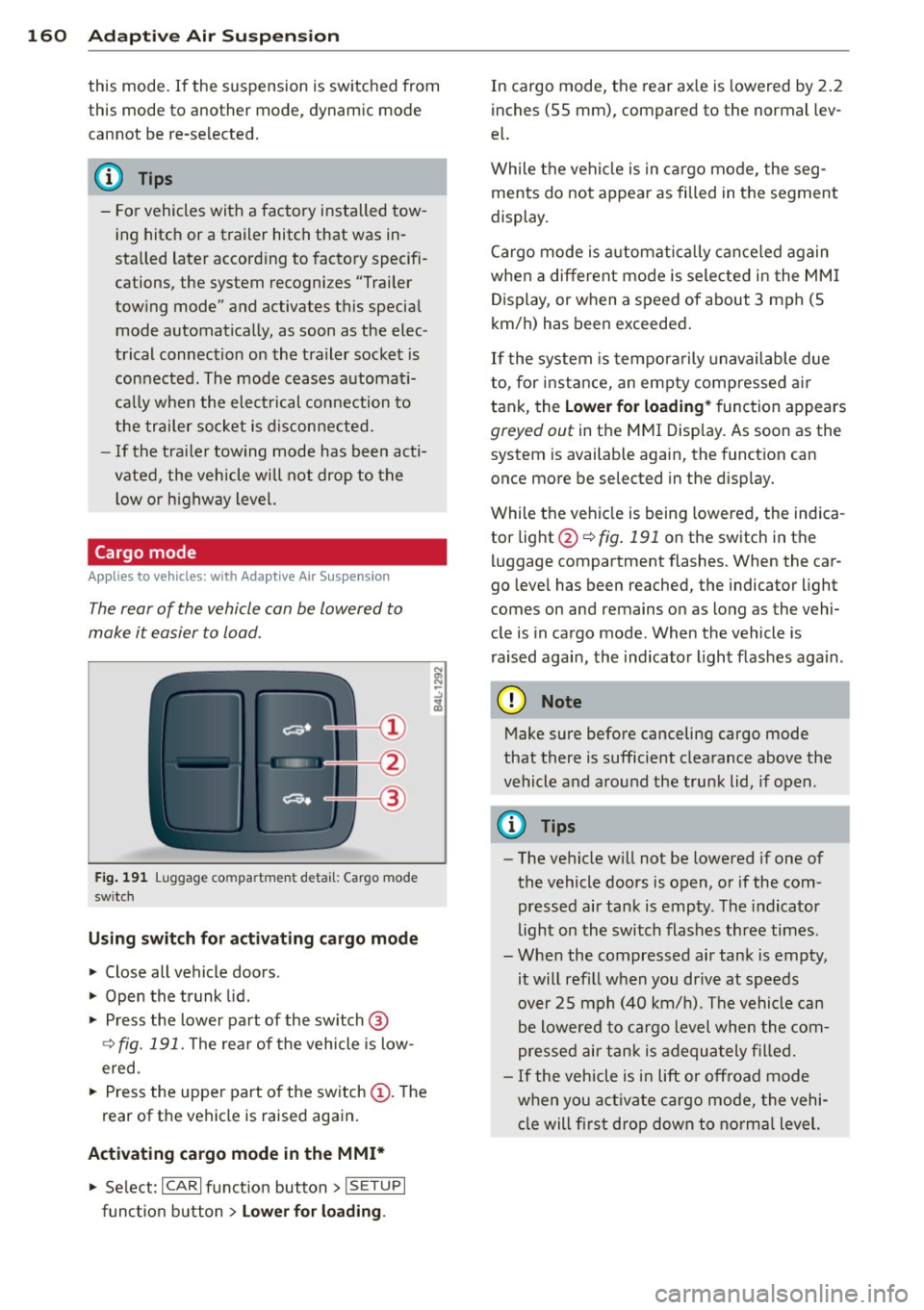
The rear of the vehicle can be lowered to
make it easier to load.
Fig. 191 Luggage compa rtment detail: Cargo mode
sw itch
Using switch for activating c argo mode
.. Close all vehicle doors .
.. Open the trunk lid.
.,. Press the lower part of the sw itch ®
~ fig. 191. The rea r of the vehicle is low
ered.
.. Press the uppe r part o f the sw itch
(D . The
rear of the vehicle is raised again.
Activating cargo mode in the MMI*
.. Se lect: ICARI funct ion button> I SE TUP I
func tion button > Lower for loading .
In cargo mode, the rear ax le is lowered by 2 .2
inches (55 mm), compared to the normal lev
el.
While the veh icle is in ca rgo mode, the seg
ments do not appear as filled in the segment
display.
Cargo mode i s automatic ally c an ce le d again
when a different mode is selected in the MM I
Display, or when a speed of about 3 mph (5
km/ h) has been exceeded.
If the system is tempora rily unavailable due
to, for instance, an empty compressed air
tank, the
Lower for loading * function appears
greyed out in the MMI Display. As soon as the
system is available again, the funct ion can
once more be selected in the disp lay.
While the vehicle is being lowered, the indica
tor light @~
fig. 191 on the switch in the
l uggage compartment flashes. When the car
go leve l has been reached, the indicator light
comes on and remains on as long as the vehi
cle is in cargo mode. When the vehicle is
r aised agai n, the indicator light flashes again.
(D Note
M ake sure before canceling cargo mode
that there is sufficient clearance above the
vehicle and a round the trunk lid, if open.
(D Tips
- The vehicle w ill not be lowered if one of
the vehicle doors is open, or if the com
pressed air tank is empty. The indicator
light on the switch flashes three times.
- Whe n the compressed air tank is empty,
it will refill when you drive at speeds
over 25 mph (40 km/ h). The vehicle can
be lowered to cargo level whe n the com
pres sed air tan k is a dequately filled.
- If the vehicle is i n lift or off road mode
when you act ivate cargo mode, the vehi
cle will fi rst drop down to no rma l level.
Page 173 of 348
Stowing luggage
Loading the luggage compartment
All luggage and other objects must be prop
erly stowed and secured in the luggage com
partment.
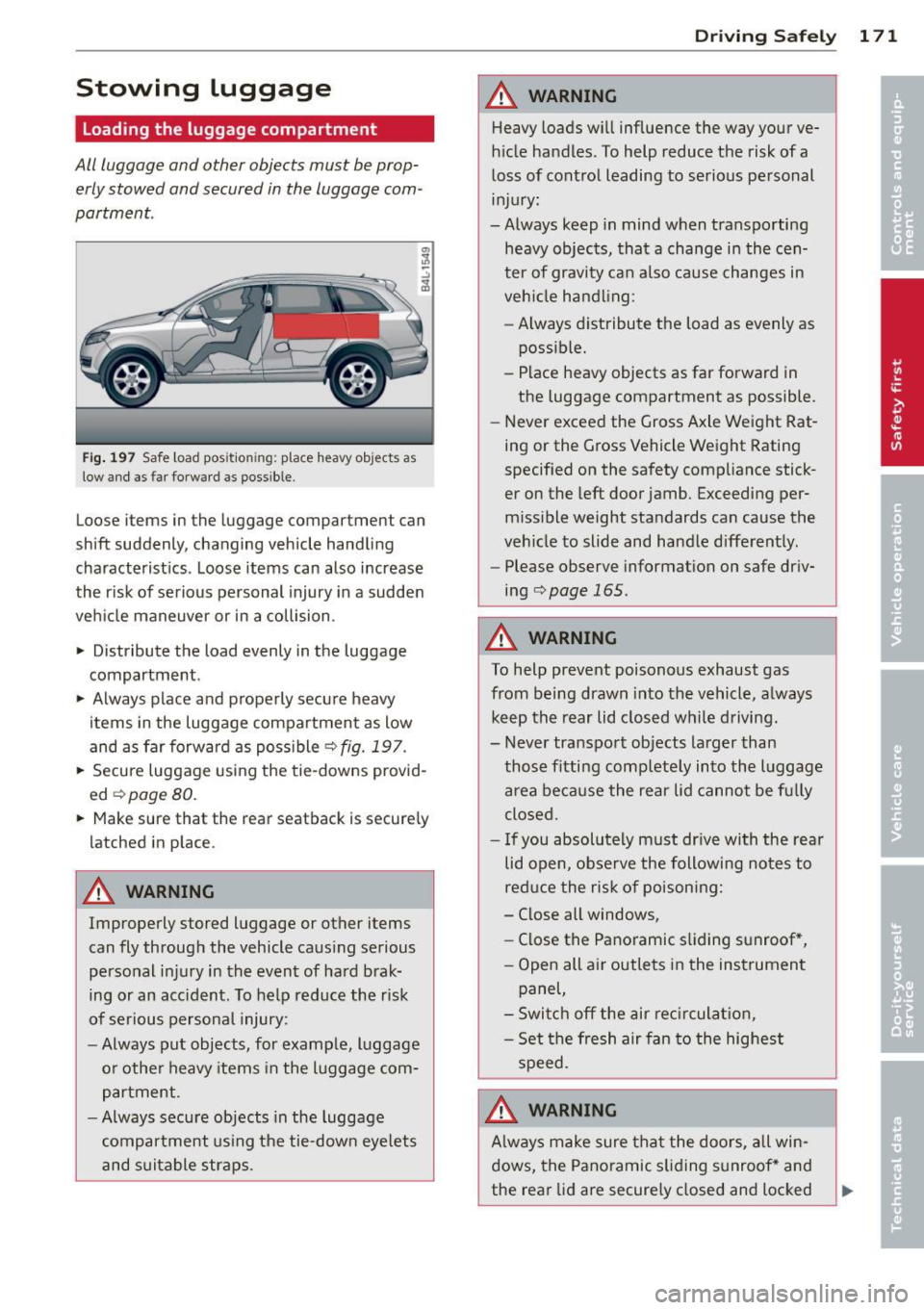
Fig . 197 Safe load pos ition ing: place heavy objects as
low and as far forward as possible.
Loose items in the luggage compartment can
shift suddenly, changing vehicle handling
characteristics . Loose items can also increase
the risk of serious personal injury in a sudden
veh icle maneuver or in a collision .
.. Distribute the load evenly in the luggage
compartment.
.. Always place and properly secure heavy
items in the luggage compartment as low
and as far forward as possible
<=>fig. 197.
.. Secure luggage using the tie-downs provid
ed
¢ page 80.
.. Make sure that the rear seatback is secure ly
latched in place.
A WARNING
Improperly stored luggage or other items
can fly through the vehicle causing serious
personal injury in the event of hard brak
ing or an acc ident. To help reduce the risk
of serious personal injury:
- Always put objects, for example, luggage
or other heavy items in the luggage com
partment.
- Always secure objects in the luggage
compartment us ing the tie-down eye lets
and suitable straps .
Drivin g Sa fely 1 71
A WARNING
Heavy loads will influence the way your ve
hicle handles. To help reduce the risk of a
loss of control leading to serious personal
injury:
-Always keep in mind when transporting heavy objects, that a change in the cen
ter of gravity can also cause changes in
veh icle handling:
- Always distribute the load as evenly as
possible.
- Place heavy objects as far forward in
the luggage compartment as possible.
- Never exceed the Gross Axle Weight Rat
ing or the Gross Vehicle Weight Rating
specified on the safety compliance stick
er on the left door jamb. Exceeding per
missible weight standards can cause the
veh icle to slide and handle differently.
- Please observe information on safe driv
ing
<=>page 165 .
A WARNING
To help prevent poisonous exhaust gas
from being drawn into the vehicle, a lways
keep the rear lid closed while driving.
- Never transport objects larger than
-
those fitting comp letely into the luggage
area because the rear lid cannot be fu lly
closed .
- If you absolutely must dr ive with the rear
lid open, observe the following notes to
reduce the risk of poisoning:
- Close all windows,
- Close the Panoramic sliding sunroof *,
- Open all air outlets in the instrument panel,
- Switch off the air rec irculat ion,
- Set the fresh a ir fan to the highest
speed.
A WARNING
A lways make sure that the doors, all win
dows, the Pano ramic s liding sunroof* and
the rear lid are securely closed and locked
Page 231 of 348
-Before descending a steep grade, reduce
speed and shift transmiss ion into a lower
gear or lower driving range. Do not ride
the brakes or hold the pedal down too
long or too often. This could cause the
brakes to get hot and dimin ish braking
efficiency.
- Do not "r ide the brakes" by resting your
foot on the pedal when you do not intend
to brake. Th is may cause the brakes to
overheat, prema ture wear and increased
stopping distance .
- Under certain climat ic and operating
condit ions such as passing through wa
ter, driving in heavy rain or after washing
the vehicle, the effectiveness of the
brakes can be reduced . In winter, ice can
accumulate on the brake pads, linings,
discs and drums. Carefully apply brakes
for a test . Brakes will dry and ice coat
ings will be cleaned off after a few care
ful brake applications.
- Driv ing for an extended period of time on
salt-covered roads w ithout us ing your
brakes can also affect braking efficiency .
Clean off accumulated salt coating from
brake discs and pads w ith a few caref ul
brake applicat ions.
- If you damage the front spoiler, or if you
install a different spoiler, be sure the air
flow to the front brakes is not obstruct
ed. Otherwise the brake system could
overheat reducing the effectiveness of
the entire brake system.
- Failure of one brake circuit will impair
the braking capability resulting in an in
creased stopp ing distance. Avoid driv ing
the vehicle and have it towed to the near
est author ized Audi dealer or qualified
workshop .
Brake booster
The brake booster adds extra braking power.
The brake booster works with vacuum pres
sure which is created only when the engine is
running¢ &,.
Int ellig ent technolog y 229
A WARNING
-Never let the veh icle roll to a stop with
the engine shut off .
- If the brake booster is not working, for
example when towing your vehicle, or because the brake booster has somehow
been damaged, the brake pedal must be
pressed considerably harder to make up
for the lack of booster assistance .
Functioning of Anti-Lock Brake System
(ABS)
ABS prevents the wheels from locking up un
der braking.
T he ABS contributes effect ively to vehicle con
trol s ince it preve nts the whee ls from
locking
when the brakes are applied. This means that
the vehicle remains steerable and is less likely
to skid .
With ABS y ou do not n eed to pump the
bra ke. Just h old t he br ake ped al d own .
However, do not expect the ABS to shorten
braking distance under
all circumstances.
When dr iving on g ravel or on new ly fallen
snow o n top of icy s urfaces, braking dis tance
may be even longer, therefore, under these
circumstances, it is especia lly important that
you drive s low ly and with great care.
How the ABS s ystem works
An a utomat ic check is made when a speed of
about 12 mph (20 km/h) is reached . When
th is happens, a pumping noise can be heard.
If an ind iv idual whee l begi ns to rotate too
s low ly in relation to vehicle speed and tends
to lock, the ABS automatically reduces brake
pressure to prevent that whee l from locking .
T his automatic adjustment p rocess will cause
a
sli ght vibrati on of the brake pedal and some
noises to a le rt you that ve hicle speed m ust be
adapted to existing road and traffic condi
tions. •
•
Page 243 of 348
Trailer towing Driving with a trailer
General information
Your Audi was designed primarily for passen
ger transportation .
If you plan to tow a trailer, please remember
that the additional load will affect durability,
economy and performance .
Trailer towing not only places more stress on
the vehicle, it also calls for more concentra
tion from the driver.
For this reason, always follow the operating
and driving instructions provided and use
common sense.
(D Note
If you are going to tow a trailer, you must
activate the trailer operation mode
q page 159, Towing a trailer.
Technical requirements
Trailer hitch
Use a weight-carrying hitch conforming to the
gross trailer weight. The hitch must be suita ble for your vehicle and trailer and must be
mounted securely on the vehicle's chassis at a
technically sound location. Use only a trailer
hitch with a removable ball mount. Always
check with the trailer hitch manufacturer to
make sure that you are using the correct
hitch.
Do not use a bumper hitch.
The hitch must be installed in such a way that
it does not interfere with the impact-absorb
ing bumper system. No modifications should
be made to the vehicle exhaust and brake sys
tems . From time to time, check that all hitch
mounting bolts remain securely fastened.
When you are not towing a trailer, remove the
trailer hitch ball mount. This prevents the
hitch from causing damage should your vehi
cle be struck from behind~.&.
Trailer towing 241
Trailer brakes
If your trailer is equipped with a braking sys
tem, check to be sure that it conforms to all
regulations.
The trailer hydraulic brake system must not be
directly connected to the vehicle's hydraulic
brake system
q .& .
Safety chains
Always use safety chains between your vehicle
and the trailer.
Trailer lights
Trailer lights must meet all regulations. Be
sure to check with your authorized Audi dealer
for correct wiring, switches, and relays.
Mirrors
If you are unable to see the traffic behind you
using the regular outside mirrors, then you
must install extended mirrors.
It is important
that you always have clear vision to the rear.
_&. WARNING
-If a trailer has electrical brakes please
note that these brakes are not activated
by the factory-fitted control unit -risk of
accident!
- After removing the trailer hitch, do not
store it in your vehicle. In case of sudden
braking, the hitch could fly forward and
injure you or your passengers.
- Never install a "weight distributing" or
"load equalizing" trailer hitch on your ve
hicle. The vehicle was not designed for
these kinds of trailer hitches. The hitch
attachment can fail, causing the trailer
to tear loose from the vehicle.
- The Gross Vehicle Weight Rating for your
vehicle, found on the safety compliance
label on the driver's side B-pillar, must
never be exceeded under any circumstan
ces. Exceeding the Gross Vehicle Weight
Rating of your vehicle is likely to damage
your vehicle, and such damage will not
be covered by your Limited New Vehicle
-
Warranty. Exceeding the Gross Vehicle ~
•
•
Page 244 of 348
242 Trailer towing
Weight Rating will also change the per
formance and handling characterist ics of
your vehicle, which could cause a crash result ing in serious injury or death .
- The Gross Vehicle Weight Rat ing for your
vehicle would be exceeded if your vehicle
is simultaneously equipped with Panor
am ic sliding sunroof; th ird-row seating;
t railer towing equipment (factory or
dealer-installed) , and running boards
(deale r-installed) . UNDER NO CIRCUM
STANCES MAY ALL SUCH ITEMS BE IN
STALLED ON THE SAME VEHICLE.
Operating instructions
MAX 6.9"
MAX175mm
E
Ill E Ill ... Q) m
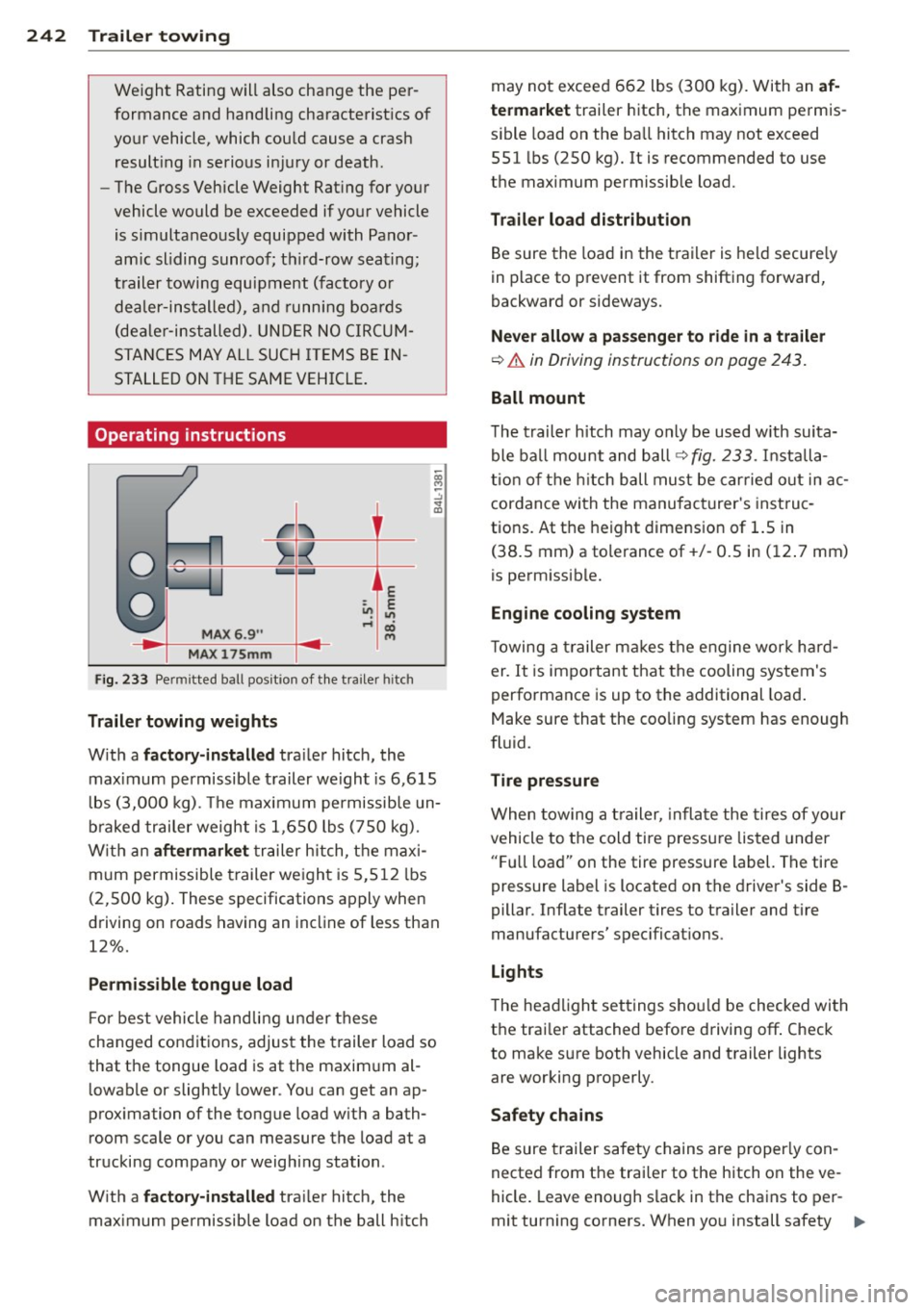
Fig. 233 Permi tted ba ll pos it ion of t he t ra iler h itc h
Trailer towing weights
With a factory-installed trailer hitch, the
maximum permissible trailer weight is 6,615
l bs (3,000 kg) . Th e maximum permissible un
braked trailer weight is 1,650 lbs (750 kg).
With an
aftermarket trailer hitch, the maxi
m um permissible trailer weight is 5,512 lbs
(2,500 kg) . These specifications apply when
driving on roads having an incline of less than
12%.
Permissible tongue load
F or best vehicle handling under these
changed condit ions, adjust the trailer load so
that the tongue load is at the maximum al
lowable or slightly lower . You can get an ap
prox imation of the tongue load w ith a bath
room scale or you can measure the load at a
trucking company or weighing station .
With a
factory-installed trailer hitch, the
maximum permissible load on the ball h itch may not exceed 662 lbs
(300 kg). With an
af
termarket
trailer hitch, the maximum permis
s ib le load on the ba ll hitch may not exceed
551 lbs (250 kg). It is recommended to use
the maximum permissible load.
Trailer load distribution
Be sure the load in the trailer is held secure ly
in place to prevent it from shifting forward,
backward or sideways.
Never allow a passenger to ride in a trailer
¢&. in Driving instructions on page 243.
Ball mount
The trailer hitch may only be used w ith suita
ble ball mount and ball¢
fig. 233. In stalla
tion of the hitch ball must be carried out in ac
cordance with the manufac turer's instruc
tions. At the height dimension of 1.5 in
(38.5 mm) a tolerance of +/- 0.5 in (12. 7 mm)
is permissib le.
Engine cooling system
Towing a trailer makes the engine work ha rd
er . It is important that the cooling system's
performance is up to the additional load .
Make sure that the cooling system has enough
fluid .
Tire pressure
When towing a trailer, infla te the tires of your
vehicle to the cold tire pressu re listed under
" Full l oad" on the tire pressure label. The tire
pressure label is located on the driver's side B
pillar . Inflate trailer tires to trailer and tire
manufacturers' spec ificat ions .
Lights
The headlight settings shou ld be checked with
the trai ler attached before driving
off. Check
to make sure both vehicle and trailer lights
are working properly.
Safety chains
Be sure trailer safety chains are properly con
nected from the trai ler to the h itch on the ve
hicle. Leave enough slack in the chains to per
mit turning corners. When you install safety
IJ,,
Page 245 of 348
chains, make sure they will not drag on the
road when you are driving.
The cha ins shou ld cross under the trai le r
tongue to prevent it from dropping in case of
separation from the hitch.
(D Note
If you are going to tow a trailer, you must
activate the trailer operation mode
¢page 159, Towing a trailer.
Driving instructions
Driving with a trailer always requires extra
core and consideration.
To obtain the best poss ible handling of vehicle
and traile r, p lease note the following:
.,. Do not tow a loaded tra iler whe n your car it
self is not loaded.
.,. Be especially careful when passing other
vehicles .
.. Observe speed limits.
.. Do not d rive at the maximum permissible
speed.
.. Always apply brakes early.
.. Monitor the temperature gauge.
Weight distribution
Tow ing a loaded trai ler with an empty ca r re
sults in a high ly unstable distribution of
weight. If this cannot be avoided, drive at very
l ow speeds only to avoid the risk of losing
steering control.
A "balanced" rig is easier to operate and con
trol. This means that the tow vehicle should
be loaded to the extent possible and permiss i
ble, while keeping the trailer as light as possi
ble under the circumstances. Whenever possi
ble, transfer some cargo to the luggage com
partment of the tow vehicle wh ile observing
tongue load requirements and vehicle loading
considerations .
Speed
The higher the speed, the more difficult it be
comes for the driver to control the rig . Do not
drive at the maximum permissible speed. Re-
Trailer towing 243
duce your speed even more if load, weather or
wind conditions are unfavorable - particularly
when going downhill.
Red uce veh icle speed
immediately if the trail
er shows the slightest sign of sway ing.
Do not
try to stop the swaying by accelerating.
Observe speed limits. In some areas, speeds
f or vehicles towing trailers are lower than for
regular vehicles.
Always apply brakes early. When driving
downh ill, shift into a lowe r gear to use the en
gine braking effect to slow the vehicle. Use of
the brakes alone can cause them to overheat
and fail.
Coolant temperature
The coolant temperature gauge¢ page 10
must be observed carefully. If the need le
moves close to the upper end of the scale, re
duce speed immediately and/or turn off the
air conditioner.
If the coolant temperature warning light in
the instrument cluster starts flashing ., pull
off the road, stop and let the engine
idle for
about two minutes to prevent heat build -up .
A WARNING
Anyone not properly restrained in a mov
ing vehicle is at a much greater risk in an
accident. Never let anyone ride in your car
who is not properly wearing the restraints
prov ided by Audi .
Trailer towing tips
Important to know
-
Your vehicle handles differently when towing
a trai ler because of the additional weight and
different weight distr ibution. Safety, perform
ance and economy will great ly depend on how
carefully you load your trailer and operate
your rig.
Before you actua lly tow your tra iler, practice
turning, stopping and backing up in an area
away from traffic. Keep practicing until you
•
•
Page 246 of 348
244 Trailer towing
have become comp lete ly familiar with the way
your vehicle-trailer combination behaves and responds.
Backing up is difficult and requires practice.
Backing up with a trai ler genera lly requires
steering action opposite to that when backing
up your veh icle without a trailer .
Maintain a greater distance be tween your ve
hicle and the one in front of you. You will need
more room to stop. To compensate for the
trailer, you will need a larger than normal
turning radius.
When passing, remember that you cannot ac
celerate as fast as you normally would be
cause of the added load. Make sure you have
enough room to pass . After passing, allow
plenty of room for your trailer before chang
ing lanes again .
Avoid jerky starts, sharp turns or rapid lane
changes.
- Do not tow a trailer during the break-in
period of your vehicle.
- If you tow a trailer, your Audi may re
quire more freq uent maintenance due to
the extra load
c> page 325.
Parking on a slope
Do not pork on a slope with a trailer. If it can
not be avoided, do so only after doing the fol
lowing:
When parking:
.. Apply the foot brake .
.. Have someone place chocks under both the
vehicle and the trai ler wheels .
.. With chocks in p lace, slowly re lease the
brakes until the wheel chocks absorb the
load .
.. Turn the wheels towards the curb .
.. Apply the parking brake .
.. Move the selector lever to
P.
When restarting after parking:
.. Apply the foot brake. ..
Start the engine.
.. Move the se lector lever to
D.
.. Release the parking brake and s low ly pull
out and away from the wheel chocks.
.. Stop and have someone retr ieve the wheel
chocks .
(D Tips
If you move the selector lever of the auto
matic transmission to
P before applying
the parking brake and before blocking the
wheels, you may have to use more fo rce
l ater to move the lever out of the
P posi
tion.
Page 291 of 348
other things that you plan to
transport so that you can make sure that your vehicle will not
be overloaded.
Steps for Determining
Correct Load Limit
1. Locate the statement "THE
COMBINED WEIGHT OF OC
CUPANTS AND CARGO
SHOULD NEVER EXCEED XXX KG OR XXX LBS"on your vehi
cle's placard (tire inflation
pressure label)
¢ page 284,
fig. 251.
2.
Determine the combined
weight of the driver and pas sengers that will be riding in
your vehicle.
3. Subtract the combined weight of the driver and passengers from
"XXX" kilo
grams or
"XXX" pounds
shown on the sticker
¢ page 284, fig. 251 .
4. The resulting figure equals
the available amount of car
go and luggage load capaci
ty . For example, if the
"XXX"
amount equals 1400 lbs.
and there will be five 150
lbs. passengers in your vehi
cle, the amount of available
cargo and luggage load ca-
Tires and wheels 289
pa city is 650 lbs. (1400-7 so
(5 X 150) = 650 lbs.)
5. Determine the combined
weight of luggage and cargo
being loaded on the vehicle .
That weight may not safely exceed the available cargo
and luggage load capacity
calculated in Step
4.
6. If your vehicle will be towing
a trailer, load from your trail
er will be transferred to your
vehicle. Consult this manual
to determine how this re
duces the available cargo
and luggage load capacity of
your vehicle.
~ Check the tire sidewall
( ¢ page 291 , fig. 255) to de
termine the designated load rating for a specific tire.
•
•
'
Page 303 of 348
What do I do now?
Jack, tools and
inflatable spare tire
Tools
The tool kit is located in the luggage com
partment under the cargo floor cover.
F ig . 257 Luggage compa rtme nt: ve hicle tool ki t
The on board tool kit includes:
- Hook for removing wheel covers*
- Plastic hook to remove wheel bolt cove rs*
- Wheel bolt wrench
- Alignment pin for changing wheels
- Screwdriver with reversible blade
- 10 x 13 open ended wrench
- Towing eye
@ Tips
Some of the onboard items listed above
are prov ided on certa in models only or are
optional extras .
What do I d o now ? 301
Jack and folding chocks
The jack and the folding chocks are located in
the luggage compartment under the cargo
floor cover.
F ig . 258 Luggage compar tme nt ve hicle jack and fold ·
i ng chocks
--------
F ig. 259 Opening fo ldi ng chocks
Vehi cle jack
The jack is located under the tool kit
¢ fig . 258. Before storing the jack, make sure
it is wound back down as far as it will go.
Folding chocks
Two unassembled fo lding c hocks are attached
to the foam section at the front with the jack
¢fig . 258.
Re lease the two hook-and-loop fasteners, and
remove the two chocks. To use the chocks, you
first have to raise the support plate
¢ fig . 259 (D and then insert the locking plate
with the two "tabs" into the elongated ho les
in the base plate @¢.&. .
A WARNING
-The chock cannot fulfill its function and
may lose its stability if the "tabs" on the
support p late are not inse rted co rrectly
into the elong ated holes in the base