turn signal AUDI Q7 2013 Owner´s Manual
[x] Cancel search | Manufacturer: AUDI, Model Year: 2013, Model line: Q7, Model: AUDI Q7 2013Pages: 348, PDF Size: 87.72 MB
Page 124 of 348
122 Adaptive cruise control
select information from the trip computer,
navigation system* or adaptive cruise control.
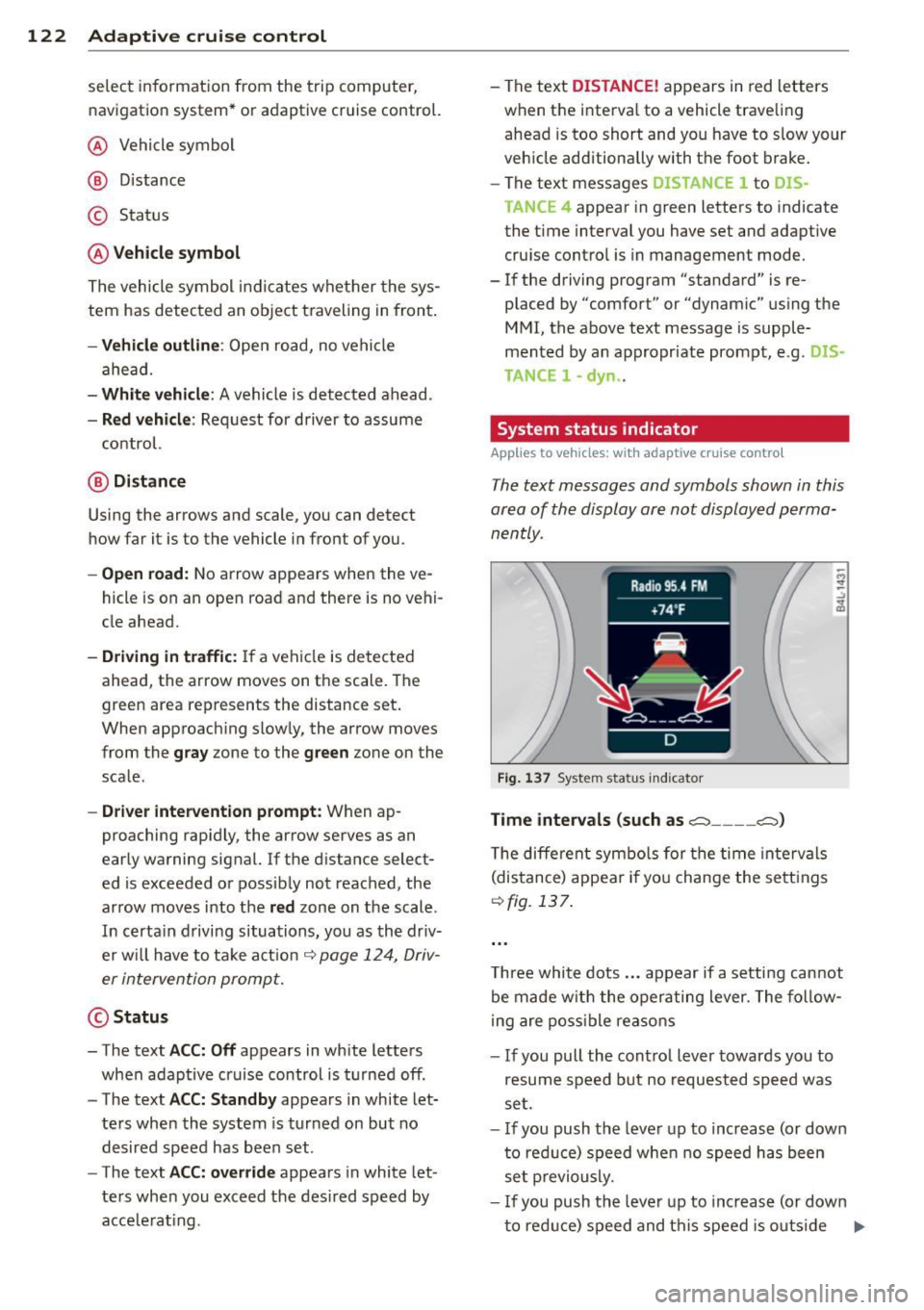
@ Vehicle symbol
@ Distance
© Status
@Vehicle symbol
The vehicle symbol indicates whether the sys
tem has detected an object traveling in front .
-Vehicle outline: Open road, no vehicle
ahead.
- White vehicle: A vehicle is detected ahead.
-Red vehicle : Request for driver to assume
control.
@ Distance
Using the arrows and scale, you can detect
how far it is to the vehicle in front of you.
- Open road: No arrow appears when the ve
hicle is on an open road and there is no vehi
cle ahead.
- Driving in traffic: If a vehicle is detected
ahead, the arrow moves on the scale. The
green area represents the distance set.
When approach ing slow ly, the arrow moves
from the
gray zone to the green zone on the
scale .
-Driver intervention prompt : When ap
proaching rap idly, the arrow serves as an
early warning signal. If the d istance select
ed is exceeded or possibly not reached, the
arrow moves into the
red zone on the scale.
In certa in driving situations, you as the driv
er w ill have to take action
c::> page 124, Driv
er intervention prompt.
@Status
- The text ACC: Off appears in white letters
when adaptive cruise control is turned off.
- The text
ACC: Standby appears in white let
ters when the system is turned on but no
desired speed has been set.
- The text
ACC: override appears in white let
te rs when you exceed the desired speed by
acce lerat ing. - The text
DI
STANCE! appears in red letters
when the interva l to a vehicle traveling
ahead is too short and you have to slow your
veh icle additionally with the foot brake.
- The text messages
DISTANCE 1 to DIS
TANCE
4 appear in green letters to indicate
the t ime interval you have set and adapt ive
cruise control is in management mode.
- If the driving program "standard" is re
placed by "comfort" or "dynam ic" using the
MMI , the above text message is supple
mented by an appropriate prompt, e.g.
DIS
TANCE
1 -dyn .
System status indicator
Applies to vehicles : wi th adap tive c ruise contro l
The text messages and symbols shown in this
area of the display are not displayed perma
nently.
Fig. 137 System status indicator
Time intervals (such as.::::::, ____ .::::::,)
The different symbols for the time intervals
(distance) appear if you change the settings
c::>fig. 137.
Three white dots ... appear if a setting cannot
be made w ith the operating lever. The follow
ing are possible reasons
- If you pull the cont ro l lever towards you to
resume speed but no requested speed was
set.
- If you push the lever up to increase (or down
to reduce) speed when no speed has been
set previously.
- If you push the lever up to increase (or down
to red uce) speed and this speed is outs ide
Ill>
Page 131 of 348
Audi side assist Lane Change Assistant
Description
App lies to vehicles: with side assist
The side assist helps you when changing
lanes .
AUDl Q7
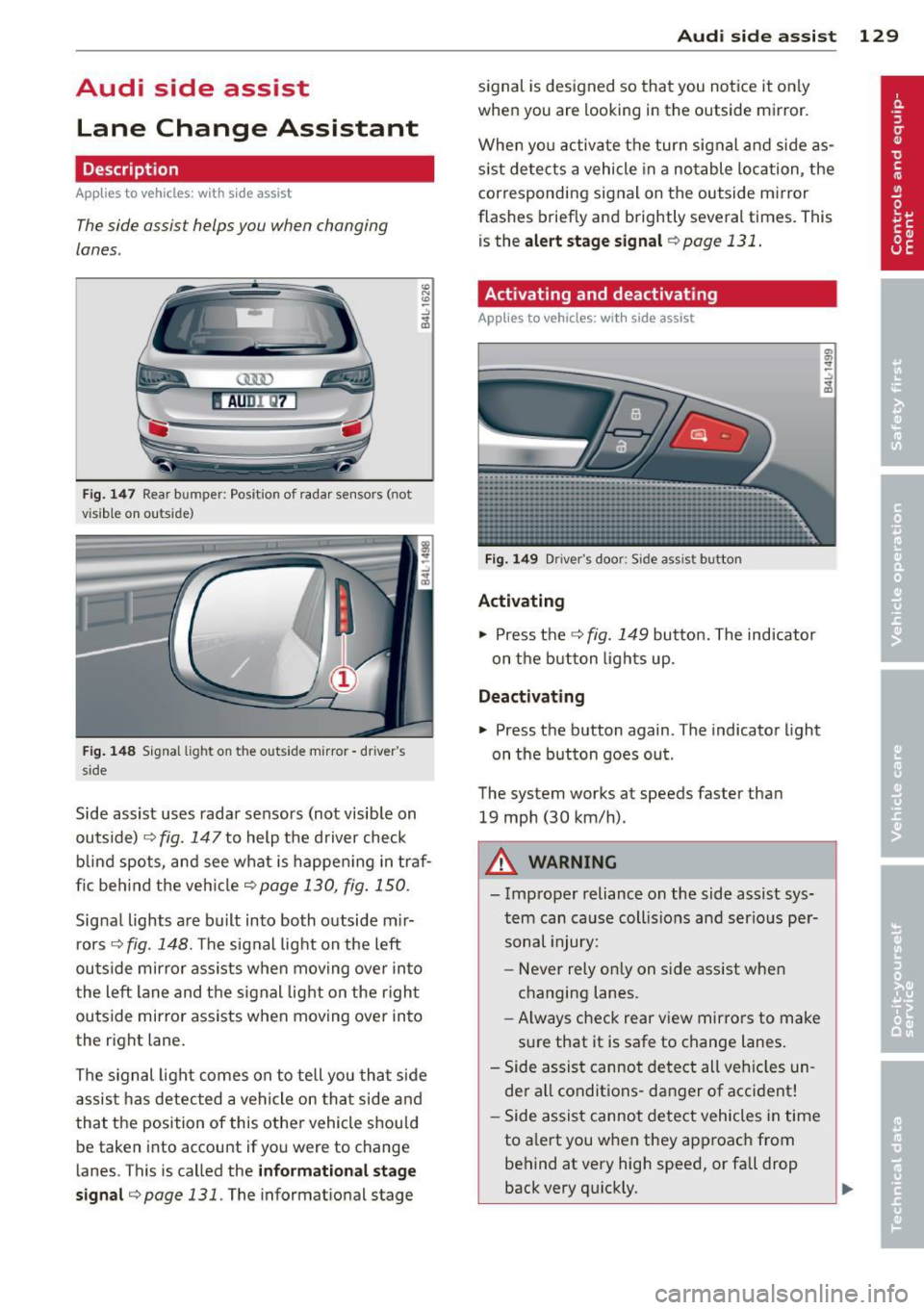
Fig. 147 Rear b umper: Pos it ion of radar sensors (not
v isib le on outside)
Fig . 148 Signal light on the outside mirror -driver 's
s ide
~ -..:, .. (D
Side assist uses radar sensors (not visib le on
outside) ¢
fig. 147 to help the driver check
b lind spots, and see what is happen ing in traf
fic beh ind the veh icle
¢ page 130, fig. 150.
Signal lights are bu ilt into both outside m ir
r ors ¢
fig. 148. The signal light on the left
outside mirror assists when moving over into
the left lane and the signal light on the r igh t
ou tside mirror assists when moving over in to
the right lane .
The s ignal light comes on to tell you that side
assis t has detec ted a vehicle on tha t side and
that t he position of this othe r vehicle should
be taken into account if yo u were to change
lanes . This is called the
informatio nal st age
sign al¢
page 131. The informat ional stage
Aud i side assist 129
signal is designed so that you notice it on ly
when you are looking in the outside mirror.
When yo u activate the turn signal and side as
s ist de tects a vehicle in a no table location, the
corresponding signal on the outside mi rror
flashes briefly and brightly several times. This
is the
a lert stage signal ¢ page 131 .
Activating and deactivating
Applies to vehicles: wit h side assist
Fi g. 14 9 Drive r's doo r: Side assist button
Activating
.,. Press the ¢
fig. 149 button. The ind icator
on the b utton lights up.
Deactivating
.,. Press the button again. The indicator light
on the button goes out .
The system works at speeds faster than
19 mph (30 km/h) .
A WARNING
-Imp roper reliance on the side assist sys
tem can cause collis ions and serio us pe r
sonal injury:
- Never rely on ly on side assist when
changing lanes.
- Always check rear view mirrors to make
su re that it is safe to change lanes.
- Side assist canno t detect all veh icles un
de r all conditions- danger of accident!
- Side assist cannot detect vehicles in time
to a lert you w hen they app roac h from
behind at very hig h speed, or fall drop
back very qu ickly.
~
Page 132 of 348
130 Audi side assist
-The radar sensor's vision can be reduced
or entirely blocked by rain, snow, and
heavy spray . This can result in side assist
not adequately detecting vehicles or, in
some cases, not detecting them at all.
Always keep an eye on the direction you
are traveling and the relevant area
around the vehicle.
- Please note that side assist indicates
there are approaching vehicles, or
vehicles in your blind spot, only after
your vehicle has reached a driving speed
of at least 19 mph (30 km/h).
- Side assist signal does not work around
tight corners (turning radius less than
328 feet, or 100 m).
- Side assist is no replacement for the driv
er's full attention. The driver alone is re
sponsible for lane changes and similar
driving maneuvers. Always keep an eye
on the direction you are traveling and the relevant area around the vehicle.
- To ensure that you do not adversely af
fect side assist, do not block the area on
the rear bumper where the radar sensors
are located with foreign objects (such as
stickers or bicycle racks).
- Make sure that the signal light on the
outside mirror is not blocked by stickers
or other items.
(Di Tips
- Side assist automatically deactivates if it
detects that the radar sensors are
blocked ¢
page 135. The indicator light
on the button goes out .
- The area on the bumper where the radar
sensors are located must consistently re
main free of snow, ice, and heavy soiling
so that side assist can function properly.
Follow the additional notes on
¢page 136.
-For vehicles with a factory installed tow
ing hitch* or a trailer hitch* that was in
stalled later according to factory specifi
cations, side assist is automatically deac- tivated
as soon as the electrical connec
tion to the trailer electrical socket is made
¢ page 135.
-For vehicles with a trailer hitch that was
not installed according to factory specifi
cations, switch off the side assist when
towing a trailer .
- Additional tinting on the front side win
dows can make it harder to see and cor
rectly understand the signal light on the
outside mirror.
- For Declaration of Compliance to United
States FCC and Industry Canada regula
tions¢
page 328.
Sensor detection area
Applies to vehicles: with side assist
-----··· .... ·--·--
@ / ,
--
ill b''T -
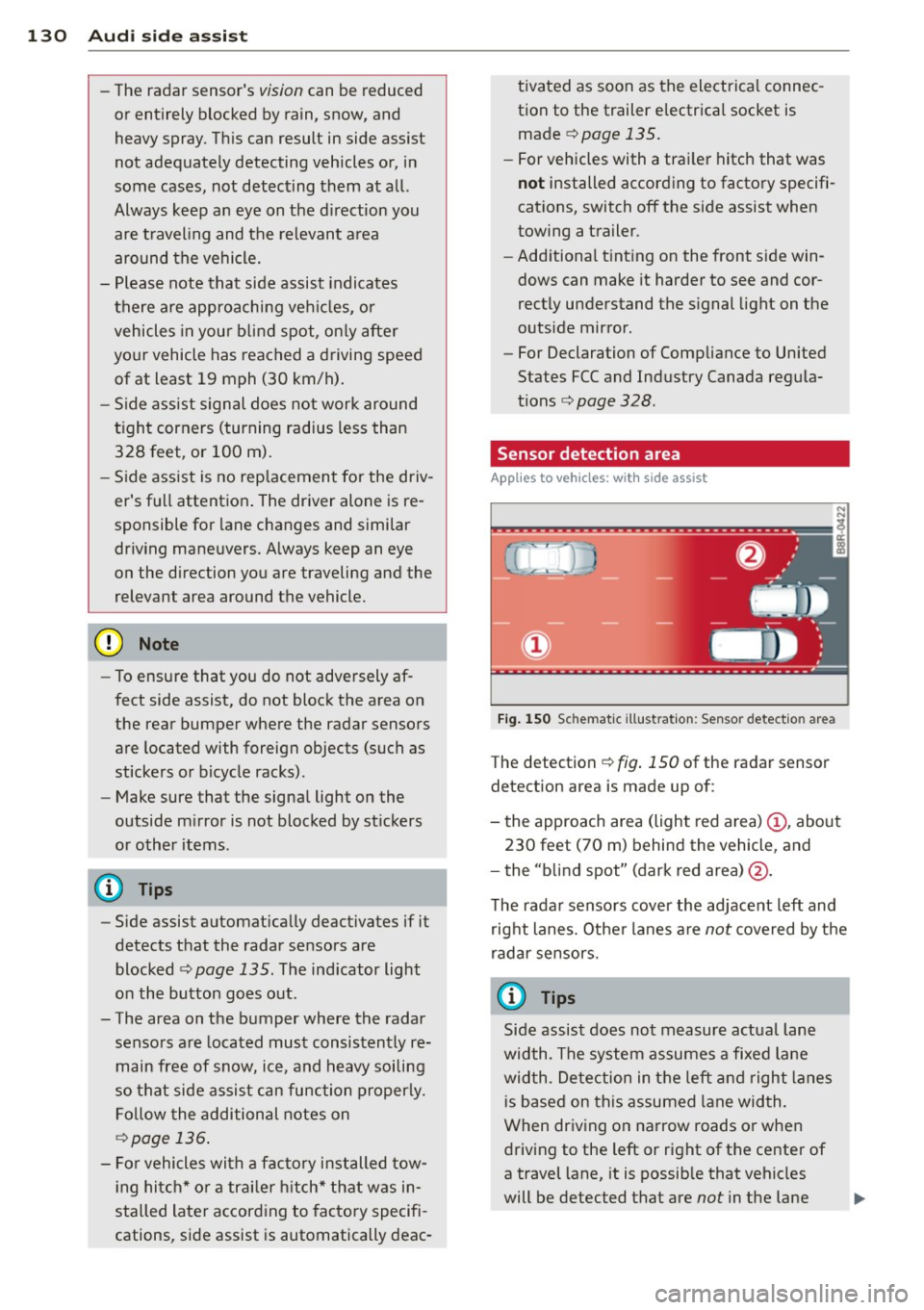
Fig. 150 Sc hematic illustration: Sensor detectio n area
The detection ¢ fig. 150 of the radar sensor
detection area is made up of:
-
- the approach area (light red area) (D, about
230 feet (70 m) behind the vehicle, and
- the "blind spot" (dark red area) @.
The radar sensors cover the adjacent left and
right lanes. Other lanes are
not covered by the
radar sensors.
(D Tips
Side assist does not measure actual lane
width. The system assumes a fixed lane
width . Detection in the left and right lanes
is based on this assumed lane width.
When driving on narrow roads or when
driving to the left or right of the center of
a travel lane, it is possible that vehicles
will be detected that are
not in the lane
Page 133 of 348
next to the lane you are using
¢page 135.
Operation
Applies to vehicles: with side assist
Side assist compares the distance and differ
ence in speed of detected vehicles with the
speed of your vehicle . Whenever the differ
ence in speed and d istance is registered as no
table if you were to change lanes, a signal l ight appea rs on the respective mirror.
The signal can light up if you are passed by a
vehicle or if you are pass ing another vehicle.
If you pass another vehicle s lowly (difference
in speed less than 9 mph, or 15 km/h), the
signal light will come on as soon as the other
vehicle is in your blind spot and is detected by
side assist . When the difference in speed is
g reater, the signal light will not come on.
Informational and alert stage signals
Applies to vehicles: with side assist
Side assist has two signal stages:
- the informational stage signal, and
- the alert stage signal.
Side assist he lps you by using the appropriate
signal stage, depending on whether or not
you have activated the turn signal, and thus have indicated that you are or are not chang
in g lanes .
Informational stage signal
As long as you have not activated the turn sig
nal, side assist informs you of detected
vehicles that are registered as being in a nota
b le location if you were to change lanes.
Whenever the detected vehicle's difference in speed and distance is registered by side assist
as notable, the signal light on the respective
mirror produces muted illuminat ion.
The br ightness of the informat ional stage sig
nal is designed not to be as intense, so that it
does not interfere with your view of the road
when yo u are driving and have no intention of
changing lanes. When you look i n the outside
Aud i side assist 131
mirror, you can clearly see the informational
stage signal.
Alert stage signal
When you activate the turn signal, and s ide
ass ist has detected a vehicle in a notable loca
t ion on that part icular s ide, the signa l light on
this side mirror flashes brightly. The repeated
brief and bright flashing of the alert stage
signal reminds you to carefully check traffic to
the rear in the outside mirror and over your
shoulder, so that you can safely complete the lane change
¢ A in Safety tips on page 136 .
@ Tips
The brightness of the signal light on the
outside mirrors can be adjusted with the
MMI ¢page 134.
Driving situation: Fast approaching
vehicles
Applies to vehicles: with side assist
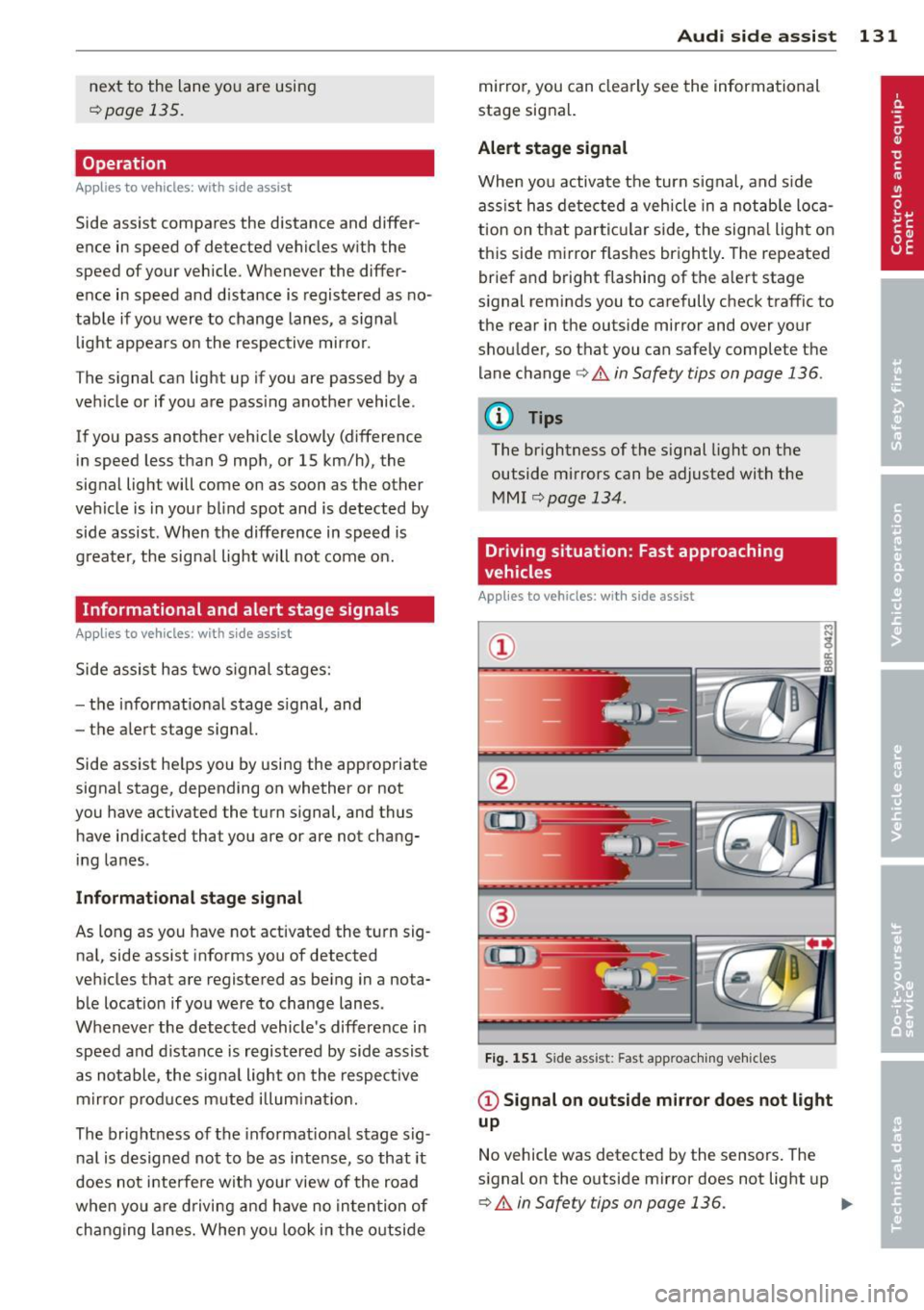
Fig. 151 Side assist : Fast app roaching vehicles
@ Signal on outside mirror does not light
up
No vehicle was detected by the sensors. The
signal on the outside mirror does not light up
¢ A in Safety tips on page 136. IJJ,,
Page 134 of 348

132 Audi side assist
@ Informational stage signal lights up
A fast approaching veh icle - in the left-hand
l ane for examp le - was detected by the sen
sors . Although this vehicle is sti ll far away, it
should be taken into account if you were to
change lanes, due to the considerable differ
ence in speed. The informational stage signal
on the outside m irror lights up
c::;, page 131.
@ Alert stage signal flashes
If you activate your turn signal in driving sit
uation @, the signal briefly f lashes repeated
ly. Side ass ist is alerting you to a veh icle that
you may not have noticed.
@ Tips
- The faster a vehicle approaches from the
rear, the sooner the signal on the outside
mirror lights up. Side assist will signa l,
at the latest, when a detected vehicle en
ters your "blind spot" .
- When vehicles approach very quickly,
changing lanes can be dangerous even if
the signal on the outside mirror does not
light up.
Driving situation: Slowly approaching
vehicles
Applies to vehicles : wi th side assist
@
Fig. 152 Side assist: S low ly approac hing veh icles and
veh icles in yo ur blind spot
@ Signal on outside mirror does not light
up
A vehicle approaching slowly -in the left-hand
lane for example - was detec ted by the sen
sors. Because of the small d ifference in speed
and the considerable distance from your vehi
cle, the signal on the outside mirror will not
light up
c::;, &. in Safety tips on page 136.
@ Informational stage signal lights up
The distance between your vehicle and that of
the slow ly approaching vehicle has narrowed .
The informationa l stage signal on the outside
mirror lights up.
As soon as the differe nce in speed and dis
tance is registered as notable if you were to
change lanes, a signa l on the mirror lights up.
Side assist will signal at the latest when a de-
tected vehicle enters your "b lind spot". .,,.
Page 135 of 348
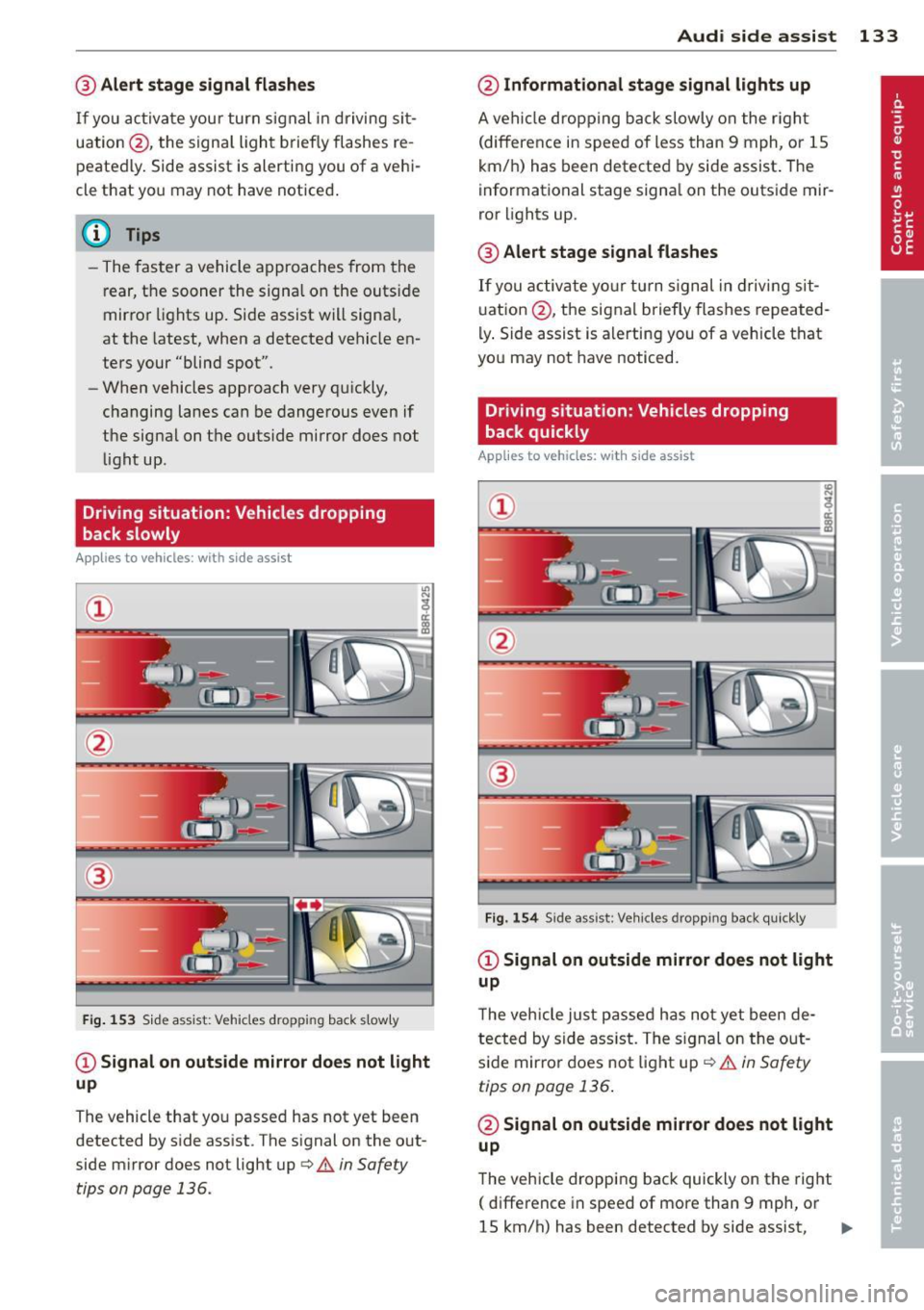
@ Alert stage signal flashes
If you activate your turn signal in driving sit
uation @, the signa l light briefly flashes re
peatedly. Side assist is alerting you of a vehi
cle that you may not have noticed .
@ Tips
-The faster a vehicle approaches from the
rear, the sooner the signa l on the outside
mirror lights up. Side assist will signa l,
at the latest, when a detected vehicle en
ters your "blind spot".
- When vehicles approach very quickly,
changing lanes can be dangerous even if
the signal on the outside mirror does not
light up.
Driving situation: Vehicles dropping
back slowly
Applies to vehicles: with side assist
®
Fig . 153 Side assist: Vehicles dropp ing back s lowly
CD Signal on outs ide mirror does not light
up
The vehicle that you passed has not yet been
detected by side assist . The signal on the out
side mirror does not light up
q .& in Safety
tips on page 136.
Audi side assist 133
@ Informational stage signal lights up
A vehicle dropping back slowly on the r ight
(difference in speed of less than 9 mph, or lS
km/h) has been detected by side assist. The
informational stage signa l on the outside mir
ror lights up.
@ Alert stage signal flashes
If you activate yo ur turn signal in driving sit
uation @, the signal briefly flashes repeated
ly. Side assist is alerting you of a vehicle that
you may not have noticed.
Driving situation: Vehicles dropping
back quickly
Applies to vehicles: with side assist
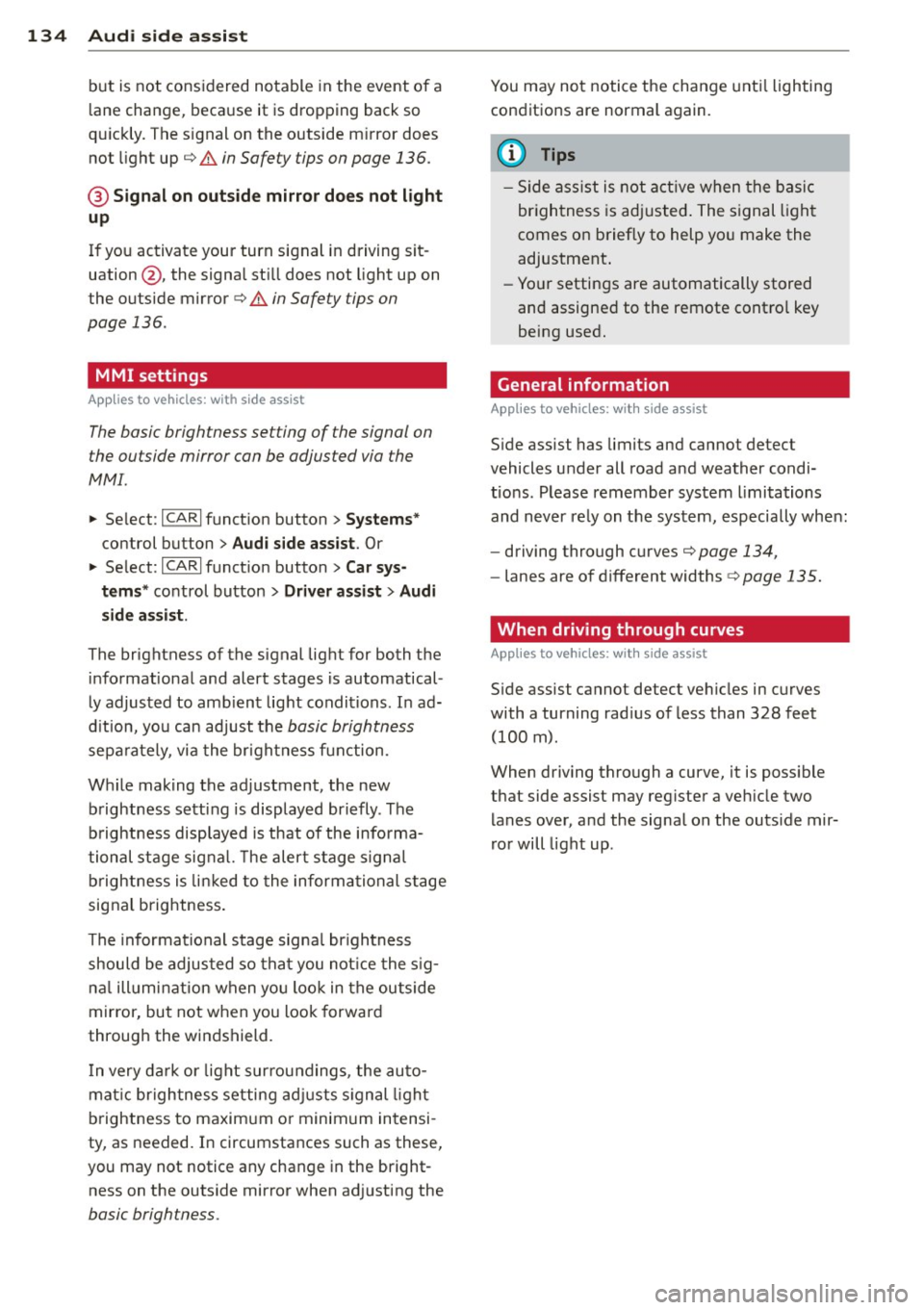
®
Fig. 154 Side assist: Veh icles dropp ing back quickly
CD Signal on outside mirror does not light
up
T he vehicle just passed has not yet been de
tected by side ass ist. The sign al on the out
side mirror does not light up
q .& in Safety
tips on page 136 .
@ Signal on outside mirror does not light
up
The vehicle dropping back quickly on the right
( difference in speed of more than 9 mph, or
lS km/h) has been detected by side assist,
1J1>
Page 136 of 348
134 Audi side assist
but is not considered notable in the event of a
lane change, because it is dropping back so
quickly. The signal on the outside mirror does not light up¢.&.
in Safety tips on page 136.
@ Signal on outside mirror does not light
up
If you activate your turn signal in driving sit
uation @, the signal still does not light up on
the outside mirror¢.&.
in Safety tips on
page 136.
MMI settings
App lies to vehicles: with side assist
The basic brightness setting of the signal on
the outside mirror can be adjusted via the
MMI.
.. Select : ICARI function button> Systems*
control button > Audi side assist. Or
.. Select:
I CARI function button > Car sys
tems*
control button > Driver assist > Audi
side assist.
The brightness of the signal light for both the
informational and alert stages is automatical
ly adjusted to ambient light conditions. In ad
dition, you can adjust the
basic brightness
separately, via the brightness function.
While making the adjustment, the new brightness setting is displayed briefly . The
brightness displayed is that of the informa
tional stage signal. The alert stage signal
brightness is linked to the informational stage
signal brightness.
The informational stage signal brightness
should be adjusted so that you notice the sig
nal illumination when you look in the outside
mirror, but not when you look forward
through the windshield.
In very dark or light surroundings, the auto
matic brightness setting adjusts signal light
brightness to maximum or minimum intensi
ty, as needed. In circumstances such as these,
you may not notice any change in the bright
ness on the outside mirror when adjusting the
basic brightness.
You may not notice the change until lighting
conditions are normal again.
(D Tips
- Side assist is not active when the basic
brightness is adjusted. The signal light
comes on briefly to help you make the
adjustment.
- Your settings are automatically stored
and assigned to the remote control key
being used.
· General information '
App lies to vehicles : wit h side assist
Side assist has limits and cannot detect
vehicles under all road and weather condi
tions . Please remember system limitations
and never rely on the system, especially when:
- driving through curves¢
page 134,
-lanes are of different widths¢ page 135.
' When driving through curves
Applies to vehicles: wit h side assist
Side assist cannot detect vehicles in curves
with a turning radius of less than 328 feet
(100 m).
When driving through a curve, it is possible
that side assist may register a vehicle two
lanes over, and the signal on the outside mir
ror will light up.
Page 149 of 348
-You can change the volume and pitch of
the signals as well as the display
Qpage 153.
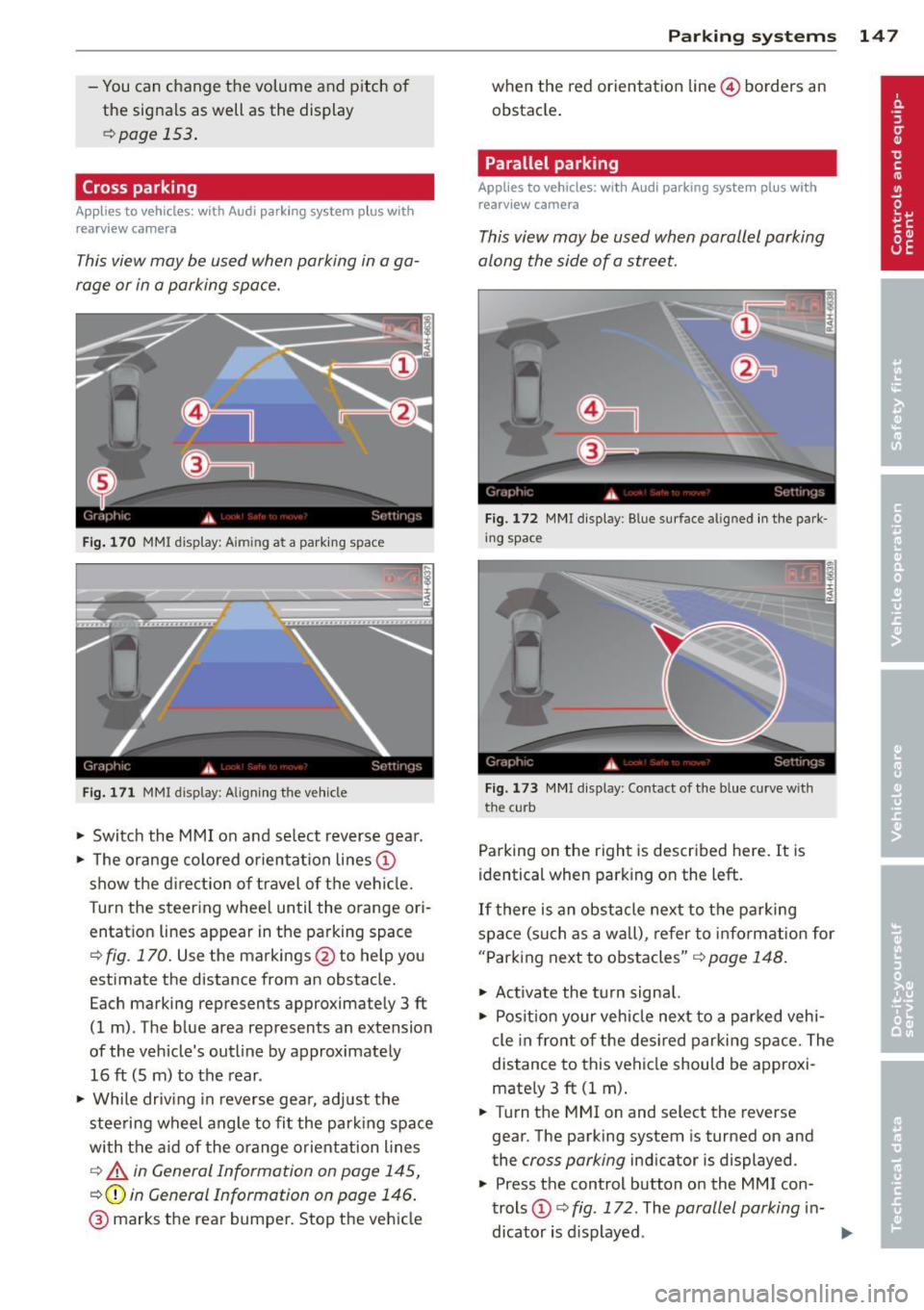
Cross parking
Applies to vehicles: with Audi parking system plus w ith
rearview camera
This view may be used when parking in a ga
rage or in a parking space.
Fig. 170 MMI display: A im ing at a parking space
Fig. 171 MMI display: Aligning the vehicle
"' Switch the MMI on and select reverse gear.
"' The orange colored orientation lines@
show the direction of travel of the vehicle.
Turn the steering wheel until the orange ori
entation lines appear in the parking space
Q fig. 170. Use the markings @to help you
estimate the distance from an obstacle.
Each marking represents approximately 3 ft
(1 m) . The blue area represents an extension
of the vehicle's outline by approximately
16 ft (Sm) to the rear .
"' While driving in reverse gear, adjust the
steering wheel angle to fit the parking space
with the aid of the orange orientation lines
c::> A in General Information on page 145,
Q@in General Information on page 146.
@ marks the rear bumper. Stop the vehicle
Parking systems 147
when the red orientation line© borders an
obstacle.
Parallel parking
Applies to vehicles: with Audi parking system plus with
rearview camera
This view may be used when parallel parking
along the side of a street.
Fig. 172 MMI display: Blue surface aligned in the park
ing space
Fig. 173 MMI display : Contact of the blue curve w ith
the cu rb
Parking on the right is described here. It is
identical when parking on the left.
If there is an obstacle next to the parking
space (such as a wall), refer to information for
"Parking next to obstacles"
c::> page 148.
"' Activate the turn signal.
"' Position your vehicle next to a parked vehi
cle in front of the desired parking space. The
distance to this vehicle should be approxi
mately 3
ft (1 m).
"' Turn the MMI on and select the reverse
gear. The parking system is turned on and
the
cross parking indicator is displayed .
"' Press the control button on the
MMI con
trols
(D c::> fig. 172. The parallel parking in-
dicator is displayed.
II>
Page 153 of 348

You can choose between three different views in this mode.
.. To cross park, parallel park, or position the
vehicle in front of a trai ler, press the ® con
trol button on the controls repeatedly until
the symbo l for the desired mode is selected .
Cross parking
Applies to vehicles: with Audi parking system p lus w it h
fr ont- an d rearview ca mera
This view may be used when parking in a ga
rage or in a parking space .
Fig. 182 MMI display: A iming at a pa rki ng space
Fi g. 183 MMI display: Al ign ing the vehicle
Requirement: cross parking is selected
¢ page 150 .
.. The orange colo red o rien tation lines©
show the d irection of t ravel of t he vehi cle.
T urn the s teering whee l until the orange ori
entatio n lines appear in the parking space
¢
fig. 182 . Use the markings @to help you
est imate the distance from an obstacle.
Each marking represents approximately 3
ft
(1 m) . The blue area represents an extension
of the vehicle's out line by approximate ly
16
ft (5 m) to the rear .
.. While driv ing in reverse ge ar, ad just the
stee ring wheel angle to fi t the park ing space
P arking sys tems 151
with the aid of the orange orientation lines
¢ A in General information on page 148,
¢ (Din General information on page 149 .
® marks the rear bumper. Stop the vehicle
when the red orientat ion line @ borders an
obstacle¢
A in General Information on
page 145.
Parallel parking
Applies to vehicles : wit h Audi parking system pl us with
front- and rearview camera
This view may be used when parallel parking
along the side of a street.
Fi g. 184 MMI disp lay: B lue surface aligned in t he park
i n g space
Fi g. 185 MMI disp lay: Contact o f the b lue curve w ith
the curb
Parking on the right is described here. It is
identical when parking o n the left.
If there is an obstacle next to the parking
spa ce (such as a wall), refer to in fo rm atio n for
"Park ing next to o bstacles"
r::!:> page 152.
Req uirement: pa ra ll el par king is sele cted
¢ page 150.
.. Act ivate the turn signal.
.. Pos it ion your veh icle n ext to a par ked v ehi-
cle in fro nt of t he des ired par kin g space. The ...
Page 155 of 348
Manual -This view behind the vehicle (Rear
mode) is a lways disp layed when you turn on
the system.
Adjusting the display and warning tones
Applies to vehicles: with rear park assist/Audi parking sys
t em plus with rearview camera/front- and rearview cam·
e ra
The display* and warning tones can be ad
justed in the MMI.
""S elect: ICARlf unction button> Systems*
control button > Parking system. Or
"" Se lect: I CAR
I function button > Car sys
tems* control button > Driver assist
> Park
ing aid.
Display*
- Off -when the parking system is switched
off, only aud ible signals are given.
-On -when the parking system is switched
on, either the visual display or the picture
from the rearview camera is disp layed .
Warning tones
- Front volume* - front sensor vo lume
- Front frequency* -front sensor frequency
- Rear volume - rear sensor volume
- Rear frequency -rear sensor frequency
- In-car entertainment fader/Music volume
while parking - when the parking system is
switched on, the volume of the active audio
source is lowered.
The new ly adjusted value is briefly heard from
the signal generator.
@ Tips
- The warning tones can also be adjusted
direct ly by the visual disp lay* or the pic
ture from the camera*. S imply press the
Settings* control button.
- Changed settings are activated when
parking system is switched on again.
- The settings are automatically stored
and assigned to the remote control key
being used. Parking
systems 153
Error messages
Applies to
vehicles: with rear park assist/Audi parking sys
tem plus with rearview camera/front- and rearv iew ca m
era
There is an error in the system if the LED in
the~ button* is blinking and you hear a con
tinuo us alarm for a few seconds after switch
ing on the park ing system or when the park
ing system is already activated .
If the error is
not corrected before you switch off the igni
tion, when you switch on the parking system
again, the LED in the ~ button* will blink. If
you activate the parking system with the but
ton in this case, the continuous warning tone
will continue to sound.
Parking system plus with front and
rearview camera*
There is another system error if:
- the~·· symbol appears in the display and
the corresponding display area is shown in
blue. The camera is not working in this area.
- all segments around the vehicles are red or
if no segments are displayed.
Drive to your authorized A udi dealer or au
thorized repair fac ility immed iate ly to have
the mal function corrected .
Trailer hitch
Applies to vehicles: with rea r park assist/Audi parking sys
tem plus with rearview camera/front- and rearview cam
era and tra iler hitch
For vehicles using the trailer socket, the park
ing system rear sensors do not turn on when
you shift into reverse gear or when you press
the~ button*. This results in the follow ing
restrictions:
Rear park assist*
There is no warning for distances to the rear.
Audi parking system plus with rearview
camera/front and rearview camera*
There is no distance warning for the rear. The
front sensors remain act ivated. The visual dis
play sw itches to the trailer towing mode. The
rearview camera image will not show the ori-
entat ion lines and the blue surfaces . ..,.