ABS AUDI Q7 2013 Owner´s Manual
[x] Cancel search | Manufacturer: AUDI, Model Year: 2013, Model line: Q7, Model: AUDI Q7 2013Pages: 348, PDF Size: 87.72 MB
Page 246 of 348
244 Trailer towing
have become comp lete ly familiar with the way
your vehicle-trailer combination behaves and responds.
Backing up is difficult and requires practice.
Backing up with a trai ler genera lly requires
steering action opposite to that when backing
up your veh icle without a trailer .
Maintain a greater distance be tween your ve
hicle and the one in front of you. You will need
more room to stop. To compensate for the
trailer, you will need a larger than normal
turning radius.
When passing, remember that you cannot ac
celerate as fast as you normally would be
cause of the added load. Make sure you have
enough room to pass . After passing, allow
plenty of room for your trailer before chang
ing lanes again .
Avoid jerky starts, sharp turns or rapid lane
changes.
- Do not tow a trailer during the break-in
period of your vehicle.
- If you tow a trailer, your Audi may re
quire more freq uent maintenance due to
the extra load
c> page 325.
Parking on a slope
Do not pork on a slope with a trailer. If it can
not be avoided, do so only after doing the fol
lowing:
When parking:
.. Apply the foot brake .
.. Have someone place chocks under both the
vehicle and the trai ler wheels .
.. With chocks in p lace, slowly re lease the
brakes until the wheel chocks absorb the
load .
.. Turn the wheels towards the curb .
.. Apply the parking brake .
.. Move the selector lever to
P.
When restarting after parking:
.. Apply the foot brake. ..
Start the engine.
.. Move the se lector lever to
D.
.. Release the parking brake and s low ly pull
out and away from the wheel chocks.
.. Stop and have someone retr ieve the wheel
chocks .
(D Tips
If you move the selector lever of the auto
matic transmission to
P before applying
the parking brake and before blocking the
wheels, you may have to use more fo rce
l ater to move the lever out of the
P posi
tion.
Page 253 of 348
Your authorized Audi dealer can provide cleaning products that have been tested and ap
proved for your vehicle .
Care of interior
MMI display
"' Clean the MMI disp lay with a soft clean
cloth and an LCD cleaner .
The MMI display can be cleaned with a profes sionally available "LCD cleaner". The cloth
should be s light ly dampened with the clean
ing f lu id to clean the display.
(D Note
To avo id scratching the MM I display, you
should never clean it d ry.
MMI control console
"' First clean the MMI control console with a
brush to remove dust from the housing.
"' Then wipe the MMI contro l conso le with a
clean, soft, slightly damp cloth .
The MM I control console shou ld be cleaned
with a brush first so that no dirt is trapped be
tween the buttons and the housing. We rec ommend giv ing the MMI control console a fi
nal w ipe with a cloth mo istened with water
and d ish washing detergent.
Cl) Note
To prevent damage, make sure that no flu id ever gets into the MMI control console.
Aluminum trim
Use only neutral-pH products to remove spots
and depos its from alum inum surfaces .
C hr ome ca re produ cts and alkaline cleaners
will attac k alum in um s urfaces and can dam
age them ove r time.
A WARNING
Always read and heed a ll WARNINGS and
other information
~ page 245 .
Cleaning and protec tion 25 1
Fabrics and fabric coverings
Fabr ics and fab ric cover ings (e.g. seats, door
trim pa ne ls, etc.) sho uld be cleaned at regular
intervals w ith a vacuum cleaner . This removes
s u rface dirt particles which could become em
bedded in the fabric throug h use. Steam
cleaners should not be used, because the
steam tends to push the dirt deeper into the
fabric and lock it there.
No rmal cl ean ing
Generally, we recommend using a soft sponge
or a lint-free microfiber cloth to the clean fab ric . Brushes shou ld only be used for carpets
and floor mats, since other fabr ic surfaces
could be harmed by brushes.
Normal s urface stains can be cleaned using a
commerc ially available foam cleaner. Spread
the foam on the surface of the fabric with a
soft sponge and work it in gently. Do not satu
rate the fabric. Then pat the foam dry us ing
absorbent, dry cloths (e.g. m icrofiber cloth)
and vacuum it after it has dried completely.
Cleaning sta in s
Stains caused by beverages (e.g. coffee, fruit
juice, etc.) can be treated with a mild deter gent solution . Apply the detergent solution
with a sponge . In the case of stubborn stains,
a dete rgent paste can be applied directly to
the stain and worked into the fabric . After
wards, use copious amoun ts of clean wa ter to
remove the rema ining de tergent. App ly the
water with a damp cloth or sponge and pat
the fabric dry with an absorbent, dry clot h.
Stains from choco late or ma keup sho uld have
detergent paste (e.g . ox-gall soap) rubbed in
to them. Afterwards, remove the soap with
water (damp sponge) .
A lcohol can be used to treat sta ins from
grease, o il, lipstick or a ballpoint pen. Melted
grease or dye must be patted off using ab
sorbent mater ial. It may be necessary to re
treat the areas with detergent paste and wa
ter.
•
•
Page 255 of 348
and can damage the leather surface as well as
weaken seams .
The leather sho uld be cleaned reg ularly as
needed. After having been used for a re latively
l ong time, yo ur leather seats will acquire a
rich aged finish. This is a characteristic of nat
ura l leather and a sign of true quality .
I n o rder to maintain the va lue of th is natura l
p roduct over the life of your vehicle, you
should follow the recommendations below :
(D Note
-To keep yo ur leather from bleach ing out,
do not a llow it to be exposed to bright
sunlight for long periods of time. If you
have to leave the vehicle parked o utside
for long periods, cover the leather to
protect it from d irect exposure to sun
light.
- Sharp objects on clothing, such as zip
pers, rivets or sharp pieces on be lts can
leave permanent scratches or scrape
marks on the surface of the leather .
- After each time you clean the leather and
at regu lar inte rva ls, use a leather preser
vat ive creme that conta ins UV-blockers
and that wor ks into the leather. This
c reme will no urish and moistur ize the
l eather, helping i t to brea the and stay
supple .
It also helps to b uild up a protec
tive coating on the s urface .
- Clean the lea ther every 2 -3 months,
and clean any areas that get soiled.
- Remove fresh mar ks made by ba llpoint
pens, ink, lipstick, shoe polish, e tc. as
soon as possib le .
- Preserve the colo r of the lea ther as need
ed by using a special colored leather care
creme to to uch up areas of uneven co lor.
Cleaning and protec tion 253
Cleaning and caring for leather
upholstery and trim
App lies to vehicles : with natural lea ther
Natural leather requires special care and at
tention .
Normal cleaning
.. Clean so iled areas with a slightly moistened
cotton or woolen cloth .
More stubborn dirt
.. More st ubborn dirt can be removed using a
cloth saturated with a mild soap solut ion (2
tablespoons mild liquid soap).
.. Never allow the soap solution to saturate
the leather, and make certain that no water soaks into the seams.
.,. Wipe off the soap so lution with a soft, dry
cloth.
Cleaning spots
.. Remove fresh wat er-based spots (such as
coffee, tea, juices, blood) with an absorbent
cloth or pape r towel.
.. Remove fresh
greas e or oil-ba sed spot s
(such as bu tte r, mayonnaise, chocola te) with
an absorbent cloth or paper towel, or use
the cleaner from the leather care kit if the
spot has not yet penetrated into the surface
of the leather.
.. Use an oil/grease dissolving spray, if
oil/
grease spot s ha ve dried on.
.. Remove specific k inds of spots (ballpoint
pen, felt marker, fingerna il polish, water
based pa int, shoe po lish, etc.) with a spot
remover specifically fo rmu lated for leather.
Leather care
.. Every half year use an approved leather care
product (available from your authorized
Aud i dealer) to care fo r the leather.
.,. App ly the product very spar ingly.
.. Wipe it off with a damp clot h.
If you have any questions about clean ing and
ca ring for the leather in your v ehicle, it is best
to contact you r authorized Audi dea ler, who
will be g lad to help you and tell you abo ut o ur
f ull range of leather care products, such as : .,..
•
•
Page 277 of 348
thoroughly checked by an authorized Audi
dealer or qualified workshop and the cause
corrected .
If the brake fluid level is too low ,
the brake warning/indicator light will i llum i
nate. Con tact an au thori zed Aud i dealer
im ·
mediately .
@ Tips
The brake fluid reservoir is located under
neath the cover.
Changing brake fluid
Have the brake fluid changed by an experi
enced technician .
Brake fluid absorbs moist ure from the a ir. If
the water content in the brake fluid is too
h igh, corrosion in the brake system may result
after a per iod of t ime . The bo iling po int of the
brake fluid w ill also decrease considerably and
decrease b raking performance .
Therefore, the brake flu id must be changed
every two years . Always use new brake fluid
which conforms to Federal Motor Vehicle
Standa rd "FMVSS 116 DOT 4".
The brake f lu id reservoir can be difficult to
reach, therefore, we recommend that yo u
have the brake f lu id changed by your author
i zed
Audi dea ler . Your deale r has the co rrect
too ls, the right b rake fluid and the know-how
to do this fo r you.
_& WARNING
- Br ake fluid is po isonous . It must be s to r
ed only in the closed orig inal con tainer
o ut of the reac h of c hildren!
- Br ake f ailure can resu lt from old or in ap
propr iate b ra ke fluid. Observe these pre
caut ions:
- Use on ly brake fluid that meets SAE
specif ication
J 1 703 and conforms to
Federal Motor V ehicle Sta ndard 116.
A lways check wi th you r auth o riz ed Audi
deale r to ma ke s ure you are using the
correct brake flu id . T he correc t type of
Checkin g and fillin g 275
brake f luid is also ind icated on t he
brake f luid rese rvoir.
- The bra ke fl uid must be new. Heavy use
of the brakes can cause a vapo r lock if
the brake fluid is left in the system too
l ong. This can seriously affect the effi
c iency of the brakes as well as your
safe ty. This co uld resu lt in an accide nt.
(1) Note
Brake fluid will damage the paint of your
vehicle.
@) For the sake of the environment
Because o f the prob lem of proper disposal
of brake fluid as well as the spec ial too ls
required and the necessary expertise, we
recomme nd that you have the brake flu id
changed by you r autho rized Aud i deale r.
Battery
General information
U nder normal operating cond itions, the bat
tery in your Audi does not need any ma inte
nance. With
high outside temperatures or
long da ily drives we recommend that you have
the e lectrolyte level chec ked by an au thorized
Audi dealer or qualified wo rkshop . The elec
t ro lyte level should also be che cked each time
t h e battery is cha rged
~ page 2 77.
Have the battery checked when you take your
vehicle in for se rv ice . You a re well advised to
replace a battery that is o lde r th an 5 years .
With certain types of airbag deployment, the ba tte ry is disconnected from the ve hicle elec
t rical sys tem for safety reasons
~ A in Re
pair, care and disposal of the airbags on
page 198.
Disconnecting the battery terminals
Some vehicle fu nctions (power window regu
lators, fo r example) are lost if the battery te r
mina ls are disconn ected . T hese functions have
to be relearned after the bat tery termina ls are
conne cte d ag ain. To p revent t his, the battery .,.
•
•
Page 278 of 348
2 76 Chec king and filling
should only be disconnected from the vehicle
e lectrical system when absolutely necessary
for repairs.
Vehicles not driven for long periods
If you do not drive your vehicle over a pe riod
of several days or weeks, electrical compo
nents are gradually cut back or switched off.
This reduces energy consumption and main
tains starting capab ility over a longer period
<=> page 231.
Take into consideration that when you un lock
your vehicle, some convenience functions, such as the interior lights or the power seat
adjustment, may not be available. The con
venience functions will be available again
when you turn on the ignition and start the
engine .
Winter operation
During the winter months, battery capacity
tends to decrease as temperatures drop . This
is because more power is also consumed while
starting, and the headlights, rear window de
fogger, etc., are used more often .
Avoid unnecessary power consumption, par
ticularly in city traffic or when traveling only
short d istances . Let your authorized Audi
dealer check the capacity of the vehicle bat
tery before w inte r sets in
<=> page 277. A well
cha rged battery w ill not only prevent starting
p rob lems when the weather is cold, but will
a lso last longer.
(D Tips
If your vehicle is left standing for several
weeks at extremely low temperatures, the
vehicle battery should be removed and
stored where it will not freeze . This wi ll
prevent it from being damaged and having
to be replaced.
Working on the battery
Be especially careful when working on or near
the battery.
The battery is located under the driver 's seat.
Before you check anyth ing under the driver 's
seat,
read and heed all WARNINGS c:> _&.
Always heed the safety warnings, when work
ing on the vehicle battery or the vehicle elec
trical system to prevent injury.
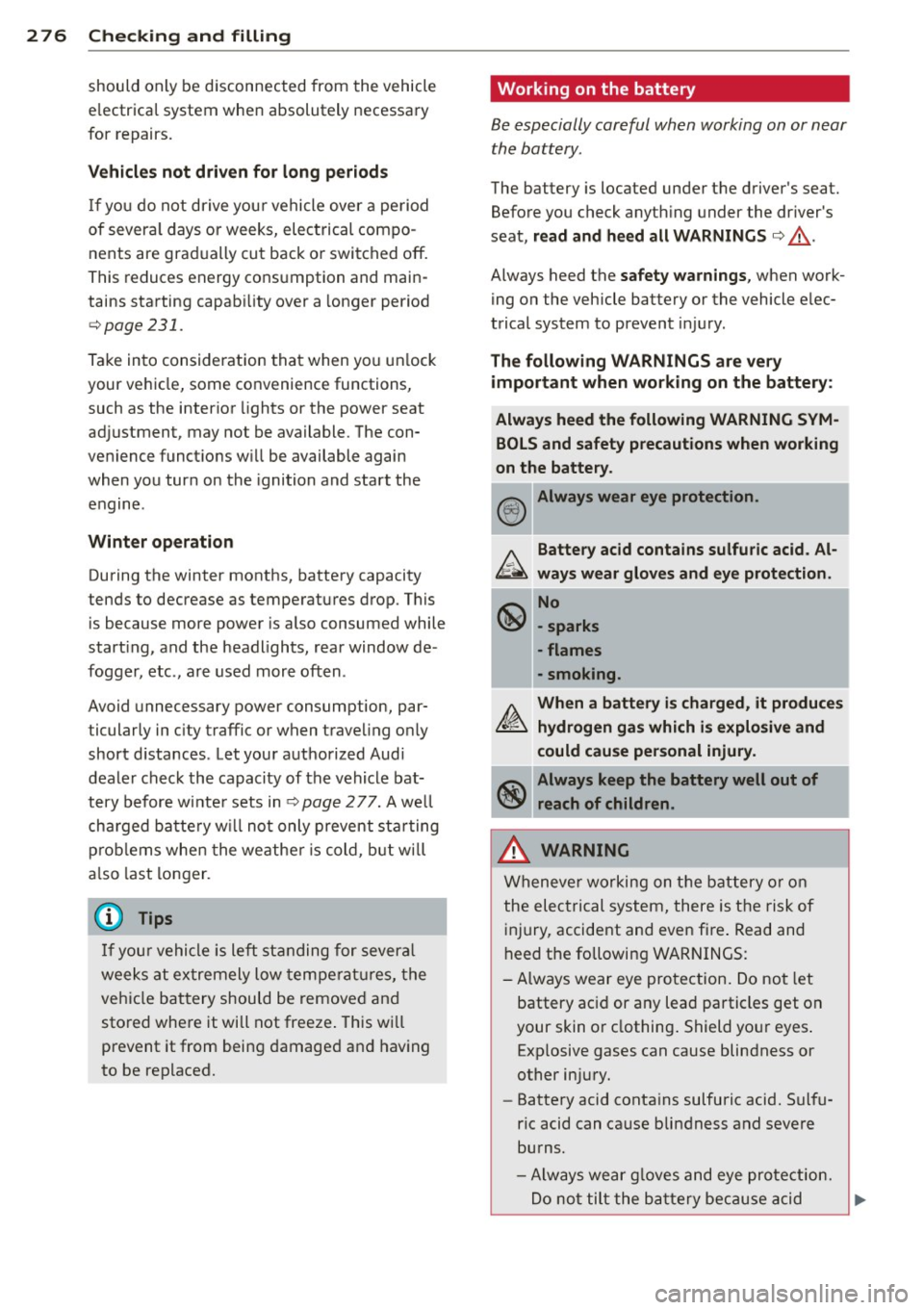
The following WARNINGS are very
important when working on the battery:
Always heed the following WARNING SYM BOLS and safety precautions when working
on the battery.
® Always wear eye protection .
b.. Battery acid contains sulfuric acid . Al
~ ways wear gloves and eye protection.
~ No
\!:!Y -sparks
- flames
- smoking.
A When a battery is charged, it produces
~ hydrogen gas which is explosive and
could cause personal injury.
Always keep the battery well out of reach of children.
,&. WARNING
Whenever working on the battery or on
the electrical system, there is the risk of
injury, accident and even fire . Read and
heed the following WARNINGS:
- Always wear eye protection. Do not let
battery ac id or any lead particles get on
your skin or clothing. Shield your eyes .
Exp losive gases can cause blindness or
other injury.
- Battery acid contains sulfuric acid. Sulfu
ric acid can cause blindness and severe
burns.
- Always wear g loves and eye protection.
-
Do not tilt the battery because acid ~
Page 301 of 348
TPMS malfunction indicator is combined with
the low tire pressure tellta le . When the sys
tem detects a malf unct ion, the te lltale will
flash for approximately one minute and then remain cont inuously illuminated. This se
quence will continue upon subsequent vehicle
start-ups as long as the malfunction ex ists .
When the malfunct ion indicator is illuminat
ed, the system may not be able to detect or
sig nal low t ire pressure as intended . TPMS
malfunct ions may occur for a variety of rea
sons, including the installat ion of rep lace
ment or alternate tires o r whee ls on the veh i
cle that prevent the TPMS from funct io ni ng
p roperly. Always check the TPM S malfunct ion
tellta le after replacing one or more tires or
wheels on your vehicle to ensure that the re p lacement or a lternate tires and wheels allow
the TPMS to continue to function properly.
Tire pressure indicator appears
The tire pressure indicator in the instrument
cluster informs you if the tire pressure is too
low or if there is a system malfunction.
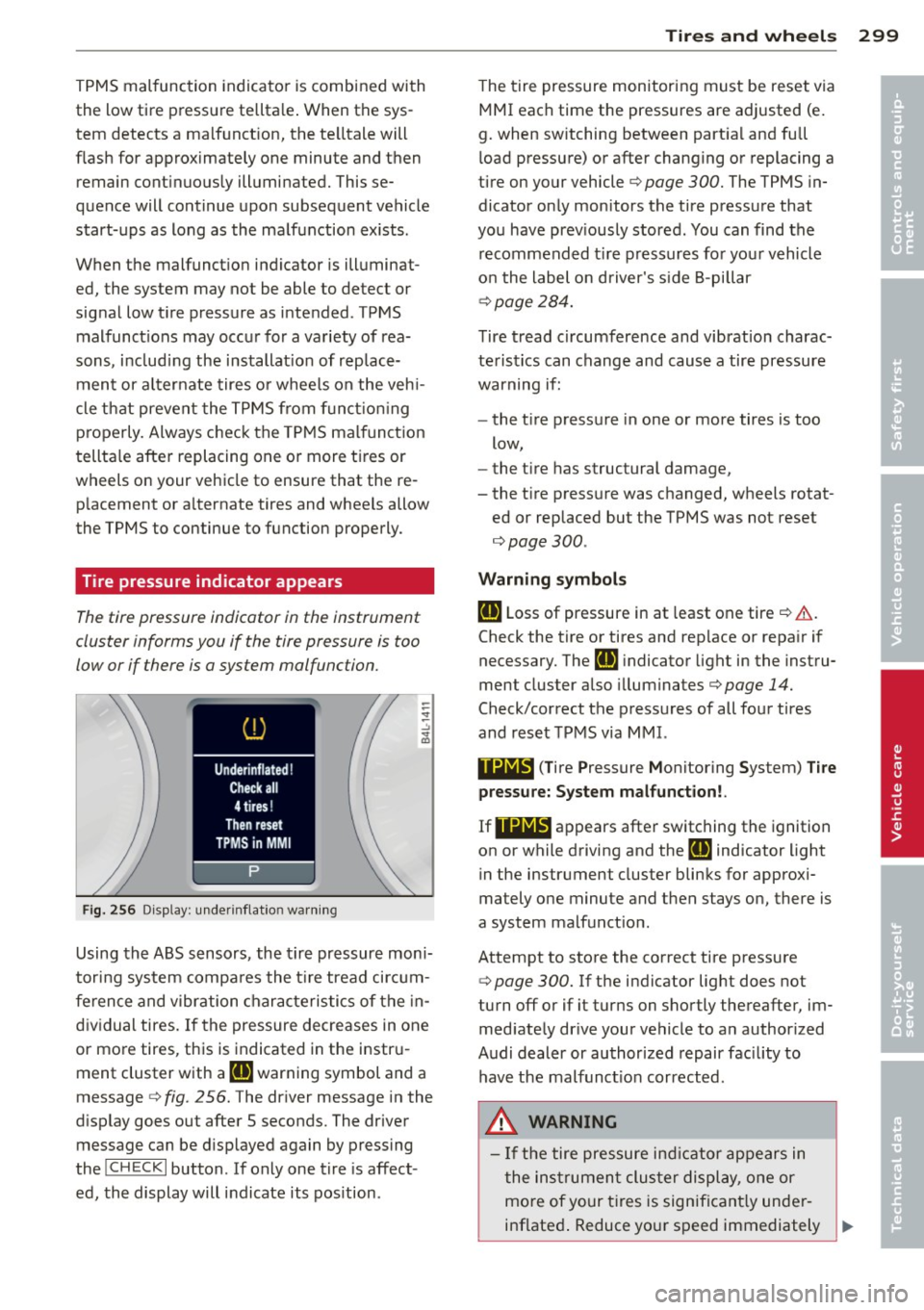
Fi g. 25 6 Display: under inflat io n warn ing
Using the ABS sensors, the tire pressure mon i
tori ng system compa res the t ire tread ci rcum
fe rence and vibration characteristics of the in
dividual tires. If the pressure decreases in one
or more tires, this is indicated in the instr u
ment cluster with a
IE warning symbol and a
message
c:> fig . 256. The driver message in the
d isplay goes out after 5 seconds. The driver
message can be d isplayed again by pressing
the
! CHECK I button . If only one tire is affect
ed, the display will indicate its pos ition .
Tire s an d wheel s 2 99
The t ire pressure monitoring must be reset via
MMI each time the pressures are adjusted (e.
g. when switching between part ia l and full
l oad pressure) or after changing or replacing a
tire on your vehicle
c:> page 300. The TPMS in
dicator on ly monitors the tire pressure that
you have prev iously stored . You can find the
recommended t ire pressures for you r vehicle
o n the label on driver's s ide 8-pillar
¢ page 284.
Tire tread circumference and vibration charac
teristics can change and cause a tire pressure
warning if:
- the t ire pressure in one or more tires is too
low,
- the t ire has structural damage,
- the t ire press ure was changed, wheels rotat-
ed or replaced but the TPMS was not reset
¢page 300.
Warni ng symbo ls
IE Loss of pressure in at least one tire ¢ &..
Check the tire or tires and rep lace or repa ir if
necessary. The
Rt] i ndicator light in the instru
ment cluster also illuminates¢
page 14.
Check/correct the p ressures of all four tires
and reset TPMS via MMI.
••NIB (T ire Pressure Monitoring System) Tir e
pressure: System malfunct ion!.
If llilW appears
after switching the ignition
on or while driving and the
IE indicator light
in the instrument cluster blinks for approxi
mately one minute and then stays on, there is
a system malfunct ion.
Attempt to store the correct tire pressure
¢
page 300. If the indicator light does not
turn off or if it turns on shortly thereafter, im med iate ly dr ive your vehicle to an author ized
Audi dealer or authorized repair fac ility to
have the malfunct ion corrected.
_&, WARNING
- If the tire pressure ind icator appears in
the ins trument cluster display, one or
mo re of your t ires is significant ly under
inflated . Reduce your speed immediately ..,
•
•
Page 302 of 348
300 Tire s and whee ls
and avoid any hard steering or braking
maneuvers. Stop as soon as possible and
check the tires and their pressures. In
flate the tire pressure to the proper pres
sure as indicated on the vehicle's t ire
pressure label~
page 284 . Driving on a
significantly under-inflated tire causes
the tire to overheat and can lead to tire
failure. Under-inflation also is likely to impair the vehicle's handling and stop
ping ability.
- T he driver is responsible for ma inta ining
the correct tire pressures . You must
check the tire pressures regular ly.
- Under certain conditions (such as a spor
ty driving style, winter conditions or unpaved roads), the pressure monitor ind i
cator may be de layed.
- Ask your authorized Audi dealer if run
flat tires may be used on your veh icle.
Your vehicle registration becomes invalid if you use these tires when not permit
ted . Damage to your veh icle or acc idents
could also result .
(D Tips
-The tire pressure monitoring system
stops working when there is an ESC/ABS
malfunction .
- Using snow chains may result in a system
malfunction.
- The tire pressure monitoring system on
your Audi was developed using t ires with
the "AO" or "RO" identification on the
tire sidewall
Q page 291 . We recom
mend using these t ires.
Reset tire pressure monitoring system
If the tire pressure is adjusted , wheels are ro
tated or changed, the TPMS must be reset via
MMI.
.. Before resetting the TPMS, the current pres
sures of all four tires must correspond to
the specified val ues. Adjust the tire pressure
and reset the pressure i n the t ire p ressu re monitoring system according to the load
you are carrying
Q page 284.
.. Turn on the ign ition.
.. Select:
!CAR ! function button> Systems *
contro l bu tto n > Tire p ressure monitoring >
S tor e now . Or
.. Select :
!CAR ! function button> Car sy s
tems *
contro l button > Se rvicing & che cks >
Tire pres sure monitoring > Sto re tir e pre s
s ure s.
(D Tips
Do not sto re the tire pressure if there are
snow cha ins on the tire.
Page 303 of 348
What do I do now?
Jack, tools and
inflatable spare tire
Tools
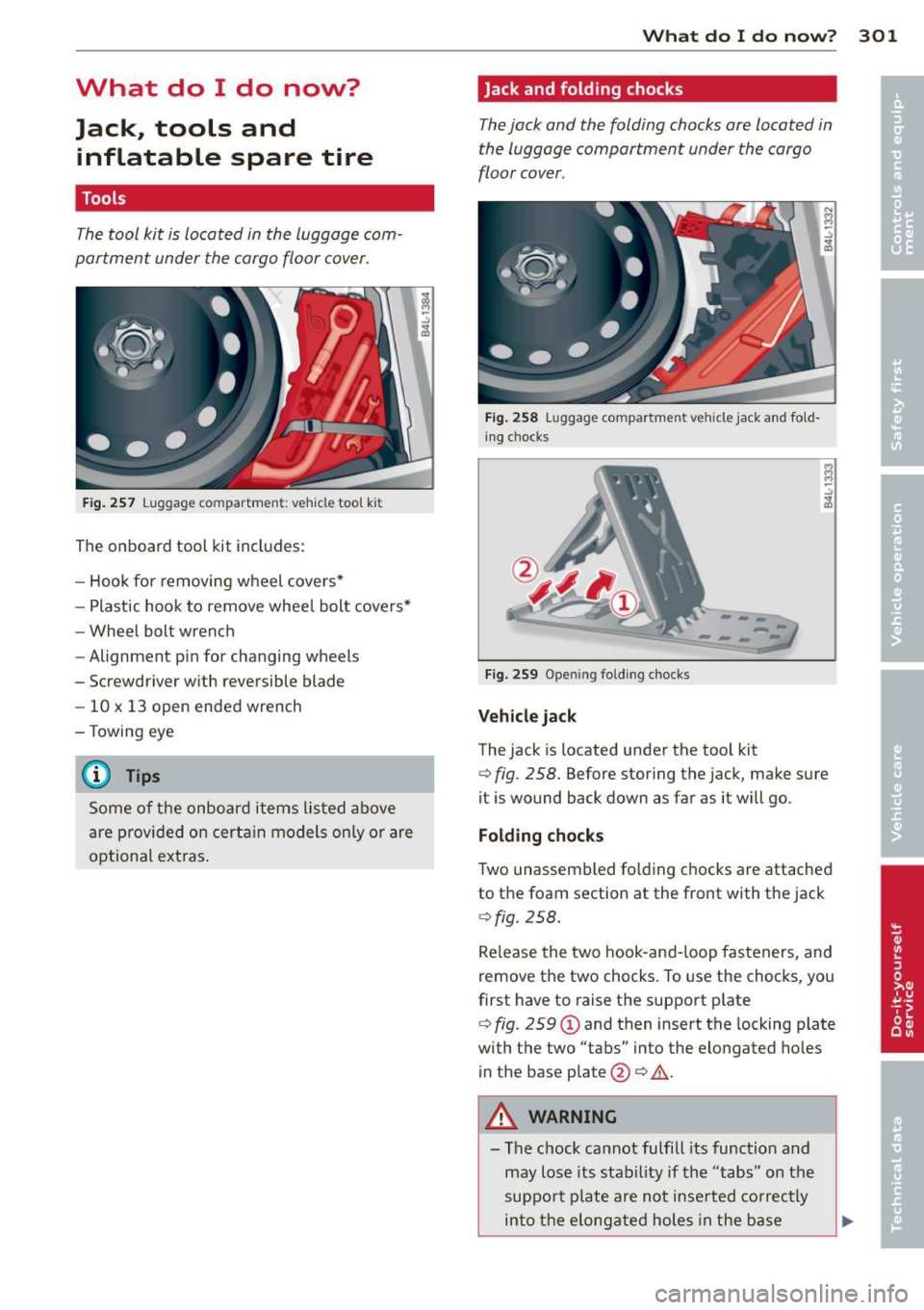
The tool kit is located in the luggage com
partment under the cargo floor cover.
F ig . 257 Luggage compa rtme nt: ve hicle tool ki t
The on board tool kit includes:
- Hook for removing wheel covers*
- Plastic hook to remove wheel bolt cove rs*
- Wheel bolt wrench
- Alignment pin for changing wheels
- Screwdriver with reversible blade
- 10 x 13 open ended wrench
- Towing eye
@ Tips
Some of the onboard items listed above
are prov ided on certa in models only or are
optional extras .
What do I d o now ? 301
Jack and folding chocks
The jack and the folding chocks are located in
the luggage compartment under the cargo
floor cover.
F ig . 258 Luggage compar tme nt ve hicle jack and fold ·
i ng chocks
--------
F ig. 259 Opening fo ldi ng chocks
Vehi cle jack
The jack is located under the tool kit
¢ fig . 258. Before storing the jack, make sure
it is wound back down as far as it will go.
Folding chocks
Two unassembled fo lding c hocks are attached
to the foam section at the front with the jack
¢fig . 258.
Re lease the two hook-and-loop fasteners, and
remove the two chocks. To use the chocks, you
first have to raise the support plate
¢ fig . 259 (D and then insert the locking plate
with the two "tabs" into the elongated ho les
in the base plate @¢.&. .
A WARNING
-The chock cannot fulfill its function and
may lose its stability if the "tabs" on the
support p late are not inse rted co rrectly
into the elong ated holes in the base
Page 304 of 348
302 What do I do now ?
plate. If this happens, the vehicle may
start to move while a wheel is being changed.
- Never use the folding chocks if they are
damaged or if they have not been assem
bled correctly.
A WARNING
Improper use of the vehicle jack can cause
ser ious persona l injuries.
- Never use the jack supplied with your
Audi on anothe r vehicle, particularly on a
heavier one. The jack is only suitable for
use on the vehicle it came w ith.
- Us ing a bumper jack to raise the vehicle
will damage the bump er system. The
jack may slip, causing in jury.
- Never support your veh icle on cinder
blocks, b ricks or other objec ts. These
may no t be ab le to suppor t the load and
c ou ld cau se injury whe n they fail.
- Never start o r run the engine while the
vehicle is supported by the j ack.
- If you must wo rk under the vehicle, al
ways use safety stands specifically de
signed for this purpose.
- Always make su re the inf latable spare
ti re and even a flat tire a re se cu red in
pla ce and not loose, otherwise t hey
c ou ld f ly forward, causing personal in jury
to passengers in the veh icle in an acc i
dent o r sudden mane uver.
Removing bass box
Applies to vehicles: with bass box
Before the inflatable spare tire can be taken
out, the bass box must be removed .
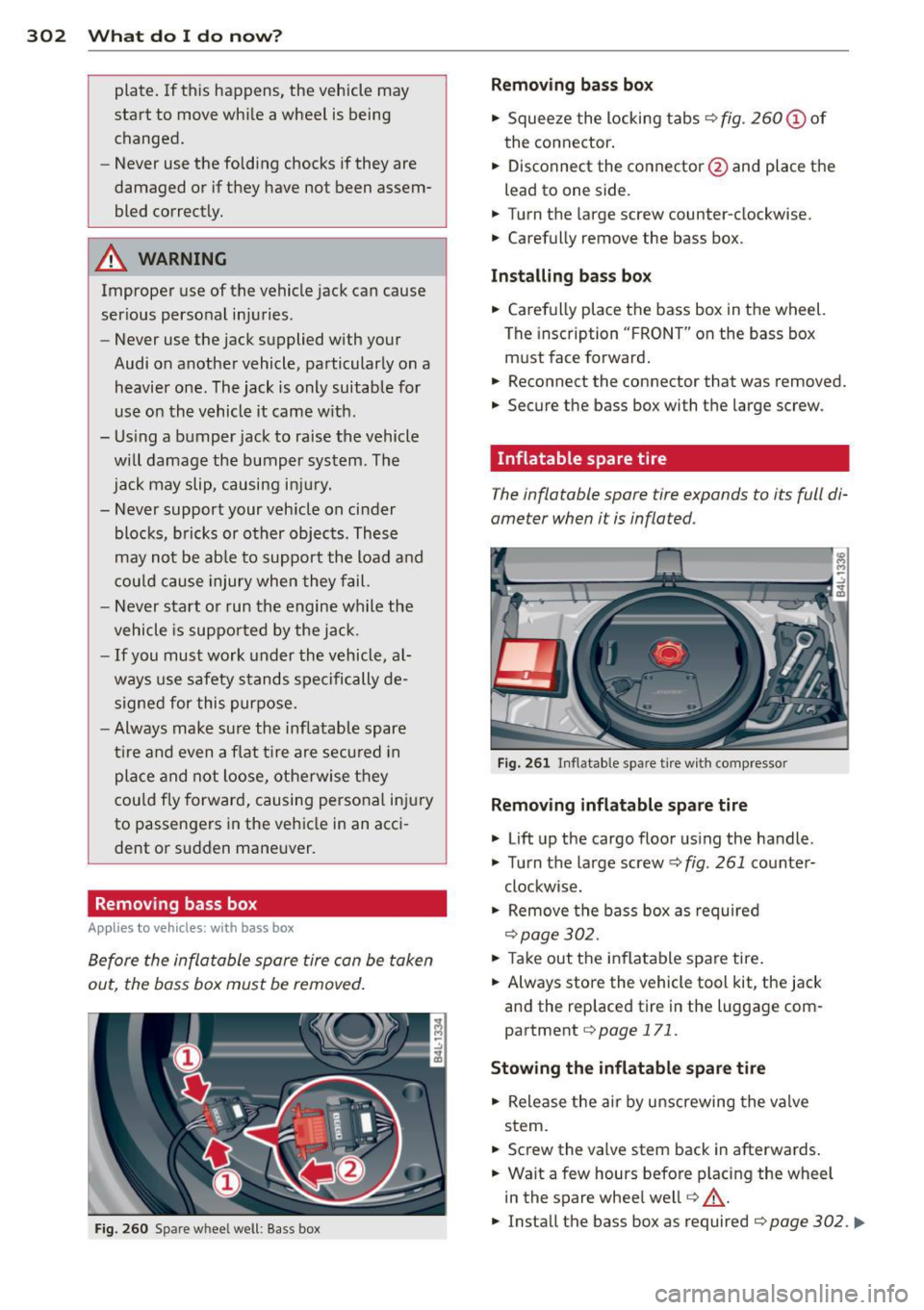
Fig. 260 Spare wheel well: Bass box
Removing bass box
" Squee ze the locking tabs ¢ fig. 260 (!) of
the connector .
" Disconnect the connector @and place the
lead to one side.
" Turn t he large screw counter-clockwise.
" Carefully
remove the bass box.
Installing bass bo x
" Carefully place t he bass box in the wheel.
The insc ription "FRO NT" on the bass box
m ust face forward .
" Reconnect the connector that was removed.
" Secure the bass box with t he large screw.
· Inflatable spare tire
The inflatable spare tire expands to its full di
ameter when it is inflated.
Fi g. 2 61 In flatable spare t ire w ith compressor
Removing inflatable spare tire
" Lift up the cargo floor us ing the handle .
" Tu rn the large screw¢
fig. 261 co unter-
clockwise.
" Remove the bass box as required
¢page 302.
" Take out the inflatable spare tire .
" Always sto re the vehicle tool kit, the jack
and the replaced tire in the luggage com
partment
¢page 171.
Stowing the inflatable spar e tire
" Release the air by unscrewing the valve
stem.
" Screw the valve stem back in afterwards .
" Wait a few hours befo re p lacing the wheel
in the spare whee l we ll
r=:, _.&.
" Install the bass box as required r=:, page 302 . ..,.
Page 333 of 348
All-wheel drive ..... .... ... .. .. .. ... 231
Winter tires . ... .. .... ... .. .. .. ... 295
Alloy whee ls . ............. .... .. ... 2 50
Alternator Malfunct io n . . . . . . . . . . . . . . . . . . . . . . . 31
Ambience lighting Lighting p rof iles ... .... ... .. .. .. .... 62
Anti-freeze
refer to Engine coo la nt system .. .. .. . 27 1
Anti -lock brake system
H ow the ABS system wo rks . .. .. .. .. . 229
War ning/ indicato r lights ...... .... ... 18
Anti-Slip Regulation System (ASR) How the system works ..... .. .. .. .. . 227
Anti -theft systems
Anti-theft alarm system . . . . . . . . . . . . . SO
Elect ronic immobilizer .. ... .. .. .. .. .. 40
Approa ch/departu re angle ... .. .. .. .. . 238
Ash tray . .. .. ................. .. .. .. 86
ASR How t he Anti -Slip Regulation System
works ... .. .. ............. .. .. ... 22 7
Aster is k
What does it mean when someth ing is
marked with an asterisk? . . . . . . . . . . . . . . 6
Aud i b rak ing guard ............ .. .... 127
E rro r messages .......... .... .. .. . 128
Sett ings . .. .. ........... .. .. .. ... 128
S tat us messages ......... .. .. .. .. . 128
Switching on and
off ...... .. .. .. .. . 128
Aud i Service Repa ir Manuals and Lite ra-
ture .. .. .. .. .... ............. .. .. . 325
Auto-Check Control . . . . . . . . . . . . . . . . . . 30
Automatic belt retrac to r . . . . . . . . . . . . . 179
Automatic ca r wash
refer to Wash ing ............ .. .... 246
Aut omatic mode
Four- zone automatic comfort a ir cond i-
tioning .. ..... ........... ... ... ... 98
Automatic S hift Lock (ASL) . ... .. .. .. . 139
Automatic t ransmission ..... .. .. .. .. . 137
Automatic S hift Lock (ASL) . .. .. .. .. . 139
D riving .. .. ............. .... .. .. . 13 7
D ynamic shift program . ... .. .. .. .. . 1 40
Emergency mode . ..... ... .. .. .. .. . 14 1
Emergency release for selector lever . . 142
Ignition key safety lock .... .. .. .. .. . 105
Inde x 331
Kick -down . . . . . . . . . . . . . . . . . . . . . . . . 14 0
Manua l shift program ... .... ... .. .. 140
Se lector lever . . . . . . . . . . . . . . . . . . . . . 138
Sh ift buttons .. .. ................. 141
Steering wheel with tiptronic ®
A UTO mode
141
AC climate contro ls .. .. ..... ... .. .. . 94
Auto Safety Hot lin e ............. .. .. 172
Average speed . . . . . . . . . . . . . . . . . . . . . . . 24
Avoid damaging the vehicle .... ... .. .. 236
B
Bass box . . . . . . . . . . . . . . . . . . . . . . . . . . 302
Battery ...... .. .. .... ............. 275
Battery location .................. . 276
Charg ing .. .. .. .. .. . .. .... .... .. .. 277
Impo rtant warnings when working on
the battery .. .. .. .. . .............. 276
Jump star ting .. .. .... ........... .. 31 4
L ow . ... .. .. .... .. . .. .. ..... ... .. 231
Rep lacing the battery .. ..... ... .. .. 279
State of charge . . . . . . . . . . . . . . . . . . . . 231
Voltage ... .. .. .. ................. . 36
Winter operation . ................. 275
Working on the battery ...... ... .. .. 276
Befo re driving ... .... . ... ...... ... .. 165
B lended gasoline .................. . 256
Body cavity sealing . ................. 250
Boos ter sea ts . . . . . . . . . . . . . . . . . . . . . . 213
B rake assistant .. .. .. ............... 230
Brake booster ..... .. . .. .. ..... ... .. 229
B ra ke fluid
Changi ng the bra ke fluid ........ .. .. 275
Checking the brake fluid level . ... .. .. 274
Rese rvoir ... .... .. . .. .. ..... ... .. 274
What is the correct brake fluid level? . . 274
What should I do if the brake fluid warn-
ing light comes on? ............ .. .. 274
Brake light De fective . . . . . . . . . . . . . . . . . . . . . . . . . 23
B rake system .. .. .... .......... ..... 274
Ant i- lock b rake system . . . . . . . . . . . . . . 18
Br ake fluid .. .. .. .... ............. 27 4
Br ake fluid specifica tions fo r refill and re-
placement . ..... ... .. .. ..... ... .. 275
B rake pads . ..... .. . .. .. ..... ... .. 234
General information ........... .. .. 228
•
•