cruise control AUDI Q7 2013 Owner´s Manual
[x] Cancel search | Manufacturer: AUDI, Model Year: 2013, Model line: Q7, Model: AUDI Q7 2013Pages: 348, PDF Size: 87.72 MB
Page 126 of 348
124 Adaptive cruise control
Stationary object ahead
The text message Stationary object ahead ap
pears, when you want to activate the system
and there is a stationary vehicle or an object
immediately in front of you .
Gradient too steep
The text message Gradient too steep appears
when the max imum gradient for proper ACC
operation has been exceeded. Adaptive cruise
contro l is turned
off . A warning tone also
sounds as a reminder.
Shift lever position!
The text message Shift lever position! ap
pears when the selector lever is moved to po
sition
N . In this position, adaptive cruise con
trol is not ava ilab le .
Driver intervention prompt
Applies to vehicles: with adaptive cruise co ntrol
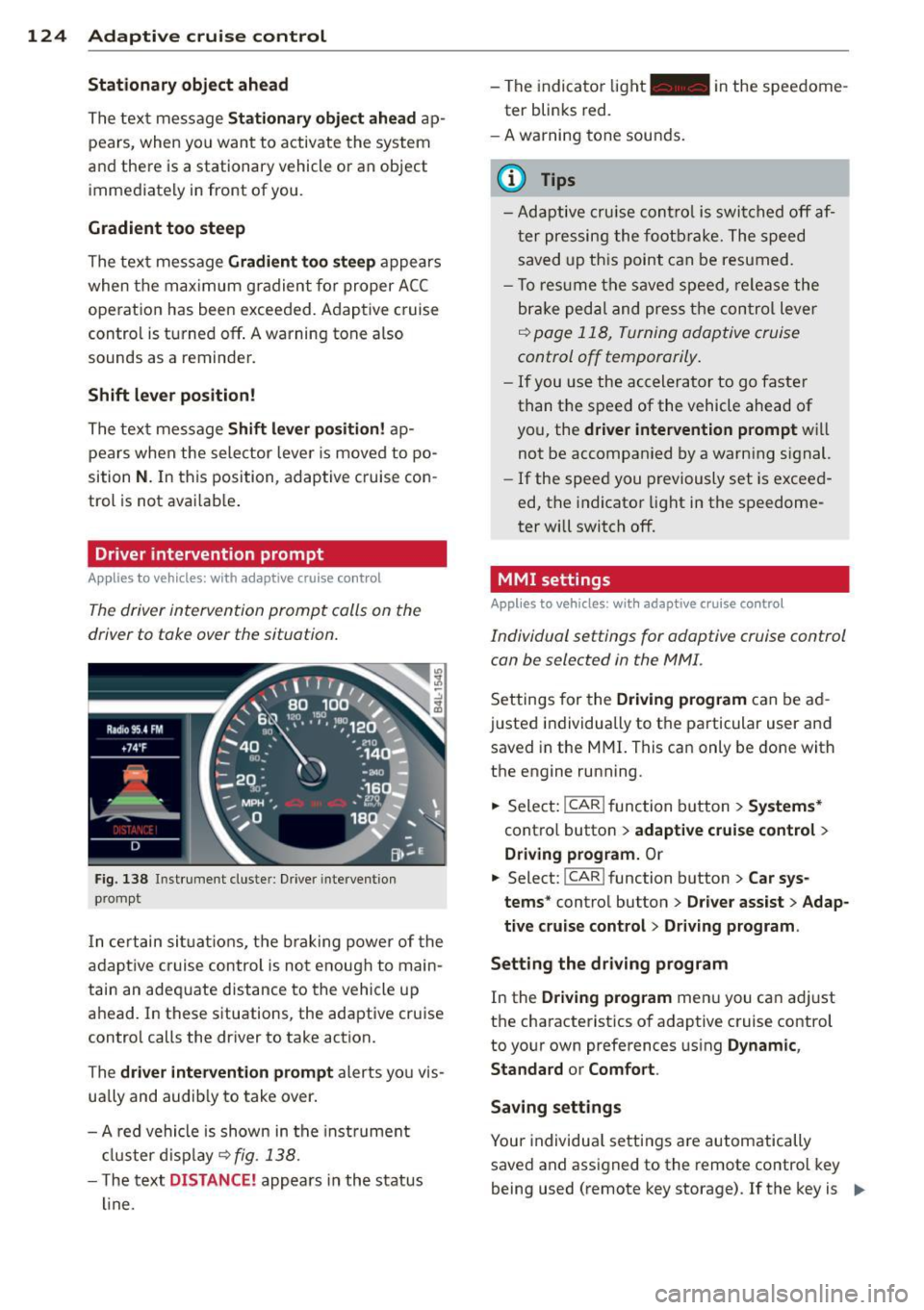
The driver intervention prompt calls on the
driver to toke over the situation.
Fig. 138 I n st rument cluste r: Drive r in terven tion
prompt
I n certain situat ions , the braking power of the
adapt ive cr uise control is not enough to main
tain an adequate distance to the vehicle up
ahead. In these situations, the adaptive cruise
control calls the driver to take action.
The
driver intervention prompt alerts you vis
ually and audib ly to take over.
- A red vehicle is shown in the instrument
cluster display ~
fig. 138.
- T he text DISTANCE! appears in the status
line. -
The indicator light- in the speedome
ter blinks red.
- A warning tone sounds.
0) Tips
-Adaptive cruise control is switched off af
ter pressing the footbrake. The speed
saved up this point can be resumed.
- To res um e the saved speed, release the
brake pedal and press the control lever
~ page 118, Turning adoptive cruise
control off temporarily.
-If you use the accelerator to go faster
than the speed of the vehicle ahead of
you, the
driver intervention prompt wi ll
not be accompanied by a warning s ignal.
- If the speed you previously set is exceed
ed, the indicator light in the speedome
ter will switch
off.
MMI settings
Applies to vehicles : with adaptive cruise contro l
Individual settings for adoptive cruise control
con be selected in the
MMI.
Settings for the Driving program can be ad
justed individually to the particular user and
saved in the MMI. This can only be done with
the engine running .
.,. Select:
!CAR ! function button> Systems*
cont ro l button > adaptive cruise control >
Driving program. Or
.,. Select: !CAR ! function button> Car sys·
tems *
control button > Driver assist > Adap
tive cruise control > Driving program .
Setting the driving program
In the Driving program menu you can ad just
the characteristics of adaptive cruise control
to your own preferences using
Dynamic,
Standard
or Comfort .
Saving settings
Your individual settings are automatically
saved and assigned to the remote control key
being used (remote key storage) . If the key is ..,_
Page 127 of 348
given to another person, the saved settings remain as they are .
System limitations
General information
Applies to vehicles: with adaptive cruise co ntrol
The radar sensor has limits that the driver
must know to be able to use ACC properly .
The adaptive cruise control works within lim its that are also related to radar sensor range
and sight distance . In some situations ACC
may react unusually or late from the driver's
point of v iew. Therefore, always be attent ive
to what is happening around you and always
be ready to intervene, if necessary:
-when driving around curves ¢page 125
- when vehicles up front are not in line with
your vehicle ¢ page 126
- when other veh icles are changing lanes
i=> page 126
- when other vehicles are difficult to detect i=>page 126
- when vehicles up ahead are not moving or obstacles are in your travel lane i=>page 126
A WARNING
The radar sensor's function and range can
be reduced by rain, snow and heavy spray.
Moving veh icles up ahead may not be
prompt ly detec ted or may not be detected
a t all.
- Always pay careful att ention to the traf
fic s ituation and be ready to intervene
and be re ady to take comp lete cont rol
whenever necessary.
Ad apti ve crui se control 125
When driving around curves
App lies to vehicles: wit h adaptive cruise control
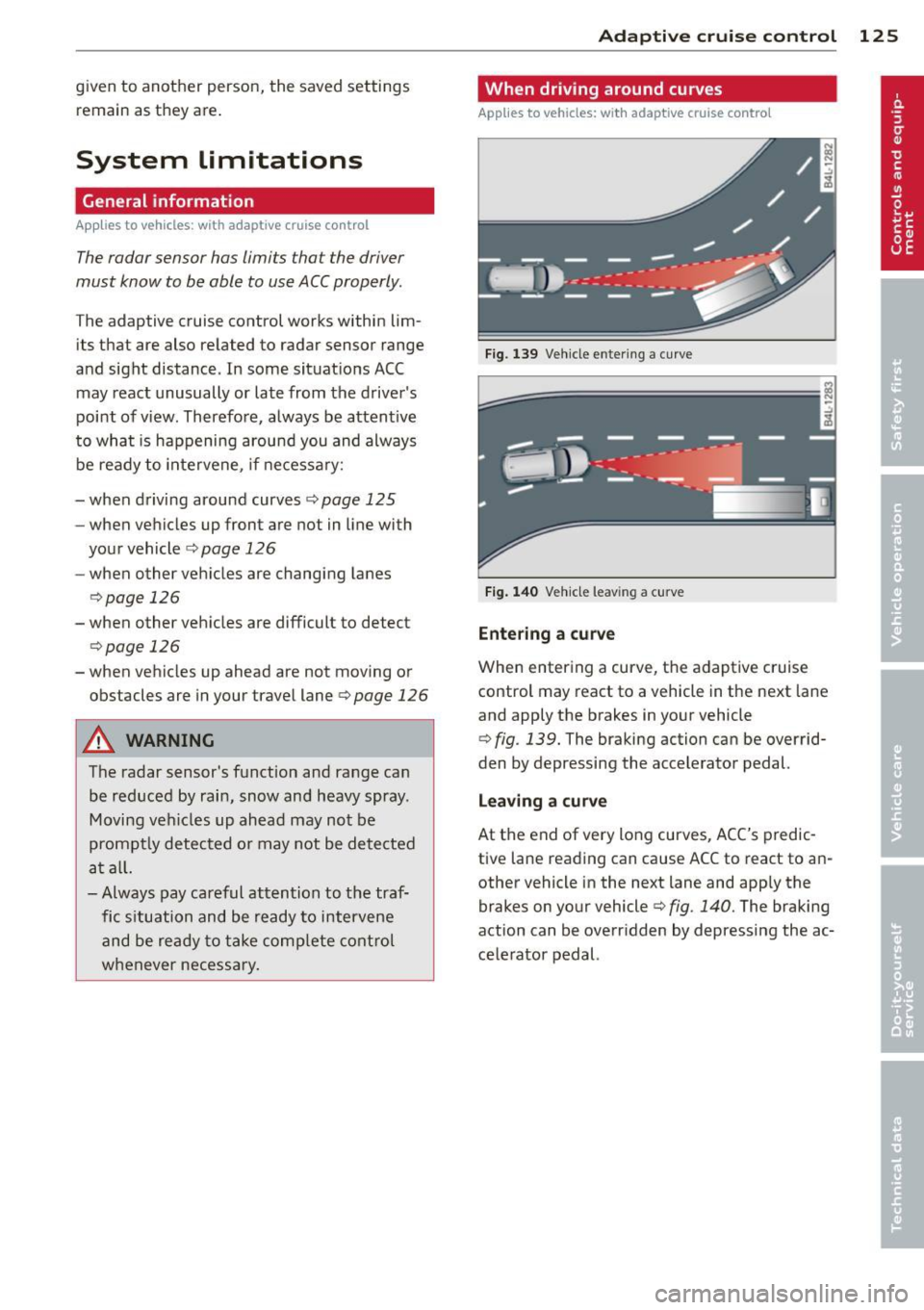
Fig. 139 Ve hicle e nter ing a curve
Fi g. 140 Ve hicle leav ing a curve
Entering a curv e
When entering a curve, the adaptive cruise
control may react to a vehicle in the next lane
and apply the brakes in your vehicle
¢ fig . 139. The braking action can be overrid·
den by depressing the accelerator pedal.
L e aving a curv e
At the end of very long curves, ACC's predic
tive lane reading can cause ACC to react to an
other vehicle in the next lane and app ly the
brakes on your vehicle¢ fig . 140. The braking
action can be overr idden by depress ing the ac
ce lerator pedal.
Page 128 of 348
126 Adaptive cruise control
Vehicles offset to one side
Applies to vehicles: with adaptive cruise control
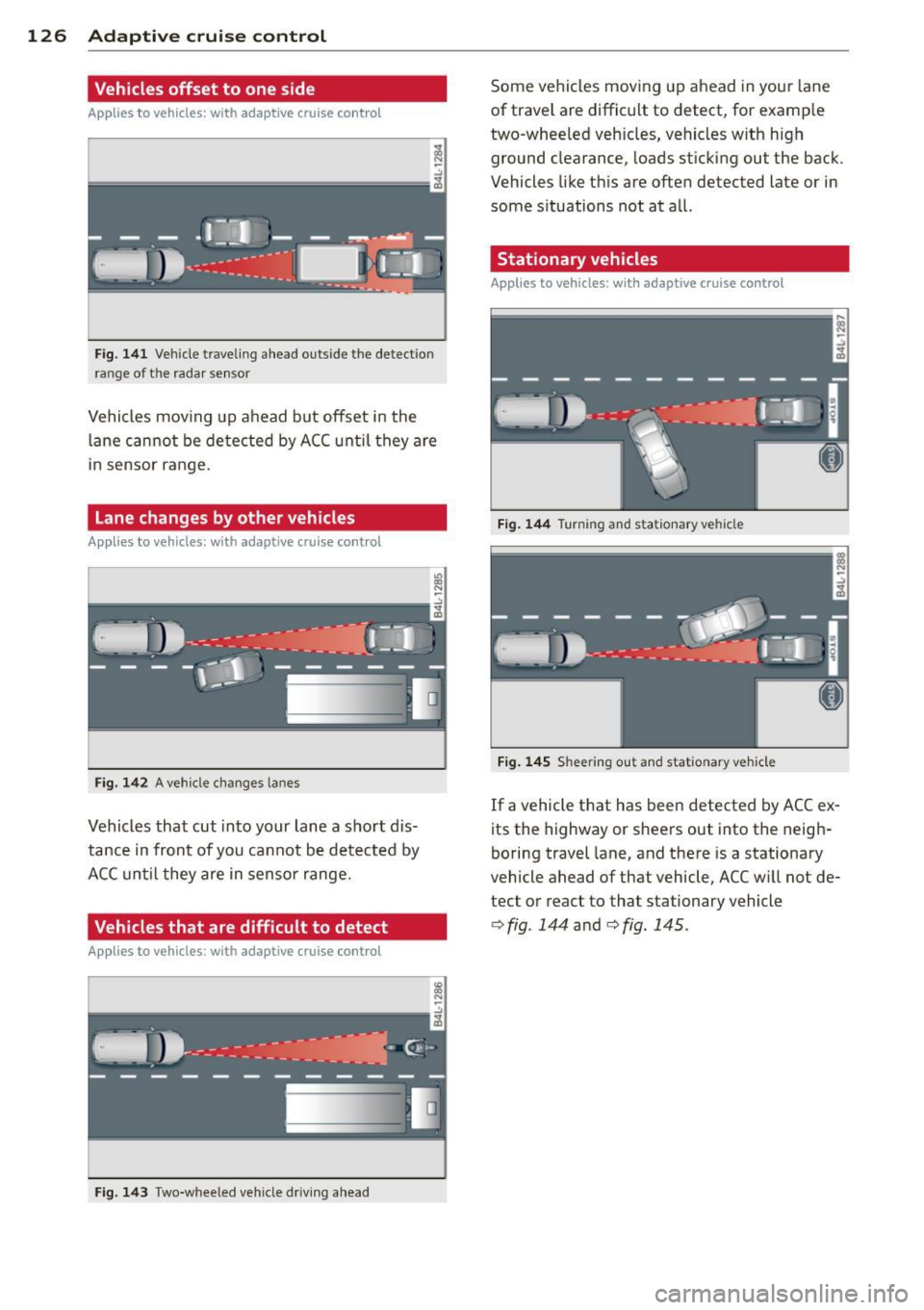
Fig. 141 Vehicle traveling a head o utside the detect ion
range of t he rada r se nsor
Vehicles mov ing up ahead but offset i n the
la ne cannot be detected by ACC until they are
in sensor range.
Lane changes by other vehicles
Applies to vehicles: with adaptive cruise control
Fig. 142 A vehicle changes lanes
Vehicles that cut into your lane a sho rt dis
tance in front of you cannot be detected by
ACC until they are in senso r range.
Vehicles that are difficult to detect
Applies to vehicles: with adaptive cruis e contro l
Fig. 143 Two -wheeled vehicle driving ahead
Some vehicles moving up ahead in your lane
of trave l are difficult to detect, for examp le
two -wheeled veh icles, vehicles w ith high
ground clearance, loads sticking out the back .
Vehicles like this are often detected late or in
some situations not at all.
Stationary vehicles
Applies to vehicles: with adaptive cruise contro l
Fig. 144 Turning and stationary ve hicle
Fig. 145 Sheering out and stat ionary veh icle
If a vehicle that has been detected by ACC ex
its the highway or sheers out into the neigh
boring travel lane, and there is a stationary
vehicle ahead of that vehicle, ACC will not de·
tect or react to that stationary vehicle
<=> fig. 144 and c> fig. 145 .
Page 129 of 348
Audi braking guard
Description
Applies to vehicles: with a daptive cruise co ntrol
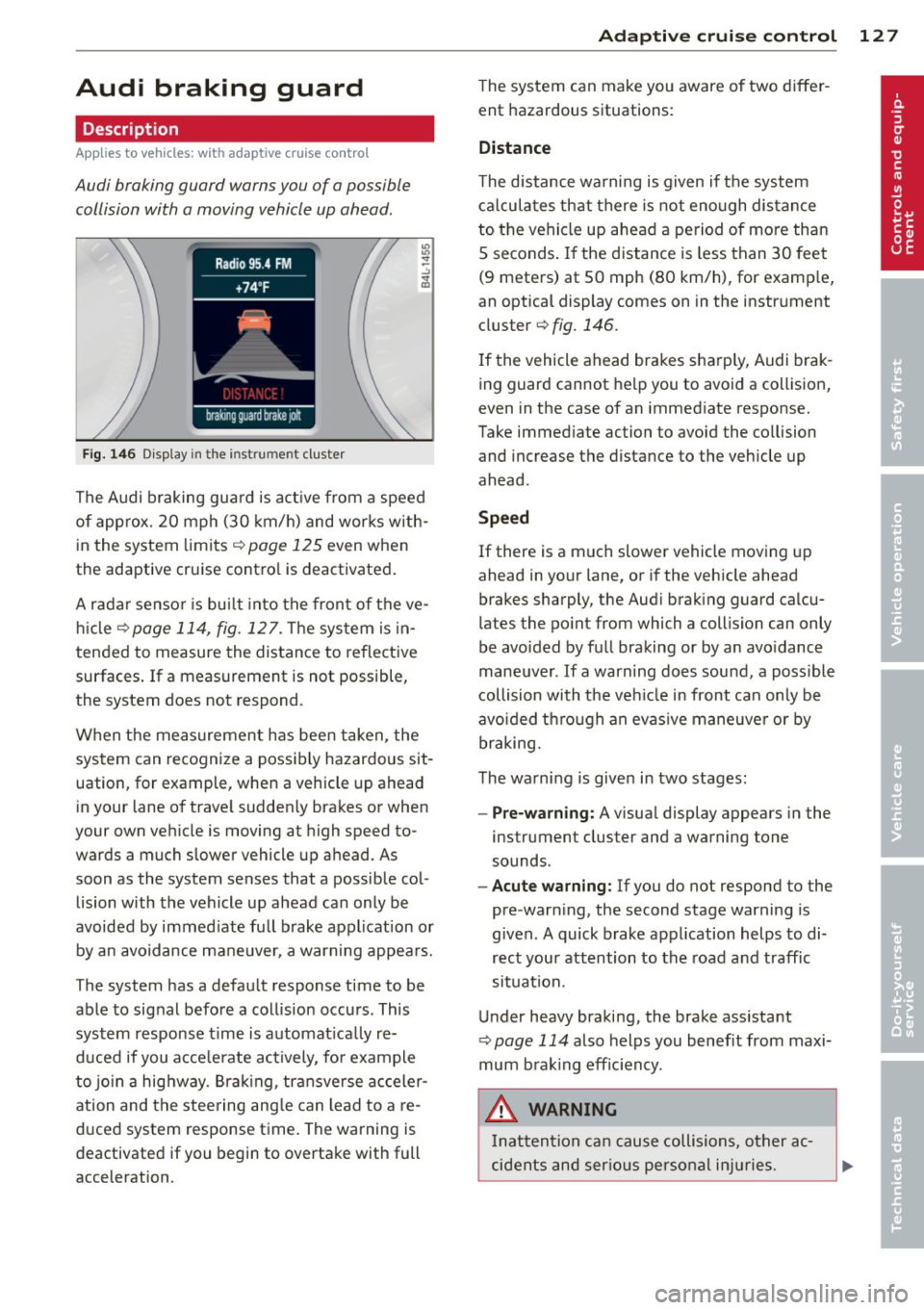
Audi braking guard warns you of a possible
collision with a moving vehicle up ahead .
Fig. 146 Display in the instrument cluster
The Audi braking guard is active from a speed
of approx. 20 mph (30 km/h) and works with
in the system limits¢
page 125 even when
the adaptive cruise contro l is deactivated.
A radar sensor is bu ilt into the front of the ve
hicle
¢page 114, fig. 127. The system is in
tended to measure the distance to reflective
surfaces .
If a measurement is not possible,
the system does not respond.
When the measurement has been taken, the
system can recognize a possibly hazardous sit
uation, for example, whe n a vehicle up ahead
in your lane of trave l sudden ly brakes or when
your own vehicle is moving at high speed to
wards a much slower vehicle up ahead . As
soon as the system senses that a possible col
lision with the vehicle up ahead can only be
avoided by immed iate full brake application or
by an avoidance maneuver, a warning appears.
The system has a defau lt response time to be
able to signal before a collision occurs. This
system response time is automat ica lly re
duced if you acce lerate actively, fo r example
to join a highway. Braking, transverse acceler
ation and the steering angle can lead to a re
duced system response time. The warning is
deactivated if you begin to overtake with full
acceleration .
Adaptive cruise control 127
The system can make you aware o f two differ
ent hazardous situations:
Distance
The distance warning is given if the system
calculates that there is not enough distance
to the vehicle up ahead a period of more than
S seconds . If the distance is less than 30 feet
(9 meters) at SO mph (80 km/h), for examp le,
an optical display comes on in the instrument
cluster¢
fig. 146.
If the vehicle ahead brakes sharp ly, Audi brak
ing guard cannot help you to avoid a collision,
even in the case of an immediate response.
Take immed iate action to avoid the co llision
and increase the distance to the vehicle up
ahead.
Speed
If there is a much slower vehicle moving up
ahead in your lane, or if the vehicle ahead
brakes sharply, the Aud i brak ing guard calcu
lates the po int from which a collision can only
be avoided by full braking or by an avoidance
maneuver. If a warning does sound, a poss ible
collision with the ve hicle in front can on ly be
avo ided through an evasive maneuver or by
braking.
The warning is given in two stages :
-Pre-warning: A visual display appears in the
instrument cluster and a warning tone
sounds.
- Acute warning: If you do not respond to the
pre-warn ing, the second stage warning is
given. A quick brake application helps to di
rect your attention to the road and traffic
situation.
Under heavy braking, the brake ass istant
¢
page 114 also helps you benef it from maxi
mum brak ing efficiency.
A WARNING
Inatt ention can cause collisions, other ac
cidents and serious personal injuries.
Page 130 of 348
128 Adapti ve crui se co ntrol
-Always pay close attenti on to t he traffic,
even w hen the Aud i brak ing guard is
switched on. The Aud i b rak ing guard pro
vides a warning but does no t brake the
car for you . You m ust apply t he brakes
yours elf!
- Always ke ep the sa fe and legal distance
betwe en your vehicle and veh icles up
ahead.
-Audi braking guard works within limits and w ill not respond outs ide the system
limits, for examp le when approaching a
stopped vehicle or s tationary obstacle
(end of a traff ic jam or veh icle that has
broken down in traffic).
- Always remember th at the radar sensor
f or the A udi braking guard wo rks within
defined detection and range limits that
may prevent the proper detection of oth
er veh icles.
- The radar sensor's function and range
can be reduced by rain, snow and heavy
spray. Moving vehicles up ahead may not
be promptly detected or may not be de
tected at al l.
- Always pay careful attention to the traf
fic s ituation and be ready to intervene
and be ready to take comp lete control
whenever necessary.
- Reflective surfaces includ ing crash barri
ers or tunnel entrances may impair the
function of th e radar sensor .
Settings in the MMI
Applies to vehicles: with adaptive cruise control
The settings of the Audi braking guard are
performed in the MMI.
.. Se lect :
ICARI fu nct ion button> Systems *
control button > Audi braking guard . Or
.. Se lect:
I CARI funct ion button > Car sys
tems *
control button > Driver assist > Audi
braking guard .
- System -
the Audi braking guard system can
be switched
On and Off .
-Early warning -the acoustic warning and
the messages can be switched
On and Off .
(D Tips
When handing ove r the keys to another
person, the p revious settings are adopted
i f the Audi braking g uard is activated
¢ page 43.
Driver's information in the instrument
cluster display
Applies to vehicles: with adaptive cruise contro l
Braking guard activated
Th is message appears when the Aud i b ra ki ng
guard applies the brakes du ring a second
st age (a cute) war ning .
Braking guard off
This message appears when the system has
been deac tivated via the MMI. This message
also appea rs br iefly at each beginn ing of a t rip
i f t he sys tem is swi tched off .
This message also appears when the system is not available because of a malfunct ion or if
E SC is switched to the Off road
mode ¢ page 225. The system can no longe r
war n of an impending coll is io n.
Page 249 of 348

directly at locks, or at door or hatch
openings -they can freeze shut.
- Never use sponges designed to remove
insects , or any kitchen scouring sponges
or similar products. They can damage
your paint finish .
- You should remove debris (such as in
sects) from the headlight lenses on a
regular basis, for example when refuel
ing your vehicle. Never use a dry cloth or
sponge to clean the headlights . Only use
wet cloths or sponges to prevent
scratches . It is best to use soapy water .
@) For the sake of the environment
In the interest of the environment, the ve
hicle should only be washed in special
wash bays .
Washing your vehicle with a power
washer
Cleaning the exterior of your car with a high
pressure power washer is safe as long as you observ e a few simple rules.
" Before using the power washer , make sure
you have read and understood the WARN
INGS ~.&.
in General information on
page 245.
" Always follow the operating instructions for
the pow er wash er.
" Make su re that the jet on the spray hose
produces a "fan shaped spr ay" .
" Do
not hold the spray nozzle too close to
soft materials .
When cleaning the vehicle with a power wash
er
always follow the operating ins truc tions.
T his applies particularly to the
operating
pressure
and the spraying distance. Maintain
a sufficient distance to soft materials such as
rubber hoses and sound/vibration deadening
materials (particularly on the underside of the
engine hood). Do not use a jet which sprays
water in a
direct stream or one that has a ro
tating
jet.
Water temperature should not exceed 140 °F
(60 °().
Cleaning and protection 247
A WARNING
Never wash tires with a jet that sprays wa
ter in a direct stream . This could cause in
visible damage to the tires and weaken
them, even if the spray is from a relatively
long distance and for a short time . Dam
aged and weakened tires can fail and cause
accidents and personal injury.
(D Note
To avoid damaging your vehicle, always make sure that there is sufficient distance
between the spray head and soft materials
like rubber hoses, plastic parts and sound
deadening materials. Never aim the spray
head at the same point for a long time.
This also applies to cleaning headlights
and painted bumpers. Remember : the
closer the nozzle is to the surface of the
material, the greater the stress on the ma
terial.
Sensors and camera lenses
- Remove snow with a hand brush and remove
ice with a de-icing spray that does not con
tain solvents.
- Clean the sensors (adaptive cruise control*,
parking system*) with a cleaning solution
that does not contain solvents and a soft
cloth.
- Dampen the camera lens with a household
alcohol-based glass cleaner, and then wipe
the lens clean with a dry cloth.
(D Note
- If you wash your vehicle with a pressure
washer,
- make sure there is enough distance to
sensors in the rear bumper .
- do not clean the camera lenses and the
area around them with the pressure
washer .
- Never use warm or hot water to remove
snow or ice from the camera lens. This
could cause the lens to crack .
•
•
Page 312 of 348
310 Fuses and bulb s
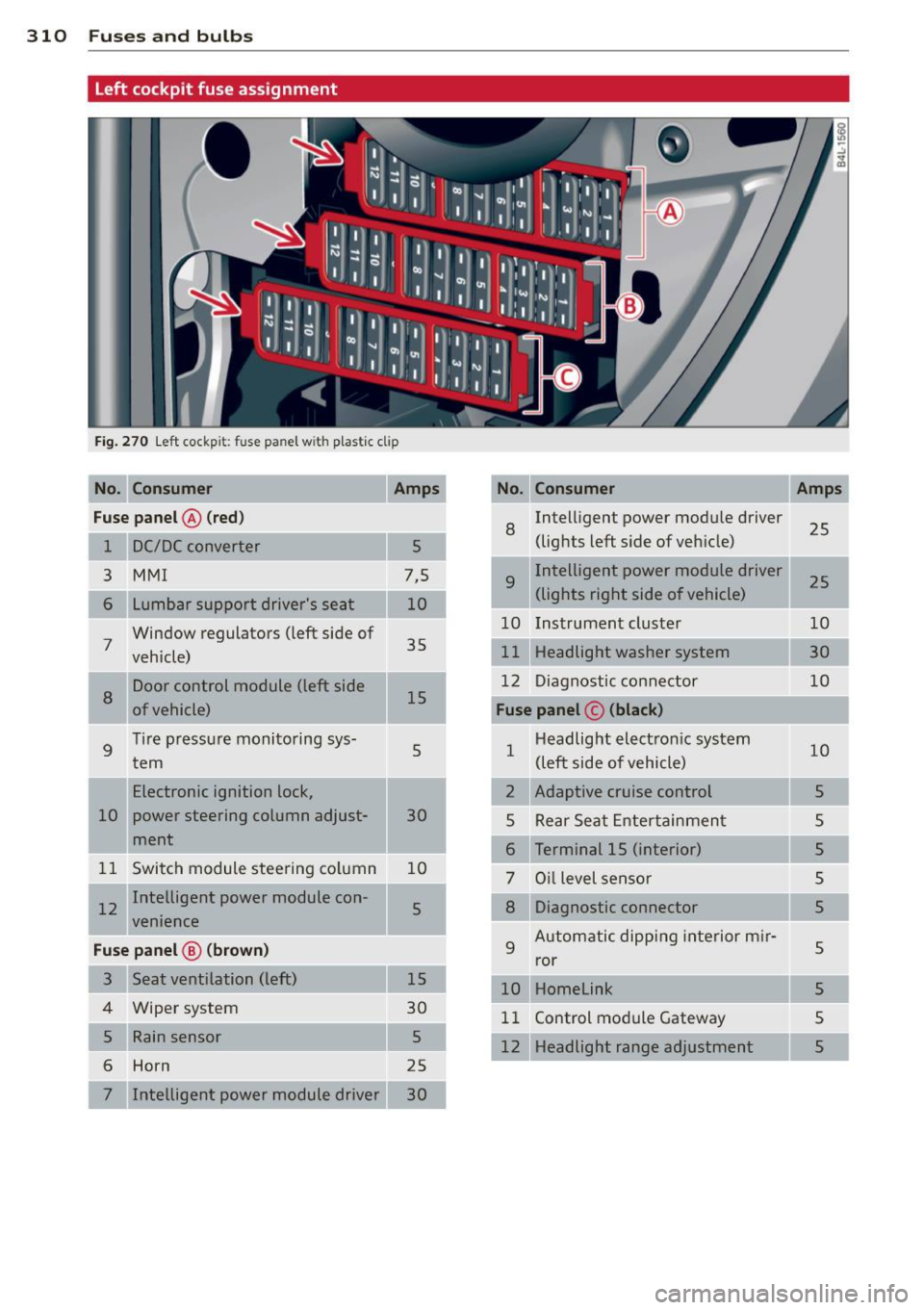
Left cockpit fuse assignment
Fig. 270 Left cockpit: fuse panel w ith p lastic clip
No. Consumer
Fu se pa nel @ (red )
8 Intelligent power modu le driver
25
1 5 (lights left s
ide of veh icle)
3
MMI 7,5 9 Intelligent power module driver 25
6 Lumbar support driver's seat
(lights right side of vehicle)
Window regulators (left side of 10 Instrument cluster
10
7 vehicle) 35
11 Headlight
washer system
Door control module (left side 12 Diagnostic connector
10
8 of vehicle) 15 Fu
se panel © (black )
9 Tire pressure monitoring sys-
5 1 Headlight electron
ic system
10
tern (left side of vehicle)
.
Electronic ignition lock,
2 Adaptive cruise control
5
10 power steering column adjust-
30
5 Rear Seat Ente rtainment
s
I ment 6 Terminal 15 (interior)
5
11 Switch module steering co lumn 10
7 Oil level sensor 5
I 12 Intelligent power module con-5 8 Diagnostic connector
5
venience
F u se pa nel @ (b ro wn) 9 Automatic dipping
interior m ir-5 ror
3 10 Homelink
5
4 Wiper system 11 Control module Gateway 5
5 5
12 Headlight range adjustment 5
6 Horn
25
7 Intelligent power module driver 30
Page 332 of 348
330 Index
A
Accessories
Adaptive A ir Suspension .... ... .. .. .. .
Cargo mode in the MMI .... .. .. .. .. . 327
155
160
Controls ...................... .. . 155
D .. escnpt 1on ... ........... .. .. .... .
H igh level . ............. ... .. .... .
Highway leve l .... ..... ... .. .. .... .
Instrument cluster display ... ... ... .
Jacking mode when changing a flat tire
Low level ................ .... .... . 155
155
155
158
159
155
Normal level ............. .... .... . 155
Segment display ........... .. .. ... 157
Sett ing the driving modes . ... .. .. .. . 157
Trailer towing mode ....... .... .... . 159
Using switch for cargo mode ...... ... 160
Warn ing/ indicator lights ..... .. .... .. 17
Adaptive cruise control .......... .. .. . 113
Changing speed . . . . . . . . . . . . . . . . . . . 11 7
C leaning senso rs .. ....... .. .. .. ... 247
Dr iver info rmation .......... .. .... . 120
Driver intervention prompt . .. .. .. .. . 124
Driving in traffic ................... 114
Driving program . . . . . . . . . . . . . . . . . . . 124
Error messages . . . . . . . . . . . . . . . . . . . 122
Open road .. ............. .. .. .. .. . 114
Override 114
Request for dr iver to assume control . . 114
Save speed ................. ... .. . 116
Setting distance . . . . . . . . . . . . . . . . . . . 118
Settings ... ............. .. .. .. .. . 124
Sett ing t ime interval .......... .... . 118
Specia l dr iv ing s ituations .. .. .. ..... 125
Status messages ........ ... .. .... . 122
Switching on and off ..... ... .. .... . 116
System limits . . . . . . . . . . . . . . . . . . . . . 125
Temporarily turning off .... .. .. .. .. . 118
warn ing/indicator lights ..... .. .... . 121
Adaptive light .......... ... ... ..... .. 59
defective . . . . . . . . . . . . . . . . . . . . . . . . . . 3 7
AdBlue .. .. .. ............. ........ .
261
Filling 262
Messages in the instrument cluster dis-
p lay .. ... ....... ....... ... .. .... .
261
Adding
Engine coolant ... ............ .... .
273
Engine oil 270
Windsh ield washer fluid ........ .... 279
Additional accessor ies
Additives Engine oil
Adjusting 327
270
Instrument cluster illumination .. .. .. . 13
Steering column electrically ..... .. .. 103
Steering column manually .. .. ... ... 103
Adjusting front seats . . . . . . . . . . . . . . . . . 71
Airbag
Warning/ind icator lights ........ .. .. .
16
Airbag system . . . . . . . . . . . . . . . . . 184, 201
Advanced Airbag System ..... ... .. .. 188
Advanced Airbag System components . 191
Care .. .... .... .. ............. .... 198
Children .. .. .. .. ............. .. .. 206
Child restraints ... .............. ... 207
Components (front airbags) ......... 191
Danger of fitting a child safety seat on
the front passenger seat ........ .. ..
186
Disposal .. .... .. ... .......... .... 198
Front airbags . . . . . . . . . . . . . . . . 188, 189
How do the front airbags work? ...... 193
How many a irbags does my vehicle
have? ....... ... .. .............. .
191
How the Advanced Airbag System com-
ponents work togethe r ......... ....
192
Important things to know ........ ... 184
Indicator light ... ............ .... . 195
Monitoring .... .. .......... ... .... 195
PASS ENGER AIR BAG OFF light . .. .. .. 195
Repairs ... .... .. .. ........... .... 198
Safety instructions ............... .. 197
Side airbags . .. .. .......... ...... . 199
Side curtain airbags ...... ...... .. .. 202
Weight-sensing mat .. ... ... ... .. .. 206
When must the system be inspected? . 195
Air conditioning
refer to Climate controls . . . . . . . . . . . . . 91
Air distribution
Climate controls .. ............. .... .
94
Four- zone automatic comfort air condi-
tioning . .. .. .. .. ............. .. .. .
99
Air pollutants filter
Climate controls . ............... ... .
91
Page 335 of 348
_______________________________ ___:I~n ~d ~e:.::x 333
Cleaning
A lcantara (synthetic suede) ... .. .. .. . 254
Eng ine compartment ... ... .. .. .. .. . 255
Exhaust tail p ipes ......... .. .. .. .. . 250
Fabrics and fabr ic coverings .. .. .. .. . 251
Instrument panel .............. .... 252
Inter ior . . . . . . . . . . . . . . . . . . . . . . . . . . 2 5 1
L eather .. ............ ...... .... .. 253
M MI con tro l conso le ...... .. .. .. .. . 251
M MI d isp lay ............. .... .. ... 2 51
Pl asti c and v inyl ....... ... .. .. .. ... 248
P lastic parts . ..... .... ... .. .. .. ... 252
Safety belts . ... .. .... ... .. .. .. ... 254
tr im strips . .. ........... .. .. .. ... 248
Trim str ips . ............. .... .. ... 248
C lean ing and pro tect ion .. ... .. .. .. .. . 2 45
Climate control . . . . . . . . . . . . . . . . . . . . . . 91
Synchron izing ............... ... ... . 92
Warm and cold ........... .... .. .. .. 9 1
Climate controls Air cond itioner o n/off ..... .. .. .. .. .. 93
A ir distribution .............. .... ... 94
A ir outlets ................. .... ... 96
A ir outlets (rear) ......... .. .. .. .. .. 96
A ir r eci rcula tion .......... .... .. .. .. 95
AUTO (st and ard setti ng) ... .. .. .. .. .. 94
B asic settings . . . . . . . . . . . . . . . . . . . . . . 99
Controls . . . . . . . . . . . . . . . . . . . . . . . . . . 92
Defrosting/defogging .. ... .. .. .... .. 94
Descr ipt ion . ............. .... .. .... 91
Energy management ...... .. .. .. .. .. 91
Fa n ... .. .. .. ........ ... .. ... ... .. 94
Front seat vent ilation ........ .... .. 100
H eated seats, front .............. .. 100
K ey coded sett ing ......... .. .. .. .. .. 9 1
Recirculation mode (autom atic) . . . . . . . 99
Recommended se tt ings . ... .. .. .... .. 91
Residua l heat ... .. .... ... .. .. .. .... 93
Sett ing t he temperature ... .. .. .. .. .. 94
Supp lementary heater ..... .. .. .. .. . 100
Synchroni zat ion . . . . . . . . . . . . . . . . . . . . 99
Turn ing on and off ........ .. .. .. .. .. 93
Using climate control economically . . . . 97
C lock ..... .. .. ... .. ..... ... .. .. .... 11
Closing Panor ami c slid ing su nroof .. .. .. .. .. .. S5
Coat hooks . . . . . . . . . . . . . . . . . . . . . . . . . 89
Cold tire inflat ion pressure ... .. .. .. .. . 284 Compass mir
ro r . . . . . . . . . . . . . . . . . . . . . 69
Compliance ....... .. ............... 328
Consume r Information . . . . . . . . . . 172, 325
Contacting N HTSA . . . . . . . . . . . . . . . . . . 172
Convenience key ... .. ................ 49
D river messages .. .. .......... .... . 108
Locking vehicl e . . . . . . . . . . . . . . . . . . . . . 50
START bu tton .. .. ................. 10 7
Star ting engi ne .. ............. .. .. 10 7
S TOP b utton ..... ... .. .. ..... ... .. 108
Switching engine off . .. ..... ... .. .. 108
Switching on ignition . .. ..... ... .. .. 107
Un locking vehicle . ................. . 49
Co nvertib le child sa fety se ats 212
Convertib le locking retractor
Act ivati ng ... .. .. .. . .. ... ... .. .. .. 217
Deact ivat ing . .. .. .. ............... 218
U si ng to secure a child safety seat 2.15, 217
Coolant system .. .. ................. 271
Cooling box in glove compa rtment ... .. . 88
Cooling System Expansion tank . .. .. . ... ...... ... .. 272
Cornering light . . . . . . . . . . . . . . . . . . . . . . 59
Cruise cont ro l
Changing speed .. .. . ... .... ... .. .. 112
Presetting your spe ed .. ..... ... .. .. 112
Switching off .. .. .. ............... 112
Switching on . .. .. .... .... ....... .. 111
Warning/ind ica tor lights .......... .. . 18
also refer to Adaptive cruise control ... 113
C ruising range . . . . . . . . . . . . . . . . . . . . . . . 24
(upholder . . . . . . . . . . . . . . . . . . . 78 , 85 , 86
D
Damp ing
r e fer to Adapt ive A ir Suspension . 155, 157
Data ......... .. .. .. . ... ....... .... 322
Dat a recorder . .. .. .. .. .... .... ..... 225
Date d isp lay . . . . . . . . . . . . . . . . . . . . . . . . 11
Daytime running lights. .. ..... ... . 57 , 58
De clara ti on of compliance
Adaptive cruise cont rol .. ....... .. .. 32 8
Audi s ide ass ist .... . .. ..... ... .. .. 328
Ce ll phone package .. ... .... ... .. .. 328
Convenience key .... . .. ..... ... .. .. 328
E lectronic immob ilizer ... .. ......... 328
•
•
Page 336 of 348
334 Index
------------------------------------
Homelink® universal remote control .. 328
Remote control key ................ 328
def What does this mean when it appea rs in
the trip odometer display? ... .. .... .. 12
Defective light bulb warning . . . . . . . . . . . 23
Defrosting/defogging the windows . . . . . . 94
Defrosting/defogging windows . .. ...... 96
Determining correct load limit . .. .... . 288
Diesel fuel ... ................ ..... . 257
Diesel particulate filter . . . . . . . . . . 37,235
Digital clock . . . . . . . . . . . . . . . . . . . . . . . . 11
Digital compass ......... .. .. .. .. .. .. 69
Digital speedometer ............ .. ... . 22
Dimensions ................ ... .... . 321
Dimming the rearview mirror .. .. ...... 69
Dipstick Reading the dipstick properly . .. .. .. . 269
Distance control system
refer to Adaptive cruise contro l .... ... 113
Doors Power child safety lock .... .. .. .. .. . . 48
Driver information system . .. .. .. .. .. .. 21
Dig ital speedometer ...... .. .. .. .. . . 22
Driver information messages . . . . . . . . . 30
Open door or rear lid warning . . . . . . . . . 22
Outside temperature display .. .. ...... 22
Sound system display ....... .. .... .. 21
Driver seat
refer to Seat ing pos ition ....... .. ... 166
Driver's seat . . . . . . . . . . . . . . . . . . . . . . . . 72
Driver's seat memory ....... .. .. .. .. . . 73
Activating remote control key ..... .. .. 74
Recalling a seat position . . . . . . . . . . . . . 73
Storing a seat position . . . . . . . . . . . . . . . 73
Driving messages . . . . . . . . . . . . . . . . . . . . 30
Driving mode
refer to Adaptive Air Suspension . lSS, 157
Driving offroad
Driving through water ..... .... .... . 239
Driving tips .............. .. .. .. .. . 238
Rules of behavior ........... .. .... . 238
Sand and mud .. ...... .... ... .. .. . 239
Snow-covered ground ...... ..... .. . 239
Unpaved roads ............... .. ... 239
Driving safely ............. .... .... . 165 Driving
through water ........... .. .. 239
Driving time . . . . . . . . . . . . . . . . . . . . . . . . 24
Duplicate key . .. .. ... .......... .. .. . 38
Dust filter
Climate controls . ................. .. 91
E
Easy entry feature .. .. ........... .. .. 104
Efficiency program . . . . . . . . . . . . . . . . . . . 26
Fuel economy messages . . . . . . . . . . . . . 27
Memory levels . . . . . . . . . . . . . . . . . . . . . 25
Other equipment ..... .... ..... .. .. . 27
Electric seat adjustment
refer to Power seat . . . . . . . . . . . . . . . . . 72
Electronic differential lock (EDL)
How the system works .............. 227
Warning/indicator lights ........ .. .. . 18
Electronic immob ilizer ........... .... . 40
Electronic power control (EPC) warning/indicator light . . . . . . . . . 15
E lectronic speed limiter ............... 28
Electronic Stabilization Control (ESC)
Hill descent control . ........... .. .. 225
How the system works .............. 225
Offroad mode .... ............. .... 225
Warning/indicator lights ............. 16
Emergency flasher . . . . . . . . . . . . . . . . . . . 60
Warning/ind icator lights ........ .... . 16
Emergency locking of doors ....... .. .. . 45
Emergency operation Rear lid ....... .. .. .............. .. 48
Emergency starting ................. 314
Emergency towing ... .... .... ... .. .. 316
Energy management ................ 231
Battery power ... ............. .... 233
Driver notification ............. .. .. 233
Engine Compartment .... ................ . 266
Coolant ....... .. .. .............. . 271
Hood ......... .. .. .............. . 264
Starting . . . . . . . . . . . . . . . . . . . . 105, 106
Starting with jumper cables ..... .... 314
Stopping .. .... .. ................. 106
Engine compartment
Safety instructions ................ . 264
Working the eng ine compartment .... 264