instrument cluster AUDI Q7 2013 Owner´s Manual
[x] Cancel search | Manufacturer: AUDI, Model Year: 2013, Model line: Q7, Model: AUDI Q7 2013Pages: 348, PDF Size: 87.72 MB
Page 110 of 348
108 On the road
reached operating temperat ure -other
wise yo u risk engine damage.
- The eng ine cannot be sta rted by pushing
or towing the vehicle.
@ For the sake of the environment
Do not allow the engine to warm up with
t he vehicle stationary. Start driving righ t
away . In th is way you avoid unnecessa ry
emissio ns.
@ Tips
If you open the drive r's door when the ig
nition is switched o n, a buzze r sounds and
the message
Ignition is on appears i n the
instrument cluster disp lay. Please switch
the ignition off.
Switching engine off with the~
button
App lies to vehicles: with Convenience key
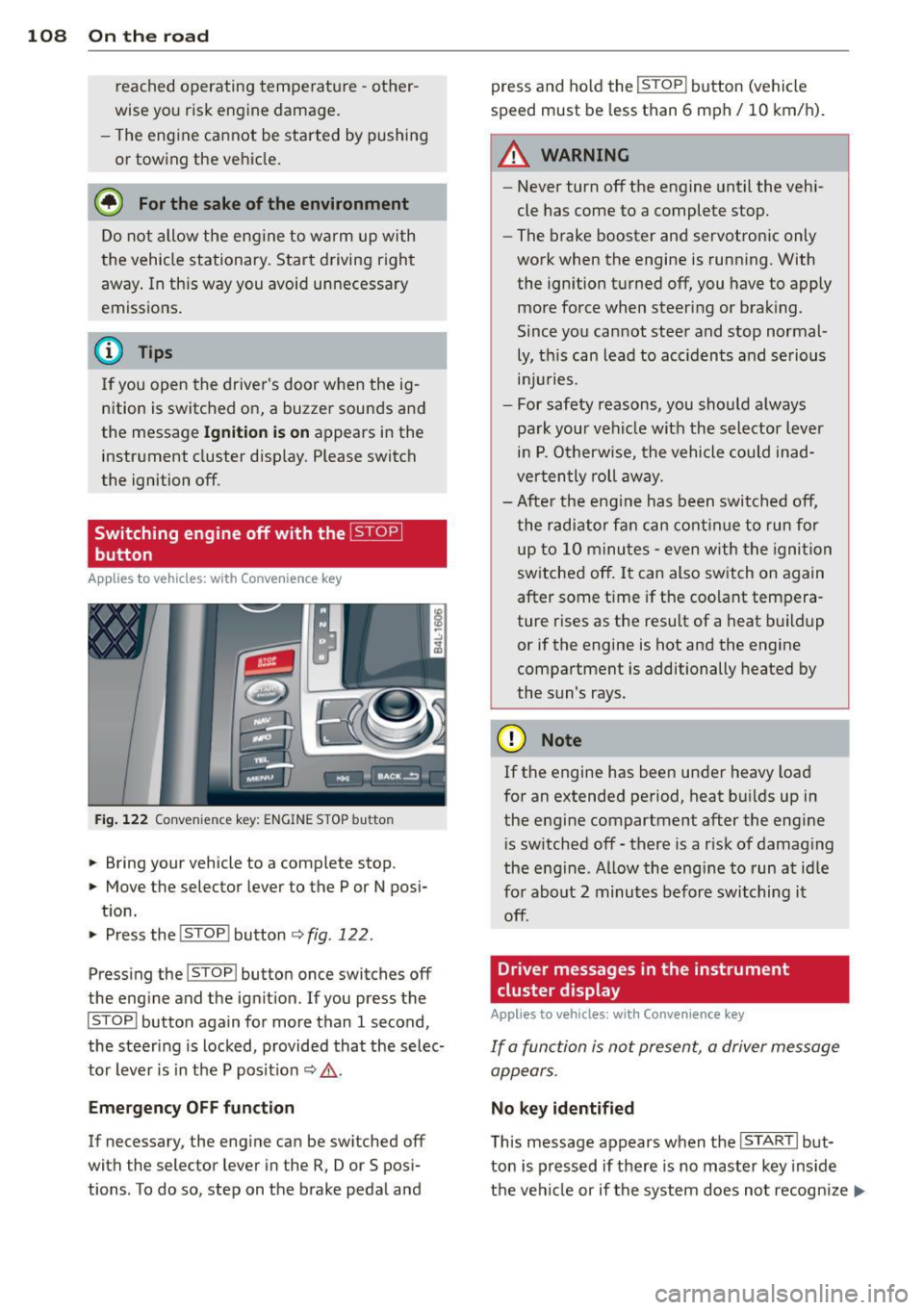
Fig. 122 Convenience key: ENGINE STOP butto n
.. Bring your vehicle to a complete stop.
.. Move the selector lever to the P or N posi-
t ion.
.. Pressthe !STOP !button
¢fig.122.
Press ing the I STOP I button once switches off
the engine and the ignition. If you press the
ISTOPI button again for more than 1 second,
the steering is locked, provided that the selec
tor lever is in t he P pos it ion
¢ & .
Emergency OFF function
If necessary, the engine can be switched off
with the selector lever in the
R, Dor S posi
tions . To do so, step on the brake peda l and press and ho
ld the !STOP ! b utton (vehicle
speed must be less than 6 mph/ 10 km/ h).
.&_ WARNING
-
- Never turn off the engine until the vehi-
cle has come to a complete stop.
- The brake booster and servotronic only
work when the engine is running. With
the ignition turned off, you have to apply mo re force when steeri ng or brak ing.
Since you cannot steer and stop normal
ly, t his can lead to acc idents and se rious
. . . in Juries.
- For safety reasons, you sho uld a lways
pa rk your vehi cle wit h the selector lever
i n P. O therwise, the vehicle could inad
ver ten tly roll aw ay.
- Afte r the eng ine has been switch ed off,
t he r adi at or f an can co ntinu e to run f or
up to 10 minu tes -even with the igni tion
switched off . It can also switch on again
after some t ime if the coolant tem pera
ture rises as the resu lt of a heat b uildup
or if the engine is hot and the engine
compa rtment is additionally heated by
the sun's rays.
(D Note
If the engine has been under heavy load
for an extended pe rio d, heat b uilds up in
the engine compartment after the engi ne
i s sw itched off -there is a r isk of damag ing
the e ng in e. A llow th e engi ne to run a t id le
fo r abo ut 2 minutes befor e switching it
off .
Driver messages in the instrument
cluster display
Applies to vehicles: with Co nvenience key
If a func tion is not present, a driver message
appears .
No key identified
This message appears when t he I STAR T I but-
ton is pr essed if there is no master key ins id e
the vehi cle or if t he system does not recogn ize
IJ,-
Page 113 of 348
vehicle must be standing in uphill driving direction.
After releasing the brake pedal , the brake
power is held for a
brief moment to prevent
the vehicle from rolling back when starting. At
this time, you can easily beg in to move your
veh icle.
A WARNING
- If you did not begin moving immediately
after releasing the brake pedal, under
certain circumstances, the vehicle would
begin to roll backward . Depress the
brake pedal immediately or engage the
park ing brake.
- Should the engine stall, depress the
brake pedal immediately or engage the
par king brake.
- In order to prevent the vehicle from ro ll
ing back un intentionally when sta rting in
stop-and-go traffic, keep the brake pedal depressed for a few seconds before d riv
ing off.
- When you leave the vehicle -even if only
briefly - , switch off the ignition and
make sure to remove the ignition key . Al
so engage the
p a rking b rake to prevent
your vehicle from rolling unintentionally. Th is particu larly applies if ch ildren are
left in the veh icle -danger of acc ident!
Cruise control
Switching the system on
The cruise control system makes it possible to
drive at a constant speed starting at
20 mph
(30 km/h).
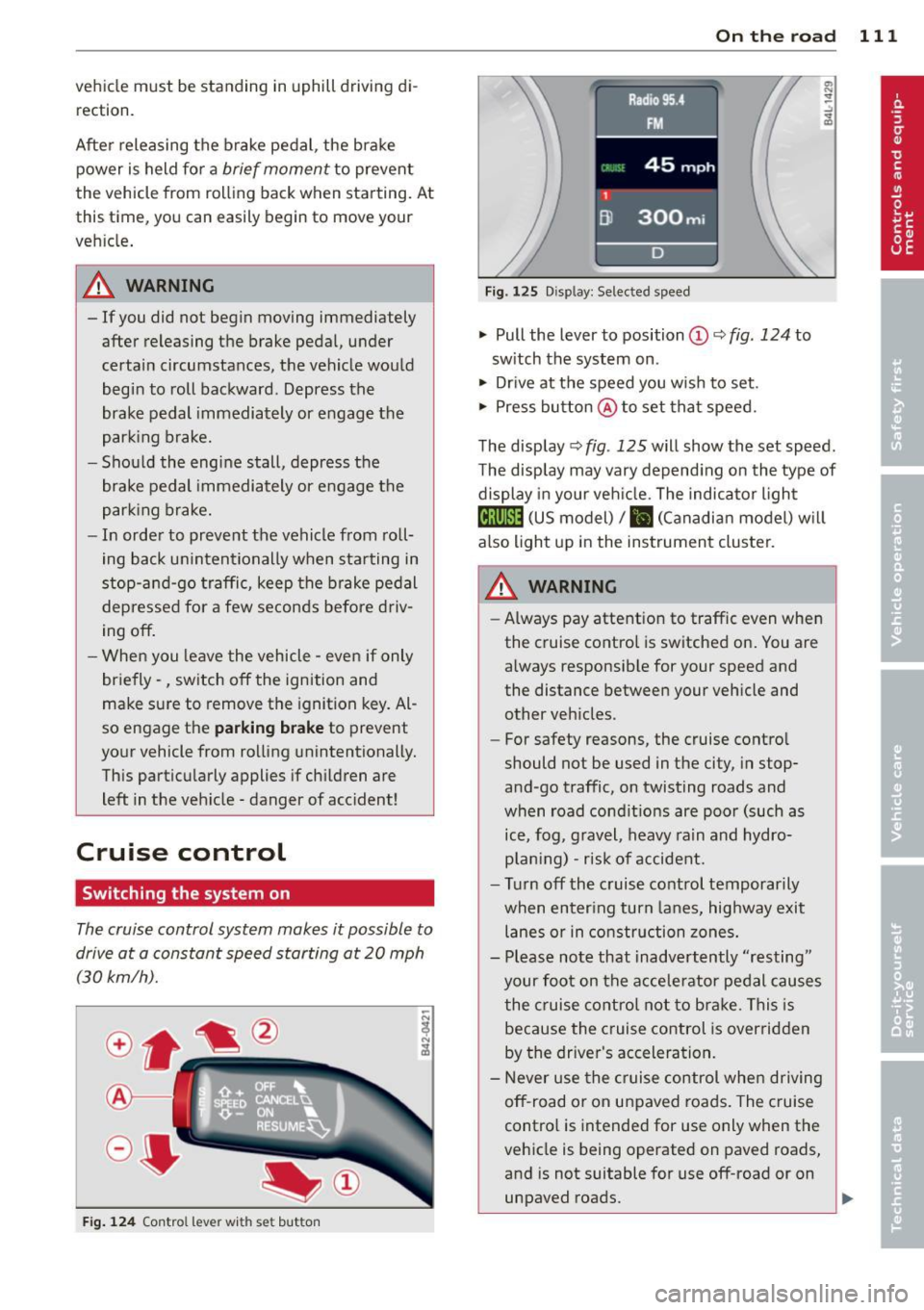
F ig . 124 Con tro l le ver w ith set button
On th e road 111
Fig. 1 2 5 Disp lay: Se lec te d speed
.. Pull the lever to position@c::> fig. 124 to
sw itch the system on .
.. Drive at the speed you wish to set .
.. Press button @to set tha t speed.
The display c::>
fig. 125 will show the set speed .
T he display may vary depend ing on the type of
display in your veh icle. The indicato r light
@;\1)~1~ (US model)/ B (Canadian model) w il l
also light up in the instrument cluster.
_& WARNING
- Always pay attention to traffic even when
the cruise control is switched on. You are
always responsible for your speed and
the distance between your veh icle and
other vehicles .
- For safety reasons, the cruise contro l
should not be used in the city , in stop
and -go traffic, on twisting roads and
when road condit ions are poor (such as
ice, fog , gravel , heavy rain and hydro
p lan ing) -risk of accident.
- Turn off the cruise control temporarily
when enter ing turn lanes, highway exit
lanes or in construction zones.
- Please note that inadvertently "resting"
your foo t on the accelerator pedal causes
the cruise contro l not to bra ke. This is
because the c ruise control is overridden
by the driver's acceleration.
- Never use the cruise control whe n driving
off -road or on unpaved roads. The c ruise
contro l is intended for use only when the
vehicle is being operated on paved roads,
and is not suitable for use off-road or on
unpaved roads.
1J1,,,
Page 121 of 348
Redu cing distance
"' Push the slider sw itch onc e to the left Q.
The distance currently set is shown for 3
seconds in the instrument cluster display.
"' Push the slider switch
again to the left 0
to decrease the distance by one step.
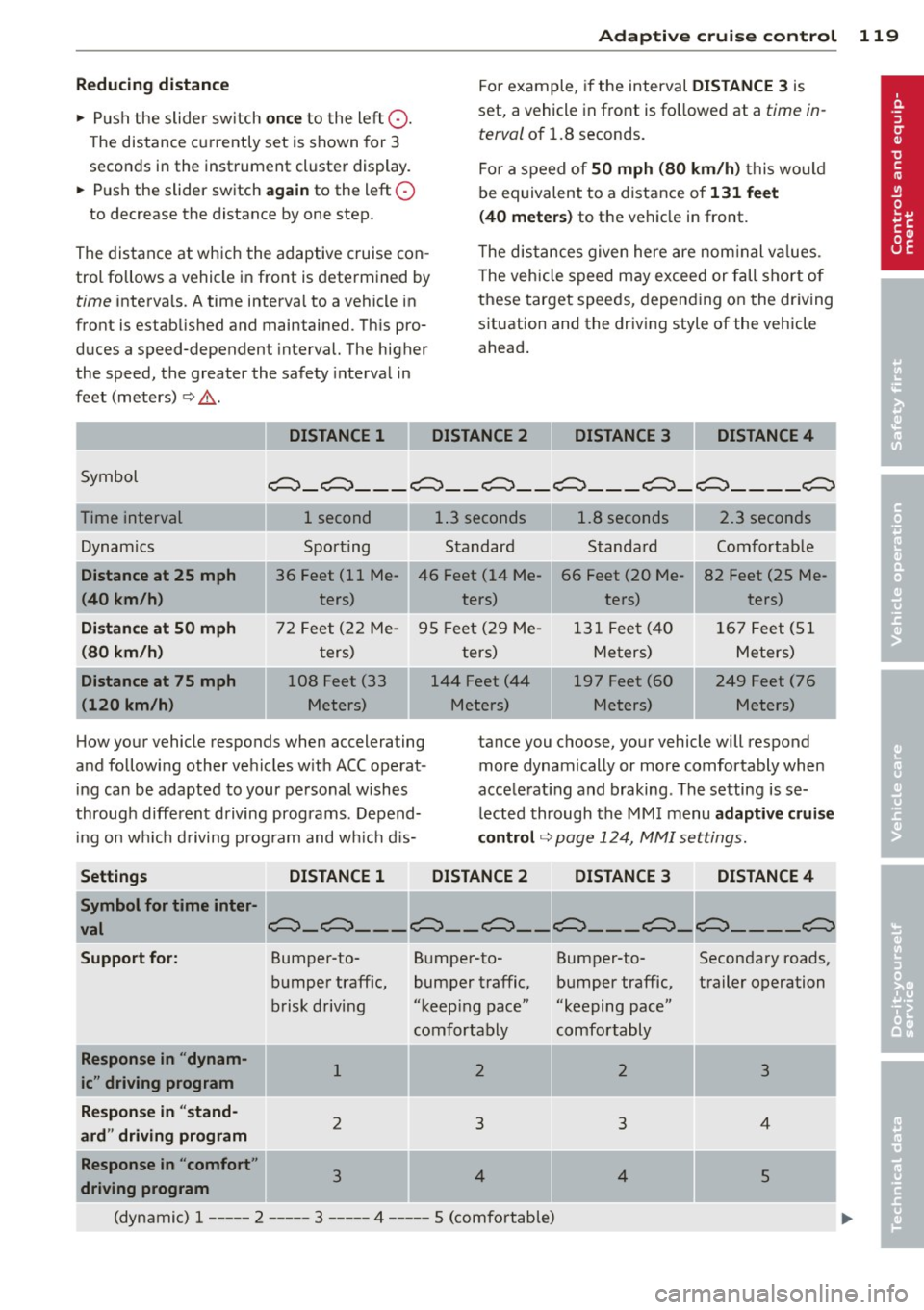
The distance at which the adaptive cruise con trol follows a vehicle in front is determined by
time interva ls. A time interval to a vehicle in
front is estab lished and maintained. Th is pro
duces a speed-dependent interval. The higher
the speed, the greater the safety interva l in
feet (meters)
¢ ,&. .
DISTANCE 1 Ada
pti ve crui se control 119
For example, if the interval DISTANCE 3 is
set, a vehicle in front is fo llowed at a
time in
terval
of 1.8 seconds.
For a speed of
50 mph (80 km /h ) this wo uld
be equivalent to a distance of
131 feet
( 4 0 meter s)
to the vehicle in front.
T he distances given here are nom inal va lues .
T he vehicle speed may exceed or fall shor t of
these target speeds, depending on the driving situation and the driving style of the vehicle
ahead .
DISTANCE 2 DISTANCE 3 DISTANCE4
Symbol
~ -~ --- ~-- ~-- ~--- ~-~ ---- ~
Time interval
Dynamics
I Distance at 25 mph
(40 km /h )
Di st a nce at 50 mph
(80 km /h)
Distance at 75 mph
(120 km /h)
1 second 1.3 seconds
Sporting Standard
36 Feet (11 Me-
JI 46 Feet (14 Me-
ters) ters)
-.
72 Feet (2 2 Me- 95 Feet (29 Me-
t ers) ters)
108 Feet (33 144 Feet (44
Meters) Meters)
1.8 seconds
Standard
66 Feet (20 Me ters)
-
131 Feet (40 Me ters)
197 Feet (60
Meters)
2.3 seconds
Comfortab le
82 Feet (25 Me- ·
ters)
1 67 Feet (51
Meters)
249 Feet (76 ·
Meters)
How your vehicle responds when accelerating
and following other vehicles w it h ACC operat
i ng can be adapted to your personal wishes
through diffe rent driving programs. Depend
ing on w hich driving p rog ram and wh ic h dis- tance you choose, your vehicle will respond
more dynamically or more comfortably when
acce lerat ing and braking . The setting is se
lected through the MM I menu
adapt ive cruise
contro l¢
page 124, MMI settings.
Settings DISTANCE 1 DISTANCE 2 DISTANCE 3 DISTANCE4
Symbol for time inter·
val
~-~----- ~ ~----~
Support fo r: Bumper-to- B umper-to- Bumper-to- Secondary roads,
bumper traffic, bumper traffic, bumper traffic, trailer operation
b risk driving "keep ing pace" "keeping pace"
comfortably comfortably
Re sponse in "dynam-
1 2 2 3 ic" driving program
Response in "stand -
2 3 3 4
ard" driving program
Response in "comfort "
3 4 4 5
driving program
(dynamic) 1-- ---2 ----- 3 --- -- 4 ----- 5 (comfortable)
Page 122 of 348
120 Adapti ve crui se control
_&. WARNING
-
Following other vehicles too closely in
creases the risk of a crash and serious per
sonal injury .
- Following other vehicles too closely, par
ticu larly at higher speeds increases the
risk of coll is ions and serious personal in
jury.
- Setting short distances to the traffic
ahead reduces the time and distance
available to bring your vehicle to a safe
stop and makes it even more necessary
to pay close attention to traffic .
- Always select a speed and distance to
traffic ahead that is safe and appropriate
under the prevailing traff ic, road, weath
er and lighting conditions.
- Never rely on the distance control fea
ture of ACC a lone to prevent rear-end col
lis ions. Always be prepared to b rake and
take evasive act io n to avoid co llisions
and other ac cident situations.
- Never allow the clos ing speed between
yo u a nd other vehicles to be so h igh that
the adaptive cruise control may not be
able to slow your vehicle safe ly . If clos
ing speed is too high, yo u m ust app ly the
brakes yourself to reduce the risk of a
rear-end crash.
- Always select a greater following dis
tance to the veh icle ahead on wet roads
than on dry roads.
- Always read and heed the information
and WARNINGS
¢ &. in Description on
page 113.
(D Tips
The distance setting is reset to the factory
default
DIS TANCE 3 the next time the ig
nition is turned on.
Driver information
Displays in the instrument cluster
Applies to veh icles: w ith adaptive cruise contro l
Depending on the driving situation, driver in
formation is displayed in the instrument clus
ter .
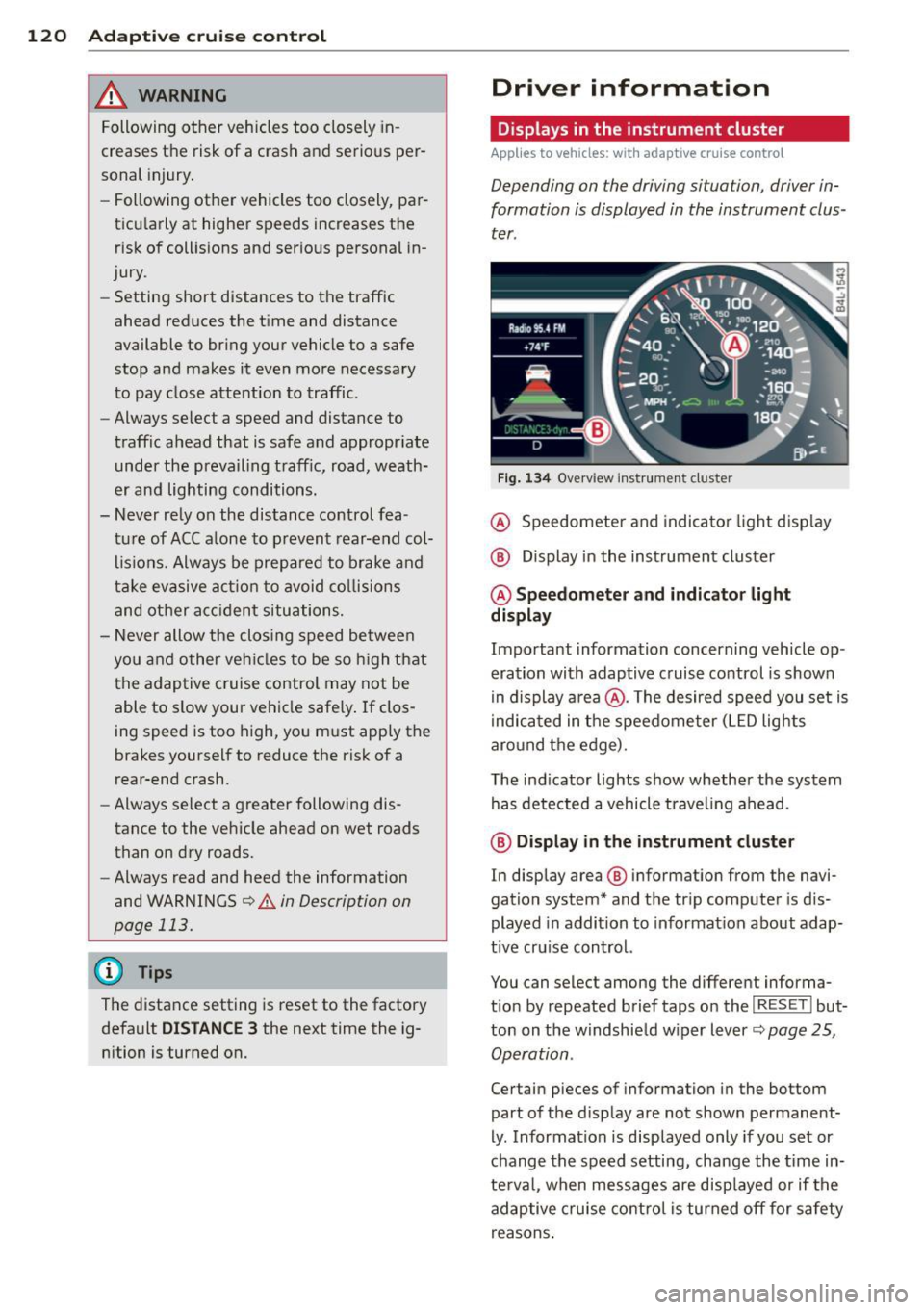
Fig . 1 34 Overview ins tr u me nt cluster
@ Speedometer and indica to r li ght d isp lay
@ Display in the instrument cluster
@ Speedometer and indi cato r light
display
Important information concerning vehicle op
eration with adaptive cruise control is shown
in display a rea @. The desired speed you set is
i ndica ted in the speedometer (L ED lights
aro und the edge).
T he ind icator lights show whether the system
has detected a vehicle trave ling ahead .
@ Display in the in strument cluster
In display area @ information from the navi
gation system* and the tr ip computer is dis
played in addition to informat ion about adap
t ive cru ise control.
You can select among the different informa
t io n by repeated brief taps on the
I RESET I but
ton on the w indshie ld w iper lever
c::> page 25,
Operation .
Certain pieces of information in the bottom
part of the d isplay are not shown permanent
ly . Information is displayed only if you set or
change the speed setting, change the time in
te rva l, when messages are disp layed or if the
adaptive cruise contro l is turned off for safety
reasons .
Page 123 of 348
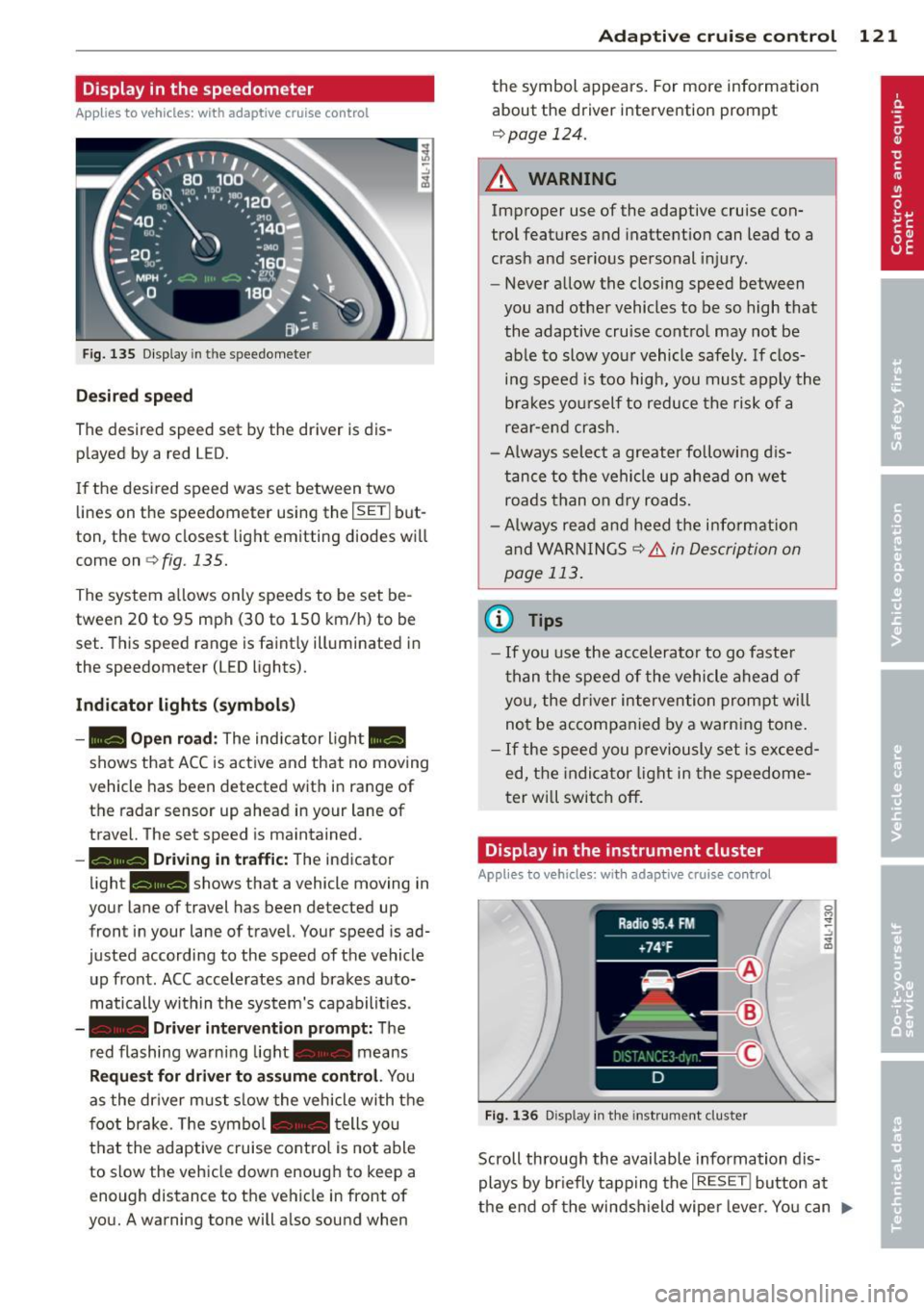
Display in the speedometer
Applies to vehicles: with adaptive cruise control
Fig. 135 D isplay in the speedomete r
Des ired spe ed
The desired speed set by the driver is dis
p layed by a red LED.
If the desi red speed was set between two
lines on the speedometer using the
I SETI but
ton, the two closest light emitting diodes will
come on <=>
fig. 135.
The system a llows only speeds to be set be
tween 20 to 95 mph (30 to 150 km/h) to be
set. This speed range is faint ly illuminated in
the speedometer (LED lights).
Ind icator light s (symbol s)
-- Open road :
The indicator light _
shows that ACC is active and that no moving
vehicle has been detected with in range of the radar sensor up ahead in your lane of
travel. The set speed is maintained.
- - Driving in tr aff ic: The indicator
light - shows that a vehicle moving in
your lane of travel has been detected up
front in your lane of travel. Your speed is ad
justed according to the speed of the vehicle
up front . ACC accelerates and brakes auto
matically within the system's capabilit ies .
-- Driver int erv ent ion prompt: The
red flashing warning light- means
Reque st for dri ver to assum e co ntr ol. You
as the dr iver must slow the vehicle with the
f oot brake. The symbol - tells you
t h at the adaptive cruise co ntrol is not able
to slow the vehicle down enough to keep a
enough distance to the vehicle in front of
you. A warning tone will also sound when
Ad apti ve crui se control 121
the symbol appears. For more information
about the driver intervention prompt
r::!) page 124.
_& WARNING
Improper use of the adaptive cruise con
trol features and inattention can lead to a
crash and serious personal injury.
- Never allow the closing speed between
you and othe r vehicles to be so high that
the adaptive cruise contro l may not be
able to slow your vehicle safely. If clos
ing speed is too high, you must apply the
brakes yo urself to reduce the risk of a
rear-end crash.
- Always select a greater following d is
tance to the vehicle up ahead on wet
roads than on dry roads.
- Always read and heed the information
and WARNINGS <=>
& in Description on
page 113 .
(D Tips
-If you use the accelerator to go faste r
t han t he speed of the vehicle ahead of
you, the dr iver intervention prompt will
not be accompan ied by a warn ing tone.
- If the speed you previously set is exceed
ed, the indicator light in the speedome
ter will switch off.
Display in the instrument cluster
Appl ies to vehicles: wit h adaptive cruise control
F ig. 136 D isp lay in the instrument cluster
-
Scroll through the available information dis
plays by br iefly tapp ing the
I RESET ! button at
the end of the windshield wipe r lever. You can ..,.
Page 126 of 348
124 Adaptive cruise control
Stationary object ahead
The text message Stationary object ahead ap
pears, when you want to activate the system
and there is a stationary vehicle or an object
immediately in front of you .
Gradient too steep
The text message Gradient too steep appears
when the max imum gradient for proper ACC
operation has been exceeded. Adaptive cruise
contro l is turned
off . A warning tone also
sounds as a reminder.
Shift lever position!
The text message Shift lever position! ap
pears when the selector lever is moved to po
sition
N . In this position, adaptive cruise con
trol is not ava ilab le .
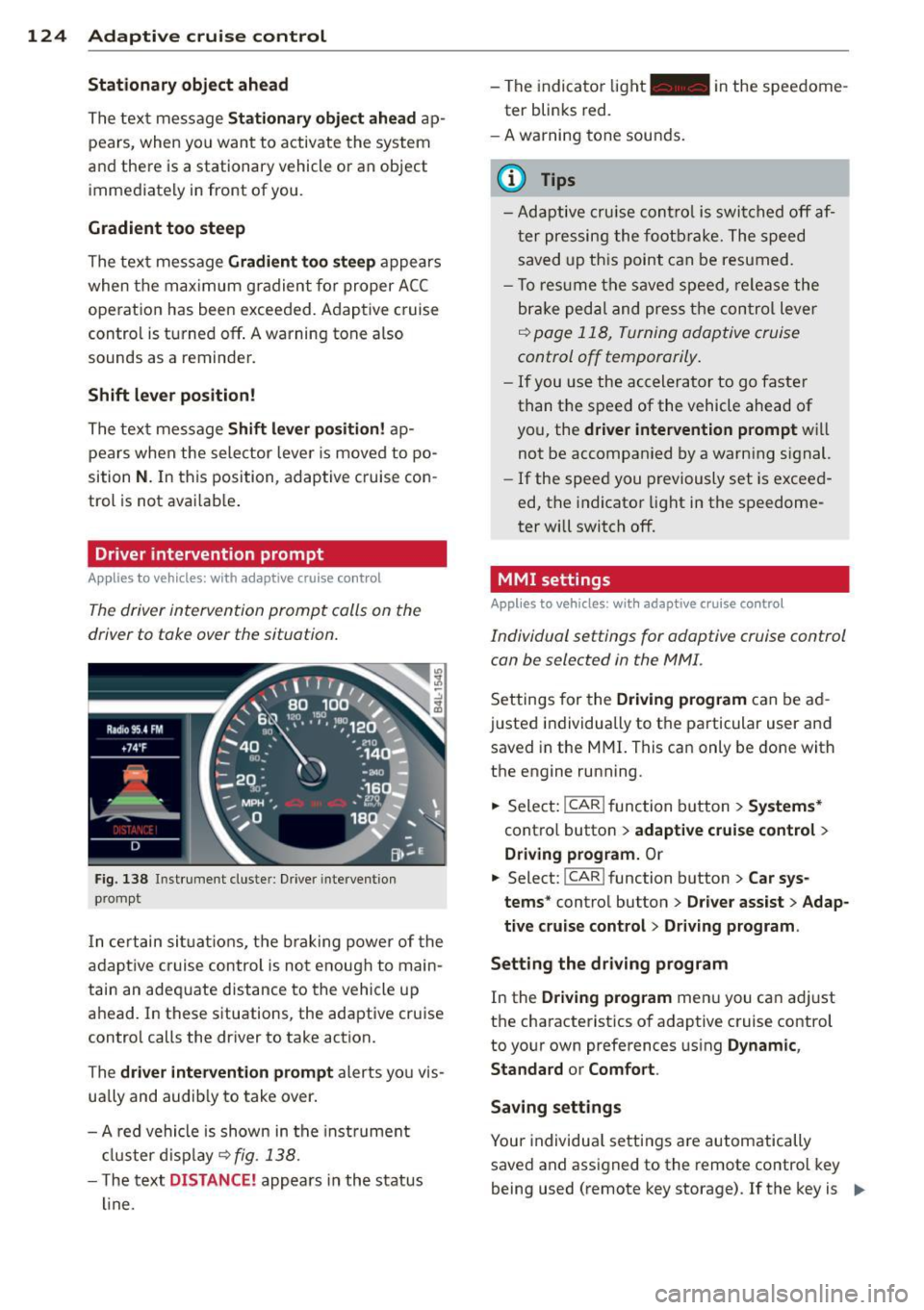
Driver intervention prompt
Applies to vehicles: with adaptive cruise co ntrol
The driver intervention prompt calls on the
driver to toke over the situation.
Fig. 138 I n st rument cluste r: Drive r in terven tion
prompt
I n certain situat ions , the braking power of the
adapt ive cr uise control is not enough to main
tain an adequate distance to the vehicle up
ahead. In these situations, the adaptive cruise
control calls the driver to take action.
The
driver intervention prompt alerts you vis
ually and audib ly to take over.
- A red vehicle is shown in the instrument
cluster display ~
fig. 138.
- T he text DISTANCE! appears in the status
line. -
The indicator light- in the speedome
ter blinks red.
- A warning tone sounds.
0) Tips
-Adaptive cruise control is switched off af
ter pressing the footbrake. The speed
saved up this point can be resumed.
- To res um e the saved speed, release the
brake pedal and press the control lever
~ page 118, Turning adoptive cruise
control off temporarily.
-If you use the accelerator to go faster
than the speed of the vehicle ahead of
you, the
driver intervention prompt wi ll
not be accompanied by a warning s ignal.
- If the speed you previously set is exceed
ed, the indicator light in the speedome
ter will switch
off.
MMI settings
Applies to vehicles : with adaptive cruise contro l
Individual settings for adoptive cruise control
con be selected in the
MMI.
Settings for the Driving program can be ad
justed individually to the particular user and
saved in the MMI. This can only be done with
the engine running .
.,. Select:
!CAR ! function button> Systems*
cont ro l button > adaptive cruise control >
Driving program. Or
.,. Select: !CAR ! function button> Car sys·
tems *
control button > Driver assist > Adap
tive cruise control > Driving program .
Setting the driving program
In the Driving program menu you can ad just
the characteristics of adaptive cruise control
to your own preferences using
Dynamic,
Standard
or Comfort .
Saving settings
Your individual settings are automatically
saved and assigned to the remote control key
being used (remote key storage) . If the key is ..,_
Page 129 of 348
Audi braking guard
Description
Applies to vehicles: with a daptive cruise co ntrol
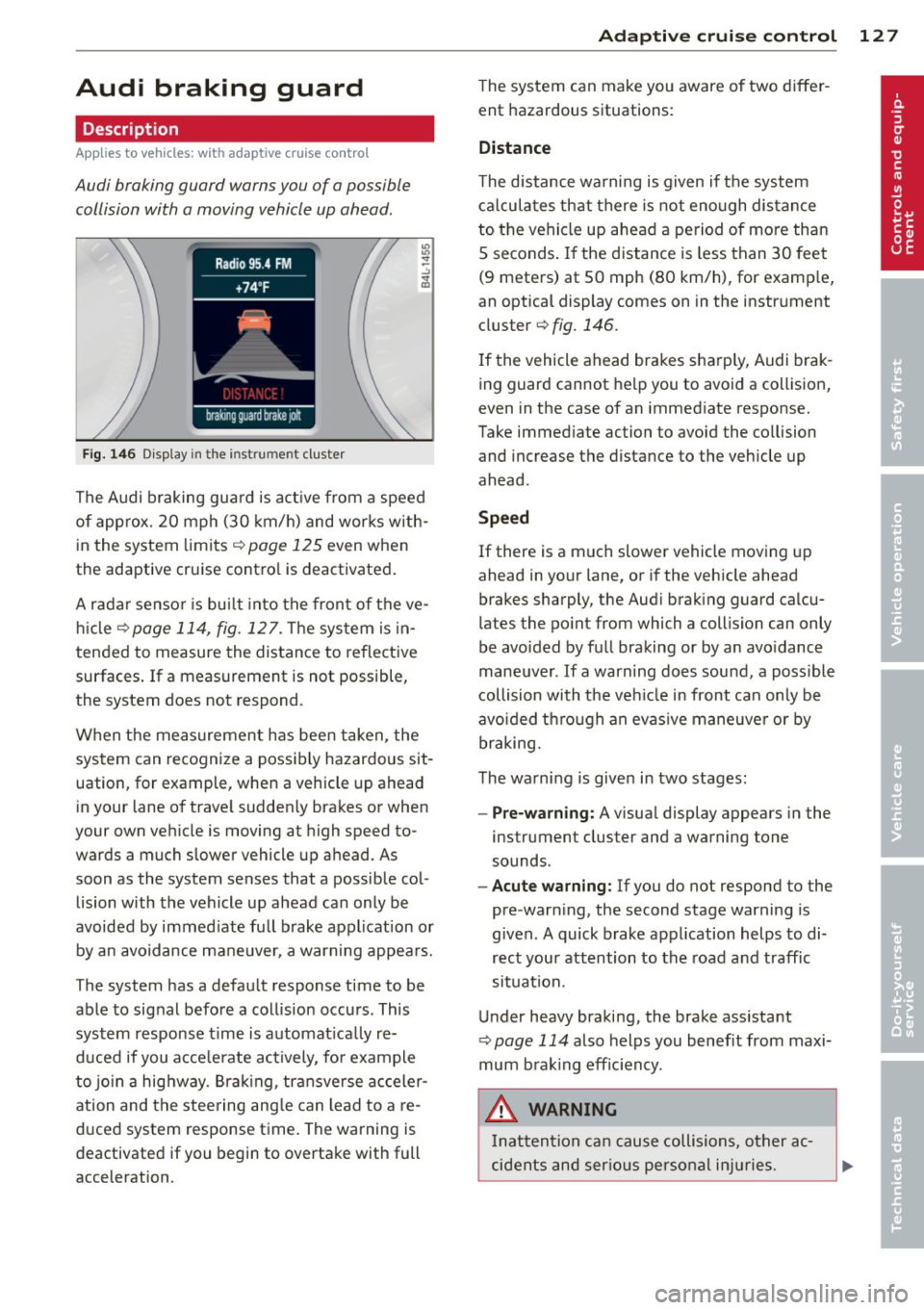
Audi braking guard warns you of a possible
collision with a moving vehicle up ahead .
Fig. 146 Display in the instrument cluster
The Audi braking guard is active from a speed
of approx. 20 mph (30 km/h) and works with
in the system limits¢
page 125 even when
the adaptive cruise contro l is deactivated.
A radar sensor is bu ilt into the front of the ve
hicle
¢page 114, fig. 127. The system is in
tended to measure the distance to reflective
surfaces .
If a measurement is not possible,
the system does not respond.
When the measurement has been taken, the
system can recognize a possibly hazardous sit
uation, for example, whe n a vehicle up ahead
in your lane of trave l sudden ly brakes or when
your own vehicle is moving at high speed to
wards a much slower vehicle up ahead . As
soon as the system senses that a possible col
lision with the vehicle up ahead can only be
avoided by immed iate full brake application or
by an avoidance maneuver, a warning appears.
The system has a defau lt response time to be
able to signal before a collision occurs. This
system response time is automat ica lly re
duced if you acce lerate actively, fo r example
to join a highway. Braking, transverse acceler
ation and the steering angle can lead to a re
duced system response time. The warning is
deactivated if you begin to overtake with full
acceleration .
Adaptive cruise control 127
The system can make you aware o f two differ
ent hazardous situations:
Distance
The distance warning is given if the system
calculates that there is not enough distance
to the vehicle up ahead a period of more than
S seconds . If the distance is less than 30 feet
(9 meters) at SO mph (80 km/h), for examp le,
an optical display comes on in the instrument
cluster¢
fig. 146.
If the vehicle ahead brakes sharp ly, Audi brak
ing guard cannot help you to avoid a collision,
even in the case of an immediate response.
Take immed iate action to avoid the co llision
and increase the distance to the vehicle up
ahead.
Speed
If there is a much slower vehicle moving up
ahead in your lane, or if the vehicle ahead
brakes sharply, the Aud i brak ing guard calcu
lates the po int from which a collision can only
be avoided by full braking or by an avoidance
maneuver. If a warning does sound, a poss ible
collision with the ve hicle in front can on ly be
avo ided through an evasive maneuver or by
braking.
The warning is given in two stages :
-Pre-warning: A visual display appears in the
instrument cluster and a warning tone
sounds.
- Acute warning: If you do not respond to the
pre-warn ing, the second stage warning is
given. A quick brake application helps to di
rect your attention to the road and traffic
situation.
Under heavy braking, the brake ass istant
¢
page 114 also helps you benef it from maxi
mum brak ing efficiency.
A WARNING
Inatt ention can cause collisions, other ac
cidents and serious personal injuries.
Page 130 of 348
128 Adapti ve crui se co ntrol
-Always pay close attenti on to t he traffic,
even w hen the Aud i brak ing guard is
switched on. The Aud i b rak ing guard pro
vides a warning but does no t brake the
car for you . You m ust apply t he brakes
yours elf!
- Always ke ep the sa fe and legal distance
betwe en your vehicle and veh icles up
ahead.
-Audi braking guard works within limits and w ill not respond outs ide the system
limits, for examp le when approaching a
stopped vehicle or s tationary obstacle
(end of a traff ic jam or veh icle that has
broken down in traffic).
- Always remember th at the radar sensor
f or the A udi braking guard wo rks within
defined detection and range limits that
may prevent the proper detection of oth
er veh icles.
- The radar sensor's function and range
can be reduced by rain, snow and heavy
spray. Moving vehicles up ahead may not
be promptly detected or may not be de
tected at al l.
- Always pay careful attention to the traf
fic s ituation and be ready to intervene
and be ready to take comp lete control
whenever necessary.
- Reflective surfaces includ ing crash barri
ers or tunnel entrances may impair the
function of th e radar sensor .
Settings in the MMI
Applies to vehicles: with adaptive cruise control
The settings of the Audi braking guard are
performed in the MMI.
.. Se lect :
ICARI fu nct ion button> Systems *
control button > Audi braking guard . Or
.. Se lect:
I CARI funct ion button > Car sys
tems *
control button > Driver assist > Audi
braking guard .
- System -
the Audi braking guard system can
be switched
On and Off .
-Early warning -the acoustic warning and
the messages can be switched
On and Off .
(D Tips
When handing ove r the keys to another
person, the p revious settings are adopted
i f the Audi braking g uard is activated
¢ page 43.
Driver's information in the instrument
cluster display
Applies to vehicles: with adaptive cruise contro l
Braking guard activated
Th is message appears when the Aud i b ra ki ng
guard applies the brakes du ring a second
st age (a cute) war ning .
Braking guard off
This message appears when the system has
been deac tivated via the MMI. This message
also appea rs br iefly at each beginn ing of a t rip
i f t he sys tem is swi tched off .
This message also appears when the system is not available because of a malfunct ion or if
E SC is switched to the Off road
mode ¢ page 225. The system can no longe r
war n of an impending coll is io n.
Page 137 of 348
Lane width
Applies to vehicles: with side assist
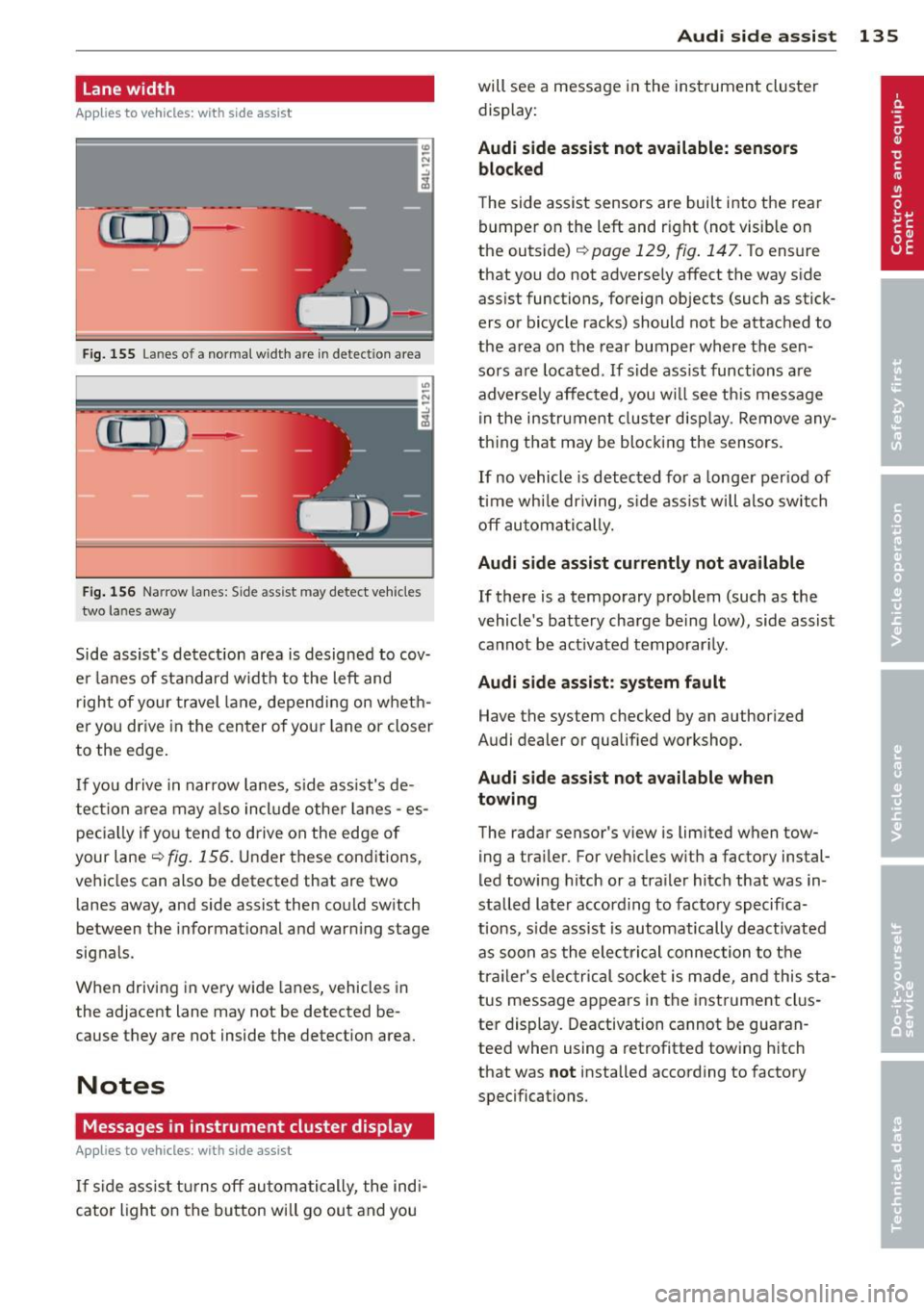
-· Fig. 155 Lan es o f a norma l wid th a re in detect ion area
Fig . 156 Narrow lanes: Side ass ist may detect vehicles
two la nes away
Side assist's detection area is designed to cov
e r l anes of standard w idth to the left and
r ight of your travel lane, depending on wheth
er you dr ive in the center of your lane or closer
to the edge.
I f you drive in narrow lanes, s ide ass ist's de
tec tion a rea may a lso incl ude other lanes -es
pec ia lly if you tend to drive on the edge of
your lane
c:::> fig. 156 . Under these cond it ions,
ve hicles can also be detected that are two
lanes away, and side assist then could switch
between the informat ional and warn ing stage
signals.
When driving in very wide lanes, vehicles in
the adjacent lane may not be detected be
cause they are not inside the detection area.
Notes
Messages in instrument cluster display
Applies to vehicles: with side assist
If s ide ass ist t urns off automa tically, the ind i
cator l igh t on the button wi ll go ou t and you
Aud i side assist 135
will see a message in the instrument cluster
display:
Audi side assist not available: sensors
bloc ked
The side assist sensors are built into the rear
bumper on the left and r ight (not visible on
the outside)
c:::> page 129, fig . 147. To ensure
that you do not adversely affect the way side
ass ist functions, foreign objects (such as stick
ers or bicycle racks) should not be attached to
the area on the rear bumper where the sen
sors a re located . If side ass ist functions are
adverse ly affec ted, you w ill see th is message
in the instrument cluster disp lay . Remove any
th ing t hat may be blocking the sensors.
If no vehicle is detected for a longer per iod of
t ime wh ile dr iv ing, s ide ass ist w ill also switch
off automatically.
Audi s ide as sist cu rrentl y not available
If there is a temporary problem (such as the
vehicle 's battery charge be ing low), side assist
cannot be act ivated temporar ily .
Audi side assis t: sy stem fault
Have the system checked by an author ized
Audi dealer or qualified workshop.
Audi side assist not availabl e when
towing
The radar sensor's view is limited when tow
ing a tra iler. For vehicles with a factory instal
led tow ing hitch or a trailer hitch that was in
stalled later according to facto ry specifica
tions, s ide ass ist is automatically deact ivated
as soon as the ele ctrical connection to the
trailer's e lectrical socke t is made, and this sta
tus message appears in the instrument clus
ter display. Deactivation cannot be guaran
teed when using a retrofitted towing hitch
that was
not installed according to factory
specifications.
Page 159 of 348
emphasis on comfort are selected in this
mode.
- Automatic lowering : When a speed of
abo ut 75 mph (120 km/h) is exceeded for
more than 30 seconds, the vehicle is auto
matically lowered by 0.6 inch (15 mm) to
low level .
-Automatic raising: The vehicle is automati
ca lly raised to
normal level again, if the
speed falls below about 44 mph (70 km/h)
for a period of 2 minutes . The vehicle is
raised immediately when speed falls below
about 22 mph (35 km/h) .
Offroad
Select the offroad mode when you have to
travel over poor quality sections of road (e .g.
trails). In th is mode, the vehicle is raised to
high level 1, and damp ing characteristics for
poor road stretches are selected . When
sw itch ing to offroad mode, the Adaptive Air
Suspension indicator appears automat ically in
the instrument cluster display ¢
page 158.
The offroad mode can only be activated at
speeds below 37 mph (60 km/h) . Offroad
mode ends automatically and the automatic
mode is activated when a speed of approxi
mately 50 mph (80 km/h) is exceeded.
Lift
Select the lift mode when except ionally high
ground clearance is needed at a reduced
speed. In this mode, the vehicle is raised to
high level 2. When switching to lift mode , the
Adaptive A ir Suspension indicator appears au
tomatically in the instrument cluster display
¢ page 158.
The lift mode can be activated only at speeds
be low 12 mph (20 km/h) . When a speed of
about 25 mph (40 km/h) is exceeded, the sys
tem automatically leaves lift mode and the
offroad mode is activated. The instrument
cluster display automat ically switches the dis
play to Adaptive Air Suspens ion to indicate re
duced ground clearance .
Adaptive Air Suspension 15 7
MMI settings
Applies to vehicles: wit h Adaptive A ir Suspension
Driving modes are adjusted in the MMI and
the current vehicle level is displayed .
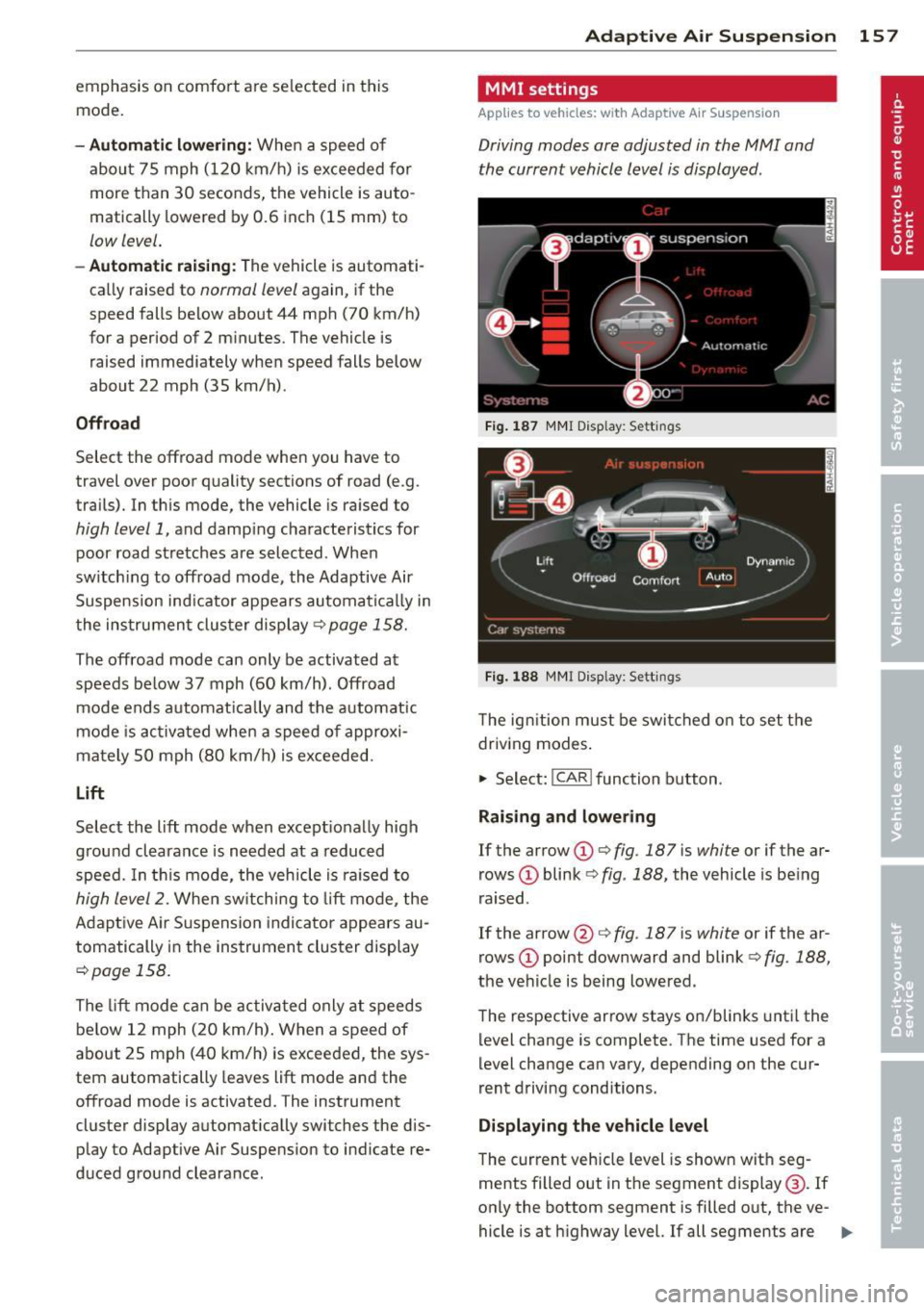
Fig. 187 MMI Display: Sett ings
Fig. 188 MMI Display: Sett ings
Th e ign ition must be switched on to set the
driving modes.
1-Select: !CAR ! function button .
Raising and lowering
If the arrow (D ¢ fig. 187 is white or if the ar
rows
(D blink ¢ fig. 188, the vehicle is being
raised .
If the arrow @¢
fig. 187 is white or if the ar
rows
(D point downward and blink ¢ fig. 188,
the vehicle is being lowered .
The respective arrow stays on/blinks until the
level change is complete . The time used for a
level change can vary, depending on the cur
rent driving conditions .
Displaying the vehicle level
The c urrent vehicle level is shown with seg
ments filled out in the segment display@. If
only the bottom segment is filled o ut, the ve-
hicle is at highway level. If all segments are
IJJ>-