seats AUDI Q7 2013 Owner´s Manual
[x] Cancel search | Manufacturer: AUDI, Model Year: 2013, Model line: Q7, Model: AUDI Q7 2013Pages: 348, PDF Size: 87.72 MB
Page 225 of 348
-Improper use of child restra int anchors
(incl uding tether anchors) can lead to in
jury in a co llision. The anchors are de
signed to withstand only those loads im
posed by correctly fitted ch ild restraints .
- Never mount two child restraint systems
on one LATCH lower anchor po int.
- Never attach two child restraint systems
to one tether strap or tether anchorage.
- Never attach a tether strap to a tie-down
hook in the luggage compartment.
- Never use ch ild restra int tether ancho
rages to secure safety belts or other
kinds of occupant restra ints.
- Never secure or attach any luggage or
other items to t he LATCH lower ancho
rages or to the tether anchors.
- If a tether or other strap is used to at
tac h a child restraint to the fro nt passen
ger seat, make sure that it is not so
t ight, that it causes the we ight-sensing
mat to measu re mo re weight than is ac
t ual ly on the seat.
- T he heav ier we ight reg iste red can make
the Advanced Airbag System wo rk as
though an adult were on the seat and de ploy the Adva nced Ai rbag when it must
be s uppressed causing serious or even
fatal injury to the child.
- If you must install a rearward facing
child safety seat on the front passenger
seat because of exceptional circ umstan
ces and the
PASSENGER AIR BAG OFF
light does not come on and stay on, im
med iately install the rear-facing child
safety seat in a rear seating posi tion and
have the a irbag system inspected by you r
Audi dealer.
Child S afety 223
Installing the upper tether strap on the
anchorage
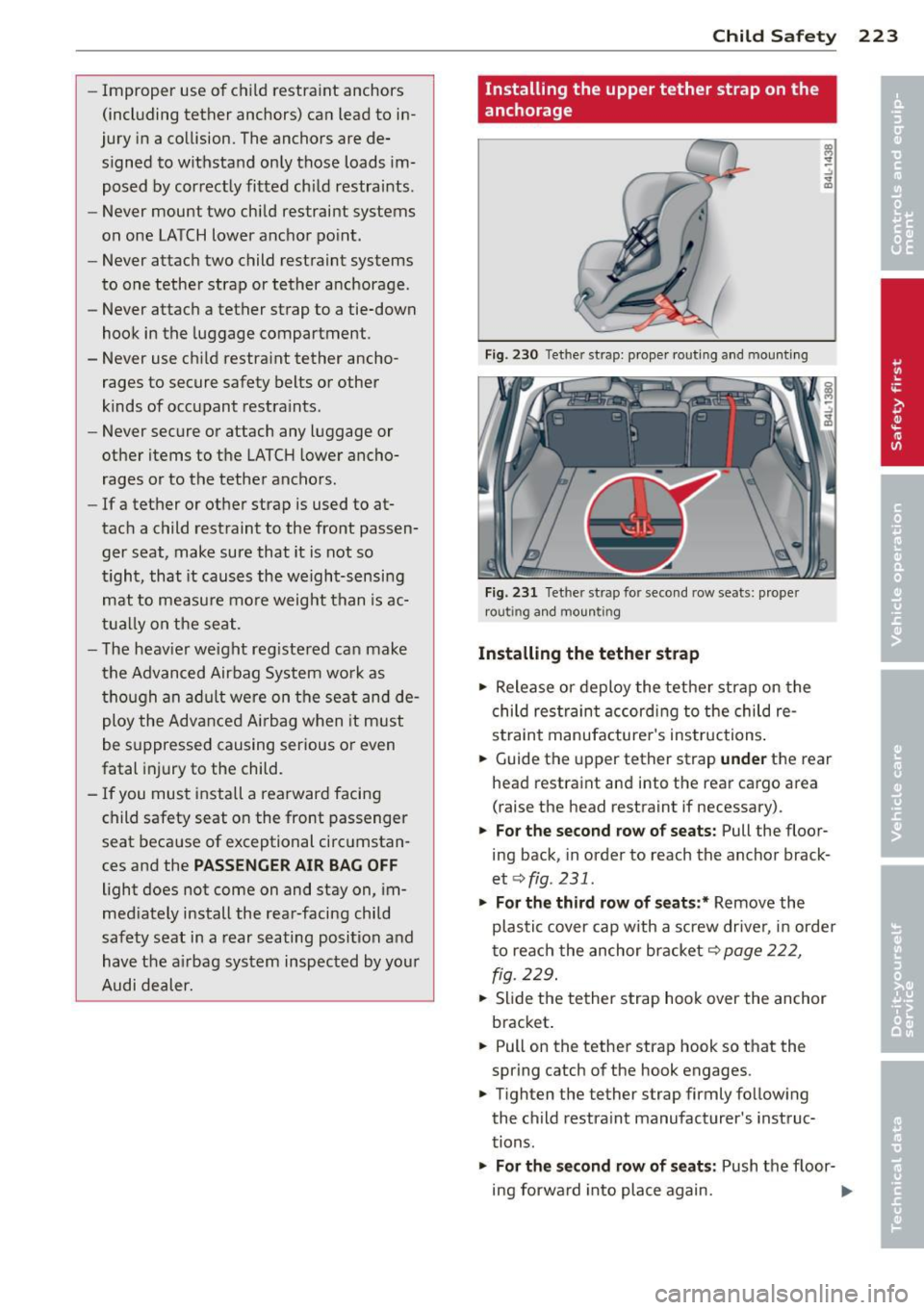
Fig . 230 Tet her st rap: prope r rout ing a nd mounti ng
Fi g. 23 1 Tet her st rap fo r seco nd row sea ts: prope r
rou ting and moun tin g
Installing the tether strap
... Release or deploy the tether strap on the
child res traint accord ing to the child re
st raint manufacture r's ins tructions .
... Guide the upper tether strap
und er the rear
head restraint and into the rear ca rgo area
(raise the head restraint if necessary).
... Fo r the second row o f seats: Pull the floor
ing back, in order to reach the anchor brack
et
c:::> fig. 231 .
... Fo r the third row of seat s:* Remove the
plastic cover cap with a screw drive r, in orde r
to reach the anchor bracket
c:::> page 222,
fig . 229.
.,. Slide the tether strap hoo k over the anchor
bracket .
... Pull on the tether strap hook so that the
spring catch of the hook engages .
.,. Tighten the tether strap firmly follow ing
the child restra int manufacturer's instruc
tions .
.,. For the second r ow of s eats : Push the floor-
ing forward into place again.
11-
Page 226 of 348
224 Child Saf ety
Re leas ing th e te th er str ap
.. Loosen the tension following the child re
stra int manufacturer's instructions.
.. Depress the spring catch on the hook and
release it from the anchorage .
.. Fo r t he seco nd ro w of se ats: Push the floor
ing forward into place again.
.. For the th ird r ow of seats :* Replace the
plast ic cover cap .
(D Note
If you leave the child restraint with the
tether strap firmly installed for several
days, this could leave a mark on the up
holstery on the seat cushion and backrest
in the area whe re the tether strap was in
stalled. The uphols tery would a lso be per
manently stretched around the tether
strap . This applies especially to leather
seats .
Using tether straps on rearward-facing
child restraints
Currently , few rear -facing child restraint sys
tems come with a tether . P lease read and
heed the child restraint system manufactur
e r's instructions caref ully to determine how to
p roperly insta ll the tethe r.
& WARNING
A child in a rearward -facing child safety
seat insta lled on the front passenger seat
w ill be seriously injured and can be ki lled if
the front a irbag inflates - even with an Ad
vanced Airbag System.
- The inflating airbag will hit the child safety seat or infant carrier with great
force and w ill smash the ch ild safety seat
and child against the backrest, center
armrest, or door .
- A tight tether or other strap on a rear
ward-facing child restra int attached to
the front passenger seat can put too much pressure on the weight-mat in the
seat and register a heavier weigh t in the
Advanced Airbag System. The heav ier weight registered can make the system
work as though an adult were on the seat
and deploy the Advanced Airbag when it must be suppressed causing ser ious or
even fatal injury to the ch ild.
- If you must install a rearward fac ing
child safety seat on the front passenger
seat because of exceptional c ircumstan
ces and the
PASSENGER AIR BAG OFF
light does not come on and stay on, im
mediately insta ll the rear-fac ing ch ild
safety seat in a rear seating position and have the airbag system inspected by your
Audi dea ler.
Additional Information
Sources of information about child
restraints and their use
T here are a number of sou rces of add itiona l
information about child restraint se lection, in
sta llation and use:
N HT SA advises that the best chi ld safety seat
is the one that fits your ch ild and fits in you r
vehicle, and that yo u will use correct ly and
consistently.
T ry before yo u buy!
U. S Nat ional Highw ay Traffi c Safety Admin
i s trat ion
Tel.: 1-888-327-4 236 (TIY: 1-800-424-9153)
http://www.nhtsa.gov
N ati onal SAFE KID S Camp aign
Tel.: (202) 662-0600
http://www.safekids .o rg
S af ety Belt Saf e U. S.A
T el.: (800) 7 45 -SAFE (Eng Lish)
Tel.: (800) 747-SANO (Span ish)
http://www.ca rseat.org
T ranspo rt Ca nad a Info rmation Centre
Tel.: 1-800 -333-0371 or call
1-613-998-8616 if you are in the Ottawa area
http://www.tc.gc.ca/eng/ roadsafety/
menu.htm
Aud i Cu stom er R elation s
Tel.: (800) 822-2834
Page 235 of 348
With the engine running
Although electrical energy is generated when
the vehicle is being driven, the battery can be
come discharged. This happens most ly when
litt le energy is being generated and a great
deal consumed and the battery's state of
charge is not optimal.
To bring the energy balance back into equili
brium, consumers which require especia lly
large amounts of energy are temporarily cut
back or switched off. Heating systems in par
ticular requ ire a great deal of energy. If you
notice, for example, that the heated seats* or
the heated rear window are not heating, they h ave been temporar ily cut back or switched
off. These systems will be available again as
soon as the energy ba lance has been restored.
You will also notice that engine idle speed has
been increased slightly. This is normal and not
a cause for concern . By increasing engine idle
speed the additional energy required is gener
ated and the battery is charged .
Driver notification in the instrument
cluster display
If battery power drops into the range where it
can limit the ab ility of the engine to start, th is
is shown in the instrument cluster display
with the following driver message:
(•) Low battery charge: battery will be
charged while driving
This notification reminds you that the starting
capability of the engine may be limited. As
soon as you start driving again, the battery
will be recharged and the notification will go
out.
Driver notification appears and goes out
again
If th is driver notification appears after the ig
nition is turned on or while driving and it goes
out again after a wh ile, the battery has been
adequately recharged.
Intelligent technology 233
Driver notification appears and does not
go out again
If this driver notification appears after the ig
nition is turned on or whi le driving and does
not go out again, the battery's state of charge
is not in the optimal range. Starting ab ility is
restricted . Have the battery checked as soon
as possible by an authorized Aud i dealer or
qualified workshop.
•
•
Page 253 of 348
Your authorized Audi dealer can provide cleaning products that have been tested and ap
proved for your vehicle .
Care of interior
MMI display
"' Clean the MMI disp lay with a soft clean
cloth and an LCD cleaner .
The MMI display can be cleaned with a profes sionally available "LCD cleaner". The cloth
should be s light ly dampened with the clean
ing f lu id to clean the display.
(D Note
To avo id scratching the MM I display, you
should never clean it d ry.
MMI control console
"' First clean the MMI control console with a
brush to remove dust from the housing.
"' Then wipe the MMI contro l conso le with a
clean, soft, slightly damp cloth .
The MM I control console shou ld be cleaned
with a brush first so that no dirt is trapped be
tween the buttons and the housing. We rec ommend giv ing the MMI control console a fi
nal w ipe with a cloth mo istened with water
and d ish washing detergent.
Cl) Note
To prevent damage, make sure that no flu id ever gets into the MMI control console.
Aluminum trim
Use only neutral-pH products to remove spots
and depos its from alum inum surfaces .
C hr ome ca re produ cts and alkaline cleaners
will attac k alum in um s urfaces and can dam
age them ove r time.
A WARNING
Always read and heed a ll WARNINGS and
other information
~ page 245 .
Cleaning and protec tion 25 1
Fabrics and fabric coverings
Fabr ics and fab ric cover ings (e.g. seats, door
trim pa ne ls, etc.) sho uld be cleaned at regular
intervals w ith a vacuum cleaner . This removes
s u rface dirt particles which could become em
bedded in the fabric throug h use. Steam
cleaners should not be used, because the
steam tends to push the dirt deeper into the
fabric and lock it there.
No rmal cl ean ing
Generally, we recommend using a soft sponge
or a lint-free microfiber cloth to the clean fab ric . Brushes shou ld only be used for carpets
and floor mats, since other fabr ic surfaces
could be harmed by brushes.
Normal s urface stains can be cleaned using a
commerc ially available foam cleaner. Spread
the foam on the surface of the fabric with a
soft sponge and work it in gently. Do not satu
rate the fabric. Then pat the foam dry us ing
absorbent, dry cloths (e.g. m icrofiber cloth)
and vacuum it after it has dried completely.
Cleaning sta in s
Stains caused by beverages (e.g. coffee, fruit
juice, etc.) can be treated with a mild deter gent solution . Apply the detergent solution
with a sponge . In the case of stubborn stains,
a dete rgent paste can be applied directly to
the stain and worked into the fabric . After
wards, use copious amoun ts of clean wa ter to
remove the rema ining de tergent. App ly the
water with a damp cloth or sponge and pat
the fabric dry with an absorbent, dry clot h.
Stains from choco late or ma keup sho uld have
detergent paste (e.g . ox-gall soap) rubbed in
to them. Afterwards, remove the soap with
water (damp sponge) .
A lcohol can be used to treat sta ins from
grease, o il, lipstick or a ballpoint pen. Melted
grease or dye must be patted off using ab
sorbent mater ial. It may be necessary to re
treat the areas with detergent paste and wa
ter.
•
•
Page 254 of 348
252 Cleaning and protec tio n
In the case of genera l soi ling of the uphols
tery and cover material, we re commend hiring
a specialist that has the equ ipment to clean
the seat cove rs an d other fa bric surfaces by
shampooing and spray ex traction.
.&_ WARNING
Always r ead and heed all WARNINGS and
the information
~ page 245.
(D Tips
Open Velcro fasteners on your clothing can
damage the seat cover. Please make sure
that Velcro fasteners are closed.
Plastic parts and instrument panel
Always use a clean cloth mo istened in clear
wate r to clean these areas. For pers istent dirt
use an Audi approved
s olvent -fr ee plas tic
cleane r/pro tectan t.
.&_ WARNING
So lvents can change the propert ies of
some plastics and make it harder for the
airbag to dep loy.
-
- Never clean the instr ument pane l or the
s u rface of air bag modules with cleaning
products that contain solvents .
- Products conta ining solvents wi ll make
the surface o f th is part porous.
- Serious injuries can result if plastic pa rts
come loose when the airbag is deployed .
- Always read and heed all WARN INGS and
other information ~
page 245.
(D Note
Cleaning agents con taini ng solvents will
at tac k t he mater ial and can change the
way it behaves .
Natural leather
Applies to vehicles: wit h natural leather
Audi makes great efforts to maintain the
properties, natural look and feel of interior
leather .
General
We offer many d ifferent types of leather on
o u r vehicles. Most are d ifferent types of nappa
leather, which has a smooth surface and
comes in various colo rs .
The intensity of the co lo r determines the visu
al characterist ics and appearance .
If the sur
face of the leather has a typ ica l natural look,
then the leather is a nappa leather that has
been left in a relat ive ly natura l condit ion. This
l eat her offe rs part icular ly good comfort and
breathes we ll. Fine veins, closed grai ns, insect
bi tes, sk in fo lds, and s ubtl e va ria tions in color
remain visible . These characteristics demon
strate that the material is natura l.
Natu ra l na ppa le athe r is not covere d by a co l
o r finish. It is therefore mo re sensit ive to soil
ing and wea r, which is something you need to
consider if children, animals or other factors
mig ht prove to be part icu larly hard on the
leat her.
By cont rast, leather types that are covered by
a colo red finish layer are more durable . This
has a positive effect on the leather's resist
ance to wear and soiling in dai ly use. On the
other hand, the typica l characteristics of natu
ral leather a re barely or not apparent . Howev
er, th is does not mean that the leathe r itse lf
i s of infe rior quality .
Care and handling
Because of the exclusive nature of the types of
leather that Aud i uses and their unique prop
erties (such as sens it ivity to oils, grease, soil
i ng, etc.), you will need to be somewhat ca re
ful with these leathers, and a ce rtai n type of
ca re is req uired. Fo r example, dark clothing
ma ter ials can dis co lor le athe r seats (especi al
ly if such clothing is damp and was not dyed
correct ly). Dust and dirt particles in pores ,
fo lds, and seams can have an abrasive effect .,..
Page 255 of 348
and can damage the leather surface as well as
weaken seams .
The leather sho uld be cleaned reg ularly as
needed. After having been used for a re latively
l ong time, yo ur leather seats will acquire a
rich aged finish. This is a characteristic of nat
ura l leather and a sign of true quality .
I n o rder to maintain the va lue of th is natura l
p roduct over the life of your vehicle, you
should follow the recommendations below :
(D Note
-To keep yo ur leather from bleach ing out,
do not a llow it to be exposed to bright
sunlight for long periods of time. If you
have to leave the vehicle parked o utside
for long periods, cover the leather to
protect it from d irect exposure to sun
light.
- Sharp objects on clothing, such as zip
pers, rivets or sharp pieces on be lts can
leave permanent scratches or scrape
marks on the surface of the leather .
- After each time you clean the leather and
at regu lar inte rva ls, use a leather preser
vat ive creme that conta ins UV-blockers
and that wor ks into the leather. This
c reme will no urish and moistur ize the
l eather, helping i t to brea the and stay
supple .
It also helps to b uild up a protec
tive coating on the s urface .
- Clean the lea ther every 2 -3 months,
and clean any areas that get soiled.
- Remove fresh mar ks made by ba llpoint
pens, ink, lipstick, shoe polish, e tc. as
soon as possib le .
- Preserve the colo r of the lea ther as need
ed by using a special colored leather care
creme to to uch up areas of uneven co lor.
Cleaning and protec tion 253
Cleaning and caring for leather
upholstery and trim
App lies to vehicles : with natural lea ther
Natural leather requires special care and at
tention .
Normal cleaning
.. Clean so iled areas with a slightly moistened
cotton or woolen cloth .
More stubborn dirt
.. More st ubborn dirt can be removed using a
cloth saturated with a mild soap solut ion (2
tablespoons mild liquid soap).
.. Never allow the soap solution to saturate
the leather, and make certain that no water soaks into the seams.
.,. Wipe off the soap so lution with a soft, dry
cloth.
Cleaning spots
.. Remove fresh wat er-based spots (such as
coffee, tea, juices, blood) with an absorbent
cloth or pape r towel.
.. Remove fresh
greas e or oil-ba sed spot s
(such as bu tte r, mayonnaise, chocola te) with
an absorbent cloth or paper towel, or use
the cleaner from the leather care kit if the
spot has not yet penetrated into the surface
of the leather.
.. Use an oil/grease dissolving spray, if
oil/
grease spot s ha ve dried on.
.. Remove specific k inds of spots (ballpoint
pen, felt marker, fingerna il polish, water
based pa int, shoe po lish, etc.) with a spot
remover specifically fo rmu lated for leather.
Leather care
.. Every half year use an approved leather care
product (available from your authorized
Aud i dealer) to care fo r the leather.
.,. App ly the product very spar ingly.
.. Wipe it off with a damp clot h.
If you have any questions about clean ing and
ca ring for the leather in your v ehicle, it is best
to contact you r authorized Audi dea ler, who
will be g lad to help you and tell you abo ut o ur
f ull range of leather care products, such as : .,..
•
•
Page 290 of 348
288 Tires and wheels
Tires and vehicle load limits
There are limits to the amount of load or
weight that any veh icle and any t ire can carry.
A vehicle that is overloaded wi ll not handle
well and is more difficult to stop. Overload ing
can not on ly lead to loss of vehicle control
,
but can a lso damage important parts of the
vehicle and can lead to sudden tire failure in-
,
eluding a blowout and sudden deflation that
can cause the vehicle to crash .
Your safety and that of your passengers a lso
depends on making sure that load limits are
not exceeded. Vehicle load includes everybody
and everyth ing in and on the vehicle . These
load limits are tech nically referred to as the
vehicle's
Gross Vehicle Weight Rating
("GVWR").
The "GVWR" includes the we ight of the basic
vehicle, all factory installed accessories , a full
tank of fuel , oi l, coo lant and other fluids plus
maximum load. The maxim um load includes
the number of passengers that the vehicle is intended to carry ("seating capacity") with an
assumed weight of 150 lbs (68 kg) for each
passenger at a designated seating position
and the tota l weight of any l uggage in the ve
hicle. If you tow a trailer, the weight of the
trailer hitch and the tongue weight of the
loaded trailer must be included as part of the
veh icle load .
The
Gross Axle Weight Rating ("GAWR") is
the maximum load that can be applied at each
of the vehicle's two axles .
The Gross Vehicle Weight Rating and the
Gross Axle Weight Rating are listed on the
safety compliance st icker label located on the
driver's side B -pillar. Your Audi has 5 seating
positions, 2 in the front and 3 in the rear for
total seating capacity of 5. On vehicles w ith
six seats*, your veh icle has two front seats,
two seats in the second row seating and two
seats in the third row seating. On vehicles
with seven seats*, your vehicle has two front
seats, three seats in the second row seating
and two seats in the third row seating . Each seating
position has a seat belt
q page 175,
Safety belts .
The fact that there is an upper limit to your
vehicle's Gross Vehicle Weight Rating means
that the total weight of whatever is being car
ried in the vehicle (including the weight of a
trailer hitch and the tongue weight of the
loaded trailer) is lim ited. The more passen
gers in the vehicle or passengers who are
heavier than the standard we ights assumed
mean that less weight can be carr ied as lug
gage .
The tire pressure label on your Audi also lists
the maximum combined weight of all of the
occupants and luggage or other cargo that
the vehicle can carry . For the location of the
label
q page 284, fig. 251.
_& WARNING
Overloading a vehicle can cause loss of ve
h icl e control, a crash or other accident, se
rious personal injury, and even death.
- Carrying more weight than your vehicle
was designed to carry will prevent the
vehicle from handling properly and in
crease the risk of the loss of vehicle con
trol.
- The brakes on a vehicle that has been
overloaded may not be able to stop the
veh icle w ith in a safe distance.
- Tires on a vehicle that has been over load
ed can fail suddenly, including a blowout
and sudden deflation, causing loss of
control and a crash .
- Always make sure that the total load be
ing transported -including the weight of
a trailer hitch and the tongue we ight of a
loaded trailer -does not make the vehi
cle heavier than the vehicle's Gross Vehi
cle Weight Rating.
Determining correct load limit
Use the example below to cal
culate the total weight of the
passengers and luggage or
Page 313 of 348
Fuse s and bulb s 311
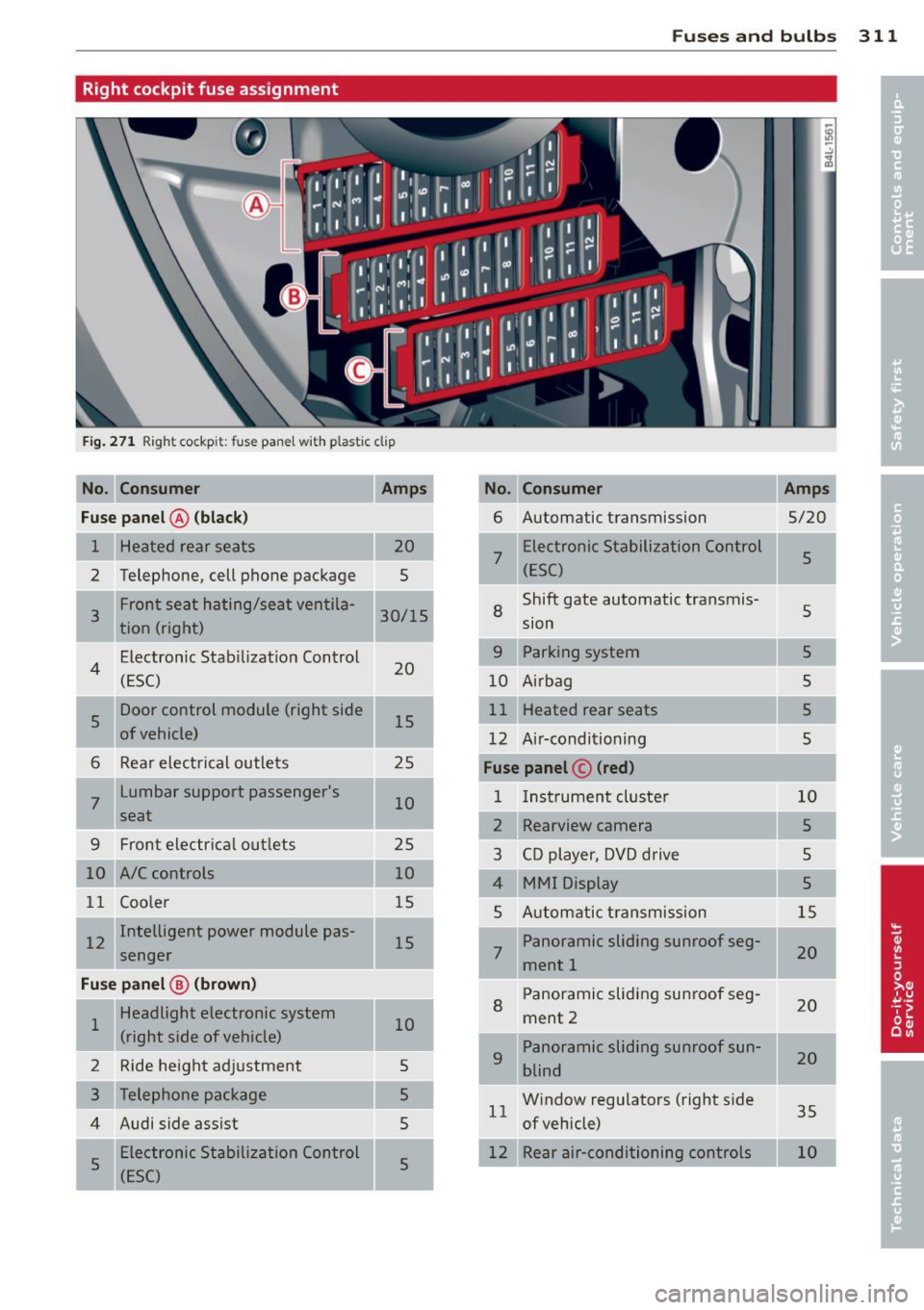
Right cockpit fuse assignment
Fig . 27 1 Righ t cockp it: f use pane l w ith pla stic clip
No. Con sumer Amps No. Consumer Amps
Fu se pa nel@ (bla ck )
6 Automatic transmission
5/20
1 Heated rear seats
7
Electronic Stabilization Control 5
2 Telephone, cell phone package (ESC)
--Shift gate automatic transmis-
Front seat hating/seat ventila-
8 s 3 30/15
tion (right) sion
Electron ic Stab ilizat ion Control
9 Parking system 5
4 (ESC) 20
10 Airbag s
s
Door control module (right side 15 Heated rear seats
5
of vehicle) 12 Ai r·conditioning 5
6 Rear electrical outlets 25 Fuse panel © (red )
7
Lumbar support passenger's
10 1
Instrument cluste r 10
seat 2 Rearview camera 5
9 Front electrical outlets 25
3 CD player, DVD drive s
10 A/C controls 10
MMI Display 5
11 Coo ler 15
5 Automatic transmission 15
I 12 Intelligent power module pas-
15 Panoramic sliding sunroof seg-
senger 7 ment 1 20
Fu
se p anel@ (b rown ) Panoramic sliding sunroof seg-
Headlight electronic system
8 ment 2 20
1 10
(right side of vehicle) Panoramic sliding sunroof sun-
2 Ride height adjustment 5
9 blind 20
5 Window regulators (right side
1 1 35
4 Audi side assist
5 of vehicle)
5 Electronic Stabili
zation Control
5 12 Rear air-conditioning controls
(ESC)
Page 332 of 348
330 Index
A
Accessories
Adaptive A ir Suspension .... ... .. .. .. .
Cargo mode in the MMI .... .. .. .. .. . 327
155
160
Controls ...................... .. . 155
D .. escnpt 1on ... ........... .. .. .... .
H igh level . ............. ... .. .... .
Highway leve l .... ..... ... .. .. .... .
Instrument cluster display ... ... ... .
Jacking mode when changing a flat tire
Low level ................ .... .... . 155
155
155
158
159
155
Normal level ............. .... .... . 155
Segment display ........... .. .. ... 157
Sett ing the driving modes . ... .. .. .. . 157
Trailer towing mode ....... .... .... . 159
Using switch for cargo mode ...... ... 160
Warn ing/ indicator lights ..... .. .... .. 17
Adaptive cruise control .......... .. .. . 113
Changing speed . . . . . . . . . . . . . . . . . . . 11 7
C leaning senso rs .. ....... .. .. .. ... 247
Dr iver info rmation .......... .. .... . 120
Driver intervention prompt . .. .. .. .. . 124
Driving in traffic ................... 114
Driving program . . . . . . . . . . . . . . . . . . . 124
Error messages . . . . . . . . . . . . . . . . . . . 122
Open road .. ............. .. .. .. .. . 114
Override 114
Request for dr iver to assume control . . 114
Save speed ................. ... .. . 116
Setting distance . . . . . . . . . . . . . . . . . . . 118
Settings ... ............. .. .. .. .. . 124
Sett ing t ime interval .......... .... . 118
Specia l dr iv ing s ituations .. .. .. ..... 125
Status messages ........ ... .. .... . 122
Switching on and off ..... ... .. .... . 116
System limits . . . . . . . . . . . . . . . . . . . . . 125
Temporarily turning off .... .. .. .. .. . 118
warn ing/indicator lights ..... .. .... . 121
Adaptive light .......... ... ... ..... .. 59
defective . . . . . . . . . . . . . . . . . . . . . . . . . . 3 7
AdBlue .. .. .. ............. ........ .
261
Filling 262
Messages in the instrument cluster dis-
p lay .. ... ....... ....... ... .. .... .
261
Adding
Engine coolant ... ............ .... .
273
Engine oil 270
Windsh ield washer fluid ........ .... 279
Additional accessor ies
Additives Engine oil
Adjusting 327
270
Instrument cluster illumination .. .. .. . 13
Steering column electrically ..... .. .. 103
Steering column manually .. .. ... ... 103
Adjusting front seats . . . . . . . . . . . . . . . . . 71
Airbag
Warning/ind icator lights ........ .. .. .
16
Airbag system . . . . . . . . . . . . . . . . . 184, 201
Advanced Airbag System ..... ... .. .. 188
Advanced Airbag System components . 191
Care .. .... .... .. ............. .... 198
Children .. .. .. .. ............. .. .. 206
Child restraints ... .............. ... 207
Components (front airbags) ......... 191
Danger of fitting a child safety seat on
the front passenger seat ........ .. ..
186
Disposal .. .... .. ... .......... .... 198
Front airbags . . . . . . . . . . . . . . . . 188, 189
How do the front airbags work? ...... 193
How many a irbags does my vehicle
have? ....... ... .. .............. .
191
How the Advanced Airbag System com-
ponents work togethe r ......... ....
192
Important things to know ........ ... 184
Indicator light ... ............ .... . 195
Monitoring .... .. .......... ... .... 195
PASS ENGER AIR BAG OFF light . .. .. .. 195
Repairs ... .... .. .. ........... .... 198
Safety instructions ............... .. 197
Side airbags . .. .. .......... ...... . 199
Side curtain airbags ...... ...... .. .. 202
Weight-sensing mat .. ... ... ... .. .. 206
When must the system be inspected? . 195
Air conditioning
refer to Climate controls . . . . . . . . . . . . . 91
Air distribution
Climate controls .. ............. .... .
94
Four- zone automatic comfort air condi-
tioning . .. .. .. .. ............. .. .. .
99
Air pollutants filter
Climate controls . ............... ... .
91
Page 334 of 348
332 Index
How does moisture or road salt affect the
brakes? .................... ..... . 228
Malfunction .............. ... .... .. 32
Parking brake ............ .. .. .... . 109
Warning/indicator lights ... .. .. .... .. 19
Worn brake pads symbol ....... .. .... 36
Braking guard
refer to Audi braking guard .......... 127
Break-in period ............ .. .. .... . 234
Brake pads ............ .. .... .. .. . 234
Tires .... .. ................ ..... . 234
Breakover angle .. .. ........ ... .. .. . 238
Bulbs ... .. .. ..................... . 312
Bumper cover Caution when parking near a parking bar-rier or curb ............... ... .... . 110
C
California Proposition 65 Warning .. .. . 265
Battery specific .............. .... . 277
Capacities ... ... .... ...... .. .. .. .. . 322
Car -Systems
Ambience lighting . . . . . . . . . . . . . . . . . . 62
Lighting profiles ............ .. .... .. 62
Car care ..... ................ ..... . 245
Interior . . . . . . . . . . . . . . . . . . . . . . . . . . 251
Plastic and vinyl ................ .. . 248
Care of exterior ............ .. .. .. .. . 245
Cargo area
refer to Loading the luggage compart-
ment .. .. .. ... .... ...... .. .. .. .. . 171
Cargo floor .. ............. .. .. .. .. .. 82
Cargo net .... ... .......... .. .. .. .. .. 80
Catalytic converter ... ...... .. .. .. .. . 235
Center armrest Cup holder . . . . . . . . . . . . . . . . . . . . . . . . 77
Storage compartment . . . . . . . . . . . . . . . 77
Center console in rear ..... .. .. .. .. .. . . 78
Central locking Emergency locking .. ...... .. .. .. .. . . 45
Panoramic slid ing sunroof .. .. .. .. .. . . 55
Certification .............. .. .. .. .. . 328
Changing a flat tire .......... ... .... . 304
Changing a wheel .............. .. ... 304
Changing engine oil ......... .... ... . 270 Chassis
Undercoating
also refer to Adaptive Air Suspen- 250
sion . . . . . . . . . . . . . . . . . . . . . . . . 155, 157
CHECK button ..... ................. . 12
Checking Engine coolant level . ............ ... 272
Checking tire pressure ........... .... 286
Child restraints
Danger of using child restraints in the
front seat . . . . . . . . . . . . . . . . . . . . . . . . 186
Where can I get additional information
about child restraints and their use? .. 224
Child restraint system anchors .... .. .. 218
Child safety ..... .. .......... ... .. .. 205
Convertible locking retractor ... .. .. .. 215
Guidance fixtures for lower anchorages 220
Important safety instructions for using
child safety seats . ............. .. .. 208
Important things to know when driving
with children .... ................ . 205
Installing a child restraint using the
LATCH system .. .. ............. .. .. 221
Mounting and releasing the anchorage
hook . .... .... ................... 221
Tether anchors . .. .......... ... .. .. 222
Tether straps . ... ....... ...... .. .. 222
Child safety lock
rear doors (power) .. ........... .... . 48
Child safety seat Unused safety belts on the rear seat . . 210
Child safety seats .. ..... ..... ... .. .. 211
Booster seats ................. .... 213
Convertib le child seats ............. 212
Convertible locking retractor ......... 215
Danger of using child restraints in the
front seat ..... .. ................ . 186
How do I properly install a child safety
seat in my vehicle? ............... .. 208
Infant seats .................. .... 211
Installing ... .. .. ....... ...... .. .. 215
LATCH system .. .. ... ......... ... .. 221
Safety instructions ... .. ..... ... .. .. 208
Child seats Lower anchorages ............. .... 219