check engine light AUDI Q7 2014 Owner´s Manual
[x] Cancel search | Manufacturer: AUDI, Model Year: 2014, Model line: Q7, Model: AUDI Q7 2014Pages: 340, PDF Size: 85.02 MB
Page 35 of 340
& WARNING
-If your veh icle should break down for
mechanical or other reasons, park at a
safe distance from moving traffic, turn off the engine and turn on the ha zard
warning lights¢
page 60, Emergency
flasher .
-
-Never open the hood if you see or hear
steam or coolant escap ing from the en
gine compartme nt -you risk being scald
ed . Wa it until you can no longe r see or
hear stea m or coo la nt escaping.
- The eng ine compartment of a ny veh icle
is a dangerous a rea . Before you perfo rm
any wor k in the engine compa rtme nt,
t ur n o f the eng ine and allow it to cool.
F ollow the warning stick ers ¢
page 257.
(D Note
Do not co nti nu e d riving if the . symbol
illumi nates. T here is a m alf unct io n in the
eng ine cooling system -you co uld dam age
your eng ine .
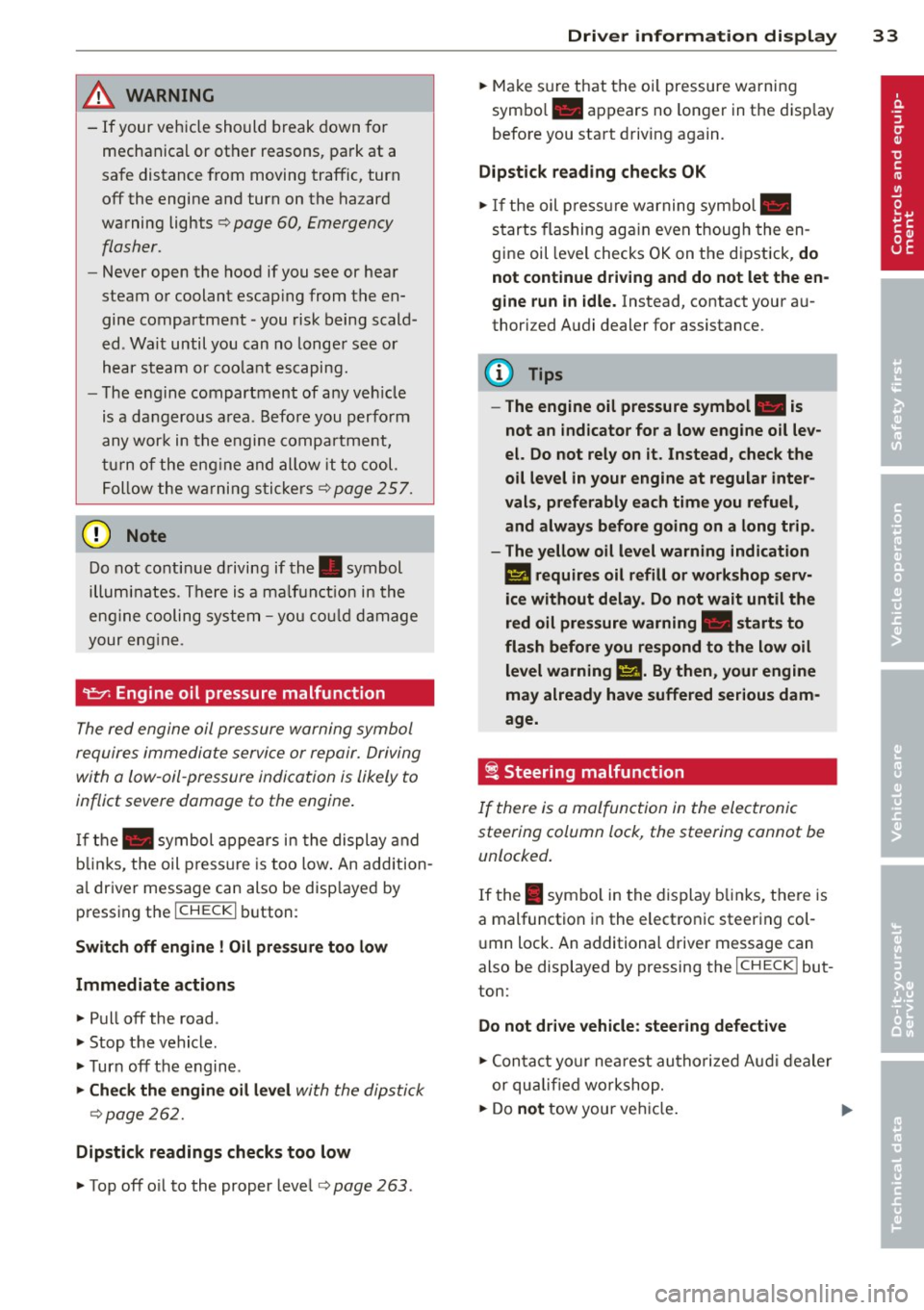
"t:::7: Engine oil pressure malfunction
The red engine oil pressure warning symbol
requires immediate servi ce or repair. Driving
with a low -oil -pressure indication is likely to
inflict severe damage to the engine .
If the. symbol appe ars in the display and
b links, the oil press ure is too low . An addition
a l driver message can also be disp layed by
pressing the
I CH ECK i button :
Switch off engine! Oil pre ssure too low
Immediate actions
~ Pull off the road .
~ Stop the vehicle.
~T urnoff the engine .
~ Check the engine oil lev el with the dipsti ck
¢page 262.
Dipstick readings checks too low
~ Top off o il to the proper level¢ page 263 .
Driver information di spla y 33
~ Make s ure that the oi l pressure wa rning
symbo l. appears no longer in the disp lay
befo re you sta rt driv ing again.
Dipstick reading checks OK
~ If the oil press ure warning symbol.
starts flashing aga in even thoug h the en
gine oil leve l checks OK on the dipstick,
do
not continue driving and do not let the en
gine run in idle .
Instead, contact your au
thori zed A udi dealer for assistance.
(D Tips
- The engine oil pressure symbol. is
not an indicator for a low engine o il lev
el. Do not rely on it . Instead, check the
oil level in your engine at regular inter
vals, preferably each time you refuel,
and always b efore going on a long trip .
- The yellow oil level warning indication
l!I requires oil refill or workshop serv
ice without delay . Do not wait until the
red oil pressure warning. start s to
fla sh before you. respond to th e low oil
level warning l!I. By then, your engine
may already have suffered serious dam
age.
i Steering malfunction
If there is a malfunction in the electronic
steering column lock, the steering cannot be
unlocked .
If the . symbo l in the display b links, the re is
a malfunction i n the elect ro nic steer ing col
u mn lock. An additional driver message can
also be displayed by pressing the
ICHECK I but
ton:
Do not drive vehicle: steering defective
~ Contact your nea rest au thori zed Aud i deale r
or qu alified worksho p.
~ Do not tow your ve hicle. .,..
Page 36 of 340
34 Driver in formation d isplay
A WARNING -
Your vehicle must not be towed in the
event of a malfunction in the electron ic
steering column lock because it cannot be
steered due to the locked steering. If it is
t owed w ith the stee ring locked, there is
the risk of an accident.
~ Ignition lock malfunction
A malfunction in the ignition lock must be re
paired immediately.
If the . symbo l in the d isplay blinks, there is
a malf unct ion in the electronic ignition lock.
A n addit ional driver message ca n also be d is
p layed by pressing the
! CHECK I button:
Ignit ion lo ck def ect ive . C ontact work shop !
• Do not turn the eng ine off.
• Drive immediate ly to an authorized Audi
dealer to have the ma lfunction corrected.
If there is a ma lfunction in the e lectronic igni
tion lock, the ign ition cannot be turned off.
Drive immediately to an a uthorized Audi dea l
e r to have the cause of the ma lfunction co r
rected .
On vehicles w ith Convenience key*, the engine
should not be sw itched
off using the ! STOP !
button because the eng ine cannot be started
aga in after the ignition is switched
off .
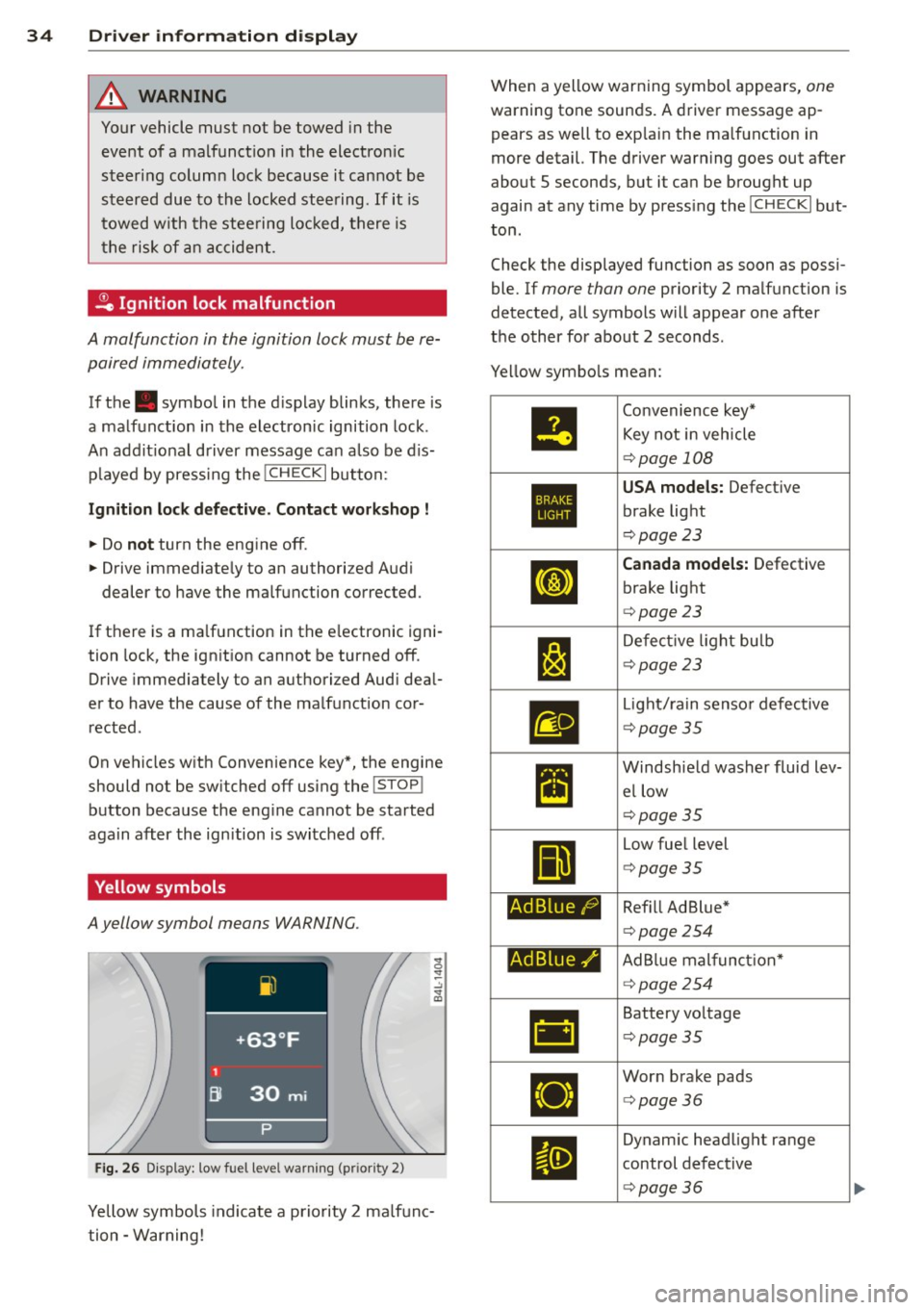
Yellow symbols
A yellow symbol means WARNING.
Fig . 26 Display: low fuel level warning (pr io ri ty 2)
Yellow symbols indicate a priority 2 ma lfunc
tion -Warning! When a yellow warning symbol appears,
one
warning tone sounds. A driver message ap
pears as well to exp lain the ma lfunction in
more detail. The driver warning goes out after
about 5 seconds, but it ca n be brought up
again at any time by press ing the
! CHECK I but
ton .
Check the displayed function as soon as possi
ble. If
more than one priority 2 ma lfunction is
detected, all symbols will appear one after
the o ther for about 2 seconds .
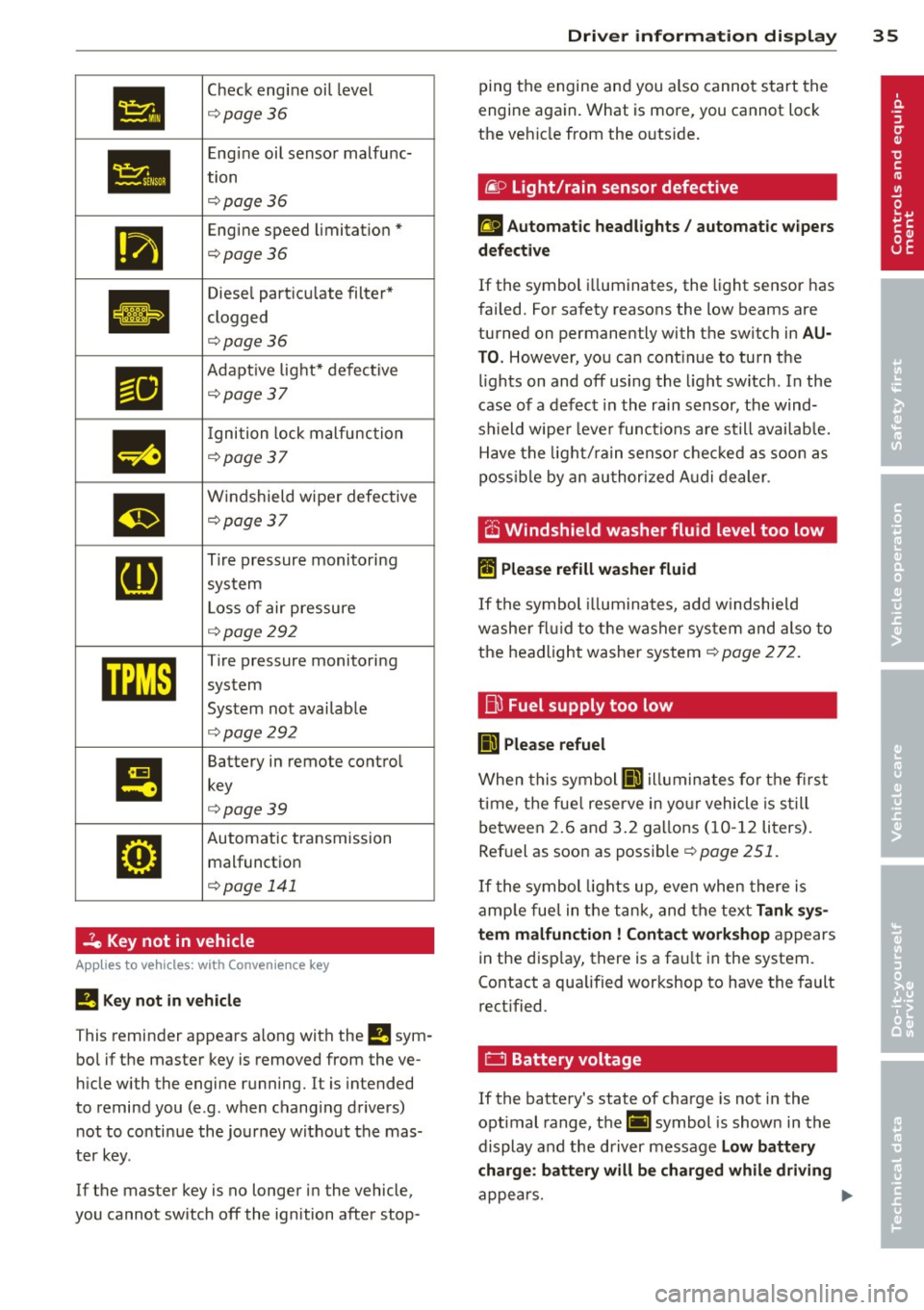
Ye llow symbo ls mean:
•
1:1
Ad Blue/)
Ad Blue,/'
•
Convenience key*
Key not i n veh icle
¢ page 108
USA models: Defect ive
brake light
¢ page 23
Canada model s: Defective
brake light
¢ page 23
De fect ive l ight bulb
¢page23
Light/ rain senso r defective
¢ page35
Windsh ie ld washer fluid lev
el low
¢page35
Low fue l level
¢ page35
Ref ill Ad Blue *
¢page 254
AdBlue mal funct ion*
¢ page254
Battery vo ltage
¢ page35
Wor n brake pads
<=> page36
Dynam ic headlight range
control defect ive
¢ page36
Page 37 of 340
•
Check engine oi l level
¢ page36
•
Engine oil sensor malfunc-
tion
¢page 36
111
Engine speed limitation*
¢page36
Ill
Diesel particu late filter*
clogged
.
¢page36
Ill
Adapt ive light* defective
¢page37
m
I gnition lock malfunction
¢page 37
m
Windshield wiper defective
¢page37
[I]
Tire pressure monitoring
system
L oss of air pressure
¢ page292
mm
Tire pressure monitoring
system
System not avai lab le
¢ page292
I!
Battery in remote contro l
key
¢page39
•
Automatic transmission malfunction
¢ page 141
2e Key not in vehicle
Applies to vehicles: with Convenience key
!I Key not in ve hicle
This reminder appears a long with the !I sym
bo l if the master key is removed from the ve
hi cle with the engine running.
It is intended
to remind you (e.g. when changing drivers) not to continue the journey w ithout the mas
ter key.
If the master key is no longer in the vehicle,
you cannot sw itch
off the ignition after stop-
Dri ver information di spla y 35
ping the engine and you also cannot start the
engine again. What is more, you cannot lock
the ve hicle from the outs ide .
liP Light/rain sensor defective
£I Automatic headlights / automatic w ipers
d efe ctiv e
If the symbol i lluminates, the light sensor has
failed. For safety reasons the low beams are
turned on permanently with the switch in
AU
T O . However, you can cont inue to turn the
l ights on and
off using the l ight sw itch. In the
case of a defect in the rain sensor, the wind
shield wipe r lever functions a re still availab le.
Have the light/ rain senso r chec ked as soon as
poss ib le by an au thorized A udi dealer .
.-v ~,
O Windshield washer fluid level too low
II Plea se refill wa she r fluid
If the symbol illum ina tes, add w indshie ld
washe r fl ui d to the washer sys tem and also to
the headlight washer system¢
page 272.
fj)
Fuel supply too low
II) Ple ase refuel
When this symbol II) illuminates for the first
t ime, the fue l reserve in yo ur vehicle is s till
between 2.6 and 3.2 ga llons (10- 12 liters).
Ref uel as soon as possible¢
page 251.
If the symbol lights up, even when there is
amp le fue l in the tank, and the text
Tank sy s
tem malfuncti on! Contact work shop
appears
in the disp lay, there is a fa ult in the system.
Contact a qualified workshop to have the fault
rect ified.
0 Battery voltage
If the battery's state of charge is not in the
optimal range, the(•] symbol is shown in the
display and the driver message
Low battery
charge : batt ery will be char ged whil e driving
appea rs. .,.
Page 38 of 340
36 Driver in formation d isplay
While this driver notification is displayed, yo u
have to be prepared for limited starting capa
b ili ty.
Driv er m essage appears and goes out
a ga in
If t his driver message appears after the igni
tion is turned on or while driving and it goes
out again after a while, the battery has been
adequately recharged.
Driv er m essage app ear s and do es not g o
out ag ain
If th is driver notification appears after the ig
n ition is turned on or while driv ing and does
not go out again, the battery's state of charge
is not in the opt imal range . Starting capability
is restricted . Have the battery checked by an
author ized Audi dealer as soon as poss ible.
(0) Worn brake pads
EiJ Brak e pa ds !
If the war ning l ight illum inates, immediately
contact your authorized Audi dealer or quali
fied workshop to have all brake pads inspect
ed. On USA models the wa rning light
EiJ
comes on togethe r wi th the warn ing light
1111 . Both sets of brake pads on an axle
must always be replaced at the same time .
.&_ WARNING
Driv ing with bad brakes can cause a colli
sion and serious personal injury .
-If the warning light EiJ and the warning
light
11111 ) with the message Brake
pads !
comes on in the instrument cluster
display, immediately contact your au
tho rized Aud i dealer o r qualified work
shop to have a ll brake pads chec ked or
replaced if necessary.
i.(D Headlight range control
II H eadli ght range c ontrol def ective !
l ) - : USA mod els only
-
If the symbol i lluminates, the dynamic head
li ght range control is no lo nger working prop
erly. Have the system checked and repaired at
your authori zed Aud i dea ler.
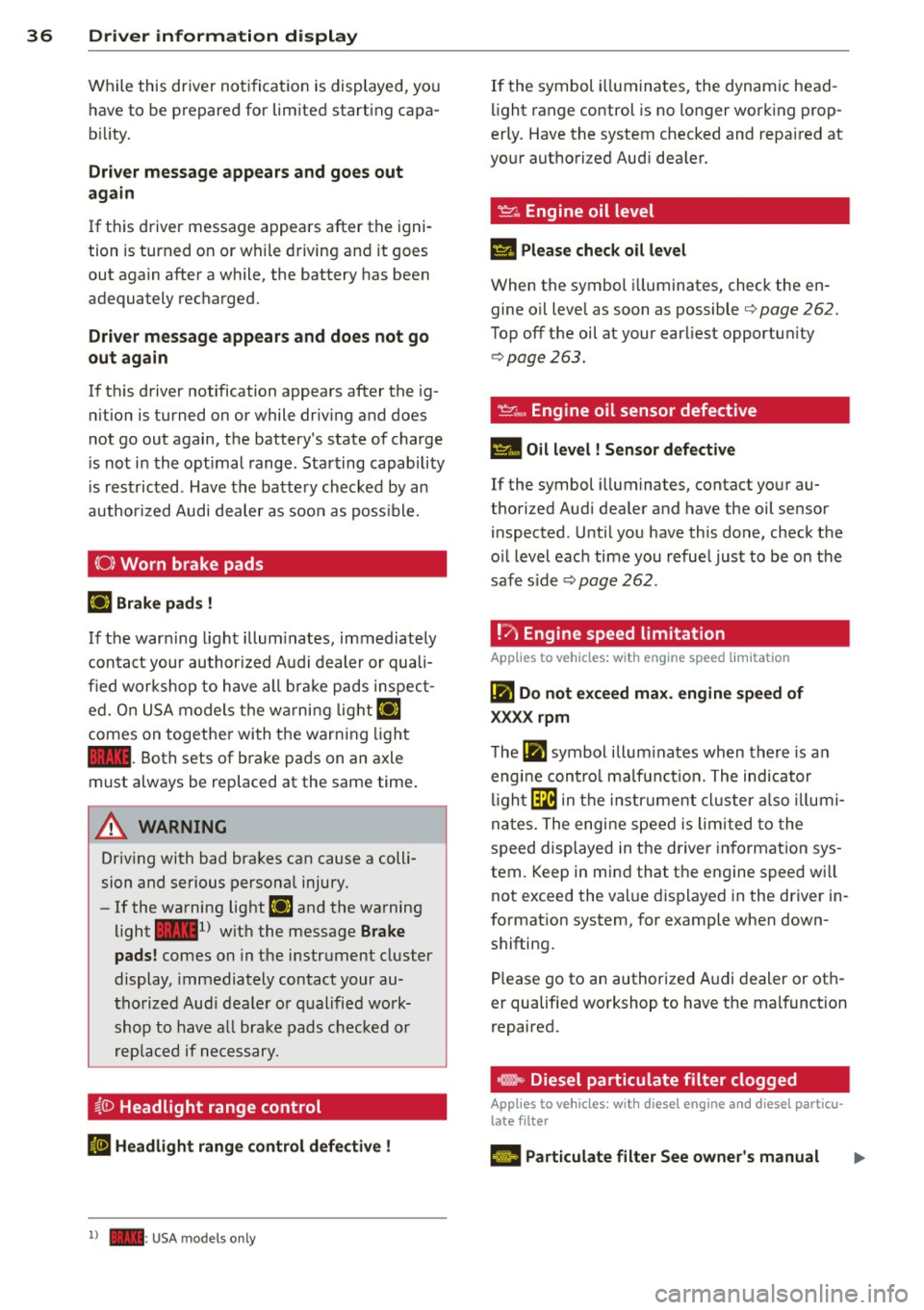
~ .. Engine oil level
II Please check o il leve l
When the symbol i lluminates, check the en
gine oi l leve l as soon as possible
<=> page 262.
Top off the oil at your earliest opportun ity
<=> page 263.
~ .... , Engine oil sensor defective
Ill Oil level ! Sensor d efe ct ive
If the symbol illuminates, contact your au
thorized Audi dea ler and have the oil sensor
inspected . Until you have this done, check the
o il level each time you refue l just to be on the
safe side <=>
page 262.
! ?)
Engine speed limitation
Applies to vehicles: with engine speed limitation
Iii Do not exc eed ma x. engine speed of
XXXX rpm
T he Iii symbol illum inates when there is an
engi ne cont rol malf unct ion. The indicator
l igh t~ in the instr ument cluster a lso illumi
nates. The engine speed is limited to the
speed displayed in the driver in format ion sys
tem. Keep in mind that the engine speed wi ll
not exceed the val ue d isplayed in the driver in
format ion system, for example when down
shifting.
Please go to an authorized A udi dealer or oth
er qualified workshop to have the malfunct ion
repaired.
e, Diesel particulate filter clogged
Applies to vehicles: with diesel eng ine and diese l particu
late filter
El Particulate filter See owner's manual
Page 39 of 340
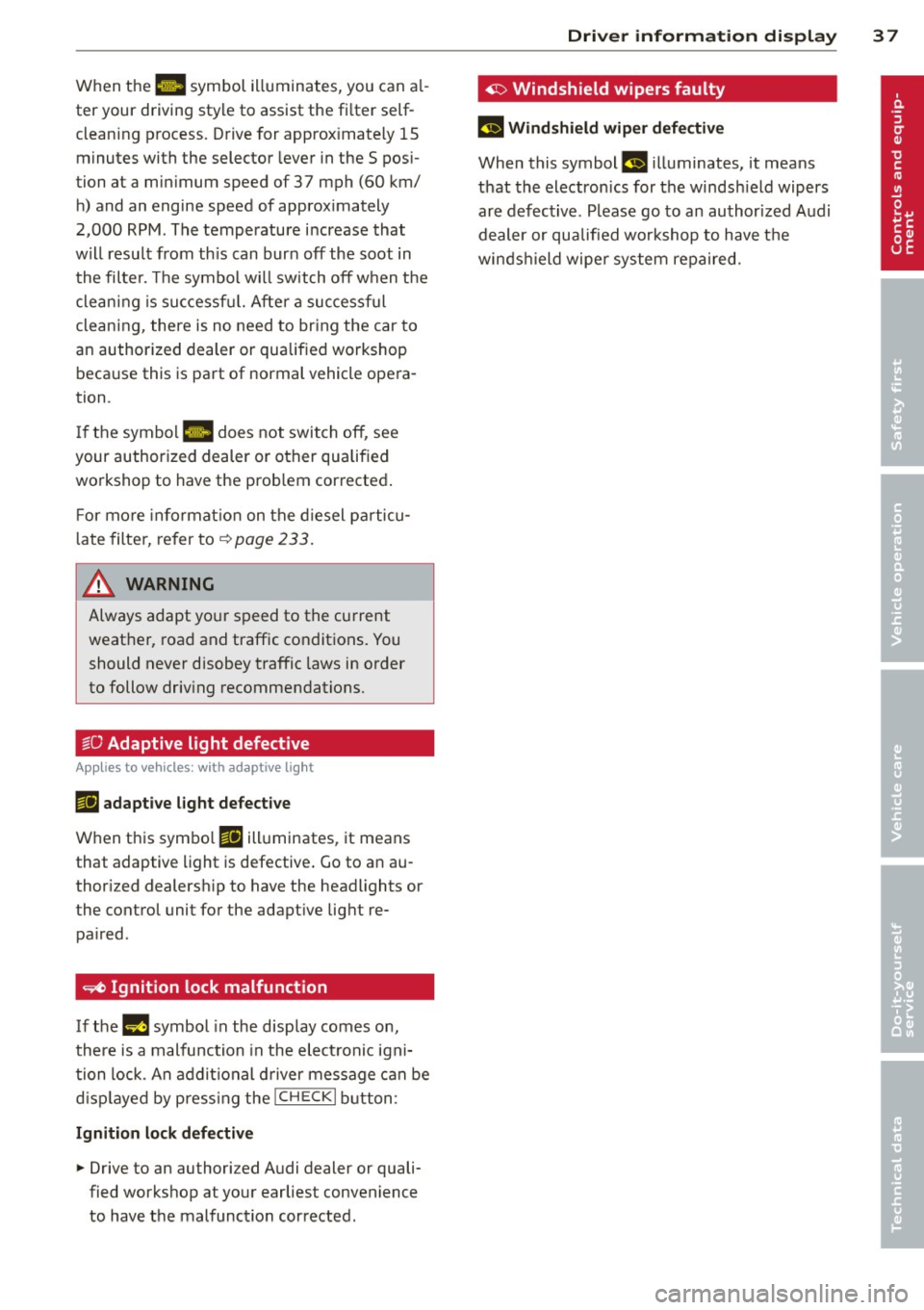
When the 1111 symbol illuminates, you can al
ter your driving style to assist the fi lter self
cleaning process. Drive for approx imately 15
minutes with the selector lever in the S pos i
tion at a minimum speed of 37 mph (60 km/ h) and an engine speed of approx imately
2,000 RPM . The temperature i ncrease that
will result from th is can burn off the soot in
the filter. The symbol w ill switch off when the
cleaning is successf ul. After a successful
cleaning, there is no need to br ing the car to
an authorized dealer or qualified workshop beca use this is part of normal vehicle opera
tion .
I f the symbol
II does not switch off, see
your authorized dealer or other qualified
workshop to have the prob lem corrected .
F or mo re informat io n on the d iesel pa rticu
l ate filter, refer to~
page 233 .
& WARNING ,..__
Always adapt yo ur speed to the current
weather, road and traffic condit ions. You
should never disobey traffic laws in order
to follow driv ing recommendations.
~O Adaptive light defective
Appl ies to vehicles: with adapt ive light
111 adapti ve l ight defe cti ve
When this symbo l Ill illuminates, it means
that adaptive light is defective . Go to an au
thor ized dealersh ip to have the headlights or
the control unit for the adapt ive lig ht re
pa ired .
~ Ignition lock malfunction
If the l!)J symbol in the display comes on,
there is a malfunction in the elect ronic igni
tion lock. An addit ional d river message can be
d isp layed by press ing the
! CHECK I b utton:
Ignitio n lock d efective
.. Drive to an authorized Audi dealer or quali
fied workshop at your earliest convenience
to have the malfunction corrected.
Dri ver information di spla y 37
'1> Windshield wipers faulty
£~$ Windshield wip er de fecti ve
When this symbol £11 illuminates, it means
t h at the electronics for the winds hield wipers
are defective . Please go to an author ized A udi
dealer or qualified wo rkshop to have t he
winds hield wiper system repaired.
Page 59 of 340
Clear vision Lights
Switching the headlights on and off
In the "AUTO" posit ion, a light sensor auto·
matically switch es t he head · and taillights on
and off in r espons e to light conditions .
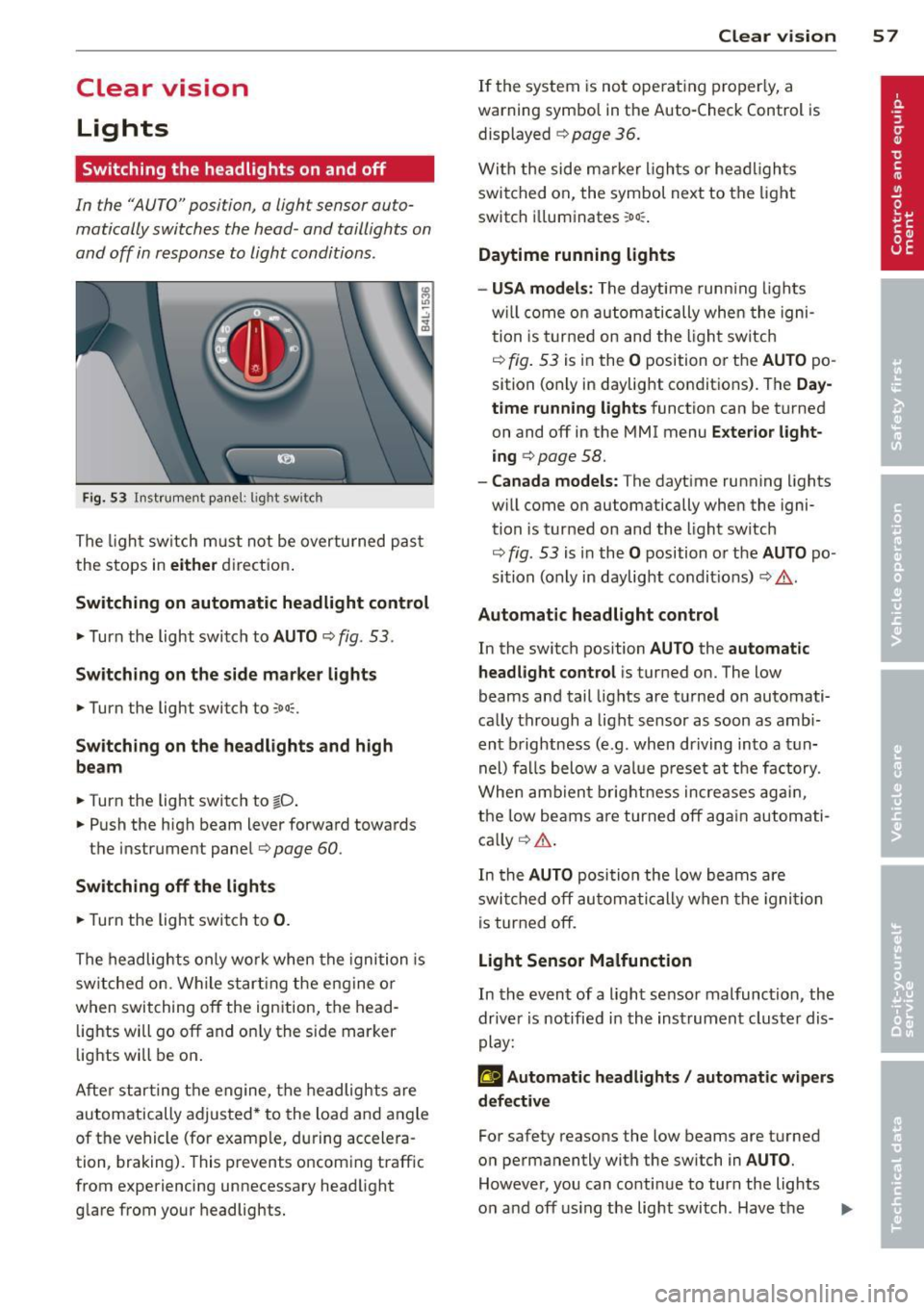
Fig. 53 Instrumen t pane l: lig ht sw it c h
The ligh t sw itch m ust not be overturned pas t
the stops in
eit her direct ion .
Sw itching on automatic headlight control
,.. Turn the light switch to AUTO ¢ fig. 53.
Sw itching on the side m ark e r lights
,.. Turn the light switch to ,oo::.
Sw itching on the headlights and high
be am
,.. Turn the light switch to tD .
,.. Push the high beam lever forward toward s
the instrument panel¢
page 60 .
Swi tching off the light s
,.. Turn the light switch to 0.
The headlights only wo rk when the ignition is
sw itched on . While s tart ing the engine or
when switching
off the ignition, the head ·
lights will go
off and on ly the s ide marker
lights will be on .
Afte r star ting t he engine, the headlights are
automatically adjusted * to the load and angle
of the vehicle (for example, during accelera ·
tion, braking). This prevents oncom ing traffic
from experiencing unnecessary headlight glare from your headlights.
Clear vi sion 5 7
If the system is not ope rat ing properly, a
warning symbol in the Auto-Check Control is displayed ¢
page 36.
With the side m arker ligh ts or he ad ligh ts
switched on, the symbol next to the light
sw itch i lluminates
:o o:: .
Daytime running lights
- USA model s:
The daytime runn ing lights
w ill come on au tomatically whe n the igni
tion is turne d on and the l ight sw itch
¢
fig. 53 is in the O position or the AUTO po
sition (only in daylight conditions) . The
Day
time running lights
function can be turned
on and
off in the MMI menu E xter ior l ight
ing ¢
page 58.
-Canada models: The dayt ime running lights
w ill come on automatically when the igni·
tion is turned on and the light switch
¢
fig . 53 is in the O position o r the AUTO po
sition (only in daylight condit ions) ¢ .&. .
Automatic headlight control
In the switch position AUTO the automatic
headlight control
i s turned on. The low
beams and tail lights are turned on automati
ca lly through a light sensor as soon as amb i
ent b rightness (e.g . when driving into a t un
nel) fa lls below a value p reset a t the factory.
When ambien t brightn ess increases ag ain ,
the low beams are turned
off ag ain autom ati
ca lly ¢ .&. .
In the
AUTO posi tion the low beams a re
swi tched
off au tom ati cally when the igni tion
is tur ned
off .
Light Sensor Malfunction
In the event of a light sensor malfunction , the
dr ive r is notified in the instrument cluster dis
play:
g Automatic headlights / automatic w ipers
defective
For safety reasons the low beams are t urned
o n permanently wi th the switch in
AUTO .
However, you can conti nue to turn the lights
o n and
off using the light switch . Hav e the II>
Page 163 of 340

Homelink
Universal remote
control
Description
Applies to vehicles: with Home link
The HomeLink universal remote control can
be programmed with the remote control for
devices that are already present.
With Home Link, you can control devices such
as the garage door, security systems, house
lights , etc. comfortably from the inside of you
vehicle.
Homelink makes it possible for you to rep lace
three different remote controls from devices
in your home with one universal remote. This
feature works for most garage door and exte
rior door motor signals. Programming the in
dividual remote control for your remote con
trol takes place on the left side of the front bumper. There is a control module attached at
this location .
A one-time programming of the sensor must be performed before you are able to use sys
tems with Homelink. If the system does not activate after performing the one-time pro
gramming, check whether the system uses a rolling code
¢ page 163 .
A WARNING
-Never use the Homelink transmitter
with any garage door opener that does
have not the safety stop and reverse fea
ture as required by federa l safety stand
ards. This includes any garage door open
er model manufactured before April 1,
1982.
- A garage door opener which cannot de
tect an object, signaling the door to stop
and reverse does not meet current feder
al safety standards . Using a garage door
opener without these features increases
risk of serious injury or death.
Homelink 161
- For safety reasons never release the
parking brake or start the engine while
anyone is standing in front of the vehicle .
- A garage door or an estate gate may
sometimes be set in motion when the
Homelink remote control is being pro
grammed. If the device is repeatedly ac
tivated, th is can overstrain motor and
damage its electrical components - an
overheated mo to r i s a fire hazard!
- To avoid possib le injuries or property
damage, please always make abso lutely
certa in that no persons or objects are lo
cated in the range of motion of any
equipment being operated.
(0 Tips
- If you would like more information on
Homelink, where to purchase the Home
Link compat ible products, or would like
to purchase the Home Link Home Light
ing Package, please call toll-free :
1-800-355-3515.
- For Declaration of Compliance to United
States FCC and Industry Canada regula
tions
¢page 319.
-For security reasons, we recommend that
you clear the programmed buttons be
fore selling the vehicle.
Operation
App lies to vehicles : with Homeli nk
111111 111111
-
Fig. 191 Headl iner: controls
Req uirement: The buttons must be program
med
<:!)page 162.
Page 228 of 340
226 Intelligent technology
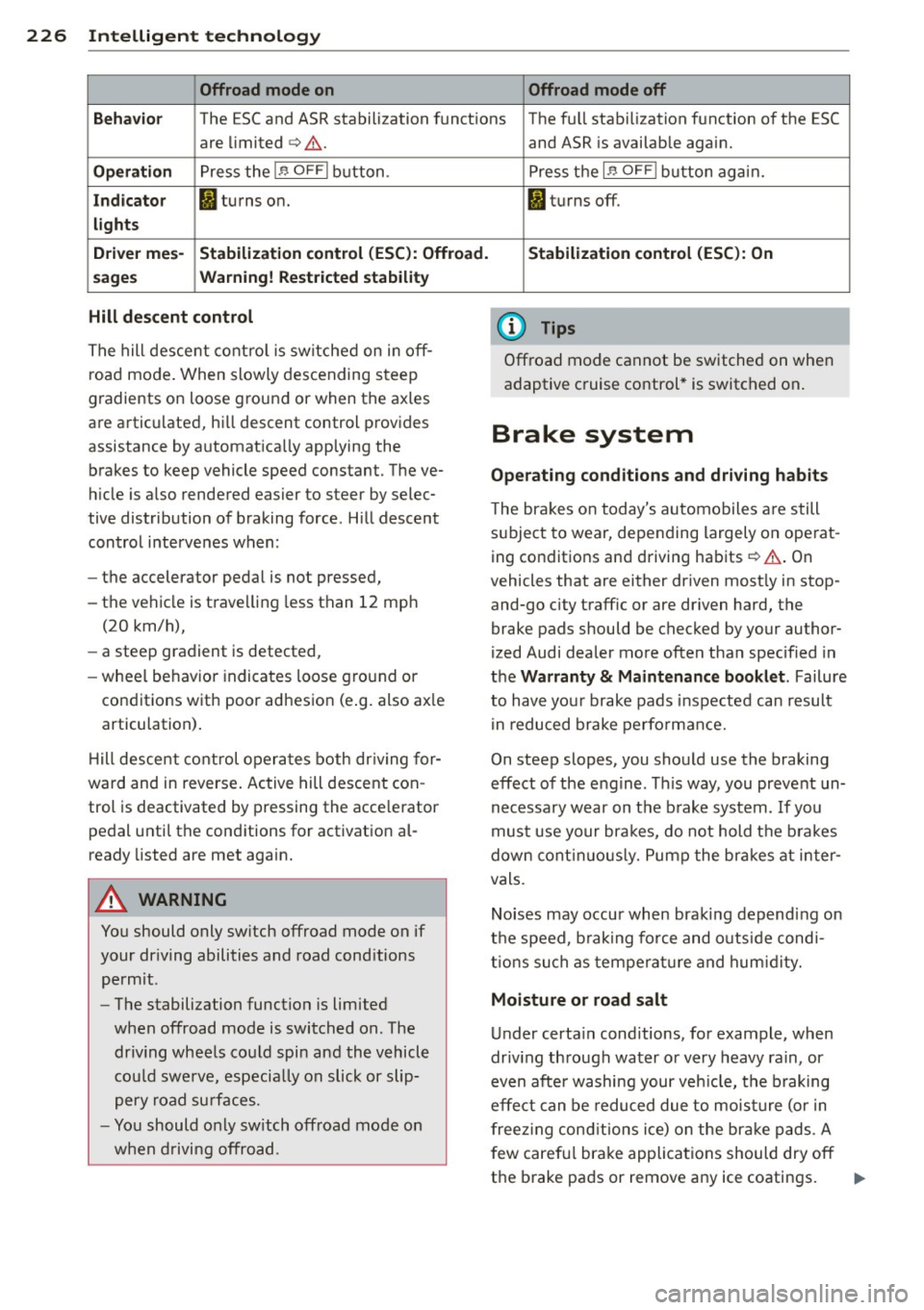
Offroad mode on Offroad mode off
Behavio r
The ESC and ASR stabilization functions The fu ll stabilization function of the ESC
are limited
c> Li::,. .
Operation Press the 1.$ OFFI button.
Indicator fl turns on.
lights
D rive r mes-
Stabilization control (ESC): Offroad.
sages Warning! Rest ricted stability
Hill descent control
The hill descent control is switched on in off
road mode. When slowly descending steep
gradients on loose ground or when the axles
are articulated, h ill descent control provides
assistance by automatically applying the
brakes to keep vehicle speed constant. The ve
h icle is also rendered easier to steer by selec
tive distribution of braking force . Hill descent
control intervenes when:
- the accelerator pedal is not pressed,
- the vehicle is trave lling less than 12 mph
(20 km/h),
- a steep gradient is detected,
-wheel behavio r indicates loose ground or
conditions with poor adhesion (e .g. also ax le
articulation) .
H ill descent control operates both driving for
ward and in reverse . Active hill descent con
trol is deactivated by pressing the accelerator
pedal until the conditions for activation al
ready listed are met again.
A WARNING
You should only switch offroad mode on if
your dr iving abilities and road cond itions
permit.
- The stabilization function is limited
when offroad mode is switched on. The
dr iv ing wheels could spin and the vehicle
cou ld swerve, especially on slick or slip
pery road surfaces.
- You should only sw itch offroad mode on
when driving offroad. and ASR
is available again.
Press the
1 .$ OF FI button again.
fl turns off.
Stabilization control (ESC): On
(D Tips
Offroad mode cannot be switched on when
adaptive cruise control* is switched on .
Brake system
Operating conditions and driving habits
The brakes on today's automobiles are still
subject to wear, depending largely on operat
ing conditions and driving habits
c> Li::,. . On
vehicles that are either driven most ly in stop
and-go city traffic or are dr iven hard, the
brake pads should be checked by your author
ized Audi dealer more often than specified in
the Warranty & Maintenance booklet . Failure
to have your brake pads inspected can result
in reduced brake performance.
On steep slopes, you should use the braking
effect of the engine . This way, you prevent un
necessary wear on the brake system .
If you
must use your brakes, do not hold the brakes
down continuously. Pump the brakes at inter
vals.
Noises may occur when braking depending on
the speed, b raking force and outs ide cond i
tions such as temperature and humidity.
Moisture or road salt
Under certain conditions, for example, when
driv ing through water or very heavy rain, or
even after washing your veh icle, the braking
effect can be reduced due to moisture (or in
freezing conditions ice) on the bra ke pads. A
f ew careful brake applications should dry off
the brake pads or remove any ice coatings.
jll,,
Page 237 of 340
Reducing unnecessary idling
Even when your car is just idling it burns up
fuel.
11-Shut the engine off when you are not driving
the vehicle.
11-Do not warm up the vehicle by letting the
engine run at idle .
It makes sense to shut
off the engine in traffic
jams, when waiting for trains to pass at rail
road cross ings, or at traffic lights that have
long waits on red. Turning the engine
off for
just 30-40 seconds saves more fuel than is
burned starting the engine again.
It takes a long time for the engine to warm up
fully when it is running at idle. However, wear
and noxious emissions are especially high
when the engine is warming up. So you should
drive away as soon as you start the engine and
avoid running at high rpms while the engine is
still warming up .
(D Note
Do not leave engine idling unattended af
ter starting. If warning lights should come
on to indicate improper operation, they
wou ld go unheeded. Extended idling also
produces heat, which cou ld result in over
heating or other damage to the vehicle or
other property .
Regular maintenance
A badly tuned engine unnecessarily wastes a lot of fuel .
11-Have your vehicle serviced at regular inter-
vals.
By having your vehicle regularly serviced by an
authorized Audi dealer helps to ensure that it
runs properly and economically. The condition
of your vehicle not only affects its safe ty and
ab ility to hold its value, it also affects fuel
consumption .
Check your oil each time you fill your tank.
Driving and environment 235
The amount of oil used is re lated to engine
load and speed.
It is normal for the oil consumption of a new
engine to reach its lowest value after a certain
mileage has been driven.
You must drive your vehicle about 3,000 miles
(S,000 kilometers) before you can properly
assess oil consumpt ion.
This also app lies to fue l consumption and en
gine output.
(D Note
- Have your veh icle ma inta ined properly
and in accordance with the service rec
ommendations in your Warranty
& Main
t enance booklet. Lack of prop er mainte
nance as well as improper use of the ve
hicle will impair the function of the
emission cont ro l system and could lead
to damage.
- Do not alter or remove any component of
the Emission Control System unless ap
proved by the manufacturer.
- Do not alter or remove any device, such
as heat shields, switches, ignition wires,
valves, which are designed to protect
your vehicle's Emission Control System and other important vehicle compo
nents.
Fewer short trips
Fuel consumption will always be relatively
high on short trips .
11-Try to avoid driv ing short distances w ith a
cold engine.
T he engine and cata lytic converter have to
reach their optimal operating temperature to
reduce fuel consumpt ion and noxious emis
s ions effectively .
Just after starting, a co ld engine in a mid-size
car on ly achieves a fuel economy of 6-8 mi les
per gallon (30-40 l/l00km). After about a
half a mile, fuel economy climbs to 12 mpg
(20 l/100 km). After about
2 .5 miles (4 km), liJI,
•
•
Page 243 of 340
Weight Rating will also change the per
formance and handling characteristics of
your vehicle, which could cause a crash resulting in serious injury or death .
- The Gross Vehicle Weight Rating for your
vehicle would be exceeded if your vehicle
is simultaneously equipped with Panor
amic sliding sunroof; third-row seating;
trailer towing equipment (factory or
dealer-installed), and running boards
(dealer-installed) . UNDER NO CIRCUM
STANCES MAY ALL SUCH ITEMS BE IN
STALLED ON THE SAME VEHICLE.
Operating instructions
MAX 6.9"
MAX175mm
E
1/1 E 1/1 ... a)
m
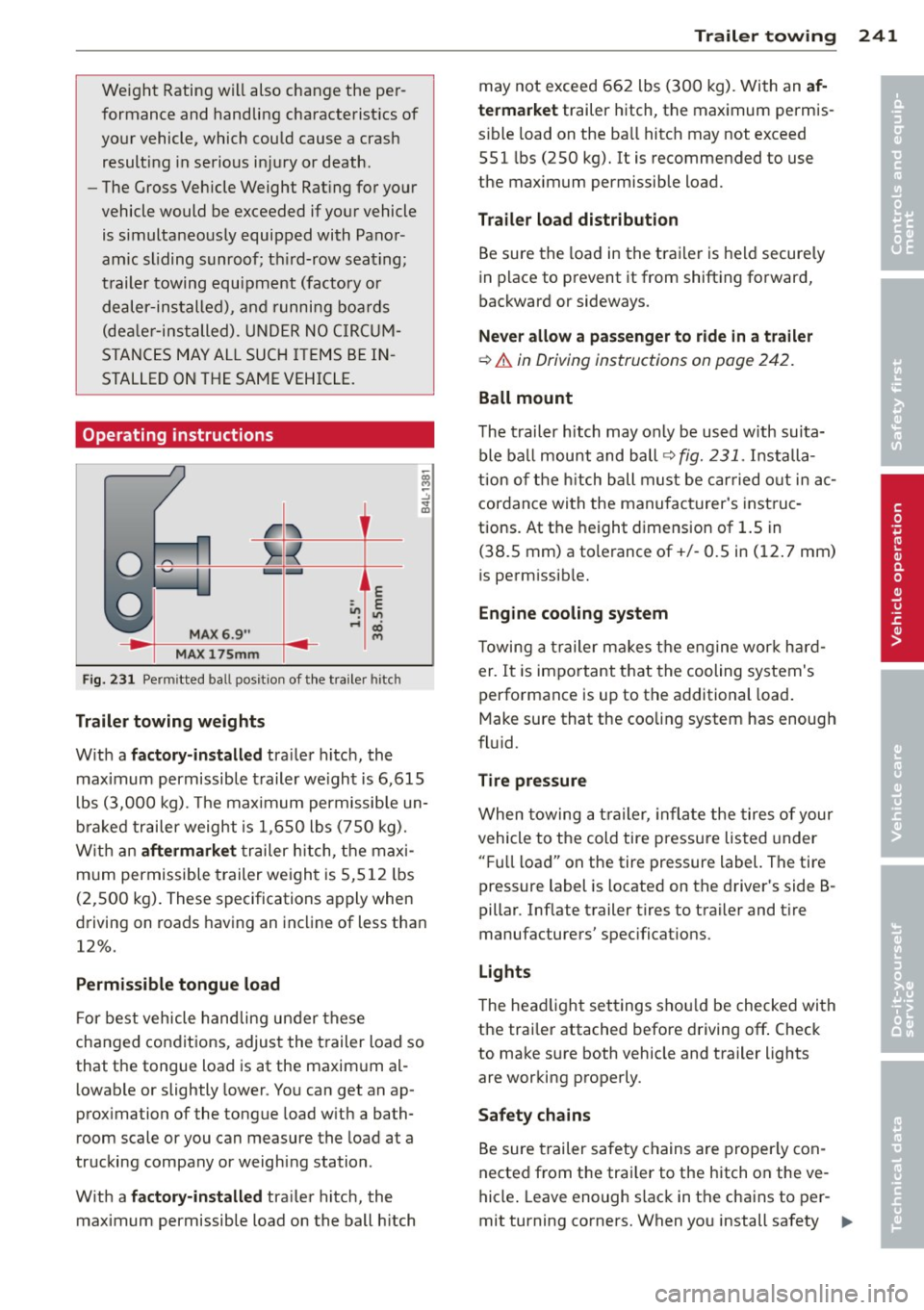
Fig. 231 Perm itted ba ll posit ion of the trailer hitch
Trailer towing weights
With a factory-installed trailer hitch, the
maximum permissible trailer weight is 6,615
lbs (3,000 kg). The maximum permissible un
braked trailer weight is 1,650 lbs (750 kg).
With an
aftermarket trailer hitch, the maxi
mum permissible trailer weight is 5,512 lbs
(2,500 kg). These specifications apply when
driving on roads having an incline of less than
12%.
Permissible tongue load
For best vehicle handling under these
changed cond itions, adjust the trailer load so
that the tongue load is at the maximum al
lowable or slightly lower. You can get an ap
proximation of the tongue load with a bath
room scale or you can measure the load at a
trucking company or weighing station .
With a
factory-installed trailer hitch, the
maximum permissible load on the ball hitch Trailer towing 241
may not exceed 662 lbs (300 kg). With an
af
termarket
trailer hitch, the maximum permis
sible load on the ball hitch may not exceed
551 lbs (250 kg).
It is recommended to use
the maximum permissible load.
Trailer load distribution
Be sure the load in the trailer is held securely
in place to prevent it from shifting forward,
backward or sideways.
Never allow a passenger to ride in a trailer
¢ .& in Driving instructions on page 242.
Ball mount
The trailer hitch may only be used with suita
ble ball mount and ball ¢
fig. 231. Installa
tion of the hitch ball must be carried out in ac
cordance with the manufacturer's instruc
tions. At the height dimension of 1.5 in
(38.S mm) a tolerance of+/- 0.5 in (12. 7 mm)
is permissible.
Engine cooling system
Towing a trailer makes the engine work hard
er . It is important that the cooling system's
performance is up to the additional load.
Make sure that the cooling system has enough
fluid .
Tire pressure
When towing a trailer, inflate the tires of your
vehicle to the cold tire pressure listed under
"Full load" on the tire pressure label. The tire
pressure label is located on the driver's side B
pillar . Inflate trailer tires to trailer and tire
manufacturers' specifications .
Lights
The headlight settings should be checked with
the trailer attached before driving
off. Check
to make sure both vehicle and trailer lights
are working properly .
Safety chains
Be sure trailer safety chains are properly con
nected from the trailer to the hitch on the
ve
hicle. Leave enough slack in the chains to per
mit turning corners. When you install safety
Ill-
•
•