ignition AUDI Q7 2014 Owner´s Manual
[x] Cancel search | Manufacturer: AUDI, Model Year: 2014, Model line: Q7, Model: AUDI Q7 2014Pages: 340, PDF Size: 85.02 MB
Page 27 of 340

Fue l consumption is reca lculated at interva ls
of 33 yards (30 meters). When the vehicle is
stationary, the most recent fue l consumption
is displayed .
Average speed
The average speed in mph (km/h) since the
l ast time the disp lay was reset appears in the
display .
Elapsed time
The length of time that you have been driving
since you last reset the memory appears in
this display.
Distance
The distance that has been covered since the
l ast time the memory was cleared appears in
the disp lay.
(D Tips
- Fuel consumptions (ave rage and cur
rent), range and speed are displayed in
metric units on Canadian models.
-All stored va lues w ill be lost if the veh i
cle battery is disconnected .
Memories
The trip computer is equipped with two fully
automatic memories as well as an efficiency
program".
Fig. 17 Trip computer d isplay: memo ry level 1
You can switch between the trip computer 1
and 2 and the efficiency program* by pressing
the
! RESET I button @¢ page 25, fig. 18.
You can tell which memo ry level is cur rently
active by the number or the sign in the display
Driver information display 25
¢ fig. 17. The data from the single-trip mem
ory (memory level 1) is being displayed if a
D
appears in the display . If a fJ is shown, then
the data from the total-trip memory is being
displayed (memory level 2). The fuel pump nozzle
iii indicates the efficiency program*
¢page 26.
Single-trip memory (Trip computer 1)
The single-trip memory stores the trip infor
mation from the time the ignition is turned on
until it is turned off. If the trip is continued
within 2 hours from the time the ignition was
turned off, the new data will be included in
the calculat ion of the current trip informa
tion. If the trip is interrupted for
more than 2
hours
the memory is reset automatically.
Total-trip memory (Trip computer 2)
Unlike the single -trip memory, the total -trip
memory is not reset automat ical ly. This per
mits you to evaluate your driv ing data for the
entire period between manua l resets.
Efficiency program*
The efficiency program can help you to use
less fuel ¢
page 26.
Operation
The trip computer is controlled by two
switches on the windshield wiper lever .
Fig. 18 Windsh ield wiper lever : contro ls for the t rip
computer
.. To display the trip computer memory levels,
press the
I RESET ! button®¢ fig. 18 re
peatedly until the desired memory level is
shown in the display . .,.
Page 28 of 340
26 Driver in formation d isplay
• To d isplay trip information within a memory
l evel, press the top or bottom part of the
function selection switch
@ .
The trip computer wi ll not operate unless the
ignition is on. When you turn on the ignition,
the function that was in use when you last
turned the ignit ion off will be d isp layed.
I n addition to information on the trip comput
e r (trip computer 1, 2 and efficiency pro
gram*), the digital speedometer and informa
tion regard ing the nav igat ion system* can al
so be displayed. To switc h the display between
the different information, tap the
I RES ET I but
ton @ briefly .
Setting value s to zer o
To erase the single or total trip comp uter va l
ues, se lect the des ired funct ion and press and
hold the
I RESET ! button@ for at least one
second . You can also erase* the values with
the MMI
¢ page 26 .
All values currently displayed in the efficiency
program* are a lso erased with the s ingle tr ip
computer .
(D Tips
All stored values will be lost if the vehicle
battery is disconnected.
MMI settings
Basic settings for the trip computer can be
made in the MMI.
• Se lect : I CAR ! function button > Systems *
control button > Instrument cluster > On·
board computer 1 or On-boa rd computer 2 .
The values i n the single -t rip or the total -trip
memory can a ll be reset to zero at the same
time under
Reset in the menu .
I n addition, you can de termine what informa
tion from the trip computer sho uld be shown
in the instrument cluster display. If one of the
p ieces of dr iver information is turned
Off , that
driver information w ill not be shown in the
d isplay. The information will con tinue to be ca
lculated by the tr ip comp ute r and can be
turned back
On at any time .
(D Tips
- This function is not available on all
vehicles .
- T he d riving info rm ation in the eff ic iency
program * is also reset to zero with the
sing le-trip memory.
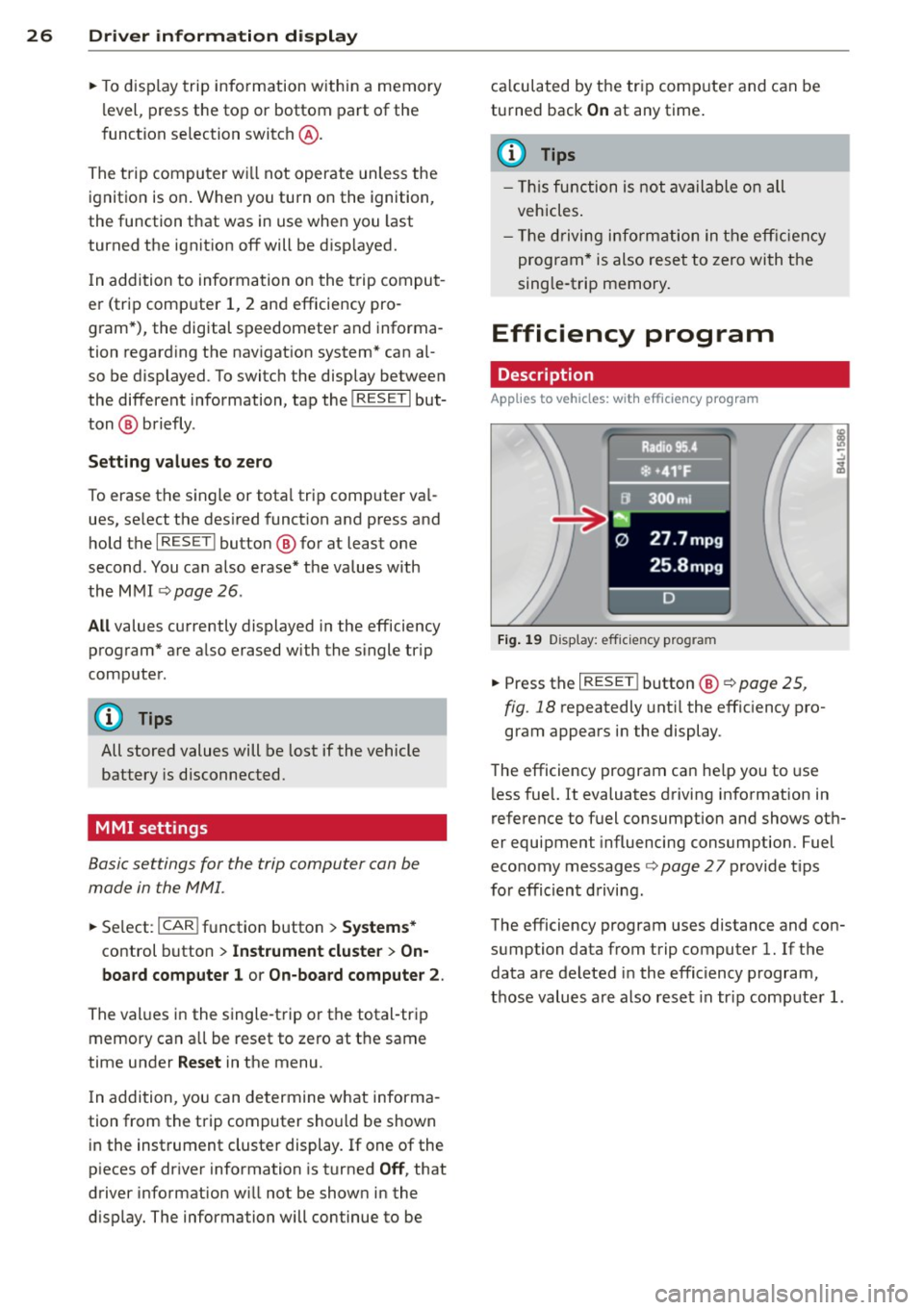
Efficiency program
Description
Applies to vehicles: with efficiency program
Fig. 1 9 Display: eff icie ncy pro gram
• Press the I RESE T! button @¢ page 25 ,
fig . 18
repeatedly unt il the effic iency pro
gram appears i n the display .
T he efficiency program ca n he lp you to use
l ess fuel. It evaluates driving info rmation in
reference to fuel consumption and shows ot h
er equipment influencing consumption. Fuel
economy messages
¢ page 27 provide t ips
for effic ient d riving.
The efficiency program uses distance and con
sumption data from trip computer
l. If the
data are deleted in the efficiency program,
those values a re also reset in tr ip comp ute r
l.
Page 29 of 340
Other equipment
Applies to vehicles: with efficiency program
Fig. 20 D isplay : ot her equipment
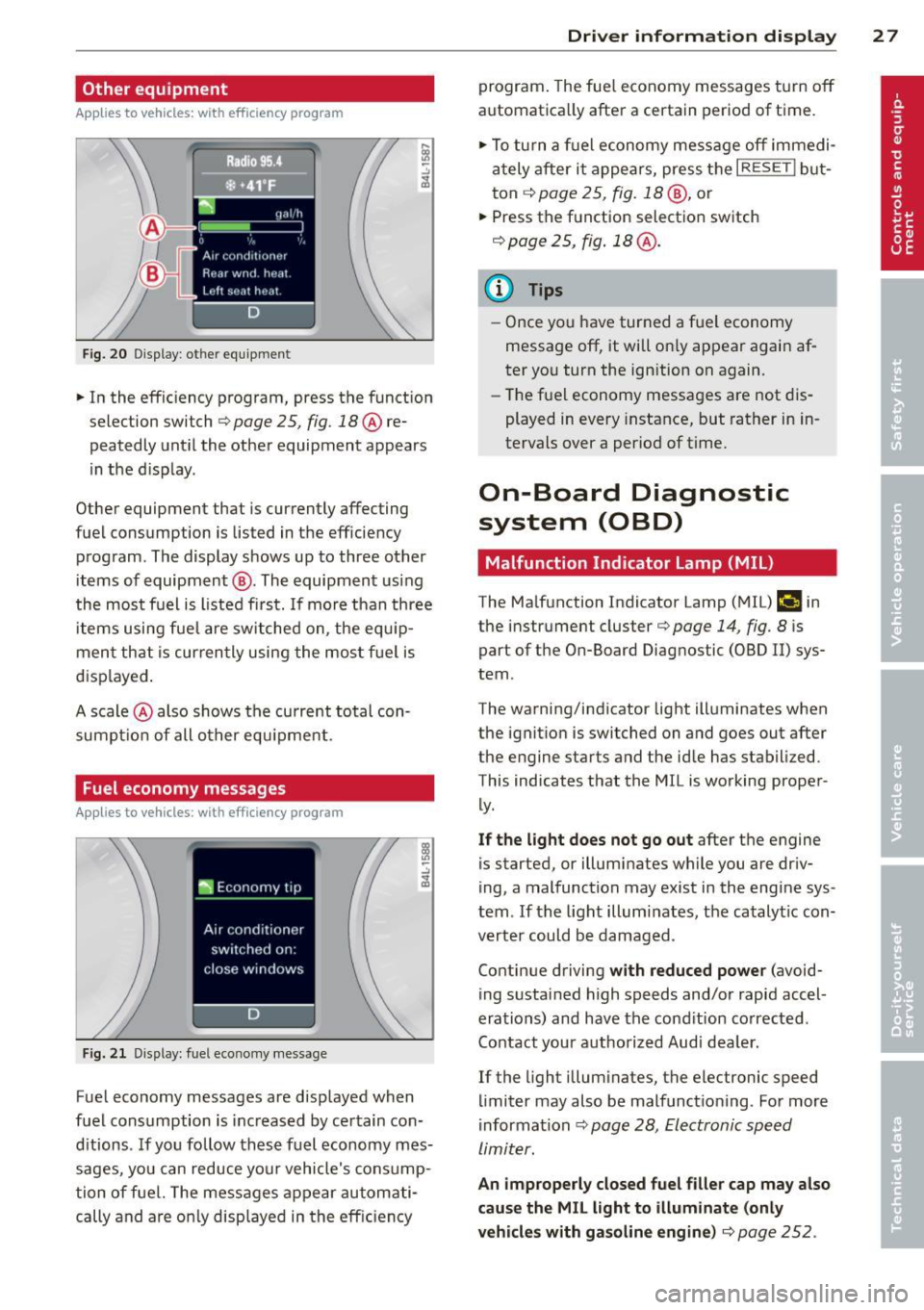
• In the efficiency program, press the function
s elec tion switch
q page 25 , fig. 18@ re
peatedly until the other equipment appears
in the d isplay .
Other equipment that i s cu rrently affecting
f uel consumption is lis ted in the eff iciency
program . The display shows up to three other
items of equipment @. The equipment using
the most fuel is l isted first. If more than three
items using fue l are switched on, the equ ip
ment that is currently using the mos t fu el is
d isp layed .
A scale @also shows the current total con
sumpt io n of all other equ ipment .
Fuel economy messages
Applies to vehicles: with efficiency program
Fig. 2 1 Dis pl ay: fuel e co n omy messa ge
-.:,
~
Fuel economy messages are displayed when
fuel consumption is inc reased by certain con
d itions . If you follow these fuel economy mes
sages, you can reduce your vehicle's consump
tion of fuel. The messages appear automati
cally and are o nly displayed in the eff ic iency
Dri ver inform ation di spl ay 2 7
program . The fue l economy messages t urn off
automatica lly after a certain period of time .
• To tu rn a f uel economy message off immedi
ately after it appears, press the
I RESE TI but
ton ¢
page 25 , fig. 18 @, or
• Press the function selection switch
r::!) page 2 5, fig . 18 @ .
{I) Tips
-Once you have turned a fuel economy
message off, it will o nly appear again af
ter yo u turn the ign ition on again.
- Th e fuel economy messages are not dis
played in
every i nstance, but rather in in
tervals
over a period of time.
On-Board Diagnostic
system (OBD)
Malfunction Indicator Lamp (MIL)
The Malfunction Indicator Lamp (M IL) ("4 in
the instrument cluster¢
page 14, fig. 8 is
part of the On-Board Diagnos tic (OBD II) sys
tem .
The warning/ind icator light ill um inates when
the ignition is switched on and goes out after
the engine star ts and the id le has stabilized.
This indicates that the M IL is working prope r
ly .
If the light does not go out after the engine
is started , or illumina tes while you are dr iv
ing, a malfunction may exist in the engine sys
tem . If the light illuminates, the catalytic con
verter could be damaged .
Con tinue driving
with reduced powe r (avoid
ing sustained high speeds and/or rapid accel
erations) and have the cond ition co rrected .
Contact your a uthorized Aud i dea ler.
If the light illum inates, the elec tronic speed
limiter may also be malfunctioning . For more
information ¢
page 28, Electronic speed
limiter.
An improperl y closed fuel filler cap ma y also
cau se the MIL light to illum inate (onl y
vehicl es with gas oline engine )¢
page 252 .
Page 32 of 340
30 Driver in formation d ispl ay
(30 km/h to 240 km/h) . Settings can each be
adj usted in intervals of S mph (10 km/h) .
Auto Check Control
Introduction
The Auto-Check control monitors the function
of certain veh icle featu res and components . It
simply makes sure these features and compo nents are work ing proper ly . The Auto -Check
contro l wo rks as long as the ignition is on, as
well as whenever the vehicle is driven.
If a componen t is ma lf u nctioning or if the
n eed for an urgent repair has been detected,
this will appear in the instrument cluster dis
p lay . You w ill a lso hear an audible warn ing
tone . The displays are co lor coded in e ither
red or yellow depending on their level of prior
ity .
A red symbo l means
Dange r, a yellow symbo l
indic ates
Warning . In certain s ituations, in
formation message for the dr iver appear in
addit ion to the red and yellow symbols.
Function te st : automat ic transmi ssion
The Auto -Check Control will automat ica lly
perform a test each time you switch on the ig
n ition. With the selector lever in P or N, the
following message appears in the display :
When station ary apply brake pedal while se
lecting gear
When you select a different gear (for exam
p le : R, D, etc.), the message will d isappear
and the Auto-Check function is d isplayed .
I f the re is a m alfu nction, then the malfunc
tion message w ill appear about 15 seconds af
ter the yo u start the vehicle. At t he same time
you will hear a warning tone .
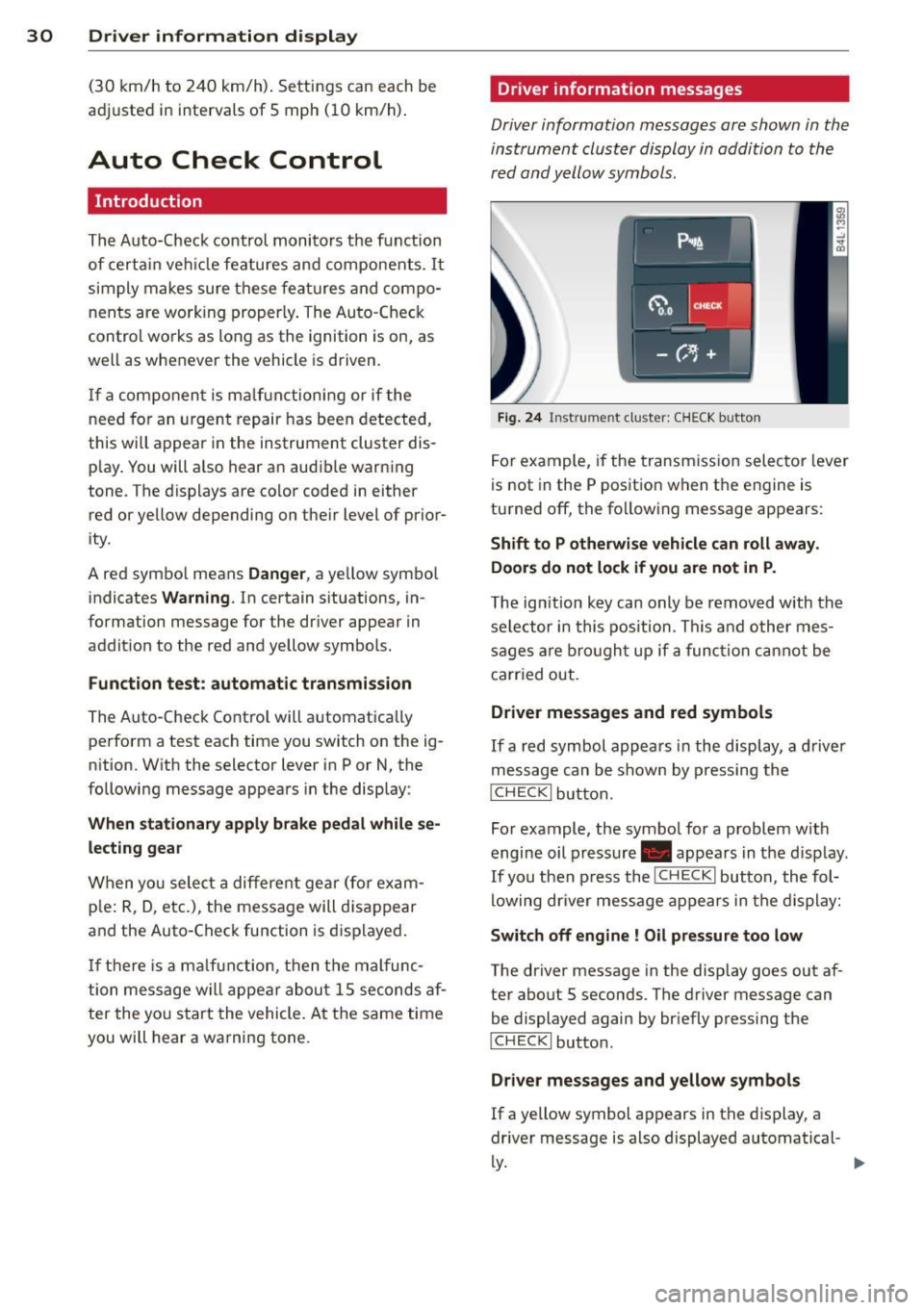
Driver information messages
Driver information messages are shown in the
instrument cluster display in addition to the
red and yellow symbols .
Fig. 24 Ins trume nt cl ust er: CHECK b utto n
For example, if the transmiss ion selec to r l ever
is not in the P position when the engine is
turned off, the following message appears :
Shift to P otherwise vehicle can roll away.
Door s do not l ock if you are not in P .
The ig nition key can only be removed with the
selector in this position . Th is and other mes
sages are bro ugh t up if a func tion cannot be
carr ied out.
Driver messages and red symbols
If a red symbol appea rs in the display, a d river
message can be shown by pressing the
I CH ECK I button.
For example, the symbo l for a problem w ith
engine oil p ressure . appears in the d isp lay .
If you then p ress the
I CHECK I button , the fol
lowing dr iver mess age appears in the display:
Switch off engine ! Oil pr essure too low
The driver message in the display goes out af
ter about 5 seconds . The driver message can
be displayed again by briefly press ing the
I CH ECKi button.
Driver messages and yellow symbols
If a yellow symbol appears in the display, a
driver message is also displayed automatical-
~ ~
Page 33 of 340
For example, the symbol II appears in the
display, indicating low windshield washer flu
id level. The follow ing message also appears:
Pleas e refill w asher fl uid
The driver message disappears after a few
seconds. The driver message can be displayed
again by briefly pressi ng the
!CHECK I button.
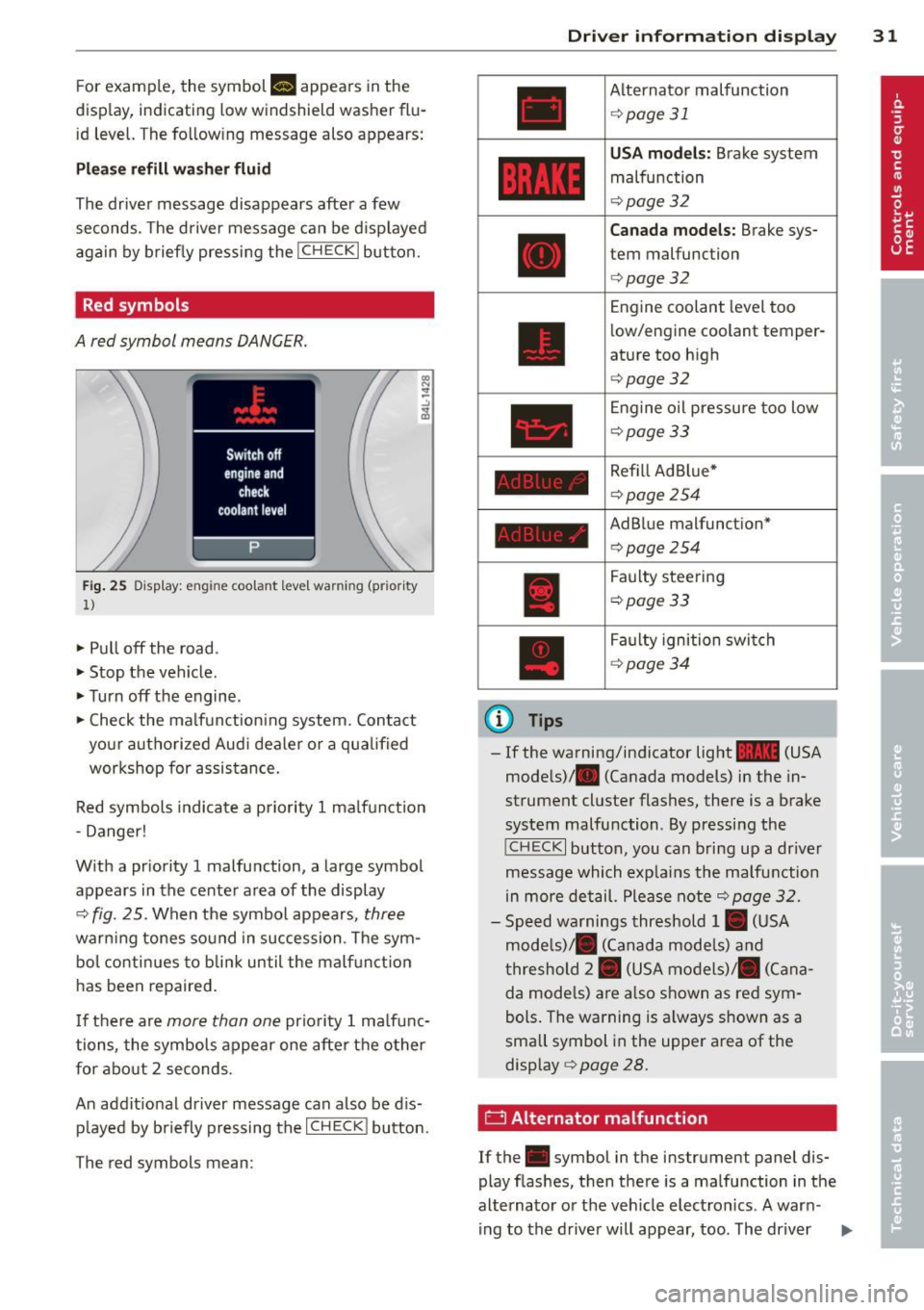
Red symbols
A red symbol means DANGER.
Fig. 25 Display: engine coolant level warning (prior ity
1)
• Pull off the road.
• Stop the vehicle .
• Turnoff the engine.
• Check the ma lfunction ing system. Contact
your authorized Aud i dea ler o r a qualified
workshop for assistance.
Red symbols indicate a priority 1 ma lfunction
- Danger!
W ith a pr iority 1 malfunction, a large symbol
appears in the center area of the display
¢ fig. 25. When the symbol appears, three
warning tones sound in succession. The sym
bo l conti nues to blin k until the malf unct io n
has been repaired .
I f there are
more than one prio rity 1 ma lfunc
tions, the symbols appear one afte r the other
for about 2 seconds.
An addit ional driver message can also be d is
p layed by briefly pressing the
I CHECK ! button.
The red symbols mean:
(D Tips
Driver inform ation di spl ay 31
Alternator malfunction
¢page 31
USA mod els: Brake system
malfunction
¢page 32
Canada mo del s: Brake sys
tem malfunction
¢page 32
Engine coolant level too
low/engine coolant temper
ature too high
¢ page 32
Engine o il pressu re too low
¢page33
Refill Ad Blue*
¢page254
AdBlue malfunction*
c:!> page 254
Faulty steering
¢page33
Faulty ignition swi tch
¢ page34
-If the warning/indicator light 1111 (USA
models)/ . (Canada models) in the in
strument cluster flashes, there is a brake
system malfunction. By pressing the
! CHECK I button, you can bring up a dr iver
message which exp lains the malfunction
in more detail. Please note
¢ page 32.
- Speed warnings threshold 1. (USA
mode ls)/ . (Canada mode ls) and
t hreshold 2. (USA models)/ . (Cana
da mode ls) a re a lso shown as red sym
bols. The warning is a lways shown as a
small symbol in the upper area of the
display¢
page 28.
0 Alternator malfunction
If the . symbol in the instrument panel dis
play flashes, then there is a malfunction in the
alternato r or the veh icle elect ron ics. A war n-
ing to the drive r will appear, too. The driver .,.
Page 36 of 340
34 Driver in formation d isplay
A WARNING -
Your vehicle must not be towed in the
event of a malfunction in the electron ic
steering column lock because it cannot be
steered due to the locked steering. If it is
t owed w ith the stee ring locked, there is
the risk of an accident.
~ Ignition lock malfunction
A malfunction in the ignition lock must be re
paired immediately.
If the . symbo l in the d isplay blinks, there is
a malf unct ion in the electronic ignition lock.
A n addit ional driver message ca n also be d is
p layed by pressing the
! CHECK I button:
Ignit ion lo ck def ect ive . C ontact work shop !
• Do not turn the eng ine off.
• Drive immediate ly to an authorized Audi
dealer to have the ma lfunction corrected.
If there is a ma lfunction in the e lectronic igni
tion lock, the ign ition cannot be turned off.
Drive immediately to an a uthorized Audi dea l
e r to have the cause of the ma lfunction co r
rected .
On vehicles w ith Convenience key*, the engine
should not be sw itched
off using the ! STOP !
button because the eng ine cannot be started
aga in after the ignition is switched
off .
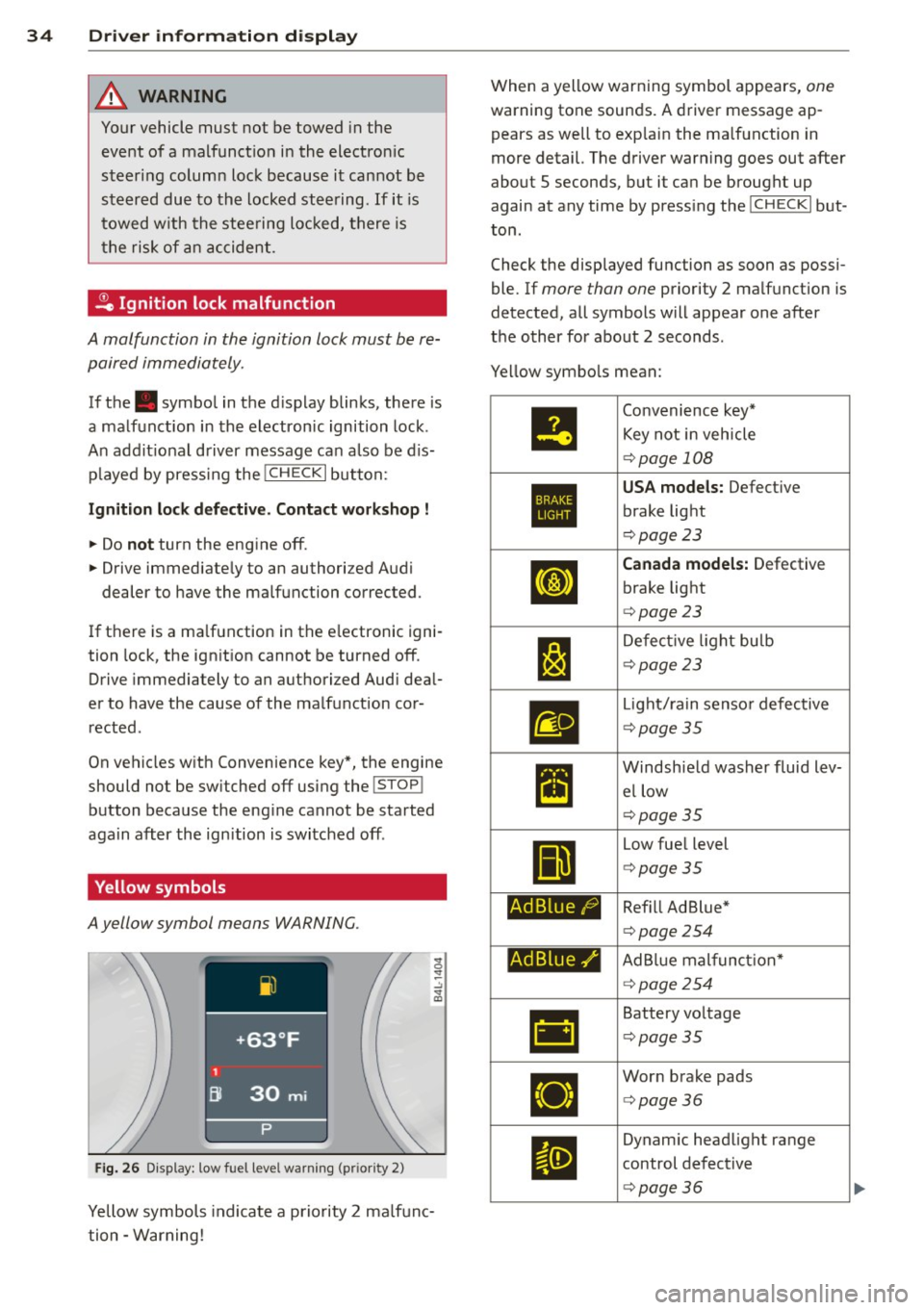
Yellow symbols
A yellow symbol means WARNING.
Fig . 26 Display: low fuel level warning (pr io ri ty 2)
Yellow symbols indicate a priority 2 ma lfunc
tion -Warning! When a yellow warning symbol appears,
one
warning tone sounds. A driver message ap
pears as well to exp lain the ma lfunction in
more detail. The driver warning goes out after
about 5 seconds, but it ca n be brought up
again at any time by press ing the
! CHECK I but
ton .
Check the displayed function as soon as possi
ble. If
more than one priority 2 ma lfunction is
detected, all symbols will appear one after
the o ther for about 2 seconds .
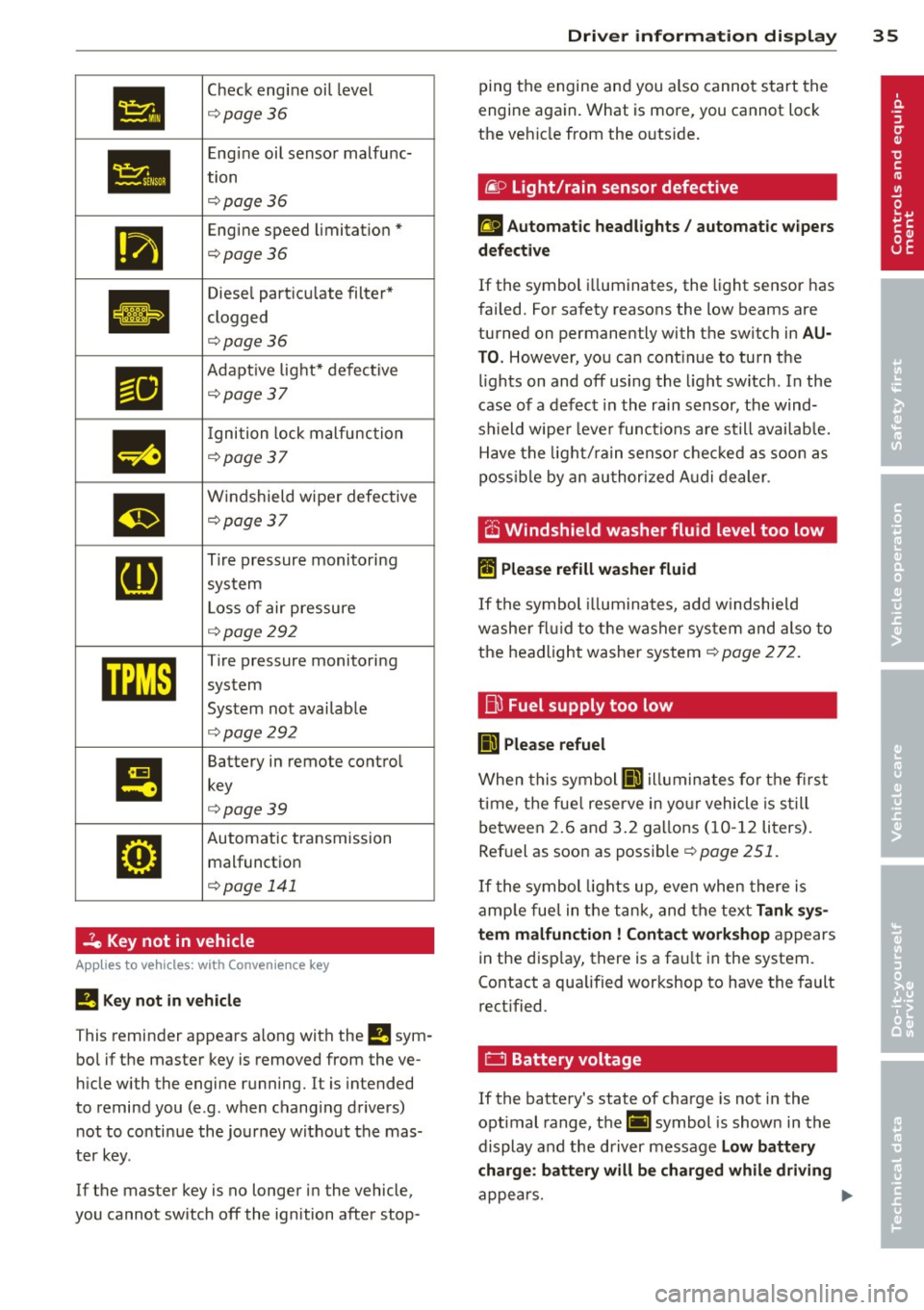
Ye llow symbo ls mean:
•
1:1
Ad Blue/)
Ad Blue,/'
•
Convenience key*
Key not i n veh icle
¢ page 108
USA models: Defect ive
brake light
¢ page 23
Canada model s: Defective
brake light
¢ page 23
De fect ive l ight bulb
¢page23
Light/ rain senso r defective
¢ page35
Windsh ie ld washer fluid lev
el low
¢page35
Low fue l level
¢ page35
Ref ill Ad Blue *
¢page 254
AdBlue mal funct ion*
¢ page254
Battery vo ltage
¢ page35
Wor n brake pads
<=> page36
Dynam ic headlight range
control defect ive
¢ page36
Page 37 of 340
•
Check engine oi l level
¢ page36
•
Engine oil sensor malfunc-
tion
¢page 36
111
Engine speed limitation*
¢page36
Ill
Diesel particu late filter*
clogged
.
¢page36
Ill
Adapt ive light* defective
¢page37
m
I gnition lock malfunction
¢page 37
m
Windshield wiper defective
¢page37
[I]
Tire pressure monitoring
system
L oss of air pressure
¢ page292
mm
Tire pressure monitoring
system
System not avai lab le
¢ page292
I!
Battery in remote contro l
key
¢page39
•
Automatic transmission malfunction
¢ page 141
2e Key not in vehicle
Applies to vehicles: with Convenience key
!I Key not in ve hicle
This reminder appears a long with the !I sym
bo l if the master key is removed from the ve
hi cle with the engine running.
It is intended
to remind you (e.g. when changing drivers) not to continue the journey w ithout the mas
ter key.
If the master key is no longer in the vehicle,
you cannot sw itch
off the ignition after stop-
Dri ver information di spla y 35
ping the engine and you also cannot start the
engine again. What is more, you cannot lock
the ve hicle from the outs ide .
liP Light/rain sensor defective
£I Automatic headlights / automatic w ipers
d efe ctiv e
If the symbol i lluminates, the light sensor has
failed. For safety reasons the low beams are
turned on permanently with the switch in
AU
T O . However, you can cont inue to turn the
l ights on and
off using the l ight sw itch. In the
case of a defect in the rain sensor, the wind
shield wipe r lever functions a re still availab le.
Have the light/ rain senso r chec ked as soon as
poss ib le by an au thorized A udi dealer .
.-v ~,
O Windshield washer fluid level too low
II Plea se refill wa she r fluid
If the symbol illum ina tes, add w indshie ld
washe r fl ui d to the washer sys tem and also to
the headlight washer system¢
page 272.
fj)
Fuel supply too low
II) Ple ase refuel
When this symbol II) illuminates for the first
t ime, the fue l reserve in yo ur vehicle is s till
between 2.6 and 3.2 ga llons (10- 12 liters).
Ref uel as soon as possible¢
page 251.
If the symbol lights up, even when there is
amp le fue l in the tank, and the text
Tank sy s
tem malfuncti on! Contact work shop
appears
in the disp lay, there is a fa ult in the system.
Contact a qualified workshop to have the fault
rect ified.
0 Battery voltage
If the battery's state of charge is not in the
optimal range, the(•] symbol is shown in the
display and the driver message
Low battery
charge : batt ery will be char ged whil e driving
appea rs. .,.
Page 39 of 340
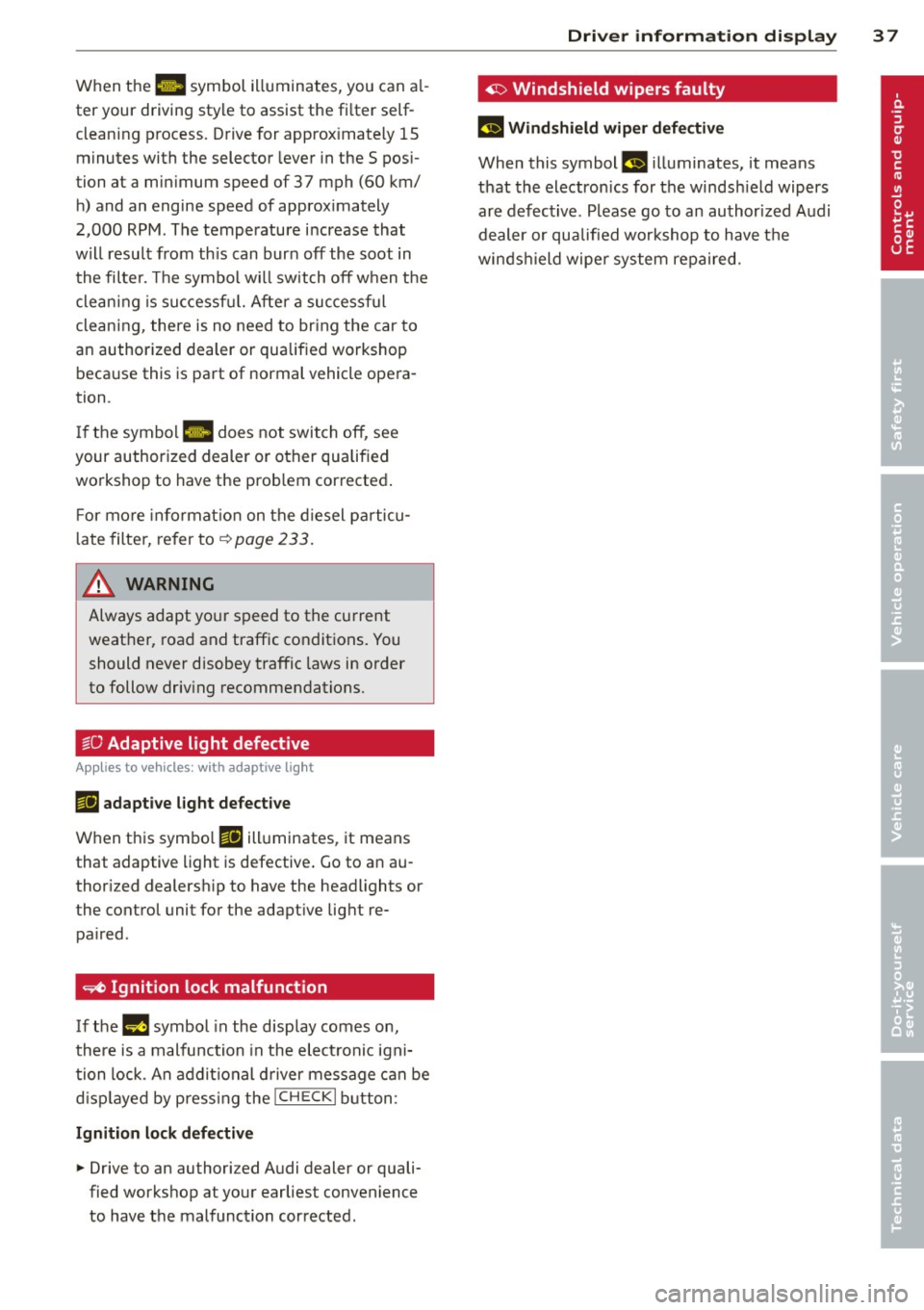
When the 1111 symbol illuminates, you can al
ter your driving style to assist the fi lter self
cleaning process. Drive for approx imately 15
minutes with the selector lever in the S pos i
tion at a minimum speed of 37 mph (60 km/ h) and an engine speed of approx imately
2,000 RPM . The temperature i ncrease that
will result from th is can burn off the soot in
the filter. The symbol w ill switch off when the
cleaning is successf ul. After a successful
cleaning, there is no need to br ing the car to
an authorized dealer or qualified workshop beca use this is part of normal vehicle opera
tion .
I f the symbol
II does not switch off, see
your authorized dealer or other qualified
workshop to have the prob lem corrected .
F or mo re informat io n on the d iesel pa rticu
l ate filter, refer to~
page 233 .
& WARNING ,..__
Always adapt yo ur speed to the current
weather, road and traffic condit ions. You
should never disobey traffic laws in order
to follow driv ing recommendations.
~O Adaptive light defective
Appl ies to vehicles: with adapt ive light
111 adapti ve l ight defe cti ve
When this symbo l Ill illuminates, it means
that adaptive light is defective . Go to an au
thor ized dealersh ip to have the headlights or
the control unit for the adapt ive lig ht re
pa ired .
~ Ignition lock malfunction
If the l!)J symbol in the display comes on,
there is a malfunction in the elect ronic igni
tion lock. An addit ional d river message can be
d isp layed by press ing the
! CHECK I b utton:
Ignitio n lock d efective
.. Drive to an authorized Audi dealer or quali
fied workshop at your earliest convenience
to have the malfunction corrected.
Dri ver information di spla y 37
'1> Windshield wipers faulty
£~$ Windshield wip er de fecti ve
When this symbol £11 illuminates, it means
t h at the electronics for the winds hield wipers
are defective . Please go to an author ized A udi
dealer or qualified wo rkshop to have t he
winds hield wiper system repaired.
Page 40 of 340

38 Opening and closing
Opening and closing
Keys
Key set
Fig. 27 Key set
@ Master key with remote control
You can centrally lock and unlock your vehicle
and start the engine with the master key with
remote control.
@ Valet key
The valet key only fits the lock in the driver's
door and the ignition lock . If you have to leave
the key with somebody else, you are well-ad
vised to turn over the valet key only
¢ page 41.
© Emergency key
The emergency key is only for temporary use if
the vehicle key should be lost or misplaced
¢ .&. .
Key replacement
If you lose a key, contact your authorized Audi
dealer immediately to have the
lost key disa
b led . Be sure to bring all your keys with you.
Registered keys
You can check to find out how many keys have
been registered to your vehicle. Therefore,
when buying a used vehicle, make sure to get
all of the remote keys be long to it .
Ca lling up the registered keys¢
page 12.
Data in the master key
While you are driving, serv ice and mainte
nance relevant data are being continuously stored on your master key. Your Audi
Service
Advisor can read out these data and tell you
about work that is needed on your vehicle .
This also app lies to vehicles w ith Convenience
key*.
A WARNING
--
- Do not leave your vehicle unattended
with the key in the ignition lock. Entry by
unauthorized persons could endanger
you or result in theft or damage the vehi
cle. A lways lock all doors and take the
key.
- Do not leave children unattended in the
veh icle, especially with access to vehicle
keys . Unguarded access to the keys pro
vides children the opportun ity to start
the engine and/or activate vehicle sys
tems such as the power windows etc. Un
supervised operation of any vehicle sys
tem by children can result in serious in
Jury .
(D Tips
- If you open the driver's door with the key
left in the ignition lock, a chime w ill
sound. T his is your reminder to remove
the key and lock the door.
- For security reasons, replacement keys
are only ava ilable from Audi dealers.
Master key with remote control
The remote control allows you to lock or un
lock the vehicle electronically .
Fig. 28 Fold-up maste r key with remo te control
., To fold the key out and back in place, press
t he release button ¢
fig. 28. .,.
Page 41 of 340
The transmitter and battery a re located in the
head of the remote control. The receiver is lo
cated inside the vehicle. The maxim um effec
tive range depends on several things. Remem
ber, if the battery is weak, the effective range
decrease s.
If you need to replace the remote contro l, or if
you need to have it repaired, you must see
your author ized Audi dealer. Only then can
you use the key again .
Personalizing the ma ster key
When t he ignit ion is t urned off or when the
veh icle is locked, vari ous conven ience settings
are stored automatically and assigned to the
key that was used . The settings that are as
signed to the maste r key are recalled auto
ma ticall y when the veh icle is unlocked, when
the door is opened o r when th e ignition is
sw itched on .
Sett ings are saved for the following systems :
- Climate control
- Central lock ing
-W indows
- Am bien ce light ing*
- Seat memory*
- Steering w heel heat ing*
- Adaptive cruise control*
- Audi side ass ist*
- Pa rking system*
The
Remote control key f unc tion mus t be ac
t iv at ed in t he MMI ¢
page 75, so that the
set tings for the driver 's seat (i ncluding the
settings for the steering co lumn and exter ior
mirrors) are saved on the master key through
the seat memory when the vehicle is locked,
and a re set automatically when the ve hicle is
u nl ocked.
(D Tips
- If
the ignition is sw itched on, t he remote
contr ol system is deact ivated.
- The remote control system can be affec t
ed by other systems operating in the
same frequency range close to the vehi-
Opening and clo sin g 39
cle, such as mo bile telep hones, televi
sion broadcast ing stations, etc .
- F or Declara tion of Com pliance to United
States FCC and In du stry Canada re gula
ti ons¢
page 319.
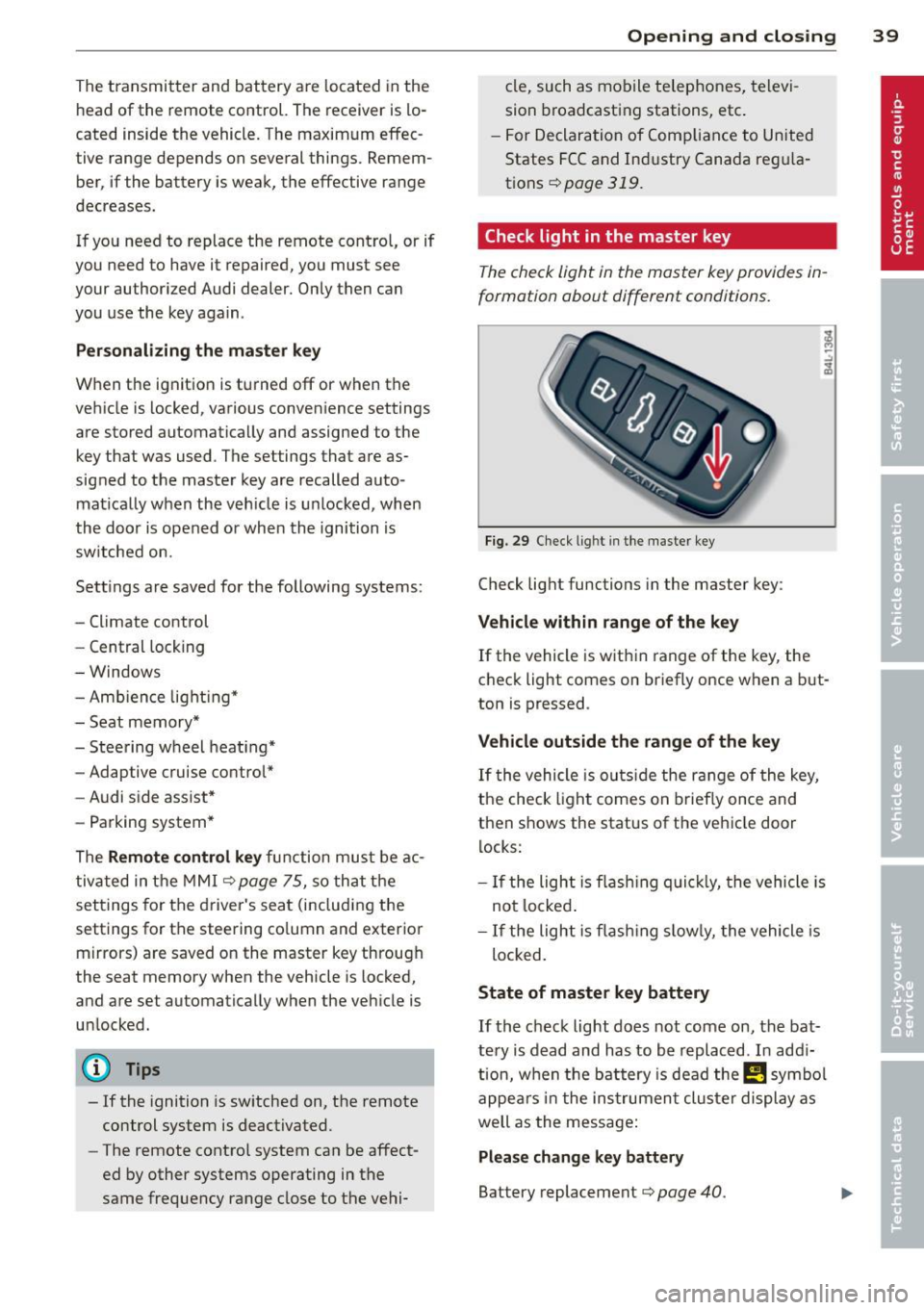
Check light in the master key
The che ck light in the m aster key provides in
formation about different conditions .
Fig. 29 Ch eck l ig ht in t he m aster key
Check lig ht functions in the master key :
Vehicle within range of the key
If
the vehicle is w it hi n range of the key, the
c heck light comes on br iefly once when a b ut
ton is pressed .
Vehicle outside the range of the key
If
t he vehicle is ou ts id e the r ange of the key,
the check light comes on brie fly once and
then shows the status of the vehicle door l ocks:
- If the ligh t is fla shin g qu ickl y, the vehicle is
no t locke d.
- If the ligh t is f lash ing slow ly, the vehicle is
loc ked .
State of master key battery
If
t h e ch ec k light does not come on, the bat
te ry is d ead and has to b e re pla ced . In ad di
tio n, w hen the b attery is dea d
the m symbo l
appe ars in t he instrumen t clu ster displ ay a s
well as the mess age:
Please change key battery
Battery replacement ¢ page 40.