suspension AUDI Q7 2014 Owner´s Manual
[x] Cancel search | Manufacturer: AUDI, Model Year: 2014, Model line: Q7, Model: AUDI Q7 2014Pages: 340, PDF Size: 85.02 MB
Page 162 of 340
160 Adapti ve Air Su spen sion
this mode. If the suspension is switched from
this mode to another mode, dynamic mode
cannot be re-selected .
(D Tips
-For vehicles with a factory installed tow
ing hitch or a trailer hitch that was in
stalled later accord ing to factory specifi
cations, the system recognizes "Trailer
tow ing mode" and activates this specia l
mode automatically, as soon as the elec
trical connection on the trailer socket is
connected. The mode ceases a utomat i
ca lly when the elect rical connection to
t h e trai ler socket is d isconnected.
- If the tra iler towing mode has been acti
vated, the vehicle will not drop to the
l ow or highway level.
Cargo mode
Applies to vehicles: with Adapt ive Air Suspe nsio n
The rear of the vehicle can be lowered to
make it easier to load.
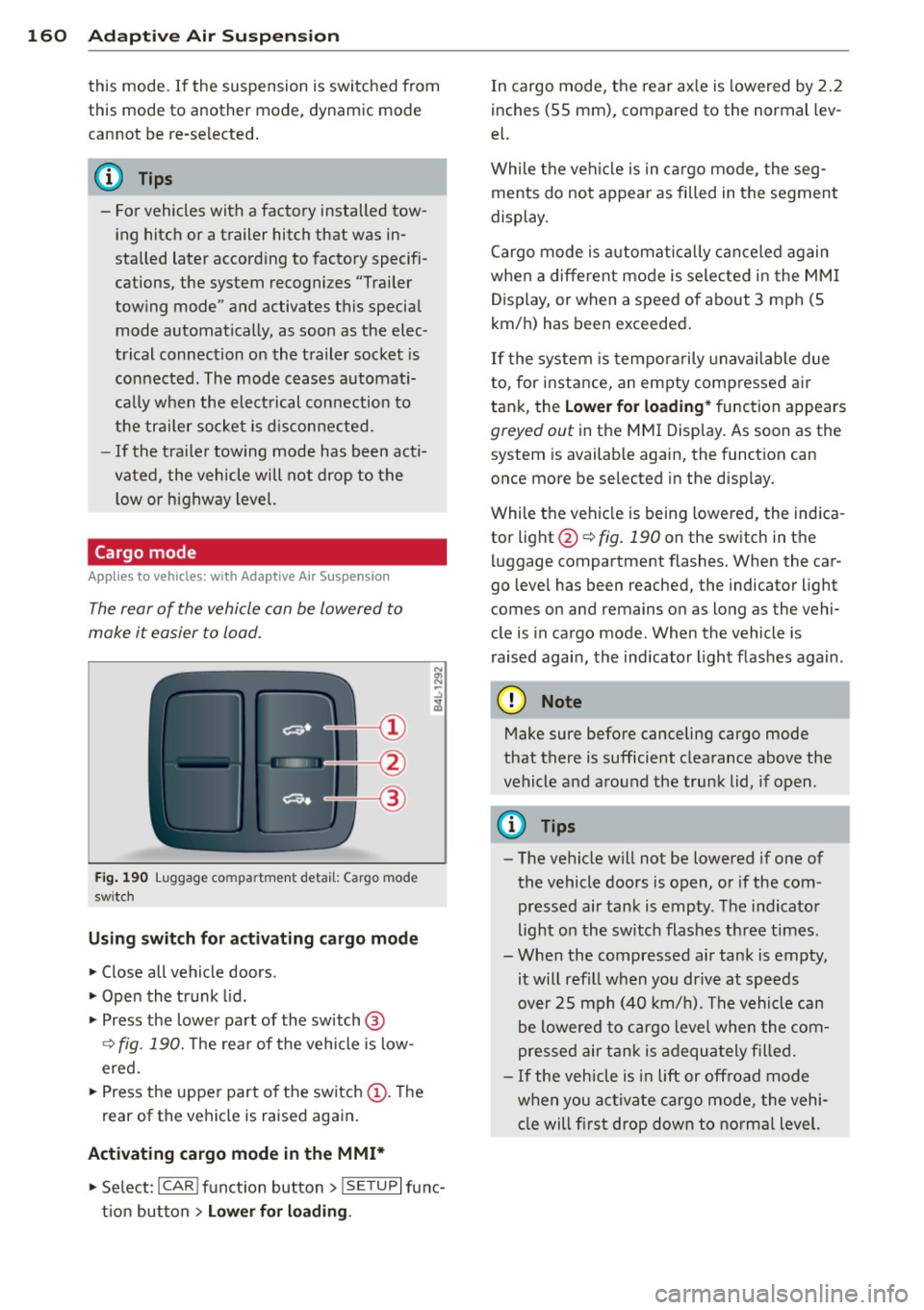
Fig. 190 Luggage compa rtment detail: Cargo mode
sw itch
Using switch for activating c argo mode
.. Close all vehicle doors .
.. Open the trunk lid .
.,. Press the lower pa rt of the switch @
<=> fig. 190. The rea r of the vehicle is low
ered.
.,. Press the uppe r part o f the switch @. T he
rear of the vehicle is raised again.
Activating cargo mode in the MMI*
.. Select: ICAR I funct io n button> !SETUP I func
t ion button >
Lower for loading .
In cargo mode, the rear ax le is lowered by 2 .2
inches (S5 mm), compared to the normal lev
el.
While the veh icle is in ca rgo mode, the seg
ments do not appear as filled in the segment
display.
Cargo mode i s automatic ally c an ce le d again
when a different mode is selected in the MM I
Display, or when a speed of about 3 mph (5
km/ h) has been exceeded.
If the system is tempora rily unavailable due
to, for instance, an empty compressed air
tank, the
Lower for loading * function appears
greyed out in the MMI Display. As soon as the
system is available again, the funct ion can
once more be selected in the disp lay.
While the vehicle is being lowered, the indica
tor light @~
fig. 190 on the switch in the
l uggage compartment flashes. When the car
go leve l has been reached, the indicator light
comes on and remains on as long as the vehi
cle is in cargo mode. When the vehicle is
r aised agai n, the indicator light flashes again.
(D Note
M ake sure before canceling cargo mode
that there is sufficient clearance above the
vehicle and around the trunk lid, if open.
(D Tips
- The vehicle w ill not be lowered if one of
the vehicle doors is open, or if the com
pressed air tank is empty. The indicator
light on the switch flashes three times.
- Whe n the compressed air tank is empty,
it will refill when you drive at speeds
over 25 mph (40 km/ h). The vehicle can
be lowered to cargo level whe n the com
pres sed air tan k is adequately filled.
- If the vehicle is i n lift or off road mode
when you act ivate cargo mode, the vehi
cle will fi rst drop down to no rma l level.
Page 200 of 340
198 Airbag system
@ For the sake of the environment
Undep loyed airbag modu les and preten
sioners might be classified as Perchlorate Material -special handling may app ly, see
www.dtsc.ca.gov/haza rdouswaste/per chlorate. When the vehicle or parts of the
restraint system including airbag modules
and safety belts w ith pretens ioners are
scrapped, all applicable laws and regula
tions must be observed. Your authori zed
Audi dea ler is familiar with these requ ire
ments and we recommend that you have
your dea ler perform this service for you.
Other things that can affect Advanced
Airbag performance
Changing the vehicle's suspension system can
change the way that the Advanced Airbag Sys
tem performs in a crash. For example, using
tire-r im combinations not approved by Aud i,
l owering the vehicle, changing the stiffness o f
the suspension, including the springs, s uspen
sion struts, shock absorbers etc. can change
the forces that are measured by the airbag
sensors and sent to the electronic control
un it. Some suspension changes can, for exam
ple, increase the force levels measured by the
sensors and make the airbag system deploy in
crashes in wh ich it would not deploy if the
changes had not been made. Other kinds of
changes may reduce the force levels meas
u red by the sensors and prevent the airbag
from deploying when it should .
The sensors in the safety belt buckle for the
driver and front passenger sea t tell the elec
tronic control module if the safety belt is
latched or not. If the safety belt is being used,
the front airbag will deploy at a slightly high
er rate of vehicle deceleration than if the safe
ty belt is not being used. Therefore, in a par
ticular collision, it is possible that an airbag
will not deploy at a seating position where the safety belt is being used but will inflate at the
position where the safety belt is not being
used.
It is important that nothing interfere
with the safety belt buckles so that the sen- sors can send the correct info
rmation about
safety belt use to the electronic control unit.
.&_ WARNING
-
Changing the vehicle's suspension includ- ing use of unapproved tire-rim combina
tions can change Advanced Airbag per
formance and increase the risk of serious
personal injury in a crash.
- Never install suspension components
that do not have the same performance
characteristics as the components origi
nally installed on your vehicle.
- Never use tire-rim combinations that
have not been approved by Audi.
&_ WARNING
--
Items stored between the safety be lt
buckle and the center console can cause
the sensors in the buckle to send the
wrong information to the e lectronic con
trol module and prevent the Advanced Air
bag System from working properly.
- Always make sure that nothing can inter
fere with the safety belt buckles and that
they are not obstructed.
Side airbags
Description of side airbag s
The airbag system can provide supplemental
protection to properly restrained occupants.
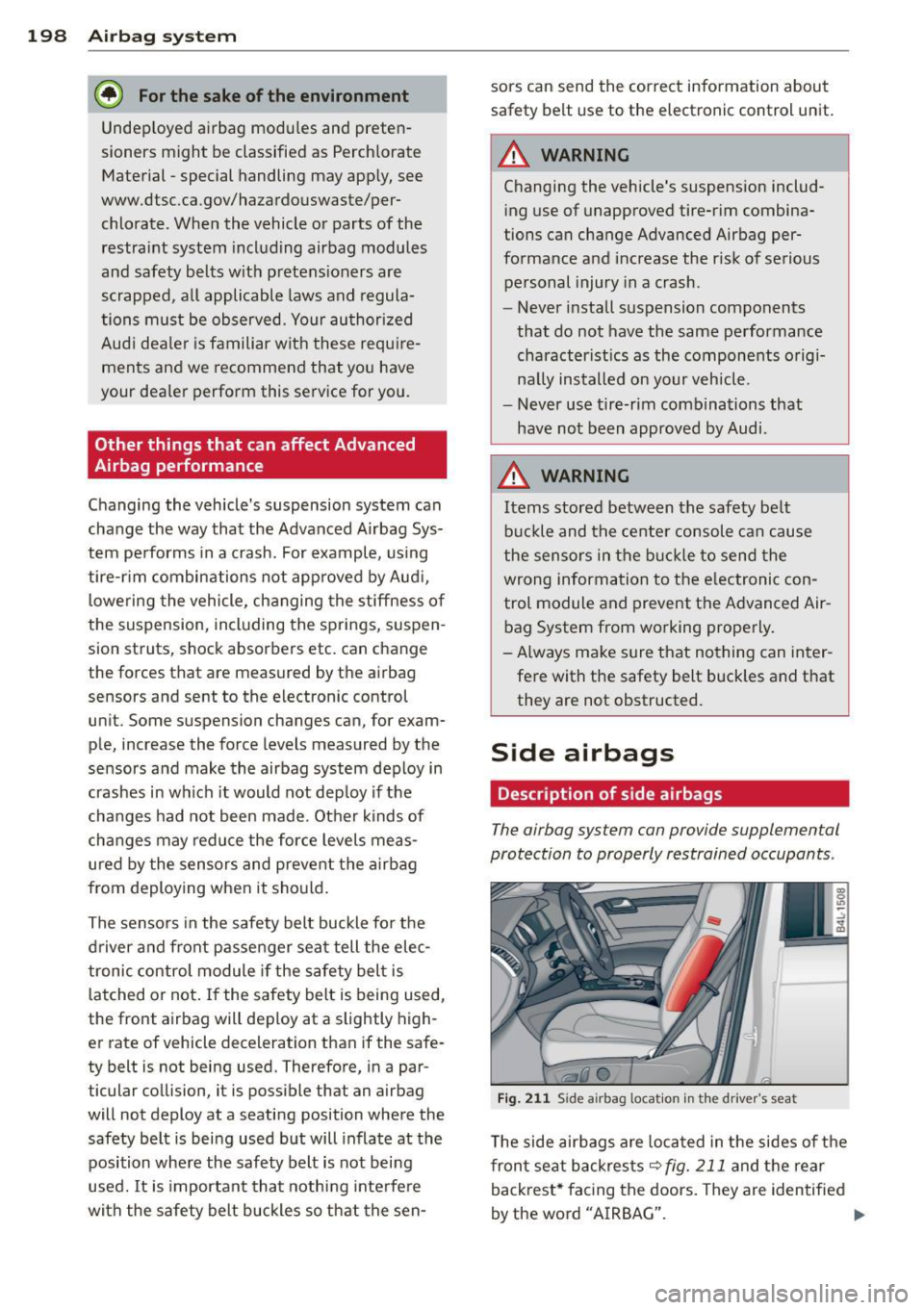
Fig. 211 Side airbag location in th e drive r's seat
The side airbags are located in the sides of the
front seat backrests
~fig. 211 and the rear
backrest* facing the doors. They are identified
by the word "AIRBAG". ....
Page 240 of 340
238 Driving off road
sideways (depends on center o f gravity). Maxi
mum permitted latera l ang le: 35°
Breakover angle
Indicates the angle up to which the veh icle
can drive ove r a ramp at low speed w ithout
the underside of the vehicle hitt ing the edge
of the ramp.
-Vehicles without air springs: maximum
breakover angle: 21, 1
°
-Vehicles with adaptive air suspension*:
maximum breakove r angle: 23.8° (at high
level 2)
Approach/departure angle
Transition from the horizontal plane to a gra
d ient or from a grade back to level ground . In
dicates the angle up to which the vehicle can
drive onto or off a slope at low speed witho ut
str iking the bumper or the underbody.
-Vehicles without air springs: maximum ap
proach/departure angle : 21.0° (front),
23 .4° (rea r)
- Vehicles with adaptive air suspension*:
maximum approach/departure angle at high
level 2: (front) 23,5°, (rear) 25.4°
Ground clearance
The distance between the road surface and
the lowest point of the veh icle underbody .
-Vehicles without air springs: ground clear
ance: 8.1 in (204.8 mm)
- Vehicles with adaptive air suspension*:
maximum ground clearance: 9 .4 in
(239 .8 mm) at high level 2
A WARNING
Exceeding the stated maximum figures
-
can result in severe injuries or vehicle dam
age.
- All the information was gathered on lev
el, firm and non-slippery road surfaces,
and under dry weather conditions.
- Ideal conditions do not prevail offroad.
Never utilize the maximum readings to
their fullest, always leave a safety re
serve.
Driving tips
On poor road and offroad, there is always on
ly one motto: Plan ahead and drive slowly!
Please observe the following when driving
away from paved roads :
.,. Drive on ly on roads and offroad sections
which match the design of your vehicle and
your abilities as a driver. Never take risks!
.,. Dr ive slowly and plan ahead!
.,. Take into consideration the
ground clear
ance
of your vehicle .
.,. Activate the
offroad mode ¢ page 224 as
needed .
.,. Use the
hill des cent control¢ page 226
when driving down steep sections on hills .
Unpaved roads and offroad
Drive slowly on unfamiliar roads and unknown
offroad sections, and look out for unexpected
obstacles (e.g. potholes, rocks, tree stumps,
etc.).
To prevent the veh icle from bottoming and
avo id damage to the underbody, you should
drive straight across severe bumps in the
ground with only one side o f the vehicle so
that only two of your whee ls cross the bumps.
Drive briskly through sandy or ma rshy offroad
sections and do not stop, if at all possible .
Driving through water
Note the following to avoid veh icle damage
when driving through water, for example on
flooded roads:
- The water must not be any higher than the
bottom of the vehicle body.
- Do not dr ive faster than walk ing speed .
Driving on a slope
If you ever find yourse lf not able to climb a
s lope, do not try to turn around, drive back
down in
reverse. Otherwise, you run the risk
of tipping over. ..,.
Page 241 of 340
If the vehicle threaten s to tip o ver when
d riv ing across a slope , you mu st imm ediate
ly steer downhill in the di rection of the
slope.
D o not park your vehicle on steep slopes or
grades .
To reduce the risk of t ipping over, dr ive on
slopes in the d irection o f the downward slope
(fa ll line) -
not cro sswi se.
~ WARNING
After driving through water, m ud, slush,
etc., the brakes may be slow to take effect
because of wet brake rotors and pads. Dry
the brakes first by braking carefully to re
store the full braking effect.
(D Note
-
Vehicle components such as the engine,
transmiss ion, suspension or electrical sys
tem can be severely damaged by driving
through water.
{l) Tips
- Check the depth of the wate r before dr iv
i ng through it.
- Do not stop the veh icle, dr ive in reverse
or switc h the engine off when driving
t h rough water.
- Keep in mind that oncoming vehicles may create waves that raise the water
leve l and make it too deep for your vehi
cle to drive through safely.
- Avoid dr iving through sa lt water because
i t can cause corrosion.
Driving off road 239
•
•
Page 285 of 340
.,.Check the tire sidewall
(i=> page 284, fig. 253) to de
termine the designated load rating for a specific tire.
Tire service life
The service life of tires depends on a lot of
different things including proper installation
and balancing, correct tire pressure and driv
ing style.
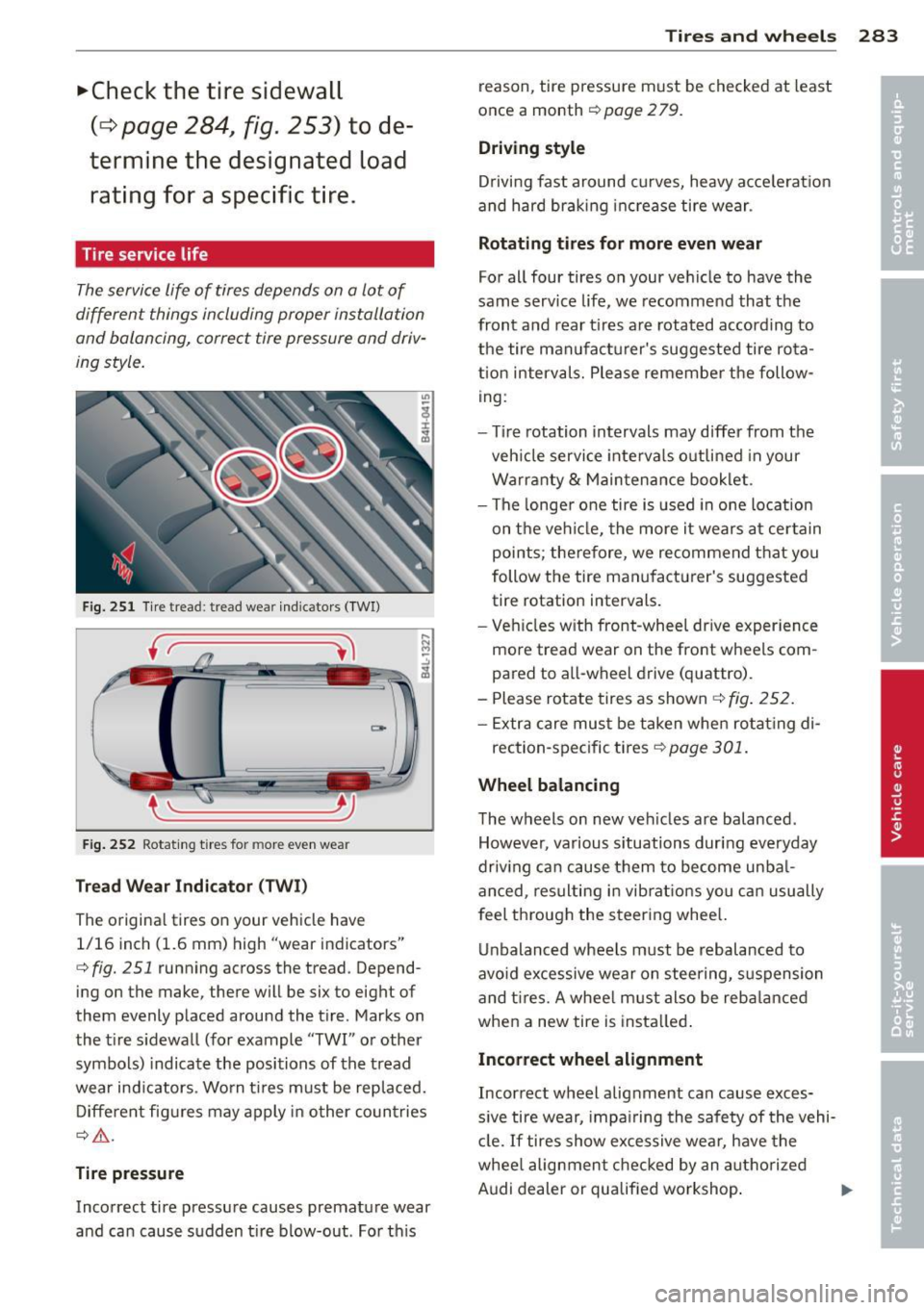
Fig. 251 Tire tread: tread wear indicators (TWI)
Fig. 252 Rotating tires for more even wear
Tread Wear Indicator (TWI)
The original tires on your vehicle have
1/16 inch (1.6 mm) high "wear indicators"
c::> fig. 251 running across the tread. Depend
ing on the make, there will be six to eight of
them evenly placed around the tire. Marks on
the tire sidewall (for example "TWI" or other
symbols) indicate the positions of the tread
wear indicators . Worn tires must be replaced.
Different figures may apply in other countries
c::> &. .
Tire pressure
Incorrect tire pressure causes premature wear
and can cause sudden tire blow-out . For this
Tires and wheels 283
reason , tire pressure must be checked at least
once a month
c::> page 2 79.
Driving style
Driving fast around curves, heavy acceleration
and hard braking increase tire wear .
Rotating tires for more even wear
For all four tires on your vehicle to have the
same service life, we recommend that the
front and rear tires are rotated according to
the tire manufacturer's suggested tire rota
tion intervals. Please remember the follow
ing:
- Tire rotation intervals may differ from the
vehicle service intervals outlined in your
Warranty & Maintenance booklet.
- The longer one tire is used in one location
on the vehicle, the more it wears at certain
points ; therefore, we recommend that you
follow the tire manufacturer's suggested
tire rotation intervals.
- Vehicles with front-wheel drive experience
more tread wear on the front wheels com
pared to all-wheel drive (q uattro).
- Please rotate tires as shown
c::> fig. 252.
-Extra care must be taken when rotating di-
rection-specific tires
c::> page 301.
Wheel balancing
The wheels on new vehicles are balanced .
However, various situations during everyday
driving can cause them to become unbal anced, resulting in vibrations you can usually
feel through the steering wheel.
Unbalanced wheels must be rebalanced to
avoid excessive wear on steering, suspension
and tires. A wheel must also be rebalanced
when a new tire is installed.
Incorrect wheel alignment
Incorrect wheel alignment can cause exces
sive tire wear, impairing the safety of the vehi
cle.
If tires show excessive wear, have the
wheel alignment checked by an authorized
Audi dealer or qualified workshop.
Ill>
Page 292 of 340

29 0 T ire s and wheel s
driving a few yards and correct if neces
sary. Follow the instructions from the
snow cha in manufacturer when doing so .
- If the Adaptive Air Suspension* should
malfunction, do not mount or use snow
chains because the vehicle will be ex
tremely low. If you do dr ive with snow
chains on while the vehicle is at this lev
el, the snow chains might severely dam
age the wheelhouse and other parts of
the veh icle.
(!) Tips
Where snow cha ins are mandatory oncer
tain roads, this normally also applies to
veh icles with all-whee l dr ive.
Wheel bolts
Wheel bolts must always be tightened to the
correct torque .
The design of wheel bolts is matched to the
factory installed r ims. If different rims are fit
ted, the correct wheel bolts with the r ight
l ength and correctly shaped bolt heads must
be used. This ensures t hat wheels a re fitted
secure ly and that the brake system f unctions
correctly .
I n ce rtain circumstances, you may not use
wheel bolts from a different vehicle -even if it
is the same mode l
<=?page 318.
.&_ WARNING
Improperly tightened o r maintained wheel
bolts can become loose ca using loss of
contro l, a co llision and serious persona l in
jury.
- Always keep the wheel bolts and the
threads in the wheel hubs clean so the
wheel bolts can turn easily and be prop
erly t ightened.
- Never grease or oil the wheel bo lts and
the threads in the wheel hubs. They can
become loose w hile driving if greased or
oiled, even if tightened to the specified
torque. -
On ly use wheel bolts that be long to the
rim being installed .
- Never use different wheels bolts on yo ur
veh icle.
- Always maintain the correct tightening
torque for the whee l bolts to reduce the
risk of a whee l loss. If the tightening tor
que of the wheel bolts is too low, they
can loosen and come out when the vehi
cle is mov ing. If the tightening torque is
too high, the wheel bolts a nd threads
can be damaged and the whee l can be
come loose.
(D Note
The specified torque for the wheel bolts is 120 ft lb ( 160 Nm) with a to le rance of
± 7,4 ft lb( ± 10 Nm) . T orque wheel bolts
diagonally. After changi ng a wheel, the
torque m ust be che cked as soon as possi
ble with a to rque wrenc h - preferab ly by an
a uthorized Audi dea le r or q ualified work
shop.
Low aspect ratio tires
Your Audi is factory-equipped w ith low aspect
ratio tires. These tires have been tho roughly
tested and been se lected specifically for your
model for their superb performance, road fee l
and hand ling under a variety of d riving condi
tions . As k your au thor ized A udi dealer for
more de tails .
T he low aspect ratio of these t ires is ind icated
by a numera l of
55 or l ess in the tire's s ize
designation. The n umeral rep resen ts the ratio
of the tire's s idewa ll height in relation to its
tread width exp ressed in percentage . Conven
t iona l tires have a he ight/width ratio of 60 or
more.
The performan ce of l ow-a spect-r atio tire s is
particularl y sen sitive to imp roper inflation
pre ssure. It is therefo re important that low
a spect ratio tires are inflated to the specified
pressure and th at the inflation pressure is
regularly checked and mainta ined. Tire pres -
s u res should be checked at least onc e a ..,.
Page 301 of 340
Loosening
• Install the wheel bolt wrench over the
whee l bolt and push it down as far as it wi ll
go.
• Take tight hold of th e
end of the wrench
handle and turn the whee l bolts
counter
clockwise
abou t one single turn in the di rec·
tion of arrow
c::> fig. 262 .
Tightening
• Install the wheel bolt wrench over the
wheel bolt and push it down as far as it will
go .
• Take tight hold of the
end of the wrench
handle and turn each wheel bolt
clockwise
until it is seated .
& WARNING
-Do not use force or hurry when changi ng
a whee l· you can cause the vehicle to slip
off the jac k and cause serious personal
injuries .
-Do not loosen the wheel bolts more than
one turn
before you raise the veh icle with
the jack. -You risk an injury.
(j) Tips
If a wheel bolt is very tight, you may find it
easie r to loosen by carefully pushing down
on the end of the wheel bolt wrench with
one foot only. As you do so, hold on to the
car to keep yo ur balance and take care not
to slip.
Raising the vehicle
The vehicle must be lifted with th e jack first
before the wheel can be removed .
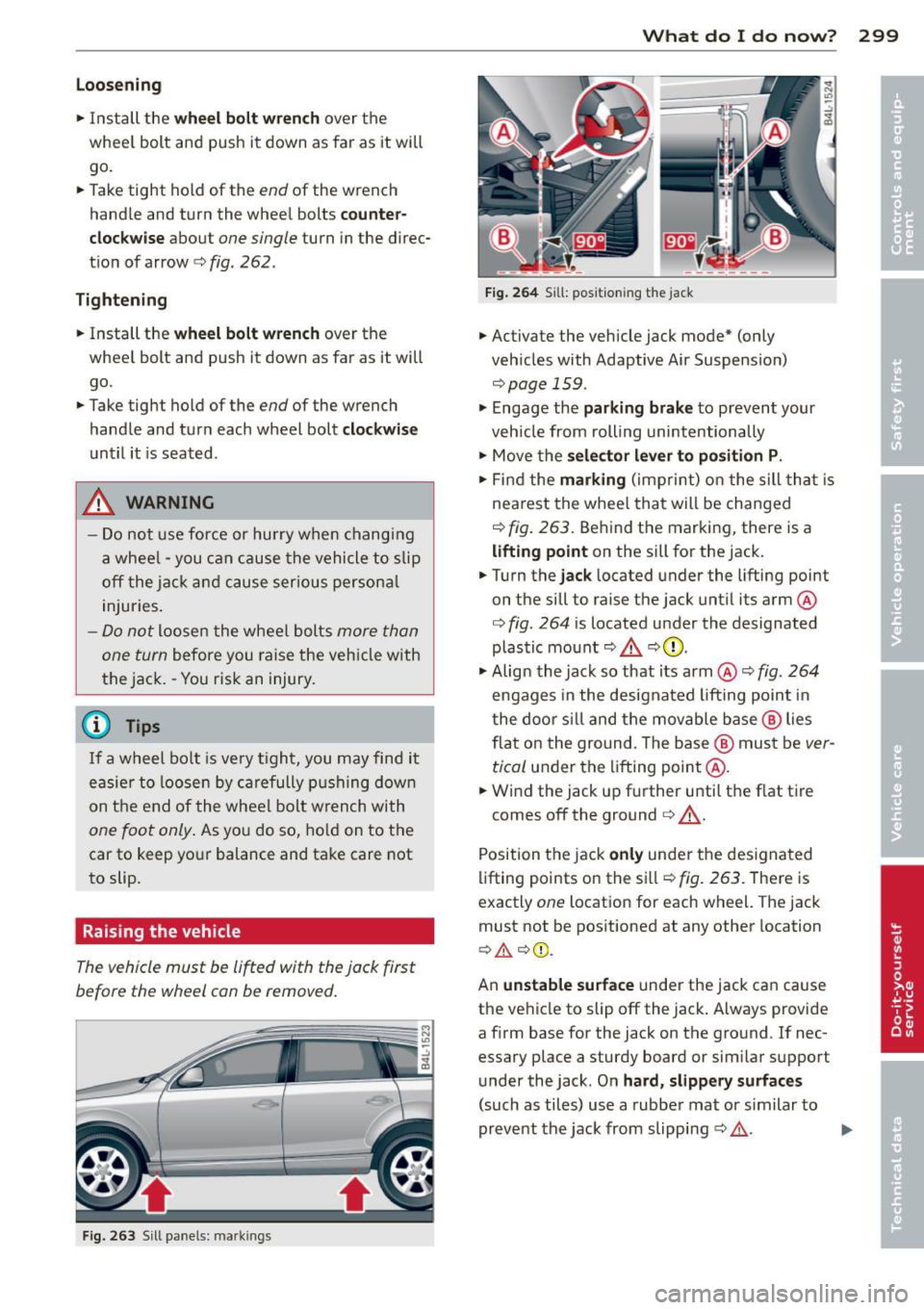
Fig. 263 Sill pane ls: m arkin gs
What do I do now? 299
Fig. 264 Sill: p ositioning the jack
• Activate the vehicle jack mode* (only
veh icles with Adaptive Air Suspension)
c::> page 159 .
• Engage the parking brake to prevent your
vehicle from rolling unintentionally
• Move the
selector lever to position P .
• Find the marking (imprint) on the sill that is
nea rest the whee l that will be changed
c::>fig. 263. Behind the marking, there is a
lifting point on the sill for the jack.
• Turn the
jack located under the lifting point
on the sill to raise the jack until its arm@
c::> fig. 264 is located under the designated
plastic mount
c::> .&. c::> Q) .
• Align the jack so that its arm@ c::> fig. 264
engages in the designated lifting point in
the door s ill and the movable base® lies
flat on the ground. The base@ must be
ver
tical
under the lifting point@.
• Wind the jack up further until the flat tire
comes off the ground
c::> .,& .
Position the jack only under the designated
lifting points on the sill
c::> fig. 263. There is
exactly
one locat ion for each whe el. The jack
must not be positioned at any other location
c::> .&. c::> Q).
An unstable surface under the jack ca n cause
the vehicle to slip off the jack. Always provide
a firm base for the jack on the ground . If nec
essary place a sturdy board or similar support
under the jack . On
hard, slippery surfaces
(such as tiles) use a rubber mat or similar to
prevent the jack from slipping
c::> ,&.. .,,.
Page 323 of 340
A
Accessories
Adaptive A ir Suspension . .. .. .. .. .. .. .
Cargo mode in the MMI .. .. .. .. .. .. . 318
155
160
Controls ... ............. .. .. .. .. . 155
Description .............. .... .. ... 155
H igh level . ................. ... ... 155
Highway level ..................... 155
Instrument cluster display . . . . . . . . . . 158
Jacking mode when changing a flat tire 159
Low level . . . . . . . . . . . . . . . . . . . . . . . . . 155
Normal level ............. .... .. ... 155
Segment display .............. .... 157
Sett ing the driving modes .. .. .. .. .. . 157
Trailer towing mode . . . . . . . . . . . . . . . . 159
Using switch for cargo mode .. .. .. .. . 160
Warning/indicator lights . .. .. .. .. .. .. 17
Adaptive cruise control ............. .. 113
Changing speed ..... ..... .. .. .. .. . 117
C leaning the sensor ....... .. .. .. .. . 245
Driver information ........ .. .. .. .. . 120
Driver intervention prompt . .. .. .. .. .
Driving in traffic ................ .. .
Driving program ................ .. .
Error messages .................. .
Open road .. ............. .... .. .. .
Override 124
114
124
122 114
114
Request for driver to assume control . . 114
Save speed . . . . . . . . . . . . . . . . . . . . . . . 116
Sett ing distance ..... ..... .. .. .. .. . 118
Settings . .. ............. .... .. .. . 124
Sett ing t ime interval ...... .. .. .. .. . 118
Specia l dr iv ing s ituations .. .. .. .. .. . 125
Status messages ................. . 122
Switching on and
off ......... ... .. . 116
System limits ................ .... . 125
Temporarily turning
off .... .. .. .. .. . 118
warning/indicator lights ... .. .. .. .. . 121
Adaptive light ................ ... .... 59
defective . . . . . . . . . . . . . . . . . . . . . . . . . . 3 7
AdBlue .. .. .. ................. .. ... 254
Filling 255
Messages in the instrument cluster dis-
p lay ... .. .. .. ................ .... 254
Index 321
Adding
E . l ngine coo ant ..... ............... 266
Engine oil ..... .. .. ............... 263
Windshie ld washer fluid .......... .. 272
Additional accessor ies
Additives Engine oil
Adjusting 318
263
Instrument cluster illumination .. .. .. . 13
Steering column electrically ..... .. .. 103
Steering column manually .......... 103
Adjusting front seats . . . . . . . . . . . . . . . . . 72
Airbag Warning/ind icator lights ........ .. .. . 16
Airbag system . . . . . . . . . . . . . . . . . 183, 200
Advanced Airbag System .. ... ... .. .. 187
Advanced Airbag System components . 190
Care ........ .. .. ................. 197
Children .. .. .. .. .... ........... .. 205
Child restraints ... .. ............... 206
Components (front airbags) ......... 190
Danger of fitting a chi ld safety seat on
the front passenger seat ........ .. .. 185
Disposal .. .. .. .. .... ........... .. 197
Front airbags .. .. ............ 187,188
How do the front airbags work? ...... 192
How many airbags does my vehicle
have? ....... ... .. ............... 190
How the Advanced Airbag System com-
ponents work together ......... .... 191
Important things to know .......... . 183
Indicator light ..... ............... 194
Monitor ing . ..... ................. 194
PASS ENGER AIR BAG OFF light ... .. .. 194
Repairs ... .. .. .. .... ........... .. 197
Safety instructions ................. 196
Side airbags ..... .. ..... .......... 198
Side curtain airbags .. .. .. ... ... .... 201
Weight-sensing mat .. ... ... ... .. .. 205
When must the system be inspected? . 194
Air conditioning
refer to Climate controls . . . . . . . . . . . . . 92
Air distribution Climate controls .. ................. . 95
Four- zone automatic comfort air condi-
tioning . .. .. .. .. .. ............... 100
Air pollutants filter Climate controls .... .............. .. 92
•
•
Page 326 of 340
324 Index
Controls .... .. .. ..... ... .. .. .... .. 93
Defrosting/defogging . . . . . . . . . . . . . . . 95
Descr ipt ion .. .. ... .... ... .. .. .... .. 92
Energy management . . . . . . . . . . . . . . . . 92
Fan . .. .. .... ........... ........ .. 95
Front seat ventilation ...... ... .. ... 101
H eated seats, front ....... .. .. .. .. . 10 1
Key coded sett ing .............. ..... 92
Recircu lation mode (automatic) ... ... 100
Recommended se ttings .............. 92
Residua l heat ... ...... ... .. .. .... .. 94
Setting the temperature ... .. .. .... . . 95
Supp lementary heater ... .. .. ... ... . 101
Synchron izat ion ............ .. .... . 100
Turn ing on and off ........ .. .. .... .. 94
Using climate control economically . . . . 98
C lock ... .... ... . ...... ... .. .. .... .. 11
C losing
P anoramic slid ing su nroof .. .. .. .. .. . . 55
Coat hooks . . . . . . . . . . . . . . . . . . . . . . . . . 90
Cold ti re inflat ion p ressure ... .. .. .... . 27 7
Compass m irror ..... ...... .. .. .. .. .. 70
Comp liance .. ............. .. .. .. ... 319
Consumer Info rmation . . . . . . . . . . 1 71, 3 16
Contact ing NHTSA ...... .... ... .... . 171
Controls Cleaning ... ... .. ..... ... .. .. .... . 246
Conve nience key ..................... 49
Dr iver messages ........ .. .. .. .. .. . 108
L ock ing vehicle ... ..... ... .. .. .... .. 50
START button .. .. ..... ... .. .. .... . 10 7
Starting engine ....... ... .. .. .... . 107
STOP button ...................... 108
Sw itching engine off ............... 108
Sw itching on ignition .. ..... ..... .. . 107
Unlock ing vehicle .......... ... .. .... 49
Convertible c hil d safety seats . ... .. .. . 211
Conve rtible locking retracto r
Activating ........................ 216
Deactivating . . . . . . . . . . . . . . . . . . . . . . 217
Using to secure a chi ld safety seat 21 4, 2 16
Coolant system ................. .... 264
Cooling box in g love compartment .. .... 89
Cooling System Expansion tank . .. ..... ... .. .. .... . 265
Corner ing light .. .... ...... .. .. .. .. .. 59 Cruise cont
ro l
Changing speed .. .. ... ..... ... .. .. 111
Presett ing your speed .. ..... ... .. .. 112
Switching off ..................... 112
Switching on ..... ............. .... 111
Warning/ind icator lights ........... .. 18
also refer to Adaptive cruise control ... 113
Cruising range . . . . . . . . . . . . . . . . . . . . . . . 24
(upholder . . . . . . . . . . . . . . . . . . . 79 , 86, 8 7
D
Damp ing
refer to Adapt ive A ir Suspension . 155, 15 7
Data recorder ... .. ............. .. .. 224
Date d is p lay . . . . . . . . . . . . . . . . . . . . . . . . 11
Daytime run ning l ights... ....... .. 57, 58
Declarat ion of compliance
Adaptive cruise control ............. 319
Audi side ass ist ................... 319
Cell phone package . . . . . . . . . . . . . . . . 319
Convenience key .. .. ... ....... ... .. 319
E lectronic i mmob i Lizer . . . . . . . . . . . . . . 319
Homel in k universal remo te control ... 319
Remote contro l key ............ .... 319
Decorative parts/tr im
Cleaning ...... .................. . 246
def What does this mean when it appears in
the tr ip odometer display? ........... 12
De fective light bu lb warning . ... .. .. .. . 23
Defrost ing/defogg ing the w indows ... .. . 95
Defrost ing/defogging windows ......... 97
De term ining co rrect load limit ........ 282
Diesel fuel .. .. .. .. .. ... ....... ... .. 250
Diesel pa rticulate f ilter . . . . . . . . . . 36, 233
Digital cloc k . . . . . . . . . . . . . . . . . . . . . . . . 11
Digital compass . . . . . . . . . . . . . . . . . . . . . 70
Digital speedometer . . . . . . . . . . . . . . . . . . 22
Dime nsio ns .. ... ................... 314
Dimming the rearview mirror ... .. .. .. . 69
D ipst ick
Reading the d ipst ic k properly ........ 262
Displays Cleaning . . . . . . . . . . . . . . . . . . . . . . . . . 246
Distance control system
refer to Adapt ive cruise control ..... .. 113
Page 330 of 340
328 Index
Imp roperly worn safety be lts ... .. .... . 181
Indicator lights . . . . . . . . . . . . . . . . . . . . . . 14
A irbag system ........... .... .... . 194
PASSENG ER A IR BAG OFF .. .. .. .. .. . 194
Infant seats . . . . . . . . . . . . . . . . . . . . . . . 210
I nflatable spare tire ..... ... .. .. .... . 295
Inflating ... ... . ...... ... ... ..... . 296
I ns tal ling ch ild safety seats
Safety belts ........... .. .. .. .. .. . 214
Installing the upper tether strap on the
ancho rage ... ... .... .... .. .. .. .. .. . 222
Instrument cluster ill umination . ... .. . . 13
I ns truments and controls ... .. .. .... .. 10
General illustra tion ..... .. .. .. .. .. ... 8
Inter ior lights
Front .. .. .. ..... ........... ... .. .. 61
Rear .. .. .. .. . .......... .. .. .... .. 61
Intermittent w iping
Ra in sensor .............. .. .. .. .. .. 63
l
Jack .. .. .. .. ................. .... . 294
J ump-s tart ing .. ........... .. .. .. .. . 307
Jumper cables ................ ... .. . 308
K
Key . .. .. .. .. .. . .......... .. .. .... .. 38
Ba ttery replacement . . . . . . . . . . . . . . . . 40
Coded sett ings .............. ... .. .. 92
Conven ience opening and closing of w in-
dows .... ... .. .... .... .. .. .. .. .. .. 53
E mergency key . . . . . . . . . . . . . . . . . . . . . 38
Key replacement . . . . . . . . . . . . . . . . . . . 38
Master key . . . . . . . . . . . . . . . . . . . . . . . . 38
Valet key . . . . . . . . . . . . . . . . . . . . . . . . . . 38
Key coded sett ings
C lima te controls . . . . . . . . . . . . . . . . . . . . 9 2
Keyless entry remote control . .. .. .. .. . . 38
Kick -down
tiptronic ... .. . .. ..... ... .. .. .... . 14 1
L
LA T C H
D escription .. .. .. ..... ... .. .. .... .
Guidance fixt ures fo r lower anchorages 21
7
218
219 Installing a child restra
int .. ... ... . .. 220
Location . ..... .. ... .. ..... ... .. .. 218
Mounting and releasing the anchorage
hook . .... .... .. ............. .... 220
Latera l ang le .... .. ............. .... 237
Leather cleaning/protect ion ....... ... 24 7
Level adj ustment
refer to Adaptive Air Suspension . 155, 157
Lifting jack . .. .. .. ... .......... .. .. 299
Lifting vehicle ..... ................ . 311
Light Exterior lighting in the mirror housing .. 59
leav ing home .. .. ... .......... .. .. . 59
also refer to Amb ience light ing .. .. .. . 62
Lighting
refer to Ambience lighting . . . . . . . . . . . 62
Light ing in the m irror housing ..... .. .. . 59
Lights . .. .. .... .. ............. ..... 57
Coming home . . . . . . . . . . . . . . . . . . . . . . 58
Daytime runn ing lights ............ .. 58
Emergency flashe rs . . . . . . . . . . . . . . . . . 60
Exterior lights . . . . . . . . . . . . . . . . . . . . . 58
Front fog lights . . . . . . . . . . . . . . . . . . . . 58
Headl ights .. .. .. ... .......... .... . 57
High beam . . . . . . . . . . . . . . . . . . . . 57, 60
High beam warning/indicator light . ... . 18
Leaving home .... .. ... ..... ... .. .. . 58
Rear fog lights ... ............... .. . 59
S ide marker lights ............. ..... 57
Turn signals . ... . ... ... .... ... .. .. . 60
Xenon headlights . . . . . . . . . . . . . . . . . . . 5 7
Light sensor defective . .. ..... ... .. .. . 35
Load ing the luggage compartmen t ..... 170
Load ing the roof rack ............ .... . 85
Locking Power locking switc h ... ..... ... .. .. . 44
Rear lid/trunk lid ... .... .... ... .. .. . 45
Remote control key ............ .... . 43
U sing the key .. .. ............. .. .. . 43
Lower universal anchorage bars (Canada) 217
Lower unive rsal ancho rages (Canada) 217
Luggage Stow ing .. .... .. ... .......... .... 170
l uggage compa rtment
Tie-down rings ... .. ... ..... ... .. .. . 81