wheel AUDI Q7 2014 Owner´s Manual
[x] Cancel search | Manufacturer: AUDI, Model Year: 2014, Model line: Q7, Model: AUDI Q7 2014Pages: 340, PDF Size: 85.02 MB
Page 112 of 340
110 On the road
The parking brake warning light. (USA)/ .
(CON) illuminates when the parking brake is
set and you switch on the ignition.
A WARNING
-
Always release the parking brake com
pletely. A partially engaged brake will
overheat the rear brakes, reduce their ef
fectiveness and cause excessive wear. This could lead to brake failure and an accident .
(D Note
Only after the vehicle has come to com
plete stop, should you firmly set the park
ing brake and
move the selector lever into
P.
Parking
• Press the brake pedal to stop the vehicle .
• Apply the parking brake firmly
r=,> page 109,
fig. 123 @.
• Move the selector lever to P.
.. Turn the engine off~_& .
.. When on inclines or declines, turn the steer
ing wheel so that the vehicle will roll into
the curb if it begins to
move.
A WARNING
This is how you can reduce the risk of in
jury when leaving your vehicle.
- Never park the vehicle where it can come
in contact with dry grass, spilled fuel or
any other flammable materials.
- When parking on hills, always turn the
wheels so that the front wheels will first
roll into the curb, if the vehicle should
start to roll.
- Never allow anyone - especially small
children - to remain in the vehicle when
it is locked. Locked doors make it more
difficult for rescuers to access the pas
senger compartment in the event of an
emergency. Danger to life!
- Never leave children unsupervised in the
vehicle. Children could release the park
ing brake or
move the gearshift lever out
-
of gear. The vehicle could start to roll
away and cause an accident.
- No matter what the season is, the tem
perature in a parked vehicle can reach
dangerous levels.
Q) Note
- Please exercise care when you park your
vehicle in parking areas with parking bar
riers or curbs. Parking barriers and curbs
vary in height and could damage your
bumper and related components as the
front of your vehicle
moves over a barrier
or curb that is too high, as you park or as
you back out of a parking spot. In order
to be sure that no such damage can oc
cur, you may wish to stop short of having
the front tires of your car touch the park
ing barrier or curb.
- Please also exercise exceptional care
when you drive up or down steep ramps
or drive
over curbs or other obstacles, for
which the vehicle is not designed, be
cause components of th@ vehicle close to
the ground, such as bumper covers,
spoilers and suspension and exhaust sys
tem components, may become dam
aged.
Starting on hills
Hill Hold makes it easier to start on hills.
The system is activated when the brake pedal
is depressed
for a few seconds . For this, the
vehicle must be standing in uphill driving di rection.
After releasing the brake pedal, the brake power is held for a
brief moment to prevent
the vehicle from rolling back when starting. At
this time, you can easily begin to
move your
vehicle.
A WARNING
- If you did not begin moving immediately
after releasing the brake pedal, under
certain circumstances, the vehicle would
begin to roll backward. Depress the ..,.
Page 115 of 340
Adaptive cruise control Speed and distance
control system
Description
Applies to vehicles: with adaptive cruise cont rol
The adaptive cruise control driver assistance
program is a combined speed and distance
control system .
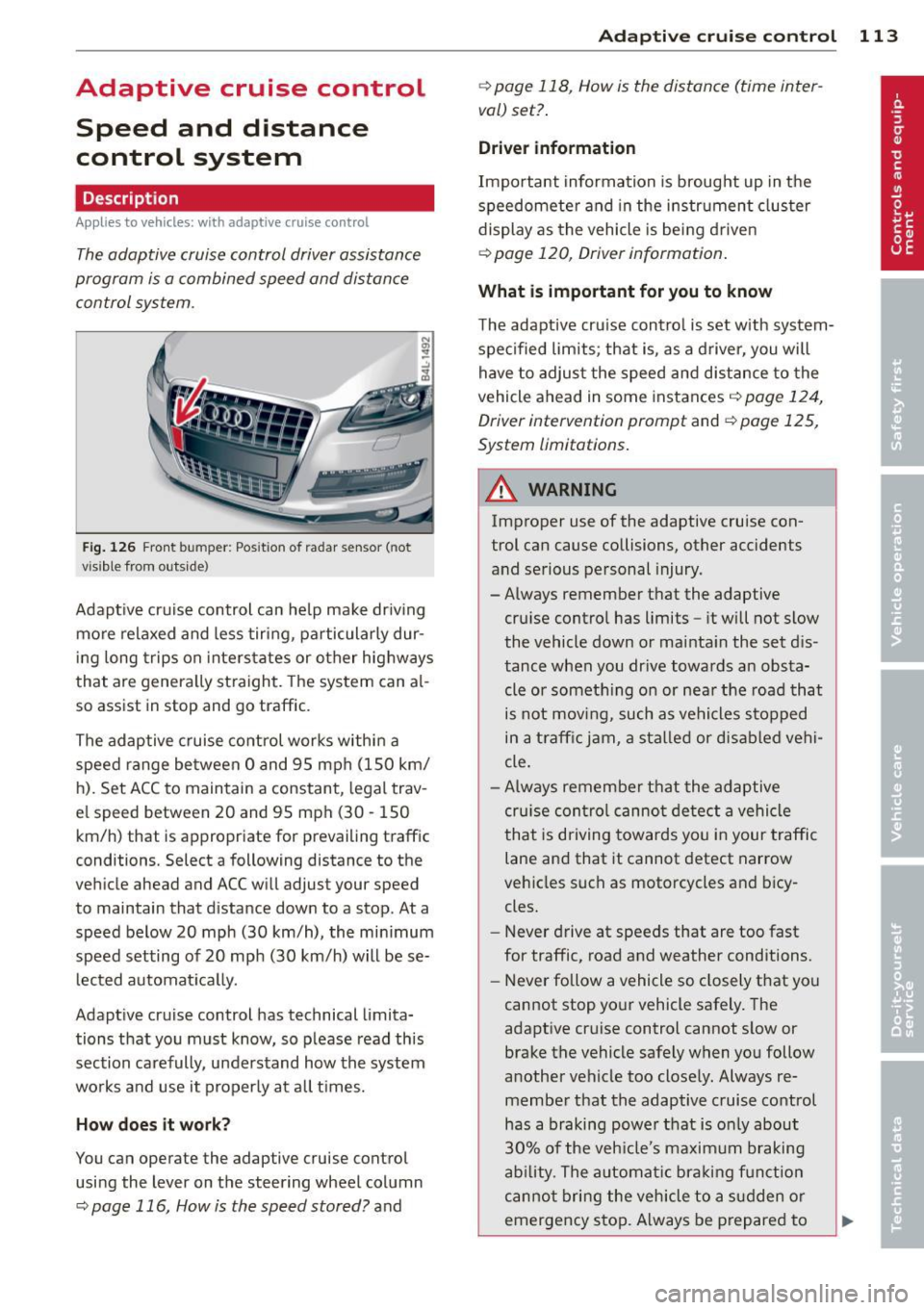
Fig . 126 Front bu mper: Pos itio n of r adar sen sor (not
vi sibl e from out side)
Adapt ive cruise control can he lp ma ke driv ing
more relaxed and less tiring , particularly dur
i n g long trips on interstates or other hig hways
that are genera lly st raight. The system can al
so ass ist in stop and go traffic .
The adaptive cruise co ntrol works within a
speed range be tween 0 and 95 mph (150 km/
h). Set ACC to maintain a constant , legal trav
el speed between 20 and 95 mph (30 -150
km/h) that is appropriate for prevailing traffic
conditions. Select a following distance to the
veh icle ahead and ACC will adjust your speed
to maintain that d istance down to a stop . At a
speed below 20 mph (30 km/h), the min imum
speed setting of 20 mph (30 km/h) will be se l ected automati ca lly.
Adaptive cruise control has technical limita
tions that you must know, so p lease read th is
section carefully , understand how the system
wo rks and use it properly at a ll times.
How does it work?
You can operate the adaptive cruise control
using the lever on the steering wheel column
c::> page 116, How is the speed stored? and
Ad apti ve crui se control 11 3
c::> page 118, How is the distance (time inter
val) set? .
Driver information
Important information is brought up in the
speedomete r and in the instr ument clus ter
display as the vehicle is being driven
c::> page 120, Driver informat ion .
What is important for you to know
The adaptive cru ise contro l is set w ith system
spe cified lim its; that is, as a driver, you will
have to adjus t the speed and distance to the
vehicle ahead in some instances
c:> page 124,
Driver intervention prompt
and c::> page 125,
System limitations.
A WARNING
Imp roper use of the adaptive cruise con
trol can cause collisions, other accidents
and serious personal injury.
- Always remember that the adaptive cru ise contro l has limits -it will not slow
the vehicle down or ma inta in the set d is
tance when you dr ive towards an obsta
cle or someth ing o n or nea r the road that
is not movi ng, such as ve hicles stopped
in a tra ffic jam, a sta lled or d is ab led vehi
cle.
- Always remembe r that the adaptive
cru ise con tro l canno t detect a vehi cle
that is driving towards yo u in your traffic
lane and that it cannot detect narrow
vehicles s uch as motorcycles and bicy
cles.
- Never drive at speeds that are too fast
for traffic, road and weather conditions.
- Never follow a vehicle so closely that yo u
cannot stop your vehicle safely. The
adaptive cruise control cannot s low or
brake the vehicle safely when you follow
another vehicle too close ly. Always re
membe r that the adaptive cruise control
has a braking powe r th at is o nly about
30% of the veh icle 's maxim um braking
ab ility. The a uto mat ic bra kin g f unction
canno t bring the veh icle to a s udden or
emergency stop . Always be p repared to
-
Page 128 of 340
126 Adaptive cruise control
Vehicles offset to one side
Applies to vehicles: with adaptive cruise control
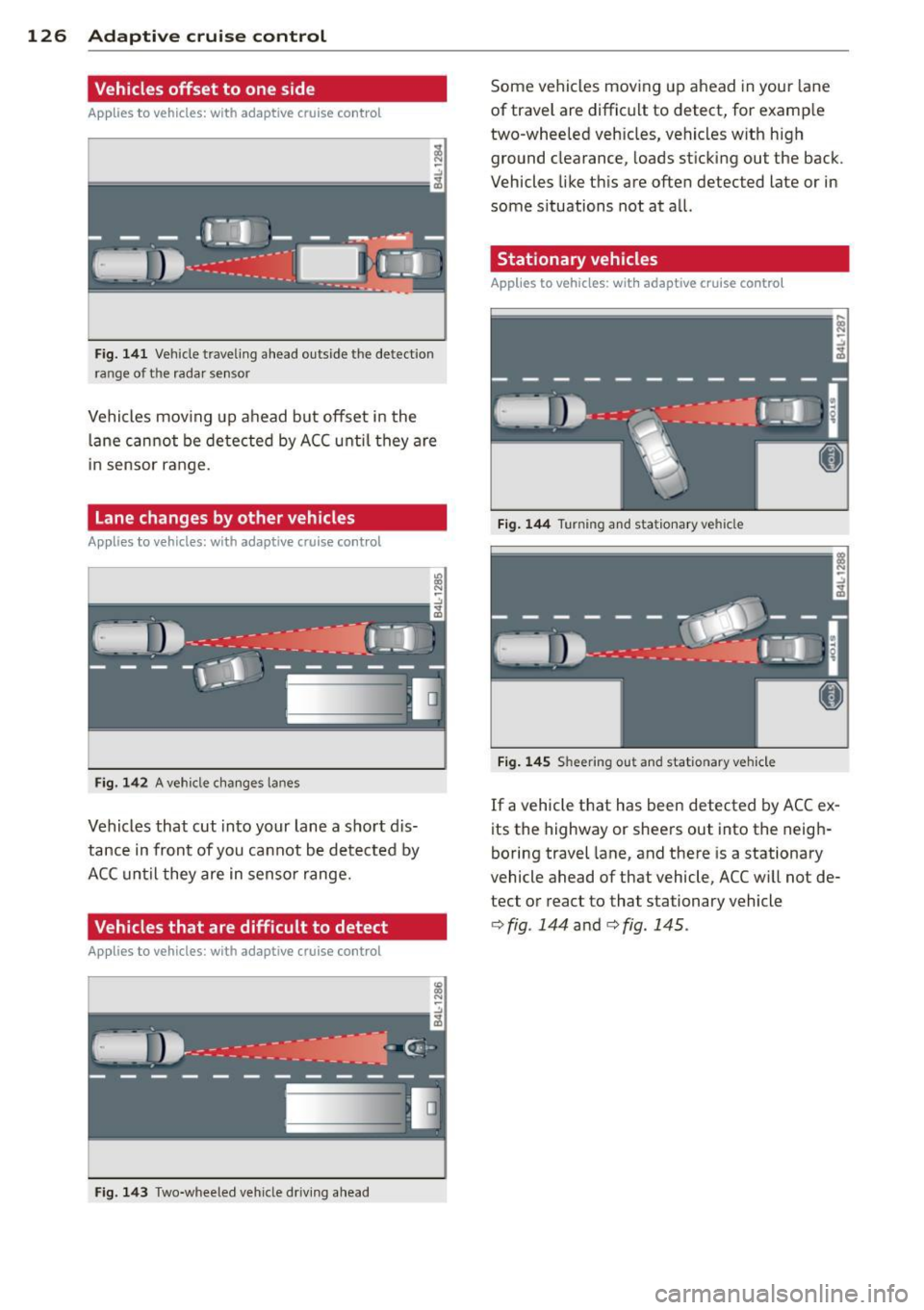
Fig. 141 Vehicle traveling a head o utside the detect ion
range of t he rada r se nsor
Vehicles mov ing up ahead but offset i n the
la ne cannot be detected by ACC until they are
in sensor range.
Lane changes by other vehicles
Applies to vehicles: with adaptive cruise control
Fig. 142 A vehicle changes lanes
Vehicles that cut into your lane a sho rt dis
tance in front of you cannot be detected by
ACC until they are in senso r range.
Vehicles that are difficult to detect
Applies to vehicles: with adaptive cruis e contro l
Fig. 143 Two -wheeled vehicle driving ahead
Some vehicles moving up ahead in your lane
of trave l are difficult to detect, for examp le
two -wheeled veh icles, vehicles w ith high
ground clearance, loads sticking out the back .
Vehicles like this are often detected late or in
some situations not at all.
Stationary vehicles
Applies to vehicles: with adaptive cruise contro l
Fig. 144 Turning and stationary ve hicle
Fig. 145 Sheering out and stat ionary veh icle
If a vehicle that has been detected by ACC ex
its the highway or sheers out into the neigh
boring travel lane, and there is a stationary
vehicle ahead of that vehicle, ACC will not de·
tect or react to that stationary vehicle
<=> fig. 144 and c> fig. 145 .
Page 141 of 340

Driving the automatic transmission
Fig. 159 Shift g ate on the center co nso le: se lector lev
er wi th release butt on
Starting the engine
~ The selector lever must be in P or N .
Starting off
~ Press and hold the brake pedal.
~ Press and hold the release button in these
lector lever handle , select the desired selec
tor lever pos ition such as D and release the
button .
~ Wait briefly until the transmission has shift
ed (you will feel a slight movement).
~ Remove your foot from the brake pedal and
acce lerate .
Stopping temporarily
~ Keep the vehicle stationary us ing the brak
ing pedal, for examp le at traffic lights.
~ Do not press the accelerato r pedal when do -
ing this.
Stopping /parking
If the selector lever is not in the P position
when you open the driver's door, the vehicle
could roll. The message
Transmi ssion : Car
may roll! Shift to park!
appears.
~ Press and hold the brake pedal unt il the ve
hicle has come to a complete stop.
~ Set the parking brake firmly 9 page 110,
Parking.
~ Se lect the P selector lever position 9 &.-
Stopping on an incline
~ Always press the brake pedal to hold the ve
hicle in place and prevent it from "rolling
back"
9 ,& . Do not try to prevent the vehi-
Autom atic transm ission 139
cle from "rolling back" when a gear is en
gaged by increasing the engine speed
c::>(D.
Under certain circumstances, such as driving
in the mountains, it may be usefu l to switch
temporarily to the manual shift program in or
der to adjust the gears to the driving condi
tions by hand
c::> page 140 .
On slopes, activate the parking brake first and
then move the selector lever to the P position.
This prevents too much stress from being
placed on the locking mechanism.
A WARNING
- Unintended vehicle movement can cause
serious injury.
- Never leave your vehicle with the engine
running while in gear.
If you must leave
your veh icle when the engine is running,
apply the park ing brake firmly and move
the selector lever to P.
- Power is still transmitted to the wheels
when the engine is running at idle. To
prevent the vehicle from "c reeping ", you
must keep your foot on the brake when
the engine is running and the selector
lever is in D, Sor R or "tiptronic" mode is
selected.
- Do not press the accelerator pedal when
changing the se lector lever position
while the vehicle is stationary and the engine is running.
- Never shift into R or P while driving.
- Before driving down a steep slope, re-
duce your speed and shift into a lower
gear with "tiptronic".
- Do not ride the brakes or press the bra ke
pedal too often or too long when driving
down a hi ll. Constant braking causes the
brakes to overheat and substantially re
duces braking performance, increases braking distance or causes complete fa il·
ure of the brake system.
- To prevent the vehicle from rolling back
when stopping on inclines, always hold it
in place with the brake pedal or parking
brake . .,..
Page 142 of 340
140 Automatic transmission
-Never hold the vehicle on an incline with
a slipping clutch. The clutch opens auto
matically when it becomes too hot from
the overload. An indicator lamp
[O] illu
minates and a driver message appears
c!;> page 141 when the clutch is overload
ed.
- If the engine must remain running, never
have any driving position engaged when
checking under the hood. Make sure the
selector lever has securely engaged and
is locked in P with the parking brake
firmly set¢
page 257. Otherwise, any
increase in engine speed may set the ve
hicle in motion, even with the parking
brake applied.
(D Note
- When stopping on an incline, do not try
to hold the vehicle in place by pressing
the accelerator peda l while a driving gear
is selected. This can cause the transmis
sion to overheat and can damage it. Acti
vate the park ing brake or press the brake
pedal to prevent the vehicle from rolling.
- Allowing the vehicle to roll when the en
gine is stopped and the selector lever is
in
N will damage the transmiss ion be
cause it is not lubricated under those cir
cumstances.
Hill descent control
The hill descent control system assists the
driver when driving down declines.
H ill descent control is activated when these
lector lever is in D/S and you press the brake
pedal. The transmission automatically selects
a gear that is suitab le for the incline. Hill de
scent control tries to maintain the speed ach
ieved at the time of braking, within physical
and technical limitations . It may st ill be nec
essary to adjust the speed with the brakes.
Hill descent control switches off once the de
cline levels out or you press the accelerator pedal. When the speed
is set in the cruise control
system
c!;>page 111, hill descent control is al
so activated.
A WARNING
--
Hill descent control cannot overcome
physical limitations, so it may not be able
to maintain a constant speed under all
conditions. Always be ready to apply the brakes.
· Manual shift program
Using the manual shift program you can
manually select gears.
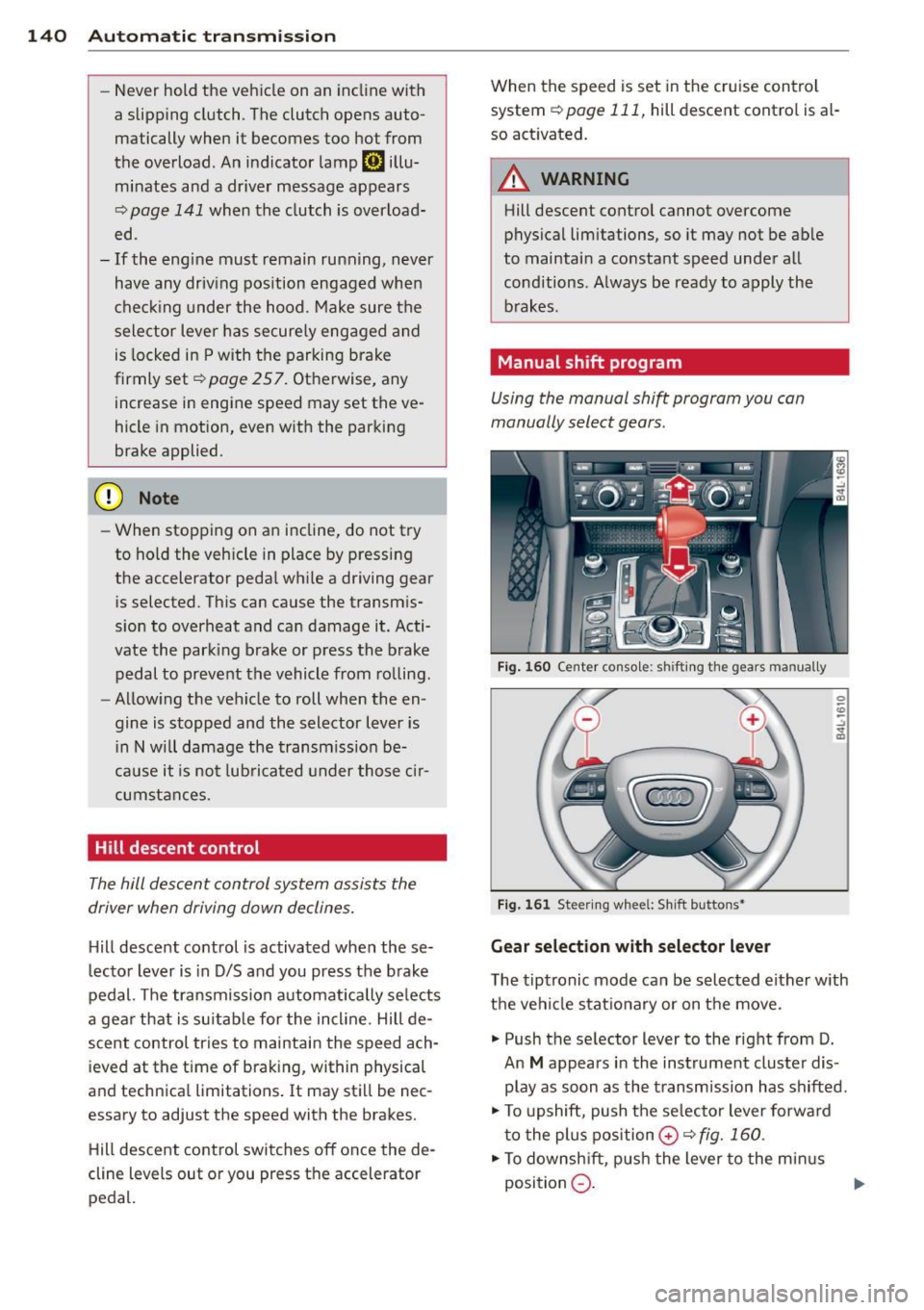
Fig. 160 Center console: shift ing the gears manually
Fig. 161 Steering wheel: Sh ift buttons•
Gear selection with selector lever
The tiptronic mode can be selected either with
the vehicle stationary or on the move.
.,. Push the selector lever to the right from D.
An
M appears in the instrument cluster dis
play as soon as the transmission has shifted .
.,. To upshift, push the se lecto r lever forward
to the plus position
0 c!;> fig. 160 .
.,. To downshift, push the lever to the minus
position
Q . 1J>-
Page 143 of 340
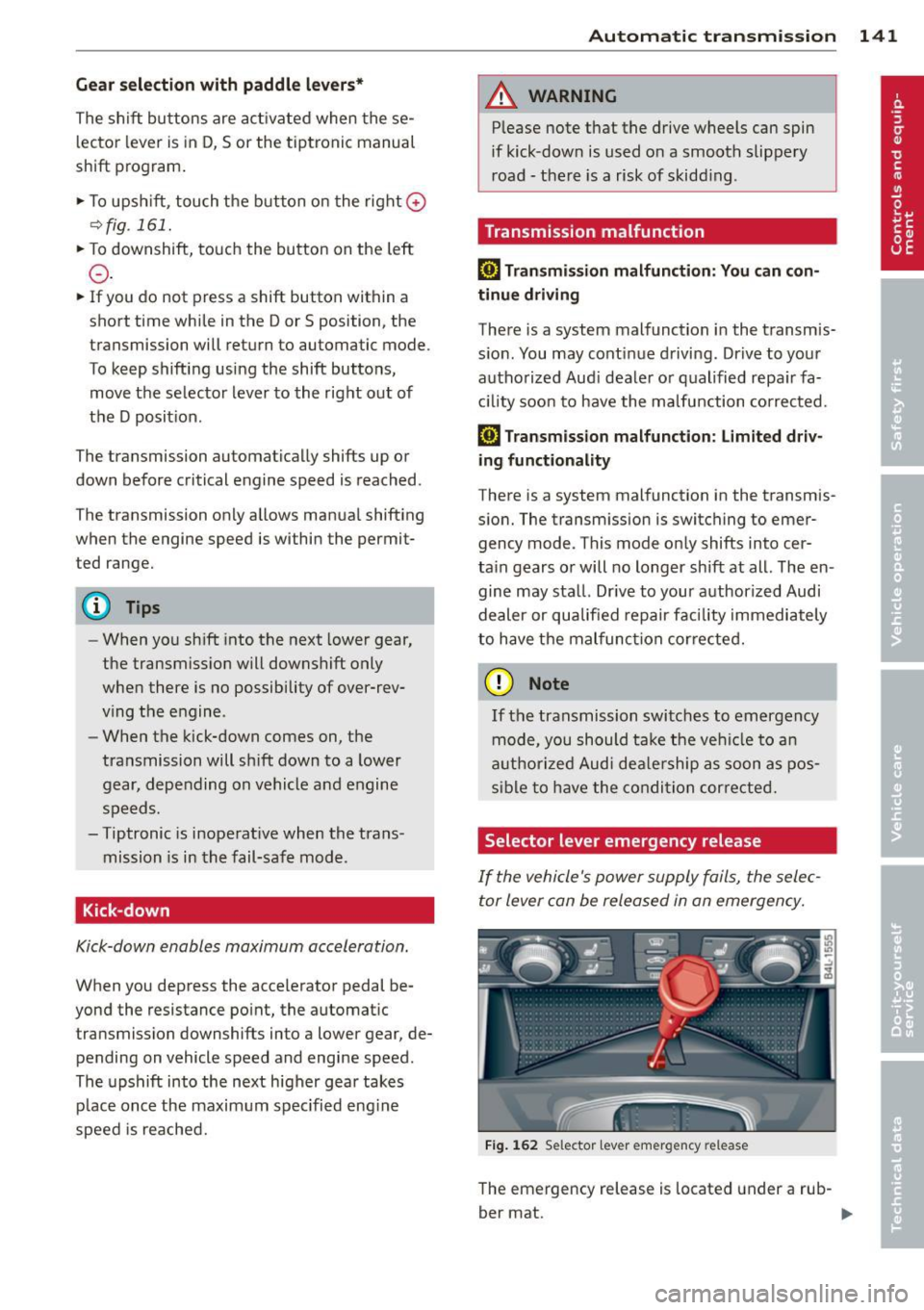
Gear selection with paddle levers*
The shift buttons are activated when these
lector lever is in D, Sor the tiptronic manual
shift program .
.,. To upsh ift, touch the button on the right
0
¢fig. 161.
.,. To downshift, touch the button on the left
0-
... If you do not press a shift button within a
short time while in the Dor S position, the
transmission will return to automatic mode .
To keep shifting using the shift buttons, move the selector lever to the right out of
the D position.
The transmission automatically shifts up or
down before critical engine speed is reached.
The transmission only allows manua l shifting
when the engine speed is within the permit
ted range.
(D Tips
- When you sh ift into the next lower gear,
the transmiss ion will downshift only
when there is no possibility of over-rev
ving the engine .
- When the kick-down comes on, the
transmission will sh ift down to a lower
gear, depending on vehicle and engine
speeds.
- Tiptronic is inoperat ive when the trans
mission is in the fail-safe mode .
Kick-down
Kick-down enables maximum acceleration.
When you depress the accelerator pedal be
yond the resistance point, the automatic
transmission downshifts into a lower gear, de pending on vehicle speed and engine speed.
The upshift into the next higher gear takes
p lace once the maximum spec ified eng ine
speed is reached.
Autom atic transm ission 141
A WARNING
Please note that the drive wheels can spin
if kick-dow n is used on a smooth slippery
road -there is a risk of skidding .
Transmission malfunction
[O] Transmission malfunction: You can con
tinue driving
There is a system malfunction in the transmis
sion. You may continue driving . Drive to your
authorized Aud i dea ler or qualified repair fa
cility soon to have the malfunction corrected.
[O] Transmission malfunction: limited driv
ing functionality
There is a system malfunction in the transmis
sion. The transmission is switching to emer gency mode . This mode only shifts into cer
ta in gears or will no longer shift at all. The en
gine may sta ll. Drive to your authorized Audi
dealer or qualified repair facility immediately
to have the malfunction cor rected.
(D Note
If the transmission switches to emergency
mode, you should take the vehicle to an
a utho rized Aud i dealership as soon as pos
sible to have the condition corrected.
Selector lever emergency release
If the vehicle's power supply fails, the selec
tor lever can be released in an emergency.
Fig. 162 Selector lever emergency release
The emergency release is located under a rub-
ber mat. ..,.
Page 145 of 340
Parking systems
General information
App lies to vehicles: with rea r park assis t/Audi park ing sys
tem plus w ith rearview camera/front -and rearview cam
era
Depending on your vehicle's equipment, vari
ous parking aids will help you when parking
and maneuvering.
The
rear park assist is an acoustic park assist
system that will give you a sound warning to let you know there is something
behind the
veh icle ¢page
144 .
The Audi parking system plus with rearview
camera
audibly and visually tells you there is
something
in front of and behind the vehicle .
A rearview camera also shows you what is be
hind the vehicle ¢ page
144 .
The Audi parking system plus with front- and
rearview camera
audibly and visually tells you
there is something
in front of and behind the
veh icle. A front and rearview camera also
shows you what is in front of and behind the
veh icle¢ page
148 .
& WARNING
-Always look for traffic and check the area
around your vehicle by looking at it di
rect ly as well. The parking system cannot
replace the driver's attention. The driver
is a lways responsible for safety during
park ing and for all other maneuvers.
- Please note that some surfaces, such as clothing, are not detected by the system.
- Sensors and cameras have blind spots in
wh ich people and objects cannot be de
tected. Be especially cautious of children
and animals.
- The sensors can be displaced by impacts
or damage to the radiator grille, bumper,
wheel housing and the underbody . The
park ing systems may become impaired
as a resu lt. Have your authorized Audi
dealer or qualified workshop check their
function.
- Make sure the sensors are not covered by
stickers, deposits or any other obstruc-
Parking systems 143
tions as it may impair the sensor func
tion. For informat ion on cleaning, refer
to
¢ page 244.
([) Note
-Some objects are not detected by the
system under certain circumstances:
- Objects such as barrier chains, trailer
draw bars, vertical poles or fences
- Objects above the sensors such as wall
extensions
- Objects w ith specific surfaces or struc
tures such as chain link fences or pow
der snow.
- If you continue driving closer to a low-ly
ing object, it may disappear from the
sensor range. Note that you w ill no lon
ger be warned about this obstacle.
@ Tips
-The system may provide a warning even
though there are no obstacles in the cov
erage area in some situations, such as:
- certain road surfaces or for long grass.
- externa l ultrasonic sources e .g . from
cleaning vehicles.
- heavy rain, snow or thick vehicle ex
haust.
- We recommend tha t you practice park
ing in a traff ic-free location or parking
lot to become familiar with the system.
When doing this, there should be good
light and weather cond itions.
- You can change the vo lume and pitch of
the s ignals as well as the disp lay
¢page
153.
- Please refer to the instructions for tow
ing a trailer ¢page
153.
-What appears in the MMI display is
somewhat time-delayed.
Page 148 of 340
146 Parking sy stems
- The came ra lens en larges and distorts
the field of vision. The object appears
both altered and inaccurate on the
screen.
- In certa in s ituations, people or objects in
the display appear closer or further
away:
- objects th at do no t touch the gro und,
such as the bumper o f a parked vehicle,
a trailer hitch o r the rea r of a truck. Do
not use the help lines in this case.
- If driven from a leve l su rface onto an
incline, or a downward slope .
- I f driven toward protr uding objec ts.
- I f the veh icle is ca rrying too much load
in t he rear.
(D Note
-Always read and fo llow the applicab le
warnings
¢ (D in General information on
page 143 .
-The o range colored orientation lines in
t h e M MI disp lay show t he ve hicl e path
depend ing o n the steering wheel angle .
The front of the vehicle fron t swings out
more than the rea r of the vehicle. Main
ta in p lenty of distance so that your o ut
s ide mirror or a corner of your veh icle
does not collide with any obstacles.
Switching on and off
Applies to vehicles: with Audi parking system p lus w ith
rearview camera
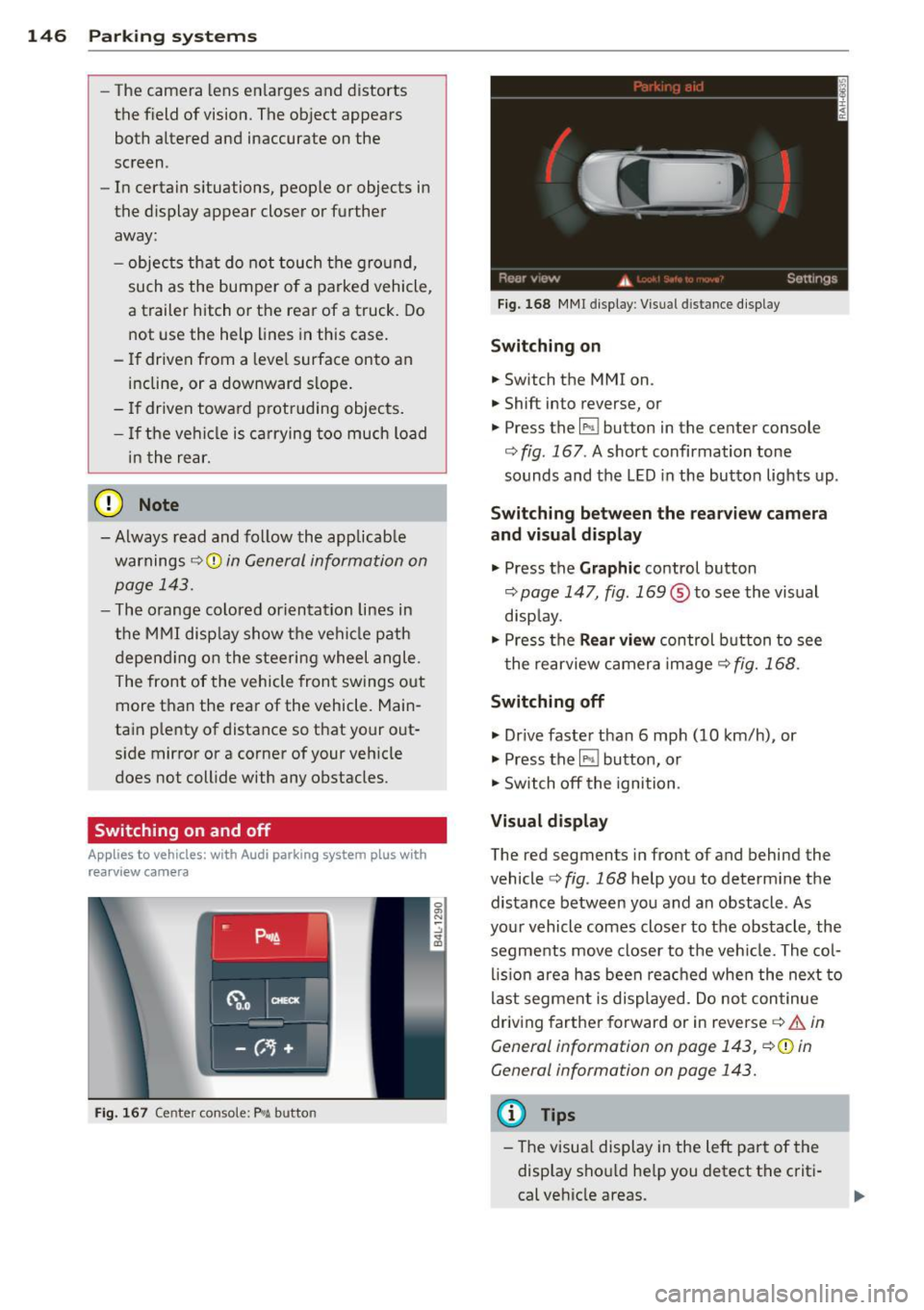
F ig . 167 Center co nsole: P"A button
F ig . 1 68 MMI display: Visual distance display
Switching on
.. Switch the MMI on .
.. Shift into reverse, or
.. Press the
l" •I button in the center console
c:;, fig. 167 . A short confirmation tone
sounds and the LED in the button lights up .
Switching between the rearv iew camera
and visual display
.. Press the Graphic control button
c:;, page 147, fig. 169 ® to see the vis ual
disp lay.
.. Press the
Rear vi ew control b utton to see
t he rearview c amera image
c:;, fig. 168 .
Switching off
.. Dr ive faster than 6 mph (10 km/h) , or
.. Press the~ button, or
.. Switch off the ignition .
Visual displ ay
The red segments in front of and behind the
vehicle
c> fig. 168 help you to determ ine the
distance between you and an obstacle . As
your vehicle comes closer to the obstacle , the
segments move closer to t he veh icle. The col
lis ion are a has been rea ched when the next to
last segment is displayed . Do no t con tinue
driving farther forward or in reverse
c:;, .&. in
General information on page 143, c:;,@ in
General information on page 143.
(D Tips
-The visua l display in the left part of the
disp lay sho uld he lp you detect t he crit i
cal ve hicle areas .
Page 149 of 340
-You can change the volume and pitch of
the signals as well as the display
Qpage 153.
Cross parking
Applies to vehicles: with Audi parking system plus w ith
rearview camera
This view may be used when parking in a ga
rage or in a parking space.
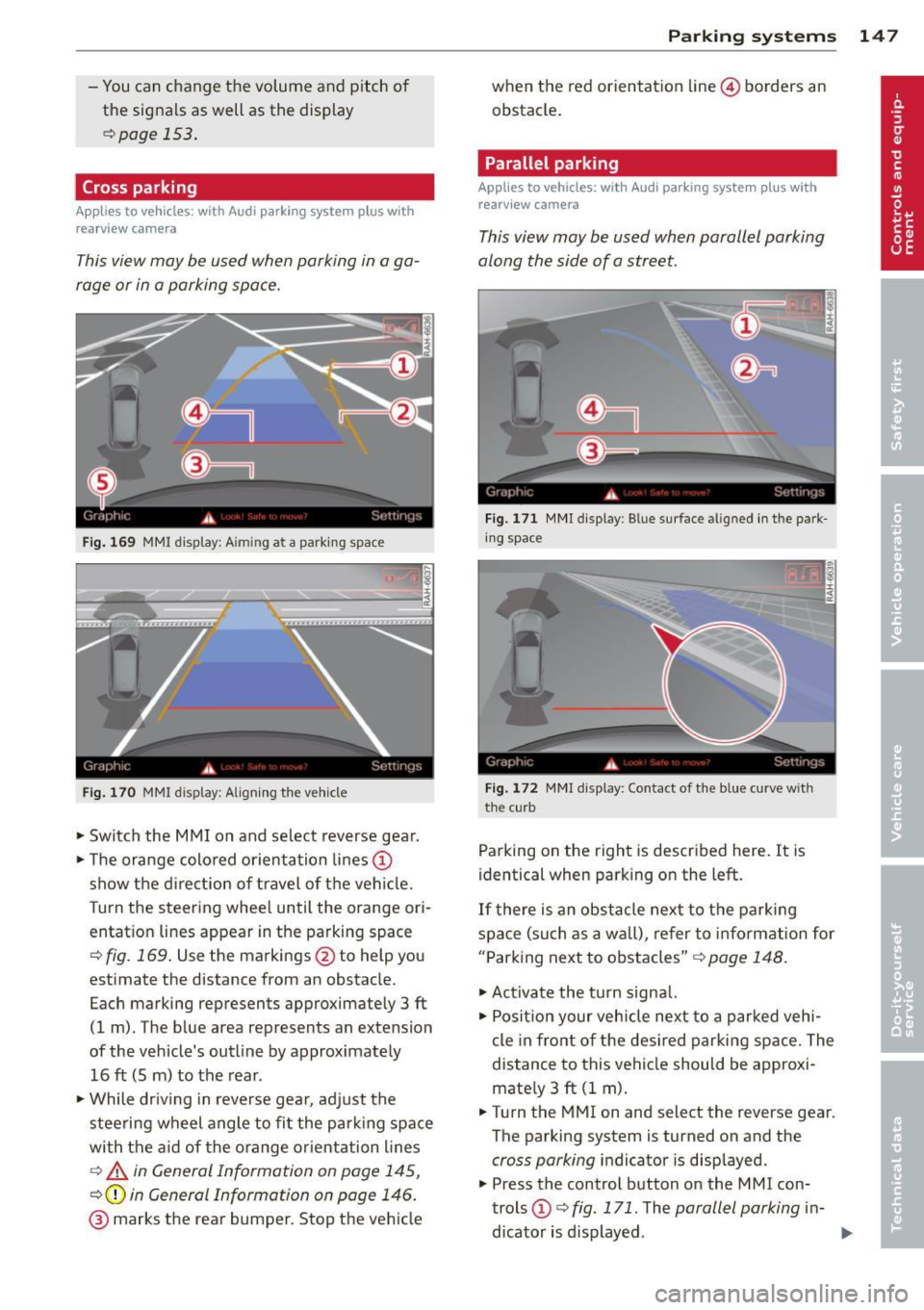
Fig. 169 MMI display: A im ing at a parking space
Fig. 170 MMI display: Aligning the vehicle
"'Switch the MMI on and select reverse gear.
"'Th e orange colored orientation lines@
show the direction of travel of the vehicle.
Turn the steering wheel until the orange ori
entation lines appear in the parking space
Qfig. 169. Use the markings @to help you
estimate the distance from an obstacle.
Each marking represents approximately 3 ft
(1 m) . The blue area represents an extension
of the vehicle's outline by approximately
16 ft (5 m) to the rear .
"'Wh ile driving in reverse gear, adjust the
steering wheel angle to fit the parking space
with the aid of the orange orientation lines
c::> A in General Information on page 145,
Q@in General Information on page 146.
@ marks the rear bumper. Stop the vehicle
Parking systems 147
when the red orientation line© borders an
obstacle.
Parallel parking
Applies to vehicles: with Audi parking system plus with
rearview camera
This view may be used when parallel parking
along the side of a street.
Fig. 171 MMI display: Blue surface aligned in the park
ing space
Fig. 172 MMI display : Contact of the blue curve w ith
the cu rb
Parking on the right is described here. It is
identical when parking on the left.
If there is an obstacle next to the parking
space (such as a wall), refer to information for
"Parking next to obstacles"
c::> page 148.
"'Activate the turn signal.
"' Position your vehicle next to a parked vehi
cle in front of the desired parking space. The
distance to this vehicle should be approxi
mately 3
ft (1 m).
"' Turn the MMI on and select the reverse gear.
The parking system is turned on and the
cross parking indicator is displayed.
"' Press the control button on the MMI con
trols @
c::> fig. 171. The parallel parking in-
dicator is displayed.
II>
Page 150 of 340
148 Parking system s
•Backup and align your vehicle so the bl ue
area @ borders on the rear end of the vehi
cle or on the parking space line
c:> A in Gen
eral Information on page 145,
c:>(D in Gen
eral Information on page 146.
The blue
area represents an extension of the vehicle's
outline by app rox imately 16 ft (5 m) to the
rear. The long side of the b lue a rea shou ld
be o n the curb. The enti re blue area must fit
i n to the par kin g space.
• With the veh icle stopped, turn the s teer ing
wheel to the right as far as it wi ll go .
• Back into the parking space until the blue
curve
c:> fig. 172 touches the curb c:> A in
General Information on page 145,
c:>(D in
General Information on page 146.
Stop the
vehicle.
• With the veh icle stopped, turn the steer ing
wheel to the left as far as it will go .
• Co nti nue to bac k into the pa rking space un
t il the vehicle is parked p aralle l to the c urb
c:> A in General Information on page 145,
c:>(D in General Information on page 146 .
® marks the rear bumper. Stop the vehicle,
at the latest, when the red orientation line
@ borders an obstacle. Keep an eye on the
front of your vehicle wh ile doing this.
Par king ne xt to ob stacle s
When there is an obstacle (s uch as a wall)
next to the parking space, choose a space with
more space on the sides. Pos ition the long
side of the blue area so that there is sufficient
space from the curb. The area must not be on
the curb. You w ill also need to start turning
the steering whee l much earl ie r. T he re shou ld
be a suffi cient amount of space between the
curb and the b lue curve, and the blue curve
c:> fig. 172 mus t not touch the curb.
@ Tips
The left or right orientation lines and sur
faces wi ll be displayed, depending on the
t urn signa l being use d.
Audi parking system
plus with front- and
rearview camera
Introduction '
Applies to vehicles: with Aud i parking system plus with
front- and rearview camera
In addition to an acoustic and visual parking
system, this parking system contains a front
and rearview camera
c:> page 146. You are as
s isted by various views, such as corner v iews
at the front and rear of the vehicle, and views
directly in front of or behind the vehicle.
General information
Appli es to vehicles: with Audi parking system plus with
front- and rearview camera
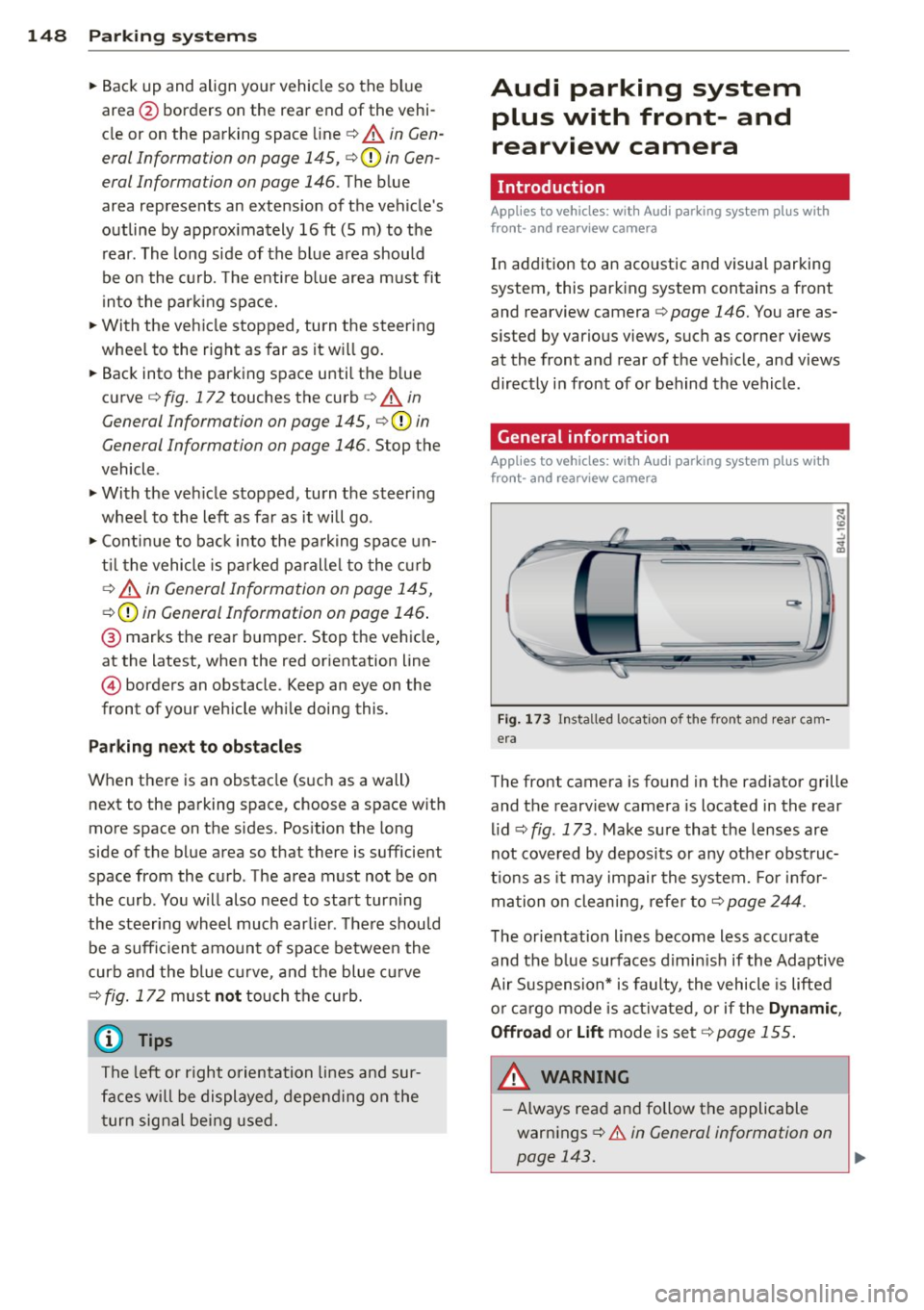
Fig . 1 73 Installed location of the front and rear cam
era
The front camera is found in the radiator grille
and the rearview camera is located in the rear
l id
c:> fig . 173. Make sure that t he lenses are
not cover ed by deposits or any other obst ruc
tio ns as it may impair the system. Fo r in for
mation o n clean ing, re fer to
c:> page 244.
T he orientation lines become less accurate
and the b lue surfaces d imin is h if the Adaptive
Air S uspension* is faulty, the vehicle is lifted
o r car go mode is acti va ted, or if the
Dynami c,
Offroad
or Lift mode is set c:>page 155.
A WARNING
-Always rea d and follow the applicable
warnings
c:> .& in General information on
-
page 143. .,..