lights AUDI Q7 2014 Owner´s Manual
[x] Cancel search | Manufacturer: AUDI, Model Year: 2014, Model line: Q7, Model: AUDI Q7 2014Pages: 340, PDF Size: 85.02 MB
Page 59 of 340
Clear vision Lights
Switching the headlights on and off
In the "AUTO" posit ion, a light sensor auto·
matically switch es t he head · and taillights on
and off in r espons e to light conditions .
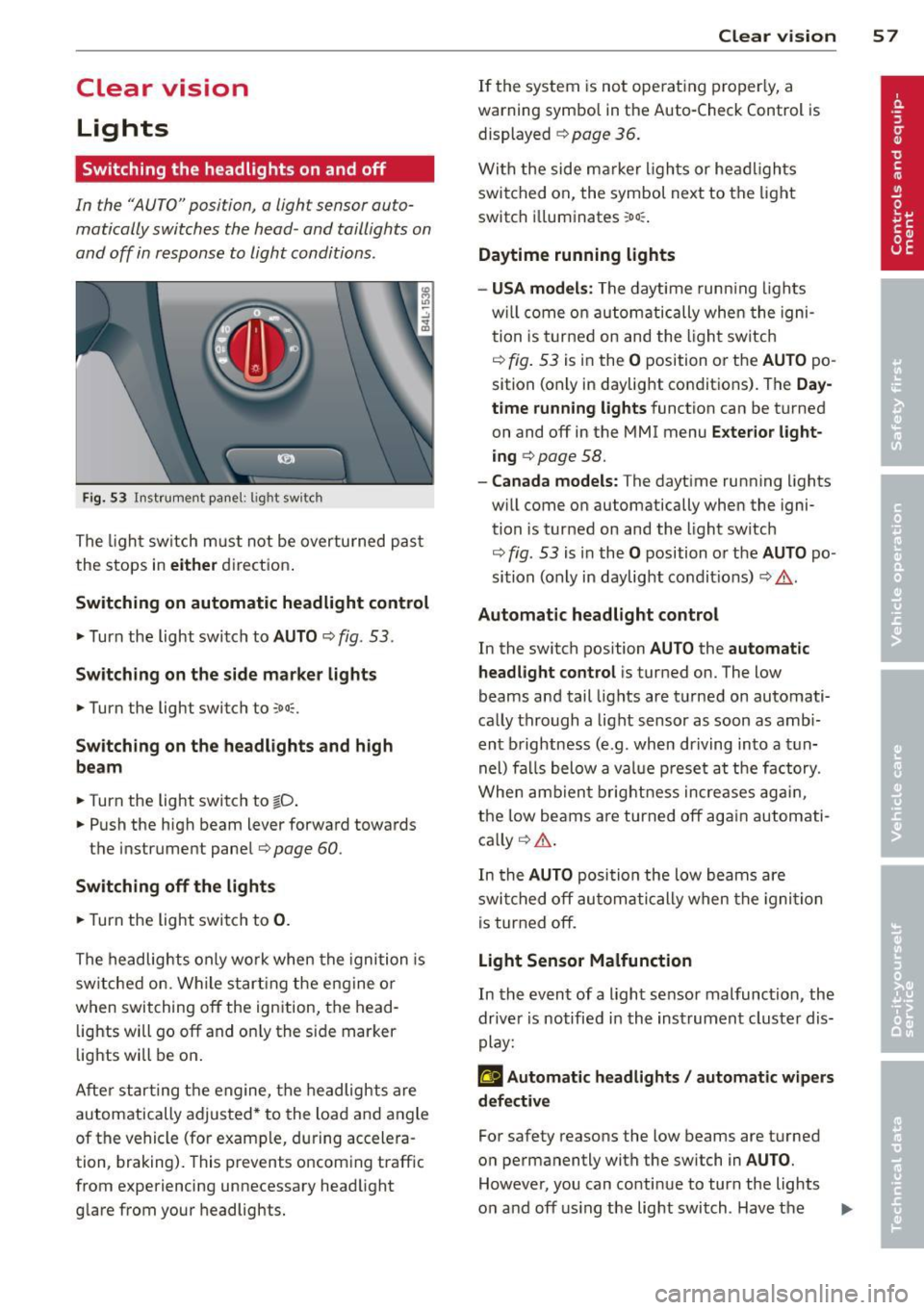
Fig. 53 Instrumen t pane l: lig ht sw it c h
The ligh t sw itch m ust not be overturned pas t
the stops in
eit her direct ion .
Sw itching on automatic headlight control
,.. Turn the light switch to AUTO ¢ fig. 53.
Sw itching on the side m ark e r lights
,.. Turn the light switch to ,oo::.
Sw itching on the headlights and high
be am
,.. Turn the light switch to tD .
,.. Push the high beam lever forward toward s
the instrument panel¢
page 60 .
Swi tching off the light s
,.. Turn the light switch to 0.
The headlights only wo rk when the ignition is
sw itched on . While s tart ing the engine or
when switching
off the ignition, the head ·
lights will go
off and on ly the s ide marker
lights will be on .
Afte r star ting t he engine, the headlights are
automatically adjusted * to the load and angle
of the vehicle (for example, during accelera ·
tion, braking). This prevents oncom ing traffic
from experiencing unnecessary headlight glare from your headlights.
Clear vi sion 5 7
If the system is not ope rat ing properly, a
warning symbol in the Auto-Check Control is displayed ¢
page 36.
With the side m arker ligh ts or he ad ligh ts
switched on, the symbol next to the light
sw itch i lluminates
:o o:: .
Daytime running lights
- USA model s:
The daytime runn ing lights
w ill come on au tomatically whe n the igni
tion is turne d on and the l ight sw itch
¢
fig. 53 is in the O position or the AUTO po
sition (only in daylight conditions) . The
Day
time running lights
function can be turned
on and
off in the MMI menu E xter ior l ight
ing ¢
page 58.
-Canada models: The dayt ime running lights
w ill come on automatically when the igni·
tion is turned on and the light switch
¢
fig . 53 is in the O position o r the AUTO po
sition (only in daylight condit ions) ¢ .&. .
Automatic headlight control
In the switch position AUTO the automatic
headlight control
i s turned on. The low
beams and tail lights are turned on automati
ca lly through a light sensor as soon as amb i
ent b rightness (e.g . when driving into a t un
nel) fa lls below a value p reset a t the factory.
When ambien t brightn ess increases ag ain ,
the low beams are turned
off ag ain autom ati
ca lly ¢ .&. .
In the
AUTO posi tion the low beams a re
swi tched
off au tom ati cally when the igni tion
is tur ned
off .
Light Sensor Malfunction
In the event of a light sensor malfunction , the
dr ive r is notified in the instrument cluster dis
play:
g Automatic headlights / automatic w ipers
defective
For safety reasons the low beams are t urned
o n permanently wi th the switch in
AUTO .
However, you can conti nue to turn the lights
o n and
off using the light switch . Hav e the II>
Page 60 of 340
58 Clear vis ion
lig ht sensor checked as soo n as poss ible at an
author ized Audi dealer or qua lified wor kshop .
.&_ WARNING
-Daytime ru nning lights and automatic
headlights are only intended to assist
the driver. They do not relieve the driver
of his respons ib ility to check the head
lights and to turn them on manually ac
co rding to the current light and v is ibi lity
condit ions. For example, fog cannot be
dete cted by the light sensors*. So alw ays
switch on the headlights
io u nder these
weather conditions and when driving in
the dark.
- Crashes can happen when yo u cannot see
the road ahead and when you cannot be seen by other motorists. Always turn on
the headlights so that you can see ahead
and so that others can see yo ur car from
the back.
- Please obey a ll laws when using the
lighting systems described here.
@ Tips
- With the switch in AUTO front fog lights
and rear fog lights cannot be turned on in addition.
- The light senso r for headlight contro l is
l ocated in the rear view m irror mount.
You should therefore not app ly any st ick
ers to the windsh ield in this area in o rder
to preve nt ma lfunctions o r failures.
- Some exterior lighting functions can be
adjusted
c:> page 58.
-When you remove your key from the igni
tion while the vehicle's lights are turned
on, a buzzer sou nds as long as the driv
er's door is open .
- In coo l o r damp weather, t he ins ide of
t h e headlights, turn signa ls and tail
li ghts can fog ove r du e to t he tempera
tu re diffe re n ce between the inside and
outside. They will cle ar sho rtly after
swi tching them on. This does not affect
t h e service li fe of the lighting . -
In the event o f a light sensor malfunc
tion, the driver is notified in the instru
ment cl uster display
c:> page 35 .
Adjusting exterior lighting
The functions are set in the MMI.
• Sele ct: I CAR I function butt on > System s*
control but to n > Exterior lighting . Or
.. Select:
I CAR I function button > Car systems *
contro l butto n > Vehicle settings > Exterior
lighting .
Coming home (Lights when leaving car ),
Leaving home (Lights when unlock ing car )
The coming home f unction ill uminates the
area o utside the vehicle when you tu rn the ig
nition off and open t he driver's door. Depend
ing on vehicle equ ipment, the f unction can be
switched on and off or the length of t i me the
lights remain on* can be adjusted .
The leaving home illum inates the area outside
t h e ve hicle when yo u unlock the vehicle . This
funct ion can be switched on and off .
The Coming home and Leaving home func
tions only operate when it is dark and the light switch is in the
AUTO pos ition.
Daytime running lights
USA model s: The daytime r unning lights can
be turned on or off using th is function.
Canada model s: Th e fu nction cannot be
turned off .
It is activated automatically each
time the ignition is t urned on. This menu item
is shown "greyed out" .
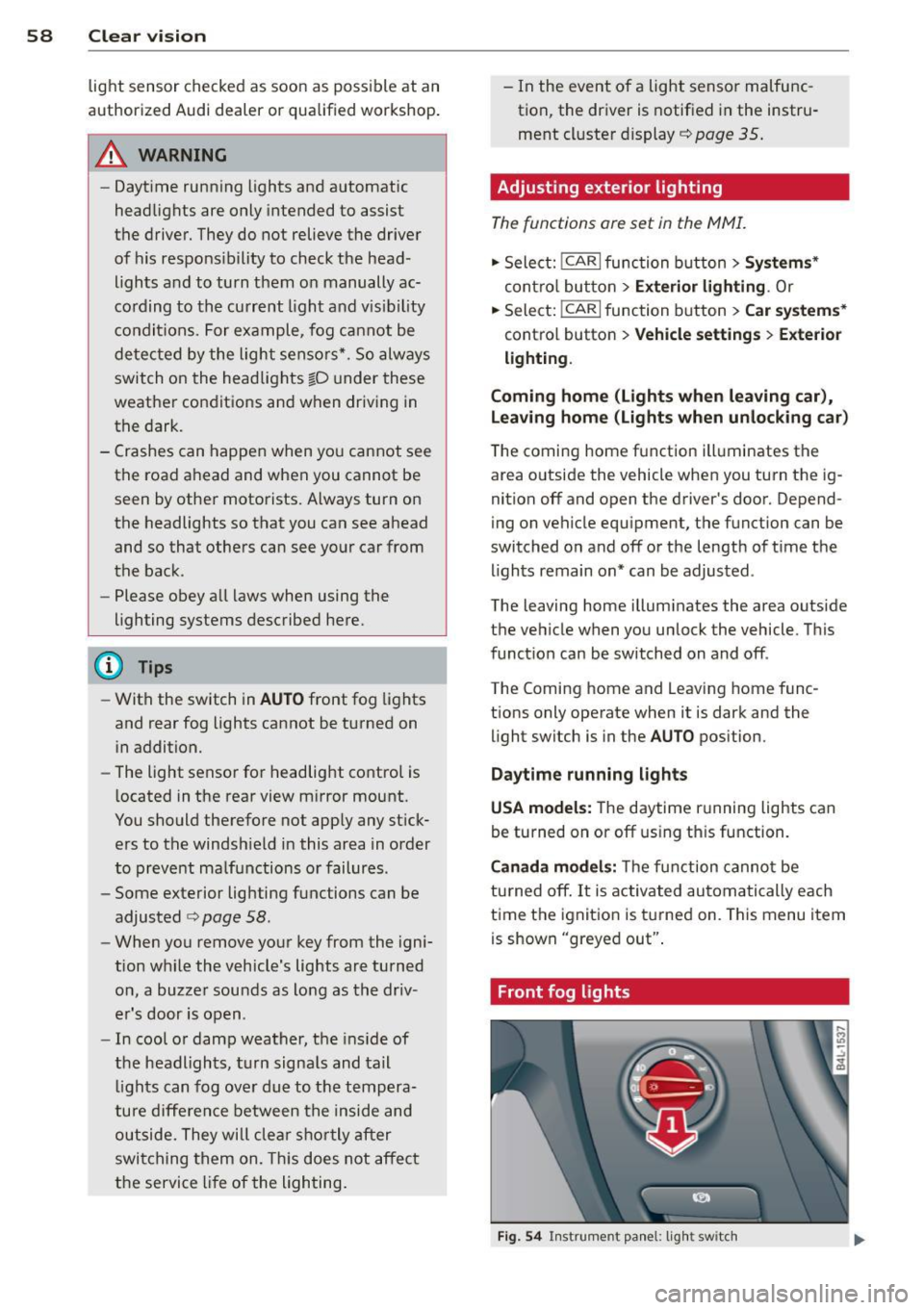
Front fog lights
Fig. 54 Instrument pa nel: light switch
Page 61 of 340
The light switch must not be overturned past
the stops in
either d irectio n.
Switching on the front fog lights }0
~ Turn the light swit ch to ;oo:; or to §D.
~ P ull the ligh t switch to the first stop (!).
When the front fog lights are on, the symbol
}O n ext to the lig ht switch will illum inate.
@ Tips
W ith the switch in AUTO front fog lights
and rear fog lights cannot be turned o n in
add it io n.
Rear fog lights
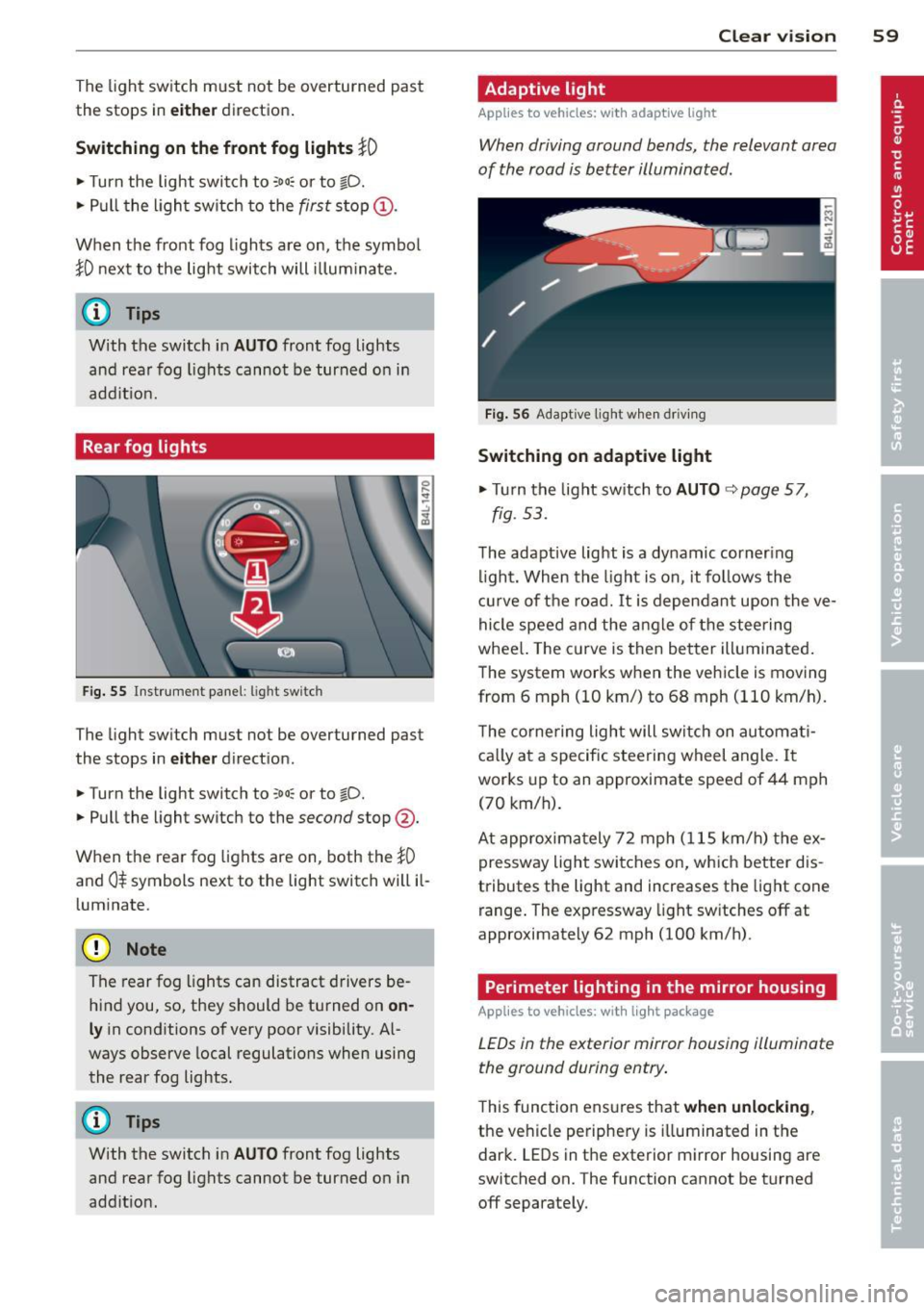
Fig. 55 Inst rument pa ne l: lig ht sw itc h
The light sw itch must not be overturned past
the stops in
either d irect ion.
~ Turn the light switch to ;oo:; or to §D.
~ Pull the light switch to the second stop @.
When the rear fog lights are on, both the
}0
and 0$ symbols next to the light switch will il
l um inate.
(D Note
The rear fog lights can distract d rivers be
h ind you, so, they should be turned on
on
ly in cond itions of very poor visibility. Al
ways observe local regulations when using
the rear fog lights.
{D) Tips
With the switch in AUTO front fog lights
and rea r fog lights cannot be turned on in
add it io n.
Clear vi sion 59
Adaptive light
Applies to vehicles: wit h adaptive light
When driving around bends, the relevant area
of the road is better illuminated .
Fig. 56 Adapt ive light w hen driv ing
Switching on adaptive light
~ Tu rn the lig ht sw itch to AUTO ~ page 57,
fig . 5 3.
The adaptive lig ht is a dy namic corner ing
li ght. Wh en th e light is on, it fo llows th e
cur ve of t he road. It is depen dan t upon the ve
hi cle spee d and the a ngle of the stee ring
whee l. The c urve is then bette r illuminated .
The system wor ks when the vehicle is moving
from 6 mph (10 km/) to 68 mph (110 km/h).
T he co rne ring ligh t will swi tch on automa ti
ca lly a t a specif ic steering wheel angle. I t
wor ks up to an a pproximate speed of 44 mph
(70 km/h).
At approx im at ely 72 mph ( 115 km/h) t he ex
p ressway light swi tches on, which better dis
tributes the light and increases the light cone
range . The exp ressway light sw itches
off at
approximate ly 62 mph (100 km/h) .
Perimeter lighting in the mirror housing
Applies to vehicles: wit h lig ht pac kage
LEDs in the exterior mirror housing illuminate
the ground during entry .
This func tion ens ures that when unlocking ,
the vehicle pe riphe ry is illuminated in t he
dar k. LEDs in t he e xterior m irror housing are
switched on. The function cannot be turned
off separate ly.
Page 62 of 340
60 Clear vis ion
Emergency flasher
The emergency flasher makes other motorists
aware that you or your vehicle are in an emer
gency situation .
. ..----.,
------------------
Fig. 57 Center console: emergency flasher switch
.. Press the sw itch ~ ~fig. 57 to turn the
emergency flashers on or off.
When the emergency flasher is on, a ll four
turn signals b link a t the same time. The turn
signal indicator lights
II B in the instrument
cluster, as we ll as the light in the emergency
f lasher switch ~ blink likewise .
The eme rgency flashers will turn on automati
cally if you are in an accident where the airbag
has dep loyed .
(D} Tips
You shou ld tu rn on the emergency flashe rs
when:
- you are the last vehicle st anding in a tr af
fic jam so that any o ther veh icles coming
can see you, or when
- you r vehicle has broken down or yo u are
i n an emergency situation, or when
- you r vehicle is being towed by a tow
truc k or if yo u are tow ing a nothe r vehicle
behind you.
Turn signal and high beam lever
The lever on the left side of the steering col
umn is used to operate the turn signals and
the high beam as well as the headlight flash
er.
t
'
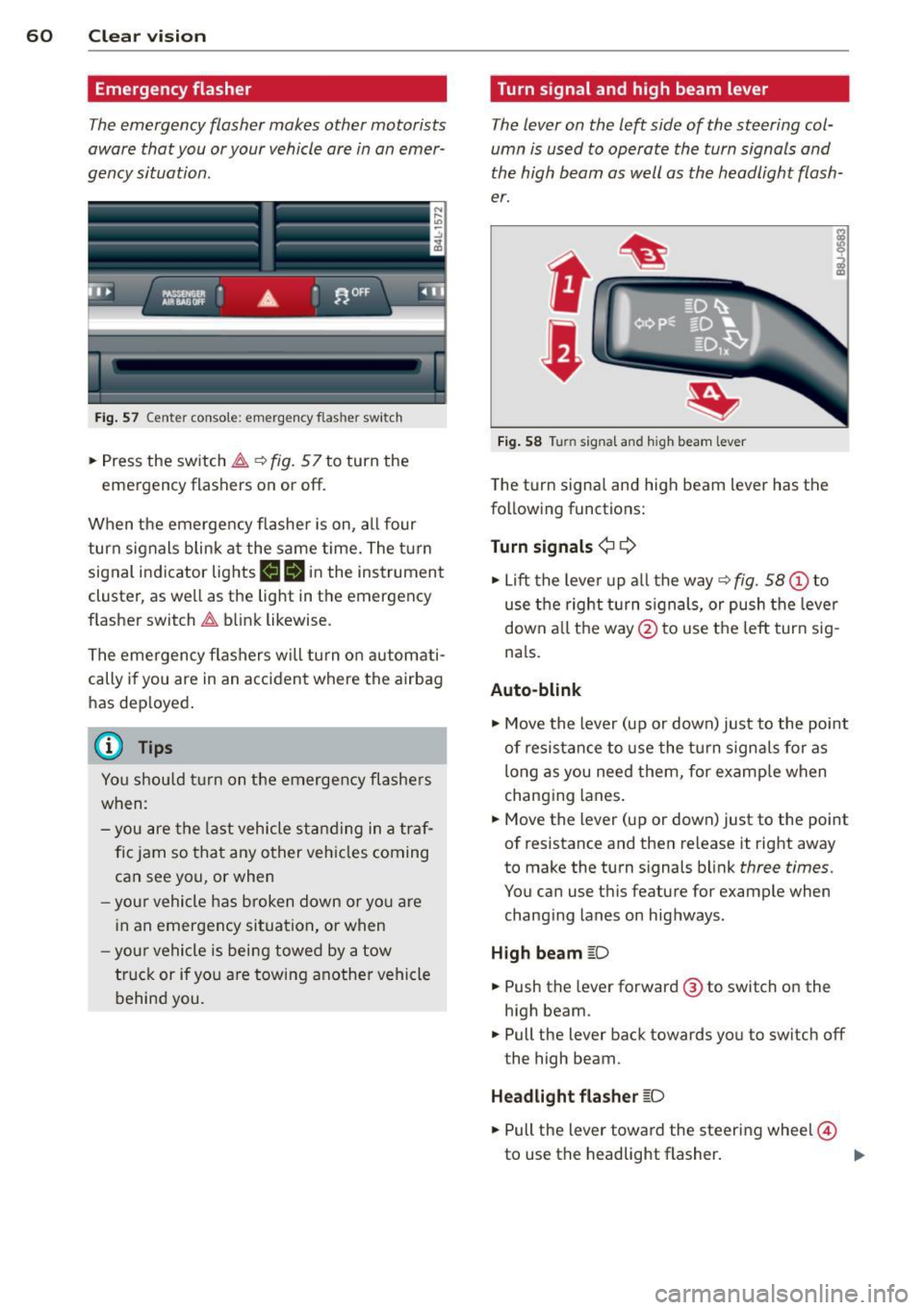
Fi g. 5 8 Turn signal and high beam lever
The turn signal and high beam lever has the
following functions:
Turn signals ¢¢
.. Lift the leve r up a ll the way ~ fig. 58 (D to
use t he right turn s ignals, or push the lever
down a ll th e way @ to use the left turn sig
n a ls.
Auto-blink
"" Move the lever (up or down) just to the point
of resistance to use the turn signals fo r as
long as you need them, for examp le when
chang ing lanes .
"" Move the lever (up or down) just to the point
of resistance and then re lease it right away
to make the turn signals b link
three times.
You can use this feature for example when
chang ing lanes on highways.
High beam [D
"" Push the lever forward @ to switch o n the
high beam .
"" Pull the lever back towards you to switch off
the high beam.
Headlight fla sher [D
"" Pull the lever toward the steering wheel@
to use the headlight flasher .
IJJ>
Page 63 of 340
Notes o n these featur es
- The turn signals only work with t he ignition
turned on . T he indicator light s
II or Ill in
the instrument cluster
¢ page 14 also b link.
- After you have turned a corner , the tur n sig-
nal switches off automatica lly.
- The
high beam works only when the head
lights are on. The indicator light
II in t he
instrument cluster i lluminates when the
high beams a re on.
- The
headlight flasher wo rks only as long as
you hold the lever -even if there are no
lights turned on . The indicator light
II in
the ins trument cluster illuminate s when you
u se the headlight flasher .
A WARNING
-
Do not use the high beam or headlight
flasher if you know that thes e cou ld blind
oncoming traffic.
Interior lights
Front interior lights
The interior lights include reading lights for
both the driver and the front passenger .
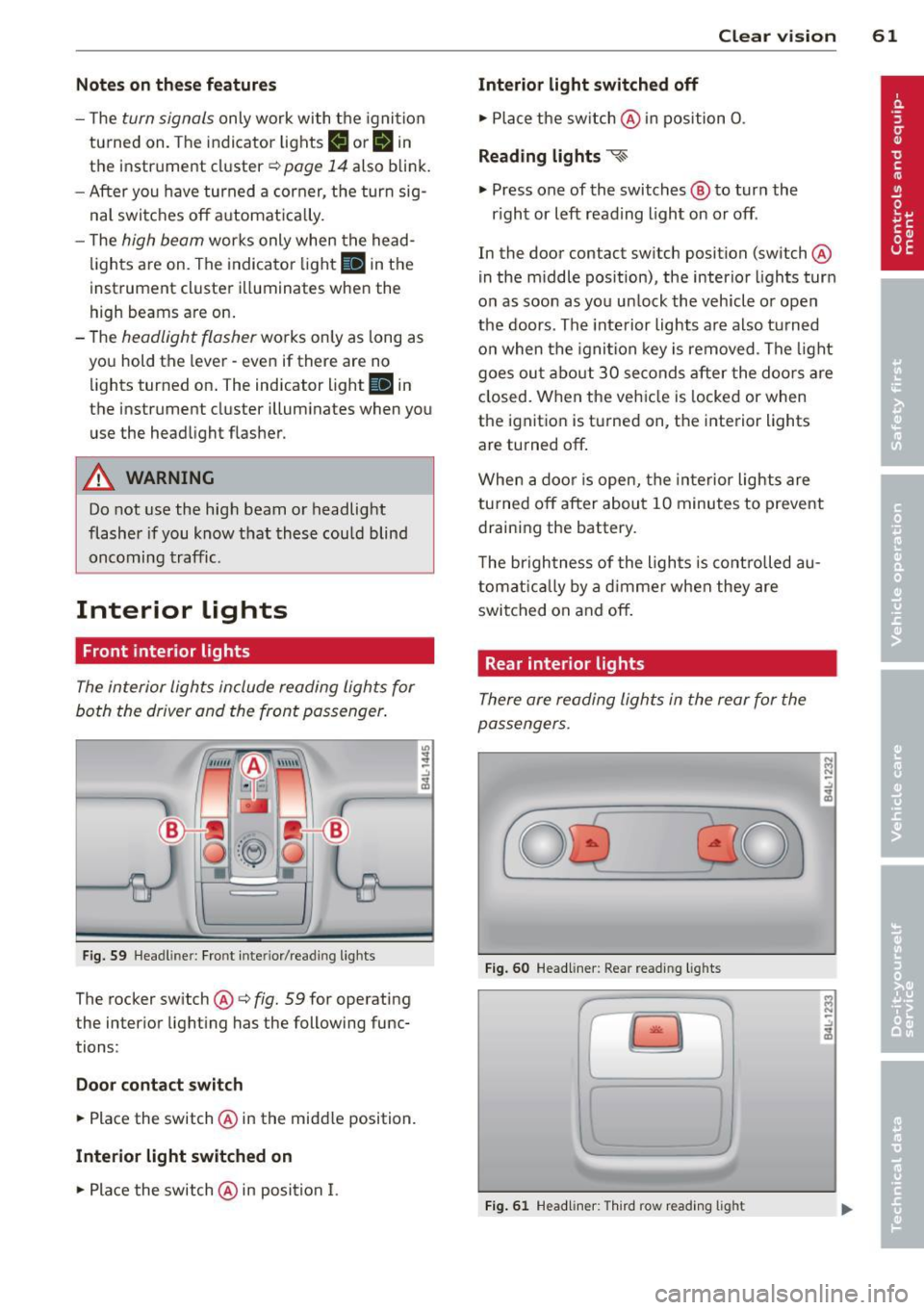
Fig. 59 Headlin er: Fro nt in te rior /re adi ng light s
The rocker switch @¢ fig. 59 for ope rating
the in ter ior lighting has the follow ing func
tions :
Door cont act switch
.,. Place the switch @ in the midd le position.
Interior light switched on
.,. Pla ce the switch @ in posi tion I.
.,,
:! .:,
1A
Clear vision 61
Interior light switched off
.,. Place the sw itch @ in position 0 .
Reading lights ~
.,. Press one of the switches @ to turn the
r ight or left reading light on or off .
In the door contact swi tch position (switch @
in the m iddle position), the interior l ights tur n
o n as soon as you unlock the vehicle o r open
the doors . The inte rior lights are also turned
o n when the igni tion key is removed . The light
goes ou t about 30 seconds after the doo rs are
closed. When the veh icle is locked or when
the igni tion is turned on, the i nterior lights
are turned off .
When a door is open, the interior lights are
tu rned off after about 10 minutes to prevent
draining the battery.
T he brigh tness of the lights is cont rolled au
tomat ic all y by a d imme r when they are
switched on and off.
Rear interior lights
There are reading ligh ts in the rear for the
passengers .
0
...
Fig . 60 Headli ner: Rear read ing light s
>l!i:.
r -
' \.
Fig. 61 Headlin er: Third row r eading light
N .., N
.:,
1A
:::i N
-.:,
1A
Page 64 of 340
62 Clear vision
• Press one of the switches «-~ to turn the
right or left reading light on or off~
fig. 60.
For vehicles with third row seating*, the lug
gage compartment light can be switched on
and off with the button'*' and used as a read
ing light
~fig. 61. The rear lid has to be
closed.
The lights in the luggage compartment and in
the rear lid switch on and off automatically
when the lid is opened and closed.
@ Tips
If the rear lid remains open longer than 10
minutes, the luggage compartment lights
turn off automatically to prevent the vehi cle battery from discharging.
Ambience lighting
App lies to vehicles: with amb ience light ing
The ambience lighting con be adjusted in the
MMI.
• Select : I CARI function button> Systems*
control button > Ambience lighting. Or
• Select :
I CARI function button > Car systems*
control button > Vehicle settings > Interior
lighting .
When the vehicle is unlock ed, the standard
lighting turns on automatically and dims after
approx. 2 minutes, and when the ignition is
turned on it switches off immediately .
The following interior lighting is
controlled:
- Front footwell
- Rear footwell
- Front door panel
- Rear door panel
Vision
Sun visors
Using the sun visors makes driving safer.
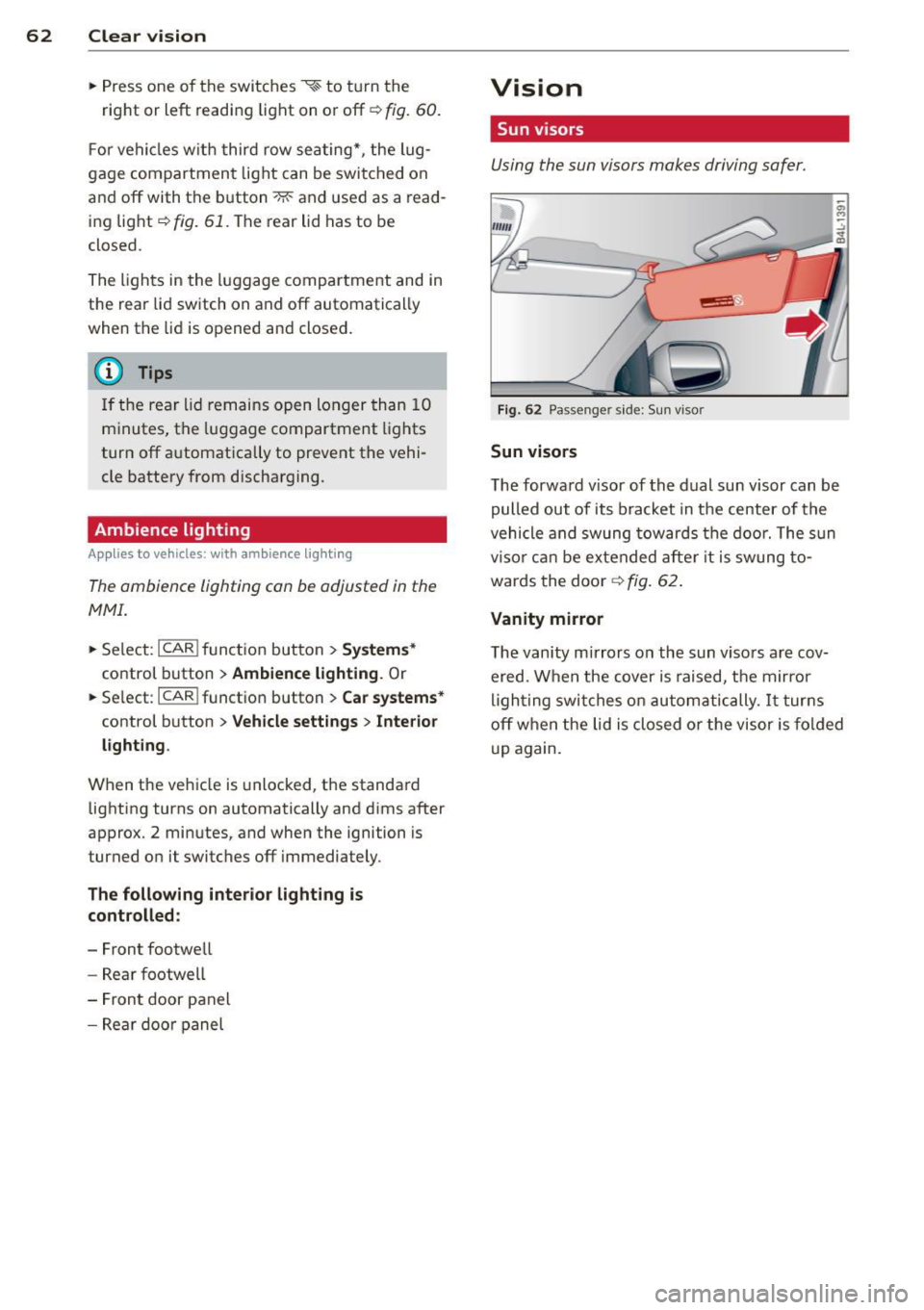
Fig. 62 Passenger sid e: Sun visor
Sun visors
The forward visor of the dual sun visor can be
pulled out of its bracket in the center of the
vehicle and swung towards the door. The sun
visor can be extended after it is swung to
wards the door
~ fig. 62.
Vanity mirror
The vanity mirrors on the sun visors are cov ered. When the cover is raised, the mirror
lighting switches on automatically.
It turns
off when the lid is closed or the visor is folded
up again.
Page 68 of 340
66 Clear vis ion
Headlight washer system
Ap plies to vehicles: with hea dlig ht washer syste m
The headlight washer system cleans the
headlights .
.. Operate the windshield wiper/washer sys
tem
q page 63, fig. 65 ® with the head
lights turned on by holding the lever for lon
ger than one second .
The washer jets extend forward out of the
front bumper driven by water pressure to
spray the front headlights with water .
You shou ld inspect the headlights regularly
(for example when refueling) and clean off
any solid dirt or insects from the lenses .
To ensure the system works proper ly in winter,
keep the washer jets free of snow and remove
any ice using a de- ic ing spray.
Service position
The wiper blades can only be changed in the
service position.
.. If the wiper blades are not frozen to the
windshield, bring the windshield wiper lever
to the basic position@¢
page 63 , fig. 65 .
.. Se lect :
I CAR I function button> S ystems *
control button> Windshi eld w ip e rs > S er v
ice positi on.
Or
.. Se lect :
I CAR ! funct io n button > Car sy stems *
control button > Servicing & checks > Wiper
servic e po sition .
-On -chang ing the windshield w iper b lades
can on ly be done if you bring the wiper a rms
to the se rv ice posi tion. You w ill also avoid
paint damage to t he hood when working on
the wipers in this pos ition.
- Off -the wi ndshield wipe rs a re moved to
their initial pos ition aga in.
(D Note
N ever maneuve r your vehicle with the
front windshield wipe r arms ra ised si nce
they wi ll a utomat ica lly be moved back to the
ir basic position above a speed of 3
mph
(6 km/h) and ca n scratch the hood.
(D Tips
- Yo u can also use the se rv ice posi tion, for
examp le, i f you want to p rotec t the
windshield from icing by using a cover .
- T he service posit ion automatically
switches to
Off when you operate the
w indshield wiper lever, or speed exceeds
3 mph (6 km/h).
Cleaning windshield wiper blades
Clean the windshie ld w iper b lades when they
begin to leave st reaks .
.. Place the windsh ie ld w iper arms in the serv
ice pos it ion. Refer to ¢
page 66.
.. Lift the wiper arm away from the rear win
dow .
.. Use a soft cloth and glass cleane r to clean
the wi ndshield wipe r blades.
.&_ WARNING
Dir ty windsh ield wipe r blades can impair
your view. This can lead to accidents.
.
Page 71 of 340
the selector lever must be in the P position
and the ignition must be off. This will now be
come the stored setting when the vehicle is
put in reverse gear again.
Tilting th e pa sseng er's si de exte ri or
m irror (only with se at mem ory )
When you move the selector lever into R (Re
verse), the mirror on the front passenger's door (knob turned to ®
c::> fig. 70) will tilt
slightly downward. This make is easier for you
to see the curb when you are backing into a
parking space .
The mirror returns to its initial position as soon as reverse gear is disengaged and vehicle
speed is above about
9 mph (15 km/h). The
mirror a lso returns to its in itia l posit ion if the
sw itch is moved to the drive r's exte rior mi rror
© o r the ignit ion is switched off.
0 Note
- Curved (i.e . convex) mirror surfaces in
crease your field of view. Remembe r th at
vehicles or o ther objects w ill appear
smaller and farther away than when
seen in a flat mirro r. If yo u use this mir
ror to est imate distances of following
vehicles when changing lanes, you could
estimate incorrect ly and cause an acci
dent.
- If the mirror hous ing is moved un inten
tionally (for example, while park ing your
vehicle), then you must first fo ld the mir
ro r electrically . Do not readjust the mir
ror hous ing manually. You could damage
the motor which controls the mi rror.
- If you wash t he veh icle in an automatic
car wash, you must fold the exte rior m ir
r o rs in to redu ce the r is k of damage to
the mirrors. Never fold power folding ex
te rior mi rrors* by hand . Only fold them
in and out using the power cont ro ls.
(D Tips
If there should be a malfunc tion in the
elec trical system, you can still ad just the
exterior m irrors by pressing the edge o f
the mirror.
Clear vis ion 69
Dimming the mirrors
0 ~
-.:,
~
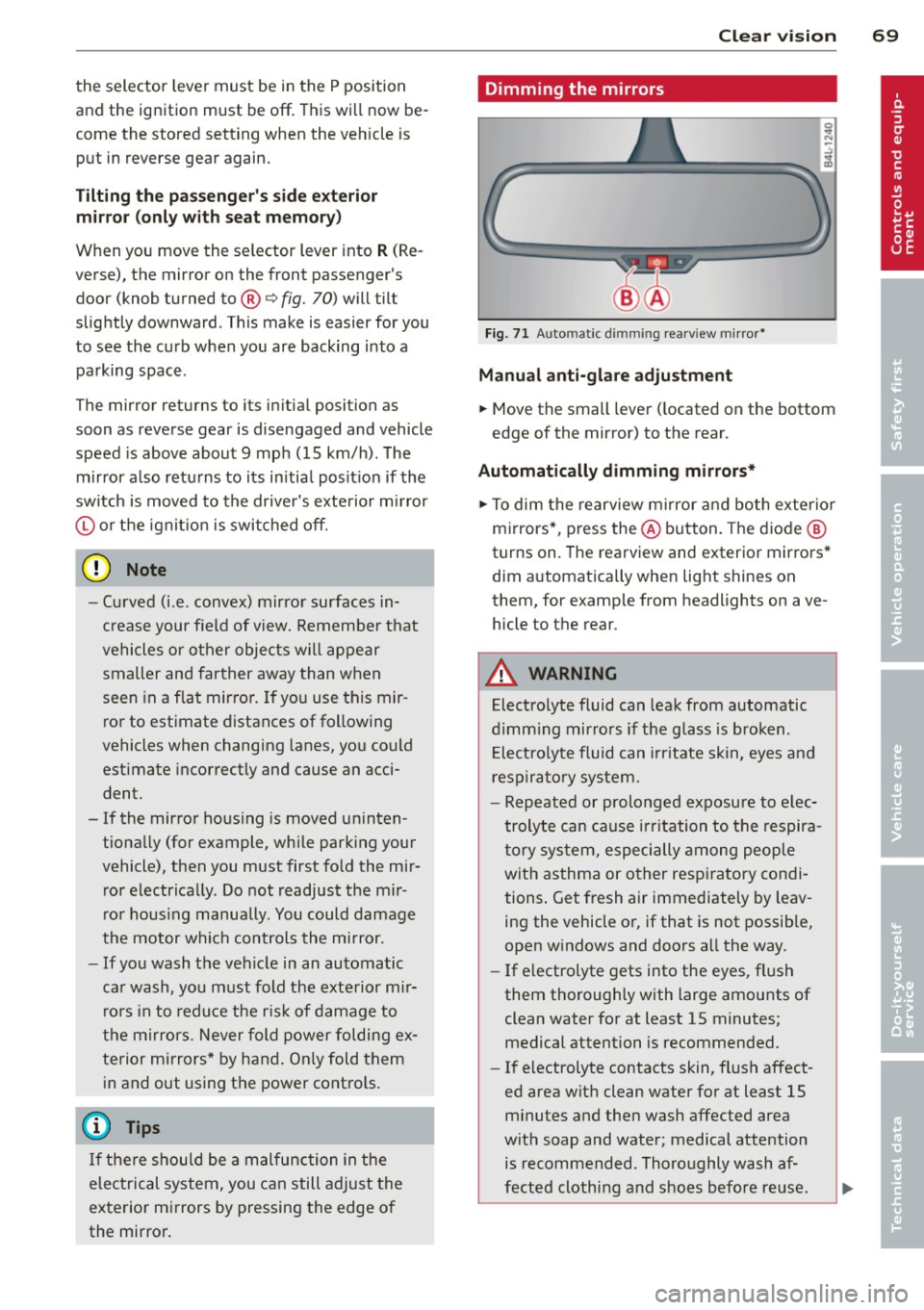
Fig. 71 Auto mat ic d immin g rea rv iew m ir ror *
Manu al a nti-gl are adju stment
... Move the small lever ( located on the bottom
edge of the mirror) to the rear .
Automatically dimming mirro rs*
... To dim the rearview mirror and both exterior
m irrors*, press the @button . T he diode @
turns on. The rearview and exterior mirrors *
dim automatically when light shines on
them, for examp le from headlights on ave
hicle to the rear.
A WARNING
-Electro lyte fluid can leak from automatic
d imm ing mirro rs if the glass is broken.
E lect ro lyte fluid can irritate skin, eyes and
respira to ry system.
- Repeated or prolonged exposu re to e lec
trolyte can cause irritation to the respira
t ory sys tem, especially among people
with asthma or o ther resp iratory condi
tions . Get fresh air immediately by leav
ing the vehicle or, if that is not possib le,
open w indows and doors a ll the way.
- If electrolyte gets into the eyes, flush
them thorough ly with large amounts of
clean water for at least
15 minutes;
medical attention is recommended.
- If electrolyte contacts skin, flush affect
ed area with clean water for at least 15 minutes and then wash affected area
with soap and water; medical attention is recommended. Thoroughly wash af
fected clothing and shoes before reuse.
Page 122 of 340
120 Adapti ve crui se control
_&. WARNING
-
Following other vehicles too closely in
creases the risk of a crash and serious per
sonal injury .
- Following other vehicles too closely, par
ticu larly at higher speeds increases the
risk of coll is ions and serious personal in
jury.
- Setting short distances to the traffic
ahead reduces the time and distance
available to bring your vehicle to a safe
stop and makes it even more necessary
to pay close attention to traffic .
- Always select a speed and distance to
traffic ahead that is safe and appropriate
under the prevailing traff ic, road, weath
er and lighting conditions.
- Never rely on the distance control fea
ture of ACC a lone to prevent rear-end col
lis ions. Always be prepared to b rake and
take evasive act io n to avoid co llisions
and other ac cident situations.
- Never allow the clos ing speed between
yo u a nd other vehicles to be so h igh that
the adaptive cruise control may not be
able to slow your vehicle safe ly . If clos
ing speed is too high, yo u m ust app ly the
brakes yourself to reduce the risk of a
rear-end crash.
- Always select a greater following dis
tance to the veh icle ahead on wet roads
than on dry roads.
- Always read and heed the information
and WARNINGS
¢ &. in Description on
page 113.
(D Tips
The distance setting is reset to the factory
default
DIS TANCE 3 the next time the ig
nition is turned on.
Driver information
Displays in the instrument cluster
Applies to veh icles: w ith adaptive cruise contro l
Depending on the driving situation, driver in
formation is displayed in the instrument clus
ter .
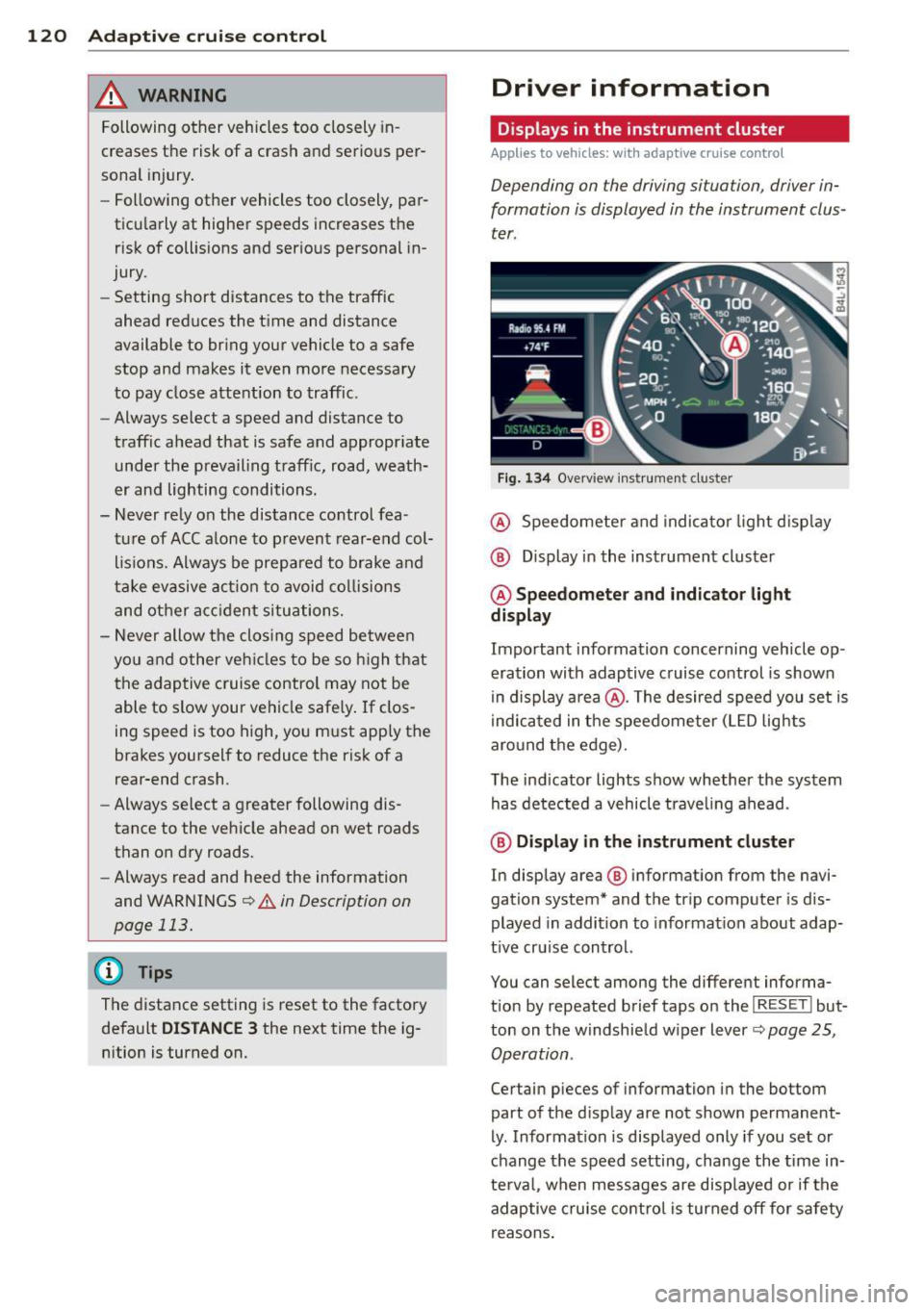
Fig . 1 34 Overview ins tr u me nt cluster
@ Speedometer and indica to r li ght d isp lay
@ Display in the instrument cluster
@ Speedometer and indi cato r light
display
Important information concerning vehicle op
eration with adaptive cruise control is shown
in display a rea @. The desired speed you set is
i ndica ted in the speedometer (L ED lights
aro und the edge).
T he ind icator lights show whether the system
has detected a vehicle trave ling ahead .
@ Display in the in strument cluster
In display area @ information from the navi
gation system* and the tr ip computer is dis
played in addition to informat ion about adap
t ive cru ise control.
You can select among the different informa
t io n by repeated brief taps on the
I RESET I but
ton on the w indshie ld w iper lever
c::> page 25,
Operation .
Certain pieces of information in the bottom
part of the d isplay are not shown permanent
ly . Information is displayed only if you set or
change the speed setting, change the time in
te rva l, when messages are disp layed or if the
adaptive cruise contro l is turned off for safety
reasons .
Page 123 of 340
Display in the speedometer
Applies to vehicles: with adaptive cruise control
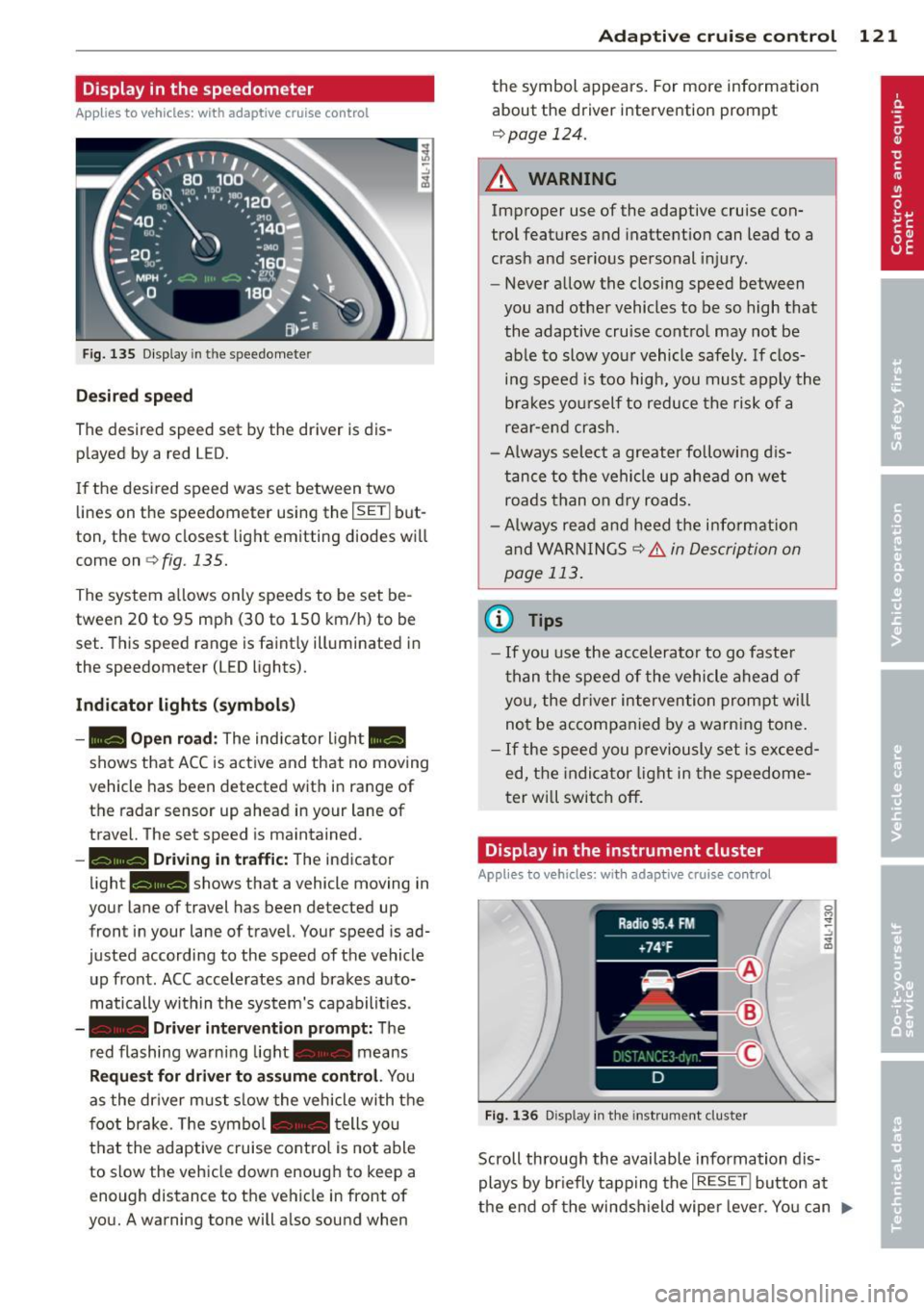
Fig. 135 D isplay in the speedomete r
Des ired spe ed
The desired speed set by the driver is dis
p layed by a red LED.
If the desi red speed was set between two
lines on the speedometer using the
I SETI but
ton, the two closest light emitting diodes will
come on <=>
fig. 135.
The system a llows only speeds to be set be
tween 20 to 95 mph (30 to 150 km/h) to be
set. This speed range is faint ly illuminated in
the speedometer (LED lights).
Ind icator light s (symbol s)
-- Open road :
The indicator light _
shows that ACC is active and that no moving
vehicle has been detected with in range of the radar sensor up ahead in your lane of
travel. The set speed is maintained.
- - Driving in tr aff ic: The indicator
light - shows that a vehicle moving in
your lane of travel has been detected up
front in your lane of travel. Your speed is ad
justed according to the speed of the vehicle
up front . ACC accelerates and brakes auto
matically within the system's capabilit ies .
-- Driver int erv ent ion prompt: The
red flashing warning light- means
Reque st for dri ver to assum e co ntr ol. You
as the dr iver must slow the vehicle with the
f oot brake. The symbol - tells you
t h at the adaptive cruise co ntrol is not able
to slow the vehicle down enough to keep a
enough distance to the vehicle in front of
you. A warning tone will also sound when
Ad apti ve crui se control 121
the symbol appears. For more information
about the driver intervention prompt
r::!) page 124.
_& WARNING
Improper use of the adaptive cruise con
trol features and inattention can lead to a
crash and serious personal injury.
- Never allow the closing speed between
you and othe r vehicles to be so high that
the adaptive cruise contro l may not be
able to slow your vehicle safely. If clos
ing speed is too high, you must apply the
brakes yo urself to reduce the risk of a
rear-end crash.
- Always select a greater following d is
tance to the vehicle up ahead on wet
roads than on dry roads.
- Always read and heed the information
and WARNINGS <=>
& in Description on
page 113 .
(D Tips
-If you use the accelerator to go faste r
t han t he speed of the vehicle ahead of
you, the dr iver intervention prompt will
not be accompan ied by a warn ing tone.
- If the speed you previously set is exceed
ed, the indicator light in the speedome
ter will switch off.
Display in the instrument cluster
Appl ies to vehicles: wit h adaptive cruise control
F ig. 136 D isp lay in the instrument cluster
-
Scroll through the available information dis
plays by br iefly tapp ing the
I RESET ! button at
the end of the windshield wipe r lever. You can ..,.