lights AUDI Q7 2014 Owner´s Manual
[x] Cancel search | Manufacturer: AUDI, Model Year: 2014, Model line: Q7, Model: AUDI Q7 2014Pages: 340, PDF Size: 85.02 MB
Page 21 of 340
Instruments and warning/indicator lights 19
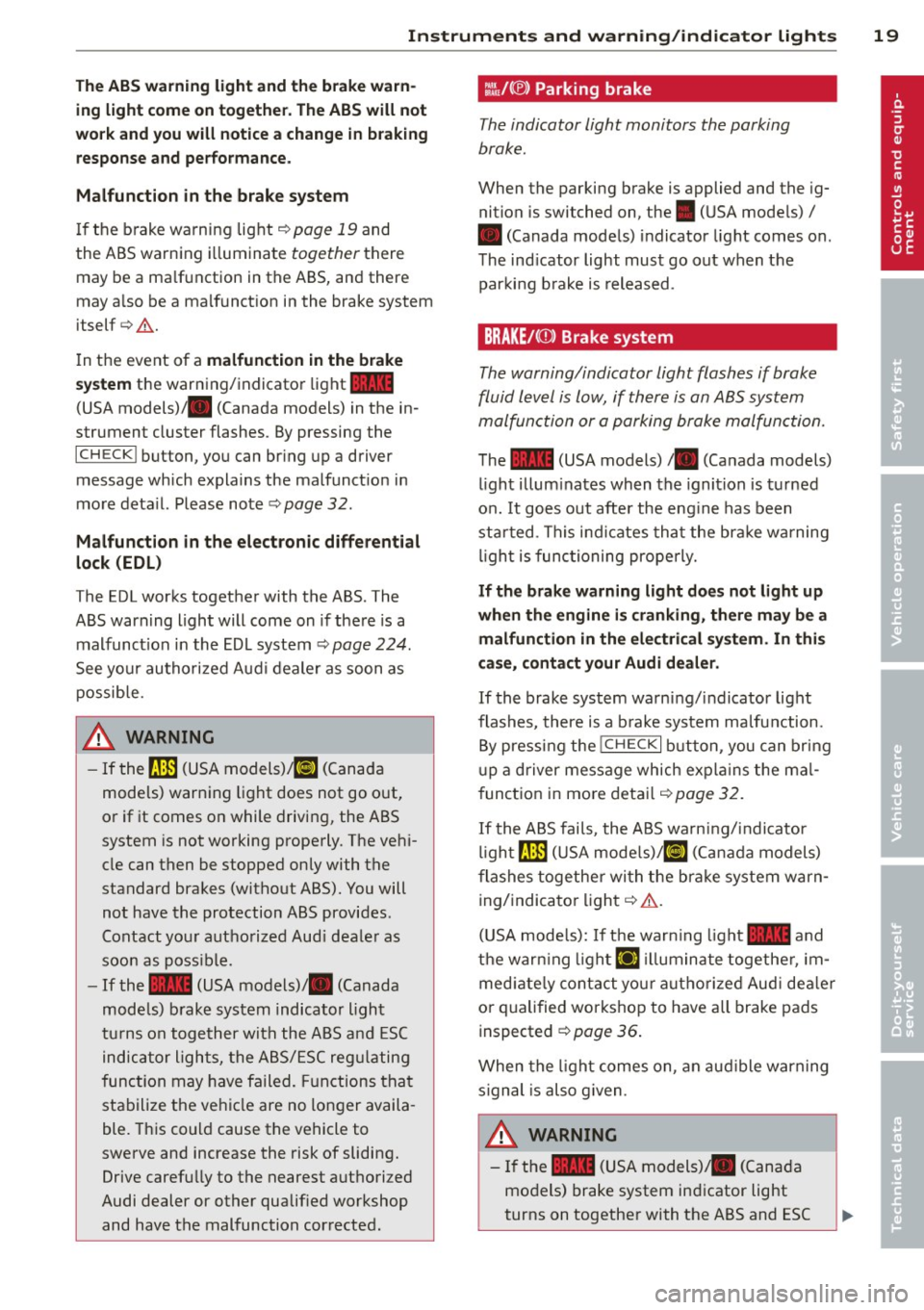
The ABS warning light and the brake warn ing light come on together. The ABS will not
work and you will notice a change in braking response and performance.
Malfunction in the brake system
If the brake warning light <=>page 19 and
the ABS warning illuminate
together there
may be a malfunction in the ABS, and there
may also be a malfunction in the brake system
itself <=>,&. .
In the event of a
malfunction in the brake
system
the warning/indicator light 1111
(USA models);III (Canada models) in the in
strument cluster flashes. By pressing the
ICHECKI button, you can bring up a driver
message which explains the malfunction in
more detail. Please note
<=>pag e 32.
Malfunction in the electronic differential
lock (EDL)
The EDL works together with the ABS. The
ABS warning light will come on if there is a
malfunction in the EDL system
<=> page 224.
See your authorized Audi dealer as soon as
possible.
.&, WARNING
-
- If the f!B (USA models);tlJ (Canada
models) warning light does not go out,
or if it comes on while driving, the ABS
system is not working properly. The vehi
cle can then be stopped only with the
standard brakes (without ABS). You will
not have the protection ABS provides.
Contact your authorized Audi dealer as
soon as possible.
- If the
1111 (USA models)/ . (Canada
models) brake system indicator light
turns on together with the ABS and ESC
indicator lights, the ABS/ESC regulating
function may have failed. Functions that
stabilize the vehicle are no longer availa
ble. This could cause the vehicle to
swerve and increase the risk of sliding.
Drive carefully to the nearest authorized
Audi dealer or other qualified workshop
and have the malfunction corrected.
:l~ /(® ) Parking brake
The indicator light monitors the parking
brake.
When the parking brake is applied and the ig
nition is switched on, the. (USA models) /
• (Canada models) indicator light comes on.
The indicator light must go out when the
parking brake is released.
BRAKE/CCDl Brake system
The warning/indicator light flashes if brake
fluid level is low, if there is an
ABS system
ma/function or a parking brake ma/function.
The 1111 (USA models)/ . (Canada models)
light illuminates when the ignition is turned
on.
It goes out after the engine has been
started . This indicates that the brake warning
light is functioning properly.
If the brake warning light does not light up
when the engine is cranking, there may be a malfunction in the electrical system. In this
case, contact your Audi dealer.
If the brake system warning/indicator light
flashes, there is a brake system malfunction .
By pressing the
I CH ECK i button , you can bring
up a driver message which explains the mal
function in more detail
<=>page 32.
If the ABS fails, the ABS warning/indicator
light~ (USA
models)/KCJ (Canada models)
flashes together with the brake system warn
ing/indicator light<=>,&. .
(USA models): If the warning light
1111 and
the warning light
El illuminate together , im
mediately contact your authorized Audi dealer
or qualified workshop to have all brake pads
inspected ¢
page 36.
When the light comes on, an audible warning
signal is also given .
.&, WARNING ~ ~
-If the 1111 (USA models) ;III (Canada
models) brake system indicator light
turns on together with the ABS and ESC
Page 22 of 340
20 Instrum ent s a nd w arn in g/i ndic ato r light s
indicator lights, the ABS/ESC regu lating
function may have failed. Functions that
stabilize the vehicle are no longer availa ble . This could cause the vehicle to
swerve and increase the risk of sliding.
Drive carefu lly to the nearest authorized
Audi dealer or other qualified workshop and have the malfunction corrected.
- If the brake warning/indicator light does
not go out afte r a few seconds and the
par king brake is released, or ligh ts up
wh ile you are driving, the fluid level in
the brake fluid reservoir is too low. If you believe that it is safe to do so, proceed
immediately at low speed to the nearest
authorized Audi dealer or qualified repair
facility and have the brake system in
spected.
- Always keep in m ind that after several
brake applicat ions, you will need greater
pressure on the b rake pedal to stop your
vehicle . Do not re ly on stra ined brakes to
respond w ith maximum stopp ing power
in cri tic al situations. You must a llow for
increased bra king distances. The extra
distance used up by fad ing brakes could
lead to an accident.
Page 25 of 340

Defective light bulb warning
The defective light bulb warning tells you
when a vehicle light bulb has become defec
tive.
Fig . 14 D isplay : defective lig ht bu lb warn ing
The defective light bu lb warning monitors the
function of the light bulbs . If th is symbol
I
illuminates, a brake light, a turn signal (front
or rear), a headlight, the backup light, a fog
light or a rear fog light has failed.
A WARNING
- light bu lbs are pressurized and could ex
plode while they are being changed caus
ing serious personal injury.
- Work with due care when handling the
high-voltage section of gas discharge
(xenon) lights. Fa ilure to do so could re
s u lt in dea th o r se rious injury.
(D Tips
Have the bulb replaced or the connection
repa ired by you r autho rized Aud i Service
department.
Dri ver inform ation di spl ay 23
Service interval display
The service interval display reminds you when
your next service is due .
Fig . 1 5 Display: Serv ice interva l d isplay
T he schedule for the nex t oi l change or inspec
tion is ca lculated automatica lly and disp layed
accordingly. The disp lay works in two stages:
Service reminder
30 days before t he next service is due, a serv
ice reminde r appea rs in the display whe n you
turn on the ignition
~fig. 15.
After about 5 seconds the display switches
back to norma l. The distance and time re
mai ning are updated each time the ignit ion is
turned on unt il t he da te d ue for se rv ice is
reached.
Service due
When the due date fo r se rvice is reached, the
mes sage
Se rv ice due! appears in the instr u
ment cluster immed iate ly after yo u tur n on
the ignit ion. Addit iona lly, a warning tone
sounds. After about 5 seconds the disp lay
switches back to normal.
Calling up the service schedules
If or when an oil change o r inspection is due,
can be shown in the MMI display by selecting
the service in terval d isplay in the car menu .
Se lect
I CAR I funct io n button > Sy stem s* con
trol button
> S ervice inte rval display or I CAR !
function button > Car sy stem s* contro l but -
ton
> Servicing & chec ks > Service in te rva ls. ..,_
Page 34 of 340
32 Driver in formation d isplay
warning goes out after about 5 seconds, but it
can be brought up at any time by pressing the
I CHECK ! button again .
Usually , you can still drive to the next dealer
ship. Turn off all b ut the most necessary elec
trica l cons umers, sinc e these drain the vehi
cle's battery.
(D Note
If the . warning symbol (coolant system
malfunction) also lights up on the instru
ment panel during the trip ¢
page 32,
then you have to stop immediately and
turn off the eng ine . The coolant pump is
not working anymore -danger of damage
to the eng ine!
BRAKE/( ©) Brake system malfunction
A malfunc tion in the brake system mus t be
repaired as soon as possible .
If the warn ing /indicator light~ (USA
models)/ . (Canada mode ls) in the instru
ment cluster flashes, there is a brake system
malfunction . By pressing the
I CH ECK ! button,
you can bring up a dr iver message which ex
p la ins the ma lfu nction in more detail.
Stop vehicle and check brake fluid level
> Pull off the road.
> Stop the vehicle.
>T urnoff the engine .
> Check the brake fluid level¢
page 267 .
> Co ntact you r neares t auth orized Audi dea ler
o r q ualified workshop if necessa ry.
Warning! Fault in brake system. Contact
workshop
> Drive carefu lly to the nearest a utho rized
Audi de aler or qua lified workshop and h ave
the mal function cor rected ¢
&_.
If the A BS system malfunctions, the ABS
war ning/ indica to r li ght illum inates toge ther
with the bra ke system mal func tion warning/
indicator light¢&. .
A WARNING
-Always observe the war nings in
¢
page 257, before opening the hood
a nd checking the brake flu id.
- Dr iving with low brake flu id is a safety
hazard . Stop the car and get professiona l
assis tance .
- If the ~ (USA models) . (Canada
models) brake system ind icator light
turns on toget he r with the ABS and ESC
i n dicator lights, the A BS/ ESC regulat ing
fu nction may have failed. Func tio ns that
s tabilize the vehicle a re no longer av aila
b le. This could ca use the vehicle to
swerve and inc rease the r isk of s liding.
Drive carefully to the nearest authorized
Aud i dealer or other q ualified workshop
and have the ma lfu nction corrected .
-L Engine cooling system malfunction
A malfunction in the engine cooling system
must be repaired as soon as possible .
When the. symbo l in t he display blinks,
t h en eit her the engine coo la nt
temperature is
too high, o r the coo lant
level is too low. An
additional driver message can also be dis
played by pressing the
I CHECK ! button:
Switch off engine and check coolant level
> Pull off t he road.
> Stop the vehicle.
> Tur noff the engine .
> Check coolant level ¢
page 265.
> Add coo lant if necessary ¢ page 266.
> Continue dr iv ing on ly after the engine cool
ant warning/ind icator light goes out.
> Contact your authorized Aud i dealer for as -
sistance if necessa ry.
If the engine coolant level is correct, then the
radiator fa n may be the cause of the malfunc
t ion .
If the . warning symbo l (a lternator mal
funct ion) also lights up on the instrument
panel ¢
page 31, then the fan be lt may be
damaged .
Page 35 of 340
& WARNING
-If your veh icle should break down for
mechanical or other reasons, park at a
safe distance from moving traffic, turn off the engine and turn on the ha zard
warning lights¢
page 60, Emergency
flasher .
-
-Never open the hood if you see or hear
steam or coolant escap ing from the en
gine compartme nt -you risk being scald
ed . Wa it until you can no longe r see or
hear stea m or coo la nt escaping.
- The eng ine compartment of a ny veh icle
is a dangerous a rea . Before you perfo rm
any wor k in the engine compa rtme nt,
t ur n o f the eng ine and allow it to cool.
F ollow the warning stick ers ¢
page 257.
(D Note
Do not co nti nu e d riving if the . symbol
illumi nates. T here is a m alf unct io n in the
eng ine cooling system -you co uld dam age
your eng ine .
"t:::7: Engine oil pressure malfunction
The red engine oil pressure warning symbol
requires immediate servi ce or repair. Driving
with a low -oil -pressure indication is likely to
inflict severe damage to the engine .
If the. symbol appe ars in the display and
b links, the oil press ure is too low . An addition
a l driver message can also be disp layed by
pressing the
I CH ECK i button :
Switch off engine! Oil pre ssure too low
Immediate actions
~ Pull off the road .
~ Stop the vehicle.
~T urnoff the engine .
~ Check the engine oil lev el with the dipsti ck
¢page 262.
Dipstick readings checks too low
~ Top off o il to the proper level¢ page 263 .
Driver information di spla y 33
~ Make s ure that the oi l pressure wa rning
symbo l. appears no longer in the disp lay
befo re you sta rt driv ing again.
Dipstick reading checks OK
~ If the oil press ure warning symbol.
starts flashing aga in even thoug h the en
gine oil leve l checks OK on the dipstick,
do
not continue driving and do not let the en
gine run in idle .
Instead, contact your au
thori zed A udi dealer for assistance.
(D Tips
- The engine oil pressure symbol. is
not an indicator for a low engine o il lev
el. Do not rely on it . Instead, check the
oil level in your engine at regular inter
vals, preferably each time you refuel,
and always b efore going on a long trip .
- The yellow oil level warning indication
l!I requires oil refill or workshop serv
ice without delay . Do not wait until the
red oil pressure warning. start s to
fla sh before you. respond to th e low oil
level warning l!I. By then, your engine
may already have suffered serious dam
age.
i Steering malfunction
If there is a malfunction in the electronic
steering column lock, the steering cannot be
unlocked .
If the . symbo l in the display b links, the re is
a malfunction i n the elect ro nic steer ing col
u mn lock. An additional driver message can
also be displayed by pressing the
ICHECK I but
ton:
Do not drive vehicle: steering defective
~ Contact your nea rest au thori zed Aud i deale r
or qu alified worksho p.
~ Do not tow your ve hicle. .,..
Page 37 of 340
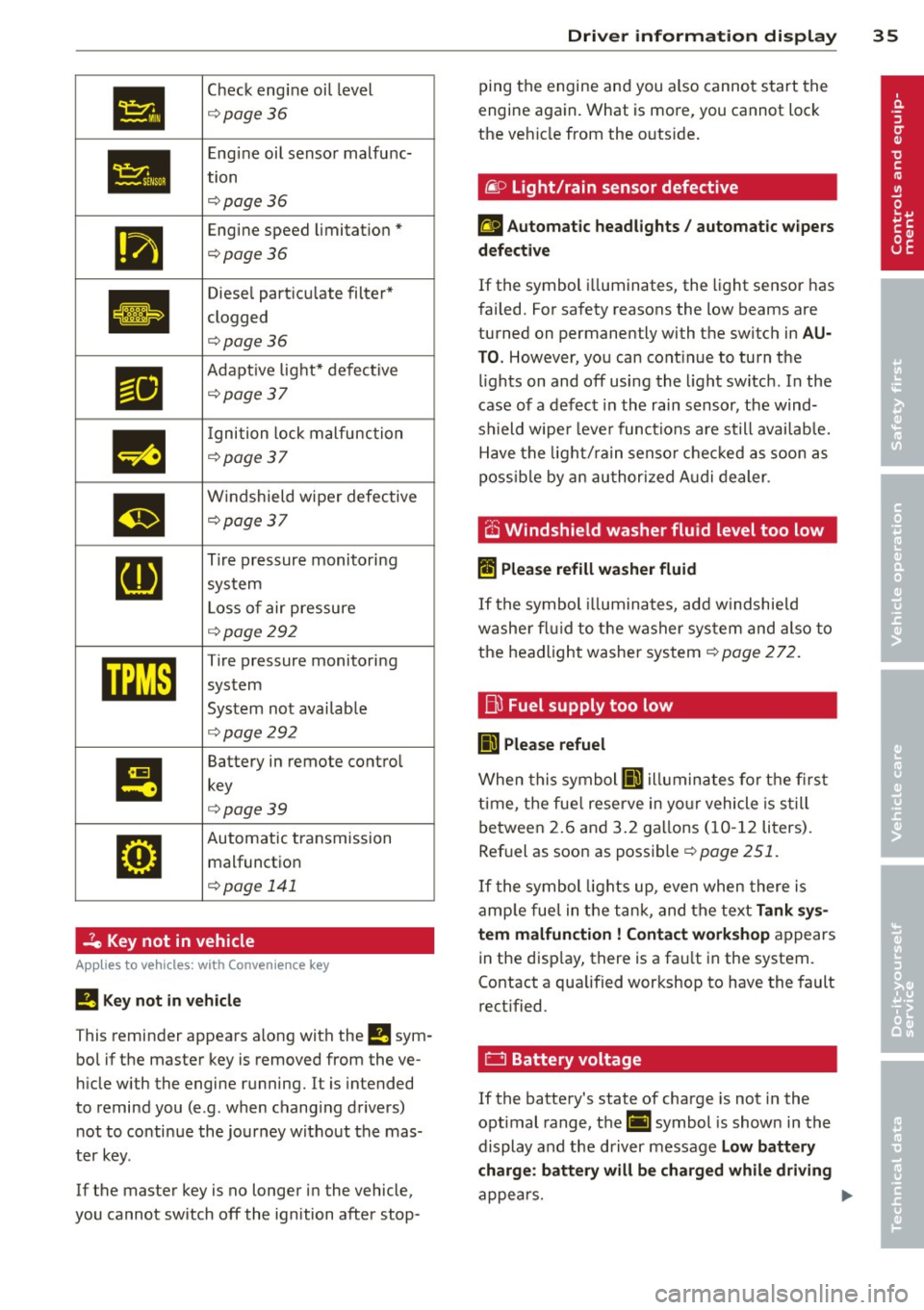
•
Check engine oi l level
¢ page36
•
Engine oil sensor malfunc-
tion
¢page 36
111
Engine speed limitation*
¢page36
Ill
Diesel particu late filter*
clogged
.
¢page36
Ill
Adapt ive light* defective
¢page37
m
I gnition lock malfunction
¢page 37
m
Windshield wiper defective
¢page37
[I]
Tire pressure monitoring
system
L oss of air pressure
¢ page292
mm
Tire pressure monitoring
system
System not avai lab le
¢ page292
I!
Battery in remote contro l
key
¢page39
•
Automatic transmission malfunction
¢ page 141
2e Key not in vehicle
Applies to vehicles: with Convenience key
!I Key not in ve hicle
This reminder appears a long with the !I sym
bo l if the master key is removed from the ve
hi cle with the engine running.
It is intended
to remind you (e.g. when changing drivers) not to continue the journey w ithout the mas
ter key.
If the master key is no longer in the vehicle,
you cannot sw itch
off the ignition after stop-
Dri ver information di spla y 35
ping the engine and you also cannot start the
engine again. What is more, you cannot lock
the ve hicle from the outs ide .
liP Light/rain sensor defective
£I Automatic headlights / automatic w ipers
d efe ctiv e
If the symbol i lluminates, the light sensor has
failed. For safety reasons the low beams are
turned on permanently with the switch in
AU
T O . However, you can cont inue to turn the
l ights on and
off using the l ight sw itch. In the
case of a defect in the rain sensor, the wind
shield wipe r lever functions a re still availab le.
Have the light/ rain senso r chec ked as soon as
poss ib le by an au thorized A udi dealer .
.-v ~,
O Windshield washer fluid level too low
II Plea se refill wa she r fluid
If the symbol illum ina tes, add w indshie ld
washe r fl ui d to the washer sys tem and also to
the headlight washer system¢
page 272.
fj)
Fuel supply too low
II) Ple ase refuel
When this symbol II) illuminates for the first
t ime, the fue l reserve in yo ur vehicle is s till
between 2.6 and 3.2 ga llons (10- 12 liters).
Ref uel as soon as possible¢
page 251.
If the symbol lights up, even when there is
amp le fue l in the tank, and the text
Tank sy s
tem malfuncti on! Contact work shop
appears
in the disp lay, there is a fa ult in the system.
Contact a qualified workshop to have the fault
rect ified.
0 Battery voltage
If the battery's state of charge is not in the
optimal range, the(•] symbol is shown in the
display and the driver message
Low battery
charge : batt ery will be char ged whil e driving
appea rs. .,.
Page 39 of 340
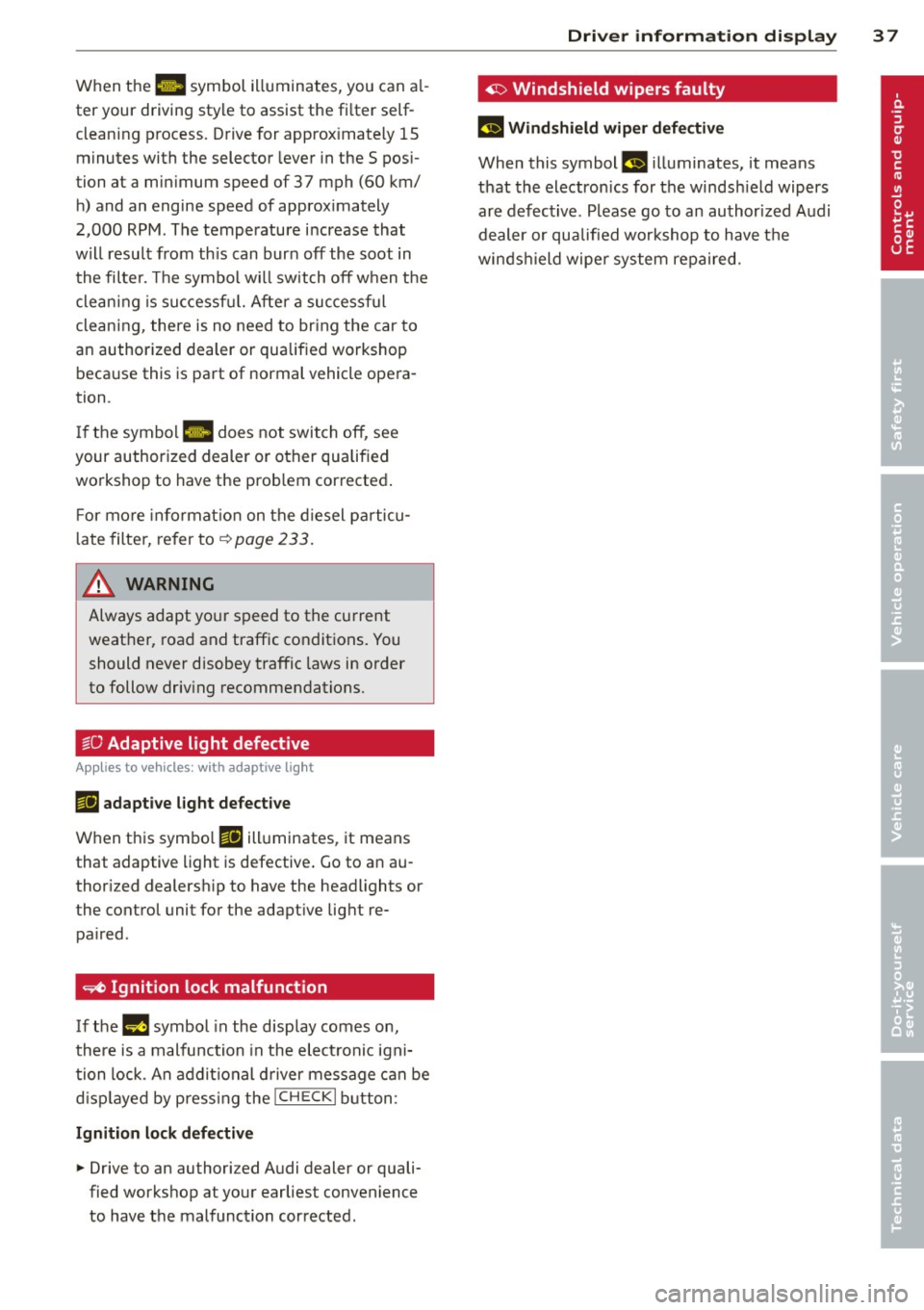
When the 1111 symbol illuminates, you can al
ter your driving style to assist the fi lter self
cleaning process. Drive for approx imately 15
minutes with the selector lever in the S pos i
tion at a minimum speed of 37 mph (60 km/ h) and an engine speed of approx imately
2,000 RPM . The temperature i ncrease that
will result from th is can burn off the soot in
the filter. The symbol w ill switch off when the
cleaning is successf ul. After a successful
cleaning, there is no need to br ing the car to
an authorized dealer or qualified workshop beca use this is part of normal vehicle opera
tion .
I f the symbol
II does not switch off, see
your authorized dealer or other qualified
workshop to have the prob lem corrected .
F or mo re informat io n on the d iesel pa rticu
l ate filter, refer to~
page 233 .
& WARNING ,..__
Always adapt yo ur speed to the current
weather, road and traffic condit ions. You
should never disobey traffic laws in order
to follow driv ing recommendations.
~O Adaptive light defective
Appl ies to vehicles: with adapt ive light
111 adapti ve l ight defe cti ve
When this symbo l Ill illuminates, it means
that adaptive light is defective . Go to an au
thor ized dealersh ip to have the headlights or
the control unit for the adapt ive lig ht re
pa ired .
~ Ignition lock malfunction
If the l!)J symbol in the display comes on,
there is a malfunction in the elect ronic igni
tion lock. An addit ional d river message can be
d isp layed by press ing the
! CHECK I b utton:
Ignitio n lock d efective
.. Drive to an authorized Audi dealer or quali
fied workshop at your earliest convenience
to have the malfunction corrected.
Dri ver information di spla y 37
'1> Windshield wipers faulty
£~$ Windshield wip er de fecti ve
When this symbol £11 illuminates, it means
t h at the electronics for the winds hield wipers
are defective . Please go to an author ized A udi
dealer or qualified wo rkshop to have t he
winds hield wiper system repaired.
Page 43 of 340
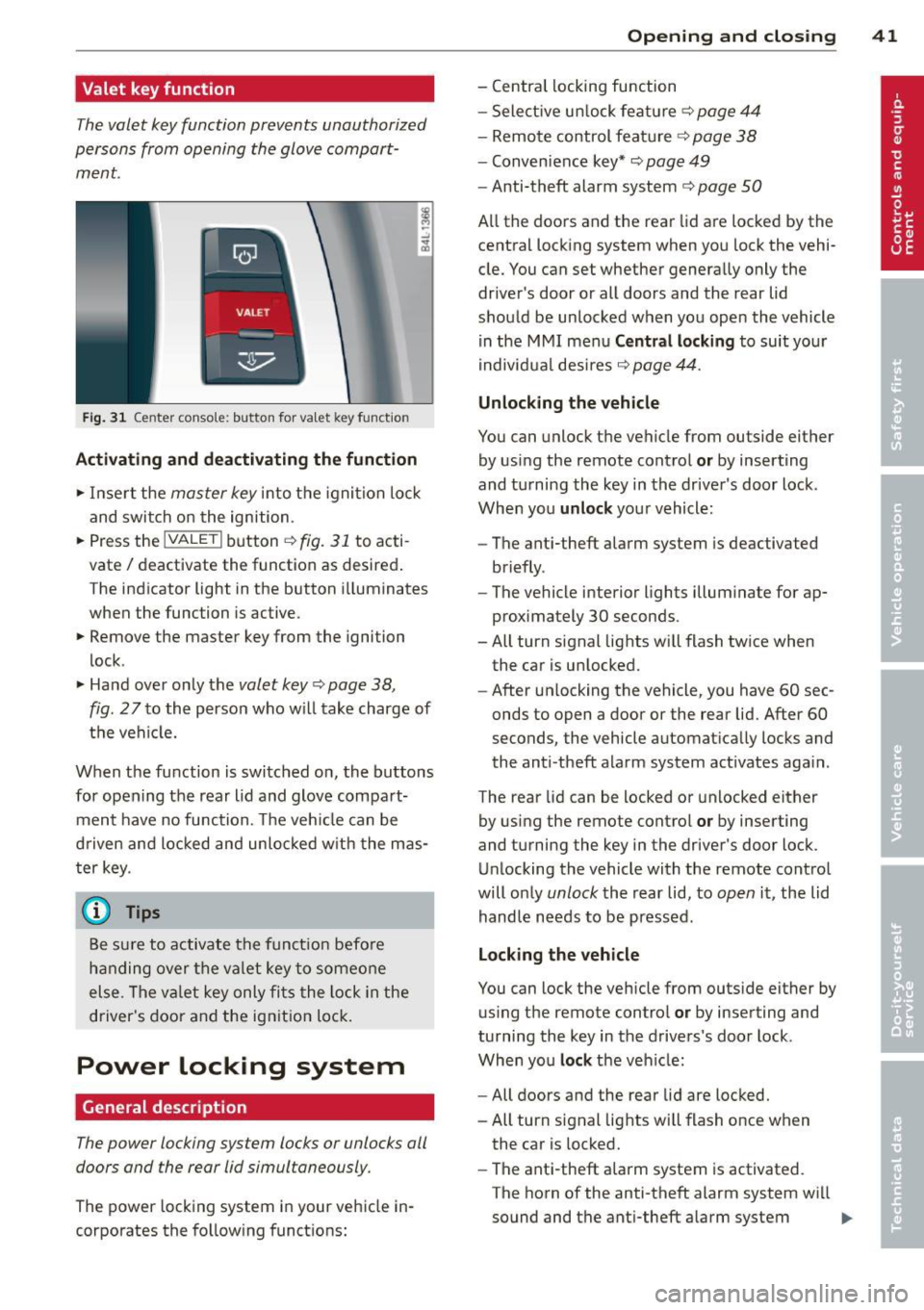
Valet key function
The valet key function prevents unauthorized
persons from opening the glove compart
ment.
Fig. 31 Center conso le: button for va let key funct ion
Activating and deactivating the function
.,. Inse rt the master key into the ignition lock
and switch on the ignition .
.,. Press the
!VALET I button c:> fig. 31 to acti
vate
I deactivate the function as desired .
The indicator light in the button i lluminates
when the function is active.
.,. Remove the master key from the ignition
lock .
.,. Hand over only the valet key
c:> page 38,
fig . 27 to the person who will take charge of
the vehicle.
When the function is switched on, the buttons for opening the rear lid and glove compart
ment have no function. The vehicle can be
d riven and locked and unloc ked w ith the mas
ter key.
(j) Tips
Be sure to activate the funct ion befo re
handing over the valet key to someone
else . The va let key only fits the lock in the
driver's door and the ignition lock.
Power locking system
General description
The power locking system locks or unlocks all
doors and the rear lid simultaneously.
The power locking system in your vehicle in
corporates the fo llowing functions:
Opening and closing 41
- Central locking function
- Select ive un lock feature
c:> page 44
- Remote control feature
c:> page 38
- Convenience key*
c:> page 49
- Anti-theft alarm system
c:> page 50
All the doors and the rear lid are locked by the
central locking system when you lock the vehi
cle. You can set whether generally only the
driver 's door or all doors and the rear lid
should be unlocked when you open the vehicle
in the MMI menu
Central locking to suit your
individual desires
c:> page 44.
Unlocking the vehicle
You can unlock the vehicle from outside either
by using the remote control
or by inserting
and turning the key in the driver's door lock .
When you
unlock your vehicle :
- The anti-theft alarm system is deactivated
briefly .
- The vehicle interior lights illuminate for ap
proximately 30 seconds .
- All turn signal lights will flash twice when
the car is unlocked .
- After un locking the vehicle, you have 60 sec
onds to open a door or the rear lid. After 60
seconds, the vehicle automatically locks and
the anti-theft alarm system activates aga in .
The rear lid can be locked or unlocked either
by using the remote control
or by inserting
and turning the key in the driver's door lock.
Unlocking the vehicle with the remote control
will only unlock the rear lid, to open it, the lid
handle needs to be pressed .
Locking the vehicle
You can lock the vehicle from outside either by
using the remote control
or by inserting and
turning the key in the drivers 's door lock .
When you
lock the veh icle:
- All doors and the rear lid are locked.
- All turn signal lights will flash once when
the car is locked.
- The ant i-theft alarm system is activated.
The horn of the anti-theft alarm system wi ll
sound and the anti-theft alarm system ..,.
Page 44 of 340

42 Openin g and clo sing
readiness light, located in the upper part of
the driver's door panel, will start to blink.
- T he vehicle interior lights turn off.
Unlocking and l ocking with Conven ience
k ey*
On vehicles which a re equipped w ith the C o n
ve nience k ey*
authorization system, the
doors are unlocked without a key by means of
a proximity sensor in the door handle. The
doors are simi larly locked without a key using
the locking button. Each door has a proximity
sensor and a locking button .
Automatic l ock ing
The automatic locking feature locks all the ve
hicle doors and the rear lid when you drive
faster than 9 mph (15 km/h). This function can be turned on and off in the MMI
C entr al
lo cking
Menu c:> page 44.
You can un lock the vehicle from the inside by :
- removing the key from the ign it ion sw itch
(the vehicle will automat ica lly unlock itself)
or
- pressing the unlock part of the power lock
switch @or
- pull ing the door handle (twice to open the
rear doors).
Unintent ionall y locking yourself out
In the following cases there safeguards to
prevent you locking your remote master key in
the vehicle :
- The veh icle does not lock with the power
locking sw itch
c:> page 44 if the driver's
door is open.
- On vehicles with Convenience key* , if the
most recently used master key is in the lug
gage compartment, the rear lid is automati
cal ly unloc ked aga in after it is closed.
Do not lock your vehicle with the
r e mot e m as
t e r k ey or Convenienc e key*
until all doors
and the rea r lid are closed. In t his way you
avoid locking yourse lf out accidenta lly.
A WARNING
- When you lock your vehicle from outside,
nobody- espec ially children -should re
main inside the vehicle . Remember,
when you lock the vehicle from the out
side the windows cannot be opened from
the inside.
- When you leave the veh icle, always re
move the ignition key and take it with
you . This will prevent passengers (chil
dren, for example) from accidentally be
ing locked in the vehicle should they acci
dentally press the power locking switch
in the front doors.
- Do not leave children inside the vehicle
unsupervised. In an emergency it would
be imposs ible to open the doors from
the outside without the key.
(D Tips
- In the event of a crash with airbag de
ployment all locked doors will be auto
matically unlocked to give access to the
vehicle occupants from the outside.
- If the power locking system sho uld mal
function, you can lock each door individ
ually using the vehicle key
c:> page 45 .
-If the power locking system shou ld fa il,
you can still open the fuel tank flap in an
emergency
c:> page 254 .
-You are well advised not to keep va lua
bles inside an unattended vehicle, v is ible
or not. Even a properly locked vehicle
cannot p rov ide the secur ity of a safe .
Page 45 of 340

Unlocking and locking the vehicle with
the remote control
How the remote control works.
Fig. 32 Remot e contr ol: fun ctio n but ton s
Either the driver 's door only or the entire vehi
cle will unlock when the unlock button @ is
pressed once, depending on the settings in
the MMI
Central locking menu ¢ page 44 .
To unlock the vehicle CD
.. Press button @.
.. Press button @two
times within two sec
onds
to unlock all doors and the rear lid .
To lock the vehicle 5'.l
.. Press button @¢A in General description
on page 42 .
.. Watch that all turn signal lights flash once .
To unlock rear lid only ,c::::j
.. Press button © for approximately one sec
ond .
PANIC Button
.. Push the red button @to activate the panic
function. The horn sounds and the turn sig nals flash .
.. Push the button @again to deactivate the
panic function.
On vehicles w ith Convenience key*, the selec
tor lever must be in the P posit ion, otherwise
the vehicle cannot be locked.
_& WARNING
Read and follow all WARNINGS ¢&. in
General description on page 42.
-
Opening and closing 43
@ Tips
-In order to make sure the locking func
tion is working, you should a lways keep
your eye on the vehicle to make s ure it is
properly locked.
- Do not use the remote control if you are
inside the car, otherwise you may unin
tentionally lock the vehicle, and then you
would set off the anti-theft alarm when
you try to start the eng ine or open a
door . In case this happens anyhow, push
the unlock button@.
- Use the pan ic function on ly if you are in
an emergency s ituation.
Operating locks with the key
To lock and unlock the vehicle from the out
side, turn the key in the lock of the driver's door .
Fig. 33 Key turns fo r open in g and closing .
To unlock the vehicle
.. Insert the key into the lock of the dr iver's
door .
.. Turn the key
one time to position @to un
lock the driver's door.
.. Turn the key
two times to position @
N N N :;
~
¢ fig. 33 to unlock all doors and the rear lid .
To lock the vehicle
.. Close a ll windows and doors properly.
.. Turn the key in the lock of the driver 's door
to the lock position
@ ¢ A in General de-
scription on page 42. ..,.