ESP AUDI Q7 2015 Owner´s Manual
[x] Cancel search | Manufacturer: AUDI, Model Year: 2015, Model line: Q7, Model: AUDI Q7 2015Pages: 350, PDF Size: 86 MB
Page 51 of 350

M N
0 ...J
'SI: ,...., \!) ..,.,
,...., ..,., ,....,
@ Tips
-In order to activate the child safety lock
on the left and the right side, you have to press the two safety buttons in succes
sion.
- Make certain that the check light comes
on in the corresponding safety switch
when the child safety lock is activated.
Convenience key
Description
A pp lies to vehicles: with Convenie nce key
Access and vehicle operation based on: Mas
ter key remains in driver 's pocket .
The Convenience key vehicle authorization
system allows
keyless unlocking , locking and
starting of the vehicle . You only have to carry
the master key on your person.
It makes no difference whether the master
key is in your jacket pocket or in your brief
case . As soon as you approach your vehicle,
the Convenience key recognizes the request
for access, checks for authorization and ena
bles the following functions:
- Unlocking the vehicle~
page 49.
-Locking the vehicle~ page 50.
-Switching on ignition and starting the en -
gine by pressing the
I START! button; the
master key does not have to be in the igni
tion switch
~page 109.
_& WARNING
- When you lock your vehicle from outside,
nobody- especially children -should re
main inside the vehicle. Remember,
when you lock the vehicle from the out
side the windows cannot be opened from
the inside .
- When you leave the vehicle, always re
move the ignition key and take it with
you. This will prevent passengers (chil
dren, for example) from accidentally be
ing locked in the vehicle should they acci-
Opening and closing 49
dentally press the power locking switch
in the front doors.
- Do not leave children inside the vehicle
unsupervised. In an emergency it would
be impossible to open the doors from
the outside without the key.
(D Tips
- In order for the Convenience key to func
tion, you must always carry the master
key with you .
- In order to be able to unlock or lock the
vehicle, the authorized master key must
be within a range of about S feet (l.S
meters) from the door or the rear lid.
- Of course, you can still unlock and lock
your vehicle using the buttons on the
master key . The selector lever must be in
the P position .
- For Declaration of Compliance to United
States FCC and Industry Canada regula
tions ~
page 329 .
Unlocking the vehicle
Applies to vehicles : wit h Co nve nience key
The doors and the rear lid can be unlocked
without operating the master key .
Fig. 44 Convenien ce key: unlocking vehicle door
.,. Take hold of the door handle. The door is un-
locked automatically.
.,. Pull the handle to open the door.
A door is unlocked as soon as you approach
the door handle and the system recognizes an
authorized master key. The vehicle can be un
locked at any door. The authorized master key
only has to be within a range of about 5 feet (l.S meters) from the respective door.
II>-
Page 52 of 350
50 Openin g and clo sing
When a door is unlocked, the driver 's door is
a lways unlocked as we ll.
It depends on the
settings in the central locking menu in the
MMI whether the entire vehicle is unlocked or
only certain doors ¢
page 44.
{O) Tips
If your vehicle has been stand ing for an ex
tended period, please note the following:
- The proximity sensors are deactivated af-
ter a few days to save power. You then
have to pull on the door handle once to
unlock the vehicle and a second time to
open the veh icle.
- To prevent the battery from being dis
charged and to preserve your veh icle's
ability to start for as long as possible,
the energy management system gradu
a lly switches off unnecessary co nven
i ence f unct io ns.
It is possible that you
will not be able to unlock your vehicle us
ing these convenience f unctions.
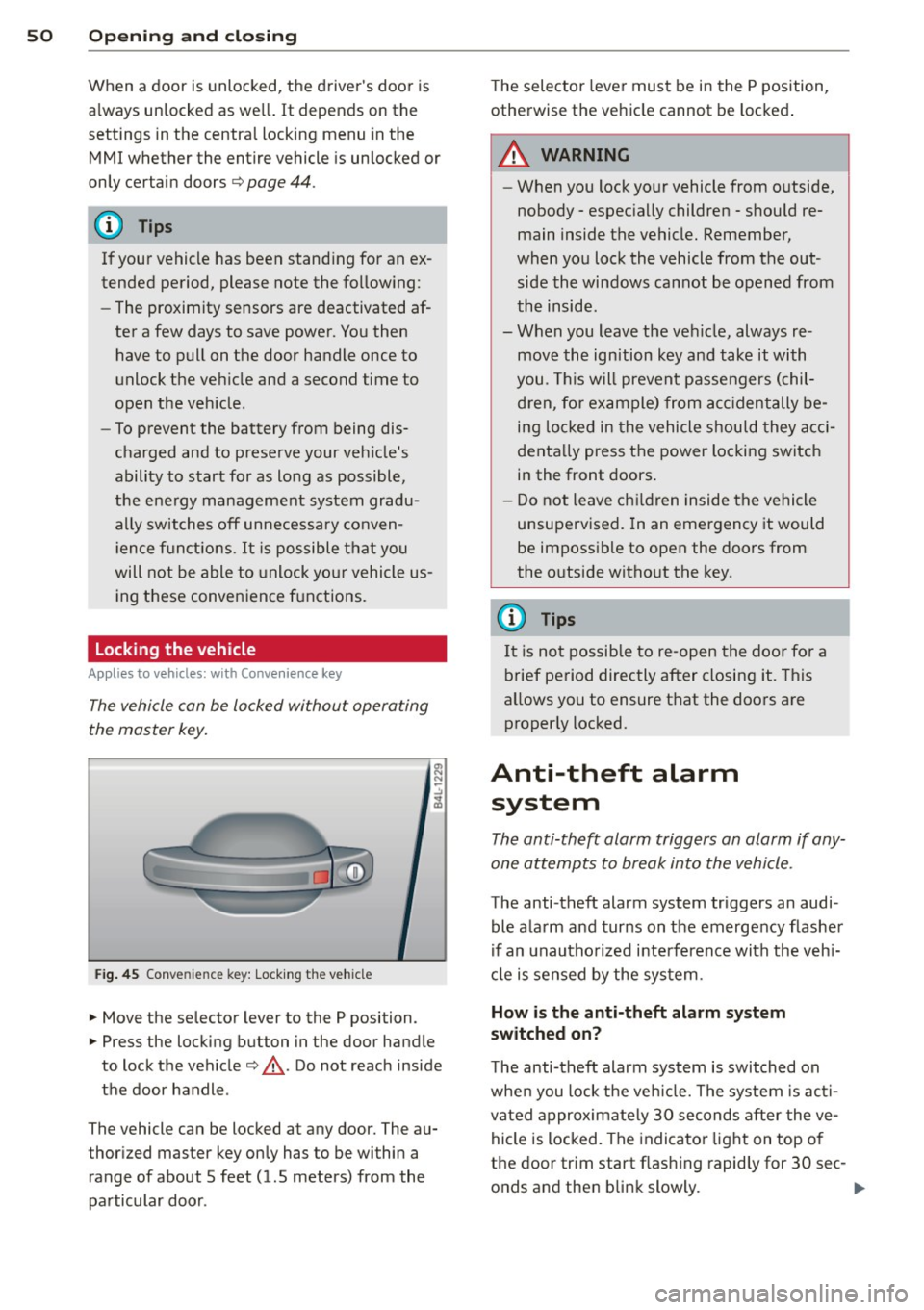
Locking the vehicle
A ppl ies to vehicles: with Conve nie nce key
The vehicle can be locked without operating
the master key.
Fig . 45 Conve nience key: Lock ing th e ve hicle
.. Move the se lector lever to the P position .
.. Press the locking button in the door handle
to lock the vehicle¢,&.. Do not reach inside
the door handle .
The vehicle can be locked at any door. The au
thor ized master key on ly has to be within a
range of about 5 feet (1.5 meters) from the
pa rticular door . T
he selec tor lever must be in the P position,
otherwise the ve hicle cannot be locked .
A WARNING
--When you lock yo ur vehicle from o utside,
nobody - espec ia lly children - shou ld re
main inside the vehicle. Remember,
when you lock the vehicle from the out
side the wi ndows cannot be opened from
the inside.
- When you leave the veh icle, always re
move the ign ition key and take it with
you. This will prevent passengers (chil
d ren, fo r ex ample) from acci dentally be
i n g lo cked in the vehicle shou ld they acci
denta lly press the power locking switch
in the front doors.
- Do not leave ch ildren inside the vehicle
unsupervised. In an emergency it would
be impossible to open the doors from
the o utside witho ut the key.
(J} Tips
It i s no t possible to re -open the doo r fo r a
brief pe riod directly after closing it. This
allows you to ensure that the doo rs are
properly locked.
Anti-theft alarm system
The anti-theft alarm triggers an alarm if any
one attempts to break into the vehicle.
The anti-theft alarm system triggers an audi
ble ala rm and turns on the emergency flashe r
if an unautho rized interfe rence with the veh i
cl e is sensed by the sys tem.
How is the anti-theft alarm system
switched on?
T he anti-theft alarm system is switched on
whe n you lock the ve hicle. The system is ac ti
vated approximate ly 30 seconds after the ve
hicle is locked. The indicato r ligh t on top o f
the door trim start flashing rapid ly for 30 sec -
onds and then blink slowly. ..,.
Page 53 of 350
M
"' 0 ..J
"". rl I.O
"' rl
"' rl
How is the anti-theft alarm system
switched off?
The anti -theft a la rm system is switched off
on ly when you unlock yo ur vehicle. If yo u do
not open a door w ith in 60 seconds after you
have unlocked with the remote control , the
ve hicle w ill lock itse lf again a utomat ically .
When will the anti-theft alarm sy stem be
triggered?
W hen the ve hicle is locked , the alarm system
mon itors and p rotects the following parts of
the vehicle:
- engi ne compartment
- lu ggage compartment
- doo rs
- i gnition
When the system is activated, the alarm will
be tr iggered if on e of the doo rs, the eng ine
h ood or t he rear lid a re opened, o r if the ig ni
tion is turned on. The an ti-t heft alarm sys tem
will also go off when t he battery is discon
nected .
You can a lso tr igge r the alarm by p re ssing t he
P ANIC button o n your remote con trol. T his
will alert o ther peop le in case of emergency.
Press the
PANIC b utton again to t urn off the
a larm .
How is the anti-theft alarm switched off
when triggered?
The a larm system is switc hed off when you
u nl ock the vehicle o r whe n the ignition is
sw itched on. The alarm will also switch itself
off when it comes to the end of its cycle.
Emergency flasher and horn
The emergency flas her wi ll blink brief ly and
the hor n sounds when the doors, engine hood
a nd rear lid are proper ly closed .
If th e emergen cy fl ashe rs do no t blink , or the
horn does no t soun d, check the doors, engine
h ood an d rear lid to make sure they are prop
erly closed.
If you close a door, t he hood o r
the rear lid w ith the anti-theft alarm sw itched
on, the emergency flashers will b link and the
Opening and clo sin g 51
horn wi ll sou nd on ly afte r you have closed the
door or li d.
(D Tips
For the anti-the ft a la rm sys te m to fu n c
tion properly, make sure all ve hicle doors
and win dows are closed before leavi ng t he
v ehicle .
Power windows
Controls
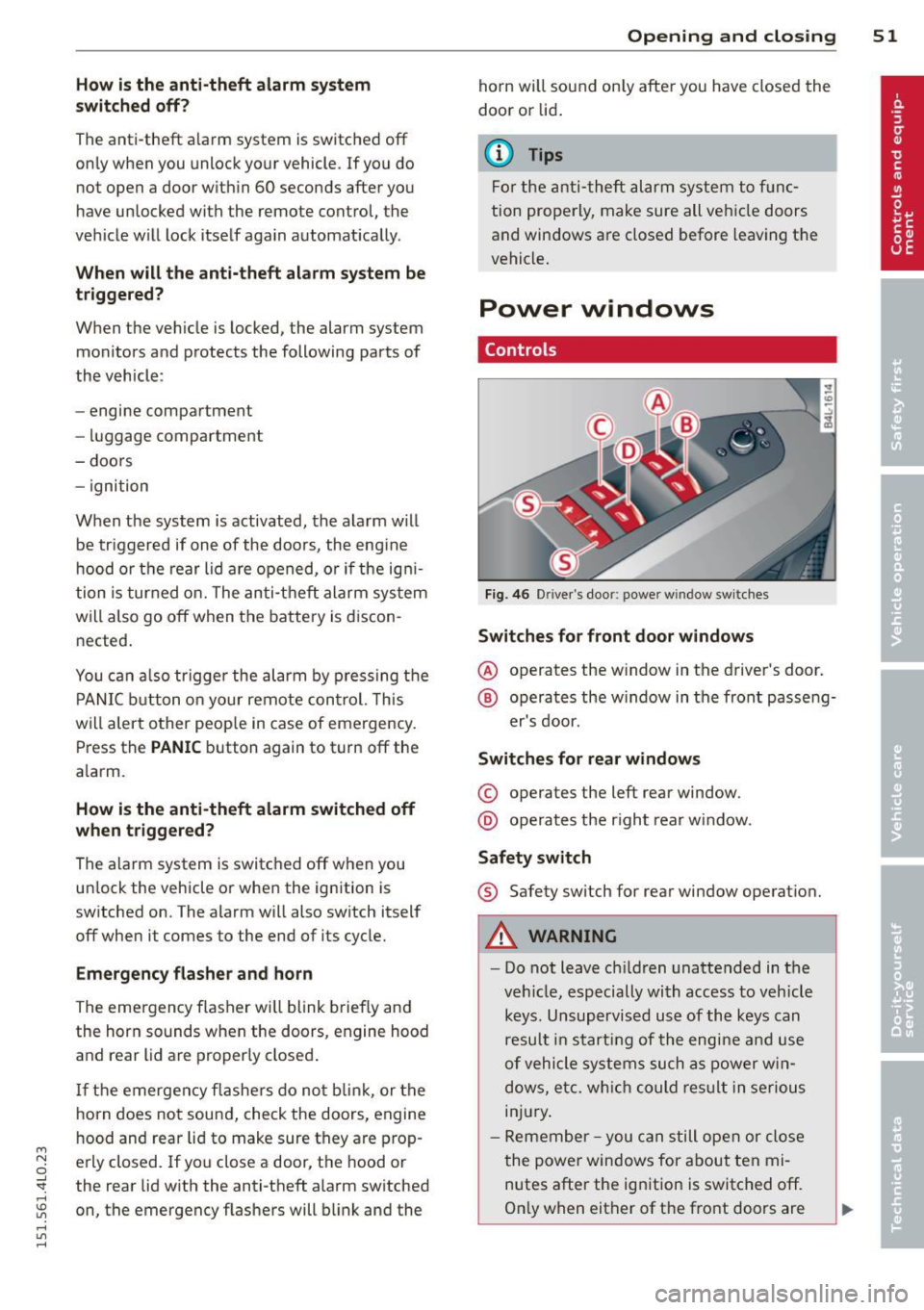
Fig. 4 6 Drive r's doo r: power w indow sw itches
Switches for front door windows
@ o p erates the w indow in the d river's door.
® opera tes the w indow in the front passe ng-
er's door .
Switches for rear windows
© operates the left rear window.
@ operates the r ight rea r wi ndow.
Safety switch
® Safety switch for rear window operat ion.
A WARNING
- Do not lea ve c hildren unattended in t he
ve hicle, especially wi th access to veh icle
keys. Unsupervi sed us e of the keys can
resu lt in start ing of the engi ne and use
o f vehicle system s such as po wer w in
dows, etc. w hich co uld res ult in se riou s
in jur y.
- R eme mber -you can s till ope n or close
the powe r win dows for about ten mi
n utes after the ign ition is switc hed off .
O nl y w hen eit her of t he fro nt doors are
Page 54 of 350

52 Openin g and clo sing
opened are the power windows switched
off.
- Be careful when closing the windows .
Check to see that no one is in the way, or
serious injury could result!
- Always remove the ignition key whenever
you leave your vehicle.
- If you lock your vehicle from the outside,
no one, especia lly children, sho uld re
main in the vehicle .
- Do not stick anything on the windows or
the windshield that may interfere with
the driver's fie ld of vision.
In addition to t he switches in the drive r's
door there is a separate switch in each
door for the power window in that door
¢ page 53, fig. 47.
Switches in the driver's door
T he driver can operate all windows.
I f the respective switch is pushed or pulled
the w indow will open or close. The power win
dow switches have a
two -positi on fun ction :
Opening the windows
.. Push the sw itch to the fir st stop and hold i t
there unt il the wi ndow has lowered to the
desired position.
.. Push the switch briefly to the
second stop:
the window wi ll automatically open all the
way.
Closing the windows
.. Pull the switch up to the fir st stop and ho ld
it there until the window has risen to the de
sired position .
.. Pull the switch quick ly to the
second po si
tion :
the w indow w ill automatically close all
t he way ¢
A in Controls on page 5 l.
Activating /deactivating the r ear windows
.. Press the left[!] switch ¢ page 51, fig. 46 to
deactivate only the window regulator in the
left door . The indicator light in the switch i l
luminates.
.. Press the right[!] switch ¢ page 51, fig. 46
to
d eactiv ate only the window reg ulator in
the
right door. The ind icator light in the
sw itch illuminates .
.. Press the
1±1 sw itch aga in to reactivate the
w indow regu lator . The indicato r light in the
sw itch goes out .
If you press both
1±1 switches ® in succession,
the following funct ions are switched off in the
rear of the vehicle:
- The window regulator switches in the rear
doors .
- The buttons for the Panoramic slid ing su n
roof* .
- On veh icles with rear climate control*, oper
ation from the rear is blocked . Dashes" ---"
are show n in the displays for the rear cli
mate cont ro ls, and the rear air-cond ition ing
can only be operated from the climate con
trols in the cabin ¢page 100.
- I f
only th e left 1±1 sw itch was pressed, the
w indow regu lator in the
left rear do or and
t he buttons in t he rear for the Panoramic
sliding sunroof* are deactivated . In addi
t ion , the door is locked .
- If
o nly the right[!] switch was pressed, the
w indow regu lator in the
right re ar door and
the buttons in the rear for the Panoramic
sliding sunroof* are deactivated . In addi
tion, the door is locked.
T his feature has been provided for the safety
of small children riding in the rear of the ve hi
cle .
(D Tips
- T he windows can sti ll be opened and
closed for about ten minutes after the
ignition has been t urned off . The powe r
w indows are not shut off unt il one of the
front doors is opened.
- In order to act ivate the child safety lock
on the left and the right side, you have to
press the two safety switches in succes
sion . Make certa in that the check light
comes on the correspond ing safety
Page 57 of 350

M N
0 ...J
'SI: ,...., \!) ..,.,
,...., ..,., ,....,
Opening front r oof segment to comf ort
se ttin g
"Turn the rotary switch ¢ fig. 49@ to posi
tion ©, you will feel the switch engage . The
roof segment is slid open only to a comfort
position w ith low wind noise. This is the rec
ommended standard sett ing for normal
driv ing cond itions .
Sliding front roof segment full y open
" Rotate and hold the switch @ in position @
unt il the roof segment has reached the de
s ired pos it ion. There may be increased wind
noise in this pos it ion.
(D Tips
- In posit ion @, the switch jumps back to
pos ition © again as soon as the switch is
released .
- When dr iv ing with the Panoramic slid ing
sunroof open, open the front roof seg
ment to the comfort setting to m inim ize
wind noise .
Closing Panoramic sliding sunroof
Applies to vehicles: with Panoram ic sliding sunroof
Clos ing tilted front roof segm ent
" Pull the switch¢ page 54, fig . 49 @ and
ho ld it until the roof segment has reached
the des ired pos ition.
" Pull the switch
brie fly to close the roo f seg
ment automatica lly. By activating the switch
briefly again, the roof segment can be stop
ped in any position ¢
.&_.
Clos ing front r oof s egment wh en slid
o p en
" Rotate switch ¢ page 54, fig. 49@ to posi
t ion @ to close the roof segment
c::> .&_. To
move to an intermediate posit ion, rotate the
switch to the corresponding click-stop .
Clos ing tilt ed r ear roof segm ent
" Tap the rocker switch ¢ page 54, fig. 49 ®
or
c::> page 54, fig. 50 © in the front area Q
br iefl y to close the roof segment completely
c::> .&_.
Opening and clo sin g 55
"To set an intermediate position manually,
press the rocker switch in the front area~
until the roof segment has reached the de
sired tilt posit ion
c::> .&_ .
A WARNING
Improper use of the Panoram ic sliding
sunroof can cause serious personal injury.
- Be careful when closing the Panoramic
-
sliding sunroof . Not paying attention
could cause you or others to be trapped
and injured as the Panoram ic sliding sun
roof closes.
- Always take the key w ith you when you
leave the vehicle to prevent injur ies
caused by the Panoramic slid ing sunroof
clos ing
- Never leave children or persons requiring
assistance alone in the vehicle, especially
when they could access the vehicle keys .
Unsupervised use of the keys can result
in the engine being started or use of ve
hicle systems such as the power win
dows, etc. wh ich could result in serious
injury. The doors could be locked with
the remote key, de laying help in an
emergency.
- The Panoramic slid ing sunroof will con
tinue to operate until the ign ition key
has been removed and one of the front
doors has been opened.
Convenience closing feature
Applies to vehicles: wit h Pa noramic slid ing sunroof
The Panoramic sliding sunroof can be closed
from outside with the key in the driver's door lock .
" Insert the key into the dr iver's door lock.
" Turn and hold the key in the lock pos it ion ®
c::> page 43, fig . 33 until the Panoramic slid
ing sunroof is complete ly closed
c::> A in
Closing Panoramic sliding sunroof on
page 55.
T he power s un blind is a lso closed . .,..
Page 62 of 350
60 Clear vision
Clear vision
Lights
Switching the headlights on and off
In the "AUTO" position, a light sensor auto
matically switches the head -and taillights on
and off in response to light conditions .
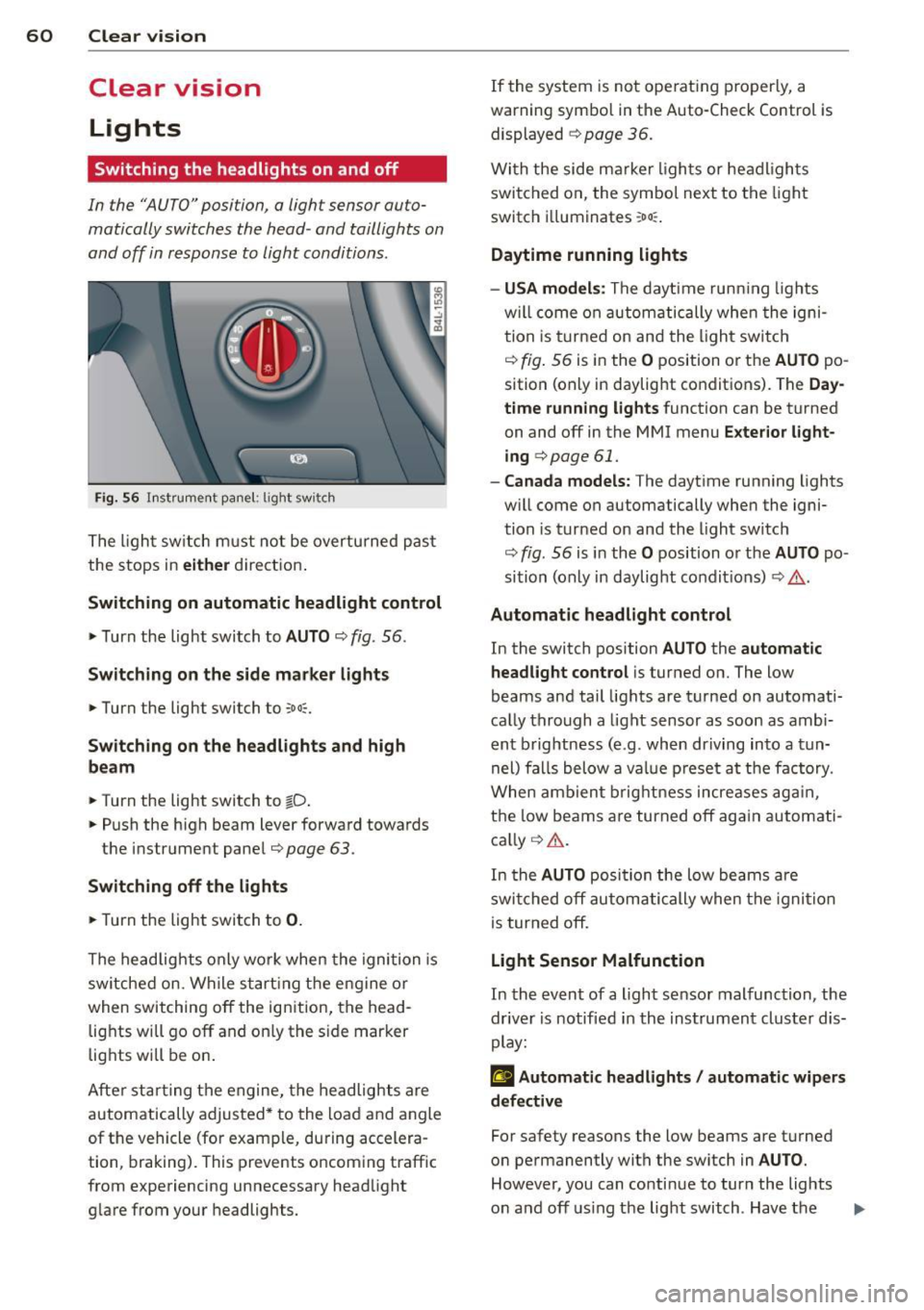
Fig. 56 Instrument pane l: lig ht sw it ch
The light switch must not be overturned past
the stops in
either direction.
Switching on automatic headlight control
.,. Turn the light switch to AUTO ¢ fig. 56.
Switching on the side marker lights
... Turn the light switch to :o o:.
Switching on the headlights and high
beam
... Turn the light switch to tD .
... Push the high beam lever forward towards
the instrument panel¢
page 63 .
Switching off the lights
... Turn the light switch to 0.
The headlights only work when the ignition is
switched on. While starting the engine or
when switching off the ignition, the head
lights will go off and on ly the side marker
lights will be on.
After starting the engine, the headlights are
automatically adjusted* to the load and angle
of the vehicle (for example, during accelera
tion, braking). This prevents oncoming traff ic
from experiencing unnecessary headlight
glare from your headlights. If the
system is not ope rating properly, a
warn ing symbol in the Auto-Check Control is
displayed
¢ page 36.
With the side marker lights or headlights
switched on, the symbol next to the light
switch i lluminates
:oo :.
Daytime running lights
- USA models :
The daytime running lights
w ill come on automatically when the igni
tion is turned on and the light switch
¢ fig. 56 is in the O position or the AUTO po
sition (only in daylight conditions). The
Day
time running lights
function can be turned
on and off in the MMI menu
Exterior light
ing
c> page 61.
- Canada models: The daytime running lights
w ill come on automatically when the igni
tion is turned on and the light switch
¢ fig. 56 is in the O position or the AUTO po
sition (only in daylight condit ions) ¢
.&..
Automatic headlight control
In the switch position AUTO the automatic
headlight control
is turned on. The low
beams and tail lights are turned on automati
cally through
a light sensor as soon as ambi
ent brightness (e .g . when driving into
a tun
nel) falls below
a value preset at the factory .
When ambient brightness increases again,
the low beams are turned off again automati
cally ¢
A.
In the AUTO position the low beams are
switched off automatically when the ignition
is turned off.
Light Sensor Malfunction
In the event of a light sensor malfunction , the
driver is notified in the instrument cluster dis
play:
£I Automatic headlights / automatic wipers
defective
For safety reasons the low beams are turned
on permanently with the sw itch in
AUTO.
However, you can conti nue to turn the lights
on and off using the light switch . Have the ..,.
Page 63 of 350
light sensor checked as soon as possible at an
authorized Audi dealer or qualified workshop.
A WARNING
- Daytime running lights and automatic
headlights are only intended to assist
the driver. They do not relieve the driver
of his responsibility to check the head
lights and to turn them on manually ac
cording to the current light and visibility
conditions. For example, fog cannot be
detected by the light sensors*. So always
switch on the headlights
~D under these
weather conditions and when driving in
the dark.
- Crashes can happen when you cannot see
the road ahead and when you cannot be
seen by other motorists. Always turn on
the headlights so that you can see ahead
and so that others can see your car from
the back.
- Please obey all laws when using the
lighting systems described here.
@ Tips
-With the switch in AUTO front fog lights
and rear fog lights cannot be turned on in addition.
- The light sensor for headlight control is
located in the rear view mirror mount.
You should therefore not apply any stick
ers to the windshield in this area in order
to prevent malfunctions or failures.
- Some exterior lighting functions can be
adjusted ¢
page 61.
-When you remove your key from the igni
tion while the vehicle's lights are turned
on, a buzzer sounds as long as the driv
er's door is open.
- In cool or damp weather, the inside of
the headlights, turn signals and tail
lights can fog over due to the tempera
ture difference between the inside and
outside. They will clear shortly after
M "' switching them on. This does not affect 0
~ the service life of the lighting.
rl I.O
"' rl
"' rl
Clear vision 61
-In the event of a light sensor malfunc
tion, the driver is notified in the instru
ment cluster display¢
page 35.
Adjusting exterior lighting
The functions are set in the MMI.
.,. Select: !CAR ! function button > Systems*
control button > Exterior lighting. Or
.,. Select:
I CAR I function button > Car systems*
control button > Vehicle settings > Exterior
light ing.
Coming home (Lights when leaving car),
Leaving home (Lights when unlocking car)
The coming home function illuminates the
area outside the vehicle when you turn the ig
nition off and open the driver's door. Depend
ing on vehicle equipment, the function can be
switched on and off or the length of ti me the lights remain on* can be adjusted .
The leaving home illuminates the area outside
the vehicle when you unlock the vehicle . This
function can be switched on and off .
The Coming home and Leaving home func
tions only operate when it is dark and the light switch is in the
AUTO position.
Daytime running lights
USA models: The daytime running lights can
be turned on or off using this function.
Canada models: The function cannot be
turned
off. It is activated automatically each
time the ignition is turned on. This menu item is shown "greyed out" .
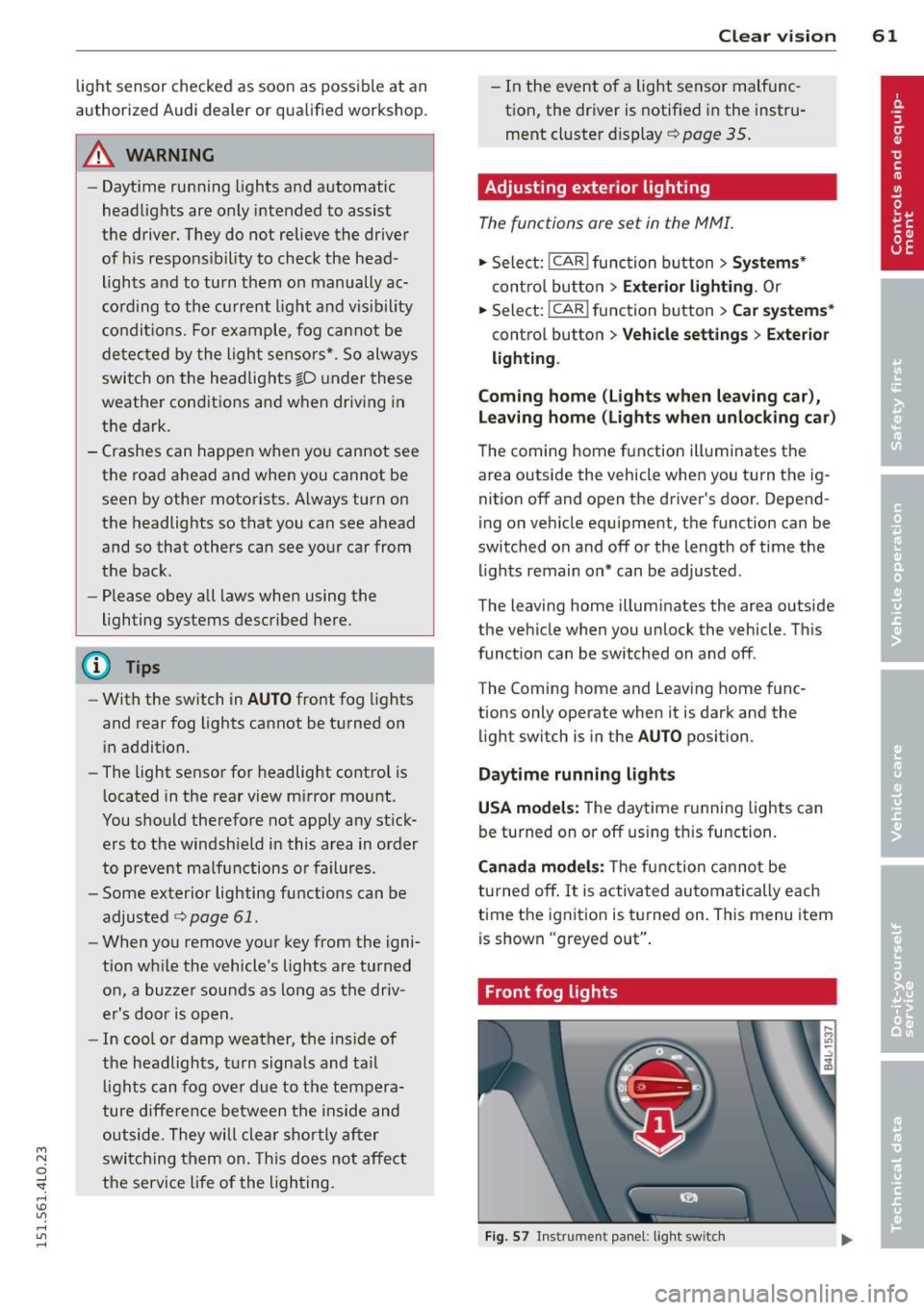
Front fog lights
Fig. 57 Instrument panel: light switch
Page 66 of 350
64 Clear vision
Notes on the se feature s
- The turn signals only work with the ignition
tu rned on. The indicator lights
II or ii in
the instr ument cluster ¢
page 14 also b link .
- After you have turned a corner, the turn sig -
nal switches off a utomat ically.
- T he
high beam works only when the head
lights are on. The indicator light
SI in the
instrument cluste r illuminates when the
high beams a re on.
- The
headlight flasher works on ly as long as
yo u hold the leve r - even if there are no
lights turned on . The ind icator light
SI in
the instrument cl uster illum inates when you
use the head light flasher.
A WARNING
Do not use the hig h beam o r headlight
flasher if you know that th ese cou ld blind
oncoming traffic.
Interior lights
Front interior lights
-
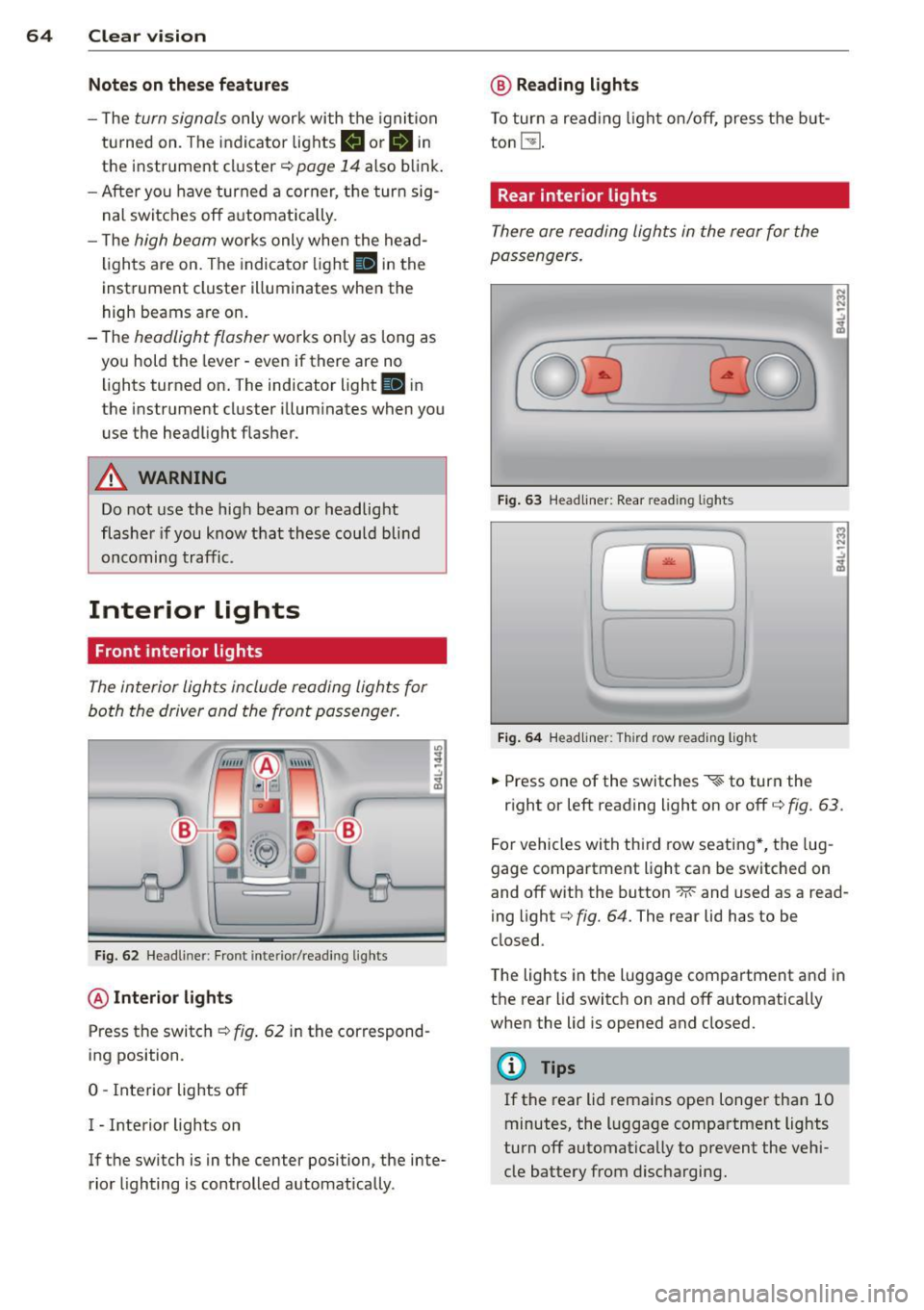
The interior ligh ts include reading lights for
bo th the driver and the front passenger .
Fig. 6 2 Headli ner: Fro nt inte rior/read ing lights
@ Interior lights
Press the switch ¢ fig. 62 in the correspond
ing position.
0 -Interior lights off
I - Inte rior lights on
If the switch is in the center position, the inte
rior lighting is controlled automatica lly.
@ Reading lights
T o tur n a read ing light on/off, press the b ut
ton
t!J .
Rear interior lights
There are reading lights in the rear for the
passengers .
Fig. 63 Head liner: Rear read ing lights
~
--
' ~ '-
Fig . 64 Head liner: Third row read ing light
.. Press one of the switches ~ to turn the
N .., N
.:,
~
::i N -.:,
~
right or left reading light on or off c::;, fig. 63.
For vehicles with thi rd row seating *, the lug
gage compartment light can be switched on
and off with the button -M-and used as a read
ing light
c::;, fig. 64. The rear lid has to be
closed.
The lights in the luggage compartment and in
t h e rear lid switch on and off automatically
when the lid is opened and closed.
@ Tips
If the rear lid remains ope n longer than 10
minutes, the l uggage compartment lights
turn off automatically to prevent the vehi
cle battery from disc harging .
Page 69 of 350

M
"' 0 ..J
"". rl I.O
"' rl
"' rl
the rain sensor is not activated until vehicle
speed is above 4 mph (6 km/h).
To reduce the sensitivity of the rain sensor,
the switch@ must be moved down. To in
crease the sensitivity of the rain sensor, the
switch must be moved up.
The higher the sensitivity setting, the sooner
the windshield wipers react to moisture on
the windshield . Increased sensitivity is sig
naled by the windshield w ipers making a sin
gle pass over the windshield.
The rain sensor wiper intervals depend on the
sensitivity setting as well as vehicle speed .
During brief stops, wiper motion will adjust in
relation to the amount of rain on the wind
shield.
A WARNING
- Wiper blades are crucial for safe driving!
Only when they are in good condition are
they able to clear the windows properly
to provide uncompromised visibility .
Worn or damaged wiper blades are a
safety hazard
i:::> page 69, Replacing
windshield wiper blades!
- The rain sensor is only designed to assist
and support the driver.
It remains entire
ly the driver's responsibility to monitor
outside weather conditions and to man
ually activate the wipers as soon as rain
or drizzle reduces visibility through the
windshield .
(D Note
In freezing or near freezing conditions:
- Always check that the wiper blades are
not frozen to the glass before you turn
the wipers on. Loosen a wiper blade
which is frozen in place before operating
the wipers to prevent damage to the
wiper blade or the wiper motor .
- Do not use the wipers to clear a frosted
window . Using the wipers as a conven
ient ice scraper will destroy the wiper
blades .
Clear vision 67
-Prior to using a car wash, the w indshield
wiper system must be switched off (lever
in position 0). This helps to prevent unin
tentional switching on and damage to
the windshield wiper system.
(1} Tips
- The windshield wipers are switched off
when the ignition is turned off. Activate
the windshield wipers after the ignition
is switched back on by moving the wind
shield wiper lever to any position .
- Worn or dirty windshield wiper blades
cause smearing which can affect the op
eration of the rain sensor . Check the con
dition of your windshield w iper blades
regularly.
- The rain sensor is part of the interval
wiping system. Turning off the ignition
will also deactivate the rain sensor. To re activate the sensor, switch off the inter
val wiping function, then switch it back
on again.
- Make sure the washer fluid reservoir in
the engine compartment is topped off
before going on a long trip. Look up
i:::> page 2 70 for checking and filling the
washer container.
Rear window wiper
T he wip er lever is also used to operate the
rear window wiper and the automa tic wiper/
washer func tion.
Fig. 69 Wipe r leve r: activat ing the re ar w indow wiper
and was her
The rear w indow wiper and the automatic wip
er/washer functions a re activated as follows : ..,.
Page 74 of 350
7 2 Clear vision
-Repeated or prolonged exposure to elec
trolyte can cause irritation to the respira tory system, especially among people
with asthma or other respiratory condi
tions . Get fresh air immediately by leav
ing the vehicle or, if that is not possible,
open windows and doors all the way.
- If electrolyte gets into the eyes, flush
them thoroughly with large amounts of
clean water for at least 15 minutes;
medical attention is recommended.
- If electrolyte contacts skin, flush affect
ed area with clean water for at least 15
minutes and then wash affected area
with soap and water; medical attention
is recommended . Thoroughly wash af
fected clothing and shoes before reuse.
- If swallowed and person is conscious,
rinse mouth with water for at least 15
minutes. Do not induce vomiting unless
instructed to do so by medical professio
nal. Get medical attention immediately.
(D Note
Liquid electrolyte leaking from broken mir
ror glass will damage any plastic surfaces
it comes in contact with. Clean up spilled
electrolyte immediately with clean water
and a sponge.
@ Tips
- Switching off the dimming function of
the inside rear view mirror also deacti
vates the automatic dimming function of
the exterior mirrors*.
- The automatic dimming mirrors do not
dim when the interior lighting is turned
on or the reverse gear is selected.
-Automatic dimming for the mirror only operates properly if the sun shade* for
the rear window is not in use or the light
striking the inside mirror is not hindered
by other objects.
Digital compass
Activating or deactivating the compass
Applies to veh icles: w ith dig ital compass
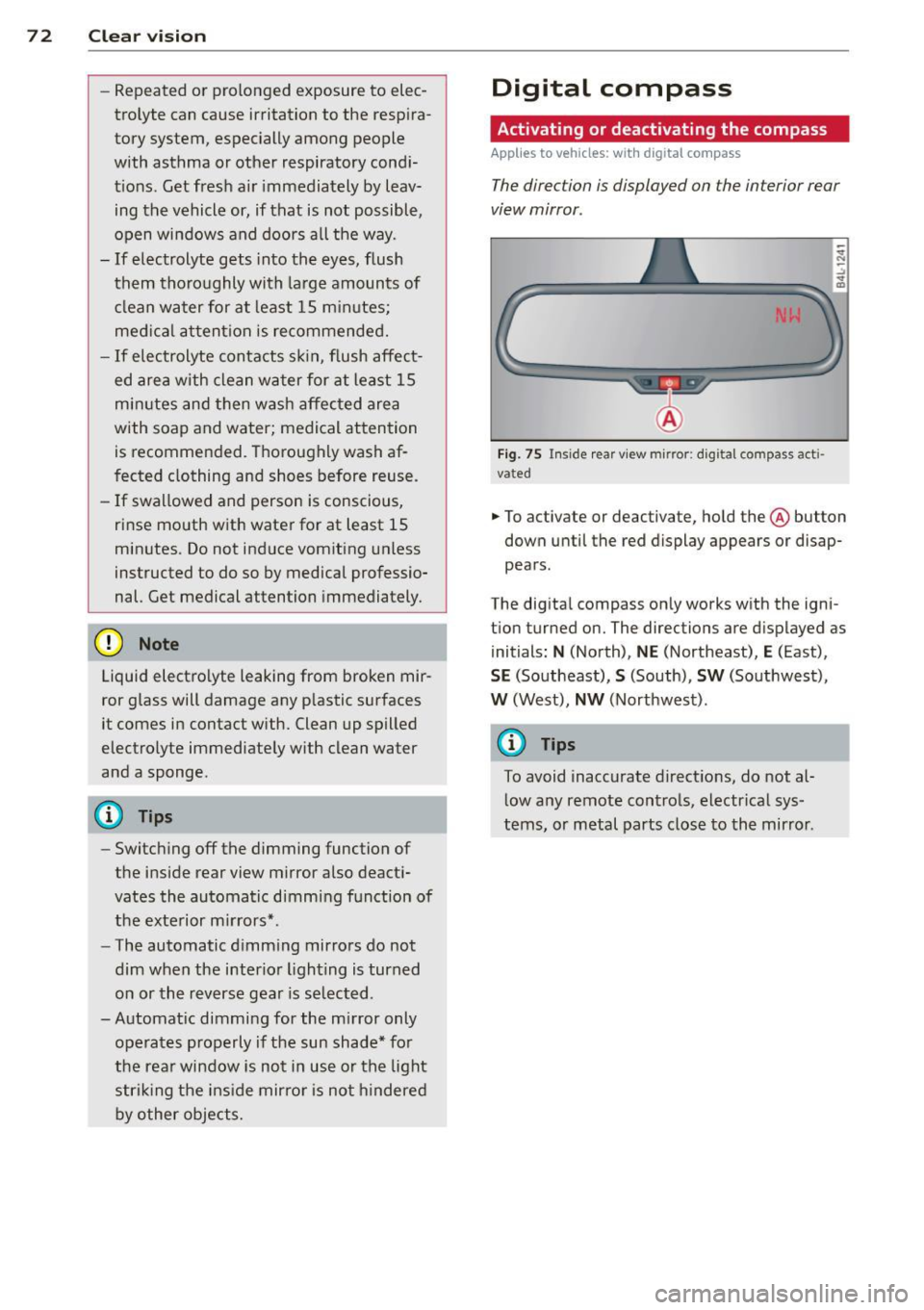
The direction is displayed on the interior rear
view mirror .
Fig. 75 Inside rear view mirror: digital compass acti
vated
.. To activate or deactivate, hold the @ button
down until the red display appears or disap
pears.
The digital compass only works with the igni
t ion turned on. The directions are displayed as
initials:
N (North), NE (Northeast), E (East),
SE (Southeast), S (South), SW (Southwest),
W (West), NW (Northwest).
@ Tips
To avoid inaccurate directions, do not al
low any remote controls, electrical sys
tems, or metal parts close to the mirror .