battery AUDI Q7 2015 Owner´s Manual
[x] Cancel search | Manufacturer: AUDI, Model Year: 2015, Model line: Q7, Model: AUDI Q7 2015Pages: 350, PDF Size: 86 MB
Page 53 of 350
M
"' 0 ..J
"". rl I.O
"' rl
"' rl
How is the anti-theft alarm system
switched off?
The anti -theft a la rm system is switched off
on ly when you unlock yo ur vehicle. If yo u do
not open a door w ith in 60 seconds after you
have unlocked with the remote control , the
ve hicle w ill lock itse lf again a utomat ically .
When will the anti-theft alarm sy stem be
triggered?
W hen the ve hicle is locked , the alarm system
mon itors and p rotects the following parts of
the vehicle:
- engi ne compartment
- lu ggage compartment
- doo rs
- i gnition
When the system is activated, the alarm will
be tr iggered if on e of the doo rs, the eng ine
h ood or t he rear lid a re opened, o r if the ig ni
tion is turned on. The an ti-t heft alarm sys tem
will also go off when t he battery is discon
nected .
You can a lso tr igge r the alarm by p re ssing t he
P ANIC button o n your remote con trol. T his
will alert o ther peop le in case of emergency.
Press the
PANIC b utton again to t urn off the
a larm .
How is the anti-theft alarm switched off
when triggered?
The a larm system is switc hed off when you
u nl ock the vehicle o r whe n the ignition is
sw itched on. The alarm will also switch itself
off when it comes to the end of its cycle.
Emergency flasher and horn
The emergency flas her wi ll blink brief ly and
the hor n sounds when the doors, engine hood
a nd rear lid are proper ly closed .
If th e emergen cy fl ashe rs do no t blink , or the
horn does no t soun d, check the doors, engine
h ood an d rear lid to make sure they are prop
erly closed.
If you close a door, t he hood o r
the rear lid w ith the anti-theft alarm sw itched
on, the emergency flashers will b link and the
Opening and clo sin g 51
horn wi ll sou nd on ly afte r you have closed the
door or li d.
(D Tips
For the anti-the ft a la rm sys te m to fu n c
tion properly, make sure all ve hicle doors
and win dows are closed before leavi ng t he
v ehicle .
Power windows
Controls
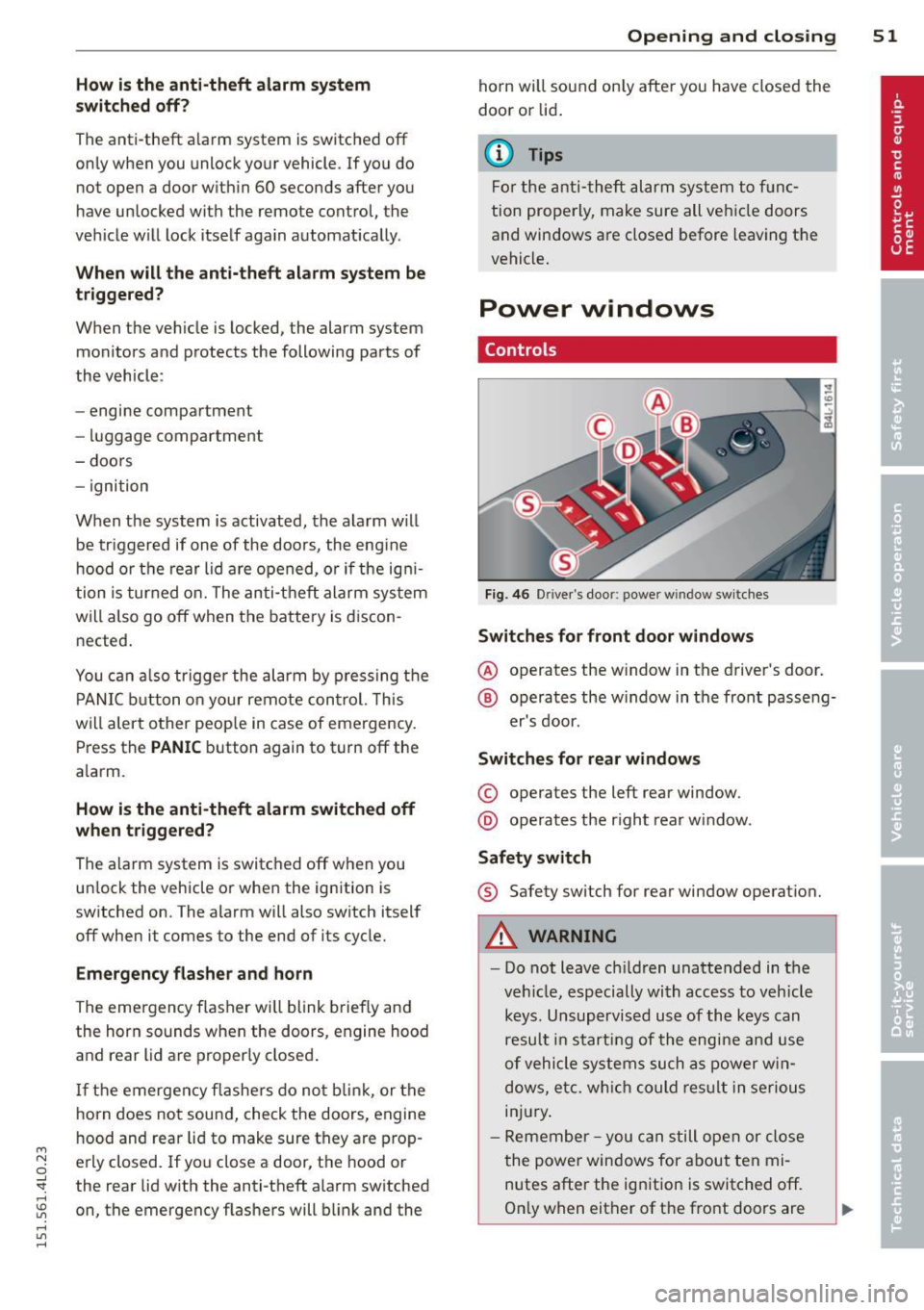
Fig. 4 6 Drive r's doo r: power w indow sw itches
Switches for front door windows
@ o p erates the w indow in the d river's door.
® opera tes the w indow in the front passe ng-
er's door .
Switches for rear windows
© operates the left rear window.
@ operates the r ight rea r wi ndow.
Safety switch
® Safety switch for rear window operat ion.
A WARNING
- Do not lea ve c hildren unattended in t he
ve hicle, especially wi th access to veh icle
keys. Unsupervi sed us e of the keys can
resu lt in start ing of the engi ne and use
o f vehicle system s such as po wer w in
dows, etc. w hich co uld res ult in se riou s
in jur y.
- R eme mber -you can s till ope n or close
the powe r win dows for about ten mi
n utes after the ign ition is switc hed off .
O nl y w hen eit her of t he fro nt doors are
Page 56 of 350
54 Opening and closing
Reactivating the system after battery
disconnection
If the vehicle battery is disconnected and then
reconnected, the a utomatic closing and open
ing function wilt not work until it is reactivat
ed. To reactivate this feature, perform the fol
lowing steps:
Reactivating close /open feature
., Pull and hold the power window switch until
the window is completely closed .
., Re lease the switch .
., Pull the switch again for one second. The au
tomatic closing/opening is now reactivated.
Panoramic sliding
sunroof
Description
Applies to vehicles: with Panoramic sliding sunroof
The Panoramic sliding sunroof is comprised of
two individual glass roof segments, which can be adjusted electrically independently of each
other.
The front segment can be tilted and slid open.
The rear segment can be tilted, but it cannot be slid open .
T he Panoramic s liding sunroof is operated by
the driver or passenger when the ignition is on
with a rotary switch (for the front roof seg
ment) and a rocker switch (rear roof seg
ment) .
After the ignit ion has been switched off , the
Panoramic sliding sunroof can st ill be opened
or closed for about 10 m inutes . However, as
soon as the dr iver's or passenger's door is
opened, the sw itches for the Pano ramic s lid
ing sunroof are inoperat ive.
0 Note
You should always close the Panoramic
sliding sunroof when you leave you r vehi
cle. Sudden rain can drench the interior
equ ipment and damage the electronic con
venience feat ures in your vehicle .
(D Tips
If you park your vehicle in the sun, we rec
ommend that you close both sun blinds
c>page56.
Tilting/sliding open Panoramic sliding
sunroof
Applies to veh icles: w ith Panoramic sliding sunroof
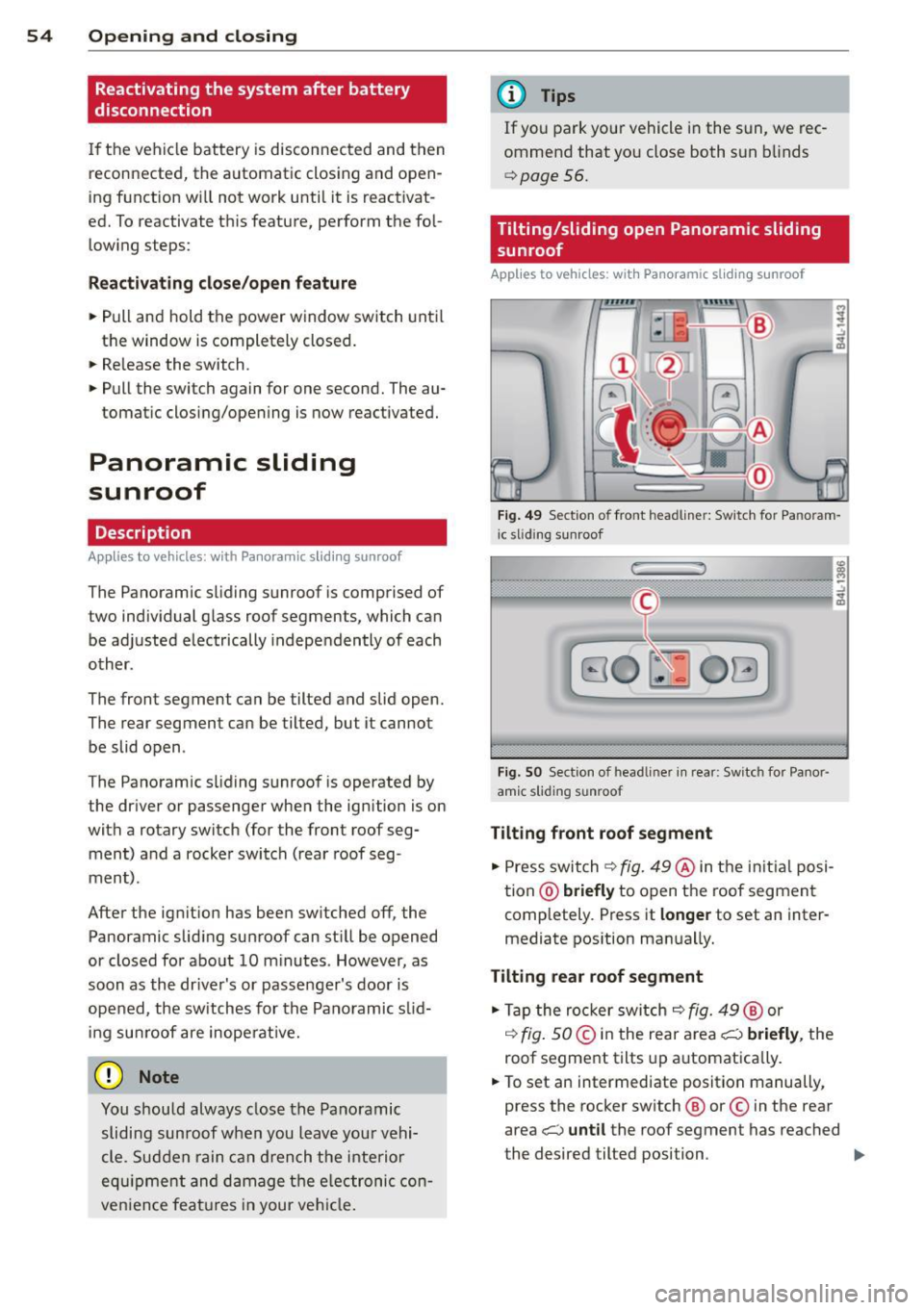
Fig. 49 Se ction o f fro nt headline r: Sw itch for Pa noram
i c slid ing sunroof
Fi g. SO Sect ion of head liner in rear : Switc h for Panor
amic s lidin g sunroof
Tilting front roof segment
., Press switch c> fig. 49@in the initial posi
tion @)
briefly to open the roof segment
completely . Press it
longer to set an inter
mediate pos ition manually.
Tilting rear roof segment
., Tap the rocker switch c> fig. 49@ or
,:¢, fig. SO @in the rear area i;:::) briefly, the
roof segment tilts up automatica lly.
., To set an intermediate position manually ,
press the rocker switch @ or© in the rear
area
i;:::) until the roof segment has reached
the desired tilted position . ..,.
Page 66 of 350
64 Clear vision
Notes on the se feature s
- The turn signals only work with the ignition
tu rned on. The indicator lights
II or ii in
the instr ument cluster ¢
page 14 also b link .
- After you have turned a corner, the turn sig -
nal switches off a utomat ically.
- T he
high beam works only when the head
lights are on. The indicator light
SI in the
instrument cluste r illuminates when the
high beams a re on.
- The
headlight flasher works on ly as long as
yo u hold the leve r - even if there are no
lights turned on . The ind icator light
SI in
the instrument cl uster illum inates when you
use the head light flasher.
A WARNING
Do not use the hig h beam o r headlight
flasher if you know that th ese cou ld blind
oncoming traffic.
Interior lights
Front interior lights
-
The interior ligh ts include reading lights for
bo th the driver and the front passenger .
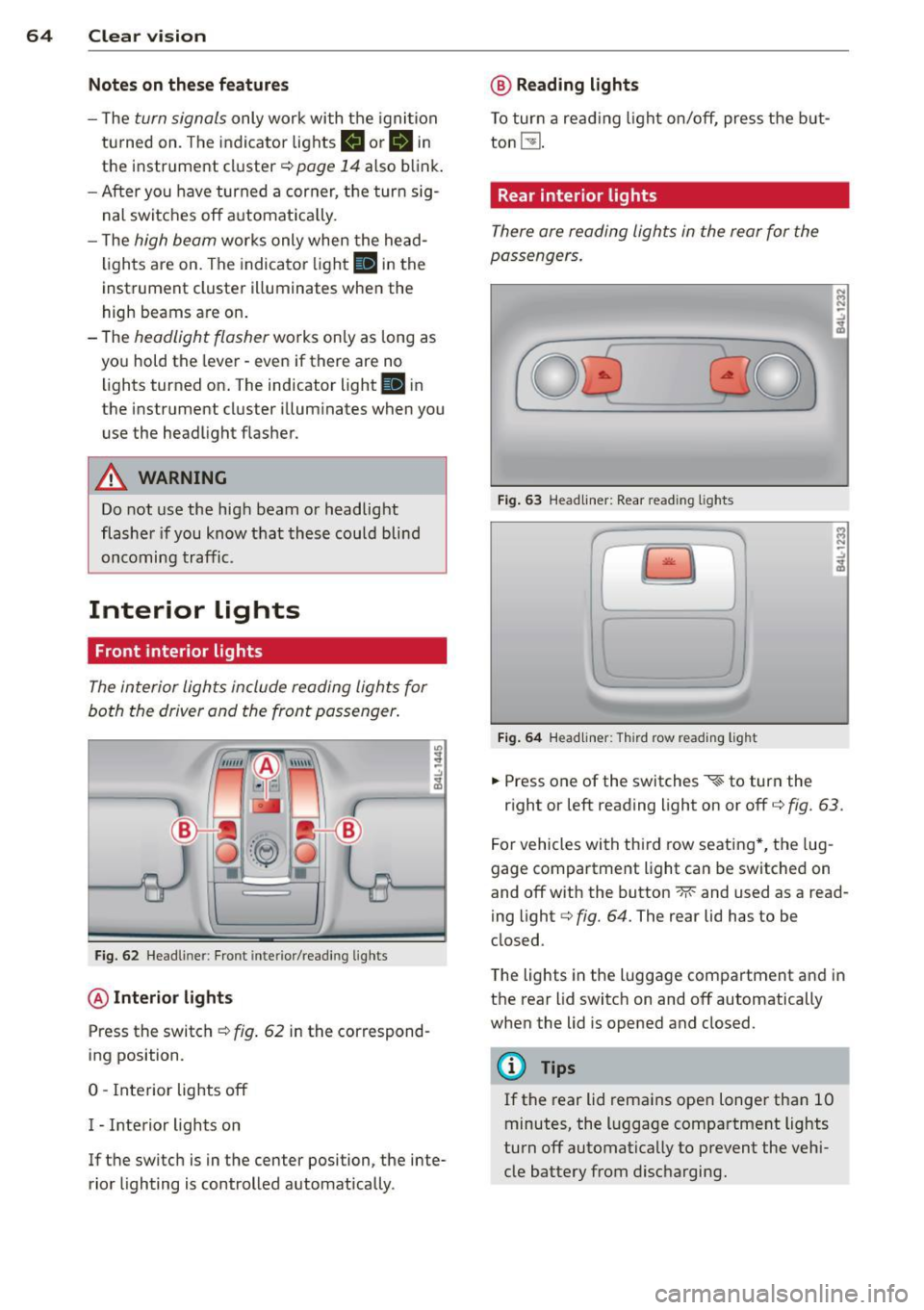
Fig. 6 2 Headli ner: Fro nt inte rior/read ing lights
@ Interior lights
Press the switch ¢ fig. 62 in the correspond
ing position.
0 -Interior lights off
I - Inte rior lights on
If the switch is in the center position, the inte
rior lighting is controlled automatica lly.
@ Reading lights
T o tur n a read ing light on/off, press the b ut
ton
t!J .
Rear interior lights
There are reading lights in the rear for the
passengers .
Fig. 63 Head liner: Rear read ing lights
~
--
' ~ '-
Fig . 64 Head liner: Third row read ing light
.. Press one of the switches ~ to turn the
N .., N
.:,
~
::i N -.:,
~
right or left reading light on or off c::;, fig. 63.
For vehicles with thi rd row seating *, the lug
gage compartment light can be switched on
and off with the button -M-and used as a read
ing light
c::;, fig. 64. The rear lid has to be
closed.
The lights in the luggage compartment and in
t h e rear lid switch on and off automatically
when the lid is opened and closed.
@ Tips
If the rear lid remains ope n longer than 10
minutes, the l uggage compartment lights
turn off automatically to prevent the vehi
cle battery from disc harging .
Page 96 of 350
94 Warm and cold
Warm and cold Climate control
Description
The air conditioner is fully automatic and is
designed to maintain a comfortable and uni
form climate inside the vehicle .
We recommend the following settings :
.. Set the temperature to 72 °F (+22 °C).
.. Press the
!AUTO ! button.
With this setting, you attain maximum com
fort in the least amount of time. Change this
setting, as desired, to meet your personal
needs.
The climate controls are a combination of
heating, ventilation and cooling systems,
which automatica lly reduce humidity and cool
the air inside your vehicle.
The air temperature, air flow and air distribu
tion are automatica lly regu lated to achieve
and maintain the desired passenger compart
ment temperature as quick ly as possib le.
The system automatically compensates for
changes in outside temperature and for the
intensity of the sunlight entering the vehicle.
We recommend you use the
Automatic mode
¢ page 97 for year-round comfort.
Please note the following:
Turn on the air conditioner to reduce humidity
in the vehicle . Thi s also prevents the windows
from fogging up.
When the outside temperature is high and the
a ir i s very humid,
condensation from the
evaporator may drip under the vehicle. This is
norma l and does not indicate a leak.
If the outside temperature is low, the fan nor
mally only switches to a h igher speed once
the eng ine coolant has warmed up sufficient
l y.
The air conditioner temporarily switches off
when you drive off from a standstill using full
thrott le to save eng ine power. The
compressor a lso switches off if the coo l
ant temperature is too high , so that the en
gine can be adequately cooled under extreme
loads.
Air pollutants filter
The air pollutants filt er (a comb ined particle
filter and activated charcoa l filter) reduces or
prevents outside air pollution (dust, or pollen)
from enter ing the vehicle. The air is also fil
tered in air recirculation mode .
The air pollutants filt er must be changed at
the interva ls specified in your Warranty
&
Maintenance booklet, so that the a ir condi
tioner can properly work.
If you drive your vehicle in an area with high
air pollution, the filter may need to be
changed more frequently than specified in
your Audi Warranty
& Maintenance booklet. If
in doubt, ask your authorized Audi Service Ad
visor for advice .
Key coded settings
The air conditioner settings selected are auto
matically stored and assigned to the key be ing
used. When the vehicle is started, the air con
ditioner automa tically selects the settings as
s igned to that key. This way every driver will
maintain h is/her own personal settings and
does not have to reset them manually .
If a different dr iver uses your key and changes
the a ir cond itioner settings, the latest adjust
ments will e rase and replace the settings you
have stored.
Energy management
To prevent the battery from being discharged
and to restore the balance of energy, compo
nents which require large amounts of energy
are temporarily cut back or switched off
¢ page 228. Heating systems in pa rticular re
quire a great deal of energy.
If yo u notice , fo r
example, that the seat* or rear window heat
ing is not heating, they have been temporarily
cut back or switched off by
energy manage
ment.
These systems are availab le aga in as
soon as the energy balance has been restored . .,.
Page 139 of 350

M
"' 0 _,
"". rl I.O
"' rl
"' rl
Lane width
Applies to vehicles: with side assist
-· Fig. 158 Lan es o f a norma l wid th are in detect ion area
Fig . 159 Narrow lanes: Side ass ist may detect vehicles
two la nes away
Side assist's detection area is designed to cov
e r l anes of standard w idth to the left and
r ight of your travel lane, depending on wheth
er you dr ive in the center of your lane or closer
to the edge.
I f you drive in narrow lanes, s ide ass ist's de
tec tion a rea may a lso incl ude other lanes -es
pec ia lly if you tend to d rive on the edge of
your lane
c:::> fig. 159 . Under these cond it ions,
ve hicles can also be detected that are two
l anes away, and side assist then could switch
between the informat ional and warn ing stage
signals.
When driving in very wide lanes, vehicles in
the adjacent lane may not be detected be
cause they are not inside the detection area.
Notes
Messages in instrument cluster display
Applies to vehicles: with side assist
If s ide ass ist t urns off automa tically, the ind i
cator l igh t on the button wi ll go ou t and you
Aud i side assist 13 7
will see a message in the instrument cluster
display:
Audi side assist not available: sensors
blocked
T he side assist sensors are built into the rear
bumper on the left and r ight (not visible on
the outside)
c:!> poge 131, fig . 150. To ensure
that you do not adversely affect the way side
ass ist functions, foreign objects (such as stick
ers or bicycle racks) should not be attached to
the area on the rear bumper where the sen
sors a re located . If side ass ist functions are
adverse ly affec ted, you w ill see th is message
in the instrument cluster disp lay . Remove any
th ing t hat may be blocking the sensors.
If no vehicle is detected for a longer per iod of
t ime wh ile dr iv ing, s ide ass ist w ill also switch
off automati cally.
Audi side assist cu rrently not available
If there is a temporary problem (such as the
vehicle 's battery charge be ing low), side assist
cannot be act ivated temporar ily .
Audi side as sis t: system fault
Have the system checked by an author ized
Audi dealer or qualified workshop.
Audi side assist not available when
towing
The radar sensor's view is limited when tow ing a tra iler. For vehicles with a factory instal
led tow ing hitch or a trailer hitch that was in
stalled later according to facto ry specifica
t ions, s ide ass ist is automatically deact ivated
as soon as the ele ctrical connection to the
trailer's e lectrical socke t is made, an d this sta
tus message appears in the instrument clus
ter display. Deactivation cannot be guaran
teed when using a ret rofitted towing hitch
that was
not installed according to factory
specifications .
Page 146 of 350
144 Automatic transmi ssion
• Carefu lly lift the rubber mat with a screw
driver or something similar ¢
fig . 165.
• You now have access to a rocker switch . Us
ing a screwdr iver or similar object, press the
rocker sw itch down and hold it in that pos i
t ion.
• Now press the release button and move the
selector lever to the N position .
The selector lever can only be moved from the P position if the key is in the lock and the igni
tion is sw itched on .
If the power supply fails
(for example, the battery is discharged) a nd
the vehicle must be p ushed or towed , move
the selector leve r to the N pos ition first using
the emergency release .
Page 198 of 350
196 Airbag system
turned off, and the PASSENGER AIR BAG
OFF light will stay on.
Repair, care and disposal of the airbags
Parts of the airbag system are installed at
many different places on your Audi. Installing,
removing, servicing or repairing a part in an
area of the vehicle can damage a part of an
airbag system and prevent that system from
working properly in a collision.
There are some important things you have to know to make sure that the effectiveness of
the system will not be impaired and that dis
carded components do not cause injury or pol
lute the environment.
& WARNING
Improper care, servicing and repair proce
dures can increase the risk of personal in
jury and death by preventing an airbag from deploying when needed or deploying an airbag unexpectedly:
- Never cover, obstruct, or change the
steering wheel horn pad or airbag cover
or the instrument panel or modify them
in any way .
- Never attach any objects such as cu pholders or telephone mountings to the
surfaces covering the airbag units.
- For cleaning the horn pad or instrument
panel, use only a soft, dry cloth or one
moistened with plain water . Solvents or
cleaners could damage the airbag cover
or change the stiffness or strength of the
material so that the airbag cannot de
ploy and protect properly.
- Never repair, adjust, or change any parts
of the airbag system.
-All work on the steering wheel, instru
ment panel, front seats or electrical sys
tem (including the installation of audio
equipment, cellular telephones and CB
radios, etc.) must be performed by a
qualified technician who has the training
and special equipment necessary. -
For any work on the airbag system, we
strongly recommend that you see your
authorized Audi dealer or qualified work
shop.
- Never modify the front bumper or parts
of the vehicle body.
- Always make sure that the side airbag can inflate without interference:
- Never install seat covers or replace
ment upholstery over the front seat
backs that have not been specifically
approved by Audi.
- Never use additional seat cushions that
cover the areas where the side airbags
inflate.
- Damage to the original seat covers or
to the seam in the area of the side air
bag module must always be repaired
immediately by an authorized Audi
dealer.
- The airbag system can be activated only
once. After an airbag has inflated, it
must be replaced by an authorized Audi
dealer or qualified technician who has
the technical information, training and
special equipment necessary .
- The airbag system can be deployed only
once . After an airbag has been deployed,
it must be replaced with new replace
ment parts designed and approved espe
cially for your Audi model version. Re placement of complete airbag systems
or airbag components must be per
formed by qualified workshops only.
Make sure that any airbag service action
is entered in your Audi Warranty
& Main
tenance booklet under
AIRBAG REPLACE
MENT RECORD .
-For safety reasons in severe accidents,
the alternator and starter are separated
from the vehicle battery with a pyrotech nic circuit interrupter.
- Work on the pyrotechnic circuit inter
rupter must only be performed by a
qualified dealer - risk of an accident!
- If the vehicle or the circuit interrupter
is scrapped , all applicable safety pre
cautions must be followed.
Page 230 of 350

228 Intelligent technology
will have no warning from a sudden in
crease in engine speed as with a front
wheel drive vehicle. Always drive at speeds wh ich are suited to the road con
ditions -risk of crash.
Energy management
Starting ability is optimized
Energy management controls the distribution
of electrical energy and thus optimizes the
availability of electrical energy for starting
the engine.
I f a vehicle with a conventional energy system
is not driven for a long period of time, the bat
tery is discharged by idling current consumers
(e.g. immobilizer) . In certain circumstances it
can result in there being insufficient energy
available to start the engine.
I ntelligent energy management in your vehi
cle handles the distribution of electrical ener
gy . Starting ability is markedly improved and
the life of the battery is extended.
Basically , energy management consists o f
battery diagnosis, idling current manage
ment
and dynamic energy management.
Battery diagnosis
Battery diagnosis continuously determines
the state of the battery. Sensors determine
battery vo ltage, battery current and battery
temperature. This determines the current
state of charge and the power of the battery.
Idling current management
I dling current management reduces energy
consumption while the vehicle is standing.
With the ignition switched off, it contro ls the
energy supply to the various e lectrica l compo
nents. Data from battery diagnosis is consid
ered.
Depending on the battery's state of charge,
individual consumers are gradually turned off
to prevent excessive discharge of the battery
and thus ma intain starting capability.
Dynamic energy management
While the vehicle is being driven, dynamic en
ergy management distributes the energy gen
erated according to the needs of the individu
al components.
It regulates consumption, so
that more electrical energy is not being used
than is being generated and ensures an opti
mal state of charge for the battery.
(!) Tips
- But even energy management cannot
negate the limits of physics. Consider
that the power and life of a battery are
limited.
- If start ing ability is threatened, you are
informed by a warning
¢ page 229,
Driver notification in the instrument
cluster display.
What you should know
The highest priority is given to maintaining
starting capability.
The battery is severely taxed in short-distance
driv ing, in city traffic and during the cold time
of year. Abundant electrical energy is re
quired, but only a little is generated . It is also
critical if the engine is not running and electri
cal components are turned on. In this in
stance energy is being consumed but none is
being generated.
It i s in precise ly these s ituations that you will
notice energy management actively regu lat
ing the distribution of energy.
Vehicle stands for an extended period
If you do not drive your vehicle over a period
of several days or weeks, e lectr ica l compo
nents are gradually cut back or sw itched off.
T his reduces energy consumption and ma in
ta ins starting capability over a longer period.
T ake into consideration that when you unlock
your vehicle, some convenience functions,
such as the interior lights or the power seat
adjustment, may not be availab le. The con
venience functions will be availab le again
Page 231 of 350
M N
0 ..J
'SI: ,...., \!) 1.1'1 ,...., 1.1'1 ,....,
when you turn on the ignition and start the
engine.
With the engine turned off
If you listen to the radio, for example, with
the engine turned off or use other MMI func
tions, the battery is being d ischa rged.
I f starting capability is jeopardized due to en
e rgy consumpt ion, the following warning ap
pears in the MMI display:
Please start engine, otherwise system will
switch off in 3 minutes.
The warning ind icates that the system will be
turned off automatically after 3 minutes. If
you wish to cont inue using the functions, you
have to start the engine.
With the engine running
Although electrical energy is generated when
the vehicle is be ing driven, the battery can be
come discharged . Th is happens mostly when
little energy is be ing generated and a great
deal consumed and the battery's state of
charge is not optimal.
To br ing the energy balance back into equili
brium, consumers which require especially
l arge amounts of energy are temporarily cut
back or swit ched off. Heating systems in par
t icular requ ire a great deal of energy.
If you
notice, for example, that the heated seats* or
the heated rear window are not heating, they
have been temporari ly cut back or switched
off. These systems will be avai lab le again as
soon as the energy balance has been restored.
You will a lso notice that engine idle speed has
been increased slightly . This is norma l and not
a cause for concern . By increasing engine idle
speed the add itiona l energy required is gener
ated and the battery is charged.
Driver notification in the instrument
cluster display
If battery power drops into the range where it
can limit the ability of the engine to start, this
Intelligent technology 229
is shown in the instrument cluster display
with the following driver message:
(•) I.ow battery charge: battery will be
charged while driving
T h is not ificat ion reminds you that the start ing
capability of the engine may be limited. As
soon as you start driv in g again, the battery
will be recharged and the not ific at ion w ill go
out.
Driver notification appears and goes out
again
If t his driver notification appears after the ig
nition is tu rned on or whi le driving and it goes
out again after a while, the battery has been
adequately recharged.
Driver notification appears and does not
go out again
If this driver notification appears after the ig
nition is turned on or whi le driving and does
not go out again, the battery's state of charge
is not in the optimal range. Starting ab ility is
restricted . Have the battery checked as soon
as possible by an authorized Aud i dealer or
qualified workshop.
•
•
Page 234 of 350
232 Driving and en vironm ent
,8. WARNING
-Do not park your vehicle over flammable
materials such as grass or leaves because
the high temperature of the diesel par
t icu late filter could start a fire .
- Do not apply an underbody protectant in the exhaust system area or a fire could start.
Avoid damaging the vehicle
When you are driving on poor roads, or over
curbs, steep ramps, etc., make certain that
low-lying parts such as spoilers and exhaust
system parts do not bottom out and get dam
aged.
This is especia lly true for vehicles with low
slung chassis (sports chassis)* and fully load
ed vehicles.
Shutting down vehicle
If you would like your vehicle to remain inop
erative for a longer period of time, contact an
Audi or other specialized dealer . They can ad
vise you on necessary precautions e.g . corro
sion prevention, maintenance and storage. Pay attention to additional information con
cerning the battery. Refer to
c::> page 266 .
Operate your vehicle
economically and
minimize pollution
General
Your personal style of driving will determine
the economy of your vehicle, as well as ex
haust and noise levels .
Fuel economy, environmental impact, and
wear on your engine, brakes and tires largely
depend on three factors:
- your personal driving style
- operating conditions
- technical limitations
If you anticipate what you need to do next and
drive economically, you can easily cut your
fuel consumption by 10-15 percent . This sec
tion will give you some tips on how you can help the environment and your pocketbook.
(D Tips
The consumption estimates as published by ENVIRONMENTAL PROTECTION AGENCY
(EPA) and Transport Canada may not corre
spond to your actual consumption on the road, which will vary depending upon vehi
cle load and speed, road and weather con
dit ions, trip length, etc.
· Drive smoothly and keep a lookout
ahead
Vehicles use the most fuel when they ore ac
celerating.
., Avo id unnecessary accelerating and brak ing .
Vehicles use the most fuel when they are ac
celerating . If you anticipate what is going to
happen next, you will need to brake less and,
thus, acce lerate less. Let the vehicle coast
whenever possible -for examp le when you see
that the next traffic light is red.
Avoid full throttle
Driving at moderate speeds saves fuel and
improves your mileage.
., Try and keep well below your car's maximum
speed.
Accelerating gently reduces fuel consump
tion, engine wear, and does not disturb the environment.
Fuel consumption, exhaust emissions and en
gine noise increase disproportionately at high
speeds. If you drive at approximately three
quarters of top speed, fuel consumption w ill
be reduced by one half. Never drive faster
than the posted speed limit and weather con
ditions permit.