rear view mirror AUDI Q7 2015 Owner´s Manual
[x] Cancel search | Manufacturer: AUDI, Model Year: 2015, Model line: Q7, Model: AUDI Q7 2015Pages: 350, PDF Size: 86 MB
Page 153 of 350
M
"' 0 ..J
""'. rl I.O
"' rl
"' rl
-If the position or the installation angle
of a camera was changed, after a colli
sion for example, do not continue to use
the system for safety reasons . Have it
checked by your authorized Audi dealer
ship .
- Use the
Rear mode and the Corner view
(rear)
mode only when the rear lid is
completely closed, otherwise the image
in the display will be inaccurate.
- Objects and obstacles
above the camera
are not displayed.
- Camera lenses enlarge and distort the
field of vision. The objects appear both altered and inaccurate on the screen.
(0 Note
- Always read and follow the applicable
warnings ¢0
in General information on
page 145 .
-The MMI display shows the direction in
which the rear of the vehicle is traveling
based on the steering wheel angle. The
vehicle front swings out more than the
vehicle rear. Maintain plenty of distance
so that your outside mirror or a corner of
your vehicle does not collide with any ob
stacles.
@ Tips
If the rear lid is open, the image in the
rearview camera is displayed without ori
entation lines and without blue surfac es.
Switching on or off
Applies to vehicles: with Audi parking system plus w ith
front- and rearview camera
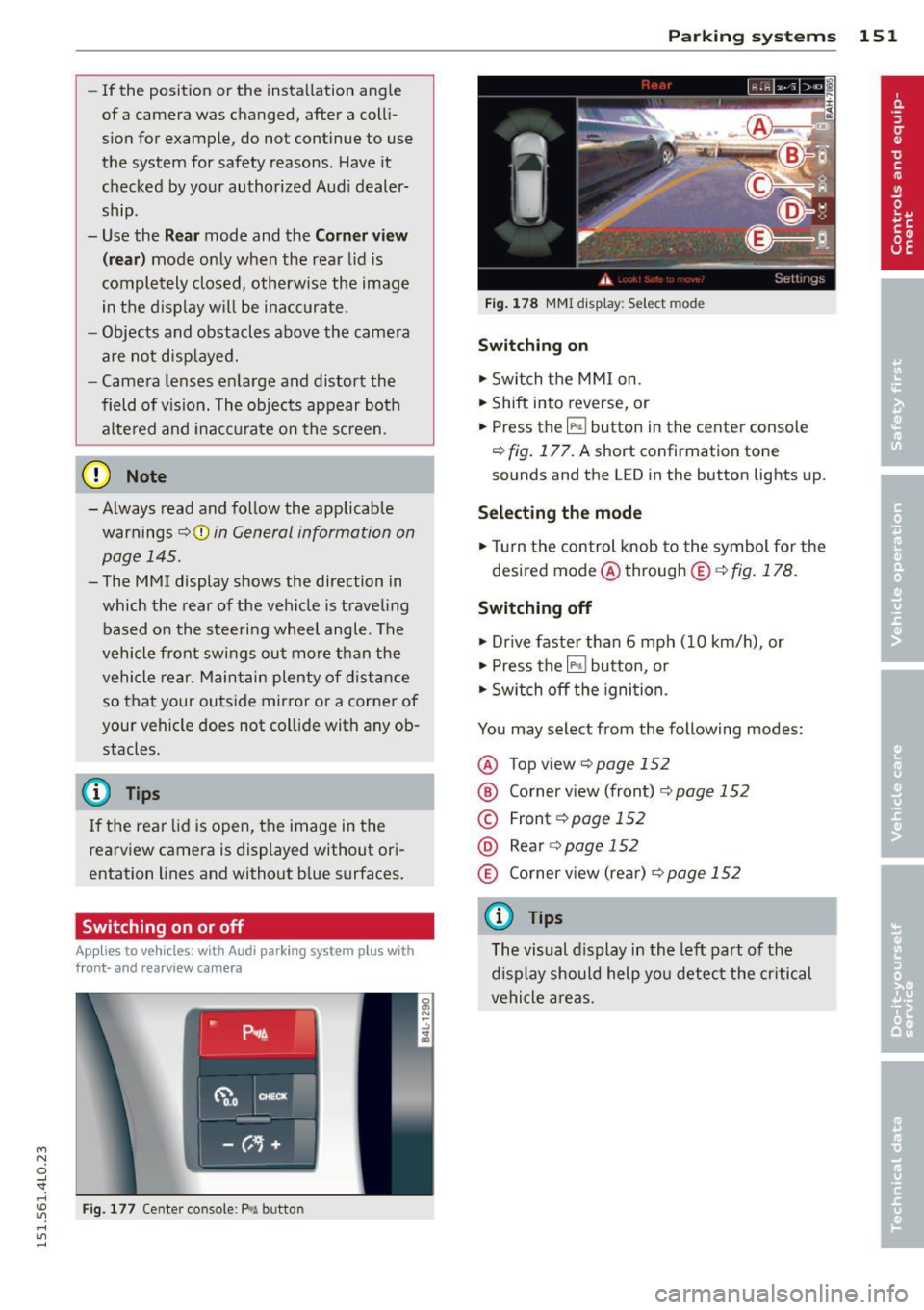
Fig. 177 Center console : P,•A but ton
Parking systems 151
Fig. 178 MMI display: Select mode
Switching on
.,. Switch the MMI on.
.,. Shift into reverse, or
.,. Press the
IP.1! button in the center console
¢
fig. 177. A short confirmation tone
sounds and the L ED in the button lights up.
Selecting the mode
.,. Turn the control knob to the symbol for the
desired mode @through @¢fig.178.
Switching off
.,. Drive faster than 6 mph (10 km/h) , or
.,. Press the
l""'I button, or
.,. Switch off the ignition .
You may select from the following modes:
@ Topview ¢page152
@ Corner view (front) ¢ page 152
© Front¢ page 152
@ Rear o page 152
® Corner view (rear)¢ page 152
(D Tips
The visual display in the left part of the
display should help you detect the critical
vehicle areas.
Page 336 of 350
334 Index
Controls .... .. .. ..... ... .. .. .... .. 95
Defrosting/defogging . . . . . . . . . . . . . . . 97
Descr ipt ion .. .. ... .... ... .. .. .... .. 94
Energy management . . . . . . . . . . . . . . . . 94
Fan . .. .. .... ........... ........ .. 97
Front seat ventilation ...... ... .. ... 103
H eated seats, front ....... .. .. .. .. . 103
Key coded sett ing .............. ..... 94
Recircu lation mode (automatic) . .. ... 102
Recommended se ttings .............. 94
Residua l heat ... ...... ... .. .. .... .. 96
Setting the temperature ... .. .. .... . .
9 7
Supp lementary heater ... .. .. ... ... . 103
Synchron izat ion ............ .. .... . 102
Turn ing on and off ........ .. .. .... .. 96
Using climate control economically .. .
100
Clock ... .... ... . ...... ... .. .. .... .. 1 1
C losing
P anoramic slid ing su nroof .. .. .. .. .. . .
55
Coat hooks . . . . . . . . . . . . . . . . . . . . . . . . . 92
Cold ti re inflat ion p ressure ... .. .. .... . 278
Compass m irror ..... ...... .. .. .. .. .. 72
Comp liance .. ............. .. .. .. ... 329
Consumer Info rmation . . . . . . . . . . 1 70, 326
Contact ing NHTSA ...... .... ... .... .
170
Controls
Cleaning ... ... .. ..... ... .. .. .... .
245
Conve nience key ........... .. .. .... .. 49
Dr iver messages ........ .. .. .. .. .. . 1 10
Lock ing vehicle . .. ..... ... .. .. .... .. 50
START button .. .. ..... ... .. .. .... . 109
Starting engine ....... ... .. .. .... . 109
STOP button ............... .. .... . 110
Switching engine off ............... 110
Switching on ignition .. ..... ..... .. . 109
Unlock ing vehicle .......... ... .. .... 49
Convertible c hil d safety seats . ... .. .. . 210
Conve rtible locking retracto r
Activating ........................
215
Deactivating . .. .. ..... ... .. .. .... . 216
Using to secure a chi ld safety seat
213, 2 15
Coolant system ................. .... 262
Cooling box in g love compartment .. ....
91
Cooling System
Expansion tank . .. ..... ... .. .. .... . 263
Corner ing light .. .... ...... .. .. .. .. .. 62 Cruise cont
ro l
Changing speed .. .. ... ..... ... .. ..
113
Presett ing your speed . . . . . . . . . . . . . . 114
Switching off ..................... 114
Switching on ..... ............. .... 113
Warning/ind icator lights ........... .. 18
also refer to Adaptive cruise control ... 115
Cruising range . . . . . . . . . . . . . . . . . . . . . . . 24
(u pholder . . . . . . . . . . . . . . . . . . . 81, 88, 89
D
Damp ing
refer to Adapt ive A ir Suspension . 157, 159
Data recorder ... .. ............. .. .. 223
Date d is p lay . . . . . . . . . . . . . . . . . . . . . . . . 11
Daytime run ning l ights. . . . . . . . . . . . 60, 61
Declarat ion of compliance
Adaptive cruise control .............
329
Audi side ass ist ................... 329
Cell phone package ................ 329
Convenience key .. .. ... ....... ... .. 329
E lectronic immob ilizer ............. . 329
Homelin k universal remo te control ... 3 29
Remote con tro l key ............ .... 3 29
Decorative parts/tr im
Cleaning ...... .................. .
244
def
What does this mean when it appears in
the tr ip odometer display? ...........
12
Defective light bu lb warning . ... .. .. .. . 23
Defrost ing/defogg ing the w indows ... .. . 97
Defrost ing/defogging windows ......... 99
De term ining co rrect load limit ........
288
Diesel fuel . . . . . . . . . . . . . . . . . . . . . . . . . 249
Diesel pa rticulate f ilter . . . . . . . . . . 36, 231
Digital cloc k . . . . . . . . . . . . . . . . . . . . . . . . 11
Digital compass . . . . . . . . . . . . . . . . . . . . .
72
Digital speedometer . . . . . . . . . . . . . . . . . . 22
Dime nsio ns .. ... ...................
324
D imming the rearview mirror ... .. .. .. . 71
D ip st ick
Reading the d ipst ic k properly ........ 260
Displays Cleaning . . . . . . . . . . . . . . . . . . . . . . . . .
245
Distance control system
refer to Adapt ive cruise control ..... .. 115