brake light AUDI Q7 2015 Owner´s Manual
[x] Cancel search | Manufacturer: AUDI, Model Year: 2015, Model line: Q7, Model: AUDI Q7 2015Pages: 350, PDF Size: 86 MB
Page 125 of 350

M
"' 0 ..J
"". rl I.O
"' rl
"' rl
Display in the speedometer
Applies to vehicles: with adaptive cruise control
Fig. 138 D isplay in the speedomete r
Des ired spe ed
The desired speed set by the driver is dis
p layed by a red LED.
If the desi red speed was set between two
lines on the speedometer using the
I SETI but
ton, the two closest light emitting diodes will
come on <=>
fig. 138.
The system a llows only speeds to be set be
tween 20 to 95 mph (30 to 150 km/h) to be
set. This speed range is faint ly illuminated in
the speedometer (LED lights).
Ind icator lights (symbols )
-- Open road :
The indicator light_
shows that ACC is act ive and that no moving
vehicle has been detected with in range of the radar sensor up ahead in your lane of
travel. The set speed is maintained.
- - Driving in traff ic: The ind icator
light - shows that a vehicle moving in
your lane of travel has been detected up
front in your lane of travel. Your speed is ad
justed according to the speed of the vehicle
up front . ACC accelerates and brakes auto
matically within the sys tem's capabilit ies .
-- Driver int ervention prompt: The
red flashing warning light- means
Request for driver to a ssume control. You
as the dr iver must s low the vehicle with the
f oot brake. The symbo l-t ells you
t h at the adaptive c ruise co ntrol is not able
to slow the vehicle down enough to keep a
enough distance to the ve hicle in front of
you. A warning tone will a lso sound when
Ad apti ve crui se control 12 3
the symbol appears. For more information
about the driver intervention prompt
r::!) page 126.
_& WARNING
Improper use of the adaptive cruise con
trol feat ures and inattent ion can lead to a
crash and ser ious pe rsonal inju ry.
- Never a llow the closing speed between
you and othe r vehicles to be so high that
the adaptive cruise cont ro l may not be
ab le to slow yo ur vehicle safely. If clos
ing speed is too high, you must apply the
brakes yo urself to reduce t he ris k of a
rear-e nd crash.
- Always sele ct a greate r followi ng d is
tance to the vehicle up ahead on wet
roads t han on d ry roads.
- Always rea d and h eed t he i nfo rmation
an d WAR NINGS <=>
& in Desc rip tio n on
page 115 .
(D Tips
- If you use t he accelerator to go faste r
t han t he speed of the vehicle ahead o f
yo u, the dr iver in tervention prompt will
not be accompa nied by a warn ing tone.
- I f the speed you previ ously set is exceed
ed, the indic ator light in the s peedome
ter wi ll swi tch off.
Display in the instrument cluster
Appl ies to vehicles: wit h adaptive cruise control
Fig. 139 Disp lay in the inst rument cluster
-
Scroll through the availabl e information dis
p lays by br iefly tapp ing the
I RESET ! button at
the en d of the windshield wipe r leve r. Yo u can ..,.
Page 127 of 350
the 20 to 95 mph (30 to 150 km/h) speed
range .
ACC: Unavailable
The text message ACC: Unavailable appears,
for example, if the temperature of the brakes
i s excessive. Adaptive cruise control is tempo
rarily not available. A warning tone sounds as
a reminder .
ACC: Not available
The text message ACC: Not available appears
in the event of a malfuncti on. Adaptive cruise
control is turned
off . A warning tone sounds
as a reminder. Have the system inspected by a
q ua lified dealership.
ACC: Sensor blocked
The text message ACC: Sensor blocked ap
pears when the ACC System can no longer ac
curately detect vehicles moving up ahead in
your lane of travel. Adaptive cruise control is turned
off. A warning tone also sounds as a re
minder.
To decide whether it is necessary to switch
off
the ACC (ACC : Sensor blocked) or if it is only a
temporary condition (ACC functionality limit
ed) the system will take into cons ideration the
outside temperature and/or the windshield
operat ion.
The ACC sensor is dirty or blocked (e.g. leaves,
snow).
The ACC sensor is located behind the area to
the right of the front license plate . If the ACC
sensor is dirty or blocked, clean the area to re
store system operat ion.
ACC off: Manual control!
The text message ACC off: Manual control!
appears after the ve hicle has been brought to
a standstill by the adaptive cruise control. In
this case you must depress the brake peda l to
prevent the veh icle from rolling. A warn ing
"" tone sounds as a reminder.
N
0 ...J
'SI: ,...., \!) ..,.,
,...., ..,., ,....,
Adaptive cruise control 125
Stabilization control (ESC)
The text message Stabilization control (ESC)
appears if the Electronic Stabilization Control
(ESC) has intervened . In this case the adaptive
cruise control is automatically turned
off . This
is accompanied by a warn ing tone.
Speed
T he set speed in mph (Canada km/h) always
appears when saving or changing the speed in
adaptive cruise control
¢ page 118, How is
the speed stored?
and r::!) page 119, Changing
stored speed.
ACC functionality limited
T he message ACC functionality limited ap
pears when the ACC System does not detect
any moving vehicles up ahead in yo ur lane of
trave l for a longer period of time. During this
time, the distance to moving vehicles in your
lane of travel up ahead is not being ma in
ta ined . The ACC system is not switched off,
and increased attention to the traffic situation
is absolutely necessary. The following may be
reasons why the message
ACC functionality
limited
appears :
- The ACC sensor is d irty . The ACC system is
not react ing, or is not reacting correctly, to
moving vehicles up ahead in your lane of
t ravel.
- There may be very light traffic on and there
is nothing that marks the side of the road
(for examp le, guard ra ils, traffic signs,
trees). As soon as a moving vehicle up ahead
is detected again, ACC becomes active again
and the message disappears.
T he ACC sensor is located be hind the area to
the right of the front license plate. If the ACC
senso r is dirty or blocked, clean the area to re
store system operation.
Parking brake!
T he text message Parking brake! appears,
when the parking brake is applied. ACC is
turned
off . A warning tone sounds as a re
minder.
Page 128 of 350
126 Adaptive cruise control
Stationary object ahead
The text message Stationary object ahead ap
pears, when you want to activate the system
and there is a stationary vehicle or an object
immediately in front of you .
Gradient too steep
The text message Gradient too steep appears
when the max imum gradient for proper ACC
operation has been exceeded. Adaptive cru ise
contro l is turned
off . A warning tone also
sounds as a reminder.
Shift lever position!
The text message Shift lever position! ap
pears when the selector lever is moved to po
sition
N . In this position, adapt ive cruise con
trol is not ava ilab le .
Driver intervention prompt
Applies to vehicles: with adaptive cruise co ntrol
The driver intervention prompt calls on the
driver to toke over the situation.
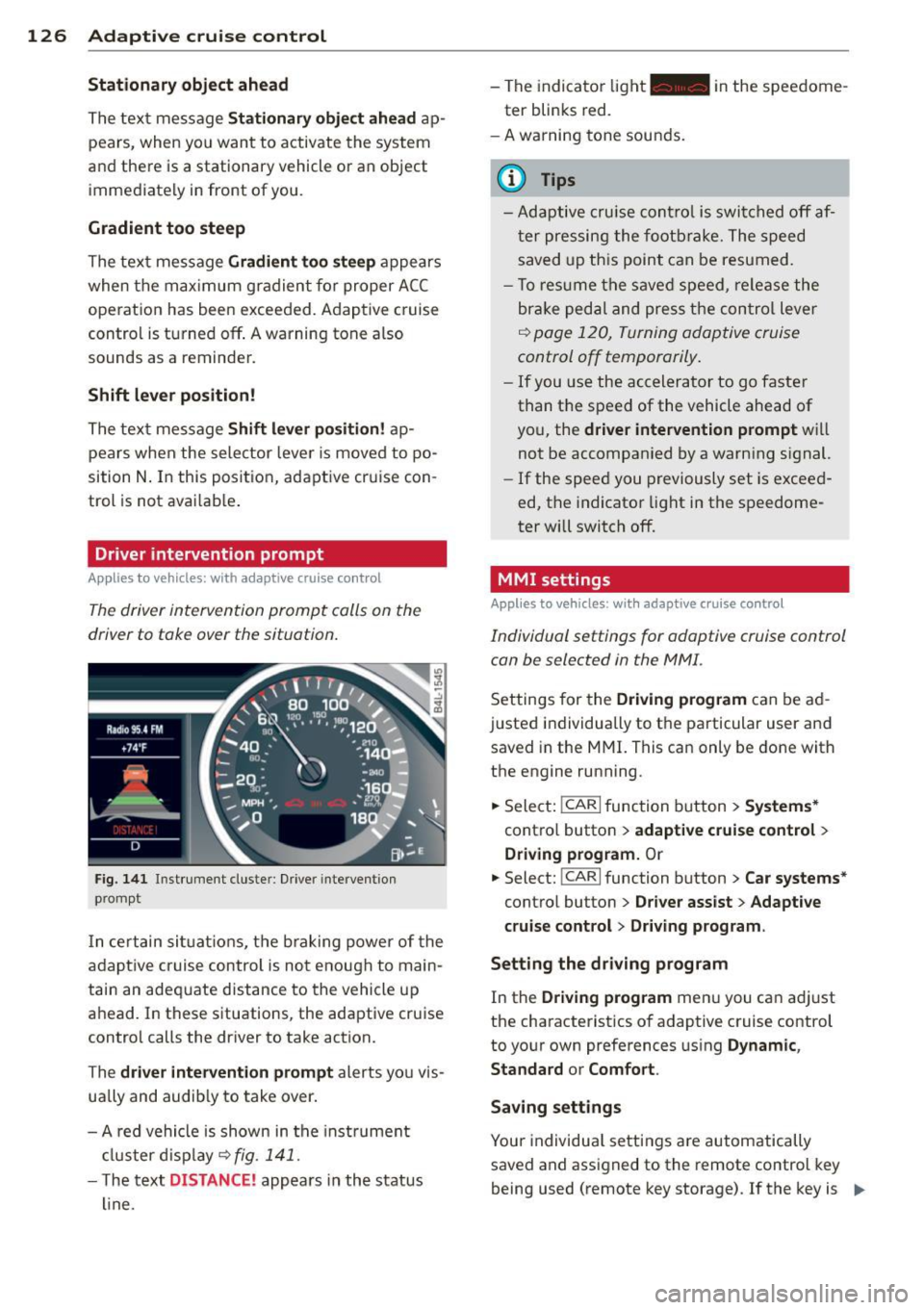
Fig. 141 I n st rument clus te r: Drive r in terven tion
p romp t
In certain situations, the braking power of the
adapt ive cr uise control is not enough to main
tain an adequate distance to the vehicle up
ahead. In these situations, the adaptive cruise
control calls the driver to take action.
The
driver intervention prompt alerts you vis
ually and audib ly to take over.
- A red vehicle is shown in the instrument
cluster display ~
fig. 141 .
- The text DIS TANCE! appears in the status
line. -
The indicator light- in the speedome
ter blinks red.
- A warning tone sounds.
0) Tips
-Adaptive cruise control is switched off af
ter pressing the footbrake. The speed
saved up this point can be resumed.
- To res um e the saved speed , release the
brake pedal and press the control lever
~ page 120, Turning adoptive cruise
control off temporarily .
-If you use the accelerator to go faster
than the speed of the vehicle ahead of
you, the
driver intervention prompt will
not be accompanied by a warn ing s ignal.
- If the speed you previously set is exceed
ed, the indicator light in the speedome
ter will switch
off.
MMI settings
Applies to vehicles : with adaptive cruise contro l
Individual settings for adoptive cruise control
con be selected in the MMI.
Settings for the Driving program can be ad
justed individually to the particular user and
saved in the MMI. This can only be done with
the engine running .
.,. Select:
!CAR I function button> Systems*
cont ro l button > adaptive cruise control >
Driving program. Or
.,. Select: !CAR I function button > Car systems *
control button > Driver assist > Adaptive
cruise control
> Driving program .
Setting the driving program
In the Driving program menu you can ad just
the characteristics of adaptive cruise control
to your own preferences using
Dynamic,
Standard
or Comfort .
Saving settings
Your individual settings are automatically
saved and assigned to the remote control key
being used (remote key storage) . If the key is ..,_
Page 141 of 350
Automatic
transmission
tiptronic
Introduction
The automatic transmission is controlled elec
tronically. The transmission upshifts or down
shifts automatically depending on which drive
program is selected. The power is transferred
by a torque converter .
When a
mode rate d riv in g s ty le is used, the
transmission selects the most econom ica l
driving mode. It w ill then change up early and
delay the downshifts to g ive better fuel econ
omy.
T he transmission switches to a sporty mode
after a k ick-down or when the driver uses a
spo rty driving sty le characterized by quick ac
celerator pedal movements, heavy accelera
tion, frequent changes in speed and traveling
at the maximum speed.
If desired, the driver can a lso select the gears
manually ( tiptronic mode ) ¢ page 142.
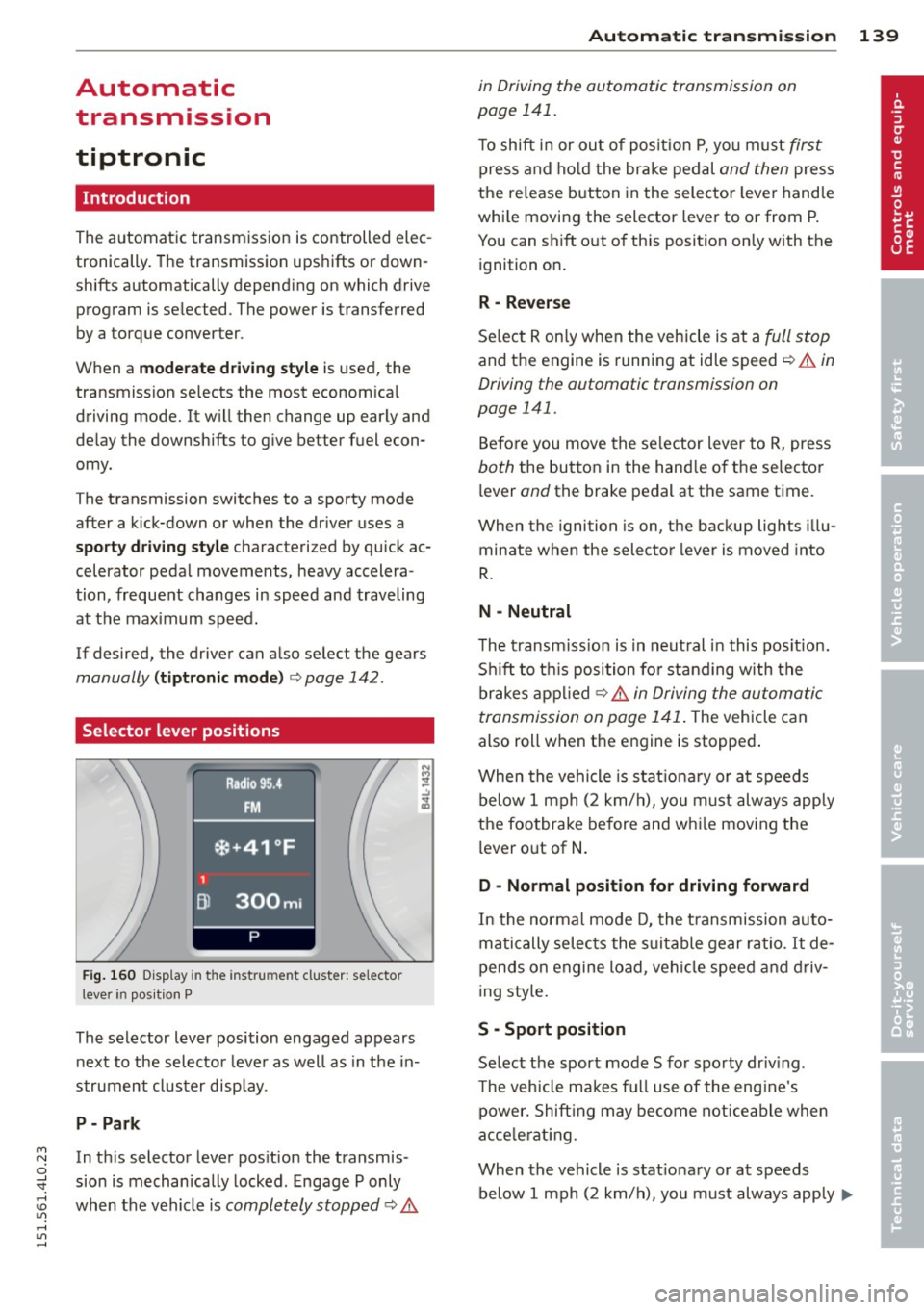
Selector lever positions
Fig. 160 D isp lay in t he i nst ru m en t cluster: selecto r
l ever in pos it ion P
The selector lever position engaged appears
next to the selecto r lever as well as in the in
strument clus ter disp lay.
P- P ark
M N In th is selector lever pos ition the transmis-o
;;f_ sion is mechan ically locked . Engage P only
~ when the vehicle is completely stopped ¢ 11::.. 1.1'1 ,...., 1.1'1 ,....,
Automatic tran sm iss ion 139
in Driving the automatic transmission on
page 141.
T o shift in or out of posit io n P , yo u m ust first
press and ho ld the brake pedal and then press
the re lease button in the selector leve r handle
whi le moving the selector lever to or from P.
You can shift out of th is position only with the
ignition on.
R -Reverse
Se lect R on ly when the vehicle is at a full stop
and the engine is running at idle speed ¢ 11::.. in
Driving the automatic transmission on
page 141.
Before you move the se lector lever to R, press
both the button in the hand le o f the selector
lever
and the brake pedal at the same t ime.
When the ignition is on, the backup lights illu
minate when the selecto r lever is moved into
R .
N -Neutral
The t ransm iss ion is in neut ral in this pos ition.
S hi ft to t his position fo r standing with the
brakes appl ied ¢
11::.. in Driving the automatic
transmission on page 141 .
The vehicle can
also roll when the engine is stopped .
When the vehicle is stat iona ry or at speeds
below 1 mph (2 km/h), yo u m ust always apply
the footbrake before and whi le mov ing the
lever o ut of
N .
D - Normal position for driving forward
In the no rma l mode D, the t ransmission auto
matically selects the s uitable gear ratio.
It de
pends on engine load, vehicle speed and driv
i ng sty le.
S -Sport posit ion
Se lect the sport mode S for spo rty dr iv ing .
T he vehicle makes fu ll use of the eng ine's
power. Shift ing may become noticeable when
acce lerat ing.
When the vehicle is stat ionary or at speeds
below 1 mph (2 km/h), you must always app ly ...,
Page 142 of 350
140 Automatic transmission
the foot brake before and while moving the
lever to Dor S out of N .
.&_ WARNING
Read and follow all WARNINGS
c::> & in
Driving the automatic transmission on
page 141.
(D Note
Coasting downhill with the transmission in N and the engine not running will result in
damage to the automatic transmission
and possibly the catalytic converter.
(D Tips
- If you accidentally select N while driving,
take your foot off the accelerator pedal immediately and wait for the engine to
slow down to idle before selecting D.
- If there is a power failure, the selector
lever will not move out of the P position.
The emergency release can be used if
this happens
c::> page 143.
Automatic Shift Lock (ASL)
T he Automatic Shift Lock safeguards you
against accidentally shifting into a forward or the reverse gear and causing the vehicle to
move unintentionally.
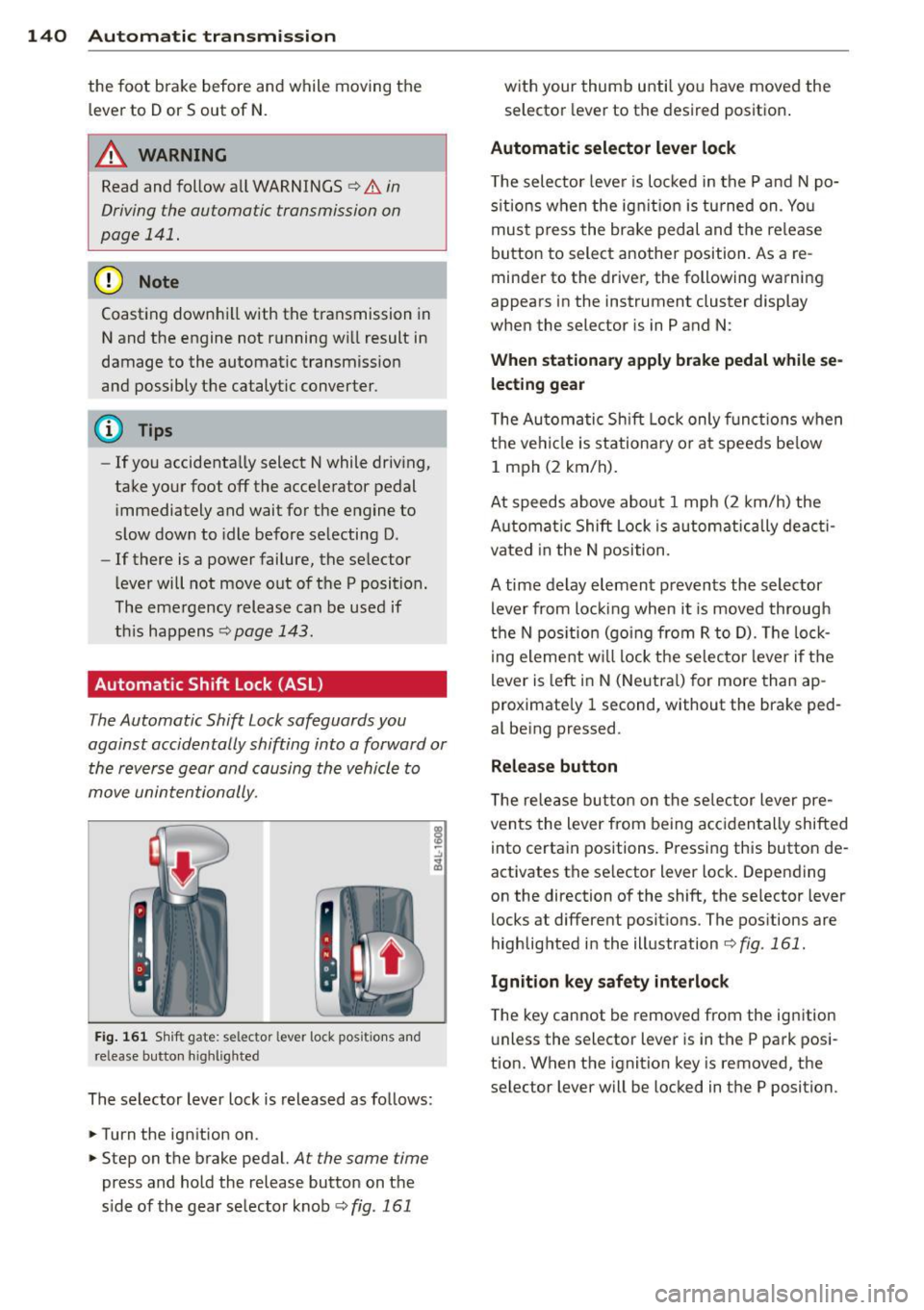
Fig . 161 Shift gate : se lector lever lock posi tion s an d
re lease button h ig hl igh te d
The selector lever lock is released as follows:
.. Tu rn the ignition on .
.. Step on the brake pedal.
At the same time
press and hold the release button on the
side of the gear selector knob
c::> fig. 161
with your thumb until you have moved the selector lever to the desired position .
Automatic selector lever lock
The selector lever is locked in the P and N po
sitions when the ignition is tu rned on . You
must press the brake pedal and the release
button to select another position . As a re
minder to the driver, the following warning
appears in the instrument cluster display
when the selector is in P and N:
When stationary apply brake pedal while se
lecting gear
The Automatic Shift Lock only functions when
the vehicle is stationary or at speeds below
1 mph (2 km/h).
At speeds above about 1 mph (2 km/h) the
Automat ic Shift Lock is automatically deacti
vated in the N position.
A time delay element prevents the selector lever from locking when it is moved through
the N position (going from R to D). The lock
ing element will lock the selector lever if the
lever is left in N (Neutral) for more than ap
proximately 1 second, without the brake ped
al being pressed .
Release button
The release button on the selector lever pre
vents the lever from being accidentally shifted
into certain positions. Pressing this button de
activates the selector lever lock. Depending
on the direction of the shift, the selector lever
locks at different positions . The positions are
highlighted in the illustration
c::> fig . 161.
Ignition key safety interlock
The key cannot be removed from the ignition
unless the selector lever is in the P park posi
tion. When the ignition key is removed, the
selector lever will be locked in the P position.
Page 143 of 350
M
"' 0 _,
"". rl I.O
"' rl
"' rl
Driving the automatic transmission
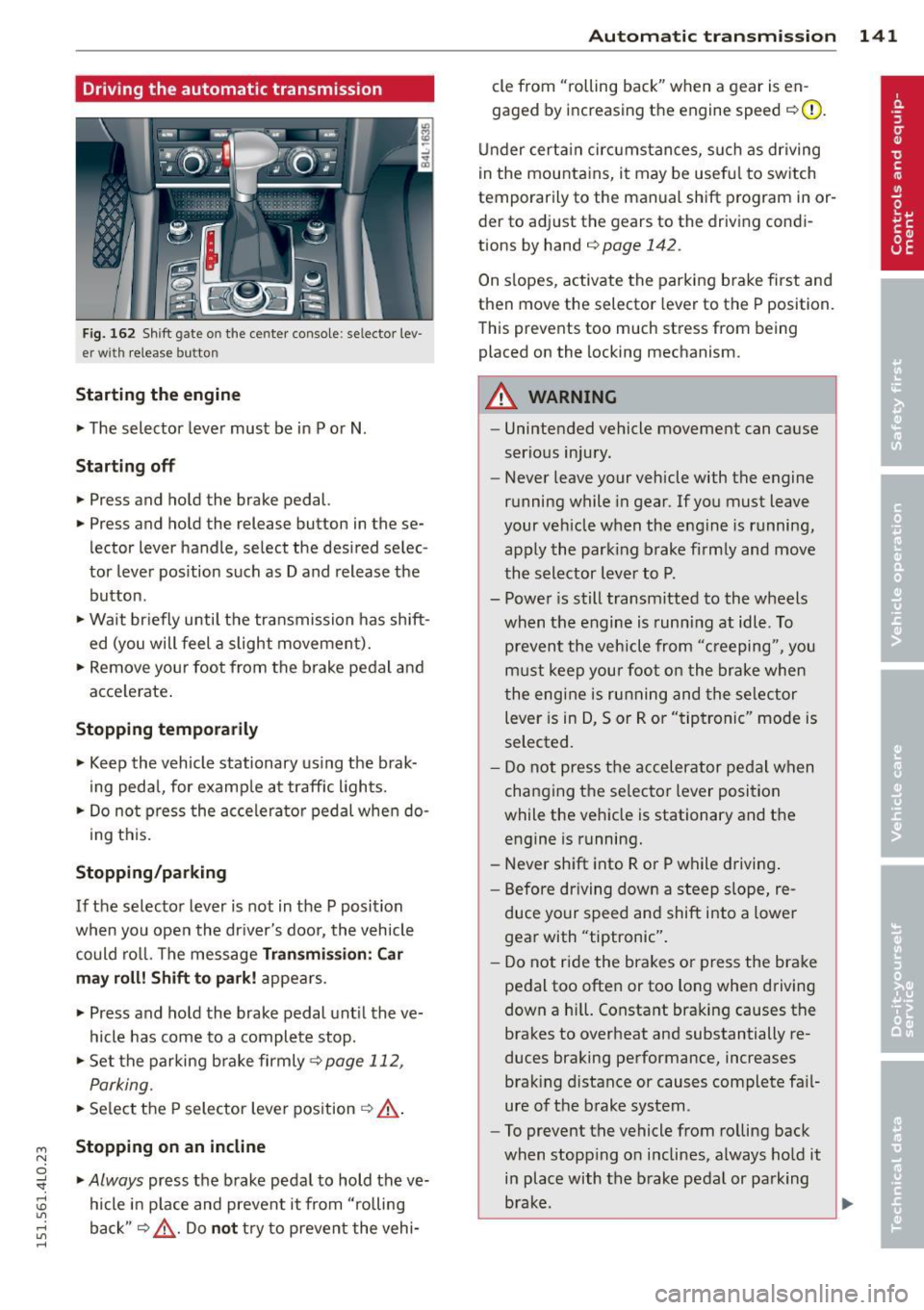
Fig. 162 Shift g ate on the center co nso le: se lector lev
er wi th release butt on
Starting the engine
~ The selector lever must be in P or N .
Starting off
~ Press and hold the brake pedal.
~ Press and hold the release button in these
lector lever handle , select the desired selec
tor lever pos ition such as D and release the
button .
~ Wait briefly until the transmission has shift
ed (you will feel a slight movement).
~ Remove your foot from the brake pedal and
acce lerate .
Stopping temporarily
~ Keep the vehicle stationary us ing the brak
ing pedal, for examp le at traffic lights.
~ Do not press the accelerato r pedal when do -
ing this.
Stopping /parking
If the selector lever is not in the P position
when you open the driver's door, the vehicle
could roll. The message
Transmi ssion : Car
may roll! Shift to park! appears.
~ Press and hold the brake pedal unt il the ve
hicle has come to a complete stop.
~ Set the parking brake firmly 9 page 112,
Parking.
~ Se lect the P selector lever position 9 &.-
Stopping on an incline
~ Always press the brake pedal to hold the ve
hicle in place and prevent it from "rolling
back"
9 ,& . Do not try to prevent the vehi-
Autom atic transm ission 141
cle from "rolling back" when a gear is en
gaged by increasing the engine speed
c::>(D.
Under certain circumstances, such as driving
in the mountains, it may be usefu l to switch
temporarily to the manual shift program in or
der to adjust the gears to the driving condi
tions by hand
c::> page 142 .
On slopes, activate the parking brake first and
then move the selector lever to the P position.
This prevents too much stress from being
placed on the locking mechanism.
A WARNING
- Unintended vehicle movement can cause
serious injury.
- Never leave your vehicle with the engine
running while in gear.
If you must leave
your veh icle when the engine is running,
apply the park ing brake firmly and move
the selector lever to P.
- Power is still transmitted to the wheels
when the engine is running at idle. To
prevent the vehicle from "c reeping ", you
must keep your foot on the brake when
the engine is running and the selector
lever is in D, Sor R or "tiptronic" mode is
selected.
- Do not press the accelerator pedal when
changing the se lector lever position
while the vehicle is stationary and the engine is running.
- Never shift into R or P while driving.
- Before driving down a steep slope, re-
duce your speed and shift into a lower
gear with "tiptronic".
- Do not ride the brakes or press the bra ke
pedal too often or too long when driving
down a hi ll. Constant braking causes the
brakes to overheat and substantially re
duces braking performance, increases braking distance or causes complete fa il·
ure of the brake system.
- To prevent the vehicle from rolling back
when stopping on inclines, always hold it
in place with the brake pedal or parking
brake . .,..
Page 225 of 350

M N
0 ...J
'SI: ,...., \!) 1.1'1 ,...., 1.1'1 ,....,
Intelligent technology Notice about data
recorded by vehicle
control modules
Your vehicle is not equipped with an Event Da
ta Recorder (EDR), installed by some manu
facturers for the express purpose of capturing
data for retrieval after an accident or crash
event. EDRs are sometimes called "crash re
corders".
Some state laws restrict the retr ieval or down
loading of data stored by EDRs that were in
stalled in a vehicle for the express purpose of
retrieving data after an accident or crash
event without the owner's consent.
Although your vehicle is not equipped with an
EDR, it is equipped with a number of electron
ic control modules for various vehicle systems
such as, for example, engine function, emis
sion control, as well as for the airbags and
safety belts.
These electronic control modules also record
vehicle-related data during norma l vehicle op
eration for diagnostic and repair purposes.
The recording capacity of the electronic con
trol modules is limited to data (no sound is re
corded) and only a small amount of data is ac
tually recorded over a very limited period of
time and stored when a system fault or other
condition is sensed by a control unit. Some of
the data then stored may relate to vehicle
speed, direction, braking as we ll as restraint
system use and performance in the event of a
crash or other condition. Stored data can only be read and downloaded with special equip
ment.
Electronic Stabilization
Control (ESC)
Description
The Electronic Stabilization Control (ESC) rein
forces driver safety. It reduces the risk of slip
ping and improves driving stability. ESC de
tects critical s ituations such as the vehicle
Intelligent technology 223
oversteering and understeering or the whee ls
spinning . The vehicle is stabilized by applying
the brakes or reducing eng ine torque . Once
the ESC is active, the indicator light
GI blinks
in the instrument cluster.
The following systems are integrated in the
ESC:
Anti-lock brake system (ABS)
ABS prevents the wheels from locking up
when brak ing. The vehicle can sti ll be steered
even during hard braking. Apply steady pres
sure to the brake peda l. Do not pump the ped
al. A pulsing in the brake pedal indicates that
the system is helping you to brake the vehicle.
Brake assist system
The brake assist system can decrease braking
distance.
It increases braking power when the
driver presses the brake peda l quickly in emer
gency situations. You must press and hold the
brake pedal until the situation is over. In
vehicles with adaptive cruise control*, the
brake assist system is more sensitive if the
distance detected to the vehicle ahead is too
small.
Anti-slip regulation (ASR)
ASR reduces engine power when the drive
wheels begin to spin and adapts the force to
the road conditions. This makes it easier to
start, accelerate and dr ive up hi lls.
Electronic differential lock (EDL)
The EDL brakes wheels that are spinning and
transfers the drive power to the other wheels.
This function is not available at higher speeds .
In extreme cases, EDL automatically switches
off to help keep the brake on the braked wheel
from overheating. EDL will switch on again au
tomatically when conditions have returned to
normal.
A WARNING
- The ESC and its integrated systems can
not overcome the laws of physics. This is
especially important on slippery or wet
~
•
•
Page 234 of 350
232 Driving and en vironm ent
,8. WARNING
-Do not park your vehicle over flammable
materials such as grass or leaves because
the high temperature of the diesel par
t icu late filter could start a fire .
- Do not apply an underbody protectant in the exhaust system area or a fire could start.
Avoid damaging the vehicle
When you are driving on poor roads, or over
curbs, steep ramps, etc., make certain that
low-lying parts such as spoilers and exhaust
system parts do not bottom out and get dam
aged.
This is especia lly true for vehicles with low
slung chassis (sports chassis)* and fully load
ed vehicles.
Shutting down vehicle
If you would like your vehicle to remain inop
erative for a longer period of time, contact an
Audi or other specialized dealer . They can ad
vise you on necessary precautions e.g . corro
sion prevention, maintenance and storage. Pay attention to additional information con
cerning the battery. Refer to
c::> page 266 .
Operate your vehicle
economically and
minimize pollution
General
Your personal style of driving will determine
the economy of your vehicle, as well as ex
haust and noise levels .
Fuel economy, environmental impact, and
wear on your engine, brakes and tires largely
depend on three factors:
- your personal driving style
- operating conditions
- technical limitations
If you anticipate what you need to do next and
drive economically, you can easily cut your
fuel consumption by 10-15 percent . This sec
tion will give you some tips on how you can help the environment and your pocketbook.
(D Tips
The consumption estimates as published by ENVIRONMENTAL PROTECTION AGENCY
(EPA) and Transport Canada may not corre
spond to your actual consumption on the road, which will vary depending upon vehi
cle load and speed, road and weather con
dit ions, trip length, etc.
· Drive smoothly and keep a lookout
ahead
Vehicles use the most fuel when they ore ac
celerating.
., Avo id unnecessary accelerating and brak ing .
Vehicles use the most fuel when they are ac
celerating . If you anticipate what is going to
happen next, you will need to brake less and,
thus, acce lerate less. Let the vehicle coast
whenever possible -for examp le when you see
that the next traffic light is red.
Avoid full throttle
Driving at moderate speeds saves fuel and
improves your mileage.
., Try and keep well below your car's maximum
speed.
Accelerating gently reduces fuel consump
tion, engine wear, and does not disturb the environment.
Fuel consumption, exhaust emissions and en
gine noise increase disproportionately at high
speeds. If you drive at approximately three
quarters of top speed, fuel consumption w ill
be reduced by one half. Never drive faster
than the posted speed limit and weather con
ditions permit.
Page 240 of 350
238 Trailer towing
Trailer towing
Driving with a trailer
General information
Your Audi was designed primarily for passen
ger transportation .
If you plan to tow a trailer, p lease remember
that the additional load will affect durability,
economy and performance .
Trailer towing not on ly places more stress on
the vehicle, it also calls for more concentra
tion from the driver.
For this reason, always follow the operating
and driving instructions provided and use
common sense.
@ Note
If you are going to tow a trai ler, you must
activate the trailer operation mode
c:::> page 161, Towing a trailer.
Technical requirements
Trailer hitch
Use a weight-carrying hitch conforming to the
gross trailer weight. The hitch must be suita ble for your vehicle and trailer and must be
mounted securely on the vehicle's chassis at a
technically sound location . Use only a trailer
hitch with a removable ball mount. Always
check with the trailer hitch manufacturer to
make sure that you are using the cor rect
hitch.
Do not use a bumper hitch.
The hitch must be installed in such a way that
it does not interfere with the impact-absorb
ing bumper system. No modifications should
be made to the vehicle exhaust and brake sys
tems. From time to time, check that all hitch
mounting bolts remain securely fastened.
When you are not towing a trailer, remove the
trai ler hitch ball mount. This prevents the
hitch from causing damage should your vehi
cle be struck from behind
c:::> A.
Trailer brakes
If your trailer is equipped with a brakin g sys
tem, check to be sure that it conforms to all
regulations.
T he trailer hydraulic brake system must not be
directly connected to the vehicle's hydraulic
brake system
c:::> A .
Safety chains
Always use safety chains between your veh icle
and the tra iler.
Trailer lights
Trailer lights must meet all regulations. Be
sure to check with your authorized Audi dealer
for correct wiring, sw itches, and relays.
Mirrors
If you are unable to see the traffic behind you
using the regular outside mirrors, then you
must install extended mirrors.
It is important
that you always have clear v is ion to the rear .
A WARNING ,-
- If a trailer has electrical brakes please
note that these brakes are not activated
by the factory-fitted control unit -risk of
accident!
- Afte r removing the trailer hitch, do not
store it in yo ur vehicle. In case of sudden
braking, the hitch could fly forward and
injure you or your passengers.
- Never install a "weight distributing" or
"load equalizing" trailer hitch on your ve
hicle. The vehicle was not designed for
these kinds of trailer hitches. The hitch
attachment can fail, causing the trailer
to tear loose from the vehicle.
- The Gross Vehicle Weight Rating for your
vehicle, found on the safety compliance
label on the driver's side B-pillar, must
never be exceeded under any circumstan
ces. Exceeding the Gross Vehicle Weight
Rating of your vehicle is likely to damage
your vehicle, and such damage will not
be covered by your Limited New Vehicle
-
Warranty. Exceeding the Gross Vehicle ~
Page 241 of 350
M N
0 ...J
'SI: ,...., \!) 1.1'1 ,...., 1.1'1 ,....,
Weight Rating will also change the per
formance and handling characteristics of
your vehicle, which could cause a crash result ing in serious injury or death .
- The Gross Vehicle Weight Rat ing for your
vehicle would be exceeded if your vehicle is simultaneously equipped with Panor
amic sliding sunroof; th ird-row seating;
trailer towing equipment (factory or
dealer-installed), and running boards
(dea ler-installed) . UNDER NO CIRCUM
STANCES MAY ALL SUCH ITEMS BE IN
STALLED ON THE SAME VEHICLE.
Operating instructions
MAX 6.9"
MAX175mm
E
1/1 E 1/1 ... a)
m
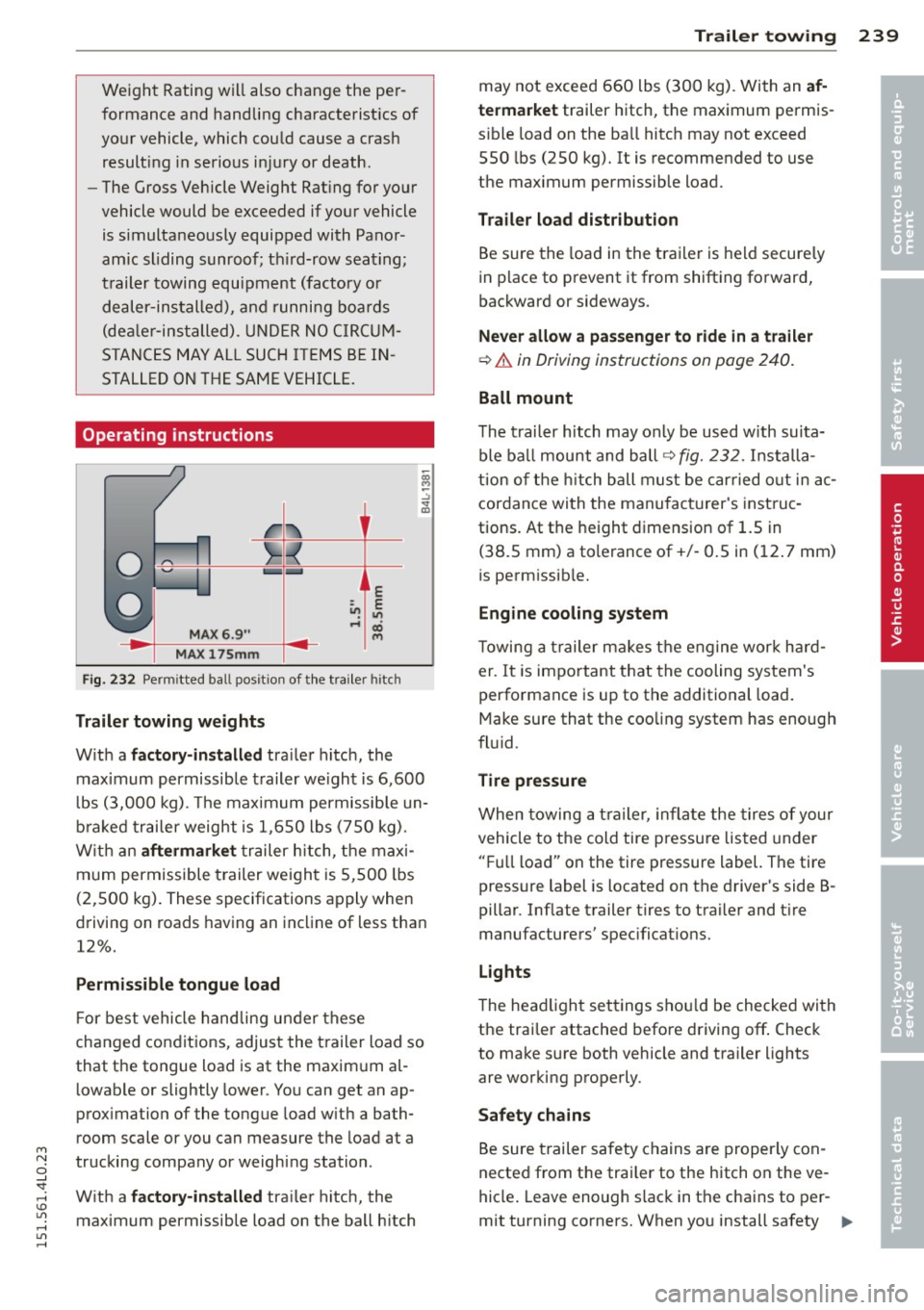
Fig. 232 Perm itted ba ll posit ion of t he tra iler hitch
Trailer towing weights
W ith a factory-installed tra iler hitch, the
maximum permissible trailer we ight is 6,600
l bs (3,000 kg). The maximum permissible un
braked trailer weight is 1,650 lbs (750 kg).
With an
aftermarket trailer hitch, the maxi
mum permissible t railer we ight is 5,500 lbs
(2,500 kg). These specifications apply when
driving on roads having an incline of less than
12%.
Permissible tongue load
For best vehicle handling under these
changed cond itions, adjust the trailer load so
that the tongue load is at the maximum al
l owable or slightly lower. You can get an ap
prox imation of the tongue load with a bath
room scale or you can measure the load at a
trucking company or weighing station .
With a
factory-installed tra iler hitch, the
maximum permissible load on the ball hitch
Trailer towing 239
may not exceed 660 lbs (300 kg). With an af
termarket
trailer hitch, the maximum permis
s ib le load on the ba ll hitch may not exceed
550 lbs (250 kg).
It is recommended to use
the maximum permissible load.
Trailer load distribution
Be sure the load in the trailer is held secure ly
in place to prevent it from shifting forward,
backward or sideways.
Never allow a passenger to ride in a trailer
¢.& in Driving instructions on page 240.
Ball mount
The trailer hitch may only be used w ith suita
ble ball mount and ball ¢
fig. 232. Installa
t ion of the hitch ball must be carried out in ac
cordance with the manufacturer's instruc
tions. At the height dimension of 1.5 in
(38.5 mm) a tolerance of+/- 0.5 in (12 . 7 mm)
is perm issib le.
Engine cooling system
Towing a trailer makes the engine work hard
er . It is important that the cooling system's
performance is up to the additional load .
Make sure that the cooling system has enough
fluid .
Tire pressure
When towing a tra iler, inflate the tires of your
vehicle to the cold tire pressure listed under
" Full load" on the tire pressure label. The tire
pressure label is located on the driver's side B
pillar . Inf late trailer tires to trai ler and t ire
manufacturers' spec ificat ions .
Lights
The headlight settings sho uld be checked with
the trailer attached before driving
off . Check
to make sure both vehicle and trailer lights
are working properly .
Safety chains
Be sure trailer safety chains are properly con
nected from the trailer to the hitch on the
ve
hicle . Leave enough slack in the chains to per
mit turning corners. When you install safety
Ill-
•
•