lights AUDI Q7 2015 Owner´s Manual
[x] Cancel search | Manufacturer: AUDI, Model Year: 2015, Model line: Q7, Model: AUDI Q7 2015Pages: 350, PDF Size: 86 MB
Page 64 of 350
62 Clear vis ion
The light sw itch must not be overturned past
the stops in
either direction.
Switching on the front f og lights tO
.. Turn the light switch to :oo: or to gD .
.. Pull the ligh t switch to the first stop (!).
When the front fog l ights are on, the symbol
}O next to the light switch will i llum inate.
(D Tips
With the switch in AUTO front fog lights
and rear fog lights cannot be turned on in
add it ion.
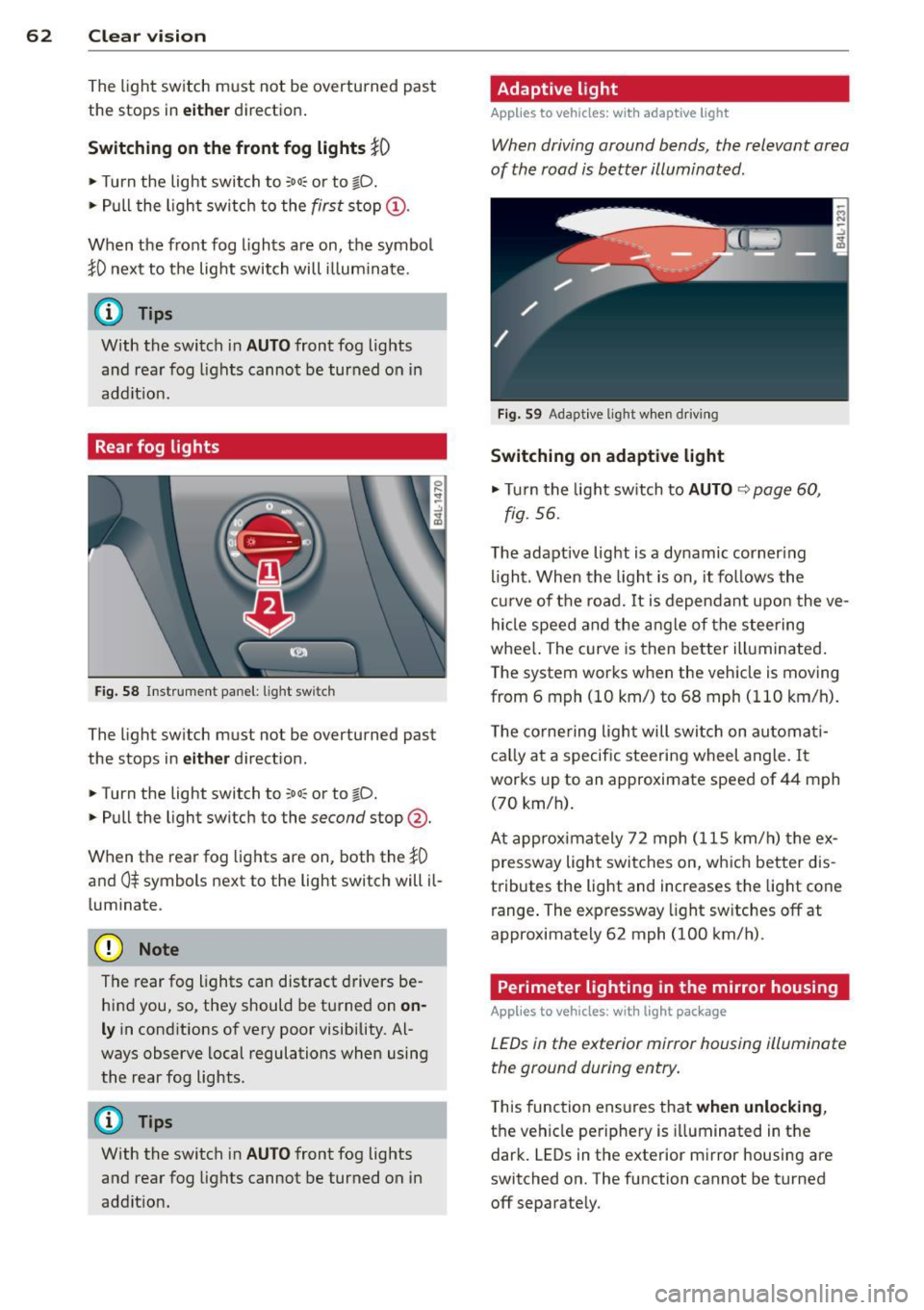
Rear fog lights
F ig. S8 Instrume nt panel: light switch
The light switch must not be overturned past
the stops in
eit her d irect ion.
.. Turn the light switch to
:oo: or to gD.
.. Pull the light switch to the second stop @.
When the rear fog lights are on, both the
}0
and 0$ symbols next to the light switch will il
l um inate.
(D Note
The rear fog lights can distract drivers be
hind you, so, they should be turned on
on
ly in cond itions of very poor visibility. Al
ways observe local regulations when using
the rear fog lights.
{D) Tips
With the switch in AUTO front fog lights
and rear fog lights cannot be turned on in
addit ion.
Adaptive light
Applies to vehicles: with adaptive ligh t
When driving around bends, the relevant area
of the rood is better illuminated .
Fig . S9 Adapt ive light w hen dr iv in g
Switching on adaptive light
... Tu rn the light sw itch to AUTO ¢ page 60,
fig. 56.
The adaptive light is a dynamic corner ing
li ght. When the light is on, it follows the
cur ve of the road. It is dependan t upon the ve
hicle speed and the angle of the steering
whee l. The curve is then better illuminated .
T he system works when the vehicle is moving
from 6 mph (10 km/) to 68 mph ( 110 km/h).
T he corne ring ligh t will switch on automati
ca lly at a specific stee ring wheel angle. It
works up to an approximate speed of 44 mph
(70 km/h) .
At approxima tely 72 mph (115 km/h) the ex
pressway light switches on, wh ich better dis
tributes the light and increases the light cone
range . The expressway light sw itches
off at
approximately 62 mph (100 km/h).
Perimeter lighting in the mirror housing
Applies to vehicles: with light package
LEDs in the exterior mirror housing illuminate
the ground during entry .
This func tion ensures that when unlockin g,
the vehicle pe riphery is illuminated in the
dark. LEDs in the exterior m irror housing are
switched on. The function cannot be turned
off separate ly.
Page 65 of 350
M
"' 0 ..J
"". rl I.O
"' rl
"' rl
Emergency flasher
The emergency flasher makes other motorists
aware that you or your vehicle are in an emer
gency situation.
,r--,a.
-------------------
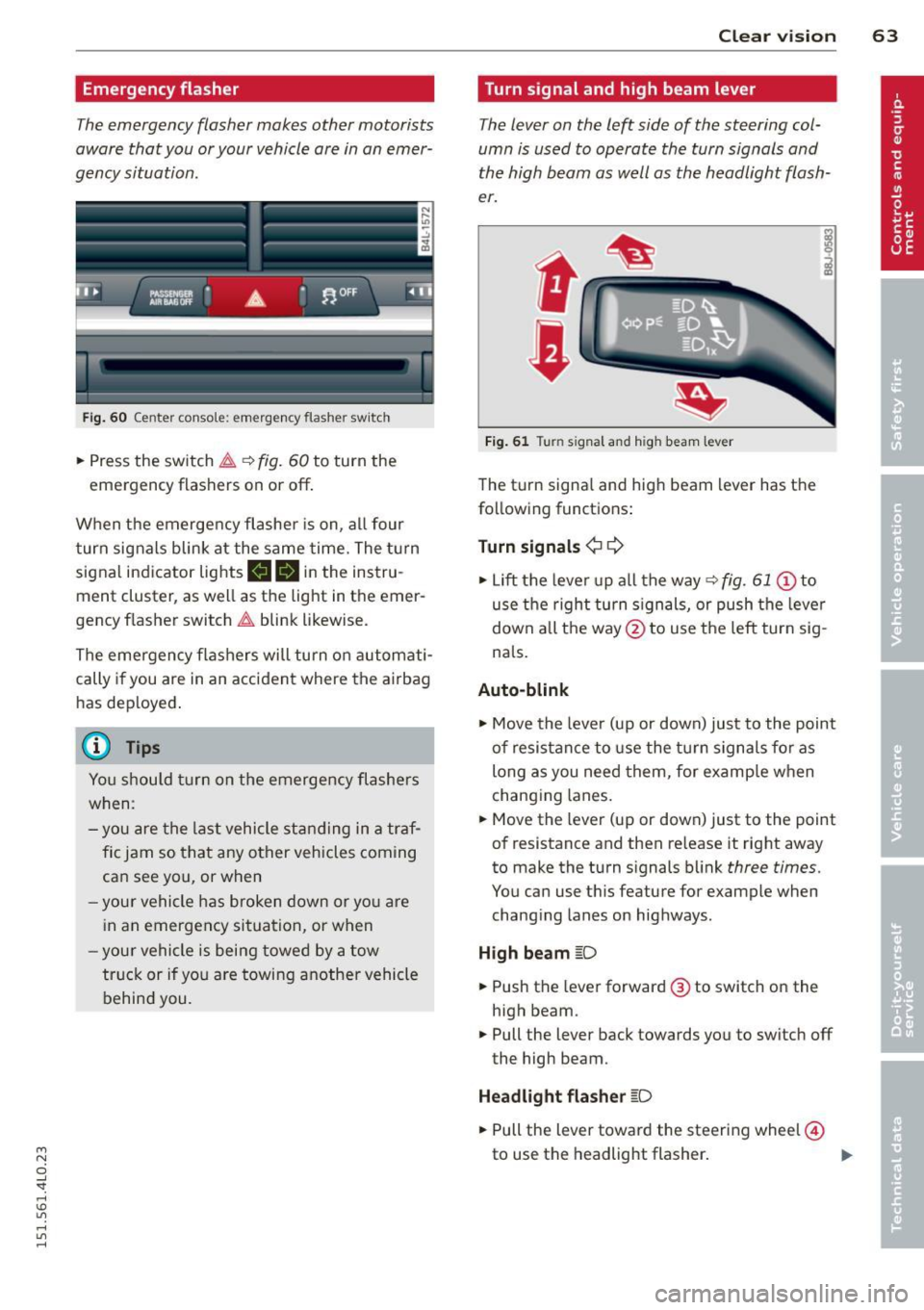
Fi g. 6 0 Center console: em ergency flasher sw itch
.. Press the sw itch ~ ~ fig. 60 to turn the
emergency flashers on or off .
When the emerge ncy flashe r is on, al l four
turn signals blink at the same time. The t urn
signal indicator lights
11111 in the instru
ment cluster, as well as the light in the emer
gency f lasher switch ~ blink likewise.
The emergency flashers will turn on automati cally if you are in an accident where the airbag
has dep loyed .
@ Tips
You shou ld tu rn on the emergency flashers
when:
- you are the l ast vehicle st anding in a tr af
fi c jam so that any other vehicles coming
can see you, or when
- your vehicle h as broken down or yo u are
i n an emergency si tuation, or when
- your vehicle is being towed by a tow
tru ck or if you are towing another vehicle
behind you.
Clear vi sion 63
Turn signal and high beam lever
The lever on the left side of the steering col
umn is used to operate the turn signals and
the high beam as well as the headlight flash
er.
t
'
Fi g. 61 Turn signal and high beam lever
The turn signa l and high beam lever has t he
following functions :
Turn signals ¢¢
.. Lift the leve r up a ll the way ~ fig. 61 @to
use t he right turn s ignals, or push the leve r
down all the way@to use t he left tur n sig
na ls .
Auto -blink
.. Move the leve r (up or down) just to the point
of resistan ce to use the turn signa ls fo r as
long as you need them, for example w hen
chang ing lanes.
.. Move the lever (up or down) just to the point
of resistance and then release it right away
to make the turn signals blink
three times.
You can use t his feature for example when
chang ing lanes on highways.
H igh beam [D
.. Push the lever forward @ to sw itch on the
high beam .
.. Pull the lever back towards you to switch off
the high beam.
Headlight flasher [D
.. Pull the lever toward the steering wheel@
to use the headlight flasher .
~
Page 66 of 350
64 Clear vision
Notes on the se feature s
- The turn signals only work with the ignition
tu rned on. The indicator lights
II or ii in
the instr ument cluster ¢
page 14 also b link .
- After you have turned a corner, the turn sig -
nal switches off a utomat ically.
- T he
high beam works only when the head
lights are on. The indicator light
SI in the
instrument cluste r illuminates when the
high beams a re on.
- The
headlight flasher works on ly as long as
yo u hold the leve r - even if there are no
lights turned on . The ind icator light
SI in
the instrument cl uster illum inates when you
use the head light flasher.
A WARNING
Do not use the hig h beam o r headlight
flasher if you know that th ese cou ld blind
oncoming traffic.
Interior lights
Front interior lights
-
The interior ligh ts include reading lights for
bo th the driver and the front passenger .
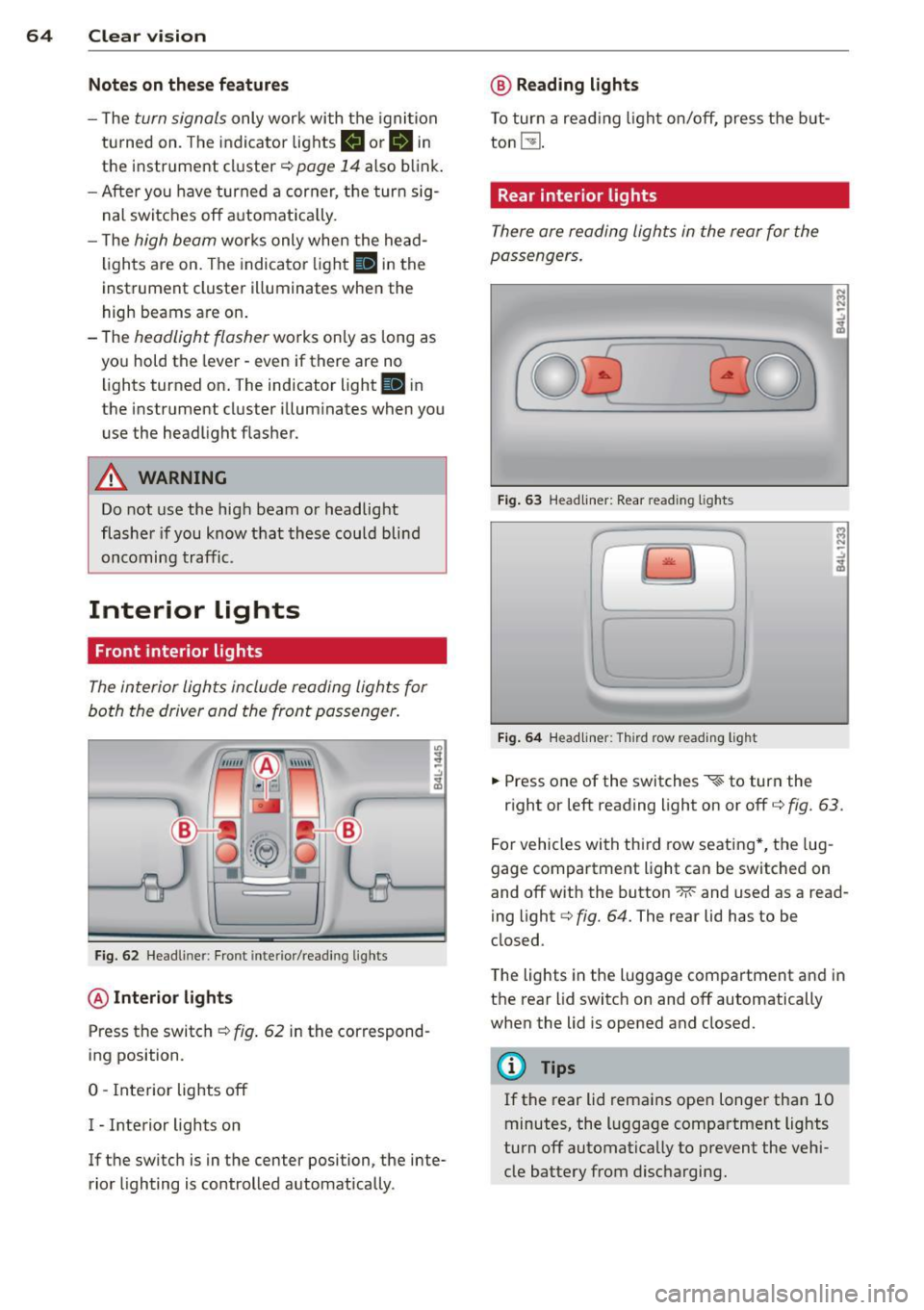
Fig. 6 2 Headli ner: Fro nt inte rior/read ing lights
@ Interior lights
Press the switch ¢ fig. 62 in the correspond
ing position.
0 -Interior lights off
I - Inte rior lights on
If the switch is in the center position, the inte
rior lighting is controlled automatica lly.
@ Reading lights
T o tur n a read ing light on/off, press the b ut
ton
t!J .
Rear interior lights
There are reading lights in the rear for the
passengers .
Fig. 63 Head liner: Rear read ing lights
~
--
' ~ '-
Fig . 64 Head liner: Third row read ing light
.. Press one of the switches ~ to turn the
N .., N
.:,
~
::i N -.:,
~
right or left reading light on or off c::;, fig. 63.
For vehicles with thi rd row seating *, the lug
gage compartment light can be switched on
and off with the button -M-and used as a read
ing light
c::;, fig. 64. The rear lid has to be
closed.
The lights in the luggage compartment and in
t h e rear lid switch on and off automatically
when the lid is opened and closed.
@ Tips
If the rear lid remains ope n longer than 10
minutes, the l uggage compartment lights
turn off automatically to prevent the vehi
cle battery from disc harging .
Page 70 of 350
68 Clear vis ion
Int ermittent w iping
.. Push the w iper lever forward to the first po
sition @~
fig. 69. The rear window wiper
will wipe the window approx. every four sec onds .
Automatic wiper /washer function
.. Push the w iper lever fo rward to the second
stop,
posi tion (!), and hold it there for as
l ong as you want the rear wiper/washer to
operate.
.. Re lease the lever aga in . the wiper wi ll keep
runn ing for approx. four seconds.
Switching interm ittent wip er action off
.. Pull the lever all the way back to the or iginal
position .
As soon as the reverse gea r is engaged and
the front wipe rs are turned on and operat ing
at the same time, the rear wipe r also turns on
automatically.
A WARNING
Wipe r blades are crucial for safe d riving!
On ly in good condition are they able to
clear the windows properly to provide un
restricted visibility. Worn or frayed wipe r
blades are a safety hazard! ¢
page 69,
Replacing windshield wiper blades
CD Note
In freezing or near freezing condit ions:
- Always check that the wiper blades are
not frozen to the glass before you turn
the wiper on. Loosen a wiper blade which i s frozen in p lace before operating the
wipe r to prevent damage to the wiper
blade o r the wiper motor .
- Do not use the wiper to clear a frosted
window . U si ng the w ipers as a conven
i ent ice sc raper will destroy the wiper
blades.
-
Headlight washer system
App lies to vehicles : wi th headlight washe r system
The headlight washer system cleans the
headlights.
.. Operate the w indshield wiper/washer sys
tem ¢
page 66, fig. 68 ® with the head
lights turned on by ho lding the lever for lon
ger than one second .
The washer jets extend forward out of the
front bumper driven by water pressu re to
spray the fro nt headlights w ith water .
You should inspect the headlights regu larly
(for example whe n refueling) and clean off
any solid di rt or i nsects from the le nses .
To ensure the system wor ks proper ly in w inter,
keep the washer jets free of snow and remove
any ice using a de-icing spray.
Service position
The wiper blades can only be changed in the
service position .
.. If the wiper blades are not frozen to the
windshie ld, bring the windshie ld wiper lever
to the basic pos ition @¢
page 66, fig. 68.
.. Select: !CAR I function button> Systems *
control button> Windshield wipers > Serv
ic e po sition .
Or
.. Select:
!CARI function button> Car sy stems*
cont ro l butto n > Servicing & checks > Wip er
s ervi ce po sition .
-On -changing the windshield wipe r blades
can o nly be done if you b ring the wiper arms
t o the servi ce position. Yo u will a lso avoid
pa int damage to the hood when wor king on
t he wipe rs in this position .
-Off -the w indshie ld w ipers are moved to
t heir initia l posi tion again .
CD Note
Never ma ne uver you r vehicle with the
front windshie ld w iper arms raised s ince
t hey will automatically be moved bac k t o
Page 73 of 350
M
"' 0 ..J
"". rl I.O
"' rl
"' rl
when leaving the car parked close to other
vehicles.
Memory setting for the exterior mirro rs *
When the seat pos ition is saved in the memo
r y, the position of the exte rior mirrors is saved
at t he same time~
page 76.
If the position of the passenger mirror is
changed whe n the vehicle is in reve rse gear
and the switch is i n the ® position, th is new
tilte d position will be a utomat ica lly saved to
the remote key when the vehicle is taken out
of reverse gear. To save, the rotary knob for
mirror ad justment must be in the ® position,
the selector lever must be in the P position
and the ign ition must be off . Th is will now be
come the stored setting when the vehicle is
put in reverse gear again .
Tilting the passenger' s side e xterior
mirror (only with seat memory )
When you move the selector lever into R (Re
ve rse), the mir ror on the front passenger's
door (knob tu rned to @
Q fig. 73) will tilt
slig htly downward. This make is easier for you
to see the curb w hen you are backing in to a
parking space.
The mirro r returns to its in itia l position as
soon as reve rse gear is disengaged and vehicle
speed is above abou t 9 mp h (1 5 km/h). The
mirror a lso retu rns to its initia l position if the
switch is moved to the driver's exterior mirror
© o r the ignit io n is switched off.
(D Note
-Cur ved (i.e. convex) mirr or surfaces in
crease your field of view. Remembe r th at
vehicles or other objects w ill appear
smaller and farther away than when
seen in a flat mirror. If yo u use this mir
ror to est imate distances of following
vehicles when c hanging lanes, you could
estimate incorrectly and cause an acci
dent.
- If the mir ro r hous ing is moved un inten
tiona lly (for exampl e, while park ing your
vehicle), t hen you must first fo ld the mi r- Clear vi
sion 71
ror elect rically . Do not read just the mir
ror housing ma nually . You cou ld damage
the motor which controls the m irror .
-If you wash the vehicle in a n automatic
car wash, you must fold the exter ior mir
rors in to reduce the risk of damage to
the mirrors . Never fold power fo ld ing ex
terior mirrors* by hand. Only fo ld them
in and o ut using the power controls.
(D Tips
If t here sho uld be a ma lf u nction in the
e lectrica l system, you can st ill adjust the
ex ter ior mirrors by press ing the edge of
the m irror.
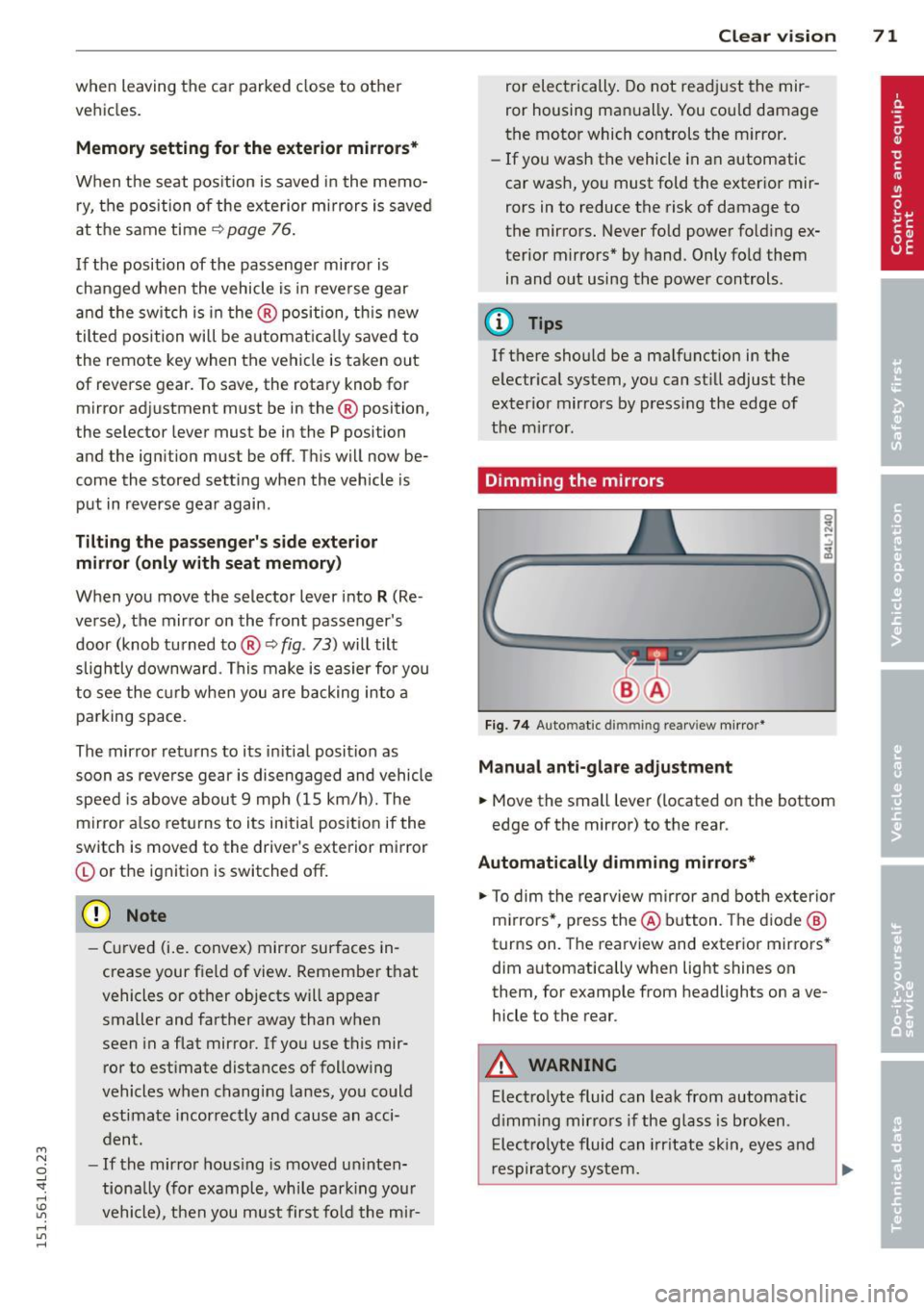
Dimming the mirrors
Fig . 74 Auto matic dimming rearview mirror*
Manual anti-glare adjustment
.,. Move the small lever ( located on the bottom
edge of the mirror) to the rear .
Automatically dimming mirrors*
.,. To dim the rearview mi rror and both exterio r
m irrors* , pr ess the @ button . Th e d io d e @
turns on. The rearview and exterior mirrors *
dim a utomatically when light shines on
them, for examp le from headlights on ave
hicle to the rear.
A WARNING ...
Elect ro lyte fluid can lea k from aut omatic
d imm ing mirro rs if the glass is b roken .
E lec trolyte fluid can irrit ate sk in, eyes and
res pirato ry sys tem.
Page 124 of 350
122 Adapti ve crui se control
A WARNING
Following ot her vehicles too closely in
creases the risk of a crash and serious per
sonal injury .
- Following other vehicles too closely, par
t icularly at higher speeds increases the
risk of collis ions and serious pe rsonal in
Jury.
- Setting short distances to the traffic
ahead reduces the time and distance
available to br ing you r vehicle to a safe
stop and makes i t even mo re ne cessary
to pay close attention to traffic.
- Always select a speed and distance to
traffic ahead that is safe and appropr iate
under the prevailing traff ic, road, weath
er and Lighting conditions .
- Never re ly on the dis tance control fea
ture of ACC a lone to p reven t rear -end col
lisions. Always be prepared to brake and
take evasive act ion to avoid co llisions
and other acc ident situations.
- Never allow the closing speed between
you and other vehicles to be so h igh that
the adaptive cruise control may not be
able to slow your vehicle safe ly. If clos
ing speed is too high, you must apply the
brakes yourself to reduce the risk of a
rear-end c rash.
- Always select a g reater following dis
tance to the veh icle ahead on wet roads
than o n dry roads.
- Always read and heed the information
and WARNI NGS
9 .&. in Description on
page 115.
(0 Tips
The distance setting is reset to the factory
default
DISTANCE 3 the next time the ig
nition is turned on.
Driver information
Displays in the instrument cluster
Applies to veh icles: w ith adaptive cruise contro l
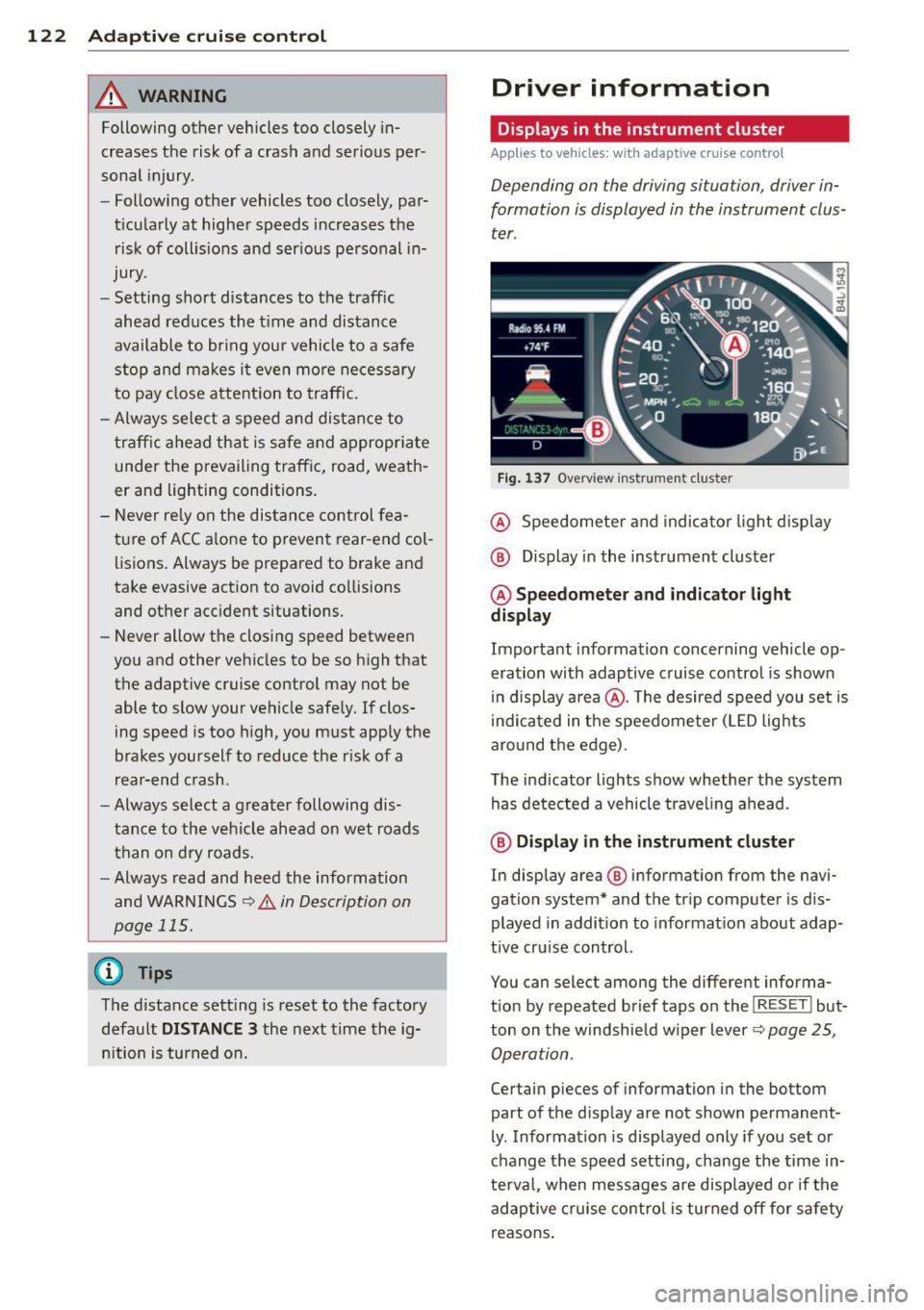
Depending on the driving situation, driver in
formation is displayed in the instrument clus
ter .
Fig . 1 37 Overv iew ins tr u me nt cluster
@ Speedometer and indica to r Li ght d isp lay
@ Display in the instrument cluster
@ Speedometer and indicato r light
display
Important information concerning vehicle op
eration with adaptive cruise control is shown
i n display a rea @. The desired speed you set is
i ndica ted in the speedome ter (LED lights
aro und t he ed ge).
T he ind icator Lights show whether the system
has detected a vehicle trave ling ahead .
@ Display in the in strument cluster
In display area@ information from the navi
gation system* and th e tr ip computer is dis
played in addition to informat ion about adap
t ive cru ise control.
You can select among the different informa
t io n by repeated brief taps o n the
I RESET I but
ton on the w indshie ld w iper Lever
9 page 25,
Operation .
Certain pieces of information in the bottom
part of the display are not shown permanent
ly . Information is displayed only if you set or
c h ange the speed setting, change the time in
te rva l, when messages are disp layed or if the
adaptive cruise co ntro l is turned
off for safety
r easons .
Page 125 of 350

M
"' 0 ..J
"". rl I.O
"' rl
"' rl
Display in the speedometer
Applies to vehicles: with adaptive cruise control
Fig. 138 D isplay in the speedomete r
Des ired spe ed
The desired speed set by the driver is dis
p layed by a red LED.
If the desi red speed was set between two
lines on the speedometer using the
I SETI but
ton, the two closest light emitting diodes will
come on <=>
fig. 138.
The system a llows only speeds to be set be
tween 20 to 95 mph (30 to 150 km/h) to be
set. This speed range is faint ly illuminated in
the speedometer (LED lights).
Ind icator lights (symbols )
-- Open road :
The indicator light_
shows that ACC is act ive and that no moving
vehicle has been detected with in range of the radar sensor up ahead in your lane of
travel. The set speed is maintained.
- - Driving in traff ic: The ind icator
light - shows that a vehicle moving in
your lane of travel has been detected up
front in your lane of travel. Your speed is ad
justed according to the speed of the vehicle
up front . ACC accelerates and brakes auto
matically within the sys tem's capabilit ies .
-- Driver int ervention prompt: The
red flashing warning light- means
Request for driver to a ssume control. You
as the dr iver must s low the vehicle with the
f oot brake. The symbo l-t ells you
t h at the adaptive c ruise co ntrol is not able
to slow the vehicle down enough to keep a
enough distance to the ve hicle in front of
you. A warning tone will a lso sound when
Ad apti ve crui se control 12 3
the symbol appears. For more information
about the driver intervention prompt
r::!) page 126.
_& WARNING
Improper use of the adaptive cruise con
trol feat ures and inattent ion can lead to a
crash and ser ious pe rsonal inju ry.
- Never a llow the closing speed between
you and othe r vehicles to be so high that
the adaptive cruise cont ro l may not be
ab le to slow yo ur vehicle safely. If clos
ing speed is too high, you must apply the
brakes yo urself to reduce t he ris k of a
rear-e nd crash.
- Always sele ct a greate r followi ng d is
tance to the vehicle up ahead on wet
roads t han on d ry roads.
- Always rea d and h eed t he i nfo rmation
an d WAR NINGS <=>
& in Desc rip tio n on
page 115 .
(D Tips
- If you use t he accelerator to go faste r
t han t he speed of the vehicle ahead o f
yo u, the dr iver in tervention prompt will
not be accompa nied by a warn ing tone.
- I f the speed you previ ously set is exceed
ed, the indic ator light in the s peedome
ter wi ll swi tch off.
Display in the instrument cluster
Appl ies to vehicles: wit h adaptive cruise control
Fig. 139 Disp lay in the inst rument cluster
-
Scroll through the availabl e information dis
p lays by br iefly tapp ing the
I RESET ! button at
the en d of the windshield wipe r leve r. Yo u can ..,.
Page 133 of 350
M
"' 0 _,
"". rl I.O
"' rl
"' rl
Audi side assist Lane Change Assistant
Description
App lies to vehicles: with side assist
The side assist helps you when changing
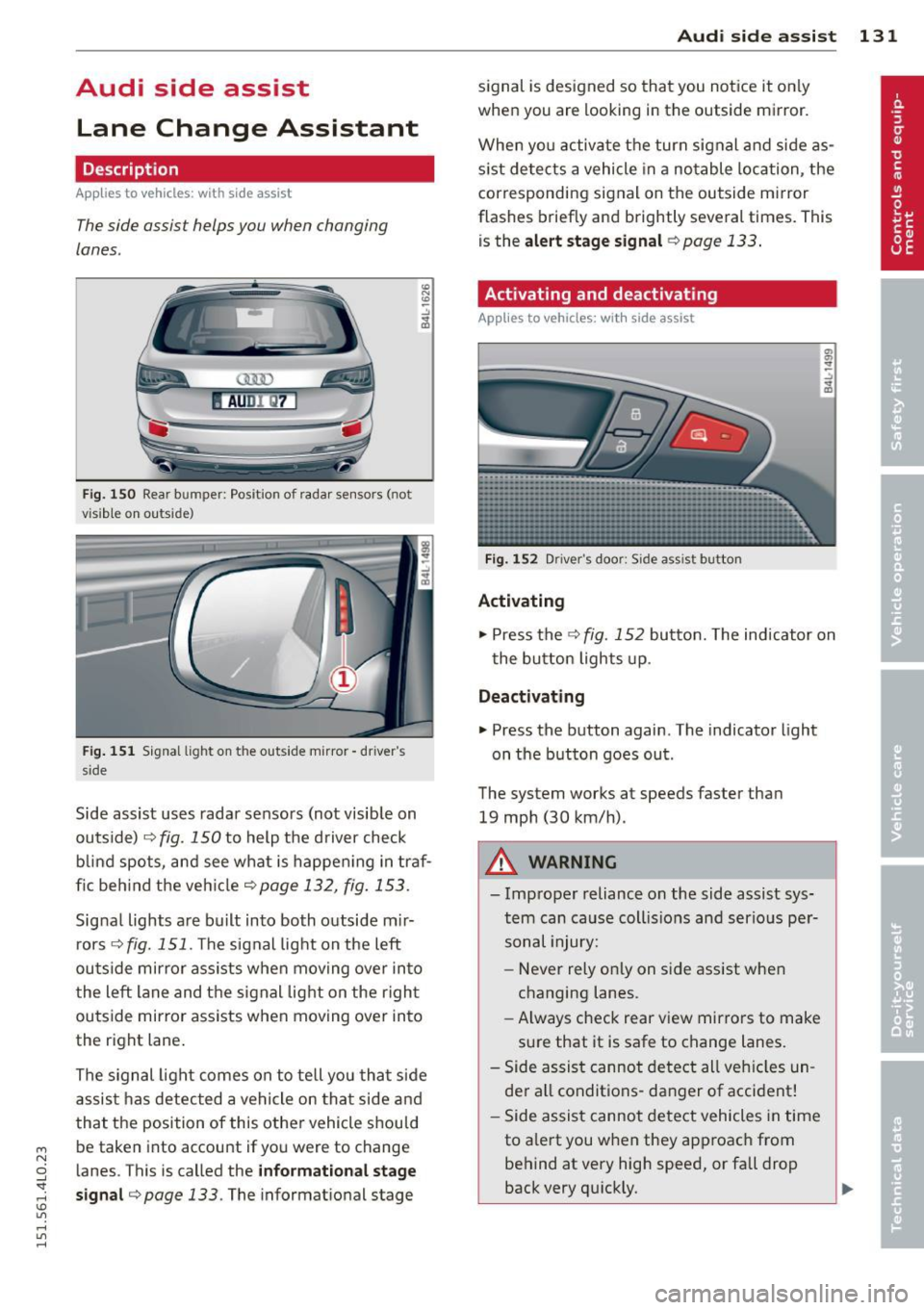
lanes .
AUDl Q7
Fig. 150 Rear b umper: Pos it ion of radar sensors (not
v is ib le on outside)
F ig .
15 1 Signal light on the outside mirror -driver 's
s ide
~ -..:, .. (D
Side assist uses radar sensors (not visib le on
outside) ¢
fig. 150 to help the d river check
b lind spots, and see what is happen ing in traf
fic beh ind the veh icle
¢ page 132, fig. 153.
Signa l lights are bu ilt into both outside m ir
r ors ¢
fig. 151 . The signal light on the left
ou tside mirror assists when moving over into
the left lane and the signal light on the r igh t
ou tside mirror assists when moving over in to
the right lane .
The s ignal lig ht comes on to tell yo u that side
assis t has detec ted a vehicle on tha t side and
that t he position of this othe r vehicle shou ld
be taken into account if yo u were to change
l anes. This is called the
informationa l stage
sign al¢ page 133.
The informat ional stage
Aud i side assist 131
signal is designed so that you notice it on ly
when you are looking in the outside mirror.
When yo u activate the turn signal and side as
s ist de tects a vehicle in a no table location, the
corresponding signal on the outside mi rror
flashes briefly and brightly several times. Th is
is the
alert stage signal ¢page 133.
Activating and deactivating
Applies to vehicles: wit h side assist
Fi g.
1 52 D river 's doo r: Side assist button
Activating
.,. Press the
¢ fig. 152 button. The indicator on
t he button lights up .
Deactivating
.,. Press the button again. The indicator light
on the button goes ou t.
The system works at speeds faster than
19 mph (30 km/h) .
A WARNING
-Imp roper reliance on the side assist sys
tem can cause coll is ions and serio us pe r
sonal injury:
- Never rely on ly on side assist when
changing lanes.
- Always check rear view mirrors to make
su re that it is safe to change lanes.
- Side assist canno t detect all veh icles un
de r all conditions- danger of accident!
- Side assist canno t detect vehicles in time
to a lert you w hen they app roac h from
behind at very hig h speed, or fall drop
back very qu ickly.
~
Page 136 of 350
134 Audi side assist
@ Informational stage signal lights up
A fast approaching veh icle - in the left-hand
l ane for examp le - was detected by the sen
sors . Although this vehicle is sti ll far away, it
should be taken into account if you were to
change lanes, due to the considerable differ
ence in speed. The informational stage signal
on the outside m irror lights up
c::;, page 133.
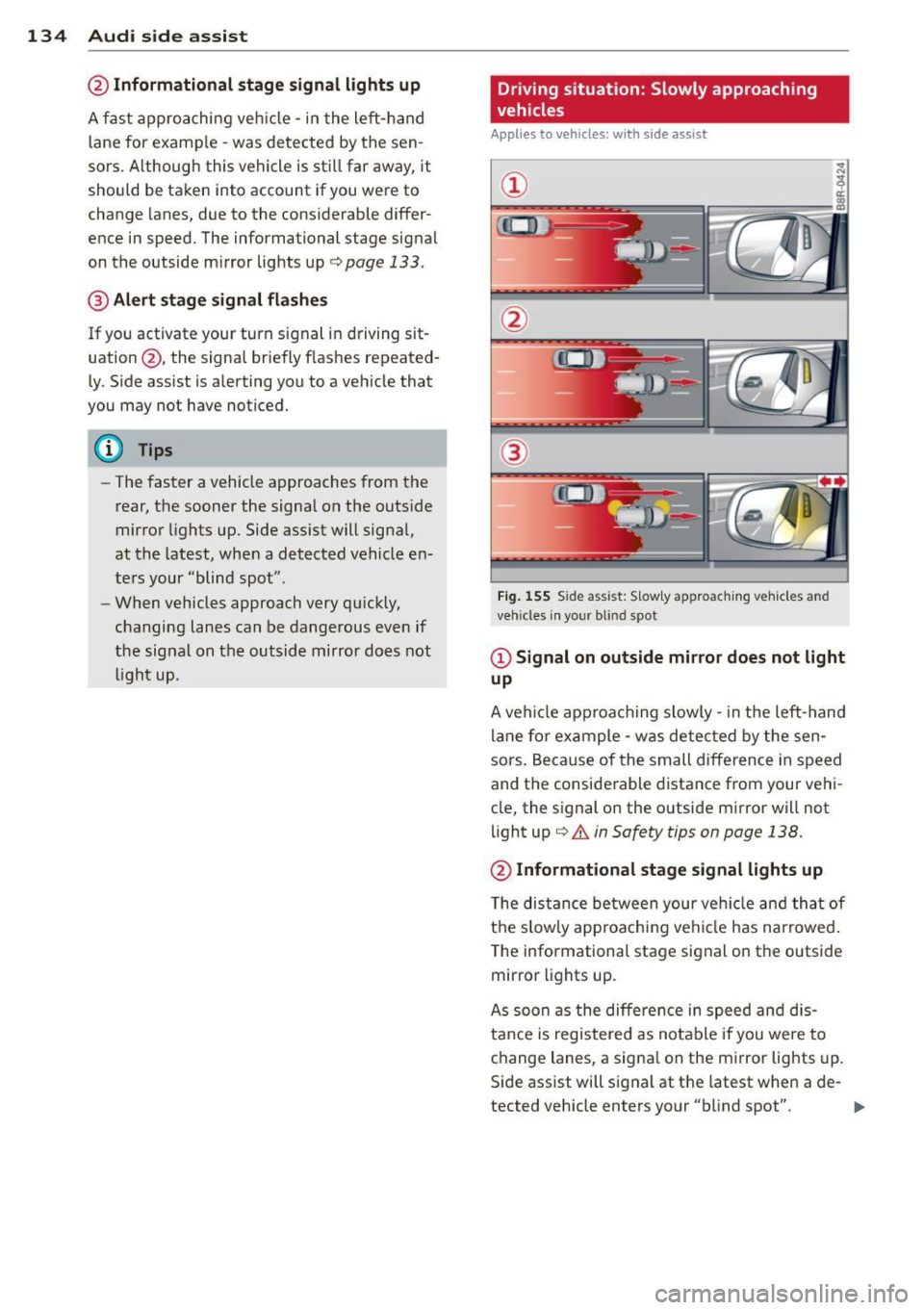
@ Alert stage signal flashes
If you activate your turn signal in driving sit
uation @, the signal briefly f lashes repeated
ly. Side ass ist is alerting you to a veh icle that
you may not have noticed.
@ Tips
- The faster a vehicle approaches from the
rear, the sooner the signal on the outside
mirror lights up. Side assist will signa l,
at the latest, when a detected vehicle en
ters your "blind spot" .
- When vehicles approach very quickly,
changing lanes can be dangerous even if
the signal on the outside mirror does not
light up.
Driving situation: Slowly approaching
vehicles
Applies to vehicles : wi th side assist
@
Fig. 15 5 Side assist: S low ly approac hing veh icles and
veh icles in yo ur blind spot
@ Signal on outside mirror does not light
up
A vehicle approaching slowly -in the left-hand
lane for example - was detec ted by the sen
sors. Because of the small d ifference in speed
and the considerable distance from your vehi
cle, the signal on the outside mirror will not
light up
c::;, &. in Safety tips on page 138.
@ Informational stage signal lights up
The distance between your vehicle and that of
the slow ly approaching vehicle has narrowed .
The informationa l stage signal on the outside
mirror lights up.
As soon as the differe nce in speed and dis
tance is registered as notable if you were to
change lanes, a signa l on the mirror lights up.
Side assist will signal at the latest when a de-
tected vehicle enters your "b lind spot". .,,.
Page 137 of 350
M
"' 0 _,
"". rl I.O
"' rl
"' rl
@ Alert stage signal flashes
If you activate your turn signal in driving sit
uation @, the signa l light briefly flashes re
peatedly. Side assist is alerting you of a vehi
cle that you may not have noticed .
@ Tips
-The faster a vehicle approaches from the
rear, the sooner the signa l on the outside
mirror lights up. Side assist will signa l,
at the latest, when a detected vehicle en
ters your "blind spot".
- When vehicles approach very quickly,
changing lanes can be dangerous even if
the signal on the outside mirror does not
light up.
Driving situation: Vehicles dropping
back slowly
Applies to vehicles: with side assist
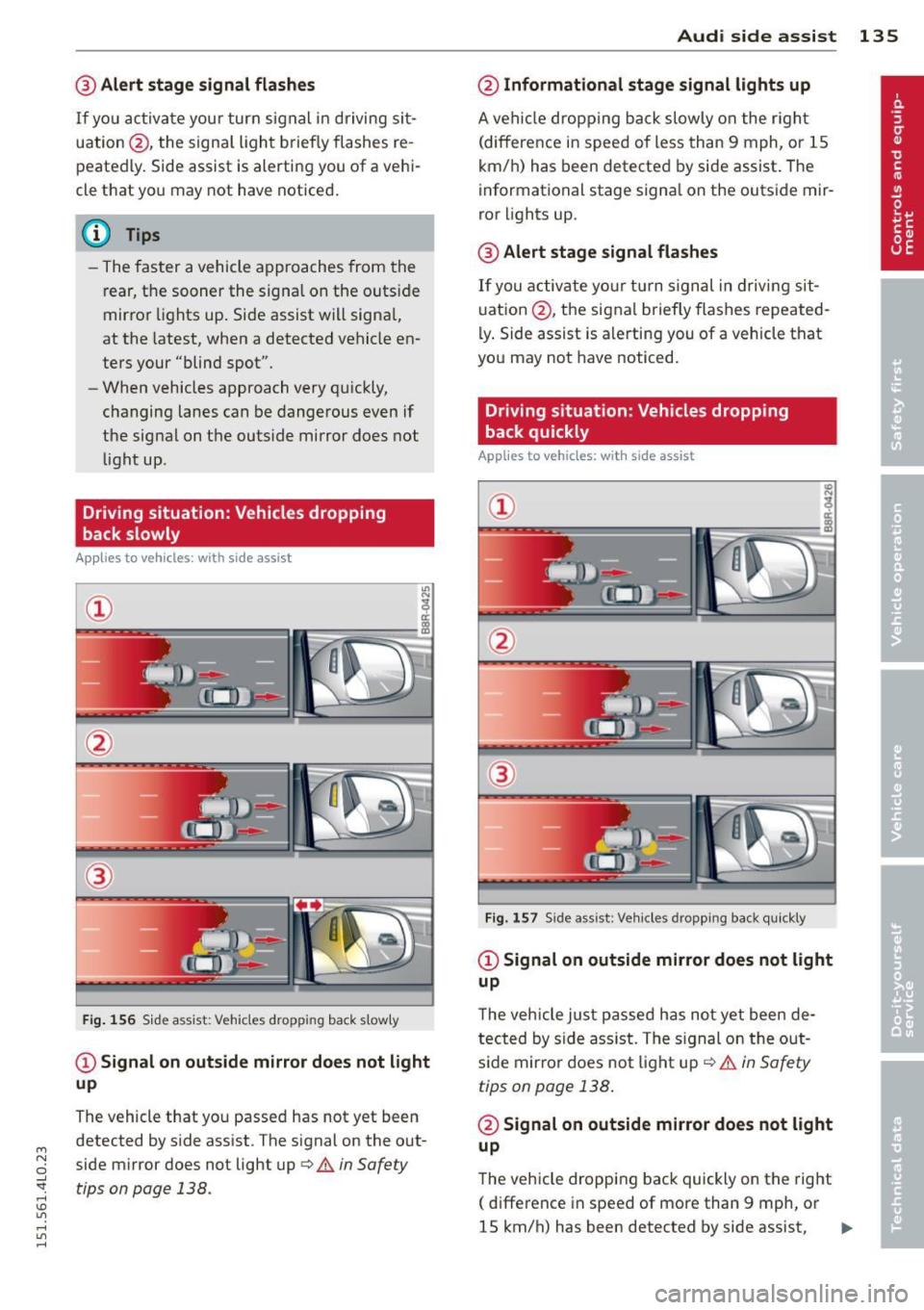
®
Fig . 156 S id e assist: Vehicles dropp ing back s lowly
CD Signal on outs ide mirror does not light
up
The vehicle that you passed has not yet been
detected by side assist . The signal on the out
side mirror does not light up
q .& in Safety
tips on page 138.
Audi side assist 135
@ Informational stage signal lights up
A vehicle dropping back slowly on the r ight
(difference in speed of less than 9 mph, or lS
km/h) has been detected by side assist. The
informational stage signa l on the outside mir
ror lights up.
@ Alert stage signal flashes
If you activate yo ur turn signal in driving sit
uation @, the signal briefly flashes repeated
ly. Side assist is alerting you of a vehicle that
you may not have noticed.
Driving situation: Vehicles dropping
back quickly
Applies to vehicles: with side assist
®
Fig. 157 Side assist: Veh icles dropp ing back quickly
CD Signal on outside mirror does not light
up
T he vehicle just passed has not yet been de
tected by side ass ist. The sign al on the out
side mirror does not light up
q .& in Safety
tips on page 138 .
@ Signal on outside mirror does not light
up
The vehicle dropping back quickly on the right
( difference in speed of more than 9 mph, or
lS km/h) has been detected by side assist,
1J1>