tow AUDI Q7 2015 Owner´s Manual
[x] Cancel search | Manufacturer: AUDI, Model Year: 2015, Model line: Q7, Model: AUDI Q7 2015Pages: 350, PDF Size: 86 MB
Page 146 of 350
144 Automatic transmi ssion
• Carefu lly lift the rubber mat with a screw
driver or something similar ¢
fig . 165.
• You now have access to a rocker switch . Us
ing a screwdr iver or similar object, press the
rocker sw itch down and hold it in that pos i
t ion.
• Now press the release button and move the
selector lever to the N position .
The selector lever can only be moved from the P position if the key is in the lock and the igni
tion is sw itched on .
If the power supply fails
(for example, the battery is discharged) a nd
the vehicle must be p ushed or towed , move
the selector leve r to the N pos ition first using
the emergency release .
Page 147 of 350
M N
0 ...J
'SI: ,...., \!) 1.1'1 ,...., 1.1'1 ,....,
Parking systems
General information
App lies to vehicles: with rea r park assis t/Audi park ing sys
tem plus w ith rearview camera/front -and rearview cam
era
Depending on your vehicle's equipment, vari
ous parking aids will help you when parking
and maneuvering.
The
rear park assist is an acoustic park assist
system that will give you a sound warning to let you know there is something
behind the
veh icle ¢page
146.
The Audi parking system plus with rearview
camera
audibly and visually tells you there is
something
in front of and behind the vehicle .
A rearview camera also shows you what is be
hind the vehicle¢ page
146.
The Audi parking system plus with front- and
rearview camera
audibly and visually tells you
there is something
in front of and behind the
veh icle. A front and rearview camera also
shows you what is in front of and behind the
veh icle ¢page
150.
& WARNING
- Always look for traffic and check the area
around your vehicle by looking at it di
rect ly as well. The parking system cannot
replace the driver's attention. The driver
is a lways responsible for safety during
park ing and for all other maneuvers.
- Please note that some surfaces, such as clothing, are not detected by the system.
- Sensors and cameras have blind spots in
wh ich people and objects cannot be de
tected. Be especially cautious of children
and animals.
- The sensors can be displaced by impacts
or damage to the radiator grille, bumper,
wheel housing and the underbody . The
park ing systems may become impaired
as a resu lt. Have your authorized Audi
dealer or qualified workshop check their
function .
- Make sure the sensors are not covered by
stickers, deposits or any other obstruc-
Parking systems 145
tions as it may impair the sensor func
tion. For informat ion on cleaning, refer
to
¢ page 242.
([) Note
-Some objects are not detected by the
system under certain circumstances:
- Objects such as barrier chains, trailer
draw bars, vertical poles or fences
- Objects above the sensors such as wall
extensions
- Objects w ith specific surfaces or struc
tures such as chain link fences or pow
der snow.
- If you continue driving closer to a low-ly
ing object, it may disappear from the
sensor range. Note that you w ill no lon
ger be warned about this obstacle.
@ Tips
-The system may provide a warning even
though there are no obstacles in the cov
erage area in some situations, such as:
- certain road surfaces or for long grass.
- externa l ultrasonic sources e .g . from
cleaning vehicles.
- heavy rain, snow or thick vehicle ex
haust.
- We recommend tha t you practice park
ing in a traff ic-free location or parking
lot to become familiar with the system.
When doing this, there should be good
light and weather cond itions.
- You can change the vo lume and pitch of
the s ignals as well as the disp lay
¢page
155.
- Please refer to the instructions for tow
ing a trailer ¢page
155.
-What appears in the MMI display is
somewhat time-delayed.
Page 150 of 350
148 Parking sy stems
- The came ra lens en larges and distorts
the field of vision. The object appears
both a ltered and inaccurate on the
screen .
- In certa in s ituations, people or objects in
the display appear closer or further
away:
- objects th at do no t touch the gro und,
such as the bumper o f a parked vehicle,
a trailer hitch o r the rea r of a truck. Do
not use the help lines in this case.
- If driven from a leve l su rface onto an
incline, or a downward slope .
- I f driven toward protr uding objec ts.
- I f the veh icle is ca rrying too much load
in t he rear.
(D Note
-Always read and fo llow the applicab le
warnings
¢ (D in General information on
page 14 5.
- The o range colored orientation lines in
t h e M MI disp lay show t he ve hicl e path
depend ing o n the steering wheel angle .
The front of the vehicle fron t swings out
more than the rea r of the vehicle. Main
ta in p lenty of distance so that your o ut
s ide mirror or a corner of your veh icle
does not collide with any obstacles.
Switching on and off
A pplies to vehicles: with Audi parking system p lus w ith
rearview camera
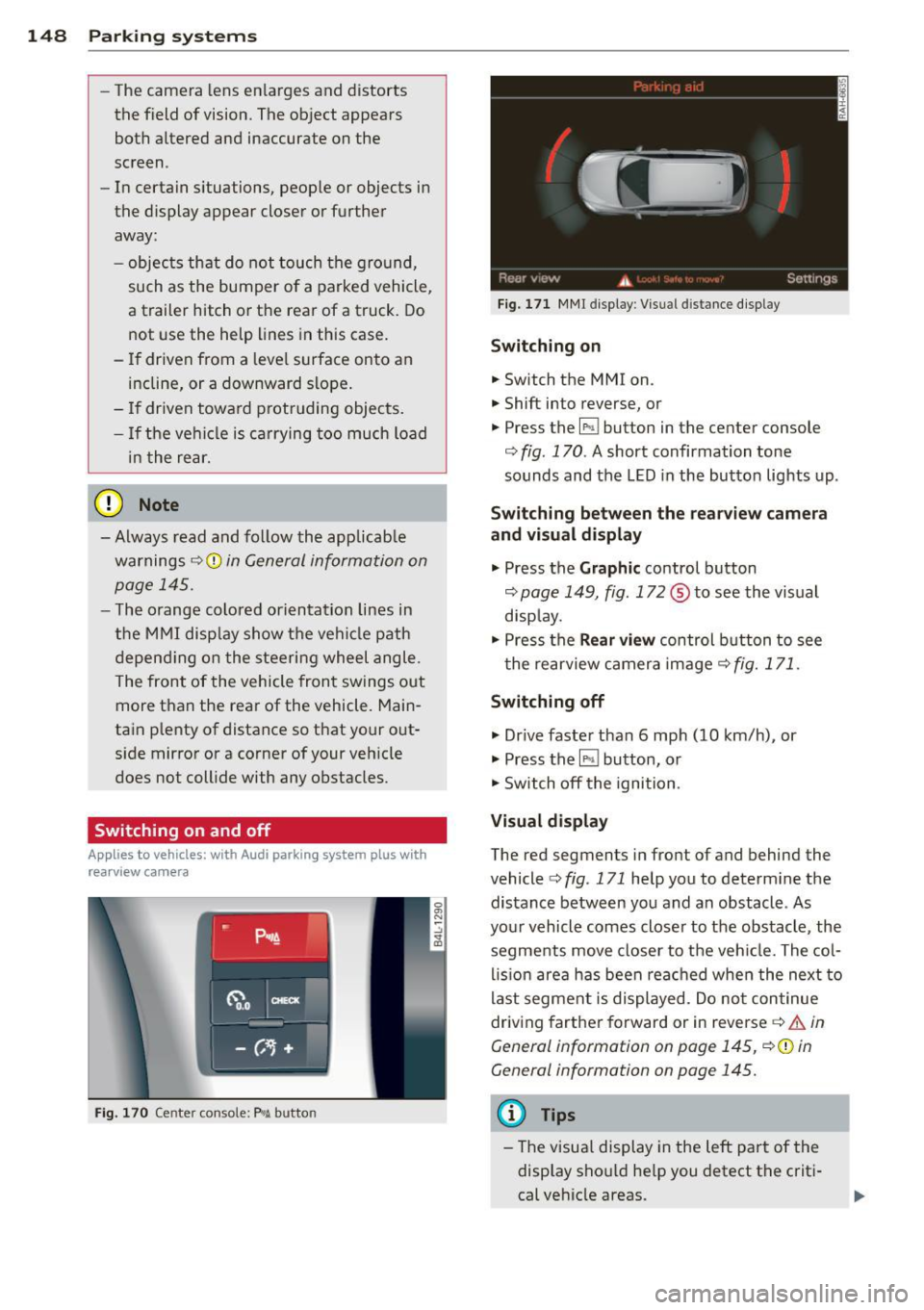
F ig . 170 Ce nter co nsole: P"A b utto n
Fig . 17 1 MMI display : Visual distance d isplay
Switching on
.. Switch the MMI on .
.. Shift into reverse, or
.. Press the
l" •I button in the center console
co
fig. 170 . A short confirmation tone
sounds and the LED in the button lights up .
Switching between the rearv iew camera
and visual display
.. Press the Graphic control button
~ page 149, fig. 172 ® to see the vis ual
disp lay.
.. Press the
Rear vi ew control b utton to see
t he rearview c amera image ~
fig. 171.
Switching off
.. Dr ive faster than 6 mph (10 km/h) , or
.. Press the~ button, or
.. Switch off the ignition .
Visual displ ay
The red segments in front of and behind the
vehicle co
fig. 171 help you to determ ine the
distance between you and an obstacle . As
your vehicle comes closer to the obstacle , the
segments move closer to t he veh icle. The col
lis ion are a has been rea ched when the next to
last segment is displayed . Do no t continue
driving farther forward or in reverse co.&.
in
General information on page 145,
~ @ in
General information on page 145.
(D Tips
- The visua l display in the left part of the
disp lay sho uld he lp you detect t he crit i
cal ve hicle areas .
Page 156 of 350
154 Parking systems
distance to this vehicle should be approxi
mately 3 ft (1 m).
• Turn the
MMI on and select the reverse gear.
The parking system is turned on and the
parallel parking indicator is displayed .
• Press the contro l button on the
MMI con
trols
(D ¢ fig . 186 . The cross parking indica
tor is displayed .
•Backup and align yo ur vehicle so the blue
area @ borders on the rear end of the vehi
cle or on the pa rking space line¢ .&.
in Gen
eral information on page 150, ¢(Din Gen
eral information on page 151 .
The blue area
represents an extension of the veh icle's out
line by approximately
16 ft (5 m) to the rear .
The long side of the blue area should be on
the curb . The entire blue area must fit into
the parking space .
• With the vehicle stopped, turn the steer ing
wheel to the right as far as it will go.
• Back into the parking space until the blue
curve ¢
fig. 187 touches the curb¢.&. in
General information on page 150,
~ CD in
General information on page 151.
Stop the
vehicle.
• With the veh icle stopped, turn the steer ing
wheel to the left as far as i t will go .
• Continue to back into the parking space un
t il the vehicle is parked pa rallel to the curb
¢.&. in General information on page 150,
¢(Din General information on page 151.
@ marks the rear bumper. Stop the vehicle,
at the latest, when the red orientation line
© borders an obstacle. Keep an eye on the
front of your vehicle while doing th is .
Parking next to obstacles
When there is an obstacle (such as a wall)
next to the parking space, choose a space w ith
mo re space on the sides. Position the long
side of the blue area so that there is sufficient
space from the curb. The area must not be on
the curb . You wi ll also need to start turning
the steering wheel much earlier . There should
be a sufficient amount of space between the
curb and the blue curve, and the blue curve
c::> fig. 187 must not touch the curb.
(D Tips
The left or right orientation lines and sur
faces will be displayed, depending on the
turn signal being used.
Trailer mode
Applies to vehicles: with Audi parking system plus with
front· and rearview camera a nd tra iler h itch
This view assists you in positioning the vehicle
in front of a trailer.
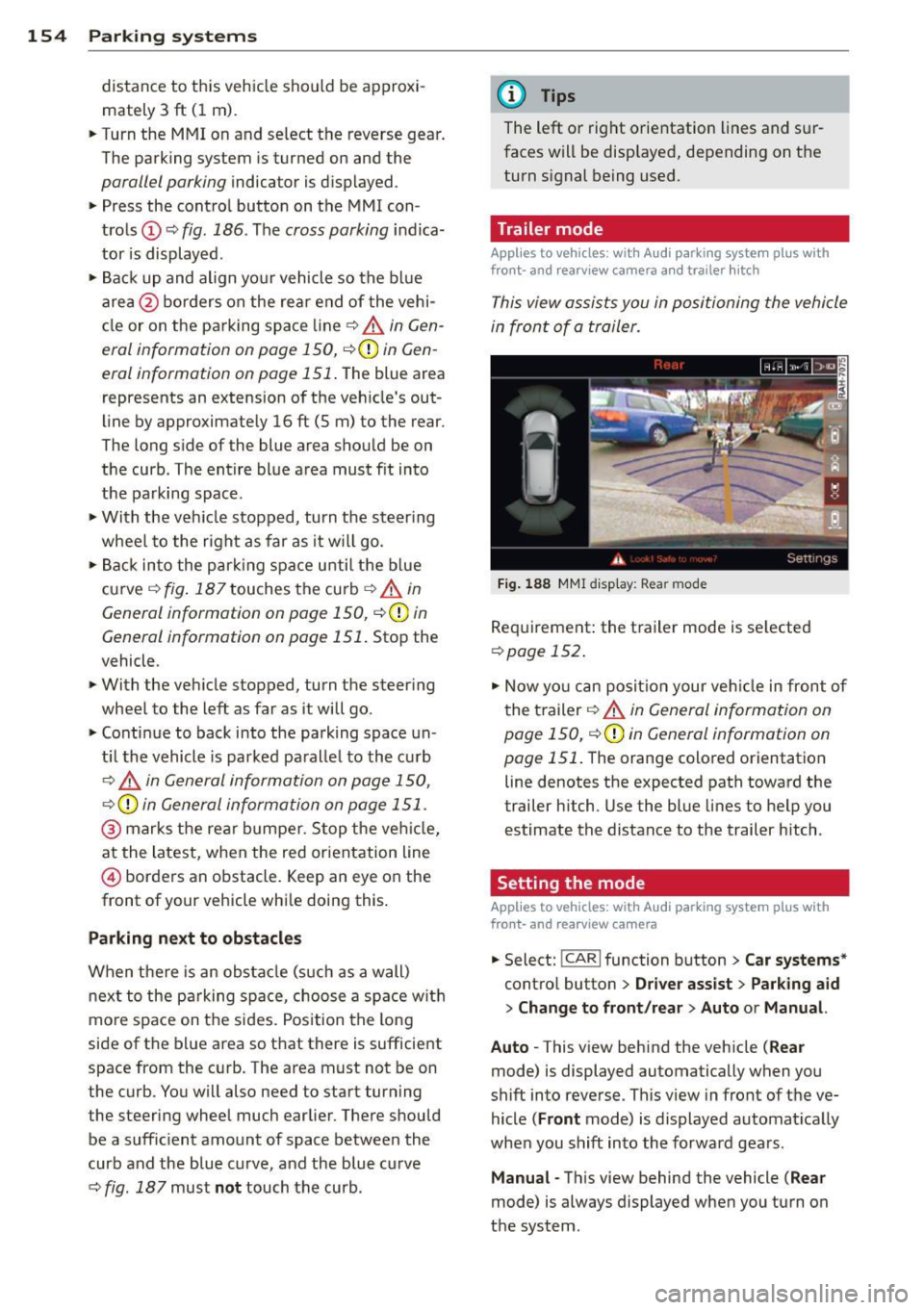
Fig. 188 MMI dis p lay : R ea r m od e
Requirement: the trailer mode is se lected
c:> page 152 .
• Now you can position your veh icle in front of
the trailer
c::> .&. in General information on
page 150,
c::>(D in General information on
page 151 .
The orange colored orientation
line denotes the expected path toward the
trailer h itch. Use the blue lines to help you
estimate the distance to the trailer hitch .
Setting the mode
Applies to vehicles: with Audi parking system plus with
front· and rearview camera
• Select: !CAR I function button> Car systems *
control button > Driver assist > Parking aid
> Change to front /rear > Auto or Manual.
Auto -
This v iew behind the vehicle ( Rear
mode) is displayed automatically when you
shift into reverse . This view in front of the ve
hicle
( Front mode) is displayed automat ically
whe n you shift into the forward gears.
Manual -This view behind the vehicle ( Rear
mode) is always displayed when you turn on
the system .
Page 157 of 350

M N
0 ...J
'SI: ,...., \!) ..,.,
,...., ..,., ,....,
Adjusting the display and warning tones
Applies to vehicles: with rear park assist/Audi parking sys
tem plus with rearview camera/front- and rearview cam
era
The display* and warning tones can be ad
justed in the MMI.
~ Select: ICARI function button> Systems*
control button > Parking system. Or
~ Select: ICARI function button> Car systems*
control button > Driver assist> Parking aid.
Display*
- Off -when the parking system is switched
on, only audible signals are given.
-On -when the parking system is switched
on, either the visua l display or the picture
from the rearview camera is disp layed.
Warning tones
- Front volume* -front sensor volume
- Front frequency* -front sensor frequency
- Rear volume -rear sensor volume
- Rear frequency -rear sensor frequency
- In-car entertainment fader/Music volume
while parking -when the parking system is
switched on, the volume of the active audio
source is lowered.
The new ly adjusted value is briefly heard from
the signal generator .
(D Tips
- The warning tones can also be adjusted
direct ly by the visual disp lay* or the pic
ture from the camera*. Simply press the
Settings* control button.
- Changed settings are activated when
parking system is switched on again.
- The settings are automatically stored
and assigned to the remote control key
being used. Parking
systems 155
Error messages
Applies to vehicles: with
rear park assist/Audi parking sys
tem plus with rearview camera/front- and rearview cam
era
There is an error in the system if the LED in
the~ button* is blinking and you hear a con
tinuous alarm for a few seconds after switch ing on the park ing system or when the park
ing system is already activated .
If the error is
not corrected before you switch off the igni
tion, when you switch on the parking system
again, the LED in the ~ button* will blink. If
you activate the parking system with the but
ton in this case, the continuous warning tone
will continue to sound.
Parking system plus with front and
rearview camera*
There is another system error if:
- the~·· symbol appears in the display and
the corresponding display area is shown in
blue. The camera is not working in this area.
- all segments around the vehicles are red or
if no segments are displayed.
Drive to your authorized Audi dealer or au
thorized repa ir facility immediately to have
the malfunction corrected .
Trailer hitch
Applies to vehicles: with rear park assist/Audi parking sys
tem plus with rearview camera/front- and rearview cam
era and trailer hitch
For vehicles using the trailer socket, the park
ing system rear sensors do not turn on when
you shift into reverse gear or when you press
the~ button*. This results in the follow ing
restrictions:
Rear park assist*
There is no warning for distances to the rear.
Audi parking system plus with rearview
camera/front and rearview camera*
There is no distance warning for the rear. The
front sensors remain activated. The visual dis play switches to the trailer towing mode. The
rearview camera image will not show the ori-
entat ion lines and the blue surfaces . ..,.
Page 159 of 350

M N
0 ...J 'SI" ,...., \!) 1.1'1 ,...., 1.1'1 ,....,
Adaptive Air Suspension
Air suspension and damping
Description
App lies to vehicles: with Adapt ive Air S uspe nsio n
Air suspension and damping con be adjusted
separately.
Adaptive A ir Suspension is an electronically
controlled springing and damping system.
This chassis system makes it easier on the
driver by adapt ing to the particular situation
through imperceptible control processes.
The
Adaptive Air Suspension component reg
ulates ground clearance depending on vehicle
speed and driver input. It functions independ
ently from the load condition . Accelerating to
a speed above a predetermined limit will make the vehicle lower itself. On the other
hand, driving more slowly results in the vehi
cle raising again at specific speeds.
The
damping component provides individual
control of the damping forces . For example,
w ith damping characterist ics set to provide
greater comfort, damping is set somewhat
harder for a br ief per iod only as required, for
example, when go ing aro und a curve or when
braking.
Settings
Adapt ive Air Suspension prov ides the driver
with the opportun ity to set the chassis charac
ter istics also to their individual preference.
W ith the driving modes
Comfort, Automatic
and Dynamic the driver has three chassis set
tings available, ranging from comfort to spor
ty. The
Offrood mode can be selected for driv
ing on poor quality stretches of road. In addi
tion,
Lift provides a fifth mode, which can be
selected when exceptionally high ground
clearance is needed
c::;, page 157, Chassis con
trols .
The modes are set in MMI <::;,page 159.
Adaptive A ir Suspension 157
A WARNING
The height of the parked vehicle can
change due to temperature fluctuations or
changes in load .
@ Note
-Whenever you park your vehicle, a lways
make sure there is adequate clearance
above and below the vehicle. The he ight
of the parked vehicle can change as the
result of temperature fluctuations,
changes in load condition and changes in
the driving mode (ground clearance).
- If the vehicle is be ing t ransported (e.g .
by tow truck, train, ship, etc.), mount the
tie-down chains/cables over the running
surface (circumference) o f the tires. Nev
er secure the vehicle by the axle, the sus
pension struts or the front or rear tow
line eye . For technica l reasons, the pres
sure in the suspens ion struts may change
dur ing the transport, which could result
in the vehicle no longer being secured
properly.
- If you are going to tow a trailer with a
trailer hitch that was
not installed ac
cording to factory specif ications, you
must activate the traile r operation mode
man ually
<::;,page 161.
(D Tips
-Before you can raise your vehicle using
the vehicle jack (for example, when
chang ing a flat tire) or a vehicle lift, yo u
must activate the jacking mode
c::;, page 161.
-On some models, the vehicle can reach
its maximum speed only in the
Automat
ic
and Dynamic modes.
Chassis controls
App lies to vehicles : wit h Adaptive A ir Suspensio n
Five different driving modes can be set by the
driver.
T he automatic control processes are speed
and time-dependent. For example, it is not
Page 163 of 350

M N
0 ...J
'SI: ,...., \!) ..,.,
,...., ..,., ,....,
Displaying the vehicle level
The current vehicle leve l is shown with seg
ments fi lled out in the segment disp lay @. If
on ly the bottom segment is filled out, the ve
hicle is at highway leve l. If all segments are
fi lled out, the vehicle is at high level 2 and has
the greatest amount of ground clearance pos
sible.
While the vehicle is being raised or lowered,
the target level is indicated by an arrow @
¢
fig. 191 or a white border @¢ fig. 192. The
arrow/border disappears aga in when the vehi
cle is at the target level.
Jacking mode when changing a flat tire
Applies to vehicles: with Adaptive Air Suspension
This mode must be activated in the MMI be
fore raising the vehicle with a jack or on a ve
hicle lift.
.,. Select: ICARI funct ion button> ! SETUP I func
t ion button >
Jacking mode. Or
.,. Select:
I CARI funct ion button > Car systems*
control button > Servicing & checks > Air
susp.: tire change .
The vehicle jack mode must be activated be
fore changing a wheel so that the automatic
control processes fo r the a ir suspension do
not make lift ing with the vehicle jack more dif
ficult.
The check lamp
II i n the instrument cluster
d isp lay illuminates in vehicle jack mode.
0) Tips
The vehicle jack mode is switched off auto
mat ically at speeds above 9 mph (15 km/
h).
Towing a trailer
Appl ies to vehicles: with towing hitch and Adaptive Air
Suspension
Automatic lowering is not desirable when
towing a trailer.
.,. Se lect: ICAR I function button> !SETUP I func
tion button >
Towing mode . Or
Adaptive A ir Suspension 161
.,. Select: !CAR I function button > Car systems*
contro l button > Vehicle settings > Air
susp.: towing .
As long as towing mode is activated, a vehicle
with a trai ler appears in the
adaptive air sus
pension
main menu.
Level Adjustment when towing a trailer
- Before hitching up the trailer and before ad
jus ting the tongue weight at the trailer, the
automatic or comfort mode
must be select
ed so that the ve hicle can be at normal level
¢ page 159, MMI settings.
-If driving in dynamic mode is desired, this
mode
must be selected before hitching up
the trailer and before adjusting the tongue
weight. However, note that your vehicle is lowered and ground clearance is reduced.
- If you have to dr ive under difficult road con
ditions, you can select offroad or lift mode,
after hitch ing up the trailer or after adjust
ing the tongue weight.
- If the veh icle is at
normal level, and you se
lect offroad mode wh ile traveling at speeds
higher than 22 mph (35 km/h), the veh icle
w ill not be ra ised. Offroad mode will appear
as the active mode in the MMI Display.
- If the veh icle is in offroad mode at
high level
1 ,
it automatically lowers to normal level
when the ve hicl e is t ravel ing at speeds ex
ceeding approximately 31 mph (SO km/h).
The vehicle is automatically raised to
high
level 1
again when the traveling speed falls
be low approximately 25 mph (40 km/h).
Restrictions when operating with a trailer
When operating w ith a tra iler, the lift mode
can only be selected up to about 12 mph (20
km/h). Lift mode is automatically cance led
again when a speed of about 25 mph (40 km/
h) is exceeded.
If the vehicle is in automatic, comfort, offroad
or lift mode before the trai ler towing mode is
activated, the dynamic mode cannot be acti
vated.
If the vehicle is in dynamic mode before tow-
ing operation is activated, it can be driven in
IJI,-
Page 164 of 350
162 Adapti ve Air Su spen sion
this mode. If the suspension is switched from
this mode to another mode, dynamic mode
cannot be re-selected .
(D Tips
-For vehicles with a factory installed tow
ing hitch or a trailer hitch that was in
stalled later accord ing to factory specifi
cations, the system recognizes "Trailer
tow ing mode" and activates this specia l
mode automatically, as soon as the elec
trical connection on the trailer socket is
connected. The mode ceases a utomat i
ca lly when the elect rical connection to
t h e trai ler socket is d isconnected.
- If the tra iler towing mode has been acti
vated, the vehicle will not drop to the
l ow or highway level.
Cargo mode
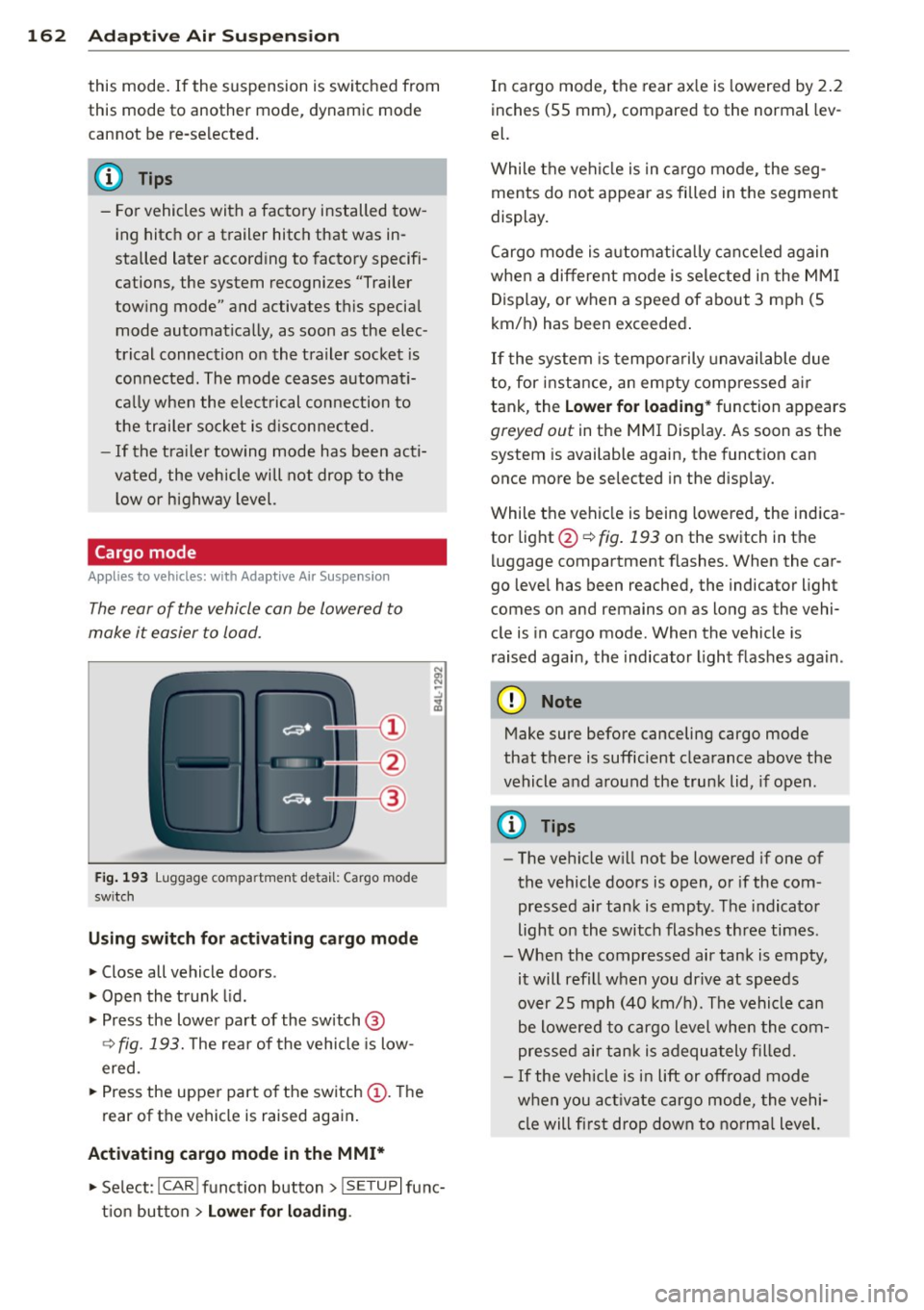
Applies to vehicles: with Adapt ive Air Suspe nsio n
The rear of the vehicle can be lowered to
make it easier to load.
Fig. 193 Luggage compa rtment detail: Cargo mode
sw itch
Using switch for activating c argo mode
.. Close all vehicle doors .
.. Open the trunk lid .
.,. Press the lower pa rt of the switch @
~ fig. 193. The rea r of the vehicle is low
ered.
.,. Press the uppe r part o f the switch @. T he
rear of the vehicle is raised again.
Activating cargo mode in the MMI*
.. Select: ICAR I funct io n button> !SETUP I func
t ion button >
Lower for loading .
In cargo mode, the rear ax le is lowered by 2 .2
inches (S5 mm), compared to the normal lev
el.
While the veh icle is in ca rgo mode, the seg
ments do not appear as filled in the segment
display.
Cargo mode i s automatic ally c an ce le d again
when a different mode is selected in the MM I
Display, or when a speed of about 3 mph (5
km/ h) has been exceeded.
If the system is tempora rily unavailable due
to, for instance, an empty compressed air
tank, the
Lower for loading * function appears
greyed out in the MMI Display. As soon as the
system is available again, the funct ion can
once more be selected in the disp lay.
While the vehicle is being lowered, the indica
tor light @~
fig. 193 on the switch in the
l uggage compartment flashes. When the car
go leve l has been reached, the indicator light
comes on and remains on as long as the vehi
cle is in cargo mode. When the vehicle is
r aised agai n, the indicator light flashes again.
(D Note
M ake sure before canceling cargo mode
that there is sufficient clearance above the
vehicle and around the trunk lid, if open.
(D Tips
- The vehicle w ill not be lowered if one of
the vehicle doors is open, or if the com
pressed air tank is empty. The indicator
light on the switch flashes three times.
- Whe n the compressed air tank is empty,
it will refill when you drive at speeds
over 25 mph (40 km/ h). The vehicle can
be lowered to cargo level whe n the com
pres sed air tan k is adequately filled.
- If the vehicle is i n lift or off road mode
when you act ivate cargo mode, the vehi
cle will fi rst drop down to no rma l level.
Page 167 of 350
M N
0 ...J
'SI: ,...., \!) 1.1'1 ,...., 1.1'1 ,....,
~ Always keep both feet in the footwell so
that you are in control of the vehicle at all
times.
For detailed information on how to adjust the
driver's seat, see
¢ page 75.
A WARNING
Drivers who are unbelted, out of position
or too close to the airbag can be seriously
injured by an airbag as it unfolds. To help
reduce the risk of serious personal injury:
- Always adjust the driver's seat and the
steering wheel so that there are at least
10 inches (25 cm) between your breast
bone and the steering wheel.
- Always hold the steering wheel on the
outside of the steering wheel rim with
your hands at the 9 o'clock and 3 o'clock positions to help reduce the risk of per
sonal injury if the driver's airbag inflates.
- Never hold the steering wheel at the
12 o'clock position or with your hands at
other positions inside the steering wheel
rim or on the steering wheel hub. Hold
ing the steering wheel the wrong way
can cause serious injuries to the hands,
arms and head if the driver's airbag de
ploys.
- Pointing the steering wheel toward your
face decreases the ability of the supple
mental driver's airbag to protect you in a
collision .
- Always sit in an upright position and nev
er lean against or place any part of your
body too close to the area where the air
bags are located.
- Before driving, always adjust the front
seats and head restraints properly and
make sure that all passengers are prop
erly restrained.
- Never adjust the seats while the vehicle
is moving . Your seat may move unexpect
edly and you could lose control of the ve
hicle.
- Never drive with the backrest reclined or
tilted far back! The farther the backrests
are tilted back, the greater the risk of in-
Driving Safely 165
jury due to incorrect positioning of the
safety belt and improper seating posi
tion .
- Children must always ride in child safety
seats ¢
page 203. Special precautions
apply when installing a child safety seat
on the front passenger seat¢
page 182.
Proper seating position for the front
passenger
The proper front passenger seating position
is important for safe, relaxed driving .
For your own safety and to reduce the risk of
injury in the event of an accident, we recom
mend that you adjust the seat for the front
passenger to the following position :
~ Adjust the angle of the seatback so that it is
in an upright position and your back comes
in full contact with it whenever the vehicle is
moving .
~ Adjust the head restraint so the upper edge
is as even as possible with the top of your
head. If that is not possible , try to adjust
the head restraint so that it is as close to
this position as possible¢
page 166.
~ Keep both feet flat on the floor in front of
the front passenger seat .
~ Fasten and wear safety belts correct
ly ¢
page 177 .
For detailed information on how to adjust the
front passenger 's seat, see ¢
page 7 4.
A WARNING ,_
Front seat passengers who are unbelted,
out of position or too close to the airbag
can be seriously injured or killed by the air
bag as it unfolds. To help reduce the risk of
serious personal injury:
- Passengers must always sit in an upright
position and never lean against or place
any part of their body too close to the
area where the airbags are located.
- Passengers who are unbelted, out of po
sition or too close to the airbag can be
seriously injured by an airbag as it
•
•
Page 171 of 350
M
"' 0 ..J
-
"' rl
Stowing luggage
Loading the luggage compartment
All luggage and other objects must be prop
erly stowed and secured in the luggage com
partment.
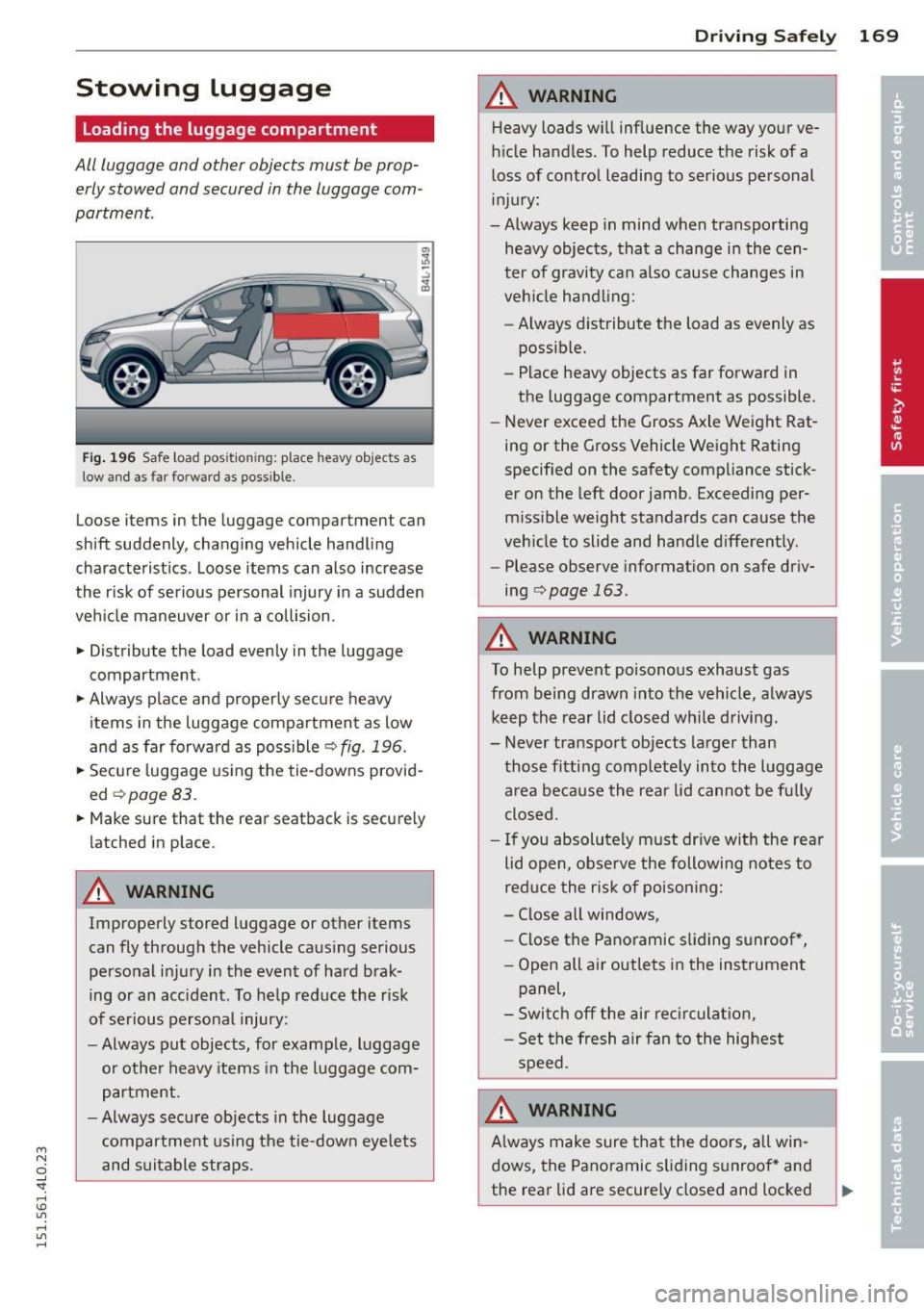
Fig . 196 Safe load pos ition ing: place heavy objects as
low and as far forward as possible.
Loose items in the luggage compartment can
shift suddenly, changing vehicle handling
characteristics . Loose items can also increase
the r isk of serious personal injury in a sudden
veh icle maneuver or in a collision .
.. Distribute the load evenly in the luggage
compartment.
.. Always place and properly secure heavy
items in the luggage compartment as low
and as far forward as poss ible
q fig. 196.
.. Secure luggage using the tie-downs provid
ed
¢ page 83.
.. Make sure that the rear seatback is securely
latched in place.
A WARNING
Improperly stored luggage or other items
can fly through the vehicle causing serious
personal injury in the event of hard brak
ing or an acc ident. To help reduce the r isk
of serious personal injury:
- Always put objects, for example, luggage
or other heavy items in the luggage com
partment.
- Always secure objects in the luggage
compartment us ing the tie-down eye lets
and suitable straps .
Drivin g Sa fely 169
A WARNING
Heavy loads will influence the way your ve
h icle handles. To help reduce the risk of a
loss of control leading to serious personal
injury:
-Always keep in mind when transporting
heavy objects, that a change in the cen
ter of gravity can also cause changes in
veh icle handling:
- Always distribute the load as evenly as
possible.
- Place heavy objects as far forward in
the luggage compartment as possible.
- Never exceed the Gross Axle Weight Rat
ing or the Gross Vehicle Weight Rating
specified on the safety compliance stick
er on the left door jamb. Exceeding per
miss ible weight standards can cause the
veh icle to slide and handle differently.
- Please observe information on safe driv
ing
qpage 163 .
A WARNING
To help prevent poisonous exhaust gas
from being drawn into the vehicle, a lways
keep the rear lid closed while driving.
- Never transpo rt objects larger than
-
those fitting comp letely into the luggage
area because the rear lid cannot be fu lly
closed .
- If you absolutely must dr ive with the rea r
lid open, observe the following notes to
red uce the risk of poisoni ng:
- Close all windows,
- Close the Panoramic s liding sunroof *,
- Open all air outlets in the inst rument
panel,
- Switch off the air rec irculat ion,
- Set the fresh a ir fan to the highest
speed.
A WARNING
A lways make sure that the doo rs, all win
dows, the Pano ramic s liding sunroof* and
the rear lid are securely closed and locked