tow AUDI Q7 2015 Owner´s Manual
[x] Cancel search | Manufacturer: AUDI, Model Year: 2015, Model line: Q7, Model: AUDI Q7 2015Pages: 350, PDF Size: 86 MB
Page 68 of 350
66 Clear vis ion
Wiper and washer
system
Switching the windshield wipers on
The windshield wiper lever controls both the
windshield wipers and the washer system .
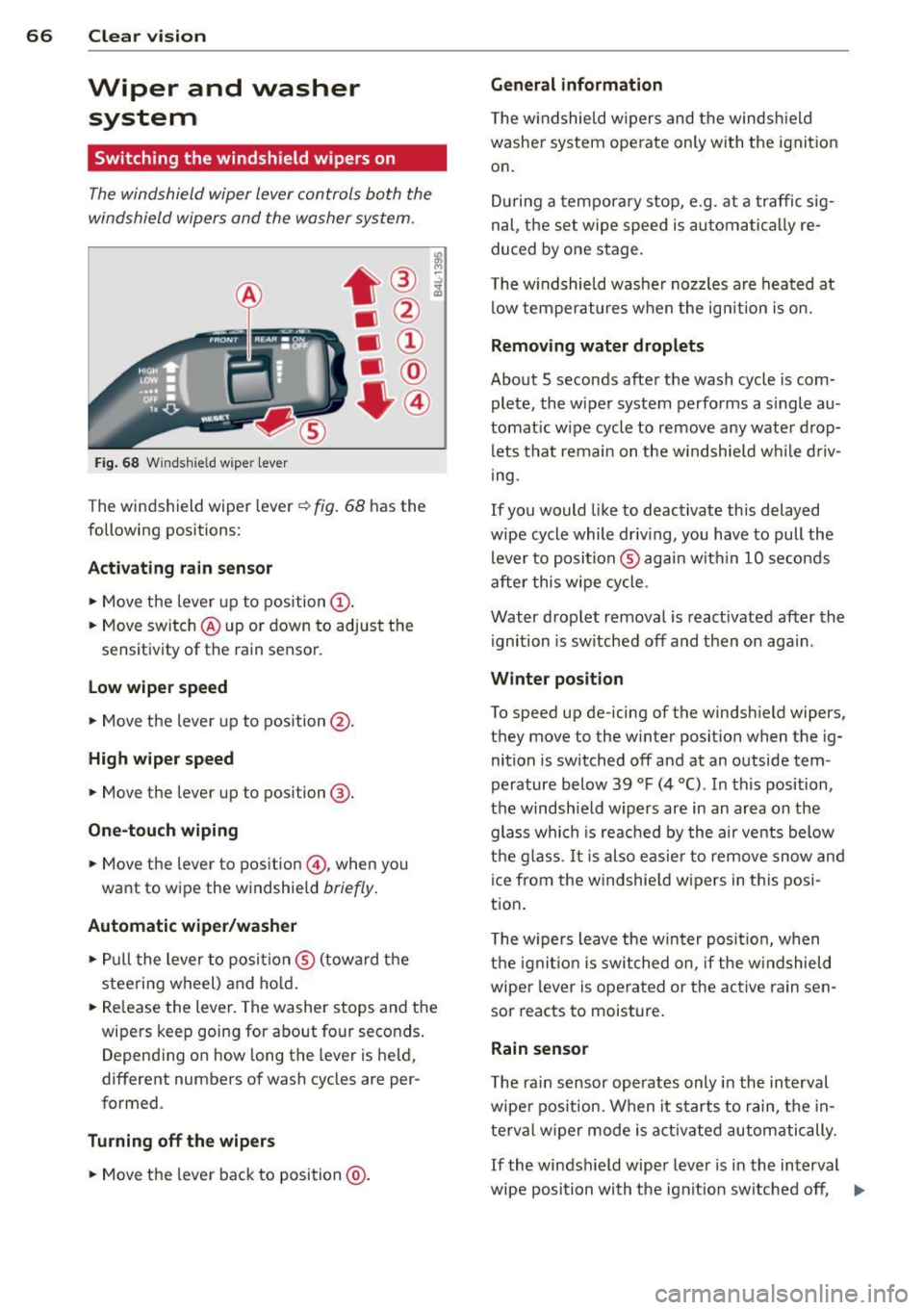
Fig. 68 Windshie ld w ipe r lever
T he windshield wiper lever ¢ fig. 68 has th e
following posit ions :
Act ivating r ain sen sor
.. Move the lever up to position (D .
.. Move switch @up or down to adjust the
sensitivity of th e rain sensor.
low wiper sp eed
.. Move the leve r up to position @.
High wiper speed
.. Move the lever up to posi tion @.
One-touch wiping
.. Move the lever to pos ition @, when you
want to w ipe the w indshield
br iefly .
Automatic wip er/ washer
.. Pull the lever to posi tion ® (toward the
steering wheel) and ho ld.
.. Re lease the lever. The washer stops and the
wipers keep going for abou t four seconds .
D epend ing on how long th e lever is held,
different numbers of wash cycles are pe r
formed .
Turning off the wip ers
.. Move the lever back to position @.
General information
The w indshie ld wipers and the windsh ield
washer system operate only with the ignit ion
on .
D uring a tempora ry stop, e.g. at a traffic sig
nal, the set wipe speed is automati cally re
duced by one stage.
T he w indshie ld washe r nozzles are heated at
low temperatures when the ign ition is o n.
Removing water drop lets
About 5 seconds after the wash cycle is com
plete, the wiper system performs a s ingle au
tomat ic w ipe cycle to remove any wate r d rop
lets that remain on the w indshie ld w hile d riv
ing .
If you would like to deactivate this delayed
wipe cycle while driv ing , you have to pull the
lever to position ® agai n w ith in 10 seconds
after this wipe cycle .
Water drop let remova l is reactivated after the
ignition is sw itched off and then on aga in .
Winter posit ion
To speed up de-icing of the windsh ield wipe rs,
they move to the w inter po sition when the ig
nition is switched off and at an outside tem
perature below 39
°F (4 °() . In this position,
the windshie ld wipers are in an area on the
glass whi ch is reac hed by the air vents below
the g lass . It i s also easie r to remove snow and
ice from the w indshie ld w ipers in t his posi
tion.
T he w ipers leave the win ter posi tion, when
the igni tion is switched on, if the w indshield
wiper lever is ope rated or the active rain sen
sor reacts to moisture.
Rain sensor
T he rain sensor operates only in the interval
wiper pos ition. When it starts to rain, the in
te rv al wiper mode is activ ated automatically.
If the windshield wipe r lever is in the interval
wipe position with the ignit ion sw itched off , ..,.
Page 86 of 350
84 Seats and storage
Retractable luggage compartment cover
The luggage compartment cover keeps lug
gage o r other objects out of vi ew .
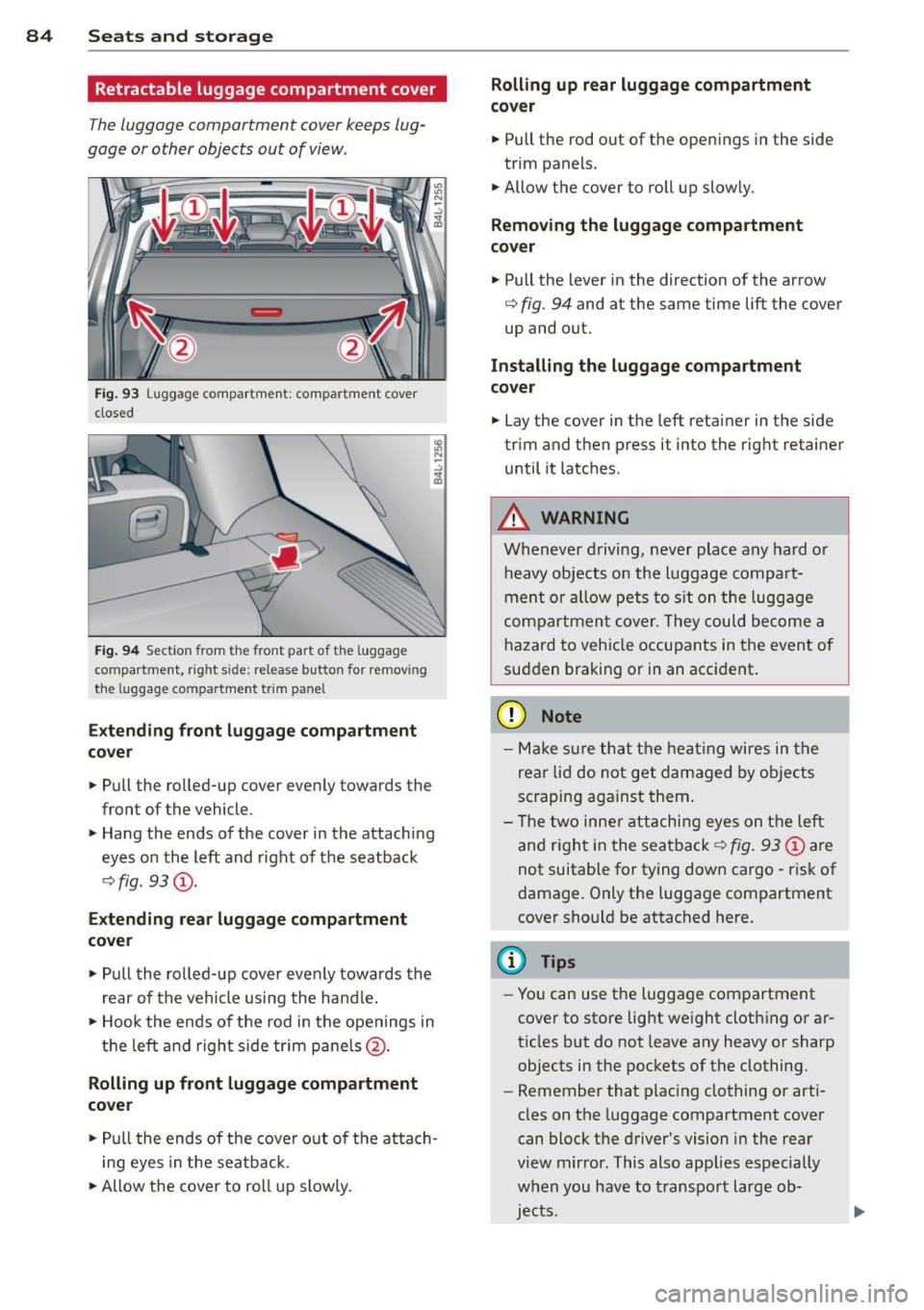
Fig. 93 Luggage compartment: compartment cover
closed
Fig . 9 4 Section from the front part of t he luggage
compartment, right side: release button for removing
the lu ggage compartme nt trim panel
Exte nding front luggag e co mpa rtment
c o v er
.. Pull the rolled-up cover evenly towards the
front of the vehicle.
.. Hang the ends of the cover in the attaching
eyes on the left and right of the seatback
q fig. 93@.
Extendi ng re ar luggage compartment
cove r
.. Pull the rolled-up cover evenly towards the
rear of the vehicle using the hand le.
.. Hook the ends of the rod in the openings in
t h e left and right s ide tr im pane ls @ .
Rolling up front luggage compa rtment
cover
.. Pull the ends of the cover o ut of the atta ch
i ng eyes in the seatback.
.. Allow the cover to roll up slowly.
Rolling up rear luggage compartment
co ve r
.. Pull the rod o ut of the open ings in the side
trim panels .
.. Allow the cover to roll up slowly.
Removing the luggage compartment
co ver
.. Pull the lever in the direction of the arrow
q fig. 94 and at the same time lift the cover
up and out.
Installing the luggage compa rtm ent
cover
.. Lay the cover in the left retainer in the side
trim and then press it into the right retainer
until it latches .
A WARNING
Whenever driving, never place any hard or
heavy objects on the luggage compa rt
ment or allow pets to s it on the luggage
compartmen t cover. They could become a
hazard to vehicle occupants in the event of
sudden braking or in an accident .
(D Note
-Make s ure that t he heat ing wires in the
rea r lid do not get damaged by objects
sc raping aga inst them .
- T he two inne r attachi ng eyes on the left
and r igh t in the sea tback
q fig . 93 @ are
not suitable for tying down cargo -risk of
damage. Only the luggage compartment
cover shou ld be attached here.
(D Tips
- You can use the luggage compartment
cover to store light we ight clothing or ar
ticles but do not leave any heavy or sharp
objects in the pockets of the clothing.
- Remember that plac ing clothing or arti
cles on the luggage compartment cover
can block t he driver 's vision in the rear
view m irror . This also applies especially
when you have to transport large ob
jec ts.
Page 88 of 350
86 Seats and stor age
Loading
.. Fold the center seatback fo rward r::!> page 82 .
.. Remove the sack from the luggage compart-
ment and unfold it .
.. Place the empty sack over the lowered seat
back so that the end with the zip fastener is
in the luggage compartment.
.. Load objects from the luggage compart
ment into the sk i sack
r::!> & -
Securing
.. Insert the ski sack strap @.!> fig. 97 into the
center seat be lt buck le
@ .
.. Pull the securing strap t ight by the free end
of the belt ©-
.. Veh icles with 6 seats*: The ski sack has two
straps with hooks on the unders ide . Hang
the hooks into the luggage compar tment by
the rear fas tening eyes and pull the secur ing
strap tig ht by the free end ©-
Storage
.. Re lease the securing strap for the sack .
.. Pull the sack to the rear over the fold ed
down sea tback.
.. Raise the se atb ack unt il it is securely latch
ed .
.. Fold up the empty sac k.
.. Stow the ski sack in the l uggage compart
ment so that it cannot slide around.
A WARNING
-
- The ski sack is intended only for the
transportation of skis, snowboards and
other light objects. To red uce the risk of
serious persona l injury never transpo rt
heavy o r po inted object s in the ski sa ck.
- When brak ing rapidly o r duri ng a n acci
dent the load cou ld be displaced and
c a us e inj ury to occ upants.
- Sharp edges on the load must b e cove red
for pro te ct ion. Always fas ten the belt
ti gh tly ar ou nd the sa ck and its content s
.!>fig. 97.
(D Tips
Never stow the ski sack away if it's wet or
damp (for examp le, snow me lting from
skis). Let it dry complete ly before you stow
i t away.
Roof rack
First things first
A roof rack can be fitted to carry additional
luggage on the roof.
.. Always read and follow the instructions pro
vided by the roof rack man ufactu rer when
installing the roof rack system .
If you are transporting luggage or other ob
jects on the roof, p lease note the follow ing :
- Your vehicle has spec ially designed aerody-
namic roof rails. O nly install a roof rack spe
cifically designed for your model. Contact
the nearest autho rized Aud i deale r fo r infor
mat ion on approved modu la r r oof racks fo r
your veh icle.
- These approved roof racks are the basis for a
complete roof rac k system. Addi tional at
t achments for the b asi c r oof r ack are neces
sary to sa fely transport luggage, bi cy cl es,
surf boa rds, skis or sma ll boats. All necessa
ry hardware for these systems is available at
your author ized A udi dealer.
- We recommend that you keep t he i nstalla
tion instructions for your roof rack system
together w ith your Owner's literature in the
veh icle.
When should the roof rack be removed?
- Before going through an automa tic car wash
(it is best to ask the car wash operator for
adv ice) .
- When not in use, to reduce fue l consump
tion, wind noise and to guar d against theft .
A WARNING
-
-Use of an unapproved roof rack o r inco r-
rect mounting of an approved roof rac k
Page 110 of 350
108 On the road
Starting and stopping
the engine
Starting the engine
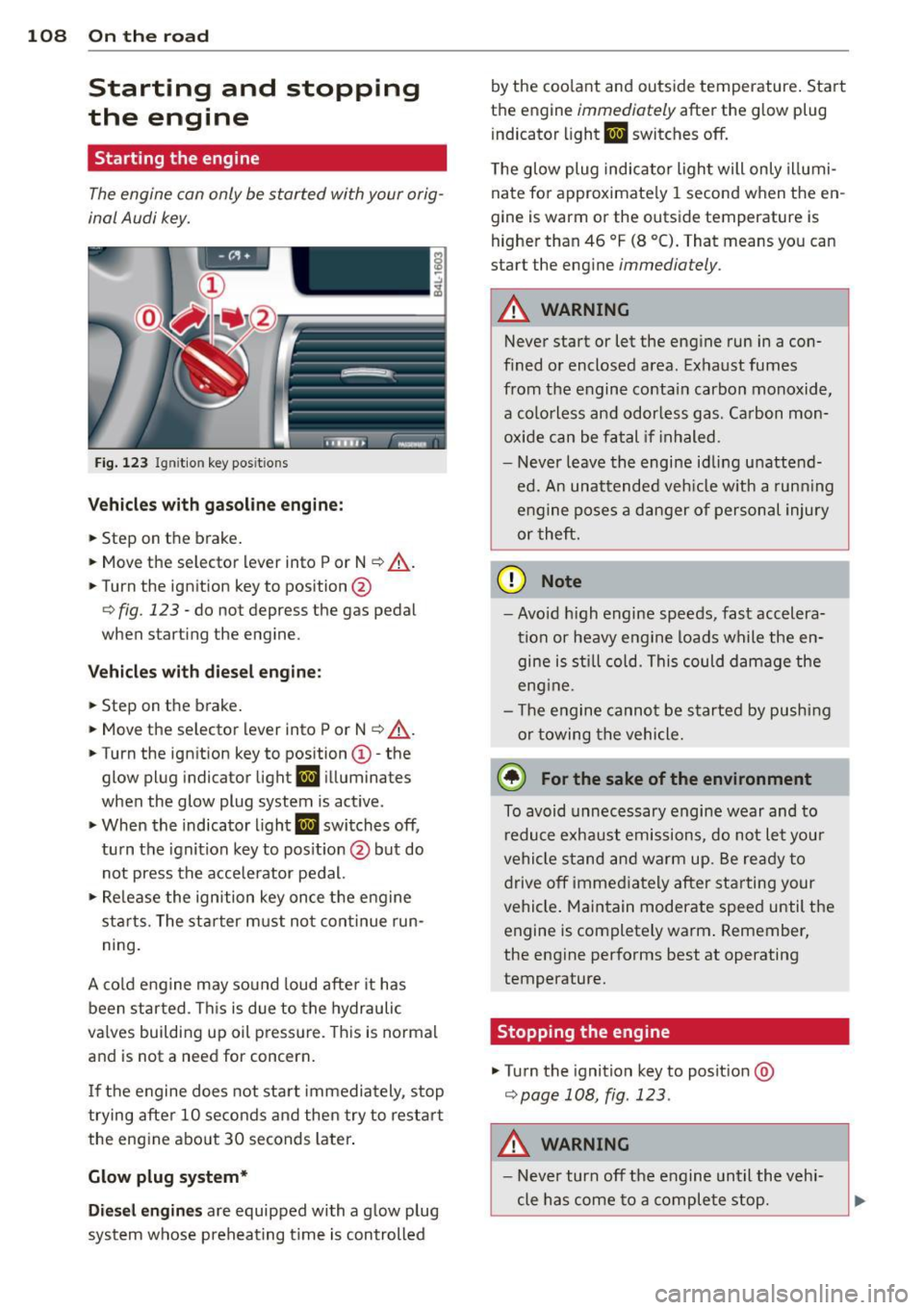
The engine can only be started with your orig
inal Audi key.
Fig. 123 I gni tion key positio ns
Vehicles with gasoline engine:
.. Step on the brake .
.. Move the selector lever into P or N
~ ,&. .
.. Tu rn the ignition key to position @
~ fig. 123 -do not depress the gas pedal
when starting the engine.
Vehicles with diesel engine:
.. Step on the brake .
.. Move the selector lever into P or N
~ ,&..
.. Turn the ign ition key to position ©- the
glow plug indicator light
II illuminates
when the glow plug system is act ive .
.. When the indicator l ight
II switches off,
turn the ignition key to pos it ion @ but do
not press the accelerator pedal.
.,. Re lease the ignition key once the engine
sta rts. The starter must not continue run
ning.
A cold engine may sound loud after it has
been started . This is due to the hydraulic
va lves building up oil pressure. This is normal
and is not a need for concern.
If the engine does not start immediately, stop
trying after 10 seconds and then try to restart
the engine abo ut 30 seconds later.
Glow plug system*
Diesel engines are equipped with a glow plug
system whose preheating t ime is controlled by the coo
lant and outs ide temperature . Start
the engine
immediately after the glow plug
indicator light
II switches off.
The glow plug indicator light will only illumi
nate for approximate ly 1 second when the en
gine is warm or the outside temperature is
higher than 46 °F (8 °C). That means you can
start the engine
immediately .
A WARNING
-Never start or let the engine run in a con-
fined or enclosed area. Exhaust fumes
from the engine contain carbon monoxide,
a colorless and odorless gas . Carbon mon
oxide can be fatal if in haled.
- Never leave the engine idling unattend
ed. An unattended veh icle w ith a runn ing
engine poses a danger of personal injury
or theft .
(D Note
- Avo id high engine speeds, fast accelera
tion or heavy engine loads while the en gine is still cold. This could damage the
eng ine .
- Th e engine cannot be started by pushing
or towing the vehicle .
@ For the sake of the environment
To avoid unnecessary engine wear and to
reduce exhaust emissions, do not let your
vehicle stand and warm up. Be ready to
drive off immediately after starting your
vehicle. Maintain moderate speed until the
engine is completely warm . Remember,
the engine performs best at operating
temperature.
· Stopping the engine
.,. Turn the ignition key to posit ion @
~page 108, fig . 123.
A WARNING
-
- Never turn off the engine until the vehi-
cle has come to a complete stop.
Page 112 of 350
110 On the road
reac hed o per ating temperature -other
wise you risk engine damage.
- The eng ine cannot be started by pushing
or towing the vehicle.
@ For the sake of the environment
Do not allow the engine to warm up with
t he vehicle stationary. Start driving right
away . In th is way you avoid unnecessary
emissions.
@ Tips
If you open the drive r's door when the ig
nition is switched o n, a buzze r sounds and
the message
Ignition is on appears i n the
instrument cluster disp lay. Please switch
the ignition off.
Switching engine off with the~
button
App lies to veh icles: wit h Co nvenience key
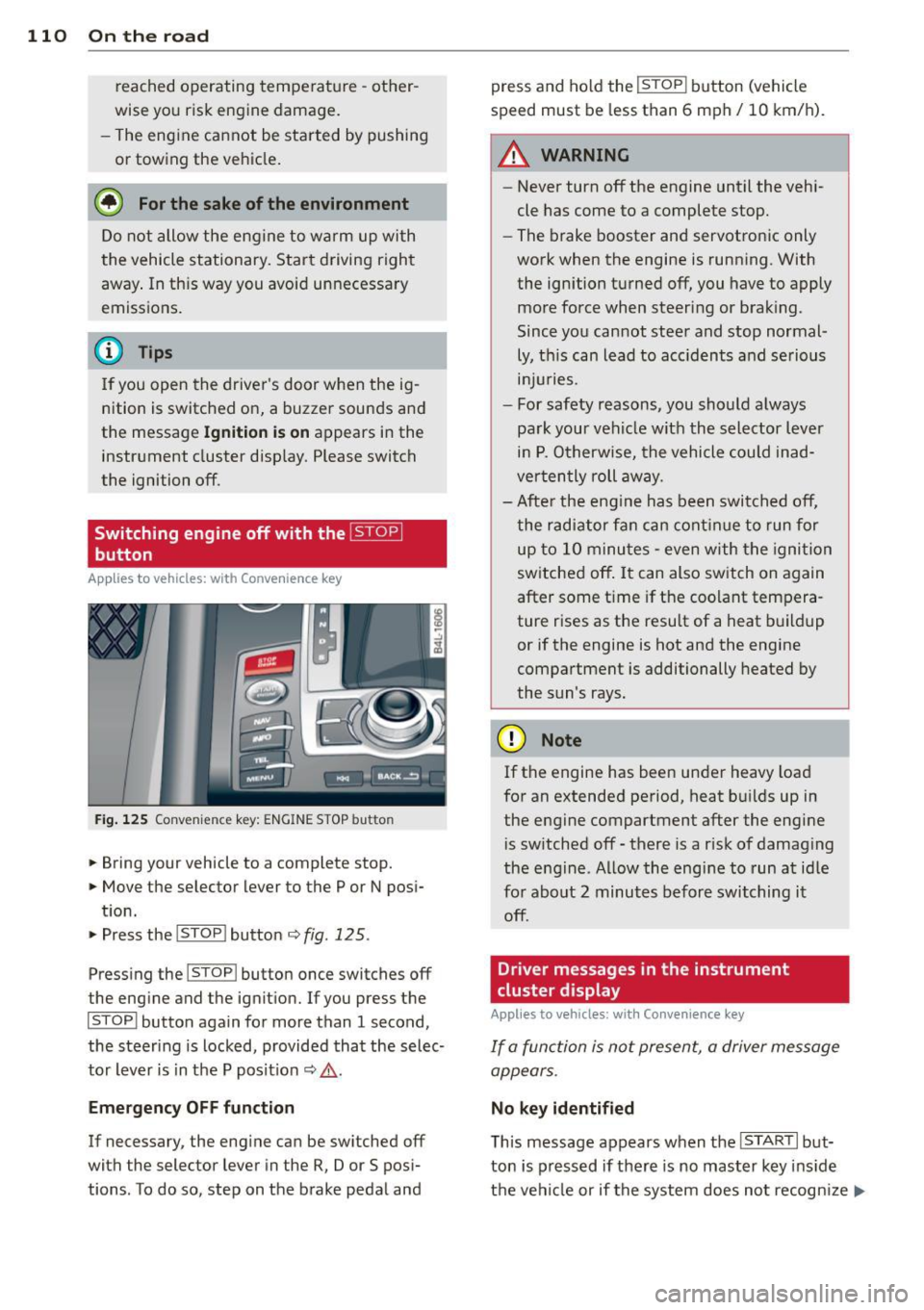
Fig . 125 Convenience key: ENGINE STOP button
.. Bring your vehicle to a complete stop.
.. Move the selector lever to the P or N pos i-
t ion.
.. Press the
!STOP ! button c;, fig. 125.
Pressing the ! STOP ! button once switches off
the eng ine and the ignition. If you press t he
!STOPI button again for more than 1 second,
the steering is locked , provided that the selec
tor lever is in t he P pos it ion
c;, & .
Emergency OFF function
If necessary, the eng ine can be sw itched off
with the selector lever in the R, Dor S posi
tions . To do so, step on the brake pedal and press and ho
ld the
! STOP ! button (vehicle
speed must be less than 6 mph/ 10 km/h).
.&_ WARNING
-
- Never turn off the engine until the vehi-
cle has come to a complete stop.
- The brake booster and servotronic only
work when the engine is running. With
the ignition turned off, you have to apply mo re force when steeri ng or brak ing.
Since you cannot stee r and stop normal
ly, t his can lead to acc idents and se rious
. . . in Juries.
- For safety reasons, you sho uld a lways
pa rk your vehicle wit h the selector lever
in P. O therwise, the vehicle could inad
ver ten tly roll aw ay.
- Afte r the eng ine has been switch ed off,
t he r adi ator fa n can cont in ue to run f or
up to 10 minu tes -even with the igni tion
switched off . It can also switch on again
after some t ime if the coolant tempera
ture rises as the resu lt of a heat b uildup
or if the engine is hot and the engine
compartment is additionally heated by
the sun's rays.
(D Note
If the engine has been under heavy load
for an extended pe rio d, heat b uilds up in
the engine compartment after the engi ne
i s sw itched off -there is a r isk of damag ing
the e ngine. A llow the engi ne to run a t id le
fo r about 2 minutes before switching it
off .
Driver messages in the instrument
cluster display
Applies to veh icles: w it h Co nvenience key
If a func tion is not present, a driver message
appears.
No key identified
T his message appears when the I STAR T I but-
ton is pr essed if there is no master key ins id e
the vehi cle or if the system does not recogn ize
IJ,-
Page 116 of 350
114 On the road
• To increase/decrease the speed quickly, hold
the lever in the
0 10 direction unti l the de
s ired speed is displayed.
You can a lso press the accelerator pedal down
to increase your speed , e .g. if you want to
pass someone . The speed yo u saved earlier
will resume as soon as you release the acceler
ator pedal.
If , however, you exceed your saved speed by
5 mph (10 km/h) for longer than 5 minutes ,
the cruise contro l will turn off temporarily .
The symbol will go out but the saved speed
will be retained.
Presetting your speed
You con preset your desired speed while the
vehicle is not moving.
• Turn on the ignition.
• Pull lever into position
(D c:;, page 113,
fig. 127.
• Press the lever in the 0 or O direction to
increase or decrease you r speed .
• Release the lever to save that speed .
This funct ion makes it possible, for example,
to save the speed you want before driving on
the highway . Once o n the hig hway, activate
the cruise contro l by pulling the lever toward
(D .
Switching the system off
Temporary deactivation
• Press the b ra ke peda l, or
• Press the lever into pos it ion @ (not clicked
into p lace)
r:!;> poge 113, fig . 127, or
• Drive for longer than 5 minutes at more
than 5 mph (10 km/h) above the stored
speed.
Switching off completely
• Press lever in to posi tion @ (clic ked into
place), or
• Switch the ignition off .
The system reta ins the saved speed if yo u de
activate the cru ise con trol tempo rari ly. To re- sume the saved speed, re
lease the brake ped
al and pu ll the lever to position
(D .
Switch ing the igni tion off e rases the saved
speed.
A WARNING ~
You shou ld only ret urn to the saved speed
if it is not too fast for the c urrent traffic
conditions -risk of an accident!
-
Page 117 of 350
M
"' 0 ..J
"". rl I.O
"' rl
"' rl
Adaptive cruise control Speed and distance
control system
Description
Applies to vehicles: with adaptive cruise cont rol
The adaptive cruise control driver assistance
program is a combined speed and distance
control system .
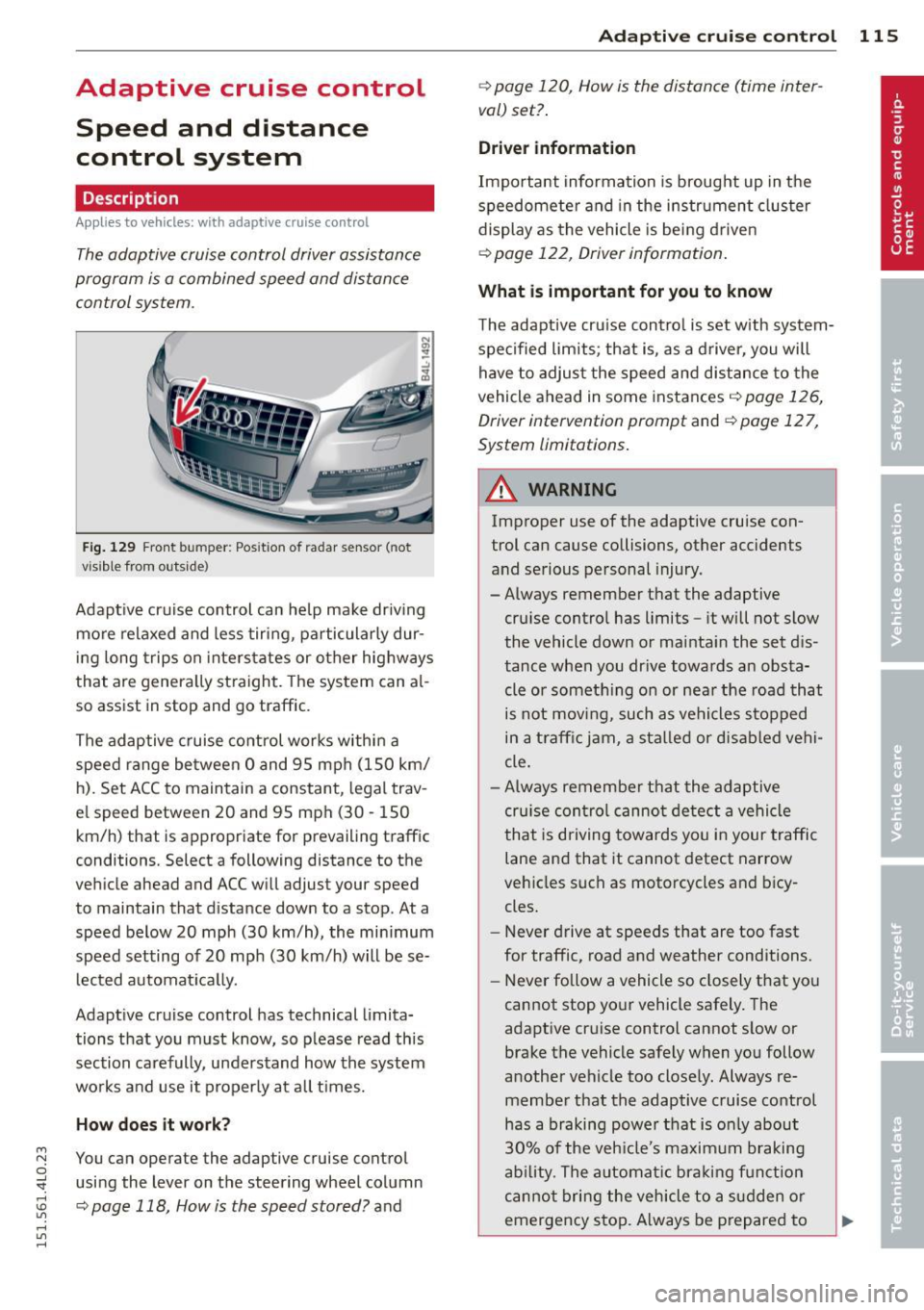
Fig . 12 9 Fro nt bu mper: Pos itio n of r adar se nsor (not
v is ib le from out side)
Adapt ive cruise control can he lp ma ke driv ing
more relaxed and less tiri ng , particularly dur
in g long trips on inters tates or other hig hways
that are genera lly st raight. The sys tem can al
so ass ist in stop and go traffic .
The adap tive cruise co ntrol wor ks within a
spee d range be tween 0 and 95 mph (150 km/
h ). Set ACC to maintain a constant, legal trav
e l speed between 20 and 95 mph (30 -150
km/h) that is appropriate for prevailing traff ic
conditions. Select a following distance to the
veh icle ahead and ACC will adjust your speed
to maintain that d istance down to a stop . At a
speed below 20 mph (30 km/h), the min imum
speed setting of 20 mph (30 km/h) will be se l ected a utomati ca lly.
Adapt ive cruise control has technical limita
tions that you must know, so p lease read th is
section carefully , understand how the system
wo rks and use it properly at a ll times.
How does it work?
You can operate the adaptive cruise control
usi ng the lever on the steering wheel column
c::> page 118, How is the speed stored? and
Ad apti ve crui se control 115
c::> page 120 , How is the distance (time inter
val) set? .
Driver information
Important informa tion is broug ht up in the
speedomete r an d in the instr ument clus ter
display as the vehicle is being driven
c::> page 122, Driver informat ion .
What is important for you to know
The adaptive cru ise cont ro l is set w ith system
spe cified lim its; that is, as a driver, you will
have to adjus t the speed and d istance to the
vehicle ahead in some instances
c:> page 126,
Driver intervention prompt
and c::> page 12 7,
System limitations .
A WARNING
Improper use of the adaptive cruise con
trol can cause collisions, other accidents
and se rious personal injury.
- Always remember that the adaptive cru ise contro l has limits -it will not slow
the vehicle down or ma inta in the set d is
tance when you dr ive towards an obsta
cle or someth ing o n or nea r the road that
is not mov ing, such as ve hicles stopped
in a tra ffic jam, a sta lled or d is ab led vehi
cle.
- Always remembe r that the adaptive
cru ise con tro l canno t detect a vehi cle
that is driving towards yo u in your traff ic
lane and that it cannot detect narrow
veh icles s uch as motorcycles and bicy
cles.
- Never drive at speeds that are too fast
for traffic, road and weather conditions.
- Never follow a vehicle so closely that yo u
cannot stop yo ur vehicle safely . The
adaptive cr uise control cannot s low or
brake the vehicle safely when you follow
a nother vehicle too close ly. Always re
membe r that the adaptive cruise control
has a braking powe r th at is o nly about
3 0% of the veh icle 's maxim um braking
abil ity. T he a uto mat ic br ak in g f unctio n
canno t bri ng the veh icle to a s udden or
emergency sto p. Always be prepared to
-
Page 126 of 350

124 Adaptive cruise control
select information from the trip computer,
navigation system* or adaptive cruise control.
@ Vehicle symbol
@ Distance
© Status
@Vehicle symbol
The vehicle symbol indicates whether the sys
tem has detected an object traveling in front .
-Vehicle outline: Open road, no vehicle
ahead.
- White vehicle: A vehicle is detected ahead.
-Red vehicle : Request for driver to assume
control.
@ Distance
Using the arrows and scale, you can detect
how far it is to the vehicle in front of you.
- Open road: No arrow appears when the ve
hicle is on an open road and there is no vehi
cle ahead.
- Driving in traffic: If a vehicle is detected
ahead, the arrow moves on the scale. The
green area represents the distance set.
When approach ing slow ly, the arrow moves
from the
gray zone to the green zone on the
scale .
-Driver intervention prompt : When ap
proaching rapidly, the arrow serves as an
early warning signal. If the d istance select
ed is exceeded or possibly not reached, the
arrow moves into the
red zone on the scale.
In certa in driving situations, you as the driv
er w ill have to take action
c::> page 126, Driv
er intervention prompt.
@Status
- The text ACC: Off appears in white letters
when adaptive cruise control is turned off.
- The text
ACC: Standby appears in white let
ters when the system is turned on but no
desired speed has been set.
- The text
ACC: override appears in white let
te rs when you exceed the desired speed by
acce lerat ing. - The text
D
ISTANC E! appears in red letters
when the interva l to a vehicle traveling
ahead is too short and you have to slow your
veh icle additionally with the foot brake.
- The text messages
DISTANCE 1 to DIS
TANCE
4 appear in green letters to indicate
the t ime interval you have set and adapt ive
cruise control is in management mode.
- If the driving program "standard" is re
placed by "comfort" or "dynam ic" using the
MMI , the above text message is supple
mented by an appropriate prompt, e.g.
DIS
TANCE
1 -dyn .
System status indicator
Applies to vehicles : wi th adap tive c ruise contro l
The text messages and symbols shown in this
area of the display are not displayed perma
nently.
Fig. 140 System status indicator
Time intervals (such as.::::::, ____ .::::::,)
The different symbols for the time intervals
(distance) appear if you change the settings
c::> fig. 140 .
Three white dots ... appear if a setting cannot
be made w ith the operating lever. The follow
ing are possible reasons
- If you pull the cont ro l lever towards you to
resume speed but no requested speed was
set.
- If you push the lever up to increase (or down
to reduce) speed when no speed has been
set previously.
- If you push the lever up to increase (or down
to red uce) speed and this speed is outs ide
Ill>
Page 134 of 350
132 Audi side assist
-The radar sensor's vision can be reduced
or entirely blocked by rain, snow, and
heavy spray . This can result in side assist
not adequately detecting vehicles or, in
some cases, not detecting them at all.
Always keep an eye on the direction you
are traveling and the relevant area
around the vehicle.
- Please note that side assist indicates
there are approaching vehicles, or
vehicles in your blind spot, only after
your vehicle has reached a driving speed
of at least 19 mph (30 km/h).
- Side assist signal does not work around
tight corners (turning radius less than
328 feet, or 100 m).
- Side assist is no replacement for the driv
er's full attention. The driver alone is re
sponsible for lane changes and similar
driving maneuvers. Always keep an eye
on the direction you are traveling and the relevant area around the vehicle.
- To ensure that you do not adversely af
fect side assist, do not block the area on
the rear bumper where the radar sensors
are located with foreign objects (such as
stickers or bicycle racks).
- Make sure that the signal light on the
outside mirror is not blocked by stickers
or other items.
(Di Tips
- Side assist automatically deactivates if it
detects that the radar sensors are
blocked ¢
page 13 7. The indicator light
on the button goes out .
- The area on the bumper where the radar
sensors are located must consistently re
main free of snow, ice, and heavy soiling
so that side assist can function properly.
Follow the additional notes on
¢page 138.
-For vehicles with a factory installed tow
ing hitch* or a trailer hitch* that was in
stalled later according to factory specifi
cations, side assist is automatically deac- tivated
as soon as the electrical connec
tion to the trailer electrical socket is made
¢ page 137.
-For vehicles with a trailer hitch that was
not installed according to factory specifi
cations, switch off the side assist when
towing a trailer .
- Additional tinting on the front side win
dows can make it harder to see and cor
rectly understand the signal light on the
outside mirror.
- For Declaration of Compliance to United
States FCC and Industry Canada regula
tions¢
page 329.
Sensor detection area
Applies to vehicles: with side assist
-----··· .... ·--·--
@ / ,
--
ill b''T -
Fig. 153 Sc hematic illustration: Sensor detectio n area
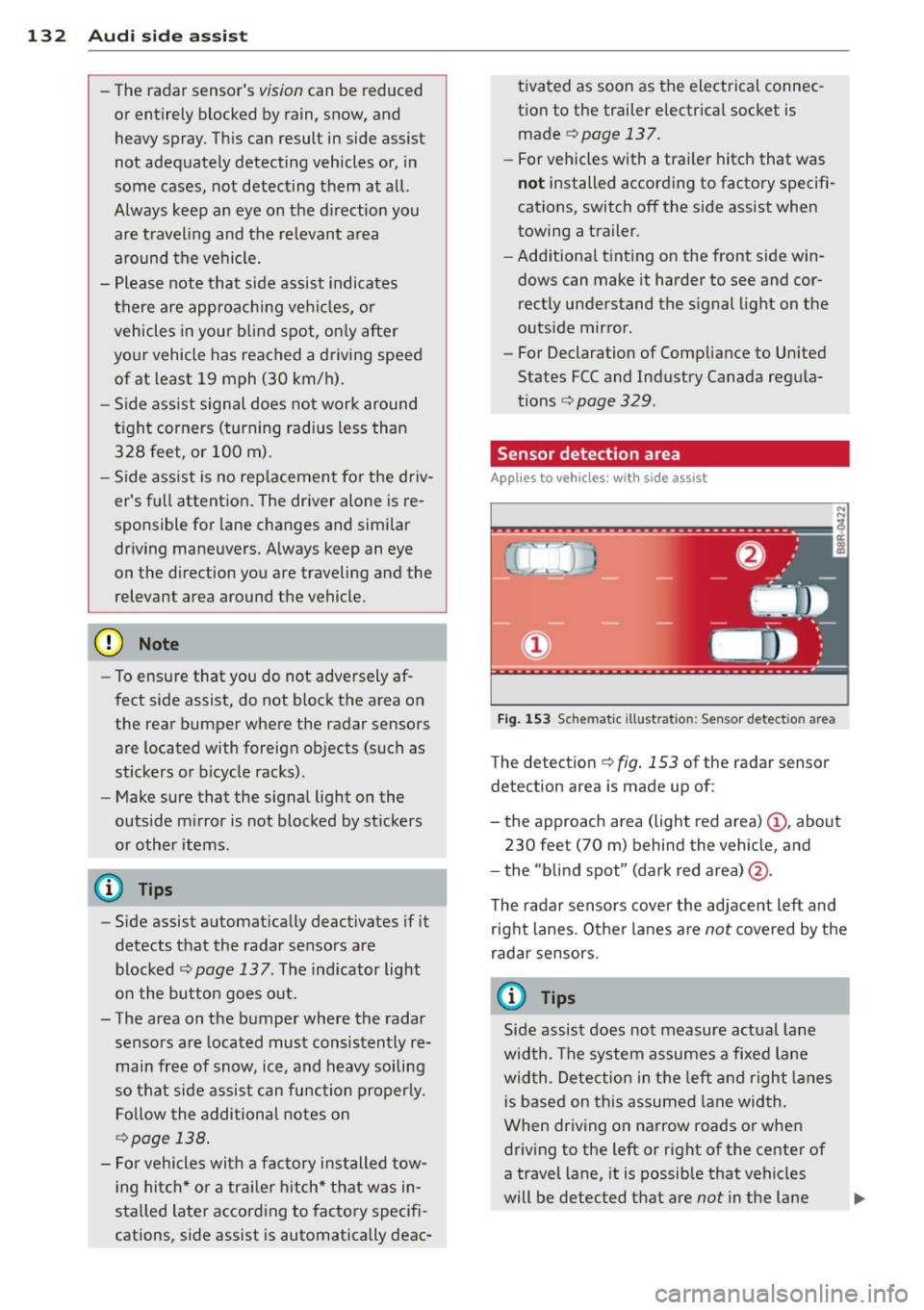
The detection ¢ fig. 153 of the radar sensor
detection area is made up of:
-
- the approach area (light red area) (D, about
230 feet (70 m) behind the vehicle, and
- the "blind spot" (dark red area) @.
The radar sensors cover the adjacent left and
right lanes. Other lanes are
not covered by the
radar sensors.
(D Tips
Side assist does not measure actual lane
width. The system assumes a fixed lane
width . Detection in the left and right lanes
is based on this assumed lane width.
When driving on narrow roads or when
driving to the left or right of the center of
a travel lane, it is possible that vehicles
will be detected that are
not in the lane
Page 139 of 350

M
"' 0 _,
"". rl I.O
"' rl
"' rl
Lane width
Applies to vehicles: with side assist
-· Fig. 158 Lan es o f a norma l wid th are in detect ion area
Fig . 159 Narrow lanes: Side ass ist may detect vehicles
two la nes away
Side assist's detection area is designed to cov
e r l anes of standard w idth to the left and
r ight of your travel lane, depending on wheth
er you dr ive in the center of your lane or closer
to the edge.
I f you drive in narrow lanes, s ide ass ist's de
tec tion a rea may a lso incl ude other lanes -es
pec ia lly if you tend to d rive on the edge of
your lane
c:::> fig. 159 . Under these cond it ions,
ve hicles can also be detected that are two
l anes away, and side assist then could switch
between the informat ional and warn ing stage
signals.
When driving in very wide lanes, vehicles in
the adjacent lane may not be detected be
cause they are not inside the detection area.
Notes
Messages in instrument cluster display
Applies to vehicles: with side assist
If s ide ass ist t urns off automa tically, the ind i
cator l igh t on the button wi ll go ou t and you
Aud i side assist 13 7
will see a message in the instrument cluster
display:
Audi side assist not available: sensors
blocked
T he side assist sensors are built into the rear
bumper on the left and r ight (not visible on
the outside)
c:!> poge 131, fig . 150. To ensure
that you do not adversely affect the way side
ass ist functions, foreign objects (such as stick
ers or bicycle racks) should not be attached to
the area on the rear bumper where the sen
sors a re located . If side ass ist functions are
adverse ly affec ted, you w ill see th is message
in the instrument cluster disp lay . Remove any
th ing t hat may be blocking the sensors.
If no vehicle is detected for a longer per iod of
t ime wh ile dr iv ing, s ide ass ist w ill also switch
off automati cally.
Audi side assist cu rrently not available
If there is a temporary problem (such as the
vehicle 's battery charge be ing low), side assist
cannot be act ivated temporar ily .
Audi side as sis t: system fault
Have the system checked by an author ized
Audi dealer or qualified workshop.
Audi side assist not available when
towing
The radar sensor's view is limited when tow ing a tra iler. For vehicles with a factory instal
led tow ing hitch or a trailer hitch that was in
stalled later according to facto ry specifica
t ions, s ide ass ist is automatically deact ivated
as soon as the ele ctrical connection to the
trailer's e lectrical socke t is made, an d this sta
tus message appears in the instrument clus
ter display. Deactivation cannot be guaran
teed when using a ret rofitted towing hitch
that was
not installed according to factory
specifications .