warning lights AUDI Q7 2015 Owner´s Manual
[x] Cancel search | Manufacturer: AUDI, Model Year: 2015, Model line: Q7, Model: AUDI Q7 2015Pages: 350, PDF Size: 86 MB
Page 124 of 350
122 Adapti ve crui se control
A WARNING
Following ot her vehicles too closely in
creases the risk of a crash and serious per
sonal injury .
- Following other vehicles too closely, par
t icularly at higher speeds increases the
risk of collis ions and serious pe rsonal in
Jury.
- Setting short distances to the traffic
ahead reduces the time and distance
available to br ing you r vehicle to a safe
stop and makes i t even mo re ne cessary
to pay close attention to traffic.
- Always select a speed and distance to
traffic ahead that is safe and appropr iate
under the prevailing traff ic, road, weath
er and Lighting conditions .
- Never re ly on the dis tance control fea
ture of ACC a lone to p reven t rear -end col
lisions. Always be prepared to brake and
take evasive act ion to avoid co llisions
and other acc ident situations.
- Never allow the closing speed between
you and other vehicles to be so h igh that
the adaptive cruise control may not be
able to slow your vehicle safe ly. If clos
ing speed is too high, you must apply the
brakes yourself to reduce the risk of a
rear-end c rash.
- Always select a g reater following dis
tance to the veh icle ahead on wet roads
than o n dry roads.
- Always read and heed the information
and WARNI NGS
9 .&. in Description on
page 115.
(0 Tips
The distance setting is reset to the factory
default
DISTANCE 3 the next time the ig
nition is turned on.
Driver information
Displays in the instrument cluster
Applies to veh icles: w ith adaptive cruise contro l
Depending on the driving situation, driver in
formation is displayed in the instrument clus
ter .
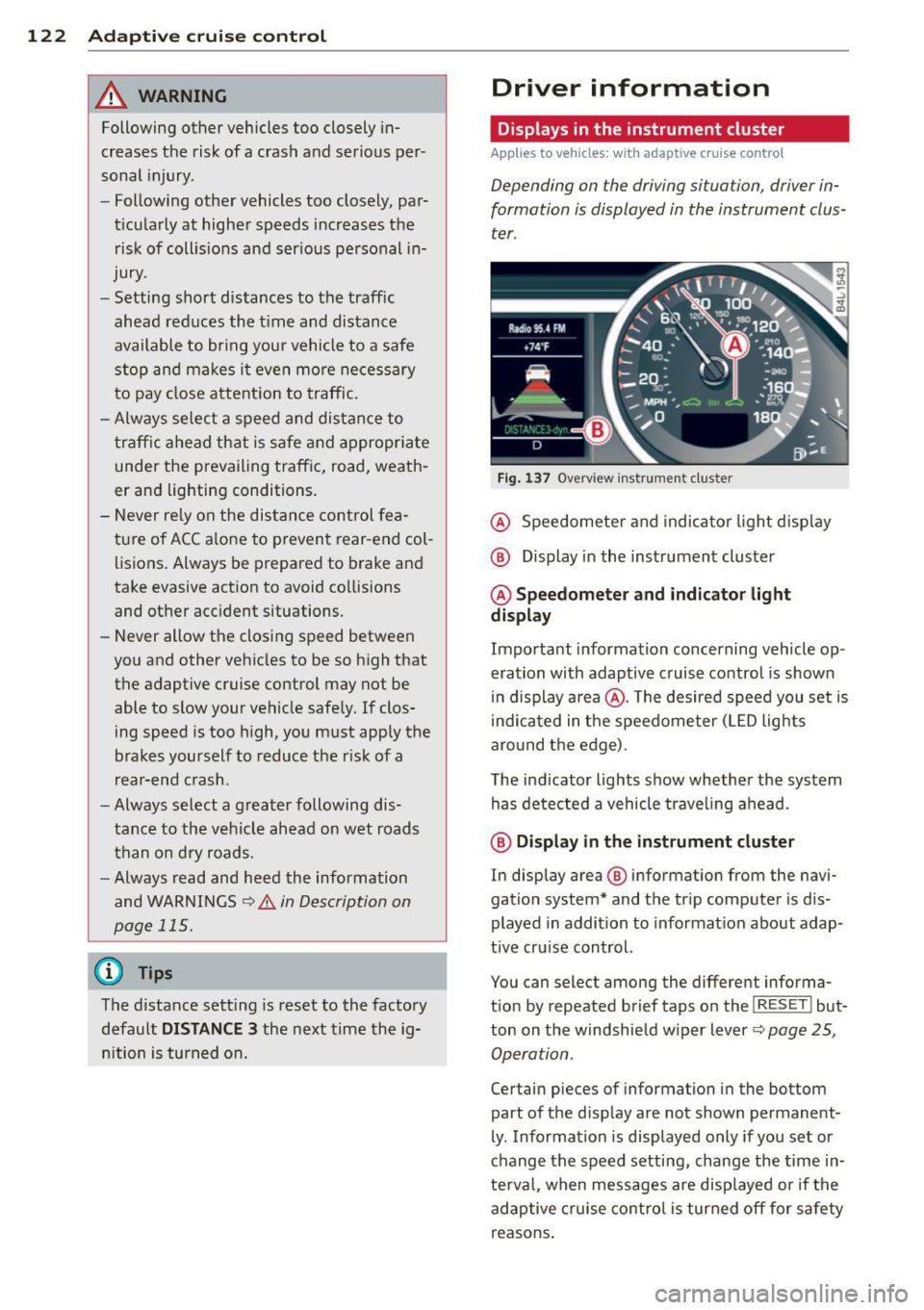
Fig . 1 37 Overv iew ins tr u me nt cluster
@ Speedometer and indica to r Li ght d isp lay
@ Display in the instrument cluster
@ Speedometer and indicato r light
display
Important information concerning vehicle op
eration with adaptive cruise control is shown
i n display a rea @. The desired speed you set is
i ndica ted in the speedome ter (LED lights
aro und t he ed ge).
T he ind icator Lights show whether the system
has detected a vehicle trave ling ahead .
@ Display in the in strument cluster
In display area@ information from the navi
gation system* and th e tr ip computer is dis
played in addition to informat ion about adap
t ive cru ise control.
You can select among the different informa
t io n by repeated brief taps o n the
I RESET I but
ton on the w indshie ld w iper Lever
9 page 25,
Operation .
Certain pieces of information in the bottom
part of the display are not shown permanent
ly . Information is displayed only if you set or
c h ange the speed setting, change the time in
te rva l, when messages are disp layed or if the
adaptive cruise co ntro l is turned
off for safety
r easons .
Page 125 of 350

M
"' 0 ..J
"". rl I.O
"' rl
"' rl
Display in the speedometer
Applies to vehicles: with adaptive cruise control
Fig. 138 D isplay in the speedomete r
Des ired spe ed
The desired speed set by the driver is dis
p layed by a red LED.
If the desi red speed was set between two
lines on the speedometer using the
I SETI but
ton, the two closest light emitting diodes will
come on <=>
fig. 138.
The system a llows only speeds to be set be
tween 20 to 95 mph (30 to 150 km/h) to be
set. This speed range is faint ly illuminated in
the speedometer (LED lights).
Ind icator lights (symbols )
-- Open road :
The indicator light_
shows that ACC is act ive and that no moving
vehicle has been detected with in range of the radar sensor up ahead in your lane of
travel. The set speed is maintained.
- - Driving in traff ic: The ind icator
light - shows that a vehicle moving in
your lane of travel has been detected up
front in your lane of travel. Your speed is ad
justed according to the speed of the vehicle
up front . ACC accelerates and brakes auto
matically within the sys tem's capabilit ies .
-- Driver int ervention prompt: The
red flashing warning light- means
Request for driver to a ssume control. You
as the dr iver must s low the vehicle with the
f oot brake. The symbo l-t ells you
t h at the adaptive c ruise co ntrol is not able
to slow the vehicle down enough to keep a
enough distance to the ve hicle in front of
you. A warning tone will a lso sound when
Ad apti ve crui se control 12 3
the symbol appears. For more information
about the driver intervention prompt
r::!) page 126.
_& WARNING
Improper use of the adaptive cruise con
trol feat ures and inattent ion can lead to a
crash and ser ious pe rsonal inju ry.
- Never a llow the closing speed between
you and othe r vehicles to be so high that
the adaptive cruise cont ro l may not be
ab le to slow yo ur vehicle safely. If clos
ing speed is too high, you must apply the
brakes yo urself to reduce t he ris k of a
rear-e nd crash.
- Always sele ct a greate r followi ng d is
tance to the vehicle up ahead on wet
roads t han on d ry roads.
- Always rea d and h eed t he i nfo rmation
an d WAR NINGS <=>
& in Desc rip tio n on
page 115 .
(D Tips
- If you use t he accelerator to go faste r
t han t he speed of the vehicle ahead o f
yo u, the dr iver in tervention prompt will
not be accompa nied by a warn ing tone.
- I f the speed you previ ously set is exceed
ed, the indic ator light in the s peedome
ter wi ll swi tch off.
Display in the instrument cluster
Appl ies to vehicles: wit h adaptive cruise control
Fig. 139 Disp lay in the inst rument cluster
-
Scroll through the availabl e information dis
p lays by br iefly tapp ing the
I RESET ! button at
the en d of the windshield wipe r leve r. Yo u can ..,.
Page 133 of 350
M
"' 0 _,
"". rl I.O
"' rl
"' rl
Audi side assist Lane Change Assistant
Description
App lies to vehicles: with side assist
The side assist helps you when changing
lanes .
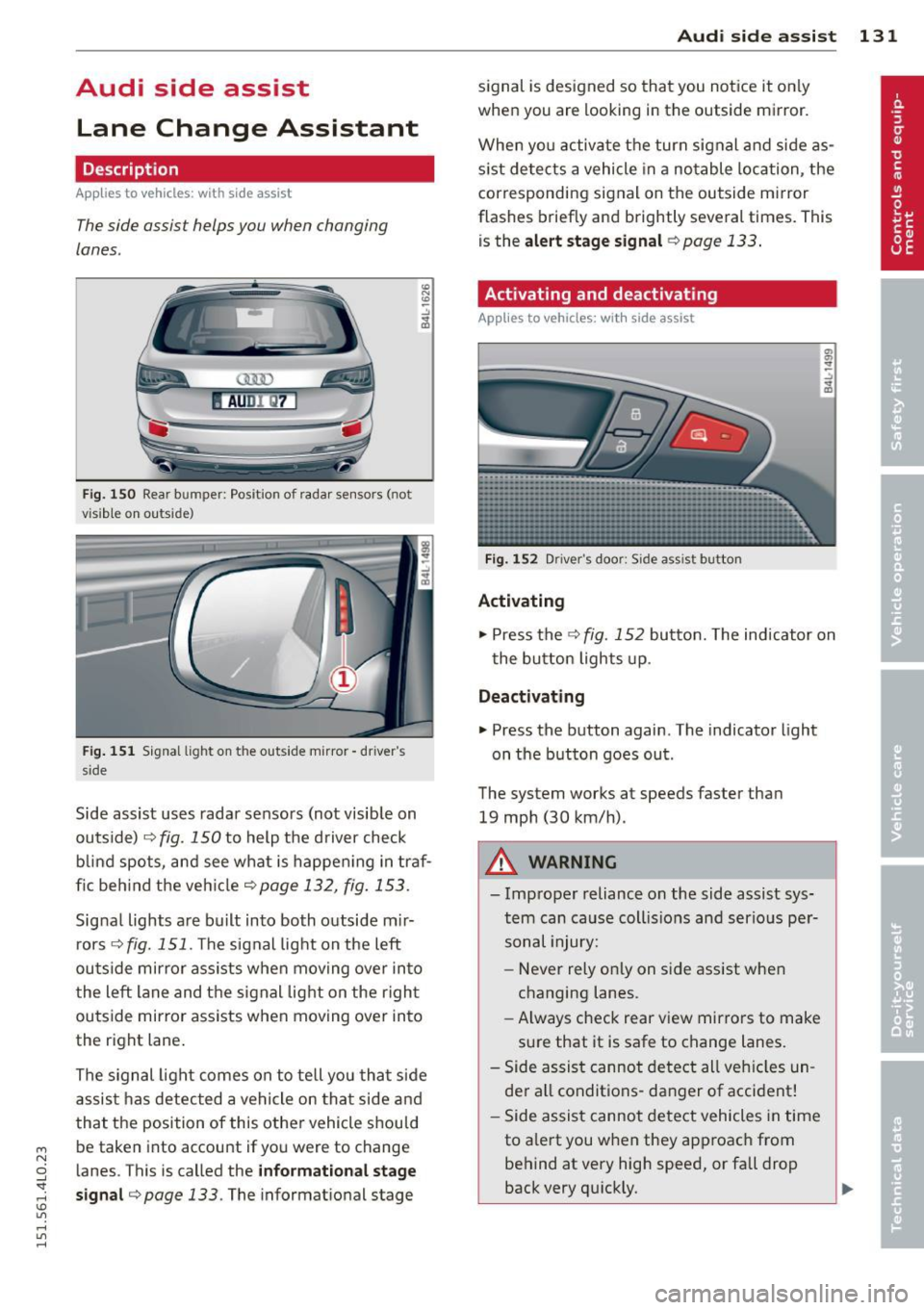
AUDl Q7
Fig. 150 Rear b umper: Pos it ion of radar sensors (not
v is ib le on outside)
F ig .
15 1 Signal light on the outside mirror -driver 's
s ide
~ -..:, .. (D
Side assist uses radar sensors (not visib le on
outside) ¢
fig. 150 to help the d river check
b lind spots, and see what is happen ing in traf
fic beh ind the veh icle
¢ page 132, fig. 153.
Signa l lights are bu ilt into both outside m ir
r ors ¢
fig. 151 . The signal light on the left
ou tside mirror assists when moving over into
the left lane and the signal light on the r igh t
ou tside mirror assists when moving over in to
the right lane .
The s ignal lig ht comes on to tell yo u that side
assis t has detec ted a vehicle on tha t side and
that t he position of this othe r vehicle shou ld
be taken into account if yo u were to change
l anes. This is called the
informationa l stage
sign al¢ page 133.
The informat ional stage
Aud i side assist 131
signal is designed so that you notice it on ly
when you are looking in the outside mirror.
When yo u activate the turn signal and side as
s ist de tects a vehicle in a no table location, the
corresponding signal on the outside mi rror
flashes briefly and brightly several times. Th is
is the
alert stage signal ¢page 133.
Activating and deactivating
Applies to vehicles: wit h side assist
Fi g.
1 52 D river 's doo r: Side assist button
Activating
.,. Press the
¢ fig. 152 button. The indicator on
t he button lights up .
Deactivating
.,. Press the button again. The indicator light
on the button goes ou t.
The system works at speeds faster than
19 mph (30 km/h) .
A WARNING
-Imp roper reliance on the side assist sys
tem can cause coll is ions and serio us pe r
sonal injury:
- Never rely on ly on side assist when
changing lanes.
- Always check rear view mirrors to make
su re that it is safe to change lanes.
- Side assist canno t detect all veh icles un
de r all conditions- danger of accident!
- Side assist canno t detect vehicles in time
to a lert you w hen they app roac h from
behind at very hig h speed, or fall drop
back very qu ickly.
~
Page 143 of 350
M
"' 0 _,
"". rl I.O
"' rl
"' rl
Driving the automatic transmission
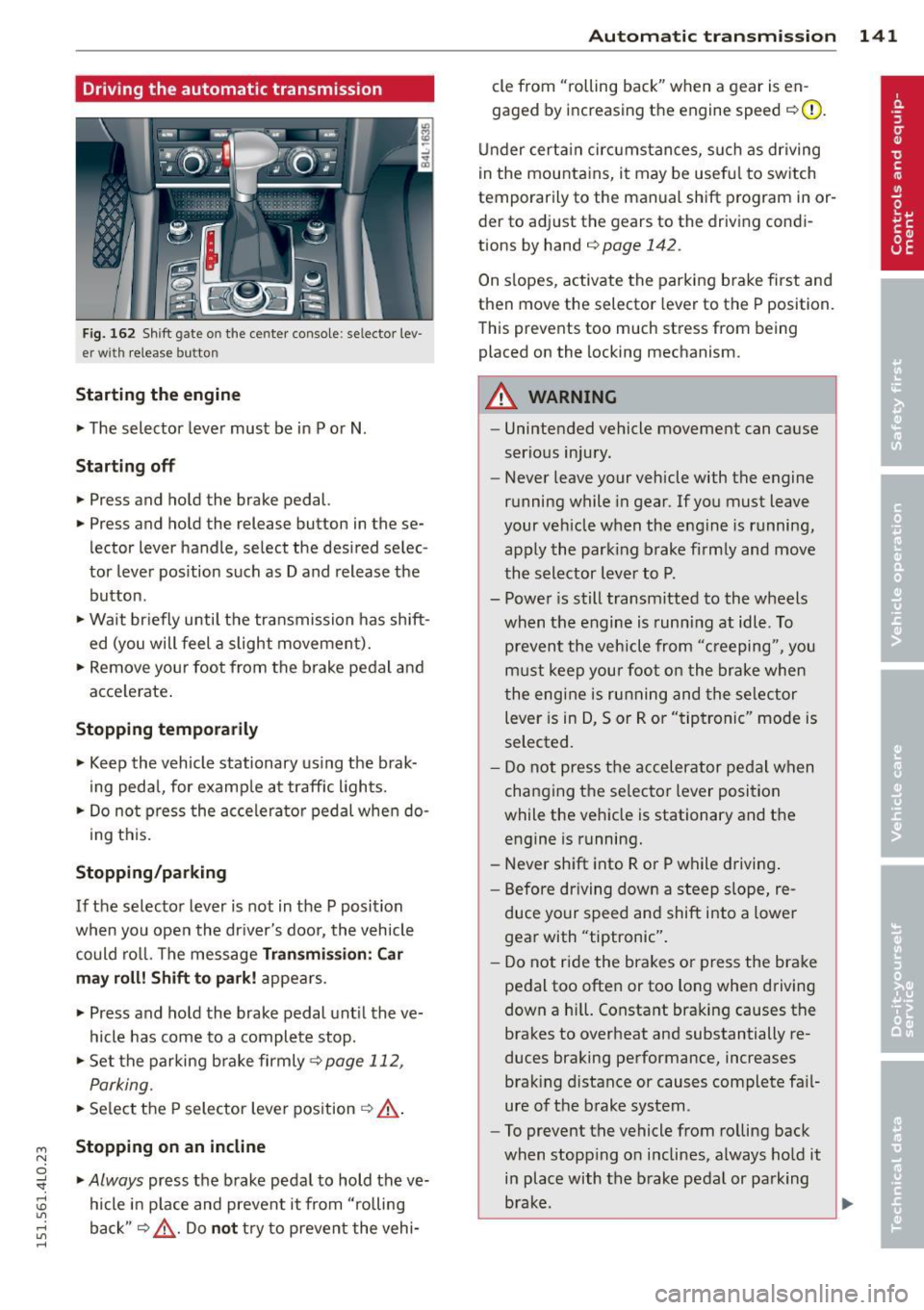
Fig. 162 Shift g ate on the center co nso le: se lector lev
er wi th release butt on
Starting the engine
~ The selector lever must be in P or N .
Starting off
~ Press and hold the brake pedal.
~ Press and hold the release button in these
lector lever handle , select the desired selec
tor lever pos ition such as D and release the
button .
~ Wait briefly until the transmission has shift
ed (you will feel a slight movement).
~ Remove your foot from the brake pedal and
acce lerate .
Stopping temporarily
~ Keep the vehicle stationary us ing the brak
ing pedal, for examp le at traffic lights.
~ Do not press the accelerato r pedal when do -
ing this.
Stopping /parking
If the selector lever is not in the P position
when you open the driver's door, the vehicle
could roll. The message
Transmi ssion : Car
may roll! Shift to park! appears.
~ Press and hold the brake pedal unt il the ve
hicle has come to a complete stop.
~ Set the parking brake firmly 9 page 112,
Parking.
~ Se lect the P selector lever position 9 &.-
Stopping on an incline
~ Always press the brake pedal to hold the ve
hicle in place and prevent it from "rolling
back"
9 ,& . Do not try to prevent the vehi-
Autom atic transm ission 141
cle from "rolling back" when a gear is en
gaged by increasing the engine speed
c::>(D.
Under certain circumstances, such as driving
in the mountains, it may be usefu l to switch
temporarily to the manual shift program in or
der to adjust the gears to the driving condi
tions by hand
c::> page 142 .
On slopes, activate the parking brake first and
then move the selector lever to the P position.
This prevents too much stress from being
placed on the locking mechanism.
A WARNING
- Unintended vehicle movement can cause
serious injury.
- Never leave your vehicle with the engine
running while in gear.
If you must leave
your veh icle when the engine is running,
apply the park ing brake firmly and move
the selector lever to P.
- Power is still transmitted to the wheels
when the engine is running at idle. To
prevent the vehicle from "c reeping ", you
must keep your foot on the brake when
the engine is running and the selector
lever is in D, Sor R or "tiptronic" mode is
selected.
- Do not press the accelerator pedal when
changing the se lector lever position
while the vehicle is stationary and the engine is running.
- Never shift into R or P while driving.
- Before driving down a steep slope, re-
duce your speed and shift into a lower
gear with "tiptronic".
- Do not ride the brakes or press the bra ke
pedal too often or too long when driving
down a hi ll. Constant braking causes the
brakes to overheat and substantially re
duces braking performance, increases braking distance or causes complete fa il·
ure of the brake system.
- To prevent the vehicle from rolling back
when stopping on inclines, always hold it
in place with the brake pedal or parking
brake . .,..
Page 150 of 350
148 Parking sy stems
- The came ra lens en larges and distorts
the field of vision. The object appears
both a ltered and inaccurate on the
screen .
- In certa in s ituations, people or objects in
the display appear closer or further
away:
- objects th at do no t touch the gro und,
such as the bumper o f a parked vehicle,
a trailer hitch o r the rea r of a truck. Do
not use the help lines in this case.
- If driven from a leve l su rface onto an
incline, or a downward slope .
- I f driven toward protr uding objec ts.
- I f the veh icle is ca rrying too much load
in t he rear.
(D Note
-Always read and fo llow the applicab le
warnings
¢ (D in General information on
page 14 5.
- The o range colored orientation lines in
t h e M MI disp lay show t he ve hicl e path
depend ing o n the steering wheel angle .
The front of the vehicle fron t swings out
more than the rea r of the vehicle. Main
ta in p lenty of distance so that your o ut
s ide mirror or a corner of your veh icle
does not collide with any obstacles.
Switching on and off
A pplies to vehicles: with Audi parking system p lus w ith
rearview camera
F ig . 170 Ce nter co nsole: P"A b utto n
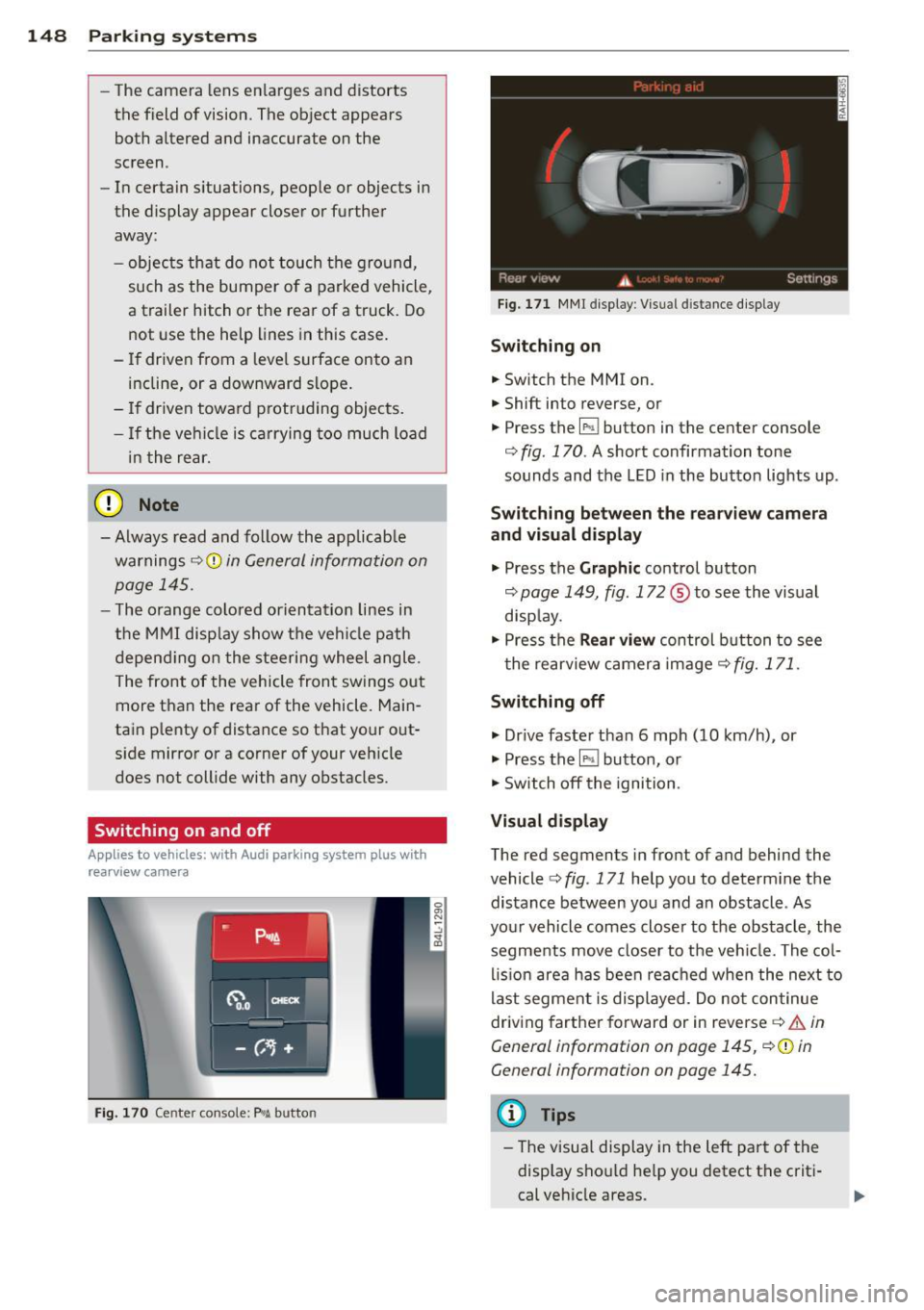
Fig . 17 1 MMI display : Visual distance d isplay
Switching on
.. Switch the MMI on .
.. Shift into reverse, or
.. Press the
l" •I button in the center console
co
fig. 170 . A short confirmation tone
sounds and the LED in the button lights up .
Switching between the rearv iew camera
and visual display
.. Press the Graphic control button
~ page 149, fig. 172 ® to see the vis ual
disp lay.
.. Press the
Rear vi ew control b utton to see
t he rearview c amera image ~
fig. 171.
Switching off
.. Dr ive faster than 6 mph (10 km/h) , or
.. Press the~ button, or
.. Switch off the ignition .
Visual displ ay
The red segments in front of and behind the
vehicle co
fig. 171 help you to determ ine the
distance between you and an obstacle . As
your vehicle comes closer to the obstacle , the
segments move closer to t he veh icle. The col
lis ion are a has been rea ched when the next to
last segment is displayed . Do no t continue
driving farther forward or in reverse co.&.
in
General information on page 145,
~ @ in
General information on page 145.
(D Tips
- The visua l display in the left part of the
disp lay sho uld he lp you detect t he crit i
cal ve hicle areas .
Page 153 of 350
M
"' 0 ..J
""'. rl I.O
"' rl
"' rl
-If the position or the installation angle
of a camera was changed, after a colli
sion for example, do not continue to use
the system for safety reasons . Have it
checked by your authorized Audi dealer
ship .
- Use the
Rear mode and the Corner view
(rear)
mode only when the rear lid is
completely closed, otherwise the image
in the display will be inaccurate.
- Objects and obstacles
above the camera
are not displayed.
- Camera lenses enlarge and distort the
field of vision. The objects appear both altered and inaccurate on the screen.
(0 Note
- Always read and follow the applicable
warnings ¢0
in General information on
page 145 .
-The MMI display shows the direction in
which the rear of the vehicle is traveling
based on the steering wheel angle. The
vehicle front swings out more than the
vehicle rear. Maintain plenty of distance
so that your outside mirror or a corner of
your vehicle does not collide with any ob
stacles.
@ Tips
If the rear lid is open, the image in the
rearview camera is displayed without ori
entation lines and without blue surfac es.
Switching on or off
Applies to vehicles: with Audi parking system plus w ith
front- and rearview camera
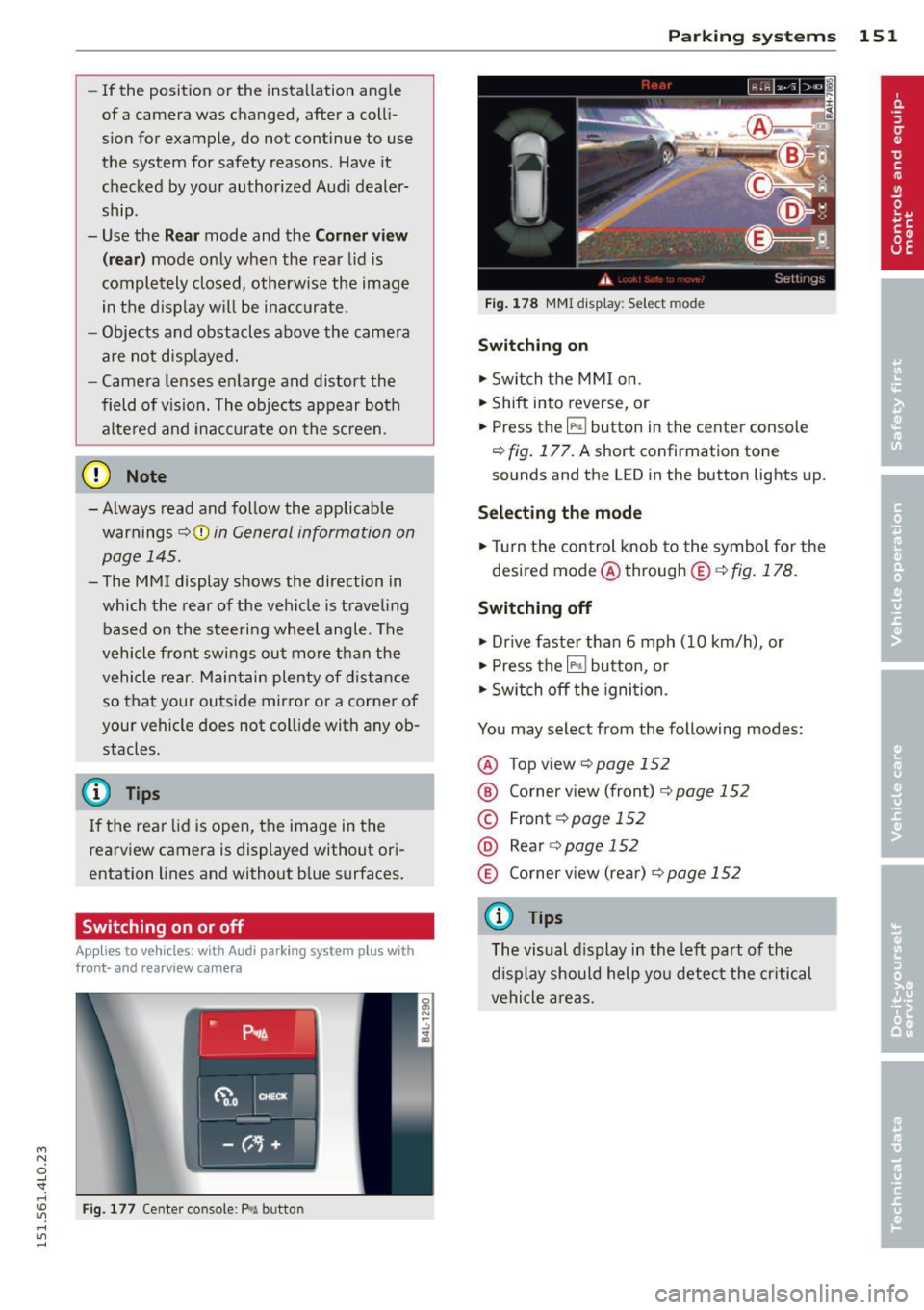
Fig. 177 Center console : P,•A but ton
Parking systems 151
Fig. 178 MMI display: Select mode
Switching on
.,. Switch the MMI on.
.,. Shift into reverse, or
.,. Press the
IP.1! button in the center console
¢
fig. 177. A short confirmation tone
sounds and the L ED in the button lights up.
Selecting the mode
.,. Turn the control knob to the symbol for the
desired mode @through @¢fig.178.
Switching off
.,. Drive faster than 6 mph (10 km/h) , or
.,. Press the
l""'I button, or
.,. Switch off the ignition .
You may select from the following modes:
@ Topview ¢page152
@ Corner view (front) ¢ page 152
© Front¢ page 152
@ Rear o page 152
® Corner view (rear)¢ page 152
(D Tips
The visual display in the left part of the
display should help you detect the critical
vehicle areas.
Page 165 of 350
M N
0 ...J
'SI: ,...., \!) 1.1'1 ,...., 1.1'1 ,....,
Driving Safely
General notes
Safe driving habits
Please remember -safety first!
This chapter contains important information,
tips, instructions and warnings that you need
to read and observe for your own safety, the
safety of your passengers and others . We have
summarized here what you need to know
about safety belts, airbags, ch ild restra ints as
well as child safety. You r safety is for us
priori
ty number 1.
Always observe t he information
a nd warn ings in th is se ct ion - for yo ur own
safety as well as that of your passengers .
The information in this se ction applies to all
model ve rsion s of your veh icle . Some of the
feat ures descr ibed in th is sec tions may be
standa rd equipment on some models, or may
be optional equipment on others . If you are
not sure, ask yo ur authorized Aud i dea ler.
A WARNING
- Always make sure that you follow the in
st ruct ions and heed the WARNINGS i n
this manual. It is in your interest and in
the inte rest of you r passengers.
- Always keep all of the Owner's Literature
man uals in your Audi when you lend o r
sell your vehicle so that this im po rtant
information will a lways be availab le to
the driver and passengers.
- Always keep the Owner's Literature han
dy so that you can find it easily if yo u
have ques tion s.
Safety equipment
The safety features are part of the occupant
restraint syst em and work togeth er to help
redu ce the risk of injury in a wide variety of
accident situations .
Your safety and the safety of your passenge rs
should not be left to chance. Advances in
t echnology have made a var iety o f fea tures
avai lable to he lp red uce the risk of i njury in an
Dr iving Safel y 163
accident . The following is a list of just a few of
the safety features in yo ur Audi :
- sophis ticated s afety be lts fo r drive r and a ll
passenger sea ting posit ions,
- be lt tens ione rs fo r the fro nt seats and the
outer sea ting pos it ions in the second row
seating,
- be lt h eight adjustment fo r th e front seats
a nd the o ute r seat ing positions in the sec
ond row sea ting,
- he ad restra ints for e ach sea ting pos it ion,
- front airbags,
- side airbags in the fro nt seats a nd the outer
seating posit ions i n the second row seat
ing*,
- side curta in airbags,
- special LATCH anchorages for child re-
straints,
- adjustab le steeri ng column.
T hese individual safety features, can work to
gether as a system to he lp protect you and
your passengers in a wide range of accide nts.
These features cannot work as a system if
they are not always correctly adjusted and cor
rect ly used .
Safety is everybody's responsibil ity!
Important things to do before driving
Safety is everybody 's job! Vehicle and occu
pant safety always depends on the informed
and careful driver.
Fo r yo ur safety and the safety of your passen
gers,
before driving always:
.. Ma ke s ure that all lights and signa ls are op
erating correctly .
.. Ma ke s ure that the tire pressure is co rrect .
.. Make s ure that all windows are clean and a f
ford good vis ibility to the outs ide.
.. Secure all luggage and o ther items carefu lly
¢ page 90.
.. Make s ure that nothing can interfere with
the peda ls.
.. Adj ust fron t se at, head res traint and m irrors
c orrectly fo r you r heigh t. .,..
•
•
Page 175 of 350
Safety belts
General notes
Always wear safety belts!
Wearing safety bel ts correc tly saves live s!
This chapter explains why saf ety belts ar e nec
essary, how they work and how to adjust and
wear them correc tly .
... Read all the information that follows and
heed all of the instructions and WARNINGS.
A WARNING
Not wearing safety belts or wearing them
improperly increases the risk of serious
personal injury and death .
- Safety belts are the single most effective
means available to reduce the risk of se
rious injury and death in automobile acci
dents . For your protection and that of
your passengers, always correctly wear
safety belts when the vehicle is moving.
- Pregnant women, injured, or physically
impaired persons must also use safety
belts. Like all vehicle occupants, they are
more likely to be seriously injured if they
do not wear safety be lts . The best way to
protect a fetus is to protect the mother -
throughout the entire pregnancy.
Number of seats
Vehicles with five seats: Your vehicle has two
front seats and three rear seats. Each seating
position has a safety belt.
Vehicles with six seats:* Your vehicle has two
front seats, two seats in the second row and two seats in the third row. Each seating posi
tion has a safety belt .
Vehicles with seven seats:* Your vehicles has
two front seats, three seats in the second row and two seats in the third row. Each seating
~ position has a safety belt.
0 ..J
'SI: ,...., \!) 1.1"1 ,....,
"' ,....,
Safety belts 173
A WARNING
Not wearing safety belts or wearing them
improperly increases the risk of serious
personal injury and death .
- Never strap more than one person, in
cluding small children, into any belt . It is
especially dangerous to place a safety
be lt over a child sitting on your lap.
- Never let more people ride in the vehicle
than there are safety belts available .
- Be sure everyone riding in the vehicle is
properly restrained with a separate safe
ty belt or child restraint.
Safety belt warning light
Your vehicle has a warning system for the
driver and front seat passenger (on USA mod
els only) to remind you about the importance
of buckling-up.
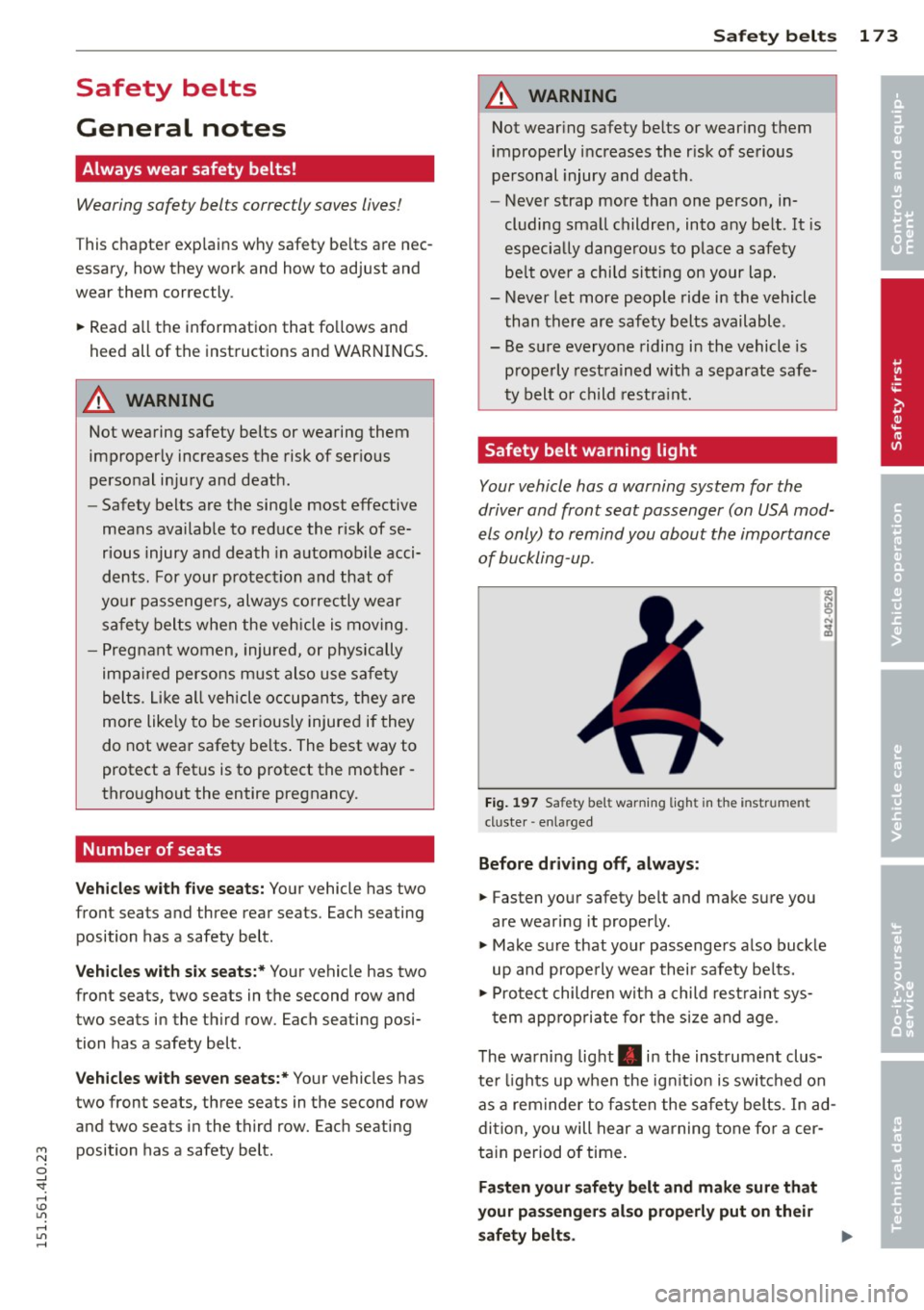
Fig. 197 Safet y bel t warn in g ligh t in the inst rum ent
cl uster -enla rged
Before driving off, always:
... Fasten your safety belt and make sure you
are wearing it properly .
"' Make sure that your passengers also buckle
up and properly wear their safety belts.
"' Protect children with a child restraint sys-
tem appropriate for the s ize and age.
The warning light . in the instrument clus
ter lights up when the ign it ion is switched on
as a reminder to fasten the safety belts. In ad
dition, you will hear a warning tone for a cer
tain period of time.
Fasten your safety belt and make sure that
your passengers also properly put on their
safety belts.
•
•
Page 230 of 350

228 Intelligent technology
will have no warning from a sudden in
crease in engine speed as with a front
wheel drive vehicle. Always drive at speeds wh ich are suited to the road con
ditions -risk of crash.
Energy management
Starting ability is optimized
Energy management controls the distribution
of electrical energy and thus optimizes the
availability of electrical energy for starting
the engine.
I f a vehicle with a conventional energy system
is not driven for a long period of time, the bat
tery is discharged by idling current consumers
(e.g. immobilizer) . In certain circumstances it
can result in there being insufficient energy
available to start the engine.
I ntelligent energy management in your vehi
cle handles the distribution of electrical ener
gy . Starting ability is markedly improved and
the life of the battery is extended.
Basically , energy management consists o f
battery diagnosis, idling current manage
ment
and dynamic energy management.
Battery diagnosis
Battery diagnosis continuously determines
the state of the battery. Sensors determine
battery vo ltage, battery current and battery
temperature. This determines the current
state of charge and the power of the battery.
Idling current management
I dling current management reduces energy
consumption while the vehicle is standing.
With the ignition switched off, it contro ls the
energy supply to the various e lectrica l compo
nents. Data from battery diagnosis is consid
ered.
Depending on the battery's state of charge,
individual consumers are gradually turned off
to prevent excessive discharge of the battery
and thus ma intain starting capability.
Dynamic energy management
While the vehicle is being driven, dynamic en
ergy management distributes the energy gen
erated according to the needs of the individu
al components.
It regulates consumption, so
that more electrical energy is not being used
than is being generated and ensures an opti
mal state of charge for the battery.
(!) Tips
- But even energy management cannot
negate the limits of physics. Consider
that the power and life of a battery are
limited.
- If start ing ability is threatened, you are
informed by a warning
¢ page 229,
Driver notification in the instrument
cluster display.
What you should know
The highest priority is given to maintaining
starting capability.
The battery is severely taxed in short-distance
driv ing, in city traffic and during the cold time
of year. Abundant electrical energy is re
quired, but only a little is generated . It is also
critical if the engine is not running and electri
cal components are turned on. In this in
stance energy is being consumed but none is
being generated.
It i s in precise ly these s ituations that you will
notice energy management actively regu lat
ing the distribution of energy.
Vehicle stands for an extended period
If you do not drive your vehicle over a period
of several days or weeks, e lectr ica l compo
nents are gradually cut back or sw itched off.
T his reduces energy consumption and ma in
ta ins starting capability over a longer period.
T ake into consideration that when you unlock
your vehicle, some convenience functions,
such as the interior lights or the power seat
adjustment, may not be availab le. The con
venience functions will be availab le again
Page 235 of 350
M N
0 ..J
'SI: ,...., \!) 1.1'1 ,...., 1.1'1 ,....,
Reducing unnecessary idling
Even when your car is just idling it burns up
fuel.
11-Shut the engine off when you are not driving
the vehicle.
11-Do not warm up the vehicle by letting the
engine run at idle .
It makes sense to shut
off the engine in traffic
jams, when waiting for trains to pass at rail
road cross ings, or at traffic lights that have
long waits on red. Turning the engine
off for
just 30-40 seconds saves more fuel than is
burned starting the engine again.
It takes a long time for the engine to warm up
fully when it is running at idle. However, wear
and noxious emissions are especially high
when the engine is warming up. So you should
drive away as soon as you start the engine and
avoid running at high rpms while the engine is
still warming up .
(D Note
Do not leave engine idling unattended af
ter starting. If warning lights should come
on to indicate improper operation, they
wou ld go unheeded. Extended idling also
produces heat, which cou ld result in over
heating or other damage to the vehicle or
other property .
Regular maintenance
A badly tuned engine unnecessarily wastes a lot of fuel .
11-Have your vehicle serviced at regular inter-
vals.
By having your vehicle regularly serviced by an
authorized Audi dealer helps to ensure that it
runs properly and economically. The condition
of your vehicle not only affects its safety and
ab ility to hold its value, it also affects fuel
consumption.
Check your oil each time you fill your tank.
Driving and environment 233
The amount of oil used is re lated to engine
load and speed.
It is normal for the oil consumption of a new
engine to reach its lowest value after a certain
mileage has been driven.
You must drive your vehicle about 3,000 miles
(S,000 kilometers) before you can properly
assess oil consumpt ion.
This also app lies to fue l consumption and en
gine output.
(D Note
- Have your veh icle ma inta ined properly
and in accordance with the service rec
ommendations in your Warranty
& Main
t enance booklet. Lack of prop er mainte
nance as well as improper use of the ve
hicle will impair the function of the
emission cont ro l system and could lead
to damage.
- Do not alter or remove any component of
the Emission Control System unless ap
proved by the manufacturer.
- Do not alter or remove any device, such
as heat shields, switches, ignition wires,
valves, which are designed to protect
your vehicle's Emission Control System and other important vehicle compo
nents.
Fewer short trips
Fuel consumption will always be relatively
high on short trips .
11-Try to avoid driving short distances w ith a
cold engine.
T he engine and cata lytic converter have to
reach their optimal operating temperature to
reduce fuel consumpt ion and noxious emis
s ions effectively .
Just after starting, a co ld engine in a mid-size
car only achieves a fuel economy of 6-8 mi les
per gallon (30-40 l/l00km). After about a
half a mile, fuel economy climbs to 12 mpg
(20 l/100 km). After about
2.5 miles (4 km), liJI,
•
•