warning lights AUDI Q7 2015 Owner´s Manual
[x] Cancel search | Manufacturer: AUDI, Model Year: 2015, Model line: Q7, Model: AUDI Q7 2015Pages: 350, PDF Size: 86 MB
Page 22 of 350
20 Instrum ent s a nd w arn in g/i ndic ato r light s
indicator lights, the ABS/ESC regu lating
function may have failed. Functions that
stabilize the vehicle are no longer availa ble . This could cause the vehicle to
swerve and increase the risk of sliding.
Drive carefu lly to the nearest authorized
Audi dealer or other qualified workshop and have the malfunction corrected.
- If the brake warning/indicator light does
not go out afte r a few seconds and the
par king brake is released, or ligh ts up
wh ile you are driving, the fluid level in
the brake fluid reservoir is too low. If you believe that it is safe to do so, proceed
immediately at low speed to the nearest
authorized Audi dealer or qualified repair
facility and have the brake system in
spected.
- Always keep in m ind that after several
brake applicat ions, you will need greater
pressure on the b rake pedal to stop your
vehicle . Do not re ly on stra ined brakes to
respond w ith maximum stopp ing power
in cri tic al situations. You must a llow for
increased bra king distances. The extra
distance used up by fad ing brakes could
lead to an accident.
Page 25 of 350

M
"' 0 ..J
"". rl I.O
"' rl
"' rl
Defective light bulb warning
The defective light bulb warning tells you
when a vehicle light bulb has become defec
tive.
Fig . 14 D isplay : defective lig ht bu lb warn ing
The defective light bu lb warning monitors the
function of the light bulbs . If th is symbol
S:!I
illuminates, a brake light, a turn signal (front
or rear), a headlight, the backup light, a fog
light or a rear fog light has failed.
A WARNING
- light bu lbs are pressurized and could ex
plode while they are being changed caus
ing serious personal injury.
- Work w ith due care when handling the
high-voltage section of gas discharge
(xenon) lights. Fa ilure to do so could re
sult in dea th o r se rious injury.
(D Tips
Have the bulb replaced or the connection
repa ired by you r autho rized Aud i Service
department.
Dri ver inform ation di spl ay 23
Service interval display
The service interval display reminds you when
your next service is due .
Fig . 1 5 Display: Serv ice interva l d isplay
T he schedule for the nex t oi l change or inspec
tion is ca lculated automatica lly and disp layed
accordingly. The disp lay works in two stages:
Service reminder
30 days before t he nex t se rvice is due, a serv
i ce reminde r appea rs in the display whe n you
turn on the ignition
~fig. 15.
After about 5 seconds the display switches
back to norma l. The distance and time re
mai ning are updated each time the ignit ion is
turned on unt il t he da te d ue for se rv ice is
reached.
Service due
When the due date fo r se rvice is reached, the
mes sage
Se rv ice due! appears in the instr u
ment cluster immed iate ly after yo u tur n on
the ignit ion. Addit iona lly, a warning tone
sounds. After about 5 seconds the disp lay
switches back to normal.
Calling up the service schedules
If or when an oil change o r inspection is due,
can be shown in the MMI display by selecting
the service in terval d isplay in the car menu .
Se lect
I CAR I funct io n button > Sy stem s* con
trol button
> S ervice inte rval display or I CAR !
function button > Car sy stem s* contro l but -
ton
> Servicing & chec ks > Service in te rv als . ..,_
Page 33 of 350
M N
0 ...J
'SI: ,...., \!) 1.1"1 ,...., 1.1"1 ,....,
For example, the symbol II appears in the
display, indicating low windshield washer flu
id level. The follow ing message also appears:
Please refill washer fluid
The driver message disappears after a few
seconds. The driver message can be d isp layed
again by briefly pressing the
!CHECK I button.
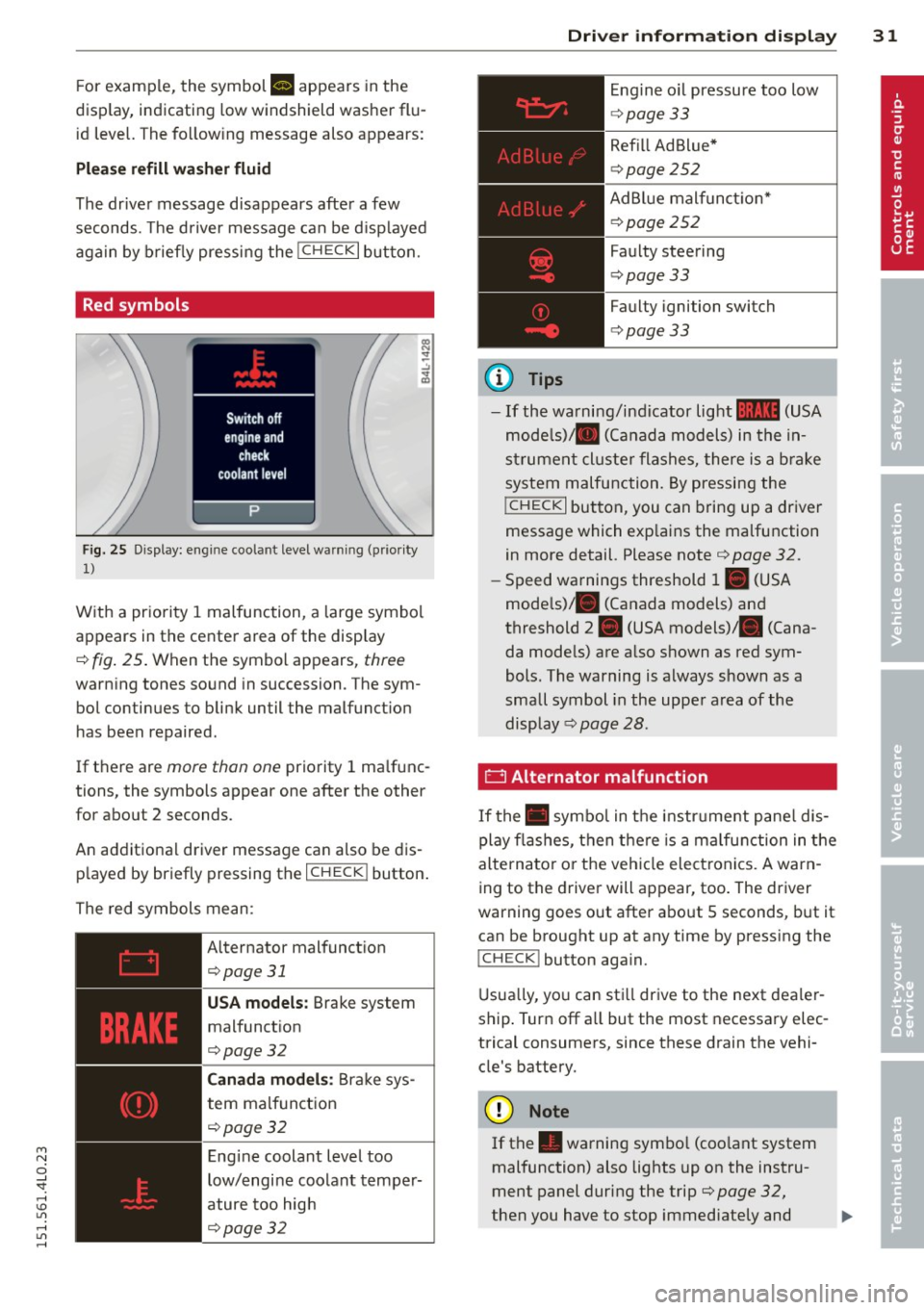
Red symbols
Fig. 25 Display: engine coolant level warning (prio rity
1)
With a priority 1 malfunction, a large symbol
appears in the center area of the display
¢ fig . 25 . Wh en the symbo l appears, three
warning tones sound in succession. The sym
bol continues to blink until the malfunct ion
has been repaired.
If there are
more than one priority 1 ma lfunc
tions, the symbols appear one after the other for about 2 seconds.
An additional driver message can also be dis
played by briefly pressing the
I CHECK ! button.
The red symbols mean:
Alternator malfunct ion
¢page31
USA models: Brake system
malfunction
¢page32
Canada models: Brake sys
tem malfunction
¢pa ge32
Engine coolant level too
low/engine coolant temper
ature too high
¢page32
Driver information display 31
@ Tips
Engine oil pressure too low
¢page 33
Refill Ad Blue*
¢page 252
AdBlue malfunct ion*
c!>page252
Faulty steering
c!>page 33
Faulty ignition switch
¢page 33
-If the warning/indicator light 11111 (USA
models)/ . (Canada models) in the in
strument cluster flashes, there is a brake
system malfunction. By pressing the
!CHECK I button, you can bring up a driver
message which exp lains the malfunction
in more detail. Please note ¢
page 32.
-Speed warnings threshold 1. (USA
mode ls)/ . (Canada models) and
threshold 2. (USA models) . (Cana
da models) are a lso shown as red sym
bols. The warning is always shown as a
small symbol in the uppe r area of the
display
c!> page 28.
0 Alternator malfunction
If the . symbol in the instrument panel dis
play flashes, then there is a malfunction in the
alternator o r the vehicle elect ronics. A warn
ing to the driver will appear, too . The driver
warning goes out after about 5 seconds, but it
can be brought up at any time by pressing the
ICHECK I button aga in.
Usually, you can still drive to the next deale r
ship . Turn off all but the most necessary elec
trical consumers, since these drain the vehi
cle's battery.
([) Note
If the . warning symbo l (coo lant system
malfunction) also lights up on the instru
ment panel during the trip¢
page 32,
then you have to stop immediately and ..,_
Page 34 of 350
32 Driver in formation d isplay
turn off the eng ine. The coolant pump is
not working anymore -danger of damage
to the eng ine !
BRAKE/(©) Brake system malfunction
A malfunction in the brake system must be
repaired as soon as possible.
I f the warning/indicator light 1111 (USA
models) ;II (Canada mode ls) in the instru
ment cluster flashes, there is a brake system
mal function . By pressing the
I CHECK ! button,
you can bring up a dr iver message which ex
p la ins the ma lfu nction in more detail.
Stop veh icle and check brake fluid level
• Pull off the road.
• Stop the vehicle .
• Turnoff the engine.
• Check the brake fluid level¢
page 265.
• Co ntact your nearest a uthorized Audi dealer
or qualified workshop if necessary .
Warning! Fault in brake system. Contact
workshop
• Drive carefu lly to the nearest a uthorized
Audi dealer or qualified workshop and have
the malfunction corrected ¢
&.
If t he ABS system malfunctions, the ABS
warn ing/ indicato r light illum inates together
wi th the brake system malfunction warning/
i ndicato r light ¢& .
A WARNING
-Always obse rve the wa rni ngs in
¢
page 2 56, be fo re opening the hoo d
a nd chec king t he b rake fluid.
- D riving with low b ra ke fluid is a safety
ha zar d. S top the car and get pro fession al
assistance .
-If the 1111 (U SA m odels)/ . (C anad a
mode ls) brake sy stem indica tor ligh t
t ur ns on together with the AB S and E SC
indicator lights, the ABS/ES C reg ulating
f unction may have failed . Fu nctions that
stabilize the ve hicle are no longer availa
ble. Th is could cause the vehicle to swerve and
inc rease the r is k of slidi ng.
Drive ca re fully to the nea rest authorized
Aud i dealer or other q ualified works hop
a nd have the ma lfu nction co rrected .
-L Engine cooling system malfunction
A malfunction in the engine cooling system
must be repaired as soon as possible.
When the. symbo l in the disp lay blinks,
then either the engine coo lant
temperature is
too high, o r the coolant
level is too low. An
additional driver message can also be dis
played by p ressing the
ICHECK I button:
Switch off engine and check coolant level
• Pull off t he ro ad.
• Stop the vehicle.
• Tur noff the engi ne .
• Chec k coolant leve l¢
page 263.
• Add coo lant if necessary ¢ page 264.
• Continue dr iv ing on ly after t he engine cool
ant warning/ind icat or light goes out.
• Contact your authorized Aud i dealer for as-
sis tance if necessa ry.
If the engi ne coo lant level is correct, then the
r adiator fan may be the cause of the malfunc
t ion.
If the . warning symbol (alternator mal
funct ion) also lights up on the inst rument
panel
¢ page 31, then the fa n be lt may be
damaged .
A WARNING
- If you r vehicle should bre ak down for
me chanical or other reasons, par k at a
s af e dis tance from mov ing tra ffic, turn
o ff the en gine and tu rn on the haza rd
war ning lights¢
page 63, Emergency
flasher .
-
-Never open the hood if you see o r hear
steam or coo la nt escaping from the en
g ine compartment -you r is k being scald
ed . Wait unt il you can no longer see o r
hear steam o r co olant escap ing.
Page 44 of 350
42 Openin g and clo sing
readiness light, located in the upper part of
the driver's door panel, will start to blink.
- T he vehicle interior lights turn off.
Unlocking and l ocking with Conven ience
k ey*
On vehicles which a re equipped w ith the C o n
ve nience k ey*
authorization system, the
doors are unlocked without a key by means of
a proximity sensor in the door handle. The
doors are simi larly locked without a key using
the locking button. Each door has a proximity
sensor and a locking button .
Automatic l ock ing
The automatic locking feature locks all the ve
hicle doors and the rear lid when you drive
faster than 9 mph (15 km/h). This function can be turned on and off in the MMI
C entr al
lo cking
Menu c:> page 44.
You can un lock the vehicle from the inside by :
- removing the key from the ign it ion sw itch
(the vehicle will automat ica lly unlock itself)
or
- pressing the unlock part of the power lock
switch @or
- pull ing the door handle (twice to open the
rear doors).
Unintent ionall y locking yourself out
In the following cases there safeguards to
prevent you locking your remote master key in
the vehicle :
- The veh icle does not lock with the power
locking sw itch
c:> page 44 if the driver's
door is open.
- On vehicles with Convenience key* , if the
most recently used master key is in the lug
gage compartment, the rear lid is automati
cal ly unloc ked aga in after it is closed.
Do not lock your vehicle with the
r e mot e m as
t e r k ey or Convenienc e key*
until all doors
and the rea r lid are closed. In t his way you
avoid locking yourse lf out accidenta lly.
A WARNING
- When you lock your vehicle from outside,
nobody- espec ially children -should re
main inside the vehicle . Remember,
when you lock the vehicle from the out
side the windows cannot be opened from
the inside.
- When you leave the veh icle, always re
move the ignition key and take it with
you . This will prevent passengers (chil
dren, for example) from accidentally be
ing locked in the vehicle should they acci
dentally press the power locking switch
in the front doors.
- Do not leave children inside the vehicle
unsupervised. In an emergency it would
be imposs ible to open the doors from
the outside without the key.
(D Tips
- In the event of a crash with airbag de
ployment all locked doors will be auto
matically unlocked to give access to the
vehicle occupants from the outside.
- If the power locking system sho uld mal
function, you can lock each door individ
ually using the vehicle key
c:> page 45 .
-If the power locking system shou ld fa il,
you can still open the fuel tank flap in an
emergency
c:> page 2 52 .
-You are well advised not to keep va lua
bles inside an unattended vehicle, v is ible
or not. Even a properly locked vehicle
cannot p rov ide the secur ity of a safe .
Page 45 of 350
M
"' 0 ..J
"". rl I.O
"' rl
"' rl
Unlocking and locking the vehicle with
the remote control
How the remote control works.
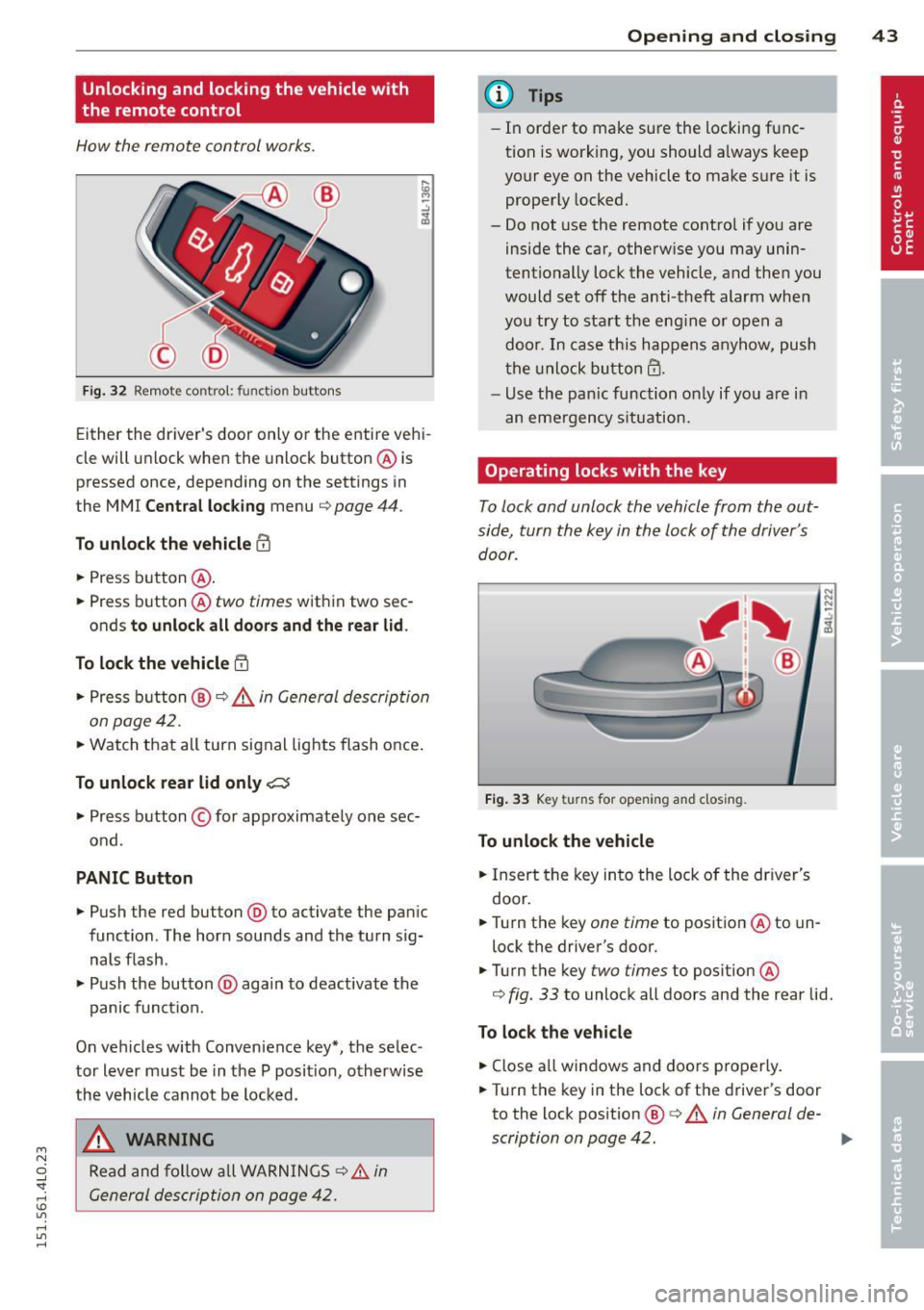
Fig. 32 Remot e contr ol: fun ctio n but ton s
Either the driver 's door only or the entire vehi
cle will unlock when the unlock button @ is
pressed once, depending on the settings in
the MMI
Central locking menu ¢ page 44 .
To unlock the vehicle CD
.. Press button @.
.. Press button @two
times within two sec
onds
to unlock all doors and the rear lid .
To lock the vehicle 5'.l
.. Press button @¢A in General description
on page 42 .
.. Watch that all turn signal lights flash once .
To unlock rear lid only ,c::::j
.. Press button © for approximately one sec
ond .
PANIC Button
.. Push the red button @to activate the panic
function. The horn sounds and the turn sig nals flash .
.. Push the button @again to deactivate the
panic function.
On vehicles w ith Convenience key*, the selec
tor lever must be in the P posit ion, otherwise
the vehicle cannot be locked.
_& WARNING
Read and follow all WARNINGS ¢&. in
General description on page 42.
-
Opening and closing 43
@ Tips
-In order to make sure the locking func
tion is working, you should a lways keep
your eye on the vehicle to make s ure it is
properly locked.
- Do not use the remote control if you are
inside the car, otherwise you may unin
tentionally lock the vehicle, and then you
would set off the anti-theft alarm when
you try to start the eng ine or open a
door . In case this happens anyhow, push
the unlock button@.
- Use the pan ic function on ly if you are in
an emergency s ituation.
Operating locks with the key
To lock and unlock the vehicle from the out
side, turn the key in the lock of the driver's door .
Fig. 33 Key turns fo r open in g and closing .
To unlock the vehicle
.. Insert the key into the lock of the dr iver's
door .
.. Turn the key
one time to position @to un
lock the driver's door.
.. Turn the key
two times to position @
N N N :;
~
¢ fig. 33 to unlock all doors and the rear lid .
To lock the vehicle
.. Close a ll windows and doors properly.
.. Turn the key in the lock of the driver 's door
to the lock position
@ ¢ A in General de-
scription on page 42. ..,.
Page 63 of 350
light sensor checked as soon as possible at an
authorized Audi dealer or qualified workshop.
A WARNING
- Daytime running lights and automatic
headlights are only intended to assist
the driver. They do not relieve the driver
of his responsibility to check the head
lights and to turn them on manually ac
cording to the current light and visibility
conditions. For example, fog cannot be
detected by the light sensors*. So always
switch on the headlights
~D under these
weather conditions and when driving in
the dark.
- Crashes can happen when you cannot see
the road ahead and when you cannot be
seen by other motorists. Always turn on
the headlights so that you can see ahead
and so that others can see your car from
the back.
- Please obey all laws when using the
lighting systems described here.
@ Tips
-With the switch in AUTO front fog lights
and rear fog lights cannot be turned on in addition.
- The light sensor for headlight control is
located in the rear view mirror mount.
You should therefore not apply any stick
ers to the windshield in this area in order
to prevent malfunctions or failures.
- Some exterior lighting functions can be
adjusted ¢
page 61.
-When you remove your key from the igni
tion while the vehicle's lights are turned
on, a buzzer sounds as long as the driv
er's door is open.
- In cool or damp weather, the inside of
the headlights, turn signals and tail
lights can fog over due to the tempera
ture difference between the inside and
outside. They will clear shortly after
M "' switching them on. This does not affect 0
~ the service life of the lighting.
rl I.O
"' rl
"' rl
Clear vision 61
-In the event of a light sensor malfunc
tion, the driver is notified in the instru
ment cluster display¢
page 35.
Adjusting exterior lighting
The functions are set in the MMI.
.,. Select: !CAR ! function button > Systems*
control button > Exterior lighting. Or
.,. Select:
I CAR I function button > Car systems*
control button > Vehicle settings > Exterior
light ing.
Coming home (Lights when leaving car),
Leaving home (Lights when unlocking car)
The coming home function illuminates the
area outside the vehicle when you turn the ig
nition off and open the driver's door. Depend
ing on vehicle equipment, the function can be
switched on and off or the length of ti me the lights remain on* can be adjusted .
The leaving home illuminates the area outside
the vehicle when you unlock the vehicle . This
function can be switched on and off .
The Coming home and Leaving home func
tions only operate when it is dark and the light switch is in the
AUTO position.
Daytime running lights
USA models: The daytime running lights can
be turned on or off using this function.
Canada models: The function cannot be
turned
off. It is activated automatically each
time the ignition is turned on. This menu item is shown "greyed out" .
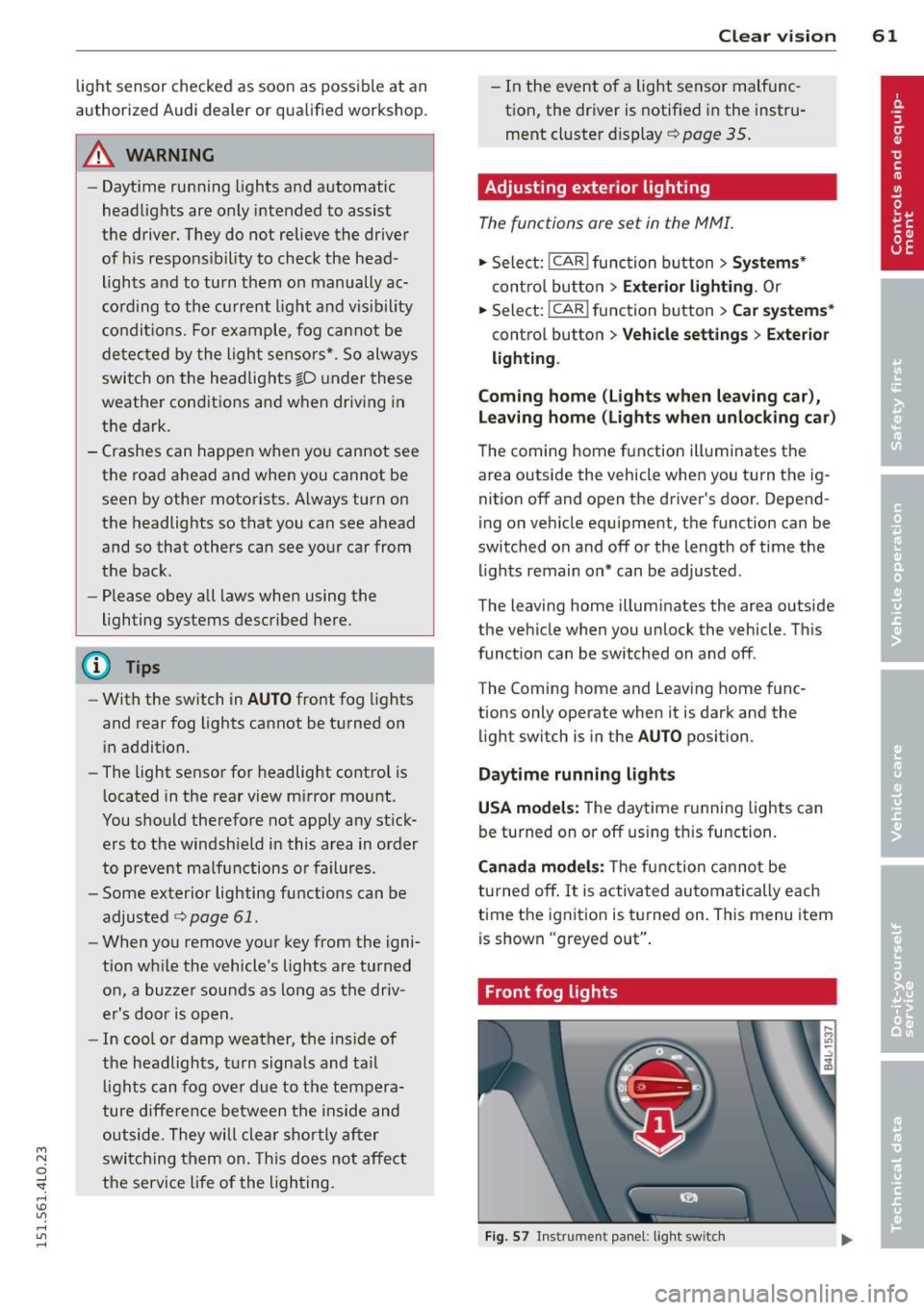
Front fog lights
Fig. 57 Instrument panel: light switch
Page 66 of 350
64 Clear vision
Notes on the se feature s
- The turn signals only work with the ignition
tu rned on. The indicator lights
II or ii in
the instr ument cluster ¢
page 14 also b link .
- After you have turned a corner, the turn sig -
nal switches off a utomat ically.
- T he
high beam works only when the head
lights are on. The indicator light
SI in the
instrument cluste r illuminates when the
high beams a re on.
- The
headlight flasher works on ly as long as
yo u hold the leve r - even if there are no
lights turned on . The ind icator light
SI in
the instrument cl uster illum inates when you
use the head light flasher.
A WARNING
Do not use the hig h beam o r headlight
flasher if you know that th ese cou ld blind
oncoming traffic.
Interior lights
Front interior lights
-
The interior ligh ts include reading lights for
bo th the driver and the front passenger .
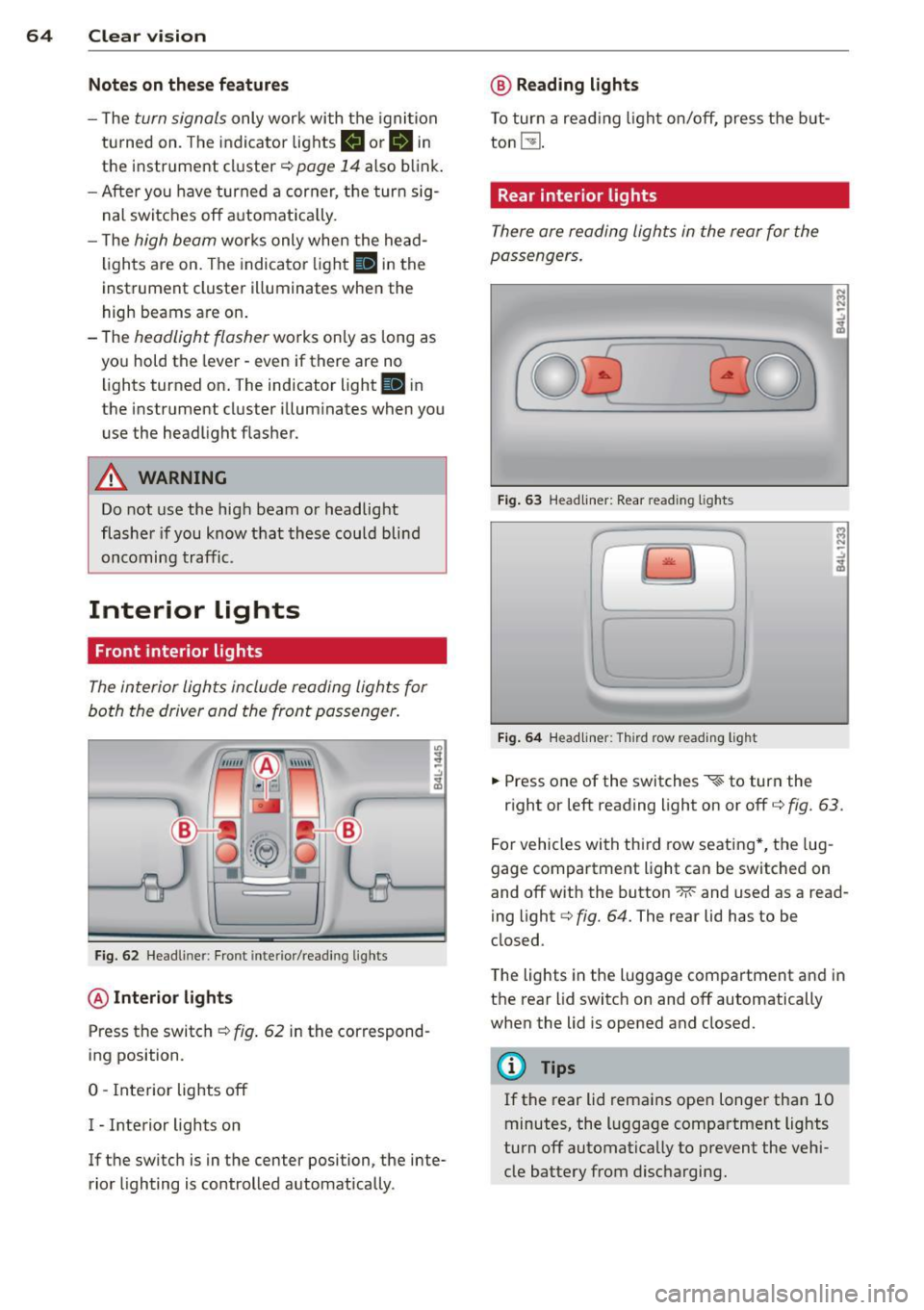
Fig. 6 2 Headli ner: Fro nt inte rior/read ing lights
@ Interior lights
Press the switch ¢ fig. 62 in the correspond
ing position.
0 -Interior lights off
I - Inte rior lights on
If the switch is in the center position, the inte
rior lighting is controlled automatica lly.
@ Reading lights
T o tur n a read ing light on/off, press the b ut
ton
t!J .
Rear interior lights
There are reading lights in the rear for the
passengers .
Fig. 63 Head liner: Rear read ing lights
~
--
' ~ '-
Fig . 64 Head liner: Third row read ing light
.. Press one of the switches ~ to turn the
N .., N
.:,
~
::i N -.:,
~
right or left reading light on or off c::;, fig. 63.
For vehicles with thi rd row seating *, the lug
gage compartment light can be switched on
and off with the button -M-and used as a read
ing light
c::;, fig. 64. The rear lid has to be
closed.
The lights in the luggage compartment and in
t h e rear lid switch on and off automatically
when the lid is opened and closed.
@ Tips
If the rear lid remains ope n longer than 10
minutes, the l uggage compartment lights
turn off automatically to prevent the vehi
cle battery from disc harging .
Page 70 of 350
68 Clear vis ion
Int ermittent w iping
.. Push the w iper lever forward to the first po
sition @~
fig. 69. The rear window wiper
will wipe the window approx. every four sec onds .
Automatic wiper /washer function
.. Push the w iper lever fo rward to the second
stop,
posi tion (!), and hold it there for as
l ong as you want the rear wiper/washer to
operate.
.. Re lease the lever aga in . the wiper wi ll keep
runn ing for approx. four seconds.
Switching interm ittent wip er action off
.. Pull the lever all the way back to the or iginal
position .
As soon as the reverse gea r is engaged and
the front wipe rs are turned on and operat ing
at the same time, the rear wipe r also turns on
automatically.
A WARNING
Wipe r blades are crucial for safe d riving!
On ly in good condition are they able to
clear the windows properly to provide un
restricted visibility. Worn or frayed wipe r
blades are a safety hazard! ¢
page 69,
Replacing windshield wiper blades
CD Note
In freezing or near freezing condit ions:
- Always check that the wiper blades are
not frozen to the glass before you turn
the wiper on. Loosen a wiper blade which i s frozen in p lace before operating the
wipe r to prevent damage to the wiper
blade o r the wiper motor .
- Do not use the wiper to clear a frosted
window . U si ng the w ipers as a conven
i ent ice sc raper will destroy the wiper
blades.
-
Headlight washer system
App lies to vehicles : wi th headlight washe r system
The headlight washer system cleans the
headlights.
.. Operate the w indshield wiper/washer sys
tem ¢
page 66, fig. 68 ® with the head
lights turned on by ho lding the lever for lon
ger than one second .
The washer jets extend forward out of the
front bumper driven by water pressu re to
spray the fro nt headlights w ith water .
You should inspect the headlights regu larly
(for example whe n refueling) and clean off
any solid di rt or i nsects from the le nses .
To ensure the system wor ks proper ly in w inter,
keep the washer jets free of snow and remove
any ice using a de-icing spray.
Service position
The wiper blades can only be changed in the
service position .
.. If the wiper blades are not frozen to the
windshie ld, bring the windshie ld wiper lever
to the basic pos ition @¢
page 66, fig. 68.
.. Select: !CAR I function button> Systems *
control button> Windshield wipers > Serv
ic e po sition .
Or
.. Select:
!CARI function button> Car sy stems*
cont ro l butto n > Servicing & checks > Wip er
s ervi ce po sition .
-On -changing the windshield wipe r blades
can o nly be done if you b ring the wiper arms
t o the servi ce position. Yo u will a lso avoid
pa int damage to the hood when wor king on
t he wipe rs in this position .
-Off -the w indshie ld w ipers are moved to
t heir initia l posi tion again .
CD Note
Never ma ne uver you r vehicle with the
front windshie ld w iper arms raised s ince
t hey will automatically be moved bac k t o
Page 73 of 350
M
"' 0 ..J
"". rl I.O
"' rl
"' rl
when leaving the car parked close to other
vehicles.
Memory setting for the exterior mirro rs *
When the seat pos ition is saved in the memo
r y, the position of the exte rior mirrors is saved
at t he same time~
page 76.
If the position of the passenger mirror is
changed whe n the vehicle is in reve rse gear
and the switch is i n the ® position, th is new
tilte d position will be a utomat ica lly saved to
the remote key when the vehicle is taken out
of reverse gear. To save, the rotary knob for
mirror ad justment must be in the ® position,
the selector lever must be in the P position
and the ign ition must be off . Th is will now be
come the stored setting when the vehicle is
put in reverse gear again .
Tilting the passenger' s side e xterior
mirror (only with seat memory )
When you move the selector lever into R (Re
ve rse), the mir ror on the front passenger's
door (knob tu rned to @
Q fig. 73) will tilt
slig htly downward. This make is easier for you
to see the curb w hen you are backing in to a
parking space.
The mirro r returns to its in itia l position as
soon as reve rse gear is disengaged and vehicle
speed is above abou t 9 mp h (1 5 km/h). The
mirror a lso retu rns to its initia l position if the
switch is moved to the driver's exterior mirror
© o r the ignit io n is switched off.
(D Note
-Cur ved (i.e. convex) mirr or surfaces in
crease your field of view. Remembe r th at
vehicles or other objects w ill appear
smaller and farther away than when
seen in a flat mirror. If yo u use this mir
ror to est imate distances of following
vehicles when c hanging lanes, you could
estimate incorrectly and cause an acci
dent.
- If the mir ro r hous ing is moved un inten
tiona lly (for exampl e, while park ing your
vehicle), t hen you must first fo ld the mi r- Clear vi
sion 71
ror elect rically . Do not read just the mir
ror housing ma nually . You cou ld damage
the motor which controls the m irror .
-If you wash the vehicle in a n automatic
car wash, you must fold the exter ior mir
rors in to reduce the risk of damage to
the mirrors . Never fold power fo ld ing ex
terior mirrors* by hand. Only fo ld them
in and o ut using the power controls.
(D Tips
If t here sho uld be a ma lf u nction in the
e lectrica l system, you can st ill adjust the
ex ter ior mirrors by press ing the edge of
the m irror.
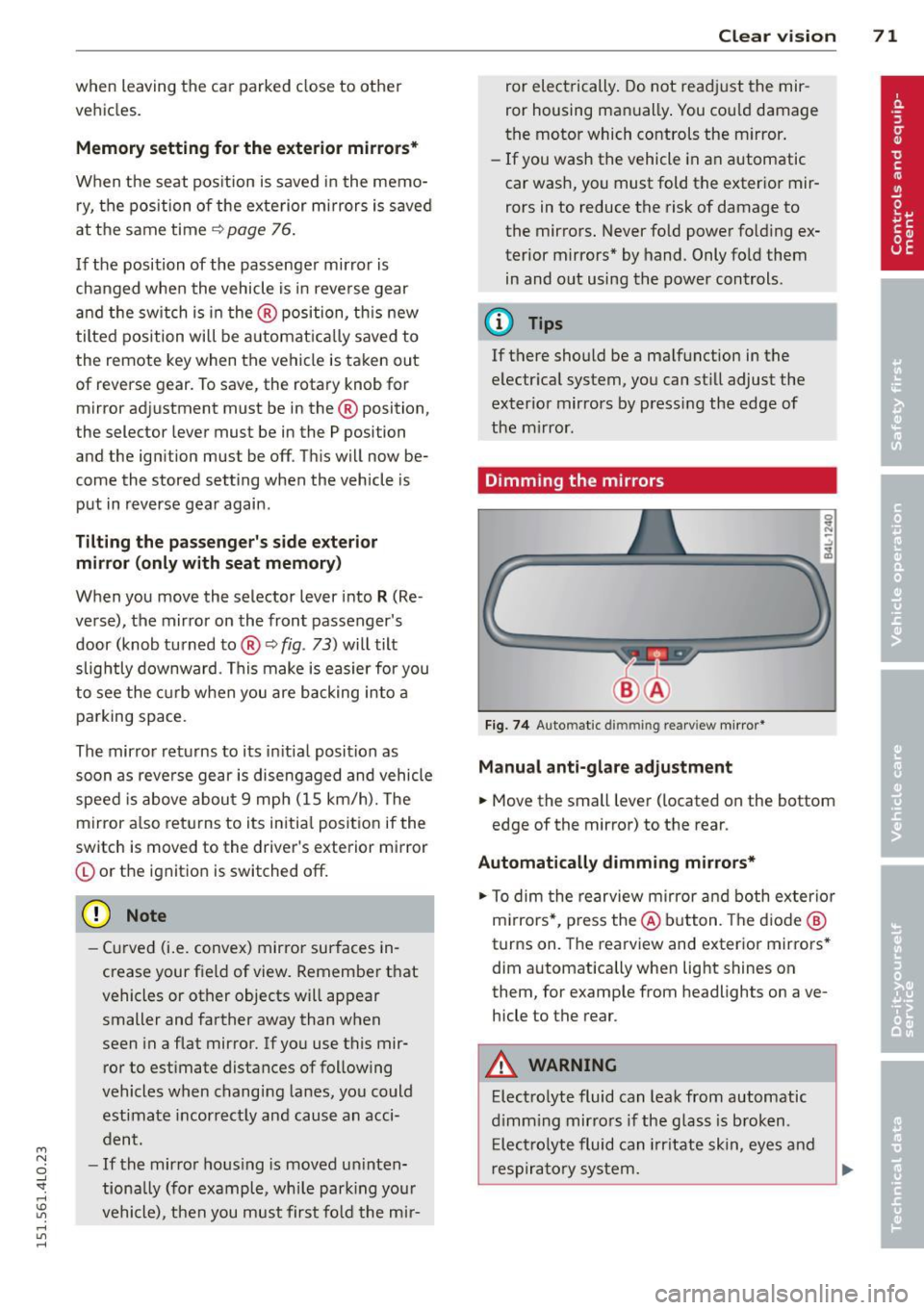
Dimming the mirrors
Fig . 74 Auto matic dimming rearview mirror*
Manual anti-glare adjustment
.,. Move the small lever ( located on the bottom
edge of the mirror) to the rear .
Automatically dimming mirrors*
.,. To dim the rearview mi rror and both exterio r
m irrors* , pr ess the @ button . Th e d io d e @
turns on. The rearview and exterior mirrors *
dim a utomatically when light shines on
them, for examp le from headlights on ave
hicle to the rear.
A WARNING ...
Elect ro lyte fluid can lea k from aut omatic
d imm ing mirro rs if the glass is b roken .
E lec trolyte fluid can irrit ate sk in, eyes and
res pirato ry sys tem.