battery is located AUDI Q7 2015 Owner´s Manual
[x] Cancel search | Manufacturer: AUDI, Model Year: 2015, Model line: Q7, Model: AUDI Q7 2015Pages: 350, PDF Size: 86 MB
Page 41 of 350
M
"' 0 ..J
"". rl I.O
"' rl
"' rl
The transmitter and battery a re located in the
head of the remote control. The receiver is lo
cated inside the vehicle. The maxim um effec
tive range depends on several things. Remem
ber, if the battery is weak, the effective range
decrease s.
If you need to replace the remote contro l, or if
you need to have it repaired, you must see
your author ized Audi dealer. Only then can
you use the key again .
Personalizing the ma ster key
When t he ignit ion is t urned off or when the
veh icle is locked, vari ous conven ience settings
are stored automatically and assigned to the
key that was used . The settings that are as
signed to the maste r key are recalled auto
ma ticall y when the veh icle is unlocked, when
the door is opened o r when th e ignition is
sw itched on .
Sett ings are saved for the following systems :
- Climate control
- Central lock ing
-W indows
- Am bien ce light ing*
- Seat memory*
- Steering w heel heat ing*
- Adaptive cruise control*
- Audi side ass ist*
- Pa rking system*
The
Remote control key f unc tion mus t be ac
t iv at ed in t he MMI ¢
page 77, so that the
set tings for the driver 's seat (i ncluding the
settings for the steering co lumn and exter ior
mirrors) are saved on the master key through
the seat memory when the vehicle is locked,
and a re set automatically when the ve hicle is
u nl ocked.
(D Tips
- If
the ignition is sw itched on, t he remote
contr ol system is deact ivated.
- The remote control system can be affec t
ed by other systems operating in the
same frequency range close to the vehi-
Opening and clo sin g 39
cle, such as mo bile telep hones, televi
sion broadcast ing stations, etc .
- F or Declara tion of Com pliance to United
States FCC and In du stry Canada re gula
ti ons¢
page 329.
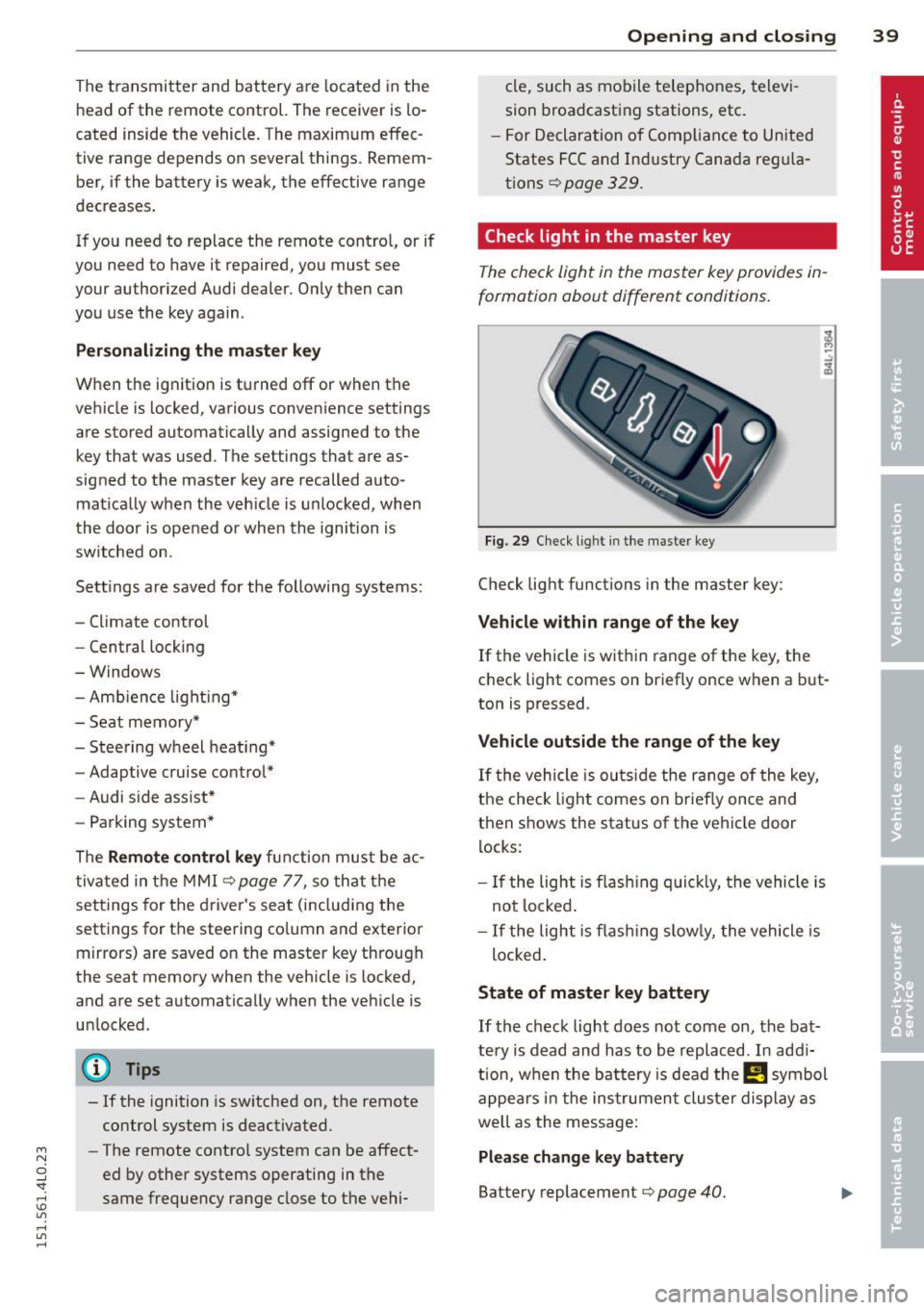
Check light in the master key
The che ck light in the m aster key provides in
formation about different conditions .
Fig. 29 Ch eck l ig ht in t he m aster key
Check lig ht functions in the master key :
Vehicle within range of the key
If
the vehicle is w it hi n range of the key, the
c heck light comes on br iefly once when a b ut
ton is pressed .
Vehicle outside the range of the key
If
t he vehicle is ou ts id e the r ange of the key,
the check light comes on brie fly once and
then shows the status of the vehicle door l ocks:
- If the ligh t is fla shin g qu ickl y, the vehicle is
no t locke d.
- If the ligh t is f lash ing slow ly, the vehicle is
loc ked .
State of master key battery
If
t h e ch ec k light does not come on, the bat
te ry is d ead and has to b e re pla ced . In ad di
tio n, w hen the b attery is dea d the !! symbol
appe ars in t he in strumen t clu ste r displ ay a s
well as the message:
Please change key battery
Battery replacement ¢ page 40.
Page 42 of 350
40 Opening and clo sing
@ Tips
Please note that the current state of the
veh icle door locks can only be recalled with
the master key that was last used to lock
the vehicle . It is possible that a different
state is shown for the door locks on the
other master key wh ich is not the same as
that of the vehicle .
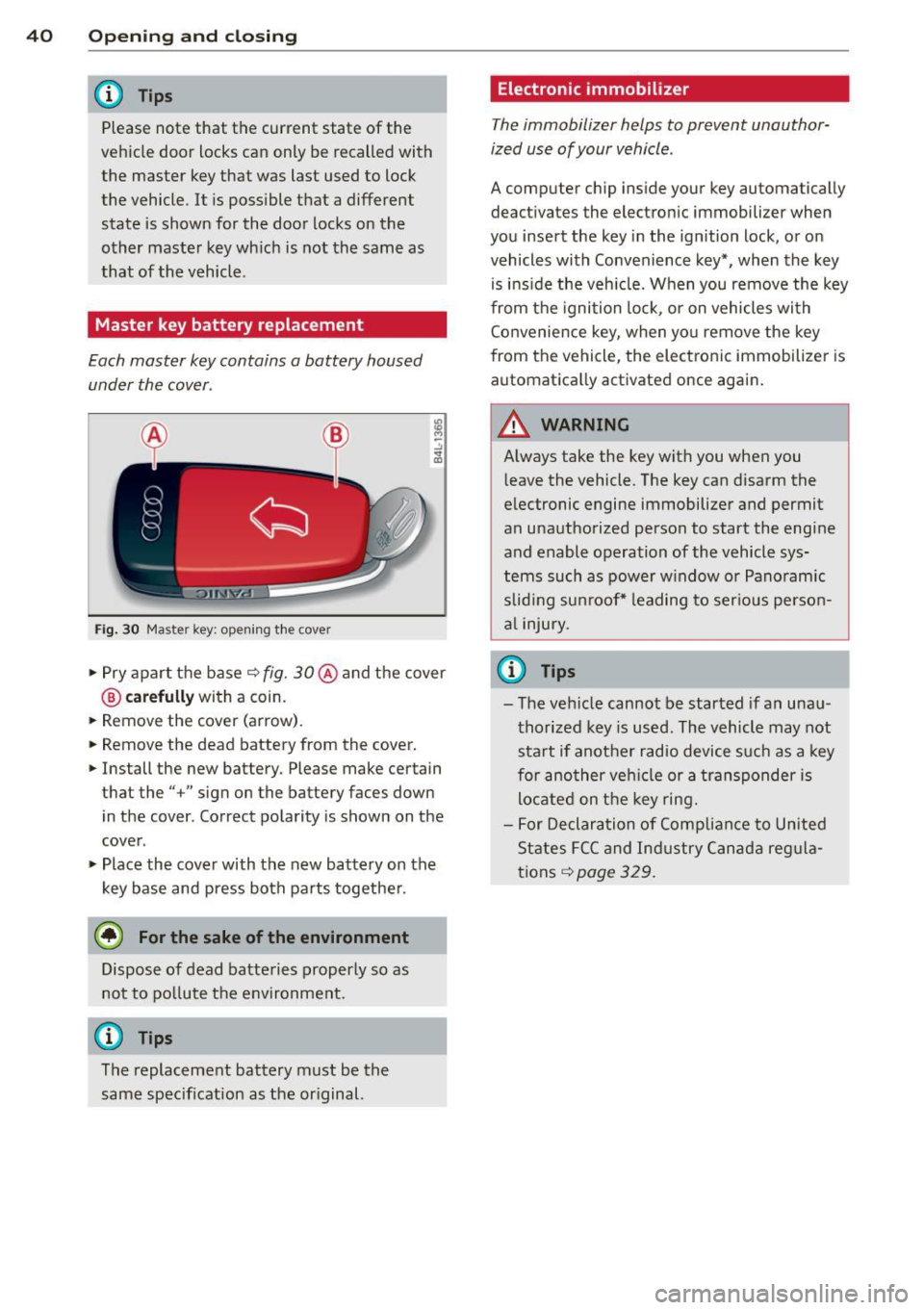
Master key battery replacement
Each master key contains a battery housed
under the cover .
Fig. 30 Master ke y: opening the cove r
.. Pry apart the base q fig. 30@ and the cover
@ carefully with a coin.
.. Remove the cover (arrow) .
.. Remove the dead battery from the cover.
.. Install the new battery. Please make certain
that the" +" sign on the battery faces down
in the cover . Correct polarity is shown on the
cover .
.. Place the cover with the new battery on the
key base and press both parts together.
@ For the sake of the environment
Dispose of dead batteries properly so as
not to po llute the environment.
@ Tips
The replacement battery must be the
same specification as the or iginal.
Electronic immobilizer
T he immobilizer helps to prevent unauthor
ized use of your vehicle .
A computer chip in side your key automatically
deac tivate s the elec tronic immob ilizer when
you insert the key in the ignition lock , or on
vehicles with Convenience key*, when the key
is ins ide the veh icle. When you remove the key
from the ignition lock, or on vehicles with
Convenience key, when you remove the key
from the vehicle, the electronic immobilizer is
automatica lly activated once again.
WARNING
Always take the key with you when you
l eave the vehicle. The key can disarm the
electronic engine immobilizer and permit
an unauthorized person to start the engine
and enable operation of the vehicle sys
tems such as power w indow or Panoramic
slid ing sunroof* leading to serious person
al injury.
u) Tips
-The vehicle cannot be started if an unau
thorized key is used . The vehicle may not
start if another radio device such as a key
for another vehicle or a transponder is
located on the key ring.
- For Declaration of Compliance to United
States FCC and Industry Canada regula
tions
q page 329.
Page 139 of 350

M
"' 0 _,
"". rl I.O
"' rl
"' rl
Lane width
Applies to vehicles: with side assist
-· Fig. 158 Lan es o f a norma l wid th are in detect ion area
Fig . 159 Narrow lanes: Side ass ist may detect vehicles
two la nes away
Side assist's detection area is designed to cov
e r l anes of standard w idth to the left and
r ight of your travel lane, depending on wheth
er you dr ive in the center of your lane or closer
to the edge.
I f you drive in narrow lanes, s ide ass ist's de
tec tion a rea may a lso incl ude other lanes -es
pec ia lly if you tend to d rive on the edge of
your lane
c:::> fig. 159 . Under these cond it ions,
ve hicles can also be detected that are two
l anes away, and side assist then could switch
between the informat ional and warn ing stage
signals.
When driving in very wide lanes, vehicles in
the adjacent lane may not be detected be
cause they are not inside the detection area.
Notes
Messages in instrument cluster display
Applies to vehicles: with side assist
If s ide ass ist t urns off automa tically, the ind i
cator l igh t on the button wi ll go ou t and you
Aud i side assist 13 7
will see a message in the instrument cluster
display:
Audi side assist not available: sensors
blocked
T he side assist sensors are built into the rear
bumper on the left and r ight (not visible on
the outside)
c:!> poge 131, fig . 150. To ensure
that you do not adversely affect the way side
ass ist functions, foreign objects (such as stick
ers or bicycle racks) should not be attached to
the area on the rear bumper where the sen
sors a re located . If side ass ist functions are
adverse ly affec ted, you w ill see th is message
in the instrument cluster disp lay . Remove any
th ing t hat may be blocking the sensors.
If no vehicle is detected for a longer per iod of
t ime wh ile dr iv ing, s ide ass ist w ill also switch
off automati cally.
Audi side assist cu rrently not available
If there is a temporary problem (such as the
vehicle 's battery charge be ing low), side assist
cannot be act ivated temporar ily .
Audi side as sis t: system fault
Have the system checked by an author ized
Audi dealer or qualified workshop.
Audi side assist not available when
towing
The radar sensor's view is limited when tow ing a tra iler. For vehicles with a factory instal
led tow ing hitch or a trailer hitch that was in
stalled later according to facto ry specifica
t ions, s ide ass ist is automatically deact ivated
as soon as the ele ctrical connection to the
trailer's e lectrical socke t is made, an d this sta
tus message appears in the instrument clus
ter display. Deactivation cannot be guaran
teed when using a ret rofitted towing hitch
that was
not installed according to factory
specifications .
Page 268 of 350
26 6 Ch eck ing and filling
If the brake fluid level falls considerably be
low the "MIN" mark, the brake warning/indi
cator light (U .S . mode ls:
11111 , Canadian
models: .) will come on
<=> page 19 and
<=> page 32. Do not continue to operate the ve
h icle . The complete brake system should be
thoroughly checked by an authorized Aud i
dea ler or qualified workshop and the cause
corrected. If the brake fluid level is too low,
the brake warning/indicator light will illum i
nate . Contact an authorized Aud i dealer
im
m ediatel y.
@ Tips
The brake fluid rese rvoir is located unde r
neath the cove r.
Changing brake fluid
Hove the broke fluid changed by on experi
enced technician.
Brake fluid absorbs moisture from the a ir . If
the water content in the brake fluid is too
h igh , corrosion in the brake system may result
after a per iod of t ime. The bo iling po int of the
brake fluid wi ll also decrease considerably and
decrease braking performance.
Therefore, the brake flu id must be changed
e ver y tw o year s. Always use new b rake fluid
which conforms to Federal Motor Vehicle
Standard "FMVSS 1 16 DO T 4".
The brake flu id reservo ir can be difficult to
reach, therefore, we recommend that you
have the brake f luid changed by you r author
ized
Audi dea ler. Your dea ler has the correct
too ls, the right brake fluid and the know -how
to do this for you.
A WARNING
- Brake fluid is poisonous . It must be stor
ed only i n the closed orig inal container
o ut of the reach of children!
- Brake fa ilure can result from old or inap
propriate b rake fluid. Observe these pre
caut ions: -
Use only brake fluid that meets SAE
specification
J 1703 and conforms to
Federa l Motor Vehicle Standard 116.
Always check with your authorized Audi
dealer to make sure you are using the
correct brake fluid . The correct type of
brake f lu id is also ind icated on the
brake flu id reservoir.
- T he brake fluid must be new. Heavy use
of the bra kes ca n cause a vapo r lock if
the b rake fluid is left in the system too
l ong . This can seriously affect the effi
c iency of the brakes as well as your
safety. This co uld resu lt in an accident.
(D Note
Bra ke fluid will damage the paint of you r
vehicle .
(® For the sake of the environment
Because of the p rob lem of p roper disposal
of b ra ke fluid as well as the spec ial too ls
r equired and the necessary expertise, we
re commend that yo u have the brake fluid
changed by yo ur authorized Aud i dea ler.
Battery
General information
U nder normal ope rat ing cond itions , the bat
tery in yo ur Audi does not need any ma inte
nance. With
high o utside tempe ra tur es or
l ong dai ly drives we recommend that you have
the e lectrolyte level checked by an authorized
Audi dealer or qualif ied workshop. The elec
trolyte level should also be checked each time
the battery is charged
<=> page 268.
Have the battery checked when yo u take your
vehicle in for service. You are well advised to replace a battery that is o lder than 5 years .
With certain types of airbag deployment, the battery is disconnected from the veh icle elec
trical system for safety reasons<=>.&
in Re
pair , core and disposal of the airbags on
page 196.
~
Page 269 of 350
M N
0 ...J
'SI: ,...., \!) ..,.,
,...., ..,., ,....,
Disconne cting the batt ery t erminals
Some vehicle functions (power w indow regu
l ators, for example) are lost if the battery ter
minals are disconnected . These functions have
to be re learned after the battery terminals are
connected again. To prevent this, the battery
should only be disconnected from the vehicle
electrical system when absolutely necessary
for repairs .
Vehicle s not driven fo r lo ng period s
If you do not drive your vehicle over a period
of several days or weeks, electrical compo
nents are gradually cut back or switched off .
This reduces energy consumption and main
tains starting capab ility over a longer per iod
¢ page 228 .
Take into consideration that when you unlock
your vehicle, some convenience functions,
such as the inter ior lights or the power seat
adjustment, may not be available . The con
ve nience funct ions w ill be available again
when yo u turn on the ignition and start the
engine.
Winter op eration
During the winter months, battery capacity
tends to decrease as tempe ratures d rop . This
i s because more powe r is also consumed while
start ing, and the headl ights, rea r window de
fogger, etc., are used more often.
Avo id unnecessary power consumption, par
ticularly in c ity t raffic or when t rave ling on ly
short d istances. Let you r autho rized Aud i
dealer check the capacity of the vehicle bat
tery before winter sets in ¢
page 268. A well
charged battery wi ll not only prevent starting
prob lems when the weather is cold, but will
also last longer .
If your vehicle is left standing for severa l
weeks at extremely low temperat ures, the
veh icle battery should be removed and
stored where it will not freeze. This will
prevent it from bei ng damaged and hav ing
to be replaced.
Checkin g and fillin g 267
Working on the battery
Be especially careful when working on or near
the battery.
The battery is located under the driver 's seat.
Before you check anyth ing under the dr iver's
seat,
read and h eed all WARNINGS G &_ .
Always heed the safety warnings , when work
ing on the vehicle battery or the vehicle e lec
trical system to prevent injury .
The following WARNINGS are ver y
important when working on the batter y:
Alway s heed the following WARN IN G SY M-
BOLS a nd safety p re caution s when working
on the battery .
®
Alway s wear e ye prote ction.
~
Batt ery acid contain s sulfuric acid. Al -
w ay s we ar gloves and eye prot ection.
@
No
-spa rk s
- flam es
- smoking .
~
When a b atter y is ch arged , it produces
h y drogen g as w hic h is e xplosi ve and
could cause pe rsonal injur y.
®
Alw ays keep the batt ery well out of
r e a ch of childr en.
A WARNING
Whenever working on the battery or on
the electrical system, there is the risk of
injury, accident and even fire. Read and
heed the following WARNINGS:
- Always wear eye protection. Do not let
battery ac id or any lead particles get on
your skin or clothing. Shield your eyes.
Exp losive gases can cause blindness or
other inju ry.
- Battery acid conta ins sulfuric acid. Sulfu
ric acid can cause blindness and severe
bu rns.
- Always wear g loves and eye protection.
Do not tilt the battery because acid
~
•
•
Page 347 of 350
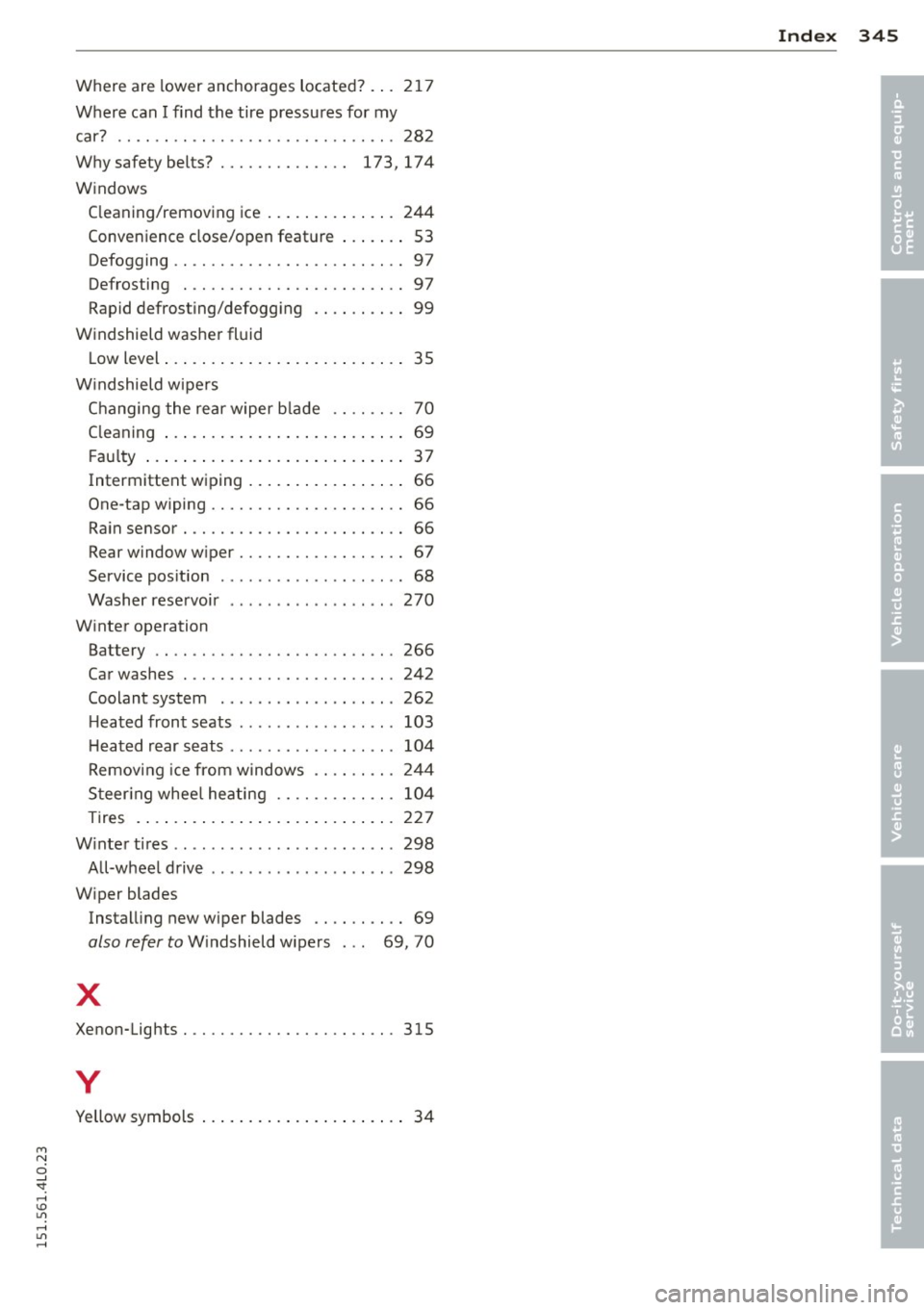
M N
0 ...J
'SI: ,...., \!) 1.1'1 ,...., 1.1'1 ,....,
Where are lower anchorages located? ... 21 7
Where can I find the tire pressu res for my
car? ...... ................... .. ... 28 2
W hy safety belts? . . . . . . . . . . . . . . 173, 174
W indows
C leaning/remov ing ice .. ... .. .. .. .. . 244
Conve nience close/open feat ure ... .. .. 53
Defogging . . . . . . . . . . . . . . . . . . . . . . . . . 97
Defrosting . ............. .... .. .. .. 97
Rapid defrosting/defogg ing .. .. .. .. .. 99
Windshield was her fluid
L ow level ... .... ...... ... .. .. .. .... 35
W indshield w ipe rs
C hanging the rear w iper b lade . . . . . . . . 70
C leaning ... .... ...... ... .. .. .. .... 69
F au lty ... .. .. .... .. .... ... .. .. .... 37
Intermittent wiping .... ... .. .. .. .. .. 66
One -tap wiping ........... .. .. .. .... 66
Ra in sensor . ............. .... .. .... 66
Rear window w iper ........ .. .. .. .. .. 67
Service pos it ion . . . . . . . . . . . . . . . . . . . . 68
Washer rese rvoir .... ..... .. .. .. .. . 270
W inter operation
Battery .. .. ............. .... .. ... 266
Car washes . ............. .... .. ... 242
Coolant system ............. .... .. 262
H eated front seats . ....... .. .. .. .. . 103
H eated rear seats ............ .. .... 104
R emov ing ice from w indows .. .. .. .. . 24 4
S teer ing whee l he ating .... .. .. .. .. . 104
Tires . ..... .. ... .. ..... ... .. .. ... 227
W inte r tires ..... ....... .... ... ... .. 298
A ll-wheel drive .............. ... ... 298
W iper blades
Instal ling new wiper blades .. .. .. .. .. 69
also refer to W indshield wipers . . . 69, 70
X
Xenon-Lights . ............. .... .. ... 315
y
Yellow symbols . . . . . . . . . . . . . . . . . . . . . . 34
Inde x 345
•
•