heating AUDI Q7 2017 Owner´s Manual
[x] Cancel search | Manufacturer: AUDI, Model Year: 2017, Model line: Q7, Model: AUDI Q7 2017Pages: 402, PDF Size: 100.39 MB
Page 75 of 402
u co ...... N r-... N ...... 0
0
:E: '
matica lly when the outside temperature is be low
zero. When the cooling mode is switched on,
efx
the vehicle interior is cooled and dehumidified as
quickly as possible.
c'.E) Recirculation mode
In recircu lation mode, the air inside the vehicle is
circu lated and fi ltered. This prevents the unfil
tered air o utside the vehicle from entering the
vehicle interior. Switching recirculation mode on when driving through a tunnel or when sitting in
traffic is recommended
<=> ,& .
Using the button, recircu lation mode is switched
on and off using the~ button. You can also
switch off the recirculation mode by pressing the knob @ (left side) or the off using the :!: button .
AUTO
Automatic mode
Automatic mode maintains a constant tempera
ture inside the veh icle. Air temperature, airflow
and air distribution are controlled automatically .
You can switch automatic mode on or off by
pressing the knob @ (left side) .
Temperature
You can adjust the temperature between 60°F
(+16°()
and 84°F (+28°() by turning the knob
@ . If outs ide of this range,
LO or HI will appear
in the cl imate control system display . At both of
these sett ings, the cl imate control system runs
continuously at maximum cool ing or heating
power. There is no temperature regulation.
8fr Blower
You can manually adjust the volume of air gener
ated by the blower to your preference by turning
the knob
(D . The blower should always run at a
low setting to prevent the windows from fogging
and to ensure a continuous exchange of air inside
the veh icle. To have the blower regulated auto
mat ically, press the knob @(left side).
Air distribution
You can use the buttons to select the vents
where the air will flow. To have the a ir dist ribu
tion regulated automatically, p ress the knob@
(left s ide).
Warm and cold
J ,J Seat heating/ventilation*
If you press the JI~ button, the seat heating/
ventilation is switches on at the highest leve l (3) .
The LEDs indicate the temperature level. To re
duce the temperature, press the button again. To
switch the seat heating/ventilation off, press the button repeatedly until the LED turns off.
3E Defogging
The windshield and side windows are defrosted
or cleared of condensation as quickly as possible.
The maximum amount of air flows mainly from
the vents below the windsh ield. Recirculation
mode switches off. The temperature should be
set at
+72°F (+22°() or higher . The temperature
is controlled automat ically .
Defrost is switched on and off switched on and
off using the~ button. You can sw itch the func
t ion off by pressing the knob @(left s ide).
Applies to vehicles with winds hield de fogger: the
windshield defogger switches on automatically
when outside temperatures are low. If you would like to sw itch the windshield defroster on man
ually, press the :!: button . The LED in the button
blinks .
,!! Rear window defogger
Press the button~ to switch the rear window de
fogger on. It only operates when the engine is running . It switches off automatically after
10 to
20 minutes, depending on the outs ide tempera
ture .
To keep the rear window defogger on continuous ly, press and hold the~ button longer than
three seconds . This is stored until the ign ition is
switched off .
Synchronization
The function is activated by pressing and holding
the knob @ (left side) . When synchron ization is
switched on, the settings for the driver's side are applied to the front passenger's side and the rear
(except fo r seat heating/vent ilation*). Synchro ni
zation switches off if the settings are changed on
the front passenger's side or in the rear. ..,.
73
Page 76 of 402
Warm and cold
Vents
You can open or close the center and rear vents in
the cockpit and the vents in the rear center con
sole and door pillars using the ridged thumb
wheels. The levers adjust the direction of the air
flow from the vents.
Residual heat
You can activate the residual heat function when
the ignition is switched
off by pressing the knob
@ (left side). The residual heat from the coolant
is used to heat the vehicle inter ior. The residual
heat function switches
off automatically after
about 15 minutes.
A WARNING
- You should not use the recirculation mode
for an extended period of time, because no
fresh air is drawn in and the windows can
fog when coo ling mode is sw itched
off. This
increases the risk of an accident.
- Individuals with reduced sensitivity to pain
or temperature could develop burns when
using the seat heating function. To reduce
74
the risk of injury, these individuals should
not use seat heating.
(D Note
To avoid damage to the heating elements in
the seats, do not knee l on the seats or place
heavy loads on a small area of the seat .
Setup
Applies to : vehicles wit h 3-zo ne de luxe automatic climate
control
The climate control system basic settings are ac
cessed in the Infotainment system.
"'Select in the Infotainment system: IMENU ! but
ton
> Vehicle > l eft control button > Air condi
tioning
Seat heating/seat ventilation*
You can adjust the seat heating/ventilation bal
ance for the driver and front passenger.
Automatic auxiliary heater*
The aux iliary heater he lps to warm the vehicle in
terior more quickly.
Page 78 of 402
Warm and cold
~~ Cooling mod e*
The maximum coo ling mode can be switched
sw itched on and off using the
~f.!i button. The ai r
is not coo led and humidity is not removed when
coo ling mode is switched off . This can cause fog
on the windows. Cooling mode switches off auto matically when the outs ide temperature is be low
zero. When the cooling mode is switched on,~
the vehicle inter ior is cooled and dehumidified as
qu ickly as possible .
~ Recirculation mode
In recirculation mode, the a ir inside the vehicle is
circu lated and filtered. This prevents the unfil
tered a ir outside the vehicle from entering the
veh icle interior . Switch ing recirculation mode on
when dr iv ing th rough a tunnel or when s itting in
traffic is recommended
~ _&. .
Using the button, recirculation mode is switched
on and off using the
o's) button . You can also
sw itch the recircu lation mode off by pressing the
knob @or the off us ing the
J% butto n.
AUTO Autom ati c mode
Automatic mode ma inta ins a constant tempera
ture ins ide the vehicle . Air temperature, airflow
and a ir distribution are cont rolled automatically .
You can switc h automatic mode on or off by
p ressing the knob @.
Temperature
You can adjust the temperature between 60° F
( + 16°()
and 84°F (+28°() by turn ing the knob
@ . If outs ide of this range,
LO or HI wi ll appear
i n the climate control system d isplay. At bot h of
these sett ings, the cl imate contro l system runs
con tinuously at maximum cool ing or heat ing
power. There is no tempe rature regulat ion .
86'~ Blower
You can adjust the vo lume of air generated by the
b lower to yo ur preference usi ng the rocker
sw itches @. The blower should always ru n at a
low se tt ing to prevent the win dows from fogg ing
and to ens ure a continuous exchange of air ins ide
the vehicle . To have the b lower regu lated auto
mat ica lly, press the knob @.
76
Air distribution
You can use the rocker sw itches @to adjus t the
vents where the air w ill flow o ut o f. Press the
rocker switches @repeatedly unti l the desired
air distribution setting is disp layed in the climate
contro l system controls . To have the air d istribu
tion regulated automatically, press the knob @.
J 3!J Seat heating /ventilation*
If you press the JI 3M button, the seat heating/
ventilation is switches on at the highest level (3) .
The LEDs ind icate th e temperatu re level. To re
duce the temperature, press the button aga in. To
switch the seat heating/ventilat ion off, press the
button repeatedly unti l the L ED turns off .
® MAX Defogging
The windshield and side windows are defrosted
or cleared of condensat ion as quick ly as poss ible.
The maximum amount of air f lows mainly from
the vents below the windsh ield. Recirculation
mode switches off . The temperature should be
set at
+72°F (+22°() or hig her . The temperature
i s controlled automat ica lly .
Defrost is sw itched on and off®
MAX button.
You can also switch the funct ion off by pressing
the knob @.
Applies to vehicles with windsh ield defogger: the
winds hield defogger switches on automatically
whe n outside temperatures are low . If you would
lik e to sw itch the winds hield defroster on ma n
u ally, press the
:fx button . T he L ED in the button
blinks.
QW REAR Rear window defogger
Press the button~ to switch the rear wi ndow de
fogger on .
It only operates when t he engine is
r un ning .
It sw itches off automatically after 10 to
20 minutes, depending on the outs ide tempera
ture .
To keep the rea r window defogger o n cont inuous
ly, press and hold the
QiP R EA R button longer
t h an th ree seconds. This is stored unt il the igni
tion is swi tched off.
Page 79 of 402
u co ...... N r-... N ...... 0
0
:E: '
Use the rocker switch(;) to select the funct io n.
When synchronization is switched on, the set
tings for the driver's side are applied to the front
passenger's side and the rear (except for seat
heating/ventilation*). When the settings on the
front passenger 's side or in the rear are changed,
the synchron izat ion is automatically sw itched off
and
4-zone appears in the display .
SET REAR
function
Use the rocker switch (D to select the funct ion .
When the function is switched on, you can adjust
all settings for the rear using the climate control
system controls in the cockpit . The rear climate
control system controls cannot be operated at
the same time. This function switches off auto
matically after a certain period of time or after
l eaving the menu.
Vents
You can open or close the center and rear vents in
the cockpit and the vents in the rear center con
sole and door pillars using the ridged thumb
wheels. The levers adjust the direct io n of the air
flow from the vents. The w ide ven t is opened and
closed using the~ button ~
page 8, fig. 2@ .
Residual heat
You can activate the residual heat funct ion when
the ignition is switched off by pressing the knob
@ (left side). The residual heat from the coolant
is used to heat the vehicle inter io r. The resid ual
heat function switches off automatically after
about 15 min utes.
& WARNING
- You should not use the recirculation mode
for an extended period of time, because no
fresh a ir is drawn in and the windows can
fog when coo ling mode is switched off . This
increases the risk of an accident .
- Individuals with reduced sensitivity to pain
or temperature could develop burns when
using the seat heating function . To reduce
the risk of injury, these ind iv iduals should
not use seat heating.
Warm and cold
(D Note
To avoid damage to the heating elements in
the seats, do not kneel on the seats or place
heavy loads on a small area of the seat.
(D Tips
It is not possible to operate the rear climate
control system controls when the power ch ild
safety lock is switched on. With With the
SET REAR function, you can apply all settings
to the rear using the climate control system
controls in the cockpit
~ page 43.
Setup
Applies to: vehicles with 4 -zone deluxe automat ic climate
contro l
The climate control system basic settings are ac
cessed in the Infotainment system .
.. Select in the Infotainment system: I MENU! but
ton
> Vehicle > l eft control b utton > Air condi
tioning
Seat heating/seat ventilation*
You can adjust the seat heating/ventilation bal
ance fo r the driver, front passenger and rear pas
sengers .
Footwell temperature
You can adjust the footwell temperature so that
it is cooler or warmer.
Auto recirculation
When switched on, automat ic rec irculat ion con
trols the recirculation mode automatically . You
must press the
® MAX button if fog forms on
the windows.
Automatic auxiliary heater*
The aux iliary heater he lps to warm the vehicle in
terior more quickly.
Steering wheel heating
Applies to: vehicles with stee ring wheel heating
The steering wheel rim can be heated .
.. Press the button on the multifunction steering
wheel to switch the steering wheel heating on ..,_
77
Page 80 of 402
Warm and cold
and off ~ ¢ page 14, fig. 11. The message
Steering wheel heating: on /Stee ring wheel
heating : off
appears in t he instr ument cluster
display.
The temperatu re is maintaine d at a constant lev
e l when steering whee l heating is switched on.
T he stee ring wheel heat ing settings are s to re d
a utomatically and ass igned to the remote cont ro l
key that is in use .
78
Page 82 of 402
Driving
engaged, for examp le when you notice that the
next traffic light is red . This produces an engine
braking effect, wh ich helps to protect the brakes
and tires and reduces the emissions and fuel con
sumpt ion to zero (fuel shut-off during decelera
tion) .
Shift efficientl y
Upshifting earlier is an effective way to save fuel.
Staying in a gear too long uses fue l unnecessari
ly .
Press down on the acce lerator peda l slowly and
avoid "k ick -down".
Avoid full acceleration
You sho uld rarely t ravel a t the maximum vehicle
speed. High speeds cause a disp ropor tionately
h igh increase in fuel consumption, emissions and
traffic noise . Driving more slowly saves fue l.
Reduce idling time
The Start/Stop system* helps to reduce the id ling
time automatically. In vehicles wi tho ut the Start/
Stop system*, it is efficient to switch the engine
off when stopped at rai lroad crossings and long
red lights . Stopping the engine for 30 -40 sec
onds already saves more fuel than the amount of
extra fuel needed to restart the eng ine.
I t takes a very long time in idle to wa rm the en
gine up to operating temperature . Wear and
emissions are especially high in the wa rm -up
phase. Therefore, yo u should begin driving im
mediately after starting the engine. Avoid high
RPMs while do ing th is .
Have ma intenance performed regularly
By having maintenance performed regu larly on
your veh icle, you can help to reduce f uel con
sumpt ion before yo u even start to dr ive. The
maintenance condition of your vehicle not only
affects traffic safety and long -term value but a l
so impacts f uel consumption . A poorly main
tained engine can lead to f uel consumpt ion that
is 10% higher tha n normal.
80
Avoid short trips
The eng ine and exh aust clean ing syste m mus t
r each their op tima l operating temperatu re to ef
fectively reduce consumption and emissions.
A cold engine uses a d isp roportion ately high
amoun t of fue l. The e ngine re aches opera ting
temperat ure and cons umption norma lizes on ly
after approximate ly 2.S mi les ( 4 km).
Check the tire pressure
To save fue l, ma ke sure the t ires are always in
flated to the corre ct press ure
~ page 343. The
f uel consumpt ion c an increase by S% if the p res
s ur e is only 0 .S bar too low. Due to the inc reased
rol ling resistance, low tire pressures w ill also
l ead to greater tire wear and will affect driving
behavior.
Do not drive on winter tires year -round, as this
will consume up to 10% more f ue l.
Eliminate unnecessary weight
Since eve ry po und of ext ra weight increases f uel
consump tion, a quick inspect io n of the luggage
compartment may be wo rth it to avoid unneces
sary weight .
When not be ing used, a roof ra ck sho uld be re
moved to decrease the w ind resis tance of the ve
hicle . This will save yo u approx ima tely 12% fue l
at speeds from 62 -7S mph (100 -120 km/h) .
Save energy
The engine d rives the generator, which generates
electri city; the f uel consumpt ion also increases
with t he deman d for e lec tricity . T he refore, sw itch
electrica l eq uipment o ff when you no longe r
need it . Examples of eq uipment that uses a lot of
energy are air blowers at a high setting, the rear
window defogger and seat heating* .
CJ) Note
Do not leave engine idling unattended after
starting. If warning lights s hould come on to
i ndicate imprope r operation, they would go
unheeded. Extended idling also prod uces
h eat, which could result in overheating or
other damage to the vehicle or othe r proper
ty .
Page 84 of 402
Driving
Power steering wheel position adjustment
Applies to: ve hicles w ith power steering whee l adj ustment
The steering wheel position can be adjusted elec
trically up and down and forward and back.
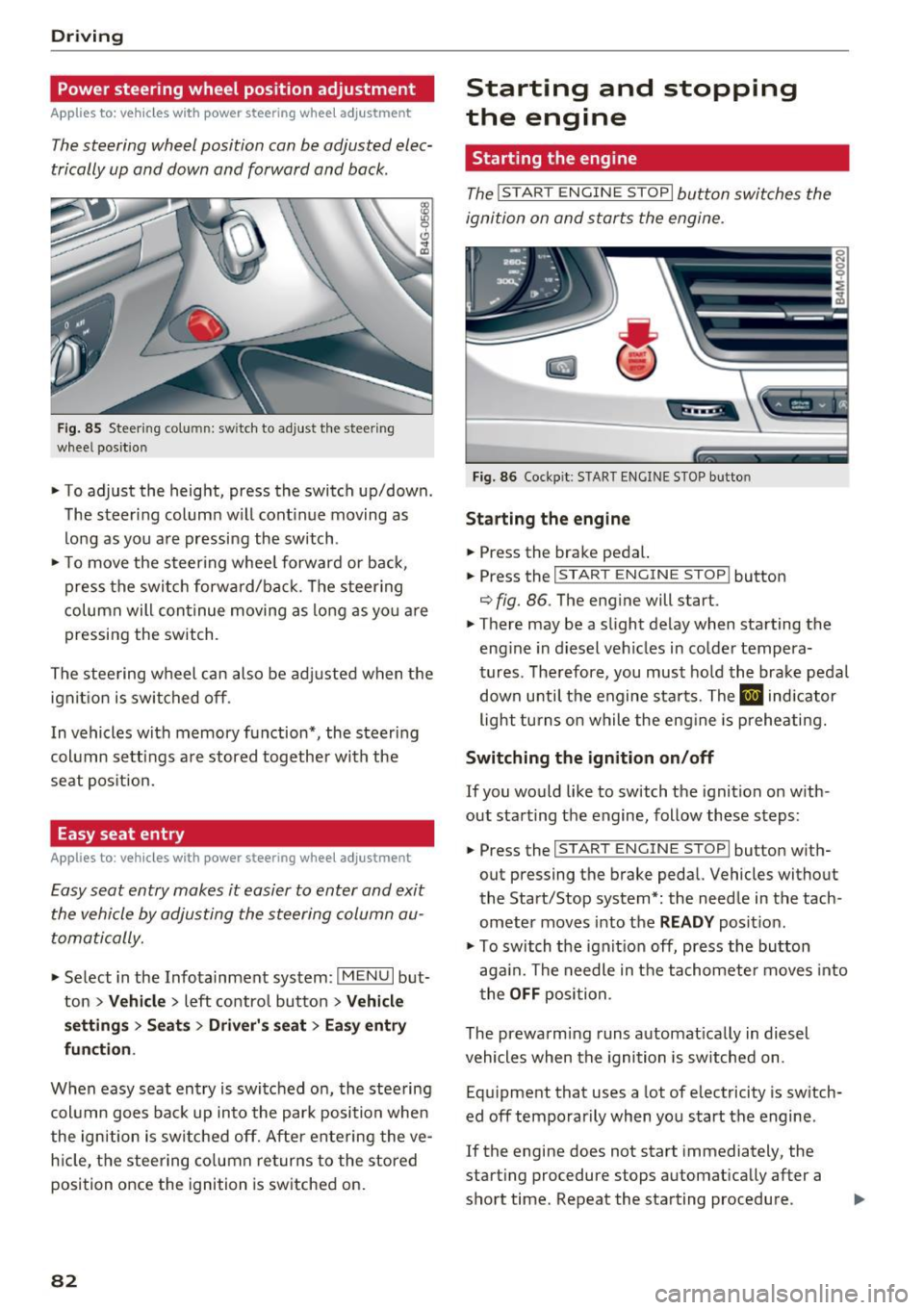
F ig. 85 Steering co lumn: switch to adjust the steering
wheel position
.. To adjust the height, press the switch up/down.
The steer ing column w ill cont inue moving as
long as yo u are pressing the switch .
.. To move the steering whee l forward or back,
press the swi tc h forward/bac k. T he steer ing
column will con tinue moving as long as you a re
pressing the switch.
The stee ring wheel can also be adjusted when the
ign it ion is swit ched off .
In vehicles with memory function*, the steering
col umn se tt ings a re stored together wi th the
seat pos it ion.
Easy seat entry
App lies to: ve hicles with power steering whee l adjustment
Easy seat entry makes it easier to enter and exit
the vehicle by adjusting the steering column au
toma tically.
" Se lect in the Infota inment sys tem: I MENU I but
ton
> Vehi cle> left contro l button > Vehicle
settings > Seats > Driver 's seat > Ea sy e ntry
fun ction .
When easy seat entry is switched o n, the stee ring
col umn goes bac k up into the par k posi tion when
the ign ition is switched off. Afte r ente ring the ve
h icle, t he steering co lumn re turns to the stored
position once the ignition is switched on.
82
Starting and stopping
the engine
Starting the engine
The ! START ENGINE STOPI button switches the
ignition on and starts the engine.
F ig . 86 Cockp it: S TART ENGINE STOP but to n
St arting the engine
.. Press the brake pedal.
.. Press the
I START ENGINE STOP ! button
¢ fig. 86. The eng ine will start.
.. There may be a slight delay when starting the
eng ine in diesel vehicles in co lde r tempera
tures. The refore, you must ho ld the brake pedal
down unti l t h e engine sta rts. The
El ind icator
light tu rns on while the eng ine is preheating.
Switching the ignition on /off
If you would like to switch the ignition on w ith
out starting the engine, follow these steps:
.. Press the
I START ENGINE STOP ! button w ith
out pressing the brake peda l. Vehicles without
the Start/Stop system*: the needle in the tach
ometer moves into t he
READ Y position.
" To switch the ignit io n off, press the bu tton
aga in. The needle in t he tachomete r moves into
t he
OFF position.
The prewarming runs a utomat ically in diesel
vehicles when the igni tion is sw itched on.
Eq uipment that uses a lot of electricity is sw itch
ed off tempo rarily when you start the engine .
If the engine does not start immediately, the
start ing procedure stops automat ically after a
short time. Repeat the starting procedure .
Page 105 of 402

u co ...... N r-... N ...... 0
0
:E: '
your speed and the distance between your
vehicle and other vehicles.
- For safety reasons, cruise control should not
be used in the city, in stop-and-go traffic, on
winding roads and when road conditions are poor (such as ice, fog, gravel, heavy rain and
hydroplaning), because th is increases the
risk of an accident.
- Switch the cruise control off temporar ily
when driving in turn ing lanes, h ighway exits
o r in construction zones.
- Please note that unconsciously "resting"
your foot on the accelerator pedal prevents the cruise control from b raking. This is be
ca use p ressing the acce le ra to r peda l ove r
rides the cruise contro l system.
- If a brake system ma lf u nction such as over
heating occurs when the c ruise contro l sys
tem is switched on, the braking function in
the system may be switched off . The rest of
the cruise control system functions remain act ive as long as the
@;\l)Mj (USA models) /
Bl (Canada models) indicator light is on.
Before driving downhill a long distance on a
steep hill, decrease your speed and select a
lower gear. Th is makes use of the eng ine
braking effect and relieves the brakes.
(D} Tips
The brake lights turn on when the brakes are app lied a utomat ically.
Changing the speed
Applies to: vehicles with cruise control system
.,. To increase/decrease the speed in 1 mph (1
km/h) increments, br iefly
tap the lever toward
0 10 ¢ page 102, fig. 96 to the first level.
.,. To inc rease/decrease the speed in 5 mph (10
km/h) i ncrements, br iefly
tap the lever toward
0 10 to t he second level.
.,. To increase or decrease the speed quickly,
hold
the lever toward 0 10 to the first or second
level until the desired speed is reached .
Ass ista nce sys te m s
Overriding the speed
Applies to: vehicles with cruise control system
You can press the acce le rato r pedal to increase
you r speed, for ex ample if you want to pass
someone . The speed you set ear lier will resume
as soon as you release the acce lerator pedal.
However, if you are exceeding the stored speed
by a considerable amount fo r a long time, the
c ruise contro l system will tempora rily switch off.
The
1Q;jl )~ij (USA mode ls) 1111 (Canada mode ls) in
dicator light in the instrument cluster turns
off
and the stored speed is maintained.
Preselecting a speed
Applies to: vehicles with cruise control system
You can pre-select your desired speed when the
vehicle is stationary.
.,. Switch the ignit ion on.
.,. Pull the lever into position
(D ¢ page 102,
fig.
96.
.,. To increase or decrease the speed, tap the lever
toward
0 10 .
This function makes it possible, fo r example, to
save the speed you want before driving on the
highway. Once you are on the expressway, acti
vate the cruise control system by pulling the lev er into position
(D .
Switching off
Applies to: vehicles with cruise control system
Deact ivating temporarily
.,. Press the brake pedal, or
.,. Press the lever toward @(not locked into
p lace)
¢ page 102, fig . 96.
Switching off completely
.,. Press the lever into position @(clicked into
place), or
.,. Switch the ignit ion off .
The speed you stored will be maintained if the cruise contro l has been switched off temporarily .
To resume the stored speed, release the brake pedal and pull the lever to position
(D . .,.
103
Page 150 of 402
Intelligent Technology
Intelligent Technology
Electronic stabilization
control (ESC)
Description
Elect ronic stabilization control (ESC) supports
driver safety.
It red uces the risk of slipping and
improves driving stability. ESC detects crit ica l sit
uations such as when the vehicle is oversteering
and understeering or the wheels are spinning.
The vehicle is stabilized by applying the brakes or reducing eng ine torq ue. When the ESC engages,
the
DJ ind icator light blinks in the instrument
cluste r.
The fo llow ing systems are integrated in the ESC:
Ant i-loc k bra king system (ABS)
ABS prevents the whee ls from locking when brak
ing. The vehicle can sti ll be steered even during
hard brak ing. Apply steady pressure to the brake
pedal. Do not pump the pedal. A puls ing in the
brake pedal indicates that the system is acting to
stabilize the vehicle .
Brake assist system
The brake assist system can decrease brak ing dis
tance . It increases braking power when the driver
presses the brake pedal quick ly in emergency sit
uations . You must press and hold the b rake pedal
until the dangerous situat io n is over . In veh icles
with adapt ive cr uise control*, the bra ke assist
sys tem is more sensitive if the d ista nce detec ted
t o the vehicle dr iv ing ahead is too small.
O n ve hicles w ith act ivated and funct io ni ng night
vision assist*, the brake ass ist system ca n re
spond more sens it ively if there is a warning.
Anti-Slip Regulation (ASR )
ASR reduces eng ine power when the drive wheels
begin spinning a nd adap ts the force to the road
conditions . This makes it easie r to start, acceler
ate and dr ive up h ills.
Electron ic differential lock (EDL )
EDL applies the brakes to a wheel that starts
spinning and transfers the drive power to the
148
other driving whee ls. This function is not avai la
ble at higher speeds.
In extreme cases , ED L automat ica lly swi tches off
to keep t he b rake on the braked wheel from over
heating. The veh icle is still working correct ly. ED L
will switch on again automatically when condi
tions have returned to normal.
Steering recommendat ion
The ESC he lps to stabilize the vehicle by chang ing
t h e s teer ing torque.
Select ive wheel torque control
Se lective wheel to rque cont rol is used when d riv
i ng on curves. Braking is targeted toward the
whee ls on the inside of the curve as needed . T his
a ll ows mo re precise dr iving in cu rves .
Automatic post -collision braking system
The "automat ic post -collis io n braking system"
can help to reduce the risk of sliding and of addi
tiona l co llisions after an acc ident. If the a irbag
contro l modu le detects a collision, the veh icle is
braked by the ESC.
The veh icle does not brake automatically if:
- the driver presses the accelerator pedal, or
- the ESC, the brake system or the veh icle elect ri-
cal system are not functioning.
A WARNING
- The ESC and its integrated systems cannot
overcome the lim its imposed by natura l
phys ical laws . This is espec ially important
on s lippery or wet roads . If the systems be
gi n ac ting to stabilize yo ur vehicle, you
should immediately a lter your speed to
match the road and traffic conditions. Do
not let the inc reased safety provided tempt
you into taking risks. This could increase
your r isk of a coll is ion.
- Please note the risk of a collision increases
when driving fast, especially through curves
and on slippery or wet roads, and when dr iv
ing too close to objects ahead. The ESC and
its integrated systems cannot always pre
vent co llisions -there is st ill a risk of acci
dents!
Page 156 of 402
Intelligent Technology
What you should know
Maintaining the starting ability is the highest
priority .
A lot of stress is placed on the vehicle battery
when dr iv ing short d istances, dur ing c ity dr iving,
and at cold times of the year . A lot of energy is
used but little is gene rated .
It is also critical
when the engine is not ru nning but e lectr ica l
eq uipment is swi tched o n. In this case , energy is
used bu t none is generated.
In s ituations like this, energy management will
actively regu late the d istribution of ene rgy.
Long pe riods without use
If you do not drive your vehicle for several days or
weeks, e lectrical equipment is gradually scaled
back or switched off . This reduces energy use and
ensu res t he veh icle w ill be able to sta rt afte r long
pe riods of time. Some convenience functions ,
such as inte rior lighting or powe r seat adjust
men t, may not be available under ce rta in ci rc u m
s tances. These convenience functions will be
ava ilable aga in once you switch the ign ition on
and start the engine .
With the engine switched off
The vehicle battery will d rain if yo u use I nfota in
ment functions such as listening to the rad io
while the engine is switched
off .
If t he ve hicle's ability to s tart may be impaired by
the energy use, a message will appear in the In
fotainmen t system disp lay . T he message indi
ca tes that the system wi ll switch off automatica l
ly soon. If you would like to continue using the
functions, yo u m ust start the eng ine.
With the engine running
A lthough elect rical energy is generated whi le
d riving, the vehicle battery can d rain. This can
happen if little energy is generated but much is
used, and the charge level of the veh icle battery
is not optima l.
To restore the balance of energy, components
that require large amounts of energy are tempo rarily sca led back or switched
off . Heating sys
tems in part icu lar require a great deal of energy .
154
If you notice, for example, that the seat heating*
or rear window defogger is not working, then it has been temporarily reduced or switched
off.
These systems are availab le again as soon as the
energy supply has been restored.
In addition, you may notice that the idle speed
has slight ly increased . That is normal and no
cause for concern. By increasing the idling speed,
the addit ional required energy will be generated
and the vehicle battery w ill be charged .
Notice about data
recorded by the Event
Data Recorder and
vehicle control modules
E v ent Data Recorder
This vehicle is equ ipped with an Event Data Re
corder (EDR). The main purpose of an EDR is to
record, in certain crash or near crash-like situa
tions, such as an airbag deployment or hitt ing a
r oad obstacle, data that will ass ist in understand
i ng how a vehi cle's systems pe rformed. The EDR
i s des igned to record data related to vehicle dy
nam ics and safe ty systems for a short per iod of
time, typica lly 30 seconds or less. The EDR in this
vehicle is designed to record such data as:
- How va rious systems in yo ur vehicle were ope r
a ting;
- Whethe r or not the d rive r and passenger safety
belts were buckled/fastened;
- How far (if at all) the driver was depressing the
acceler ator and/or bra ke pedal; a nd,
- How fast the vehicle was traveling .
These data can help provide a better understand i ng of the c ircumstances in wh ich crashes a nd in
juries occur . NOTE : EDR data are recorded by your
vehicle on ly if a non-tr iv ial crash situation occurs;
no data are re co rded by the E DR unde r no rma l
driv ing cond itions and no persona l da ta (e.g.,
name, gender, age, and crash location) are re
corded. However, other parties, such as law en
forcement, could combine the EDR data with the
type of persona lly identifying data rout inely ac-
quired during a crash investigation . ..,.