steering AUDI Q7 2017 Owner´s Manual
[x] Cancel search | Manufacturer: AUDI, Model Year: 2017, Model line: Q7, Model: AUDI Q7 2017Pages: 402, PDF Size: 100.39 MB
Page 30 of 402
Cockpit over view
Add the maximum amount of oil indicated in the
disp lay as soon as possible¢
page 326.
~- Steering lock
• Steerin g: malfunction ! Plea se stop vehicle
There is a malfunction in the electronic stee ring
lock . You cannot t urn the ignition on .
Do
not tow your vehicle because i t cannot be
s teered. See an au thori zed A udi dealer o r au tho r
ized Aud i Service Faci lity for assistance .
Ell Steering lock : malfunc tion! Plea se contact
Service
There is a malfunction in the electronic steering
lock .
Drive to an authori zed Aud i dea ler or authori zed
Aud i Serv ice Facility immediately to have the
malfunct ion corrected.
A WARNING
-
Do not tow your veh icle when the re is a mal
function in the electronic stee ring loc k - this
increases the risk of an accident.
~ Engine start system
• Engin e s tart system : malfunction ! Plea se
c on tact Service
Do not switch the ignit ion off because you may
not be able to switc h it o n aga in.
Drive to an authorized Aud i dealer or authorized
Aud i Serv ice Fac ility immediately to have the
malfunct ion corrected .
= Engine start system : malfunction ! Plea se
c ontact Service
There is a malfunction in the engine start ing sys
tem.
D rive to an a uthorized Audi dea ler or authorized
Aud i Service Facility imm ediately to have t he
malfunct ion corrected.
28
· c:::::::, Hood
• Warning! Hood i s not lo cked. Stop vehicl e
and ch eck the lo ck
If the indicator light turns on and the message
appears , the hood lock ing mechanism is not en
gaged co rrectly .
Stop immediately and close the hood
¢ page 323 .
0/Q Air suspension
Applies to: vehicles with air suspension
• Air suspension : malfunction . Saf ely stop ve
hi cle. St ee ring and ground clearan ce limited
Due to a system malfunction, you r vehicle's
ground clearance is very low at the front or rea r
axle* (in veh icles with all-wheel stee ring). Be
ca use of this, the wheels no longer have enoug h
clea rance to steer co rrectly.
See an author ized Audi dealer or authorized Audi
Se rvice Facility for assis tance .
• Air s uspens ion: mal func tion! You can con
t inu e driv ing slowl y. Speed limited to max .
35 mph
(60 k m /h)
There is a ma lfunction that can resu lt in restrict
ed driving s tabili ty . T he speed is limited to a
max imum of 35 mph (60 km/h) .
Drive to an authorized Audi dealer or authorized
Audi Service Facility immediate ly to have the
malfunc tion corrected .
• Air suspens ion: malfunction! You m ay con
tinue dri ving slowl y at m ax. 3 5 mph
(60 km /h )
There is a ma lfunction that can res ult in restric t
ed driving stability .
D rive to an authori zed A udi dealer or authori zed
Audi Se rvice Fac il ity immediate ly a t a maxim um
speed of 35 mph (60 km/h) to have the mal func
tion corrected .
• Air su spen sion: service mode. Vehicle can b e
m oved but han dling may be impaired
Carefully drive to an a uthorized Aud i dealer or
autho rized Aud i Serv ice Facility immediately to
have the service mode deactivated.
jll,,
Page 66 of 402
Sea ts and stor age
_& WARNING
- Always read and follow the applicable warn
ings
q pag e 259, Proper adjustm ent of
head restraints .
-Only remove the head restraints for the sec
ond row seats when it is necessary for in
sta lling a child safety seat~
page 295,
Child safety.
Install the head rest rai nt again
immediately once the child s afety seat is re
moved. Driv ing with the head res traints re
moved or not in the upright position in
creases the risk of serious injury .
Memory function
Description
Applies to: veh icles with memory function
Using the memory funct ion , you can qu ickly and
easi ly store a pe rsonal seat profile for the driver
and fron t passenger and recall the settings. The
memory function is controlled by t he remo te
control key and the memory buttons in the driv
er's/front passenger's* door .
The drive r's seat profile is stored aga in and as
signed to the remo te control key each time the
ve hicl e is locked. When you open the door, the
seat profi le is automatica lly recalled.
If two peo
p le use the ve hicle, it is recommended that each
person a lways uses their "own" remote contro l
key.
Two seat profiles can be stored each using the memory buttons . Once they are stored, these
seat profiles can be selected at any time.
The fo llowing settings are stored:
Remote Memory button
control
key
Driver Dri ver Front pas-
senger
Seat X X X
Steering
X X wheel*
Both exte rior
X X mirrors
*
64
Remote control key
Applies to: vehicles with memory function
The driver 's seat profile can be assigned to the
remote control key when the vehicle is locked .
.. Select in the Infotainment system: IMENUj but
ton
> Ve hicle > left control button > Vehicle
se tting s > Se ats > Driver 's seat> S tore se t
t ing s on remo te control k ey.
@ Tips
If you do not wish to have the seat profile for
another driver ass igned to the remote control
key, switch the memory f unction off in the In
fotainment system.
Memory buttons
Applies to: vehicles with memory funct ion
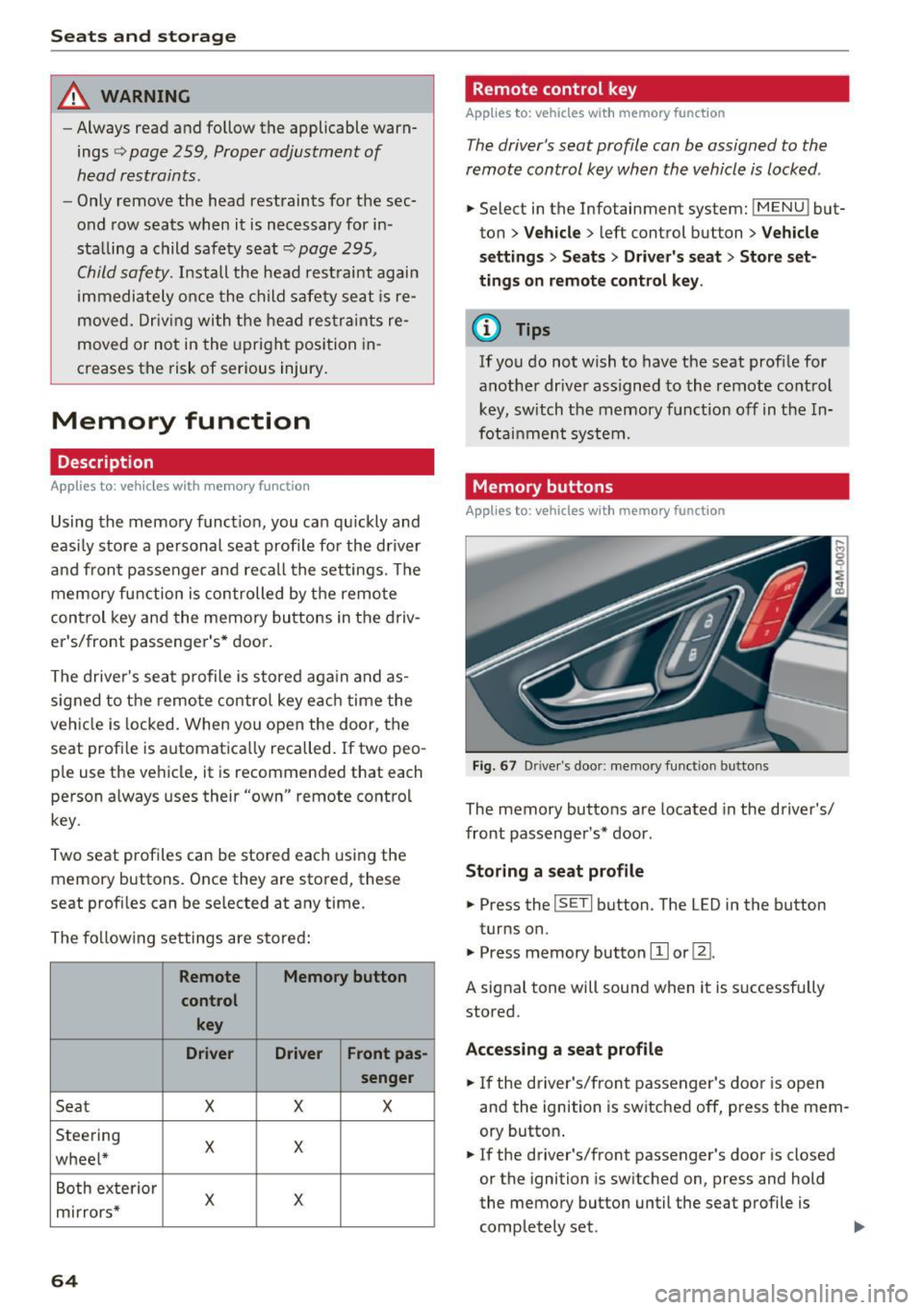
Fig . 67 D rive r's doo r: memory function b utto ns
The memory buttons are located in the driver's/
front passenger's * door .
Storing a sea t p rofile
.. Press the ISETI button . The LED in the button
turns on.
"' Press memory button
[I] or ~-
A signal tone will sound when it is s uccessfully
stored.
Acc essing a s eat profil e
"' If the driver's/front passenger's door is open
and the ignition is switched off, press the mem
ory button .
.. If the driver's/front passenger's door is closed
or the ignition is sw itched on, press and hold
the memory button until the seat profile is comp letely set. .,..
Page 79 of 402
u co ...... N r-... N ...... 0
0
:E: '
Use the rocker switch(;) to select the funct io n.
When synchronization is switched on, the set
tings for the driver's side are applied to the front
passenger's side and the rear (except for seat
heating/ventilation*). When the settings on the
front passenger 's side or in the rear are changed,
the synchron izat ion is automatically sw itched off
and
4-zone appears in the display .
SET REAR
function
Use the rocker switch (D to select the funct ion .
When the function is switched on, you can adjust
all settings for the rear using the climate control
system controls in the cockpit . The rear climate
control system controls cannot be operated at
the same time. This function switches off auto
matically after a certain period of time or after
l eaving the menu.
Vents
You can open or close the center and rear vents in
the cockpit and the vents in the rear center con
sole and door pillars using the ridged thumb
wheels. The levers adjust the direct io n of the air
flow from the vents. The w ide ven t is opened and
closed using the~ button ~
page 8, fig. 2@ .
Residual heat
You can activate the residual heat funct ion when
the ignition is switched off by pressing the knob
@ (left side). The residual heat from the coolant
is used to heat the vehicle inter io r. The resid ual
heat function switches off automatically after
about 15 min utes.
& WARNING
- You should not use the recirculation mode
for an extended period of time, because no
fresh a ir is drawn in and the windows can
fog when coo ling mode is switched off . This
increases the risk of an accident .
- Individuals with reduced sensitivity to pain
or temperature could develop burns when
using the seat heating function . To reduce
the risk of injury, these ind iv iduals should
not use seat heating.
Warm and cold
(D Note
To avoid damage to the heating elements in
the seats, do not kneel on the seats or place
heavy loads on a small area of the seat.
(D Tips
It is not possible to operate the rear climate
control system controls when the power ch ild
safety lock is switched on. With With the
SET REAR function, you can apply all settings
to the rear using the climate control system
controls in the cockpit
~ page 43.
Setup
Applies to: vehicles with 4 -zone deluxe automat ic climate
contro l
The climate control system basic settings are ac
cessed in the Infotainment system .
.. Select in the Infotainment system: I MENU! but
ton
> Vehicle > l eft control b utton > Air condi
tioning
Seat heating/seat ventilation*
You can adjust the seat heating/ventilation bal
ance fo r the driver, front passenger and rear pas
sengers .
Footwell temperature
You can adjust the footwell temperature so that
it is cooler or warmer.
Auto recirculation
When switched on, automat ic rec irculat ion con
trols the recirculation mode automatically . You
must press the
® MAX button if fog forms on
the windows.
Automatic auxiliary heater*
The aux iliary heater he lps to warm the vehicle in
terior more quickly.
Steering wheel heating
Applies to: vehicles with stee ring wheel heating
The steering wheel rim can be heated .
.. Press the button on the multifunction steering
wheel to switch the steering wheel heating on ..,_
77
Page 80 of 402
Warm and cold
and off ~ ¢ page 14, fig. 11. The message
Steering wheel heating: on /Stee ring wheel
heating : off
appears in t he instr ument cluster
display.
The temperatu re is maintaine d at a constant lev
e l when steering whee l heating is switched on.
T he stee ring wheel heat ing settings are s to re d
a utomatically and ass igned to the remote cont ro l
key that is in use .
78
Page 83 of 402
u (0 ...... N r--. N ...... 0
0
:E
-Have your vehicle maintained properly and
in accordance with the service recommenda
tions in your Warranty
& Maintenance book
let. lack of proper maintenance as well as
improper use of the vehicle will impair the
function of the emission control system and
could lead to damage .
- Do not alter or
remove any component of
the Emission Control System unless ap proved by the manufacturer.
- Do not alter or
remove any device, such as
heat shields, switches, ignition wires,
valves, which are designed to protect your
vehicle's Emission Control System and other important vehicle components.
{t) Tips
The consumption estimates as published by
ENVIRONMENTAL PROTECTION AGENCY
(EPA) and Transport Canada may not corre
spond to your actual consumption on the
road, which will vary depending upon veh icle
load and speed, road and weather conditions,
trip length, etc.
Steering
Manual steering wheel position adjustment
Applies to: vehicles with manual steering wheel adjustment
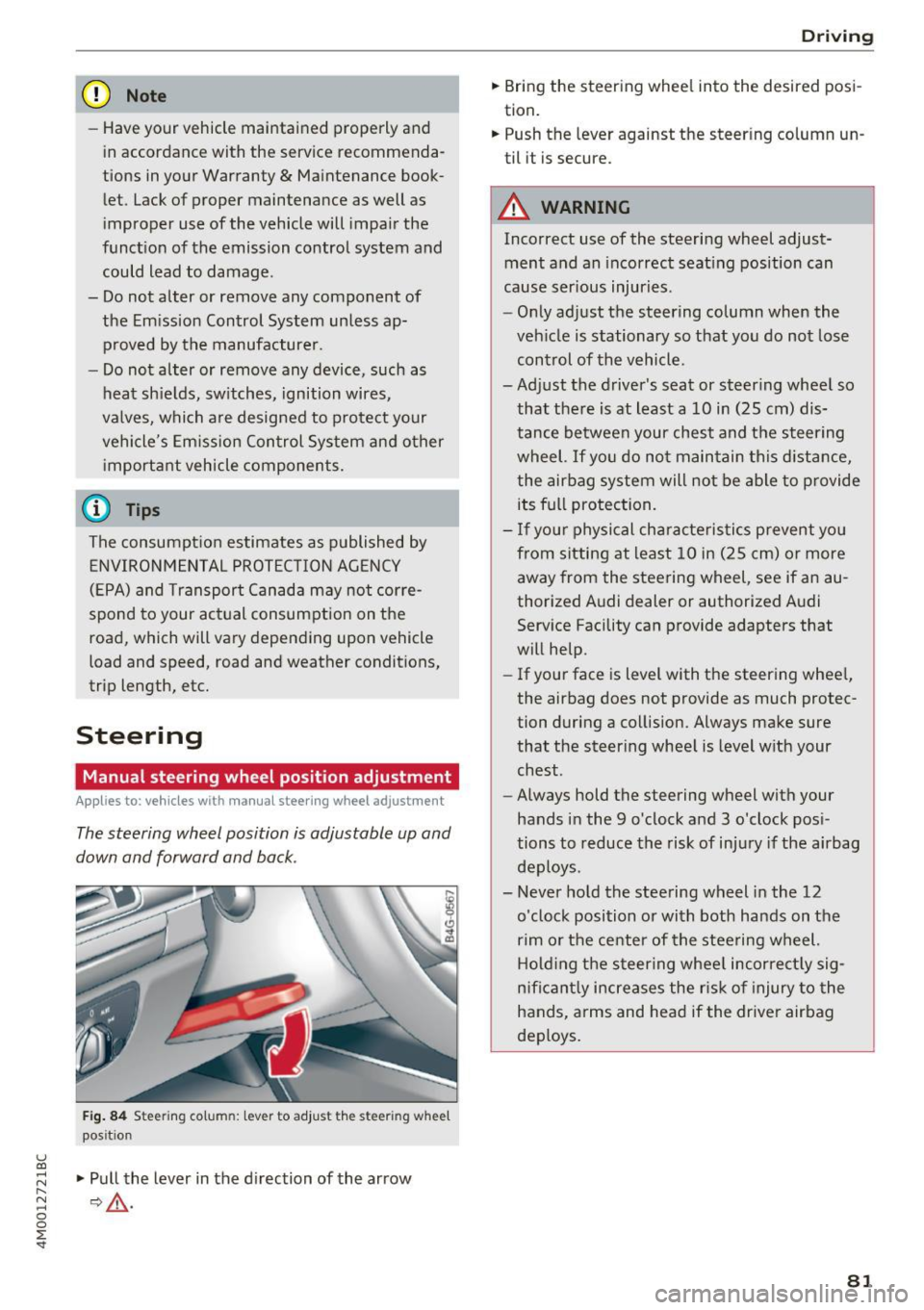
The steering wheel position is adjustable up and
down and forward and back .
Fig. 84 Steerin g col umn : le ve r to adjus t the stee rin g w heel
pos it ion
.,. Pull the lever in the direction of the arrow
¢,& .
Driving
.,. Bring the steering wheel into the desired posi
tion.
.,. Push the lever against the steering column un
til it i s secu re.
A WARNING
= Incorrect use of the steering wheel adjust-
ment and an incorrect seating position can
cause serious injuries .
- Only adjust the steering column when the
vehicle is stationary so that you do not lose
control of the vehicle.
-
-Adjust the driver's seat or steering wheel so that there is at least a 10 in (25 cm) dis
tance between your chest and the steering
wheel. If you do not maintain this distance
I
the airbag system will not be able to provide
its full protection.
- If your physical characteristics prevent you
from sitting at least 10 in (25 cm) or more
away from the steering wheel, see if an au
thorized Audi dealer or authorized Audi Service Facility can provide adapters that
will help.
- If your face is level with the steering wheel,
the airbag does not provide as much protec
tion during a collision. Always make sure
that the steering wheel is level with your
chest.
- Always hold the steering wheel with your
hands in the 9 o'clock and 3 o'clock posi
tions to reduce the risk of injury if the airbag
deploys .
- Never hold the steering wheel in the 12
o'clock position or with both hands on the
rim or the center of the steering wheel.
Holding the steering wheel incorrectly sig
nificantly increases the risk of injury to the
hands, arms and head if the driver airbag
deploys.
81
Page 84 of 402
Driving
Power steering wheel position adjustment
Applies to: ve hicles w ith power steering whee l adj ustment
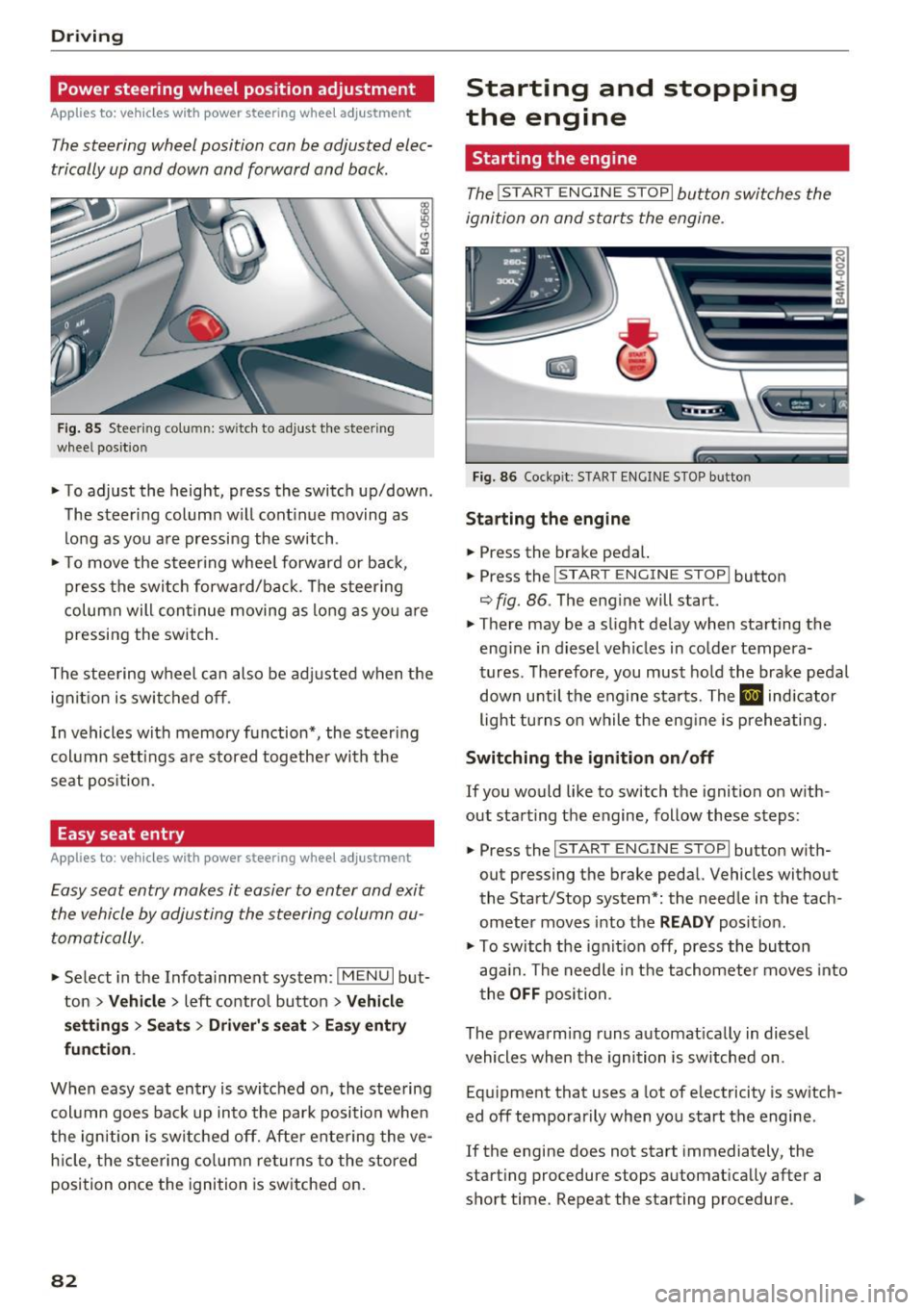
The steering wheel position can be adjusted elec
trically up and down and forward and back.
F ig. 85 Steering co lumn: switch to adjust the steering
wheel position
.. To adjust the height, press the switch up/down.
The steer ing column w ill cont inue moving as
long as yo u are pressing the switch .
.. To move the steering whee l forward or back,
press the swi tc h forward/bac k. T he steer ing
column will con tinue moving as long as you a re
pressing the switch.
The stee ring wheel can also be adjusted when the
ign it ion is swit ched off .
In vehicles with memory function*, the steering
col umn se tt ings a re stored together wi th the
seat pos it ion.
Easy seat entry
App lies to: ve hicles with power steering whee l adjustment
Easy seat entry makes it easier to enter and exit
the vehicle by adjusting the steering column au
toma tically.
" Se lect in the Infota inment sys tem: I MENU I but
ton
> Vehi cle> left contro l button > Vehicle
settings > Seats > Driver 's seat > Ea sy e ntry
fun ction .
When easy seat entry is switched o n, the stee ring
col umn goes bac k up into the par k posi tion when
the ign ition is switched off. Afte r ente ring the ve
h icle, t he steering co lumn re turns to the stored
position once the ignition is switched on.
82
Starting and stopping
the engine
Starting the engine
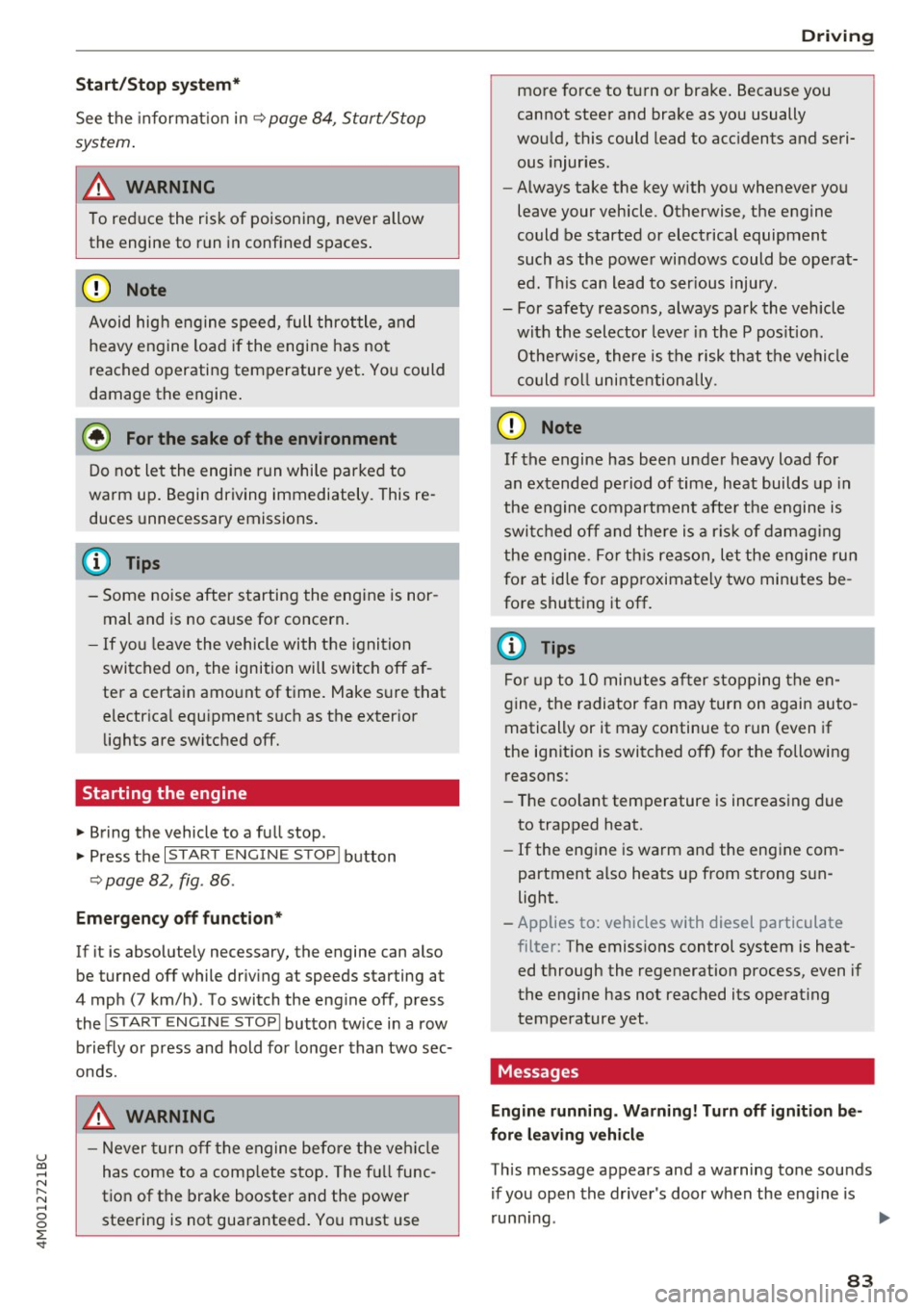
The ! START ENGINE STOPI button switches the
ignition on and starts the engine.
F ig . 86 Cockp it: S TART ENGINE STOP but to n
St arting the engine
.. Press the brake pedal.
.. Press the
I START ENGINE STOP ! button
¢ fig. 86. The eng ine will start.
.. There may be a slight delay when starting the
eng ine in diesel vehicles in co lde r tempera
tures. The refore, you must ho ld the brake pedal
down unti l t h e engine sta rts. The
El ind icator
light tu rns on while the eng ine is preheating.
Switching the ignition on /off
If you would like to switch the ignition on w ith
out starting the engine, follow these steps:
.. Press the
I START ENGINE STOP ! button w ith
out pressing the brake peda l. Vehicles without
the Start/Stop system*: the needle in the tach
ometer moves into t he
READ Y position.
" To switch the ignit io n off, press the bu tton
aga in. The needle in t he tachomete r moves into
t he
OFF position.
The prewarming runs a utomat ically in diesel
vehicles when the igni tion is sw itched on.
Eq uipment that uses a lot of electricity is sw itch
ed off tempo rarily when you start the engine .
If the engine does not start immediately, the
start ing procedure stops automat ically after a
short time. Repeat the starting procedure .
Page 85 of 402
u co ...... N r-... N ...... 0
0
:E: '
See the information in r:!:> page 84, Start/Stop
system.
A WARNING , ~
To reduce the risk of poisoning, never allow
the engine to run in confined spaces.
-
@ Note
Avoid high engine speed, full throttle, and
heavy engine load if the engine has not
reached operating temperature yet. You could
damage the engine.
@ For the sake of the environment
Do not let the engine run while parked to
warm up. Begin driving immediately. This re
duces unnecessary emissions.
(D Tips
-Some noise after starting the engine is nor
mal and is no cause for concern.
- If you leave the vehicle with the ignition
switched on, the ignition will switch off af
ter a certain amount of time. Make sure that
electrical equipment such as the exterior
lights are switched off.
Starting the engine
.,. Bring the vehicle to a full stop.
.,. Press the
I STAR T ENGINE STOPI button
r::!:> page 82, fig . 86 .
Emergency off function*
If it is absolutely necessary, the engine can also
be turned off while driving at speeds starting at
4 mph (7 km/h) . To switch the engine off, press
the
! START ENGINE STOPI button twice in a row
briefly or press and hold for longer than two sec
onds.
A WARNING
- Never turn off the engine before the vehicle
has come to a complete stop. The full func
tion of the brake booster and the power
steering is not guaranteed. You must use
Driving
more force to turn or brake. Because you
cannot steer and brake as you usually
would, this could lead to accidents and seri ous injuries .
- Always take the key with you whenever you
leave your vehicle. Otherwise, the engine
could be started or electrical equipment
such as the power windows could be operat
ed. This can lead to serious injury.
- For safety reasons, always park the vehicle with the selector lever in the P position .
Otherwise, there is the risk that the vehicle
could roll unintentionally .
(D Note
If the engine has been under heavy load for
an extended period of time, heat builds up in
the engine compartment after the engine is
switched off and there is a risk of damaging
the engine. For this reason, let the engine run
for at idle for approximately two minutes be
fore shutting it off.
(D Tips
For up to 10 minutes after stopping the en
gine, the radiator fan may turn on again auto
matically or it may continue to run (even if
the ignition is switched off) for the following reasons :
- The coolant temperature is increasing due
to trapped heat .
- If the engine is warm and the engine com
partment also heats up from strong sun
light.
- Applies to: vehicles with diesel particulate
filter: The emissions control system is heat
ed through the regeneration process, even if
the engine has not reached its operating
temperature yet .
Messages
Engine running. Warning! Turn off ignition be
fore leaving vehicle
This message appears and a warning tone sounds if you open the driver's door when the engine is
running . .,._
83
Page 88 of 402
Driving
[jj indicator light appears in the instrument clus
ter disp lay, the engine will not be stopped, for
examp le in the follow ing s ituations:
- T he eng ine has not reached the minimum re
quired temperature for Start/Stop mode .
- The inter io r temperature selected by the cli-
mate contro l system has not been reached.
- The outs ide temperature is ext remely high/low.
- The w indshield is being defrosted .
- The vehicle battery charge level is too low .
- The steering wheel is turned at a sharp angle or
is mov ing.
- After engaging the reverse gear .
- On sharp inclines.
-At high a ltitudes.
Engine automaticall y restarts
The standard Start/Stop mode will be cance led
during a stop phase in the fo llow ing s ituations.
The engine resta rts wit hout any action by the
d river.
- The vehicle rolls, for examp le while on a s lope.
- The inter ior temperature differs from the tem-
perature se lected in the A/C system.
- The w indshield is being defrosted.
- The brake pedal is pressed several times in a
row.
- The vehicle battery charge level is too low.
- Power consumption is high.
The engine can tu rn off again when the condi
tions for Start/Stop mode are met .
Ignition is switched off automatically
To prevent the veh icle bat tery from d rain ing, the
ign it ion wi ll switch off a utomat ica lly under the
following conditions:
- The Sta rt/Stop system has stopped the eng ine .
- The vehicle is stationary.
- You left the vehicle and the eng ine was not re-
started within approximate ly 30 seconds.
I f this happens, you wi ll see the message
Igni
tion turn s off automaticall y in the instrument
cluster and the activated low beams are replaced
by the parking lig ht. The parking lights will
sw itch off after approx imately 30 minutes or
when you lock the vehicle.
86
The ignition also sw itches o ff when you lock the
vehicle from the outside during a stop phase.
If t he Start/Stop system has not tu rned off the
engine or if yo u have switched the S tart/Stop sys
tem off manually, the ignition wi ll not be auto
matically switched off and the engine will contin
u e to run
Q .&. .
_& WARNING
To reduce the risk of poisoning, never allow
the engine to run in confined spaces.
(D Tips
- If you leave the ve hicle with the D/S or R se
lector lever position engaged, the parking
brake is automatically set.
- If you select the D or N selector lever posi
t ion after sh ifting into reverse, the vehicle
must be driven faster than 6 mph (10 km/h)
in order fo r the engine to switch off again .
Manually switching the Start/Stop system
off /on
Applies to: vehicles with Start/Stop system
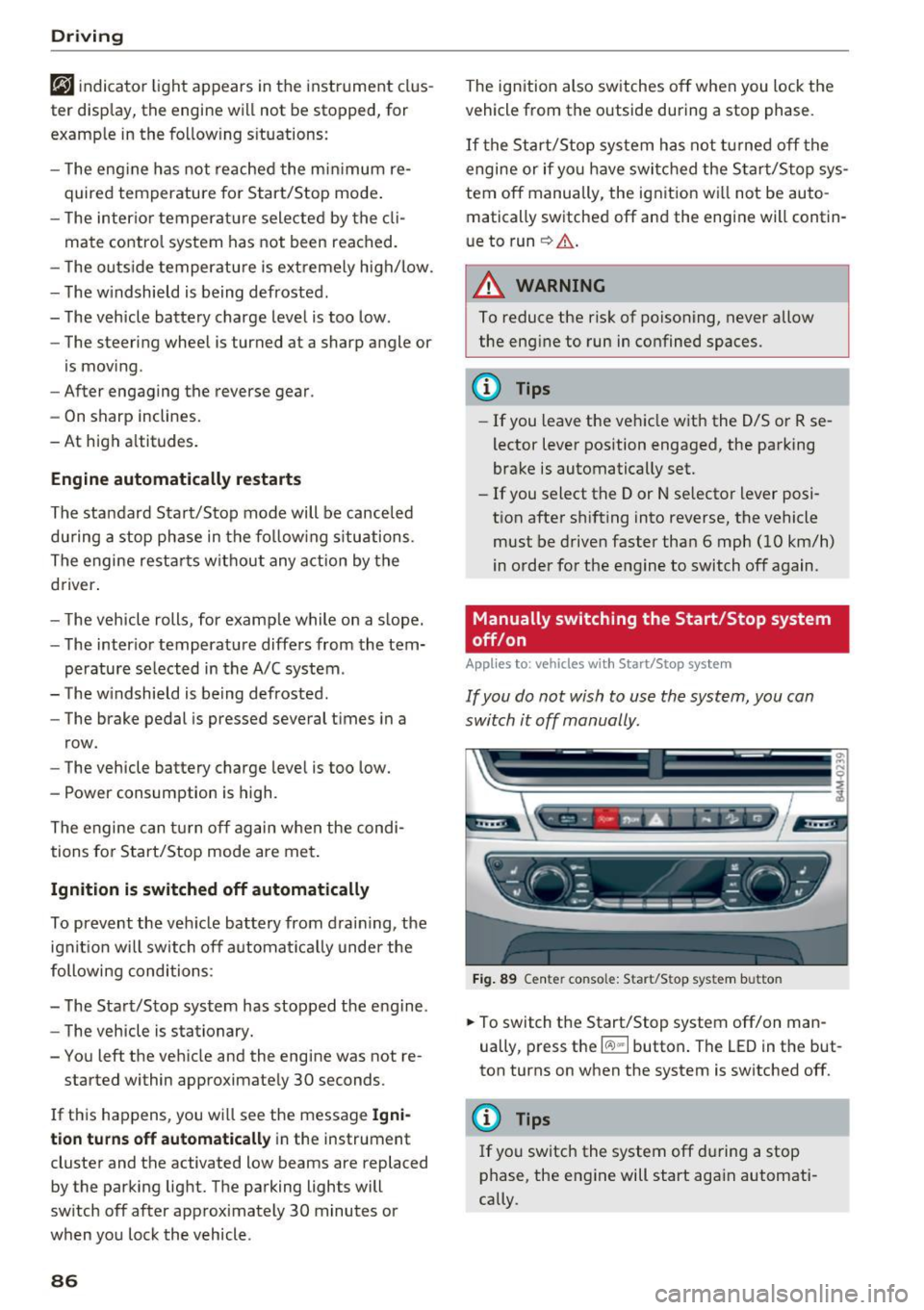
If you do not wish to use the system, you can
switch it off manually.
-- -- - --=-
,__ -~-----__ ...
~. ~- • - ,,,.. ~ .. 'l> '* A ·- -- ~ -
Fig . 89 Ce nter console: Start/Sto p system button
-
.,. To switch the Start/Stop system off/on man
ually, press t he
l(:.l) .. I button . The LED in the but
ton turns on when the system is switched off.
@ Tips
If you switch the system off du ring a stop
phase, the engine will start aga in automati
cally.
Page 90 of 402
Driving
"'Turn the engine off¢.&, .
"'Turn the steering wheel when parking on in
clines so that the wheels will roll into the curb
if the vehicle starts moving .
A WARNING
-Do not press the accelerator pedal inadver
tently if a gear is selected when the vehicle is stationary and the engine is running . Oth
erwise, the vehicle will start to move imme
diately and this could result in an accident.
- Emergency braking should only be used in
an emergency, when the normal brake pedal
has failed or the brake pedal is obstructed .
During emergency braking, your vehicle will
brake similar to heavy braking. ESC and the
associated components (ABS, ASR, EDL)
cannot overcome the laws of physics.
Around curves and when road or weather conditions are bad, a full brake application
can cause the vehicle to skid or the rear end
to swerve, which increases the risk of an ac
cident.
- If the power supply fails, you cannot set the
parking brake if it is released. In this case ,
park the vehicle on level ground and secure
it by placing the selector lever in the P posi
tion. See an authorized Audi dealer or au
thorized Audi Service Facility for assistance.
- Always take the vehicle key with you when
leaving your vehicle, even if for a short peri
od of time. This applies particularly when
children remain in the vehicle. Otherwise,
children could start the engine, release the
parking brake or operate electrical equip
ment such as power windows, which in
creases the risk of an accident .
- No one, especially children, should remain
in the vehicle when it is locked . Locked
doors make it more difficult for emergency
workers to get into the vehicle, which puts lives at risk .
{D) Tips
When stopping at a traffic signal or stopping
in city traffic, you can set the parking brake
manually. The vehicle does not have to be
held with the brake pedal. The parking brake
88
eliminates the tendency to creep when a se
lector lever position is engaged. As soon as
you press the accelerator pedal, the parking
brake releases automatically and your vehicle
starts to move¢
page 88.
(D Tips
-Occasional noises when the parking brake is
set and released are normal and are not a
cause for concern.
- The parking brake goes through a self-test cycle at regular intervals when the vehicle is
stopped . Any noises associated with this are
normal.
- If there is a power failure, the parking brake
will not set if it is released, and it will not release if it is set ¢& . See an authorized
Audi dealer or authorized Audi Service Fa
cility for assistance.
Starting to drive
Various convenience and safety functions may be
available when the vehicle begins driving, de
pending on vehicle equipment.
Starting on hills with the parking brake set
Requirement: the driver's door must be closed .
"'To start driving comfortably when on a hill, set
the parking brake and begin driving as usual.
The braking force of the parking brake does not release automatically until the wheels build up
enough driving force .
Starting on hills with hill hold assist
Hill hold assist makes it easier to start on hills.
Requirement: the driver's door must be closed
and the engine must be running.
"'To activate hill hold assist , press and hold the
brake pedal for several seconds. The vehicle
must be in an uphill direction of travel.
After releasing the brake pedal , the braking pow
er is maintained for a brief moment¢
A to pre
vent the vehicle from rolling back when starting.
During this time, you can easily begin to move
your vehicle.
111>
Page 93 of 402
u (0 ...... N r--. N ...... 0
0
:E
disp layed. The accuracy depends on the driv ing
situation and is normally around 1
°. T he side
ways angle of your vehicle should not exceed the
yellow range in the gauge. If it reaches the red range, there is a risk that the vehicle might tip
c::, A .
Dis playing the til t angle di splay
.. Select in the Infotainment system: IMENUI but-
ton
>V ehicle > Lift / Offro ad or Allro ad *.
Showing the additional display
To change the contents shown in the rig ht area of
the screen, select in the Infota inment system:
right control button
> Additiona l d isplay.
Angle :
this displays the c urren t steering wheel
angle and the maxim um angle that was reached
during a drive . These values are reset when the
ignition is switched off .
Posit ion : disp lays the height, direction and geo
coordinates of the current vehicle pos ition.
Off : only the air suspension display remains o n.
& WARNING
- Do no t exceed the yellow range in the
gauge . Your vehicle can tip, which i ncreases
the risk of an acc ident.
- Under some circumsta nces, the vehicle can
tip over or til t sideways even if the sideways
angle is low . The angle display does not re
place the driver's attention. To reduce the
risk of an accident, make sure the vehicle
does not t ip , especia lly when you are driving
at h igh speeds.
Automatic transmission
Introduction
The automat ic transmission is controlle d elec
tronica lly . Power is transfe rred using a torque
converte r.
When a
m oderate driving styl e is used , the
transmission selects the most economical driving mode. The t ransmission upshifts at a lower RPM
D rivi ng
and downs hifts at a higher RPM to improve fue l
efficiency.
T he tra nsmission switches to a sporty mode after
a kick-down or when the driver uses a
s porty
dri ving style
characterized by quick acce lerator
peda l movements, heavy acceleration, frequent
changes in speed and t raveling at the maximum
speed .
If desired, the driver can also se lect the gears
manually ( tiptronic mode ) c::, page 94.
Selecting a selector lever position
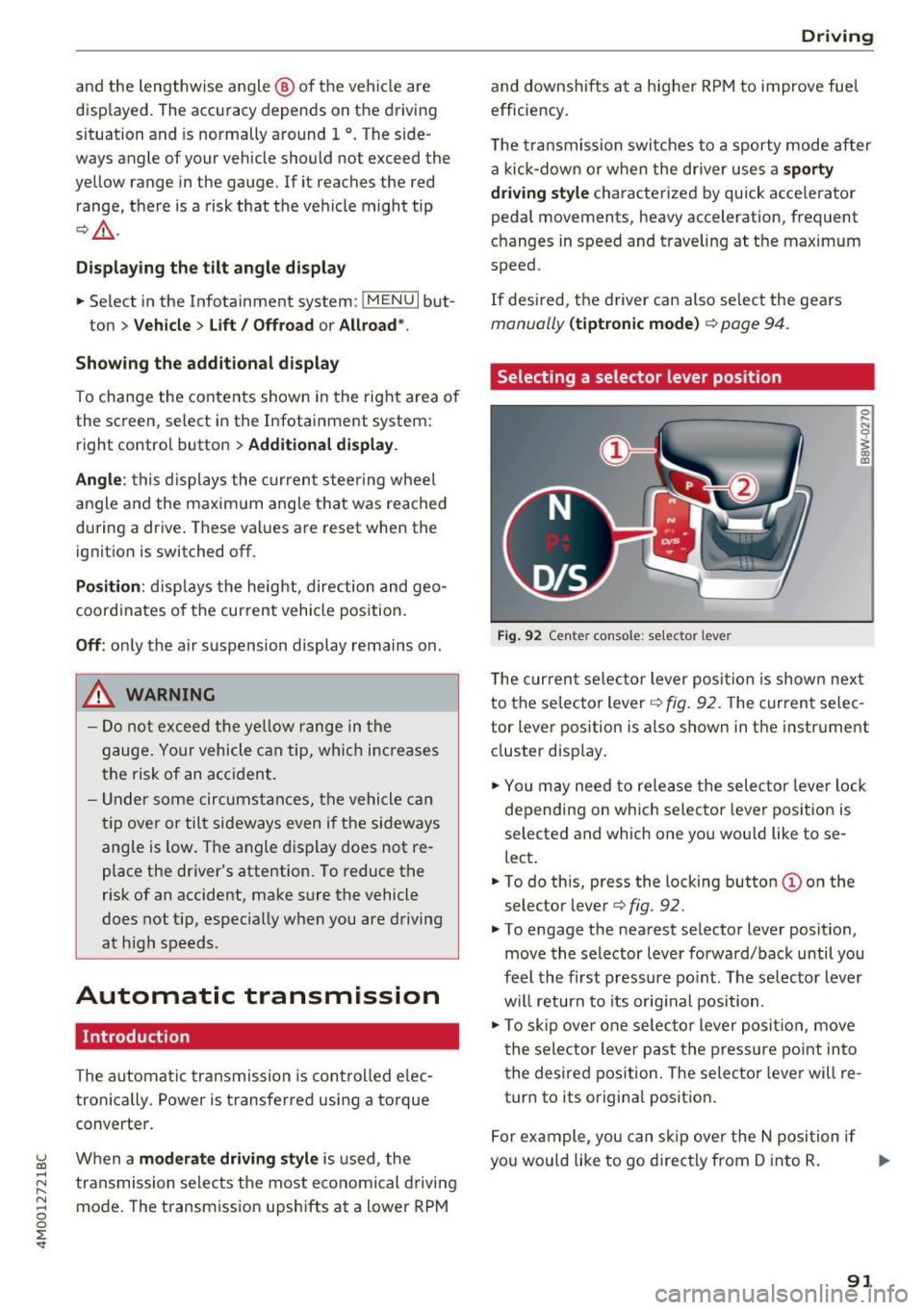
Fig . 92 Cen te r conso le: se lecto r lever
0 ,.._ N 0
~ a, m
T he curren t se lector lever posi tion is show n next
to the se lector lever
c::, fig. 92. The curren t se lec
tor lever position is a lso shown in t he instrument
cluster disp lay.
.. You may need to release the selector lever lock
depending on wh ich selecto r lever pos it ion is
selected and which one you wou ld like to se
lect .
.. To do th is, press the locking button(!) on the
selector lever
<=> fig . 92.
.. To engage the nearest selector lever position,
move the selector lever forward/back until you
fee l the first pressure po int. The selec to r lever
w ill return to its orig inal position .
.. To skip over one selec tor lever posit io n, move
the selector lever past the pressure point into
the desired position. The selector lever will re
turn to its origina l position .
F or ex ample , you can s kip over the N position if
yo u wou ld like to go d irectly from D into R . ..,.
91