stop start AUDI Q7 2017 Owner´s Manual
[x] Cancel search | Manufacturer: AUDI, Model Year: 2017, Model line: Q7, Model: AUDI Q7 2017Pages: 402, PDF Size: 100.39 MB
Page 40 of 402
Opening and clo sin g
• Pullon the door handle to open the door.
Locking the v ehic le
• Se lect the P posit ion, because the vehicle can
not be locked otherwise .
• To lock the veh icle, close the door and touch
the sensor in the door handle
o nce ¢ fig. 25 . Do
not hold the door handle while doing this .
You can un lock/lock the vehicle at every door.
The remote control key cannot be more than ap
p roximate ly 4 feet (1. 5 m) away from the door
handle. It makes no difference whether the mas
ter key is in your jacket pocket or in your brief case, for example .
If you hold the door handle while locking, this
can impair the locking function.
The door cannot be opened for a br ief period di
rectly af ter lock ing it. This way you have the op
portun ity to check if the doors locked correctly.
The settings in the Infotainment system deter
mine if the ent ire ve hicle or only one of the doors
is unlocked when unlocki ng the vehicle
¢ page 39 .
A WARNING
Read and following a ll WARNINGS ¢&. in De
scription on page 34 .
@ Tips
If your vehicle is le ft standing fo r a long peri
od of time, note the following:
- T he energy management system grad uall y
turns off unnecessa ry cohvenience functions
to prevent the vehicle batte ry from draining
and to ma intain the vehicle's ab ility to start
for as long as possib le. You may not be able
to unlock your vehicle using the convenie nce
key.
38
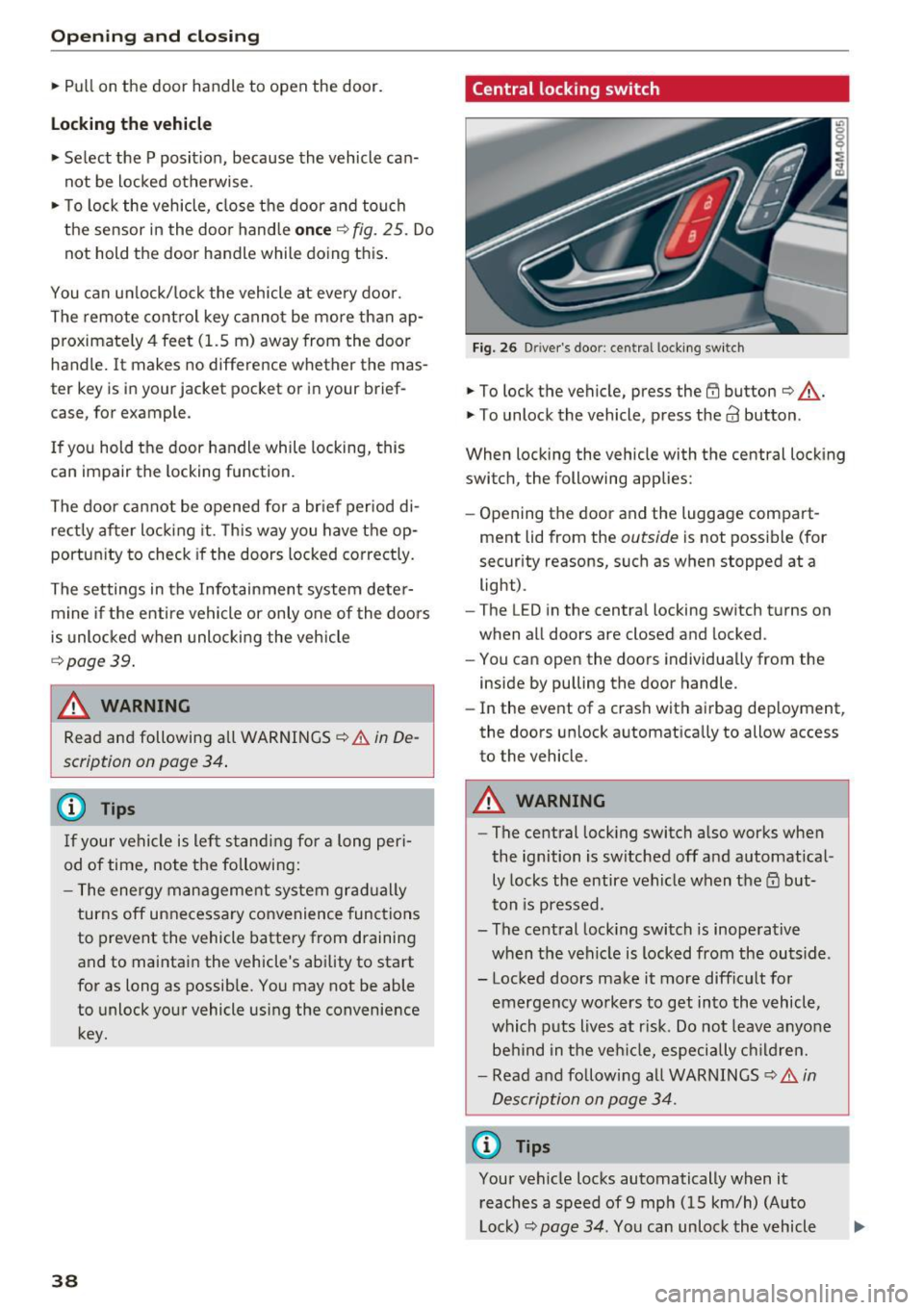
Central locking switch
Fig. 26 D river 's doo r: cen tra l lo cking sw it c h
• To lock the vehicle, press the @ button ¢&. -
• To unlock the vehicle, press the
63 button.
When locking the vehicle with the central locking
switch , the following applies:
- Opening the door and the luggage compart
ment lid from the
outside is not possib le (for
security reasons, such as when stopped at a light) .
- The L ED in the centra l locking switch turns on
when all doors are closed and locked .
- You can open the doors ind iv idually from the
inside by pulling the door handle .
- In the event of a crash with airbag dep loyment,
the doors unlock a utomatica lly to allow access
to the vehicle .
A WARNING
-The central lock ing switch a lso works when
the ignition is switched off and automatical
ly locks the entire vehicle when the
ID but
ton is pressed .
- The central lock ing switch is inoperative
when the vehicle is locked from the outs ide .
- Locked doors ma ke it more diffic ult for
emergency workers to get into the vehicle,
which puts lives at r isk . Do not leave anyone
behind in the ve hicle, especially c hild ren.
- Read and following a ll WARNINGS ¢&.
in
Description on page 34.
{D Tips
Your vehicle locks automatically when it reaches a speed of 9 mph (15 km/h) (Auto
Lock)¢
page 34. You can unloc k the vehicle
Page 46 of 402
Opening and closin g
the second level. The operation will stop if the
switch is pressed/pu lled again.
~ To se lect a position in between opened and
closed, press/pull the switch to the first leve l
until the desired window position is reached.
P owe r w ind ow sw itches
(D Left front door
@ Right front door
@ Left rear door
@ Right rear door
A WARNING
- Always take the vehicle key with you when
leaving the vehicle, even for a short period
of time. This applies particularly when chil
dren rema in in the vehicle . Otherwise ch il
dren could start the engi ne or operate e lec
trical equipment (such as power windows),
wh ich increases the r isk of an accident. The
power windows cont inue to function unti l
the driver's door or front passenger's door
has been opened.
-
- Pay careful attention when closing the win
dows. Pinching cou ld cause serious injuries .
- When loc king the vehicle from outside, the
vehicle must be unoccupied since the win
dows can no longer be opened in an emer
gency.
(D Tips
You can still open and close the windows for
approximately 10 minutes after turning the
ignition off. The power windows do not switch
off until the driver's door or front passenger's
door has been opened.
Convenience opening/closing
Applies to: ve hicles w ith conve nien ce key
All of the windows and the roof* can be opened/
closed at the same time .
Convenience opening feature
~ Press and hold the III button on the remote con
trol key until all of the windows reach the de
sired position and the roof* is tilted open .
44
Convenience closing fe atur e
~ Press the {D b utton on the remote control key
until the roof* is closed
c::> .&., , or
~ Touch the sensor * on the door handle until all
of the windows and the roof * are closed. Do not
place your hand in the door handle when doing
this.
Setting conv en ie nc e opening in th e
Infota inment s ystem
~ Select in the Infotainment system: IMENU ! but
ton
> V eh icle > left control button > V ehicle
s etting s
> Centr al lo ck ing > Lon g press to
op en window s.
A WARNING
- To reduce the r isk of injury, never close the
w indows or the roof* carelessly or in an un
controlled manner.
- For secur ity reasons, the windows and the
roof* can only be opened and closed with
the remote control key at a maxim um dis
tance of approx imately 6.5 feet (2 m) away
from the vehicle . Always pay attention when
using the~ button to close the windows
and the roof* so that no one is pinched. The
clos ing process will stop immediately when
the ~ button is released.
(D Tips
Applies to: vehicles wit h panorama g lass roof:
the power sunshade also opens/closes when
opening/closing the roof.
' Correcting power window malfunctions
You can reactivate the one-touch up/down func
tion if it malfunctions.
~ Pull the power window switc h up until the win
dow is completely raised.
~ Release the switch and pull it up aga in for at
least one second .
Page 58 of 402

Lights and Vi sion
from switching on unintentionally and ca us
ing damage to the windshield wiper system.
@ Tips
- The windshield wipers switch off when the
ignition is switched off. You can activate the
windshield wipers after the ignition is
switched back on by moving the windshield
wiper lever to any pos it ion.
- Worn or dirty windshield wiper blades result
in streaking. This can affect the rain sensor
funct ion. Check your windshield wiper
blades regularly.
- The washer fluid nozzles for the windshield
washer system are heated at low tempera
tures when the ignition is on .
- When stopp ing temporarily, such as at a
traffic light, the speed of the windshield
wipers automatically reduces by one level.
Cleaning the wiper blades
Clean the wiper blades when you see wiper
streaks. Use a soft cloth and a glass clea ne r.
Windshield wiper
"' Place the windshield wiper arms in the service
pos ition
¢ page 56 .
"'Fold the windshield wiper arms away from the
winds hield.
Rear window wiper
"' Fo ld the wiper arm away from the rear window.
A WARNING
Dirty windshield wiper blades can impair vi
sion, which increases the risk of an accident.
56
-
· Replacing wiper blades
Fig. 51 Removing windshie ld wiper blades
Windshield wiper service position/blade
replacement position
"'T o br ing the windshield w ipers into the serv ice
position, turn the ign ition off and move the
w indshie ld wiper lever into position@
¢page 55, fig. 49.
"'To bring the wip ers into the starting position ,
turn the ignition on and move the windshield
wiper lever into position @for at least two sec
onds
¢ page 55, fig. 49.
You can also turn the service position on or off in
the Infotainment system:
"' Switch the windshie ld wipers off (position @
¢page 55, fig . 49).
"' Select: the IM ENU I button > Vehicle > left con
trol button
> Service & checks > Wiper change
position .
Removing the wiper blade
"'Fold the windshie ld wiper arm away from the
windshield.
"' Press the locking knob
(D ¢ fig. 51 on the w iper
blade. Hold the wiper blade firmly.
"' Remove the wiper blade in the direction of the
arrow.
Installing the wiper blade
"' Insert the new wiper blade into the mount on
the wiper arm @until it clicks into place.
"' Place the wiper arm back on the windsh ield.
"' Turn the service position off.
1111>
Page 81 of 402
u co ...... N r-... N ...... 0
0
:E: '
General information
Breaking in
A new vehicle must be broken in for the first
1,000 mi les (1,500 km). Do not dr ive at speeds
that will exceed 2/3 of the maximum permitted
engine speed (RPM) for the first 600 miles
(1,000 km), and avoid full acceleration during
this period . You may gradually start increasing
the RPM and the speed between 600 miles
(1,000 km) and 1,000 miles (1,500 km) .
During the first hours of use, the engine has a
higher internal friction than later on when all
moving parts have settled into p lace with each
other.
How the vehicle is driven during the first 1,000
miles (1,500 km) also affects the engine quality.
Drive at moderate engine speeds after the initia l
break-in period, particularly when running a cold
engine . This will reduce eng ine wear and improve
the m ileage .
Do not drive at too low of an engine speed (RPM) .
Shift down if the engine stops running "smooth ly". Extremely high eng ine speeds are automati
cally reduced.
Reducing the risk of vehicle damage
([) Note
When driving on poor roads, by curbs and on
steep ramps , make su re that low-hang ing
components such as the spoiler and exhaust
system do not come into contact with these
or they could be damaged. This especially ap
plies to vehicles with low ground clearance
and vehicles that are heavily loaded.
Driving through water on roads
Note the following to reduce the risk of vehicle
damage when driv ing through water, for example
on flooded roads :
- The water must not be any higher than the bot
tom of the vehicle body.
D riving
- Do not drive faster than walking speed.
A WARNING
After driv ing through water or mud, the effec
tiveness of the brakes may be reduced due to moisture on the brake rotors and brake pads.
A few careful brake applications should dry
off the brakes and restore the full braking ef
fect .
(D Note
- Vehicle components such as the engine,
transmission, suspens ion or electrical sys-
tem can be severely damaged by driving
through water.
- Always switch the Start/Stop system" off
when driving through water¢
page 84.
(D Tips
-Determine the depth before driving through
water.
- Do not stop the vehicle, drive in reverse or
switch the engine off when driving through
water.
- Keep in mind that oncoming vehicles may
create waves that raise the water level and
make it too deep for your vehicle to drive
through safely.
- Avoid driv ing through salt water, because
this can cause corrosion.
Economical and environmentally-friendly
driving
T he amount o f fuel consumpt ion, the environ
mental impact and the wear to the engine,
brakes and tires depends mostly on your driving
style. With an ant icipatory and economic driving
style, fuel consumption can be reduced by ap proximately 10-15%. The following tips will help
you conserve the environment and your money at the same time.
Anticipatory driving
A vehicle uses the most fuel when accelerating.
When you drive with anticipation, you do not
need to brake as often and so you accelerate less.
When possible, let your vehicle coast with a gear ..,.
79
Page 82 of 402
Driving
engaged, for examp le when you notice that the
next traffic light is red . This produces an engine
braking effect, wh ich helps to protect the brakes
and tires and reduces the emissions and fuel con
sumpt ion to zero (fuel shut-off during decelera
tion) .
Shift efficientl y
Upshifting earlier is an effective way to save fuel.
Staying in a gear too long uses fue l unnecessari
ly .
Press down on the acce lerator peda l slowly and
avoid "k ick -down".
Avoid full acceleration
You sho uld rarely t ravel a t the maximum vehicle
speed. High speeds cause a disp ropor tionately
h igh increase in fuel consumption, emissions and
traffic noise . Driving more slowly saves fue l.
Reduce idling time
The Start/Stop system* helps to reduce the id ling
time automatically. In vehicles wi tho ut the Start/
Stop system*, it is efficient to switch the engine
off when stopped at rai lroad crossings and long
red lights . Stopping the engine for 30 -40 sec
onds already saves more fuel than the amount of
extra fuel needed to restart the eng ine.
I t takes a very long time in idle to wa rm the en
gine up to operating temperature . Wear and
emissions are especially high in the wa rm -up
phase. Therefore, yo u should begin driving im
mediately after starting the engine. Avoid high
RPMs while do ing th is .
Have ma intenance performed regularly
By having maintenance performed regu larly on
your veh icle, you can help to reduce f uel con
sumpt ion before yo u even start to dr ive. The
maintenance condition of your vehicle not only
affects traffic safety and long -term value but a l
so impacts f uel consumption . A poorly main
tained engine can lead to f uel consumpt ion that
is 10% higher tha n normal.
80
Avoid short trips
The eng ine and exh aust clean ing syste m mus t
r each their op tima l operating temperatu re to ef
fectively reduce consumption and emissions.
A cold engine uses a d isp roportion ately high
amoun t of fue l. The e ngine re aches opera ting
temperat ure and cons umption norma lizes on ly
after approximate ly 2.S mi les ( 4 km).
Check the tire pressure
To save fue l, ma ke sure the t ires are always in
flated to the corre ct press ure
~ page 343. The
f uel consumpt ion c an increase by S% if the p res
s ur e is only 0 .S bar too low. Due to the inc reased
rol ling resistance, low tire pressures w ill also
l ead to greater tire wear and will affect driving
behavior.
Do not drive on winter tires year -round, as this
will consume up to 10% more f ue l.
Eliminate unnecessary weight
Since eve ry po und of ext ra weight increases f uel
consump tion, a quick inspect io n of the luggage
compartment may be wo rth it to avoid unneces
sary weight .
When not be ing used, a roof ra ck sho uld be re
moved to decrease the w ind resis tance of the ve
hicle . This will save yo u approx ima tely 12% fue l
at speeds from 62 -7S mph (100 -120 km/h) .
Save energy
The engine d rives the generator, which generates
electri city; the f uel consumpt ion also increases
with t he deman d for e lec tricity . T he refore, sw itch
electrica l eq uipment o ff when you no longe r
need it . Examples of eq uipment that uses a lot of
energy are air blowers at a high setting, the rear
window defogger and seat heating* .
CJ) Note
Do not leave engine idling unattended after
starting. If warning lights s hould come on to
i ndicate imprope r operation, they would go
unheeded. Extended idling also prod uces
h eat, which could result in overheating or
other damage to the vehicle or othe r proper
ty .
Page 84 of 402
Driving
Power steering wheel position adjustment
Applies to: ve hicles w ith power steering whee l adj ustment
The steering wheel position can be adjusted elec
trically up and down and forward and back.
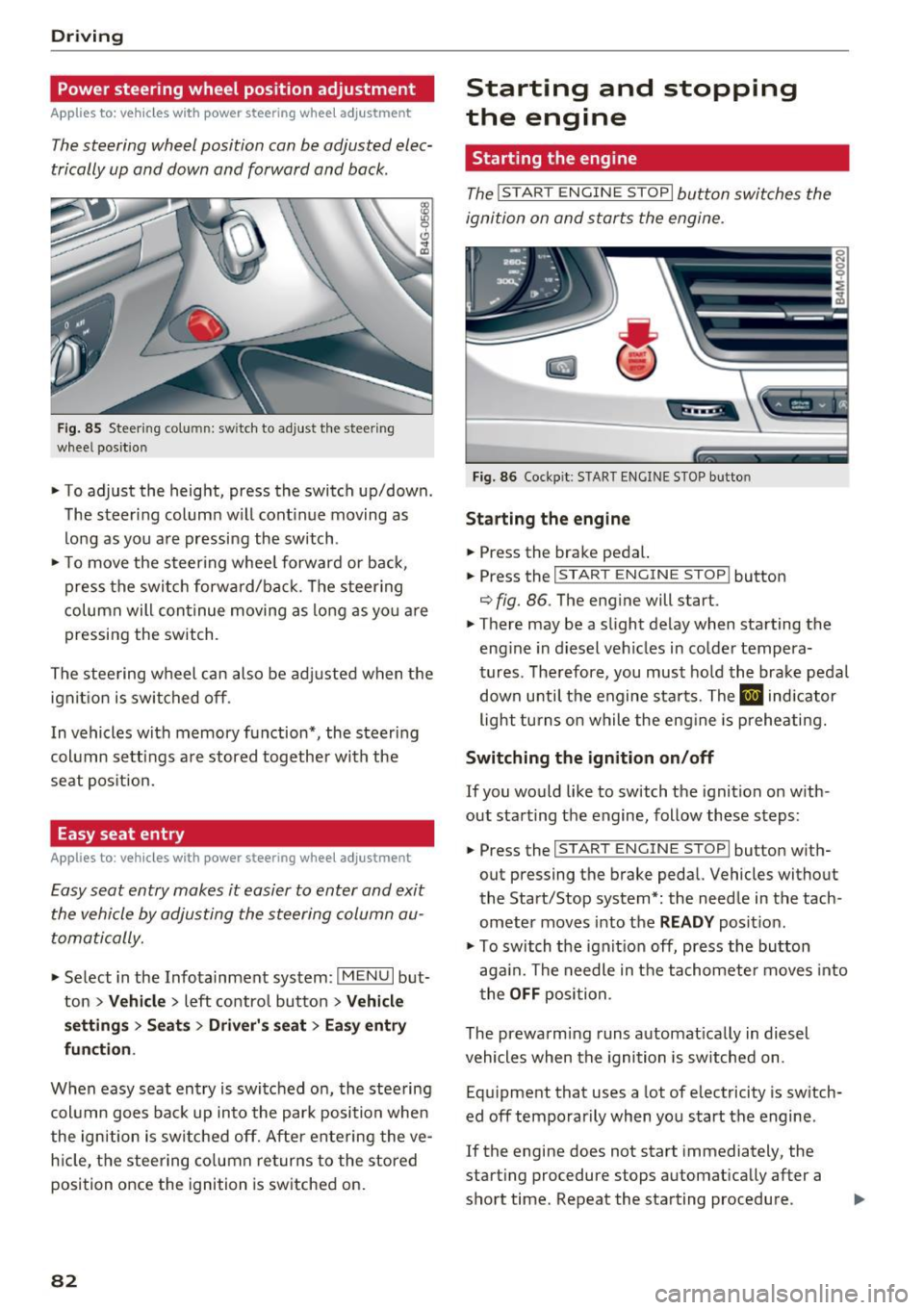
F ig. 85 Steering co lumn: switch to adjust the steering
wheel position
.. To adjust the height, press the switch up/down.
The steer ing column w ill cont inue moving as
long as yo u are pressing the switch .
.. To move the steering whee l forward or back,
press the swi tc h forward/bac k. T he steer ing
column will con tinue moving as long as you a re
pressing the switch.
The stee ring wheel can also be adjusted when the
ign it ion is swit ched off .
In vehicles with memory function*, the steering
col umn se tt ings a re stored together wi th the
seat pos it ion.
Easy seat entry
App lies to: ve hicles with power steering whee l adjustment
Easy seat entry makes it easier to enter and exit
the vehicle by adjusting the steering column au
toma tically.
" Se lect in the Infota inment sys tem: I MENU I but
ton
> Vehi cle> left contro l button > Vehicle
settings > Seats > Driver 's seat > Ea sy e ntry
fun ction .
When easy seat entry is switched o n, the stee ring
col umn goes bac k up into the par k posi tion when
the ign ition is switched off. Afte r ente ring the ve
h icle, t he steering co lumn re turns to the stored
position once the ignition is switched on.
82
Starting and stopping
the engine
Starting the engine
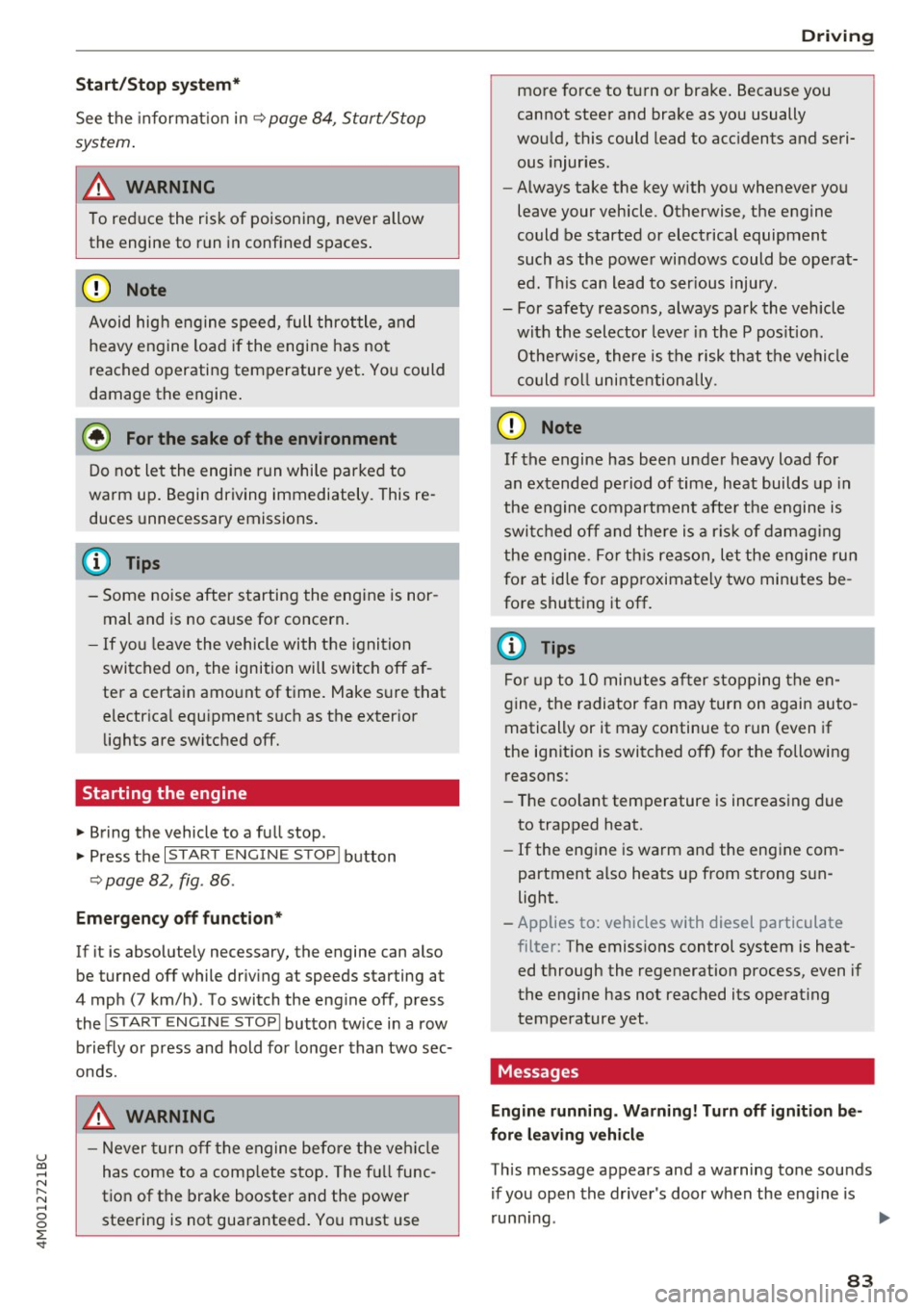
The ! START ENGINE STOPI button switches the
ignition on and starts the engine.
F ig . 86 Cockp it: S TART ENGINE STOP but to n
St arting the engine
.. Press the brake pedal.
.. Press the
I START ENGINE STOP ! button
¢ fig. 86. The eng ine will start.
.. There may be a slight delay when starting the
eng ine in diesel vehicles in co lde r tempera
tures. The refore, you must ho ld the brake pedal
down unti l t h e engine sta rts. The
El ind icator
light tu rns on while the eng ine is preheating.
Switching the ignition on /off
If you would like to switch the ignition on w ith
out starting the engine, follow these steps:
.. Press the
I START ENGINE STOP ! button w ith
out pressing the brake peda l. Vehicles without
the Start/Stop system*: the needle in the tach
ometer moves into t he
READ Y position.
" To switch the ignit io n off, press the bu tton
aga in. The needle in t he tachomete r moves into
t he
OFF position.
The prewarming runs a utomat ically in diesel
vehicles when the igni tion is sw itched on.
Eq uipment that uses a lot of electricity is sw itch
ed off tempo rarily when you start the engine .
If the engine does not start immediately, the
start ing procedure stops automat ically after a
short time. Repeat the starting procedure .
Page 85 of 402
u co ...... N r-... N ...... 0
0
:E: '
See the information in r:!:> page 84, Start/Stop
system.
A WARNING , ~
To reduce the risk of poisoning, never allow
the engine to run in confined spaces.
-
@ Note
Avoid high engine speed, full throttle, and
heavy engine load if the engine has not
reached operating temperature yet. You could
damage the engine.
@ For the sake of the environment
Do not let the engine run while parked to
warm up. Begin driving immediately. This re
duces unnecessary emissions.
(D Tips
-Some noise after starting the engine is nor
mal and is no cause for concern.
- If you leave the vehicle with the ignition
switched on, the ignition will switch off af
ter a certain amount of time. Make sure that
electrical equipment such as the exterior
lights are switched off.
Starting the engine
.,. Bring the vehicle to a full stop.
.,. Press the
I STAR T ENGINE STOPI button
r::!:> page 82, fig . 86 .
Emergency off function*
If it is absolutely necessary, the engine can also
be turned off while driving at speeds starting at
4 mph (7 km/h) . To switch the engine off, press
the
! START ENGINE STOPI button twice in a row
briefly or press and hold for longer than two sec
onds.
A WARNING
- Never turn off the engine before the vehicle
has come to a complete stop. The full func
tion of the brake booster and the power
steering is not guaranteed. You must use
Driving
more force to turn or brake. Because you
cannot steer and brake as you usually
would, this could lead to accidents and seri ous injuries .
- Always take the key with you whenever you
leave your vehicle. Otherwise, the engine
could be started or electrical equipment
such as the power windows could be operat
ed. This can lead to serious injury.
- For safety reasons, always park the vehicle with the selector lever in the P position .
Otherwise, there is the risk that the vehicle
could roll unintentionally .
(D Note
If the engine has been under heavy load for
an extended period of time, heat builds up in
the engine compartment after the engine is
switched off and there is a risk of damaging
the engine. For this reason, let the engine run
for at idle for approximately two minutes be
fore shutting it off.
(D Tips
For up to 10 minutes after stopping the en
gine, the radiator fan may turn on again auto
matically or it may continue to run (even if
the ignition is switched off) for the following reasons :
- The coolant temperature is increasing due
to trapped heat .
- If the engine is warm and the engine com
partment also heats up from strong sun
light.
- Applies to: vehicles with diesel particulate
filter: The emissions control system is heat
ed through the regeneration process, even if
the engine has not reached its operating
temperature yet .
Messages
Engine running. Warning! Turn off ignition be
fore leaving vehicle
This message appears and a warning tone sounds if you open the driver's door when the engine is
running . .,._
83
Page 86 of 402
Driving
Ple ase pre ss brake pedal
This message appears if you do not press the
brake pedal whe n starting the eng ine.
Ill Rem ote control key : key not recognized . Is
the key still in th e ve hicle ?
This indicator light turns on and th is message ap
pears if the ignit ion key was removed from the
ve hicle when the engine was running . If the igni
tion key is no longe r in the veh icle, you cannot
sw itch on the ignit ion or sta rt the engine once
you stop it. You also cannot loc k the vehicle from
the o uts ide.
Shift to P, otherwi se vehicl e can roll awa y.
D oor s do not lo ck if gea rshift i s not in P
This message appears for safety reasons if the
selecto r lever is in the N position whe n you
sw itch the ignition off . Move the selector lever to
the P pos ition. Otherwise the vehicle is not pro
tected from rolling and it cannot be locked.
II Rem ote control key : hold b ack of k ey
again st th e designat ed are a. S ee owner' s m an
ual
If the indicator light turns on and th is message
appears, there is a malfunction
c::> page 84.
S hift to P before le aving ca r, otherw ise vehicle
can r oll away
This message appears if the driver's door is
opened while the ignition is switched on and the
transmission has not been shifted to the P posi
tion . Shift the transmission into the P position
and turn off the ignition if you are leav ing the ve
h icle. Otherwise the veh icle could roll. Also see
c::> page 86 .
84
Starting the engine when there is a
malfunction
It may not be possible to start the engine under
certain cir cumstances, for example if the battery
in the vehicle key is drained, if interference is af
fected the key or if there is a system malfunc
tion.
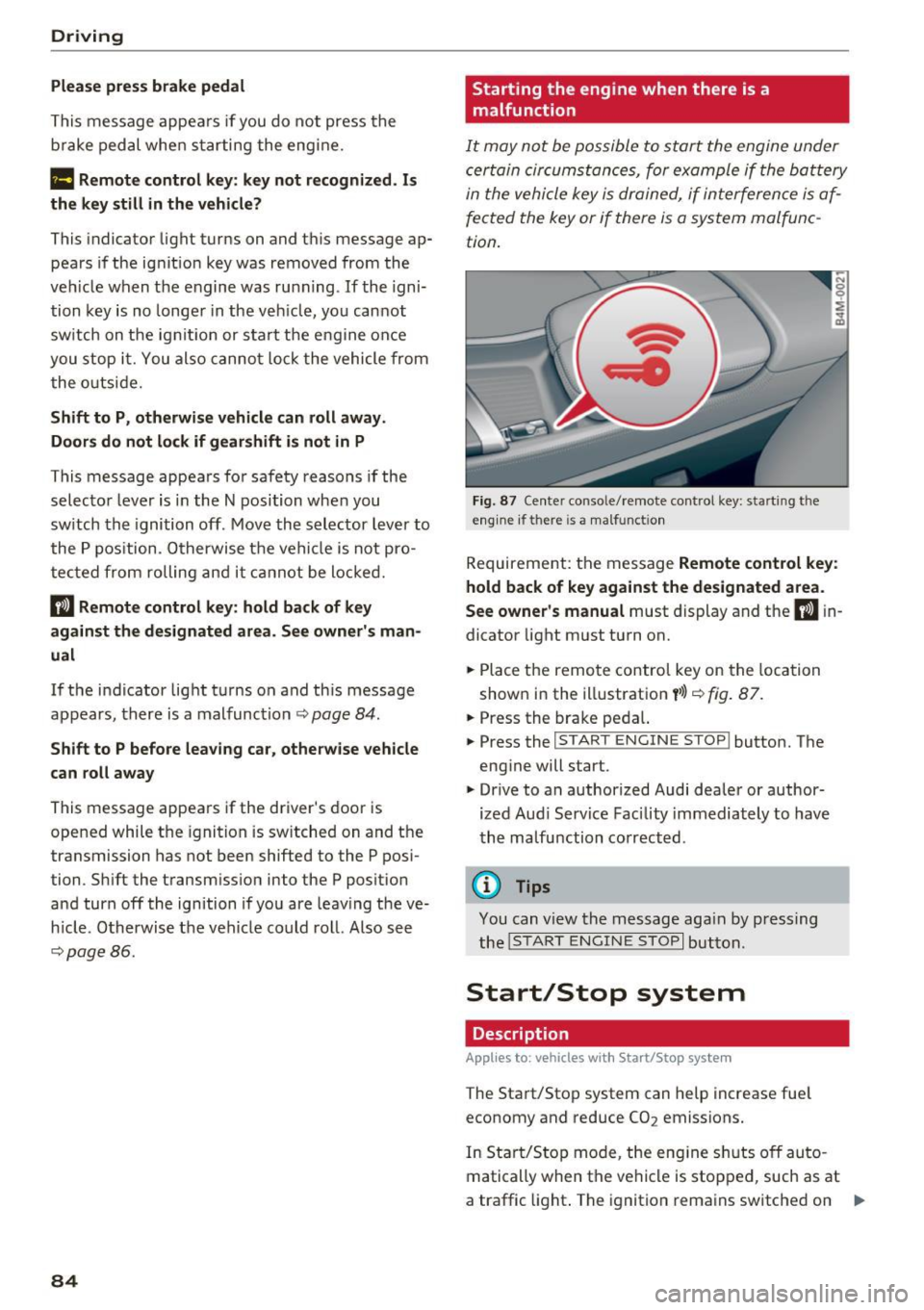
F ig. 87 Ce nte r conso le/ remote control key: start ing t he
eng ine if there is a ma lfunct ion
Requireme nt: the message Remote control ke y:
hold back of ke y aga in st the des ignated area.
S ee own er's manual
must display and the II in
dicator light must turn on.
.,. Place the remo te control key on the loca tion
shown in the illustration
y >l} c::> fig . 87.
.,. Press the brake pedal.
... Press the
!START ENGINE STOP ! button. The
engine will start.
.,. Drive to an authorized Audi dealer or author
ized Aud i Serv ice Facility immediately to have
the ma lfunction corrected .
@ Tips
You can view the message aga in by press ing
the
I S TAR T ENGI NE STOP I button.
Start/Stop system
Description
Applies to: vehicles with Start/Stop system
The Start/Stop system can help increase fue l
economy and reduce CO2 emissions.
In Sta rt/Stop mode, the eng ine s huts off auto
matically when the vehicle is stopped, such as at
a traffic light . The ignition remains switched on .,.
Page 87 of 402
u (0 ...... N r--. N ...... 0
0
:E
automatically when needed.
The Start/Stop system is automatically activ ated
as soon as the igni tion is switched on .
Basic requirements for Start /Stop mode
- The driver's door must be closed.
- The driver 's sea t belt much be fas tened .
- The hood must be closed .
- The vehicle must have driven faster than 2 mph
(3 km/h) since the last time it stopped.
- A trailer must not be hitched to the vehicle .
I f you leave the vehicle during a stop phase, the
e ngine can be restarted withi n app rox imately 30
seconds if the following requirements are met:
- The driver's door must be closed, the dr iver
must be wear ing the safety belt and the brake
peda l mus t be p ressed . Or:
- The driver's door must be closed, the bra ke
pedal mus t be pressed and a gear m ust be se
lected .
(D Note
Always sw itch the Start/Stop system off when
driving through water~
page 84.
@ Tips
The engine stops shortly before the vehicle
comes to a stop
1>.
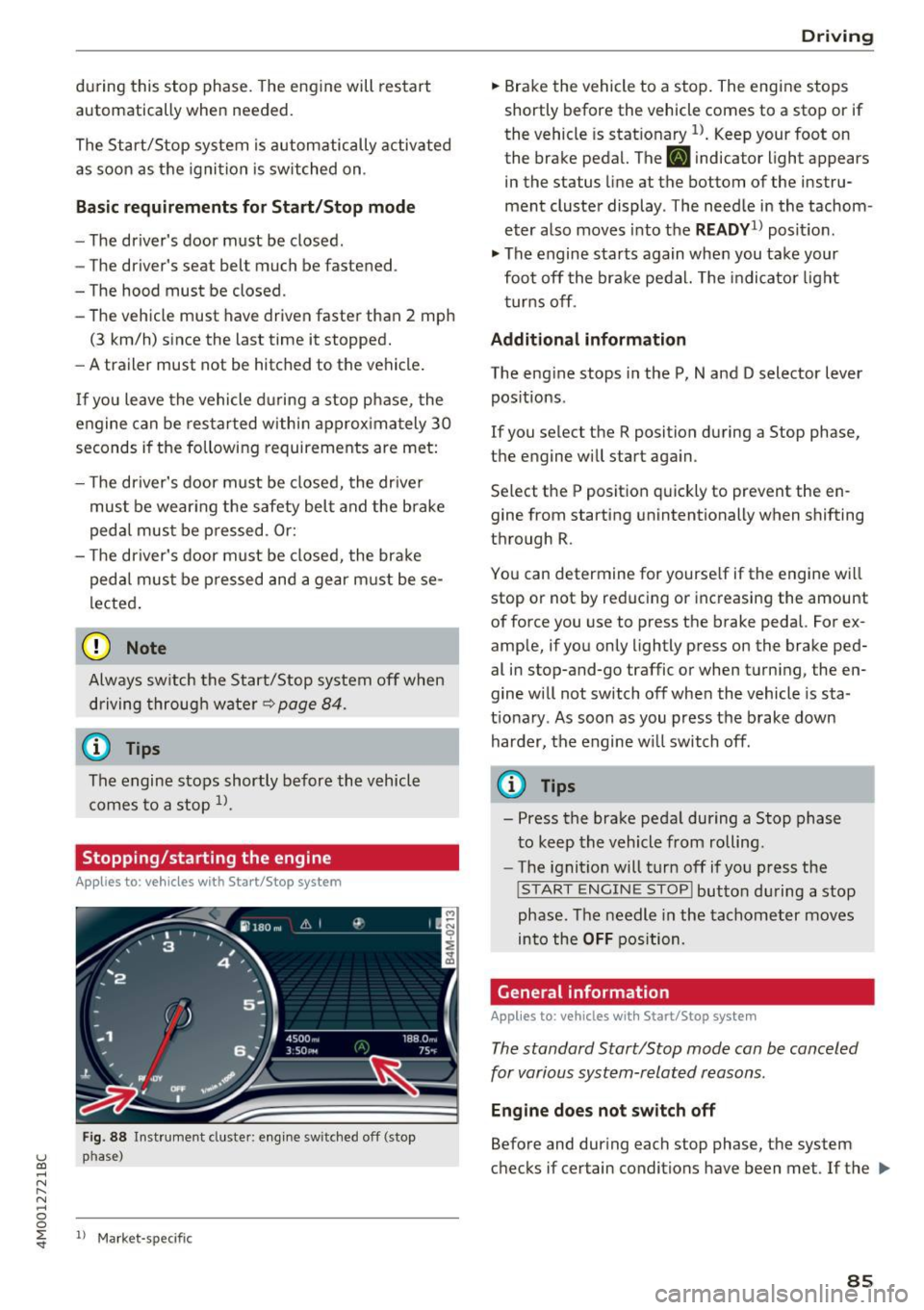
Stopping /starting the engine
Applies to: vehicles with Start/Stop system
Fig . 88 Inst rument cluste r: engine sw itched off (stop
p h ase )
ll Mark et-sp ecific
D rivi ng
.,. Brake the vehicle to a stop. The engine stops
shortly before the vehicle comes to a stop or if
the vehicle is stat ionary
l) . Keep your foot on
the brake pedal. The
[I] indicator light appears
in the status line at the bottom of the instru
ment cluster display . T he need le in the tachom
eter also moves into the
READY1l posit io n .
.,. The engine starts again when you take your
foot off the brake pedal. The indicator light
t urns off .
Additional inform ation
The eng ine stops in the P, N and D selector lever
positions .
If you select the R position during a Stop phase,
the engine will star t again .
Se lect the P position quickly to prevent the en
gine from sta rting unintentionally when shifting
through R .
You can determ ine for yourse lf if the eng ine will
stop or not by reducing or increasing the amount
of force you use to press the brake pedal. For ex
ample, if you only lightly pre ss on the brake ped
al in stop-and-go traffic or when turn ing, the en
gine w ill not switch off when the vehicle is sta
t ionary . As soon as you press the brake down
harder, the engine w ill switch off .
(D Tips
- Press the brake peda l during a Stop phase
to keep the vehicle from rolling.
- The ignition will turn off if you press the
!S TART ENGINE STOPI button during a stop
phase . The needle in the tachometer moves
into the
OFF position.
Gene ral information
Applies to: vehicles with Start/Stop system
The standard Start/Stop mode can be canceled
for various system-related reasons .
Engine doe s not switch off
Before and during each stop phase, the system
checks if certain conditions have been met . If the
liJl,,
8 5
Page 88 of 402
Driving
[jj indicator light appears in the instrument clus
ter disp lay, the engine will not be stopped, for
examp le in the follow ing s ituations:
- T he eng ine has not reached the minimum re
quired temperature for Start/Stop mode .
- The inter io r temperature selected by the cli-
mate contro l system has not been reached.
- The outs ide temperature is ext remely high/low.
- The w indshield is being defrosted .
- The vehicle battery charge level is too low .
- The steering wheel is turned at a sharp angle or
is mov ing.
- After engaging the reverse gear .
- On sharp inclines.
-At high a ltitudes.
Engine automaticall y restarts
The standard Start/Stop mode will be cance led
during a stop phase in the fo llow ing s ituations.
The engine resta rts wit hout any action by the
d river.
- The vehicle rolls, for examp le while on a s lope.
- The inter ior temperature differs from the tem-
perature se lected in the A/C system.
- The w indshield is being defrosted.
- The brake pedal is pressed several times in a
row.
- The vehicle battery charge level is too low.
- Power consumption is high.
The engine can tu rn off again when the condi
tions for Start/Stop mode are met .
Ignition is switched off automatically
To prevent the veh icle bat tery from d rain ing, the
ign it ion wi ll switch off a utomat ica lly under the
following conditions:
- The Sta rt/Stop system has stopped the eng ine .
- The vehicle is stationary.
- You left the vehicle and the eng ine was not re-
started within approximate ly 30 seconds.
I f this happens, you wi ll see the message
Igni
tion turn s off automaticall y in the instrument
cluster and the activated low beams are replaced
by the parking lig ht. The parking lights will
sw itch off after approx imately 30 minutes or
when you lock the vehicle.
86
The ignition also sw itches o ff when you lock the
vehicle from the outside during a stop phase.
If t he Start/Stop system has not tu rned off the
engine or if yo u have switched the S tart/Stop sys
tem off manually, the ignition wi ll not be auto
matically switched off and the engine will contin
u e to run
Q .&. .
_& WARNING
To reduce the risk of poisoning, never allow
the engine to run in confined spaces.
(D Tips
- If you leave the ve hicle with the D/S or R se
lector lever position engaged, the parking
brake is automatically set.
- If you select the D or N selector lever posi
t ion after sh ifting into reverse, the vehicle
must be driven faster than 6 mph (10 km/h)
in order fo r the engine to switch off again .
Manually switching the Start/Stop system
off /on
Applies to: vehicles with Start/Stop system
If you do not wish to use the system, you can
switch it off manually.
-- -- - --=-
,__ -~-----__ ...
~. ~- • - ,,,.. ~ .. 'l> '* A ·- -- ~ -
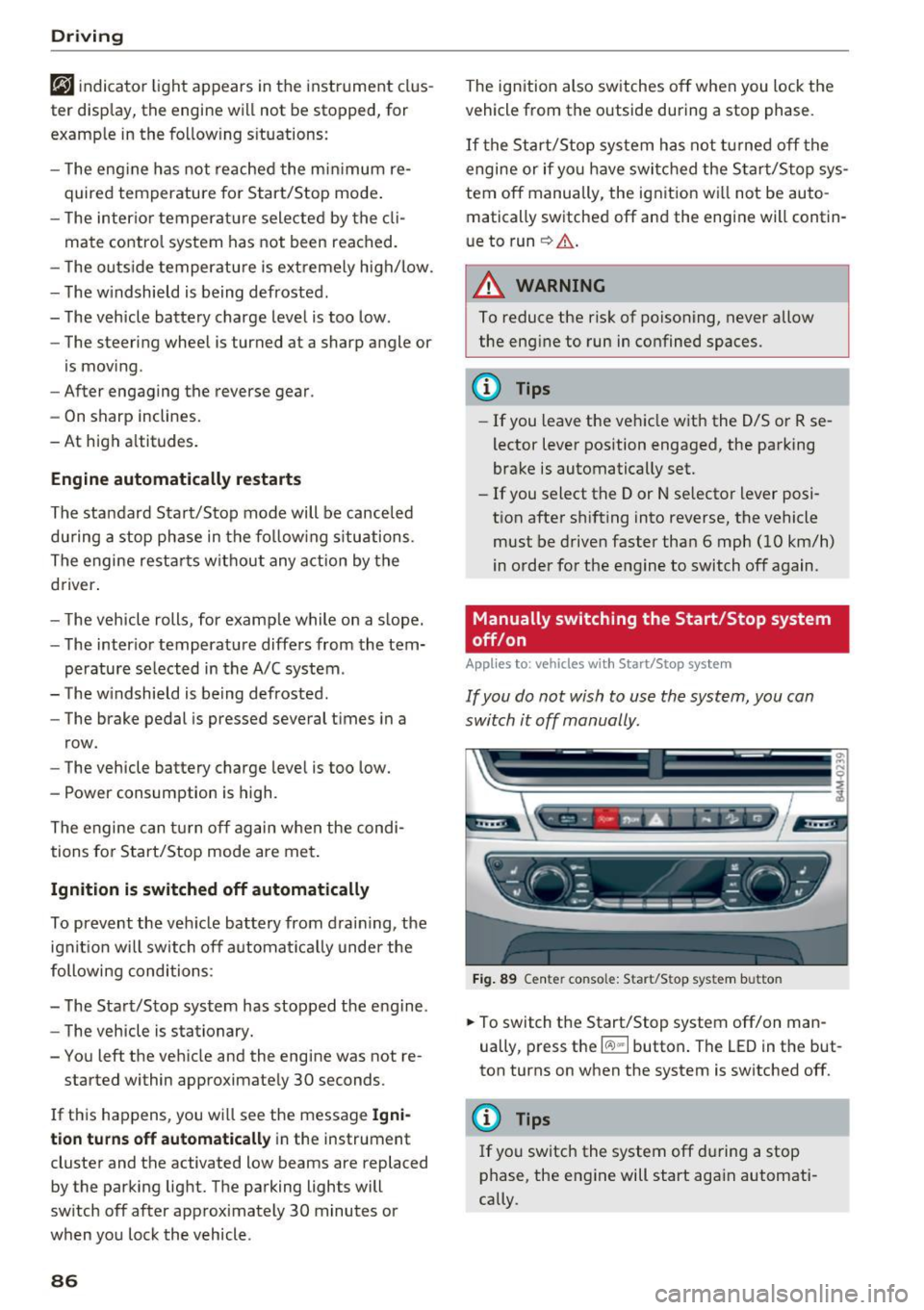
Fig . 89 Ce nter console: Start/Sto p system button
-
.,. To switch the Start/Stop system off/on man
ually, press t he
l(:.l) .. I button . The LED in the but
ton turns on when the system is switched off.
@ Tips
If you switch the system off du ring a stop
phase, the engine will start aga in automati
cally.