change time AUDI Q7 2017 Owner´s Manual
[x] Cancel search | Manufacturer: AUDI, Model Year: 2017, Model line: Q7, Model: AUDI Q7 2017Pages: 402, PDF Size: 100.39 MB
Page 207 of 402
Navigation
Opening navigation
Applies to: vehicles with navigation system
The navigation system directs you to your desti
nation, around traffic incidents and on alterna
tive routes, if desired.
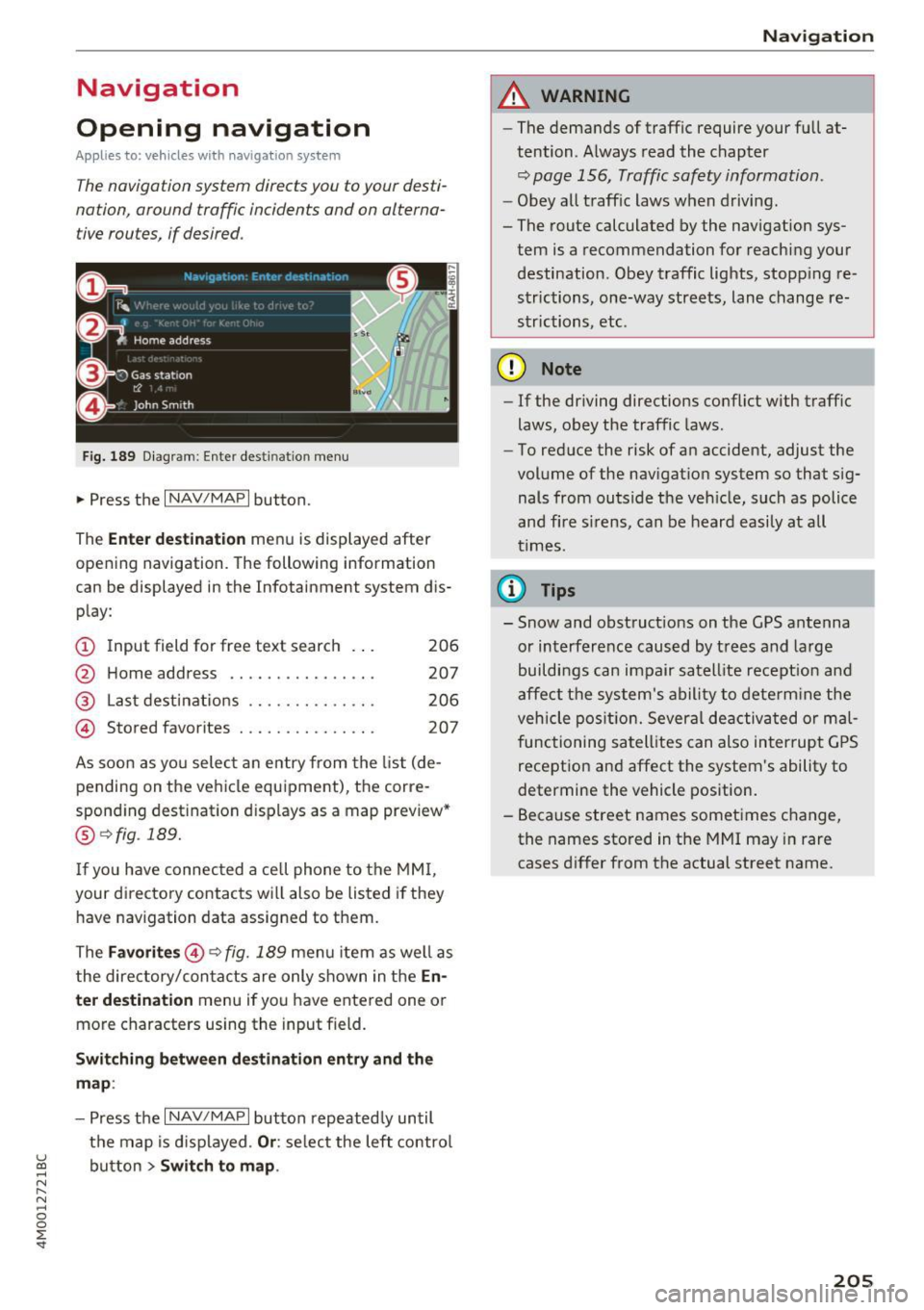
Fig. 189 Diagram : Ente r dest ination menu
.. Press the I NAV/MAPI button.
The
Enter destination menu is displayed after
opening navigation. The following information
can be displayed in the Infotainment system dis
play:
(D I nput field for free text search 206
@ Home address . . . . . . . . . . . . . . . . 207
@ Last destinations . . . . . . . . . . . . . . 206
@ Stored favorites . . . . . . . . . . . . . . . 207
As soon as you select an entry from the list (de
pending on the vehicle equipment), the corre
sponding destination d isplays as a map preview*
@ r::!> fig . 189.
If
yo u have connec ted a ce ll phone to the MMI,
your di rectory contacts will also be listed if they
have navigation data assigned to them.
The
Favorites @¢ fig. 189 menu item as well as
the directory/contacts are only shown in the
En
ter destination
menu if you have ente red one or
more characters using the input field.
Switching between destination entry and the
map :
-Press the I NAV /MAPI button repeated ly until
the map is displayed .
Or: select the left control
u ~ button > Switch to map.
N r--. N ~ 0
0
:E
A WARNING
--The demands of traffic require your full at-
tention. Always read the chapter
q page 156, Traffic safety information.
-Obey all traffic laws when driving.
- The route calculated by the navigation sys-
tem is a recommendation for reaching your
destination. Obey traffic lights, stopp ing re
strictions, one-way streets, lane change re
strictions, etc.
(D Note
- If the driving directions conflict with traffic
laws, obey the traffic laws.
- To reduce the risk of an accident, adjust the
volume of the navigation system so that sig
nals from outside the veh icle, such as police
and f ire s irens, can be heard easily at all
times .
(i) Tips
- Snow and obstruct ions on the GPS antenna
or interference caused by trees and large
buildings can impair satell ite recept ion and
affect the system's ability to determine the
veh icle position. Several deactivated or mal
functioning satellites can also interrupt GPS
reception and affect the system's ability to
determine the vehicle position.
- Because street names sometimes change,
the names stored in the MMI may in rare
cases differ from the actual street name.
205
Page 247 of 402
u co ..... N r--... N ..... 0
0
:E: '
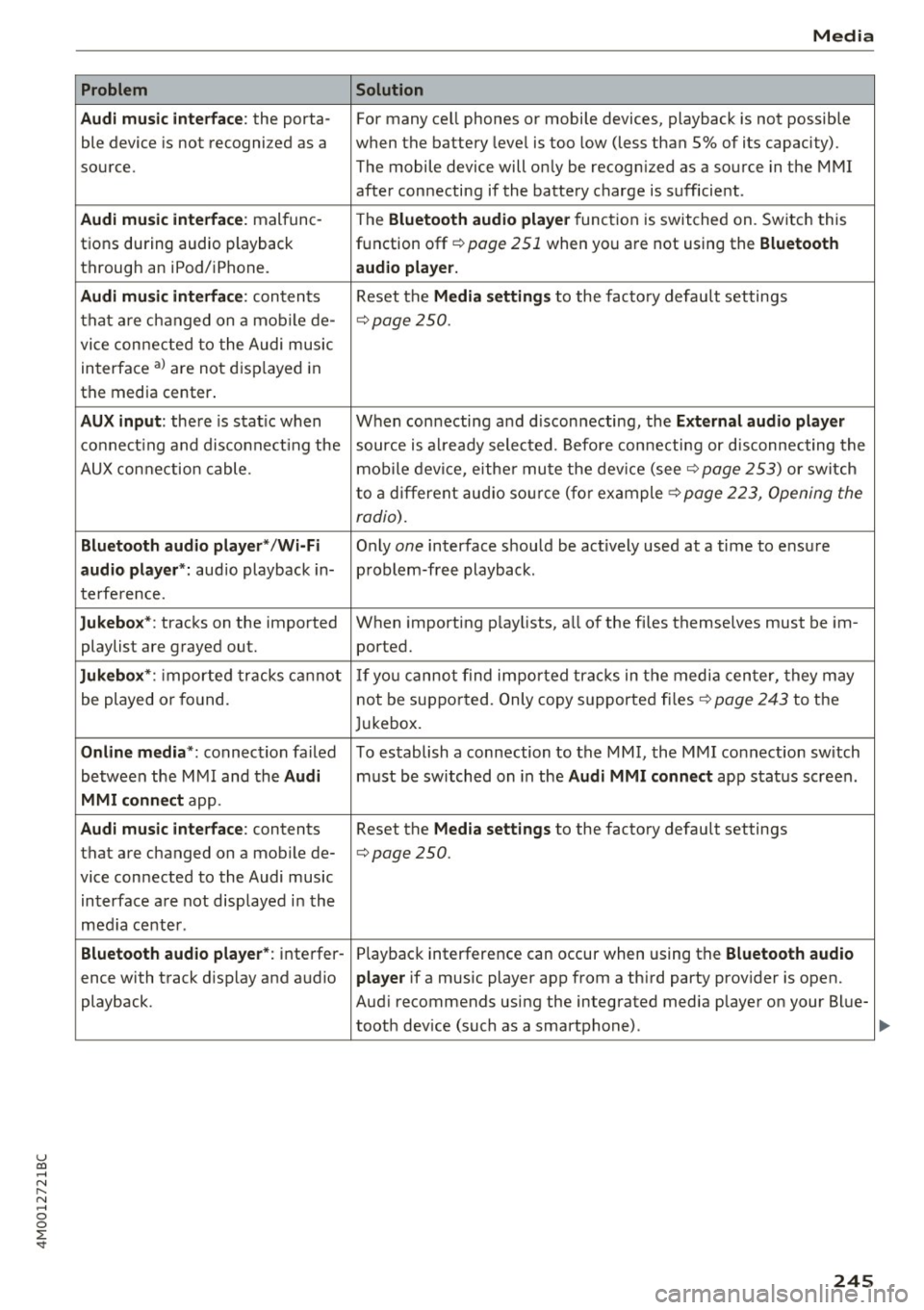
Audi music interface :
the porta-
ble device is not recogni zed as a
source.
Audi music interface : malfunc-
tions during audio playback
through an iPod/ iPhone.
Audi music interface : contents
that are changed on a mobile de-
vice connected to the Audi music
interface al are not displayed in
the media center.
AUX input: there is stat ic when
connecting and disconnecting the
AUX connection cable .
Bluetooth audio player* /Wi-Fi
audio player *:
aud io playback in-
terference.
Jukebox* : tracks on the imported
playlist are grayed out.
Jukebox* : imported tracks cannot
be played or found.
Online media *: connection failed
between the MMI and the
Audi
MMI connect
app.
Audi music interface: contents
that are changed on a mobile de-
vice connected to the Audi music interface are not displayed in the
med ia center .
Bluetooth audio player *: interfer-
ence with track d isplay and audio
playback.
Media
Solution
For many ce ll phones or mobile devices, playback is not possible
when the battery level is too low (less than 5% of its capacity).
The mobile de-vice will only be recognized as a source in the MMI
after connecting if the battery charge is sufficient .
The
Bluetooth audio player f unction is switched on. Switch this
function off
c:> page 2 51 when you a re not using the Bluetooth
audio player.
Reset the Media settings to the facto ry defau lt settings
c:> page250.
When connecting a nd disconnecting, the External audio player
source is already selected. Before connecting or disconnecting the
mobile device, either mute the device (see
c:> page 253) or switch
to a different audio source (for example
c:> page 223, Opening the
radio) .
Only one interface should be act ively used at a time to ensure
problem-free playback .
When importing playlists, a ll of the fi les themselves must be im-
ported.
If yo u cannot find impor ted tracks in the media center, they may
not be supported. Only copy supported files
c:> page 243 to the
Jukebox.
To establish a connection to the MMI, the MMI connection sw itch
must be switched on in the
Audi MMI connect app status screen .
Reset the
Media settings to the factory default settings
c:> page 250.
Playback interference can occur when using the Bluetooth audio
player
if a music player app from a th ird party provider is open.
Aud i recommends using the integrated media player on your Blue-
tooth dev ice (such as a smartphone) .
245
Page 249 of 402
u co ...... N r-... N ...... 0
0
:E: '
Setup
App lies to: veh icles with Audi smartpho ne interface
You can connect your smartphone to the MMI us
ing the Audi smartphone interface . Certain con
tent on your smartphone is adapted to the Info
tainment system display while driving and can
be operated through the MMI control panel.
Requirement
The vehicle must be stationary and the ignition
must be switched on.
iPhone generation 5 or higher with Lightning
connector and iOS 7.1.2 operating system or
h igher.
Or:
Smartphone with Android Auto app and Android
5 .0 Loll ipop operating system or higher.
.,. Connect your smar tphone to the Audi music in
te rface
c:> page 235 using a USB adapter
c:>page 234, fig. 213 .
.. Se lect and confirm A cti va te Apple CarPl ay or
Acti vate And roid Auto now.
.. Follow the system instruct ions.
.,. Pay attention to any add itional system prompts
on your smartphone if applicable.
If you chose not to use Apple CarPlay or Android
Auto when connecting your smartphone for the
first time, you can start the Audi smartphone in
terface later on using the
Connection m an ager .
.. Se lect: I MENU I button > Audi smartphone in·
terfa ce
> Change to connecti on manager .
.. Connect your smar tphone to the Audi music in
terface using a USB adapter
c:> page 234,
fig . 213.
.. Se lect and confirm Audi smartphone in the
Connection manager c:> page 250. You can se
lect your smartphone in the list of devices that
are already paired
c:> page 251.
.,. Follow the system instruct ions.
Always follow the informat ion found in
c:>(D in
Wi-Fi hotspot on page 195 .
Audi smartphon e int erfac e
{!) Tips
-The functions that can be used depend on
the fo llow ing factors, among others:
- the brand of your smartphone
- the vers ion of the operating system in
your smartphone
- the software ve rsion of the app used
- the USB adapter cab le and correct connec-
tion
- your cell phone se rvice provider
- the customized settings on your smart -
phone
- One of the factors
above or a combina tion
of any of them could cause your smartphone
to be incompatib le wit h the Audi smart
phone interface. Compatibility cannot be
guaranteed for all types of smartphones.
For more informat ion and assistance, refe r
to the use r guide and the manufactu rer of
your smartphone .
- If the connected smartphone has voice con
tr ol, you can operate your smartpho ne usi ng
t he external voice recognition system
c:>page 174.
-The menu language show n in the MMI is
based on the settings in you r smartphone .
- T he time d isplayed in the MMI is based o n
t he settings in your smartphone.
- Several MMI functions are not avai lab le
when Apple Car Play or Andro id Auto is ac
tive.
- You ca nnot co nnect any mob ile dev ices via
Bl uetooth when an App le CarPlay connec
tion is ac tive .
Operating
Applies to: vehicles wit h Audi smartp hone interface
Opening a menu
App le CarP lay :
you can go back to the Apple Car
Play main menu regardless of the se lec ted menu
item by p ressing and holdi ng the
I BACKI button .
Android Auto : to go back to the Android Auto
me nu bar, push the control knob down.
247
Page 251 of 402

u co ...... N r-... N ...... 0
0
:E: '
Setting the date and
time
You can set the clock time manually or using the
CPS*.
.,. Select : I MENU I button> Settings> left control
button >
MMI settings> Date & t ime .
.,. Or:
select : IMENUI button> Vehicle > left con-
trol button >
Vehicle settings> Date & time.
Automatic setting
When this function is switched on~. the time
and date are automatically set.
Time
Requirement: the Automatic setting must be
switched
off .
Press the control knob. You can set the Time
manually by turning and pressing the control
knob.
Date
Requirement: the Automatic setting must be
switched
off.
Press the control knob . You can set the Date
manually by turning and press ing the cont rol
knob.
Time zone
When selecting the appropriate time zone, a
sampling of countr ies in this zone will be listed .
Automatic time zone*
When this function is switched on~. the time
will automatically adjust to the corresponding
time zone.
Automatic daylight saving time*
When this function is switched on~. the time
will automatically switch to daylight saving time .
Time format
If you select 24h, the clock will disp lay, for ex
ample ,
13:00 . If you se lect AM/PM , the clock
will disp lay, for example,
1:00 PM .
System settings
Date format
If you select DD.MM .YYYY , the date display will
show, for example,
31.08.2018. If you select
MM/DD/YYYY , the date display will show, for ex
ample,
08/31/2018. If you select YYYY-MM
DD ,
the date display will show, for example,
2018-08-31 .
MMI settings
.,. Select: !MENUI button> Settings> left control
button >
MMI settings .
Language
You can change the display language as well as
the language for the voice guidance* and voice
recognition system*.
T he number of languages available depends on
the market.
Measurement units
The following measurement units can be set de
pending on availab ility:
Speed , Distance , Tem
perature , Fuel consumption , Volume , Pressure.
Tool tips
When this function is switched on~' your MMI
shows you tips for input . The frequency of how
often it displays decreases with time.
Speech dialog system
Applies to: vehicles wit h voice recognition system
Depending on vehicle equipment, the following
functions may be available:
Command display : when this function is switch
ed on ~, the MMI will show you the possible
commands for voice input in the respective
menu.
Short dialog : when this function is switched on
~. a shorter form of the prompts is used .
Command during voice output*: this function is
switched on at the factory . When this function is
switched on~. you can say new commands dur-
ing announcements. You do not need to wait for
the signal tone (beep) during an announcement.
When the funct ion is switched off
0, you need to .,,.
249
Page 254 of 402
System settings
for the MMI to be visib le to other devices . Se
lect
Invisible for the MMI to not be visible to
other devices. However, it is still possib le to es
tab lish a Bluetooth connection with paired de
vices when the v is ibility is switched off. Select
Off to turn visibility off . Then a Bluetooth con
nect ion is not possible .
-Bluetooth audio player : when this function is
switched on~. the Bluetooth aud io player is
available as a sou rce in the
Media menu .
-Bluetooth name : the MMI Bluetooth name (for
example .,AUDI MMI 2016") is displayed and
can be changed .
Online settings*
- Data usage counter :
the amount of data pack
ets that are sent and received through the MMI
is d isplayed . You can reset the data usage infor
mation to zero using the
Reset data counter
option.
-Network status: the mobile network p rovider
for data service as well as the network status
are displayed.
Wi-Fi settings*
See c> page 195, Wi-Fi hotspot.
Storing as a default telephone
Applies to: vehicles with telephone
Requirement: a cell phone must be connected to
the MMI
c> page 176 .
As soon as the cell phone is in range and the
Bluetooth function on the ce ll phone and in the
MMI is switched on, this cell phone is given prior
ity over the other Bluetooth devices and is con
nected directly to the MMI. The connected cell
phone is displayed first in the device list.
Network settings*
- Login :
you can chose an automatic login to
your ce ll phone service provider's network, or
yo u can choose a
manual login from the list of
available networks.
- Network selection: available networ ks in the
present location can be selected under network
selection. This function is only available for the
Manual login setting.
252
Apple CarPlay sound settings/ Android Auto
sound settings
Applies to: vehicles with Audi smartphone interface
See ¢ page 253.
About Apple CarPlay/ About Android Auto
Applies to: vehicles with Audi smartphone interface
Here you w ill find lega l informa tion regarding
the use of Apple CarPlay or Andro id Auto and in
formation about device-specific data exchange.
Delete CarPlay device/Delete Android Auto
device
Applies to: vehicles with Audi smartphone interface
Requirement: yo ur cell phone must not be con
nected to the Aud i m usic interface with a USB
adapter .
Select:
Audi smartphone > a device from the list
> r igh t control button.
To remove your cell phone from the list, select
and confirm
Delete CarPlay device or Delete An
droid Auto device .
System update
.,,. Select : !ME NUI button> Settings > left control
button >
System maintenance.
- System update:
slide the storage device with
the update data into the appropriate drive
¢ page 229. Select and confi rm the drive>
Start update. The length of the process de
pends on the size of the update.
- Reset driver installation: the selected media
driver package is reset to the settings at the
time of delivery.
-Version information : info rmation on the MMI
sof tware version and the navigation database*
so ftware version is disp layed. The
Software in
formation
function also prov ides information
on the software contained in the MMI and the
licensing agreement.
Page 255 of 402
Sound settings
The sound distribution and volume of the MMI
can be adjusted individually. The settings depend
on vehicle equipment.
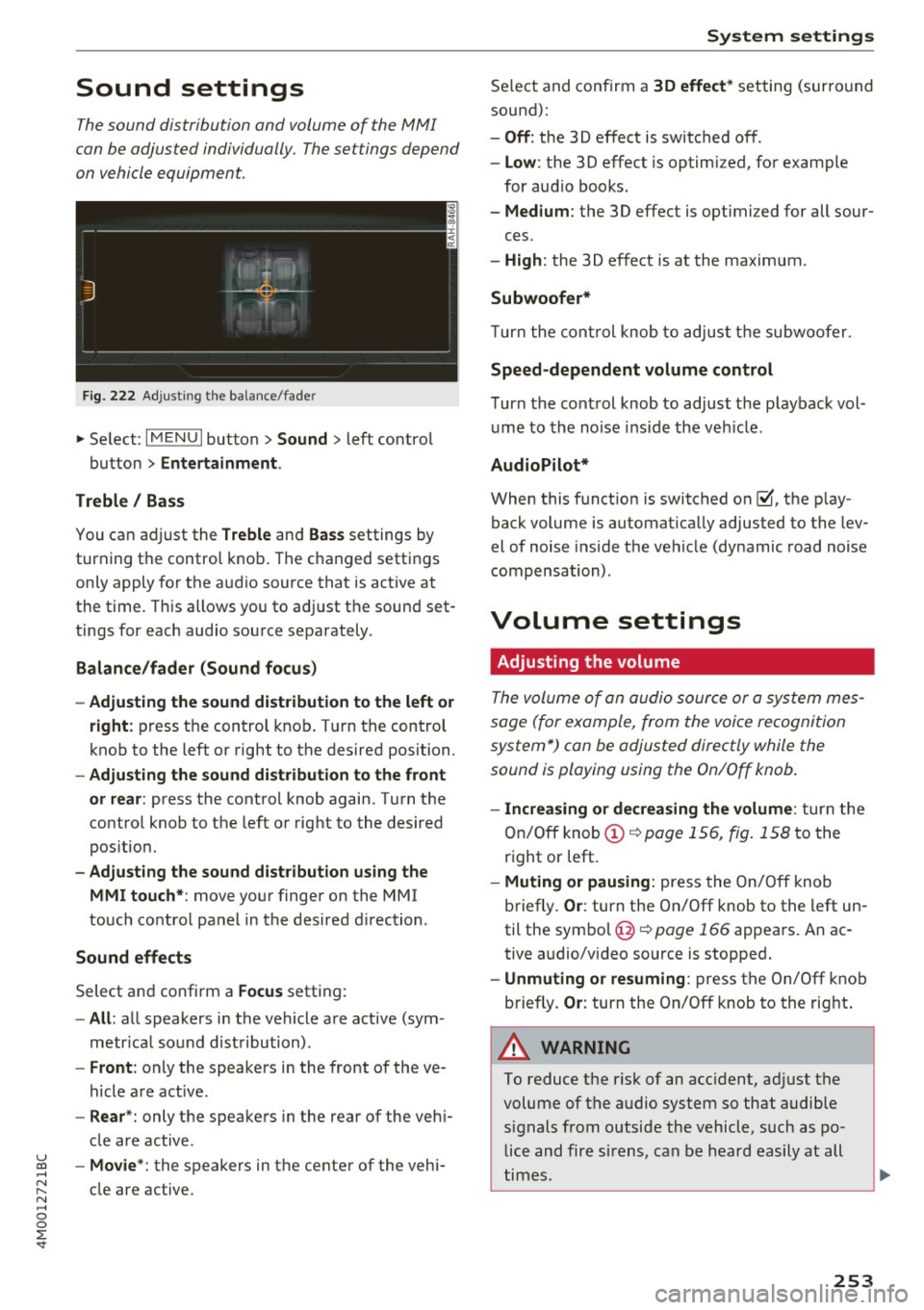
F ig . 222 Adjust ing the balance/fade r
... Se lect : I MENU I button> Sound > left contro l
button >
Entertainment .
Treble / Bass
You can adjust the Treble and Bas s settings by
turning the control knob . The changed settings
only apply for the a udio source that is act ive at
the t ime. T his allows you to ad just the sound set
tings for each audio source separately .
Balance/fader (Sound focu s)
- Adjusting the sound dist ribution to the left or
right :
press t he control knob . T ur n the control
knob to the left or right to the desired position.
- Adjusting the sound d ist ribution to the front
or rea r:
press the contro l knob again. Turn t he
contro l knob to the left o r right to the desired
pos itio n.
- Adjusting the sound d istribution using the
MMI touch* :
move your finger on the MMI
touch co ntrol panel in the desired d irection .
Sound effects
Select and confirm a Focus setting:
-All : all speakers in the vehicle are active (sym
metr ica l sound distribution) .
-Front : only the speakers i n the front of the ve
hicle are active .
-Rear *: only the speakers in the rear of the veh i-
cle are active.
u ~ - Mo vie *: the speakers in the center of the vehi-
~ cle are active. N .... 0
0
:E: '
Se lect and confirm a 30 effect * setting (surro und
sound):
- Off : the 30 effect is switched off .
-Low : the 3D effect is optimized, for example
for aud io books.
- Medium : the 3D effect is optimi zed for all sour-
ces.
- High : the 3D effect is at the maximum.
Subwoofer*
Turn the cont rol knob to adjust the subwoofer.
Speed-dependent volume control
T urn the cont rol knob to ad just the p layback vol
ume to the no ise inside the veh icle .
AudioPilot*
When this f unct ion is switched on~. the play
back volume is automat ica lly adjusted to the lev
el of noise inside the vehicle (dynamic road noise
compensation) .
Volume settings
Adjusting the volume
The volume of an audio sour ce or a sys tem mes
sage (for example, from the voice recognition
system*) can be adjusted directly while the
sound is playing using the On/Off knob.
- Increasing or dec reasing the volume : turn the
On/Off knob(!)¢
page 156, fig. 158 to the
right or left.
- Muting or pausing : press the On/ Off knob
briefly .
Or: turn the On/Off knob to the left un
til the symbol @¢
page 166 appea rs. An ac
tive audio/v ideo source is stopped.
- Unmuting or re suming : press the On/Off kno b
briefly.
Or : turn the On/Off knob to the right .
A WARNING
'-
To reduce the risk of an accident, ad just the
volume of the audio system so that audible signals from outside the vehicle, such as police and fire s irens, can be heard easily at all
times.
-
253
Page 299 of 402
u co ...... N r-... N ...... 0
0
:E: '
switched on.
- If the
PASSENGER AIR BAG OFF~. light
does not come on and stay on, immediate
ly install the forward-facing child seat in a
rear seating position and have the airbag
system inspected by your authorized Aud i
dealer.
- Always buckle the child seat firmly in
place even if a ch ild is not sitt ing in it. A
loose child seat can fly around during a
sudden stop o r in a collision.
-Always read and heed all WARNINGS whenever using a child restraint in a vehi
cle ~
page 265, Safety belts, ~ page 2 73,
Airbag system
and ~ page 295, Impor
tant information .
@ Tips
Always replace ch ild restraints that were in
stalled in a vehicle dur ing a crash. Damage to
a child restraint that is not visib le co uld cause
it to fail in anothe r collision situation .
Advanced front airbag system and children
Your vehicle is equipped with an "Advanced Air
bag System" in compliance with United States
Federal Motor Vehicle Safety Standard (FMVSS)
208, as well as Canada Motor Vehicle Safety
Standard (CMVSS) 208 as applicable at the time
your veh icle was manufactured.
The Advanced Airbag system in your vehicle has
been certified to meet the "low-risk" require
ments for 3-and 6-year old children on the pas
senger side and small adults on the driver side.
The low risk deployment crite ria are intended to
reduce the risk of injury through inte raction with
the airbag that can occur, for examp le, by being
too close to the steering whee l and instrument
panel when the airbag inflates . In addition, the
system has been certified to comply with the
"suppression" req uirements of the Safety Stand
ard, to turn off the front airbag for infants up to
12 months who are restra ined on the front pas
senger seat in child restraints that are listed in
the Standard .
Child safety
Even though your vehicle is equipped with an Ad
vanced Airbag system, all chi ldren, especially
those 12 years and younger, should always ride in the back seat properly restrained for their age
and size. The airbag on the passenger side makes
the front seat a potentia lly dangerous place for a
child to ride . The front seat is not the safest place
for a ch ild in a forward-fac ing ch ild safety seat .
It
can be a very dangerous place fo r an infant o r a
la rger ch ild i n a rea rwa rd-facing seat .
T he veh icle 's Advanced Airbag System has a ca
pacit ive passenger detection system in the front
passenge r seat cushion that can detect the p res
ence of a baby or a ch ild in a child restra int sys
tem on this seat .
The capacitive passenger detection system reg is
te rs the changes that result in an electrical field
when a child, a ch ild restraint, and a baby b lan ket
are on the front passenger seat. The change in
the measured capacitance due to the presence of
a chi ld, a child restraint, and a baby blanket on
the front passenger seat is related to the child
restra int system resting on the seat. The meas
ured capacitance of a child restraint system var
ies depend ing on the type of system and specific
make and model.
The electrical capac itance of the various types,
makes, and models of child restraints specif ied
by the U .S.National Highway Traff ic Safety Ad
min istrat ion (NHTSA) in the relevant safety
standard are stored in the Advanced Airbag Sys
tem contro l unit together with the capacitances
typ ica l of infants and a 1-year old child. When a
child restraint is used on the front passenger
seat with a typical 1 year-old infant, the Ad
vanced Airbag System compares the capacitance
measured by the capacitive passenger detection
system with the data stored in the electronic con
trol unit .
Child restraints and Advanced Airbags
Regardless of the ch ild restraint that you use,
make sure that it has been certified to meet Safe
ty Standards and has been ce rt ified by its manu
fact urer for use w ith an airbag . Always be su re
that the child restraint is properly installed at
llo-
297
Page 326 of 402
Checking and Filling
-If the hood is not latched completely, it
could fly up while you are driving and ob
struct your vision.
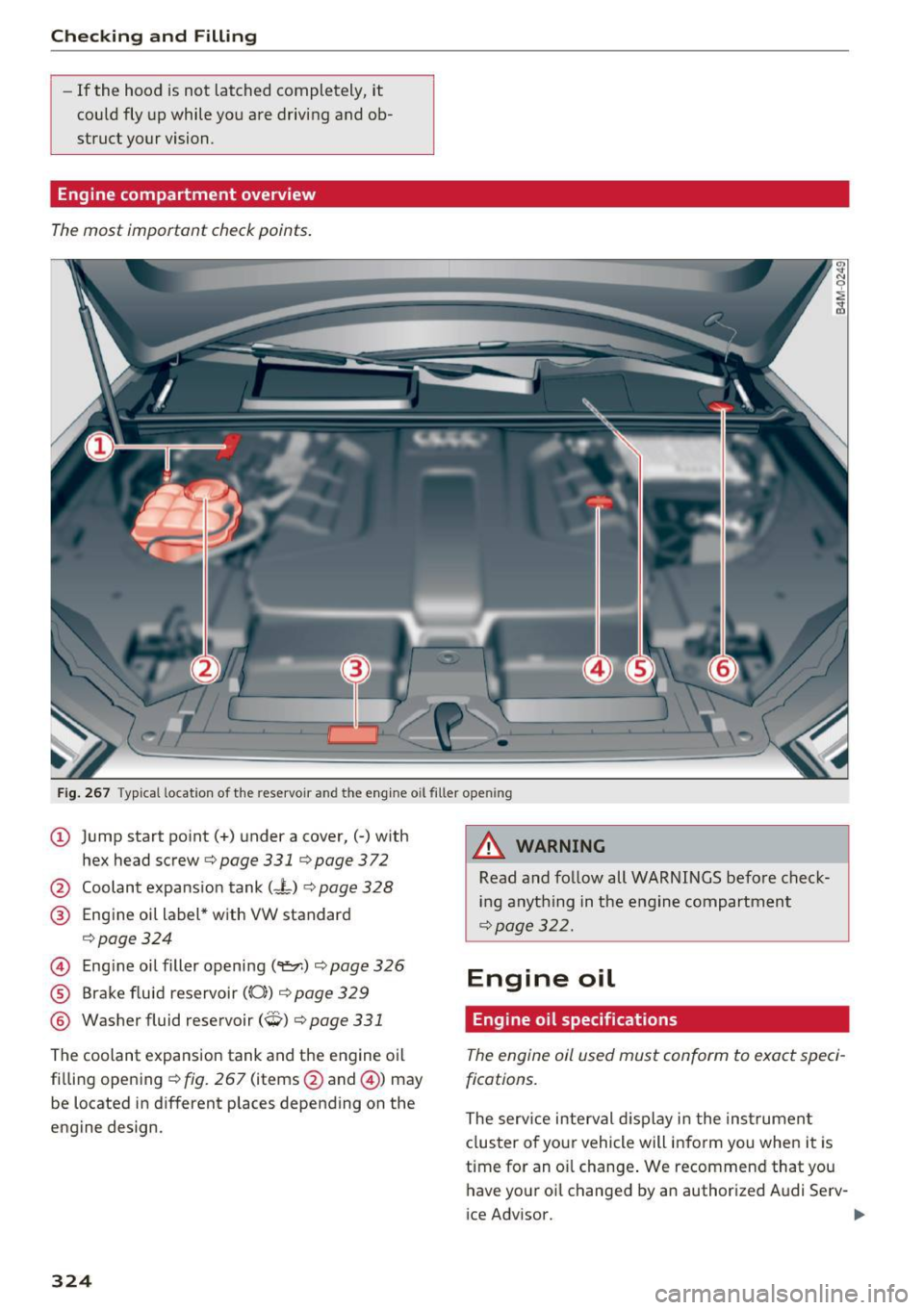
Engine compartment overview
The most important check points.
Fig. 267 Typ ical location of the reservoir and the engine oil filler opening
@ Jump start point(+) under a cover,(-) with
hex head screw
c;, page 331 qpage 372
@ Coolant expansion tank (-L) ~ page 328
@ Engine oil label * with VW standard
,=;, page 324
© Engine oil filler opening (9:::r.) c;, page 326
® Brake fluid reservoir ((0)) c;, page 329
® Washer fluid reservoir (W) c;, page 331
The coolant expansion tank and the engine o il
filling opening
c;, fig . 267 (items @and @) may
be located in different places depending on the
engine design.
324
8,_ WARNING
Read and follow all WARNINGS befo re check
ing anything in the engine compartment
c;, page 322.
Engine oil
Engine oil specifications
The engine oil used must conform to exact speci
fications.
The serv ice interval d isplay i n the instrumen t
clus ter of your vehicle will inform you when it is
time for an o il change . We recommend that you
have your oi l changed by an author ized Audi Serv-
ice Advisor. ..,_
Page 327 of 402
u co ...... N r-... N ...... 0
0
:E: '
oil that matches the Audi oil quality standard listed on the st icker. The sticker is located at the
front of the engine compartment
c> page 324,
fig . 267.
Audi re comm end s
Ocastrot /[g/j;t{E'g Frtw.::<.. ·-:dr,,JA.L
A ud i recommends Longlife h igh perform ance
e ngin e oil from Audi Genui ne Part s
Using the proper engine oil is important for the
functionality and service life of the eng ine. Your
engine was factory -filled with a high-quality oil
which can usua lly be used throughout the entire
yea r.
Note
Your Limited New Vehicle Warranty does not
cover damage o r malfunctions due to failure
to follow recommended maintenance and use requirements as set fo rth in the Aud i Owner's
Manual and Warranty
& Maintenance booklet.
- Use only a high q ual ity eng ine oil that ex-
pressly complies with the Aud i oil q uality
standard specified for your vehi cle's engine .
Using any other oil can cause serious engine
damage .
- Do not mix any l ubricants o r other additives
into the engine oil. Doing so can cause en
gine damage.
(D Tips
If you need to add oil and there is none availa
b le that meets the Audi oil quality standard
your eng ine requires, you may add a total of
no more than 0.5 qt (0.5 l) of a h igh-quality
"synthet ic" o il that meets the following speci
fications .
- Vehicles with gasoline eng ine: ACEA A3 or
API SM with a viscosity grade of SAE OW-30,
SAE 5W -30 or SAE 5W-40 .
- Vehicles with d iesel eng ine : ACEA C3 or
API CF with a v iscosity grade of SAE OW-30
or SAE 5W -30 .
- For more information about engine o il that
has been approved for your vehicle, please
contact e ither you r authorized Audi dea le r
or A udi C ustome r Relat ions at
Ch eck ing and Filling
1 (800) 822 -2834 or visit our web site at
www.audiusa .com or www .audicanada .ca.
Engine oil consumption
The engin e in your v ehicl e dep ends on an ad e
quat e amount of oil to lubricate and cool all of
its moving parts.
In order to provide effect ive lub rication and cool
ing of inte rnal engine components, all inte rnal
combustion engines consume a certain amount
of oil. Oil consumption varies from eng ine to en
gine and may change significantly over the life of
the engine. Typ ically, engines w ith a specified
break -in period (see
c> page 79) consume more
o il dur ing the break-in per iod than they consume
after oil consumption has stabilized .
Under normal cond itions, the rate of oil con
sumption depends on the qua lity and viscos ity of
the oil, the RPM (revolutions per m inute) at
which the engine is operated, the amb ient tem
perature and road condi tions. Further facto rs a re
the amo unt of oil di lution from water co ndensa
tion or fue l resid ue a nd the oxidation level of the
oi l. As any engine is subject to wear as mileage
builds up, the oi l consumption may increase ove r
time unt il replacement of worn components may
become necessary.
With a ll these variab les coming into play, no
standard rate of oi l consumption can be estab
lished or spec ified . There is no alternative to reg
ular and frequent checking of the oi l level, see
Note .
If the y ellow engine oil leve l warning symbo l Bl
in the instrument cluster lights up, you should
check the o il level as soon as possible
c> page 326. Top off the o il at your earliest con
venience
c> page 326 .
A WARNING
--Before you check anyth ing in the eng ine com-
partment, always read and heed all WARN
I NGS
c> .&. in Working in the engine compart-
ment on page 322.
Ill>
325
Page 329 of 402
u co ...... N r-... N ...... 0
0
:E: '
- Oil should never enter the sewer system or
come into contact with the ground.
- Pay attention to legal requirements when
disposing of empty oil containers.
(D Tips
- The oil level indicator in the display is only
an informational disp lay. If the oil leve l is
too low, a minimum oil warning appears in
the instrument cluster. Add oil and close
the hood. The current oil level is displayed
in the instrument cluster the next time the
ignition is switched on .
- The engine oil consumption may be up to
0.5 quart/600 miles (0.5 liter/1,000 km),
depend ing o n driving style and operating
cond itions. Consumption may be higher
during the first 3,000 miles (5,000 km). Be
ca use of th is, the engine oil level m ust be
checked regularly.
It would be best to check
each time you ref uel your vehicle and before
l ong drives.
Changing the engine oil
We recommend that hove your oil changed by an
authorized Audi dealer or a qualified service sta tion .
Before you check anyth ing in the engine compart
ment,
al ways r ead and h eed all WARNIN GS~ &
in Working in the engine compartment on
page 322.
The engine oil must be changed according to the
intervals specified in your Warranty
& Mainte
nance booklet . This is very important because the
lubricating properties of oil diminish gradually
during normal vehicle use.
Under some circumstances the engine oi l should
be changed more frequently. Change oil more of
ten if yo u drive mostly short distances, operate
the vehicle in dusty areas or under predominant ly
stop-and-go traffic condit ions, or have your vehi
cle where temperatures remain below freezing
for extended periods .
Check ing and Filling
Detergent additives in the oi l will make fresh oil
look dark after the engine has been running for a
short time . This is normal and is not a reason to
change the oi l more often than recommended.
Because of the problem of proper disposal, along
with the specia l tools and necessary expertise re
quired, we strongly recommend that you have
your o il changed by an authorized
Audi de aler or
a qual ified service stat ion.
If yo u choo se to ch ange your oil yo urself , please
note the following important information:
A WARNING "--
To reduce the risk of persona l injury if you
must change the eng ine oil in your vehicle
yourself:
- Wear eye protection.
-
-To reduce the r isk of burns from hot engine
oil, let the engine cool down to the touch.
- When removing the oil drain plug w ith your
f ingers, stay as far away as possible. Always
keep your forearm parallel to the ground to
help prevent hot oil from running down your
arm.
- Drain the oil into a container designed for
this purpose, one large enough to hold at least the tota l amount of oil in your engine.
- Engine oil is poisonous. Keep it well out of
the reach of children.
- Continuous contact with used engine o il is
harmful to your skin. Always protect your
skin by washing oil off thoroughly with soap
and water .
«I) Note
Never mix oil additives with your engine oil.
These additives can damage your engine and
adversely affect yo ur Audi limited New Vehi
cle Warranty .
@ For the sake of the environment
-Before chang ing your oil, first make sure
you know where you can properly d ispose of
the used oil.
- Always dispose of used engine o il properly .
Do not dump it on garden soil, wooded
327