key AUDI Q7 2017 Owner´s Manual
[x] Cancel search | Manufacturer: AUDI, Model Year: 2017, Model line: Q7, Model: AUDI Q7 2017Pages: 402, PDF Size: 100.39 MB
Page 69 of 402
u (0 ...... N r--. N ...... 0
0
:E
Appl ies to: ve hicles with cooled glove compartme nt
The cooled glove compartment only functions
when the AIC system is switched on.
-.- !i:CI:!·
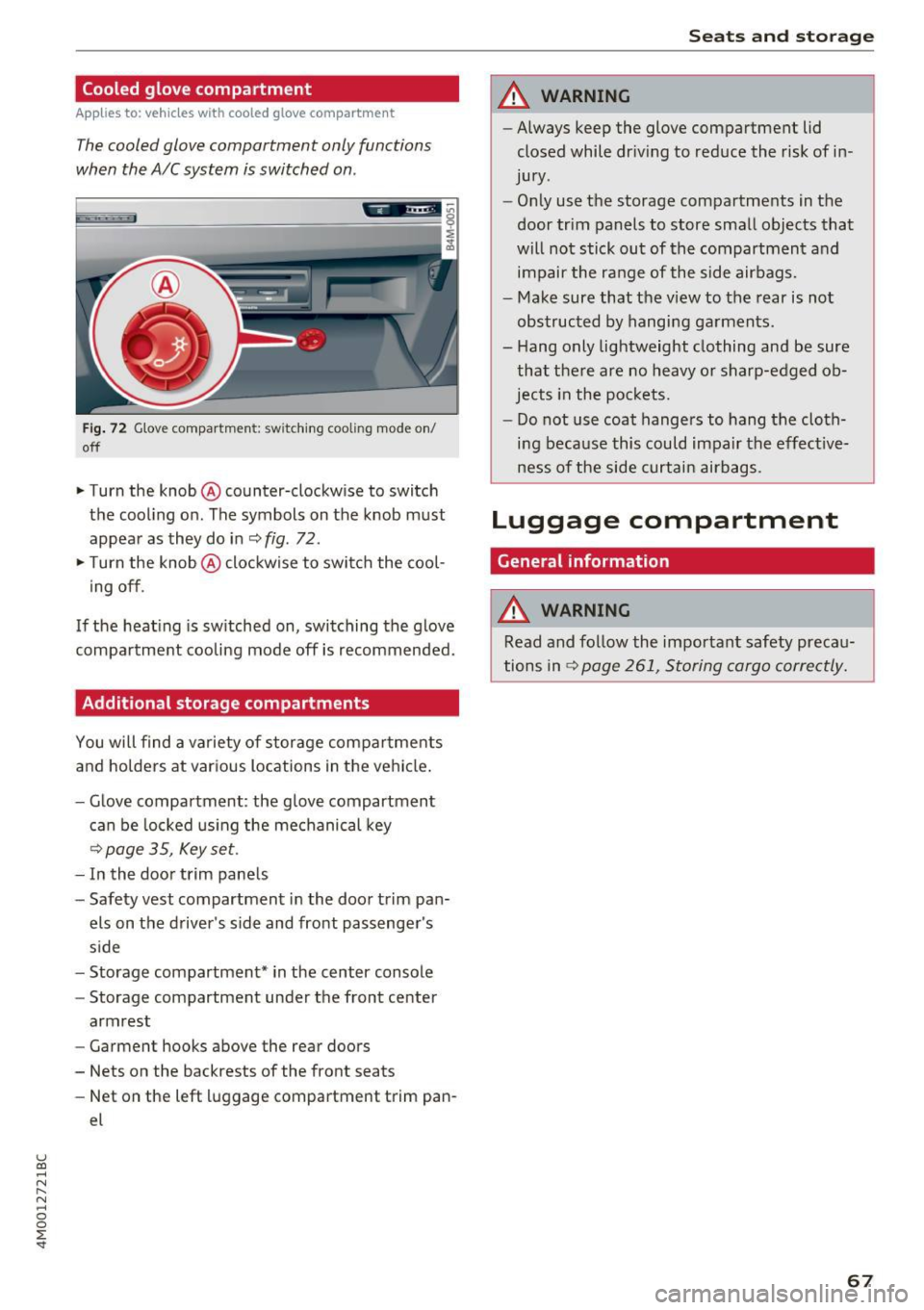
Fig. 72 G love compartment: switching cooling mode on/
off
~ Turn the knob @ counter-clockw ise to switch
the cooling on. The symbols on the knob must
appear as they do in
~ fig . 72 .
~ Turn the knob@ clockwise to switch the cool
ing off .
If the heating is switched on, switching the glove
compartment cooling mode off is recommended.
Additional storage compartments
You will find a variety of storage compartments
and holders at various locations in the vehicle.
- Glove compartment : the glove compartment
can be locked using the mechanical key
<=> page 35, Key set.
-In the door trim panels
- Safety vest compartment in the door trim pan-
els on the driver's side and front passenger's
side
- Storage compartment* in the center console
- Storage compartment under the front center
armrest
- Garment hooks above the rear doors
- Nets on the backrests of the front seats
- Net on the left luggage compartment trim pan-
el
Seats and storage
A WARNING
--Always keep the glove compartment lid
closed while dr iving to reduce the risk of in
jury .
- Only use the storage compartments in the
door trim panels to store small objects that
will not stick out of the compartment and
impair the range of the side airbags.
- Make sure that the view to the rear is not
obstructed by hanging garments.
- Hang only lightweight clothing and be sure
that there are no heavy or sharp-edged ob
jects in the pockets.
- Do not use coat hangers to hang the cloth
ing because this could impair the effective
ness of the side curtain airbags .
Luggage compartment
General information
A WARNING
Read and follow the important safety precau
tions in
r::!> page 261, Storing cargo correctly.
67
Page 73 of 402
u co ...... N r-... N ...... 0
0
:E: '
Description
A ppl ies to: ve hicles wit h 3-z on e del uxe automatic cl imate
co ntrol or 4 -zo ne de luxe automa tic cl imate co ntr ol
The climate control system warms, cools and re
moves humidity from the air in the vehicle interi
or . It is the most effective when the windows and
sunroof* are closed. If there is a bui ld-up of heat
inside the veh icle, ventilat ion can help to speed
up the cooling process.
In all heating mode functions except for
defrost,
the blower on ly switches to a higher speed once
the eng ine coolant has reached a sufficient tem
perature.
Pollutant filter
The pollutant filter removes pollutants such as
dust and pollen from the air .
Key recognition
The climate control settings are automatically
stored and assigned to the remote control key
that is in use.
Warm and cold
(®} For the sake of the environment
-If you would like to reduce fuel consump
tion, switch the air conditioning off. This
will also reduce emissions.
- In vehicles with a diesel engine, you can
switch the auxiliary heater off in the Info
tainment system.
(D Tips
-To prevent interference with the heating
and cooling output and to prevent the win
dows from fogging over, the air intake in
front of the windshield must be free of ice,
snow or leaves.
- Condensation from the cooling system can
drip and form a puddle of water under the
vehicle. This is normal and does not mean
there is a leak.
- The energy management system may tem
porarily switch off certain functions, such as
the seat heating* or rear window defogger.
These systems are available again as soon
as the energy supply has been restored.
71
Page 80 of 402

Warm and cold
and off ~ ¢ page 14, fig. 11. The message
Steering wheel heating: on /Stee ring wheel
heating : off
appears in t he instr ument cluster
display.
The temperatu re is maintaine d at a constant lev
e l when steering whee l heating is switched on.
T he stee ring wheel heat ing settings are s to re d
a utomatically and ass igned to the remote cont ro l
key that is in use .
78
Page 85 of 402
u co ...... N r-... N ...... 0
0
:E: '
See the information in r:!:> page 84, Start/Stop
system.
A WARNING , ~
To reduce the risk of poisoning, never allow
the engine to run in confined spaces.
-
@ Note
Avoid high engine speed, full throttle, and
heavy engine load if the engine has not
reached operating temperature yet. You could
damage the engine.
@ For the sake of the environment
Do not let the engine run while parked to
warm up. Begin driving immediately. This re
duces unnecessary emissions.
(D Tips
-Some noise after starting the engine is nor
mal and is no cause for concern.
- If you leave the vehicle with the ignition
switched on, the ignition will switch off af
ter a certain amount of time. Make sure that
electrical equipment such as the exterior
lights are switched off.
Starting the engine
.,. Bring the vehicle to a full stop.
.,. Press the
I STAR T ENGINE STOPI button
r::!:> page 82, fig . 86 .
Emergency off function*
If it is absolutely necessary, the engine can also
be turned off while driving at speeds starting at
4 mph (7 km/h) . To switch the engine off, press
the
! START ENGINE STOPI button twice in a row
briefly or press and hold for longer than two sec
onds.
A WARNING
- Never turn off the engine before the vehicle
has come to a complete stop. The full func
tion of the brake booster and the power
steering is not guaranteed. You must use
Driving
more force to turn or brake. Because you
cannot steer and brake as you usually
would, this could lead to accidents and seri ous injuries .
- Always take the key with you whenever you
leave your vehicle. Otherwise, the engine
could be started or electrical equipment
such as the power windows could be operat
ed. This can lead to serious injury.
- For safety reasons, always park the vehicle with the selector lever in the P position .
Otherwise, there is the risk that the vehicle
could roll unintentionally .
(D Note
If the engine has been under heavy load for
an extended period of time, heat builds up in
the engine compartment after the engine is
switched off and there is a risk of damaging
the engine. For this reason, let the engine run
for at idle for approximately two minutes be
fore shutting it off.
(D Tips
For up to 10 minutes after stopping the en
gine, the radiator fan may turn on again auto
matically or it may continue to run (even if
the ignition is switched off) for the following reasons :
- The coolant temperature is increasing due
to trapped heat .
- If the engine is warm and the engine com
partment also heats up from strong sun
light.
- Applies to: vehicles with diesel particulate
filter: The emissions control system is heat
ed through the regeneration process, even if
the engine has not reached its operating
temperature yet .
Messages
Engine running. Warning! Turn off ignition be
fore leaving vehicle
This message appears and a warning tone sounds if you open the driver's door when the engine is
running . .,._
83
Page 86 of 402
Driving
Ple ase pre ss brake pedal
This message appears if you do not press the
brake pedal whe n starting the eng ine.
Ill Rem ote control key : key not recognized . Is
the key still in th e ve hicle ?
This indicator light turns on and th is message ap
pears if the ignit ion key was removed from the
ve hicle when the engine was running . If the igni
tion key is no longe r in the veh icle, you cannot
sw itch on the ignit ion or sta rt the engine once
you stop it. You also cannot loc k the vehicle from
the o uts ide.
Shift to P, otherwi se vehicl e can roll awa y.
D oor s do not lo ck if gea rshift i s not in P
This message appears for safety reasons if the
selecto r lever is in the N position whe n you
sw itch the ignition off . Move the selector lever to
the P pos ition. Otherwise the vehicle is not pro
tected from rolling and it cannot be locked.
II Rem ote control key : hold b ack of k ey
again st th e designat ed are a. S ee owner' s m an
ual
If the indicator light turns on and th is message
appears, there is a malfunction
c::> page 84.
S hift to P before le aving ca r, otherw ise vehicle
can r oll away
This message appears if the driver's door is
opened while the ignition is switched on and the
transmission has not been shifted to the P posi
tion . Shift the transmission into the P position
and turn off the ignition if you are leav ing the ve
h icle. Otherwise the veh icle could roll. Also see
c::> page 86 .
84
Starting the engine when there is a
malfunction
It may not be possible to start the engine under
certain cir cumstances, for example if the battery
in the vehicle key is drained, if interference is af
fected the key or if there is a system malfunc
tion.
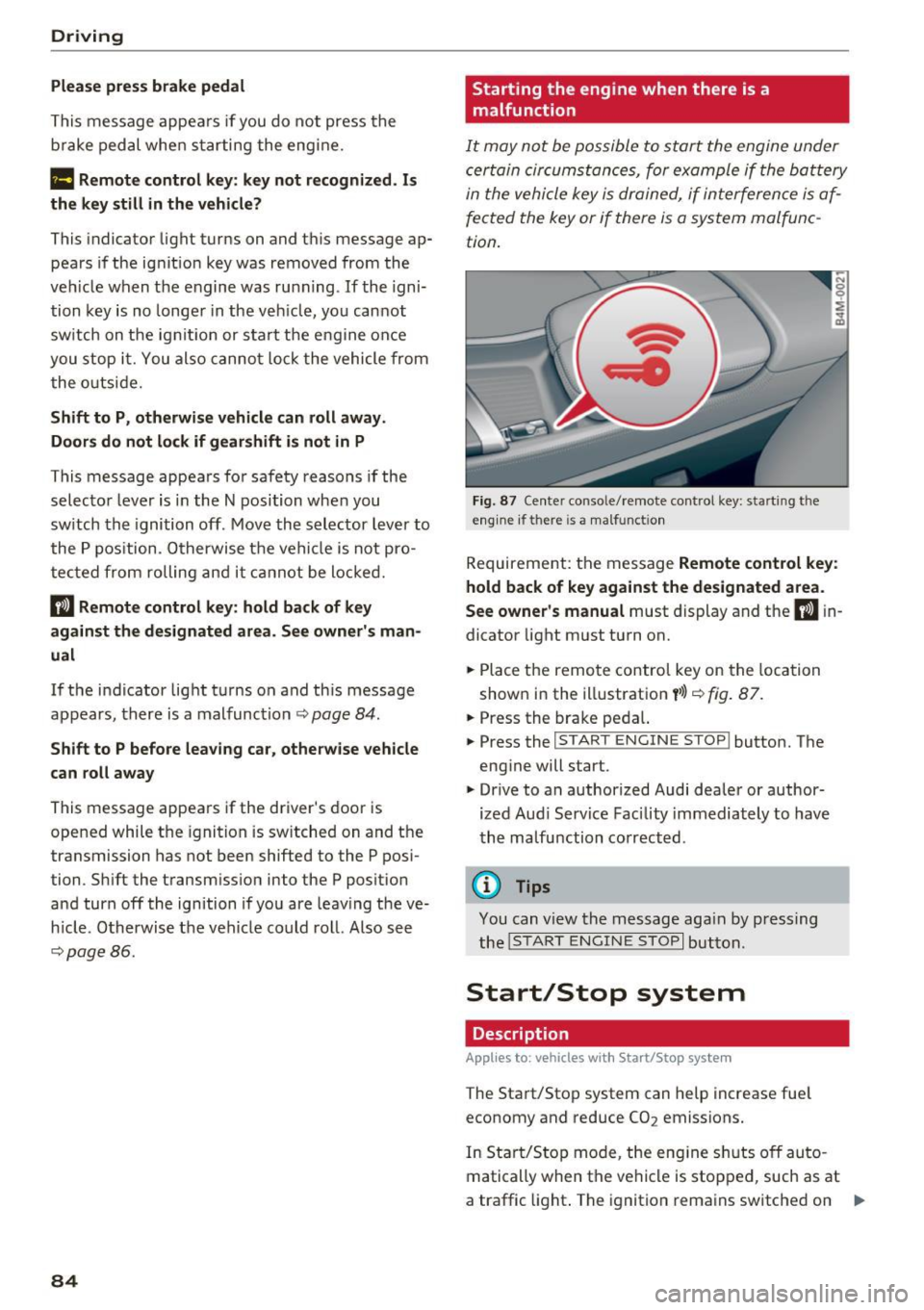
F ig. 87 Ce nte r conso le/ remote control key: start ing t he
eng ine if there is a ma lfunct ion
Requireme nt: the message Remote control ke y:
hold back of ke y aga in st the des ignated area.
S ee own er's manual
must display and the II in
dicator light must turn on.
.,. Place the remo te control key on the loca tion
shown in the illustration
y >l} c::> fig . 87.
.,. Press the brake pedal.
... Press the
!START ENGINE STOP ! button. The
engine will start.
.,. Drive to an authorized Audi dealer or author
ized Aud i Serv ice Facility immediately to have
the ma lfunction corrected .
@ Tips
You can view the message aga in by press ing
the
I S TAR T ENGI NE STOP I button.
Start/Stop system
Description
Applies to: vehicles with Start/Stop system
The Start/Stop system can help increase fue l
economy and reduce CO2 emissions.
In Sta rt/Stop mode, the eng ine s huts off auto
matically when the vehicle is stopped, such as at
a traffic light . The ignition remains switched on .,.
Page 90 of 402
Driving
"'Turn the engine off¢.&, .
"'Turn the steering wheel when parking on in
clines so that the wheels will roll into the curb
if the vehicle starts moving .
A WARNING
-Do not press the accelerator pedal inadver
tently if a gear is selected when the vehicle is stationary and the engine is running . Oth
erwise, the vehicle will start to move imme
diately and this could result in an accident.
- Emergency braking should only be used in
an emergency, when the normal brake pedal
has failed or the brake pedal is obstructed .
During emergency braking, your vehicle will
brake similar to heavy braking. ESC and the
associated components (ABS, ASR, EDL)
cannot overcome the laws of physics.
Around curves and when road or weather conditions are bad, a full brake application
can cause the vehicle to skid or the rear end
to swerve, which increases the risk of an ac
cident.
- If the power supply fails, you cannot set the
parking brake if it is released. In this case ,
park the vehicle on level ground and secure
it by placing the selector lever in the P posi
tion. See an authorized Audi dealer or au
thorized Audi Service Facility for assistance.
- Always take the vehicle key with you when
leaving your vehicle, even if for a short peri
od of time. This applies particularly when
children remain in the vehicle. Otherwise,
children could start the engine, release the
parking brake or operate electrical equip
ment such as power windows, which in
creases the risk of an accident .
- No one, especially children, should remain
in the vehicle when it is locked . Locked
doors make it more difficult for emergency
workers to get into the vehicle, which puts lives at risk .
{D) Tips
When stopping at a traffic signal or stopping
in city traffic, you can set the parking brake
manually. The vehicle does not have to be
held with the brake pedal. The parking brake
88
eliminates the tendency to creep when a se
lector lever position is engaged. As soon as
you press the accelerator pedal, the parking
brake releases automatically and your vehicle
starts to move¢
page 88.
(D Tips
-Occasional noises when the parking brake is
set and released are normal and are not a
cause for concern.
- The parking brake goes through a self-test cycle at regular intervals when the vehicle is
stopped . Any noises associated with this are
normal.
- If there is a power failure, the parking brake
will not set if it is released, and it will not release if it is set ¢& . See an authorized
Audi dealer or authorized Audi Service Fa
cility for assistance.
Starting to drive
Various convenience and safety functions may be
available when the vehicle begins driving, de
pending on vehicle equipment.
Starting on hills with the parking brake set
Requirement: the driver's door must be closed .
"'To start driving comfortably when on a hill, set
the parking brake and begin driving as usual.
The braking force of the parking brake does not release automatically until the wheels build up
enough driving force .
Starting on hills with hill hold assist
Hill hold assist makes it easier to start on hills.
Requirement: the driver's door must be closed
and the engine must be running.
"'To activate hill hold assist , press and hold the
brake pedal for several seconds. The vehicle
must be in an uphill direction of travel.
After releasing the brake pedal , the braking pow
er is maintained for a brief moment¢
A to pre
vent the vehicle from rolling back when starting.
During this time, you can easily begin to move
your vehicle.
111>
Page 107 of 402
u (0 ...... N r--. N ...... 0
0
:E
country.
Operation
App lies to: ve hicles with camera -based t raff ic s ign recogni
tio n
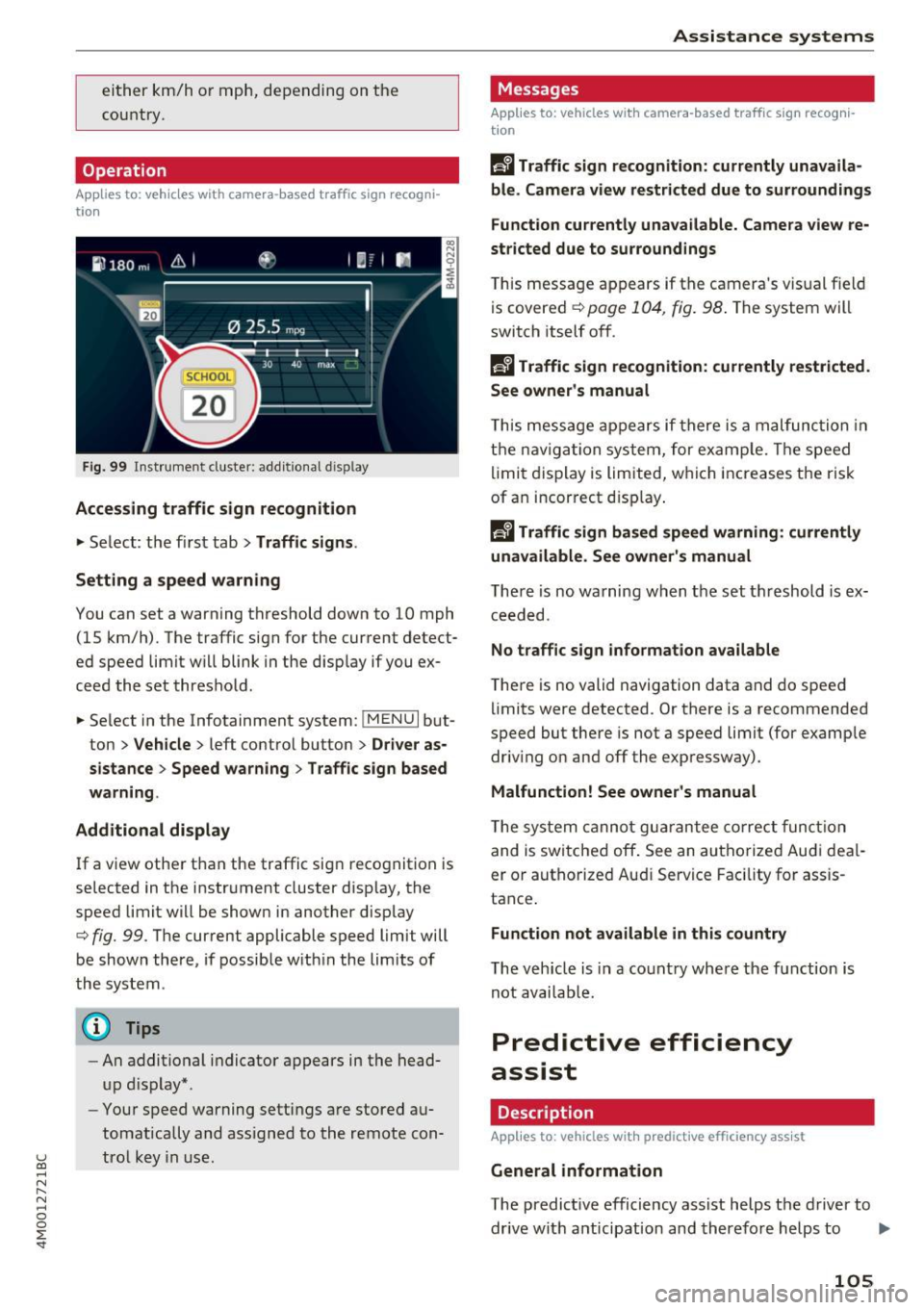
Fig. 99 Instrument cluste r: addi tio nal d isp lay
Accessing traffic sign recognition
.. Select: the first tab> Traffic signs.
Setting a speed warning
You can set a warning threshold down to 10 mph (15 km/h) . The traffic sign for the current detect
ed speed limit w ill blink in the disp lay if you ex
ceed the set threshold .
.. Select in the Infotainment system:
!MENUI but
ton >
Vehicle > left control button > Driver as
sistance> Speed warning > Traffic sign based
warning.
Additional display
If a view other than the traffic sign recognition is
selected in the instrument cluster display, the
speed limi t will be shown in another display
c::> fig. 99. The current applicable speed limit will
be shown there, if possible within the limits of
the system .
(D Tips
-An additional indicator appears in the head
up display* .
- Your speed warning settings are stored au
tomatically and assigned to the remote con
trol key in use.
Assistance systems
Messages
Applies to: veh icles w ith camera -based traff ic sign recog ni
tion
f!'A Traffic sign recognition: currently unavaila
ble. Camera view restricted due to surroundings
Function currently unavailable . Camera view re
stricted due to surroundings
This message appears if the camera's visual field
is covered
c::> page 104, fig. 98 . The system will
switch itself off.
R Traffic sign recognition: currently restricted .
See owner's manual
T his message appears if there is a malfunction in
the navigation system, for example. Th e speed
limit display is limited, which increases the risk
of an incorrect display.
f!'A Traffic sign based speed warning: currently
unavailable. See owner's manual
There is no warning when the set threshold is ex
ceeded.
No traffic sign information available
There is no valid navigation data and do speed
lim its were detected . Or there is a recommended
speed but there is not a speed limit (for example
driv ing on and off the expressway) .
Malfunction! See owner 's manual
The system cannot guarantee correct function
and is switched off . See an autho rized Audi deal
er or authorized Aud i Service Facility for assis
tance .
Function not available in this country
The vehicle is in a country where the function is
not availab le.
Predictive efficiency
assist
Description
App lies to : veh icles w it h predictive effic iency ass ist
General information
The predict ive efficiency assist helps the driver to
drive with anticipat ion and therefore helps to ..,_
105
Page 114 of 402
Ass is tance sy stems
again. The distance between the two vehicles
will change in the instrument cluster disp lay.
When approach ing a veh icle driving ahead, the
adaptive cr uise control system brakes to match
that vehicle's speed and then adjusts to the set distance.
If the vehicle driving ahead accelerates,
then the adaptive cruise control will also acceler
ate up to the speed that you have set.
The higher the speed, the greater the distance
c::> ,&. . The Distan ce 3 setting is recommended .
That is equal to the general recommendation of
"half the speed shown on the speedometer".
The distances provided are specified values . De
pending on the driving situation and how the ve hicle ahead is driving, the actual distance may be
more or less than these target distances.
I f you change the time gaps, the new ly set value
appears briefly in the instrument cluster display
I ii for Di st a nc e 3. This only occurs if the Driver
ass ista nce
display is not currently shown in the
disp lay
c::> page 109, fig. 105 .
Distance 1 : this setting corresponds to a d istance
of 92 feet (28 meters) when traveling at 62 mph
(100 km/h), or a time distance of 1 second.
Di stance 2 : this setting corresponds to a d istance
of 118 feet (36 meters) when traveling at 62
mph (100 km/h), or a time distance of 1.3 sec
onds.
Di stance 3 : this setting corresponds to a d istance
of 164 feet (SO meters) when traveling at 62
mph (100 km/h), or a time distance of 1.8 sec
onds.
Di stance 4 : this setting corresponds to a d istance
of 219 feet (67 meters) when traveling at 62
mph (100 km/h), or a time distance of 2.4 sec
onds.
Di stance 5 : this setting corresponds to a d istance
of 328 feet (100 meters) when traveling at 62
mph (100 km/h), or a time distance of 3.6 sec
onds.
112
A WARNING
When setting the distance, the driver is re
sponsible for adheri ng to any applicable legal
regulations.
@ Tips
- Depending on the selected driving mode in
dr ive se lect* and the set distance, the driv
ing behav ior will vary from dynamic to com
fortab le when accelerating
c::, page 135.
- Distan ce 3 is set automatically each time
you switch the ignition on. If you would like
to set anothe r distance as the default set
t ing, you can have the
adaptive crui se con
trol menu enabled by an autho rized Aud i
deale r or author ized Audi Service Fa cility.
- Your settings are a utomat ica lly stored and
assigned to the remote con trol key be ing
used .
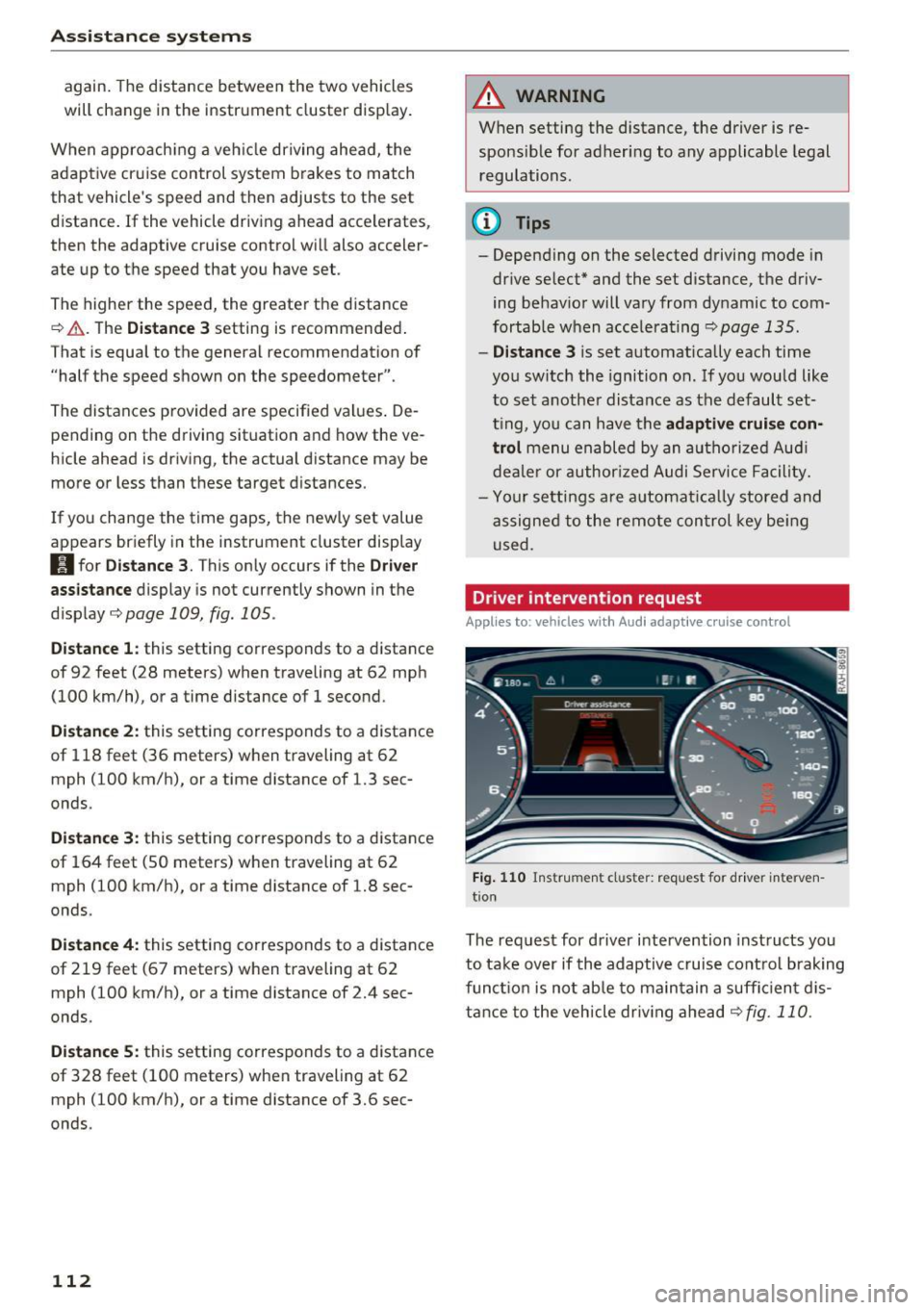
Driver intervention request
Applies to: vehicles with Audi adaptive cruise control
Fig . 110 Instr ument cluster: req uest for driver interven
t ion
The request for driver intervention instructs you
to take over if the adaptive cruise control brak ing
funct ion is not ab le to ma in tain a suff ic ient d is
tance to the vehicle dr iv ing ahead
c::,fig. 110.
Page 124 of 402
Assistance systems
authorized A udi dealer or authorized Audi
Serv ice Facility chec k their function.
@ Tips
- You can can cel the sys tem bra kin g interven
tion if yo u accelerate considerably or swerve
away.
- K eep in mind t hat pre sense city c an brake
u nexpected ly . Always sec ure any cargo o r
ob jects t hat you a re t ransport ing to reduce
the r isk o f damage or inj ury.
- Specific pre sense city funct ions sw itch off
when the ESC is limited o r switc hed off
c> page 149 or the hill descent assist is
switc hed on
c> page 150.
- When there is a mal func tion in the camera,
the pre sense city funct ions also switch off.
Settings in the
Infotainment system
Applies to: veh icles with Audi pre sense
"Se lect in the In fo ta in m en t sys tem: IMENU I but
t on
> Vehicle > left contro l bu tton > Driver as
sistance
> Audi pre sense .
Turn on/off Audi pre sense -
the pre sense func
tions ca n be tur ned on and off.
If the system is switched off, it switches on aga in
automatically once the ignition is sw itched on
again .
Early warning -the early warning can be sw itch
ed
off o r the pre sense city/front warning point
can be set
( Early /Medium /late ).
Set the warnin g time fo r the early warn ing to
Early at f irst. I f th is causes undesired ea rly warn
ings to appear, then set the wa rning time to
Me
dium .
The late warning t ime sho uld on ly be set
i n specia l cir cumstances, for example, whe n driv
i n g with a very dynam ic sty le.
@ Tips
Your sett ings a re automat ically stored and as
signed to the remote control key be ing used .
122
Messages
Applies to: vehicles with Audi pre sense
[II Audi pre sen se: malfunction! Please contact
Service
This mess age app ears w hen the pre sense f unc
t ion is affec ted. For ex ample, th is co uld be
ca used by a faul ty se nsor. Drive to an a uthori ze d
Audi dealer or authorized A udi Service Fac ility im
med iate ly to have the ma lfunction corrected.
II Audi pre sen se currently restricted. Restrict
ed sensor vision due to surroundings. See own
er 's manual
This mess age app ears if the radar se nso r a nd
c a mera v iew is obs truc ted, for ex ample by le aves,
snow , heavy s pray o r dirt . If necessary, clean the
senso rs and t he area around the camera
c> page 107 , fig. 101 or c>page 127 , fig. 122 .
(ii Audi pre sen se: currently restricted . Towing
mode
Fo r vehicles with a tra ile r h itch installed a t the
f ac to ry, the pre se nse rear func tions swi tch off
whe n the ele ct ric al connec tor a t th e so ck et is
p lu gged in. The re is no guaran tee t he f unctions
will switc h off when using a ret rofitted trailer
hitch.
II Audi pre sen se: currently restricted
This message ap pears if the ESC is rest ricted or
swi tched off, fo r example.
II Audi pre sense: currently restricted. See
owner's manual
This message appears w hen the re is a temporary
failure in a s ubsystem, such as the ESC. If t his
message appears repeatedly, d rive to an au thor
i zed Audi dealer or author ized Audi Se rvice Facili
ty to have th e ma lfu nction co rrected .
II] Audi pre sense: emergency braking system
off
This message appears if the pre sense functions
are switched off through the Infotai nment sys
tem or if the system is not ready.
Page 127 of 402
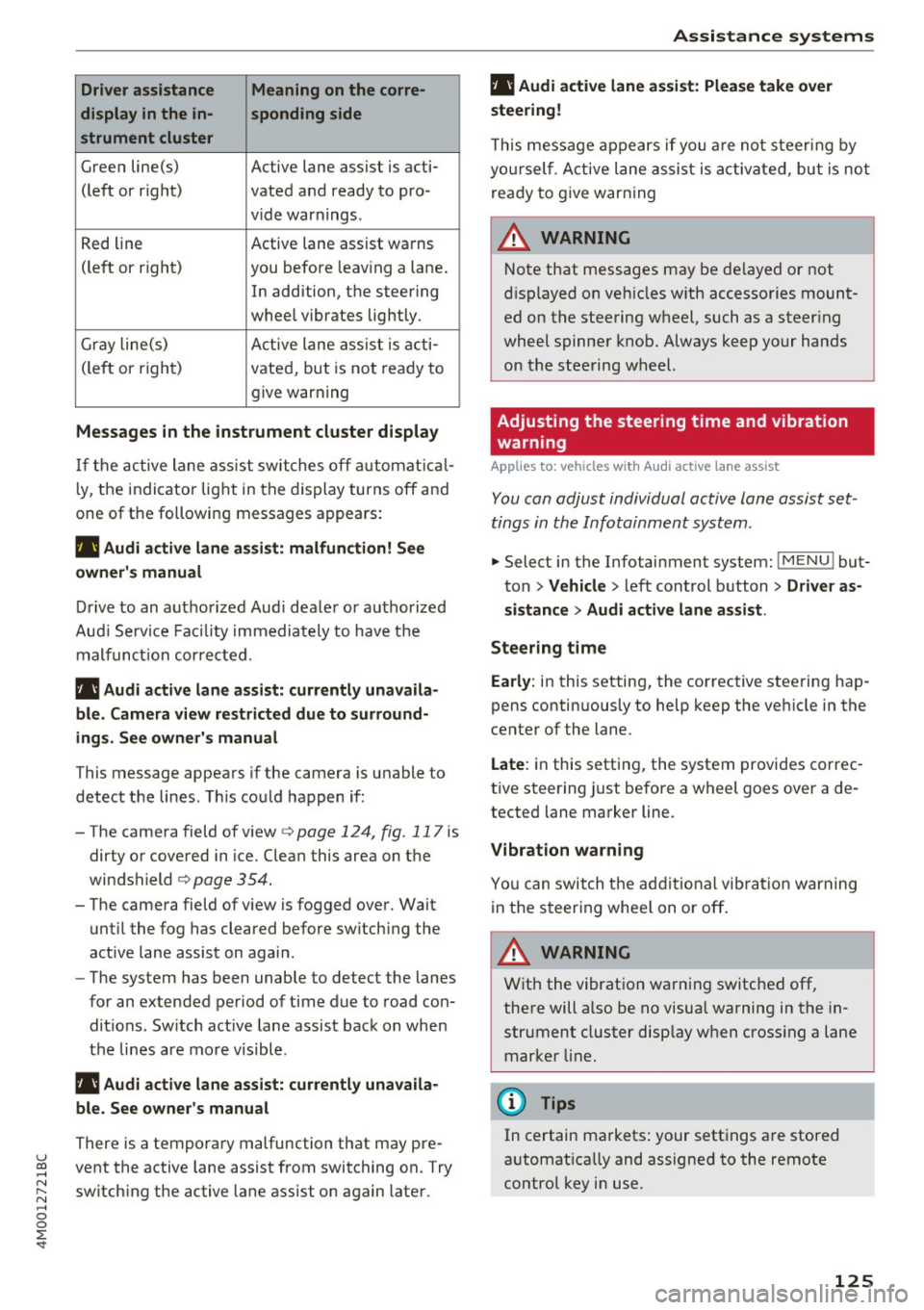
Driver assistance Meaning on the corre-
display in the in- sponding side
strument cluster
G reen line(s) Active lane assist is acti-
(left or right) vated and ready to pro -
v ide warnings .
R ed line Active lane assist warns
(le ft or right) you before leav ing a lane .
In addition, the steering
whee l vibrates lightly.
Gr ay line(s) A ctive lane ass ist is a cti -
(le ft or righ t) vate d, bu t is not rea dy to
give warning
Messages in the instrument cluster display
If t h e active lane as sist swi tches off automat ical
l y, the indicator lig ht in the dis play turns off an d
one of the followin g messages appea rs:
rl1 Audi a ctive lane assist: malfunction! See
owner's manual
Dri ve to an autho rize d Aud i dea le r o r a uthorized
Au di Serv ice Fac ility immediately to hav e th e
mal func tion cor re cte d.
rl1 Aud i active lane assist: currently unavaila
ble . Camera view restricted due to surround
ings . See owner's manual
This message appea rs if the camera is u nable to
detect t he lines . T his co uld happen if :
-The came ra field of v iew
c> page 124, fig . 117 is
dirty o r covered in ice. Clean this area on t he
windshield
c> page 354 .
- The came ra field of v iew is fogged ove r. Wait
unt il the fog has cleared before sw itching the
active lane assist on agai n.
- The system has been unable to detect the lanes
fo r an extended period of time due to road con
ditions. Sw itch act ive lane assist back on when
t h e lines are mo re visible.
rl1 Audi active lane assist: currently unavaila
ble. See owner's manual
There is a tempora ry malfunction that may pre -
u ~ vent the active lane assist from switching on. Try
N ~ switch ing the active lane assist on again later .
.... 0
0
:E: '
rl1 Audi active lane assist: Please take over
steering!
T h is m essa ge appears if yo u are not s teer ing by
yo ursel f. A ct ive lane assis t is a ctiva te d , but is no t
r e ad y to g ive warning
A WARNING
N ote that messages may be de layed or not
di sp layed o n ve hicles w ith accesso ries moun t
ed on the stee ring w heel, such as a steer ing
whee l spinne r knob . Always keep your hands
on the stee ring wheel.
Adjusting the steering time and vibration
warning
Applies to: veh icles w ith Audi active lane assist
You can adjust individual active lane assist set
tings in the Infotainment system .
-
.,. Select in the Infotainment system: I M ENU ! but
ton
> Vehicle > l eft control b utton > Driver as
sistance
> Audi active lane assist .
Steering time
Early: in this setting, the corrective stee ring hap
pens contin uously to help keep t he ve hicle in the
center of the lane.
Late : in this setting, the system provides co rrec
t ive steer ing just before a wheel goes over a de
tected lane marker line.
Vibration warning
Yo u can swit ch t he a dditiona l vib ra tion warn ing
in the s teer ing whee l on or off .
A WARNING
With the vibrat io n wa rni ng switched off,
the re will a lso be no visual warnin g in the in
str ument cluster disp lay w hen cross ing a lane
mar ker lin e.
(I} Tips
In certain ma rkets : your sett ings a re stored
a utomat ica lly and assigne d to the remote
control key i n use.
125