lane assist AUDI Q7 2017 Owner´s Manual
[x] Cancel search | Manufacturer: AUDI, Model Year: 2017, Model line: Q7, Model: AUDI Q7 2017Pages: 402, PDF Size: 100.39 MB
Page 129 of 402

u (0 ...... N r--. N ...... 0
0
:E
Applies to: vehicles with Audi side assist
®
@
©
Fig. 121 Dr iving s ituatio ns
AUD I
Fig. 122 Rear of the vehicle: position of the senso rs
Side assist functions at speeds above approxi
mately 9 mph ( 15 km/h) .
@ Vehicles that are approaching
N
0
0
:i;
" al
In certain cases, a vehicle will be classified as
critical for a lane change even if it is still some
what far away. The faste r a veh icle approaches,
t he sooner the display in the exterio r mirror w ill
turn on.
@ Vehicles traveling with you
Vehicles traveli ng with you are ind icated in the
exte rior mi rror if they are classified as critical for
a lane change. All vehicles detected by side assist
Assistance systems
are indicated by the time they ente r your "blind
spot", at the latest.
© Vehicles you are passing
If you s low ly pass a vehi cle that side assist has
de tected (the difference in speed between the
vehicle and your vehicle is less than approximate
ly 9 mph (15 km/h)), the disp lay in the exterior
mirror turns on as soon as the vehicle enters your
blind spot.
T he display w ill not turn on if you quickly pass a
vehicle that side assist has detected (the differ ence in speed is greater than approximate ly 9
mph (15 km/h)) .
Functional limitations
The radar sensors are designed to detect the left
and right adjacent lanes when the road lanes are
the normal width. In some situations, the display
in the exterior mirror may turn on even though
there is no veh icle located in the area that is criti
cal for a lane change. For example :
- If the lanes are narrow or if your are driving on
the edge of your lane. If this is the case, the
system may have detected a vehicle in another lane that is
not adjacent to your current lane .
- If you are driving through a curve . Side assist
may react to a vehicle that is in the same lane
or one lane over from the adjacent lane .
- If side assist reacts to other objects (such as
roadside structures like guard rails).
- In poor weather conditions. The side assist
functions are limited.
Do not cover the radar sensors
c:> fig. 122 with
stickers, deposits, bicycle wheels or other ob
jects, because th is will impair the function . Do
not use s ide assist when towing a trai ler. For in
formation on cleaning, see
c:> page 354.
A WARNING
-- Always pay attention to traffic and to the
area around your vehicle . S ide assist cannot
replace a driver's attention. The driver alone
is always responsible for lane changes and
-
similar driving maneuvers . IJI,
127
Page 130 of 402

Ass is tan ce sys tems
-In some situations, the system may not
function or its funct ion may be limited. For
example:
- I f vehicles are approach ing or being left
behind very quickly. The display may not
turn on in time.
- I n poor weather conditions such as heavy
rain, snow or heavy mist.
- On very wide lanes, in tight curves, or if
there is a rise in the road su rface. Vehicles
in the adjacent lane may not be detec ted
because they are outside of the sensor
range.
@ Note
The sensors can be displaced by impacts o r
damage to the bumper, whee l housing and
underbody. This can impair the system . Have
an authorized Audi dealer or authorized Audi
Service Facility check their function.
(D Tips
- If the window g lass in the driver's doo r or
front passenger's door has been tinted, the
display in the exterior mirror may be incor
rect.
- For an explanation on conformity with the
FCC regulations in the United States and the
Industry Canada regulations, see
c::> page384.
Switching on/off
Applies to: veh icles with Audi side assist
The system can be switched on/off in the Info
tainment system.
If the system is activated, the displays in the ex
ter ior mirrors will turn on briefly when the ign i
tion is sw itched on .
.,. Se lect in the Infotainment system:
IMENU I but
ton
> V ehicle > left contro l button > Driver a s
sistance
> Audi side ass ist . Off switches the
system off.
128
(D Tips
When you switch side assist on or off, the ex it
warning system activates or deact ivates
c::> page 129.
Setting the display brightness
Applies to: vehicles with Audi side ass ist
The display brightness con be adjusted in the In
fotainment system.
.,. Select in the Infotainment system : IMENU! but
ton
> V eh icle > left control button > Dri ver as
s ist ance
> Audi side a ssist.
The display br ightness adjusts au tomatically to
the brightness of the surroundings, both in the information and in the warni ng stage. In very
dark or very bright surroundings, the automatic
adjustment will set the display to the minimum or max imum level. In such cases, you may notice
no change when ad justing the br ightness, or the
change may only be noticeab le once the sur
r oundi ngs change.
Adjust the brightness to a level where the display
i n the information stage will not disrupt your
view ahead. If you change the br ightness, the dis
play in the exterior mirror w ill briefly show the
br ightness leve l in t he i nfo rmation stage . The
brightness of the warning st age is linked to the
brightness in the information stage and is adjust
ed a long with the information stage .
(D Tips
-Side ass ist is not a ctive while you are mak
ing the adjustment.
- Yo ur setti ngs are a utomat ica lly stored and
assigned to the remote control key being
used .
Page 216 of 402
Navig ation
a list o f gas stations in the area. When a gas sta
tion is selected, route guidance from the current
veh icle position is calc ulated.
Trail er mode *
Trailer mode is sw itched off at the factory.
When the function is switched on~' the maxi
m um permitted speed for vehicles with trailers is
incorpo ra ted into the rou te g uidance and the ca l
culated arrival time is adjusted according ly. Trail
e r mode is disp layed using symbols-"' in the side
menu on the map .
Personal route assistance *
Personal route assistance is sw itched off at the
factory.
Your trips are recorded and destinations are sug
gested by the MMI when this f unct ion is switched
on~
¢ page 211 .
The personal route ass istance is indicated by the
~ symbol in the status line of the Infotainment
system display.
Notification when n ea rby *
The notification when nearby is switched off at
the factory .
The MMI notifies you when you are approaching
selected po ints of int erest whe n this function is
sw itched on~- You can a lso have a
Notification
tone .
Presentation mode
The Presentation mode helps yo u to effect ively
p lan a trip and follow the p lanned route without
moving the ve hicle . You can
Select starting point
when, for example , you would like to ca lculate a
route star ting from a locat ion other than the ve
h icle pos it io n. Start
Presentation mod e to simu
late route gu idance .
1> High occu pan cy vehi cle
214
' Route criteria
Applies to: vehicles with navigation system
J(
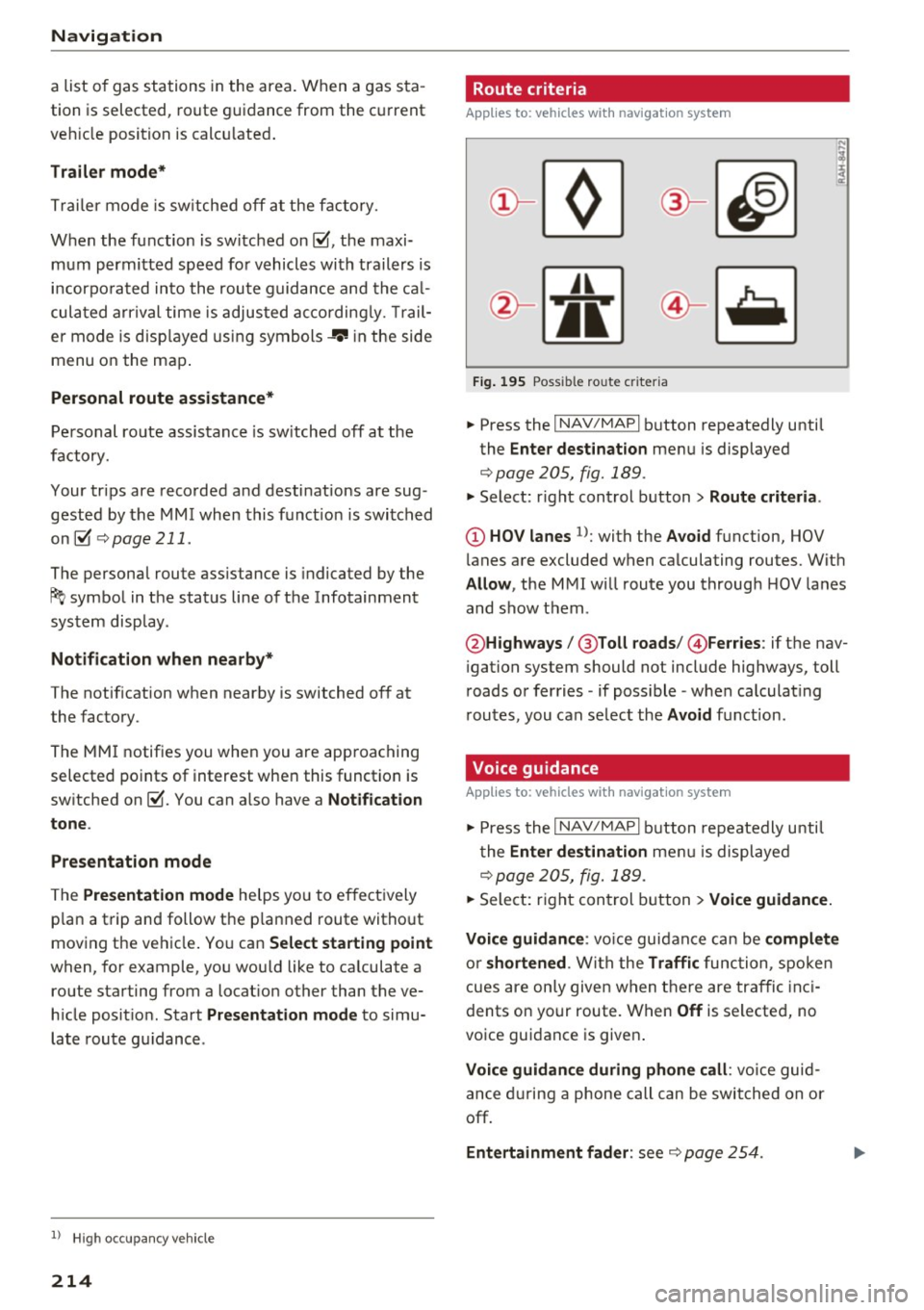
Fig . 195 Poss ible ro ute c riter ia
.. Press the I NAV /MAP I button repeatedly until
the
Enter des tinat ion menu is displayed
¢page 205, fig. 189 .
.. Select: r ight control button> Rout e criteria .
(D HOV lanes 1>: with the Avoid function, HOV
l anes are excluded when ca lculating routes. With
Allow , the MMI will route you through HOV lanes
and show them .
@Highways /@ Toll roads /@ Ferries : if the nav
i gation system should not include highways, toll
roads or ferries -if poss ible -when calculat ing
routes, you can select the
Avoid f u nction.
Voice guidance
Applies to: vehicles with navigation system
.. Press the I NAV /MAPI button repeatedly unti l
the
En ter de stination me nu is displayed
¢page 205, fig. 189 .
.. Select: r ight con trol b utton> Voice guidance.
Voic e guidan ce :
vo ice guidance can be compl ete
o r shortened . With the Traffic func tion , spoken
cues are on ly given when there are traffic inc i
dents on your route. When
Off is se lected, no
voice guidance is given .
Voice guidan ce during phone call : voice guid
ance d uring a phone call can be swi tched on or
off.
Entertainment fader : see c::> page 254.
Page 387 of 402

u co ...... N r-... N ...... 0
0
:E: '
A/C MAX (button)
A/C (button) ... ........ ..... ... ... . 72, 76
72, 75
ABS .. .. ... . .. .. ............. .. .. .. . 14 8
Accesso ries 66 ,383
Active lane ass ist
C leaning the camera area ......... ... .
also refer to Aud i active lane ass ist .. .. .
Adapt ive a ir suspension
refer to Air suspension ...... .. .. .... .
Adapt ive cr uise control ..... ... .. .. .... .
C leaning the sensor . ..... ... .. .. .... .
Distance indicator and distance warning .
Messages .. .. ............. .. .. .... .
Predictive contro l
............... .....
Traff ic jam ass ist ............. .. .... .
Ad B lue
. . .. .. .. .. .. .. .... ... .. .. .... .
355
123
134
10 7
355 1 16
116 113
114
3 18
Messages . ... .... .. .... ... .. .. .... . 318
Add it io nal accesso ries . . . . . . . . . . . . . . . . . 383
Ad justing a ir distribution (automat ic climate
control) . . . . . . . . . . . . . . . . . . . . . . . . . . .
73, 76
Ad justing the rear seats . . . . . . . . . . . . . . . . . 60
Ad justing the so und . . . . . . . . . . . . . . . . . . . 253
Ad justing the tempe rature (automatic climate
control) . . . . . . . . . . . . . . . . . . . . . . . . . . .
73, 76
Ad justing the vol ume . . . . . . . . . . . . . . . . . . . 14
Advanced key
refer to Conven ience key . . . . . . . . . . . . . . . 8 2
Airbag . . . . . . . . . . . . . . . . . . . . . . . . . . . . . . 273
Ai rbag system . .. .. .. ..... ... .. .. . 2 73,29 1
Advanced Airbag System components . . . 280
Care . . . . . . . . . . . . . . . . . . . . . . . . . . . . . . 288
Chi ldren . . . . . . . . . . . . . . . . . . . . . . . . . . . 297
Chi ld restraints 297
Components (front a irbags) . . . . . . . . . . . 280
Da nger of fitt ing a child safety seat on t he
front passenger seat . . . . . . . . . . . . . . . . . 2 7 4
D . l 1sposa . . . . . . . . . . . . . . . . . . . . . . . . . . . 288
Fron t air bags . . . . . . . . . . . . . . . . . . . . . . . 278
H ow do the fro nt airbags work? . . . . . . . . 283
How many airbags does my vehi cle have? 280
How the Advanced Airbag System compo-
nents work together . . . . . . . . . . . . . . . . .
282
Indicator light . . . . . . . . . . . . . . . . . . . . . . 285
Mon itoring . . . . . . . . . . . . . . . . . . . . . . . . . 285
PASSENGER AIR BAG light . . . . . . . . . . . . 285
Index
Repairs
Safety instr uctions . ..... . ..... ... .. . .
When m ust t he system be inspected? .. . 288
287
285
Air pressu re
T ires
..... .... .. .. ............... .. 343
Air suspension . . . . . . . . . . . . . . . . . . . . . . . 134
T ra iler mode . . . . . . . . . . . . . . . . . . . . . . . . 100
Alignment pin (changing the wheel) . . . . . . 360
All -wheel stee ring . . . . . . . . . . . . . . . . 134, 152
All season tires . . . . . . . . . . . . . . . . . . . . . . . 348
All weat her lights . . . . . . . . . . . . . . . . . . . . . . 48
All wheel d rive
refer to q uattro
AMI 152
refer to Aud i music interface . . . . . . . 234, 235
Android Auto
refer to Audi smartphone interface 247
An ti-free ze
Windsh ield washer sys tem . . . . . . . . . . . .
331
An ti-lock b raking system
refer to A BS . . . . . . . . . . . . . . . . . . . . . . . . 148
Anti-Slip Regu lation
refer to ASR . . . . . . . . . . . . . . . . . . . . . . . . 148
Apple Car Play
refer to Audi smartphone interface . . . . . 247
Asht ray . . . . . . . . . . . . . . . . . . . . . . . . . . . . . . 65
ASR · · · · · · · .... .. .. ............... .. 148
Audi active lane assist . . . . . . . . . . . . . . . . . 1 23
Messages . . . . . . . . . . . . . . . . . . . . . . . . . . 124
Audi con nect eme rgency call a nd service . . 203
Online roads ide ass istance . . . . . . . . . . . . 2 04
Audi connect vehicle contro l . . . . . . . . . . . . 199
Parki ng locat ion . . . . . . . . . . . . . . . . . . . . . 200
Remote locking and unlock ing . . . . . . . . . 200
Vehicle status report . . . . . . . . . . . . . . . . . 200
Audi connect (Infotainment) . . . . . . . . 189, 196
Data protection . . . . . . . . . . . . . . . . . . . . . 197
Se rvices ove rview . .. .... ...... ... .. ..
Start ing ..... ... .. ................ .
Audi drive select
. .. .. .... . ..... ... .. ..
Audi Ente rtainment mob ile ........... ..
Audi music interface . . ............... ..
Audi music stream
refer to W i-F i . ... .. ... .. ..... ... .. . .
190
190
134
2 36
234
232
Audio files . . . . . . . . . . . . . . . . . . . . . . . . . . . 23 7
385
Page 393 of 402
Replacing the battery . . . . . . . . . . . . . . . . . 36
Unlocking/ locking . . . . . . . . . . . . . . . . . 37, 39
Veh icle code . . . . . . . . . . . . . . . . . . . . . . . . . 35
Kick-down (automatic transmission) . . . . . . . 95
L
Lane assist
refer to Audi act ive lane assist . . . . . . . . . 123
LATCH . . . . . . . . . . . . . . . . . . . . . . . . . . . . . . 309
Description ........ ....... ...... ... . 310
Installing a child restraint ......... ... . 311
Location . . . . . . . . . . . . . . . . . . . . . . . . . . . 310
Mounting and releasing the anchorage
hook . . . . . . . . . . . . . . . . . . . . . . . . . . . . . . 311
Leather care/clean ing . . . . . . . . . . . . . . . . . 357
Left contro l button . . . . . . . . . . . . . . . . . . . . . 13
License agreement (MMI) . . . . . . . . . . . . . . 254
Lifting points (vehicle jack) . . . . . . . . . . . . . 363
Light/rain sensor Headlights . . . . . . . . . . . . . . . . . . . . . . . . . . 48
Interva l mode (wipers) . . . . . . . . . . . . . . . . 55
Light functions . . . . . . . . . . . . . . . . . . . . . . . . 48
H igh beam assistant . . . . . . . . . . . . . . . . . . 49
I nstrument illumination . . . . . . . . . . . . . . . 52
Interior lighting . . . . . . . . . . . . . . . . . . . . . . 51
Lighting Exterior . . . . . . . . . . . . . . . . . . . . . . . . . . . . . 48
I nterior . . . . . . . . . . . . . . . . . . . . . . . . . . . . . 51
Lights Headlight range control system . . . . . . . . . 48
Listening to music
refer to Media .. ............. .. . 228, 237
L oading the luggage compartment . . . . . . . 261
Locking/unlocking By remote control . . . . . . . . . . . . . . . . . . . . 3 7
W ith the central locking switch . . . . . . . . . 38
W ith the convenience key . . . . . . . . . . . . . . 37
W ith the lock cylinder . . . . . . . . . . . . . . . . . 39
Low beam headlights . . . . . . . . . . . . . . . . . . . 48
Lowering the rear of the vehicle . . . . . . . . . 13 7
L uggage compartment. . . . . . . . . . . . . . . . . . 67
Cover.. .. .. .. .. ........... .. .. .. .... 68
Socket. .. .. .. ............... .. ...... 66
u ~ Storing cargo correctly . . . . . . . . . . . . . . . 261
N r-... N .... 0
0
:E: '
Tie-downs . . . . . . . . . . . . . . . . . . . . . . . . . . . 69
also refer to Loading the luggage compart-
ment...... ... .. .. ................. 261
Luggage compartment lid . . . . . . . . . . . . . . . 40
Emergency release . . . . . . . . . . . . . . . . . . . . 43
Lumbar support . . . . . . . . . . . . . . . . . . . . . . . 59
M
Maintenance . . . . . . . . . . . . . . . . . . . . . . . . . 381
Maintenance intervals . . . . . . . . . . . . . . . . . 332
Making an emergency call . . . . . . . . . . . . . . 181
Malfunction indicator lamp (MIL) . . . . . . . . . 21
Map Changing the scale . . . . . . . . . . . . . . . . . . . 207
Display . . . . . . . . . . . . . . . . . . . . . . . . . . . . 220
Operating . . . . . . . . . . . . . . . . . . . . . . . . . . 215
Settings . . . . . . . . . . . . . . . . . . . . . . . . . . . 216
Setting the destination . . . . . . . . . . . . . . . 207
Update ....... ................... .. 205
Map update . . . . . . . . . . . . . . . . . . . . . . . . . . 218
Mechanica l key . . . . . . . . . . . . . . . . . . . . . 35, 36
Media ..... .... ................. 228, 237
Drives . . . . . . . . . . . . . . . . . . . . . . . . . . . . . 229
Supported formats . . . . . . . . . . . . . . . . . . 243
Media center . . . . . . . . . . . . . . . . . . . . . . . . . 238
Memory buttons
refer to Shortcut keys . . . . . . . . . . . . 156, 163
Memory capacity Directory . . . . . . . . . . . . . . . . . . . . . . . . . . . 186
Jukebox . . . . . . . . . . . . . . . . . . . . . . . . . . . . 230
Memory card SD card reader (MMI) . . . . . . . . . . . . . . . . . 229 Supported types/formats . . . . . . . . . . . . . 243
Memory funct ion . . . . . . . . . . . . . . . . . . . . . . 64
MENU button . . . . . . . . . . . . . . . . . . . . . . . . 156
Menu language
refer to Setting the language . . . . . . . . . . 249
Menus/symbols . . . . . . . . . . . . . . . . . . . . . . 166
Messages . . . . . . . . . . . . . . . . . . . . . . . . . . . 181
Mirrors Adjusting exterior mirrors . . . . . . . . . . . . . . 52
Compass.. .... ..................... . 57
Dimming .. .. .. .. .. ...... ....... .. .. . 53
Vanity mirror . . . . . . . . . . . . . . . . . . . . . . . . 54
MMI
refer to Multi Media Interface . . . . . . . . . . 156
391