park assist AUDI Q7 2017 Owner´s Manual
[x] Cancel search | Manufacturer: AUDI, Model Year: 2017, Model line: Q7, Model: AUDI Q7 2017Pages: 402, PDF Size: 100.39 MB
Page 146 of 402
Parking system s
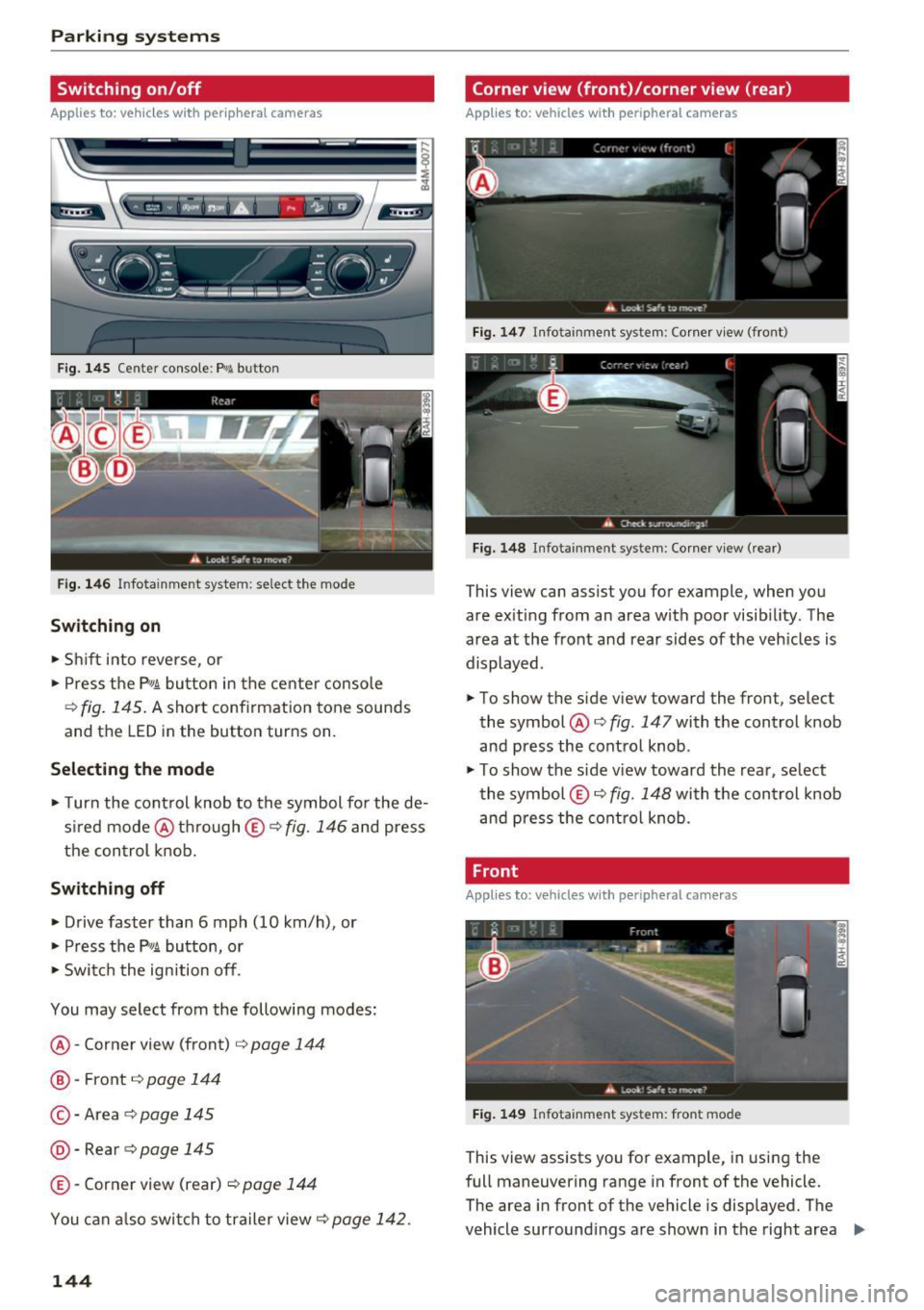
Switching on/off
Applies to: vehicle s with per ipheral cameras
·- --- --=-
•=L--:-:---
Fig. 14 5 Ce nter console: Pw .!. butto n
Fig. 146 In fo tai nme nt system : se lec t t he mode
Sw itching on
• Shi ft in to reverse, or
• Press the
P" IA button in the center console
¢ fig. 145 . A short confirmation tone sounds
and the LED in the bu tton turns on .
Selecting the mode
• Turn the cont rol knob to the symbol fo r the de
s ired mode @thr ough ©¢fig.
146 and press
the con trol k nob.
Sw itch ing off
• Drive faster than 6 mph (10 km/h) , or
• Press the
P"1A button, or
• Swi tc h the ignition off .
You may select from the following modes:
@ -Corner view (front) ¢
page 144
@-Front ¢ page 144
©-Area ¢ page 145
@-Rear ¢ page 145
©-Corner view (rear) ¢ page 144
You can a lso swi tch to trailer view¢ page 142.
144
Corner view (front)/corner view (rear)
Applies to: vehicles with peripheral cameras
Fig. 147 In fota in m ent sys tem: Corner v iew (fro nt)
Fig. 148 In fotainm ent sy stem : Corner v iew (re ar)
This view can assist you for example , when you
are ex iting from an area with poor visib ility . The
area at the front and rear sides of the veh icles is
displayed .
• To show the side v iew toward the front, select
the symbol @¢
fig. 147 with the control knob
and press the control knob .
• To show the side v iew toward the rear , se lect
the symbol ©¢
fig. 148 with the con trol knob
and press the cont rol knob .
Front
Applies to: vehicles with peripheral cameras
Fig . 14 9 Info ta inme nt sys te m : fron t mo de
This view assists you for example , in using the
full maneuvering range in front of the vehicle.
The area in front of the vehicle is displayed. The
vehicle surround ings are shown in the right area
IJJI,
Page 147 of 402
u (0 ...... N r--. N ...... 0
0
:E
cal display and camera image
q page 146.
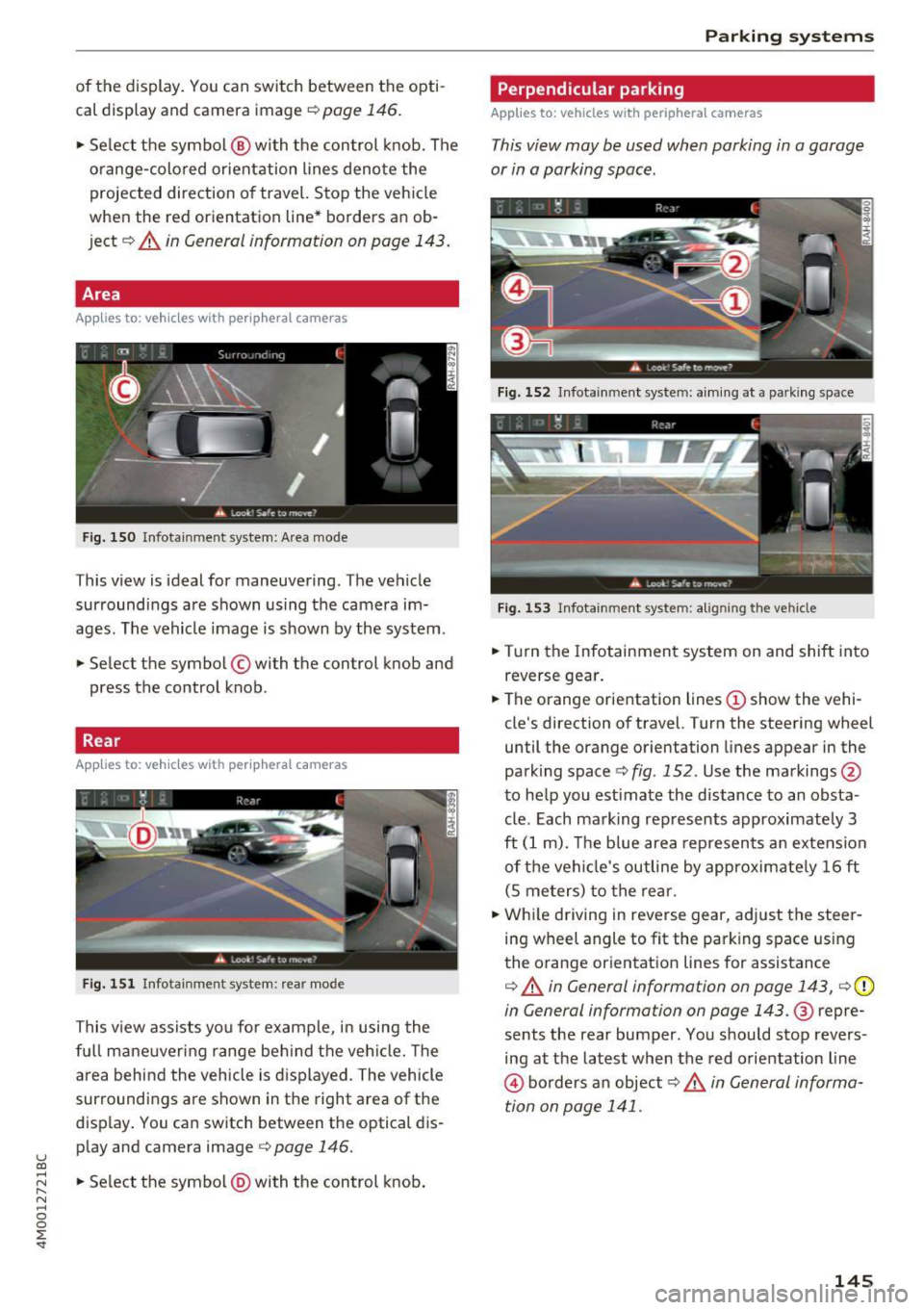
• Se lect the symbol @ with the control knob. The
o range-colored orientation lines denote the
projected direction of travel. Stop the vehicle
when the red orientation line* borders an ob
ject
q A in General information on page 143.
Area
Applies to: vehicles with peripheral cameras
Fig. 150 Infotainment system: A rea mo de
This view is ideal for maneuvering . The vehicle
surroundings are shown using the camera im
ages. The vehicle image is shown by the system.
• Select the symbol © with the control knob and
press the control knob.
Rear
App lies to: vehicles with peripheral cameras
Fig. 151 Infotainment syste m: rear mode
This v iew assists you for example, in using the
full mane uveri ng range beh ind t he vehi cle. Th e
area behind the vehicle is displayed. The vehicle
surroundings are shown in the right area of the
display . You can switch between the optical dis
p lay and camera image
c::> page 146.
• Select the symbol @with the control knob.
Parking systems
Perpendicular parking
Applies to: vehicles with peripheral cameras
This view may be used when parking in a garage
or in a parking space.
Fig . 152 Infotainment system: a iming at a park ing space
Fig. 153 Infotainment system: aligning the vehicle
• Turn the Infotainment system on and shift into
reverse gear.
• The orange orientation lines
(D show the vehi
cle's direction of travel. Turn the steering wheel
until the orange orientation lines appear in the
parking space¢
fig. 152. Use the markings @
to help you estimate the distance to an obsta
cle . Each mark ing represents approximately 3
ft (1 m). The b lue area represen ts an extension
of the vehi cle's outline by approximately 16 ft
(S meters) to the rear.
• While driving in reverse gear, adjust the steer
ing wheel angle to fit the park ing space using
the orange orientat ion lines for assistance
¢ A in General information on page 143, ¢ (D
in General information on page 143 .@ repre
sents the rear bumper. You should stop revers
ing at the latest when the red orientation line
© borders an object¢ ,& in General informa
tion on page 141.
145
Page 148 of 402

Parking sy stem s
Adjusting the parking aid
Applies to: vehicles w ith a rear parking system/parking sys
tem plus/rearview camera/peripheral cameras
The functions are adjusted in the Infotainment
system .
.. Se lect in the Info tainment system: IMENU I but
ton
> Vehi cle > left contro l button > Driver a s
s is ta nc e> Pa rking aid .
Or
.. When the parking aid is active, se lect in the In -
fota inme nt system: right contro l button *.
End sy stem * -stop the parking aid
Activ ate automatically * -sw itch automatic acti
vation on/off
Front volume * -vo lume for the front area
Rear volume -volume for the rear area
Entertainment fader -the volume of the aud io/
video source is lowered when the parking system
is turned on
The new ly selected leve l is demons trated briefly
by the sound generator.
Vi ew * -switch betwee n an optical d isplay
( Graphic ) and camera image ( Camera ) in the
right section of the display.
Trail er view * -sh ow trailer view
*Auto. front /rear came ra change * -the view be
h ind the veh icle
( Rear mode) is displayed auto
mat ica lly when you shift into reverse gear. The
view in front of the vehicle
( Front mode) is d is
p layed automatically when you shift i nto the for
ward gea rs. When first activat ing in a forward
gea r with the
P" IA bu tton, the front s ide view is
d isp layed
( Corner view (front) mode).
If you do not se t the../, the view behind the vehi
cle
( Rear mode) is a lways d isplayed and it does
not swi tch to the
Front mode when a forward
gea r is selec ted .
(D Tips
-Seve ral menus can be accessed w ith the
r ight contro l button only when the park ing
a id is ac tive.
- T he settings for volume and automatic a ct i
vation* are au toma tically s to red and as-
146
signed to the remote con trol key be ing
used.
Error messages
Applies to: vehicles with a rear parking system/parking sys
tem plus/rearview camera/peripheral cameras
Ill Rear park ass ist: malfunction! Ob stacle s
cannot be detected
Ill Front par k ass ist : malfun ct ion! Ob st a cl es
cannot be detect ed
ml Par k assist: malfunction! Obstacles cannot
be detected
When one of these messages appears, there is a
system malfunction. The L ED in the P'#~ button al
so blinks when sw itching it on. The relevant mes
sage on ly appears again w hen you manually acti
vate the park ing aid with the button.
Ill Rea r parking aid : obstacle detection re stri ct
ed
The rear cross -traffic assist* ¢ page 130, Rear
cross-traffic assist
is not available. Either the ESC
i s sw itched off, or the radar sensors may be cov
ered by a bike rack, stickers, leaves, snow or oth
er objects. Switch the ESC on , or clean the area in
front of the sensors if necessary ¢
page 12 7,
fig. 122 . If this message cont in ues to be d is
played, drive immed iate ly to an authorized A udi
dealer or au thor ized A udi Service Faci lity to have
the mal funct ion rep aired.
Parking system plus *
If a sensor or speaker is faulty, the J¼ symbol
will appear i n front of/behind the vehicle in the
I nfotai nment system d isplay. If a rear sensor is
faulty, only obs tacles that are in areas @and @
are show n¢
page 139, fig. 135 . If a fron t senso r
i s fa ulty, only obs tacles tha t are in a reas © and
@ are shown.
Peripheral cameras*
There is a system malfunction if the % symbo l
appe ars and the co rresponding area of the dis
play is shown in black . The camera is not wo rking
i n th is area.
Page 171 of 402
u co ...... N r-... N ...... 0
0
:E: '
Appl ies to: veh icles wit h vo ice recog nitio n system
You con operate many Infotainment functions
conveniently by speaking .
Requirements: the ign ition and the MM I must be
switched on
~ page 156, there must not be any
phone call in progress and the park ing system
must not be active .
~ Switching on: briefly press the~ button @
~page 14, fig. 11 on the m ultifunction steer
ing whee l and say the desired command after
the
Beep .
~ Switching off : press and hold the~ button.
Or: press the [2] butto n.
~ Pau se : say the command Pause . To resume,
press the~ button.
~ Correcting : say the command Corre ction . Or :
simply say a new command during an an
nouncement
c::> page 249.
Input assistance
The system gu ides you throug h the input with
v isua l and audio feedbac k.
- Vi sua l input as sistan ce: after switching on
vo ice recogn it io n, a display w ith a selection of
poss ible commands appears. This command
display can be sw itched on o r off . Se lect:
IMENU I button> Setting s> left cont rol button
> MMI setting s > Speech dialog system .
- Audio input a ssis tance :
to have the poss ible
commands read, tu rn the voice recognition sys
tem on and say
Help.
For the s yst em to understand you:
Speak clearly and dist inctly at a normal vo lume .
Speak louder when d riving faste r.
Emphasize the words in the commands evenly
and do not leave long pauses .
C lose the doors, the windows and the sunroof* to
reduce background noise . Make sure that passen
gers are not speaking when you are giving a voice
command .
Voice recognition system
Do not direct the air vents toward the hands-free
microphone, which is on the roof headliner near
t h e front inte rior lights .
Only use the system from the dr iver's seat be
ca use the hands -free microphone is directed to
ward that seat .
Additional settings
See c::> page 249, Speech dialog system .
A WARNING
-Dire ct your full attention to dr iv ing. As the
driver, you have complete responsibility for
safety in traffic . Only use the functions in
such a way that you a lways maintain com
p lete contro l over your vehicle in all traffic
situations.
- Do not use the voice recognition system in
emergencies beca use your voice may change
in stressful situations. It may take longer to
d ial the number or the system may not be
able to dial it at all. Dial the emergency number manually.
@ Tips
- The d ialog pauses when there is an incom
ing phone call and will continue if you ig
nore the call. The d ialog ends if you answer
the ca ll.
- You can select an item in the list using ei
ther the vo ice recognit ion system or the
cont rol knob.
Command overview
information
Appl ies to: ve hicles w ith vo ice recognit ion system
T he following overv iews des cribe the comma nds
t h at can be used to operate the MMI using the
voice recognition system.
Alte rnative commands a re separate d using a"/ ",
for example say:
Telephone / (or) Navigation /
(or) Radio.
Sequences of commands used to perfo rm an ac
t ion are iden tified w it h a"> ", fo r ex ample say:
Ente r addre ss > (t hen) Enter country /state . ..,.
169
Page 362 of 402
Emergency assistance
Emergency assistance
General information
... Park the vehicle as far as possible from moving
traffic in the event of a breakdown. In the event
of a flat tire, park the vehicle on a level surface .
It you are on a steep hill, be especially careful.
.,. Set the parking brake .
.,. Switch the emergency flashers on .
... Have the passengers exit the vehicle . They
should move to a safe place, for example be
hind a guard rail.
_& WARNING
Follow the steps given above . This is for your
protection and the for the safety of other driv
ers.
Equipment
Vehicle tool kit/tire mobility kit/vehicle
jack
App lies to: veh icles with the vehicle tool kit, tire mobility kit
an d ve hicle jack
The vehicle tool kit, vehicle jack, tire mobility kit
and compressor are stored in the luggage com
partment under the cargo floor cover. Lift the
cargo f loor using the handle.
_& WARNING
Improper use of the vehicle jack can cause se
rious personal injuries.
- Never use the screw driver hex head to
t ighten whee l bolts, since the bolts cannot
attain the necessary tightening torque if you
use the hex head, potentially causing an ac
cident.
- The factory-supplied jack is intended only
for your vehicle model. Under no circum
stances should it be used to lift heavy
vehicles or other loads; you risk injuring
yourself.
- Never start the eng ine when the vehicle is
raised, which could cause an accident .
- Support the veh icle securely with appropri
ate stands if work is to be performed under-
360
neath the vehicle; otherwise, there is a po
tential risk for injury.
- Never use the jack supplied with your Audi
on another vehicle, particularly on a heavier
one. The jack is only suitab le for use on the
veh icle it came with.
{!) Tips
The vehicle jack in your vehicle is mainte
nance-free.
Tire mobility kit
Preparation
.,. Read and follow the important safety precau-
tions ~
page 360 .
.,. Set the parking brake.
... Select the P selector lever position .
... Check if a repair with the tire mobility kit is pos
sible
~ page 360.
Using the tire mobility kit
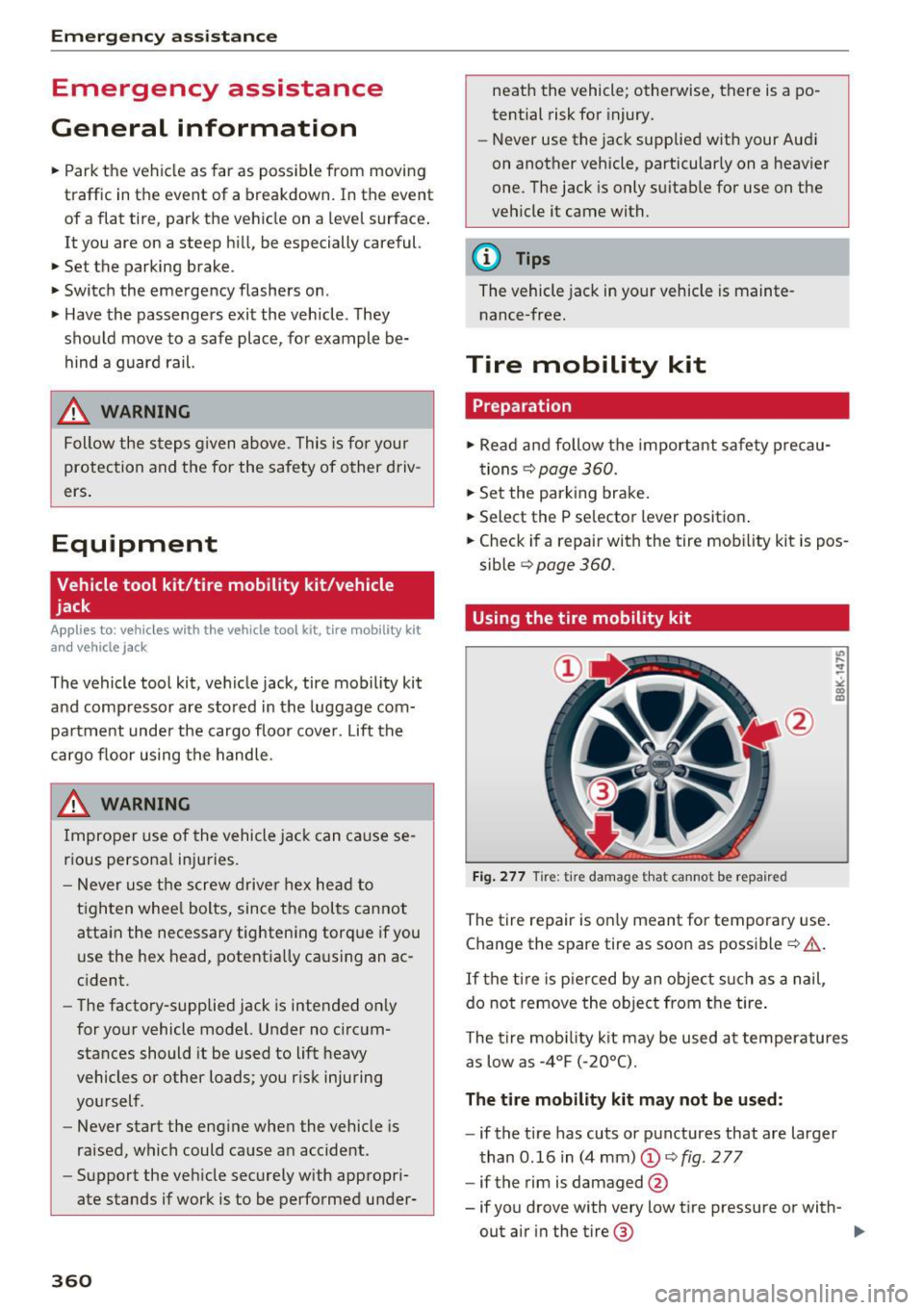
Fig. 277 Tire: tire damage that cannot be repaired
The tire repair is on ly meant for temporary use.
Change the spare tire as soon as possible~&. .
If the tire is pierced by an object such as a nail,
do not remove the object from the tire .
U) ,... .. ~
" 00 m
The tire mobility kit may be used at temperatu res
as low as -4°F (-20°C).
The tire mobility kit may not be used:
-if the tire has cuts or punctures that are larger
than 0.16 in (4 mm)
(D ~ fig . 277
- if the rim is damaged
@
- if you drove with very low tire pressure or with-
out air in the tire ® ..,.
Page 364 of 402
Emergency assistance
-If a tire pressure of 29 psi (200 kPA) cannot
reached after inflating for 6 minutes, then
the tire is too severely damaged. Do not
continue driving.
- If the tire cannot be repaired with the tire
sealant, see an authorized Audi dealer or au
thorized Audi Service Facility for ass istance.
(D} Tips
Do not operate the compressor for more than
six minutes continuously, or it can overheat.
Once the compressor has cooled, you can con
tinue to use it .
Completing
"' Adhere the sticke r that says "max . SO mph
(max. 80 km/h)" that is provided w ith the tir e
mobility kit within the driver's fie ld of vision.
"'S top the vehicle after driving for about 10 mi
nutes and check the tire pressure .
"' If the tire pressure is lower than 19 psi (130
kPA), then the tire is too severely damaged. Do
not continue driving.
A WARNING
Pay attention to the following after repairing
the tire :
- Do not drive faster than SO mph (80 km/h).
- Avoid hard acceleration, braking sharply, and fast cornering.
- The vehicle may become more difficult to
control.
- If the tire is too severely damaged, see an
authorized Audi dealer or authorized Aud i
Service Facility for assistance .
@ For the sake of the environment
You can give the used tire sealant bottle to an
authorized Audi dealer or authorized Audi
Service Facility for disposal.
@ Tips
Remember to obtain a new bottle of sealant
from an authorized Audi dea ler or authorized
Audi Service Facility after repairing a tire.
362
Replacing a wheel
' Preparation
You must complete the preparation before
changing a tire .
"'Read and follow the important safety precau-
tions¢
page 360.
"' Set the park ing brake.
"' Select the P selector lever posit ion.
"' When towing a trailer: disconnect the trailer
from your vehicle.
"' Lay out the vehicle tool kit¢
page 360 and the
spare tire.
"' Switch on wheel change mode* in the Infotain
ment system:
! MENUI button> Vehicle> left
control button >
Service & checks > Air suspen
sion: wheel change.
"'Switch the ignition off.
The vehicle jack mode* switches off automatical ly at speeds above 6 mph (10 km/h).
A WARNING
When using the ve hicle jack* on a road with a
steep hill or offroad, you must take extra pre
cautions to prevent the vehicle from rolling. Use suitable objects to block the front and
back of the wheel that is diagonal from the
wheel with the flat tire.
A WARNING
You or your passengers could be injured while
changing a whee l if you do not follow these
safety precautions:
- If you have a flat tire, move a safe distance
off the road. Turn off the engine, turn the
emergency f lashers on and use other warn
ing devices to alert other motorists.
- Make sure that passengers wait in a safe
place away from the vehicle and well away
from the road and traffic.
- To help prevent the vehicle from moving
suddenly and possibly slipping off the jack*,
always fully set the parking brake and block
the front and back of the wheel diagonally opposite the wheel being changed. When
one front wheel is lifted off the ground,
~
Page 371 of 402
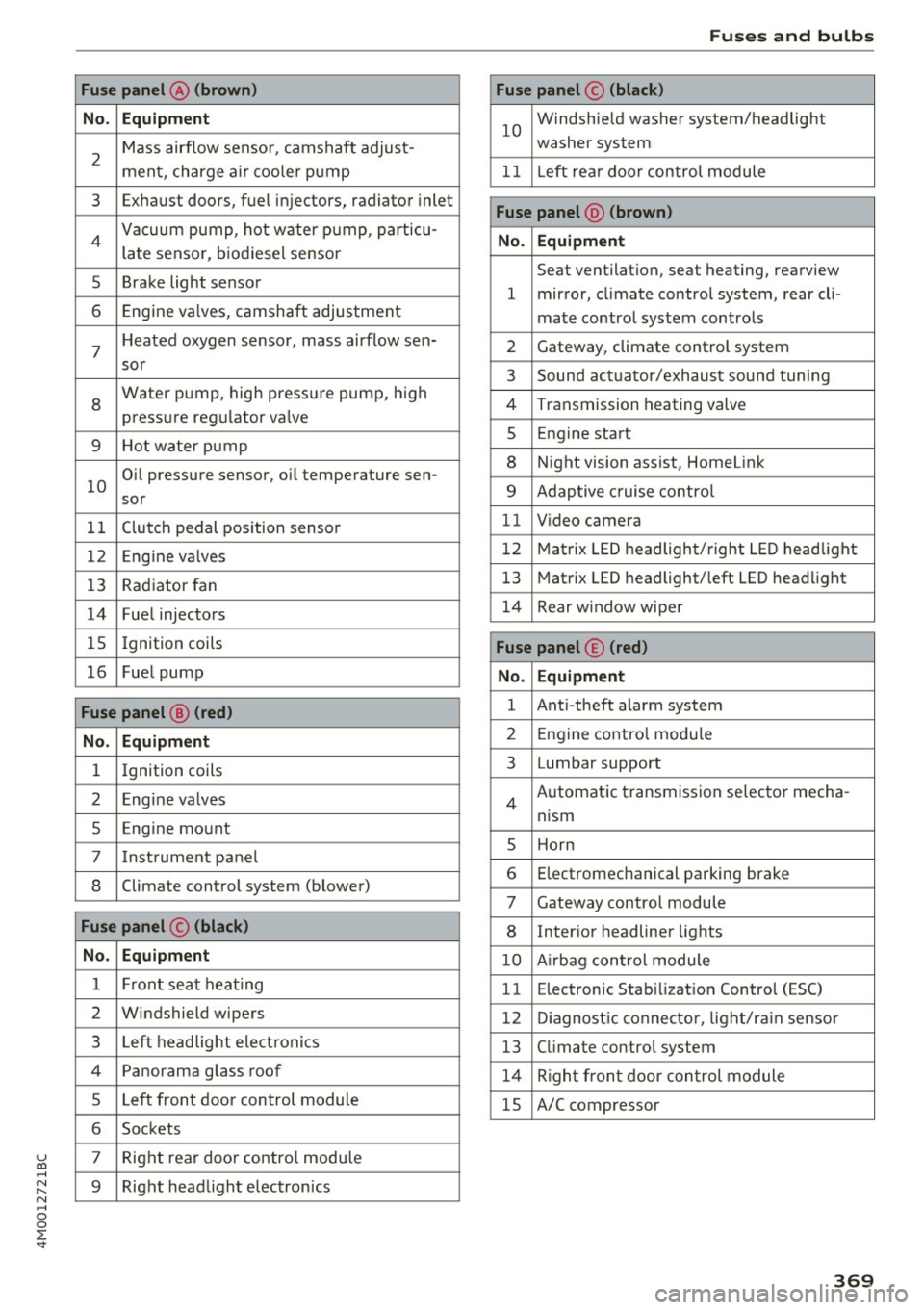
u co ...... N r-... N ...... 0
0
:E: '
No . Equipment
2
Mass airflow sensor, camshaft adjust-
ment, charge air cooler pump
3 Exhaust doors, fuel injectors, radiator inlet
4 Vacuum pump, hot water pump, particu-
late sensor, biodiesel sensor
5 Brake light sensor
6 Engine va lves, camshaft adjustment
7
Heated oxygen sensor, mass airflow sen-
sor
8
Water pump, high pressure pump, high
pressure regulator va lve
9 Hot water pump
10
Oil pressure sensor, oil temperature sen-
sor
11 Clutch pedal position sensor
12 Engine valves
13 Radiator fan
14 Fuel injectors
15 Ignition coils
16 Fuel pump
Fuse panel @ (red)
No . Equipment
1 Ignition coils
2 Eng ine va lves
5 Engine mount
7 I nstrument pane l
8 Climate control system (blower)
Fuse panel © (black)
No. Equipment
1 Front seat heating
2 Windshield wipers
3 Left headlight electronics
4 Panorama glass roof
5 Left front door control module
6 Sockets
7 Right rear door contro l module
9 Right headlight electronics
Fuses and bulbs
Fuse panel© (black)
10
Windshie ld washer system/headlight
washer system
11 Left rear doo r contro l module
Fuse panel @ (brown)
No . Equipment
Seat ventilation, seat heating, rearview
1 mirror, cl imate control system, rear cli-
mate control system controls
2 Gateway, climate control system
3 Sound actuator/exhaust sound tuning
4 Transmission heating valve
s Engine start
8 Night vision assist, HomeLink
9 Adaptive cruise contro l
11 Video camera
12 Matrix LED headlight/right LED headlight
13 Matrix LED headlight/left LED headlight
14 Rear window wipe r
Fuse panel© (red)
No. Equipment
1 Anti-theft alarm system
2 Engine control module
3 Lumbar support
Automatic transmission selector mecha-
4
nism
s Horn
6 Electromechanical parking brake
7 Gateway control module
8 Inter ior headliner lights
10 A irbag control module
11 Electronic Stabilization Control (ESC)
12 Diagnostic connector, light/ra in sensor
13 Climate control system
14 Right front door control module
15 A/C compressor
369
Page 387 of 402

u co ...... N r-... N ...... 0
0
:E: '
A/C MAX (button)
A/C (button) ... ........ ..... ... ... . 72, 76
72, 75
ABS .. .. ... . .. .. ............. .. .. .. . 14 8
Accesso ries 66 ,383
Active lane ass ist
C leaning the camera area ......... ... .
also refer to Aud i active lane ass ist .. .. .
Adapt ive a ir suspension
refer to Air suspension ...... .. .. .... .
Adapt ive cr uise control ..... ... .. .. .... .
C leaning the sensor . ..... ... .. .. .... .
Distance indicator and distance warning .
Messages .. .. ............. .. .. .... .
Predictive contro l
............... .....
Traff ic jam ass ist ............. .. .... .
Ad B lue
. . .. .. .. .. .. .. .... ... .. .. .... .
355
123
134
10 7
355 1 16
116 113
114
3 18
Messages . ... .... .. .... ... .. .. .... . 318
Add it io nal accesso ries . . . . . . . . . . . . . . . . . 383
Ad justing a ir distribution (automat ic climate
control) . . . . . . . . . . . . . . . . . . . . . . . . . . .
73, 76
Ad justing the rear seats . . . . . . . . . . . . . . . . . 60
Ad justing the so und . . . . . . . . . . . . . . . . . . . 253
Ad justing the tempe rature (automatic climate
control) . . . . . . . . . . . . . . . . . . . . . . . . . . .
73, 76
Ad justing the vol ume . . . . . . . . . . . . . . . . . . . 14
Advanced key
refer to Conven ience key . . . . . . . . . . . . . . . 8 2
Airbag . . . . . . . . . . . . . . . . . . . . . . . . . . . . . . 273
Ai rbag system . .. .. .. ..... ... .. .. . 2 73,29 1
Advanced Airbag System components . . . 280
Care . . . . . . . . . . . . . . . . . . . . . . . . . . . . . . 288
Chi ldren . . . . . . . . . . . . . . . . . . . . . . . . . . . 297
Chi ld restraints 297
Components (front a irbags) . . . . . . . . . . . 280
Da nger of fitt ing a child safety seat on t he
front passenger seat . . . . . . . . . . . . . . . . . 2 7 4
D . l 1sposa . . . . . . . . . . . . . . . . . . . . . . . . . . . 288
Fron t air bags . . . . . . . . . . . . . . . . . . . . . . . 278
H ow do the fro nt airbags work? . . . . . . . . 283
How many airbags does my vehi cle have? 280
How the Advanced Airbag System compo-
nents work together . . . . . . . . . . . . . . . . .
282
Indicator light . . . . . . . . . . . . . . . . . . . . . . 285
Mon itoring . . . . . . . . . . . . . . . . . . . . . . . . . 285
PASSENGER AIR BAG light . . . . . . . . . . . . 285
Index
Repairs
Safety instr uctions . ..... . ..... ... .. . .
When m ust t he system be inspected? .. . 288
287
285
Air pressu re
T ires
..... .... .. .. ............... .. 343
Air suspension . . . . . . . . . . . . . . . . . . . . . . . 134
T ra iler mode . . . . . . . . . . . . . . . . . . . . . . . . 100
Alignment pin (changing the wheel) . . . . . . 360
All -wheel stee ring . . . . . . . . . . . . . . . . 134, 152
All season tires . . . . . . . . . . . . . . . . . . . . . . . 348
All weat her lights . . . . . . . . . . . . . . . . . . . . . . 48
All wheel d rive
refer to q uattro
AMI 152
refer to Aud i music interface . . . . . . . 234, 235
Android Auto
refer to Audi smartphone interface 247
An ti-free ze
Windsh ield washer sys tem . . . . . . . . . . . .
331
An ti-lock b raking system
refer to A BS . . . . . . . . . . . . . . . . . . . . . . . . 148
Anti-Slip Regu lation
refer to ASR . . . . . . . . . . . . . . . . . . . . . . . . 148
Apple Car Play
refer to Audi smartphone interface . . . . . 247
Asht ray . . . . . . . . . . . . . . . . . . . . . . . . . . . . . . 65
ASR · · · · · · · .... .. .. ............... .. 148
Audi active lane assist . . . . . . . . . . . . . . . . . 1 23
Messages . . . . . . . . . . . . . . . . . . . . . . . . . . 124
Audi con nect eme rgency call a nd service . . 203
Online roads ide ass istance . . . . . . . . . . . . 2 04
Audi connect vehicle contro l . . . . . . . . . . . . 199
Parki ng locat ion . . . . . . . . . . . . . . . . . . . . . 200
Remote locking and unlock ing . . . . . . . . . 200
Vehicle status report . . . . . . . . . . . . . . . . . 200
Audi connect (Infotainment) . . . . . . . . 189, 196
Data protection . . . . . . . . . . . . . . . . . . . . . 197
Se rvices ove rview . .. .... ...... ... .. ..
Start ing ..... ... .. ................ .
Audi drive select
. .. .. .... . ..... ... .. ..
Audi Ente rtainment mob ile ........... ..
Audi music interface . . ............... ..
Audi music stream
refer to W i-F i . ... .. ... .. ..... ... .. . .
190
190
134
2 36
234
232
Audio files . . . . . . . . . . . . . . . . . . . . . . . . . . . 23 7
385
Page 390 of 402
Index
Cooling system Coolant . . . . . . . . . . . . . . . . . . . . . . . . . . . . 328
Coolant temperature indicato r . . . . . . . . . . 11
C ross ha irs . . . . . . . . . . . . . . . . . . . . . . . . . . . 207
Cruise control system . . . . . . . . . . . . . . . . . . 102
Cup holders . . . . . . . . . . . . . . . . . . . . . . . . . . . 66
Curre nt cons umption . . . . . . . . . . . . . . . . . . . 15
D
Data connection . . . . . . . . . . . . . . . . . . . . . . 1 96
Data protectio n . . . . . . . . . . . . . . . . . . . 197, 228
D ata recorder . . . . . . . . . . . . . . . . . . . . . . . . 154
Date . . . . . . . . . . . . . . . . . . . . . . . . . . . . . 15, 249
Date display . . . . . . . . . . . . . . . . . . . . . . . . . 24 9
Daytime runni ng lig hts . . . . . . . . . . . . . . . . . 48
Declarat ion of compliance
Aud i adapt ive cruise control . . . . . . . . . . . 384
Aud i side assist . . . . . . . . . . . . . . . . . . . . . 384
Ce ll phone package . . . . . . . . . . . . . . . . . . 384
Convenience key . . . . . . . . . . . . . . . . . . . . . 384
E lect ronic immob ilizer . . . . . . . . . . . . . . . . 384
Garage doo r opener (Home link) . . . . . . . . 384
R em ote con trol key . . . . . . . . . . . . . . . . . . 384
D EF
refer to Ad Blue . . . . . . . . . . . . . . . . . . . . . . 3 18
Defrosting (windows) . . . . . . . . . . . . . . . . 73, 76
DEF (inst rument cluste r) . . . . . . . . . . . . . . . . 12
Demo mode
refer to Presentation mode . . . . . . . . . . . . 213
Destination on the map . . . . . . . . . . . . . . . . 207
D etermin ing correc t load l imit
Diese l 3
4 7
Diese l part icu late filter . . . . . . . . . . . . . . . 321
Prewa rm ing . . . . . . . . . . . . . . . . . . . . . . . . . 82
Diese l Exhaust Fl uid (DEF)
refer to Ad Blue . . . . . . . . . . . . . . . . . . . . . . 318
D iese l fuel . .. .. ... ............ .... .. . 315
Dig ita l compass . . . . . . . . . . . . . . . . . . . . . . . 57
Digita l Rights Management . . . . . . . . . . . . . 228
D imen sions . . . . . . . . . . . . . . . . . . . . . . . . . . 379
Dimming the exterior mirrors . . . . . . . . . . . . 53
Dimming the rearview mir ror . . . . . . . . . . . . 53
Directory
refer to Contacts . . . . . . . . . . . . . . . . . . . . 184
388
Display . . . . . . . . . . . . . . . . . . . . . . . . . . . . . . 12
Cleaning . . . . . . . . . . . . . . . . . . . . . . . . . . . 356
Infotainment system d isp lay ..... . 157,250
Mult ifunct ion steer ing whee l . . . . . . . . . . . 12
Versions (MMI) . . . . . . . . . . . . . . . . . . . . . . 157
D istance . . . . . . . . . . . . . . . . . . . . . . . . . . . . . 15
Doors Clos ing a id . . . . . . . . . . . . . . . . . . . . . . . . . . 34
E mergency locking . . . . . . . . . . . . . . . . . . . . 39
Driver informat ion system . . . . . . . . . . . . . . . 15
Changi ng views . . . . . . . . . . . . . . . . . . . . . . 12
Ene rgy consumers . . . . . . . . . . . . . . . . . . . . 16
On-board computer . . . . . . . . . . . . . . . . . . . 15
Outs ide temperat ure display. . . . . . . . . . . . 10
Se rvice in terv al displ ay . . . . . . . . . . . . . . . 332
V iew . . . . . . . . . . . . . . . . . . . . . . . . . . . . . . . 14
D river seat
refer to Seating posi tion . . . . . . . . . . . . . . 25 7
D rives
refer to Media . .. .. .. ........... 228, 237
Drive select
refer to Audi d rive select . . . . . . . . . . . . . . 134
D rivi ng econom ica lly . . . . . . . . . . . . . . . . . . . 79
Driving offroad . . . . . . . . . . . . . . . . . . . . . . . . 89
Driving on hills . . . . . . . . . . . . . . . . . . . . . . . . 90
D rivi ng safely . . . . . . . . . . . . . . . . . . . . . . . . 256
Driving through water . . . . . . . . . . . . . . . . . . 79
D rivi ng time . . . . . . . . . . . . . . . . . . . . . . . . . . 15
DVD drive (med ia drives) . . . . . . . . . . . . . . . 229
Dynamic vol ume
refer to System vo lume . . . . . . . . . . . . . . . 254
E
E-mail . . . . . . . . . . . . . . . . . . . . . . . . . . . . . . 183
Easy seat ent ry . . . . . . . . . . . . . . . . . . . . . . . . 82
E conom ica l route .. .. .. .. ........... .. 212
ED S . . . . . . . . . . . . . . . . . . . . . . . . . . . . . . . . 148
E lectromechanical parking brake . . . . . . . . . 87
E lectromechanical steering . . . . . . . . . . . . . 152
El ectronic immobil izer . . . . . . . . . . . . . . . . . . 35
E lectronic stabili zation control
refer to ESC . . . . . . . . . . . . . . . . . . . . 148, 149
Emergency assistance . . . . . . . . . . . . . . . . . 360
Emergency b raking fu nction . . . . . . . . . . . . . 87
Emergency call funct ion
Audi connect emergency call and service . 203
Page 394 of 402
Index
MMI search
refer to Free text search . . . . . . . . . . 165, 239
MMI touch . . . . . . . . . . . . . . . . . . . . . . . . . . . 160
Monitoring the Advanced Airbag System 285
MP3
refer to Jukebox . . . . . . . . . . . . . . . . . . . . . 230
Multifunction steering wheel
Button . . . . . . . . . . . . . . . . . . . . . . . . . . . . . 14
Map zoom .. .. ... ............ .... .. .. 13
Operating . . . . . . . . . . . . . . . . . . . . . . . . . . . 12
Speech dialog system . . . . . . . . . . . . . . . . . 14
Switching tabs . . . . . . . . . . . . . . . . . . . . . . . 12
Multi Media Interface . . . . . . . . . . . . . . . . . . 156
Music collection
refer to Jukebox . . . . . . . . . . . . . . . . . . . . . 230
Mute . . . . . . . . . . . . . . . . . . . . . . . . . . . . . . . . 14
also refer to Muting . . . . . . . . . . . . . . . . . . 253
Mute (muting) . . . . . . . . . . . . . . . . . . . . . . . . 14
Muting .... .. .. ... ............ .... .. . 253
Muting (mute) . . . . . . . . . . . . . . . . . . . . . . . . 14
myAudi . . . . . . . . . . . . . . . . . . . . . . . . . 189, 209
L ogging in in the vehicle . . . . . . . . . . . . . . 189
PIN . . . . . . . . . . . . . . . . . . . . . . . . . . . . . . . 189
N
Natura l leather care/cleaning . . . . . . . . . . . 357
NAV/MAP button . . . . . . . . . . . . . . . . . . . . . 205
Navigating ( instrument cluster) . . . . . . . . . . 19
Navigation . . . . . . . . . . . . . . . . . . . . . . . . . . . 205
Announcements . . . . . . . . . . . . . . . . . . . . . 214
Better route . . . . . . . . . . . . . . . . . . . . . . . . 221
also refer to Map . . . . . . . . . . . . . . . . . . . . 215
Navigation (instrument cluster) . . . . . . . . . . 18
Net . . . . . . . . . . . . . . . . . . . . . . . . . . . . . . . . . 67
Network connection (Wi-Fi) . . . . . . . . . . . . . 195
NHTSA Contacting . . . . . . . . . . . . . . . . . . . . . . . . . 263
Night vision assist . . . . . . . . . . . . . . . . . . . . 131
Cleaning the camera . . . . . . . . . . . . . . . . . 355
Nitrogen ox ide (NOx) catalytic converter
refer to Ad Blue . . . . . . . . . . . . . . . . . . . . . . 318
Number of seats . . . . . . . . . . . . . . . . . . . . . . 265
0
Occupant protection . . . . . . . . . . . . . . . . . . . 117
392
Occupant seating positions . . . . . . . . . . . . . 257
Octane rating . . . . . . . . . . . . . . . . . . . . . . . . 314
Odometer . . . . . . . . . . . . . . . . . . . . . . . . . . . . 12
Offroad driving . . . . . . . . . . . . . . . . . . . . . . . . 89
Offroad mode . . . . . . . . . . . . . . . . . . . . . . . . 149
OFF (button) . . . . . . . . . . . . . . . . . . . . . . . 72, 75
Oil
refer to Engine oil . . . . . . . . . . . . . . . 324, 326
On-board computer . . . . . . . . . . . . . . . . . . . . 15
On-Board Diagnostic System (OBD) Data Link Connector (DLC) . . . . . . . . . . . . . . 21
Electronic speed limiter . . . . . . . . . . . . . . . 102
Malfunction indicator lamp (MIL) . . . . . . . . 21
On/Off knob (MMI) . . . . . . . . . . . . . . . . . . . . 156
Online destinations
refer to Point of interest search . . . . . . . . 209
Online map . .. .. .. .. .. ............. .. 217
Online map update . .. .. ... .......... .. 219
Online media . . . . . . . . . . . . . . . . . . . . . . . . . 233
Online roadside assistance Audi connect emergency call and service 204
Online serv ices
refer to Aud i connect (Infotainment) . . . . 189
Open ing.... .. .. .. .. .. ... ..... ... .. ... 34
Fuel filler door . . . . . . . . . . . . . . . . . . . . . . 316
Operating Multifunction steering wheel . . . . . . . . . . . 12
Multi Media Interface . . . . . . . . . . . . . . . . 158
Voice recognition system . . . . . . . . . . . . . 169
Options menu . . . . . . . . . . . . . . . . . . . . 159, 163
Other consumers . . . . . . . . . . . . . . . . . . . . . . 16
Outside temperature display . . . . . . . . . . . . . 10
Overview (Cockpit) . . . . . . . . . . . . . . . . . . . . . . 8
p
Paint damage . . . . . . . . . . . . . . . . . . . . . . . . 356
Paint number . . . . . . . . . . . . . . . . . . . . . . . . 378
Panorama glass roof . . . . . . . . . . . . . . . . . . . . 45
Emergency operation . . . . . . . . . . . . . . . . . . 45
Parenta l control
DVD .......... .. .. .. ... ............ 240
Parking aid Cleaning sensors/camera . . . . . . . . . . . . . 355
Parking brake
refer to Electromechanical parking brake . 87