park assist AUDI Q7 2017 Owner´s Manual
[x] Cancel search | Manufacturer: AUDI, Model Year: 2017, Model line: Q7, Model: AUDI Q7 2017Pages: 402, PDF Size: 100.39 MB
Page 118 of 402

Assistance systems
Distance indicator and
distance warning
Description
Applies to: vehicles with Aud i adapt ive cruise control
F ig. 114 In stru ment cl uste r: dis tance indica tor/wa rning
At speeds above 40 mph (65 km/h), this funct ion
measures the time betwee n the vehicle driv ing
ahead and s hows th is in the instrument cl uster
d isp lay¢
fig. 114 .
You can set a warning t hreshold between 0 .6 and
3.0 seconds . The . indicator light t urns on if
you fall be low the set d istance.
Switching the distance indicator/warning on
and off
.. In the Infotainment system, selec t: I MENU !
button > Vehicle > left contro l button > Driver
assistance > Distance warning.
A WARNING
- Read an d follow th e war nings on ¢.&. in
Gen eral in for ma tion on page 1 08.
-The driv er is always r espons ib le for a dhering
to the regulations applicable in th at co un
t ry .
{!) Tips
You may fall b elow he warn ing t hreshold
briefly whe n pass ing or when quickly ap
proac hing a s low veh icle . T h er e is no wa rni ng
in this scen ario . A warn ing is gi ven only if you
f al l b elow the war ning thr eshold f or an ex
t en ded pe rio d o f tim e.
116
Messages
Appl ies to: vehicles with Audi adaptive cruise control
ii ACC with traffic jam assist: unavailable . See
owner's manual
The sy stem cannot gu aran tee t hat i t will dete ct
vehicle s cor re ctl y an d it h as sw itched
off . The ra
dar sensors have shifted or are fau lty . D rive to an
aut ho rize d Audi dea le r o r a uth orized Audi Service
Facility immed iate ly to have the malfunct ion cor
r ected .
ii ACC with traffic jam assist: currently un
available. See owner's manual
This mes sage ap pears if the ada ptive cruise con
t ro l canno t be activ ated, for example i f th e hood
is ope n.
fl ACC with traffic jam assist : currently un
available. Sensor vision restricted due to sur roundings. See owner 's manual
This message ap pears if the radar se nsor v iew is
obstr ucted, for e xamp le by leaves, snow, heavy
s p ra y or dir t. Cle an the senso rs ¢
pa ge 107 ,
fi g. 101.
ill ACC with traffic jam assist: currently un
available. Grade too steep
T he road exceeds the maxim um poss ible g rade
for saf e operation . The systems cannot be sw itch
ed o n.
ill ACC with traffic jam assist: only available in
D, Sor M
Se lect t he D/S or M se lector lever position.
flJ ACC with traffic jam assist: currently un·
available. Parking brake applied
The sys tems swi tch off i f you set the parking
bra ke. Th e sys tems are av ailab le ag ai n afte r yo u
rele ase the parkin g bra ke .
ill ACC with traffic jam assist: currently un
available. Stabilization control (ESC ) input
This message appears if the e lectron ic stabiliza
t ion cont rol ( ESC) is tak ing act ion to stabiliz e the
vehicle . The systems switch
off in this scena rio .
ill ACC with traffic jam ass ist: manual control! .,.
Page 131 of 402

u (0 ...... N r--. N ...... 0
0
:E
Applies to: vehicles with Audi side assist
Fig . 123 Example dis play
Fig. 124 Door: warning str ip
When the veh icle is stationary, the exit warning
system warns the passengers of a possible colli
sion when opening the door . Within the limits of
the system, the system monitors the areas be
hind and next to the vehicle using the radar sen
sors
~ page 127, fig. 122 . Moving objects that
are approaching from behind, such as cars, are
detected
~ fig. 123.
When you open the door, the warning strip on
the affected door blinks ¢
fig. 124 if another
road us er is detected and the situation is classi
f ied as critical. The display in the exterior mirror
on the affected s ide flashes at the same time . If
the door is already open and another road user is
detected and the situation is classified as critical,
then the corresponding displays turn on.
A WARNING
-A lways pay attention to traffic and to the
area around your vehicle. The exit warning
system does not replace the attention of the
passengers. The vehicle passengers are al-
Assistance systems
ways responsible for opening the doors and
exiting the vehicle.
- The exit warning system can be available for
up to approximately three minutes after un
locking the vehicle and opening the door as
well as after switching off the ignition . Then
the system switches off with a brief flashing
of the displays.
- The exit warning system cannot notify you
of every approaching object or person, such
as joggers or pedestrians .
A WARNING
The exit warning system is subject to limita
tions and cannot warn you before every im
pending collision:
- If the vehicle is too wide for the parking
space and covered by the neighboring
vehicles.
- Approaching objects or people such as cy
clists or skateboarders may not be detected
under certain circumstances.
- The system does not react to stationary ob
jects.
- The view of the radar sensors may be im
paired by leaves, snow, heavy spray or dirt .
Clean the area in front of the sensors
c:o page 127, fig. 122.
(D Note
Also read the information in r:o© in General
information on page 128 .
(D Tips
-The exit warning system is switched on and
off through the side assist~
page 128.
-The display brightness for the exit warning
system cannot be adjusted.
- The system is not available when towing a
trailer.
-
129
Page 132 of 402

Assistance systems
Rear cross-traffic assist
Applies to: vehicles w ith rear cross -traff ic ass ist
Fig . 125 Example display
Fig. 126 Infotainment system: rear cross-traffic assist dis
play
The rear cross-traffic assist can warn the driver of
a potential collision with approaching cross-traf
fic when driving in reverse. Within its limits, the
system monitors the areas behind and next to
the vehicle using the radar sensors when leaving
a parking space
r::!.>page 127, fig. 122. Moving ob
jects that are approaching, such as cars, are de
tected
r::!.>fig. 125.
If the system detects critical cross traffic when
backing out of a parking space, it will react as fol
lows:
- Visual indicator : an indicator appears in the In
fotainment system display with a red arrow
symbol. The arrow points in the direction from
which the object is approaching
r::!.> fig. 126.
-Audible warning signal : a continuous tone may
sound as an additional indicator when driving in
reverse.
- Automatic brake activation : a brief activation
of the brakes may also warn you of a potential
collision with an approaching object.
130
Requirements for using the rear cross-traffic
assist:
- The parking aid must be switched on
c>page 138.
-Reverse gear must be engaged.
- The speed must not be higher than approxi-
mately 9 mph (15 km/h).
A WARNING
- The rear cross-traffic assist is an assist sys
tem and cannot prevent a collision by itself.
The driver must always intervene. The driver
is always responsible for braking at the cor
rect time.
- Please note that the rear cross-traffic assist
may activate the brakes unexpectedly. Se
cure any cargo that you are transporting to reduce the risk of damage or injury.
- An additional brake activation may be trig gered within 20 seconds after an automatic
brake activation.
- If there is an acoustic warning signal from the rear cross-traffic assist, then the parking system may not warn you of detected
obstacles under certain circumstances.
- The view of the radar sensors may be im
paired by leaves, snow, heavy spray or dirt.
Clean the area in front of the sensors
r::!.>page 127, fig. 122.
A WARNING
The rear cross-traffic assist is subject to limi
tations and cannot warn you before every im pending collision:
- If the vehicle is too wide for the parking
space and covered by the neighboring
vehicles.
- People, such as cyclists, joggers, in line skat
ers and pedestrians, may not be detected
under certain circumstances.
- If you are in a parallel parking space or diag
onal parking space.
(D Note
Also read the information in r::!.>0 in General
information on page 128.
Page 133 of 402

@ Tips
-You can cancel the automatic brake activa
tion w ith increasing bra king fo rce if you ap
ply the brakes yourse lf or accelerate cons id
erab ly.
- In some situations, rea r cross-traffic assist
may warn yo u even if there is no cross traffic
i n a cr itical a rea , for examp le w hen back ing
i nto a parki ng space or ma neuver ing.
- The rea r cross-traffic ass ist also switches off
whe n you switch off the ESC.
- The rea r cross traffic assist switches on and
off thro ugh the pa rking aid
qpag e 138.
- The system is not available when towin g a
trailer.
Messages
A ppl ies to: ve hicles with Audi side assist
A message appears in the inst rument cluste r dis
p lay if the s ide ass ist swi tches off autom atically .
@j Audi side assist: malfunction! Please contact
Service
@j Audi side assist and exit warning : malfunc
tion! Please contact Service
The system ca nnot gu ara nt ee th at i t w ill detec t
ve hicl es co rrectly and it has switched off. The
sensors have been moved o r are faulty . Have t he
system checked by an a uthorized Audi dealer or
author ized Audi Se rvice Facility s oon.
@j Audi side assist: currently unavailable. Sen
sor vision restricted due to surroundings . See
owner 's manual
@j Audi side assist and exit warning : currently
unavailable. Sensor vision restricted due to sur
roundings
The rad ar senso r vis io n i s im paire d. T he ar ea in
fr on t of the senso rs must no t be covered by bik e
r ac ks, st ic kers, leaves, snow or any other o bjects.
C lea n the area i n front of the senso rs, if necessa
ry
¢ page 127, fig. 122.
~ @j Audi side assist: currently unavailable. See ......
~ owner 's manual
N ...... 0
0
:E: '
@j Audi side assist and exit warning: currently
unavailable. See owner's manual
S id e assi st cann ot be sw itche d on a t this tim e be
cau se the re is a m alfu nct ion ( for e xample, the
ba tte ry c harge leve l may be to o low) .
@j Audi side assist: unavailable in towing mode
@j Audi side assist and exit warning: currently
unavailable. Towing mode
S ide assist switches off automatically when the
electrical connecto r in t he factory-installed trail
er hitch is connected . There is no guarantee the
system will sw itch o ff when us ing a ret rofi tted
t rail er h itch . Do not u se side assist and the ex it
warni ng w hen tow ing a tra ile r.
[II Rear parking aid : obstacle detection restrict
ed
The rear c ross-traffic ass ist is not available. E i
t h er the ESC is sw itched off, or the rada r senso rs
may be cove re d by a b ike rack, stic ke rs, leaves,
snow o r other objects . Swi tc h the ESC on, or
cle an the area in fron t of th e senso rs if necessa ry
~ page 127, fig. 122. If thi s m essage co ntin ue s
to be displayed, dr ive imme dia tely to an author
i z ed Audi deal er or author ized Audi Service Facili
ty to have the ma lf u nction re paire d.
Night vision assist
Description
App lies to : vehicles wit h night vision assist
The night vision assist can detect, highlight and,
if necessary , warn about pedestrians and large
wild animals .
Nigh t vision assist he lps yo u when it is dark by
u sing an infra red came ra to monit or the a rea in
front of your ve hicle , w ith in the limits of the sys
tem .
It can disp lay objec ts up to a dis tance of ap
prox ima tely 1 000 feet (300 m) . T he thermal im
age dete cted by the came ra is show n in t he in
s tru me nt clus ter di sp lay . W arm a reas appea r
lig hter a nd co ld ar eas ap pea r dar ker.
131
Page 135 of 402
If the head-up display* is switched on and the
night vision assist content is activated,. or.
will appear in the head-up display*.
Marking light*
To direct the driver's attention to a pedestrian,
the headlights can flash on the pedestrian three
times in a row when there is a pedestrian warn
ing.
This occurs at speeds above approximately 35 mph (60 km/h) if you are outside of illuminat
ed areas and no detected vehicles are shown. The
high beam assistant* controls the marking
light* c:>
page 49.
The marking light is not used for wild animals.
General information
App lies to: ve hicles w ith nigh t visio n ass ist
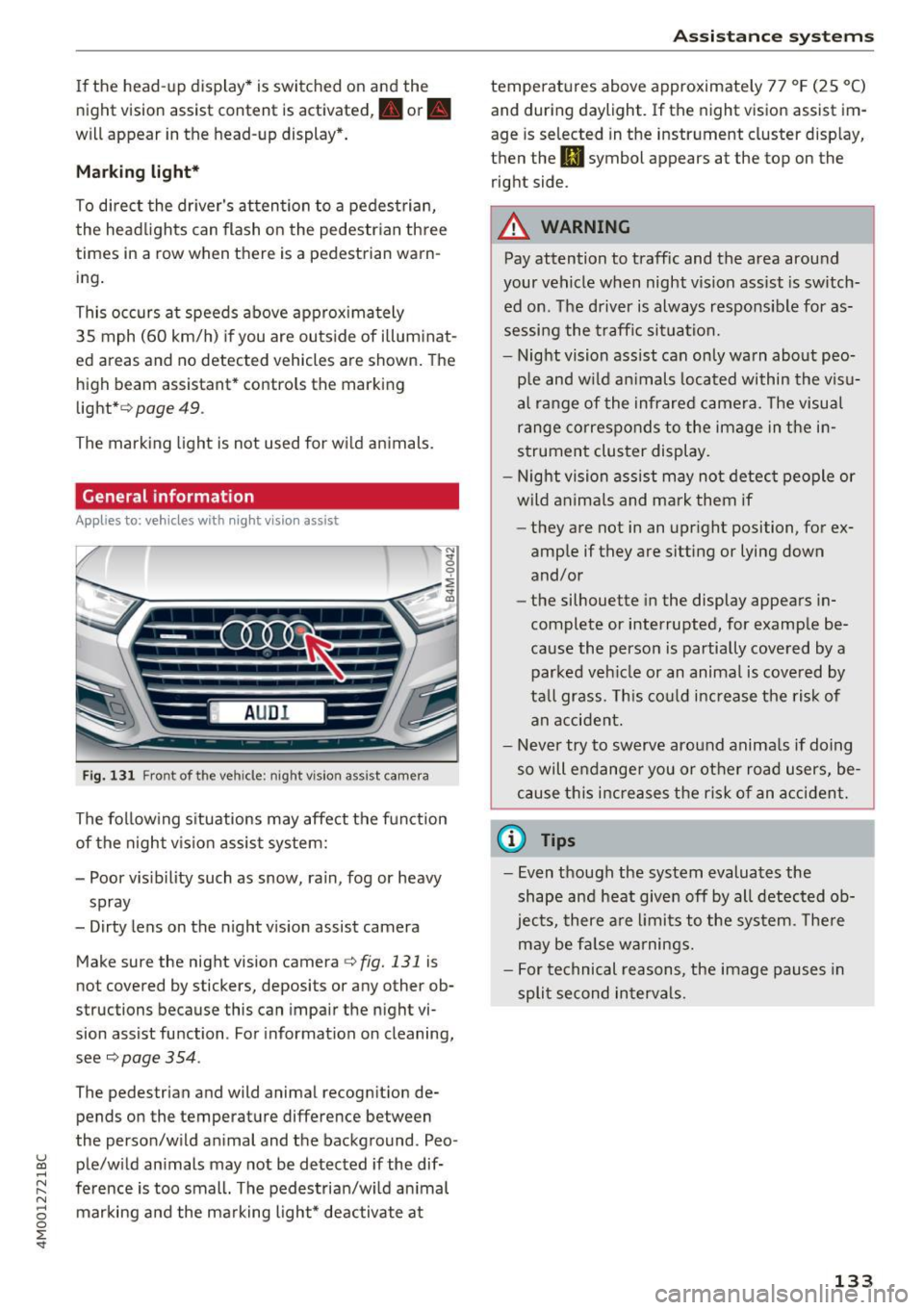
Fig. 131 Front of the ve hicle: night vision ass ist came ra
The following situations may affect the function
of the night vision assist system:
- Poor visibility such as snow, rain, fog or heavy
spray
- Dirty lens on the night vision assist camera
Make sure the night vision camera
c::> fig. 131 is
not covered by stickers, deposits or any other ob
structions because this can impair the night vi
sion assist function . For informati on on cleaning,
see
c::> page 354 .
The pedestrian and wild animal recognit ion de
pends on the temperature difference between
the person/wild anima l and the background . Pea -
~ ple/wild animals may not be detected if the dif-,.....
~ ference is too small. The pedestrian/wild animal N
8 marking and the marking light* deactivate at 0 :E
temperatures above approximately 77 °F (25 °C)
and during daylight. If the night vision assist im
age is selected in the instrument cluster display,
then the
II symbol appears at the top on the
right side.
A WARNING
-Pay attention to traffic and the area around
your vehicle when night vision assist is switch
ed on. The driver is always responsible for as
sessing the traffic situation.
- Night vision assist can only warn about peo
ple and wild animals located within the visu
al range of the infrared camera. The visual
range corresponds to the image in the in
strument cluster display.
- Night vision assist may not detect people or
wild animals and mark them if
- they are not in an upright position, for ex
ample if they are sitting or lying down
and/or
- the silhouette in the display appears in
complete or interrupted, for example be
cause the person is partially covered by a
parked vehicle or an animal is covered by
tall grass. This could increase the risk of
an accident.
- Never try to swerve around animals if doing
so will endanger you or other road users, be
cause this increases the risk of an accident.
(I) Tips
- Even though the system evaluates the
shape and heat given off by all detected ob
jects, there are limits to the system . There
may be false warnings.
- For technical reasons, the image pauses in
split second intervals.
-
133
Page 137 of 402
u (0 ...... N r--. N ...... 0
0
:E
The air suspension* is an electronically-control
l ed air suspens ion and damping sys tem . The ad
justment depends on the driving mode selected, steer ing movements, the driver's braking and ac
celeration, and as the road surface, vehicle speed
and load. The vehicle ground clearance depends
on the mode selected and the speed .
The ground clearance increases s ignificantly
when the vehicle is in the
Allroad mode . At
speeds from approximately 50 mph (80 km/h) to
75 mph (120 km/h), the ground clearance re
duces in stages. When the speed decreases, the
ground clearance increases again automat ically .
The ground clearance is the lowest in
Dynamic
mode.
Steering
The power steering adapts. Ind irect steer ing that
moves easily as in
Comfort mode is especially
suited to long drives on highways. The
Dynamic
mode provides sporty, direct steering.
All-wheel steering*
All-wheel steer ing increases driving comfort by
providing addit ional steering ability at the rear
axle . Steer ing in the opposite d irection at low
speeds decreases the turning rad ius. Steering in
the same d irect io n at high speeds improves the
response time while increasing driving stability at
the same time .
Sport differential*
As a component of the all wheel drive system
(quattro)
~ page 152, the sport diffe rential dis
tributes the dr iv ing power to the rear axle de
pending on the situation. The distribution of
power varies depending on the selected mode
from moderate
( Comfort ) to sporty (Dynamic ).
The goal is a high level of agility and ability to ac
celerate on curves . The vehicle is very responsive
to steering.
Adaptive cruise control (ACC)*
The behavior when accelerating can be adjusted
from comfortab le to sporty, depending on the
drive select mode. Adaptive cruise control also
Assistance systems
responds to the driving behavior of the vehicle
ahead in a more conservative or sporty manner.
Engine sound*
T he eng ine sound adapts to the current mode
and can be subtle to sporty .
(D Note
Applies to: vehicles wi th air suspensio n
-Make sure there is enough clearance above
and below the vehicle when parking. The
height of the ve hicle (gro und clearance) can
change once it is parked due to temperature
fluctuations, changes to the load conditions
and changes to the dr iving modes.
- When transporting the vehicle on a car car
rier, train, ship or by other means, only tie
the vehicle down at the running surface of
the tires, which is the outer c ircumference.
Sec uring the vehicle at the axle compo
nents, suspension struts o r towing eyes is
not permitted because the pressure in the
air suspens ion struts can change during
transport. The vehicle may not be secured
sufficiently if this happens.
@ Tips
The S selecto r lever position automatically en
gages when the
Dynamic mode is selected .
Selecting the driving mode
Applies to: vehicles w ith Aud i dr ive select
~- ------ -
~
Fig. 133 Center console: co ntro ls for d rive select
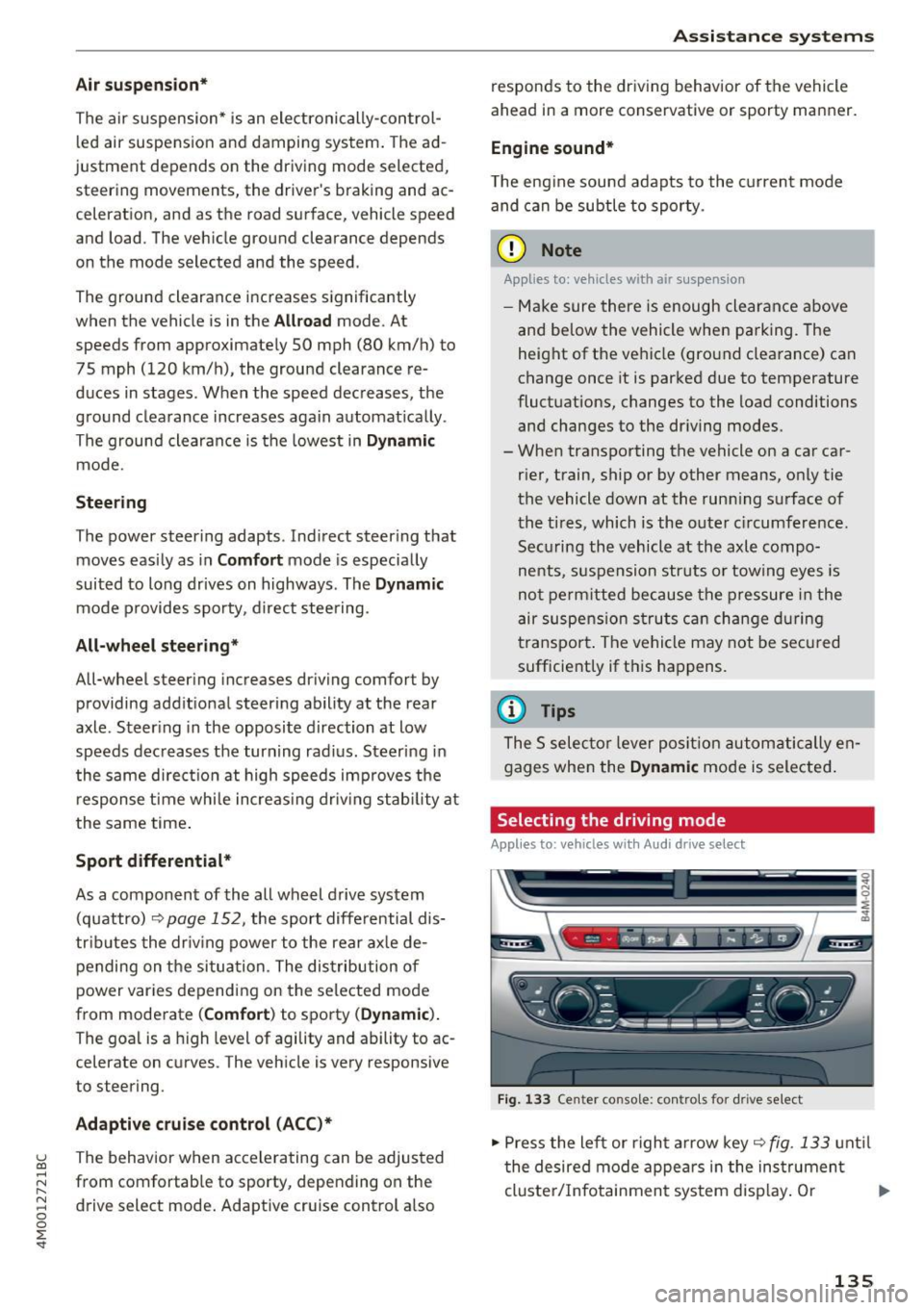
.,. Press the left or right arrow key~ fig. 133 until
the desired mode appears in the instrument
cluste r/Infotainment system disp lay. Or
II>-
135
Page 140 of 402

Parking systems
Parking systems
General information
A ppl ies to: ve hicles w ith a rea r parking sys te m /pa rking sys
tem p lus/rearv iew camera/peripheral ca meras
Depending on your vehicle's equipment , various
parking aids will help you when parking and ma
neuvering.
The
rear parking system is an audible parking aid
that warns you of obstacles
behind the vehicle
¢ page 139.
The
parking system plus assists you when park
ing by audibly and visually indicating objects de
tected
in front of and behind the veh icle
¢ page 139.
The
rearview camera shows the area behind the
vehicle in the Infotainment system display . The
lines in the rearview camera image help you to
park or maneuver
¢ page 140. The parking sys
tem plus functions are also available
¢ page 139.
The
peripheral cameras give various views to
help you when parking or maneuvering
¢ page 143. The parking system plus functions
are also available
¢page 139.
A WARNING i-==
- Always look for traffic and check the area
around your vehicle by looking at it directly
as well. The parking system cannot replace
the driver's attention. The driver is always
responsible when entering or leaving a park
ing space and during similar maneuvers.
-
- Please note that some surfaces , such as
clothing, are not detected by the system .
- Sensors and cameras have blind spots in
which people and objects cannot be detect
ed . Be especially cautious of small children
and animals .
- Always keep your eyes on the vehicle's sur
roundings, using the rearview mirror as
well.
- The sensors can be displaced by impacts or
damage to the radiator grille, bumper,
wheel housing and the underbody. The park ing system may be impa ired as a result.
138
Have an authorized Audi dealer or author
ized Audi Service Facility check their func
tion.
(D Note
- Some objects are not detected or displayed
by the system under certain circumstances:
- objects such as barrier chains, trailer draw
bars, vertical poles or fences
- objects above the sensors such as wall ex
tensions
- objects with certain surfaces or structures
such as chain link fences or powder snow
- If you continue driving closer to a low ob
ject, it may disappear from the sensor
range. Note that you will no longer be
warned about this obstacle.
- Keep enough distance from the curb to re
duce the risk of damage to the rims.
{i) Tips
- The system may provide a warning even
though there are no obstacles in the cover
age area in some situations, such as:
- certain road surfaces or when there is tall
grass
- external ultrasonic sources such as from
cleaning vehicles
- in heavy rain, snow, or thick vehicle ex
haust
- We recommend that you practice parking in
a traffic-free location or parking lot to be
come familiar with the system . When doing
this, there should be good light and weath
er conditions.
- You can change the volume of the signals
and the display ¢
page 146.
- Please refer to the instructions for towing a
trailer located in
¢page 147.
- What appears in the infotainment display is
somewhat time-delayed.
- Th e sensors must be kept clean and free of
snow and ice for the parking aid to operate .
Page 141 of 402

u (0 ...... N r--. N ...... 0
0
:E
Description
Applies to: vehicles with rear parking aid
The rear parking system is an audible parking
aid .
Desc rip tion
There is a sensor in the rear bumper cover. If
these detect an obstacle, audible signals warn
you .
Make sure the sensors are not covered by stick
ers, deposits or any other obstructions as it may
impair the function of the system . For informa
tion on cleaning, see
c::;,page 354.
The range at which the sensors begin to measure
is approximately:
side 3 ft (0.90 m)
rear
center 5.2 ft (1.60 m)
The closer you get to the obstacle, the shorter
the interval between the audible signals . A con
tinuous tone sounds when the obstacle is less
than approximately 1 foot (0.30 meters) away. Do not continue backing up
c::;, &. in General infor
ma tion on page 138,
c::;, (D in General information
on page
138!
If the distance to an obstacle remains constant,
the volume of the distance warning gradually lowers after a few seconds until it is muted (this
i s not apply in the continuous tone range). If the
obstacle becomes closer than it was before the
sound was muted, the tone will sound again . If
the obs ta cl e is father away tha n it was before the
sound was muted, no tone w ill sound . Pay atten
tion to the vehicle's surroundings when you start
to drive.
Activating
The rear parking assist activates automat ica lly
when the reverse gear is engaged. A br ief conf ir
mat io n tone will sound.
Parking systems
Parking aid plus
Description
Applies to: veh icles w ith park ing system plus
Parking system plus provides audio and visual
signals when parking.
F ig . 1 35 Illust rat io n:
Sensors are located in the front and rear bump
ers. If these detect an obstacle, audib le and visu
al signals warn you .
Make s ure the sensors a re not cove red by st ick
ers, deposits or any other obst ructions as it may
i mpa ir t he function of the system. For informa
tion on cleaning, see
c::;, page 354.
The displ ay field beg ins approx imately at:
® 4 ft (1.20 m)
® 3 ft (0 .90 m)
© 5 .2 ft (1.60 m)
@ 3 ft (0 .90 m)
T he close r you get to the obstacle , the shorter
t h e i nterval be twee n the audible signa ls . A con
t inu ous tone sounds when the obs tacle is less
than approxim ately 1 foot (0.30 meters) away .
Do not continue dr iving forward or in reverse
c::;, &. in General information on page 138, c::;, (i) in
General information on page 138!
If the distance to an obstacle remains cons tant ,
the volume of the distance warn ing gradua lly
l owers after a few seconds until it is muted (this
is not apply in the continuous tone range).
If the
obstacle becomes closer than it was before the
sound was muted , the tone will sound aga in . If
the obstacle is father away than it was before the .,_
139
Page 143 of 402
u (0 ...... N r--. N ...... 0
0
:E
Applies to: vehicles with rearv iew camera
Fig . 139 Area covered (D and area not covered @by the
rearv iew camera.
Fig. 140 Luggage compartment lid: locatio n of the rear
view camera
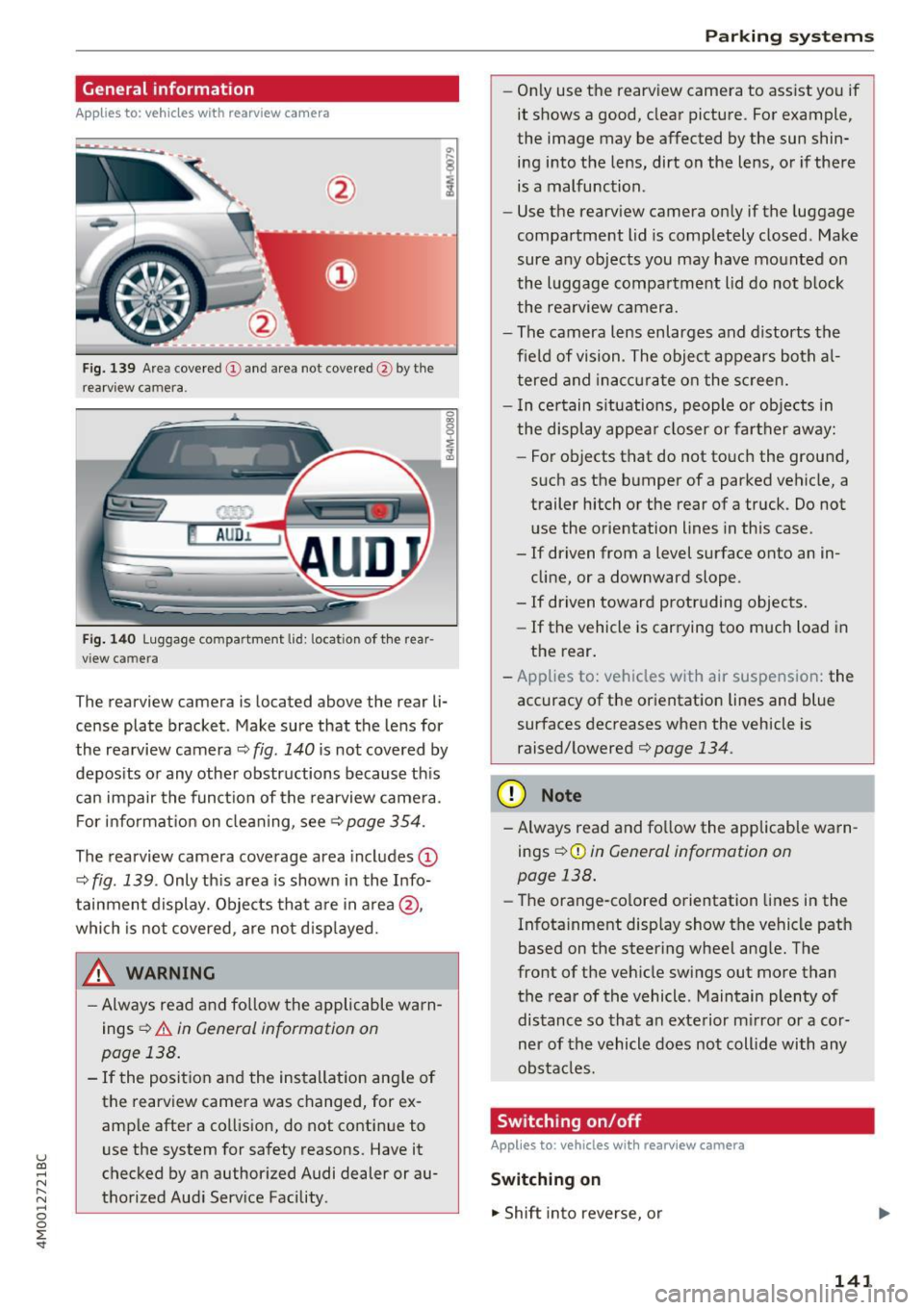
The rearview camera is located above the rear li
cense plate bracket. Make sure that the lens for
the rearview camera ¢
fig. 140 is not covered by
deposits or any other obstructions because this
can impair the function of the rearview camera.
For information on cleaning, see<=>
page 354.
The rearview camera coverage area includes (D
¢ fig. 139 . Only this area is shown in the Info
tainment display. Objects that are in area @,
which is not covered, are not displayed.
A WARNING
- Always read and follow the applicable warn
ings
<=> A in General information on
page 138.
- If the position and the installation angle of the rearview camera was changed, for ex
ample after a collision, do not continue to
use the system for safety reasons. Have it
checked by an authorized Audi dealer or au
thorized Audi Service Facility .
Parking systems
-Only use the rearview camera to assist you if
it shows a good, clear picture. For example,
the image may be affected by the sun shin
ing into the lens, dirt on the lens, or if there
is a malfunction.
- Use the rearview camera only if the luggage
compartment lid is completely closed. Make
sure any objects you may have mounted on
the luggage compartment lid do not block
the rearview camera.
- The camera lens enlarges and distorts the
field of vision. The object appears both al
tered and inaccurate on the screen.
- In certain situations, people or objects in
the display appear closer or farther away:
- For objects that do not touch the ground,
such as the bumper of a parked vehicle, a
trailer hitch or the rear of a truck. Do not
use the orientation lines in this case.
- If driven from a level surface onto an in
cline, or a downward slope .
- If driven toward protruding objects.
- If the vehicle is carrying too much load in
the rear.
- Applies to: vehicles with air suspension: the
accuracy of the orientation lines and blue
surfaces decreases when the vehicle is
raised/lowered¢
page 134.
(D Note
-Always read and follow the applicable warn
ings¢ (!)
in General information on
page 138.
- Th e orange-colored orientation lines in the
Infotainment display show the vehicle path
based on the steering wheel angle. The
front of the vehicle swings out more than
the rear of the vehicle . Maintain plenty of
distance so that an exterior mirror or a cor
ner of the vehicle does not collide with any
obstacles.
Switching on/off
Applies to: vehicles with rearview camera
Switching on
"' Shift into reverse, or
141
Page 144 of 402
Parking systems
.,. Press the Pw~ button in the center console
¢ page 140 , fig. 136. A short confirmation
tone sounds and the LED in the button turns
on.
Switching off
.,. Drive faster than 6 mph (10 km/h), or
.,. Press the
p,q~ button, or
.,. Switch the ignition off.
@ Tips
- The visual display in the right part of the
display should help you detect the critical
vehicle area.
- You can change the volume of the signals and the display
¢page 146.
Perpendicular parking
App lies to : ve hicles w ith rearview ca mera
This view may be used when parking in a garage
or in a parking space.
Fig. 141 In fotainme nt system: aim ing at a park ing space
Fig . 142 Infotainment syste m: alig ning the vehicle
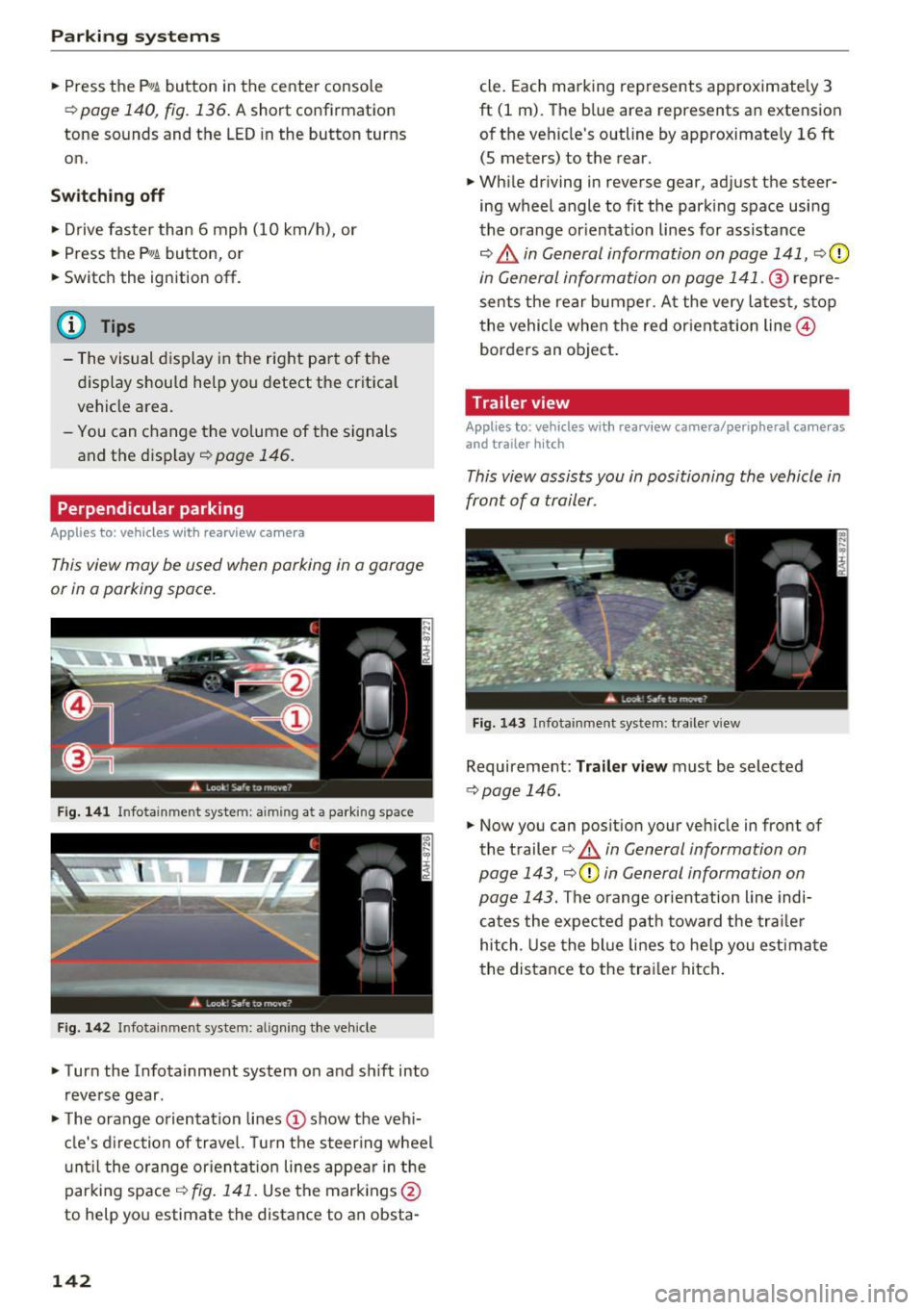
.,. Turn the Infota inment system on and shift into
reverse gear .
.,. The orange orientation lines(!) show the vehi
cle's direction of travel. Turn the steering wheel
until the orange orientat ion lines appear in the
parking space ¢
fig. 141. Use the markings @
to help you estimate the distance to an obsta-
142
cle. Each marking represents approximately 3
ft (1 m). The blue area represents an extension
of the vehicle's outline by approximate ly
16 ft
(5 meters) to the rear.
.,. While driving in reverse gear, adjust the steer
ing wheel angle to fit the parking space using
the orange orientat ion lines for assistance
¢ .&, in General information on page 141, ¢(D
in General information on page 141 . ® repre
sents the rear bumper. At the very latest, stop
the vehicle when the red orientation line@
borders an object.
Trailer view
Appl ies to : vehicles wit h rearview camera/peripheral ca meras
and trailer hitch
This view assists you in positioning the vehicle in
front of a trailer.
Fig. 143 Infota inment system : tra iler view
Requirement : Trailer view must be selected
~page 146.
.,. Now you can position your vehicle in front of
the trailer
¢ .&, in General information on
page 143, ¢(Din General information on
page 143.
The orange orientation line indi
cates the expected path toward the trailer
hitch . Use the blue lines to help you estimate
the distance to the trailer hitch.