transmission AUDI Q7 2017 Owner´s Manual
[x] Cancel search | Manufacturer: AUDI, Model Year: 2017, Model line: Q7, Model: AUDI Q7 2017Pages: 402, PDF Size: 100.39 MB
Page 376 of 402
Emergency situations
-When connecting jumper cables, make sure
that they cannot get caught in any moving
parts in the engine compartment.
- Do not bend over the batteries -danger of
chemical burns!
- The battery cell locking screws must be
tightened securely.
- Before you check anything in the engine
compartment, always read and heed all
WARNINGS
i=> page 322.
(D Note
Improper hook-up of jumper cables can ruin
the generator.
- Always connect POSITIVE(+) to POSITIVE
(+), and NEGATIVE(-) to NEGATIVE(-)
ground post of the battery manager control
unit.
- Check that all screw p lugs on the battery
cells are screwed in firmly. If not, tighten
plugs prior to connect ing clamp on negative
battery terminal.
- Please note that the procedure for connect
i ng a jumper cable as described above ap
plies specifically to the case of your vehicle
being jump started . When you are giving a
ju mp start to another vehicle, do
not con
nect the negative (-) cable to the negative
(-) terminal on the discharged batte ry @
c> fig. 293. Instead, securely connect the
negative( -) cab le to either a solid metal
component that is firm ly bolted to the en
gine block or to the engine block itself. If
the battery that is being charged does not
vent to the outside, escap ing battery gas
could ignite and explode!
Towing with a tow truck
General hints
Your Audi requires special handling for towing.
The following information is to be used by com
mercial tow truck operators who know how to op
erate the ir equipment safely.
-Never tow your Audi, towing will cause dam
age to the engine and transmission.
374
-Never wrap the safety chains or winch cables
around the brake lines .
- To prevent unnecessary damage, your Audi
must be transported with a flat bed truck .
- To load the vehicle on to the flat bed, use the
towing loop found in the vehicle tools and at
tach to the front or rear anchorage
i=>page 374 and i=>page 375.
A WARNING
A vehicle being towed is not safe for passen
gers. Never allow anyone to ride in a vehicle
being towed, for any reason.
Front towing loop
Only install the front towing loop when it is
needed.
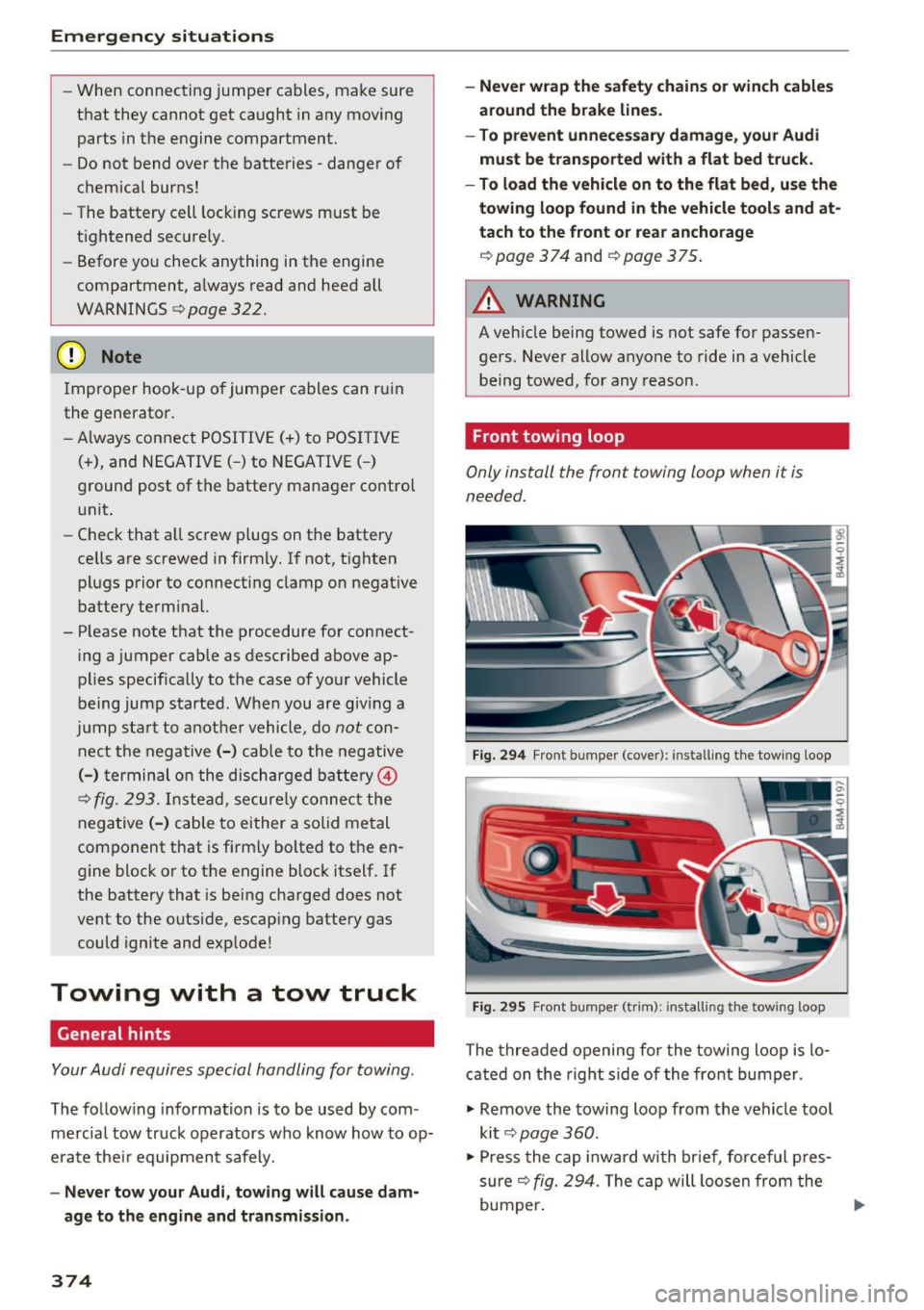
Fig. 294 Front bumper (cover): installing t he tow ing loop
Fig. 29S Front bumper (trim): install ing t he towing loo p
The threaded opening for the towing loop is lo
cated on the right side of the front bumper.
"' Remove the towing loop from the vehicle tool
kit
i=> page 360.
"'Press the cap inward with brief, forceful pres
sure
c> fig. 294. The cap will loosen from the
bumper. ""
Page 378 of 402

Emergency situations
@ Tips
Check carefully to make sure the hook-up is
secure before moving the car up the flatbed
truck ramp.
Raising the vehicle
Lifting with workshop hoist and with floor
jack
The vehicle may only be li~ed at the lifting
poin ts illus trated .
Fig . 298 Front lift ing point
Fig . 299 Rear lifti ng po int
• Read and heed WARNING c::> .&_ .
• Locate lifting po ints c::> fig . 298 and ¢ fig. 299.
• Adjus t lifting arms of workshop ho ist o r floo r
ja ck to match veh icle lif ting poin ts.
• Inse rt a rubber pa d between t he f loor jack/
w ork shop hoist and the lifting poin ts.
If you must lift your vehicle with a floor jack to
work underneath , be sure the vehicle is safely
s upported on stands intended for this purpo se.
Front lifting point
The lift ing po int is located on the floor pan re in
forcement about at the same level as the jack
376
moun ting poin t c::> fig. 298 . Do not lift the vehi
cle at the ve rtical sill reinfo rcement.
Rear lifting point
The lifting poin t is lo cated on t he ve rti cal rein
fo rcemen t of t he lower s ill for the onboard j ack
¢fig. 2 99 .
Lifting with vehicle jack
Refer to c::> page 363.
A WARNING
-To r educe th e risk of s erious inju ry an d vehi
cle damage.
- Always lift the vehicle o nly at the special
workshop hoist and f loor jack lift points i l
l ustrated
c::> fig. 298 and c::> fig. 299.
- Failure to lift the ve hicle a t these points
could ca use the vehicle to tilt o r fall from
a lift if there is a change in ve hicle weight
dist ribution and balance . This might hap
pen, fo r example, whe n heavy compo
nen ts su ch as the eng in e b lock o r trans
mi ssion are removed.
- Whe n removing heavy co mponen ts lik e
these, anchor vehicle to hois t or ad d c orre
s p ondin g weights to maintai n the ce nt er of
g ra vity. Oth erw ise, the vehicle mig ht tilt or
slip off the hoist, ca using serio us persona l
in jur y.
(D Note
-Be aw are of the fo ll ow ing poi nts bef ore lift
ing the vehicle:
- The vehicle should never be lifted or
jacked up from underneath the engine oil pan, the transmission hous ing, the front
or rear axle or the body side members.
This could lead to serious damage .
- To avoid damage to the underbody or
chassis frame, a rubber pad must be in
serted between the floor jack and the lift
points.
- Before driving over a workshop hoist,
check that the vehicle weight does not
exceed the permissible lifting capacity of
the hoist. ..,.
Page 380 of 402

Technical data
Technical data
Vehicle specifications
Fig. 300 Windsh iel d (fro nt left) : Ve hicl e Iden tific ation
N um ber ( VIN )
XXXXX XX -X -XXXX XXX XX
@-+ ~J:~t::1 ::: xxxxxxxx xx x xxxxxxxx
I YP lf'VPE XXX XXX
XX XXXXXXX XX X X XX
XXX
KW XXX
15\_L I MOIOlll
@-+ ~~
1
:tr:~i XXXX I XXXX XXX I XX
II. -AUSST . / OPTIONS
.__ __
E0A 7D5 4UB
2EH JOZ lLB
3FC
F0 A 9G3
TL6 3 KA 8EH
lXW 803
7T6 CV7 7KO
3L4 4KC
lS A 7GB
6XM SSG
lAS
SMU 7Xl
0G7 0YH
UlA X9B
908 8Z4
4X3 2K2
3Y0 413
01A
SRW
1BA
OJF
027
020
502
4G0
XX X XX X XX X XXXX
Fig . 301 Vehicle identificat ion lab el
Vehicle Identification Number (VIN) in the
Infotainment system
~ Select in the Infotainment system: the I MENU I
button > Vehicle > left contro l button > Service
& checks> Vehicle information.
Vehicle Identification Number (VIN)
The VIN can be found in the Infotainment sys
tem, on the vehicle data label, and under the
windshield on the front left side* <=:>
fig. 300 . The
VIN is also in the right side of the luggage com
partment (the fende r) under a cover.
378
Vehicle identification label
The vehicle identification label <=:> fig. 301 is locat
ed in the luggage compartment under the cargo
floor cover.
The information of the vehicle identification label
can also be found in your Warranty
& Mainte
nance booklet.
The st icker contains the follow ing vehicle data:
(D Vehicle Iden tifica tion Number (VIN)
@ Vehicle type, eng ine output, transmission
® Engine and transmission cod es
@ Paint and interior codes
® Optional equipment numbers
Safety compliance sticker
The safety compliance sticker is your assurance
that your new veh icle complies with all applicable
Federal Motor Vehicle Safety Standards which
were in effect at the time the vehicle was manu
factured. You can find this sticker on the driver's
s id e B-pillar .
It shows the month and year of pro
duction and the vehicl e identification number of
your vehicle (perfo ration) as well as the Gross Ve
hicle Weight Rating (GVWR) and the Gro ss Axle
Weight Rating (GAWR).
H igh voltage warning label
The high voltage warn ing label is located in the
e ngine compartment next to the engine hood re
lease. The spark ignit ion system complies w ith
the Canadian s tand ard IC ES-002.
Notes about technical
data
The values may vary based on special equipment
as well as market-specific equipment and meas
u ring methods.
Please note that the specifications listed in the
vehicle documentation a lways take precedence .
(D Tips
Missing technical data was not available at
the time of printing .
Page 384 of 402
Consumer Info rmation
today's a utomo biles, have steadily reduced the
scope of maintenance and repairs which can be
carried out by veh icle owners.
Also , sa fet y and
en vironmental
concerns place very strict limits
on the nature of repairs and adjustmen ts to en
g ine and transmission parts wh ich an owner can
perform .
Maintenance, adjustments and repairs usually re
qu ire special tools, testing devices and other
equ ipment available to specially trained work
shop personnel in order to assure proper per
forma nce, re liability and safety of the veh icle and
its many systems .
Improper maintenance, adjustments and repairs
can impair the operation and reliab ility of your
ve hicle and eve n void your vehicle warranty .
Therefo re, proof of se rvicing in a ccordance w ith
the m aintenance sched ule may be a condition for
up ho ld ing a possible wa rranty claim made within
the wa rranty pe riod.
Above all , ope rational safety can be adversely af
fected, cre ating unne cessa ry risks fo r you and
your passengers.
I f in doubt about any servicing, have it done by
your author ized Audi dealer or any other properly
eq uipped and qualified workshop . We strongly
urge you to g ive your author ized Audi dealer the
opportunity to perform a ll scheduled mainte
nance and necessa ry repairs. Your dealer has the
facilities, origina l parts and tra ined specialists to
keep your veh icle runn ing prope rly.
Performing limited maintenance yourself
The fo llow ing pages describe a limited number of
procedures whic h can be performed on your vehi
cle with ordinary tools, should the need arise and
tra ined personnel be unava ilable. Before per
forming any of these procedures, always thor
ough ly read all of the app licab le text and carefu l
ly follow the instructions g iven . A lways rigorously
observe the
WARNINGS prov ided .
Befo re yo u check anything in the engine com
partment, always read and heed all WARNINGS
c::> & and c::> & in Working in the engine compart
ment on page 322 .
382
A WARNING
-
-Ser ious personal in jury may occur as a result
of imp roperly performed maintenance, ad
justments or repairs .
- Always be extreme ly careful when work ing
on the vehicle . Always follow commonly ac
cepted safety practices and general com mon sense. Never r is k personal in jury.
- Do not attempt any of the mainte nance,
checks or repairs described on the following pages if you are no t fu lly fam iliar with these
or other proce dures with respect to the ve
hicle, o r are uncert ain how to p ro ceed.
- Do not do any work wi thout the prope r tools
a nd equi pmen t. H ave the necess ary wo rk
done by your authorized Au di dealer or an
other properly equipped and qualified work
shop.
- The engine compartment of any motor veh i
cle is a potentially hazardous area . Never
reach into the a rea around or touch the radi
ator fan. It is temperature controlled and
can switch on suddenly - even when the en
gine is off and the ignition key has been re
moved. The rad iator fan switches on auto
mat ica lly when the coolant reaches a certain
temperature and will con tinue to ru n until
the coolant temperat ure drops.
- Always remove the igni tion key before any
one gets u nder the vehicle.
- Always support your vehicle with safety
stands if it is necessary to work underneath
the vehicle. The ja ck* s upplied w ith the vehi
cle is no t ad equate fo r thi s pu rpose and
could collapse causing se rious personal in
jury .
- If you must wor k underne ath the vehicle
with the wheels on t he ground, always make
sure the vehicle is on level ground, that the
wheels a re always sec urely blocked and that
the engine cannot be started.
- Always make sure the transmission se lector
lever (automatic t ransm iss ion) is in P (Park
position) and the park b rake is applied.
Page 393 of 402
Replacing the battery . . . . . . . . . . . . . . . . . 36
Unlocking/ locking . . . . . . . . . . . . . . . . . 37, 39
Veh icle code . . . . . . . . . . . . . . . . . . . . . . . . . 35
Kick-down (automatic transmission) . . . . . . . 95
L
Lane assist
refer to Audi act ive lane assist . . . . . . . . . 123
LATCH . . . . . . . . . . . . . . . . . . . . . . . . . . . . . . 309
Description ........ ....... ...... ... . 310
Installing a child restraint ......... ... . 311
Location . . . . . . . . . . . . . . . . . . . . . . . . . . . 310
Mounting and releasing the anchorage
hook . . . . . . . . . . . . . . . . . . . . . . . . . . . . . . 311
Leather care/clean ing . . . . . . . . . . . . . . . . . 357
Left contro l button . . . . . . . . . . . . . . . . . . . . . 13
License agreement (MMI) . . . . . . . . . . . . . . 254
Lifting points (vehicle jack) . . . . . . . . . . . . . 363
Light/rain sensor Headlights . . . . . . . . . . . . . . . . . . . . . . . . . . 48
Interva l mode (wipers) . . . . . . . . . . . . . . . . 55
Light functions . . . . . . . . . . . . . . . . . . . . . . . . 48
H igh beam assistant . . . . . . . . . . . . . . . . . . 49
I nstrument illumination . . . . . . . . . . . . . . . 52
Interior lighting . . . . . . . . . . . . . . . . . . . . . . 51
Lighting Exterior . . . . . . . . . . . . . . . . . . . . . . . . . . . . . 48
I nterior . . . . . . . . . . . . . . . . . . . . . . . . . . . . . 51
Lights Headlight range control system . . . . . . . . . 48
Listening to music
refer to Media .. ............. .. . 228, 237
L oading the luggage compartment . . . . . . . 261
Locking/unlocking By remote control . . . . . . . . . . . . . . . . . . . . 3 7
W ith the central locking switch . . . . . . . . . 38
W ith the convenience key . . . . . . . . . . . . . . 37
W ith the lock cylinder . . . . . . . . . . . . . . . . . 39
Low beam headlights . . . . . . . . . . . . . . . . . . . 48
Lowering the rear of the vehicle . . . . . . . . . 13 7
L uggage compartment. . . . . . . . . . . . . . . . . . 67
Cover.. .. .. .. .. ........... .. .. .. .... 68
Socket. .. .. .. ............... .. ...... 66
u ~ Storing cargo correctly . . . . . . . . . . . . . . . 261
N r-... N .... 0
0
:E: '
Tie-downs . . . . . . . . . . . . . . . . . . . . . . . . . . . 69
also refer to Loading the luggage compart-
ment...... ... .. .. ................. 261
Luggage compartment lid . . . . . . . . . . . . . . . 40
Emergency release . . . . . . . . . . . . . . . . . . . . 43
Lumbar support . . . . . . . . . . . . . . . . . . . . . . . 59
M
Maintenance . . . . . . . . . . . . . . . . . . . . . . . . . 381
Maintenance intervals . . . . . . . . . . . . . . . . . 332
Making an emergency call . . . . . . . . . . . . . . 181
Malfunction indicator lamp (MIL) . . . . . . . . . 21
Map Changing the scale . . . . . . . . . . . . . . . . . . . 207
Display . . . . . . . . . . . . . . . . . . . . . . . . . . . . 220
Operating . . . . . . . . . . . . . . . . . . . . . . . . . . 215
Settings . . . . . . . . . . . . . . . . . . . . . . . . . . . 216
Setting the destination . . . . . . . . . . . . . . . 207
Update ....... ................... .. 205
Map update . . . . . . . . . . . . . . . . . . . . . . . . . . 218
Mechanica l key . . . . . . . . . . . . . . . . . . . . . 35, 36
Media ..... .... ................. 228, 237
Drives . . . . . . . . . . . . . . . . . . . . . . . . . . . . . 229
Supported formats . . . . . . . . . . . . . . . . . . 243
Media center . . . . . . . . . . . . . . . . . . . . . . . . . 238
Memory buttons
refer to Shortcut keys . . . . . . . . . . . . 156, 163
Memory capacity Directory . . . . . . . . . . . . . . . . . . . . . . . . . . . 186
Jukebox . . . . . . . . . . . . . . . . . . . . . . . . . . . . 230
Memory card SD card reader (MMI) . . . . . . . . . . . . . . . . . 229 Supported types/formats . . . . . . . . . . . . . 243
Memory funct ion . . . . . . . . . . . . . . . . . . . . . . 64
MENU button . . . . . . . . . . . . . . . . . . . . . . . . 156
Menu language
refer to Setting the language . . . . . . . . . . 249
Menus/symbols . . . . . . . . . . . . . . . . . . . . . . 166
Messages . . . . . . . . . . . . . . . . . . . . . . . . . . . 181
Mirrors Adjusting exterior mirrors . . . . . . . . . . . . . . 52
Compass.. .... ..................... . 57
Dimming .. .. .. .. .. ...... ....... .. .. . 53
Vanity mirror . . . . . . . . . . . . . . . . . . . . . . . . 54
MMI
refer to Multi Media Interface . . . . . . . . . . 156
391