vision AUDI Q7 2017 Owner´s Manual
[x] Cancel search | Manufacturer: AUDI, Model Year: 2017, Model line: Q7, Model: AUDI Q7 2017Pages: 402, PDF Size: 100.39 MB
Page 136 of 402
Ass is tance sy stems
Switching on/off
Applies to: vehicles with night vision assist
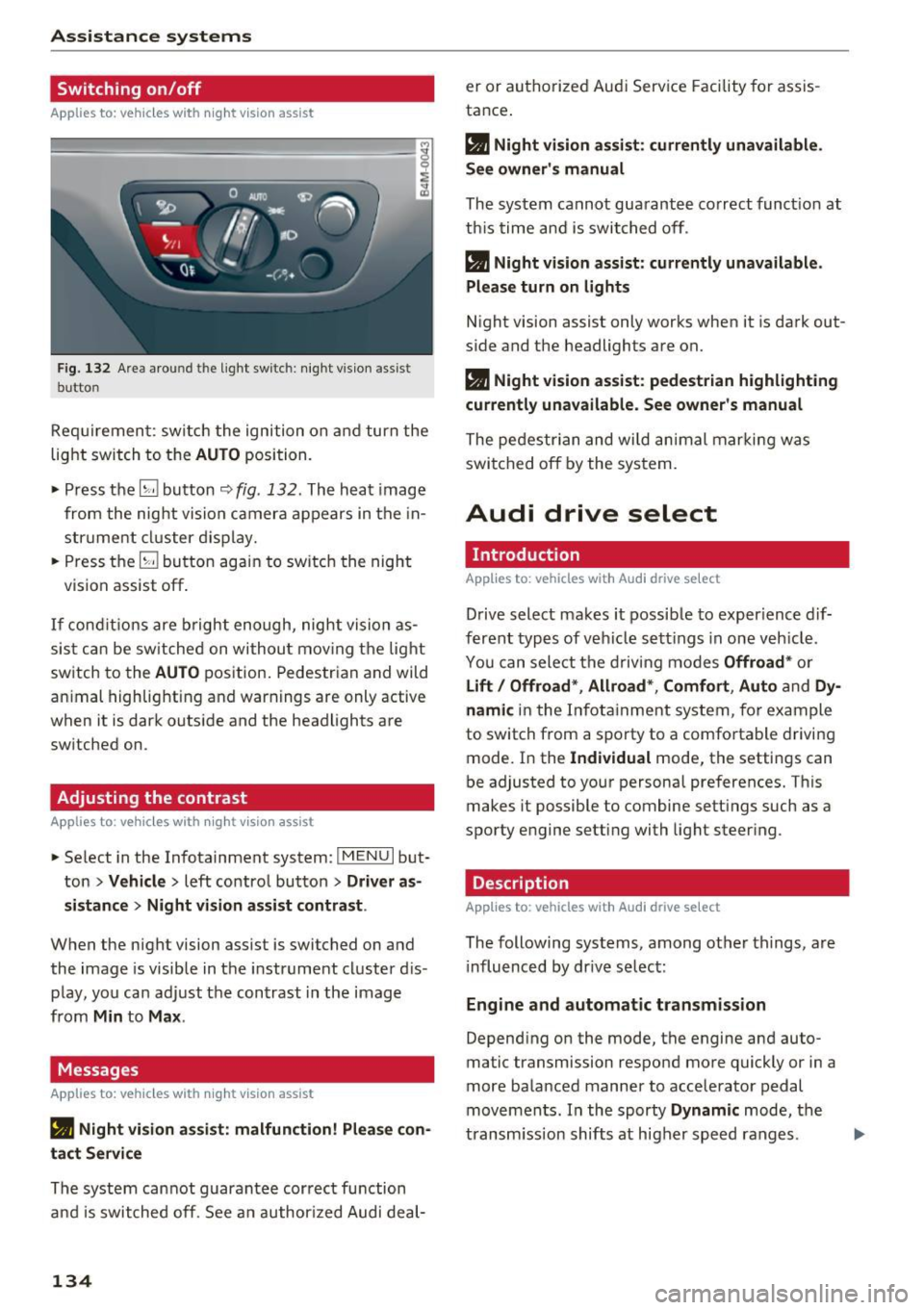
F ig. 132 Are a aro und th e light sw itc h: night vis ion assist
butto n
Requirement: sw itch the ignition on and turn the
light switch to the
AUTO position.
• Press the
[g button 9 fig . 132 . The heat image
from the nig ht vision camera appears in the in
str ume nt cluster d isplay.
• Press the
(g button again to switch the night
vision assist off .
If condit io ns are b right enough, night vision as
sis t can be sw itched on withou t mov ing the light
switch to the
AUTO position. Pedestrian and wild
an imal highlighting and warnings are only active
when it is da rk outs ide and the headlights are
sw itched on .
Adjusting the contrast
Applies to: vehicles with night vision assist
• Select in the Infotainment system: I M ENU I but
ton
> Vehicl e > left control button > Driver a s
si stance
> Nig ht vis ion as sist contra st .
When the night vision assist is switched on and
the image is visible in the instrument cluster d is
p lay, you can adjust the contrast in the image
from
Min to Ma x.
Messages
Applies to: vehicles with night vision assist
• Night vi sion a ssist : malfunction! Plea se con ·
tact S erv ic e
The system cannot guarantee correct function
and is switched off. See an author ized Audi deal-
134
er or authorized Aud i Service Facility for assis
tance .
• Night vis io n assi st: c urrently unavailable .
Se e owner's manual
The system cannot guarantee correct funct ion at
this time and is switched off .
• Night v ision ass ist : c urrently un av ail abl e.
Plea se turn on lights
N ight vision assist only works when it is dark out
side and the headlights are on.
• Night vision ass ist: pedestr ian h ighlighting
curr ent ly unavailable . See owne r's manual
The pedestr ian and wi ld animal marki ng was
switched off by the system.
Audi drive select
Introduction
App lies to: vehicles with Aud i drive se lect
Drive select makes it possib le to exper ience dif
ferent types of vehicle sett ings in one veh icle .
You can select the d riving modes
Offroad * or
Lift / Offroad *, Allroad* , Comfort , Auto and Dy ·
namic
in the Infotainment system, for example
to switch from a sporty to a comfo rtable driving
mode. In the
Individual mode, the sett ings can
be adjusted to your personal preferences. This
makes it possible to combine sett ings such as a
sporty engine setting with light steer ing .
Description
Applies to: vehicles with Audi drive select
The following systems, among other th ings, are
i nfluenced by dr ive select:
En gine and aut omatic tr ansmi ssi on
Depend ing on the mode, the engine and auto
ma tic tr ansmission respond more quickly or in a
more balanced manner to accelerator pedal
movements . In the sporty
Dynam ic mode, the
transm iss ion shifts at higher speed ranges.
Page 143 of 402
u (0 ...... N r--. N ...... 0
0
:E
Applies to: vehicles with rearv iew camera
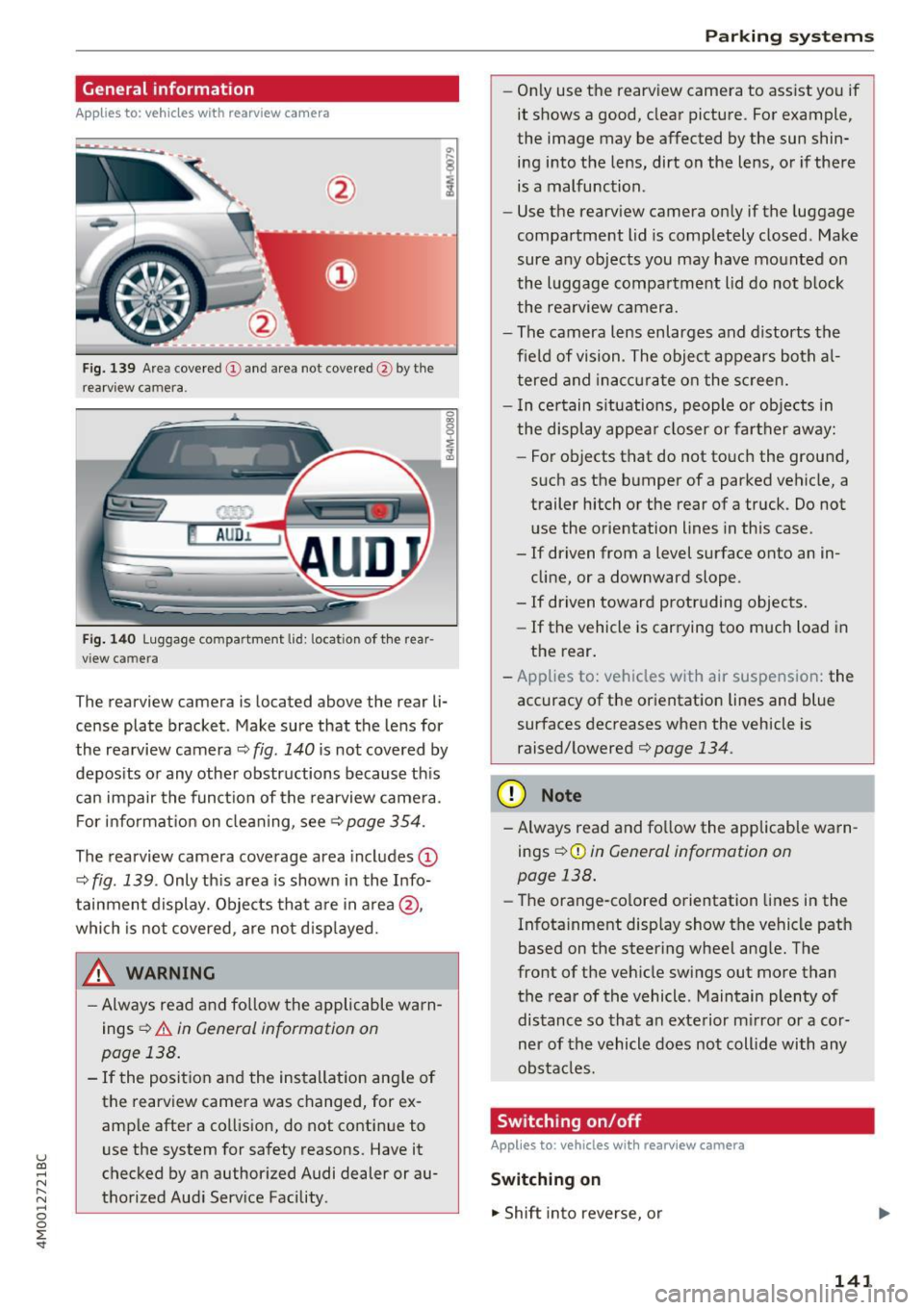
Fig . 139 Area covered (D and area not covered @by the
rearv iew camera.
Fig. 140 Luggage compartment lid: locatio n of the rear
view camera
The rearview camera is located above the rear li
cense plate bracket. Make sure that the lens for
the rearview camera ¢
fig. 140 is not covered by
deposits or any other obstructions because this
can impair the function of the rearview camera.
For information on cleaning, see<=>
page 354.
The rearview camera coverage area includes (D
¢ fig. 139 . Only this area is shown in the Info
tainment display. Objects that are in area @,
which is not covered, are not displayed.
A WARNING
- Always read and follow the applicable warn
ings
<=> A in General information on
page 138.
- If the position and the installation angle of the rearview camera was changed, for ex
ample after a collision, do not continue to
use the system for safety reasons. Have it
checked by an authorized Audi dealer or au
thorized Audi Service Facility .
Parking systems
-Only use the rearview camera to assist you if
it shows a good, clear picture. For example,
the image may be affected by the sun shin
ing into the lens, dirt on the lens, or if there
is a malfunction.
- Use the rearview camera only if the luggage
compartment lid is completely closed. Make
sure any objects you may have mounted on
the luggage compartment lid do not block
the rearview camera.
- The camera lens enlarges and distorts the
field of vision. The object appears both al
tered and inaccurate on the screen.
- In certain situations, people or objects in
the display appear closer or farther away:
- For objects that do not touch the ground,
such as the bumper of a parked vehicle, a
trailer hitch or the rear of a truck. Do not
use the orientation lines in this case.
- If driven from a level surface onto an in
cline, or a downward slope .
- If driven toward protruding objects.
- If the vehicle is carrying too much load in
the rear.
- Applies to: vehicles with air suspension: the
accuracy of the orientation lines and blue
surfaces decreases when the vehicle is
raised/lowered¢
page 134.
(D Note
-Always read and follow the applicable warn
ings¢ (!)
in General information on
page 138.
- Th e orange-colored orientation lines in the
Infotainment display show the vehicle path
based on the steering wheel angle. The
front of the vehicle swings out more than
the rear of the vehicle . Maintain plenty of
distance so that an exterior mirror or a cor
ner of the vehicle does not collide with any
obstacles.
Switching on/off
Applies to: vehicles with rearview camera
Switching on
"' Shift into reverse, or
141
Page 145 of 402
u (0 ...... N r--. N ...... 0
0
:E
Introduction
Applies to: vehicles with peripheral cameras
With this equipment, the parking system p lus*
c::> page 139 is supplemented w it h various pe riph
e ral cameras. The four cameras give you the fol
l owing views: area around the vehicle, front cor
ner view and rear corner view, view in front of the
vehicle and behind the vehicle .
General information
Applies to: vehicles with peripheral cameras
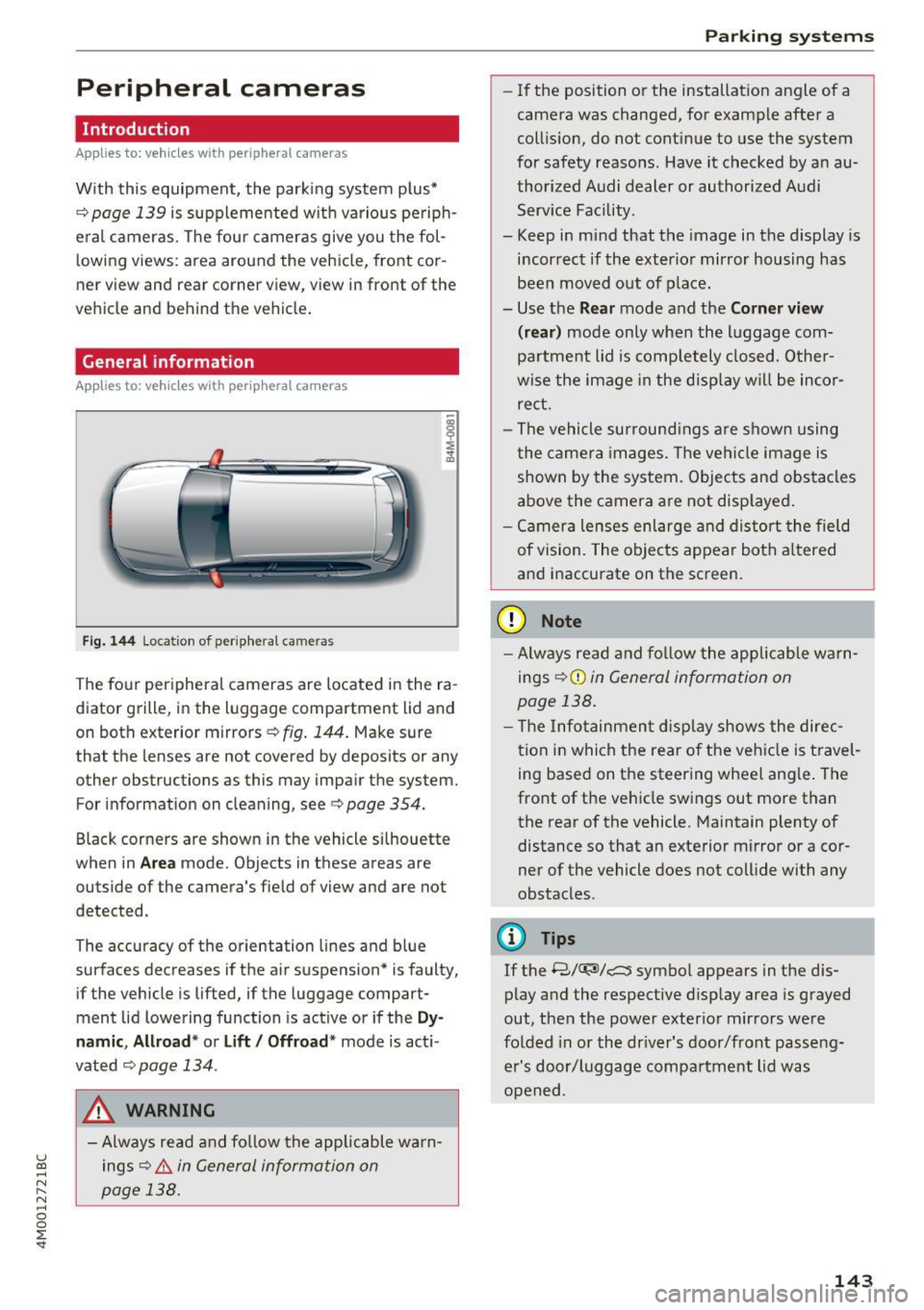
Fi g.
14 4 Location of periphera l cameras
The fo ur per ipheral cameras are located in the ra
diator grille, in the luggage compartment lid and
on both exterior mirrors
c::> fig. 144 . Make sure
that the lenses are not covered by deposits or any other obstructions as this may impair the system.
For information on cleaning, see
c::> page 354.
Black corners are shown in the vehicle s ilhouette
when in
Ar ea mode. Objects in these areas are
outside of the camera's field of view and are not
detected.
The accuracy of the orientation lines and b lue
surfaces decreases if the air suspension* is faulty,
if the vehicle is lifted, if the luggage compart
ment lid lowering function is active or if the
Dy
namic , Allr oad * or Lift / Offroad * mode is act i
vated
c::;, page 134 .
A WARNING
-Always read and fo llow the applicable warn
ings
c::> .& in General informa tion on
page 138.
Parking systems
-If the position or the installation angle of a
camera was changed, for example after a
coll is ion, do not cont inue to use the system
for safety reasons. Have it checked by a n au
thorized Audi dealer or authorized Audi Serv ice Facility.
- Keep in mind that the image in the display is
i n correct if the exterior mirror housing has
been moved out of p la ce.
- Use the
Rear mode and the Corner view
(r ear )
mode only when the luggage com
pa rtment lid is comp letely closed. Other
wise the image in the disp lay w ill be inco r
re ct.
- The vehicle surround ings a re shown using
the camer a images. The vehi cle image is
shown by the system. Objects and obs tacles
above the camera are not disp layed .
- Ca mera lenses enl arge and distort the field
of vision. The objects appear both a ltered
a nd inaccurate on the screen.
(D Note
- Alw ays read and fo llow the applicable wa rn
ings
c::> (i) in General information on
page 138 .
- T he Infotainmen t display shows the direc
t ion in which the rear o f the ve hicle is travel
ing based on the steering wheel ang le . The
front of the vehicle swings out more than
the rear of the vehicle. Maintain plenty of
distance so that an exterior mirror or a cor
ner of the vehicle does not coll ide with any
obstacles.
(D Tips
If the 8/
out, then the power exter io r mirrors were
fo lded in or the dr iver's door/front passe ng
er's door/luggage compa rtment lid was
opened .
143
Page 150 of 402
Intelligent Technology
Intelligent Technology
Electronic stabilization
control (ESC)
Description
Elect ronic stabilization control (ESC) supports
driver safety.
It red uces the risk of slipping and
improves driving stability. ESC detects crit ica l sit
uations such as when the vehicle is oversteering
and understeering or the wheels are spinning.
The vehicle is stabilized by applying the brakes or reducing eng ine torq ue. When the ESC engages,
the
DJ ind icator light blinks in the instrument
cluste r.
The fo llow ing systems are integrated in the ESC:
Ant i-loc k bra king system (ABS)
ABS prevents the whee ls from locking when brak
ing. The vehicle can sti ll be steered even during
hard brak ing. Apply steady pressure to the brake
pedal. Do not pump the pedal. A puls ing in the
brake pedal indicates that the system is acting to
stabilize the vehicle .
Brake assist system
The brake assist system can decrease brak ing dis
tance . It increases braking power when the driver
presses the brake pedal quick ly in emergency sit
uations . You must press and hold the b rake pedal
until the dangerous situat io n is over . In veh icles
with adapt ive cr uise control*, the bra ke assist
sys tem is more sensitive if the d ista nce detec ted
t o the vehicle dr iv ing ahead is too small.
O n ve hicles w ith act ivated and funct io ni ng night
vision assist*, the brake ass ist system ca n re
spond more sens it ively if there is a warning.
Anti-Slip Regulation (ASR )
ASR reduces eng ine power when the drive wheels
begin spinning a nd adap ts the force to the road
conditions . This makes it easie r to start, acceler
ate and dr ive up h ills.
Electron ic differential lock (EDL )
EDL applies the brakes to a wheel that starts
spinning and transfers the drive power to the
148
other driving whee ls. This function is not avai la
ble at higher speeds.
In extreme cases , ED L automat ica lly swi tches off
to keep t he b rake on the braked wheel from over
heating. The veh icle is still working correct ly. ED L
will switch on again automatically when condi
tions have returned to normal.
Steering recommendat ion
The ESC he lps to stabilize the vehicle by chang ing
t h e s teer ing torque.
Select ive wheel torque control
Se lective wheel to rque cont rol is used when d riv
i ng on curves. Braking is targeted toward the
whee ls on the inside of the curve as needed . T his
a ll ows mo re precise dr iving in cu rves .
Automatic post -collision braking system
The "automat ic post -collis io n braking system"
can help to reduce the risk of sliding and of addi
tiona l co llisions after an acc ident. If the a irbag
contro l modu le detects a collision, the veh icle is
braked by the ESC.
The veh icle does not brake automatically if:
- the driver presses the accelerator pedal, or
- the ESC, the brake system or the veh icle elect ri-
cal system are not functioning.
A WARNING
- The ESC and its integrated systems cannot
overcome the lim its imposed by natura l
phys ical laws . This is espec ially important
on s lippery or wet roads . If the systems be
gi n ac ting to stabilize yo ur vehicle, you
should immediately a lter your speed to
match the road and traffic conditions. Do
not let the inc reased safety provided tempt
you into taking risks. This could increase
your r isk of a coll is ion.
- Please note the risk of a collision increases
when driving fast, especially through curves
and on slippery or wet roads, and when dr iv
ing too close to objects ahead. The ESC and
its integrated systems cannot always pre
vent co llisions -there is st ill a risk of acci
dents!
Page 326 of 402
Checking and Filling
-If the hood is not latched completely, it
could fly up while you are driving and ob
struct your vision.
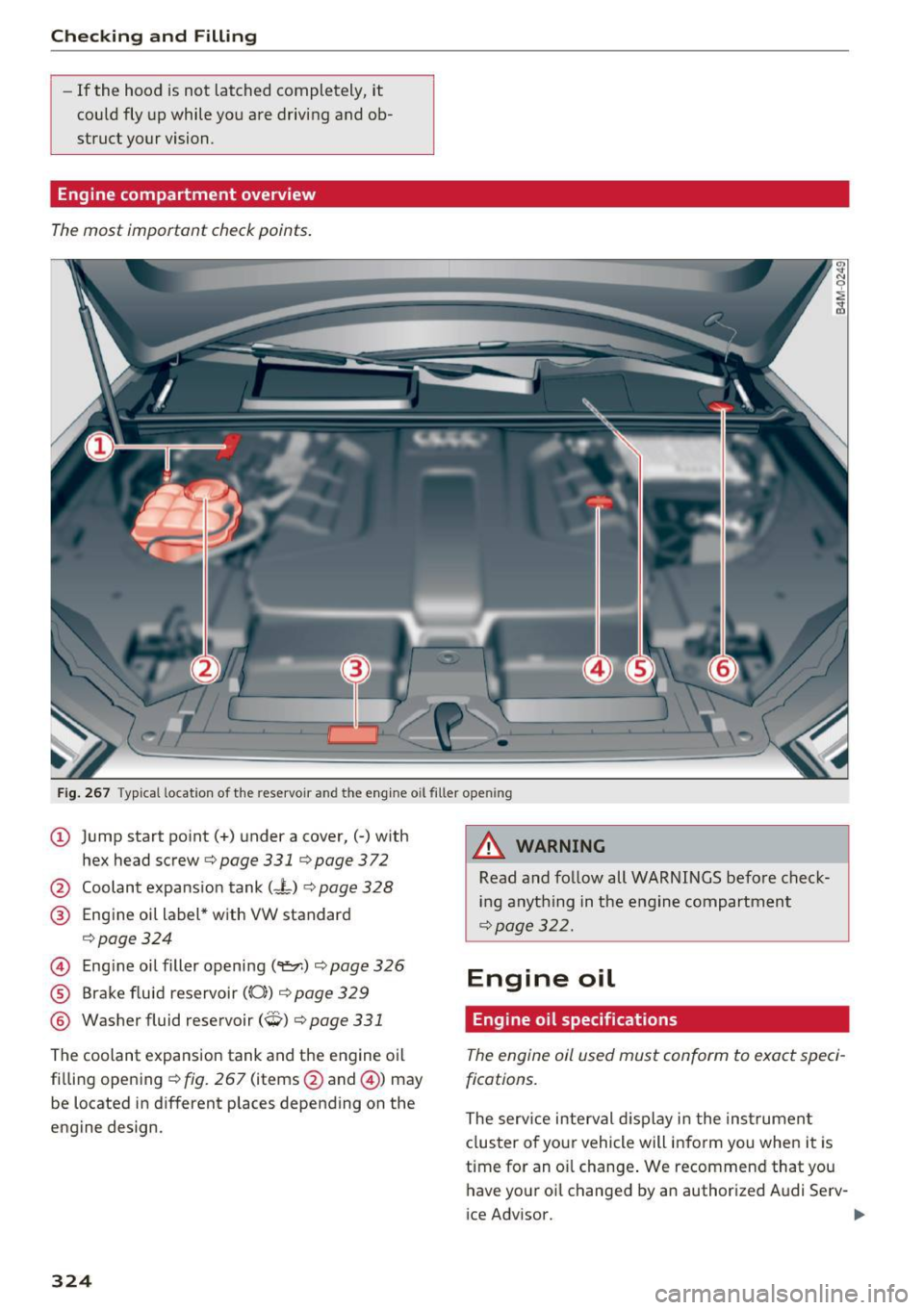
Engine compartment overview
The most important check points.
Fig. 267 Typ ical location of the reservoir and the engine oil filler opening
@ Jump start point(+) under a cover,(-) with
hex head screw
c;, page 331 qpage 372
@ Coolant expansion tank (-L) ~ page 328
@ Engine oil label * with VW standard
,=;, page 324
© Engine oil filler opening (9:::r.) c;, page 326
® Brake fluid reservoir ((0)) c;, page 329
® Washer fluid reservoir (W) c;, page 331
The coolant expansion tank and the engine o il
filling opening
c;, fig . 267 (items @and @) may
be located in different places depending on the
engine design.
324
8,_ WARNING
Read and follow all WARNINGS befo re check
ing anything in the engine compartment
c;, page 322.
Engine oil
Engine oil specifications
The engine oil used must conform to exact speci
fications.
The serv ice interval d isplay i n the instrumen t
clus ter of your vehicle will inform you when it is
time for an o il change . We recommend that you
have your oi l changed by an author ized Audi Serv-
ice Advisor. ..,_
Page 364 of 402
Emergency assistance
-If a tire pressure of 29 psi (200 kPA) cannot
reached after inflating for 6 minutes, then
the tire is too severely damaged. Do not
continue driving.
- If the tire cannot be repaired with the tire
sealant, see an authorized Audi dealer or au
thorized Audi Service Facility for ass istance.
(D} Tips
Do not operate the compressor for more than
six minutes continuously, or it can overheat.
Once the compressor has cooled, you can con
tinue to use it .
Completing
"' Adhere the sticke r that says "max . SO mph
(max. 80 km/h)" that is provided w ith the tir e
mobility kit within the driver's fie ld of vision.
"'S top the vehicle after driving for about 10 mi
nutes and check the tire pressure .
"' If the tire pressure is lower than 19 psi (130
kPA), then the tire is too severely damaged. Do
not continue driving.
A WARNING
Pay attention to the following after repairing
the tire :
- Do not drive faster than SO mph (80 km/h).
- Avoid hard acceleration, braking sharply, and fast cornering.
- The vehicle may become more difficult to
control.
- If the tire is too severely damaged, see an
authorized Audi dealer or authorized Aud i
Service Facility for assistance .
@ For the sake of the environment
You can give the used tire sealant bottle to an
authorized Audi dealer or authorized Audi
Service Facility for disposal.
@ Tips
Remember to obtain a new bottle of sealant
from an authorized Audi dea ler or authorized
Audi Service Facility after repairing a tire.
362
Replacing a wheel
' Preparation
You must complete the preparation before
changing a tire .
"'Read and follow the important safety precau-
tions¢
page 360.
"' Set the park ing brake.
"' Select the P selector lever posit ion.
"' When towing a trailer: disconnect the trailer
from your vehicle.
"' Lay out the vehicle tool kit¢
page 360 and the
spare tire.
"' Switch on wheel change mode* in the Infotain
ment system:
! MENUI button> Vehicle> left
control button >
Service & checks > Air suspen
sion: wheel change.
"'Switch the ignition off.
The vehicle jack mode* switches off automatical ly at speeds above 6 mph (10 km/h).
A WARNING
When using the ve hicle jack* on a road with a
steep hill or offroad, you must take extra pre
cautions to prevent the vehicle from rolling. Use suitable objects to block the front and
back of the wheel that is diagonal from the
wheel with the flat tire.
A WARNING
You or your passengers could be injured while
changing a whee l if you do not follow these
safety precautions:
- If you have a flat tire, move a safe distance
off the road. Turn off the engine, turn the
emergency f lashers on and use other warn
ing devices to alert other motorists.
- Make sure that passengers wait in a safe
place away from the vehicle and well away
from the road and traffic.
- To help prevent the vehicle from moving
suddenly and possibly slipping off the jack*,
always fully set the parking brake and block
the front and back of the wheel diagonally opposite the wheel being changed. When
one front wheel is lifted off the ground,
~
Page 371 of 402
u co ...... N r-... N ...... 0
0
:E: '
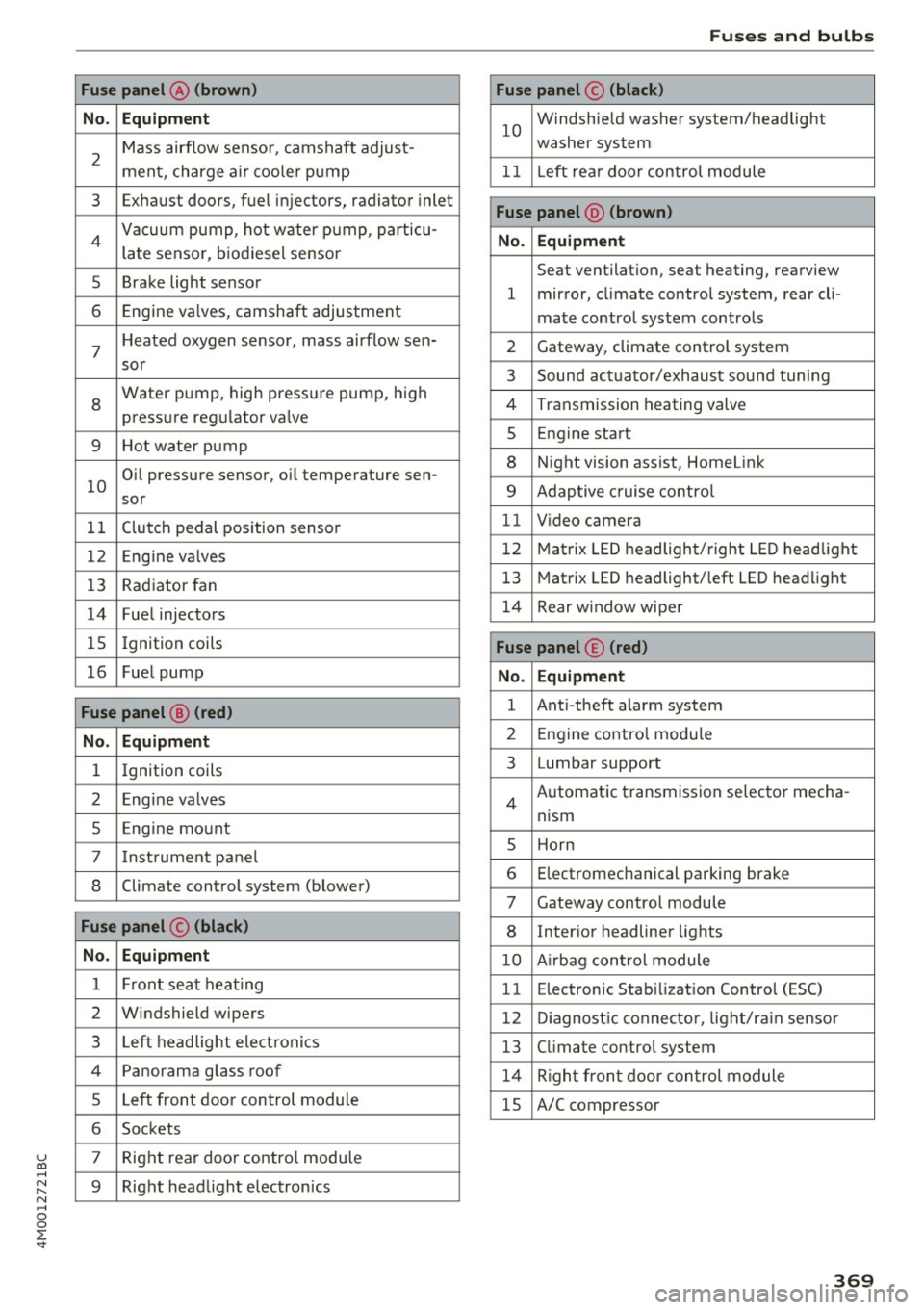
No . Equipment
2
Mass airflow sensor, camshaft adjust-
ment, charge air cooler pump
3 Exhaust doors, fuel injectors, radiator inlet
4 Vacuum pump, hot water pump, particu-
late sensor, biodiesel sensor
5 Brake light sensor
6 Engine va lves, camshaft adjustment
7
Heated oxygen sensor, mass airflow sen-
sor
8
Water pump, high pressure pump, high
pressure regulator va lve
9 Hot water pump
10
Oil pressure sensor, oil temperature sen-
sor
11 Clutch pedal position sensor
12 Engine valves
13 Radiator fan
14 Fuel injectors
15 Ignition coils
16 Fuel pump
Fuse panel @ (red)
No . Equipment
1 Ignition coils
2 Eng ine va lves
5 Engine mount
7 I nstrument pane l
8 Climate control system (blower)
Fuse panel © (black)
No. Equipment
1 Front seat heating
2 Windshield wipers
3 Left headlight electronics
4 Panorama glass roof
5 Left front door control module
6 Sockets
7 Right rear door contro l module
9 Right headlight electronics
Fuses and bulbs
Fuse panel© (black)
10
Windshie ld washer system/headlight
washer system
11 Left rear doo r contro l module
Fuse panel @ (brown)
No . Equipment
Seat ventilation, seat heating, rearview
1 mirror, cl imate control system, rear cli-
mate control system controls
2 Gateway, climate control system
3 Sound actuator/exhaust sound tuning
4 Transmission heating valve
s Engine start
8 Night vision assist, HomeLink
9 Adaptive cruise contro l
11 Video camera
12 Matrix LED headlight/right LED headlight
13 Matrix LED headlight/left LED headlight
14 Rear window wipe r
Fuse panel© (red)
No. Equipment
1 Anti-theft alarm system
2 Engine control module
3 Lumbar support
Automatic transmission selector mecha-
4
nism
s Horn
6 Electromechanical parking brake
7 Gateway control module
8 Inter ior headliner lights
10 A irbag control module
11 Electronic Stabilization Control (ESC)
12 Diagnostic connector, light/ra in sensor
13 Climate control system
14 Right front door control module
15 A/C compressor
369
Page 394 of 402
Index
MMI search
refer to Free text search . . . . . . . . . . 165, 239
MMI touch . . . . . . . . . . . . . . . . . . . . . . . . . . . 160
Monitoring the Advanced Airbag System 285
MP3
refer to Jukebox . . . . . . . . . . . . . . . . . . . . . 230
Multifunction steering wheel
Button . . . . . . . . . . . . . . . . . . . . . . . . . . . . . 14
Map zoom .. .. ... ............ .... .. .. 13
Operating . . . . . . . . . . . . . . . . . . . . . . . . . . . 12
Speech dialog system . . . . . . . . . . . . . . . . . 14
Switching tabs . . . . . . . . . . . . . . . . . . . . . . . 12
Multi Media Interface . . . . . . . . . . . . . . . . . . 156
Music collection
refer to Jukebox . . . . . . . . . . . . . . . . . . . . . 230
Mute . . . . . . . . . . . . . . . . . . . . . . . . . . . . . . . . 14
also refer to Muting . . . . . . . . . . . . . . . . . . 253
Mute (muting) . . . . . . . . . . . . . . . . . . . . . . . . 14
Muting .... .. .. ... ............ .... .. . 253
Muting (mute) . . . . . . . . . . . . . . . . . . . . . . . . 14
myAudi . . . . . . . . . . . . . . . . . . . . . . . . . 189, 209
L ogging in in the vehicle . . . . . . . . . . . . . . 189
PIN . . . . . . . . . . . . . . . . . . . . . . . . . . . . . . . 189
N
Natura l leather care/cleaning . . . . . . . . . . . 357
NAV/MAP button . . . . . . . . . . . . . . . . . . . . . 205
Navigating ( instrument cluster) . . . . . . . . . . 19
Navigation . . . . . . . . . . . . . . . . . . . . . . . . . . . 205
Announcements . . . . . . . . . . . . . . . . . . . . . 214
Better route . . . . . . . . . . . . . . . . . . . . . . . . 221
also refer to Map . . . . . . . . . . . . . . . . . . . . 215
Navigation (instrument cluster) . . . . . . . . . . 18
Net . . . . . . . . . . . . . . . . . . . . . . . . . . . . . . . . . 67
Network connection (Wi-Fi) . . . . . . . . . . . . . 195
NHTSA Contacting . . . . . . . . . . . . . . . . . . . . . . . . . 263
Night vision assist . . . . . . . . . . . . . . . . . . . . 131
Cleaning the camera . . . . . . . . . . . . . . . . . 355
Nitrogen ox ide (NOx) catalytic converter
refer to Ad Blue . . . . . . . . . . . . . . . . . . . . . . 318
Number of seats . . . . . . . . . . . . . . . . . . . . . . 265
0
Occupant protection . . . . . . . . . . . . . . . . . . . 117
392
Occupant seating positions . . . . . . . . . . . . . 257
Octane rating . . . . . . . . . . . . . . . . . . . . . . . . 314
Odometer . . . . . . . . . . . . . . . . . . . . . . . . . . . . 12
Offroad driving . . . . . . . . . . . . . . . . . . . . . . . . 89
Offroad mode . . . . . . . . . . . . . . . . . . . . . . . . 149
OFF (button) . . . . . . . . . . . . . . . . . . . . . . . 72, 75
Oil
refer to Engine oil . . . . . . . . . . . . . . . 324, 326
On-board computer . . . . . . . . . . . . . . . . . . . . 15
On-Board Diagnostic System (OBD) Data Link Connector (DLC) . . . . . . . . . . . . . . 21
Electronic speed limiter . . . . . . . . . . . . . . . 102
Malfunction indicator lamp (MIL) . . . . . . . . 21
On/Off knob (MMI) . . . . . . . . . . . . . . . . . . . . 156
Online destinations
refer to Point of interest search . . . . . . . . 209
Online map . .. .. .. .. .. ............. .. 217
Online map update . .. .. ... .......... .. 219
Online media . . . . . . . . . . . . . . . . . . . . . . . . . 233
Online roadside assistance Audi connect emergency call and service 204
Online serv ices
refer to Aud i connect (Infotainment) . . . . 189
Open ing.... .. .. .. .. .. ... ..... ... .. ... 34
Fuel filler door . . . . . . . . . . . . . . . . . . . . . . 316
Operating Multifunction steering wheel . . . . . . . . . . . 12
Multi Media Interface . . . . . . . . . . . . . . . . 158
Voice recognition system . . . . . . . . . . . . . 169
Options menu . . . . . . . . . . . . . . . . . . . . 159, 163
Other consumers . . . . . . . . . . . . . . . . . . . . . . 16
Outside temperature display . . . . . . . . . . . . . 10
Overview (Cockpit) . . . . . . . . . . . . . . . . . . . . . . 8
p
Paint damage . . . . . . . . . . . . . . . . . . . . . . . . 356
Paint number . . . . . . . . . . . . . . . . . . . . . . . . 378
Panorama glass roof . . . . . . . . . . . . . . . . . . . . 45
Emergency operation . . . . . . . . . . . . . . . . . . 45
Parenta l control
DVD .......... .. .. .. ... ............ 240
Parking aid Cleaning sensors/camera . . . . . . . . . . . . . 355
Parking brake
refer to Electromechanical parking brake . 87