vision AUDI Q7 2017 Owner´s Manual
[x] Cancel search | Manufacturer: AUDI, Model Year: 2017, Model line: Q7, Model: AUDI Q7 2017Pages: 402, PDF Size: 100.39 MB
Page 54 of 402
Lights and Vision
Interior lighting
Applies to : ve hicles w it h inte rior lig htin g
~ Select in the Infotainment system: IMENU I but
ton
> Vehi cle> left contro l bu tton > Vehicle
settings > Interior lighting.
The interior lighting turns on when you switch
the head ligh ts on while the igni tion is on .
The storage compartment in the door is illumi
nated when yo u reach your hand into the storage
compartment.
Ver sion 1
To adjust the brightness of individua l zones, se
lect
Front brightness *, Door b rightne ss or Foot
well brightnes s.
Turn the control knob to the left
or to the right. Press the control knob to co nfirm
the br ightness .
Version 2
Select and confirm one of the displayed profiles
by press ing the control knob.
Individual: you can customize the brightness and
color of individual zones. Press the r ight control
button. Press the control knob again to confirm
the settings.
Audi drive select: the interior and conto ur light
ing color changes depending on the driving mode
selected in drive select*
<=> page 134.
(D Tips
The setting is a utomat ica lly stored and as
signed to the remote control key that is be ing
used.
52
Instrument illumination
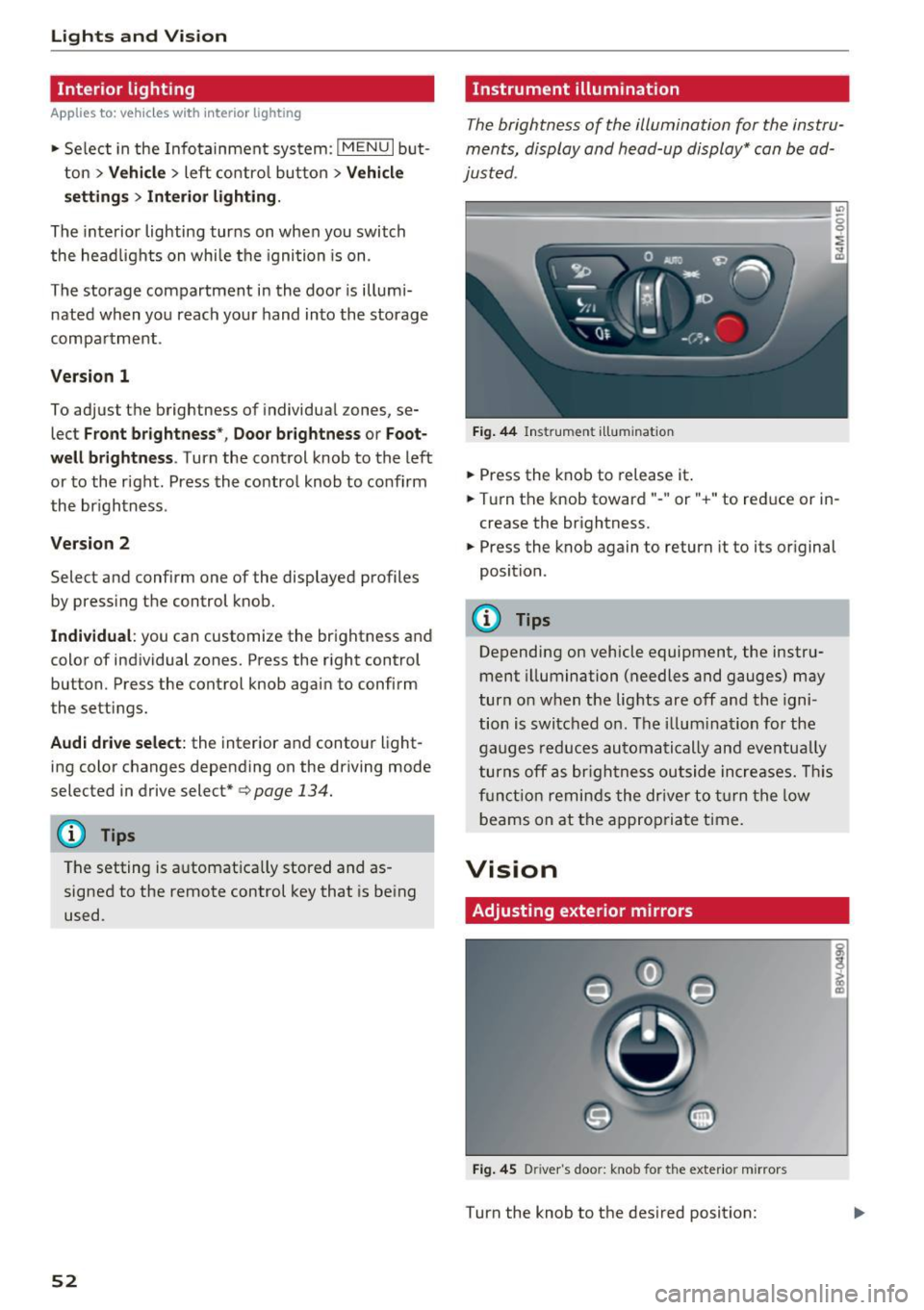
The brightness of the illumination for the instru
ments, display and head-up display* can be ad
justed .
"' t==~====== =-===~=:::::::=====~ ~~
~
Fig. 44 Ins trumen t ill uminat ion
~ Press the knob to release it .
~ Turn the knob toward" -" or" +" to reduce or in
crease the br ightness.
~ Press the knob again to return it to its original
position.
(!) Tips
Depending on vehicle equipment, the instru
ment illumination (needles and gauges) may
turn on when t he lig hts are off and the igni
tion is switched o n. The i llum ination for the
gaug es reduces automatically and eve ntua lly
turn s off a s br igh tne ss ou tside incre ases. This
f u nct io n remin ds the dr ive r to tur n the low
b eams on at the a ppropriate t ime.
Vision
Adjusting exterior mirrors
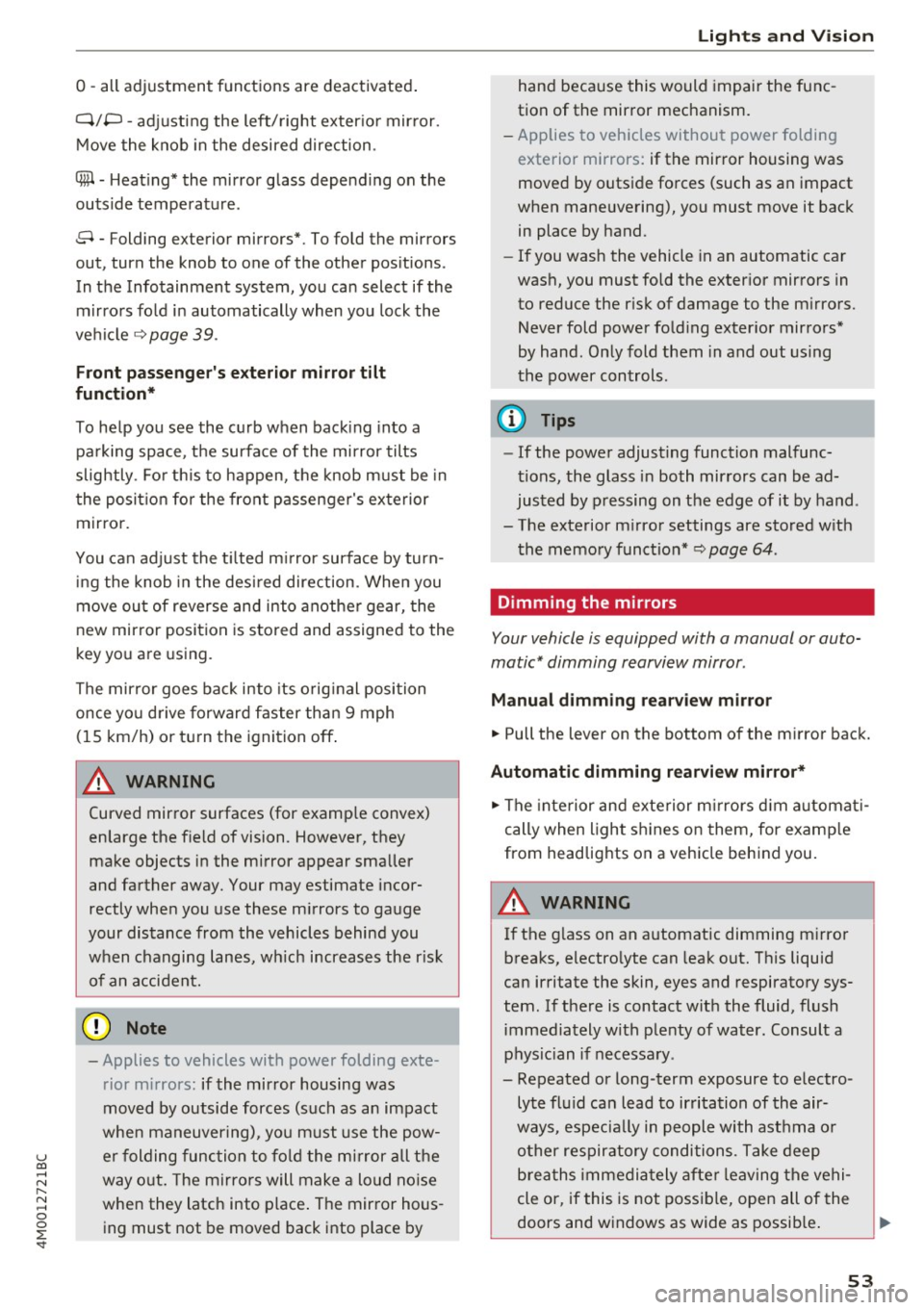
Fi g. 4 5 D river 's doo r: knob for the exter io r mirrors
Turn the knob to the des ired position:
Page 55 of 402
u co ...... N r-... N ...... 0
0
:E: '
Q/ P -adjusting the left/right exter io r mir ror.
Move the knob in the desired direction .
®-Heating* the mirror glass depending on the
outside temperature .
8 - Folding exterior mirrors* . To fold the mirrors
out, turn the knob to one of the other pos itions .
In the Infotainment system, you can select if the mirrors fo ld in automatically when you lock the
ve hicle
9 page 39.
Front pa ssenger' s exterio r mirror tilt
function*
To help you see the curb when back ing into a
pa rking space, the surface of the mirror tilts
slightly . Fo r th is to happen, the knob m ust be in
the posit io n for the front passenger's exterior
mirror.
You can adjust the t ilted m irror surface by turn
ing the knob in the desi red direction. When you
move ou t of reverse and into another gear, the
new mirror position is stored and assigned to the
key you are using.
The mir ror goes back into its orig inal position
once yo u drive forward faster than 9 mph
(15 km/h) or turn the ignition off .
A WARNING
Curved mirror surfaces (for examp le convex)
enlarge the f ield of vision . However, they
make objects in the mirror appear sma ller
and farther away. Your may estimate incor
rectly whe n you use these m irrors to gauge
your distance from the vehicles behind you
when changing lanes, wh ich increases the r is k
of an accident.
(D Note
- Applies to vehicles with power folding exte
rior mirrors: if the mirror housing was
moved by outside forces (such as an impact
whe n maneuvering), yo u m ust use the pow
e r folding func tion to fo ld the mi rror all the
way o ut. The mirro rs will make a loud no ise
when they latch into place . The mir ror hous
ing must not be moved back into place by
Light s and Vision
hand because this would impai r the func
tion of the mirror mechanism.
- Applies to vehicles without power folding
exterior mirrors: if the mirror housing was
moved by outside forces (such as an impact
when maneuvering), you must move it back
in place by hand .
- If you wash the vehicle in an automatic car
wash, you must fold the exter ior mirrors in
to reduce the r isk of damage to the m irrors.
Never fold power fo ld ing exter ior mirrors*
by hand . On ly fold them in and out us ing
the power controls.
(D Tips
- If the power adjusting function malfunc
tions, the glass in both mirrors can be ad
justed by p ressing on the edge of it by hand .
- The exterior m irror settings are stored w ith
the memory funct io n*
9 page 64 .
Dimming the mirrors
Your vehicle is equipped with a manual or auto
matic* dimming rearview mirror .
Manual dimming rearview m irror
.. Pull the lever on the bottom of the m irror back.
Automat ic dimming rearview mirror*
.. The inte rior and exte rior m irrors d im a utomat i
cally when light s hines on them, for examp le
from headlights on a veh icle beh ind you.
A WARNING
=
If the g lass on an a utomatic dimming m irro r
b reaks, electro lyte can leak out. This liquid
can irritate the skin, eyes and respiratory sys
tem. If there is contact w ith the fluid, flush
immediately w ith p lenty of water. Consult a
physic ian if necessa ry .
- Repeated or long-term exposure to e lectro
lyte fl uid can lead to ir ritation of the air
ways, especia lly in peopl e with ast hma o r
o ther respiratory condi tions. Take deep
b rea ths immedi ately afte r leaving the vehi
cle or, if this is not poss ible, open all of the
doors and windows as wide as possib le .
53
Page 56 of 402
Lights and Vision
-If electrolyte fluid enters the eyes, flush
them thoroughly with a large amount of
clean water for at least 15 minutes and then
seek medical attention .
- If electrolyte fluid comes into contact with
the skin, flush the affected area with clean
water for at least 15 minutes and then clean
with soap and water and seek medical at
tention. Clean affected clothing and shoes
thoroughly before wearing again .
- If the fluid was swallowed and the person is
conscious, flush the mouth with water for at
least 15 minutes. Do not induce vomiting
unless this is recommended by medical pro
fessionals. Seek medical attenti .on immedi
ately.
(D Note
If the glass on an automatic dimming mirror
breaks, electrolyte can leak out . This liquid
damages plastic surfaces and paint. Clean
this liquid as quickly as possible, for example
with a wet sponge .
@ Tips
-If the light reaching the rearview mirror is
obstructed, the automatic dimming mirror
will not function correctly,
- The automatic dimming mirrors do not dim
when the interior lighting is turned on or
the reverse gear is selected .
Sun visors
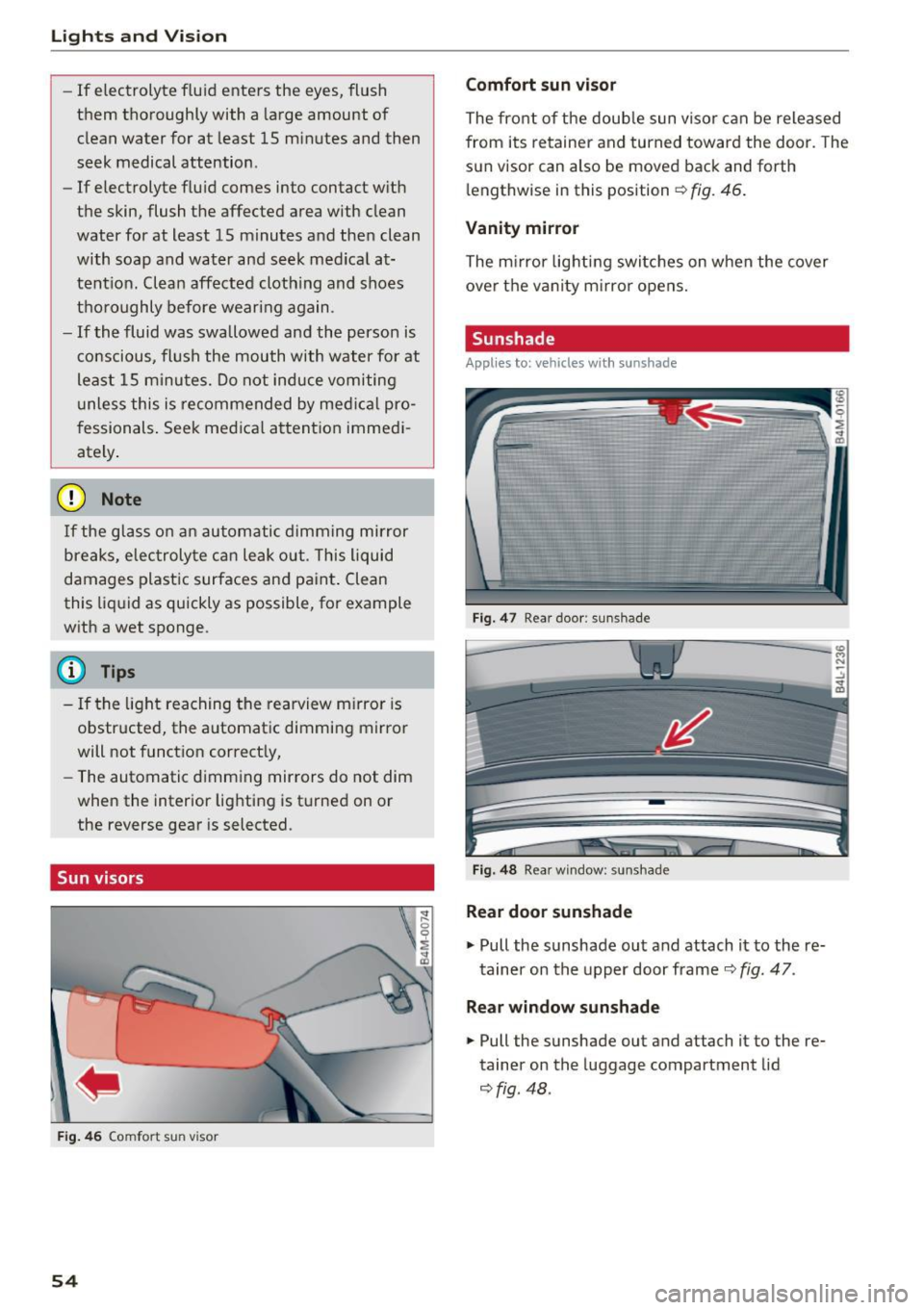
Fig. 46 Comfort sun visor
54
Comfort sun visor
The front of the double sun visor can be released
from its retainer and turned toward the door . The
sun visor can also be moved back and forth l e ngthwise in this position
Q fig . 46.
Vanity mirror
The mirror lighting switches on when the cover
over the vanity mirror opens.
Sunshade
Appl ies to: vehicles with sunshade
Fig. 47 Rear door : sun shade
Fig. 48 Rear window : sunshade
Rear door sunshade
"'Pull the sunshade out and attach it to the re
tainer on the upper door frame
Q fig. 47.
Rear window sunshade
"' Pull the sunshade out and attach it to the re
tainer on the luggage compartment lid
~fig. 48 .
Page 60 of 402
Lights and Vision
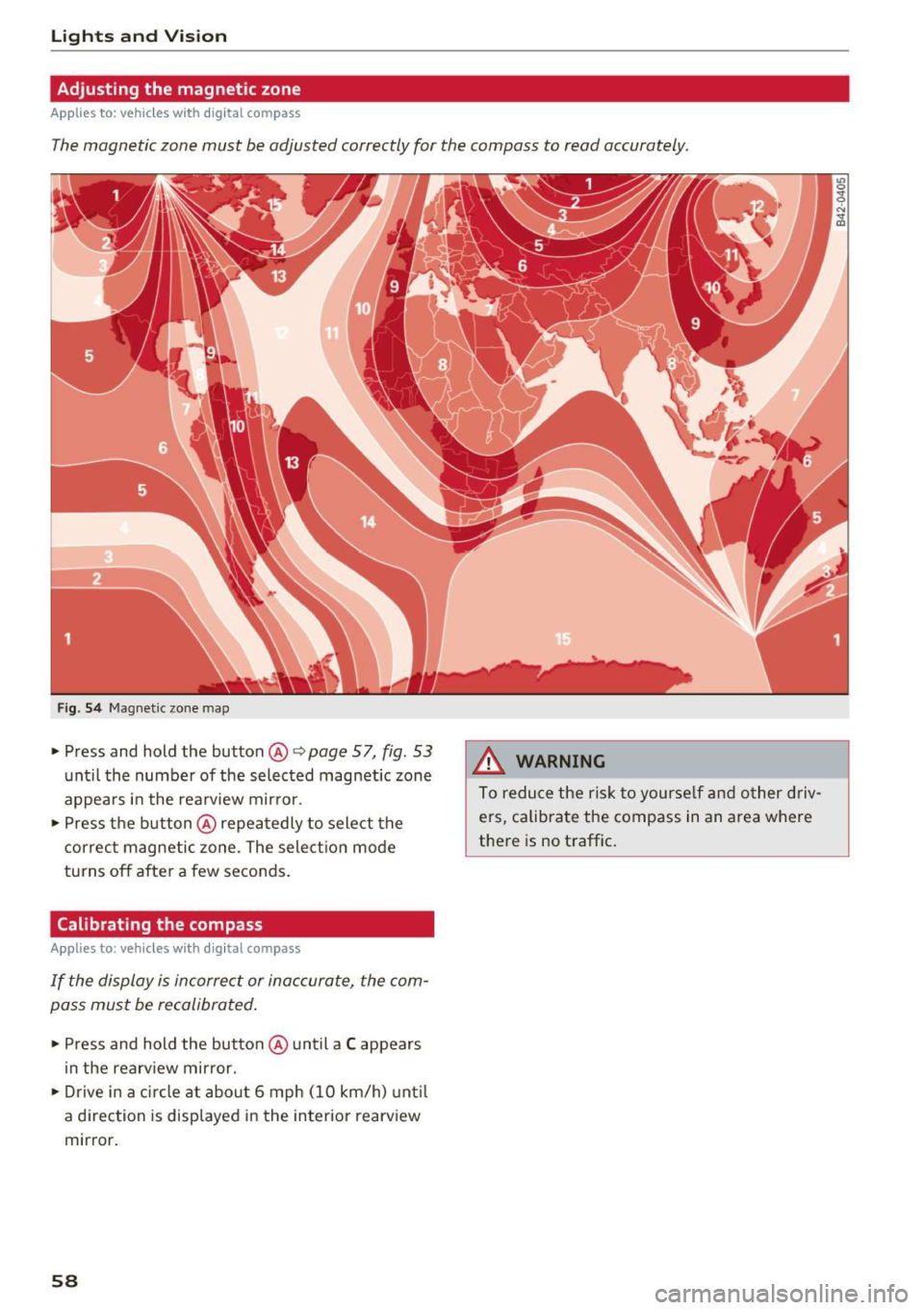
Adjusting the magnetic zone
Applies to: ve hicles w ith d ig ital compass
The magnetic zone must be adjusted correctly for the compass to read accurately.
Fig. 54 Magnetic zone map
• Press and hold the button@~ page 57, fig. 53
unt il the number of the selected magnetic zone
appears in the rea rview mir ror .
• Press the b utton @repeatedly to select the
correc t magnetic zone . The sele ct ion mode
turns off after a few seconds .
Calibrating the compass
App lies to: ve hicles with d ig ital compass
If the display is incorrect or inaccurate, the com
pass must be recalibrated .
• Press and hold the button @ until a C appears
in the rearv iew mirror.
• Drive in a circle at about 6 mph ( 10 km/h) unt il
a d irec tion is displayed i n the in terior rearv iew
mirror .
58
A WARNING
To reduce the ris k to yourse lf and o ther driv·
e rs, calibra te the compass in an area where
there is no traffic .
Page 100 of 402
Trailer towing
Trailer towing
Driving with a trailer
General information
Your Audi was designed primarily for passenger
transportation.
If you plan to tow a trailer, please remember that
the additional load will affect durability, economy and performance.
Trailer towing not on ly places more stress on the
ve hicle, it also ca lls for more concentration from
the dr iver.
F or this reason, always follow the operating and
driving instructions provided and use common
sense.
@ Note
If you are going to tow a trailer, you must ac
tivate the tra ile r operation mode
¢page 100.
Technical requirements
Traile r hitch
Use a weight-carrying hitch conforming to the
gross trai ler weight. The hitch must be suitab le
for your ve hicle and tra iler and must be mounted
securely on the vehicle 's chassis at a
technically
sound
locat ion . Use on ly a trailer hitch with a re
movable ba ll mount . Always chec k w it h t he t rail
er hitch man ufactur er to make s ure t hat you a re
using the co rrect hi tc h.
Do not use a bumper hitch.
The hitch m ust be installed i n such a way that it
does not interfere with the impact -absorbing
bumper sys tem . N o mod ificat ions should be
made to the vehicle exhaust and b rake systems .
Fr om t ime to t ime, che ck t hat all hitch mo unti ng
bol ts rem ain securely faste ned.
W hen you are not tow ing a tra iler, remove the
tra ile r hitc h ba ll mount . This prevents the hitch
from ca using damage shou ld your veh icle be
s truck from behind¢ &..
98
Trailer brakes
If your trailer is equipped wi th a bra king sys tem,
c h ec k t o be sure that it con forms to all regu la
tions.
The trailer hydrau lic br ake system mus t not be
directly connecte d to the vehicle's hydr auli c
brake system ¢&. .
Safety chains
Always use safety chains between your vehicle
and t he tra ile r.
Trailer lights
Trailer lights must meet all regulations. Be sure
to check w ith your author ized Audi dealer for cor
r ect wir ing , sw itches and relays .
Mirrors
If you are unab le to see the traffic behind you us
i ng the regular outs ide mirrors, then you
must in
stall extended mirro rs. It is important that you
always have clear vision to the rear.
A WARNING
-
- After remov ing the tra iler hitch, do not
sto re it in your vehicle . In case of sud den
braking , th e hitch co uld fl y forwar d and i n
jure you o r yo ur passenge rs.
- I f a tra ile r has e lectr ica l brakes p lease no te
t h at the se brakes are not ac tivated by the
fact ory-fi tted contro l uni t - r isk of accident!
- N ever i nst all a "we igh t distribut ing" or
"lo ad equ alizing" trailer hi tch o n yo ur veh i
cle. The vehicle was not desig ned fo r these
kinds of trailer hitches. The hitch attach
ment can fai l, ca us ing the tra iler to tear
loose from the vehicle .
- The Gross Veh icle Weight Rating for your
veh icle, found on the safety compliance la
be l on the driver's s ide B -pillar, m ust never
be exceeded under any circumstances. Ex
ceed ing the Gross Vehicle Weight Rati ng of
your veh icle is likely to damage yo ur vehicle,
and such damage will not be covered by
your Limi te d N ew Vehicle War ranty. Exceed
ing the G ros s Ve hicl e W eight Ratin g will al-
so ch ange the pe rform ance and ha ndling .,._
Page 118 of 402

Assistance systems
Distance indicator and
distance warning
Description
Applies to: vehicles with Aud i adapt ive cruise control
F ig. 114 In stru ment cl uste r: dis tance indica tor/wa rning
At speeds above 40 mph (65 km/h), this funct ion
measures the time betwee n the vehicle driv ing
ahead and s hows th is in the instrument cl uster
d isp lay¢
fig. 114 .
You can set a warning t hreshold between 0 .6 and
3.0 seconds . The . indicator light t urns on if
you fall be low the set d istance.
Switching the distance indicator/warning on
and off
.. In the Infotainment system, selec t: I MENU !
button > Vehicle > left contro l button > Driver
assistance > Distance warning.
A WARNING
- Read an d follow th e war nings on ¢.&. in
Gen eral in for ma tion on page 1 08.
-The driv er is always r espons ib le for a dhering
to the regulations applicable in th at co un
t ry .
{!) Tips
You may fall b elow he warn ing t hreshold
briefly whe n pass ing or when quickly ap
proac hing a s low veh icle . T h er e is no wa rni ng
in this scen ario . A warn ing is gi ven only if you
f al l b elow the war ning thr eshold f or an ex
t en ded pe rio d o f tim e.
116
Messages
Appl ies to: vehicles with Audi adaptive cruise control
ii ACC with traffic jam assist: unavailable . See
owner's manual
The sy stem cannot gu aran tee t hat i t will dete ct
vehicle s cor re ctl y an d it h as sw itched
off . The ra
dar sensors have shifted or are fau lty . D rive to an
aut ho rize d Audi dea le r o r a uth orized Audi Service
Facility immed iate ly to have the malfunct ion cor
r ected .
ii ACC with traffic jam assist: currently un
available. See owner's manual
This mes sage ap pears if the ada ptive cruise con
t ro l canno t be activ ated, for example i f th e hood
is ope n.
fl ACC with traffic jam assist : currently un
available. Sensor vision restricted due to sur roundings. See owner 's manual
This message ap pears if the radar se nsor v iew is
obstr ucted, for e xamp le by leaves, snow, heavy
s p ra y or dir t. Cle an the senso rs ¢
pa ge 107 ,
fi g. 101.
ill ACC with traffic jam assist: currently un
available. Grade too steep
T he road exceeds the maxim um poss ible g rade
for saf e operation . The systems cannot be sw itch
ed o n.
ill ACC with traffic jam assist: only available in
D, Sor M
Se lect t he D/S or M se lector lever position.
flJ ACC with traffic jam assist: currently un·
available. Parking brake applied
The sys tems swi tch off i f you set the parking
bra ke. Th e sys tems are av ailab le ag ai n afte r yo u
rele ase the parkin g bra ke .
ill ACC with traffic jam assist: currently un
available. Stabilization control (ESC ) input
This message appears if the e lectron ic stabiliza
t ion cont rol ( ESC) is tak ing act ion to stabiliz e the
vehicle . The systems switch
off in this scena rio .
ill ACC with traffic jam ass ist: manual control! .,.
Page 124 of 402
Assistance systems
authorized A udi dealer or authorized Audi
Serv ice Facility chec k their function.
@ Tips
- You can can cel the sys tem bra kin g interven
tion if yo u accelerate considerably or swerve
away.
- K eep in mind t hat pre sense city c an brake
u nexpected ly . Always sec ure any cargo o r
ob jects t hat you a re t ransport ing to reduce
the r isk o f damage or inj ury.
- Specific pre sense city funct ions sw itch off
when the ESC is limited o r switc hed off
c> page 149 or the hill descent assist is
switc hed on
c> page 150.
- When there is a mal func tion in the camera,
the pre sense city funct ions also switch off.
Settings in the
Infotainment system
Applies to: veh icles with Audi pre sense
"Se lect in the In fo ta in m en t sys tem: IMENU I but
t on
> Vehicle > left contro l bu tton > Driver as
sistance
> Audi pre sense .
Turn on/off Audi pre sense -
the pre sense func
tions ca n be tur ned on and off.
If the system is switched off, it switches on aga in
automatically once the ignition is sw itched on
again .
Early warning -the early warning can be sw itch
ed
off o r the pre sense city/front warning point
can be set
( Early /Medium /late ).
Set the warnin g time fo r the early warn ing to
Early at f irst. I f th is causes undesired ea rly warn
ings to appear, then set the wa rning time to
Me
dium .
The late warning t ime sho uld on ly be set
i n specia l cir cumstances, for example, whe n driv
i n g with a very dynam ic sty le.
@ Tips
Your sett ings a re automat ically stored and as
signed to the remote control key be ing used .
122
Messages
Applies to: vehicles with Audi pre sense
[II Audi pre sen se: malfunction! Please contact
Service
This mess age app ears w hen the pre sense f unc
t ion is affec ted. For ex ample, th is co uld be
ca used by a faul ty se nsor. Drive to an a uthori ze d
Audi dealer or authorized A udi Service Fac ility im
med iate ly to have the ma lfunction corrected.
II Audi pre sen se currently restricted. Restrict
ed sensor vision due to surroundings. See own
er 's manual
This mess age app ears if the radar se nso r a nd
c a mera v iew is obs truc ted, for ex ample by le aves,
snow , heavy s pray o r dirt . If necessary, clean the
senso rs and t he area around the camera
c> page 107 , fig. 101 or c>page 127 , fig. 122 .
(ii Audi pre sen se: currently restricted . Towing
mode
Fo r vehicles with a tra ile r h itch installed a t the
f ac to ry, the pre se nse rear func tions swi tch off
whe n the ele ct ric al connec tor a t th e so ck et is
p lu gged in. The re is no guaran tee t he f unctions
will switc h off when using a ret rofitted trailer
hitch.
II Audi pre sen se: currently restricted
This message ap pears if the ESC is rest ricted or
swi tched off, fo r example.
II Audi pre sense: currently restricted. See
owner's manual
This message appears w hen the re is a temporary
failure in a s ubsystem, such as the ESC. If t his
message appears repeatedly, d rive to an au thor
i zed Audi dealer or author ized Audi Se rvice Facili
ty to have th e ma lfu nction co rrected .
II] Audi pre sense: emergency braking system
off
This message appears if the pre sense functions
are switched off through the Infotai nment sys
tem or if the system is not ready.
Page 133 of 402

@ Tips
-You can cancel the automatic brake activa
tion w ith increasing bra king fo rce if you ap
ply the brakes yourse lf or accelerate cons id
erab ly.
- In some situations, rea r cross-traffic assist
may warn yo u even if there is no cross traffic
i n a cr itical a rea , for examp le w hen back ing
i nto a parki ng space or ma neuver ing.
- The rea r cross-traffic ass ist also switches off
whe n you switch off the ESC.
- The rea r cross traffic assist switches on and
off thro ugh the pa rking aid
qpag e 138.
- The system is not available when towin g a
trailer.
Messages
A ppl ies to: ve hicles with Audi side assist
A message appears in the inst rument cluste r dis
p lay if the s ide ass ist swi tches off autom atically .
@j Audi side assist: malfunction! Please contact
Service
@j Audi side assist and exit warning : malfunc
tion! Please contact Service
The system ca nnot gu ara nt ee th at i t w ill detec t
ve hicl es co rrectly and it has switched off. The
sensors have been moved o r are faulty . Have t he
system checked by an a uthorized Audi dealer or
author ized Audi Se rvice Facility s oon.
@j Audi side assist: currently unavailable. Sen
sor vision restricted due to surroundings . See
owner 's manual
@j Audi side assist and exit warning : currently
unavailable. Sensor vision restricted due to sur
roundings
The rad ar senso r vis io n i s im paire d. T he ar ea in
fr on t of the senso rs must no t be covered by bik e
r ac ks, st ic kers, leaves, snow or any other o bjects.
C lea n the area i n front of the senso rs, if necessa
ry
¢ page 127, fig. 122.
~ @j Audi side assist: currently unavailable. See ......
~ owner 's manual
N ...... 0
0
:E: '
@j Audi side assist and exit warning: currently
unavailable. See owner's manual
S id e assi st cann ot be sw itche d on a t this tim e be
cau se the re is a m alfu nct ion ( for e xample, the
ba tte ry c harge leve l may be to o low) .
@j Audi side assist: unavailable in towing mode
@j Audi side assist and exit warning: currently
unavailable. Towing mode
S ide assist switches off automatically when the
electrical connecto r in t he factory-installed trail
er hitch is connected . There is no guarantee the
system will sw itch o ff when us ing a ret rofi tted
t rail er h itch . Do not u se side assist and the ex it
warni ng w hen tow ing a tra ile r.
[II Rear parking aid : obstacle detection restrict
ed
The rear c ross-traffic ass ist is not available. E i
t h er the ESC is sw itched off, or the rada r senso rs
may be cove re d by a b ike rack, stic ke rs, leaves,
snow o r other objects . Swi tc h the ESC on, or
cle an the area in fron t of th e senso rs if necessa ry
~ page 127, fig. 122. If thi s m essage co ntin ue s
to be displayed, dr ive imme dia tely to an author
i z ed Audi deal er or author ized Audi Service Facili
ty to have the ma lf u nction re paire d.
Night vision assist
Description
App lies to : vehicles wit h night vision assist
The night vision assist can detect, highlight and,
if necessary , warn about pedestrians and large
wild animals .
Nigh t vision assist he lps yo u when it is dark by
u sing an infra red came ra to monit or the a rea in
front of your ve hicle , w ith in the limits of the sys
tem .
It can disp lay objec ts up to a dis tance of ap
prox ima tely 1 000 feet (300 m) . T he thermal im
age dete cted by the came ra is show n in t he in
s tru me nt clus ter di sp lay . W arm a reas appea r
lig hter a nd co ld ar eas ap pea r dar ker.
131
Page 134 of 402
Ass is tance sy stems
Highlighting detected pedestrians and wild
animals
Applies to: vehicles with night vision ass ist
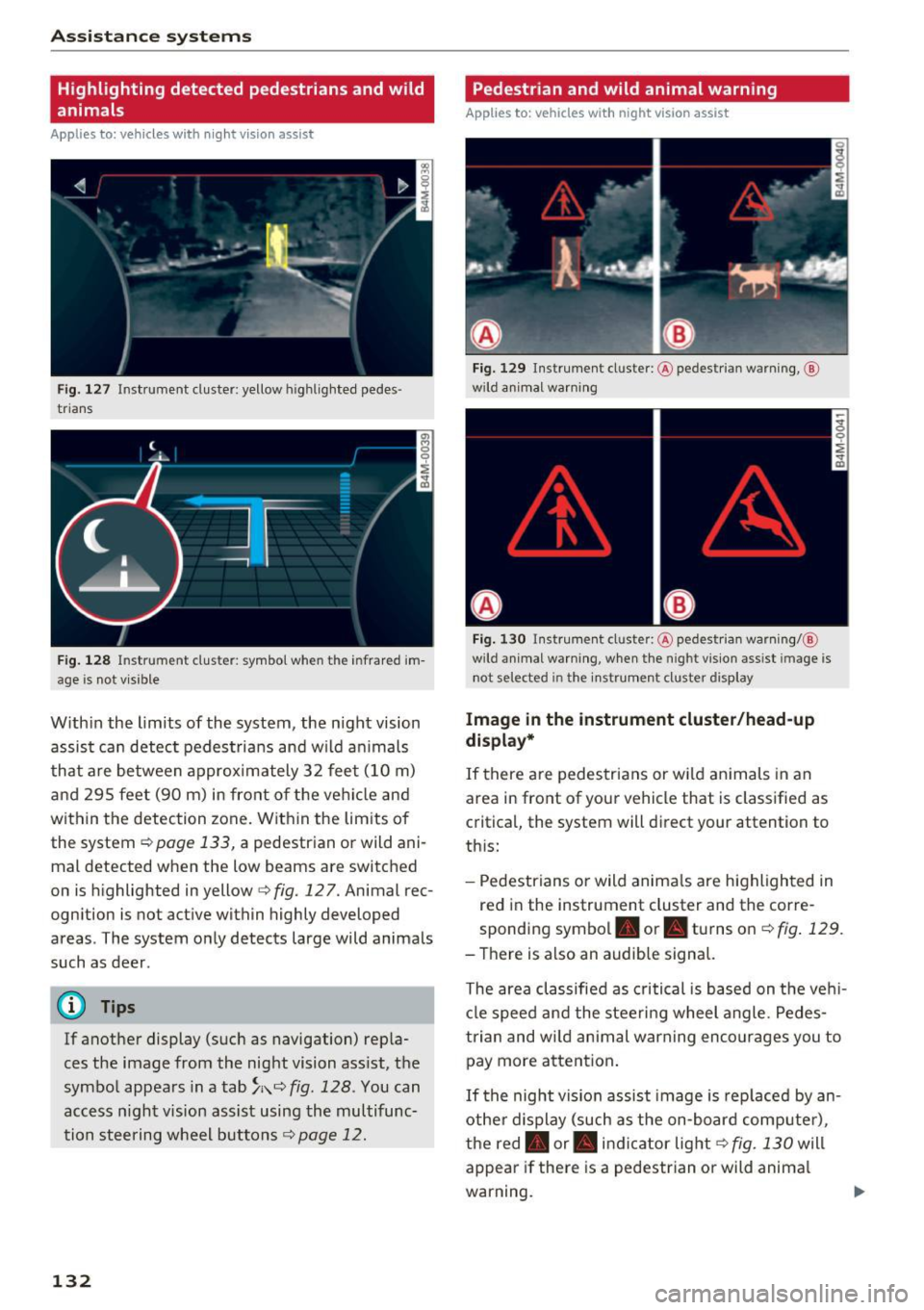
F ig. 127 Instrument cluster: yellow highl ighted pedes
trians
F ig . 128 Instrument cluster: symbol when the infrared im
age is not vi sible
With in the limits of the system, the night vision
assist can detect pedes tria ns and w ild an imals
that are between approximately 32 feet (10 m)
and 295 feet (90 m) in front of the vehicle and
within the detection zone. Within the limits of
the system
r:::;, page 133, a pedestrian or wild ani
mal detected when the low beams are switched
on is highlighted in yellow
i=> fig. 127. Animal rec
ognition is not active within highly developed
areas . The system only detects large wild animals
such as deer .
@ Tips
If another display (such as navigation) repla
ces the image from the night vision ass ist, the
symbol appears in a tab
~ i\. r:::;, fig. 128 . You can
access n ight vision assist using the multifunc
tion steering wheel buttons
r:::;, page 12.
132
Pedestrian and wild animal warning
Applies to: vehicles with night vision assist
Fig. 12 9 Instrument cl uster: @ pedest rian warning, @
wild anim al warn ing
Fi g. 130 Instr ument clus ter: @pedest ria n warning/ @
wild animal warning, when the nigh t vision ass ist im age is
not selected in the instru men t cluste r display
Image in the instrument cluster /head-up
di spl ay *
If there are pedes trians or wild an imals in an
area in front of your vehicle that is classified as
critical, the system will direct your attention to
th is:
- Pedestrians or wild anima ls are highlighted in
red in the instrument cluster and the corre
sponding symbol. or. turns on
r:::;, fig. 129 .
- There is also an audible signal.
The area classified as c ritical is based on the veh i
cle speed and the steeri ng wheel angle . Pedes
trian and wild animal warning enco urages you to
pay more attention.
If the night vision assist image is rep laced by an
othe r d isplay (such as the on-board compute r),
the red. or. in di cator light
r:::;, fig. 130 will
appear if there is a pedestrian or wild anima l
warning.
Page 135 of 402
If the head-up display* is switched on and the
night vision assist content is activated,. or.
will appear in the head-up display*.
Marking light*
To direct the driver's attention to a pedestrian,
the headlights can flash on the pedestrian three
times in a row when there is a pedestrian warn
ing.
This occurs at speeds above approximately 35 mph (60 km/h) if you are outside of illuminat
ed areas and no detected vehicles are shown. The
high beam assistant* controls the marking
light* c:>
page 49.
The marking light is not used for wild animals.
General information
App lies to: ve hicles w ith nigh t visio n ass ist
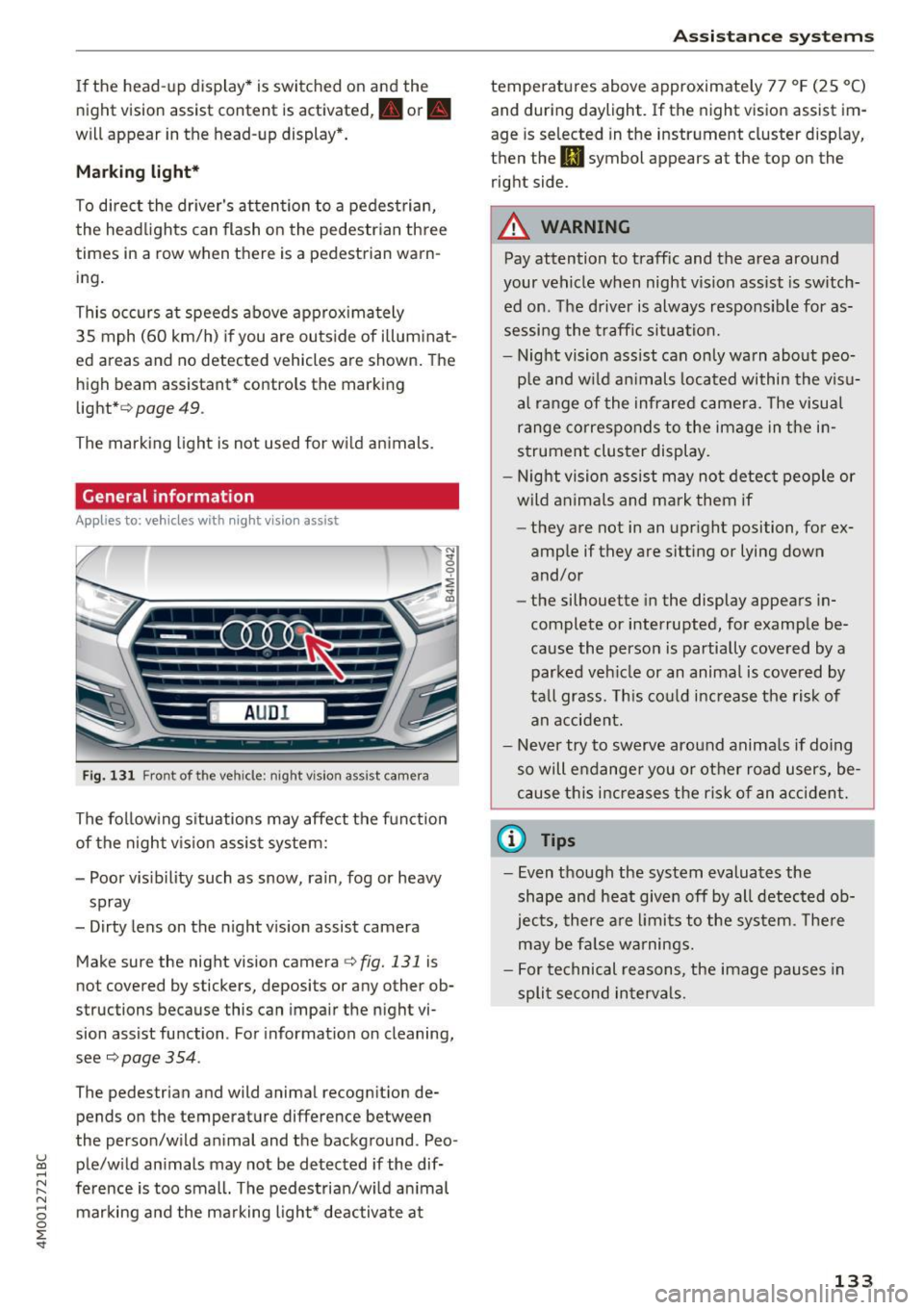
Fig. 131 Front of the ve hicle: night vision ass ist came ra
The following situations may affect the function
of the night vision assist system:
- Poor visibility such as snow, rain, fog or heavy
spray
- Dirty lens on the night vision assist camera
Make sure the night vision camera
c::> fig. 131 is
not covered by stickers, deposits or any other ob
structions because this can impair the night vi
sion assist function . For informati on on cleaning,
see
c::> page 354 .
The pedestrian and wild animal recognit ion de
pends on the temperature difference between
the person/wild anima l and the background . Pea -
~ ple/wild animals may not be detected if the dif-,.....
~ ference is too small. The pedestrian/wild animal N
8 marking and the marking light* deactivate at 0 :E
temperatures above approximately 77 °F (25 °C)
and during daylight. If the night vision assist im
age is selected in the instrument cluster display,
then the
II symbol appears at the top on the
right side.
A WARNING
-Pay attention to traffic and the area around
your vehicle when night vision assist is switch
ed on. The driver is always responsible for as
sessing the traffic situation.
- Night vision assist can only warn about peo
ple and wild animals located within the visu
al range of the infrared camera. The visual
range corresponds to the image in the in
strument cluster display.
- Night vision assist may not detect people or
wild animals and mark them if
- they are not in an upright position, for ex
ample if they are sitting or lying down
and/or
- the silhouette in the display appears in
complete or interrupted, for example be
cause the person is partially covered by a
parked vehicle or an animal is covered by
tall grass. This could increase the risk of
an accident.
- Never try to swerve around animals if doing
so will endanger you or other road users, be
cause this increases the risk of an accident.
(I) Tips
- Even though the system evaluates the
shape and heat given off by all detected ob
jects, there are limits to the system . There
may be false warnings.
- For technical reasons, the image pauses in
split second intervals.
-
133