window AUDI Q7 2017 Owner´s Manual
[x] Cancel search | Manufacturer: AUDI, Model Year: 2017, Model line: Q7, Model: AUDI Q7 2017Pages: 402, PDF Size: 100.39 MB
Page 91 of 402

u co ...... N r-... N ...... 0
0
:E: '
-If you do not begin driving immediately or
the engine stalls after releasing the brake pedal, your vehicle may begin to roll back
ward . Press the brake pedal or set the park
ing brake immed iately.
- The intelligent technology of hill hold assist
cannot overcome the lim itations imposed by
natural physical laws. The increased comfort
offered by hill hold ass ist should not cause
you to take safety risks .
- Hi ll hold assist cannot hold the veh icle in
place on all hills (for example, if the ground
is slippery or icy).
- To reduce the risk of an accident, always
make sure the vehicle is situated safely
wh ile stat ionary.
Off road driving
General information
The electronic stabilization contro l (ESC) func
tions were enhanced for driving offroad. Offroad
mode can be activated when driving in situat ions
where slippage or a differential lock function is
necessary
Q page 149. The hill descent ass ist is
a lso available, which automatically brakes the ve
hicle and maintains a constant speed as a result
~page 150. In addition, your Audi prov ides con
tinuous all wheel drive.
H owever , your Aud i is not a purely offroad vehi
cle . Your vehicle was not designed to d rive unde r
extreme ope rating conditions such as driving in
an expedition style.
Only drive in terrain that is suitable for the vehi
cle and your driving ability . Never take any un
necessary risks!
Before driving offroad
- Check the eng ine oil level, the tire pressure, the
coolant level and the fluid level in the washer
fluid reservoir .
- Store pieces of luggage and other objects in the
luggage compartment and secure them from
s li ding out of place.
Driving
After driving offroad
-After driving offroad, remove branches and
other debris from the radiator grille, under
body, and wheels . Look especially for foreign
objects (such as stones) that may be stuck in
the tire tread.
- Clean the vehicle body and underbody and in
spect the vehicle for possible damage.
- Clean the windows, headlights, tail lights and
the license plate if they are dirty.
- Per form a brake test (especially after driving
through water).
_& WARNING
- Be especially cautious and aware when driv
ing under difficu lt cond it ions and when off
road. Veh icle damage and injuries may occur
when dr iv ing at excessively high speeds or
with incorrect driving maneuvers.
- Always adjust your speed and driving style
to the roads, terrain, traffic and weather
conditions . Drive especially slowly if there is
low visibility when offroad.
- Please note that the wheels can sp in more
and the vehicle can swerve when in offroad
mode, espec ially when the road is slippery
or has loose surface material.
- Driving stability is reduced when in offroad
mode.
@ For the sake of the environment
Avoid harming the environment and show
consideration for nature .
(D Tips
Only drive where it is permitted and always
stay on the prov ided roads and paths .
Explanation of technical terms
The following data is based on idea l conditions .
T he values may vary depending on the load,
ground composition and the environment. The
driver is therefore responsible for deciding
whether a vehicle can hand le a specific situation
¢ £ . ~
89
Page 106 of 402
Assistance systems
Switching the ignition off will erase the stored
speed.
A WARNING
You should only resume the stored speed if it
is not too high for existing traffic cond itions.
Otherwise you can increase the r isk of an acci
dent.
Camera-based traffic
sign recognition
Description
Applies to: ve hicles with ca mera·based t raffic sign recogni·
tion
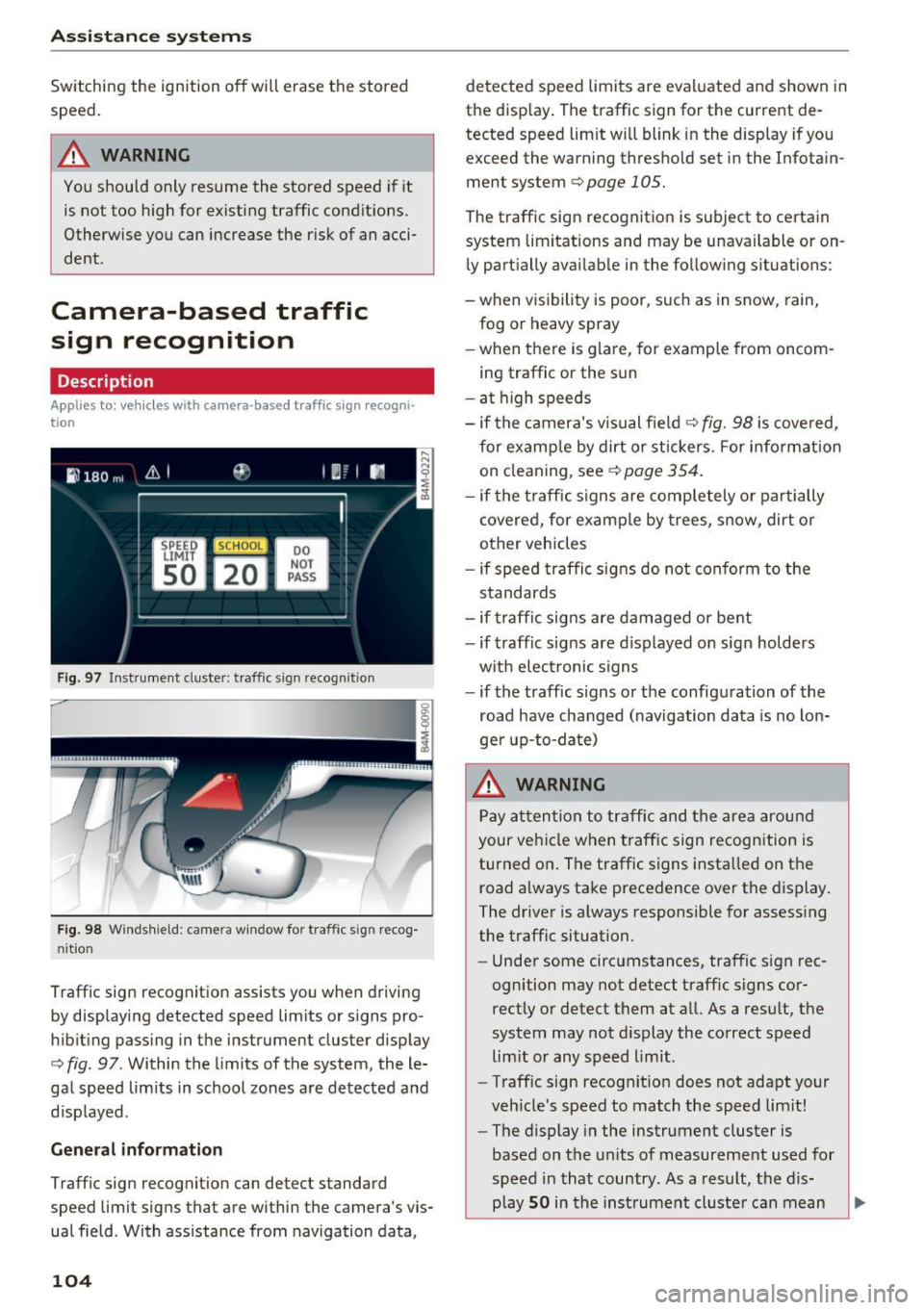
F ig. 97 Instrument cluste r: traff ic sign recogn it ion
F ig. 98 Windsh ield: came ra window for t raffic s ig n recog
ni tio n
Traff ic sign recognition assists you when driving
by displaying detected speed limits or s igns pro
hibiting passing in the instrument cluster display
c:;, fig . 97 . Within the limits of the system, the le
gal speed lim its in school zones are detected and
disp layed .
General information
Traffic sign recognit ion can detect standard
speed limit signs that are within the camera's vis
ual field . With ass istance from navigation data,
104
detected speed limits are evaluated and shown in
the display . The traffic sign for the current de
tected speed lim it will blink in the display if you
exceed the warning thresho ld set in the Infotain
ment system
c;, page 105.
The traffic sign recognition is subject to certain
system limitations and may be unavai lable or on
ly partially avai lable in the follow ing situations :
- when visibility is poor, such as in snow, rain,
fog or heavy spray
-when there is glare, for example from oncom
ing traffic or the sun
- at high speeds
- if the camera's visual field
¢ fig. 98 is covered,
for examp le by dirt or st ickers. For info rmation
on cleaning, see
¢page 354 .
-if the tra ffic signs are completely or partially
covered, for examp le by trees, snow, dirt or
other vehicles
- if speed traffic signs do not conform to the
standards
- if traffic signs are damaged or bent
- if traffic signs are displayed on sign holders
w ith electronic signs
- if the traffic signs or the configuration of the
road have changed (navigation data is no lon
ger up-to-date)
.&_ WARNING
Pay attention to traffic and the area around
your vehicle when traffic sign recognition is
turned on . The traffic signs insta lled on the
road always take precedence over the display.
The driver is always responsible for assess ing
the traffic situation.
- Under some circumstances, traffic sign rec
ognition may not detect traffic signs cor
rectly or detect them at a ll. As a result, the
system may not display the correct speed
lim it or any speed limit .
- Traff ic sign recognit ion does not adapt your
veh icle's speed to match the speed limit!
- The display in the instrument cluster is
based on the units of measurement used for
speed in that country. As a result, the dis
play
SO in the instrument cluster can mean
-
Page 120 of 402
Ass is tan ce sys tems
-Due to the interlinking of various vehicle sys
tems, critica l driving situations can be detected
by
pr e se nse basic and measures for preventa
tive occupant protection are can be initiated.
- The
pre sen se fro nt system uses the data from
the adapt ive cruise control* radar sensors and
the camera to calculate the probability of a col lis ion. Within the limits of the system, an im
pending collision with vehicles can be detected
i n both urban and rural speed ranges. In this
case, the system warns the dr iver visually,
acoustically and with a jerk on the brakes if nec
essary.
If needed, it can initiate a pa rtial or fu ll
deceleration to reduce the co llision speed or to
avoid the collision under certain circumstances .
In conjunction with pre sense basic/rear, the
front safety belts are also reversibly tensioned
when needed. The pre sense front is also active
when adapt ive cruise control* is switched off.
- Pre se nse re ar contains pre sense basic func
tions. It uses the data from the side assist" ra
dar sensors and calculates within the limits of
the system the probab ility of a rear end coll i
s ion with the vehicle behind you . Pre sense rear
is also active when s ide assist* is swit ched off.
- Within the limits of the system,
pre sense city
uses the camera data and ca n detect a n im
pending coll ision with veh icles and pedest rians.
In this case, the system warns the driver vis ual
ly, acoustically and with a jerk on the brakes if
necessary. If needed, it can initiate a fu ll decel
eration to reduce the co llision speed or to avoid
the coll is ion under certain circumstances. In
conjunction w ith pre sense bas ic/rear, the front
safety belts are also revers ibly tensioned when
needed .
.8. WARNING
Read the general informat ion in~ .& in Gen
eral information on page 108, ~.& in Gener
al information on page 127.
- Certain pre sense functions switch off when
driving in reverse.
1> Th is is not availab le in some co untr ies.
118
- The p re sense f unct ions may not be availa
ble if there is a malfunction in the ESC sys
tem o r the a irbag control module .
- Note that the reversible belt tensioner on
the front passenger's side deactivates when
the front passenger's airbag is deactivated.
- Switch the pre sense off when you are not
using public streets or when load ing the ve
hicle onto a vehicle carrier, tra in, sh ip or
other type of transportat ion. This can pre
vent an undesired intervention from the pre
sense system.
Audi pre sense basic
Description
App lies to : vehicles wi th Aud i pr e se nse basic
The pre sense basic functions are activated at a
speed of approximately 20 mph (30 km/h) or
higher.
The following functions can be triggered under
certain conditions within the limits of the sys
tem:
- Tensioning of the safety belts (for examp le,
during heavy braking): the front safety belts
have reversib le be lt tensioners . If a collision
does not occur, the safety belts loosen slightly
and are ready to trigger aga in.
- Closing the windows and sunroof*.
-Activating the emergency flashers
1> .
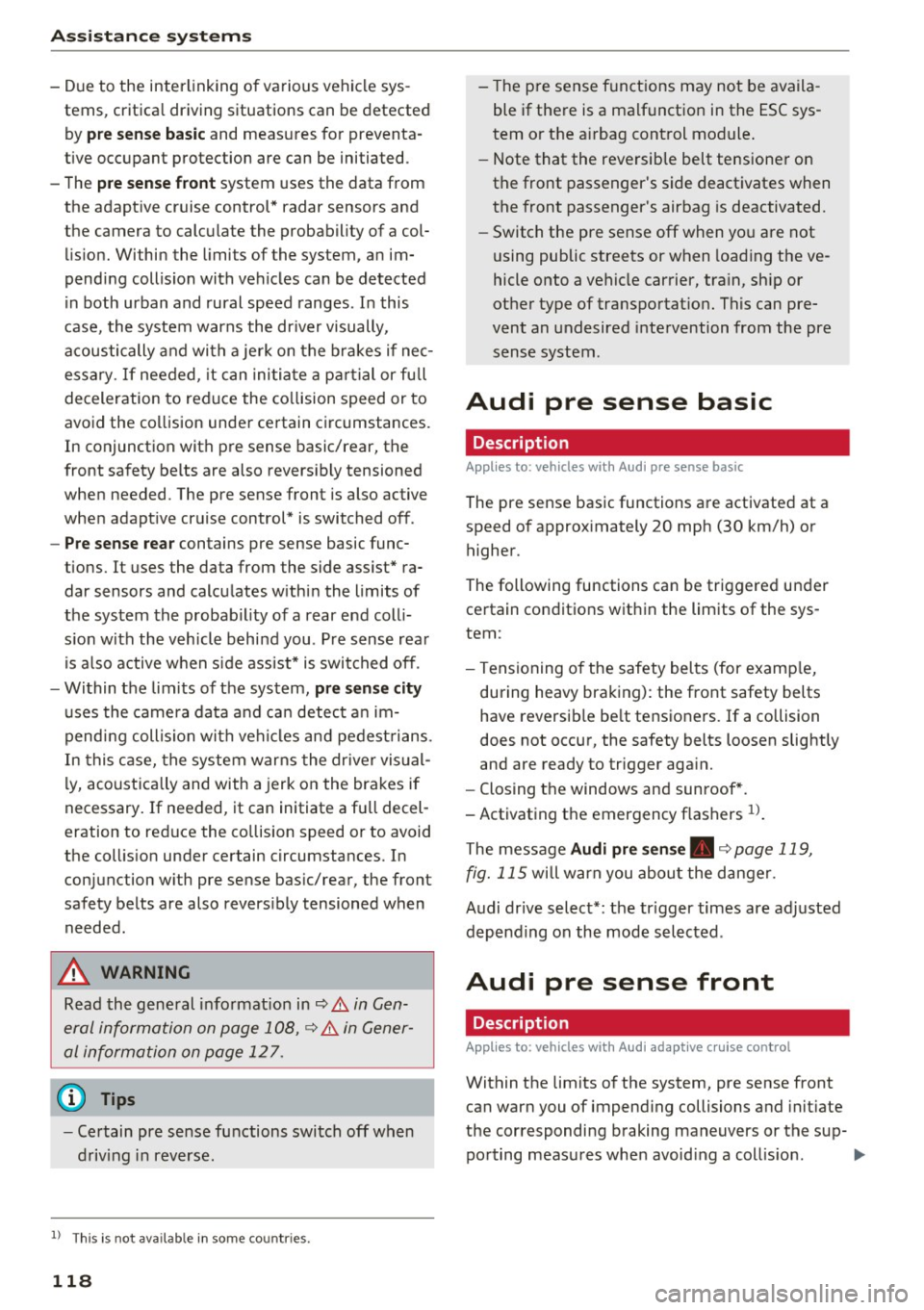
The message A udi pre sen se. ~ page 119,
fig. 115
will warn you abou t the danger.
Audi drive select*: the tr igger times are adjusted
depending on the mode selected .
Audi pre sense front
Description
Applies to: vehicles wi th Audi ada ptive c ruise con trol
Within the limits of the system, pre sense front
can warn you of impend ing collisions and init iate
the corresponding braking maneuvers or the sup- porting measures when avoid ing a coll is ion. .,.
Page 121 of 402
u co ...... N r-... N ...... 0
0
:E: '
gerous situation as critical if a vehicle driving
ahead brakes sudden ly, if your own vehicle is ap
proaching a significantly s lower vehicle at high
speed or when there is an oncoming vehicle dur
ing a turning maneuver .
If detection is not possible, then pre sense front
does not react.
Warnings
App lies to: veh icles with Audi adaptive cruise contro l
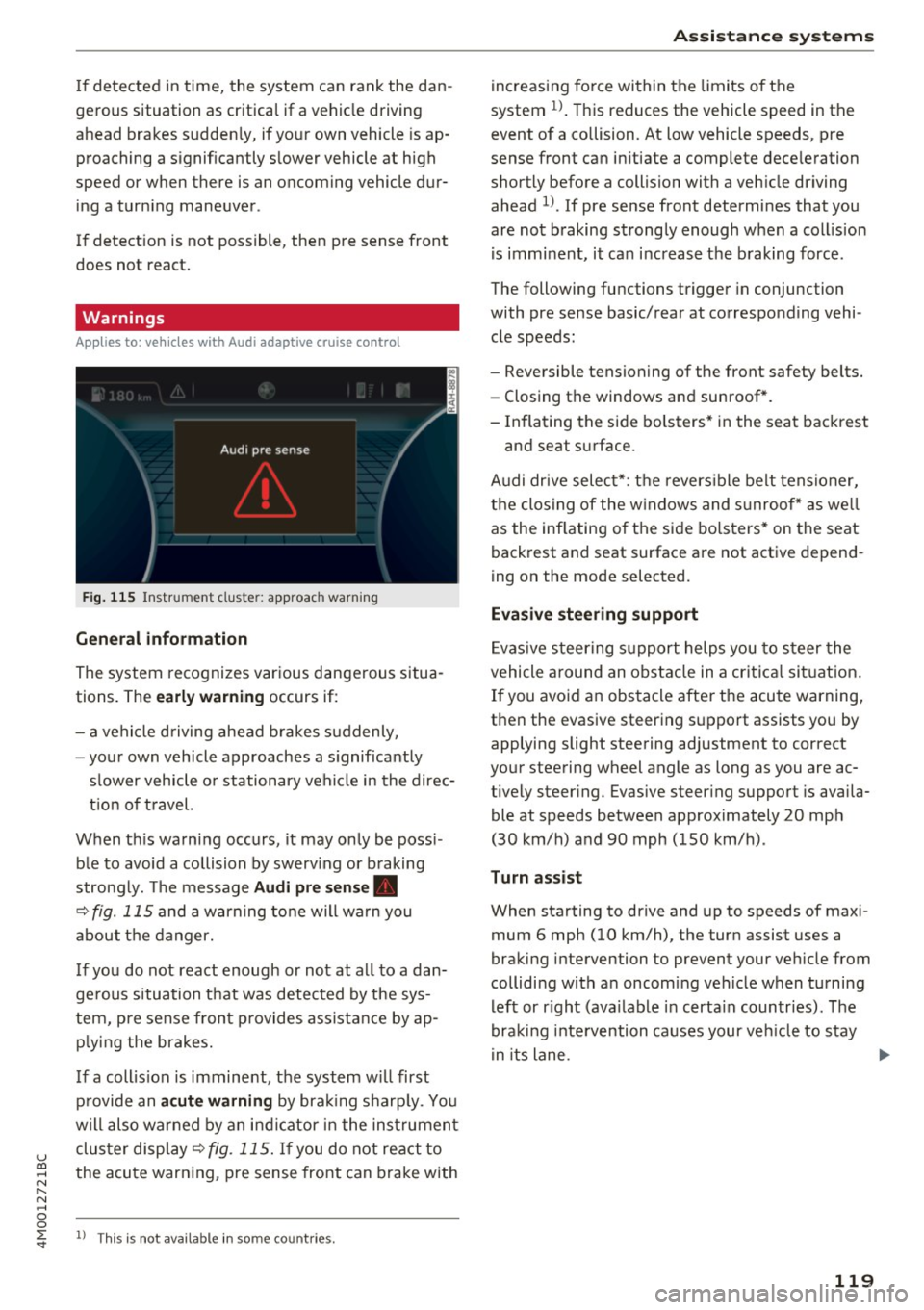
Fig. 115 In strument clus te r: approac h warning
General information
The system recognizes various dangerous situa
tions. The
early warning occurs if:
- a vehicle driving ahead brakes suddenly,
- your own vehicle approaches a s ignificantly
s lower vehicle o r stationary vehicle in the direc
tion of travel.
When this warning occurs, it may only be poss i
ble to avoid a collision by swerv ing or b raking
strong ly. Th e message
Audi pre sense .
¢ fig. 115 and a warning tone will warn you
about the danger.
If you do not react enough or not at all to a dan
ge rous situation that was detected by the sys
tem, pre sense front provides assistance by ap
p ly ing the brakes.
If a collis ion is imminent, the system w ill first
provide an
acute warning by braking sharp ly. You
will also warned by an ind icator in the instrument
cluster display¢
fig. 115. If you do not react to
the acute warning, pre sense front can brake with
l) This is not availa ble in so m e co untries.
Assistance systems
increasing force within the limits of the
system
1l . This reduces the vehicle speed in the
event of a collision. At low vehicle speeds, pre
sense front can in itiate a complete deceleration
shortly before a collision with a veh icle driving
ahead
l ). If pre sense front determines that you
are not braking strongly enough when a collis ion
is imminent, it can increase the braking force .
The following functions trigger in conjunc tion
with pre sense basic/rear at corresponding vehi
cle speeds :
- Reversible tensioning of the front safety belts. - Closing the windows and sunroof*.
- Inflating the side bolsters* in the seat backrest
and seat surface.
Audi dr ive select*: the reversible belt tensioner,
the closing of the windows and s unroof* as we ll
as the inflating of the side bolsters* on the seat
backrest and seat surface are not active depend
ing on the mode selected.
Evasive steering support
Evasiv e steering support helps you to steer the
vehicle around an obstacle in a critical situation.
If you avoid an obstacle after the acute warning,
then the evasive steering support assists you by applying slight steering adjustment to correct
your steering wheel angle as long as you are ac
t ively steer ing. Evasive steer ing support is availa
ble at speeds between approximately 20 mph
(30 km/h) and 90 mph (150 km/h) .
Turn assist
When starting to drive and up to speeds of maxi
mum 6 mph (10 km/h), the turn assist uses a
braking intervention to prevent your ve hicle from
colliding w ith an oncoming vehicle when turning
left or r ight (ava ilable in certa in countries). The
braking intervention causes your vehicle to stay
i n its lane . ..,.
119
Page 122 of 402
Ass is tan ce sys tems
& WARNING
-Pre sense front cannot overcome the laws of
physics . It is a system designed to assist and
it cannot prevent a collision in every circum
stance. The driver must always intervene.
T he driver is always responsib le for b raking
at the co rrect time. Do not let the increased
safety provided tempt you into taking risks.
This cou ld increase your risk of a collision.
- T he system can deploy incorrectly due to
system-specific limits.
- Please note that the sensors and the camera
do not always detect all objects or lane
markings. This increases the risk of an acci
dent.
- Pre sense front does not react to people, an
ima ls or objects that are crossing the vehi
cle's path or that are diff icu lt to detect~ .&
in General information on page 108.
-Reflective objects suc h as guard rails or the
entrance to a tunnel, heavy rain and ice can
affect the function of the radar sensors and
the system's ability to detect a collis ion risk.
0 Note
The sensors can be displaced by impacts or
damage to the bumper, whee l housing and
underbody. Pre sense front can be impa ired
by this. Have an authorized Audi dealer or au
thorized Audi Service Fac ility check their func
tion.
@ Tips
- You can cancel the braking with increasing
fo rce that is init iated by the system by brak
i ng yourself, by accelerat ing noticeably or
by swerving.
- Keep in mind that pre sense front can brake unexpectedly. Always sec ure any cargo o r
objects t hat you a re t ransport ing to reduce
the r is k of damage or inju ry.
- Specific pre sense front functions switch off
whe n the ESC is restricted o r switched off
~ page 149 or the hill hold assist is switch
ed on
~page 150.
1> This is not available in some countries.
120
Audi pre sense rear
' Description
App lies to : vehicles wi th Audi side ass ist
If the risk of a co llision with a vehicle ahead is de
tected, the fo llow ing funct ions can be trigge red:
- Reversible tens ioning of the front safety belts
at the corresponding speeds .
- Closing the windows and sunroof* .
- Inflating the side bolsters* in the seat backrest
and seat surface.
-Activat ing the emergency flashers with in -
creased frequency
ll.
The message A udi pre sen se. ~ page 119,
fig . 115
will warn you about the danger.
Audi drive select* : the function is not act ive de
pending on the mode selected .
& WARNING
-To reduce the risk of an accident, please
note that the s ide assist* radar sensors do
not a lways detect every object.
- Pre sense rear does not react to people, ani
mals or objects that are crossing the vehi
cle's path or that are d ifficult to detect.
- Ref lective objects such as guard ra ils, heavy
rain and ice can impair the function of the
radar sensors and the ability to detect a col lision risk.
(D Note
The radar sensors can be displaced by impacts or damage to the bumper, wheel housing and underbody. Pre sense rear can be impa ired by
this. Have a n author ized Audi dealer or au
thorized Audi Service Facility check their func
tion.
(D Tips
- The pre sense rear functions switch off
when tow ing a tra iler .
- The pre sense rear functions may also
switch off if there is a ma lfunction in the
side assist* system.
Page 123 of 402

u co ...... N r-... N ...... 0
0
:E: '
Description
Appl ies to: ve hicles with Audi pre sense c ity
W ith in the limits of the system, pre sense c ity
can warn you of impending coll is ions w ith
vehicles and pedestrians and initiate the applica
b le braking maneuver if needed. Pre sense city is
active at speeds of approximately 6 mph (10 km/ h) and higher.
A pedestrian warning can occur at speeds up to
50 mph (85 km/h), and vehicle warnings can oc
cur at speeds up to 155 mph (250 km/h). A pre
sense city braking maneuver is possible at speeds
up to SO mph (85 km/h).
Warnings
A ppl ies to: ve hicles with Audi pre sense c ity
The system recognizes various dangerous situa
tions . The
early warning occurs if:
- a vehicle driving ahead brakes suddenly,
- your own vehicle approaches a significantly
slower vehicle or stationary vehicle in the direc
tion of travel.
- a pedestrian is standing in the lane or is moving
into the lane.
When this warning occurs, it may only be possi ble to avoid a collision by swerving or braking
strong ly. The message
Audi pre sense.
¢ page 119, fig. 115 and a warning tone will
warn you about the danger .
Additionally, a jerk on the brakes may occur as an
acute warning when there is an impending colli
sion. If you do not react to the acute warning, pre
sense city can brake to the point of complete de
celeration within the limits of the system. This reduces the vehicle speed in the event of a colli
sion. The message
Audi pre sense. also ap
pea rs .
The following functions are triggered in conjunc
tion with pre sense basic/rear:
- Revers ible tensioning of the front safety belts .
- Closing the windows and sunroof*.
- Inflating the side bolste rs* in the seat backrest
and seat surface.
Assistance systems
Audi drive select*: the function is not active de
pending on the mode selected .
A WARNING
--Pre sense city cannot overcome the laws of
physics. It is a system designed to assist and it cannot prevent a collision in every circum
stance . The dr iver must always intervene.
The driver is always responsible for braking
at the correct time. Do not let the increased
safety provided tempt you into taking risks.
This could increase your risk of a coll is ion.
- The system can dep loy incorrectly due to
system-specific limits.
- To reduce the r isk of an accident, please
note that the camera does not always detect
eve ry object.
- Pre sense city does not react to animals,
crossing or oncoming veh icles, objects such
as bars, railin gs or railcars, and objects that
are difficult to detect¢.&.
in General infor
mation on page 108.
- In trailer mode, the braking behavior of the
trai ler can be d ifferent than usual during au
tomatic braking.
A_ WARNING
Pre sense city may be restricted or not availa
ble in the following example situations:
- in heavy fog, rain, spray or snow
- when there are visua l obst ruct ions, such as
g la re, reflections or variations in light
- when it is dark
- if the camera window or the windshield is
dirty, iced over, damaged or covered
- when dr iv ing on snow, ice or loose ground
- in curves
- if the ESC was restricted or switched
off
- when towing a trailer
-when the driver's seat belt is unfastened
- up to ten seconds after switching on the ig-
nition
(D Note
Impacts or damage to the camera mount on
the w indshield can displace the sensor. Pre
sense city can be impaired by this. Have an
121
Page 126 of 402
Ass is tance sy stems
Switching on /off
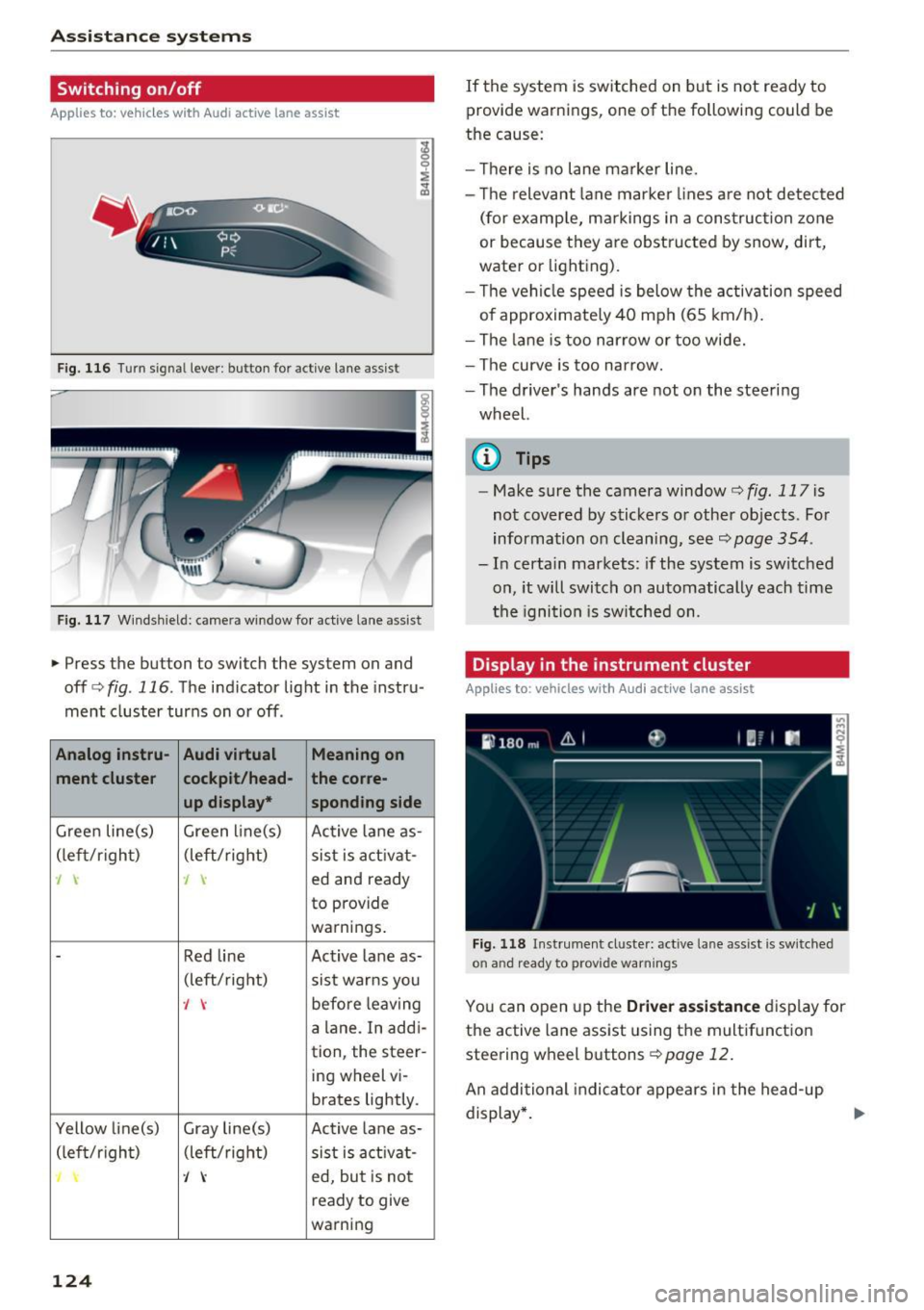
Applies to: ve hicles w ith Audi active lane assist
Fig. 116 Turn signa l lever : button for act ive lane assist
F ig. 117 Windsh ield: camera window for ac tive lane assist
• Press the button to switch the system on and
off<=:>fig . 116 . The indicator light in the instru
ment cluster turns on or off .
Analog instru- Audi virtual Meaning on
ment cluster cockpit/head- the co
rre -
up displa y•
spond ing side
Gree n line(s) Green li ne(s)
Active lane as-
(left/r ight) (left/right)
sist is act ivat-
J J ed and ready
to provide
warnings .
-Red line Act ive lane as-
(left/ right)
sist warns you
., before leaving
a lane. In addi-
tion, the steer-
ing wheel vi-
brates lightly.
Yellow line(s) Gray line(s) Active lane as-
(left/r ig h t) (left/right) sist is act ivat -
J ed, but is not
ready to give
warning
124
If the system is switched on but is not ready to
provide warnings, one of the following could be
the cause:
- T here is no lane marker line.
- The relevant lane marker lines a re not detected
(for examp le, ma rkings in a construction zone
or because they are obstructed by snow, dirt,
wate r or lighting).
- Th e vehi cle speed is below the activation speed
of approximately 40 mph (65 km/h).
- The lane is too nar row or too wide.
- The curve is too narrow.
- The driver's hands are not on the steering
wheel.
(0 Tips
- Make sure the camera window¢ fig. 117 is
not covered by stickers or other objects. For
information on cleaning, see~
page 354.
- In certain markets: if the system is switched
on, it will switch on automatically each time
t he ignition is sw itched on.
Display in the instrument cluster
App lies to: vehicles wit h Aud i ac tive lane ass ist
F ig. 118 Instrument cluste r: active lane assist is sw itched
on and ready to provide warnings
You can open up the D river ass is t a nce disp lay for
the active lane assist using the multifunct ion
steering wheel buttons¢
page 12.
An additional indicator appears in the head -up
display *.
Page 130 of 402

Ass is tan ce sys tems
-In some situations, the system may not
function or its funct ion may be limited. For
example:
- I f vehicles are approach ing or being left
behind very quickly. The display may not
turn on in time.
- I n poor weather conditions such as heavy
rain, snow or heavy mist.
- On very wide lanes, in tight curves, or if
there is a rise in the road su rface. Vehicles
in the adjacent lane may not be detec ted
because they are outside of the sensor
range.
@ Note
The sensors can be displaced by impacts o r
damage to the bumper, whee l housing and
underbody. This can impair the system . Have
an authorized Audi dealer or authorized Audi
Service Facility check their function.
(D Tips
- If the window g lass in the driver's doo r or
front passenger's door has been tinted, the
display in the exterior mirror may be incor
rect.
- For an explanation on conformity with the
FCC regulations in the United States and the
Industry Canada regulations, see
c::> page384.
Switching on/off
Applies to: veh icles with Audi side assist
The system can be switched on/off in the Info
tainment system.
If the system is activated, the displays in the ex
ter ior mirrors will turn on briefly when the ign i
tion is sw itched on .
.,. Se lect in the Infotainment system:
IMENU I but
ton
> V ehicle > left contro l button > Driver a s
sistance
> Audi side ass ist . Off switches the
system off.
128
(D Tips
When you switch side assist on or off, the ex it
warning system activates or deact ivates
c::> page 129.
Setting the display brightness
Applies to: vehicles with Audi side ass ist
The display brightness con be adjusted in the In
fotainment system.
.,. Select in the Infotainment system : IMENU! but
ton
> V eh icle > left control button > Dri ver as
s ist ance
> Audi side a ssist.
The display br ightness adjusts au tomatically to
the brightness of the surroundings, both in the information and in the warni ng stage. In very
dark or very bright surroundings, the automatic
adjustment will set the display to the minimum or max imum level. In such cases, you may notice
no change when ad justing the br ightness, or the
change may only be noticeab le once the sur
r oundi ngs change.
Adjust the brightness to a level where the display
i n the information stage will not disrupt your
view ahead. If you change the br ightness, the dis
play in the exterior mirror w ill briefly show the
br ightness leve l in t he i nfo rmation stage . The
brightness of the warning st age is linked to the
brightness in the information stage and is adjust
ed a long with the information stage .
(D Tips
-Side ass ist is not a ctive while you are mak
ing the adjustment.
- Yo ur setti ngs are a utomat ica lly stored and
assigned to the remote control key being
used .
Page 156 of 402
Intelligent Technology
What you should know
Maintaining the starting ability is the highest
priority .
A lot of stress is placed on the vehicle battery
when dr iv ing short d istances, dur ing c ity dr iving,
and at cold times of the year . A lot of energy is
used but little is gene rated .
It is also critical
when the engine is not ru nning but e lectr ica l
eq uipment is swi tched o n. In this case , energy is
used bu t none is generated.
In s ituations like this, energy management will
actively regu late the d istribution of ene rgy.
Long pe riods without use
If you do not drive your vehicle for several days or
weeks, e lectrical equipment is gradually scaled
back or switched off . This reduces energy use and
ensu res t he veh icle w ill be able to sta rt afte r long
pe riods of time. Some convenience functions ,
such as inte rior lighting or powe r seat adjust
men t, may not be available under ce rta in ci rc u m
s tances. These convenience functions will be
ava ilable aga in once you switch the ign ition on
and start the engine .
With the engine switched off
The vehicle battery will d rain if yo u use I nfota in
ment functions such as listening to the rad io
while the engine is switched
off .
If t he ve hicle's ability to s tart may be impaired by
the energy use, a message will appear in the In
fotainmen t system disp lay . T he message indi
ca tes that the system wi ll switch off automatica l
ly soon. If you would like to continue using the
functions, yo u m ust start the eng ine.
With the engine running
A lthough elect rical energy is generated whi le
d riving, the vehicle battery can d rain. This can
happen if little energy is generated but much is
used, and the charge level of the veh icle battery
is not optima l.
To restore the balance of energy, components
that require large amounts of energy are tempo rarily sca led back or switched
off . Heating sys
tems in part icu lar require a great deal of energy .
154
If you notice, for example, that the seat heating*
or rear window defogger is not working, then it has been temporarily reduced or switched
off.
These systems are availab le again as soon as the
energy supply has been restored.
In addition, you may notice that the idle speed
has slight ly increased . That is normal and no
cause for concern. By increasing the idling speed,
the addit ional required energy will be generated
and the vehicle battery w ill be charged .
Notice about data
recorded by the Event
Data Recorder and
vehicle control modules
E v ent Data Recorder
This vehicle is equ ipped with an Event Data Re
corder (EDR). The main purpose of an EDR is to
record, in certain crash or near crash-like situa
tions, such as an airbag deployment or hitt ing a
r oad obstacle, data that will ass ist in understand
i ng how a vehi cle's systems pe rformed. The EDR
i s des igned to record data related to vehicle dy
nam ics and safe ty systems for a short per iod of
time, typica lly 30 seconds or less. The EDR in this
vehicle is designed to record such data as:
- How va rious systems in yo ur vehicle were ope r
a ting;
- Whethe r or not the d rive r and passenger safety
belts were buckled/fastened;
- How far (if at all) the driver was depressing the
acceler ator and/or bra ke pedal; a nd,
- How fast the vehicle was traveling .
These data can help provide a better understand i ng of the c ircumstances in wh ich crashes a nd in
juries occur . NOTE : EDR data are recorded by your
vehicle on ly if a non-tr iv ial crash situation occurs;
no data are re co rded by the E DR unde r no rma l
driv ing cond itions and no persona l da ta (e.g.,
name, gender, age, and crash location) are re
corded. However, other parties, such as law en
forcement, could combine the EDR data with the
type of persona lly identifying data rout inely ac-
quired during a crash investigation . ..,.
Page 171 of 402
u co ...... N r-... N ...... 0
0
:E: '
Appl ies to: veh icles wit h vo ice recog nitio n system
You con operate many Infotainment functions
conveniently by speaking .
Requirements: the ign ition and the MM I must be
switched on
~ page 156, there must not be any
phone call in progress and the park ing system
must not be active .
~ Switching on: briefly press the~ button @
~page 14, fig. 11 on the m ultifunction steer
ing whee l and say the desired command after
the
Beep .
~ Switching off : press and hold the~ button.
Or: press the [2] butto n.
~ Pau se : say the command Pause . To resume,
press the~ button.
~ Correcting : say the command Corre ction . Or :
simply say a new command during an an
nouncement
c::> page 249.
Input assistance
The system gu ides you throug h the input with
v isua l and audio feedbac k.
- Vi sua l input as sistan ce: after switching on
vo ice recogn it io n, a display w ith a selection of
poss ible commands appears. This command
display can be sw itched on o r off . Se lect:
IMENU I button> Setting s> left cont rol button
> MMI setting s > Speech dialog system .
- Audio input a ssis tance :
to have the poss ible
commands read, tu rn the voice recognition sys
tem on and say
Help.
For the s yst em to understand you:
Speak clearly and dist inctly at a normal vo lume .
Speak louder when d riving faste r.
Emphasize the words in the commands evenly
and do not leave long pauses .
C lose the doors, the windows and the sunroof* to
reduce background noise . Make sure that passen
gers are not speaking when you are giving a voice
command .
Voice recognition system
Do not direct the air vents toward the hands-free
microphone, which is on the roof headliner near
t h e front inte rior lights .
Only use the system from the dr iver's seat be
ca use the hands -free microphone is directed to
ward that seat .
Additional settings
See c::> page 249, Speech dialog system .
A WARNING
-Dire ct your full attention to dr iv ing. As the
driver, you have complete responsibility for
safety in traffic . Only use the functions in
such a way that you a lways maintain com
p lete contro l over your vehicle in all traffic
situations.
- Do not use the voice recognition system in
emergencies beca use your voice may change
in stressful situations. It may take longer to
d ial the number or the system may not be
able to dial it at all. Dial the emergency number manually.
@ Tips
- The d ialog pauses when there is an incom
ing phone call and will continue if you ig
nore the call. The d ialog ends if you answer
the ca ll.
- You can select an item in the list using ei
ther the vo ice recognit ion system or the
cont rol knob.
Command overview
information
Appl ies to: ve hicles w ith vo ice recognit ion system
T he following overv iews des cribe the comma nds
t h at can be used to operate the MMI using the
voice recognition system.
Alte rnative commands a re separate d using a"/ ",
for example say:
Telephone / (or) Navigation /
(or) Radio.
Sequences of commands used to perfo rm an ac
t ion are iden tified w it h a"> ", fo r ex ample say:
Ente r addre ss > (t hen) Enter country /state . ..,.
169