climate control AUDI Q7 2017 Owner´s Manual
[x] Cancel search | Manufacturer: AUDI, Model Year: 2017, Model line: Q7, Model: AUDI Q7 2017Pages: 402, PDF Size: 100.39 MB
Page 4 of 402
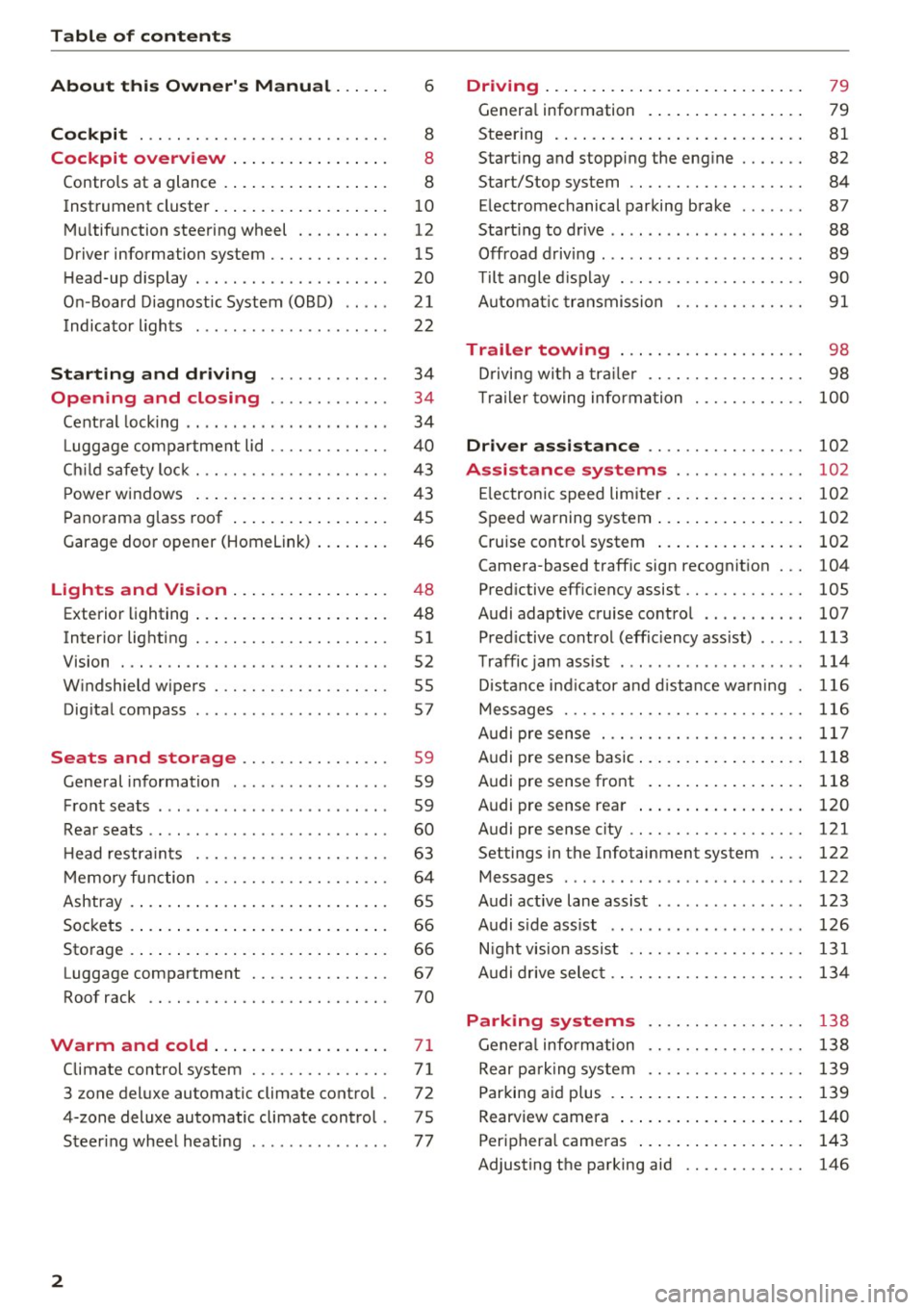
Table of contents
About this Owner's Manual ... .. .
Cockpit ... .. ............... .... .. .
Cockpit overview ................ .
Controls at a glance ... .......... .. .. .
Instrument cluster .. .......... .. .. .. .
Multifunction steering wheel ... .. .. .. .
Driver information system ............ .
H ead-up display .... .. ..... ... .. .... .
On -Board Diagnostic System (OBD) .. .. .
Indicato r lights . ................ ... .
Starting and driving ......... ... .
6
8
8
8
10
12
15
20
21
22
34
Opening and closing . . . . . . . . . . . . . 34
Central lock ing . . . . . . . . . . . . . . . . . . . . . . 34
L uggage compartment lid . . . . . . . . . . . . . 40
Ch ild safety lock . . . . . . . . . . . . . . . . . . . . . 43
Power windows . . . . . . . . . . . . . . . . . . . . . 43
Panorama glass roof . . . . . . . . . . . . . . . . . 45
Garage door opener (Homelink) . . . . . . . . 46
Lights and Vision . . . . . . . . . . . . . . . . . 48
Exterior lighting . . . . . . . . . . . . . . . . . . . . . 48
Interior lighting . . . . . . . . . . . . . . . . . . . . . 51
V1s1on . . . . . . . . . . . . . . . . . . . . . . . . . . . . . 52
Windshield wipers . . . . . . . . . . . . . . . . . . . 55
Dig ital compass . . . . . . . . . . . . . . . . . . . . . 57
Seats and storage . . . . . . . . . . . . . . . . 59
General information . . . . . . . . . . . . . . . . . 59
Front seats . . . . . . . . . . . . . . . . . . . . . . . . . 59
Rear seats . . . . . . . . . . . . . . . . . . . . . . . . . . 60
H ead restraints . . . . . . . . . . . . . . . . . . . . . 63
M emory function . . . . . . . . . . . . . . . . . . . . 64
Ashtray . . . . . . . . . . . . . . . . . . . . . . . . . . . . 65
Sockets . . . . . . . . . . . . . . . . . . . . . . . . . . . . 66
Sto rage . . . . . . . . . . . . . . . . . . . . . . . . . . . . 66
Luggage compartment . . . . . . . . . . . . . . . 67
Roof rack . . . . . . . . . . . . . . . . . . . . . . . . . . 70
Warm and cold .. .......... .. .. .. . 71
Climate control system . . . . . . . . . . . . . . . 71
3 zone deluxe automatic climate control . 72
4-zone deluxe automatic climate control . 7 5
Steer ing wheel heating . . . . . . . . . . . . . . . 77
2
Driving ..... .. .. .. .. ... .......... . .
General information . ... ........... . .
Steering .......... .. .. . .......... . .
Start ing and stopping the eng ine ..... . .
Start/Stop system .. .. ............. . .
E le ctromechanical parking brake ...... .
Start ing to drive .. .. .. ........ ..... . .
Offroad driving ... ... ...... ....... .. .
T ilt angle display . .. .. ... .......... . .
Automat ic transmission
Trailer towing ... .. ............. . .
Driving with a trail er .. .. ........... . .
T railer towing information
79
79
81
82
84
87
88
89
90
91
98
98
100
Driver assistance . . . . . . . . . . . . . . . . . 102
Assistance systems . . . . . . . . . . . . . . 102
Electronic speed limiter . . . . . . . . . . . . . . . 102
Speed warning system . . . . . . . . . . . . . . . . 102
Cruise control system . . . . . . . . . . . . . . . . 102
Camera-based traffic sign recognit ion . . . 104
Pred ictive efficiency assist. . . . . . . . . . . . . 105
Audi adaptive cruise contro l . . . . . . . . . . . 107
Pred ictive control (eff ic ie ncy assist) . . . . . 113
Traffic jam assist . . . . . . . . . . . . . . . . . . . . 114
Distance indicat or and distance warnin g 116
Messages . . . . . . . . . . . . . . . . . . . . . . . . . . 116
Audi pre sense . . . . . . . . . . . . . . . . . . . . . . 117
Audi pre sense basic . . . . . . . . . . . . . . . . . . 118
Audi pre sense front . . . . . . . . . . . . . . . . . 118
Audi pre sense rea r . . . . . . . . . . . . . . . . . . 120
Audi pre sense city . . . . . . . . . . . . . . . . . . . 121
Settings in the Infotainment system . . . . 122
Messages . . . . . . . . . . . . . . . . . . . . . . . . . . 122
Audi active lane assist . . . . . . . . . . . . . . . . 123
Audi s ide assist . . . . . . . . . . . . . . . . . . . . . 126
Night vision assist . . . . . . . . . . . . . . . . . . . 131
Audi drive select . . . . . . . . . . . . . . . . . . . . . 134
Parking systems 138
General information . . . . . . . . . . . . . . . . . 138
Rear parking system . . . . . . . . . . . . . . . . . 139
Parking aid plus . . . . . . . . . . . . . . . . . . . . . 139
Rearview camera . . . . . . . . . . . . . . . . . . . . 140
Periphera l cameras . . . . . . . . . . . . . . . . . . 143
Adjusting the parking aid . . . . . . . . . . . . . 146
Page 11 of 402
u co ...... N r-... N ...... 0
0
:E: '
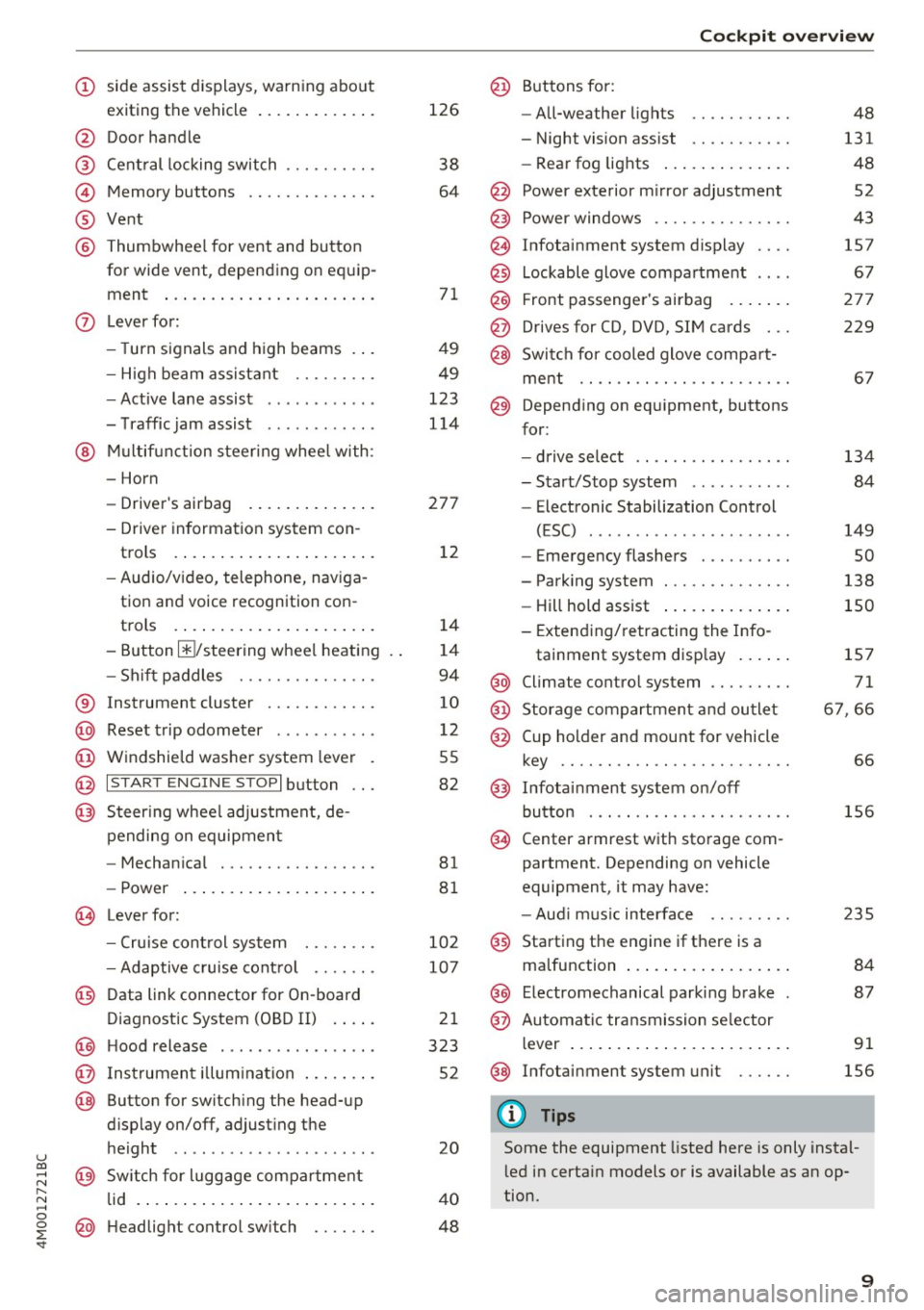
exiting the vehicle ..... ... .. .. .
@ Door handle
@ Cent ral locking switch ....... .. .
@ Memory buttons ........... .. .
® Vent
® Thumbwhee l for vent and button
for wide vent, depending on equip-
ment ... .. .... .. .... ... ... . .
0 Lever for:
- T urn s ignals and high beams . . .
- High beam assistant .... .. .. .
- Active lane assist ........... .
- T raffic jam assist ........... .
@ Mu lt if unction steer ing whee l with:
- Horn
- Drive r's airbag . ..... ... .. .. .
- Drive r informat ion system con -
trols . ... .... .. .... ... .. .. .
- Audio/v ideo, telephone, nav iga
tion and voice recognition con -
t rols .. .. ... .. ..... ... .. .. .
- Button @/steering wheel heating
- Sh if t paddles .......... .. .. .
® Instrument cluster ........... .
@ Reset t rip odometer ...... .. .. .
@ W indshield washe r system lever
@ I STAR T ENGINE ST OPI button .. .
@ Steer ing whee l adjustment, de -
pending on equipmen t
- Mechan ica l .............. .. .
- Power .... .. .. ..... ... .. .. .
@ Leverfo r:
- C ruise cont rol sys tem
- Adaptive cruise cont rol ...... .
@ Data link connector for On-board
Diagnostic System (OBD II) . ... .
@ H ood release .... . .... .... ... .
@ Ins trumen t illum ination ... .. .. .
@ Button for switch ing the head-up
d isplay on/off, adjust ing the
height .. .. ........ ..... .. .. .
@ Sw itch for lugg age compa rtment
lid . ... .. .. .. .. .. .... ... .. .. .
@ H eadlight control sw itch .... .. .
126
38
64
7 1
49
49
123
114
27 7
1 2
14
1 4
94
10
12
55
82
81
8 1
10 2
107
2 1
323
52
20
4 0
48
Coc kpit o ve rv iew
@ Buttons fo r:
- All-weather lights
- Night vision assist .......... .
- Rea r fog lights ..... . ..... .. .
@ Power exte rior m irror adjustment
@ Power windows .............. .
@ Infotainment system display
@ Lockable glove compa rtme nt
@) Front passenger 's airbag .... .. .
@ Drives for CD, DVD, SI M cards .. .
@ Swi tch for cooled glove compa rt-
me nt ...... ................ .
@ Depend ing on equ ipment, buttons
for :
- drive select ................ .
- Sta rt/Stop system ... ..... .. .
- Electronic Stabilization Control
(ESC) . .. .. .. .. ... ....... .. -
- Emergency flashers ......... .
- Parking system ............. .
- Hill hold ass ist .. .. .. ..... .. .
- Extend ing/retracting the Info-
tainment system disp lay ... .. .
@ Climate contro l system .... ... . .
@) Storage compartment and outlet
@ Cup holder and mount for vehicle
key .... .... .. .. ............ .
@ Infotai nment system on/off
button . .. .. . ............... .
@ Center armrest w ith sto rage com
partment. Depending on vehicle
equipment, it may have:
- Aud i m usic interface ........ .
@ Starting the engine if the re is a
malfunction ... .. ... .. ..... .. .
@ E lectromechanical parking brake
@ Automa tic tr ansmission se lector
lever ... .. .. .. ... .. .. ..... .. .
@ Infotainment system unit
(D Tips
48
131
48
52
43
157
67
27 7
229
6 7
134 84
149
so
138
150
1S7
71
6 7,66
66
156
2 35
84
87
91
156
Some the equipment listed here is only instal
l ed in certa in models or is available as an op
tion.
9
Page 37 of 402
-The LE D in the drive r's door rai l blinks when
you lock the vehicle . If t he LED lights up for
approximately 30 seconds after locking,
there is a malfunct ion in the cent ral locking
system. Have the p roblem corrected by an
a uth orized Audi dea ler or authorized Audi
Se rvice Fac ility.
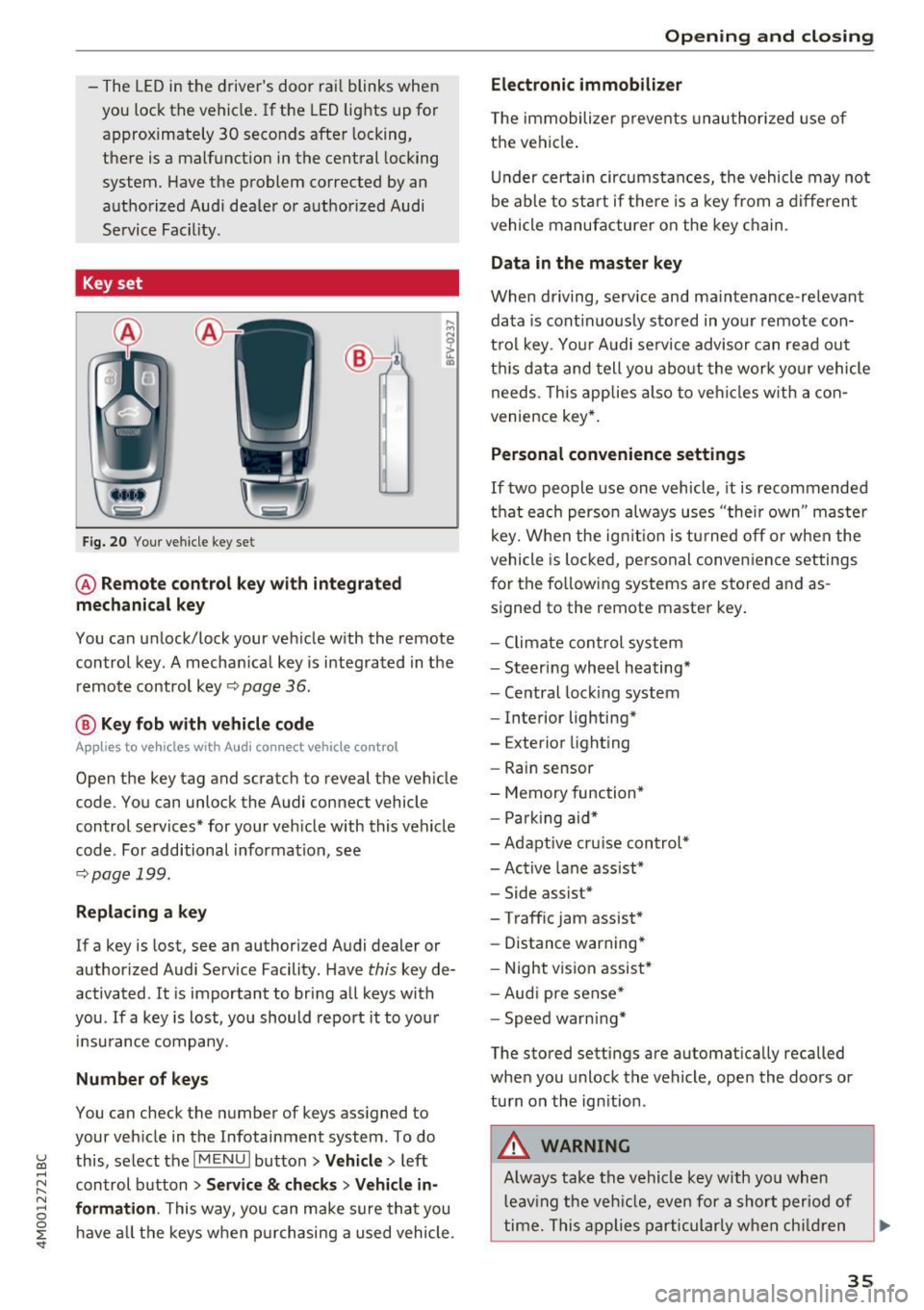
Key set
Fig. 20 You r ve hicle key set
@ Remote control key with integrated
mechanical key
You can unlock/ lock your veh icle w ith the remote
control key . A mecha nica l key is integ rated in the
remo te contro l key ~
page 36.
@ Key fob with vehicle code
Appl ies to vehicles w ith Audi connect vehicle control
Open the key tag and scratch to reveal the veh icle
code. You can unlock the Audi connect vehicle
control services* for your veh icle with this vehicle
code . For additional informat ion, see
~ pag e 199.
Replacing a key
If a key is lost, see an authorized A udi dealer or
author ized Audi Service Facility. Have
this key de
activated .
It is important to bring a ll keys with
you . If a key is lost, you should report it to you r
in sura nce company.
Number of keys
You can check the number of keys ass igned to
your veh icle in the Infotainment system . To do
~ this, select the I M ENU I butto n >Vehicl e> left ......
~ control b utton > Service & checks > Vehicle in-
N 8 formation . This way, you can m ake sure th at you
0 :E ha ve all th e keys when p urch asing a used vehicle .
Electronic immobilizer
T he immobilizer preve nts unau thori zed use of
t h e vehi cle.
Un der certai n circumstan ces, the vehicle may not
be able to start if there is a key from a diffe ren t
vehicle manufa cture r on the key c hain .
Data in the master key
When driving, service and ma intenance-re levant
da ta is cont inuo usly stored in you r remote con
t rol key . Yo ur Audi se rvice advisor can rea d ou t
t hi s data and tell you abo ut the w ork yo ur vehicle
needs. This app lies also to ve hicles w ith a con
ven ience key* .
Personal co nvenience settings
If two people use one vehicle, it is recommended
th at each perso n always u ses "thei r own " maste r
k ey. W hen the ig nitio n is t urne d off or when the
vehicle is lo cked , pe rsonal conve nien ce settings
for the follow in g systems are stored and as
s igned to the remote master key .
- Climate con trol sys te m
- Steer ing whee l heating *
- Ce ntral loc king system
- Interior lighting*
- Exterior light ing
- Rain sensor
- Memory function *
- Par king aid*
- Adapt ive cr uise con trol*
- Ac tive lane assist*
- Side assist*
- Traff ic jam assist *
- Distance warning*
- Night visio n assis t*
- Aud i p re sense *
- Spe ed wa rn in g*
The stored settings are automat ica lly recalled
whe n you unlock the vehicle, ope n the doo rs or
tu rn on th e ign ition .
_&. WARNING
-Always tak e t he ve hicle key w ith yo u wh en
l e av ing t he veh icle, eve n for a shor t per io d of
ti m e. Th is app lies par tic ularly w he n c hildr en
-
35
Page 45 of 402
u (0 ...... N r--. N ...... 0
0
:E
release
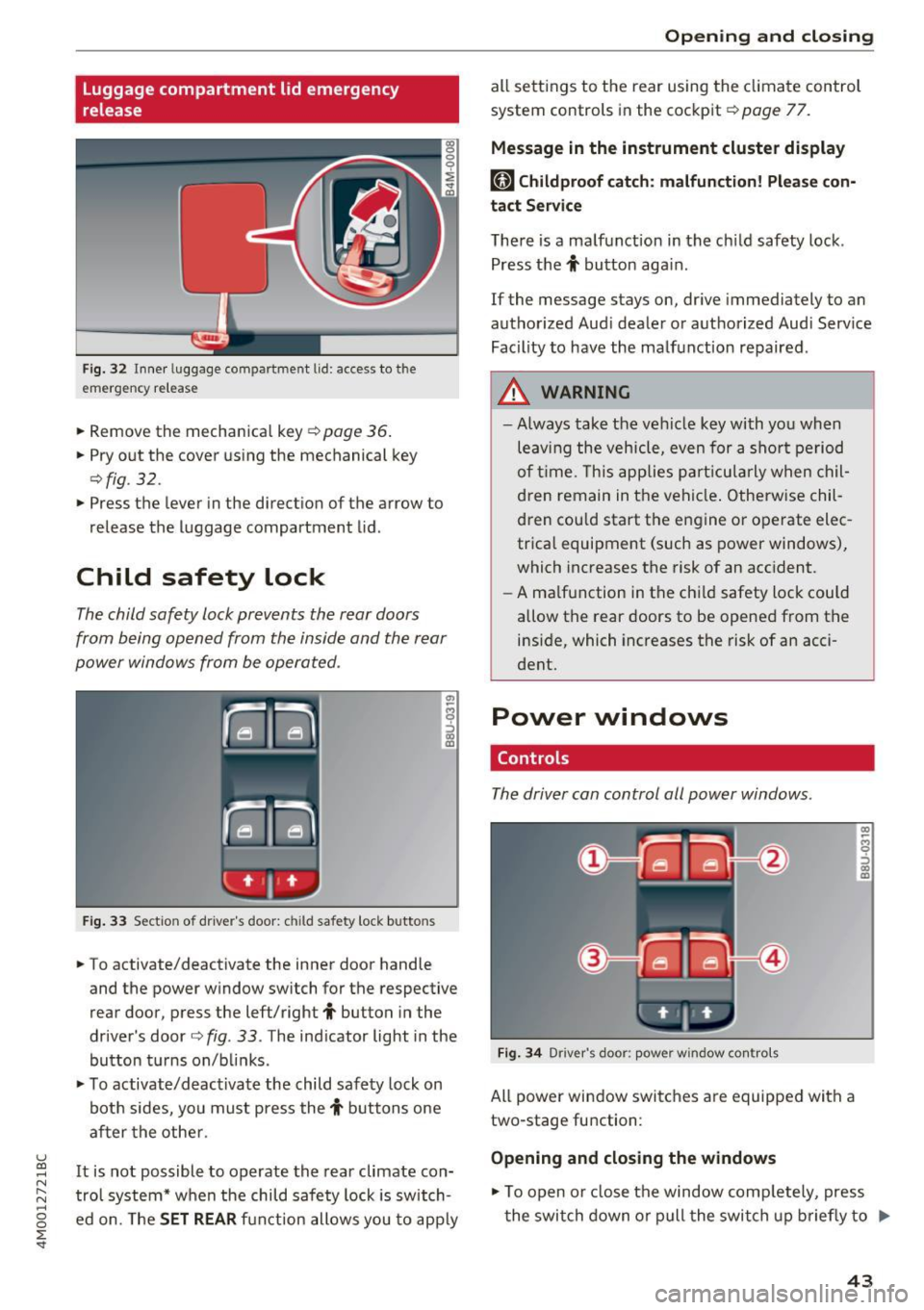
Fig . 32 Inner luggage co mpartme nt lid : access to the
emerge ncy re le ase
• Remove the mechanica l key ~ page 36 .
• Pry o ut the cover us ing the mechanical key
¢ fig . 32 .
• Press the lever in the direct io n of the arrow to
release the luggage compartment lid .
Child safety lock
The child safety lock prevents the rear doors
from being opened from the inside and the rear
power windows from be operated .
Fig. 33 Sect io n of dr ive r's door : chil d sa fety lock b utto ns
• To activate/deactivate the inner door handle
and the power w indow switch for the respective
rear door , press the left/right
t button in the
driver 's door ¢
fig. 33 . The ind icator light in the
bu tton turns on/b links .
• To activate/d eact ivate the child safety lock on
bot h sides, yo u must press the
t buttons one
a fter the othe r.
It is not possible to operate the rear climate con
tro l system* w hen the child safe ty lock is switch
e d on. The
SET REAR fu nction allows y ou to app ly
Open ing and closing
all sett ing s to the rear using the cl imate control
system controls in the cockpit ¢
page 77.
Message in the instrument cluster display
[81 Childproof catch : malfun ction! Please con·
tact Service
The re is a ma lfunction in the ch ild safety lock .
Press the
t button aga in .
If the message stays on, dr ive immediately to an
authorized Aud i dealer o r a uthorized Aud i Serv ice
Facility to have the ma lf u nction repaired .
A WARNING
=
-Always take the ve hicl e key with yo u when
leav ing the vehicle, even for a s hort pe riod
o f ti me. This applie s pa rtic ula rly w hen chil
dren remain in t he vehi cle. O therwise chil
d ren cou ld sta rt the en gine or operate elec
trica l equipment (such as power windows),
which increases the risk of an acc ident.
- A ma lf u nction in the ch ild safety loc k could
allow the rear doors to be opened from t he
inside, which increases the risk of an acci
dent.
Power windows
Controls
The driver can control all power windows.
F ig . 34 Dr iver 's doo r: pow er w indow co ntro ls
All power win dow switc hes are equipped wit h a
two-stage fu nction :
Opening and closing the windows
-
CX) ~ M 0
::'> CX) (D
• To open o r close the window comp letely, press
t he swi tch down or pull the swi tch up briefly to
IJi,,-
43
Page 73 of 402
u co ...... N r-... N ...... 0
0
:E: '
Description
A ppl ies to: ve hicles wit h 3-z on e del uxe automatic cl imate
co ntrol or 4 -zo ne de luxe automa tic cl imate co ntr ol
The climate control system warms, cools and re
moves humidity from the air in the vehicle interi
or . It is the most effective when the windows and
sunroof* are closed. If there is a bui ld-up of heat
inside the veh icle, ventilat ion can help to speed
up the cooling process.
In all heating mode functions except for
defrost,
the blower on ly switches to a higher speed once
the eng ine coolant has reached a sufficient tem
perature.
Pollutant filter
The pollutant filter removes pollutants such as
dust and pollen from the air .
Key recognition
The climate control settings are automatically
stored and assigned to the remote control key
that is in use.
Warm and cold
(®} For the sake of the environment
-If you would like to reduce fuel consump
tion, switch the air conditioning off. This
will also reduce emissions.
- In vehicles with a diesel engine, you can
switch the auxiliary heater off in the Info
tainment system.
(D Tips
-To prevent interference with the heating
and cooling output and to prevent the win
dows from fogging over, the air intake in
front of the windshield must be free of ice,
snow or leaves.
- Condensation from the cooling system can
drip and form a puddle of water under the
vehicle. This is normal and does not mean
there is a leak.
- The energy management system may tem
porarily switch off certain functions, such as
the seat heating* or rear window defogger.
These systems are available again as soon
as the energy supply has been restored.
71
Page 74 of 402
Warm and cold
3 zone deluxe automatic climate control
Operation
Applies to: vehicles w ith 3 -zo ne del uxe automatic c limate control
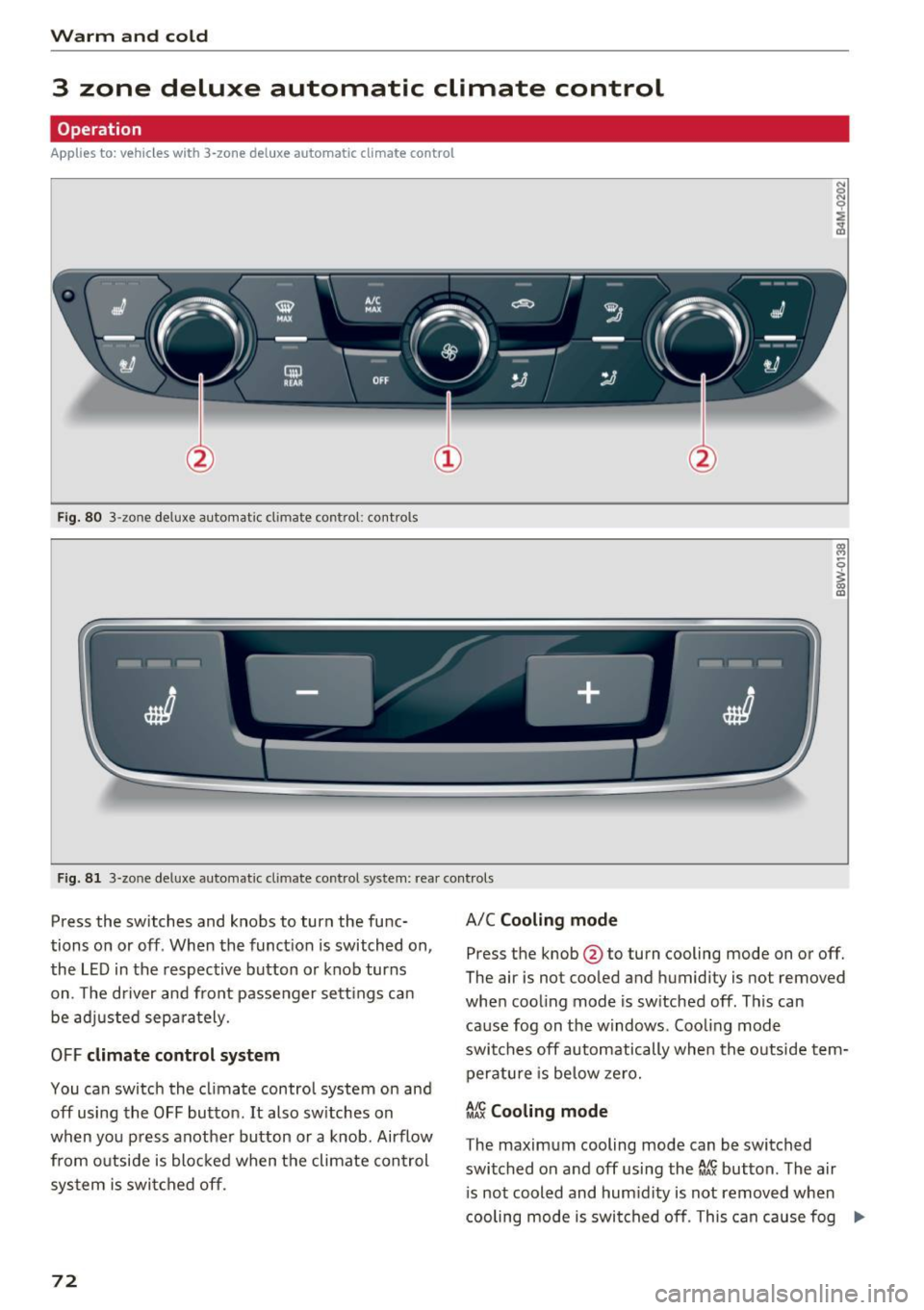
Fig. 80 3 -zone deluxe a utomat ic cl imate contro l: cont rols
:,,:: ·~ . ;
I
------I
J
-+
J
I
Fig . 8 1 3-zo ne deluxe automatic cl ima te control system: rear controls
Press the switches and knobs to turn the func
tions on or off . When the funct ion is switched on,
the LE D in the respec tive button or knob turns
on . T he driver and front passenger sett ings can
be ad justed sepa ra tely.
OFF climate control system
You can switch the cl imate control system on and
off using the OFF button. It also sw itches on
when yo u pre ss anothe r button or a knob. Airflow
from o utside is bloc ked when t he climate con trol
sys tem is swi tched off.
72
A/C Cooling mode
Press the knob @to turn cooling mode on or off.
The air is not coo led and humidity is not
removed
when coo ling mode is sw itched off . This can
cause fog on the windows . Cooli ng mode
swi tches off a utomatically whe n the o utside tem
p eratu re is be low ze ro.
~ Cooling mode
The maximum cooling mode can be switched
switched on and off using the~ button. The a ir
i s not cooled and hum id ity is not
removed when
cooling mode is swi tched off . This can cause fog ._,.
Page 76 of 402
Warm and cold
Vents
You can open or close the center and rear vents in
the cockpit and the vents in the rear center con
sole and door pillars using the ridged thumb
wheels. The levers adjust the direction of the air
flow from the vents.
Residual heat
You can activate the residual heat function when
the ignition is switched
off by pressing the knob
@ (left side). The residual heat from the coolant
is used to heat the vehicle inter ior. The residual
heat function switches
off automatically after
about 15 minutes.
A WARNING
- You should not use the recirculation mode
for an extended period of time, because no
fresh air is drawn in and the windows can
fog when coo ling mode is sw itched
off. This
increases the risk of an accident.
- Individuals with reduced sensitivity to pain
or temperature could develop burns when
using the seat heating function. To reduce
74
the risk of injury, these individuals should
not use seat heating.
(D Note
To avoid damage to the heating elements in
the seats, do not knee l on the seats or place
heavy loads on a small area of the seat .
Setup
Applies to : vehicles wit h 3-zo ne de luxe automatic climate
control
The climate control system basic settings are ac
cessed in the Infotainment system.
"'Select in the Infotainment system: IMENU ! but
ton
> Vehicle > l eft control button > Air condi
tioning
Seat heating/seat ventilation*
You can adjust the seat heating/ventilation bal
ance for the driver and front passenger.
Automatic auxiliary heater*
The aux iliary heater he lps to warm the vehicle in
terior more quickly.
Page 77 of 402
u (0 ...... N r--. N ...... 0
0
:E
4-zone deluxe automatic climate control
Operation
Applies to: ve hicles with 4 -z on e del uxe automatic cl imate c ontrol
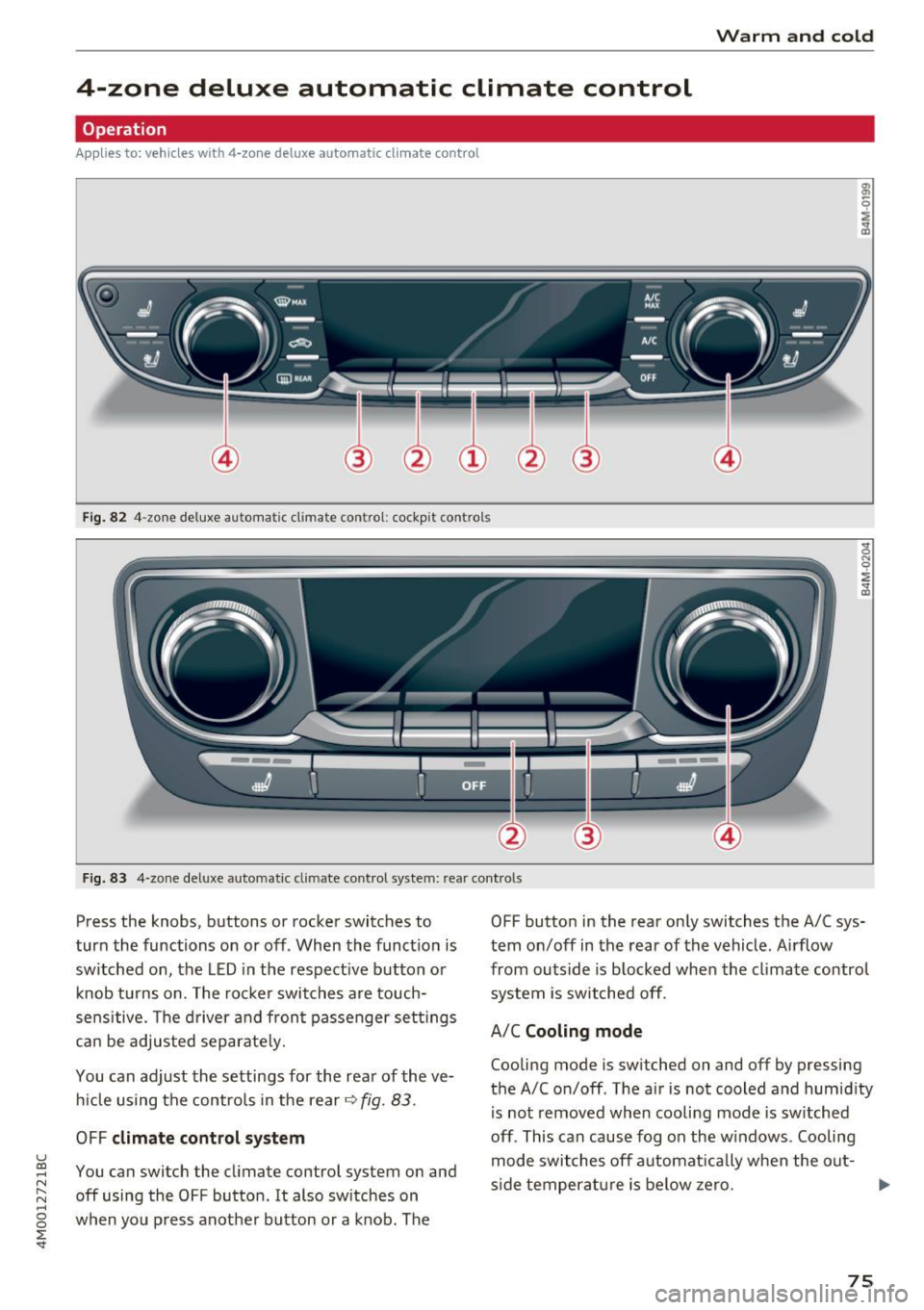
Fi g. 82 4-zone deluxe automat ic cl imate control: cockpit controls
F ig. 83 4-zone deluxe automatic climate control system: rear cont rols
Press the knobs, buttons or rocker switches to
turn the functions on or off . When the funct ion is
switched on, the LED in the respect ive button or
knob t urns on. The rocker switches are touch
sensitive. The driver a nd front passenger settings
can be adjusted separate ly.
You can adjust the settings for the rear of the ve h icle using the controls in the rear
~ fig. 83 .
OFF climate control s ystem
You can switch the climate control system on and
off using the OFF button . It also switches on
when you p ress anot he r button or a knob . The OFF button
in the rear only switches the A/C sys
tem on/off in the rear of the vehicle . A irflow
from outside is b locked when the cl imate contro l
system is switched off.
A/C Cooling mode
Cooling mode is sw itched on and
off by pressing
the A/Con/off . The air is not cooled and humid ity
is not removed when cooli ng mode is sw itched
off . This can cause fog on the w indows . Cooling
mode switches off a utomat ically when the out-
s ide temperatu re is below ze ro.
IJo-
75
Page 78 of 402
Warm and cold
~~ Cooling mod e*
The maximum coo ling mode can be switched
sw itched on and off using the
~f.!i button. The ai r
is not coo led and humidity is not removed when
coo ling mode is switched off . This can cause fog
on the windows. Cooling mode switches off auto matically when the outs ide temperature is be low
zero. When the cooling mode is switched on,~
the vehicle inter ior is cooled and dehumidified as
qu ickly as possible .
~ Recirculation mode
In recirculation mode, the a ir inside the vehicle is
circu lated and filtered. This prevents the unfil
tered a ir outside the vehicle from entering the
veh icle interior . Switch ing recirculation mode on
when dr iv ing th rough a tunnel or when s itting in
traffic is recommended
~ _&. .
Using the button, recirculation mode is switched
on and off using the
o's) button . You can also
sw itch the recircu lation mode off by pressing the
knob @or the off us ing the
J% butto n.
AUTO Autom ati c mode
Automatic mode ma inta ins a constant tempera
ture ins ide the vehicle . Air temperature, airflow
and a ir distribution are cont rolled automatically .
You can switc h automatic mode on or off by
p ressing the knob @.
Temperature
You can adjust the temperature between 60° F
( + 16°()
and 84°F (+28°() by turn ing the knob
@ . If outs ide of this range,
LO or HI wi ll appear
i n the climate control system d isplay. At bot h of
these sett ings, the cl imate contro l system runs
con tinuously at maximum cool ing or heat ing
power. There is no tempe rature regulat ion .
86'~ Blower
You can adjust the vo lume of air generated by the
b lower to yo ur preference usi ng the rocker
sw itches @. The blower should always ru n at a
low se tt ing to prevent the win dows from fogg ing
and to ens ure a continuous exchange of air ins ide
the vehicle . To have the b lower regu lated auto
mat ica lly, press the knob @.
76
Air distribution
You can use the rocker sw itches @to adjus t the
vents where the air w ill flow o ut o f. Press the
rocker switches @repeatedly unti l the desired
air distribution setting is disp layed in the climate
contro l system controls . To have the air d istribu
tion regulated automatically, press the knob @.
J 3!J Seat heating /ventilation*
If you press the JI 3M button, the seat heating/
ventilation is switches on at the highest level (3) .
The LEDs ind icate th e temperatu re level. To re
duce the temperature, press the button aga in. To
switch the seat heating/ventilat ion off, press the
button repeatedly unti l the L ED turns off .
® MAX Defogging
The windshield and side windows are defrosted
or cleared of condensat ion as quick ly as poss ible.
The maximum amount of air f lows mainly from
the vents below the windsh ield. Recirculation
mode switches off . The temperature should be
set at
+72°F (+22°() or hig her . The temperature
i s controlled automat ica lly .
Defrost is sw itched on and off®
MAX button.
You can also switch the funct ion off by pressing
the knob @.
Applies to vehicles with windsh ield defogger: the
winds hield defogger switches on automatically
whe n outside temperatures are low . If you would
lik e to sw itch the winds hield defroster on ma n
u ally, press the
:fx button . T he L ED in the button
blinks.
QW REAR Rear window defogger
Press the button~ to switch the rear wi ndow de
fogger on .
It only operates when t he engine is
r un ning .
It sw itches off automatically after 10 to
20 minutes, depending on the outs ide tempera
ture .
To keep the rea r window defogger o n cont inuous
ly, press and hold the
QiP R EA R button longer
t h an th ree seconds. This is stored unt il the igni
tion is swi tched off.
Page 79 of 402
u co ...... N r-... N ...... 0
0
:E: '
Use the rocker switch(;) to select the funct io n.
When synchronization is switched on, the set
tings for the driver's side are applied to the front
passenger's side and the rear (except for seat
heating/ventilation*). When the settings on the
front passenger 's side or in the rear are changed,
the synchron izat ion is automatically sw itched off
and
4-zone appears in the display .
SET REAR
function
Use the rocker switch (D to select the funct ion .
When the function is switched on, you can adjust
all settings for the rear using the climate control
system controls in the cockpit . The rear climate
control system controls cannot be operated at
the same time. This function switches off auto
matically after a certain period of time or after
l eaving the menu.
Vents
You can open or close the center and rear vents in
the cockpit and the vents in the rear center con
sole and door pillars using the ridged thumb
wheels. The levers adjust the direct io n of the air
flow from the vents. The w ide ven t is opened and
closed using the~ button ~
page 8, fig. 2@ .
Residual heat
You can activate the residual heat funct ion when
the ignition is switched off by pressing the knob
@ (left side). The residual heat from the coolant
is used to heat the vehicle inter io r. The resid ual
heat function switches off automatically after
about 15 min utes.
& WARNING
- You should not use the recirculation mode
for an extended period of time, because no
fresh a ir is drawn in and the windows can
fog when coo ling mode is switched off . This
increases the risk of an accident .
- Individuals with reduced sensitivity to pain
or temperature could develop burns when
using the seat heating function . To reduce
the risk of injury, these ind iv iduals should
not use seat heating.
Warm and cold
(D Note
To avoid damage to the heating elements in
the seats, do not kneel on the seats or place
heavy loads on a small area of the seat.
(D Tips
It is not possible to operate the rear climate
control system controls when the power ch ild
safety lock is switched on. With With the
SET REAR function, you can apply all settings
to the rear using the climate control system
controls in the cockpit
~ page 43.
Setup
Applies to: vehicles with 4 -zone deluxe automat ic climate
contro l
The climate control system basic settings are ac
cessed in the Infotainment system .
.. Select in the Infotainment system: I MENU! but
ton
> Vehicle > l eft control b utton > Air condi
tioning
Seat heating/seat ventilation*
You can adjust the seat heating/ventilation bal
ance fo r the driver, front passenger and rear pas
sengers .
Footwell temperature
You can adjust the footwell temperature so that
it is cooler or warmer.
Auto recirculation
When switched on, automat ic rec irculat ion con
trols the recirculation mode automatically . You
must press the
® MAX button if fog forms on
the windows.
Automatic auxiliary heater*
The aux iliary heater he lps to warm the vehicle in
terior more quickly.
Steering wheel heating
Applies to: vehicles with stee ring wheel heating
The steering wheel rim can be heated .
.. Press the button on the multifunction steering
wheel to switch the steering wheel heating on ..,_
77