fold seats AUDI Q7 2017 Owner´s Manual
[x] Cancel search | Manufacturer: AUDI, Model Year: 2017, Model line: Q7, Model: AUDI Q7 2017Pages: 402, PDF Size: 100.39 MB
Page 62 of 402
Sea ts and stor age
from 1 through 5 . You can switch the selected
massage on/off using the button @
¢fig . 56 .
Lumb ar support -you can adjust the lumbar sup
port up/down and to be s tronge r/weaker.
Side bol ster s* -you can increase/decrease the
latera l support in the seat using the s ide bo lsters
on the seat surface and the backrest.
Upp er thigh support* -you can increase/de
crease the upper th igh support .
(D Tips
-The massage function switches off auto
matically after approx imately 10 minutes .
- The air in the side bolsters* is released as
soon as the driver's door opens. This makes
is possible to enter and exit the vehicle
more comfortab ly. As soon as you sta rt d riv
i ng the veh icle, the s ide bo lsters fi ll.
Center armrest
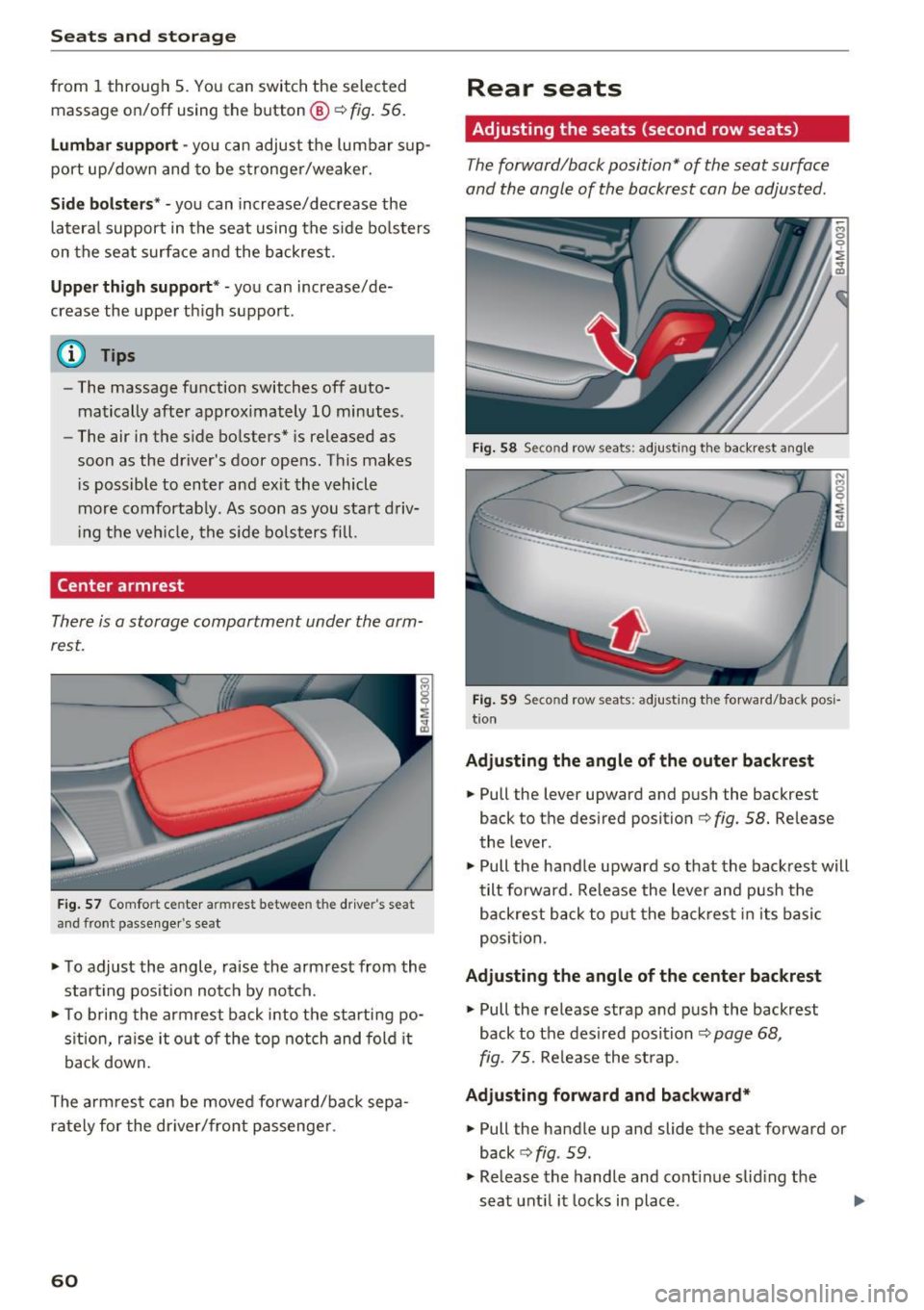
There is a storage compartment under the arm
rest.
F ig . 57 Comfort center armrest between the driver's seat
and front passe nger's seat
• To adjust the angle, raise the armrest from the
start ing pos it ion notch by no tch.
• To bring the armrest back i nto the starti ng po
s ition, ra ise it out o f the top notch and fold it
back down.
The arm rest can be moved forward/back sepa
rately for the dr iver/front passenge r.
60
Rear seats
Adjusting the seats (second row seats)
The forward/back position" of the seat surface
and the angle of the backrest can be adjusted.
Fig. 58 Se con d row seats: adjusting th e ba ckrest angle
··-·-·--··-.. ____ .. _,,,___ ____
-... ···-----...... _ ..... _____ ..
Fig. 59 Seco nd row seats: adjusting t he forward/back posi
t io n
Adju sting the angle of the outer back rest
• Pull the lever upward and push the backrest
back to the desired position¢
fig. 58. Release
the lever.
• Pull the handle upward so that the backrest will
tilt forward. Re lease the lever and push the
backrest back to p ut the back res t in i ts basic
posi tion .
Adju sting the angle of the center backrest
• Pull the release strap and p ush the backrest
back to the des ired position
¢page 68,
fig. 75.
Re lease the st rap.
Adju sting forward and backward*
• Pull the handle up and slide the seat forward or
back
c> fig . 59.
• Release the handle and cont inue sliding the
seat unt il it locks in place .
Page 63 of 402
u (0 ...... N r--. N ...... 0
0
:E
-To reduce the risk of an accident, the seat
can only be adjusted when the vehicle is sta
tionary .
- Be careful when adjusting the seat. Adjust
ing the seat without paying attention can
pinch fingers or limbs, which increases the
risk of injury.
-A lways pull forward on the backrest to make
sure it is check if it is correctly locked in
place.
Entry /exit assistance (second row seats )
Applies to: vehicles with entry assistance
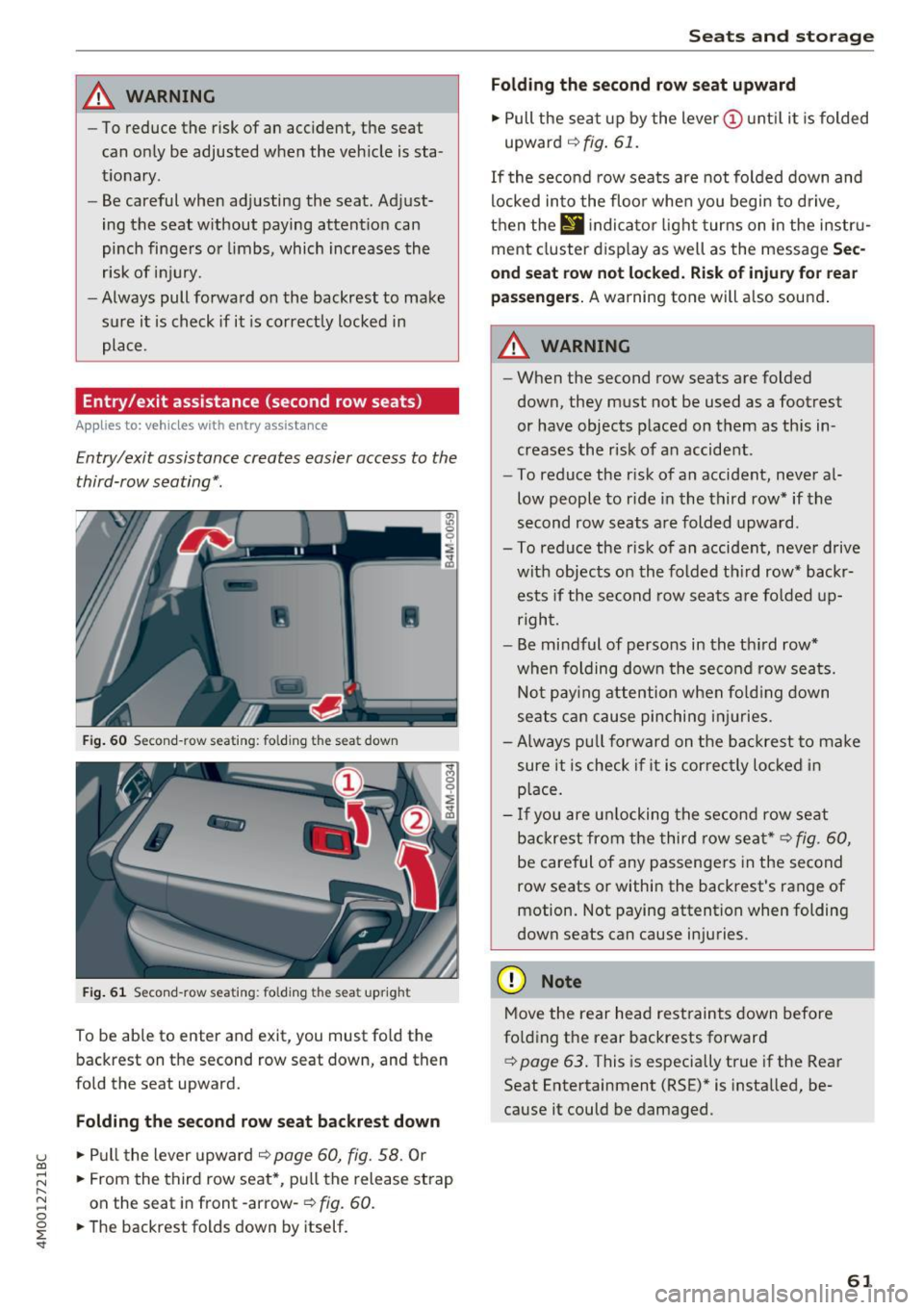
Entry/exit assistance creates easier access to the
third-row seating*.
•
Fig. 60 Second-row seat ing: folding th e seat down
Fig. 61 Second-row seating : fo lding the seat upright
To be able to enter and exit, you must fold the
backrest on the second row seat down, and then
fold the seat upward.
Folding the second row seat backrest down
.,. Pull the lever upward o:::> page 60, fig. 58. Or
.,. From the third row seat*, pull the release strap
on the seat in front -arrow-
o:::> fig. 60.
.,. The backrest folds down by itself.
Seats and storage
Folding the second row seat upward
.,. Pull the seat up by the lever(!) until it is folded
upward
o:::> fig. 61.
If the second row seats are not folded down and
locked into the floor when you begin to drive,
then the
II ind icator light turns on in the instru
ment cluster display as well as the message
Sec
ond seat row not locked. Risk of injury for rear
passengers.
A warning tone will also sound.
A WARNING
-- When the second row seats are folded
down, they must not be used as a footrest
or have objects placed on them as this in
creases the risk of an accident.
- To reduce the risk of an accident, never al
low people to ride in the third row* if the
second row seats are folded upward.
- To reduce the risk of an accident, never drive with objects on the folded third row* backrests if the second row seats are folded up
right.
- Be mindful of persons in the third row*
when folding down the second row seats.
Not paying attention when folding down
seats can cause pinching injuries.
- Always pull forward on the backrest to make
sure it is check if it is correctly locked in
place.
- If you are unlocking the second row seat
backrest from the third row seat*
o:::> fig. 60,
be careful of any passengers in the second
row seats or within the backrest's range of
motion. Not paying attention when folding
down seats can cause injuries .
(D Note
Move the rear head restraints down before
folding the rear backrests forward
¢ page 63. This is especially true if the Rear
Seat Entertainment (RSE)* is installed, be
cause it could be damaged.
61
Page 64 of 402
Sea ts and stor age
Folding the backrest down/up (third row
seats)
Applies to veh icles with third row seats
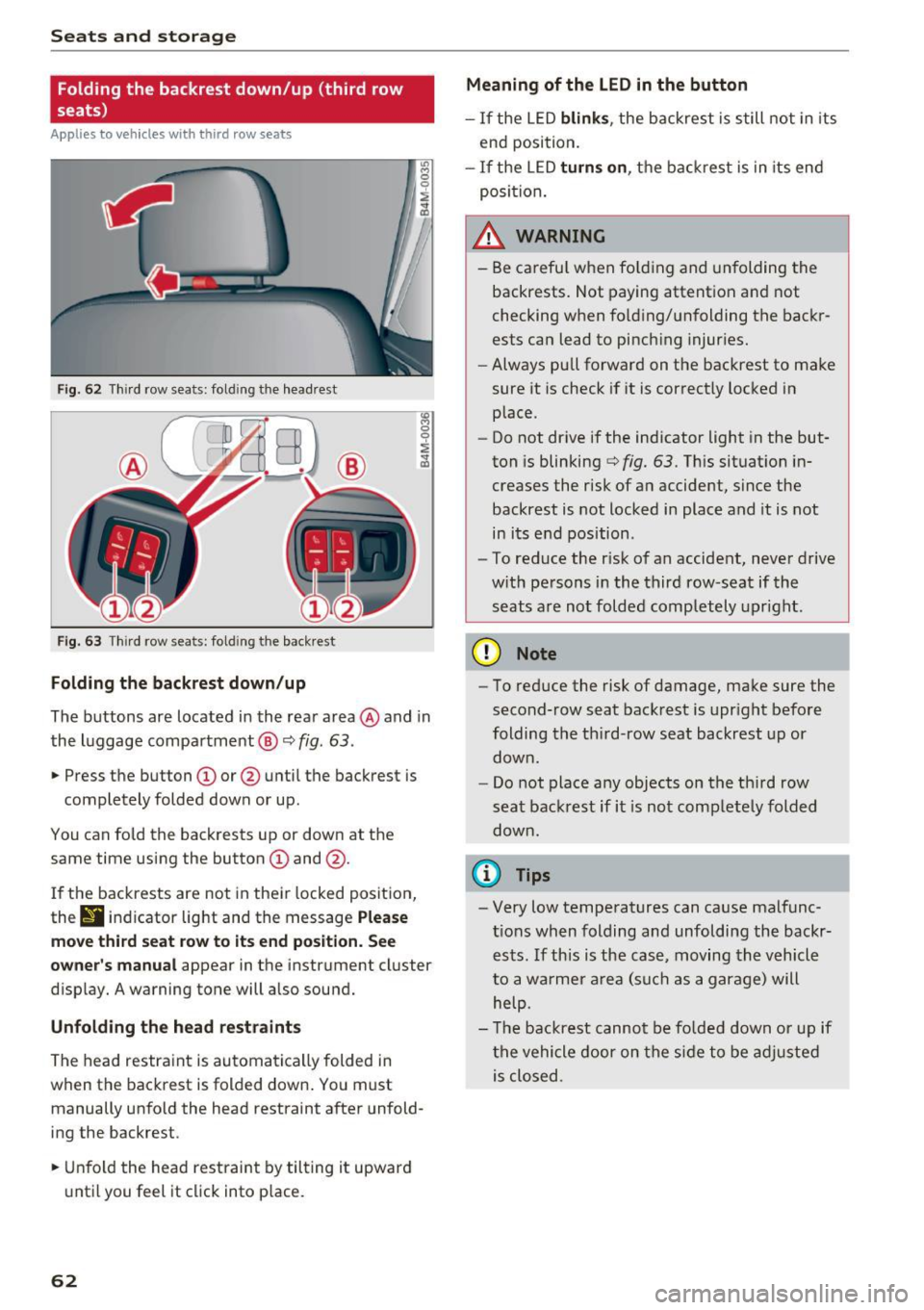
Fig. 62 T hir d row seats: fold ing the headrest
F ig . 63 Thir d row seats: fold ing the backrest
Folding the backre st down /up
The buttons are located in the rear area @and in
the luggage compartment @¢
fig. 63.
.,. Press the button CD or @ until the backrest is
completely folded down or up.
You can fo ld the backrests up or down at the
same time using the button
CD and @.
I f the backrests are not in their locked position,
thr
9 indicator light and the message P lea se
mo ve third seat r ow to it s end po sition . S ee
owner 's manual
appear in the instrument cluster
disp lay. A warning tone will a lso sound.
Unfold ing th e head re st ra int s
The head restraint is automatically folded in
when the backrest is folded down . You must
manually unfo ld the head restraint after unfold
ing the backrest .
.,. Unfold the head restraint by tilting it upward
until you feel it click into p lace.
62
Meaning of the LED in the button
- If the LED blink s, the backrest is still not in its
end position.
- If the LED turn s on, the backrest is in its end
posi tion.
_& WARNING
- Be carefu l when fo lding and unfolding the
backrests. Not paying attention and not
checking when fo ld ing/unfolding the backr
ests can lead to pinch ing injuries.
- Always pull forward on the backrest to make
sure it is check if it is correctly locked in
place.
- Do not drive if the indicator light in the but
ton is blinking
¢ fig. 63. Th is situation in
creases the risk of an accident, since the
backrest is not locked in place and it is not
in its e nd position .
- To reduce the r isk of an accident, never drive
w ith persons in the third row-seat if the
seats a re not folded comp letely upright .
(D Note
-To reduce the risk of damage, make sure the
second-row seat backrest is upr ight before
folding the th ird-row seat backrest up or
down .
- Do not place any objects on the third row
seat backrest if it is not completely folded
down.
(I} Tips
- Very low temperatures can cause malfunc
t ions when folding and unfolding the backr
ests . If this is the case, moving the vehicle
to a warmer a rea (such as a garage) will
help.
- T he backrest cannot be fo lded down or up if
the vehicle door on the side to be adjusted is closed .
Page 65 of 402
u (0 ...... N r--. N ...... 0
0
:E
Front head restraints
Applies to: vehicles with adjustable head restra ints
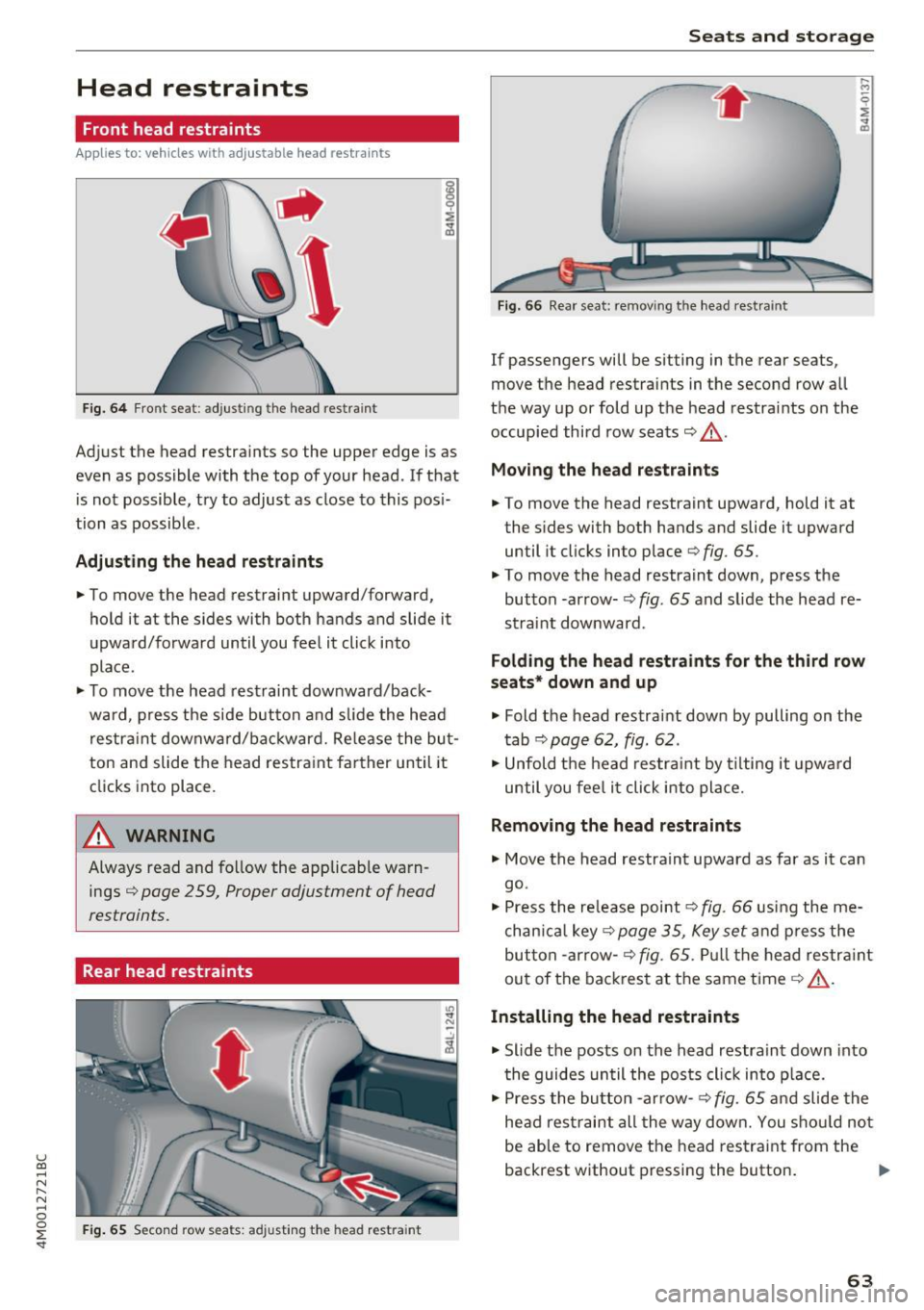
Fig. 6 4 Front seat: adjusting the head restraint
Adjust the head restraints so the upper edge is as
even as possible with the top of your head. If that
i s not possible, try to adjust as close to this pos i·
tion as possible.
Adjusting the head rest raints
.,. To move the head restraint upward/forward,
hold it at the sides with both hands and slide it
upward/forward until you feel it click into
place.
.,. To move the head restrai nt downward/back·
ward, p ress t he side button and sli de the head
res trai nt downward/bac kward. Re lease the bu t
ton and slide the head restra in t farther until it
clicks into place.
A WARNING
Always read and follow the applicab le warn
ings ¢
page 2 59, Proper adjustment of head
restraints.
Rear head restraints
I
F ig. 65 Seco nd row seats: adjusting the head restra int
-
"' "' N
Seats and storag e
Fig. 66 Rear seat: remov ing the head rest raint
If passengers will be sitting in the rear seats,
move the head restraints in the second row all
the way up or fold up t he head restra ints on the
occupied third row seats¢_&.
Moving the head restraint s
.,. To move the head restraint upward, hold it at
the sides with both hands and slide it upward
until it clicks into place ¢
fig. 65.
.,. To move the head restrain t down, p ress the
button -arrow· ¢
fig. 65 and slide the head re·
straint downward.
Folding the head restraints for the third row
seats * down and up
.,. Fold the head restraint down by pulling on the
t ab ¢
page 62, fig. 62.
.,. Unfold t he head res tra int by t ilting it upwa rd
until you fee l it click into pla ce.
Removing the head restraints
.,. Move the head restraint upward as far as it can
go.
.,. Press the re lease point¢
fig. 66 using the me
chan ica l key
<=>page 35, Key set and p ress the
but ton -arrow-
¢fig. 65. Pull the head restr aint
out of the bac kres t at the same time¢_& .
Installing the head restraints
.,. Slide t he posts on the head restra in t down into
t he guides un til the posts clic k in to p lace .
.,. Press the bu tton -arrow-
r=> fig. 65 a nd slide the
he ad res traint all the way dow n. You s ho ul d no t
be able to remove the head restrai nt from the
backrest without pressing the button . .,.
63
Page 70 of 402
Seats and storage
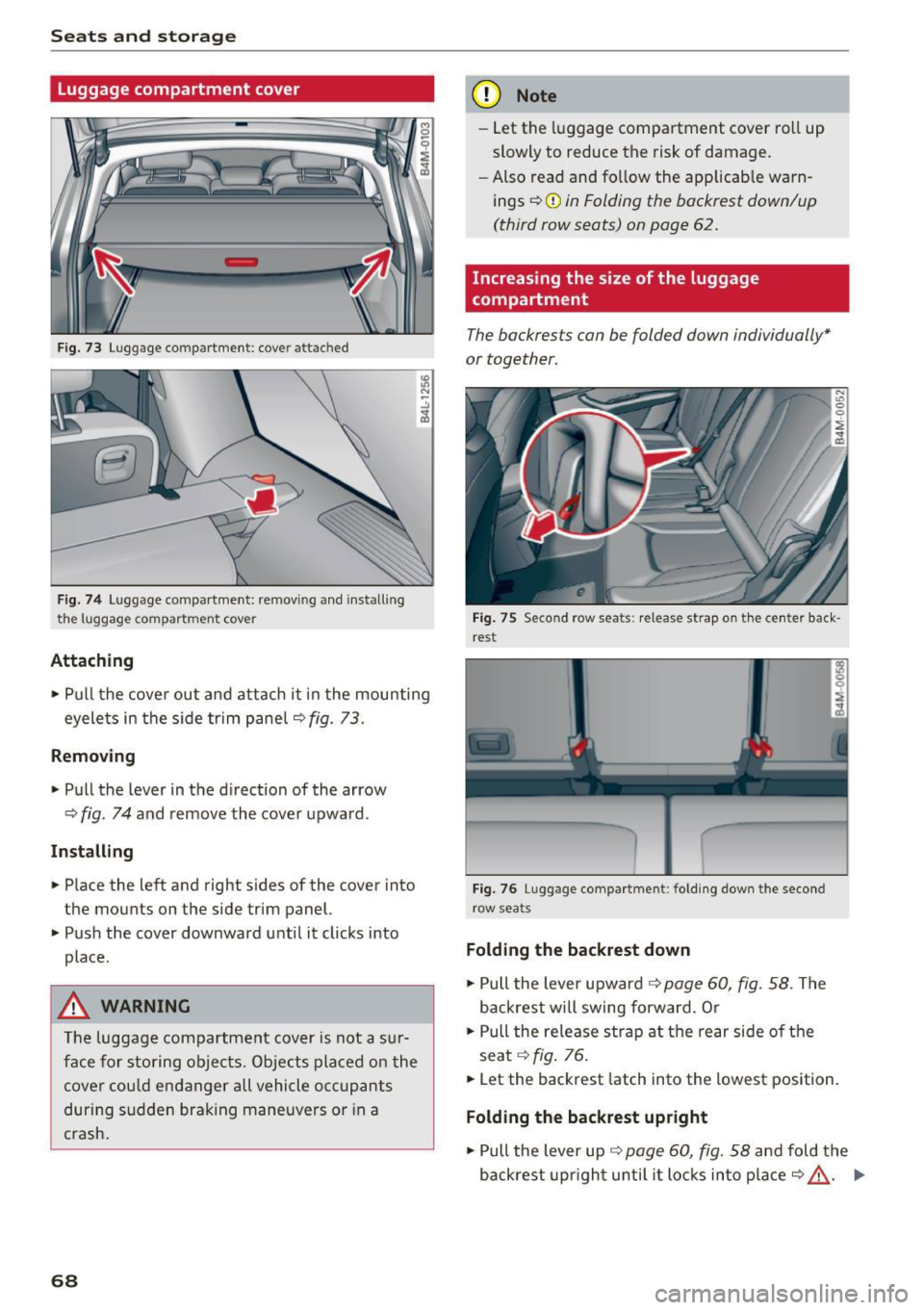
Luggage compartment cover
Fig. 73 Luggage compartment: cove r attached
Fig . 74 Luggage compar tment: removing and installing
the l uggage compartment cover
Attaching
., Pull the cover out and attach it in the mounting
eyelets in the side trim panel~
fig. 73.
Removing
., Pull the lever in the direction of the arrow
~fig. 74 and remove the cove r upward .
Installing
., Place the left and right s ides of the cover into
the mounts on the side trim panel.
., Push the cover downward until it clicks into
place.
A WARNING
The luggage compartment cover is not a sur
face for stor ing objects. Objects placed on the
cover could endanger all vehicle occupants
during sudden braking maneuvers or in a
crash .
68
(D Note
-Let the luggage compartment cover ro ll up
slowly to reduce the risk of damage.
- Also read and fo llow the applicab le warn
ings
~ (j) in Folding the backrest down/up
(third row seats) on page 62.
Increasing the size of the luggage
compartment
The backrests can be folded down individually*
or together.
Fig. 75 Second row seats: re lease strap on the center back ·
re st
Fig. 76 Luggage compartment : fol ding down the second
row seats
Folding the backrest down
., Pull the lever upward ~ page 60, fig. 58. The
backrest will swing forward. Or
., Pull the release strap at the rear side of the
seat ~
fig. 76.
., Let the backrest latch into the lowest position.
Folding the backrest upright
., Pull the lever up~ page 60, fig. 58 and fold the
backrest upright until it locks into place
~ _&. Ill>
Page 71 of 402
u (0 ...... N r--. N ...... 0
0
:E
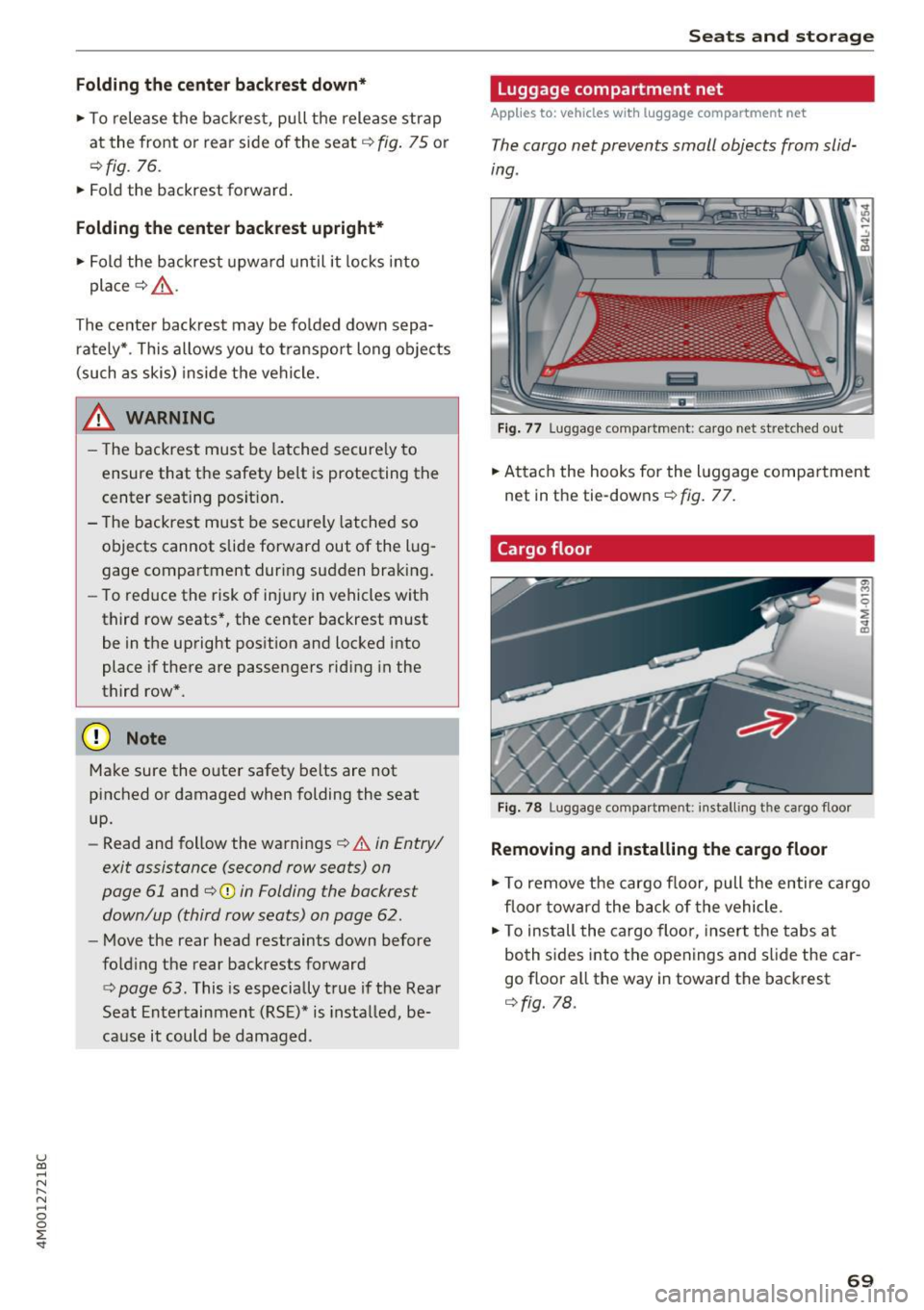
• To rele ase the back rest, pull the release strap
at the front or rear side of the seat ¢
fig. 75 or
r::!>fig. 76.
• Fold the backrest forward .
Folding the center backrest upright *
• Fold the backrest upwa rd un til it locks i nto
pla ce ¢
A .
The center backrest may be folded down sepa
r ately* . This allows you to transport long obje cts
(such as skis) inside the vehicle.
_& WARNING
- T he backrest must be latched secure ly to
ensure that the safety belt is protecting the
center seating posit ion .
-
-The backrest must be securely latched so
objects cannot slide forward out of the lug
gage compartment dur ing sudden braking .
- To red uce the risk of injury in vehicles with
third row seats*, the center backrest must
be in the upright pos ition and locked into
place if there are passengers rid ing in the
third row*.
(D Note
Make sure the oute r safety belts are not
pinched or damaged when folding the seat
up.
- Read and follow the warnings¢.&.
in Entry/
exit assistance (second row seats) on
page 61
and ¢(Din Folding the backrest
down/up (third row seats) on page
62 .
-Move the rear head restraints down before
fo ld ing the rear backrests forward
¢ page 63. This is especia lly true if the Rear
Seat Entertainment (RSE)* is insta lled, be
cause it could be damaged .
Seats and storage
Luggage compartment net
Applies to: vehicles with luggage compartment net
The cargo net prevents small objects from slid
ing .
Fig. 77 Lu ggag e compar tment: ca rgo net stretched o ut
"" Attach the hooks for the l uggage comp artment
net in the tie-downs ¢
fig. 77.
Cargo floor
Fig. 7 8 Luggage co mpartme nt: inst all ing the ca rgo floor
Removing and installing the cargo floor
a, M
0
~ .. ID
"" To remove the cargo floor, pull the entire cargo
floor toward the back of the vehicle .
• To ins tall the cargo floor, insert the tabs at
both s ides into the openings and s lide the car
go floor a ll the way in toward the backrest
¢ fig. 78.
69
Page 234 of 402

Media
(D Tips
-Check for any connection requests on your
Bluetooth device.
- Multiple Bluetooth audio players can be
connected to the MMI, but only one mobile
device can be active.
- Bluetooth protocols AVRCP (1.0/1.3/1.4)
and A2DP are supported.
- Note the volume setting on your Bluetooth
device. Audi recommends setting your mo
bile device to the maximum volume when
using it as a Bluetooth audio player.
- The supported media functions (such as
shuffle) depend on the Bluetooth device be
ing used.
- For more information on the supported de
vices, visit
www.audiusa.com/bluetooth or
contact an authorized Audi dealer or author
ized Audi Service Facility.
Wi-Fi audio player
Appl ies to: ve hicles w ith Wi-F i audio playe r
Using the Wi-Fi audio player media source on the
MMI, you can connect and operate your Wi-Fi-ca
pable media player (such as a smartphone) to wirelessly play music from your media player
li
brary. The media player is connected through the
vehicle's Wi-Fi hotspot. A UPnP Server opp or an
integrated UPnPIDLNA server on your media
player is required to access your media player
li
brary.
Requirement: the Wi-Fi function on your media
player must be switched on. The
Audi MMI con
nect
app or a UPnP server app must be installed
on your media player .
Or: you must be using a
media player with an integrated UPnP/DLNA
server.
- Connecting a media player: press the I MEDIA !
button. Press the left control button until the
sources overview
¢ page 237 is displayed . Se
lect and confirm
Wi-Fi audio player 0
¢ page 237, fig . 216 .
- If necessary, select and confirm Wi-Fi off>
Turn on Wi-Fi
to activate Wi-Fi in the MMI. Se
lect
Wi-Fi settings, if necessary. Select the
232
same settings on the wireless media player
that are used for the Wi-Fi hotspot.
-Starting the Wi-Fi audio player: start the Audi
MMI connect
app or a UPnP server app, or set
media permissions on your media player.
Operating the media player: the media player is
operated through the MMI.
- Press the left control button repeatedly until
the
Folders menu item appears. Select and con
firm
Folders.
- Playing music from the media player:
select
and confirm
Media center .
A WARNING
-As the driver, do not allow usage of the Wi
Fi hotspot to distract you from driving, as
this could increase the risk of an accident.
- It is only safe to use tablets, laptops, mo
bile devices and other similar devices when
the vehicle is stationary because, like all
loose objects, they could be thrown around
the inside of the vehicle in a crash and cause
serious injuries. Store these types of devices
securely while driving.
- Do not use any wireless devices on the front
seats within range of the airbags while driv
ing. Also read and follow the warnings in
¢ page 2 77, Front airbags.
(D Note
Always follow the information found in ¢(Din
Wi-Fi hotspot on page 195.
(D Tips
- Always read the chapter¢ page 196, Audi
connect (Infotainment) general informa
tion.
- Please note that a Wi-Fi connection does
not automatically make it possible to use
the Internet. For additional information,
see
¢ page 189.
-To avoid interruptions during playback, de
activate the power saving function on the
media player or connect it to a charger.
- The loading times for the audio data depend
on the media player used and the number of
files that it contains .
II>-
Page 260 of 402
Driving safety
-Before driving, always adjust the front seats
and head restraints properly and make sure
that all passengers are properly restrained.
- Never adjust the seats while the vehicle is
moving. Your seat may move unexpectedly
and you could lose control of the vehicle.
- Never drive with the backrest reclined or tilted far back! The farther the backrests are
tilted back, the greater the risk of injury due
to incorrect positioning of the safety belt and improper seating position .
- Children must always ride in child safety seats¢
page 295 . Special precautions ap
ply when installing a child safety seat on the
front passenger seat¢
page 2 73.
Proper seating position for the front
passenger
The proper front passenger seating position is
important for safe, relaxed driving.
For your own safety and to reduce the risk of in
jury in the event of an accident, we recommend
that you adjust the seat for the front passenger
to the following position:
.,. Adjust the angle of the seatback so that it is in
an upright position and your back comes in full
contact with it whenever the vehicle is moving .
.,. Adjust the head restraint so the upper edge is
as even as possible with the top of your head. If
that is not possible, try to adjust the head re straint so that it is as close to this position as
possible
¢page 63.
.,. Keep both feet flat on the floor in front of the
front passenger seat .
.,. Fasten and wear safety belts correct
ly¢
page 268.
For detailed information on how to adjust the
front passenger's seat, see¢
page 59 .
A WARNING
Front seat passengers who are unbelted, out
of position or too close to the airbag can be
seriously injured or killed by the airbag as it
unfolds. To help reduce the risk of serious
personal injury:
258
- Passengers must always sit in an upright po
sition and never lean against or place any
part of their body too close to the area
where the airbags are located.
- Passengers who are unbelted, out of posi
tion or too close to the airbag can be seri
ously injured by an airbag as it unfolds with
great force in the blink of an eye.
- Always make sure that there are at least
10 inches (25 cm) between the front pas
senger's breastbone and the instrument
panel.
- Each passenger must always sit on a seat of
their own and properly fasten and wear the
safety belt belonging to that seat .
- Before driving, always adjust the front pas
senger seat and head restraint properly.
-Always keep your feet on the floor in front
of the seat. Never rest them on the seat, in
strument panel, out of the window, etc. The
airbag system and safety belt will not be
able to protect you properly and can even in
crease the risk of injury in a crash.
- Never drive with the backrest reclined or
tilted far back! The farther the backrests are
tilted back, the greater the risk of injury due
to incorrect positioning of the safety belt and improper seating position.
- Children must always ride in child safety
seats ¢
page 295. Special precautions ap
ply when installing a child safety seat on the
front passenger seat¢
page 2 73.
Proper seating positions for passengers in
rear seats
Rear seat passengers must sit upright with both
feet on the floor consistent with their physical
size and be properly restrained whenever the ve
hicle is in use.
To reduce the risk of injury caused by an incorrect
seating position in the event of a sudden braking
maneuver or an accident, your passengers on the
rear bench seat must always observe the follow
ing :
.,. If there are passengers on the outer rear seats,
adjust the head restraints so the upper edge is ..,.
Page 261 of 402
u (0 ...... N r--. N ...... 0
0
:E
that is not possible, try to adjust the head re
straint so that it is as close to this position as
possible. If there is a passenger in the center
rear seat, slide the head restraint upward
i=> page 63.
• Make sure that the seatback is secu rely latched
in the upright pos ition
c:> page 68 .
• Keep both feet flat i n the footwell in front of
the rear seat .
• Fasten and wear safety be lts properly
c:> page 268 .
• Make sure that children are always properly re
strained in a child restraint that is appropriate
for their si ze and age
c:> page 295 .
A WARNING
Passengers who are improperly seated on the
rear seat can be seriously injured in a crash.
- Each passenger must always sit on a seat of
their own and properly fasten and wear the
safety belt belonging to that seat .
- Safety belts only offer max imum p rotection
when the seatback is securely latched in the
upr ight position and the safety be lts a re
prope rly pos itioned on the body. By not sit
t ing upright, a rea r seat passenger increases
the risk of personal in jury from improperly
posit ioned safety belts !
- Alw ays adjust the head rest raint prope rly so
that it can g ive maximum protection.
Dr iving safety
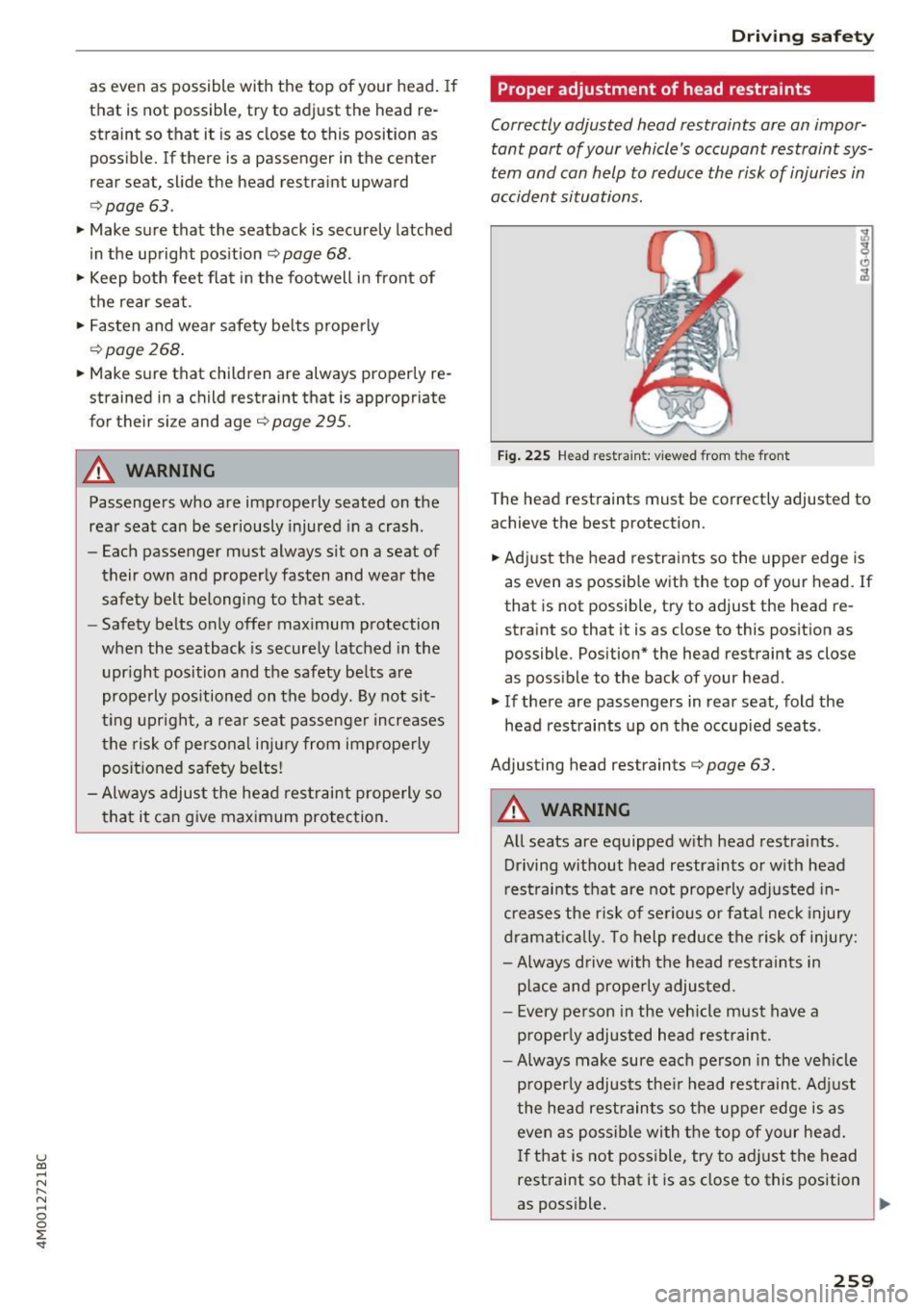
Proper adjustment of head restraints
Correctly adjusted head restraints ore an impor
tant part of your vehicle's occupant restraint sys
tem and can help to reduce the risk of injuries in
accident situations.
F ig . 22S Head restra int: v iewed from t he front
The head rest raints must be correctly adjusted to
achieve the best protection.
• Adj ust the head restraints so the upper edge is
as even as possib le with the top of your head. If
that is not possible, try to adjust the head re straint so that it is as close to this posit ion as
possible . Position* the head restraint as close
as possible to the back of your head .
• If there are passengers in rear seat, fold the
head restraints up on the occupied seats .
Ad justing head restraints
c:> page 63.
A WARNING
-A ll seats are equipped w ith head restraints .
Driving w ithout head restraints or w ith head
r est raints that are not prope rly adj usted in
creases the r is k of se rious or fata l neck injury
dr amat ic al ly. To help reduce the risk of injury:
- Always d rive with the head restra ints in
p lace and properly adjusted .
- Every person in the veh icle must have a
p roperly adjusted head restraint .
- Always make sure each person in the veh icle
p rope rly adjusts the ir head restraint. Ad just
the hea d restraints so the upper edge is as
even as possible wi th the top of your hea d.
If that is not poss ible, try to ad just the head
rest raint so that it is as close to this position
as poss ible.
~
259
Page 280 of 402
Airbag system
-Never hold the steering wheel at the 12
o'clock position or with your hands any
where inside the steering wheel or on the
steering wheel hub. Holding the steering
wheel the wrong way increases the risk of
severe injury to the arms, hands, and head if
the driver airbag deploys.
,& WARNING
Objects between you and the airbag will in
crease the risk of injury in a crash by interfer
ing with the way the airbag unfolds and/or by
being pushed into you as the airbag inflates.
- Always make sure nothing is in the front air-
bag deployment zone that could be struck
by the airbag when it inflates.
-
- Objects in the zone of a deploying airbag
can become projectiles when the airbag de
ploys and cause serious personal injury.
- Never hold things in your hands or on your
lap when the vehicle is in use.
- Never place accessories or other objects
(such as cup holders, telephone brackets,
note pads, navigation systems, or things
that are large, heavy, or bulky) on the doors;
never attach then to the doors or the wind
shield; never place them over or near or at
tach them to the area marked ,,AIRBAG" on
the steering wheel, instrument panel or the
seat backrests; never place them between
these areas and you or any other person in
the vehicle.
- Never attach objects to the windshield
above the passenger front airbag, such as
accessory GPS navigation units or music
players. Such objects could cause serious in
jury in a collision, especially when the air bags inflate.
- Never recline the front passenger seat to transport objects. Items can also move into
the deployment area of the side airbags or
the front airbag during breaking or in a sud
den maneuver. Objects near the airbags can
fly dangerously through the passenger com partment and cause injury, particularly
when the seat is reclined and the airbags in
flate.
278
,& WARNING
, -
A person on the front passenger seat, espe
cially infants and small children, will receive
serious injuries and can even be killed by be ing too close to the airbag when it inflates .
- Although the Advanced Airbag System in your vehicle is designed to turn off the front passenger airbag if an infant or a small child
is on the front passenger seat, nobody can
absolutely guarantee that deployment un
der these special conditions is impossible in
all conceivable situations that may happen
during the useful life of your vehicle.
- The Advanced Airbag System can deploy in accordance with the ,.low risk" option for 3-
and 6-year-old children under the U.S. Fed
eral Standard if a child with electrical capac
itance greater than the combined capaci
tance of a typical one-year old infant re
strained in one of the forward facing or rear
ward-facing child seats with which your ve hicle was certified is on the front passenger
seat and the other conditions for airbag de
ployment are met.
- Accident statistics have shown that children
are generally safer in the rear seat area than
in the front seating position.
- For their own safety, all children, especially
12 years and younger, should always ride in
the back properly restrained for their age
and size.
Advanced front airbag system
Your vehicle is equipped with a front Advanced
Airbag System in compliance with United States
Federal Motor Vehicle Safety Standard (FMVSS)
208, as well as Canada Motor Vehicle Safety
Standard (CMVSS) 208 as applicable at the time
your vehicle was manufactured .
-
The front Advanced Airbag System supplements
the safety belts to provide additional protection
for the driver's and front passenger's heads and upper bodies in frontal crashes. The airbags in
flate only in frontal impacts when the vehicle de-
celeration is high enough.
ll>