warning light AUDI Q7 2018 Owner´s Manual
[x] Cancel search | Manufacturer: AUDI, Model Year: 2018, Model line: Q7, Model: AUDI Q7 2018Pages: 398, PDF Size: 185.58 MB
Page 353 of 398
Cl a:, ...... N
" N ...... 0
0
::r '
General information
Regular, proper ca re helps to maintain your ve hi
cle's value. It can a lso be a requirement when
submitting warranty claims fo r cor rosion damage
and pa int defects on the body.
The requ ired cleaning and care p roducts can be
obtained from an authorized Audi dea le r or au
thor iz ed Se rvice Facility . Read and follow the in
structions for use on the packaging .
A WARNING
-Us ing clea ning and ca re products inco rrectly
can be dangero us to your hea lth .
- Always store clean ing and ca re prod ucts out
of reach of chi ldren to reduce the r isk of po i
soning .
@ For the sake of the environment
- Prefe rab ly purchase env ironmenta lly-friend
l y cleaning prod ucts.
- Do not d ispose o f leftove r clea ning and ca re
p roducts with house hold t rash.
Car washes
T he longer that deposits s uch as insects, bird
d roppings, tree sap or road salt remain on the ve
h icle, the more the surface can be damaged. High
temperatures such as those ca used by sun light
in crease the damag ing effect .
Before washing, r inse off heavy depos its with
p le nty of water.
St ubborn deposits s uch as bird d roppings or tree
sap are best removed with plenty of wate r and a
m icr ofibe r cloth.
A lso, wash t he un derside of yo ur vehicle once
road sa lt stops being used for the seaso n.
Pressure washers
When washing your ve hicle wit h a pressu re wash
e r, al ways fo llow the operating instr uctions pro
v ided wi th t he p ress ure washer. This is espe cially
i mportant in rega rd to the p ressure and sp raying
d istance . Do not aim the sp ray directly at the
Care and cleaning
seals on the side w indows, doo rs, lid s or the s un
r oof * or at tires, r ubber hoses, insulat ing mater i
al, sensors* or camera lenses* . Keep a distance of
at least 16 in (40 cm).
D o not remove snow and ice with a p ressure
washe r.
Never use cone nozz les o r high press ure no zzles .
T he wate r temperatu re mus t not be above 140 °F
(60 °() .
Automatic car washe s
Spray off the vehicle befo re washing.
Make s ure that the w indows and roo f* are closed
and the windsh ie ld wipers are off . Follow instruc
tions from the car wash ope rato r, especially if
the re are accesso ries attached to your vehicle.
If possible, use car washes that do not have
brushes .
Washing by hand
Clean the ve hicle starting from t he top and wor k
in g down using a soft sponge o r clea ning br ush.
U se solven t-free cleaning p ro duc ts.
Washing vehicles with matte finish paint by
hand
To avo id da mag ing the p aint w hen w ashi ng, fi rs t
r emove dust and large p art icl es from you r vehi
cl e. Insects, grease spots and finger prints are
best removed w ith a s pecial cleane r fo r matte
f inish paint.
Apply t he p rodu ct using a microf iber cloth . To
avo id damag ing t he pa in t surface, do no t use too
much pressure.
Rinse t he ve hicl e thoroug hly w ith w ate r. T hen
cl ea n usi ng a neutra l shampoo an d a soft mi cro
f iber cloth .
R inse t he ve hicle thoroug hly aga in and let it air
dry. Remove any wate r residue using a chamois.
,&. WARNING
--
- Only was h the veh icle w hen the ig nition i s
off and follow t he i nstr uctions from the car
351
Page 356 of 398
Care and cl eaning
Component Situation Solution
Tex tile s
Deposits adhering to Vacuum cleaner
art ifici al l eat her, the surface
A lca ntara Water -based deposits Absorbent cloth and mild soap
solutiona>
such as coffee, tea, blood, etc.
O il-based deposits Apply a m ild soap solution a), blot away the dissolved oil or
such as oil , make-up, dye, treat afterward with water, if necessary
etc.
Special deposits such Special stain remover, blot with absorbent material, treat
as ink, na il polish, la- afterward with mild soap solution, if necessary a)
tex paint, shoe pol-
ish, etc.
Natural leathe r Fresh stains Cotton cloth
with a mild soap solutiona >
Water-based deposits Fresh stairns : absorbent cloth
such as coffee, tea, dried stains: stain remover suitable for leather
blood, etc.
Oil -based deposits Fresh stairns : absorbent cloth and stain remover suitable
such as oil, make-up, for leather
etc. dried stains: oil cleaning spray
Special deposits such Spot remover suitab le for leather
as ink, nai l polish, la -
tex paint, shoe pol-
ish, etc.
Care Regula rly apply cond it ion ing cream that p rotects from
lig ht and penetrates into the material. Use specia lly-co l-
ored conditioning cream, if necessary .
Carbon part s Deposits clean the same way as plastic parts
al Mild soap solution: maximum two tablespoons of neutral soap in 1 quart (1 liter) of water
_& WARNING
The windsh ie ld may not be treated wi th wa
ter-repelling windshield coating agents. Un
favorable conditions such as wetness, dark
ness, or low sun can result in increased glare.
Wiper blade chatter is also possible.
@ Note
-Headlight s/tail light s
-Never clean headlights or tail lights with a
dry cloth or sponge.
- Do not use any cleaning product that con
tains alcohol, because they could cause
cracks to form .
-Wheel s
354
-
- Never use any paint polish or other abra
sive materials.
- Damage to the protect ive layer on the
rims such as stone chips or scratches must
be repaired immediately.
- Cam era lens es
- Neve r use wa rm or hot water to remove
snow or ice from the came ra lens . This
could cause the lens to crack .
- Neve r use ab rasive cleaning m aterials or
a lcohol to clean the camera lens . This
could cause scratches and cracks .
-Door wind ow s
- Remove snow and ice on windows and ex-
terior mirrors with a plast ic scraper. To
Page 363 of 398

a co ...... N r--. N ...... 0
0
:E '
cle tool kit), turn the v ehicle jack* under the
li ft ing po int on the side sill unti l it is high
enough that the arm@c:>
fig. 2 79 is under the
designated plastic moun t .
.. Align the vehicle jack* so the arm @engages in
t h e des ignated l ift ing po int in the door s ill and
the base @ lies f lat on the ground . The base @
must be d irectly under the lifting poi nt @ .
.. To lift the vehicle , pl ace the ratchet @(from
the vehicle too l
kit) with the correct side on the
hex socket wrench ©-
.. Move the ratchet @clockwise back and forth
unt il the wheel lifts up slightly from the
ground.
A WARNING
- Make sure the vehicle jack* is stable. There
is a r isk of injury when the ground is slick or
soft, because the vehicle jack* could slide or
sink.
- Only ra ise your vehicle with the vehicle jack*
provided by the factory .
If you use a vehicle
jack des igned for another veh icle, your vehi
cl e can slide and ca use i nju ry .
- Posi tion the vehicle ja ck* only at the desig
na ted mounting points on the side s ill and
align the jack. O therwise, the ve hicl e jack *
cou ld slip and ca use an inj ury i f it does not
have sufficie nt hold on the vehicle.
- Vehicles wi th air suspension*: changes in
tempe rat ure or load can affect the height of
the stopped vehicle.
- To reduce the risk of an accident, never start
the engine when the vehicle is raised .
- T o reduce the risk of injury, support the ve
hicle securely with suitab le stands if work is
to be performed underneath the vehicle.
- To help prevent injury to yoursel f and your
passengers:
- Do not ra ise the vehicle unt il you are sure
the jack* is securely engaged.
- Passengers must not remain in the vehicle
when it is jacked up.
- Make sure that passengers wait in a safe
p lace away from the vehicle and well away
from the road and traff ic .
Em ergen cy as sis tanc e
-Make sure jack position is correct, adjust
as necessary and then continue to raise
the jack*.
- If work has to be done under the vehicle,
ensure that it is safely supported on suita
ble stands -risk of injury!
- Never start the eng ine when the vehicle is
on the jack* -risk of accident!
(D Note
Do not lift the ve hicle by the s ill. Pos ition the
vehicle jack* only at the designated mount ing
points on the side sill. Otherw ise, your veh icle
will be damaged.
(!) Tips
The vehicle jack mode* switches off automati
cally at speeds above 6 mph (10 km/h).
Removing and installing a wheel
F ig . 28 0 Whee l: in terna l he x socke t to tu rn th e whee l
bo lt s
F ig . 2 81 W hee l: ali gnm en t p in in the top ho le
Removing a wheel
.. Remove the top wheel bolt completely using
the hex socket in the screwdriver handle (in the
IJJI>
361
Page 367 of 398
a co ...... N r--. N ...... 0
0
:E '
Color Current rating
in amps
Black 1
Purple 3
Light brown 5
Brown 7.5
Red 10
Blue 15
Yellow 20
White or transparent 25
Green 30
Orange 40
A WARNING
Do not repair fuses and never replace a blown
fuse with one that has a higher amp rating.
This can cause damage to the electrical sys
tem and increases the risk of fire.
(D Note
If a new fuse burns out again shortly after you
have installed it, have the electrical system
checked as soon as possible by an authorized
Audi dealer or authorized Audi Service Facili ty.
(D Tips
- The following table does not list fuse loca
tions that are not used.
- Some of the equipment listed in the follow
ing tables applies only to certain model ver
sions or certain optional equipment.
Fuses and bulbs
Fuse assignment - driver's/front
passenger's footwell
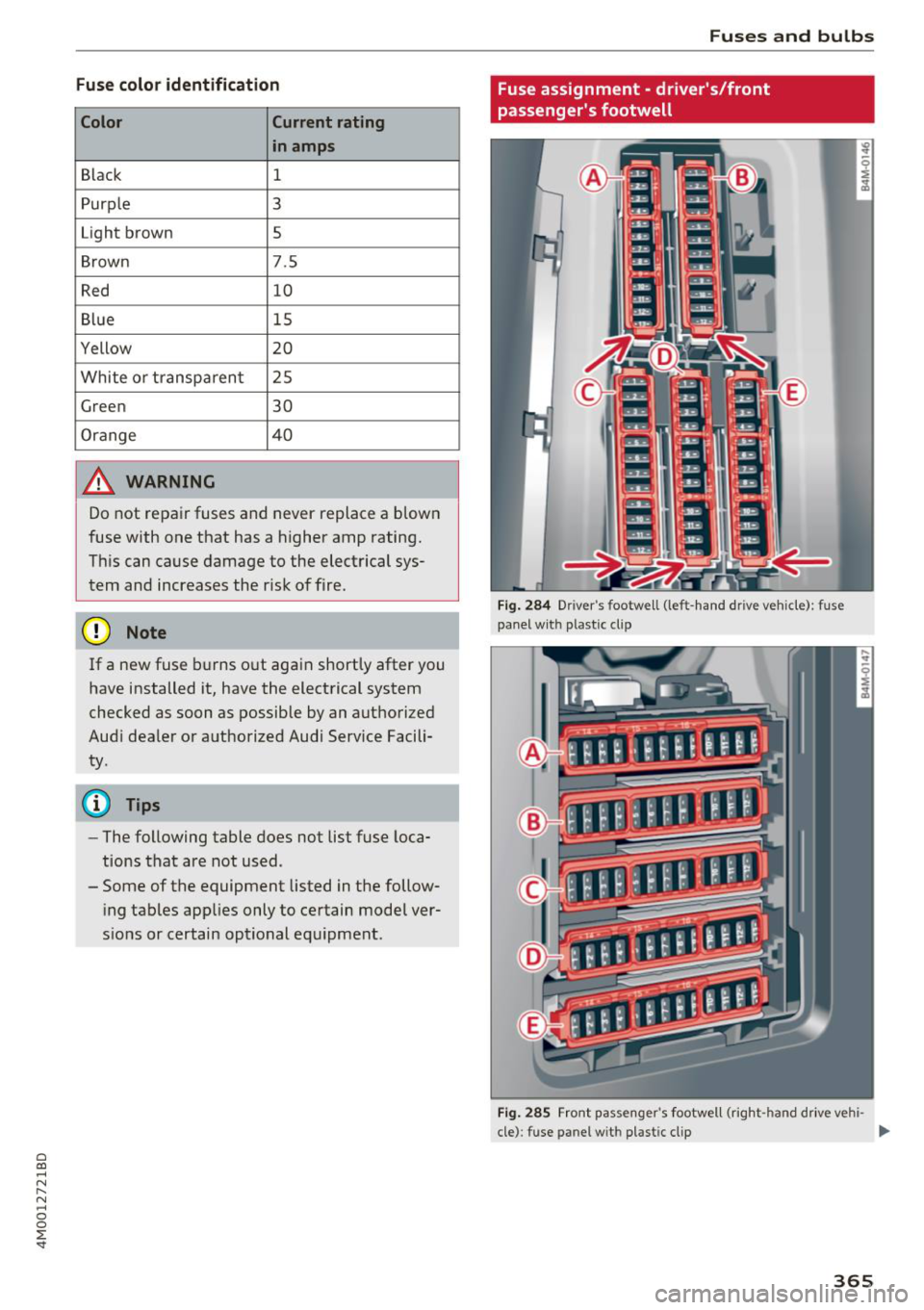
Fig. 284 Drive r's footwell (left -hand dr ive vehicle): fuse
panel with plastic clip
Fig. 285 Front passenger's footwell (right -hand drive vehi -
cle): fuse panel wit h plastic clip
II>-
365
Page 370 of 398
Fuses and bulb s
Fuse panel@ (red )
11 AdBlue heating
12 Third row seats
Fus e panel © (brown)
N o. Equip ment
2 Telephone
3 Lumba r suppo rt
4 Audi side assist
8 Sma rt mod ule (tank)
9 CD /DVD player
12 Homelink
13 Rearview camera, per
ipheral cameras
14 Right tail lights
16 Right safety belt tensioner
Fu se panel @ (red )
N o.
I Equipment
Bulbs
Replacing light bulbs
For your safety, we recommend that you have
your authorized Audi dealer replace any bulbs for
you.
I t is becoming increasing ly more and more diffi
cult to replace vehicle light bulbs since in many
cases, other parts of the car must first be re moved before you are able to get to the bulb.
This applies espec ially to the light bulbs in the
front of your car wh ich you can only reach
through the eng ine compartment.
Sheet metal and bulb ho lders can have sharp
edges that can cause ser ious cuts, parts must be
correctly taken apart and then properly put back
together to help prevent breakage of parts and long term damage from water that can enter
housings that have not been proper ly resea led.
For your safety, we recommend that you have
your author ized Audi dealer replace any bulbs for
you, s ince your dealer has the proper tools, the
correct bulbs and the expert ise.
G as disc harg e la m ps (Xe non light s):
368
Due to the high e lectrica l voltage, have the bulbs
rep laced by a qualified technician. Headlights
with Xenon light are identif ied by the high volt
age sticker.
LED h eadlights*
LE D headlights requ ire no maintenance. Please
contact your author ized Audi dealer if a bulb
needs to be rep laced.
& WARNING
Changing Xenon lamps without the necessary
equipment can cause serious personal injury.
- Bulbs are pressurized and can exp lode when
being changed. Potential risk of injury!
- On veh icles equipped with gas discharge
bulbs (Xenon light) life -threatening injuries
can result from improper handling of the high-vo ltage portions of such lamps!
- On ly your authorized A udi dealer or quali
fied workshop shou ld change the bulbs in
gas discharge lamps. There are parts with
sharp edges on the openings and on the bulb holders that can cause serious cuts . If
you are uncerta in about what to do, have
the work performed by an authorized Audi
dea le r o r qualified workshop. Ser ious per
sonal injury may result from improperly per
formed work.
© Tips
- If you still prefer to replace the light bulbs
yourself, be awa re that the engine compa rt
ment is a hazardous area to work in ~ .&.
in
Working in the engine compartment on
page 319 .
-It is best to ask your authorized Audi dealer
whenever you want to change a bulb .
Page 371 of 398
Cl a:, ...... N
" N ...... 0
0
::r '
General
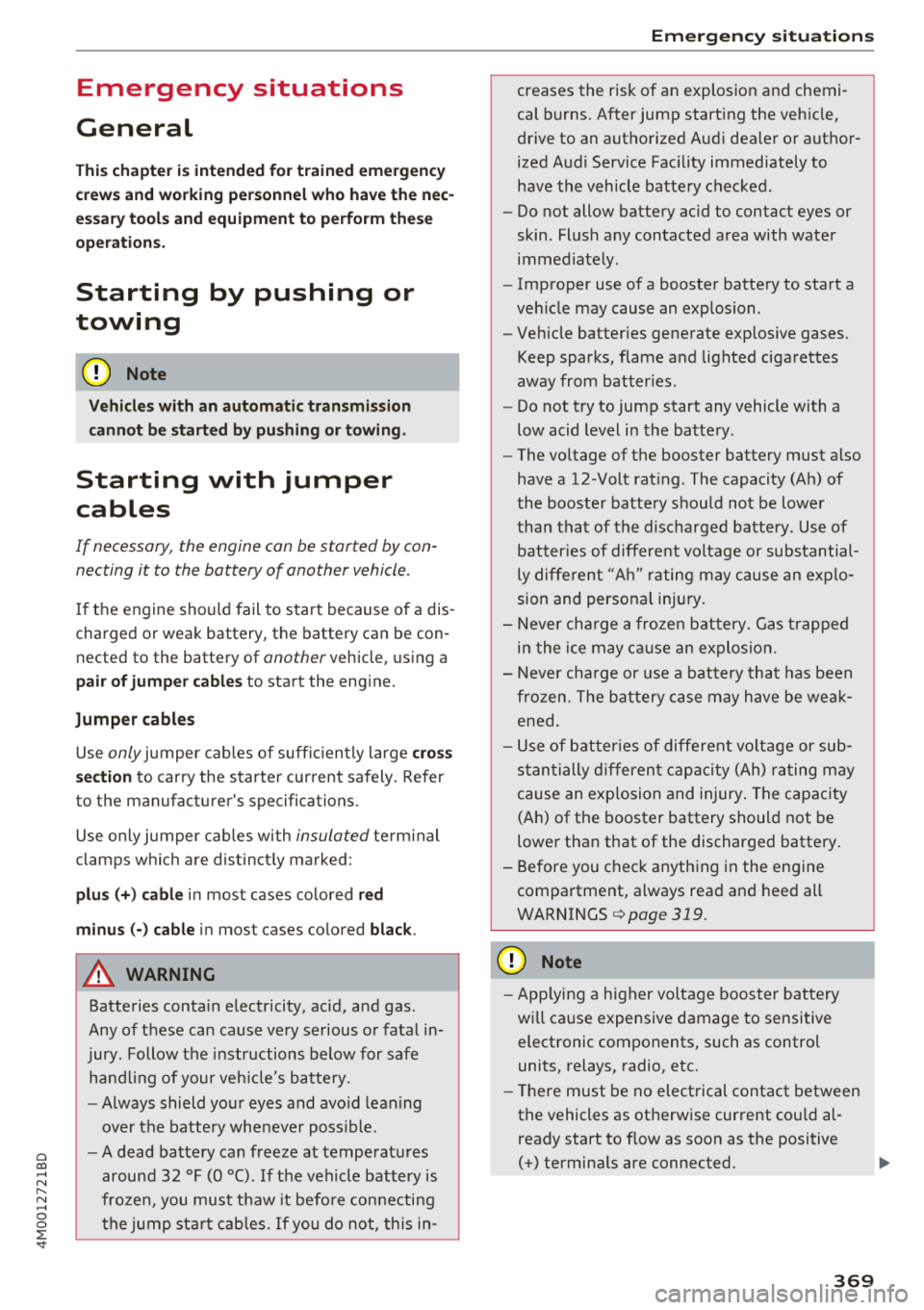
This chapter is intended for trained emergency
crews and working personnel who have the nec
essary tools and equipment to perform these
operations.
Starting by pushing or
towing
~ Note
Vehicles with an automatic transmission
cannot be started by pushing or towing.
Starting with jumper
cables
If necessary , the engine can be started by con
necting it to the battery of another vehicle.
If the engine should fail to start because of a dis
charged or weak battery, the battery can be con
nected to the battery of
another vehicle, using a
pair of jumper cables to start the engine.
Jumper cables
Use only jumper cables of sufficiently large cross
section
to carry the starter current safely. Refer
to the manufacturer's specifications.
Use only jumper cables with
insulated terminal
clamps which are distinctly marked :
plus(+) cable in most cases colored red
minus(-) cable
in most cases colored black.
A WARNING -
Batteries contain electricity, acid, and gas.
Any of these can cause very serious or fatal in
jury. Follow the instructions below for safe
handling of your vehicle's battery.
-Always shield your eyes and avoid leaning
over the battery whenever possible.
- A dead battery can freeze at temperatures
around 32 °F (0 °C) . If the vehicle battery is
frozen, you must thaw it before connecting
the jump start cables. If you do not, this in-
Emergency situations
creases the risk of an explosion and chemi
cal burns. After jump starting the vehicle,
drive to an authorized Audi dealer or author
ized Audi Service Facility immediately to
have the vehicle battery checked.
- Do not allow battery acid to contact eyes or
skin . Flush any contacted area with water
immediately.
- Improper use of a booster battery to start a
vehicle may cause an explosion .
- Vehicle batteries generate explosive gases .
Keep sparks, flame and lighted cigarettes
away from batteries.
- Do not try to jump start any vehicle with a
low acid level in the battery .
- The voltage of the booster battery must also
have a 12-Volt rating . The capacity (Ah) of
the booster battery should not be lower
than that of the discharged battery. Use of
batteries of different voltage or substantial
ly different "Ah " rating may cause an explo
sion and personal injury.
- Never charge a frozen battery. Gas trapped
in the ice may cause an explosion.
- Never charge or use a battery that has been
frozen. The battery case may have be weak
ened.
- Use of batteries of different voltage or sub
stantially different capacity (Ah) rating may
cause an explosion and injury. The capacity
(Ah) of the booster battery should not be
lower than that of the discharged battery.
- Before you check anything in the engine
compartment, always read and heed all
WARNINGS
c>page 319.
@ Note
-Applying a higher voltage booster battery
will cause expensive damage to sensitive
electronic components, such as control
units, relays, radio, etc.
- There must be no electrical contact between
the vehicles as otherwise current could al
ready start to flow as soon as the positive
( + ) terminals are connected.
369
Page 372 of 398
Emergency situations
@ Tips
The discharged battery must be properly con
nected to the vehicle's electrical system .
When jump starting or charging the battery,
never connect the negative ground cable to
the battery negative post because the battery
manager system must be able to detect the
battery's state of charge. Always connect the
negat ive g round cable to the negative ground
post of the battery manager control unit.
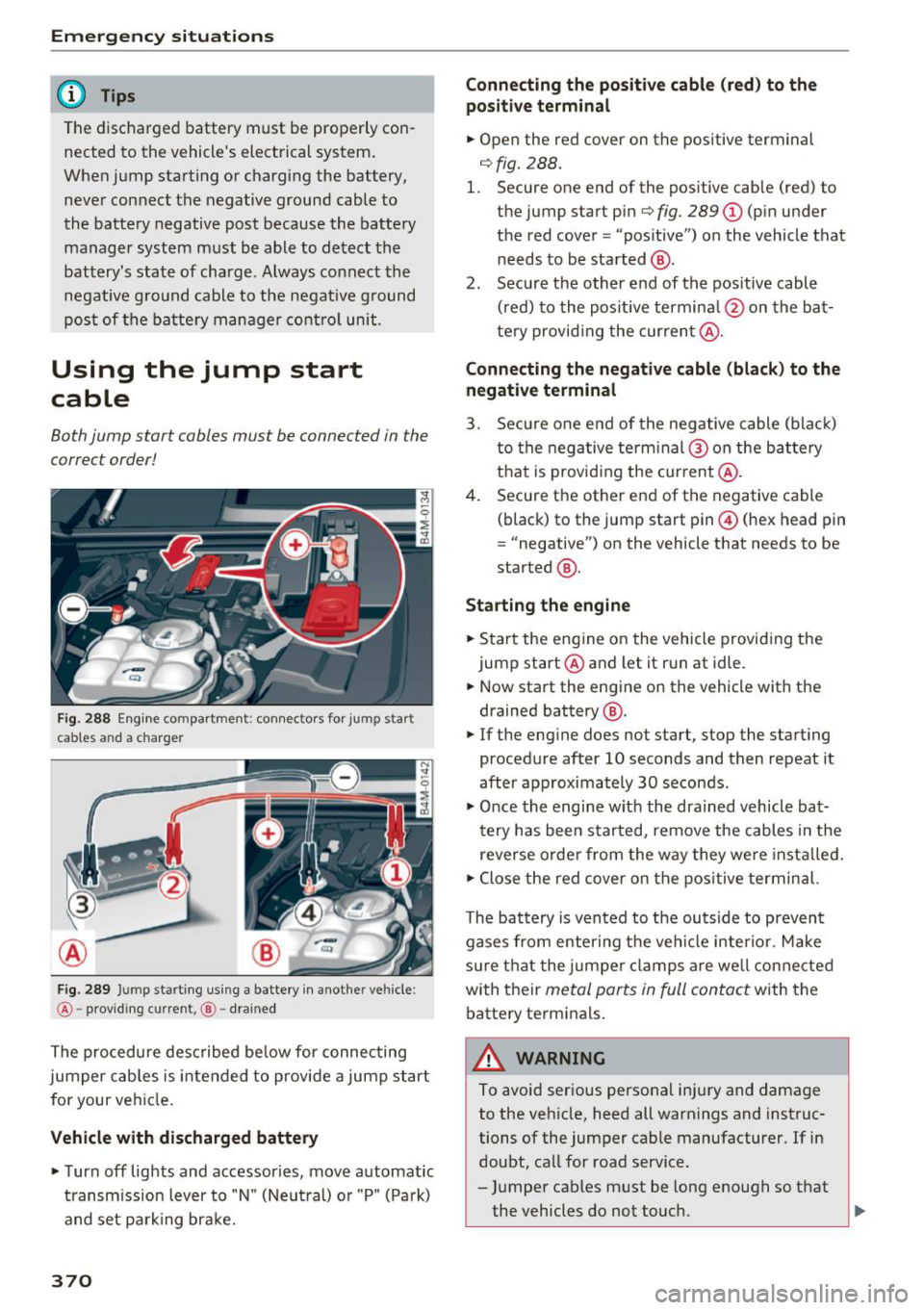
Using the jump start
cable
Both jump start cables must be connected in the
correct order!
Fig. 288 E ngin e compartme nt: co nn ectors for jump start
cables and a charger
Fig. 289 Jump starting using a battery in anot her vehicle:
@-pro vidi ng current, @-dra ined
The procedure described below for connecting
jumper cables is intended to provide a jump start
for your vehicle.
Vehicle with discharged battery
... Turn off lights and accessories, move automatic
transm ission lever to "N" (Neutral) or "P" (Pa rk)
and set parking bra ke.
370
Connecting the positive cable (red) to the
positive terminal
... Open the red cover on the positive terminal
c:::>fig. 288.
1. Secure one end of the pos itive cable (red) to
the jump start pin
c:::> fig. 289 (J) (pin under
the red cover = "pos itive") on the veh icle that
needs to be started @.
2. Secure the other end of the positive cable
(red) to the posit ive terminal @on the bat
tery provid ing the cur rent @.
Connecting the negative cable (black) to the
negative terminal
3. Secure one end of the negative cable (black)
to the negative terminal @ on the battery
that is providing the current @.
4. Secure the other end of the negative cable
(black) to the jump start pin@ (hex head pin
= "negative") on the vehicle that needs to be
started @.
Starting the engine
... Sta rt the eng ine on the vehicle providing the
jump start @and let it run at idle .
... Now start the engine on the vehicle with the
drained battery @.
... If the engine does not start, stop the starting
procedure after 10 seconds and then repeat it
after approx imately 30 seconds.
"' Once the engine w it h the drained vehicle bat
tery has been started, remove the cables in the
reverse order from the way they were install ed.
"' Close the red cover on the positive terminal.
The battery is vented to the outside to prevent
gases from enter ing the vehicle inter ior. Make
sure th at the j umper clamps are well connected
with their
metal ports in full contact with the
battery terminals .
A WARNING
-To avoid serious personal injury and damage
to the vehicle, heed all warnings and instruc
tions of the jumper cable manufacturer. If in
doubt, call for road service .
- Jumper cables must be long enough so that
the vehicles do not touch. ..,.
Page 381 of 398
Cl a:, ...... N
" N ,-1 0
0
::r '
-Changing the engine settings wi ll adversely
affect emission leve ls. Th is is detrimental to
the env ironment and increases fuel con
sumption.
- A lways observe environmenta l regu lations
when disposing of old engine o il, used brake
flu id, d irty engine coolant, spent batteries
or worn out tires.
- Undeployed airbag modules and pretension
ers might be classified as Perchlorate Mate
rial -spec ial handl ing may apply, see
www .dtsc.ca .gov/hazardouswaste/perch lo
r ate. When the vehicle or pa rts of t he re
stra int system includi ng a irbag mod ules
s af ety be lts with pretens ioners a re scrap
ped, a ll applicab le laws and regulations
must be observed. Your a uthorized Audi
dealer is fam iliar with these requirements
and we recommend that you have your dea l
er perform this service for you.
Accessories and
technical changes
Additional accessories and parts replacement
Always consult on authorized Audi dealer before
purchasing accessories.
Audi ve hicles that are constructed with advanced
materials like Steel/Aluminum (Hybrid construc
tion), Aluminum (Aud i Space Frame), and/or Alu
minum/Carbon Fiber (Ultra Advanced Light
We ight Materials) are as unique as the ir dr ivers .
Therefo re, the ava ilability of certain parts needed
for repa ir , restorat ion, or reconstruction w ill be
rest ricted , or pa rts will be unava ilable, if the ve
hicl e is not repa ired at an a uthorized Aud i co lli
sion repair facility . This includes but is not limi t
ed to structura l parts which require specia lized
training and equipment to restore their crash
worthiness back to the original NHTSA and IIHS performance.
Your vehicle incorporates the latest safety design
features ensuring a high standard of active and passive safety.
Con sum er In form ation
This safety could be compromised by non -ap
proved changes to the vehicle. For t his reason, if
parts have to be rep laced, p lease observe the fol
lowing points when install ing additional accesso
ries:
Approved Audi accessories and genuine Audi parts are avai lab le from authorized Aud i dea lers.
T hese dea le rs a lso have t he necessa ry fa cilit ies,
tools and trained specialists to install the pa rts
and accessories proper ly .
A WARNING
--
Using the wrong spare parts or using non -ap
p roved accessories can cause damage to the
vehicle and serious personal injury.
- Use on ly accessories expressly approved by
Aud i and genuine Audi spare parts
- These parts and accessor ies have been spe
cially designed to be used on your vehicle.
- Do not use license p late brac kets in the
front area that are d ifferent from the one
installed at the factory, or add additional
li
cense plate brackets.
- Never install accessor ies such as telephone
cradles or beverage holders on airbag covers
or w ith in the airbag deployment zones. Do
ing so will increase the risk of injury if a ir
bags a re tr iggered in an accident!
- Before you check anyth ing in the eng ine
compa rtment, always read and heed all
WARN INGS
~page 319.
@ Note
-If items other than genu ine Audi spare
parts, add-on equipment and accessory
items are used or if repa ir work is not per
form ed according to specified methods, th is
c an result in seve re damage to you r vehi
cle's eng ine and body (s uch as cor rosion)
and adve rsely affec t your ve hicle's warranty.
- If emergency repa irs m ust be pe rformed
elsew here, have the vehicle ex am ined by an
authorized A udi dealer as soon as possib le .
- Th e manufac ture r ca nnot be he ld liable fo r
damage wh ic h occur s d ue to fail ure to com
ply with these stipulations.
379
Page 383 of 398
Cl a:, ...... N
" N ...... 0
0
::r '
A/C MAX (button) .................. .
A/C (button)
. .. ................ ... .
67, 71
67, 70
ABS
.. .. .. .. .. ............... .. .. .. . 142
Accessories 60,379
Active lane assist
Cleaning the camera area . . . . . . . . . . . . . 352
also refer to Audi active lane assist . . . . . 117
Adaptive air suspension
refer to Air suspension ........ .. .. .. .
Adaptive cruise control ................ .
C leaning the sensor ................. .
Messages .... ................ ..... .
Predictive control
............. .. .. .. .
Ad Blue .. .. .. .. ............. .. .. .. .. . 128
102
352 110
100
314
Messages .... ................ ..... . 314
Additional accessories . . . . . . . . . . . . . . . . . 3 79
Adjusting air distribution (automatic climate
control) . . . . . . . . . . . . . . . . . . . . . . . . . . . 68, 71
Adjusting the additional display . . . . . . . . . . 14
Adjusting the rear seats . . . . . . . . . . . . . . . . . 55
Adjusting the sound . . . . . . . . . . . . . . . . . . . 249
Adjusting the temperature (automatic climate
control) . . . . . . . . . . . . . . . . . . . . . . . . . . . 68 71
,
Adjusting the volume . . . . . . . . . . . . . . . . . . . 15
Advanced key
refer to Convenience key . . . . . . . . . . . . . . . 77
Airbag . . . . . . . . . . . . . . . . . . . . . . . . . . . . . . 269
Airbag system . . . . . . . . . . . . . . . . . . . . 269, 287
Advanced Airbag System components . . . 276
Care . . . . . . . . . . . . . . . . . . . . . . . . . . . . . . 284
Children · · · · · · · · · · · · · · ...... .. .. .. . 293
Ch ild restraints
............ .. .. .. .. .
Components (front airbags) ...... .. .. .
Danger of fitting a child safety seat on the
front passenger seat ................ .
Disposal ..... ................ ..... .
Front airbags ................ .. .. .. .
How do the front airbags work? . .. .. .. .
How many airbags does my vehicle have?
How the Advanced Airbag System compo -
nents work together ........... ... .. .
Indicator light ............... .. .. .. .
Monitoring . .. ............. .. .. .. .. .
PASSENGER AIR BAG light ....... .. .. .
Repairs .... .. ................ ..... . 293
276
270
284
274
279
276
278
281
281
281
284
Index
Safety instructions . . . . . . . . . . . . . . . . . . . 283
When must the system be inspected? . . . 281
Air suspension . . . . . . . . . . . . . . . . . . . . . . . 128
Alarm system
refer to Anti-theft alarm system . . . . . . . . . 35
Alignment pin (changing the wheel) . . . . . . 357
All-weather lights . . . . . . . . . . . . . . . . . . . . . . 43
All-wheel steering . . . . . . . . . . . . . . . . 128, 146
All season tires
All wheel drive
refer to quattro
AM I 34S
146
refer to Audi music interface . . . . . . . 231, 232
Android Auto
refer to Audi smartphone interface
Anti-freeze 243
Windshield washer system . . . . . . . . . . . . 328
Anti-lock braking system
refer to ABS . . . . . . . . . . . . . . . . . . . . . . . . 142
Anti-Slip Regulation
refer to ASR . . . . . . . . . . . . . . . . . . . . . . . . 142
Anti-theft alarm system . . . . . . . . . . . . . . . . . 35
Apple CarPlay
refer to Audi smartphone interface . . . . . 243
Ashtray . . . . . . . . . . . . . . . . . . . . . . . . . . . . . . 60
ASR · · ... .. .. .. .. .. ............. .. .. 142
Audi active lane assist . . . . . . . . . . . . . . . . . 117
Messages
119
Audi adaptive cruise control
Distance display, distance warning . . . . . . 110
Traffic jam assist . . . . . . . . . . . . . . . . . . . . 109
Audi connect emergency call and service . . 201
Online roadside assistance . . . . . . . . . . . . 202
Audi connect vehicle control . . . . . . . . . . . . 197
Parking location . . . . . . . . . . . . . . . . . . . . . 198
Remote locking and unlock ing . . . . . . . . . 198
Vehicle status report . . . . . . . . . . . . . . . . . 198
Audi connect (Infotainment) ........ 187, 194
Data protection . . . . . . . . . . . . . . . . . . . . . 195
Services overview
. .. ... .. ..... ... .. ..
Start ing .. .. .. .. .. ............. .. . .
Audi drive select .
.. .. ............... ..
Audi Entertainment mobile 188
188
128
233
Audi music interface . . . . . . . . . . . . . . . . . . . 231
Audi music stream
refer to Wi-Fi . . . . . . . . . . . . . . . . . . . . . . . 229
381
Page 384 of 398
Index
Audio fi les . . . . . . . . . . . . . . . . . . . . . . . . . . . 234
Aud io player
B luetooth audio player . . . . . . . . . . . . . . . 228
W i-Fi aud io player . . . . . . . . . . . . . . . . . . . 229
Aud io track . . . . . . . . . . . . . . . . . . . . . . . . . . 237
Audi p re sense . . . . . . . . . . . . . . . . . . . . . . . 112
M essages . . . . . . . . . . . . . . . . . . . . . . . . . . 116
Sett ings . . . . . . . . . . . . . . . . . . . . . . . . . . . 116
Aud i Serv ice Repair Ma nuals and Lite rature 37 7
Aud i side assist . . . . . . . . . . . . . . . . . . . . . . . 120
Rea r cross-traffic ass ist . . . . . . . . . . . . . . . 124
Aud i smartphone interface . . . . . . . . . 243, 247
Aud i vi rt u a l co ckpit
refer t o In str ume nt cl uster . . . . . . . . . . . . . 10
AUTO Automatic headlights . . . . . . . . . . . . . . . . . 4 3
Auto Lock (centra l loc king system) . . . . . . . . 29
Autom atic belt ret ractor . . . . . . . . . . . . . . . 264
Automatic climate control . . . . . . . . . . . . . . . 66
Operation . . . . . . . . . . . . . . . . . . . . . . . . 67, 70
Automatic climate control system Aud i drive select. . . . . . . . . . . . . . . . . . . . . 128
Setup . . . . . . . . . . . . . . . . . . . . . . . . . . . 69, 72
Automatic transm ission . . . . . . . . . . . . . . . . . 85
Emergency program . . . . . . . . . . . . . . . . . . 90
H ill descent contro l . . . . . . . . . . . . . . . . . . . 88
Kick-down . . . . . . . . . . . . . . . . . . . . . . . . . . . 89
Manual s hift ing . . . . . . . . . . . . . . . . . . . . . . 89
Park ing lock emergency re lease . . . . . . . . . 91
Selector leve r pos itions . . . . . . . . . . . . . . . . 86
Automatic wipe/wash system . . . . . . . . . . . . 50
Auto Safety Hotline . . . . . . . . . . . . . . . . . . . 259
AUTO (button) Automatic cl imate control ........... 68, 71
Auxiliary heater (a utomatic climate
control) . . . . . . . . . . . . . . . . . . . . . . . . . . . 69, 72
AUX inp ut . . . . . . . . . . . . . . . . . . . . . . . . . . . 232
Average cons umption . . . . . . . . . . . . . . . . . . . 16
Average speed . . . . . . . . . . . . . . . . . . . . . . . . 16
B
BACK b utton . . . . . . . . . . . . . . . . . . . . . . . . . 14 9
Balance (sound) . . . . . . . . . . . . . . . . . . . . . . 249
Bass (sound) . . . . . . . . . . . . . . . . . . . . . . . . . 249
382
Battery
Jump starting . . . . . . . . . . . . . . . . . . . . . . . 369
also refer to Vehicle battery . . . . . . . . . . . 326
Befo re dr iv ing . . . . . . . . . . . . . . . . . . . . . . . . 252
Be lt tens ioners . . . . . . . . . . . . . . . . . . . . . . . 267
B lended gaso line . . . . . . . . . . . . . . . . . . . . . 310
B lowe r (automat ic cl imate contro l) . . . . . 68, 71
B luetoot h
Audio player . . . . . . . . . . . . . . . . . . . . . . . . 228
Connect ing a cell phone . . . . . . . . . . . . . . 17 4
Settings . . . . . . . . . . . . . . . . . . . . . . . . . . . 248
Boost . . . . . . . . . . . . . . . . . . . . . . . . . . . . . . . . 17
Booste r sea ts . . . . . . . . . . . . . . . . . . . . . . . . 301
Boos t pressure ind icator . . . . . . . . . . . . . . . . 17
B rake fl uid
Checking the brake fluid level . . . . . . . . . . 326
B rakes . . . . . . . . . . . . . . . . . . . . . . . . . . . . . . 144
B rake ass ist . . . . . . . . . . . . . . . . . . . . . . . . 142
B rake fl uid . . . . . . . . . . . . . . . . . . . . . . . . . 3 26
E lectromechanical parking brake . . . . . . . . 81
Emergency braking function . . . . . . . . . . . . 82
New bra ke pads . . . . . . . . . . . . . . . . . . . . . 144
Worn brake pads . . . . . . . . . . . . . . . . . . . . . 26
B reak -in secu rity feature . . . . . . . . . . . . . . . . 35
Breaking in New brake pads . . . . . . . . . . . . . . . . . . . . . 144
New engine . . . . . . . . . . . . . . . . . . . . . . . . . 7 4
New t ires . .. .. .. .. .. ............. .. 33 7
Browser
refer to Media center . . . . . . . . . . . . . . . . . 235
Bu lbs . . . . . . . . . . . . . . . . . . . . . . . . . . . . . . . 368
Buttons Cont rol p anel (M MI) . . . . . . . . . . . . . . . . . 149
Mult ifunct io n steer ing whee l . . . . . . . . . . . 12
Switc hing the Infotainment system disp lay
o n/off . . . . . . . . . . . . . . . . . . . . . . . . . . . . . 150
C
Cable ( USB adap ter/ AUX connector cab le) 231
Californ ia Propos ition 65 Warning . . . . . . . 319
Battery specific . . . . . . . . . . . . . . . . . . . . . 3 26
Call list . . . . . . . . . . . . . . . . . . . . . . . . . . . . . 177
Call options . . . . . . . . . . . . . . . . . . . . . . . . . . 185