start stop button AUDI Q7 2018 Owner´s Manual
[x] Cancel search | Manufacturer: AUDI, Model Year: 2018, Model line: Q7, Model: AUDI Q7 2018Pages: 398, PDF Size: 185.58 MB
Page 89 of 398
Cl a:, ...... N
" N ...... 0
0
::r '
¢ fig . 85.
A confirmation tone w ill sound when the reve rse
gear is engaged.
N · N eutral (idle )
The transm iss ion is in idle in this pos ition. To en
gage the "N" selector lever position, press the l o cki ng button (!) on the se lector lever a nd sh ift
in to t he "N " posit ion¢
fig. 85.
If you sw itch the engine off w hen the "N" selector
l ever pos ition is se lected, the transmission re
mains in "N" for app rox ima tely 30 minutes and
then "P " is engaged.
You cannot select the "N" pos ition w hen the ign i
tion is sw itched off . W hen d riving through an au
tomatic ca r wash, first select the "N" posi tion and
then tur n t he eng ine off.
For safety reasons, the vehicle ca nnot be locked
when the transm ission is in the
"N" pos it ion.
D IS -Dri ving forward
When the transmission is in the "D/S" posit ion, it
can be operated either in the normal "D" mode or
in the "S " sport mode . Move the selector lever
back to engage the "S" spo rt mode . You can only
se lect the "S" selector lever position when the "D"
or "E " posit ion is selected. To select the "D" or " E"
posi tion again w hen "S " is engaged , move the se
l ector lever back ¢& . T o shift from "N" to "D"
when traveling at speeds below 1 mph (2 km/h), press the brake pedal and s hift into the "D" posi
tion
c> & .
I n t he
no rmal mode "D ", t he transmission a uto
matica lly selects the suitab le gear ratio .
It de
pends on engine load, vehicle speed and driving
style.
Selec t the
spo rt mode "S" for spo rty driving . The
ve hicle makes full use of the engine's power .
Shifting may become noticeab le when acce lerat
ing.
The "S" selector lever posit ion engages a utomat i
cally when you se lect
Dynamic mode in drive se
l ect*.
Driving
A WARNING
-Read and follow all WARNINGS.
-The vehicle can roll even if the ignit ion is
sw itched off.
- Power is still transmitted to t he whee ls
when the engine is runn ing at idle. To pre
vent the vehicle from "creeping", you must keep your foot on the brake in all selector
lever pos itions (except "P" and "N") when
the eng ine is ru nning .
- Before ope ning the hood, select the "P" se
lecto r lever posit ion and set the pa rking
b rake. This red uces the risk of an acc ident.
A lways read and follow the app licab le wa rn
i n gs¢
page 319, Working in the engine
compartment .
(D Tips
If you accidenta lly select "N" whi le dr iv ing,
t a ke yo ur foot off the acce le rato r pedal and
w ait fo r th e e ngine to slow down to idle be
f o re selecting "D" or "S".
Driving tips
Starting th e engine
.. The "P" or "N " posit ion must be selected .
Starting from a stop
.. Press and hold the b rake peda l.
.. Sta rt the engine ¢
page 77.
.. Press the locking button (Don the selecto r lev
er and se lect the "D " "E " "S " or "R " posit io n
' '
i=:> page86.
.. Wait a moment until the transmission shifts.
You will notice a slight movement when the gear engages.
.. Re lease the brake pedal and press the accelera-
tor pedal
c> ,& .
Various convenience functions are available for
start ing on h ills
c> page 83.
Stopping t emporarily
.. Press the brake pedal to sto p the veh icle, for
examp le at a traffic light . Do not press the ac-
celerator pedal when doing this . .,._
87
Page 90 of 398
Drivin g
~ To prevent the vehicle from rolling when you
start driving, set the parking brake when stop
ping on steep hills¢
/A.
~ The parking brake will release automatically
and your vehicle will begin to move when the
doors are closed, the driver's safety belt is fas
tened, and you accelerate as usual.
Stopp ing /p a rki ng
If the selector lever is not in the "P" position
when you open the dr iver's door, the veh icle
could roll.
~ Press and hold the brake pedal¢ /A.
~ Set the parking brake.
~ To select the "P" selector lever pos it ion, press
the "P" button @on the selector lever
¢ page 86, fig . 85 .
Under certain condit ions, such as driving in the
mounta ins or when towing a trailer, it may be
helpful to switch to manual mode temporarily
and sh ift
manually to adapt to the driving condi
tions
¢ page 89.
On hills, set the parking brake first and then s hift
into the "P" position¢
page 81. This prevents too
much stress from being placed on the locking
mechanism .
.8, WARNING
- The veh icle can roll eve n when the engine is
swit ched off.
- Unintended ve hicle movement can lead to
serious injur ies.
- T o reduce the risk of an acc ident, do not
press the acce le rato r pedal whe n cha ng ing
the se lecto r lever posit ion while the ve hicle
is s ta tionary and the eng ine is ru nning.
- T o reduce the risk of an ac cident, never se
lect the "R" or "P" positions while dr iv ing .
- Do not inadvertent ly press the acce le rato r
peda l w hen the veh icle is sta tionary. Othe r
wise the risk of an acc ident in cr eases be
ca use the vehicle will start to move immed i
ate ly, even if the parking brake is set .
88
Hill descent control
The hill descent control system assists the driver
when driving down hills .
Hill descent control activates when the transm is
s ion is in the "D" or "S" pos ition and you press the
brake pedal. The transmission automat ically se
lects a gear that is suitable for the hill. Hill de
sce nt cont rol tr ies to maintain the speed ach
i eved at the t ime of braking, w it hi n phys ical and
tec hnical lim itations . If may still be necessary to
adjust the speed wit h the brake peda l.
Hill descent cont rol sw itches off once the h ill lev
els out or you press the accelerator pedal.
When operating the cru ise control system*
¢
page 95 , hill descent control is also activated
whe n the speed is set.
.8, WARNING
Hill desce nt co ntro l cannot ove rcome physical
lim itat ions, so it may not be ab le to m ainta in
a constant speed under all conditions. A lways
be ready to app ly the brakes.
Page 97 of 398
a co ...... N r--. N ...... 0
0
:E '
Description
App lies to: vehicles with speed warning system
The speed warning system helps you to stay be
low a specified maximum speed that can be set,
changed or deleted in the Infotainment system .
The speed warning system warns you if you are
exceeding the maximum speed that you have set .
A warning tone will sound as soon as your speed
exceeds the stored value slightly . The indicator
l ight also turns on in the instr ument cluster d is
p lav
[0] (USA models)/ [81 (Ca nada models) and
a message. The indica tor l igh t
[0]/ [OJ and the
message turn off if the speed fa lls back be low
the stored maximum speed.
Sett ing a threshold is recommended if you would
like to be reminded when yo u reach a certa in
maximum speed . Situations where you may want
to do so include driving in a country with a gener
al speed lim it or if there is a specified maximum
speed for winter tires.
Setting the warning threshold
Select in the I nfotai nment system:
IMENU I but
ton
> Ve hicle > le ft control button > Dri ver a ss is
tance
> Speed warning > Manual.
@ Tips
Regard less of the speed warning system, you
should always monitor yo ur speed using the
speedomete r and make sure you are following
the legal speed limit.
A ssi st a nce systems
Cruise control system
Switching on
Applies to: vehicles with cruise control system
The cruise con trol system makes it possible to
drive at a constant speed starting at 15 mph
(20 km/h) .
0
f
~
0
Fig. 89 Op era ting leve r: cru ise co ntrol sys te m
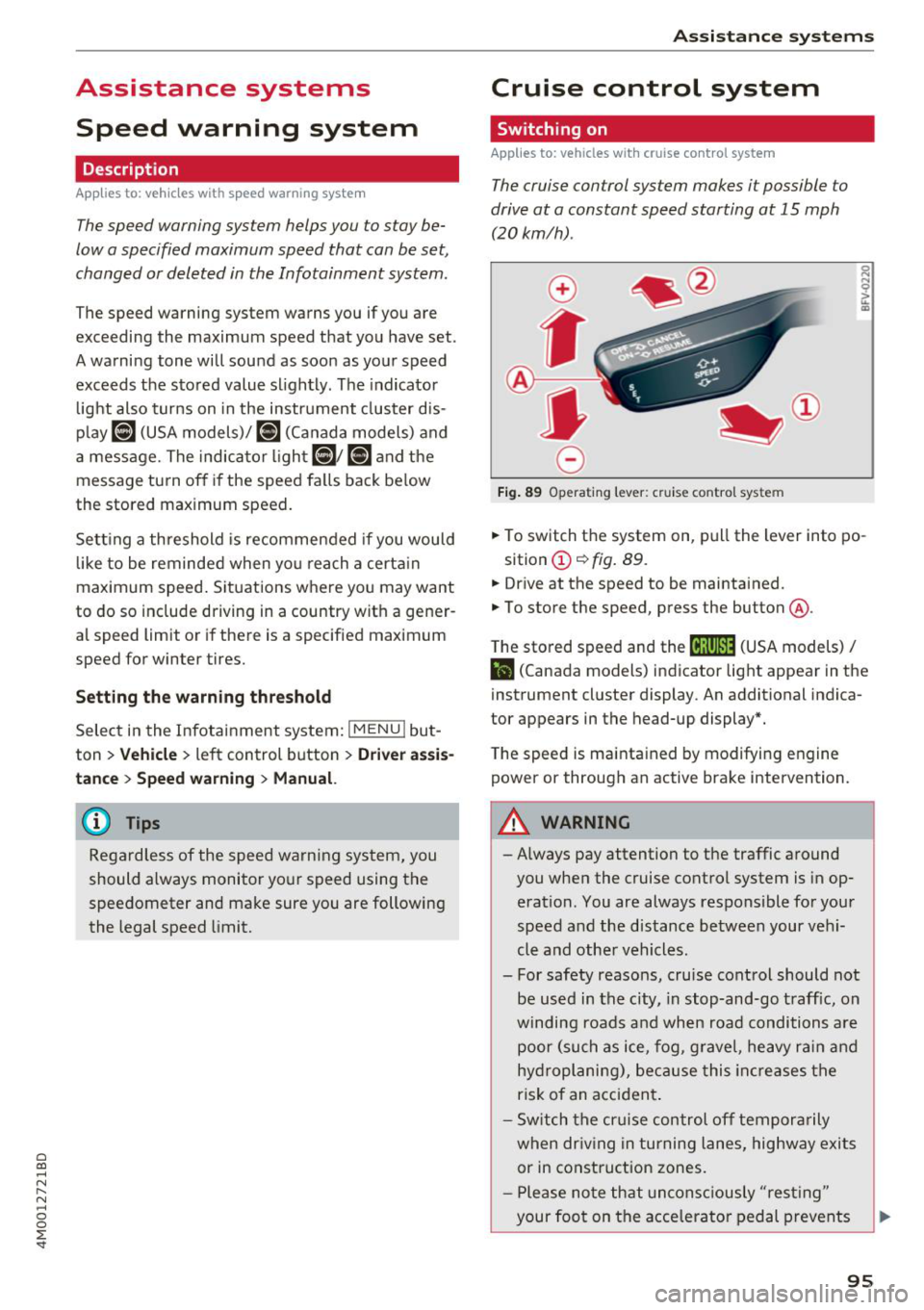
.,. To switch t he system on, pull the lever into po-
sition
(D ¢ fig. 89 .
.,. Drive at the speed to be maintained.
.,. To store the speed, press the button @.
T he stored speed and the
@jltJ~i, (USA models) /
l'I (Canada models) ind icator lig ht appear in the
instrument cluster display . An additional indica
tor appears in the head-up display*.
T he speed is mainta ined by modifyi ng engine
power or through an active brake intervention.
A WARNING
- Always pay attention to the traffic a round
you when the cruise control system is in op
eration . You are always responsible for you r
speed and the distance be tween your ve hi
cle and othe r vehicles .
- For safety reasons, cru ise cont rol should not
be used in the city, in stop -and-go t raff ic, on
winding roads a nd when road conditions a re
poor (su ch as ice, fog, g rave l, heavy ra in and
hy droplani ng), bec ause this in cr eases the
risk of an acciden t.
- S witch the cr uise con trol off tempor arily
when dr iv in g in turning lanes, highway exits
or in construction zones.
- P lease no te th at uncon sc iously "resting "
your foot on the accelerator ped al prevents
95
Page 101 of 398
Cl a:, ...... N
" N ...... 0
0
::r '
.,. On t he mult if u nct ion s teer ing whee l, tur n the
l e ft thumbw hee l
0 ~ page 12 unt il t he desired
menu item is displayed in the instrument cl us
ter .
.,. Press the left thumbwhee l to confirm the selec
t ion.
A WARNING
Your focus should always be on driving your
veh icle safely . As the dr ive r, yo u have com
plete responsib ility for safety in traffic. Only
use t he f unctions s uch as the lap time r in s uch
a way tha t you alw ays ma int ain com plete con
tr ol ove r your vehicle in all tra ffic s itu ations.
(D Tips
You ca n ret rieve information from the t rip
computer while t he lap t ime r stopwatch i s
r u nning.
Lap times and timing
Applies to: vehicles with lap timer
Requirement: the lap t imer must be o pen
~ page 98 .
Timing laps
.,. To start tim ing manually, se lect Start lap 1 in
the menu .
-
.,. To start tim ing a utomat ica lly as soon as you
begin to drive, select
Drive off to start lap 1 or
Start by driving off in the men u .
.,. To measure the lap t ime, select
New lap in the
menu. T his starts timing the next lap at the
same t ime.
After completing a lap, the difference between
the last lap and the previous best lap time w ill be
ind icated with a"-" or" +".
Pausing timing and displaying a split time
.,. To insert a pa use m , se lect Pau se in t he menu.
.,. To resume timing, se lect
Re sume in the men u .
.,. To display a split time, se lect
Split time in the
men u. The split t ime
[fw] appears for approxi
mately 10 seconds in the instrument cluste r.
The timing of the current lap continues.
A ss istance systems
Resetting timing
.,. Using the mul tifun cti on steer ing whee l, sele ct
Re set time s in the menu.
(D Tips
- A m axim um of 99 lap t imes can be meas
ure d.
- If tim ing is pa used, you can continue i t later
even if yo u swi tc h t he ign ition o ff.
- Saved lap ti mes ca nnot be indiv id ua lly de
le ted from the tot al results.
- Th e saved lap t ime r va lues w ill remain after
sw itching the ign ition off.
Lap statistics
Applies to: vehicles with lap timer
Displaying lap statistics
You can display the numbe r of laps dr iven, the
fas test lap" +", the slowes t lap" -", and the aver
age t ime "0" in the instr ument cluster .
.,. On the multifunc tion steering w heel, select the
left contro l bu tton
> Lap stati stic s o r Sta tis
tics .
.,. Turn the thumbwheel down o r up to display the
individual lap times .
.,. To return to t he lap timing that was begun,
press the left thumbwheel.
Resetting lap statistics
.,. On the mul tif unc tion stee ring w heel, selec t:
the right control button
> Reset statistics.
(D Tips
The lap st atis tic s lis t the lap t imes fo r th e l ast
3 0 l aps . The fastest and slowes t lap time o ut
of up to 99 meas ured laps are a lso d isplayed.
Predictive efficiency
assist
Introduction
T he predict ive e fficiency assist he lps the driver to
drive with anticipation and therefore helps to
save fuel. The system accesses p redictive t rip da -
ta (including speed limits, inclines and the radius
Iii"
99
Page 132 of 398
Assistance systems
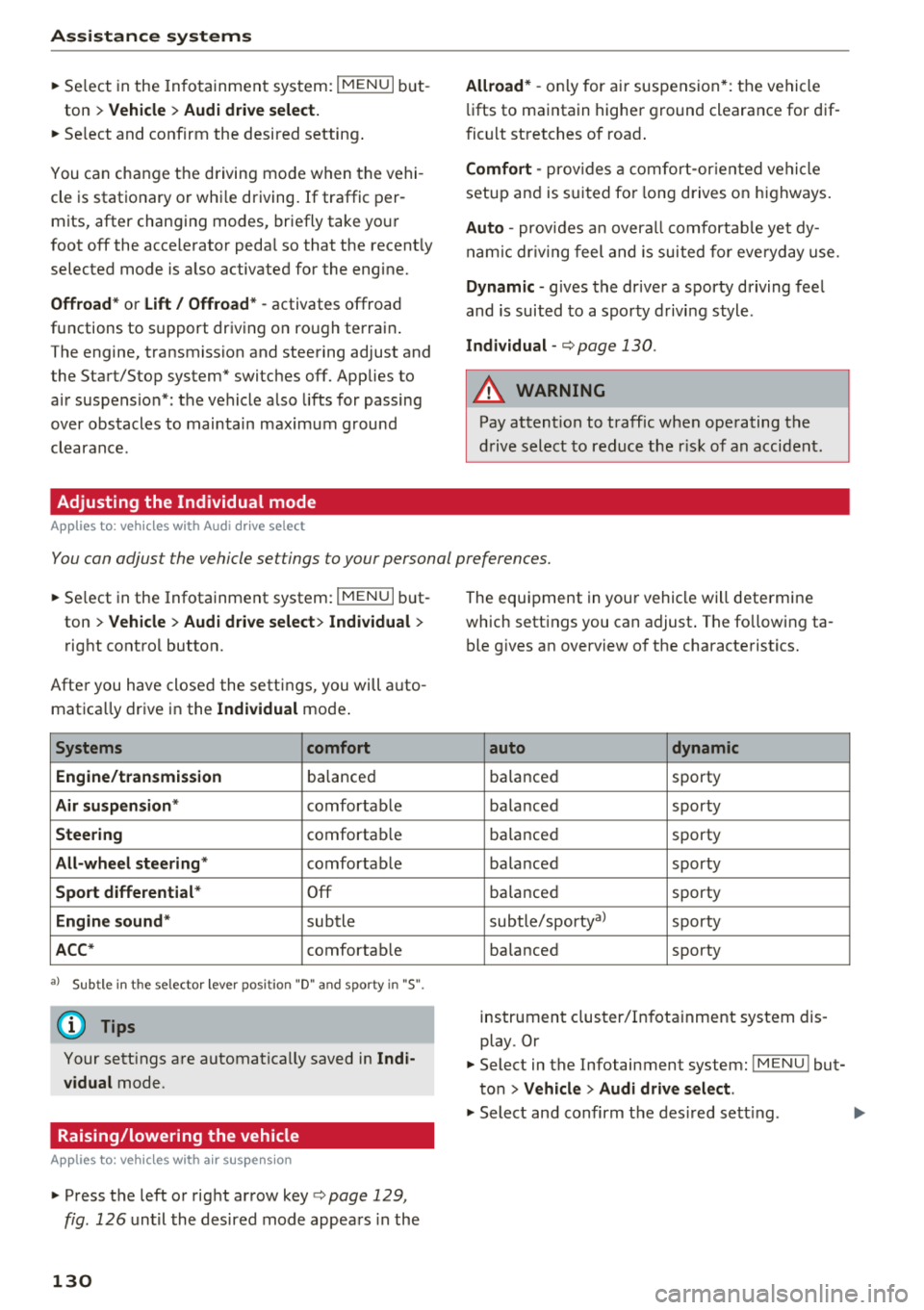
~ Select in the Infotainment system: IMENUI but-
ton
> Vehicle > Audi drive select.
~ Select and confirm the desired setting .
You can change the driving mode when the vehi
cle is stationary or whi le driving. If traffic per
mits, after changing modes, briefly take your
foot off the accelerator pedal so that the recent ly
selected mode is a lso activated for the engine.
Offroad * or Lift/ Offroad* -activates offroad
functions to support driving on rough terrain .
The engine, transmission and steering adjust and
the Start/Stop system* switches off. Applies to
air suspension*: the vehicle also lifts for passing
over obstacles to maintain maximum ground
clearance.
Adjusting the Individual mode
A pp lies to: ve hicles w ith Audi drive select
Allroad * -on ly for air suspension*: the vehicle
li fts to maintain higher ground clearance for dif
ficult stretches of road .
Comfort -provides a comfort-oriented vehicle
setup and is suited fo r long drives on highways.
Auto -provides an overa ll comfortable yet dy
namic driv in g feel and is suited for everyday use.
Dynamic -gives the driver a sporty driving feel
and is suited to a spo rty driving style.
Individual -c::;,page 130.
A WARNING
Pay attention to traffic when operating the
drive select to reduce the risk of an accident .
-
You can adjust the vehicle settings to your personal preferences.
~ Select in the Infotainment system: IMENU I but
ton
> Vehicle > Audi drive select > Individual >
right control button.
Afte r you have closed the settings, you will auto
matica lly drive in the
Individual mode .
Systems comfort
Engine/transmission
ba lanced
Air suspension * comfortable
Steering comfortable
All-wheel steering* comfortable
Sport differential * Off
Engine sound * subtle
ACC* comfortable
a l Sub tle in t he se lecto r lever posit ion "D" and sporty in "S".
(D Tips
Your settings are automatica lly saved in Indi
vidual
mode.
Raising/lowering the vehicle
A pp lies to: ve hicles w ith air susp en sion
~ Press the left or right arrow key c> page 129 ,
fig . 126
until the desired mode appears in the
130
The equipment in your vehicle will determine
which settings you can adjust . The fo llowing ta
ble gives an overview of the characteristics.
auto dynamic
ba
lanced sporty
balanced sporty
ba lanced sporty
ba la nced sporty
ba lanced sporty
subtle/sportyal sporty
ba lanced sporty
instrument cluster/Infotainment system dis
play. Or
~ Select in the Infotainment system: IMENU ! but
ton
> Vehicle > Audi drive select.
~ Select and confirm the desired setting .
Page 165 of 398
during an active ca ll. The call options de
pend on the cell phone and se rvice provide r.
You can obta in more information from your
ce ll phone service prov ider.
Navigation
Operation in the driver information system
Applies to: vehicles with multifunction steering wheel and
navigat ion system
Requirement: a destination must be entered
c::> pag e 204, rou te g uidance must be starte d and
the navigat ion tab mus t be d is pl ayed.
.,. Press t he left cont rol button on the mult ifunc -
t io n st eer ing whee l
c::>page 13.
Depending on vehicle equipment, the following
functions may be availab le in the driver in forma
tion syste m.
-Displaying nav igat ion during active route
guidance :
select and c onfirm Map or Street
view *
(analog instrument cluster).
- Showing the map when route guidance is not
active :
select and co nfirm Map .
- Access ing last destinations :
select and confirm
Last destinations > the desired destination .
-Access ing favorites : select and confirm Favor
ites >
the desired destination.
-Starting route guidance to the stored home
address :
select and confi rm Cancel route guid ·
ance
if necessary and then Home address .
If yo u have not starte d ro ute gui dance, a com
pass (in the analo g instr ument cluster) or a map
(Aud i virt ua l coc kp it)* will be disp layed.
- Canceling active route guidance : on the m ulti
function steering wheel, select: r ight control
button
> Cancel route guidance.
Additional settings
- Se lec t: rig ht c ontro l bu tton > desired entry .
Depending on t he f unction selected, the follow
in g addi tional sett ings may be poss ible:
a -Map display c::> page 214 co
~ -Map co lors c::> page 214 r--.
~ - Map orie ntation c::> page 21 4 0
~ -Au tom atic z oom c::> page 215
'
Nav igation view with route guidance
started
Applies to: vehicles with navigation system and Audi virtual
cockpit
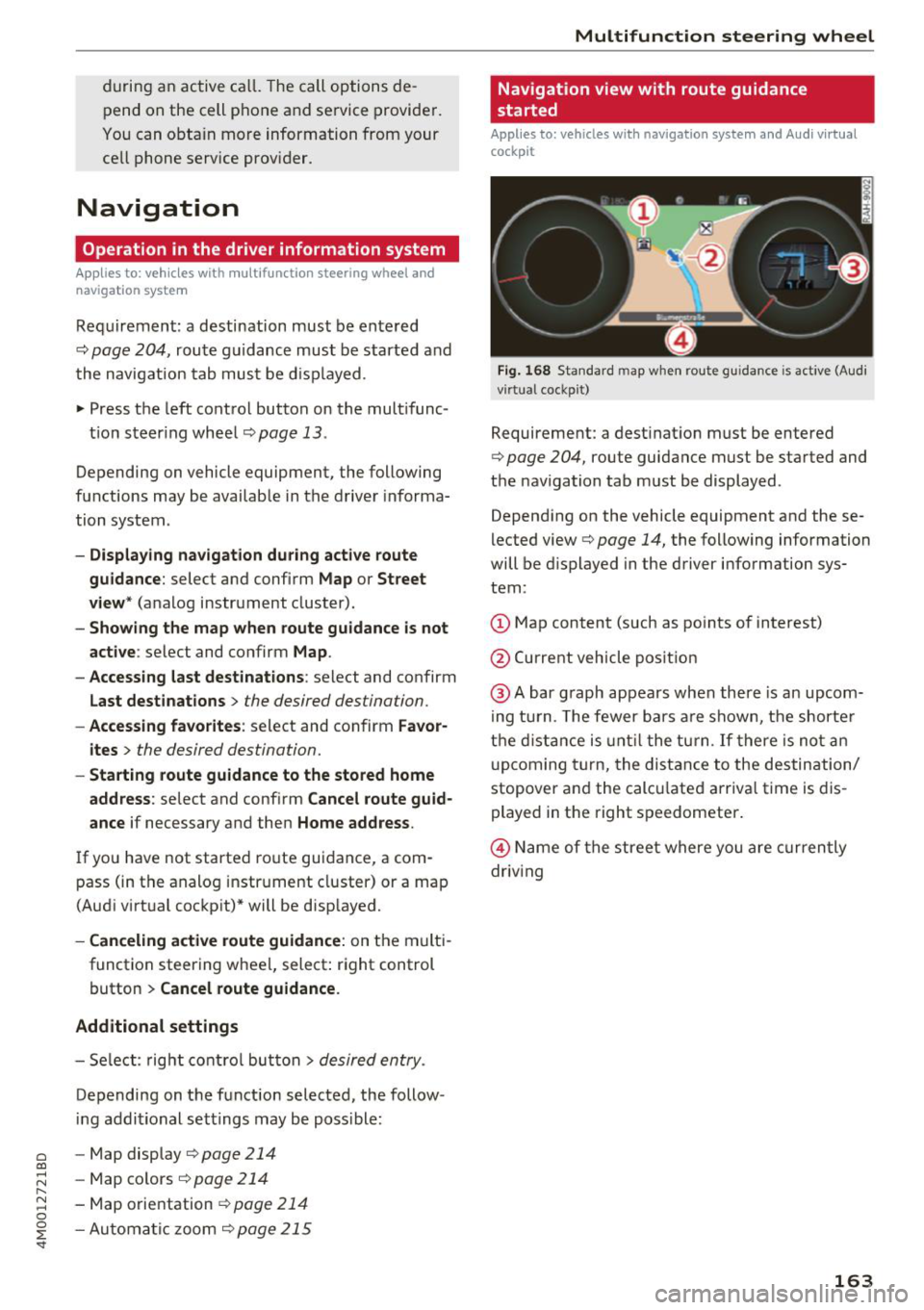
Fig. 168 Sta nda rd m ap whe n route gu idance is active (Audi
v ir tual coc kp it)
Requirement: a dest inat ion must be entered
c::> poge 204, route guidance must be sta rted and
the navigation tab m ust be displayed .
Depend ing on the vehicle equipment and these
l ected view
c::> page 14, the following information
will be d isplayed in the driver information sys
tem:
(D Map content (such as po ints of interest)
@ Current vehicle pos it ion
@ Abar g raph appears when ther e is an upcom
i ng tur n. T he fewer b ars a re s how n, th e shor te r
t h e di sta nce is until t he t urn.
If there is no t an
upc oming turn, the dis ta nce to the des tin ation/
stopover and the calc ulate d arriva l t ime is dis
played in t he right s peedometer .
@ Name of the street where you are curren tly
driv ing
163
Page 207 of 398
Cl a:, ...... N
" N ...... 0
0
::r '
field.
- Ent ering a d estination u sin g th e Ci ty/ ZIP
c o de :
select and confirm Cit y/ZIP. Enter a city
or a ZIP code .
Or: select and confirm a city from
the list.
- Se lect and confirm additional detai ls about the
destination such as
Street , House number or
Dow nto wn.
- Destination ent ry using a st reet inter se ction* :
Requirement: you must enter a street. Se lect
and confirm
Inte rsection . Select and confirm a
street d irectly from the list.
Or : search for a
street using the input field .
- Se lect and confirm
Start ro ut e guidance .
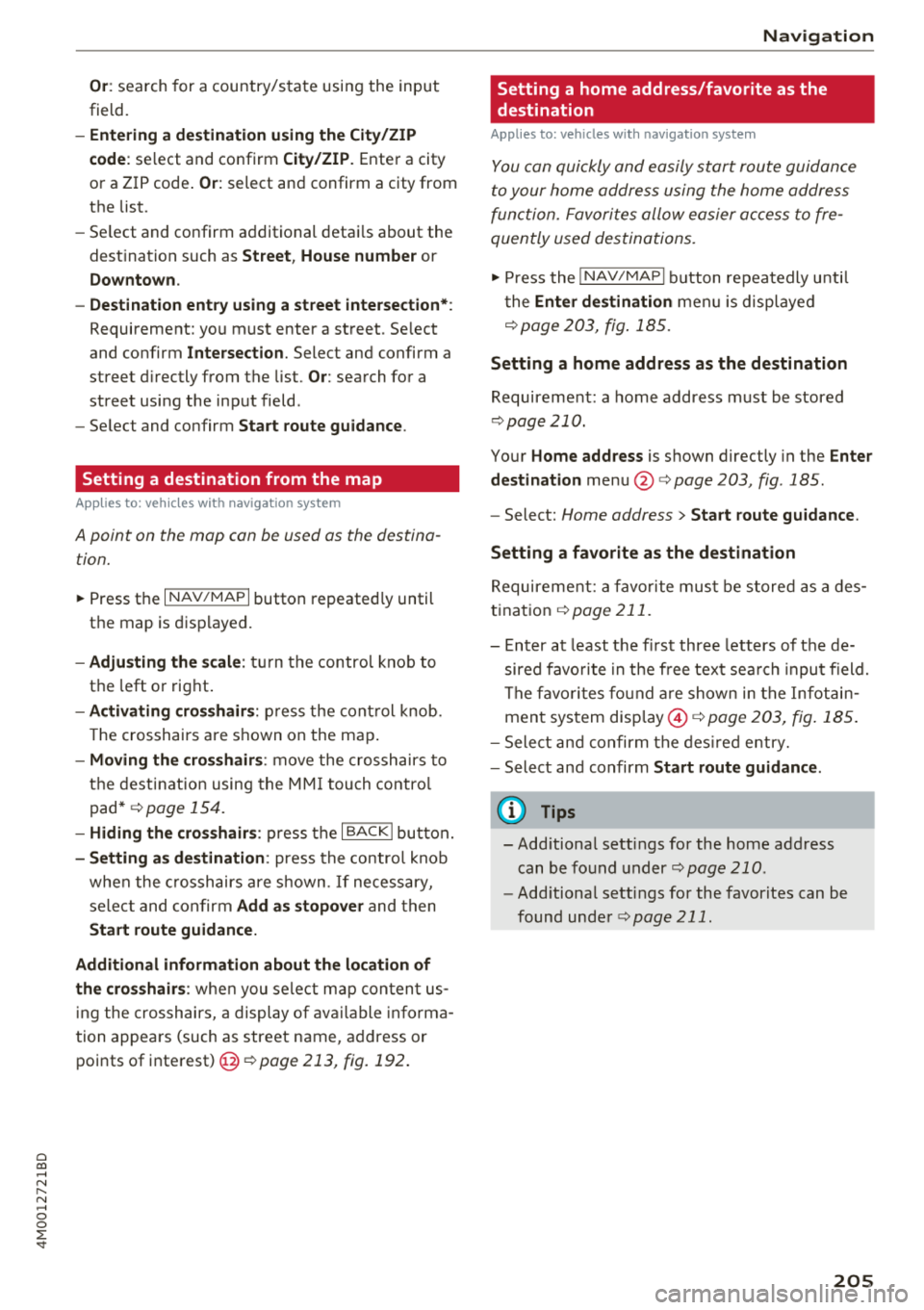
Setting a destination from the map
Applies to: vehicles with navigation system
A point on the map can be used as the destina
tion.
~ Press the I NAV/MAPI button repeated ly until
the map is disp layed.
- Adju sting the scale : tu rn the control knob to
the left or right .
-Activating cross hair s: press the cont rol knob.
T he crosshai rs are shown on the map .
-Movin g the cro sshair s: move the crosshairs to
the destination using the MM I touch contro l
pad*
¢ page 154.
- Hiding the cro sshair s: press the I BACKI bu tton.
- Setting a s de stination : press the control knob
when the c rosshairs are s hown . If necessary,
select and confirm
Add as stopover and then
Start route guidance.
Additional information about th e loc ation of
the cro sshair s:
whe n you select map content us
i ng the crosshairs, a display o f ava ilable informa
tion appears (such as street name, address or points of interest) @r::>page
213, fig. 192 .
Navigation
Setting a home address/favorite as the
destination
Applies to: vehicles with navigation system
You can quickly and easily start route guidance
to your home address using the home address
function. Favorites allow easier ac cess to fre
quently used destinations.
~ Press the I NAV/MAPI button repeatedly u nti l
t he
En ter d estination men u is displayed
¢page 203, fig.185 .
Setting a home address as the destination
Requirement: a home address must be stored
r::> page 210.
Your Home address is shown directly in the Ente r
d estination
menu @¢page 203, fig . 185 .
-Select: Home address > Sta rt route g uidance .
Setting a favorit e as the destination
Requirement: a favo rite mus t be s tored as a des
tination
¢ page 211.
-Enter at least the fi rst three letters of the de
sired favo rite in the free text sea rch inpu t field.
The favo rites fo und a re shown in the Infotain
ment system display @ ¢
page 203, fig. 185 .
-Select and co nfirm the des ired entry.
- Select and confirm
St art route guidance.
(D Tips
- Add itiona l settings for the home address
can be fo und
under ¢page210 .
-Add itiona l setti ngs for the favorites can be
found unde r
¢page 211.
205
Page 208 of 398
Navigat ion
Transferring a destination from the
directory
A pp lies to: ve hicles w ith naviga tion system
You can navigat e directly to d estinations in th e
directory.
Option•, • ~.,how co11t.Ht dl't.1il•,
0
,;== Jo;i hn Smith
~ :- Audi Beverly Hills
~ ,. Hawthorn Ave, Los Angeles, CA
&=9 t<;'l, Wilshire B lvd, Beverly Hills, CA
t
9,~
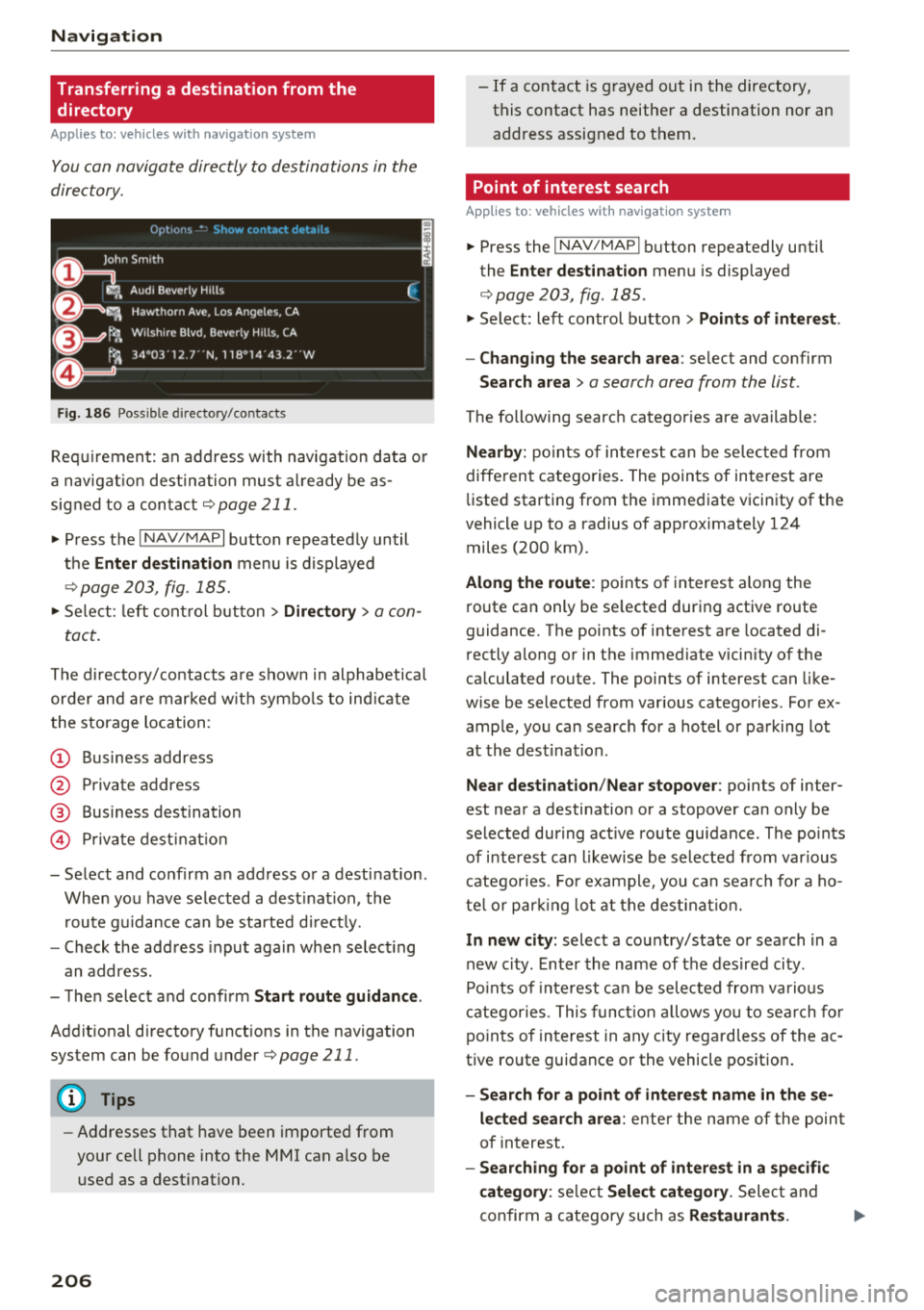
Fig . 186 Possible directory/contacts
(,
~
~
Requirement: an address with navigat ion data o r
a nav igat io n destination must a lready be as
signed to a conta ct
¢ page 211.
i. Press the I NAV/MAPI button repeatedly until
t h e
Enter de stination menu is displayed
¢ page 203, fig . 185.
i. Se lect: left con trol button > Director y > a con-
tact.
The d irectory/contacts a re shown in alphabetical
order and are marked w it h symbo ls to ind ic a te
the storage location:
(D Business address
@ Private address
@ Business dest ination
© Pr ivate dest inat io n
- Select and confirm a n address or a destination.
When you have se lected a dest inat ion, the
r oute g uidance can be started d irect ly.
- Check the address input aga in whe n select ing
an address.
- The n select and confirm
Start rout e guid ance .
Addit iona l directory functions in the navigation
system can be found under¢
page 211.
(D Tips
-Addresses that have been imported from
your cell phone into the MMI can a lso be
used as a dest ination.
206
- If a contact is g rayed out in the directory,
this contact has neither a destination nor an address assigned to them.
Point of interest search
App lies to : vehicles wit h navigat ion syste m
i. Press the I NAV/MAPI button repeatedly until
the
Enter des tinat ion me nu is displayed
¢page 203, fig . 185 .
.. Select: left control button > Points of intere st.
- Changing the search area :
select and confirm
Search area > a search area from the list .
The following search categor ies are available:
Nearby : poin ts of in teres t can be se lec ted from
diffe rent categories. The points of interest are
li sted starting from the immediate vicinity of the
vehicle up to a radius of approximately 124
miles (200 km).
Along the route : points o f interest a long the
route can only be se lected during active route
guidance. The points of interest are located di
rectly a long or in the immediate vicin ity of the
ca lculated route. The points of interest can like
wise be selected from various categories . For ex
ample, you can searc h for a hotel or parking lot
at the dest inat ion .
Near destination /Near stopo ver : points of inter
est near a destination or a stopover can only be
selected dur ing act ive route guidance. The po ints
of i nterest can likewise be selected from var ious
catego ries. Fo r example, you can sea rch fo r a ho
te l o r par king lo t a t the dest inat io n .
In new city: select a cou ntry/state or sea rch in a
new city . Enter the name of the des ired city .
Po ints o f inte rest ca n be selected from va rio us
c a tego ries. This funct ion a llows yo u to se arch fo r
po ints of in terest in any city rega rd less of the a c
tive ro ute guidance or the vehicle position.
- Search for a point of intere st name in the se
l ec ted search ar ea :
ente r the name of the poin t
o f in terest.
- Searching for a point of interest in a specific
category :
select Sel ect category . Select and
confirm a category such as
Re staurant s. .,.
Page 210 of 398
Navigation
.,. Se lect: left control button > Geographical coor
dinates .
-Select Latitude /Longitude.
- Press the control knob to set t he in dividua l val-
u es.
- T urn the cont rol knob to the left/r ight to
c h ange the selected value .
- Select and confirm
Start route guidance .
Adding a stopover
Applies to: vehicles with navigation system
You can enter an additional destination when
route guidance is active .
_________ N_a_ v_ ,_g _a _t _,o _n_ . _F _n _t _e _, _d _e_ ,_1 _, n_ a _ t,_o _n ________ ~~
jl1 Bear Va lley Rd 79 9 m;
' HC'spcria. CA, 92345 1:22 AM
J Cance l route g~1dance ::0 -·-·-·
.JI' Elias Thomas Snack Bar
' 111 N Hill St, Los Angeles, CA
Delete stopover ====~lfJ
250yd
6:05 AM
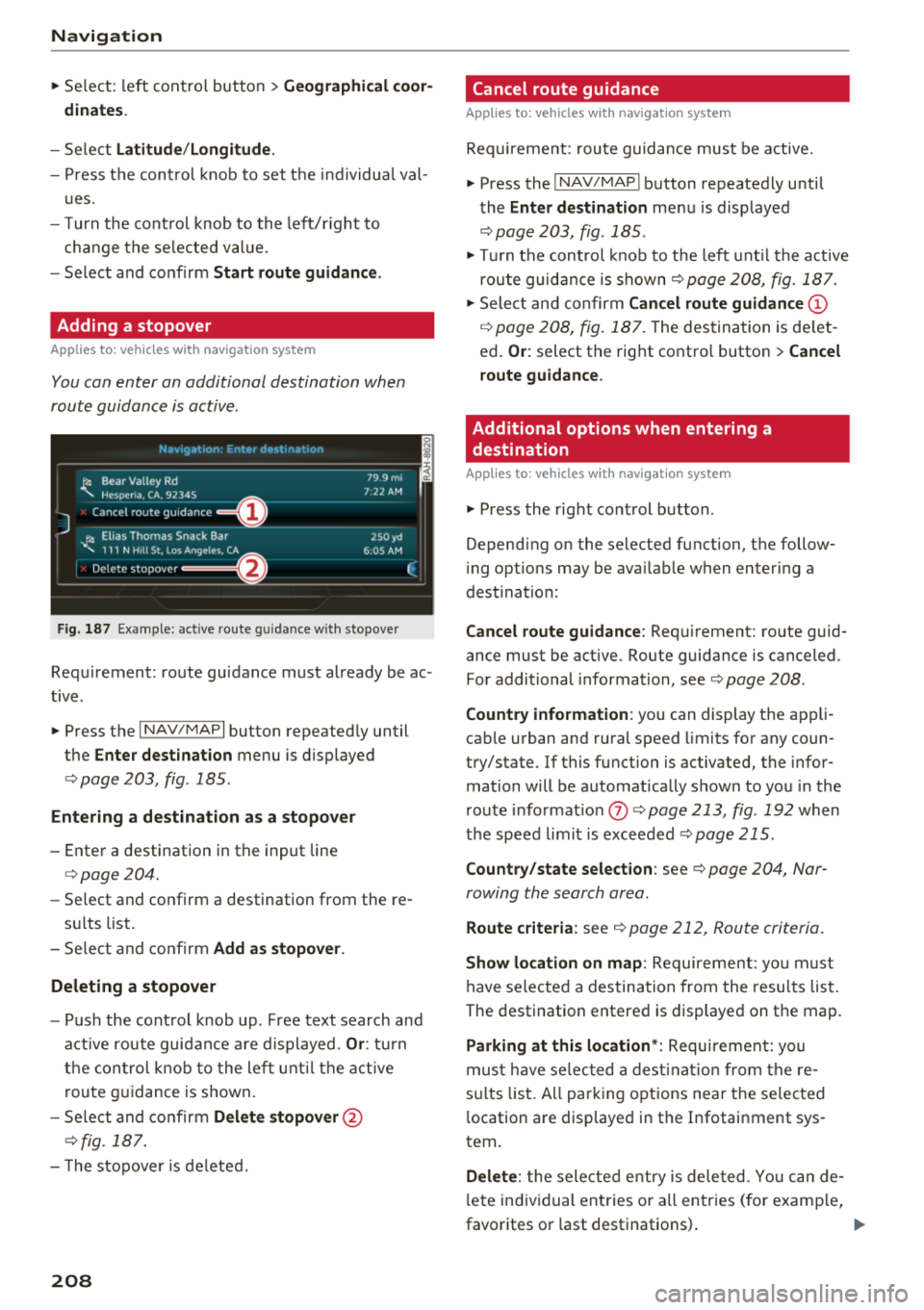
Fig . 187 Example: active route g uida nce w ith stopover
Requirement: route guidance must already be ac
tive .
.,. Press the
I NAV/MAPI button repeatedly until
the
Enter destination menu is displayed
¢ page 203, fig . 185 .
Entering a destination as a stopover
-Enter a destination in the input line
¢page 204.
-Se lect and confirm a destination from the re -
s ul ts list .
- Select and confirm
Add as stopover.
Deleting a stopover
- Push the cont rol knob up . Free text search and
active route guidance are displayed.
Or: turn
the control knob to the left until the active
route guidance is shown.
- Select and confirm
Delete stopover @
¢fig. 187.
- The stopove r is deleted.
208
Cancel route guidance
Applies to: vehicles with navigation system
Requirement: route guidance must be active.
.,. Press the
I NAV/MAPI button repeatedly until
the
Enter destination menu is displayed
¢ page 203, fig. 185 .
.,. Turn the control knob to the left until the active
route guidance is shown¢
page 208, fig. 187 .
.,. Select and confirm Cancel route guidance (D
¢ page 208, fig. 187. The destination is de let
ed.
Or : select the right contro l button > Cancel
route guidance .
Additional options when entering a
destination
Applies to: vehicles with navigation system
.,. Press the right control button .
Depend ing on the selected function, the follow
i ng opt ions may be avai lable when entering a
dest ination:
Cancel route guidance: Requirement: route guid
ance must be active. Route guidance is canceled.
For additional information, see¢ page 208 .
Country information : you can display the app li
cab le urban and rural speed limits for any coun
try/state. If this function is activated, the infor
mation will be automatically shown to you in the
route informat ion
(J) ¢ page 213, fig . 192 when
the speed limit is exceeded
¢page 215.
Country/state selection: see¢ page 204, Nar
rowing the search area .
Route criteria: see¢ page 212, Route criteria .
Show location on map: Requirement: you m ust
have selected a destination from the results list.
The destination entered is displayed on the map .
Parking at this location*: Requirement: you
must have se lected a destination from the re
su lts list . A ll parking options near the selected
l ocation are displayed in the Infotainment sys
tem.
Delete: t he selected entry is deleted. You can de
l ete individual entries or a ll entries (for examp le,
favorites or last destinations) .
...
Page 211 of 398
a co ...... N r--. N ...... 0
0
:E '
must have selected a destination from the re
sults list . Allows yo u to search for items in the vi
cinity of the selected location, such as
Travel in
formation.
Online traffic data* :
the on line traffic informa
tion
r::;, page 219 can be switched on or off .
Add destination to contact : see r::;, page 211.
Store as favorite : see r::;, page 211.
Voice guidance : see r::;,page 212.
Navigation settings: seer::;, page 211.
(D Tips
Information on online traffic data* can also
be found online at www.audiusa.com.
Personal route
assistance
Applies to: vehicles with navigation system and personal
route assistance
Your MMI con learn the routes you drive fre
quently and, depending on the current vehicle
position, suggest route guidance (for example,
your doily commute to work and back).
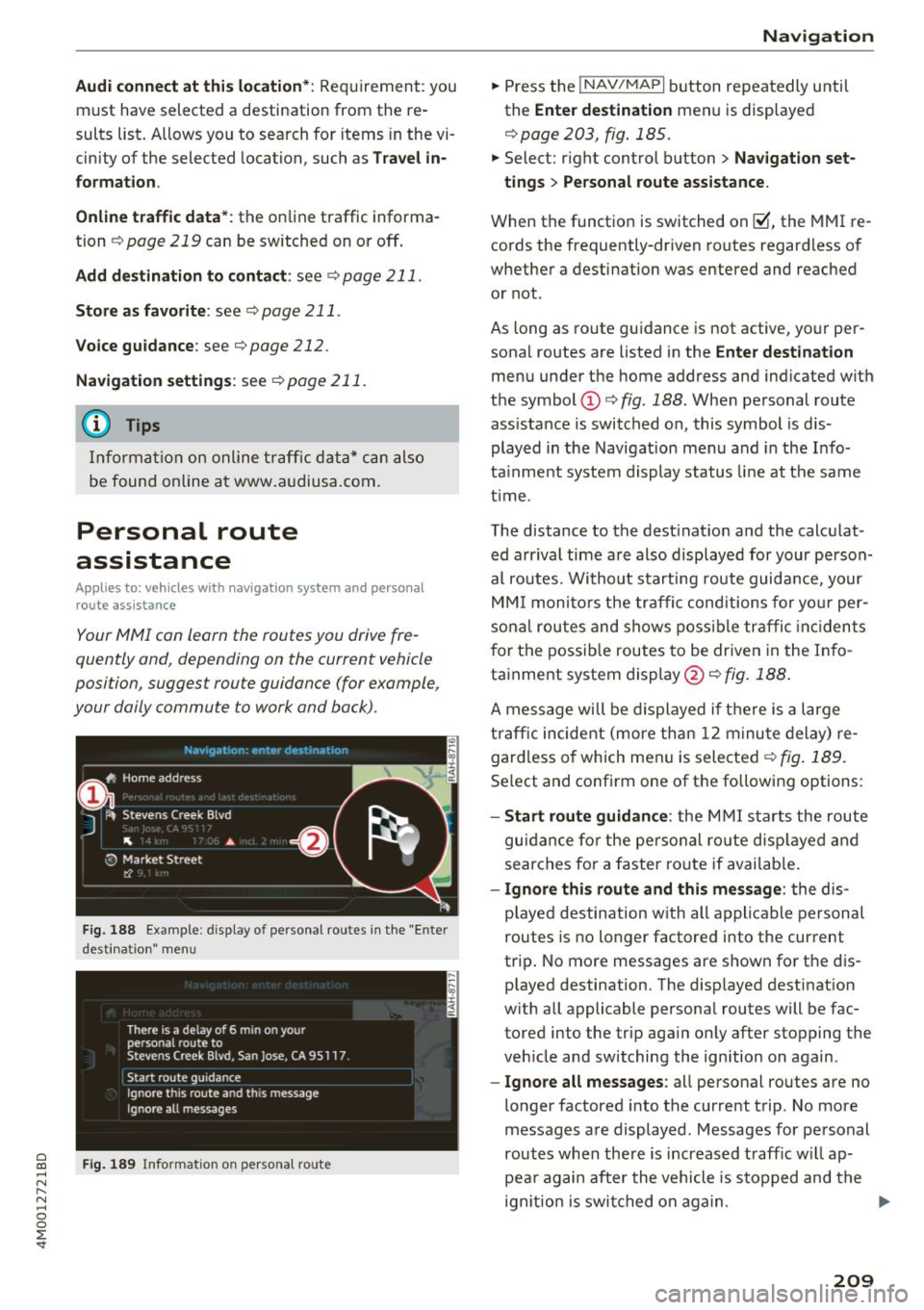
Fig. 188 Example : d isplay of personal routes in the "Enter
desti natio n" me nu
Fig. 189 Info rmation on perso nal route
Navigation
"Press the !NAV/MAPI button repeatedly until
the
Enter destination menu is displayed
r::;, page 203, fig . 185.
" Select: right control button > Navigation set-
tings > Personal route assistance.
When the function is switched on~. the MMI re
cords the frequently-driven routes regardless of
whether a destination was entered and reached
or not.
As long as route guidance is not active, your per
sonal routes are listed in the
Enter destination
menu under the home address and indicated with
the symbol
(D r::;, fig. 188. When personal route
ass istance is switched on, this symbol is dis
played in the Navigation menu and in the Info
tainment system display status line at the same
time .
The distance to the destination and the calculat
ed arrival time are also displayed for your person
al routes. Without starting route guidance, your
MMI monitors the traffic conditions for your per
sonal routes and shows possible traffic incidents
for the possible routes to be driven in the Info
tainment system display@r::;,
fig. 188.
A message will be displayed if there is a large
traffic incident (more than 12 minute delay) re
gardless of which men u is selected
r::;, fig . 189.
Select and confirm one of the following options:
-Start route guidance : the MMI starts the route
guidance for the personal ro ut e displayed and
searches for a faster route if available.
- Ignore this route and this message : the dis
played destination w ith all applicable personal
routes is no longer factored into the cur rent
trip . No more messages are shown for the dis
played destination. The disp layed destination
with all applicable personal routes will be fac
tored into the trip aga in only after stopping the
veh icle and switching the ign ition on again .
-Ignore all messages : all personal routes are no
longer factored into the current trip. No more
messages are displayed. Messages for personal
routes when there is increased traff ic w ill ap
pea r again after the vehicle is stopped and the
ign ition is switched on again . .,.
209