warning AUDI Q7 2018 Owner´s Manual
[x] Cancel search | Manufacturer: AUDI, Model Year: 2018, Model line: Q7, Model: AUDI Q7 2018Pages: 398, PDF Size: 185.58 MB
Page 31 of 398
Opening and closing
Central locking
Description
You can lock and un lock the veh icle centrally . You
h ave the following options:
- Remote control key
c> page 32,
-Sensors in the door hand les* c> page 32,
- Lock cylinder on the driver's door c:> page 34,
or
- Interior central locking switch
c:> page 33.
Turn signals
The turn s ignals flas h tw ice when yo u unloc k the
ve hicl e and flash once when you lock the veh icle.
If they do not flas h, then one of the doors, the
l uggage compartment lid or the hood is not
closed.
Automatic locking (Auto Lock )
The Auto Lock f unct io n loc ks all doors and the
l uggage compartment lid on ce the speed has ex
ceeded approximately 9 mph (15 km/ h).
The vehicle ca n be un loc ked if the open ing f unc
tion in t he centra l lock ing system sw itch is used
or one of the door handles is pulled.
I n t he event of a crash with a irbag deployment,
the doo rs will a lso automat ica lly unloc k to allow
access to t he ve hicle.
Selective door unlocking
The doors and luggage compartment lid w ill lock
when they close . You can set in the Infotainment
system whether
only the driver's door or the en
tire ve hicle should be unlocked w hen unlocking
c:>page 34.
Unintentionally locking yourself out
Only lock your veh icle when all of the doors and
the luggage compa rtme nt lid a re closed and the
r emote control key is not in the vehicle. This
h e lps to p revent yo u from locking yourse lf out
o a ccident ally. a:, ......
~ The follow ing cond it io ns prevent you from lock-
"' 8 in g your remote contro l key in the veh icle: 0 ::r '
-If the driver's door is open, the vehi cle cannot
be locked by pressing the
l'.D button on the re
mote contro l key o r by touching the locking
sensor* on a door.
- If the most recently used convenience key* is
detected in the luggage compartment, the lug
gage compartment lid automatica lly unlocks
aga in after closing it.
- If the convenience key* that was last used is de
tected ins ide the veh icle, then the vehicle can
not be locked from the outside .
Closing aid on the do ors *
T he vehicle doors a re equipped with closing aids.
When closing a door, yo u on ly have to let it fall
li ghtly into the latch. It then closes automatically
¢ ,&. .
A WARNING
-
-If you leave the vehicle, sw itch the ignition
off and take the veh icle key with you . This
applies pa rtic ula rly when children remain in
the vehicle. Ot herwise, ch ildren cou ld start
the engine or opera te e lectr ical equipme nt
(such as power w indows), which increases
the risk of an accident.
- No one, especi ally children, should stay in
the vehicle when it is locked from the out
side, because the windows can no longer be
opened from the inside
c:> page 35. Locked
doors make it more diffic ult for eme rgency
workers to get into the vehicle, which puts
lives at risk .
A WARNING
Applies to: vehicles with closing aids on the doors
-To reduce the r is k of injury, m ake sure that
the area where the d oor is closing is cle ar
du ring the closing process.
- Th e closing process ca n be stopped at any
time by pulling on the ou ter or inne r door
handle.
(D Tips
- Do not leave valuables unattended in the ve-
hicle. A lo cked ve hicl e is not a sa fe! ..,
29
Page 32 of 398
Opening and closing
-The LED in the driver's door rail blinks when
you lock the vehicle . If the LED lights up for
approximately 30 seconds after locking,
there is a malfunction in the central locking
system. Have the problem corrected by an
authorized Audi dealer or authorized Audi
Service Fac ility.
Key set
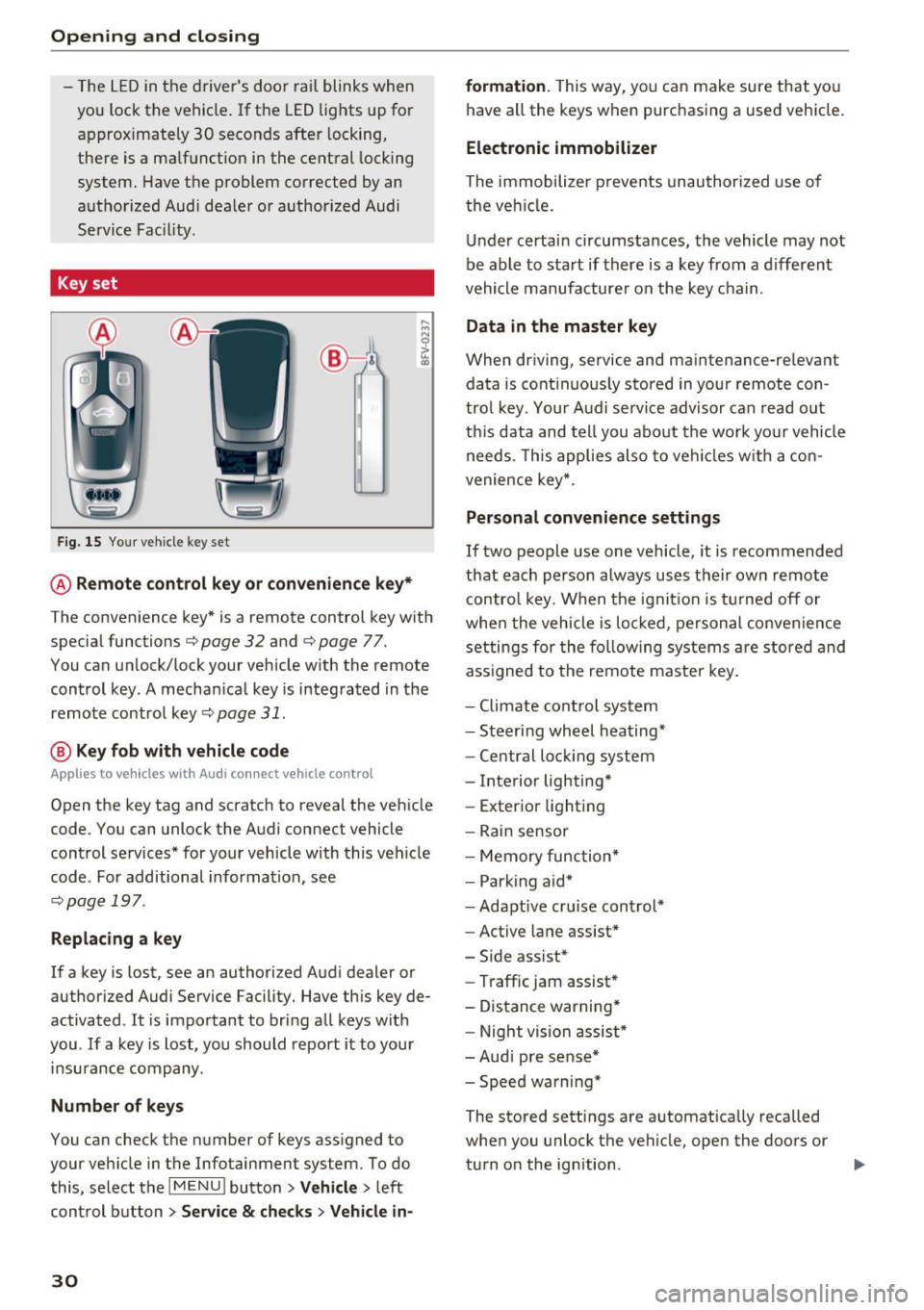
Fig . 15 Your vehicle key set
@ Remote control key or convenience key*
The convenience key* is a remote control key with
special functions
c:> page 32 and c:> page 77.
You can unlock/lock your vehicle with the remote
control key. A mechan ical key is integrated in the
remote control key
c:> page 31.
@ Key fob with vehicle code
Applies to vehicles with Audi connect vehicle control
Open the key tag and scratch to reveal the vehicle
code. You can unlock the Audi connect vehicle
control services* for your vehicle with this vehicle
code . For additional information, see
c:> page 19 7 .
Replacing a key
If a key is lost, see an authorized Audi dealer or
author ized Audi Service Facility. Have this key de
activated . It is important to bring all keys wit h
you . If a key is lost, you should report it to your
insu rance company .
Number of keys
You can check the number of keys ass igned to
your vehicle in the Infotainment system. To do this, select the
I MENU ! button> Vehicle> left
control button >
Service & checks > Vehicle in-
30
formation . This way, you can make sure that you
have all the keys when purchasing a used vehicle.
Electronic immobilizer
The immobilizer p revents unauthorized use of
the vehicl e.
Under certain circumstances, the vehicle may not
be able to start if there is a key from a different
vehicle manufacturer on the key chain .
Data in the master key
When driving, service and maintenance-relevant
data is cont inuous ly stored in your remote con
trol key. Your Audi se rvice advisor can read out
th is data and tell you about the work your vehicle
needs . T his applies also to veh icles w ith a con
venience key*.
Personal convenience settings
If two people use one vehicle, it is recommended
that each person always uses their own remote
control key. When the ignition is turned off or
when the vehicle is locked, pe rsonal convenience
settings for the following systems are stored and
ass igned to the remote master key.
- Climate cont rol system
- Steeri ng wheel heating*
- Central lock ing system
- Interior lighting*
- Exter ior lighting
- Rain sensor
- Memory function*
- Park ing aid*
- Adapt ive cru ise control*
- Active lane assist*
- Side assist*
- Traffic jam assist*
- Distance warning*
- Night vision assist*
- Audi pre sense*
- Speed warning*
The stored settings are automatically recalled
when you unlock the vehicle, open the doors or
turn o n the ignition . .,..
Page 34 of 398
Opening and closing
,.. Slide the battery holder carefully into the re
mote control key .
,.. Insert the mechanica l key.
@ For the sake of the environment
Discharged batteries must be disposed of us
ing methods that will not harm the environ
ment. Do not dispose of them in household
trash.
@ Tips
The replacement battery must meet the same
specifications as the original battery in the re
mote control key.
Unlocking /locking by remote control
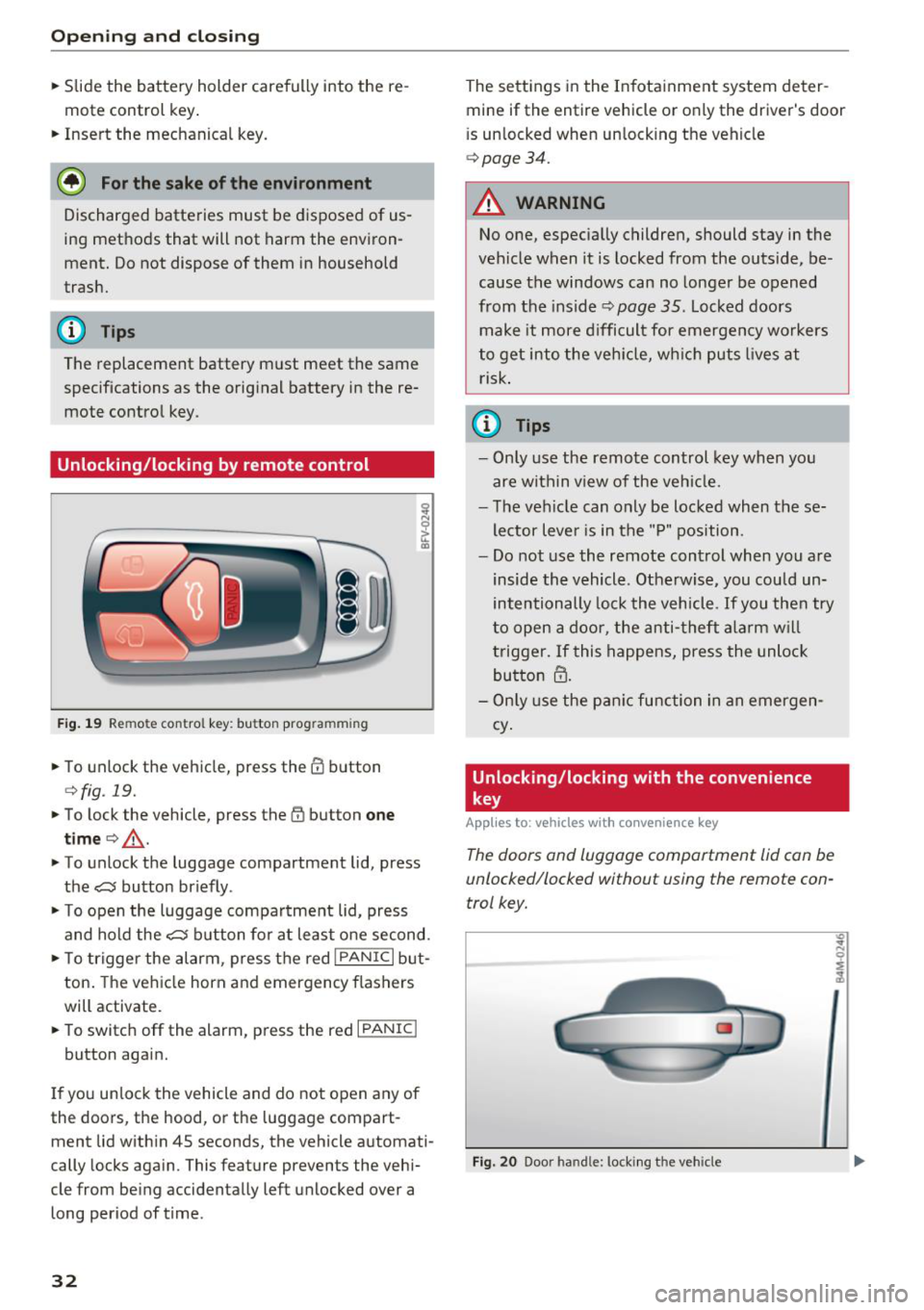
F ig . 19 Remote control key: button prog ramming
,.. To unlock the vehicle, press the CD button
¢fig . 19.
,.. To lock the vehicle, press the (I) button one
time
c> _& .
,.. To unlock the luggage compartment lid, press
the~ button briefly .
,.. To open the luggage compartment lid, press
and hold the~ button for at least one second.
,.. To trigger the alarm , press the red
I PANIC I but
ton. The vehicle horn and emergency flashers
will activate.
,.. To switch off the alarm, press the red
I PANIC I
button again.
If you unlock the vehicle and do not open any of
the doors, the hood, or the luggage compart
ment lid within 4S seconds, the vehicle automati
cally locks again. This feature prevents the vehi
cle from being accidentally left unlocked over a
long period of time.
32
The settings in the Infotainment system deter
mine if the entire vehicle or only the driver's door
i s unlocked when unlocking the vehicle
c> page34.
A WARNING
No one, especially children, should stay in the
vehicle when it is locked from the outside, be
cause the windows can no longer be opened
from the inside
c> page 35. Locked doors
make it more difficult for emergency workers
to get into the vehicle, wh ich puts lives at
risk.
(D Tips
- Only use the remote control key when you
are within v iew of the vehicle.
- The vehicle can only be locked when these
lector lever is in the "P" position .
- Do not use the remote control when you are
inside the vehicle . Otherwise, you could un
intentionally lock the vehicle. If you then try
to open a door, the anti-theft alarm will
trigger. If this happens, press the unlock
button
m.
- Only use the panic function in an emergen
cy .
Unlocking /locking with the convenience
key
App lies to: vehicles with co nvenience key
The doors and luggage compartment lid can be
unlocked/locked without using the remote con
trol key.
Fig. 20 Door handle: locki ng t he veh icle
"' .. N 0 :;
:1,
Page 35 of 398
a co ...... N r--. N ...... 0
0
:E '
.,. Grip the door handle . The door unlocks auto-
matically.
... Pull on the door handle to open the door.
Locking the v ehicl e
.,. Se lect the "P" position. The vehicle cannot be
locked if "P" is not se lected .
.,. To lock the veh icle, close the door and touch
the sensor in the door hand le
once c:> fig. 20 . Do
not hold the door handl e while doing this .
You can u nlock/lock the vehicle at eve ry door.
The remote cont rol key cannot be more than ap
proximately 4 f eet (1.S m) away from the door
handle. It makes no difference whether the mas
ter key is in you r jacket pocket or in your brief
case, for example .
If you hold the door handle while locking, this
can impair th e lock ing funct ion.
The door ca nnot be opened for a br ief per iod di
rect ly after locking it. Th is way you have the op
portunity to check if the doors locked correctly.
The settings in the Infotainment system deter mine i f the entire vehicle or only one of the doors
is unlocked when unlocking the vehicle
c:> page34 .
_& WARNING
Read and following all WARNINGS<=>&. in De
scription on page
29.
(D Tips
I f your vehicle is left standing fo r a long peri
od of time, note the following:
- The energy management system gradually
turns off unnecessary convenience functions
to prevent the vehicle battery from draining
and to maintain the vehicle 's abi lity to start
for as long as possib le. You may not be able
to unlock your vehicle us ing the convenience
key .
Op eni ng and clos ing
(D Tips
Unlocking with the convenience key (keyless
access) can be deactivated in the Infotain-
ment system
<=> page 34.
Central locking switch
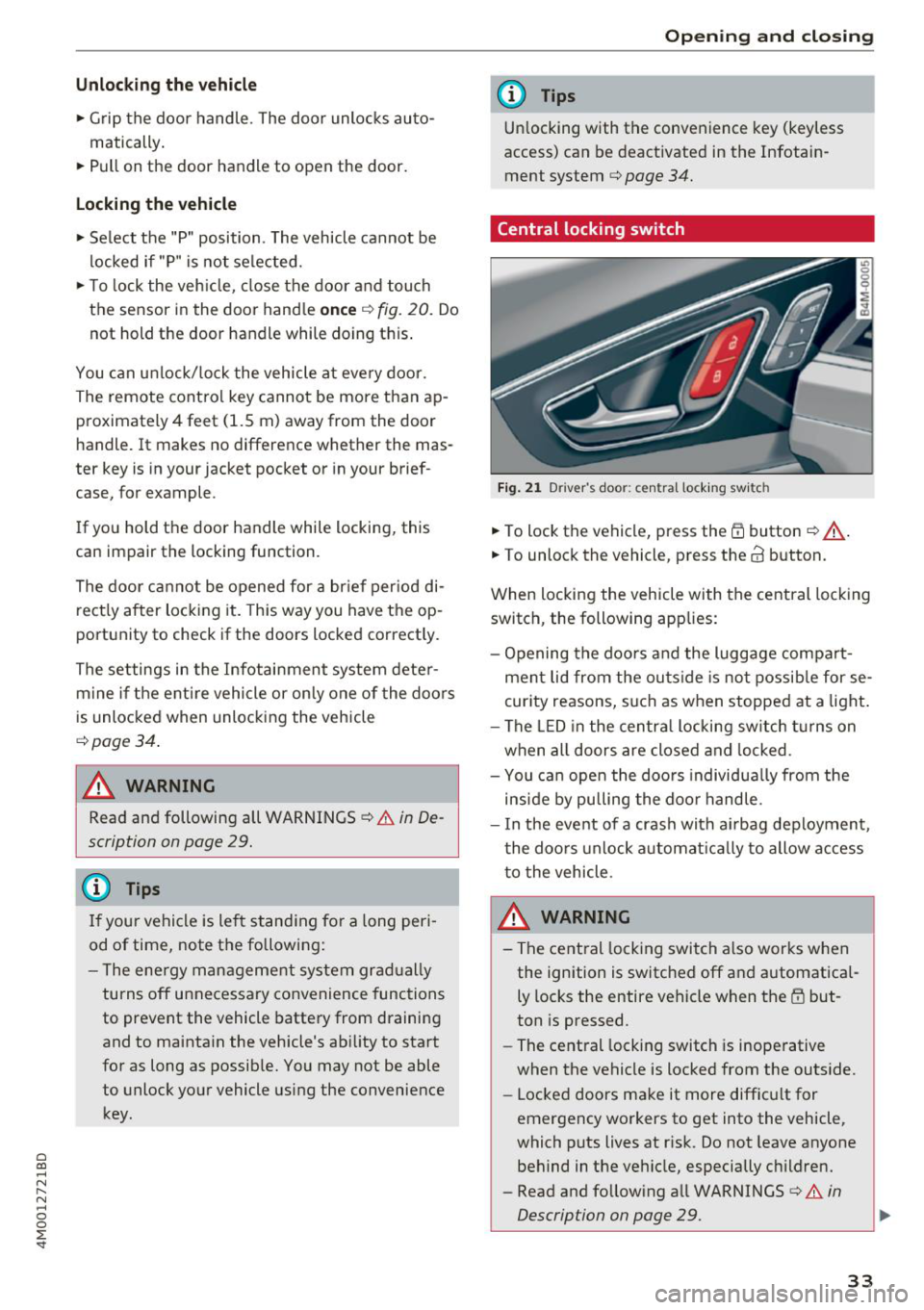
Fig . 2 1 D rive r's doo r: centra l lock ing swi tc h
... To lock the vehicle, press the Efi button <=> A-
.. To unlock th e vehicl e, pr ess the @ button.
When locking the vehicle with the central locking switch , the following app lies:
- Opening the doors and the luggage compart ment lid from the outside is no t possib le for se
curity reasons, such as when stopped at a light .
- The LED in the centra l locking sw itch turns on
when all doors are closed and locked .
- You ca n open the doo rs individua lly from the
inside by pulling the doo r handle .
- I n the event of a crash with ai rbag deployment ,
the doo rs unlock a utoma tically to allow access
to the vehicle .
.&_ WARNING ~ -
- The central locking switch a lso works when
the ignition is switched off and automatica l
ly locks the entire vehicle when the
Efi but
ton is pressed .
- The central locking switch is inoperative
when the vehicle is locked from the outs ide.
- Locked doors make it more difficult for
emergency workers to get into the vehicle,
which puts lives at risk. Do not leave anyone
behind in the vehicle, especially children.
- Read and following all WARNINGS
c:> &. in
Description on page
29 . ..,.
33
Page 37 of 398
a co ...... N r--. N ...... 0
0
:E '
... Insert the key in the inside slot and turn it all
the way to the right (right door) or left (left
door).
A WARNING
Read and following all WARNINGS¢.& in De
scription on page 29.
Anti-theft alarm system
If the anti-theft alarm system detects a veh icle
break-in, audio and visua l warning signals are
triggered. The anti-theft alarm system is sw itch
ed on or off when locking/unlocking yo ur vehicle .
If the alarm is triggered, it will shut off automat
ically after a certain amount of time .
Switching the alarm off manually
""To switch the alarm off, press the crl button on
the remote control key or switch the ignition
on.
Break-in security feature
The alarm will sound if there is a break-in at the
doors, hood, and/or luggage compartment lid.
Luggage compartment
Lid
Automatic luggage compartment lid
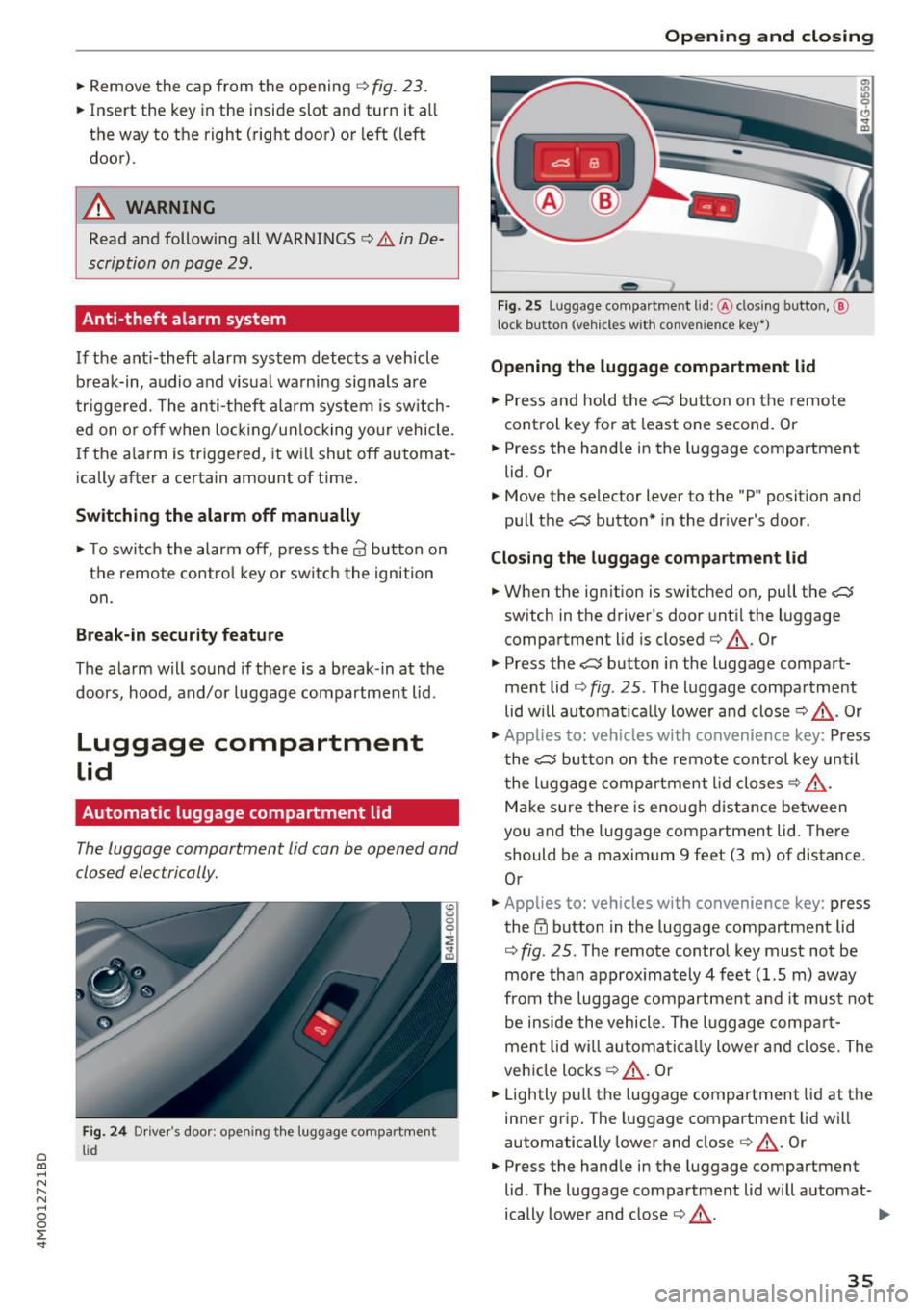
The luggage compartment lid can be opened and
closed electrically.
Fig. 24 Driver's door; opening th e luggage compartment
lid
Opening and closing
---
' c:::s lil
--
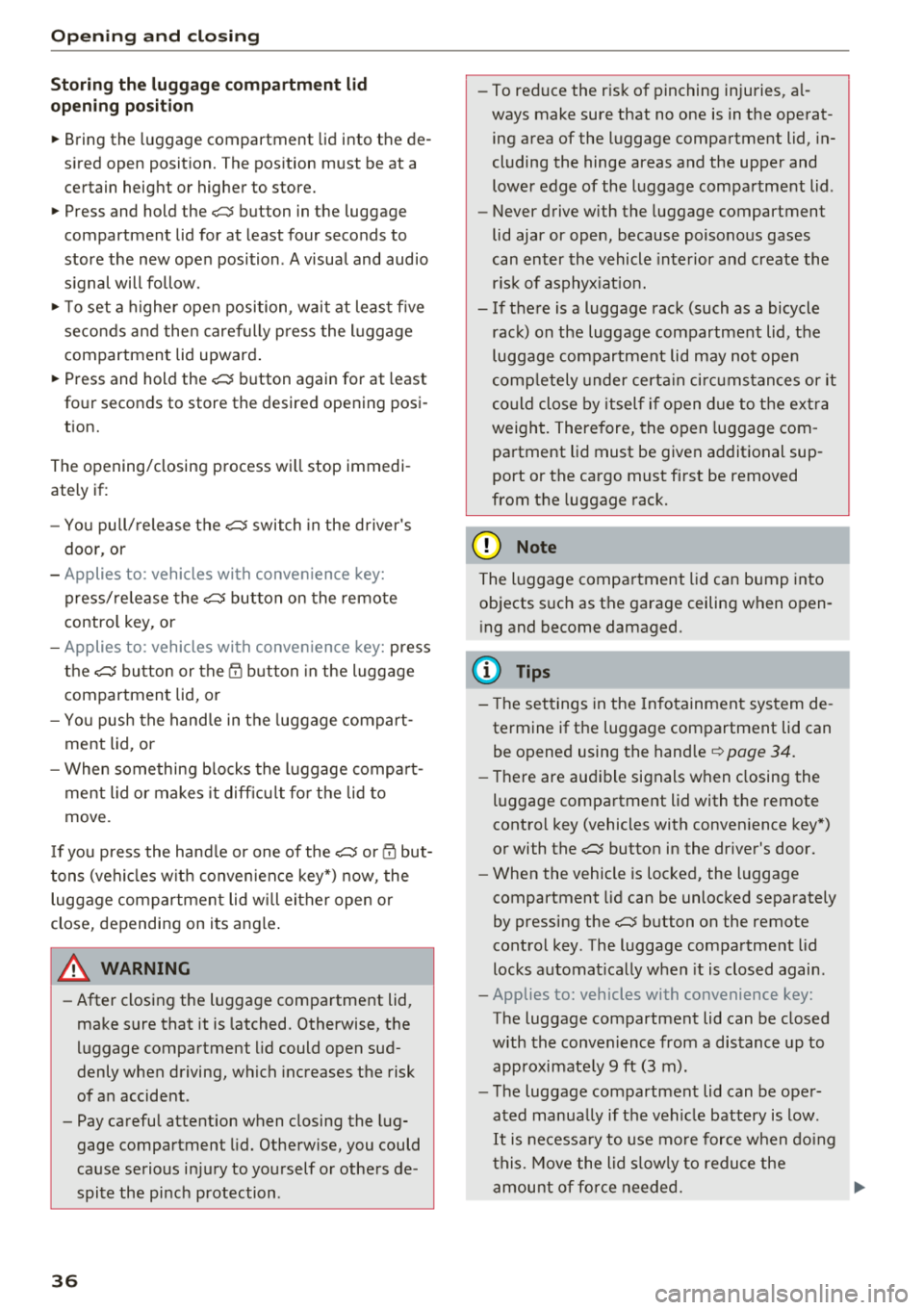
Fig. 25 Luggage compartment lid: @clos ing button, @
t ock button (vehicles with convenience key•)
Opening the luggage compartment lid
"" Press and hold the .c:::5 button on the remote
control key for at least one second. Or
"" Press the hand le in the luggage compartment
lid. Or
"" Move the selector lever to the "P" position and
pull the
.c:::5 button* in the driver's door.
Closing the luggage compartment lid
... When the ignition is switched on, pull the c::;;
switch in the driver's door until the luggage
compartment lid is closed ¢ &_ . Or
"" Press the
c::;; button in the luggage compart
ment lid¢
fig. 25. The luggage compartment
lid will automat ica lly lower and close¢&_. Or
"" Applies to: vehicles with convenience key: Press
the
.c:::5 button on the remote control key until
the luggage compartment lid closes¢&_.
Make sure there is enough distance between
you and the luggage compartment lid. There
should be a maximum 9 feet (3 m) of distance.
Or
"" Applies to: vehicles with convenience key : press
the~ button in the luggage compartment lid
¢
fig . 25. The remote control key must not be
more than approx imately 4 feet (1.5 m) away
from the luggage compartment and it must not
be inside the vehicle . The luggage compar t
ment lid wi ll automatically lower and close. The
vehicle locks¢&_ . Or
... Lightly pull the luggage compartment lid at the
inner grip. The luggage compartment lid will
automatically lower and close
c> &_ . Or
"" Press the handle in the luggage compartment
lid . The luggage compartment lid will automat-
ically lower and close
c> &_. .,.
35
Page 38 of 398
Opening and clo sing
Storin g th e luggag e comp artm ent lid
o pening posit ion
~ Bring the luggage compartment lid into the de
sired open position. The position must be at a
certain height or higher to store.
~ Press and hold the C> button in the luggage
compartment lid for at least four seconds to
store the new open position . A visual and audio
s ignal will follow .
~ To set a h igher open position, wait at least five
seconds and then caref ully press the luggage
compartment lid upward .
~ Press and hold the C> button again for at least
four seconds to store the desired opening posi
tion.
The opening/closing process wi ll stop immedi
ately if :
- Yo u pull/release the
C> switch in the driver's
door, or
- Applies to: vehicles with convenience key:
press/release the
C> button on the remote
contro l key, or
- Applies to: vehicles with conveniern;e key: press
the
C> button or the {n but ton in the luggage
compartment lid, or
- Yo u push the hand le in the luggage compart
ment lid, or
- When something b locks the luggage compa rt
ment lid or makes it difficu lt fo r the lid to
move .
I f you press the hand le or one of the
C> or {n but
tons (veh icles w it h conven ience key*) now, the
luggage compartment lid w ill either open or
close, depending on its angle .
A WARNING
-After closing the luggage compartment lid,
make s ure that it is latched. Otherwise, the
l uggage compartment lid could open sud
denly when driving, which increases the risk
of an accident .
- Pay careful attention when closing the lug
gage compartment lid. Otherw ise, you could
cause serious injury to yourself or others de
spite the pinch protection .
36
-To reduce the risk of pinching injuries, a l
ways make sure that no one is in the operat ing area of the luggage compartment lid, in
cluding the hinge areas and the upper and
lower edge of the luggage compartment lid .
- Never drive with the luggage compartment
lid ajar or open, because poisonous gases
can enter the vehicle inte rior and create the
risk of asphyx iat ion.
- If there is a luggage rack (such as a bicycle rack) on the luggage compartment lid, the
luggage compartment lid may not ope n
comp letely under cert ain ci rcumstan ces or it
co uld close by itself if open due to t he extra
weight. There fore, the open luggage com
partment lid must be given additional sup
port or the cargo must fi rst be removed
from the luggage rack.
@ Note
The l uggage compa rtment lid can bump into
objects s uch as the garage ceiling when open
i ng and become damaged .
(D Tips
- The settings in the Infotainment system de
termine if t he luggage compartment lid can
be opened using the hand le
~ page 34.
- Th ere are audible signals when closing the
luggage compartment lid with the remote
contro l key (vehicles with conven ience key*)
or with the
C> button in the driver's door.
- When the vehicle is locked, the luggage
compartment lid can be unlocked sepa rately
by pressing the
C> button on the remote
control key . The luggage compartme nt lid
locks automat ically when it is closed again.
- Applies to: vehicles with convenience key:
The luggage compartment lid can be closed
with the conven ience from a distance up to
approximate ly 9 ft (3 m).
- T he luggage compartment lid can be oper
ated manua lly if the veh icle battery is low .
It is necessa ry to use mo re force when do ing
this. Move the lid s low ly to redu ce the
amou nt o f fo rce needed. ..,.
Page 39 of 398
a co ...... N r--. N ...... 0
0
:E '
example, for a bicycle rack), the luggage
compartment lid can be opened and closed
using the handle or the foot motion activa
tion (vehicles with convenience key*).
Opening/closing the luggage compartment
lid with foot motion activation (kicking
movement)
Applies to: veh icles with conven ience key and sensor-control
led luggage compartment lid
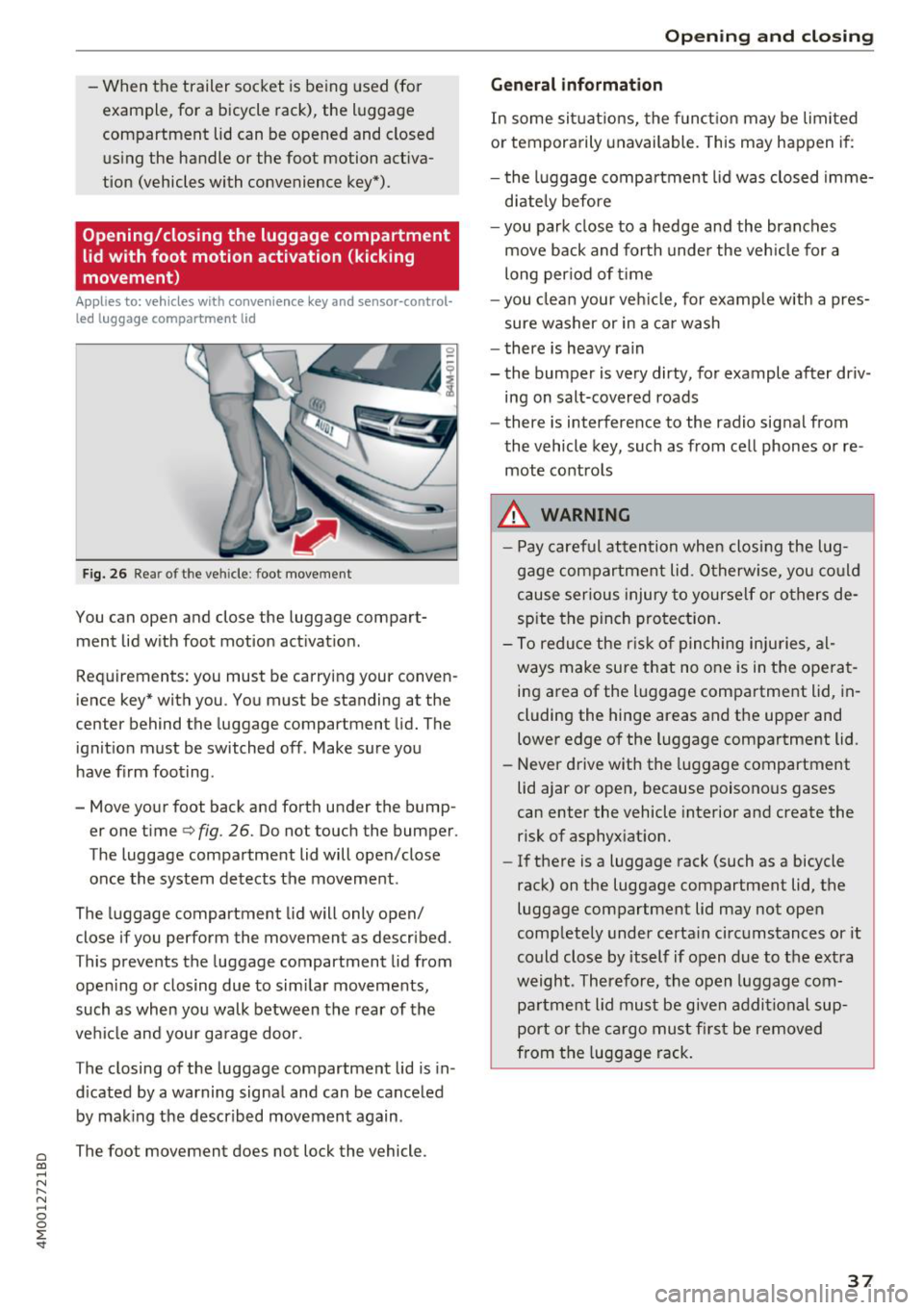
Fig. 26 Rea r of t he ve hicle : foot movement
You can open and close the luggage compart
ment lid w ith foot motion activat ion .
Requirements: you must be carrying your conven
ience key* with you . You must be standing at the
center behind the luggage compartment lid. The
ignition must be switched off . Make sure you
have f irm foot ing.
- Move your foot back and forth under the bump er one time
q fig. 26. Do not touch the bumper.
The luggage compartment lid will open/close
once the system detects the movement.
The luggage compartment lid will only open/
close if you perform the movement as described.
This prevents the luggage compartment lid from open ing or closing due to sim ilar movements,
such as when you walk between the rear of the
vehicle and your garage door.
The closing of the luggage compartment lid is in
d icated by a warning signa l and can be cance led
by making the described movement again .
The foot movement does not lock the vehicle.
Op eni ng and clos ing
General informat ion
In some sit uations, the funct ion may be limited
or temporarily unavailable. This may happen if:
- the l uggage compartment lid was closed imme
d iately before
- you park close to a hedge and the branches
move back and forth under the veh icle for a
long per iod of t i me
- you clean your veh icle, for example w ith a pres
sure washer or in a car wash
- there is heavy rain
- the bumper is very dirty, for example after driv- ing on salt-covered roads
- there is interference to the radio signal from
the vehicle key, such as from cell phones or re
mote controls
8,. WARNING
- Pay careful attention when closing the lug
gage compartment lid . O therwise, you co uld
cause serious injury to yourself or others de
spite the pinch protection .
- To reduce the r isk of pinching inju ries, al
ways make sure that no o ne is in the ope rat
ing area of the luggage compartment lid, in
cluding the hinge areas and the upper and
lower edge of the luggage compartment lid.
- Never drive with the luggage compartment
lid ajar or open, because poisonous gases
can enter the vehicle interior and create the risk of asphyxiat ion.
- If there is a luggage rack (such as a bicycle
rack) on the luggage compartment lid, the
luggage compartment lid may not open
comp letely under certa in circumstances or it
could close by itself if open due to the ext ra
weight. Therefore, the open luggage com
partment lid must be given additional sup
port or the ca rgo must fi rst be removed
from the luggage rack.
3 7
Page 40 of 398

Opening and clo sin g
Luggage compartment lid emergency
release
Fig. 27 Inner luggage compart men t lid : acces s to the
emergency rel ease
.. Remove the mechanica l key ¢ page 31 .
.. Pry out the cover using the mechanical key
¢fig . 27.
.. Press the lever in the direction of the arrow to
release the luggage compartment lid .
Child safety lock
The child safety lock prevents the rear doors
from being opened from the inside and the rear
power windows from be operated.
Fig . 28 Sect io n of drive r's door: c hild safety lock butto ns
a,
~ co a,
.. To activate/deactivate the inner door handle
and the power window switch for the respective
rear door , press the left/right
t button in the
driver 's door ¢
fig. 28 . The indicator light in the
button turns on/b links .
.. To activate/deact ivate the child safety lock on
both sides, you must press the
T buttons one
after the othe r.
It is not possible to operate the rear climate con
trol system* when the child safety lock is switch
ed on . T he
S ET REAR function allows you to app ly
38
a ll settings to the rear using the climate control
system controls in the cockpit
¢ page 72.
Message in th e instrument cluster di splay
(BJ Childproof catch : ma lfun ction! Plea se con
tac t Service
There is a ma lfunction in the ch ild safety lock .
Press the
t button aga in .
If the message stays on, dr ive immediately to an
authorized Audi dealer or authorized Audi Serv ice
Facility to have the malfunction repaired.
A WARNING
- If you leave the vehicle, sw itch the ignition
off and take the veh icle key with you. This
app lies pa rtic ula rly whe n children remain in
the vehicle. Otherwise chi ldren cou ld start
the engine or operate e lectrica l equipment
(such as power windows), which increases
the risk of an accident.
- A ma lfunction in the chi ld safety lock could
allow the rear doors to be opened from the
inside, which increases the risk of an acci
dent.
Power windows
Controls
The driver can control all power windows .
Fig. 29 D river 's doo r: pow er w indow con trols
A ll power window switches are equipped with a
two-stage function:
Opening and closing the windows
co ~ M 0
=> co a,
.. To open o r close the window comp letely, press
the swit ch down o r pull the swit ch up b riefly to .,.
Page 41 of 398
Cl a:, ...... N
" N ...... 0
0
::r '
switch is pressed/pu lled again.
• To se lect a position in between opened and
closed, press/pull the sw itch to the first level
until the desired window position is reached.
Po we r w indow switch es
(D Left front door
@ R ight front door
@ L eft rea r door
@ Right r ear door
A WARNING
- If you leave the veh icle, switch the ignit ion
off and take the vehicle key with you . This
applies particularly when children remain in
the vehicle . Otherwise children could start
the engine or operate elect rical equipment
(s uc h as powe r windows), whi ch in cr eases
the risk of an a ccident. The power windows
contin ue to f unct ion until the driver's door
or front passenge r's door has been opened .
- Pay c areful a ttent ion when closing the win
dows. Pinching co uld cause serious injur ies .
- When lo cking the veh icle from outside, the
vehicle mus t be unoc cupied since the win
dows can no longer be opened in an emer
gency.
(D Tips
You c an still open an d close the w indows for
app roxima tely 10 minutes after tu rning the
ign it ion off. The power windows do no t switch
off until the driver's door or front passenger's
door has been opened .
Convenience opening/closing
Applies to: vehicles wit h convenience key
All of the windows and the roof* can be opened/
closed at the same time.
Convenience opening feature
• Press and hold the III button on t he remote con
t ro l key until a ll of the w indows reach the de
s ir ed position and the roof* is tilted open .
Opening and cl osing
Convenience closing feature
• Press the 0 b utton on the remo te con trol key
until the roof* is closed
q .&, , or
• Touch the sensor * on the door handle unti l all
of the windows and the roof* are closed. Do not
place your hand in the door handle when doing
this .
Sett ing convenience op ening in the
Infotainment system
• Select in the Infotainment system: I MENU ! but
ton
> Vehicle > left control button > Vehicle
setting s
> Central locking > Long press to
open windows .
A WARNING
-
-Never close the w indows o r the roof* ca re
lessly or in an uncontrolled manner, be
c a use this increases the risk of injury.
- For secur ity reasons, the windows and the
roof* c an only be opened and close d wit h
the remote con trol key a t a maxim um dis
tance of approx imately 6.5 feet (2 m) away
from the vehicle . Always pay attention when
using the
0 button to close the windows
and the roof* so that no one is pinched. The
clos ing process will stop immediately when
the 6j button is released .
(D Tips
Applies to: vehicles with panorama glass roof:
the power sunshade also opens/closes when
opening/closing the roof .
Correcting power window malfunctions
You can reactivate the one-touch up/down func
tion if it ma/func tion s.
• Pull the powe r window switch up until the win
dow is compl ete ly raised.
• Release the switch and pu ll it up aga in for at
least one second .
39
Page 42 of 398
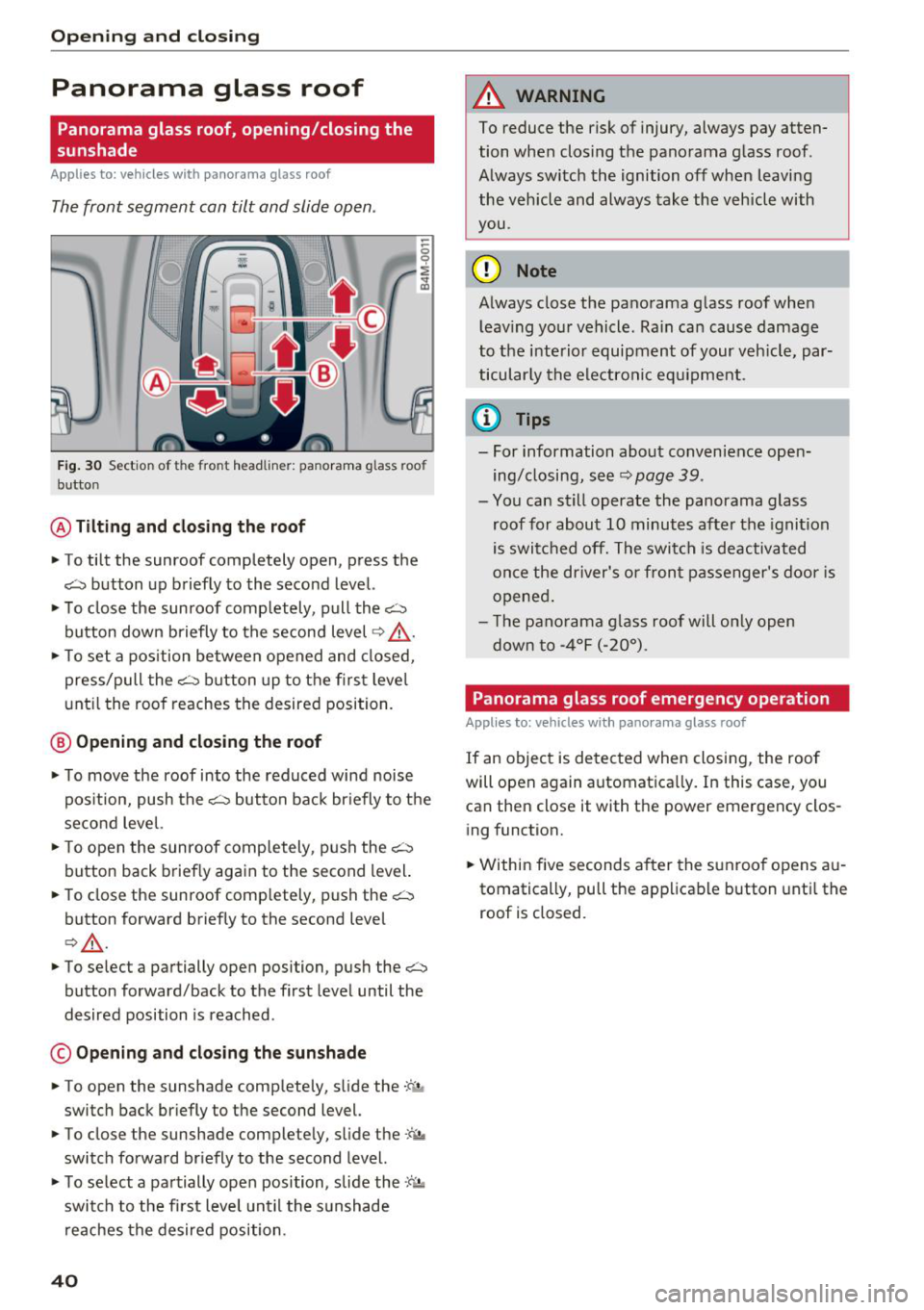
Opening and closing
Panorama glass roof
Panorama glass roof, opening/closing the
sunshade
A pp lies to: ve hicles w ith pa norama glass roof
The front segment can tilt and slide open .
Fig. 30 Sect io n of the fro nt headliner: panorama g lass roo f
b utto n
@ Tilting and closing the roof
"'To tilt the sunroof completely open, press the
~ button up briefly to the second level.
"'T o close the sunroof comp letely, pull the~
button down briefly to the second level
q /'.1..
"'T o set a position between opened and closed,
press/pull the~ button up to the first leve l
until the roof reaches the desired position.
@ Opening and closing the roof
"'To move the roof into the reduced wind noise
pos ition, push the~ button back br iefly to the
second level.
"'T o open the sunroof completely, push the~
button back briefly again to the second level.
"' To close the sunroof comp letely, push the~
button forward briefly to the second level
Q /'.1. .
"'To select a partially open position , push the~
button forward/back to the first level until the
desired position is reached .
© Opening and closing the sunshade
.. To open the sunshade completely, slide the -:c. ,.
switch back briefly to the second level.
"' To close the sunshade completely, slide the
-'f>, ,,
switch forward briefly to the second level.
"' To select a partially open position, slide the
,c'-'.1a
switch to the first level unt il the s unshade
reaches the desired position .
40
A WARNING ,_
To reduce the risk of injury, always pay atten
tion when closing the panorama glass roof .
Always switch the ignition off when leaving
the vehicle and always take the vehicle with
you .
(D Note
Always close the panorama glass roof when
l eav ing your vehicle. Rain can cause damage
to the interior equipment of your veh icle, par
ticularly the electronic equipment .
(D Tips
-For information about convenience open
ing/closing, see~
page 39 .
-You can still operate the panorama glass
roof for about 10 minutes after the ignition
is switched off. The switch is deactivated
once the driver's or front passenger's door is
opened.
- Th e pano rama glass roof wi ll only open
down to -4°F (-20°) .
Panorama glass roof emergency operation
Applies to: vehicles wi th pano rama g lass roof
If an object is detected when closing, the roof
will open again automatica lly. In this case, you
can then close it with th e power emergency clos
ing function.
"' Within five seconds after the sunroof opens au
tomatically, pull the applicable button until the
roof is clos ed.