change wheel AUDI Q7 2018 Owner´s Manual
[x] Cancel search | Manufacturer: AUDI, Model Year: 2018, Model line: Q7, Model: AUDI Q7 2018Pages: 398, PDF Size: 185.58 MB
Page 16 of 398
Cockpit overv iew
Right control button
- Opening /cl osi ng the options menu :
press the
respective right control button on the steering
whee l¢
fig. 8 . You can change any context-de
pendent functions and settings using the left
thumbwheel (for example, additional station information).
(D Tips
The availability of a se lection menu or options
menu depends on the function that is select
ed.
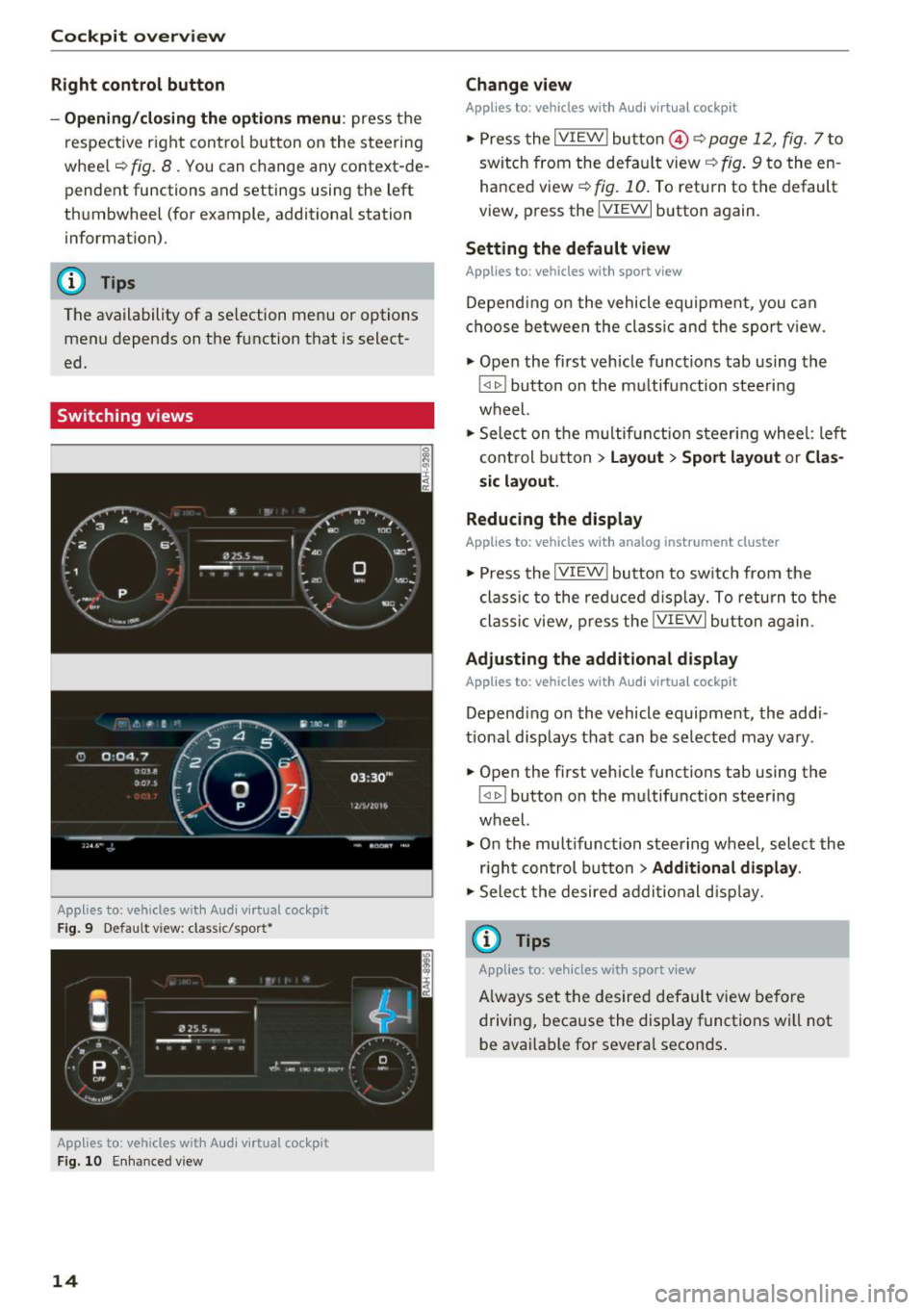
Switching views
Applies to: vehicles with Audi virtual cockpit
Fig . 9 Default v iew: cl ass ic/sport*
Applies to: vehicles with Audi vi rtual cockpit
Fig . 10 Enhanced v iew
14
Change view
Applies to: vehicles with Audi virtual cockpit
.,. Press the IVIEW I button @¢ page 12, fig. 7 to
sw itch from the defau lt view ¢
fig. 9 to the en
hanced view ¢
fig. 10. To return to the default
view, press the !VIEWI button again.
Setting the default view
Applies to: vehicles with sport view
Depend ing on the vehicle equipment, you can
choose between the class ic and the spor t view .
.,. Open the first veh icle functions tab using the
l <11> ! button on the m ultifunction steeri ng
wheel.
.,. Select on the multif unction steeri ng wheel: left
control button
> La yout > Sp ort l ayout or Cla s
s ic la yout.
Reducing th e display
Applies to: vehicles with analog instru ment cluster
.,. Press the !VIEW ! button to sw itch from the
class ic to the red uced d isplay. To return to the
class ic view, p ress the !VIEW ! but ton again .
Adjusting the additional display
Applies to: vehicles with Audi virtual cockpit
Depending on the vehicle equipment, the add i
tiona l disp lays that can be selected may va ry .
.,. Open the first vehicle functions tab using the
~ button on the multifunction steering
wheel.
.,. On the multifunction steering wheel, select the
r ight con trol button
> Additional display .
.,. Sele ct the desired additional d isp lay.
(D Tips
Applies to: vehicles with sport view
Always set the desired default view before
driving, beca use the display functions will not
be available for several seconds .
Page 71 of 398
Cl a:, .... N
" N .... 0
0
::r '
zation switches off if the settings are changed on
the front passenger's side or in the rear .
Vents
You can open or close the center and rear vents in
the cockpit and the vents in the rear center con
sole and door pi llars using the ridged thumb
wheels. The levers adjust the direction of th e air
f low from the vents.
Re sidu al heat
You can activate the residua l heat f unct ion when
the ignition is switched off by pressing the knob
@ Cleft side) . The residua l heat from the coolant
is used to heat the vehicle interior. The residual
heat function switches
off automatically after
about 15 minutes.
A WARNING
- You should not use the recirculation mode
for an extended per iod of t ime, because no
fresh a ir is draw n in and the w indows ca n
fog whe n coo ling mode is sw itched off. Th is
increases the risk of a n accide nt.
- Individua ls with reduced sensitivity to pain
o r temperat ure co ul d deve lop burns when
Warm and c old
using the seat heating function . To red uce
the risk of in jury, these individua ls sho uld
not use seat heating.
@ Note
To avoid damage to the heating elements in
the seats, do not knee l on the seats o r place
heavy loads on a small area of the seat.
Setup
Applies to : vehicles with 3-zone deluxe automat ic climate
control
The climate control system basic settings are ac
cessed in the Infotainment system.
.,. Select in the Infotainment system: I M ENU ! but
ton
> Vehicle > left cont rol b utton > Air condi
tioning
Seat heating /seat ventilation*
You can adjust the seat heat ing/vent ilat ion bal
ance fo r the d river a nd front passenger .
Automatic auxili ary heater *
The auxiliary heater he lps to warm the vehicle in
terior more quickly.
69
Page 74 of 398
Warm and cold
SYNC Syn chr oniz ation
Use t he rocker sw itc h CD to select the f unct ion.
When synchronization is switched on, the set
tings for the driver's side are applied to the front
passenger's side and the rear (except for seat
heating/venti lation*). When the settings on the
front passenger's side or in the rear are changed,
the synchron izat ion is automatically switched off
and
4- zone appears in the display .
SET REAR function
Use the rocker switch CD to select the function .
When the function is switched on, you can adjust
all settings for the rear us ing the climate control
system controls in the cockpit . The rear climate
control system controls cannot be operated at
the same time . T his function switches off auto
mat ica lly after a ce rtain per iod of t ime or after
leav ing the menu.
Vents
You can open or close the center and rear vents in
the cockpit and the vents in the rear center con
sole and door p illars using the r idged thumb
wheels. The levers adjust the d irect io n of the a ir
flow from the vents. The w ide vent is opened and
closed using the~ button ~
page 8, fig. 2@ .
Residual heat
You can activate the residual heat function when
the ignition is switched off by pressing the knob
© (left side). The residual heat from the coolant
is used to heat the ve hicle in ter io r. The res id ual
heat function switches off automatically after
about 15 minutes.
A WARNING
- You should not use the recirculation mode
for an extended period of time, because no
fresh air is drawn in and the windows can
fog when cooling mode is sw itched off . This
i ncreases the risk of an accident .
- Individuals with reduced sensitivity to pain
or temperature could develop burns when
us ing the seat heating function . To reduce
the risk of injury, these ind iv iduals should
not use seat heat ing.
72
@ Note
To avoid damage to the heating elements in
the seats, do not knee l on the seats or p lace
heavy loads on a small area of the seat.
(D Tips
It is not possib le to operate the rear climate
control system controls when the power chi ld
safety lock is switched on. W ith the SET REAR
funct ion, you can apply all settings to the rear
using the climate control system controls in
the cockp it~
page 38 .
Setup
Applies to: vehicles with 4 -zone de luxe automat ic climate
contro l
The climate control system basic settings are ac
cessed in the Infotainment system.
.. Select in the Infotainment system : IMENU! but
ton
> V eh icle > left control button > Air condi
t ioning
Seat heating /seat ventilation *
You can adjus t the seat heat ing/vent ilat io n ba l
an ce for t he d river, front passenger and rear pas
sengers .
Footwell temperature
You can adjust the footwell temperature so that
i t is cooler or wa rme r.
Auto recir culat ion
When switched on, automat ic recirculation con
trols the recirculation mode automatically . You
must press the®
MAX button if fog forms on
the w indows .
Automat ic au xili ary heater *
The aux iliary heater he lps to warm the vehicle in
terior more qu ickly.
Steering wheel heating
App lies to: vehicles wit h stee ring w heel heat ing
The steering wheel rim can be heated .
.. Press the button on the multifunction steering
wheel to switch the steering wheel heating on .,..
Page 87 of 398
Difficult terrain and off-road
When driving in unfamiliar areas and offroad,
drive slowly and keep on the watch for unexpect
ed obstacles (such as potholes, rocks, tree
stumps, etc.).
To prevent the vehicle from bottoming out and to
reduce the risk of underbody damage, you should
drive across uneven ground on only one side of
the vehicle so that only two of your wheels cross
the uneven area, instead of driving across the
center of the uneven area with all four wheels.
Drive quickly through sandy or marshy off-road
sections and do not stop , if at all possible.
Driving through water
Also read the information found in r=;, page 74.
Driving on a slope
If you are ever unable to drive up a hill, do not try
to turn around . Drive back down in
reverse in
stead . Otherwise you run the risk of t ipping over.
If the vehicle threatens to tip over when driving
across a slope, you must immediately steer
downhill in the direction of the slope.
Do not park your vehicle on steep hills .
To reduce the r isk of tipping over, drive on hills in
the direction of the downward slope (fa ll line) -
never crosswise.
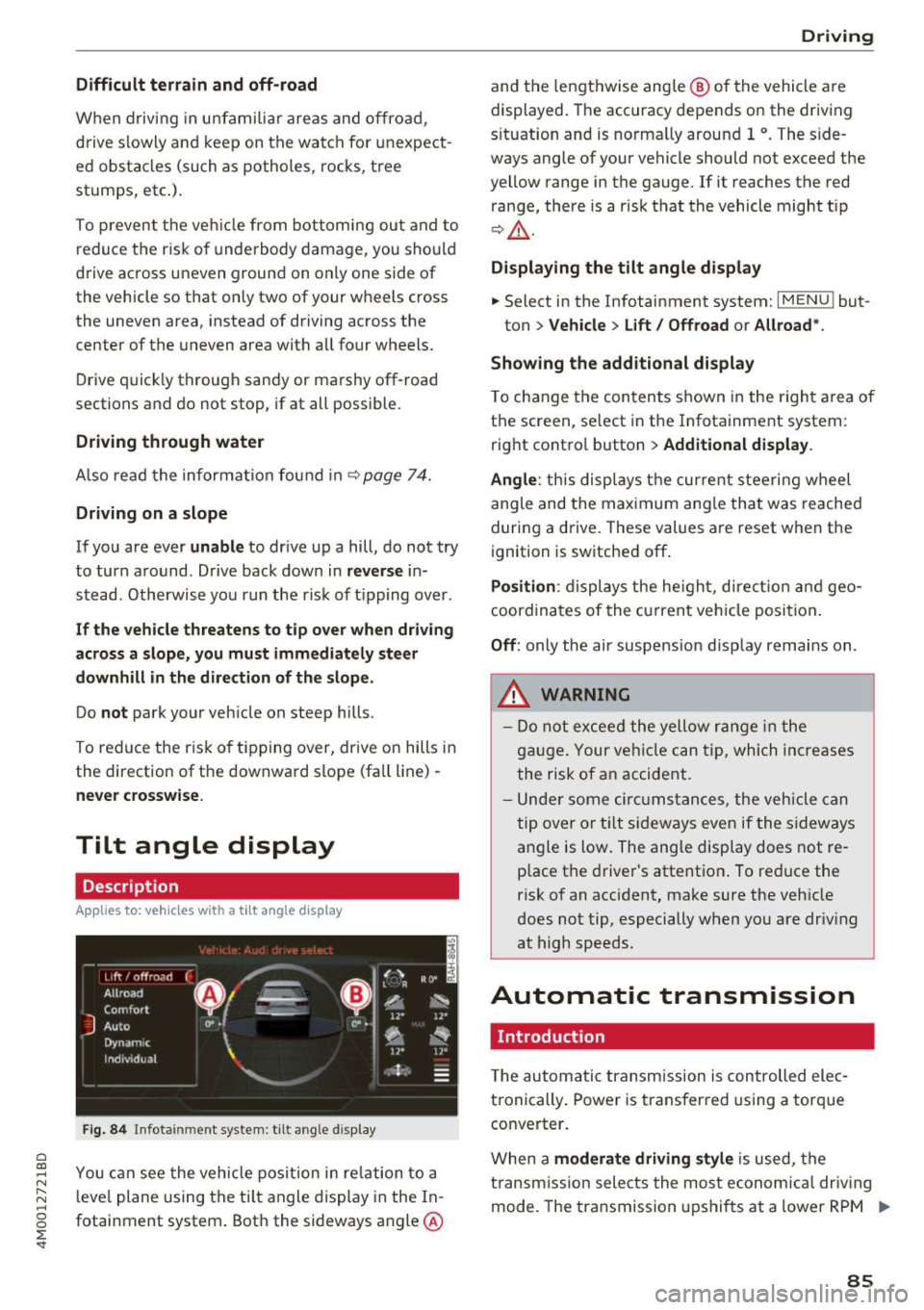
Tilt angle display
Description
Applies to: vehicles wit h a tilt ang le display
110 · I l 1ft / offrnortr1 ( ~ ....
All road
!r
-
Q
l " __,.._
Comfort 4 ~
J
ll" 11• Auto O" •
Dynamic
~ ~
Individual 11• I/"
~t-;s
Fig. 84 Infotainment system : tilt angle d isplay
a
~ You can see the vehicle position in relation to a N
~ leve l plane using the tilt angle display in the In-~
g fotainment system . Both the sideways angle @
:E '
and the lengthwise ang le @ of the vehicle are
displayed. The accuracy depends on the driving
s ituation and is norma lly around 1
°. The side
ways angle of your vehicle should not exceed the
yellow range in the gauge. If it reaches the red
range, there is a risk that the vehicle might tip
r=;,_& .
Displaying the tilt angle display
.. Select in the Infotainment system: I MENU ! but-
ton>
Vehicle > Lift/ Offroad or Allroad*.
Showing the additional display
To change the contents shown in the right area of
the screen, se lect in the Infotainment system:
right control button>
Additional display.
Angle :
this disp lays the current steering wheel
angle and the maximum angle that was reached
during a drive . These values are reset when the
ignition is switched off .
Position: displays the height, direct ion and geo
coordinates of the current vehicle posit ion.
Off : only the air suspension display remains on .
.&_ WARNING
- Do not exceed the yellow range in the
gauge. Your vehicle can tip, which increases
the risk of an accident.
- Under some circumstances , the vehicle can
tip over or tilt sideways even if the sideways
angle is low. The angle display does not re
p lace the driver's attention . To reduce the
risk of an accident, make sure the vehicle
does not tip, especially when you are driv ing
at high speeds.
Automatic transmission
Introduction
T he automatic transmission is controlled elec
tronically . Power is transferred using a torque
converter.
When a
moderate driving style is used, the
transmission selects the most economical driving
mode. The transmission upshifts at a lower RPM .,.
85
Page 96 of 398
Trail er to wing
If you have to drive th rough diffic ult road condi
tions, you can raise the vehicle again after hitch
ing the trai ler or after adjust ing the tongue
weight .
{QJ Note
Applies to: vehicles with air suspension
-Changes in temperature or load can affect
the he ight of the vehicle.
- Set the a ir suspension to the standard vehi
cle heig ht, otherwise the applicab le tongue
weig ht no longer applies to your vehicle .
(D Tips
-Use chocks when parking on incl ines if the
trailer is loaded.
- We recommend also having the vehicle in spected between the inspection intervals if
you are towing a trai ler frequently.
- Avo id driving wit h a trailer du ring the vehi
cle break-i n period .
Driving with a trailer
Driving with a trailer requires extra caution.
Speed
Adhere to the legal speed l imi ts. Follow t he lega l
regulations specif ic to the country.
As the speed inc reases, the d riving stability of
the t railer dec reases . The refore you sho uld not
exceed t he max imum legal speed limit when
there are unfavorable road, weather and/or wind
conditions. This especially applies when driving
downhill.
You must a lways reduce yo ur speed as soon as
you not ice even the s lightest swinging motion of
the trailer . Never try to "straighten out" the trail
er by accelerating.
The weig ht dis trib ution is very poo r if t he ve hicle
is empty and the trailer is loaded. However if you
must drive under these circumstances, t hen drive
especia lly slowly.
94
Brak es
Brake in a time ly manner. Downs hift be fo re dr iv
i ng down hill so that the engine can assist with
braking ~&, .
When using a t railer w it h over run bra kes, fi rst
brake ge ntly t hen q uickl y. This red uces the r isk o f
jerking while braking if the trailer wheels lock up .
Engine coolant temperatur e
Pay attention specifically to the coolant tempera
ture display when there a re high outs ide temper
at ures , and whe n driving on long i nclines
~ page 11. Shift to a highe r gear in a t imely man
ner .
A WARNING
Constant braking causes the b rakes to over
h eat and substantially reduces bra king per
formance, increases b raking distance o r caus
es complete failure of the brake system.
-
Page 106 of 398
Assistance systems
-When approaching stationary obstacles
such as stopped traffic, adaptive cruise con
trol will respond with limited function.
- Adaptive cruise control does not respond to
people, animals, or cross ing or oncoming
objects.
- The function of the radar sensors can be af
fected by reflective objects such as guard
rails, the entrance to a tunnel, heavy rain or
ice.
(D Note
The sensors can be displaced by impacts or
damage to the bumper, wheel housing and
underbody . Th is can impair the adaptive
cruise control. Have an authorized Audi dealer
or authorized Audi Service Facility check their
function.
@ Tips
For an explanation on conformity with the
FCC regulations in the United States and the
Industry Canada regulations, see
¢page 380.
In curves
A pp lies to: ve hicles w ith Audi adaptive cruise co ntrol
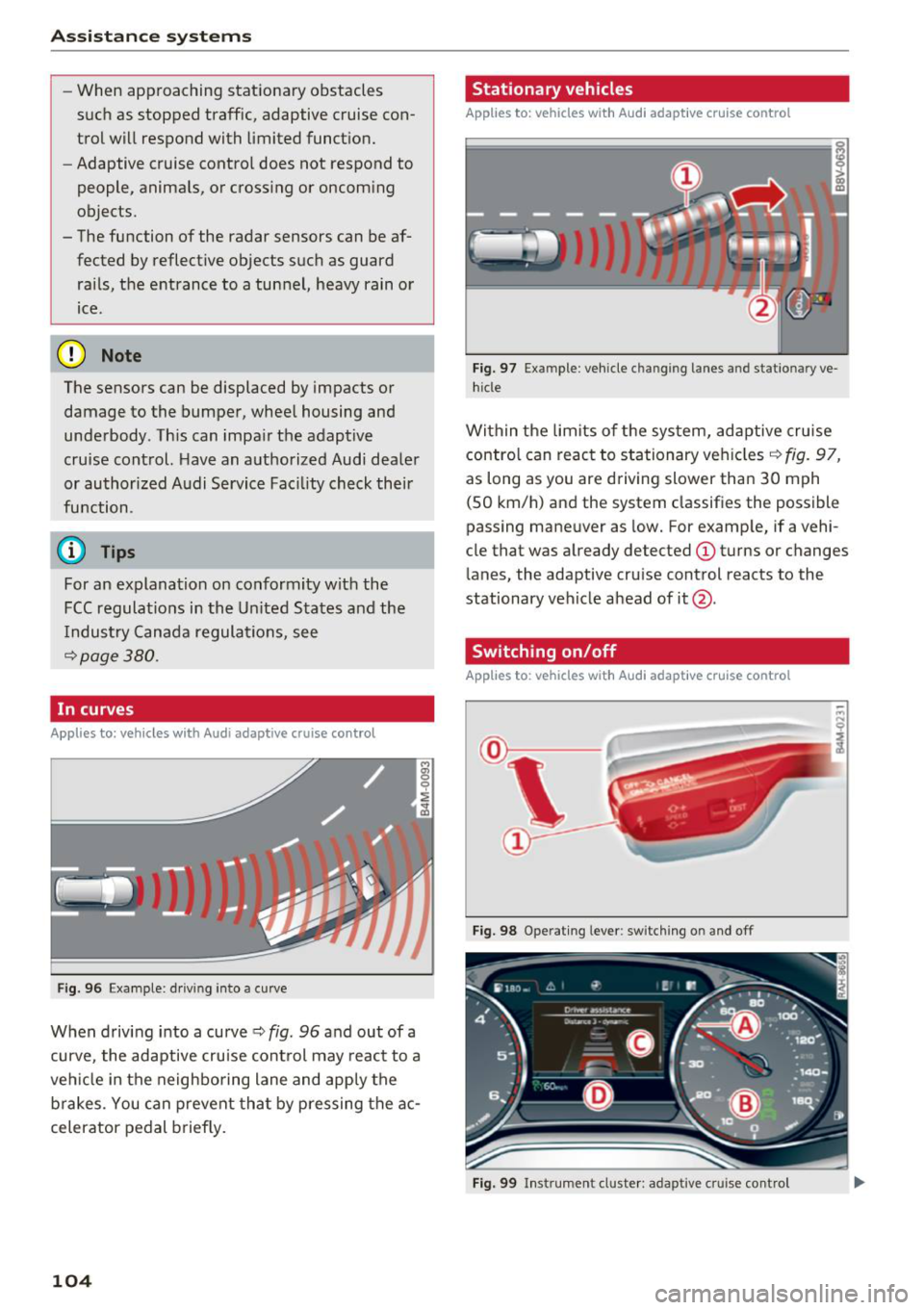
Fig . 96 Exam ple: driving into a curve
When driving into a curve ¢ fig. 96 and out of a
curve, the adaptive cruise control may react to a
vehicle in the neighboring lane and apply the
brakes. You can prevent that by pressing the ac
celerator pedal briefly.
104
Stationary vehicles
App lies to : vehicles wit h Audi adap tive cruise control
))
Fig . 97 Exa mple : ve hicl e ch an gi ng la nes a nd statio nary ve
hicle
Within the limits of the system, adaptive cruise control can react to stationary vehicles ¢
fig. 97,
as long as you are driving slower than 30 mph
(SO km/h) and the system classifies the possible
passing maneuver as low. For example, if a vehi
cle that was already detected
(D turns or changes
lane s, the adaptive cruise control reacts to the
stationary vehicle ahead of it@ .
Switching on/off
App lies to: vehicles wit h Audi ada ptive c ru ise contro l
Fig. 98 Operating lever: switching on and off
Fig. 99 In strumen t cluster: adapt ive cru ise control
Page 122 of 398

Assistance systems
Late: in this setting, the system provides correc
tive steering just before a wheel goes over a de
tected lane marker line.
Vibration warning
You can switch the additional vibration warning
in the steering wheel on or off.
&_ WARNING
With the vibration warning switched off,
there will also be no visual warning in the in
strument cluster display when crossing a lane
marker line.
(D Tips
In certain markets: you r settings are stored
automatically and assigned to the remote
control key in use.
Audi side assist
Description
Applies to: vehicles with Aud i side ass ist
Fig . 112 Senso r de tection range
Fig. 113 D isplay on the exte rior mirror
Side assist (lane change assist) helps you monitor
your blind spot and traffic behind your vehicle.
Within the limits of the system, it warns you
120
about vehicles that are coming closer or that are
traveling with you within sensor range
(D
¢ fig. 112 . If a lane change is classif ied as cr iti
ca l, the display @in the exterior mirror turns on
¢fig. 113.
The display in the left exterior mirror provides as
s istance when making a lane change to the left,
while the display in the right exterior m irror pro
vides assistance when making a lane change to
the right.
Information stage
As long as you do not activate the turn signal,
s ide assist
informs you about vehicles that are
detected and classified as critical. The display in
the mirror turns on, but is dim.
The display remains dim in the information stage
so that your view toward the front is not distur
bed.
Warning stage
If the display in a mirror blinks brightly when you
activate a turn signal, side assist is
warning you
about detected vehicles that it has classified as
critica l. If this happens, check traffic by glancing
in the exterior m irrors and over your shoulder
¢ .& in General information on page 121 .
Applies to: vehicles with active lane assist: the
display in the m irror can a lso b link if you have not
activated a turn signal: if you are approaching a
detected lane marker line and it appears you will be leaving the lane, side assist will warn you
about detected vehicles that it has classified as
critical.
@ Tips
You can adjust the brightness on of the dis
play on the rearview mirror¢
page 122.
Page 123 of 398

a co ...... N r--. N ...... 0
0
:E '
Applies to: ve hicles with Audi side assist
@
®
©
Fig . 11 4 Driving situatio ns
Fi g. 11 5 Rear of the vehicle: position of the sensors
Side assis t fun ctions at speeds above app roxi
mate ly 9 mph ( 15 km/h) .
® Vehicles that are approaching
N
0
0
:i; ..
"'
In certain cases, a vehicle will be classified as
cr itica l for a lane change even if it is still some
what far away. The faste r a ve hicle app roaches,
the soo ner the display in the exterio r mirror w ill
turn on.
@ Vehicles traveling with you
Ve hicles traveli ng w ith you are ind icated i n the
exte rior m irro r if they are classified as critical for
a lane change. All vehi cles detec ted by side assist
A ssi st a nce systems
are indicated by the time they enter your "blind
spot", at the latest.
© Vehicles you are passing
If you s low ly pass a vehi cle that s ide assist has
de tected (the difference in speed between t he
vehicle and you r vehicle is less than app roximate
ly 9 mph ( 15 km/h)), the disp lay in the exterior
mirror turns on as soon as the vehicle enters you r
blind spot.
T he disp lay w ill not turn on if you quickly pass a
vehicle that side assist has detected (the differ ence in speed is greater than approximate ly 9
mph (15 km/h)) .
Functional limitat ions
T he radar sensors are des igned to de tec t t he lef t
and right adjacent lanes when the road lanes are
the normal width . In some situations, the display
in the exte rior mirror may turn on even though
there is no veh icle located in the area that is criti
ca l for a lane change. For example :
- If the lanes are narrow or if you are dr iving on
the edge of your lane. If t his is the case, the
system may have detected a vehicle in another
lane that is
not adjacent to your current lane .
- If you are d riving through a curve . Side assist
may react to a vehicle that is in the same lane
or one lane over from the adjacent lane .
- If side assist reacts to other objects (such as
roads ide str uctures like guard rails).
- In poor weather conditions. The side assist
functions are limited.
Do not cover the radar sensors
c;, fig. 115 wit h
stickers, deposits, bicycle wheels or other ob
jects, because t his w ill impair the funct io n. Do
not use s ide ass ist when towing a trai ler. For in
format ion on cleaning, see
c;, page 351 .
A WARNING
--Always pay attention to traffic and to the
area around your vehicle. S ide assist cannot
replace a driver's atte ntion. The driver alone
i s always re spon sible for lane changes and
-
sim ila r dr iv ing mane uve rs. ~
121
Page 131 of 398
a co ...... N r--. N ...... 0
0
:E '
The air suspension* is an electronically-control
l ed air suspension and damping sys tem . The ad
justment depends on the driving mode selected, steering movements, the driver's braking and ac
celerat ion, and as the road surface, vehicle speed
and load. The veh icle ground clearance depends
on the mode selected and the speed.
The ground clearance increases s ignificantly
when the vehicle is in the
All road mode . At
speeds from approximate ly 50 mph (80 km/h) to
75 mph (120 km/h), the ground clearance re
duces in stages . When the speed decreases, the
g round clea rance increases again a utomat ically.
The ground clearance is the lowest in
Dynamic
mode.
Steering
The power steering adapts. Ind irect steer ing that
moves easily as in
Comfort mode is especia lly
suited to long drives on highways. The
Dynam ic
mode provides sporty, direct steering.
All-wheel steer ing*
All-wheel steer ing increases dr iving comfort by
providing add it ional steering ability at the rear
axle. Steer ing in the opposite d irection at low
speeds dec reases the turning rad ius. Steering in
the same d irect io n a t high speeds imp roves the
r e sponse t ime whi le increas ing dr iv ing stab ility at
the same time .
Sport differential*
As a componen t of the all wheel d rive system
(quattro)
~ page 146, the sport diffe rential dis
tr ib utes the dr iv ing power to the rear ax le de
pending on the situa tion. The dis tribution of
power var ies dependi ng on the selected mode
from moderate
(Comfort ) to sporty (Dynamic ).
The goa l is a high level of agility and ability to ac
celerate on curves . The veh icle is very responsive
to steer ing.
Adaptive cruise control (ACC)*
The behavior when accelerating can be adjusted
from comfortab le to sporty, depending on the
drive select mode . Adaptive cru ise control a lso
A ssi st a nce systems
responds to the driv ing behavior of the vehicle
ahead in a more conservative or sporty manner.
Engine sound*
T he eng ine sound adap ts to the c urren t mode
and can be subtle to sporty .
(D Note
Applies to: vehicles with air suspensio n
-Make sure there is enough clearance above
and below the vehicle when pa rk ing. The
height of the ve hicle (gro und clea rance) can
change once it is par ked due to temperature
fluctuations, changes to the load conditions
and changes to the dr iving modes.
- When transporting the vehicle on a car car
r ier, train, ship or by other means, o nly tie
the vehicle down at the runn ing s urface of
the ti res, which is the outer c ircumference.
Sec uring the vehicle at the axle compo
ne nts , sus pension str uts o r towing eyes is
no t pe rm itted because the pres sure in the
air suspens ion s truts ca n change d uring
tr anspo rt . The ve hicle may not be secu red
sufficiently if this ha ppens.
(D Tips
The "S" se lector lever posi tion automatic ally
engages w hen the
Dynamic mode is selected.
Selecting the driving mode
Applies to: vehicles wi th Aud i drive select
~- ------ -
~
Fig. 1 26 Ce nter console: co ntro ls for d rive select
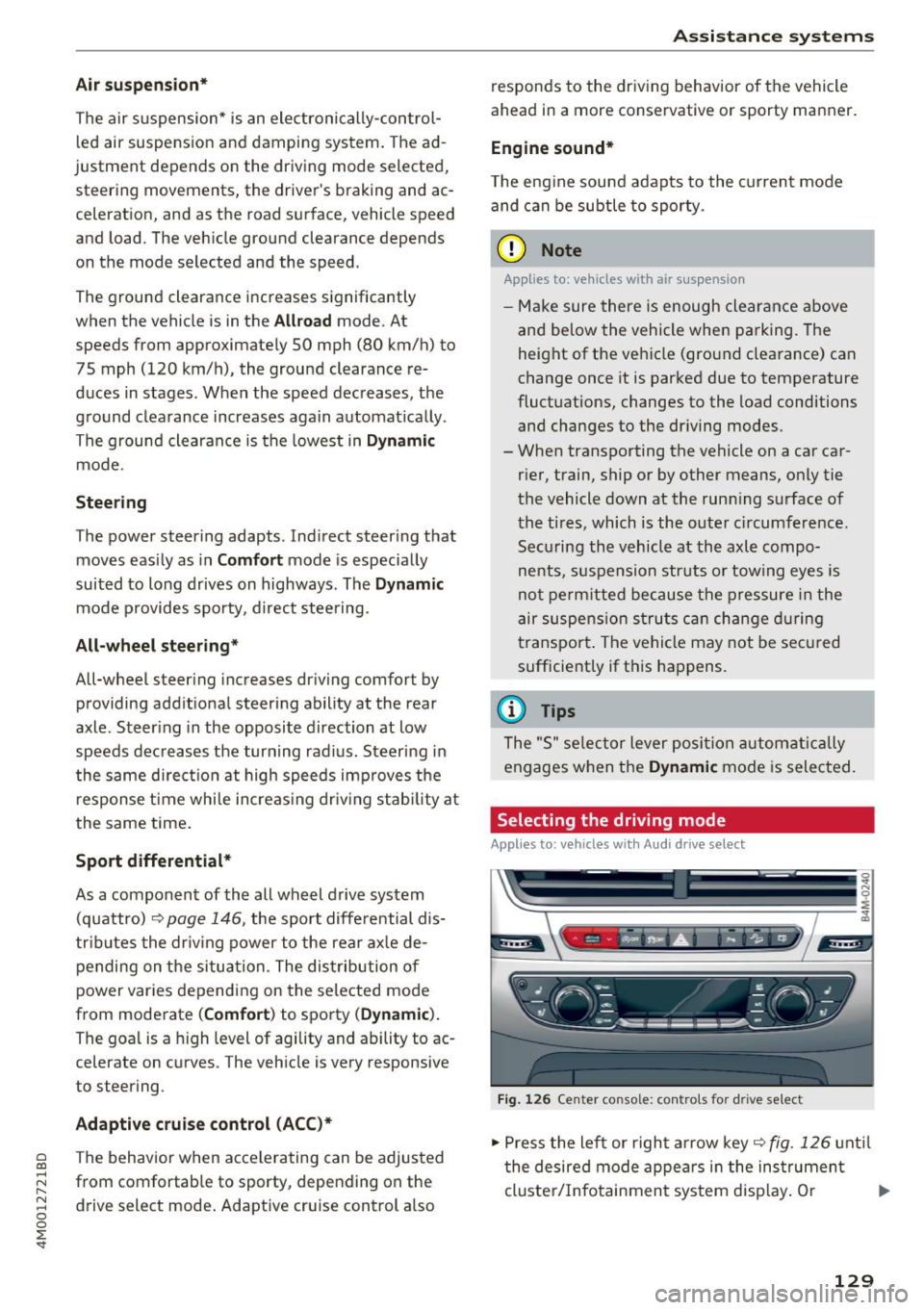
.,,. Press the le ft or righ t arrow key~ fig. 126 unt il
t he desired mode appe ars in the ins trumen t
cluste r/ Infotainmen t system disp lay. O r ..,,.
129
Page 132 of 398
Assistance systems
~ Select in the Infotainment system: IMENUI but-
ton
> Vehicle > Audi drive select.
~ Select and confirm the desired setting .
You can change the driving mode when the vehi
cle is stationary or whi le driving. If traffic per
mits, after changing modes, briefly take your
foot off the accelerator pedal so that the recent ly
selected mode is a lso activated for the engine.
Offroad * or Lift/ Offroad* -activates offroad
functions to support driving on rough terrain .
The engine, transmission and steering adjust and
the Start/Stop system* switches off. Applies to
air suspension*: the vehicle also lifts for passing
over obstacles to maintain maximum ground
clearance.
Adjusting the Individual mode
A pp lies to: ve hicles w ith Audi drive select
Allroad * -on ly for air suspension*: the vehicle
li fts to maintain higher ground clearance for dif
ficult stretches of road .
Comfort -provides a comfort-oriented vehicle
setup and is suited fo r long drives on highways.
Auto -provides an overa ll comfortable yet dy
namic driv in g feel and is suited for everyday use.
Dynamic -gives the driver a sporty driving feel
and is suited to a spo rty driving style.
Individual -c::;,page 130.
A WARNING
Pay attention to traffic when operating the
drive select to reduce the risk of an accident .
-
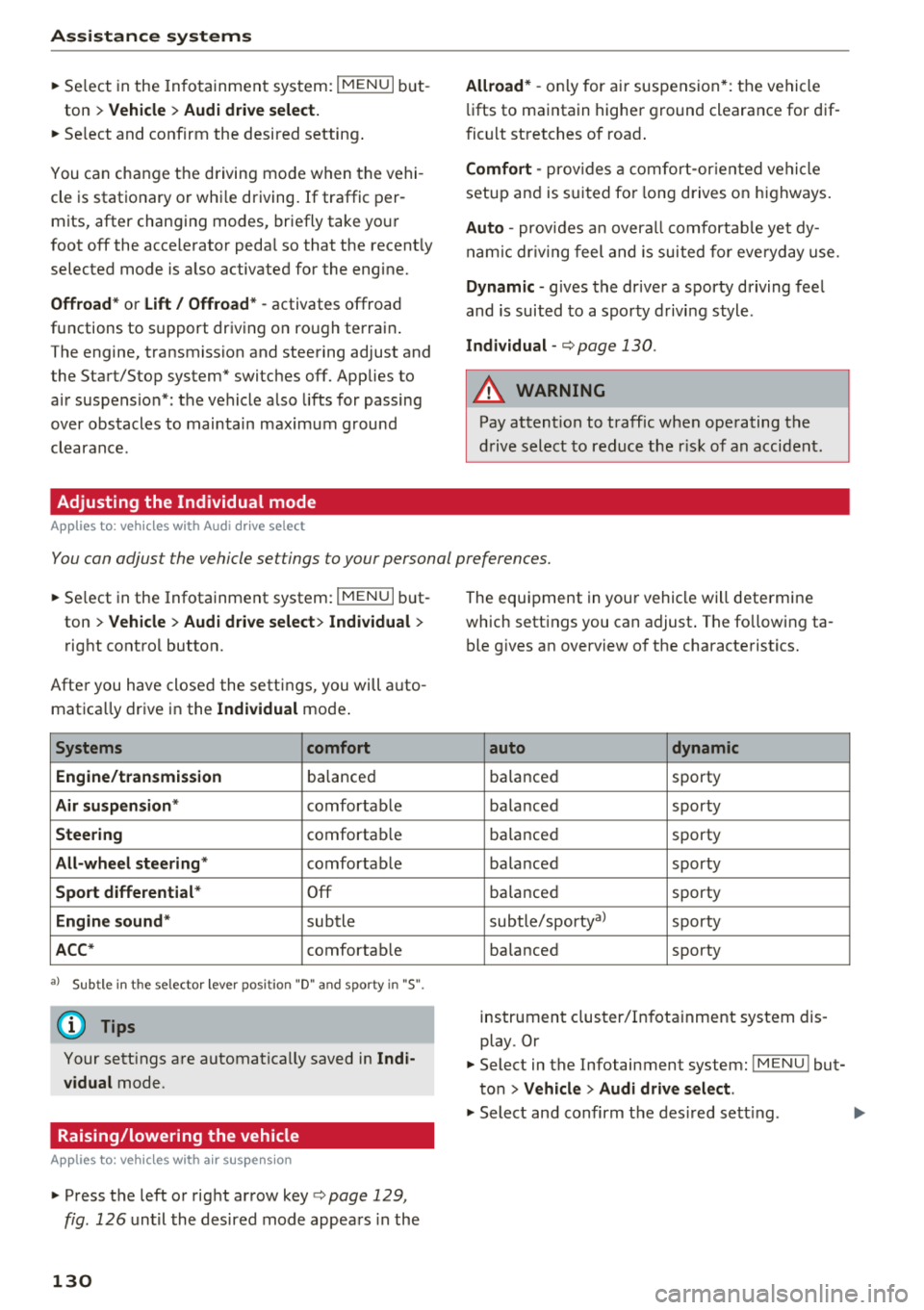
You can adjust the vehicle settings to your personal preferences.
~ Select in the Infotainment system: IMENU I but
ton
> Vehicle > Audi drive select > Individual >
right control button.
Afte r you have closed the settings, you will auto
matica lly drive in the
Individual mode .
Systems comfort
Engine/transmission
ba lanced
Air suspension * comfortable
Steering comfortable
All-wheel steering* comfortable
Sport differential * Off
Engine sound * subtle
ACC* comfortable
a l Sub tle in t he se lecto r lever posit ion "D" and sporty in "S".
(D Tips
Your settings are automatica lly saved in Indi
vidual
mode.
Raising/lowering the vehicle
A pp lies to: ve hicles w ith air susp en sion
~ Press the left or right arrow key c> page 129 ,
fig . 126
until the desired mode appears in the
130
The equipment in your vehicle will determine
which settings you can adjust . The fo llowing ta
ble gives an overview of the characteristics.
auto dynamic
ba
lanced sporty
balanced sporty
ba lanced sporty
ba la nced sporty
ba lanced sporty
subtle/sportyal sporty
ba lanced sporty
instrument cluster/Infotainment system dis
play. Or
~ Select in the Infotainment system: IMENU ! but
ton
> Vehicle > Audi drive select.
~ Select and confirm the desired setting .