page 34 AUDI Q7 2018 Owner´s Manual
[x] Cancel search | Manufacturer: AUDI, Model Year: 2018, Model line: Q7, Model: AUDI Q7 2018Pages: 398, PDF Size: 185.58 MB
Page 245 of 398
Cl a:, ...... N
" N ...... 0
0
::r '
Setup
Applies to: vehicles with Audi smartphone interface
You con connect your smortphone to the MMI us
ing the Audi smortphon e int erfac e. Certain con
t e n t on you r sm ortphone is ado pted to th e Info
tainme nt system d is p lay while driving and con
be operated through the MMI control panel .
Requirement
The vehicle must be stat ionary and the ignition
must be switched on .
iPhone generation 5 or h igher w ith Lightning
connector and iOS 7 .1.2 operating system or h igher.
Or:
Smartphone with Android Auto app and Android
5 .0 Loll ipop operating system or higher.
.,. Connec t your sma rtphone to the Audi music in
terface ¢
page 232 using a USB adapte r
¢page 231, fig. 208 .
.. Se lect and confirm A ctivate Apple CarPlay or
Acti vate And roid Auto now .
.. Follow the system instruct ions.
.. Pay attention to any additiona l system prompts
on your smartphone if applicable .
If yo u chose not to use Apple CarP lay or Android
Auto when connecting your smartphone for the
first time, you can start the Audi smartphone in
terface later on using the
Connection manager.
.,. Se lect : I MENU I button > Audi smartphone in-
terfa ce
> Change to connection manager .
.. Connec t your sma rtphone to the A udi music in
terface using a USB ad apter ¢
page 231,
fig . 208.
.. Se lect and confirm Audi smartphone in t he
Connection manager¢ page 246. You can se
l ect your smartphone in the list of devices that
are already paired¢
page 247.
.,. Follow the system instruct ions .
@ Note
Always follow the i nformat ion found in¢@) in
Wi-Fi hotspot on page 194 .
Audi smartph one interfac e
(D Tips
-The functions that can be used depen d on
the fo llow ing factors, among others:
- the brand of your smartphone
- the vers io n of the ope rating system in
your smartphone
- the software ve rsion of the app used
- the USB adapter cab le and correct connec-
tion
- your cell phone se rvice provide r
- the customized settings on yo ur sma rt -
phone
- One of the factors above o r a com bina tion
of any of them could cause your sma rtphone
to be incompatib le wit h the Audi smart
phone inter face. Compatibility cannot be
guaranteed for all types of smartp hones.
For more informat io n and assistance, refer
t o the user guide and the man ufactu rer of
yo ur sma rtphone .
- If the connected smartphone has voice con
trol, you can ope rate yo ur smartp hon e usi ng
the ex ter nal voic e recognition system
¢page 172.
- The menu language show n in t he MMI is
based on t he sett ings in you r smartp ho ne .
- Th e time d is p layed in the M MI is based o n
the settings in yo ur sma rtphone .
- Severa l M MI functions a re not avai lab le
when Apple Car Play o r Andro id A uto is ac
t ive.
- Yo u ca nnot co nnect any mob ile dev ices via
B lu etooth whe n an App le CarPlay connec
tion is a ctive .
Operating
Applies to: vehicles with Audi smartphone interface
Opening a menu
Apple CarPlay :
you can go back to t he Apple Car
Play main me nu regardless of the se lected me nu
i tem by p ressing and holdi ng the
I B ACKI button .
Android Auto : to go back to the Andro id Auto
me nu bar, push the control knob down .
243
Page 246 of 398
Audi smartphone interface
Opening a menu item
Select and confirm a menu item using the MMI
control panel.
Troubleshooting
Applies to: vehicles with Audi smartphone interface
Problem Solution
Audi smartphone
Check the charge level of your smartphone battery.
interface cannot be Check the USB cable and use a different one if necessary
.
opened. Check if Android Auto or Apple CarPlay is available in your country.
Android Auto : check if the Android Auto app is installed on you r smartphone .
Connecting the Check if you are using the correct USB adapter and if the USB adapter is connect-
smartphone to the ed correctly to your smartphone and the Aud i mus ic interface ¢
page 231.
MMI failed . Apple CarPlay: check if App le CarPlay is activated on your sma rtphone .
Android Auto: check in the And raid Auto app if Android Auto permits new
veh icles .
T he smartphone is Check if you are using the correct USB adapter and
if the USB adapter is connect -
not automatically ed correctly to your smartphone and the Audi music
interface¢
page 231.
detected. Check if the requirements needed to connect a smartphone have been met.
244
Page 248 of 398
System settings
wait for the sig nal t one (bee p) to say a new
command.
Volume : you can a djust th e vol ume of th e
p romp ts by turning the con tro l k no b.
Individual speech training (on ly when the v ehi
cle is s ta ti onary): yo u ca n ad apt the vo ice recog
ni tion sy ste m to your voic e or pro nunciati on in
or der to im prove the sys tem's a bili ty to re co gni ze
your speec h. Indivi dua l speech train ing is com
p rised of 20 s peech ent ries t hat consist o f com
mands and sequences of numbers . You can de
lete the p rogrammed voice t rain ing with the
Re
set individual speech training
function.
Display brightness
You can a djust the brigh tness o f the Info tain
ment system disp lay by t urning the cont ro l knob.
Factory settings
D epe ndi ng on t he ve hicle eq uipme nt, th e fo llow
i ng fu nctio ns ca n b e rese t to factory se ttings :
-Sound settings
- Radio
- Media settings
- Jukebox *
- Directory
-Telephone
- Bluetooth and Wi-Fi*
- Navigation settings*
- Navigation and online memory *
- Voice recognition system*
- Shortcut keys
- Message settings *
-Apps *
- Tool tips
- Audi connect *
- Audi smartphone interface *
You can select the desi red functio ns i nd ividua lly
or all at once with the option
Select all entries .
Select and confirm Restore factory settings .
(D Tips
Make sure that not o nly the sett ings were de
leted but a lso the sto red data, if ap plicable.
246
Connection manager
Introduction
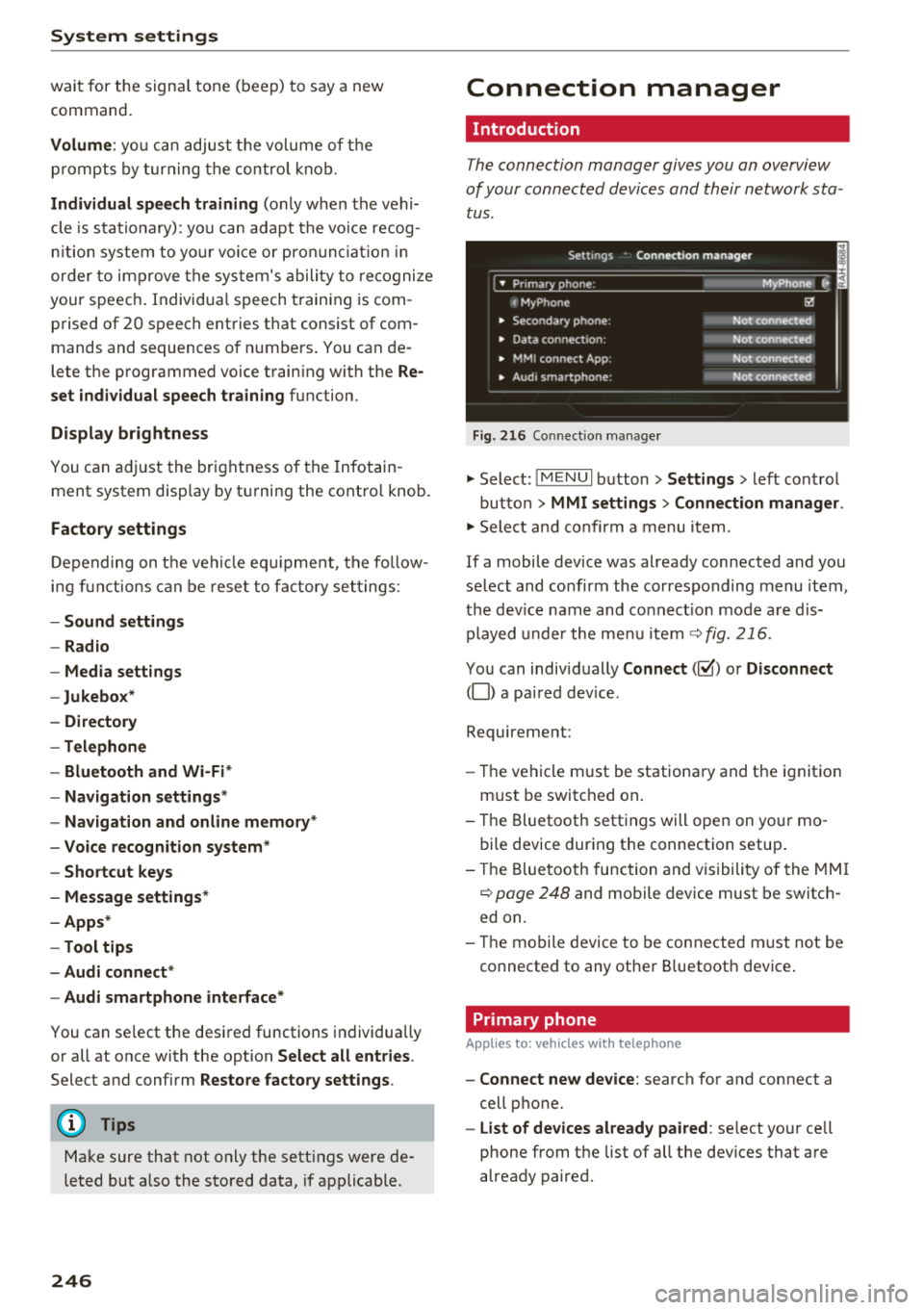
The connection manager gives you an overview
of your conn ected devic es and th eir network sta
tus .
Settings Conne-ction manager I
-====- ,.· • Prima hone: MyPhone .,.
c MyPhone
• Second ary phone :
• Data conn ection :
• MM I
connect App :
• Audi smartpho ne:
Fig. 216 Co nnec tion man ag er
Ii'!
Not connected
Not conn.,ct.,d
Not connected
Not conn..cted
"'Select : !ME NUI bu tton> Settings > left con trol
bu tton >
MMI settings > Connection manager .
"'Sele ct and confirm a menu item.
If a mobile device was already connected and you
select and co nfirm the co rresponding menu item,
t h e dev ice name and co nnect ion mode a re dis
p layed under the menu i tem
r:!;> fig. 216.
Yo u can indiv id ually Connect (~ ) or Disconnect
(0) a pa ired device .
Requirement:
- The ve hicl e m ust be statio na ry and the ignit io n
m ust be switc hed on .
- Th e Bluetooth sett ings will open on yo ur mo
bi le device dur ing the connection setup .
- T he Blue tooth func tion and v is ibili ty of the MMI
c:!;> page 24 8 and mobile device must be switc h
ed on.
- T he mo bile device to be con nected m ust not be
connected to any othe r Bluetoot h dev ice .
Primary phone
App lies to: vehicles wit h telepho ne
- Connect new device: search for and connect a
cell p hone.
- List of devices already paired : select yo ur cell
phone from the list of all the dev ices that a re
already paired.
Page 249 of 398
Cl a:, .... N
" N .... 0
0
::r '
Applies to: vehicles with telephone
-Connect new device : search for and connec t a
c e ll phone.
- List of devices already paired : selec t your cell
p hone fro m the lis t of all the devices t hat are
al re ad y p aired.
Data connection
Applies to vehicles with Audi connect (Infotainment)
- T he data conne ct ion is made using the em bed
ded SIM car d
ll i=>page 187. You do not need to
adjust a ny a ddit io n al sett ings.
{Ll) Note
Always follow t he inf ormat ion foun d in i=> @ in
W i-Fi hotspot on page 19 4.
MMI connect app
Applies to vehicles with Audi connect (Infotainment)
Requirement: the Audi MMI connect app m ust
be installed and open on your mobile device.
- Connect new device : search for and connect a
mobile device (s uch as a smartp hone) .
-List of devices already paired : selec t your mo
bile device from the list of a ll the devices that
are already paire d.
Audio player
Applies to vehicles with Bluetooth or Wi-Fi audio player
Bluetooth player*
Requirement: the Bluetooth funct ion and v is ibili
ty must be sw itched on in the MMI
i=> page 248
and on the B luetoot h aud io player.
- Connect new device : press the control knob.
Se lect
Bluetooth audio player . Search fo r and
connect a mobile device .
-List of devices already paired : select a Bl ue
tooth device from the list of a ll the devices that
are already paire d.
ll SIM card inst alle d in t he v eh icle at the fa ctory.
System settings
Wi-Fi audio player*
R eq uiremen t: th e W i-Fi h otspo t* on the M MI
i=> page 193 an d on yo ur Wi -Fi audio playe r must
be switched o n.
-Connect new device: press the co ntrol knob.
Se arch for and conne ct a W i-Fi ca pabl e dev ice.
- Disconnect Wi-Fi audio player: de activate t he
W i-Fi on you r W i-Fi capa ble dev ice. The devi ce
w ill be au tom atic a lly removed from the lis t.
@ Note
Alway s follo w the inf ormat ion foun d in i=> @ in
W i-F i h ots pot on p age 194.
Directory
Applies to: vehicles with telephone
Display contacts from a cell phone (or an addi
tiona l cell phone).
Requirement: no ce ll phones can be connec ted to
the MMI using the
Handsfree pro file.
- Connect new device: search for and connect a
new ce ll phone .
-List of devices already paired : select yo ur cell
phone from t he list of all the cell phones that
are a lready paired .
Audi smartphone
Applies to: vehicles with Audi smartphone interface
-Connect yo ur cell phone to the A udi music in
t erface
i=> page 232 using a USB adap ter
i=> page 231, fig. 2 08 .
- Sel ect your cell p ho ne from t he list of cell
p ho nes th at h ave already bee n con nec ted.
Additional options
D epen ding on the sele cted fun ct ion, yo u ca n use
t h e righ t contro l bu tton to access the ava ila bl e
additional options in t he connection mana ger . .,.
247
Page 250 of 398
System settings
Delete Bluetooth device*
The se lecte d cell p ho ne/mo bile dev ice is dis con
nected from t he M MI and is removed from the
list of all devices that are alrea dy paire d.
Show Bluetooth profiles*
You can Connect or Disconnect the Handsfree ,
Me ssages *, Dire ctory /contacts
an d Bluetooth
audio player
pro files sep arately.
Bluetooth settings*
- Bluetooth :
select and confirm a set ting for the
B luetoot h connec tion v is ibility . Select
Visible
fo r th e MM I to be vis ib le to o ther dev ices. Se
l ec t
Invisible fo r th e M MI to not be v is ible t o
othe r devi ce s. H oweve r, it is still possib le to es
tab lish a Bl uetoo th con nection with pai red de
vices when the v is ibi lity is switched off. Se lect
Off to t urn visibi lity off . Then a B luetooth con
nect ion is not possible .
-Bluetooth audio player : when this function is
switc hed on~' the Bluetooth audio player is
available as a so urce in t he
Media menu .
-Bluetooth name : the MMI B luetooth name (for
example "AUDI MMI") is d isp layed and ca n be
c h anged.
Online settings*
- Data usage counter :
the amount of data pack
ets that a re sent a nd received throug h the MMI
is d isp layed. You can reset the data usage infor
mation to zero using the
Reset data counter
option.
- Network status : the mobile netwo rk p rovider
fo r data se rvice as well as the netwo rk status
are disp layed .
Wi-Fi settings*
See ¢ page 193, Wi -Fi hotspot.
Storing as a default telephone
Applies to: vehicles with telephone
Requir emen t: a cell phone must be connected to
t he MM I
¢page 174.
As soon as t he cell phone is i n range and the
B lue tooth func tion on the ce ll phone and in the
MM I is swi tched o n, this ce ll phone is g iven pr io r
ity ove r th e ot her Blue tooth devices and is c on-
248
necte d dir ectly to the M MI. The connec ted ce ll
p hone is d is pl ayed first in t he dev ice li st .
Network settings*
- Login :
you can chose an automatic log in to
your cell p ho ne servi ce pro vider 's ne twor k, or
you can ch oose a
manual log in from t he list of
avai la bl e netwo rks .
-Network selection : availabl e netwo rks in t he
presen t loca tion can be sele cte d unde r network
select io n. This f unction is on ly avai la bl e for the
Manual log in setting.
Apple CarPlay sound settings/ Android Auto
sound settings
Applies to: vehicles with Audi smartphone interface
See q page 249.
About Apple CarPlay/ About Android Auto
Applies to: vehicles with Audi smartphone interface
Here you w ill find l ega l informa tion regarding
t h e use o f A pple Car Play o r And ro id Aut o and in
fo rmat ion a bout device -s p eci fic d ata exch ange.
Delete Apple CarPlay device/Delete Android
Auto device
Applies to: vehicles with Audi smartphone interface
Require ment: yo ur cell phone must not be con
n ect ed to the Au di music interf ace wi th a USB
adap ter.
Se lec t:
Audi smartphone > a dev ice from t he lis t
> r igh t con trol b utto n.
To remove your cell p ho ne from the list, se lect
and co nfirm
Delete Apple CarPlay device or De
lete Android Auto device .
System update
"'Select : !ME NUI bu tton> Settings > left control
bu tton >
System maintenance.
- System update :
slide the storage device with
t he update da ta into the a pprop ria te drive
¢ page 2 26 . Se lec t and conf irm the dr ive>
Start update . The length of the p rocess de
pe nds on the s ize of the upd ate.
- Reset driver installation: the selected media
dr iver p ackage is rese t to t he se ttings a t the
t im e of delivery .
Page 251 of 398
Cl a:, .--, N
" N .--, 0
0
::r '
software version and the nav igat io n database *
software vers ion is disp laye d. The
Software in·
formation function a lso provides information
on the software con tained i n the MMI and t he
li cens ing agreeme nt.
Sound settings
The sound distribution and volume of the MMI
c an b e adjust ed individually . The settings d epend
on vehicle equipme nt.
----- 1
J -~+ ~-
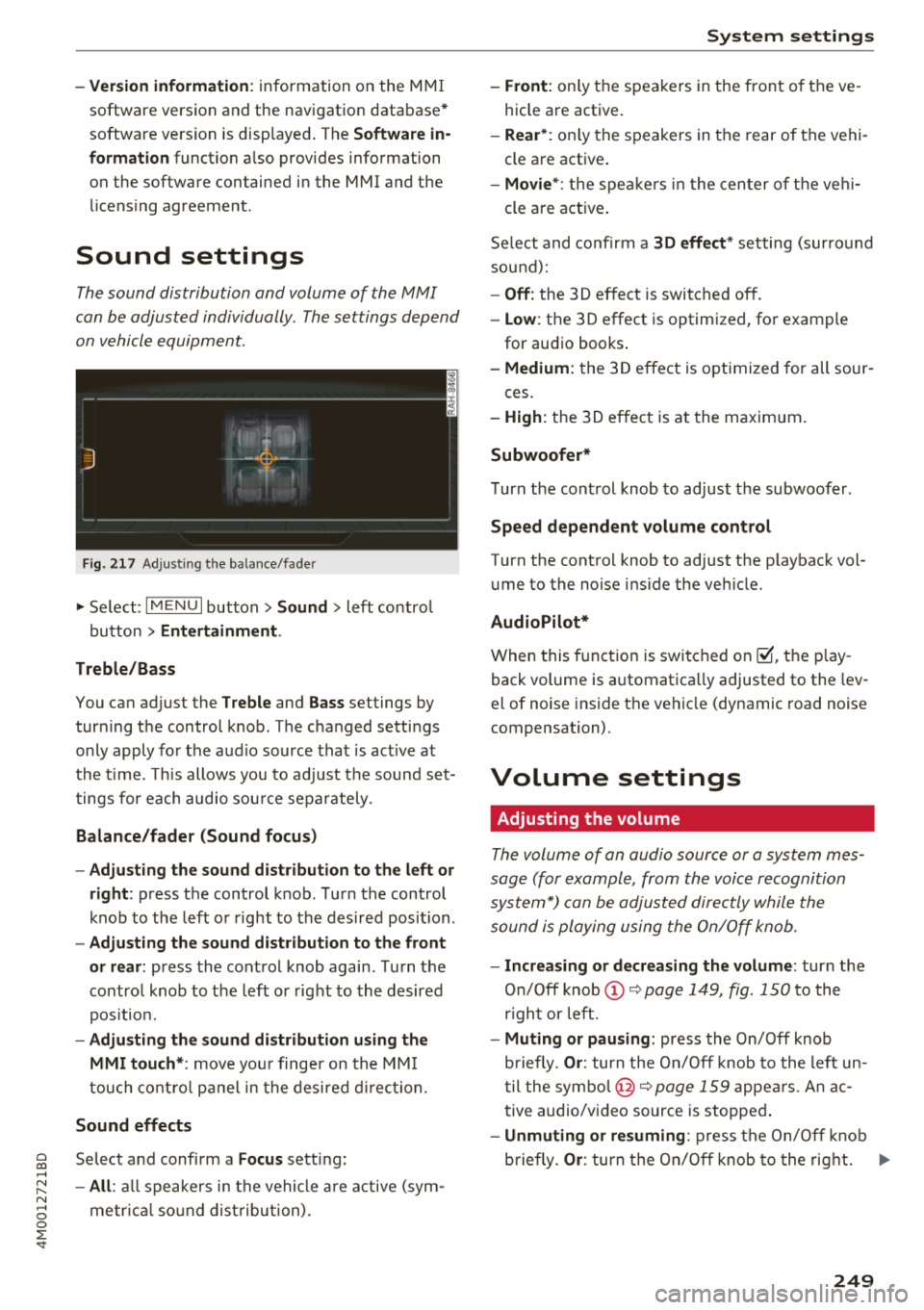
F ig. 217 A dj ustin g the ba la nce /fade r
"'Se lect : I MENU I bu tton >Sound > le ft contro l
b utt on
> Entertainment .
Treble/Bass
You can ad just the Treble and Bass settings by
turn ing t he control knob. The changed se ttings
only apply fo r the a ud io source tha t is ac tive at
t he time . T his allows you to ad just t he soun d set
t ings for each audio sou rce se para tely .
Balance/fader (Sound focus)
- Adjusting the sound d istribution to the left or
right :
press the control knob. Tur n the control
k nob to the left or right to the des ire d posi tion .
-Adjusting the sound distribution to the front
or rear:
press the cont rol knob again . T urn the
contro l knob to the left o r right to the desired
p os it io n.
- Adjusting the sound distribution using the
MMI touch* :
move your finger on the MM I
touch co ntro l pan el in th e desire d directio n.
Sound effects
Selec t and confi rm a Focus se tt in g:
- All : all sp eakers in t he vehi cle ar e active (sym
me trical sound dist ribu tion) .
System settings
-Front : only t he spea ke rs in the fron t of the ve
hicle are active.
- Rear *: on ly the s peakers in the rear of the vehi
cle a re act ive .
-Movie* : the spe akers in t he cen ter o f the ve hi-
cle a re a ct ive .
S e lect and co nfir m a
30 effect* setting (su rround
so und ):
-Off : the 3D ef fect is switched off.
- Low : the 3D effect is optimized, fo r exam ple
for au dio books .
-Medium: the 3D effect is optimize d for all sour -
ces .
-High : the 3 D effe ct is a t the m aximum .
Subwoofer*
Turn the con trol knob to ad just t he subwoofer .
Speed dependent volume control
Turn the cont rol knob to adjust the p layb ack vol
u me to the noise ins ide the ve hicle.
AudioPilot*
W hen thi5 fu nct ion i5 5w it ched on~. th e play
back volume is a utomat ica lly adjusted to the lev
e l of nois e inside t he ve hicl e (dy namic road nois e
compensation) .
Volume settings
Adjusting the volume
The volum e of an audio source or a system mes
sage (for e xampl e, from the voic e recognition
sys tem*) can be adjusted direc tly while the
sound i s pl aying u sing the On/Off knob.
- Increasing or decreasing the volume : turn the
On /O ff knob @~
page 1 49, fig. 150 to the
r igh t or left .
-Muting or pausing: press the On/Off knob
b riefly .
Or: tur n t he On/O ff knob to the left u n
t il the symb ol@ ~
page 159 appe ars. An ac
t ive a udio/v ideo source is s toppe d.
-Unmuting or resuming : pres s th e On/O ff kn ob
b riefly .
Or: turn the On/Off knob to the rig ht. ..,
249
Page 252 of 398
System settin gs
& WARNING
To reduce the risk of an accident, adjust the
volume of the aud io system so that aud ible
signals from outside the vehicle, such as po
lice and fire sirens, can be heard easily at all
times .
(D Tips
Volumes that are too h igh or too low are a u
tomatically adjusted to a set leve l w hen the
MMI is switched on .
Adjusting the system volume
.,. Se lect : I MENU I button> Sound > left contro l
button.
Telephone
App lies to: veh icles with telephone
.
Mute telephone : messages and ringtones are set
to mute .
Ringtone : see c:> page 185, Ringtone and volum e
s etting s.
Rington e volume :
you can adjust the volume of
the selected ringtone by turning the cont ro l
knob .
Messag e v olume: you ca n ad just the volume of
the notification for an incoming text m essage by
turning the control knob.
Microphone input level : you can adjust the call
volume during a phone ca ll by turning the contro l
knob.
Navigation
Applies to: vehicles with navigation system
Voice guidance : see c:>page 212.
Voice guidance dur ing phon e call : see
c:> page 212 .
Voice guidance volume : you can ad just the vo ice
gu idance volume by tur ning the control knob.
O r:
you can adjust the vo ice guidance volume during
active route guidance by turning the On/Off knob.
250
Entert ainme nt fader : the volume o f audio p lay
back can be temporarily lowered when the park
i ng system or voice guidance is active .
Voice recognition sy stem
Applies to: vehicles with voice recognition system
Command di splay : see c:> page 245.
Short dia log : see c:> page 245.
Volume : see c:>page 245.
Indi vidual speech t ra inin g: see ¢ page 245.
Parking aid*
You can adjust the vol ume of the signal tone by
turning the contro l knob .
-Adjusting the Front volum e: select and con
firm
High , Medium or Low .
- Adjus ting
the Rear volume : select and confirm
H igh , Medium or Low .
MMI touch*
Turn the control knob to adjust the volume of the
spoken prompts from the MM I touch*.
Restarting the MMI
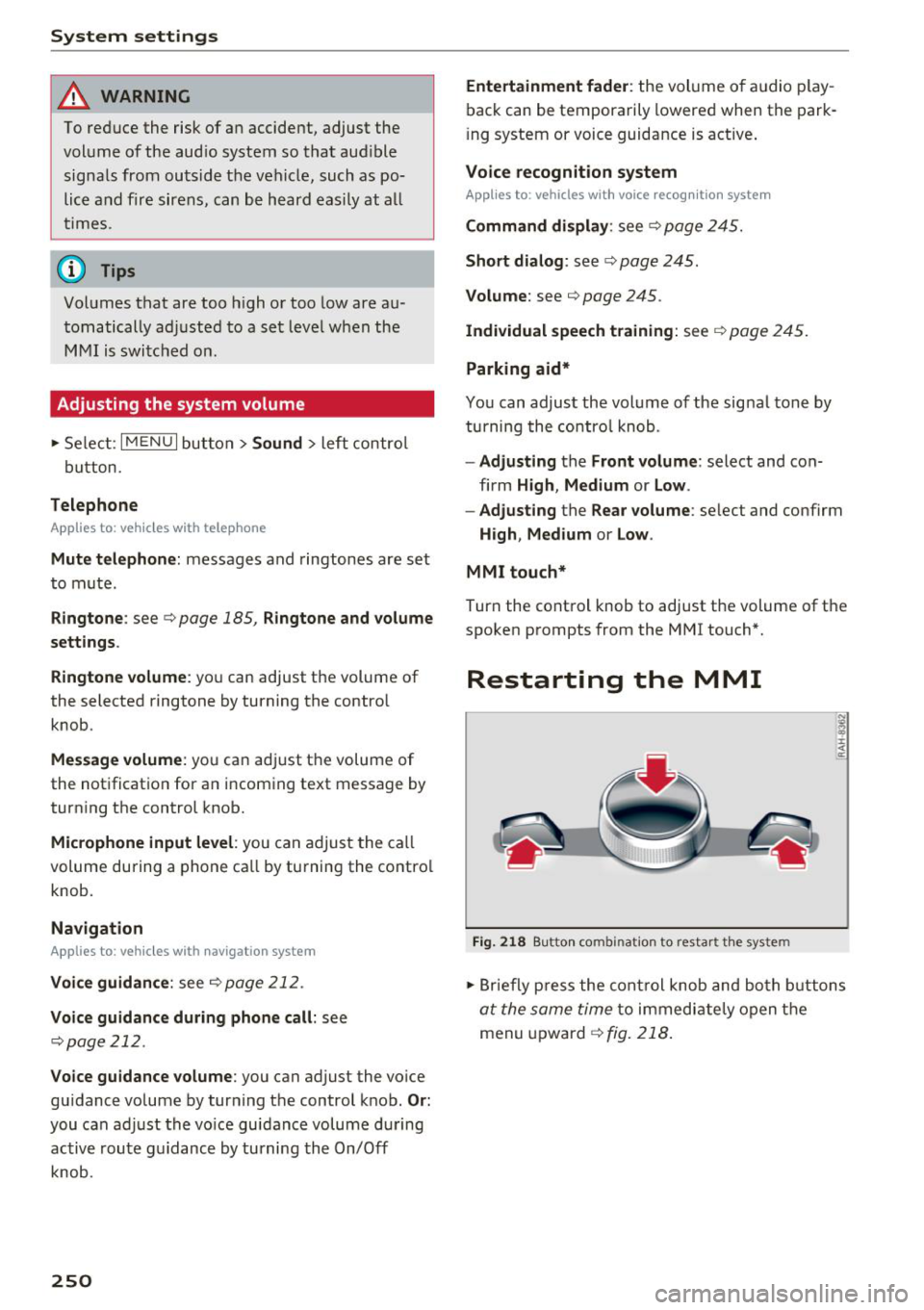
Fig. 218 Bu tton co m bin at ion to re sta rt t he s yst em
.,. Briefly p ress the cont rol knob and both b uttons
at the same time to immediate ly open the
menu upward
¢ fig. 218 .
Page 254 of 398
Drivin g saf ety
Driving safety
Basics
Safe driving habits
Please remember -safety first!
The individua l safety features of your vehicle can
work together as a system to help protect you
and your passengers in a wide range of accidents.
These features cannot work as a system if they
are not always correctly adjusted and correctly
used .
This chapter contains important informat ion,
tips, instruct ions and warn ings that you need to
read and observe for your own safety, the safety
of you r passengers and others . We have summar
ized here w hat you need to know about safety
be lts, a irbags, child restra ints as well as child
safety. Yo ur safety is for us priority number 1. Al
ways observe the information and warnings in
this section -for your own safety as we ll as that
of your passengers.
The information in this section applies to all
model versions of your vehicle . Some of the fea
tures described in this sections may be standard
equipment on some models, or may be optional
equ ipment on others. If you are not sure, ask
your author ized Audi dealer.
A WARNING
- Always make sure that you follow the in
structions and heed the WARNINGS in th is
manual.
It is in your inte rest and in the in
te rest of your passengers .
-
-Always keep all of the Owner's L iterature
manuals in yo ur Audi when you lend o r sell
yo ur vehicle so that this import ant informa
t ion w ill alw ays be availab le to the dr iver
and passengers.
- Always keep the Owner 's Lite ra ture han dy
so that you can find it easi ly if yo u have
questions .
252
Important things to do before driving
Safety is everybody's job! Vehicle and occupant
safety always depends on the informed and care
ful driver.
For your safety and the safety of your passen
gers,
bef ore dri ving alw ays:
.. Make sure that a ll lights and signals are operat
ing correctly .
.. Make sure that the tire pressure is correct.
.. Make sure that all windows are clean and afford
good vis ibility to the outs ide .
.. Sec ure all luggage and othe r items ca refully
¢ page
257 .
.. Make sure tha t noth ing ca n interfere wi th the
peda ls .
.. Adjust front seat, head restraint and mirrors
correctly for your height.
.. Instruct passengers to adjust the head re
straints according to their he ight.
.. Make sure to use the right child restraint cor
rectly to protect children¢ page 291, Child
safety .
• Sit proper ly in yo ur seat a nd make sure t hat
your passenge rs do the same ¢ page 54, Front
seats .
.. Fasten your sa fety belt and wear it p roperly . Al
so instruct your passengers to fasten their safe
ty be lts properly ¢ page 261 .
What impairs driving safety?
Safe driving is directly related to the condition of
the vehicle, the driver as well as the driver's abili
ty to concentrate on the rood without being dis
tracted.
The driver is responsib le for the safety of the ve
hicle and a ll of its occupants. If your ability to
drive is impa ired, safety risks for everybody in the
vehicle increase and you a lso become a hazard to
everyone else on the road ¢
_&.. Therefore:
.. Do not let yourse lf be distracted by passenge rs
or by using a cellular telephone .
.. NEVER drive when your driving ability is im
paired (by med ications, alcohol, drugs, etc .) .
.. Observe all traffic laws, rules of the road and
speed lim its and plain common sense . .,.
Page 255 of 398
a co ...... N r--. N ...... 0
0
:E '
weather conditions.
~ Take frequent breaks on long trips. Do not drive
for more than two hours at a stretch.
~ Do NOT drive when you are tired, under pres
sure or when you are stressed .
A WARNING
Impaired driv ing safety increases the risk of
ser ious personal inju ry and death whenever a
vehicle is being used .
Correct passenger
seating positions
Proper seating position for the driver
The proper driver seating position is important
for safe, relaxed driving .
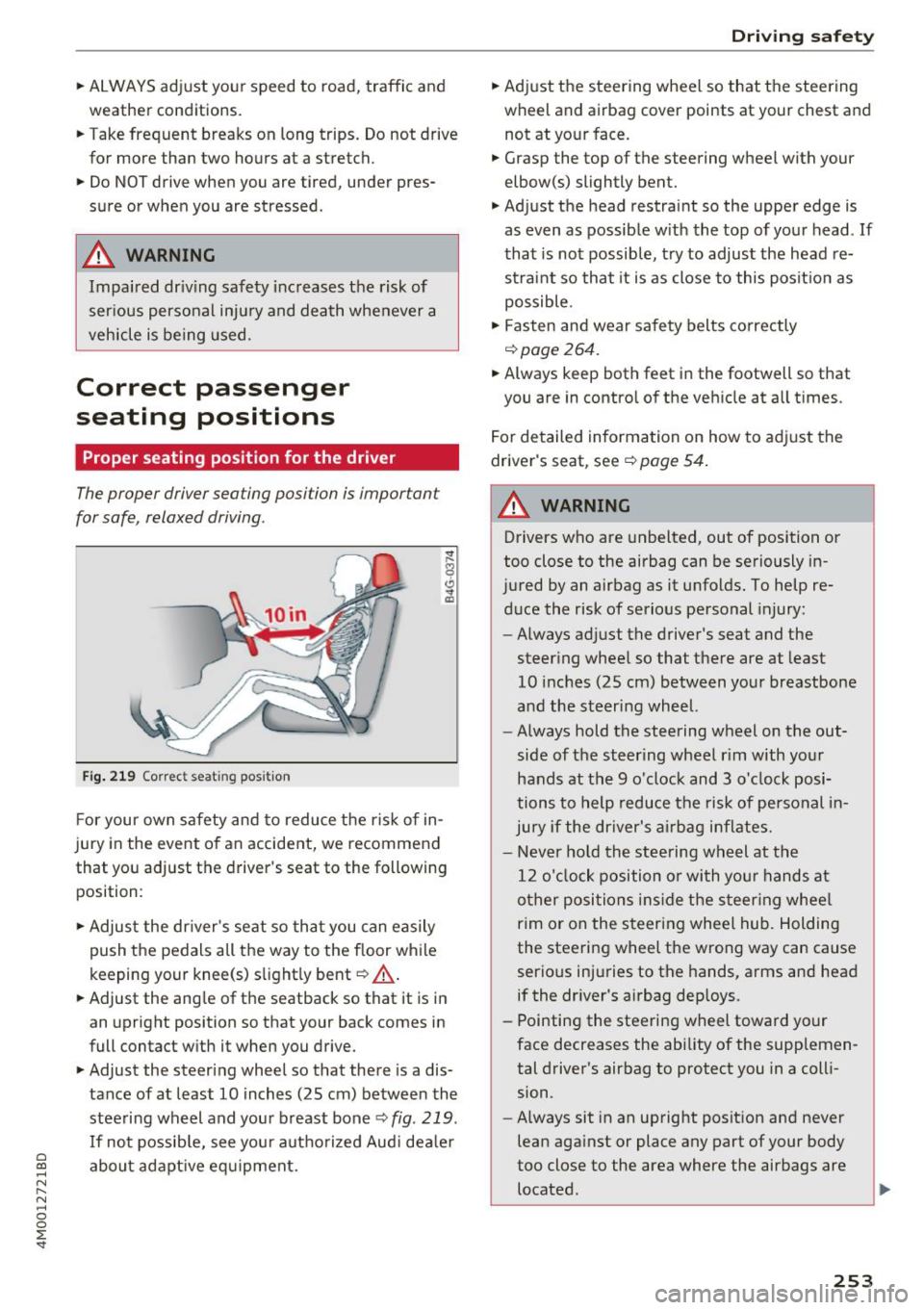
Fig. 219 Correc t seating pos ition
F or your own s afety and to reduce the risk of in
jury in the event of an accident, we recommend
that you adjust the driver 's seat to the following
position:
~ Adjust the dr iver's seat so tha t you can easily
push the pedals all the way to the f loor wh ile
keeping your knee(s) s light ly bent
c::> _& .
~ Adjust the ang le of the seatback so that it is in
an upright position so that your back comes in
full contact w ith it when you drive.
~ Adjust the steering wheel so that there is a dis
tance of at least 10 inches (25 cm) between the
stee ring wheel and you r breast bone
c::> fig. 219.
If no t possib le, see you r autho riz ed Aud i dea le r
abo ut adapt ive eq uipment.
Dri ving safety
~ Adjust the steering wheel so that the steering
wheel and airbag
cover points at your chest and
not at yo ur face.
~ Grasp the top of the steering wheel with your
elbow(s) slightly bent.
~ Adjust the head restra int so the upper edge is
as
even as possible w ith the top of your head . If
that is not possib le, t ry to adjust the head re
straint so that it is as close to this posit ion as
possible .
~ Fasten and wear safety belts correctly
c::>page 264.
~ Always keep both feet in the footwell so that
you are in contro l of the ve hicle at a ll times.
F or detailed information on how to adj ust the
drive r's seat, see
c::> page 54 .
A WARNING
-
Drivers who are unbelted, out of position or
too close to the airbag can be seriously in
jured by an airbag as it unfolds. To help re d uce the risk of serious personal injury:
- Always ad just the driver's seat and the
steer ing whee l so that there are at least
10 inc hes (25 cm) between you r breastbone
and the steering wheel.
- Always hold the steering wheel on the out
side of the steering wheel r im with your
hands at the 9 o'clock and 3 o' clock posi
tions to help reduce the risk of personal in
ju ry if the driver's airbag inflates.
- Never hold the stee ring wheel at the
12 o' clock position o r with you r hands at
o ther posi tions ins ide the s teer ing whee l
rim or on the steering wheel hub. Holding
the steering wheel the wrong way can cause
serio us injuries to the hands, arms and head
if the dr iver's airbag dep loys.
- Pointing the steering wheel toward your
face decreases the ability of the supplemen tal driver's airbag to protect you in a coll i
sion.
- Always sit in an upright position and never
lean aga inst or place any part of your body
too close to the area where the airbags are located .
253
Page 256 of 398
Driving safety
-Before driving, always adjust the front seats
and head restraints properly and make sure
that all passengers are properly restrained.
- Never adjust the seats while the vehicle is
moving. Your seat may move unexpectedly
and you could lose control of the vehicle.
- Never drive with the backrest reclined or tilted far back! The farther the backrests are
tilted back, the greater the risk of injury due
to incorrect positioning of the safety belt and improper seating position .
- Children must always ride in child safety seats¢
page 291 . Special precautions ap
ply when installing a child safety seat on the
front passenger seat
c:> page 269.
Proper seating position for the front
passenger
The proper front passenger seating position is
important for safe, relaxed driving.
For your own safety and to reduce the risk of in
jury in the event of an accident, we recommend
that you adjust the seat for the front passenger
to the following position:
.,. Adjust the angle of the seatback so that it is in
an upright position and your back comes in full
contact with it whenever the vehicle is moving .
... Adjust the head restraint so the upper edge is
as even as possible with the top of your head. If
that is not possible, try to adjust the head re straint so that it is as close to this position as
possible¢
page 58.
... Keep both feet flat on the floor in front of the
front passenger seat .
.,. Fasten and wear safety belts correct
ly¢
page 264.
For detailed information on how to adjust the
front passenger's seat, see ¢
page 54.
A WARNING
Front seat passengers who are unbelted, out
of position or too close to the airbag can be
seriously injured or killed by the airbag as it
unfolds. To help reduce the risk of serious
personal injury:
254
- Passengers must always sit in an upright po
sition and never lean against or place any
part of their body too close to the area
where the airbags are located.
- Passengers who are unbelted, out of posi
tion or too close to the airbag can be seri
ously injured by an airbag as it unfolds with
great force in the blink of an eye.
- Always make sure that there are at least
10 inches (25 cm) between the front pas
senger's breastbone and the instrument
panel.
- Each passenger must always sit on a seat of
their own and properly fasten and wear the
safety belt belonging to that seat.
- Before driving, always adjust the front pas
senger seat and head restraint properly.
- Always keep your feet on the floor in front
of the seat. Never rest them on the seat, in
strument panel, out of the window, etc. The
airbag system and safety belt will not be
able to protect you properly and can even in
crease the risk of injury in a crash.
- Never drive with the backrest reclined or
tilted far back! The farther the backrests are
tilted back, the greater the risk of injury due
to incorrect positioning of the safety belt
and improper seating position.
- Children must always ride in child safety
seats ¢
page 291. Special precautions ap
ply when installing a child safety seat on the
front passenger seat
c::> page 269.
Proper seating positions for passengers in
rear seats
Rear seat passengers must sit upright with both
feet on the floor consistent with their physical
size and be properly restrained whenever the ve
hicle is in use.
To reduce the risk of injury caused by an incorrect
seating position in the event of a sudden braking
maneuver or an accident, your passengers on the
rear bench seat must always observe the follow
ing :
... If there are passengers on the outer rear seats,
adjust the head restraints so the upper edge is .,.