park assist AUDI Q7 2018 Owner´s Manual
[x] Cancel search | Manufacturer: AUDI, Model Year: 2018, Model line: Q7, Model: AUDI Q7 2018Pages: 398, PDF Size: 185.58 MB
Page 140 of 398
Parking systems
Switching on/off
Applies to: ve hicles w ith per ip heral cameras
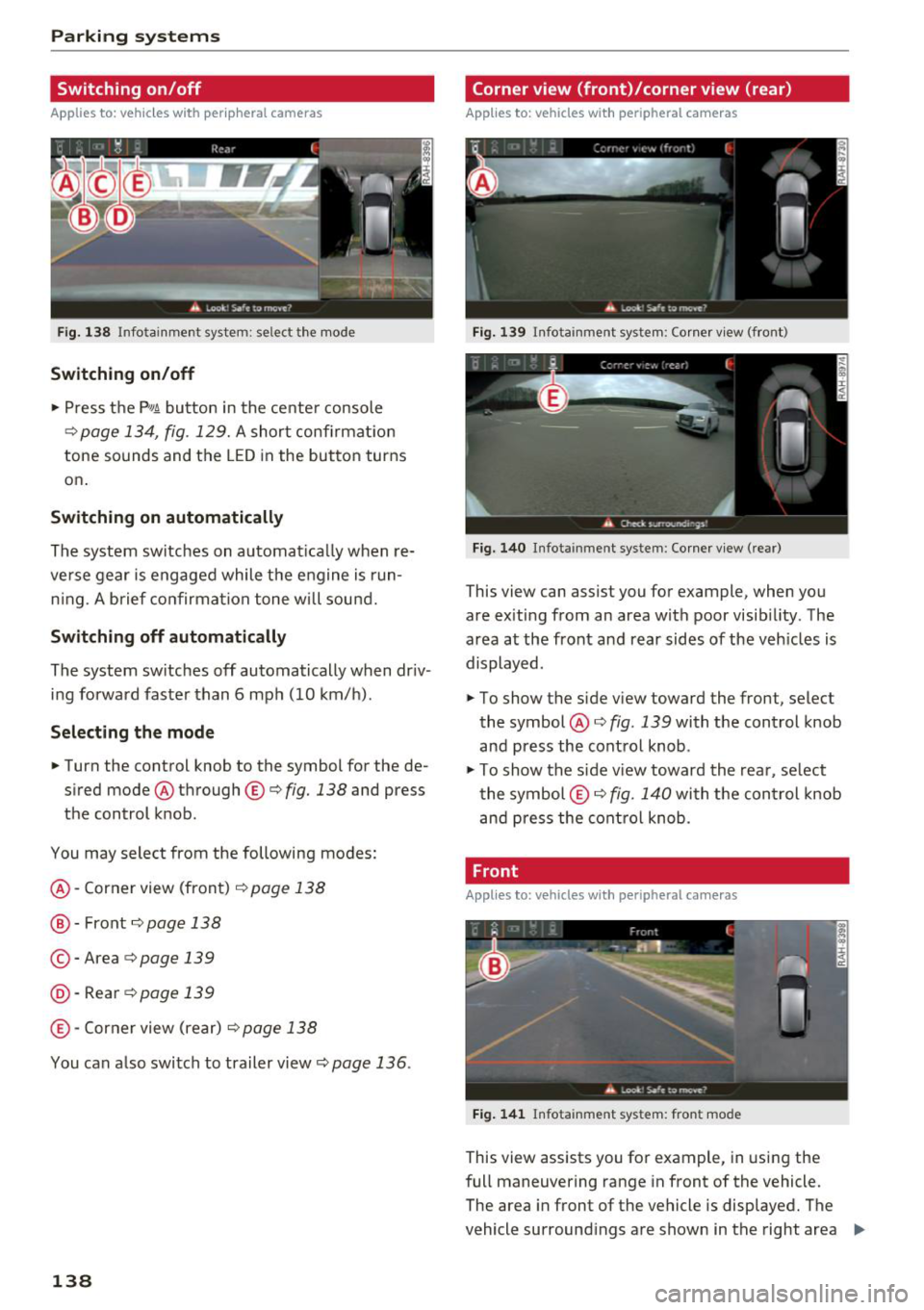
Fig. 138 Infotainment system: se lect the mode
Switching on/off
"' Press the p,qA button in the center console
¢ page 134, fig. 129. A short confirmation
tone sounds and the LED in the button turns
on .
Switching on automatically
The system switches on a utomatica lly when re
ve rse gear is engaged while the engine is run
n ing. A brief confirmation tone will sound.
Switching off automatically
The system switches off automatically when dr iv
ing forward faster than 6 mph (10 km/h) .
Selecting the mode
"'Turn the control knob to the symbol for the de
sired mode @through ©¢fig. 138 and press
the control knob .
You may select from the following modes:
@ -Corner view (front)¢ page 138
@ -Front¢ page 138
© -Area ¢ page 139
@ ·Rear ¢ page 139
© -Corner view (rear) ¢ page 138
You can also switch to trailer view¢ page 136.
138
Corner view (front)/corner view (rear)
Applies to : vehicles with peripheral cameras
Fig. 139 Infota inment system: Corner view (front)
Fig. 140 Infota inmen t system : Corner view (rear)
This view can assist you for example, when you
are exiting from an area with poor visibi lity. The
area at the front and rear sides of the veh icles is
displayed.
"' To show the side view toward the front, select
the symbol @¢
fig. 139 with the control knob
and press the control knob .
"' To show the side v iew toward the rear, se lect
the symbol ©¢ fig. 140 with the con trol knob
and press the control knob.
Front
Applies to: vehicles wi th peripheral ca meras
Fig. 1 41 Infota inment system: front mode
This view assists you for example, in using the
full maneuvering range in front of the vehicle.
The area in front of the vehicle is displayed. The
vehicle surround ings are shown in the right area
Ill>
Page 141 of 398
a co ...... N r--. N ...... 0
0
:E '
cal display and camera image¢
page 140.
"'Se lect the symbol @ with the control knob. The
o range-colored orientation lines denote the
projected direction of travel. Stop the vehicle
when the red orientation line* borders an ob
ject¢ &.
in General information on page 137.
Surroundings
Applies to: vehicles with peripheral cameras
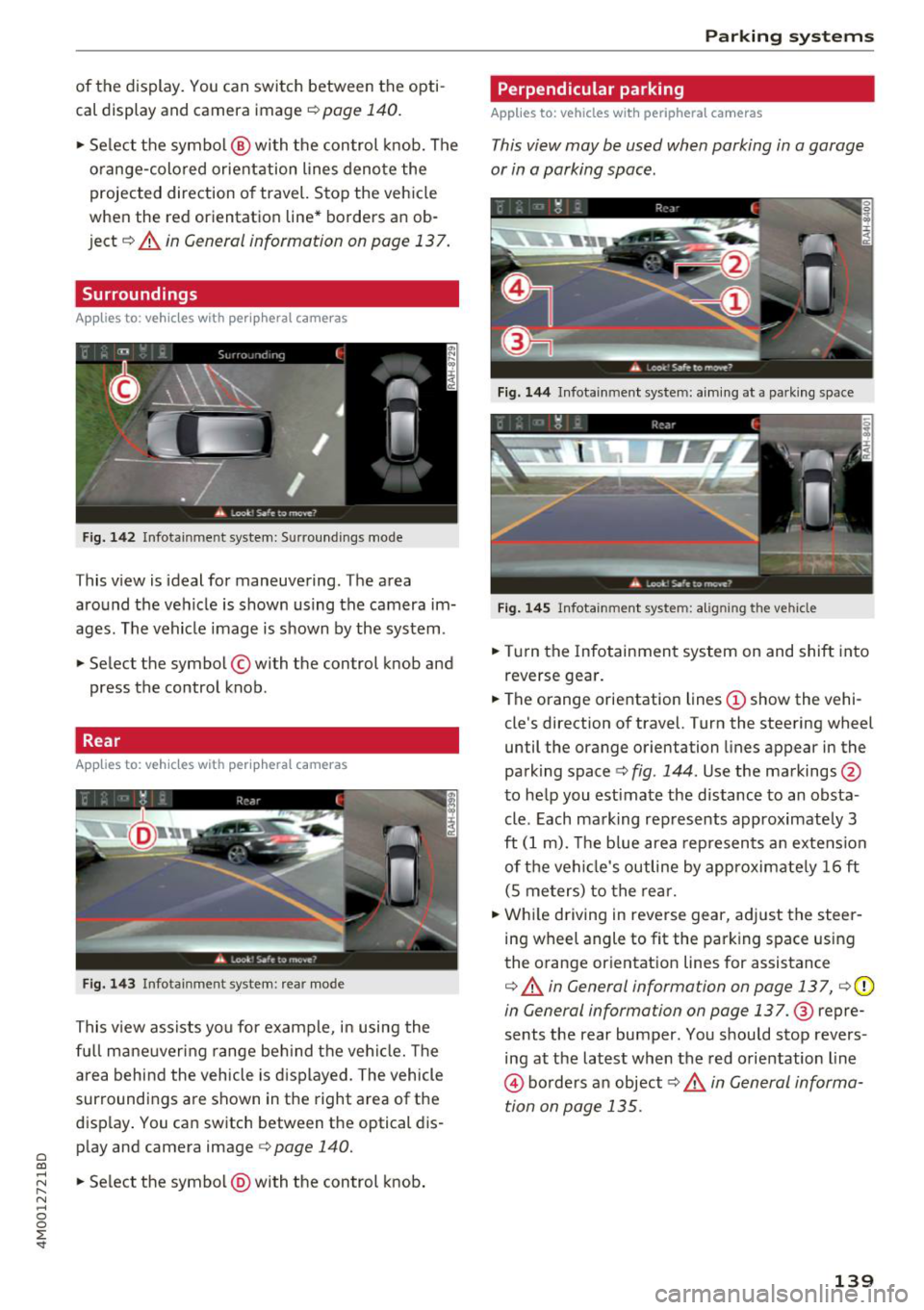
Fig. 142 Infotainment system: Surroundings mode
This view is ideal for maneuvering. The area
around the vehicle is shown using the camera im
ages . The vehicle image is shown by the system.
"' Select the symbol © with the control knob and
press the control knob.
Rear
Applies to: vehicles with peripheral cameras
F ig . 143 Infotainment system: rear mode
This view assists you for example, in using the
fu ll mane uvering range beh ind t he vehi cle. The
a rea behind the vehicle is d isplayed. The vehicle
surroundings are shown in the right area of the
disp lay . You can switch between the optical dis
play and camera image <=>
page 140.
"'Se lect the symbol @) with the control knob .
Parking systems
Perpendicular parking
Applies to: vehicles with peripheral cameras
This view may be used when parking in a garage
or in a parking space.
Fig . 144 Infotainment system: a im ing at a park ing space
Fig . 14 5 Infotainment system: aligning the vehicle
"'Turn the Infotainmen t system on and shift into
reverse gea r.
"' The orange orientation lines(!) show the vehi
cle's direction
of travel. Turn the steering wheel
until the orange orientation lines appear in the
parking space
c:> fig . 144 . Use the markings @
to help you estimate the distance to an obsta
cle. Each mark ing rep resents approximately 3
ft
(1 m). The b lue area represen ts an extension
of t he vehi cle's outline by app roximate ly
1 6 ft
(S me ters) to the rear.
"' Whi le driving in reverse gear, adj ust the steer
ing wheel angle to fit the parking space using
the o range or ientat ion lines for assistance
c:> &. in General information on page 137, ¢ (D
in General information on page 137.@ repre
sents the rear bumper. You should stop revers
ing at the lates t when the red orientation line
@ bo rders a n object c:> .& in General informa
tion on page 135.
139
Page 142 of 398
Parking syste m s
Adjusting the parking aid
Applies to: vehicles with a rear parking system/parking sys
tem plus/rearview camera/peripheral cameras
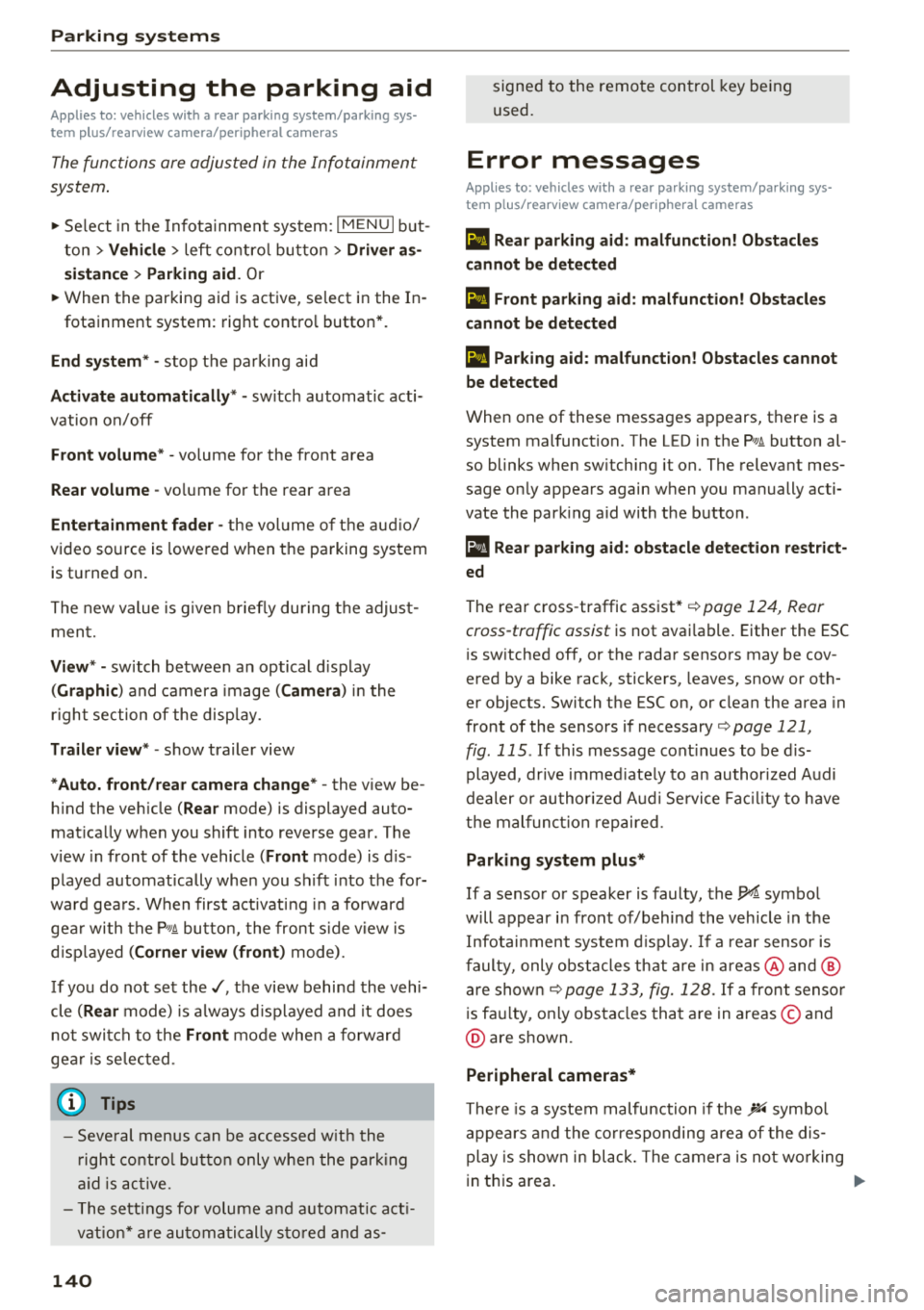
The functions are adjusted in the Infotainment
system .
.,. Se lect in the Infota inment system: IM ENU I but
ton
> Vehi cle > left contro l bu tton > Driv er a s
s is ta nce > Par kin g aid .
Or
.,. When the parking aid is active, se lect in the In -
fotainment system : rig ht contro l button *.
End sy stem * -stop t he parking aid
Acti vate automaticall y* -switch automatic acti
vation on/off
Front volume * -volume for the front area
Rear volume -volume for th e re ar ar ea
Entertainm ent f ader -the vol ume of t he aud io/
video source is lowered when t he parking system
is turned on.
The new value is g iven b riefly du ring the adjus t
ment.
Vie w* -switch between an optical d isplay
( Graphic ) and camera image ( Cam era ) in the
r ight section of the display.
Tr ail er view * -show trailer view
*Auto. front /rear came ra change * -the view be
h ind the veh icle
( Rear mode) is displayed auto
mat ically when you shift into reverse gear. The
v iew in front of the vehicle
( Front mode) is d is
played automatically when you shift into the for
ward gea rs. When first activat ing in a forward
gea r with the
P,, 1~ button, the front s ide v iew is
d isp layed
( Corn er view (fr ont ) mode).
If you do not set the./, the view behind the vehi
cle
( Rear mode) is a lways d isplayed and it does
not swi tch to the
Front mode whe n a forward
gea r is selec ted .
(0 Tips
-Seve ral menus can be accessed w ith the
r ight contro l button only when the park ing
a id is ac tive.
- The settings for volume and automatic act i
vation* are au toma tically s to red and as-
140
signed to the remote control key be ing
used .
Error messages
Applies to: vehicles with a rear parking system/parking sys
tem plus/rearview camera/peripheral cameras
Ill Rear parking aid : malfunction! Obstacles
cannot b e dete cted
Ill Front par king aid: m alfunction! Obstacles
cannot b e detected
Ill Pa rking aid : malfunct ion ! Obstacles cannot
b e detected
When one of these messages appears, there is a
system malfunction. The L ED in the
Pw, button al
so blinks when sw itching it on. The relevant mes
sage on ly appears again when you manually acti
vate the park ing aid with the button .
[ii Rear parking aid: obstacle detection re stri ct
ed
The rear cross -traffic assist* ¢ page 124, Rear
cross-traffic assist
is not available. Either the ESC
i s sw itched off, or the radar sensors may be cov
ered by a bike rack, stickers, leaves, snow or oth
er objects. Swi tch the ESC on , or clean the area in
front of the sensors if necessary¢
page 121,
fig . 115 .
If this message cont inues to be d is
played, drive immed iate ly to an authori zed Audi
dealer or author ized A udi Service Fac il ity to have
t h e mal funct ion repaired .
Parking system plus *
If a sensor or speaker is faulty, the IM symbol
will appear in front of/behind the vehicle in the
Infotai nment system d isplay. If a rear sensor is
faulty, only obs tacles that are in areas @ and @
are show n
¢page 133, fig. 128 . If a front senso r
i s fa ulty, only obstacles that are in areas © and
@ are s hown.
Peripheral cameras*
There is a system malfunction if the% symbol
appea rs and the co rresponding area of the dis
play is shown in black . The camera is no t wo rking
in this area.
Page 169 of 398
Cl a:, ...... N
" N ...... 0
0
::r '
Applies to: vehicles with voice recognitio n system
You con operate many Infotainment functions
conveniently by speaking.
Requirement: the ignition and the MM I must be
switched on ¢
page 149, there must not be any
phone call in progress and the park ing system
must not be active .
~ Switching on: briefly press th e ~ button @
¢page 15, fig. 11 on the m ultifunction steer
ing whee l and say the desired command after
the
Beep .
~ Switching off : press and hold the~ button.
Or: press the [2] butto n.
~ Pausing : say the command Pause . To resume,
press the~ button .
~ Correcting : say the com mand Correction . Or :
simp ly say a new command du ring an an
no uncement
¢ page 245.
Input assistance
The system gu ides you throug h the input with
v isua l and audio feedbac k.
- Visual input assistance : after switching on
vo ice recogn it ion, a display w ith a selection of
poss ible commands appea rs . This command
display can be sw itched on o r off . Se lect:
IMENU I button> Se ttings > left cont rol button
> MMI settings > Speech dialog system .
- Audio input a ssis tance :
to have the poss ible
comma nds read, tu rn t he voice recogn ition sys
tem o n an d say
Help.
For the system to understand you:
Speak clearly and dis tinct ly at a normal vo lume .
Speak lo uder when d riving faste r.
Emphasize the words in the commands even ly
a n d do not leave long pauses .
C lose the doors, the windows and the sunroof* to
reduce background noise . Make su re that passen
gers are not speaking when you are giving a voice
command .
Voice recognition system
Do not d irect the vents towa rd the hands -free mi
c ro p hone, which is in the roof head liner nea r the
front interior lig hts.
Only use the system from the dr ive r's seat be
ca use the hands -free microphone is di rected to
ward that seat .
Additional settings
See¢ page 245, Spee ch dialog system .
_&. WARNING
- Dir e ct y our full atte nti on to dr iv ing. As the
d river, you have com plete re sponsibility fo r
safety in traff ic . O nly use the functions in
such a way t hat you a lways maintai n com
p lete contro l over your vehicle in all traffic
situations.
- Do not use t he voice recognition system in
emergencies beca use your voice may change
in stressfu l situations. It may take longe r to
d ia l the number o r th e system may not be
ab le to d ia l it at all. Dia l the emergency
number manually.
(D Tips
-The d ialog pauses w hen the re is a n incom
ing phone call a nd will cont inue if yo u ig
nore the call. The d ia log ends if yo u answer
t he ca ll.
- Yo u can select an item in the list us ing ei
t her the vo ice recogn it io n sys tem o r the
cont ro l knob .
Command overview
information
Applies to: vehicles with voice recognition system
T he following overv iews des cribe the comm ands
t h at can be used to ope rate the MMI using the
vo ice recognit ion system.
Alte rnative comm ands ar e separate d using a"/",
f o r ex ample say:
Telephone / (or) Navigation /
(or) Radio.
Sequences of commands used to perfo rm an ac
t io n a re iden tified w it h a "> ", fo r ex am ple s ay:
Enter address > ( then) Enter country/state . ..,
167
Page 327 of 398
a co ...... N r--. N ...... 0
0
:E '
-Before the start of winter, have an author
ized Audi dealer or author ized Audi Service
Facility check if the coolant additive in your
vehicle matches the percentage appropriate
for the climate . Th is is especially important
when driving in co lder climates.
- If the appropriate coolant additive is not
available in an emergency, do not add any
other additive. You could damage the en
gine. If this happens, only use wa te r and re
store the co rrect mixture ratio with the
spec ified coo lan t additive as soon as possi
ble .
- Only refill with new coo lant.
- Radiator sealant must no t be mixed with
the coo lant.
Adding coolant
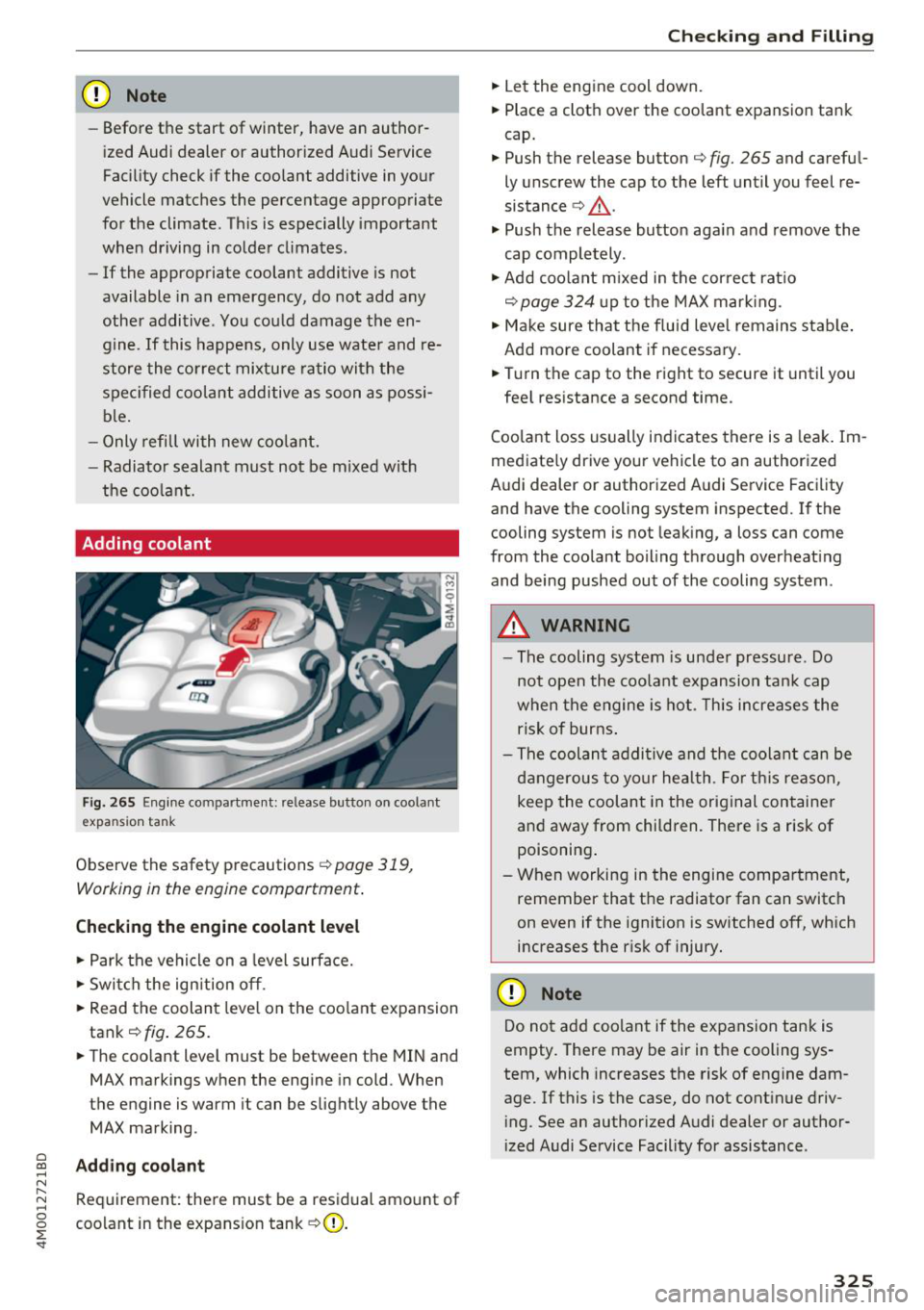
Fig . 26 5 Eng ine compartme nt: release button on coolant
expansion tank
Observe the safety precautions ¢ page 319,
Working in the engine compartment .
Checking the engine coolant level
.,. Park the vehicle on a level surface .
.,. Swi tch the ign ition off.
... Read the coolant leve l on the coo lant expansion
tank¢
fig . 265.
... The coolant level must be between the MIN and
MAX markings when the engine in cold. When
the engine is warm it can be slightly above the
MAX marking.
Adding coolant
Requirement: there must be a residual amount of
coo lant in the expans ion tank
¢ (D .
Chec king and Filling
.,. Let the engine cool down.
... Place a cloth over the coolant expansion tank
cap.
... Push the release button
¢fig. 265 and carefu l
ly unscrew the cap to the left until you feel re
sistance ¢.&, .
.,. Push the release button aga in and remove the
cap comple tely .
.,. Add coo lant m ixed in the cor rec t rat io
¢page 324 up to t he MAX mar king.
... Ma ke sure that t he f luid level remains stab le .
Add mo re coolant if necessary .
... Tu rn the cap to the right to secure it until you
fee l res istance a second time.
Coola nt loss usually in dicates there is a leak . Im
mediate ly drive your vehicle to a n authorized
Audi dealer or authorized A udi Service Facility
and have the cooling system inspected.
If the
cooling system is not leaking, a loss can come
from the coolant boiling through overheat ing
and being pushed out of the cooling system .
A WARNING ,.__
-The cooling system is under pressure. Do
not open the coo lant ex pansion tan k cap
when t he engine is hot. This increases the
ris k of burns .
- Th e coolan t addi tive and the coolan t can be
dangerou s to yo ur he alt h . Fo r th is reason,
keep the coolant in the original cont ainer
an d away from children. There is a risk of
poisoning .
- When working in the engine compar tment,
remember that t he radiator fan can switch
on even if the ignition is switched off, which increases the risk of injury .
{U) Note
Do not add coolant if the expansion tank is
empty. There may be air in the cooling sys
tem, which increases the risk of engine dam
age. If this is the case, do not cont inue driv
i ng. See an authorized A udi dealer or author
i zed Audi Service Facility for assistance .
-
325
Page 328 of 398
Checking and Filling
Brake fluid
N
N
~ N ,l: CX) al
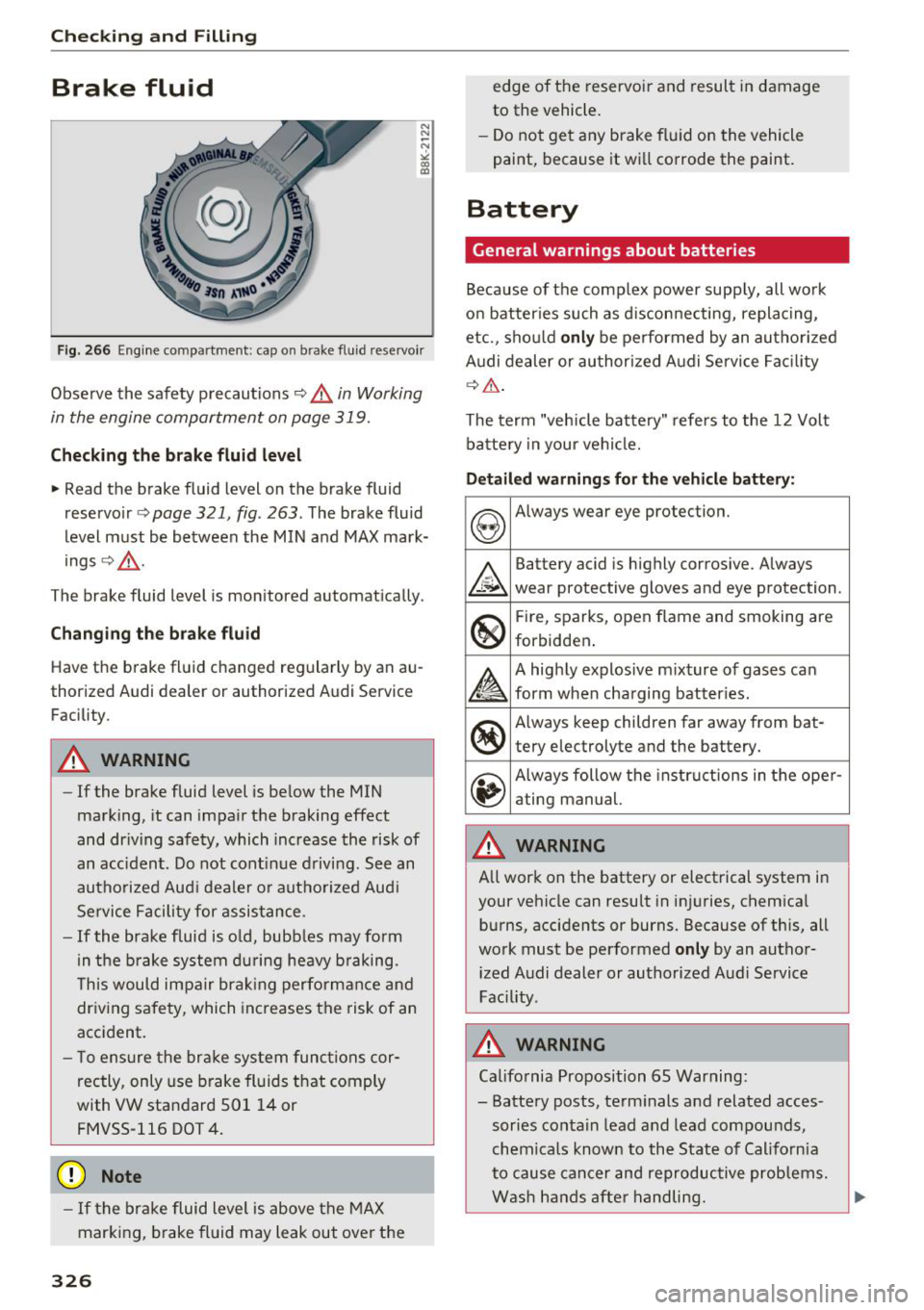
Fig. 266 Engine compartment: cap on brake flu id reservo ir
Observe the safety precautions c> .&. in Working
in the engine compartment on page 319.
Checking the br ake fluid l evel
~ Read the brake fluid level on the brake fluid
reservo ir
c> page 321, fig . 263 . The brake fluid
level must be between the MIN and MAX mark
ings
Q ,&. .
The brake fluid level is mon itored automat ically .
Chan ging the b ra ke fluid
Have the brake fluid changed regularly by an au
thorized Audi dealer or authorized Audi Servic e
Facility .
A WARNING
-If the brake fluid level is be low the MIN
marking, it can impair the braking effect
and dr iving safety, which increase the risk of
an accident. Do not cont inue d riving . See an
authorized Aud i dealer or autho rized Audi
Service Facility for assistance .
-If the brake fluid is o ld, bubbles may form
in the b rake system du ring heavy b raking.
T his would impair brak ing performance and
driving safety, which increases the risk of an
accident.
- T o ensure the brake system functions cor
rectly, only use brake fluids t hat comply
with VW standard 501 14 or
FMVSS-116 DOT 4 .
(D Note
-If the brake fluid level is above the MAX
mark ing, brake fluid may leak out over the
326
edge of the reservoi r and result in damage
to the vehicle.
- Do not get any brake fluid on the vehicle
paint, because it will corrode the paint.
Battery
General warnings about batteries
Because of the comp lex power supp ly, all wo rk
on batter ies such as d isconnecting, replacing,
etc., sho uld
onl y be performed by an autho rized
Audi dealer or au thorized A udi Servi ce Fac ility
Q _& .
The term "vehicle battery" refers to the 12 Volt
ba ttery in your vehicle.
Detail ed warnings for th e vehicle battery :
&
Battery acid is highly corros ive. Always
wear protective gloves and eye protection .
So
®
Fire, sparks, open flame and smoking are
forbidden .
£
A highly explosive m ixture of gases can
form when charging batter ies.
®
Always keep children far away from bat-
tery electrolyte and the battery.
~
Always follow the instructions in the oper -
ating manual.
A WARNING
All work on the battery or electrical system in
your vehicle can result in injuries, chemical burns, accidents or burns. Because of this, all
work must be performed
on ly by an author
ized Audi dealer or authorized Audi Service
Fac ility .
A WARNING
California Proposition 65 Warning:
- Battery posts, term inals and related acces
sories conta in lead and lead compounds,
chemicals known to the State of California
to cause cancer and reproductive problems.
Wash hands after handling.
~
Page 359 of 398
a co ...... N r--. N ...... 0
0
:E '
General information
.. Par k the vehicle as far as poss ible from moving
traff ic in the event of a breakdown. In the event
of a flat tire, park the vehicle on a leve l surface .
It you are on a steep h ill, be especially careful.
.. Set the parking brake .
.. Switch the emergency flashe rs on.
.. Have the passengers exit the veh icle . They
sho uld move to a safe place, for example be
hind a guard rail.
& WARNING
Follow the steps g iven above. This is for your
protection and the for the safety of o ther driv
ers .
Equipment
Vehicle tool kit/tire mobility kit/vehicle
jack
App lies to: veh icles with the vehicle tool kit, tire mobili ty ki t
an d vehicle jac k
The vehicle tool kit, vehicle jack, tire mobility kit
and comp ressor are s to red in the luggage com
pa rtment unde r the cargo floor cove r. Lift the
cargo floor using the handle.
& WARNING
Impro per use of the vehicle jac k can ca use se
rious perso nal injuries.
- Never use the screw drive r hex he ad to
tigh ten whee l bolts, since the bol ts cannot
atta in the necessary tighten ing torque if you
use the hex head, potentially ca using an ac
c ident.
- The factory-supplied jack is i nten ded on ly
for your vehicle model. Under no circ um
stances should it be used to lift heavy
vehicles or other loads; you r isk injuring
yourself.
- Never start the engine whe n the vehicle is
ra ised, which could ca use a n accident.
- Support the veh icle secure ly with appropr i
ate stands if work is to be performed under-
Em ergen cy as sis tanc e
neath the vehicle; otherwise, there is a po
tential risk for injury.
- Never use the jack supplied with your Audi
on another vehicle, particularly on a heavier
one. The jack is only su itable for use on the
veh icle it came with.
(D Tips
The vehicle jack in your vehicle is mainte
nance-free.
Tire mobility kit
Preparation
.. Read a nd follow the important safety precau-
t ions
¢page 357 .
.. Set the park ing brake .
.. Select the "P" selector lever position .
.. Check if a repair with the tire mobility kit is pos
sible
¢ page 357.
Using the tire mobility kit
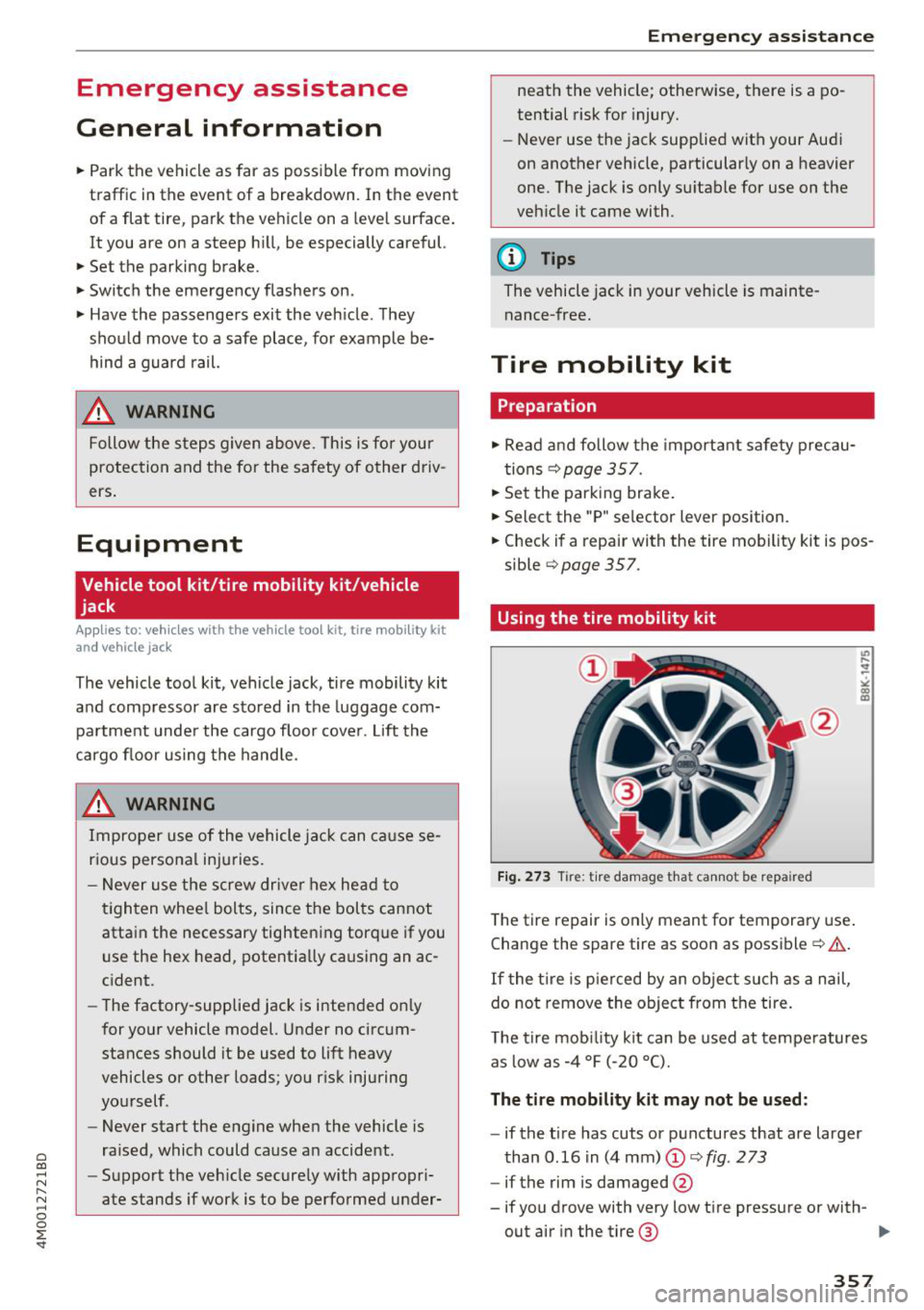
Fig. 273 Tire: tire damage t hat can not be repaired
T he tire repair is only meant for tempora ry use .
Change the spare tire as soon as possible¢& .
If the t ire is p ierced by an o bject su ch as a nail,
do no t r emove the object from the tire .
T he tire mob ility kit can be used at tempe ratures
as low as -4 °F (-20 °C).
The tire mobility kit may not be used:
- if the tire has cuts or p unctures that are larger
than 0.16 in (4 mm)
(D ¢ fig . 273
-if the rim is damaged @
- if you drove with very low t ire pressure or with-
out air in the tire @ ..,.
357
Page 361 of 398
Cl a:, ...... N
" N ,-1 0
0
::r '
reached after inflating for 6 minutes, then
the tire is too severely damaged. Do not
continue driving .
- If the t ire cannot be repaired with the tire
sealant, see an authorized Audi dealer or au
thorized Aud i Serv ice Facility for ass istance .
(D Tips
Do not operate the compressor for more than
six m inutes continuously, or it can overheat.
Once the compressor has cooled, you ca n con
tinue to use it .
Completing
"'Adhere the sticker that says "max . SO mph
(max. 80 km/h)" that is p rovided w it h the t ire
mobility kit within the dr ive r's fie ld of vision.
"' Stop the vehicle afte r driving for about 10 m i
nutes and check the tire pressure .
"' If the tire pressure is lower than 19 psi ( 130
kPA), then the tire is too severely damaged. Do
not cont inue driving.
A WARNING
Pay attent ion to the following after repair ing
the t ire :
- Do not drive faster than SO mph (80 km/h).
- Avoid hard acceleration, brak ing sharply,
and fast cornering.
- The vehicle may become more difficu lt to
contro l.
- If the tire is too severely damaged, see an
authorized Audi dealer or authorized Audi
Service Facility for assistance.
@ For the sake of the environment
You can give the used tire sealant bottle to an
authorized Audi dealer or authorized Audi
Service Facility for disposal.
(D Tips
Remember to obtain a new bottle of sea lant
from an authorized Audi dea ler or authorized
Audi Service Facility after repairing a tire.
Em ergenc y ass is tanc e
Replacing a wheel
Preparation
You must complete the preparation before
changing a tire .
"'Read and follow the impor tant safe ty precau-
tions
¢ page 357.
"'Set the park ing brake .
"' Select the "P" selector lever position .
"' When towing a tra iler : disconnect the trailer
from you r vehicle.
"' Lay out t he vehicle too l kit ¢
page 357 and the
spare tire.
"' Switch on wheel change mode* in the Infotain
ment syst em:
!MENUI button> V ehicle > left
control button >
S erv ic e & ch ecks > Air s uspen
s io n: w heel chang e.
"'Switch the ignit ion off.
The vehicle jack mod e* switches off automatica l
ly at speeds above 6 mph ( 10 km/h).
A WARNING "---
When us ing the ve hicle jack" on a road with a
steep hill or offroad, you must take extra pre
cautions to prevent the vehicle from rolling .
Use su itable objects to block the front and
back of t he wheel t hat is diagonal from the
whee l with the flat t ire.
A WARNING
You o r yo ur passenge rs could be injured while
changing a whee l if you do no t follow these
safety precautions :
- I f yo u have a flat tire, move a safe dis tance
off the road. Turn off the eng ine, turn the
emergency flashers on and use other warn
ing devices to a lert other motorists.
- Make sure that passengers wait in a safe place away from the vehicle and well away
from the road and traff ic.
- To he lp prevent the vehicle from moving
suddenly and possib ly slipping off the jack*,
a lways f ully set the park ing brake and block
the front and back of the wheel diagonally
opposite the wheel being changed. When
one front wheel is lifted off the ground,
~
359
Page 362 of 398
Emergency assistance
placing the Automatic Transmission in P
(Park) will
not prevent the vehicle from
moving.
- Before you change a wheel, be sure the
ground is level and firm. If necessary, use a
sturdy board under the jack*.
-Always store the vehicle tool kit, the jack* and the replaced tire in the luggage compartment <=>
page 257.
@ Tips
-Obey all laws.
- Before changing the wheel, you must acti- vate the jacking mode*, so that the automatic controls for the air suspension* do
not make it more difficult to lift the vehicle
with the jack*<=>
page 360 .
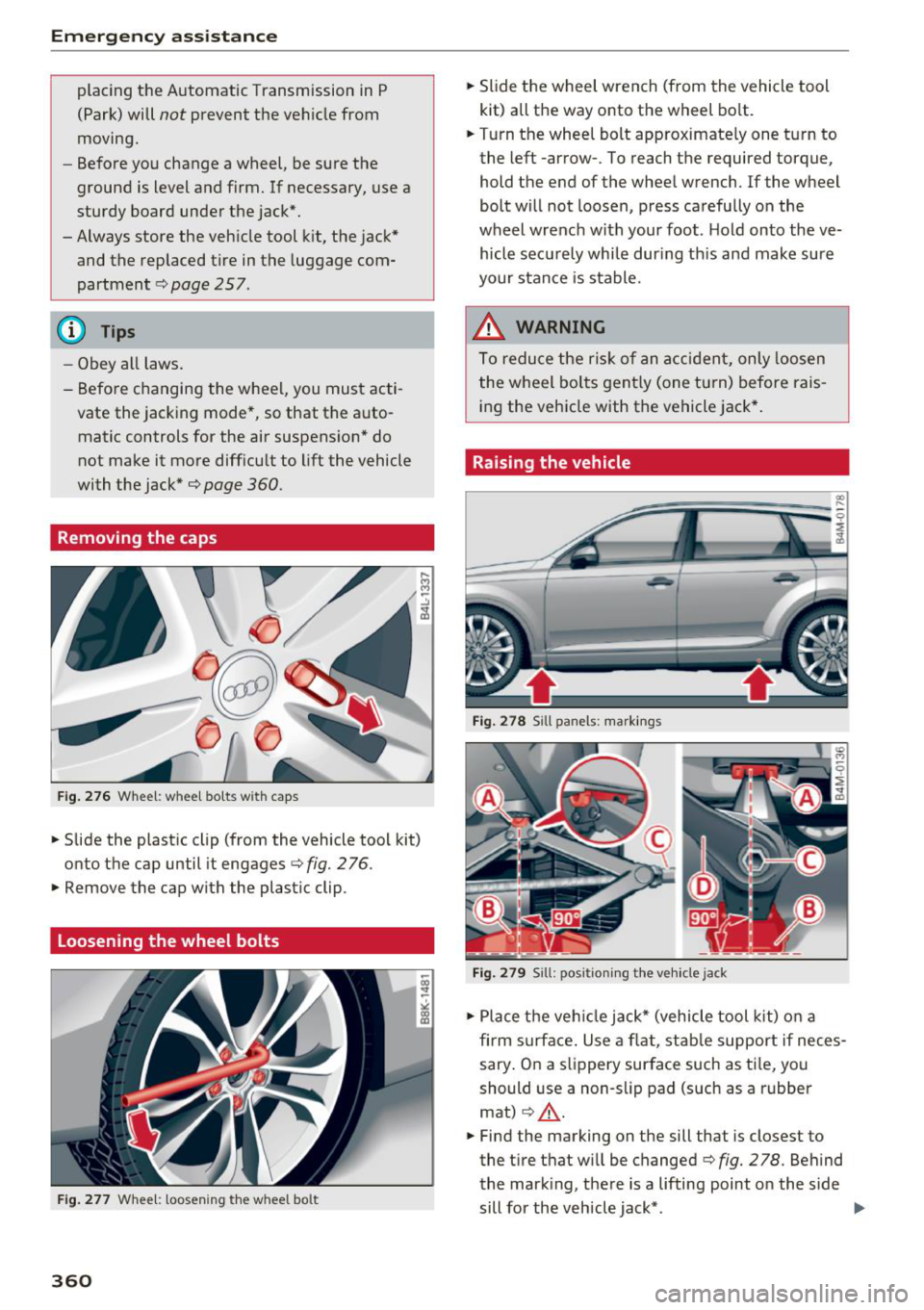
Removing the caps
Fig .. 276 Wheel: wheel bo lts wi th caps
.,. Slide the plastic clip (from the vehicle tool kit)
onto the cap until it engages
<=> fig. 276 .
.,. Remove the cap with the plastic clip .
Loosening the wheel bolts
Fig. 277 Whee l: loosen ing the w heel bo lt
360
.,. Slide the wheel wrench (from the vehicle tool
kit) all the way onto the wheel bolt .
.,. Turn the wheel bolt approximately one turn to
the left -arrow- . To reach the required torque,
hold the end of the wheel wrench. lfthe wheel
bolt will not loosen, press carefully on the
wheel wrench with your foot . H old onto the ve
hicle securely whi le during this and make sure
your stance is stable.
_&. WARNING
To reduce the risk of an accident, only loosen
the wheel bolts gently (one turn) before rais
ing the vehicle with the vehicle jack*.
Raising the vehicle
Fig. 278 S ill panels: markings
Fig. 279 Sill: positi on ing the vehicle jack
.,. Place the veh icle jack* (vehicle tool kit) on a
firm s urface. Use a flat, stable support if neces
sary . On a slippery surface such as ti le, you
should use a non-slip pad (such as a rubber
mat)
c> .&_ .
.,. Find the marking on the sill that is closest to
the tire that wi ll be changed<=>
fig. 278. Behind
the mark ing, there is a lifting point o n the side
sill for the vehicle jack* . ..,.
Page 368 of 398
Fuses and bulbs
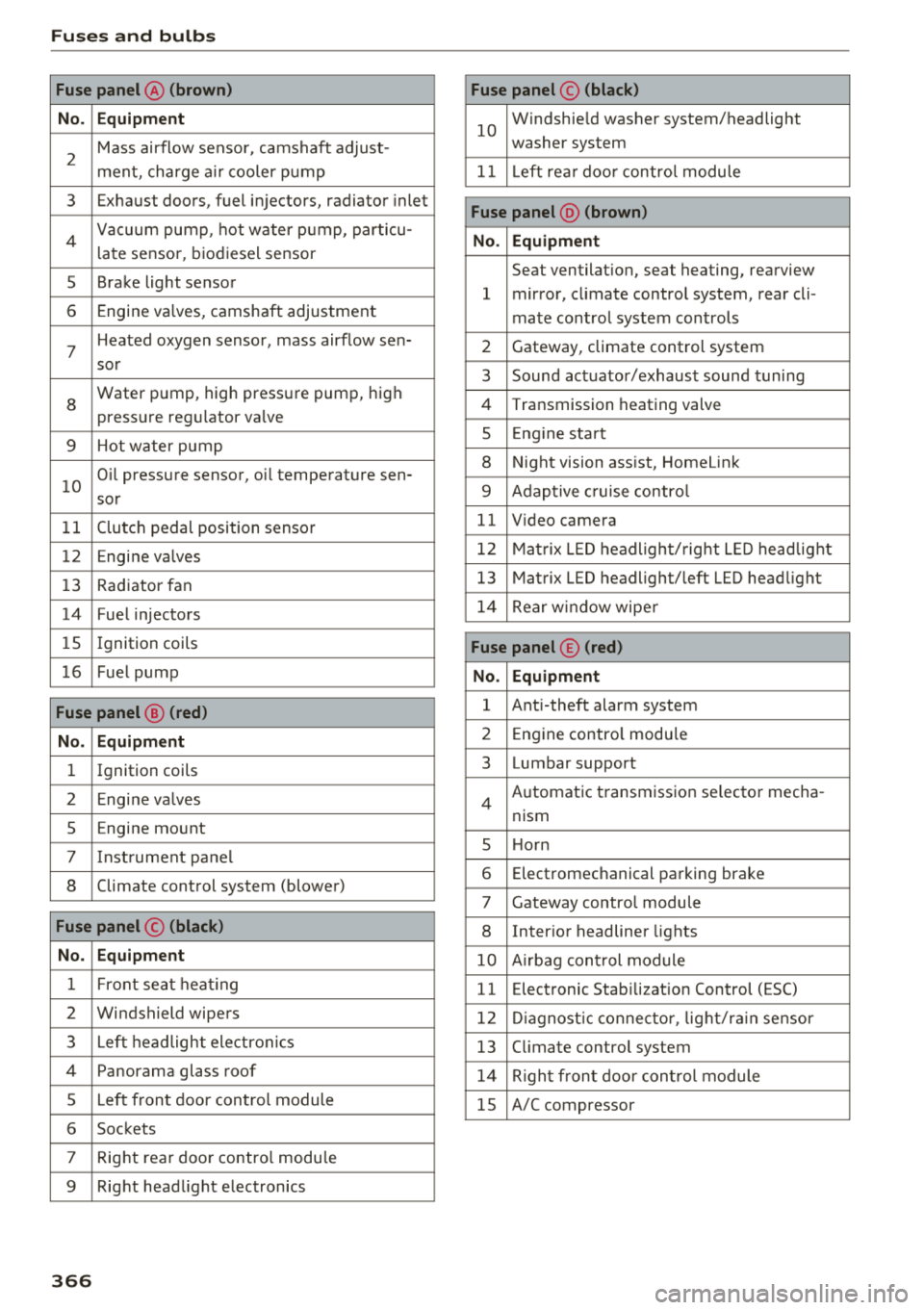
Fuse panel@ (brown) Fuse panel© (black)
No. Equipment
2
Mass airflow sensor, camshaft adjust-
ment, charge air cooler pump
10
Windshie ld washer system/headlight
washer system
11 L eft rea r door control module
3 Exhaust doors, fuel injectors, radiator inlet
4 Vacuum pump, hot water p ump, particu-
late sensor, biodiesel sensor
Fuse panel @ (brown)
No. Equipment
5 Brake light sensor
6 Engine valves, camshaft adjustment Seat ventilation, seat heating, rearview
1 mirror, climate control system, rear cli-
mate control system controls
7
Heated oxygen sensor, mass airflow sen-2 Gateway, climate control system
sor
8
Water pump, high pressure pump, high
pressure regulator va lve
9 Hot water pump
10
Oil pressure sensor, oil temperature sen-
sor
3 Sound actuator/exhaust sound tuning
4 Transmission heat ing valve
5 Engin e start
8 Night vision assist, HomeLink
9 Adaptive c ruise control
11 Clutch pedal position sensor 11 Video camera
12 Engine valves 12 Matrix LED headlight/right LED headlight
13 Radiator fan 13 Matrix LED headlight/left LED headlight
14 Fuel injectors 14 Rear window wipe r
15 Ignition coils Fuse panel © (red)
16 Fuel pump No. Equipment
Fuse panel @ (red)
1 Ant i-theft alarm system
No. Equipment 2 Engine control modu le
1 Ignition coils 3 Lumbar support
2 Engine va lves
5 En gine mount
7 Instrument panel
8 Climate control system (blower) Automatic transmission se
lector mecha-
4
nism
5 H orn
6 Electromechanical parking brake
7 Gateway control module
Fuse panel © (black) 8 Interior headliner lights
No. Equipment 10 Airbag control module
1 Front seat heating 11 Electronic Stab ilizat ion Control (ESC)
2 Windshield wipers 12 Diagnostic connector , light/rain sensor
3 Left headlight electronics 13 Climate control system
4 Panorama glass roof 14 Right front door control module
5 Left front door control module 15 A/C compressor
6 Sockets
7 Right rear door contro l modu le
9 Right headl ight electronics
366