park assist AUDI Q7 2018 Owner´s Manual
[x] Cancel search | Manufacturer: AUDI, Model Year: 2018, Model line: Q7, Model: AUDI Q7 2018Pages: 398, PDF Size: 185.58 MB
Page 90 of 398
Drivin g
~ To prevent the vehicle from rolling when you
start driving, set the parking brake when stop
ping on steep hills¢
/A.
~ The parking brake will release automatically
and your vehicle will begin to move when the
doors are closed, the driver's safety belt is fas
tened, and you accelerate as usual.
Stopp ing /p a rki ng
If the selector lever is not in the "P" position
when you open the dr iver's door, the veh icle
could roll.
~ Press and hold the brake pedal¢ /A.
~ Set the parking brake.
~ To select the "P" selector lever pos it ion, press
the "P" button @on the selector lever
¢ page 86, fig . 85 .
Under certain condit ions, such as driving in the
mounta ins or when towing a trailer, it may be
helpful to switch to manual mode temporarily
and sh ift
manually to adapt to the driving condi
tions
¢ page 89.
On hills, set the parking brake first and then s hift
into the "P" position¢
page 81. This prevents too
much stress from being placed on the locking
mechanism .
.8, WARNING
- The veh icle can roll eve n when the engine is
swit ched off.
- Unintended ve hicle movement can lead to
serious injur ies.
- T o reduce the risk of an acc ident, do not
press the acce le rato r pedal whe n cha ng ing
the se lecto r lever posit ion while the ve hicle
is s ta tionary and the eng ine is ru nning.
- T o reduce the risk of an ac cident, never se
lect the "R" or "P" positions while dr iv ing .
- Do not inadvertent ly press the acce le rato r
peda l w hen the veh icle is sta tionary. Othe r
wise the risk of an acc ident in cr eases be
ca use the vehicle will start to move immed i
ate ly, even if the parking brake is set .
88
Hill descent control
The hill descent control system assists the driver
when driving down hills .
Hill descent control activates when the transm is
s ion is in the "D" or "S" pos ition and you press the
brake pedal. The transmission automat ically se
lects a gear that is suitable for the hill. Hill de
sce nt cont rol tr ies to maintain the speed ach
i eved at the t ime of braking, w it hi n phys ical and
tec hnical lim itations . If may still be necessary to
adjust the speed wit h the brake peda l.
Hill descent cont rol sw itches off once the h ill lev
els out or you press the accelerator pedal.
When operating the cru ise control system*
¢
page 95 , hill descent control is also activated
whe n the speed is set.
.8, WARNING
Hill desce nt co ntro l cannot ove rcome physical
lim itat ions, so it may not be ab le to m ainta in
a constant speed under all conditions. A lways
be ready to app ly the brakes.
Page 96 of 398
Trail er to wing
If you have to drive th rough diffic ult road condi
tions, you can raise the vehicle again after hitch
ing the trai ler or after adjust ing the tongue
weight .
{QJ Note
Applies to: vehicles with air suspension
-Changes in temperature or load can affect
the he ight of the vehicle.
- Set the a ir suspension to the standard vehi
cle heig ht, otherwise the applicab le tongue
weig ht no longer applies to your vehicle .
(D Tips
-Use chocks when parking on incl ines if the
trailer is loaded.
- We recommend also having the vehicle in spected between the inspection intervals if
you are towing a trai ler frequently.
- Avo id driving wit h a trailer du ring the vehi
cle break-i n period .
Driving with a trailer
Driving with a trailer requires extra caution.
Speed
Adhere to the legal speed l imi ts. Follow t he lega l
regulations specif ic to the country.
As the speed inc reases, the d riving stability of
the t railer dec reases . The refore you sho uld not
exceed t he max imum legal speed limit when
there are unfavorable road, weather and/or wind
conditions. This especially applies when driving
downhill.
You must a lways reduce yo ur speed as soon as
you not ice even the s lightest swinging motion of
the trailer . Never try to "straighten out" the trail
er by accelerating.
The weig ht dis trib ution is very poo r if t he ve hicle
is empty and the trailer is loaded. However if you
must drive under these circumstances, t hen drive
especia lly slowly.
94
Brak es
Brake in a time ly manner. Downs hift be fo re dr iv
i ng down hill so that the engine can assist with
braking ~&, .
When using a t railer w it h over run bra kes, fi rst
brake ge ntly t hen q uickl y. This red uces the r isk o f
jerking while braking if the trailer wheels lock up .
Engine coolant temperatur e
Pay attention specifically to the coolant tempera
ture display when there a re high outs ide temper
at ures , and whe n driving on long i nclines
~ page 11. Shift to a highe r gear in a t imely man
ner .
A WARNING
Constant braking causes the b rakes to over
h eat and substantially reduces bra king per
formance, increases b raking distance o r caus
es complete failure of the brake system.
-
Page 113 of 398
Cl a:, ...... N
" N ...... 0
0
::r '
for safe operation. The systems cannot be switch
ed on.
Ill AC C with traffic jam a ssis t: only availabl e in
D, Sor M
Select the "D/S " or " M" selector leve r pos it ion.
Ill A CC w ith tr affic j am ass is t: currentl y un
available . Parking brake applied
The systems sw itch off if you set the parking
brake . The systems are available again after you
release the parking brake .
llJ ACC with traffic jam a ssist: currentl y un·
av ailable. Stabili zation cont rol (E SC) input
This message appears if the electronic stab iliza
tion contro l (ESC) is taking action to stabilize the
ve hicle . The systems switch off in this scenario .
Ill ACC with traffic jam a ssis t: manu al control!
This message appea rs if the veh icle rolls back
when sta rting on a slight incl ine, even t hough the
systems are active . P ress t he b rake peda l to pre
ve nt the vehicle from rolling or sta rting to move.
IIJ ACC w ith tr affic jam a ssis t: curr entl y un
availabl e. Downhill a ssis t activated
You cannot activate the system when hill hold as
sist is act ive .
II!! ACC with traffic jam assist: manual control!
This message appears if the driver does not take
over steering after mu ltip le driver intervention
requests and the system switches off . The vehicle
brakes unt il it is stationary .
ii Traffic jam a ssis t : una vailable. S ee o wner' s
manual
The system can no longer ensure that t he ve hicle
w ill stay in the lane and sw itches off. Have yo ur
vehicle checked by an a uth orized Audi dea ler or
authorized Audi Service Facility if the ma lfunc
tion is continuous .
14§ Traffic jam assis t : Plea se take over steering!
This message appea rs as soon as the system
stops detecting steer ing activ ity when the system
limits are rea ched. Always keep yo ur hands on
Ass istance systems
the steering whee l so you can be ready to steer at
any time.
14§ Traffic jam a ssis t : currentl y unavailable .
Pl ea se f asten se at belt
T he system switches off when the drive r's safety
belt is unfastened.
Ill AC C: eff iciency assist not available in thi s
countr y
The adaptation to speed lim its and routes ahead
is not available in this country .
IIJ ACC: predictive control currentl y una vaila
ble . See owne r's m anual
T he ad aptation to speed lim its and routes ahead
swi tches off at speed limits under 20 mph
(30 km/h) .
T he message ca n also appear if the adaptation to
speed limi ts and routes a head has a temporary
f ailure . Have your vehicle checked by an autho r
ized Audi dea ler or authorized Audi Service Facili
ty if the malfunction is continuous .
Distance warning : malfunction! Please contact
S erv ice
T he system cannot gua rantee that it will detect
vehicles correct ly and it has switc hed off. The ra
dar sensors have shifted or are fa ulty . Drive to an
authorized Aud i dea ler o r authorized Audi Serv ice
Facility immediate ly to have the ma lfunction cor
rected .
Distance warning : currentl y unavailable . Sen sor
view re stricted due to surrounding s. See own
e r' s manual
T his message appears if the rada r senso r view is
obstructed, for examp le by leaves, snow, heavy
spray or dirt. Clean the sensors
¢ page 103,
fig . 95 .
Distance warning : curr entl y unavailable . See
owner' s manual
This message appears if the system has a tempo
r a ry fa il ur e. If this occurs m ultip le t imes, drive to
an a uth orized Aud i dea le r o r auth orized Aud i
Se rvice Facility immed iate ly to have the ma lfunc -
t ion corrected .
liJ,,
111
Page 125 of 398
a co ...... N r--. N ...... 0
0
:E '
Applies to: ve hicles with exit warning system
Fig . 116 Example dis play
Fig. 117 Door: warning str ip
When the vehicle is stationary, the exit warning
system warns the passengers of a possible colli
sion when opening the door . Within the limits of
the system, the system monitors the areas be
hind and next to the vehicle using the radar sen
sors
c::¢> page 121, fig. 115 . Moving objects that
are approaching from behind, such as cars, are
detected
c::¢> fig. 116.
When you open the door, the warning str ip on
the affected door blinks ¢
fig. 117 if another
r oad user is detected and the situation is classi
f ied as critical. The display in the exterior mirror
on the affected side flashes at the same time . If
the door is already open and another road user is
detected and the situation is classified as critical,
then the corresponding displays turn on .
A WARNING
-Always pay attention to traffic and to the
area around your vehicle. The exit warning
system does not replace the attention of the
passengers. The vehicle passengers are al-
Assistance systems
ways responsible for opening the doors and
exiting the vehic le.
- The exit warning system can be available for
up to approximately three minutes after un
locking the vehicle and opening the door as
well as after switching off the ignition . Then
the system switches off with a brief flashing
of the displays.
- The exit warning system cannot notify you
of every approaching object or person, such
as joggers or pedestrians .
A WARNING
The exit warning system is subject to limita
tions and cannot warn you before every im
pending coll is ion:
- If the veh icle is too wide for the parking
space and covered by the neighboring
veh icles.
- Approaching objects or peop le such as cy
clists or skateboarders may not be detected
under certain circumstances.
- The system does not react to stat ionary ob
jects.
- The view of the radar sensors may be im
paired by leaves, snow, heavy spray or dirt .
Clean the area in front of the sensors
c::¢> page 121, fig. 115.
(D Note
Also read the information in c::¢,(D in General
information on page 122 .
(D Tips
-The exit warning system is switched on and
off through the side ass ist
c::¢> page 122. The
ex it warning indicators turn on dur ing the
adjustment process.
- The display brightness for the exit warning
system cannot be adjusted.
- T he system is not availab le when tow ing a
trailer.
-
123
Page 126 of 398
Ass is tance sy stem s
Rear cross-traffic assist
Applies to: ve hicles w ith rear cross -traff ic ass ist
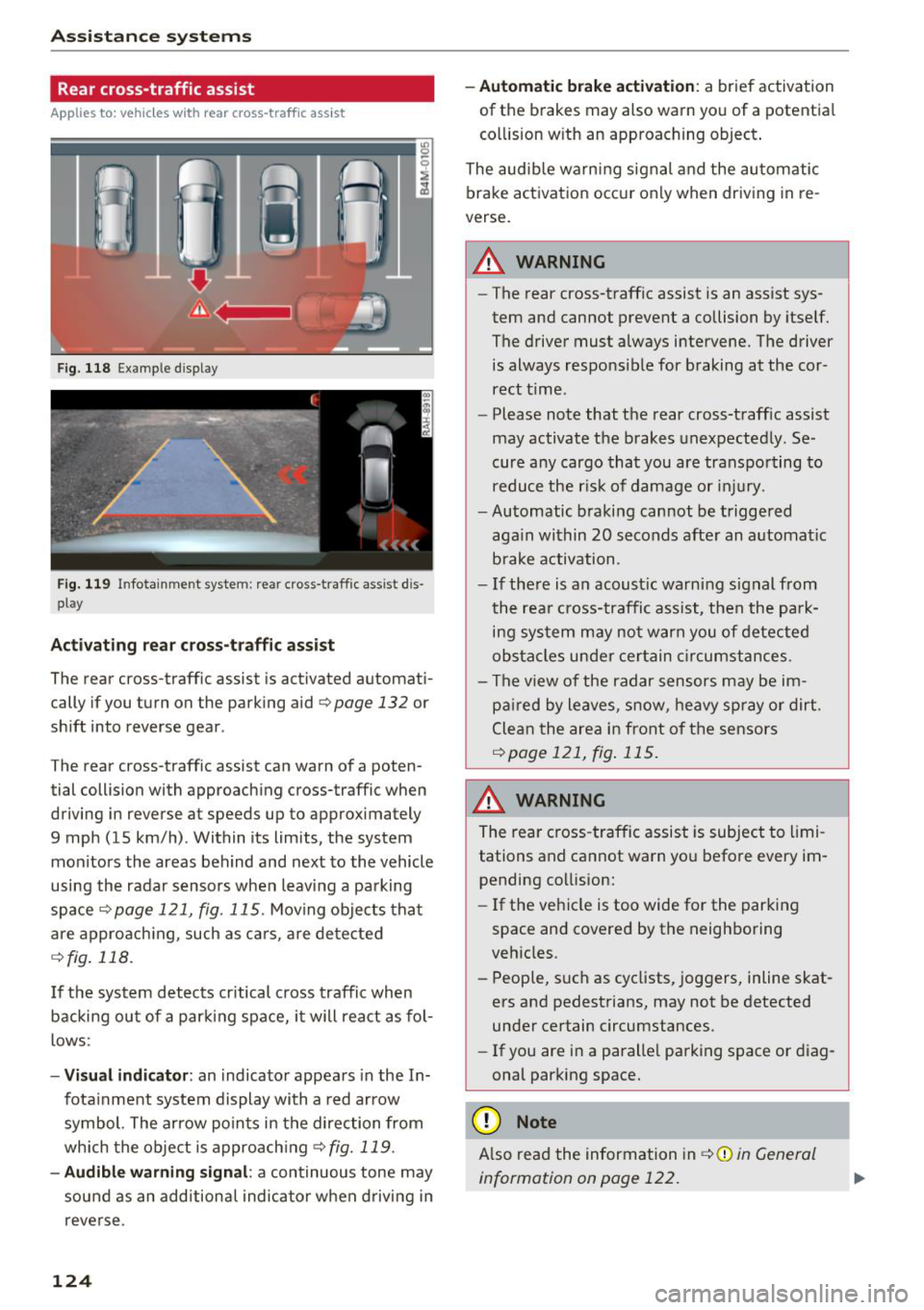
F ig. 118 Example display
Fig . 119 Infotainment system: rear cross-traffic assist dis
play
Acti vating re ar c ro ss -tr affic assist
The rear cross-traffic assist is act ivated automat i
cally if you turn on the parking aid
Qpage 132 or
shift into reverse gear .
The rear cross-traffic assist can warn of a poten
tial collision with approaching cross-traffic when
driving in reverse at speeds up to approximately
9 mph (15 km/h) . Within its limits, the system
monitors the areas behind and next to the vehicle
using the radar sensors when leav ing a parking
space
Qpage 121, fig. 115. Moving objects tha t
are appro ach ing, such as ca rs, a re detected
Q fig . 118.
If the sys tem detects cr itical cross traffic when
backing ou t of a par king space, i t will react as fol
lows:
- Vi sua l indicator : an indicator appea rs in the In
fota inment system display with a red arrow
symbol. The ar row points in the direction from
which the object is approach ing
Q fig. 119.
- Audib le warning signal :
a continuous tone may
sound as an additional indicator when driving i n
reve rse .
124 -
Automat ic brake act ivation :
a brief activation
of the brakes may also warn you of a potentia l
co llision w ith an approaching object .
The audib le warn ing signal and the automatic
brake activation occ ur only when driving in re
verse.
A WARNING
- The rear cross-traffic assist is an assist sys
tem and cannot prevent a collision by itself.
The driver must always intervene. The driver
is always responsible for braking at the cor rect t ime.
- Please note that the rear cross-traff ic assist
may activate the brakes unexpectedly. Se
cure a ny cargo that you are transpo rting to
reduce the r is k of damage or inju ry.
- Automatic braking cannot be triggered
aga in within 20 seconds afte r an a utomat ic
brake activation.
- If the re is a n acoust ic warning signal from
the rea r cross-traffic assist, then the park
ing system may no t w arn you of detected
obstacles under ce rtain c ircumstances.
- The v iew of the radar sensors may be im
pa ired by leaves, snow, heavy spray or dirt.
Clea n the area i n front of t he sensors
Qpage 121, fig . 115.
,&. WARNING
The rear cross-traffic assist is subject to limi
tations and cannot warn you befo re every im
pending collision:
- If the vehicle is too wide for the parking
space and covered by the neighboring
veh icles.
- People, s uch as cyclists, joggers, inline skat
ers and pedestrians, may not be detected
under certain circumstances.
- If you are in a paralle l parking space or diag
onal parking space.
(D Note
A lso read the information in Q (D in General
information on page 122.
-
Page 127 of 398
(D Tips
-You can cance l the automatic brake activa
t ion w ith increas ing bra king fo rce if you ap
p ly the brakes yourse lf or accelerate cons id
erab ly.
- In some situations, rear cross-traffic assist may warn you even if there is no cross traffic
in a cr itical area, for examp le when back ing
i nto a parking space or maneuver ing .
- The rea r cross-traffic ass ist also switches off
when you switch off the ESC.
- The system is not available when towing a
trailer.
Messages
Applies to: vehicles with Audi side assist
A message appears in the inst rument cluste r dis
p lay if the s ide ass ist switches off automatically .
@j Audi side assist: malfunction! Please contact
Service
@j Audi side assi st and e xit warning: malfunc
tion! Please contact Service
The system cannot guarantee that it will detec t
ve hicles correctly and it has switched off. The
sensors have been mov ed or a re faulty. Have t he
system checked by an a uthori zed Audi dea ler or
author ized Audi Service Facility soon.
@j Audi side assi st: cu rrently unavailable. Sen
sor vision restricted due to surroundings . See
owner 's manual
($j Audi side as sist and e xit warning: currently
unavailable. Sensor vision restricted due to su r
roundings
The rad ar senso r vis io n i s impa ired. The area in
fron t of the senso rs must no t be covered by b ike
rac ks, stic kers, leaves, snow or any other ob jects.
C lea n the area in f ront of th e sensors, if necessa
ry ¢
page 121, fig. 115.
($j Audi side as sist: currentl y unavailable. See
owner 's manual
Cl
~ ($j Audi side ass ist and exit warning : currently N
~ unavailable . See owner 's manual ,-1 0
0
::r '
S ide assist cannot be switched on at this time be
ca use there is a ma lfunction (for example, the
batte ry c harge leve l may be too low).
($1 Audi side assi st: unavailable in t owing mode
($j Audi side assist and ex it warning: currently
unavailable . Towing mode
S ide ass ist switches off automatically when the
electrical connecto r in t he factory-installed trail
er hitch is connected . There is no guarantee the
system will sw itch off w hen us ing a ret rofitted
t railer h itch . Do no t use side assist and the ex it
warning when tow ing a tra ile r.
Ill Rear parking aid: obstacle detect ion restrict
ed
The rear cross-traffic ass ist is not available . E i
ther the ESC is sw itched off, or the rada r senso rs
may be cove red by a b ike rack, st icke rs , leaves,
snow o r othe r objects . Switc h the ESC on, o r
cl ea n the area in fron t of the senso rs if necess ary
¢page 12 1, fig . 115. If thi s message con tinues
to be displayed, drive imme dia tely to an author
ized Audi dea ler or authorized Audi Service Facili
ty to have the ma lf u nction repaired.
Night vision assist
Description
Applies to: vehicles with night vision assist
The night vision assist can detect, highlight and,
if necessary, warn about pedestrians and large
wild animals.
N ight vision assist he lps yo u when it is dark by
u sing an infra red camera to mon itor the area in
front of your ve hicle, w ith in the limits of the sys
tem . It ca n disp lay objects up to a distance of ap
prox ima tely 1 000 feet (300 m). The thermal im
age de te cte d by t he came ra is show n in t he in
str ument cluster disp lay . Wa rm areas appear
li ghter and co ld areas a ppear da rker.
125
Page 129 of 398
If the head-up display* is switched on and the
night vision assist content is activated, . or.
will appear in the head-up display*.
Marking light*
To direct the driver's attention to a pedestrian,
the headlights can flash on the pedestrian three
times in a row when there is a pedestrian warn ing.
This occurs at speeds above approximately
35 mph (60 km/h) if you are outside of illuminat
ed areas and no detected vehicles are shown. The
high beam assistant* controls the marking
light* <=>
page 44.
The marking light is not used for wild animals.
General information
A ppl ies to: ve hicles w ith nigh t visio n ass ist
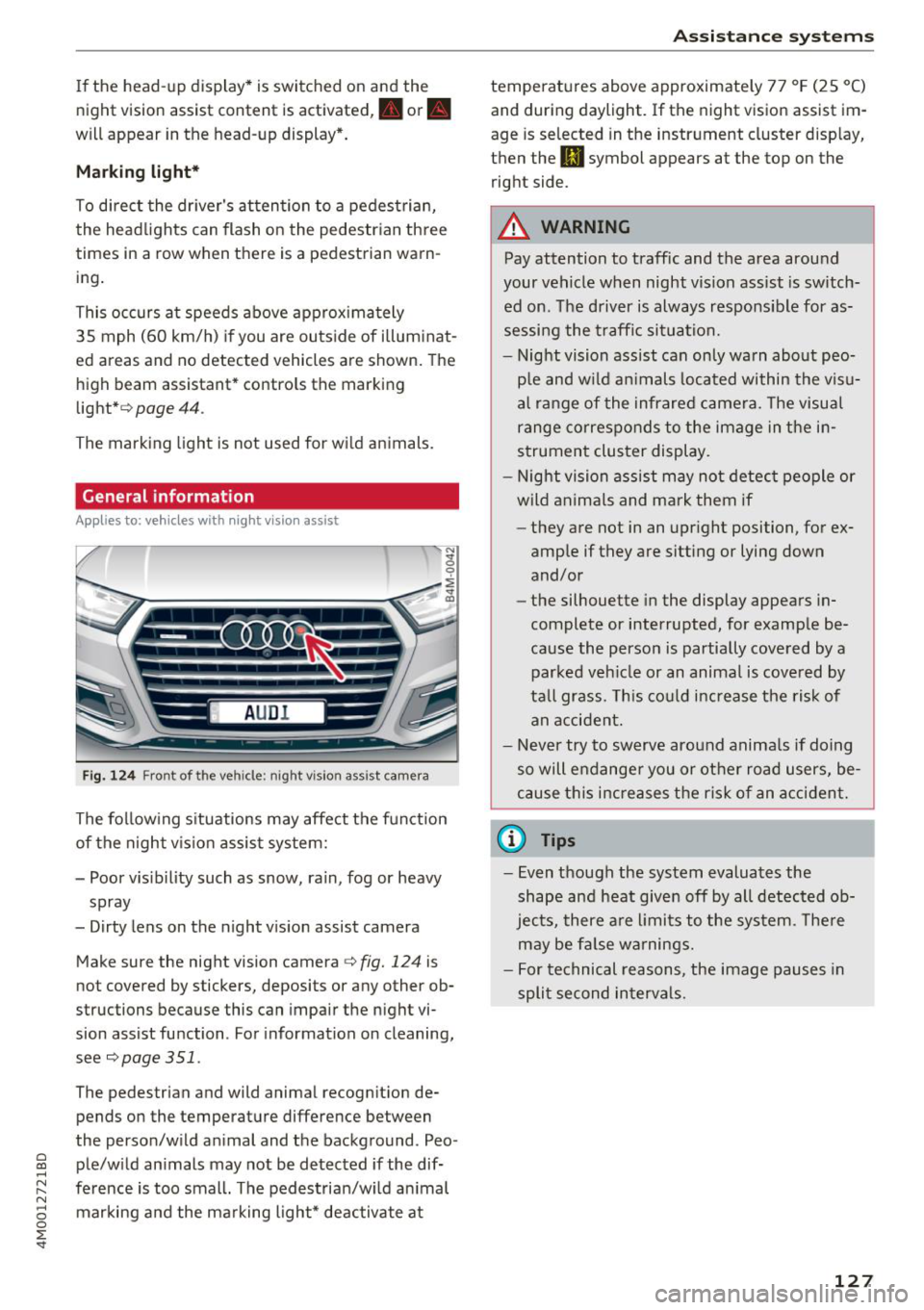
Fig. 124 Front of the ve hicle: night vision ass ist camera
The following situations may affect the function
of the night vision assist system:
- Poor visibility such as snow, rain, fog or heavy spray
- Dirty lens on the night vision assist camera
Make sure the night vision camera <=>
fig. 124 is
not covered by stickers, deposits or any other ob
structions because this can impair the night vi
sion assist function . For information on cleaning,
see<=>
page 351 .
The pedestrian and wild animal recognition de
pends on the temperature difference between
the person/wild animal and the background . Peo -
~ ple/wild animals may not be detected if the dif-,.....
~ ference is too small. The pedestrian/wild animal N
8 marking and the marking light* deactivate at 0 :E '
temperatures above approximately 77 °F (25 °C)
and during daylight. If the night vision assist im
age is selected in the instrument cluster display,
then the
II symbol appears at the top on the
right side.
A WARNING
-Pay attention to traffic and the area around
your vehicle when night vision assist is switch
ed on. The driver is always responsible for as
sessing the traffic situation.
- Night vision assist can only warn about peo
ple and wild animals located within the visu
al range of the infrared camera. The visual
range corresponds to the image in the in
strument cluster display.
- Night vision assist may not detect people or
wild animals and mark them if
- they are not in an upright position, for ex
ample if they are sitting or lying down
and/or
- the silhouette in the display appears in
complete or interrupted, for example be
cause the person is partially covered by a
parked vehicle or an animal is covered by
tall grass. This could increase the risk of
an accident.
- Never try to swerve around animals if doing
so will endanger you or other road users, be
cause this increases the risk of an accident.
@ Tips
- Even though the system evaluates the
shape and heat given off by all detected ob
jects, there are limits to the system . There
may be false warnings.
- For technical reasons, the image pauses in
split second intervals.
-
127
Page 134 of 398
Parking syste m s
Parking systems
General information
A pplies to: ve hicles w ith a rea r parking sys te m /parking sys
tem p lus/rearv iew camera/peripheral cameras
Depending on your vehicle 's equipment , various
parking aids will help you when parking and ma
ne uvering.
The
rea r pa rki ng sys te m is an aud ible parking a id
that warns you of obstacles
behind the vehicle
¢ page 133.
The parki ng sys te m plu s assists you when park
ing by aud ibly and visually indicating objects de
tected
in front of and behind the veh icle
¢ page 133.
The rea rv iew ca mera shows the area behind the
veh icle in the Infotainment system d isplay . The
lines in the rearv iew camera image he lp you to
pa rk or maneuve r
¢page 134.
The pe riph eral ca meras give various views to
help you when parking or maneuvering
¢ page 137 . The parking system plus functions
are also available ¢
page 133.
_& WARNING
-Always look for t raff ic and check the area
around your vehicle by looking at it direct ly
as well. The parking system cannot replace
the driver's attention . The driver is always
responsib le when entering or leaving a park
ing space and during similar maneuvers.
- Please note that some surfaces, such as
clothing, are not detected by the system.
-
-Sensors and cameras have blind spots in
which people and objects cannot be detect
ed . Be especially caut ious of small children
and animals.
- Always keep your eyes on the vehicle 's sur
round ings, using the rearview mirror as
well.
- The sensors can be displaced by impacts or
damage to the radiator gr ille, bumper,
wheel housing and the underbody . The park
ing system may be impa ired as a result .
Have a n author ized Audi dealer or author-
132
ized Audi Service Facility check their func
tion .
@ Note
-Some objects are not detected or disp layed
by the system under certain circumstances:
- objects such as barrier chains, trailer draw
bars, vertical poles or fences
- objects above the sensors such as wall ex
tensions
- objects with certain surfaces or structures
such as cha in link fences or powder snow
- If you continue driving closer to a low ob
ject, it may disappear from the sensor range . Note that you will no longer be
warned about th is obstacle .
- Keep enough distance from the curb to re
duce the risk of damage to the rims .
(D Tips
-The system may provide a warning even
though there are no obstacles in the cover
age area in some situations, such as :
- certa in road s urfaces or whe n the re is tall
grass
- externa l ult rasonic sources such as from
cleaning vehicles
- in heavy rain, snow, or th ick vehicle ex
ha ust
- We recommend that you practice par king in
a traffic -free location o r parking lot to be
come familiar with the system . When doing
this, there shou ld be good light and weath
er conditions.
- You can change the vo lume of the signa ls
and the display ¢
page 140.
-Please refer to the instructions for towing a
trai ler located in
¢ page 141.
-What appea rs in the infotainment d isplay is
somewhat time -de layed.
- T he sensors m ust be kept clean and free of
snow and ice for the parking aid to operate .
Page 137 of 398
a co ...... N r--. N ...... 0
0
:E '
ver using the orientation lines .
General information
Applies to: vehicles with rearview camera
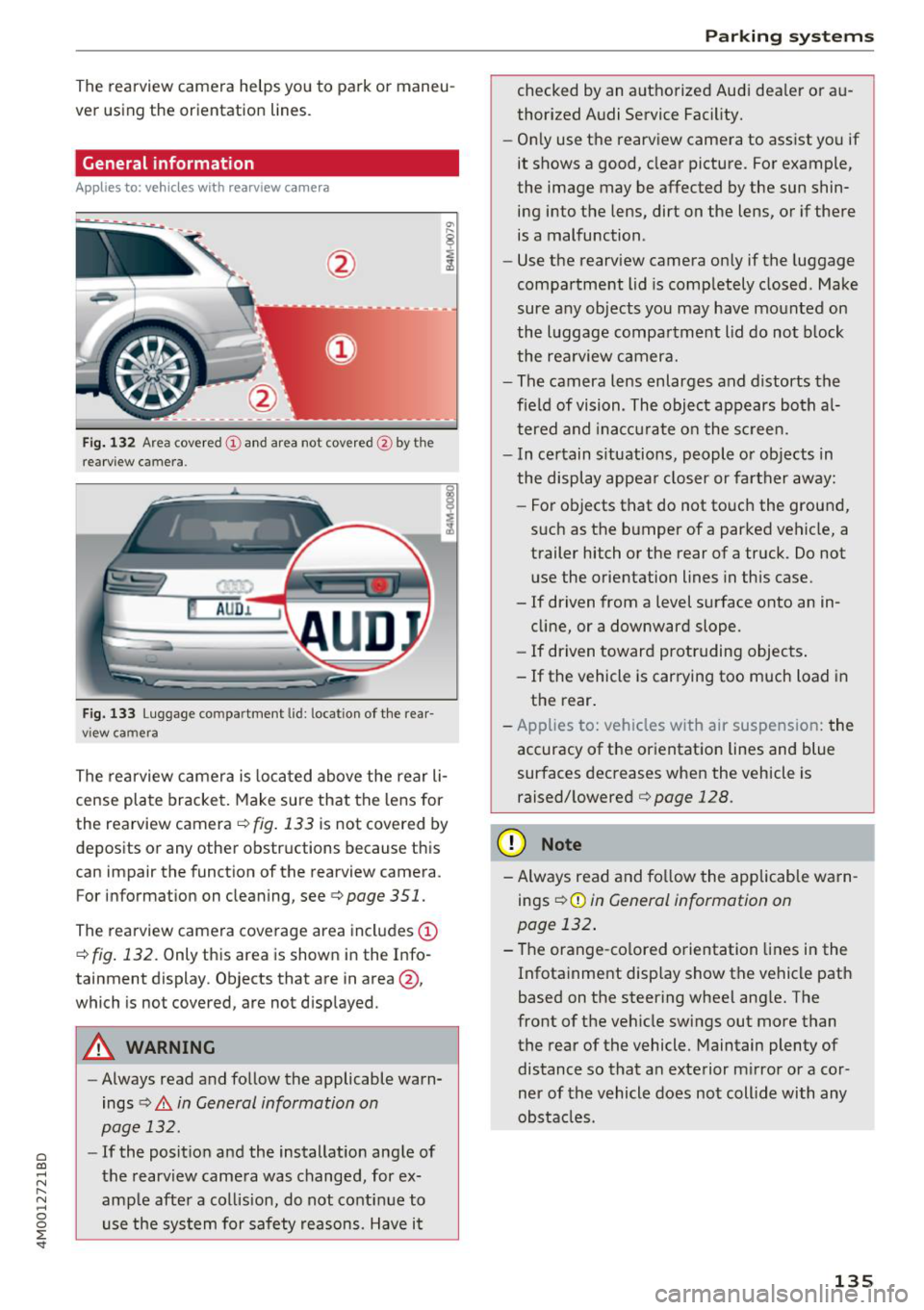
Fig. 132 Area covered (!) and area no t covered @ by the
r earview c amera.
AU D .L
Fig. 133 Luggage co mpar tment lid : lo ca ti on of the rear
view ca mera
The rearview camera is located above the rear li
cense plate bracket. Make sure that the lens for
the rearview camera .=;,
fig. 133 is not covered by
deposits or any other obstructions because this
can impair the function of the rearview camera .
For information on cleaning , see .=;,
page 351.
The rearview camera coverage area includes (D
.=;, fig. 132 . Only this area is shown in the Info
ta inment display . Objects that are in area @,
which is no t covered, are not displayed .
A WARNING
- Always read and follow the applicable warn
ings
.=;, A in General information on
page 132.
- If the position and the installation angle of
the rearview camera was changed , for ex
ample after a collision, do not continue to use the system for safety reasons. Have it
Parking systems
checked by an authorized Audi dealer or au
thorized Audi Service Facility.
- Only use the rearview camera to assist you if
it shows a good, clear picture. For example,
the image may be affected by the sun shin ing into the lens, dirt on the lens, or if there
is a malfunction .
- Use the rearview camera only if the luggage
compartment lid is completely closed . Make
sure any objects you may have mounted on
the luggage compartment lid do not block
the rearview camera.
- The camera lens enlarges and distorts the
field of vision . The object appears both al
tered and inaccurate on the screen.
- In certain situations, people or objects in
the display appear closer or farther away:
- For objects that do not touch the ground,
such as the bumper of a parked vehicle, a trailer hitch or the rear of a truck . Do not
use the orientation lines in this case.
- If driven from a level surface onto an in
cline, or a downward slope.
- If driven toward protruding objects.
- If the vehicle is carrying too much load in the rear.
- Applies to: vehicles with air suspension: the
accuracy of the orientation lines and blue
surfaces decreases when the vehicle is raised/lowered
.=;, page 128.
(D Note
- Always read and follow the applicable warn
i ngs
i=;, (D in General information on
page 132.
- The orange-colored orientation lines in the
Infotainment display show the vehicle path
based on the steering wheel angle. The
front of the vehicle swings out more than
the rear of the vehicle. Maintain plenty of
distance so that an exterior mirror or a cor
ner of the vehicle does not collide with any
obstacles .
135
Page 138 of 398
Parking systems
Switching on/off
Applies to: vehicles with rearview camera
Switching on/off
• Press the P,11.A button in the center console
¢ page 134, fig . 129. A short confirmat ion
tone sounds and the LED in the button turns
on.
Switching on automatically
The system switches on automat ically when re
verse gear is engaged while the engine is run
n ing. A brief confirmation tone will sound.
Switching off automatically
The system switches off automatically when driv
ing forward faster than 6 mph (10 km/h) .
Perpendicular parking
Applies to: vehicles with rearview camera
This view may be used when parking in a garage
or in a parking space .
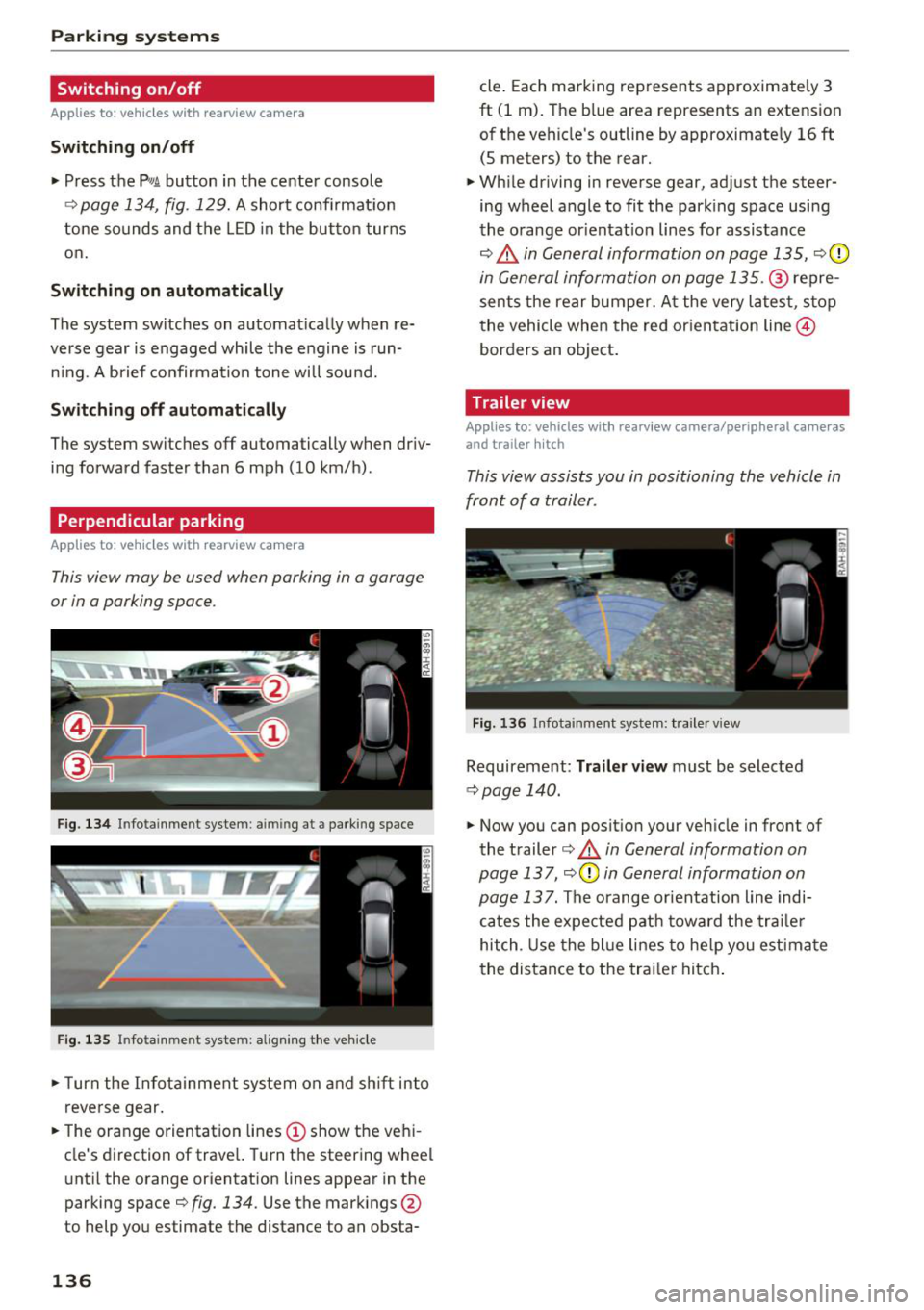
Fig. 134 In fotainme nt system : aimin g at a parking space
Fig. 135 Infotainment system: alig ning the vehicle
• Turn the Infota inment system on and shift into
reverse gear.
• The orange orientation lines
(D show the vehi
cle's direction of travel. Turn the steering wheel
until the orange orientation lines appear in the
parking space¢
fig. 134. Use the markings @
to help you estimate the distance to an obsta-
136
cle. Each marking represents approximately 3
ft (1 m). The blue area represents an extension
of the vehicle's outline by approximately
16 ft
(5 meters) to the rear.
• While driving in reverse gear, adjust the steer
ing wheel angle to fit the park ing space using
the orange or ientat io n lines for assistance
¢.&, in General information on page 135, ¢0
in General information on page 135 .@ repre
sents the rear bumper. At the very latest, stop
the vehicle when the red or ientation line@
borders an object.
Trailer view
Applies to: vehicles with rearv iew camera/peripheral cameras
and trailer hitch
This view assists you in positioning the vehicle in
front of a trailer.
Fig. 136 Infota inment system: trailer view
Requirement: Tra iler view must be selected
¢ page 140.
• Now you can position your vehicle in front of
the trailer
¢ .&, in General information on
page 137 ,
¢(\[) in General information on
page 13
7. The orange orientation line indi
cates the expected path toward the trailer
hitch . Use the blue lines to help you estimate
the distance to the trailer hitch.