ignition AUDI Q7 2018 Owner´s Manual
[x] Cancel search | Manufacturer: AUDI, Model Year: 2018, Model line: Q7, Model: AUDI Q7 2018Pages: 398, PDF Size: 185.58 MB
Page 325 of 398
Cl a:, ...... N
" N ...... 0
0
::r -
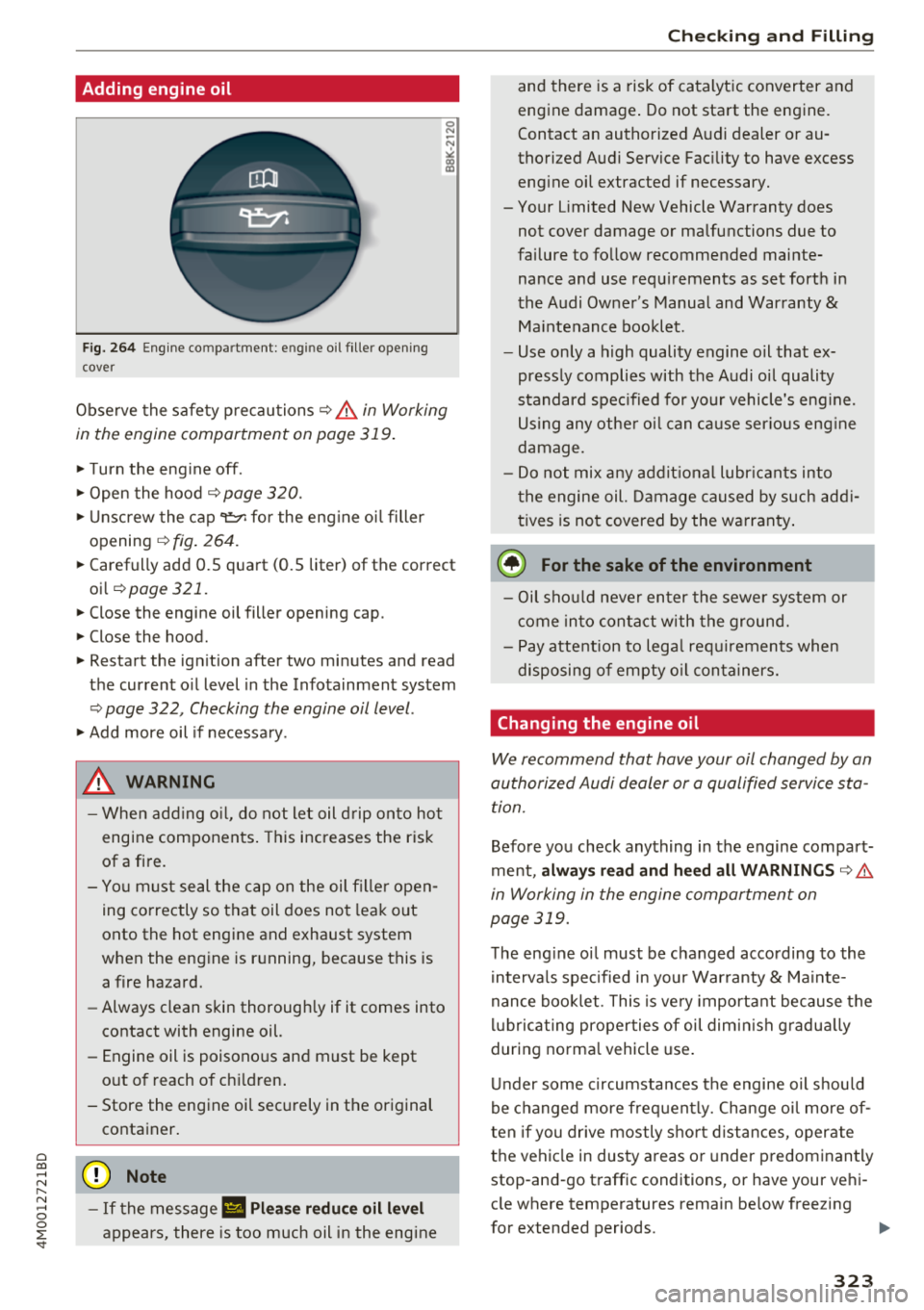
Fig. 264 Engine compa rtment : en gin e oil fille r opening
cover
Observe the safety p recautions r=:> .&. in Working
in the engine compartment on page
319 .
"'Turn the eng ine off.
"' Open the hood
r=:> page 320.
"'Unscrew the cap~ for the eng ine oi l filler
opening
r=;, fig. 264.
"' Carefully add 0.5 quart (0.5 liter) of the correct
oi l
r=;, page 321.
"'Close the engine oil filler opening cap.
"' Close the hood.
"' Restart the ignition after two mi nutes and read
the current o il level in the Infotainment system
r=:> page 322 , Checking the engine oil level.
"' Add more oil if necessa ry .
.8, WARNING
- Whe n add ing o il, do not let oil d rip on to hot
engine components . This increases the risk
of a fire.
- Yo u m ust seal the cap on the oil fi lle r open
ing correctly so that oil does not leak out
onto the hot engine and exhaust system
when the eng ine is running, because this is
a fire hazard.
- Always clean skin thoroug hly if it comes into
contact with engine oil.
- Engine oil is poisonous and must be kept
out of reach of c hil d ren .
- Store the engine oi l securely in the original
container.
(Q) Note
- If the message Ill Plea se redu ce oil level
appea rs, there is too much oil in the engine
Ch eck ing and F illing
and there is a risk of catalyt ic converter and
engine damage . Do not start the engine.
Contact an authorized A udi dealer or au
thori zed Audi Service Fac ility to have excess
eng ine oi l extracted if necessary.
- Your Limited New Vehicle Warranty does not cover damage or malfunctions due to
failure to fo llow recommended mainte
nance and use requ irements as set fort h in
the Audi Ow ne r's Manua l and War ranty
&
Ma intenance booklet.
- Use only a h igh quality engine o il that ex
press ly complies with the Audi o il quality
s tandard spec if ied for yo ur vehicle's eng ine.
Us ing any othe r oi l can c ause ser io us eng ine
damage.
- Do not mix a ny addit ional lubr ican ts into
t he engine oil. Damage caused by such add i
t ives is no t covered by the warranty .
@ For the sake of the environment
-Oil sho uld neve r en ter the sewer system or
c ome in to con tact w ith the ground.
- Pay attent ion to lega l requirements when
disposing of empty o il conta iners.
Changing the engine oil
We recommend that have your oil changed by an
authorized Audi dealer or a qualified service sta tion.
Befo re you check anything in the engine compart
ment,
a lwa ys read and heed all WARNINGS r=;, &.
in Working in the engine compartment on
page
319.
T he eng ine o il must be changed according to the
i nterva ls spec ified in your War ranty
& Ma inte
nance booklet . This is ve ry importa nt because the
l u brica ting proper ties of oil dim inish g radua lly
during norma l vehicle use .
U nder some c ircumstances the engine oil s hou ld
be c hanged more freq uent ly. Cha nge o il more of
ten if you dr ive mostly s hort d istances, operate
the vehicle in dusty areas or under p redominantly
stop-and -go traffic conditions, or have your ve hi
cle where temperatures remain be low free zing
for extended periods.
323
Page 327 of 398
a co ...... N r--. N ...... 0
0
:E '
-Before the start of winter, have an author
ized Audi dealer or author ized Audi Service
Facility check if the coolant additive in your
vehicle matches the percentage appropriate
for the climate . Th is is especially important
when driving in co lder climates.
- If the appropriate coolant additive is not
available in an emergency, do not add any
other additive. You could damage the en
gine. If this happens, only use wa te r and re
store the co rrect mixture ratio with the
spec ified coo lan t additive as soon as possi
ble .
- Only refill with new coo lant.
- Radiator sealant must no t be mixed with
the coo lant.
Adding coolant
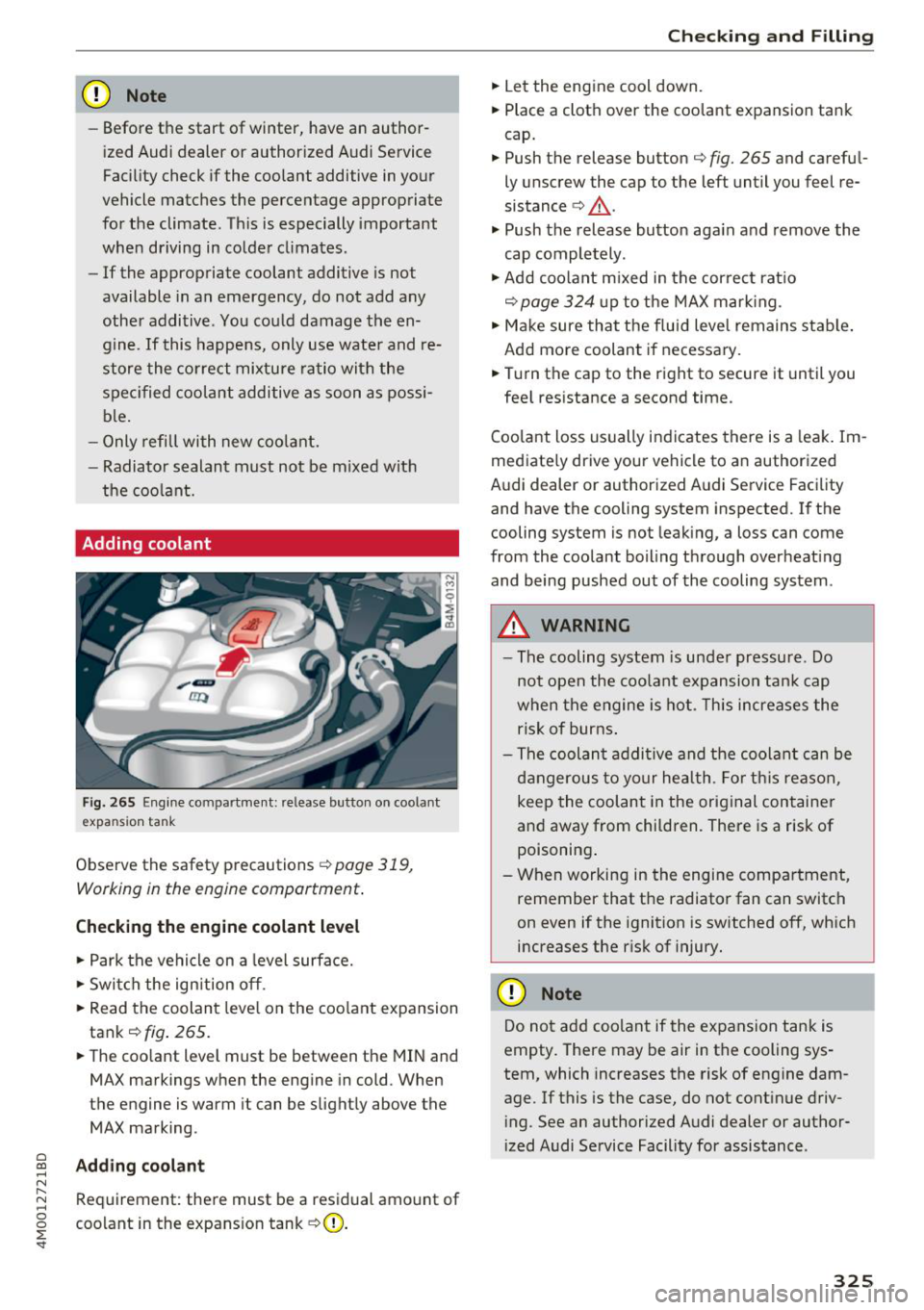
Fig . 26 5 Eng ine compartme nt: release button on coolant
expansion tank
Observe the safety precautions ¢ page 319,
Working in the engine compartment .
Checking the engine coolant level
.,. Park the vehicle on a level surface .
.,. Swi tch the ign ition off.
... Read the coolant leve l on the coo lant expansion
tank¢
fig . 265.
... The coolant level must be between the MIN and
MAX markings when the engine in cold. When
the engine is warm it can be slightly above the
MAX marking.
Adding coolant
Requirement: there must be a residual amount of
coo lant in the expans ion tank
¢ (D .
Chec king and Filling
.,. Let the engine cool down.
... Place a cloth over the coolant expansion tank
cap.
... Push the release button
¢fig. 265 and carefu l
ly unscrew the cap to the left until you feel re
sistance ¢.&, .
.,. Push the release button aga in and remove the
cap comple tely .
.,. Add coo lant m ixed in the cor rec t rat io
¢page 324 up to t he MAX mar king.
... Ma ke sure that t he f luid level remains stab le .
Add mo re coolant if necessary .
... Tu rn the cap to the right to secure it until you
fee l res istance a second time.
Coola nt loss usually in dicates there is a leak . Im
mediate ly drive your vehicle to a n authorized
Audi dealer or authorized A udi Service Facility
and have the cooling system inspected.
If the
cooling system is not leaking, a loss can come
from the coolant boiling through overheat ing
and being pushed out of the cooling system .
A WARNING ,.__
-The cooling system is under pressure. Do
not open the coo lant ex pansion tan k cap
when t he engine is hot. This increases the
ris k of burns .
- Th e coolan t addi tive and the coolan t can be
dangerou s to yo ur he alt h . Fo r th is reason,
keep the coolant in the original cont ainer
an d away from children. There is a risk of
poisoning .
- When working in the engine compar tment,
remember that t he radiator fan can switch
on even if the ignition is switched off, which increases the risk of injury .
{U) Note
Do not add coolant if the expansion tank is
empty. There may be air in the cooling sys
tem, which increases the risk of engine dam
age. If this is the case, do not cont inue driv
i ng. See an authorized A udi dealer or author
i zed Audi Service Facility for assistance .
-
325
Page 331 of 398
Cl a:, ...... N
" N ...... 0
0
::r '
ed on . The remaining distance and time is
displayed br iefly.
- Service due : if your vehicle has reached a serv
ice interval, a message appears briefly after
switching the ignition on.
({;D) Note
-Only reset the oil change indicator if the oil
was changed .
- Following the service intervals is critical to
maintaining t he service life and va lue of
your vehicle, especia lly the engine . Even if
the mileage on the vehicle is low, do not ex
ceed the time for the next service.
Checking and Filling
329
Page 350 of 398
Wheels
Please note that the TPMS is not a substitute for
proper tire maintenance, and it is the driver's re
sponsibility to maintain correct tire pressure,
even if under-inflation has not reached the level
to trigger illumination of the TPMS low tire pres
sure telltale.
Your vehicle has also been equipped with a TPMS
malfunction indicator to indicate when the sys
tem is not operating properly. The TPMS mal
function indicator is combined with the low tire pressure telltale. When the system detects a
malfunction, the telltale will flash for approxi
mately one minute and then remain continuously
illuminated. This sequence will continue upon
subsequent vehicle start-ups as long as the mal
function exists.
When the malfunction indicator is illuminated,
the system may not be able to detect or signal
low tire pressure as intended. TPMS malfunctions
may occur for a variety of reasons, including the
installation of replacement or alternate tires or
wheels on the vehicle that prevent the TPMS
from functioning properly . Always check the
TPMS malfunction telltale after replacing one or
more tires or wheels on your vehicle to ensure
that the replacement or alternate tires and
wheels allow the TPMS to continue to function
properly.
If the tire pressure monitoring indicator
appears
Applies to: vehicles with Tire Pressure Monitoring System in
dic ato r
The tire pressure indicator in the instrument
cluster informs you if the tire pressure is too low
or if there is a system malfunction.
Using the ABS sensors, the tire pressure monitor
ing system compares the tire tread circumfer
ence and vibration characteristics of the individu
al tires . If the pressure changes in one or more
tires, this is indicated in the instrument cluster
display with an indicator light
RI] and a message.
If only one tire is affected , the location of that
tire will be indicated.
The tire pressures must be stored in the Infotain
ment system again each time the pressures
348
change (switching between partial and full load
pressure) or after changing or replacing a tire on
your vehicle ~
page 349. The tire pressure moni
toring system only monitors the tire pressure you have stored. Refer to the tire pressure label for
the recommended tire pressure for your vehicle
~ page 340, fig . 272.
Tire tread circumference and vibration character
istics can change and cause a tire pressure warn
ing if:
- the tire pressure in one or more tires is too low
- the tires have structural damage
- the tire was replaced or the tire pressure was
changed and it was not stored
~ page 349
- tires that are only partially used are replaced
with new tires
Indicator lights
RI] -loss of pressure in at least one tire~,& .
Check the tires and replace or repair if necessary.
Check/correct the pressures of all four tires and
store the pressure again in the Infotainment sys
tem
~ page 349.
m (Tire Pressure Monitoring System) Tire
pressure: malfunction! See owner's manual.
If
m appears after switching the ignition on or
while driving and the
RI] indicator light in the in
strument cluster blinks for approximately one
minute and then stays on, there is system mal
function. Try to store the correct tire pressures
~ page 349. In some cases, you must drive for
several minutes after storing the pressures until
the indicator light turns off . If the indicator light
does turn off or turns on again after a short peri
od of time, drive to an authorized Audi dealer or
authorized Audi Service Facility immediately to
have the malfunction corrected.
& WARNING
- If the tire pressure indicator appears in the
display, reduce your speed immediately and
avoid any hard steering or braking maneu
vers. Stop as soon as possible and check the
tires and their pressure.
Page 360 of 398
Emergency assistance
See an authorized Audi dealer or authorized Audi
Service Facility for assistance in these situations.
A WARNING
-Please note that the tire mob ility kit cannot
be used in all situations, and that it may on
ly be used temporarily.
- The tire sealant must not come in contact with skin, eyes, or clothes.
- If tire sealant gets in your eyes or on your
skin, thoroughly rinse the affected area im
mediately with clean water.
- Do not inhale the fumes .
- If you swallow any of the tire sealant, thor-
oughly rinse your mouth immediately and
drink a lot of water. Do not induce vomiting .
Seek medical attention immediately.
- Change your clothes immediately if they get
tire sealant on them.
- If an allergic reaction occurs, seek immedi
ate medical attention .
- Keep the tire sealant away from children .
(D Tips
-If sealant leaks, allow it to dry in place. You
can then peel it
off like a sticker.
- Note the expiration date on the sealant bot
tle . Replace the tire sealant at an author
iz ed Audi dealer or authorized Audi Service
Facility.
- Radio reception can be interrupted when
operating the compressor.
- Obey all laws.
Repairing tires
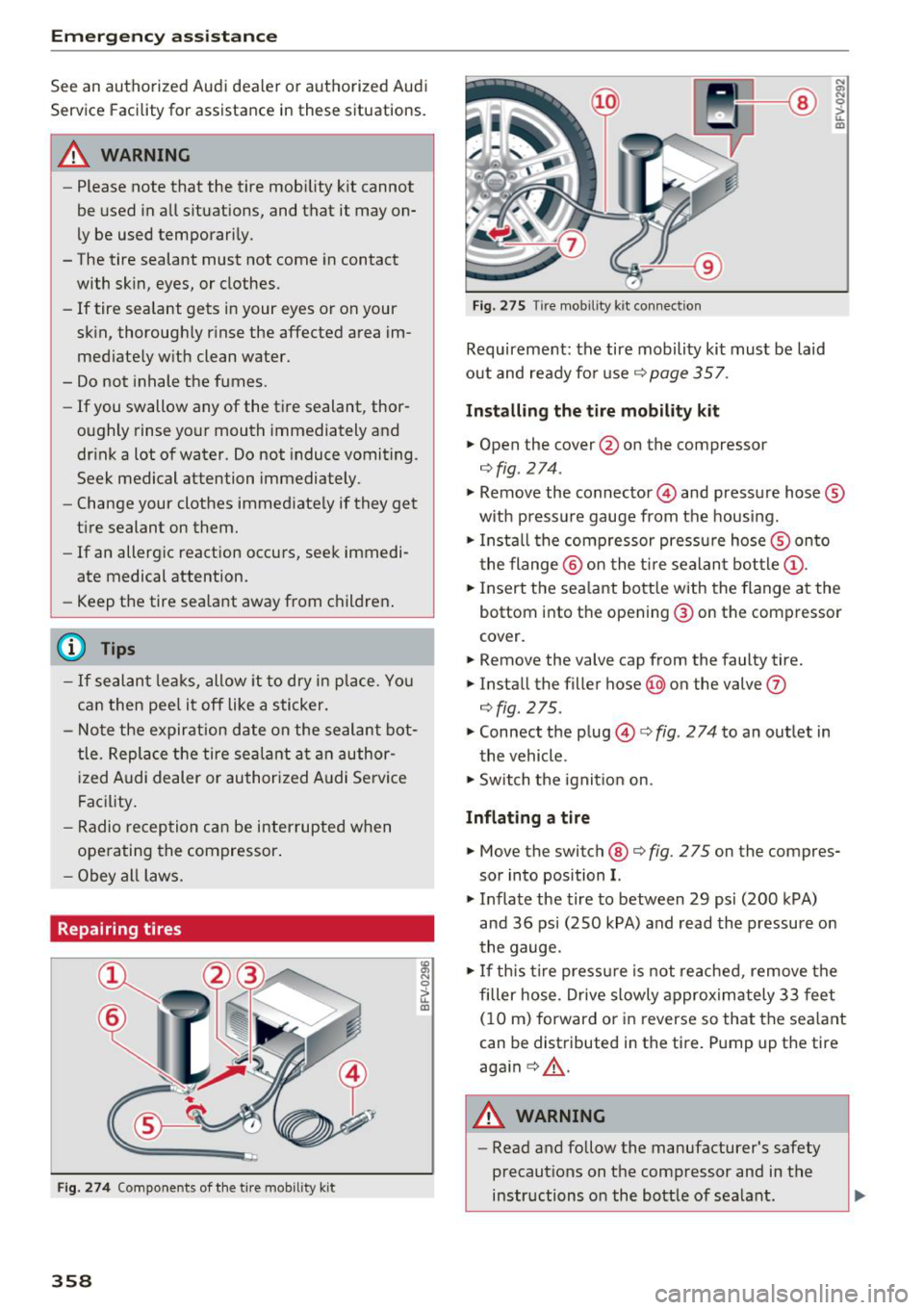
Fig. 274 Components of the tire mobility kit
358
~
"' 0
> u.
m
Fig. 275 Tire mobil ity kit connection
Requirement: the tire mobility kit must be laid
out and ready for use¢
page 357.
Installing the tire mobility kit
"" Open the cover @on the compressor
¢fig. 274 .
"' a, N 0
> u. m
""Remove the connector © and pressure hose®
with pressure gauge from the housing.
""Install the compressor pressure hose® onto
the flange @ on the tir e sealant bottle@.
"" Insert the sealant bottle with the flange at the
bottom into the opening @ on the compressor
cover.
"" Remove the valve cap from the faulty tire.
"" Install the filler hose@on the valve
(J)
¢fig. 275 .
"" Connect the plug©¢ fig. 2 74 to an outlet in
the vehicle .
"" Switch the ignition on.
Inflating a tire
""Move the switch @ ¢fig . 275 on the compres
sor into position
I.
"" Inflate the tire to between 29 psi (200 kPA)
and 36 psi (250 kPA) and read the pressure on
the gauge.
"" If this tire pressure is not reached, remove the
filler hose . Drive slowly approximately 33 feet
( 1 0 m) forward or in reverse so that the sealant
can be distributed in the tire. Pump up the tire
aga in ¢ .&, .
A WARNING
-Read and follow the manufacturer's safety
precautions on the compressor and in the
instructions on the bottle of sealant.
Page 368 of 398
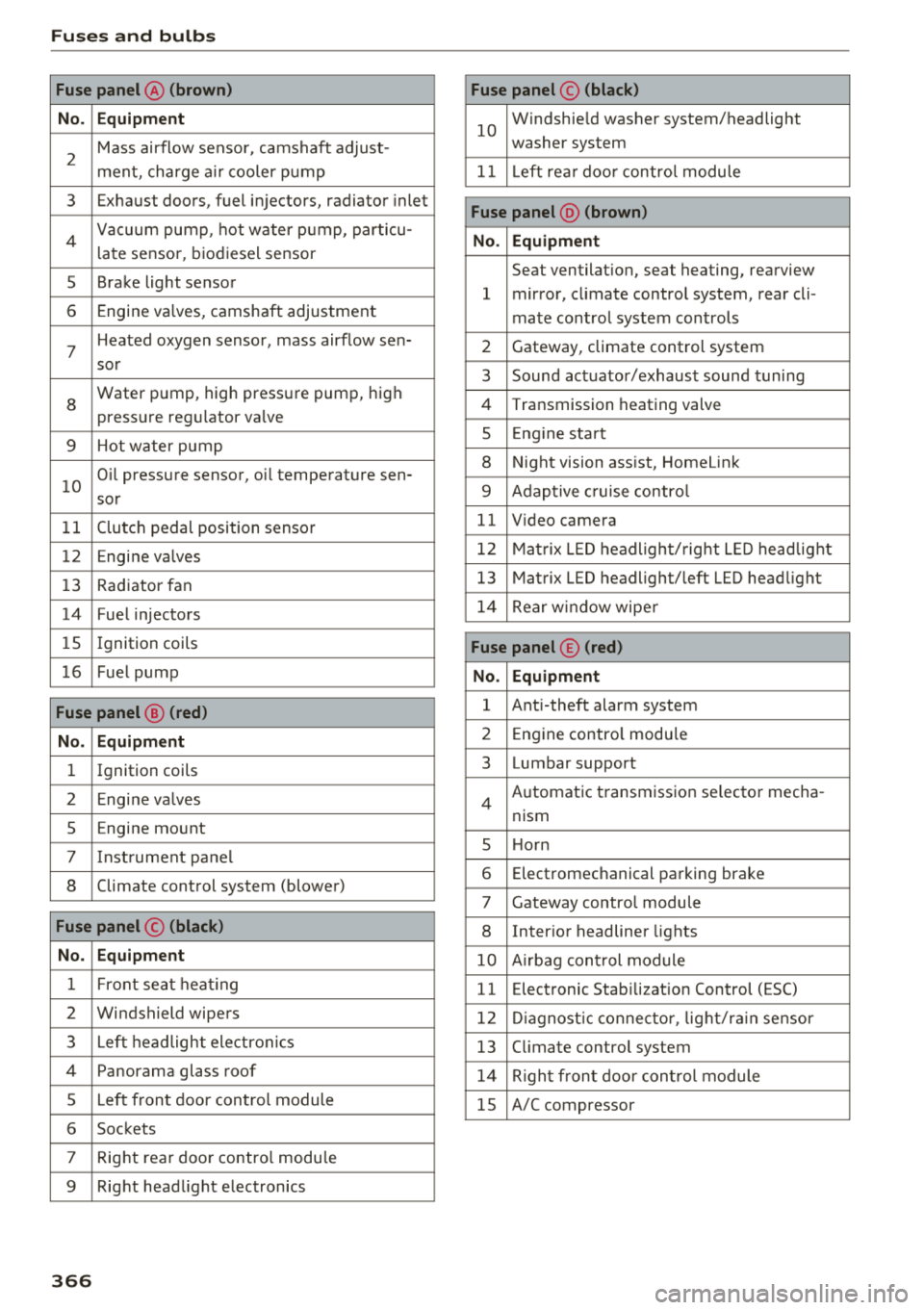
Fuses and bulbs
Fuse panel@ (brown) Fuse panel© (black)
No. Equipment
2
Mass airflow sensor, camshaft adjust-
ment, charge air cooler pump
10
Windshie ld washer system/headlight
washer system
11 L eft rea r door control module
3 Exhaust doors, fuel injectors, radiator inlet
4 Vacuum pump, hot water p ump, particu-
late sensor, biodiesel sensor
Fuse panel @ (brown)
No. Equipment
5 Brake light sensor
6 Engine valves, camshaft adjustment Seat ventilation, seat heating, rearview
1 mirror, climate control system, rear cli-
mate control system controls
7
Heated oxygen sensor, mass airflow sen-2 Gateway, climate control system
sor
8
Water pump, high pressure pump, high
pressure regulator va lve
9 Hot water pump
10
Oil pressure sensor, oil temperature sen-
sor
3 Sound actuator/exhaust sound tuning
4 Transmission heat ing valve
5 Engin e start
8 Night vision assist, HomeLink
9 Adaptive c ruise control
11 Clutch pedal position sensor 11 Video camera
12 Engine valves 12 Matrix LED headlight/right LED headlight
13 Radiator fan 13 Matrix LED headlight/left LED headlight
14 Fuel injectors 14 Rear window wipe r
15 Ignition coils Fuse panel © (red)
16 Fuel pump No. Equipment
Fuse panel @ (red)
1 Ant i-theft alarm system
No. Equipment 2 Engine control modu le
1 Ignition coils 3 Lumbar support
2 Engine va lves
5 En gine mount
7 Instrument panel
8 Climate control system (blower) Automatic transmission se
lector mecha-
4
nism
5 H orn
6 Electromechanical parking brake
7 Gateway control module
Fuse panel © (black) 8 Interior headliner lights
No. Equipment 10 Airbag control module
1 Front seat heating 11 Electronic Stab ilizat ion Control (ESC)
2 Windshield wipers 12 Diagnostic connector , light/rain sensor
3 Left headlight electronics 13 Climate control system
4 Panorama glass roof 14 Right front door control module
5 Left front door control module 15 A/C compressor
6 Sockets
7 Right rear door contro l modu le
9 Right headl ight electronics
366
Page 380 of 398
Consum er Info rmation
today's automobi les, have steadi ly red uced the
scope of maintenance and repairs which can be
carried out by veh icle owners.
Al so , sa fet y and
en vironmental
concerns place very strict limits
on the nature of repairs and adjustments to en
g ine and transmission parts w hich an owner can
perform .
Maintenance, adjustments and repairs usually re
qu ire special tools, testing devices and other
equ ipment available to specially trained work
shop personnel in order to assure proper per
forma nce, re liab ility and safety of the ve hicle and
its many systems .
Improper maintenance, adjustments and repairs
can impair the operation and reliab il ity of your
ve hicle and eve n void your vehicle warra nty .
Therefo re, proof of se rvicing in accordance w ith
the m aintenance schedule may be a condition fo r
up hold ing a possible wa rranty claim made wi thin
the warranty pe riod.
Above all, ope rational safety can be adversely af
fected, c re ating unnecessa ry risks fo r you and
your passengers.
I f in doubt about any servicing, have it done by
your author ized Audi dealer or any other prope rly
eq uipped and qualified workshop . We strongly
urge yo u to g ive your author ized Audi dealer the
opportunity to perform a ll scheduled mainte
nance and necessary repairs. Your dealer has the
facilities, origina l parts and tra ined specialists to
keep your veh icle running properly.
Performing limit ed maint enanc e yourself
The fo llowing pages describe a limited number of
procedures whic h can be performed on your ve hi
cle with ordinary tools, should the need arise and
tra ined personnel be unava ilable. Before per
forming any of these procedures, always thor
ough ly read all of the app licab le text and carefu l
ly follow the instructions g iven . Always rigorously
observe the
W ARNINGS prov ided .
Befo re yo u check an ything in the engine com
partment , alway s read and h eed all WARNINGS
c> .&. and c> .&. in Working in the engine compart
ment on page 319 .
378
A WARNING
-Ser ious personal injury may occur as a result
of improperly performed maintenance, ad
justments or repairs .
- Always be extreme ly careful when work ing
on the vehicle . Always follow commonly ac
cepted safety practices and general com mon sense. Never r is k personal in jury.
- Do not attempt any of the maintenance,
checks or repairs described on the following pages if you are not fu lly fam il iar with these
or other procedu res with respect to the ve
hicle, or are uncertain how to proceed.
- Do not do any work wi thout the prope r tools
and eq uipmen t. H ave the necessary wo rk
done by your authorized Audi dealer or an
other properly equipped and qualified work
shop.
- The engine compartment of any motor vehi
cle is a potentially hazardous area . Never
reach into the area around or touch the radi
ator fan. It is temperature controlled and
can switch on suddenly - even when the en
gine is off and the ignition key has been re
moved. The rad iator fan switches on auto
mat ically when the coolant reaches a certain
temperature and will con tinue to run until
the coolant temperat ure drops.
- Always remove the igni tion key before any
one gets under the vehicle.
- Always support your vehicle with safety
stands if it is necessary to work underneath
the vehicle. The jack* s upplied w ith the vehi
cle is no t ad equate for th is pu rpose and
could collapse causing se rious personal in
jury .
- If you must work underneath the vehicle
with the wheels on the ground, always make
sure the vehicle is on level ground, that the
wheels a re always sec urely blocked and that
the engine cannot be started.
- Always make sure the transmission se lector
lever (automatic t ransm iss ion) is in P (Park
position) and the park b rake is applied .
Page 386 of 398
Index
Contacts . . . . . . . . . . . . . . . . . . . . . . . . . . . . 183
Additional directory . . . . . . . . . . . . . . . . . . 247
Importing/exporting . . . . . . . . . . . . . . . . . 184
Memory capacity . . . . . . . . . . . . . . . . . . . . 185
Storing as destination . . . . . . . . . . . . . . . . 211
Control buttons (operating the MMI) . . . . . 152
Control knob with joystick function (MMI op
eration) . . . . . . . . . . . . . . . . . . . . . . . . . . . . . 155
Convenience key Switching the ignition on . . . . . . . . . . . . . . 77
Unlocking/locking . . . . . . . . . . . . . . . . . . . . 32
Convenience opening/closing . . . . . . . . . . . . 39
Convertible child safety seats . . . . . . . . . . . 299
Convertible locking retractor
Activating . . . . . . . . . . . . . . . . . . . . . . . . . . 304
Deactivating . . . . . . . . . . . . . . . . . . . . . . . . 305
Using to secure a child safety seat . . . . . . 304
Cooled glove compartment . . . . . . . . . . . . . . 61
Cooling mode (automatic climate
control) ........................ 67, 70, 71
Cooling system Adding coolant . . . . . . . . . . . . . . . . . . . . . . 325
Coolant . . . . . . . . . . . . . . . . . . . . . . . . . . . . 324
Coolant level checking . . . . . . . . . . . . . . . . 325
Coolant temperature indicator . . . . . . . . . . 11
Crosshairs . . . . . . . . . . . . . . . . . . . . . . . . . . . 205
Cruise control system . . . . . . . . . . . . . . . . . . . 95
Cup holders . . . . . . . . . . . . . . . . . . . . . . . . . . . 61
Current consumption 16
D
Data connection . . . . . . . . . . . . . . . . . . . . . . 194
Data protection . . . . . . . . . . . . . . . . . . . . . . . 195
Data recorder . . . . . . . . . . . . . . . . . . . . . . . . 14 7
Date . . . . . . . . . . . . . . . . . . . . . . . . . . . . . 16, 245
Date display . . . . . . . . . . . . . . . . . . . . . . . . . 245
Daytime running lights . . . . . . . . . . . . . . . . . 43
Declaration of compliance . . . . . . . . . . . . . . 380
DEF
refer to Ad Blue . . . . . . . . . . . . . . . . . . . . . . 314
Defrosting (windows) . . . . . . . . . . . . . . . . 68, 71
DEF (instrument cluster) . . . . . . . . . . . . . . . . 12
Demo mode
refer to Presentation mode . . . . . . . . . . . . 21 1
Destination on the map . . . . . . . . . . . . . . . . 205
Determining correct load limit 344
384
Diesel
Diesel particulate filter
Diesel Exhaust Fluid (DEF) 317
refertoAdBlue ... .. .. ............. .. 314
Diesel fuel . . . . . . . . . . . . . . . . . . . . . . . . . . . 311
Digital compass . . . . . . . . . . . . . . . . . . . . . . . 52
Digital Rights Management . . . . . . . . . . . . . 225
Dimensions . . . . . . . . . . . . . . . . . . . . . . . . . . 375
Dimming the exterior mirrors . . . . . . . . . . . . 48
Dimming the rearview mirror . . . . . . . . . . . . 48
Directory
refer to Contacts . . . . . . . . . . . . . . . . . . . . 183
Display . . . . . . . . . . . . . . . . . . . . . . . . . . . . . . 12
Cleaning . . . . . . . . . . . . . . . . . . . . . . . . . . . 353
Infotainment system display . . . . . . 150, 246
Multifunction steering wheel . . . . . . . . . . . 12
Versions (MMI) . . . . . . . . . . . . . . . . . . . . . . 150
Distance . . . . . . . . . . . . . . . . . . . . . . . . . . . . . 16
Doors Closing aid . . . . . . . . . . . . . . . . . . . . . . . . . . 29
Mechanically locking . . . . . . . . . . . . . . . . . . 34
Driver information system
Changing views . . . . . . . . . . . . . . . . . . . . . . 12
Energy consumers . . . . . . . . . . . . . . . . . . . . 16
On-board computer . . . . . . . . . . . . . . . . . . . 16
Outside temperature display . . . . . . . . . . . . 10
Service interval display . . . . . . . . . . . . . . . 328
V iew . . . . . . . . . . . . . . . . . . . . . . . . . . . . . . . 14
Driver seat
refer to Seating position 253
Drives
refer to Media . . . . . . . . . . . . . . . . . . 225, 234
Drive select
refer to Audi drive select . . . . . . . . . . . . . . 128
Driving economically . . . . . . . . . . . . . . . . . . . 74
Driving offroad . . . . . . . . . . . . . . . . . . . . . . . . 83
Driving on hills . . . . . . . . . . . . . . . . . . . . . . . . 84
Driving safely . . . . . . . . . . . . . . . . . . . . . . . . 252
Driving through water . . . . . . . . . . . . . . . . . . 74
Driving time . . . . . . . . . . . . . . . . . . . . . . . . . . 16
DVD drive (media drives) . . . . . . . . . . . . . . . 226
Dynamic volume
refer to System volume . . . . . . . . . . . . . . . 250
E
E-mail
181