automatic transmission AUDI Q7 2018 Owner´s Manual
[x] Cancel search | Manufacturer: AUDI, Model Year: 2018, Model line: Q7, Model: AUDI Q7 2018Pages: 398, PDF Size: 185.58 MB
Page 11 of 398
Cl a:, ...... N
" N ...... 0
0
::r '
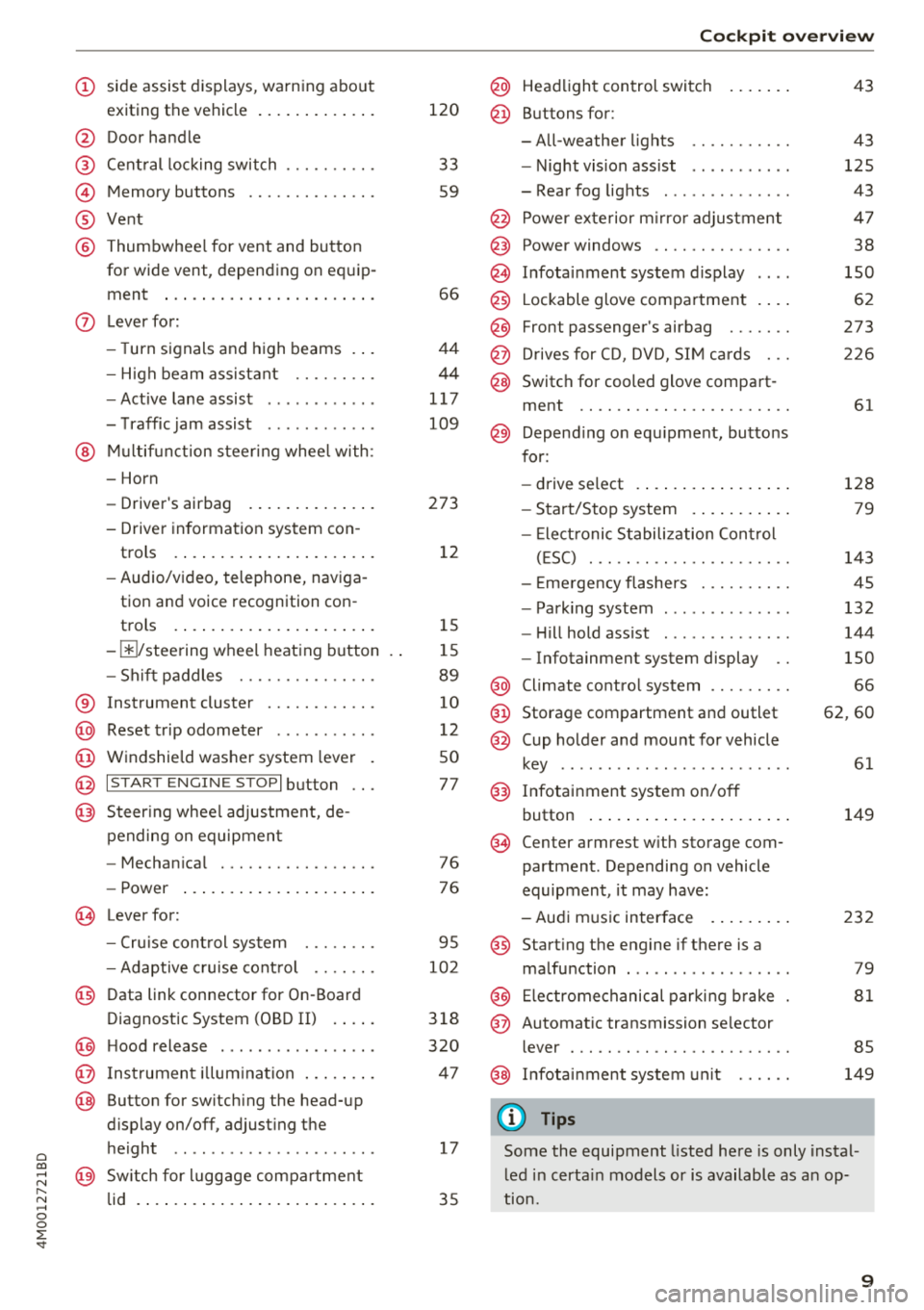
exiting the vehicle ..... ... .. .. .
@ Door handle
@ Cen tral locking swit ch ....... .. .
@ Memory buttons ........... .. .
® Vent
@ Thumbwhee l for vent and button
for wide vent, depending on eq uip -
ment ..... ... .. ..... ... .. .. .
- High beam assistant .... .. .. .
- Active lane assist ........... .
- T raffic jam assist ........... .
@ Mul tifunct ion steer ing whee l with:
- Horn
- Driver's airbag . ..... ... .. .. .
- Driver in formation sys tem con -
trols .... ... .. ..... ... .. .. .
- Audio/v ideo, telephone, nav iga
tion and voice recognition con -
trols .... ... .. ..... ... .. .. .
- III/ steering wheel heat ing b utton
- Sh ift paddles .......... .. .. .
® Instrument cluster ......... .. .
@ Reset t rip odometer .......... .
@ W indshie ld was her system lever
@ !S TAR T ENGIN E ST OPI button .. .
@ Steer ing whee l adjustment, de-
pending on equipmen t
- Mechan ica l .............. .. .
- Power ... ... .. ..... ... .. .. .
~ Lever for:
- Cru ise cont rol sys tem ... .. .. .
- Adaptive c ruise cont rol .. .. .. .
@ Data link connector for On -Board
Diagnostic System (OBD II) . ... .
@) H ood release ............... . .
@ Ins trumen t il lum ina tion ... .. .. .
@ Button for switch ing the head-up
d isplay on/off, adjust ing the
h eight .. .. ................ . .
@ Sw itch for lugg age compar tment
lid . ..... .. ... .. ..... ... .. .. .
120
33
59
66
4 4
44
1 17
109
273 12
1 5
1 5
89
10
12
50
77
76 76
95
102
3 18
320
4 7
17
35
Coc kpit o ver view
@ Head light control switc h
@ Buttons for:
- All-weathe r lights
- Night vis ion ass ist .......... .
- Rear fog lights ............. .
@ Power exte rior m irro r adjustment
@) Power windows .............. .
@ In fota inment system display
@ Lockable glove compa rtment . .. .
@ Front passenger's airbag ...... .
@ D rives for CD, DVD, S IM cards .. .
@ Switch for cooled glove compa rt-
ment .. .. .. .. .............. .
@ Depend ing o n equ ipment, butto ns
for:
- drive select .... ... .. ..... .. .
- Start/Stop system . .. ..... .. .
- Ele ct ronic S tabiliz ation Con trol
( E SC) . .. .. .. .............. .
- E me rgency flashers ......... .
- Park ing system ............. .
- Hi ll hold ass ist ............. .
- Infotainment system display ..
@ Climate cont ro l system ........ .
@ Storage compartment and outlet
@ Cup holder and mount for vehicle
key ..... ... .. .. ............ .
@) Infotainment system on/off
button ... .... .. ... .. ..... .. .
(§ Cen ter armrest w ith storage com
partment . Depending on vehicle
equipment , it may have:
- Aud i m usic interface . ..... .. .
@ Start ing t he engine if there is a
malfunction ... .. ............ .
@ Electromechanical parki ng b rake
@ Automatic transmission se lector
lever ... .. .. .. .. ............ .
@ In fota inment system un it
(D Tips
43
43
125
43
4 7
38
150
62
273
2 26
61
128 79
143
45
132
144
150
66
62 ,60
61
149
232
79
81
85
149
Some the equipment listed here is only insta l
l ed in certa in models or is available as a n op
t ion.
9
Page 30 of 398

Cockpit overv ie w
Drive to an authorized Audi dea le r or a uth orized
Audi Service Facility immediately to have the
malfunct ion corrected .
go Audi adaptive light
Applies to: ve hicles w ith Audi adaptive light
mil Audi adaptive light: malfunction! See o wn
e r's manual
Adaptive light is not working. The headlights sti ll
function.
Drive to an a utho rized Aud i dea le r or a uth o rized
Audi Service Facility immediately to have the
malfunction corrected .
~D Light/rain sensor
El Automatic headlight s: malfunction! See
o w ner's manual
El Automatic wipe rs: malfunction! See owner 's
ma nual
The light/ra in senso r is malf unct ion ing.
The low beams remain switched on at all times
for safety reasons when the lig ht switch is in the
AUTO posi tion. Howeve r, you can continue to
t ur n t he ligh ts on and off using the light sw itch.
You can still control a ll functions that are inde
pendent of the rain sensor through the wind
shie ld w iper lever.
Dr ive to an a uth o rized Aud i dea le r or a uth orized
Audi Service Facility immediately to have the
malfunction corrected .
I-: Sport differential
Applies to: veh icles w ith sport differential
II) Sport differential : malfunction! Plea se con
tact Ser vice
There is a malfunction.
Dr ive to an a uth o rized Aud i dea le r or a uth orized
Aud i Serv ice Facility immediately to have t he
malfunct ion corrected .
II) Sport differential : temperature too high .
Pleas e adapt driving sty le
28
The transmission temperature has increased sig
nificantly due to the sporty driving manner. Drive
i n a less sporty manner unti l the temperature re
turns to the normal range and the indicator light
switches of.
A WARNING
Contact an author ized Audi dealer or author
ized A udi Service Fac il ity if the sport differen
tial is fa ulty o r malfunctioning . The repai r
must be performed by trained personnel us
ing the corre ct oil in order to ensure safety.
¢ ¢Turn signals
If the . or. indicator lig ht blinks, a tur n sig
nal is t urned on. If both indica tor lights are b link
ing, the emergency flashers are on.
If an ind icator light bl inks tw ice as fast as us ual,
a turn signal bu lb has fai led. Carefully d rive to an
authorized Aud i dea ler or a uth orized Audi Serv ice
Facility immediate ly to have the ma lfunction cor
rected .
¢\~ Trailer turn signals
App lies to : vehicles wit h trailer hitch
The turn signa ls are activated in trailer mode if
the . indicator light blinks.
If a turn signal on the trailer or on the vehicle
fails while in trailer mode, the indicator light will
not blink twice as fast to indicate th is.
Page 79 of 398
a co .... N r--. N .... 0
0
:E '
Applies to: vehicles with power steering wheel adjustment
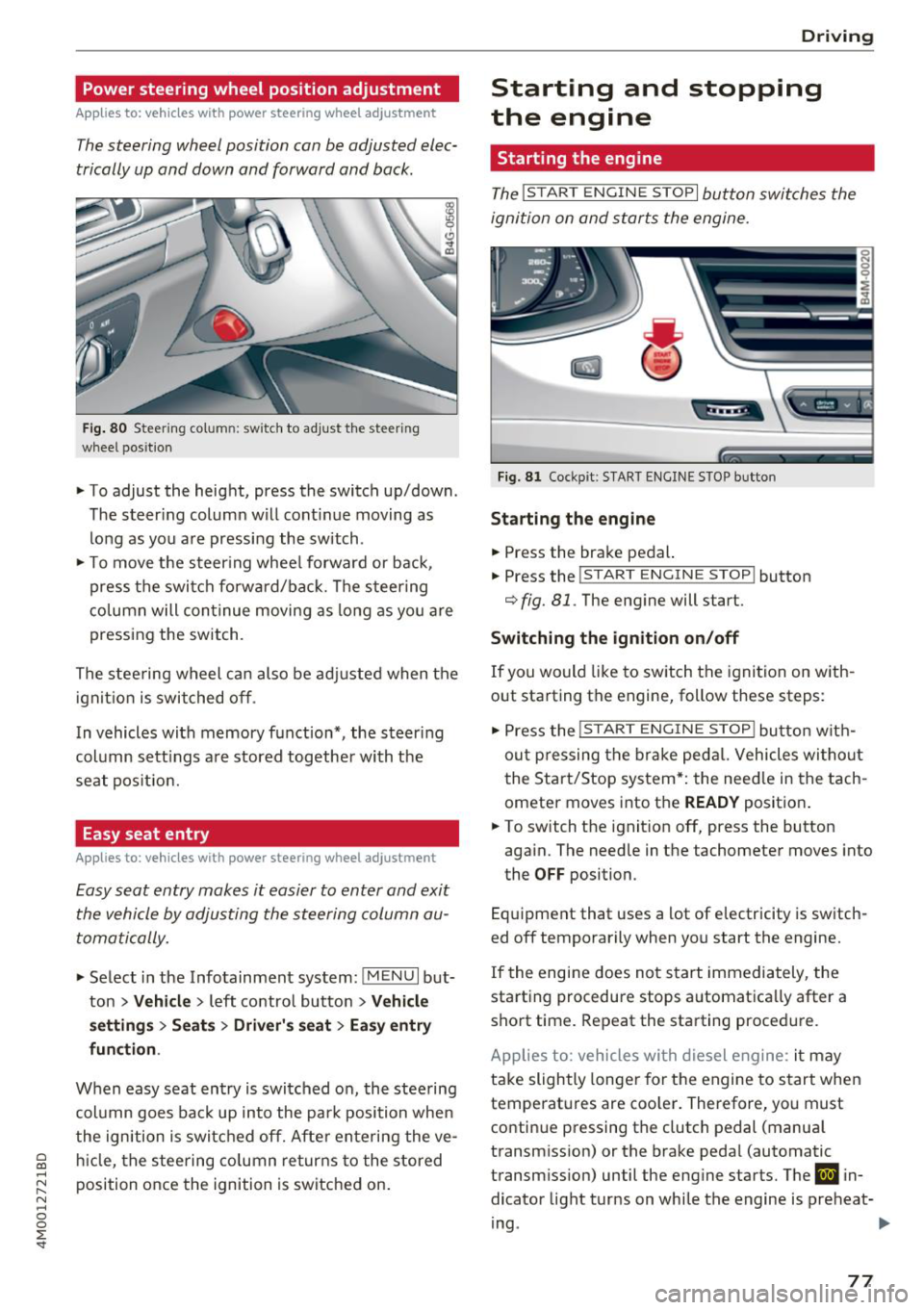
The steering wheel position con be adjusted elec
trically up and down and forward and bock.
Fig. 80 Steerin g co lu m n: sw itch to adjust th e steeri ng
whee l pos ition
.. To adjust the height, press the switch up/down .
The steer ing column will cont inue moving as
long as you are pressing the switch .
.. To move the steering wheel forward or back,
press the switch forward/back. The steering
column will continue moving as long as you are
pressing the switch.
The steering wheel can also be adjusted when the
ignition is switched off .
In vehicles with memory function*, the steer ing
column sett ings are stored together with the
seat position.
Easy seat entry
Applies to: vehicles with power steering wheel adjustment
Easy seat entry makes it easier to enter and exit
the vehicle by adjusting the steering column au
tomatically.
.. Select in the Infotainment system: !MENUI but
ton
> Vehicle > left contro l button > Vehicle
settings> Seats> Driver's seat> Easy entry
function .
When easy seat entry is switched on, the steering
column goes back up into the park position when
the ignition is switched off. After entering the ve
hicle, the steering column returns to the stored
position once the ignition is switched on.
Driving
Starting and stopping
the engine
Starting the engine
The ! STAR T ENGINE ST OPI button switches the
ignition on and starts the engine.
Fig. 81 Cockpit : S TART ENGINE STOP butto n
Starting the engine
.. Press the brake pedal.
.. Press the
!START ENGINE STOP ! button
c;, fig. 81. The engine will start.
Switching the ignition on/off
If you would like to switch the ignition on with
out starting the engine, follow these steps:
"' Press the
!S T AR T ENGINE S T OP I button with
out pressing the brake pedal. Vehicles without
the Start/Stop system*: the need le in the tach
ometer moves into the
READY position .
.. To switch the ignition off, press the button
again. The needle in the tachometer moves into
the
OFF position.
Equipment that uses a lot of electricity is switch
ed off temporarily when you start the engine.
If the engine does not start immediately, the
starting procedure stops automatica lly after a
short time. Repeat the starting procedure.
Applies to: vehicles with diesel engine: it may
take slightly longer for the engine to start when
temperatures are coo ler. Therefore, you must
continue pressing the clutch pedal (manual
transmission) or the brake pedal (automatic
transmission) until the engine starts. The
IJ in
dicator light turns on while the engine is preheat-
ing .
IJJI>
77
Page 87 of 398
Difficult terrain and off-road
When driving in unfamiliar areas and offroad,
drive slowly and keep on the watch for unexpect
ed obstacles (such as potholes, rocks, tree
stumps, etc.).
To prevent the vehicle from bottoming out and to
reduce the risk of underbody damage, you should
drive across uneven ground on only one side of
the vehicle so that only two of your wheels cross
the uneven area, instead of driving across the
center of the uneven area with all four wheels.
Drive quickly through sandy or marshy off-road
sections and do not stop , if at all possible.
Driving through water
Also read the information found in r=;, page 74.
Driving on a slope
If you are ever unable to drive up a hill, do not try
to turn around . Drive back down in
reverse in
stead . Otherwise you run the risk of t ipping over.
If the vehicle threatens to tip over when driving
across a slope, you must immediately steer
downhill in the direction of the slope.
Do not park your vehicle on steep hills .
To reduce the r isk of tipping over, drive on hills in
the direction of the downward slope (fa ll line) -
never crosswise.
Tilt angle display
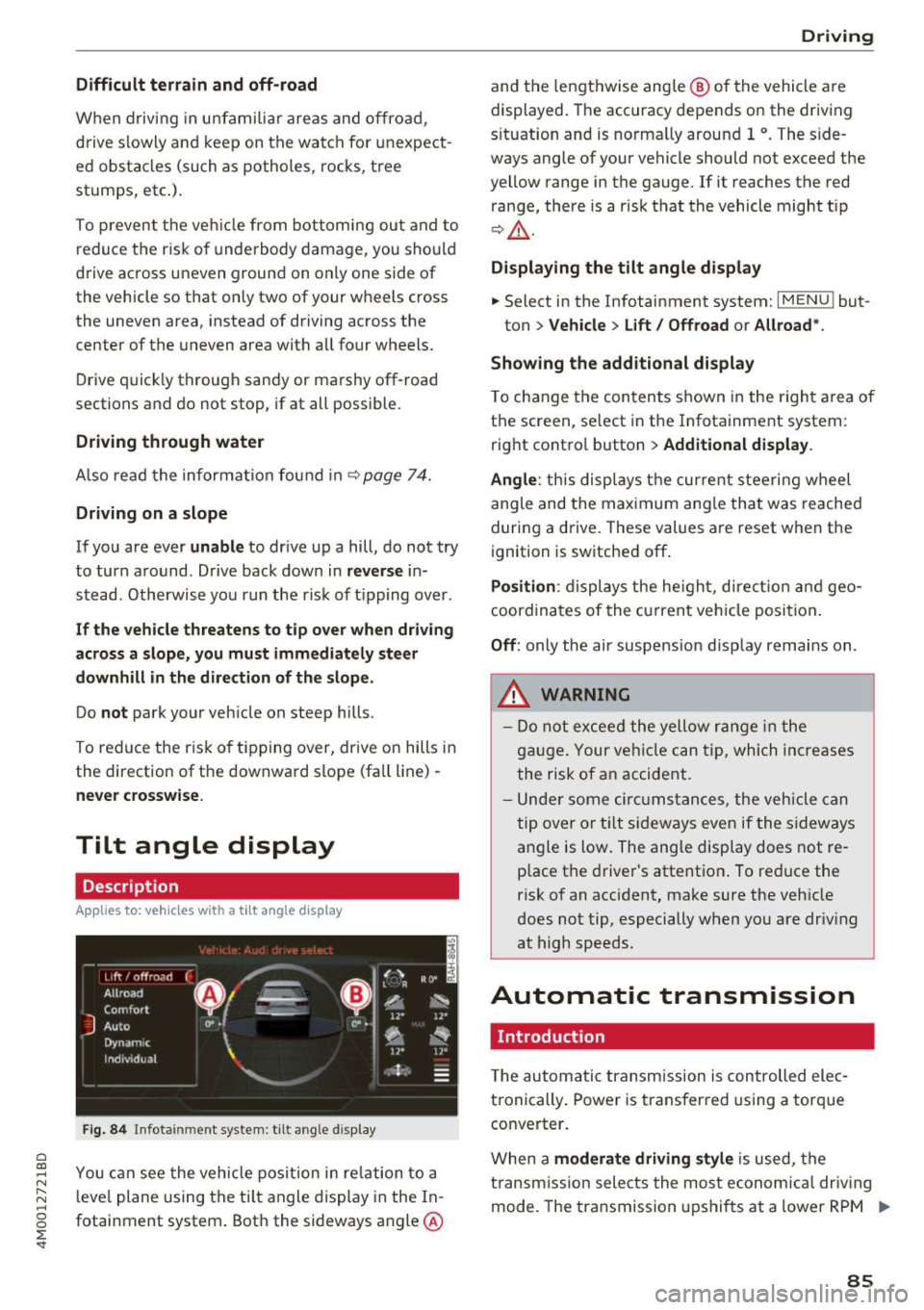
Description
Applies to: vehicles wit h a tilt ang le display
110 · I l 1ft / offrnortr1 ( ~ ....
All road
!r
-
Q
l " __,.._
Comfort 4 ~
J
ll" 11• Auto O" •
Dynamic
~ ~
Individual 11• I/"
~t-;s
Fig. 84 Infotainment system : tilt angle d isplay
a
~ You can see the vehicle position in relation to a N
~ leve l plane using the tilt angle display in the In-~
g fotainment system . Both the sideways angle @
:E '
and the lengthwise ang le @ of the vehicle are
displayed. The accuracy depends on the driving
s ituation and is norma lly around 1
°. The side
ways angle of your vehicle should not exceed the
yellow range in the gauge. If it reaches the red
range, there is a risk that the vehicle might tip
r=;,_& .
Displaying the tilt angle display
.. Select in the Infotainment system: I MENU ! but-
ton>
Vehicle > Lift/ Offroad or Allroad*.
Showing the additional display
To change the contents shown in the right area of
the screen, se lect in the Infotainment system:
right control button>
Additional display.
Angle :
this disp lays the current steering wheel
angle and the maximum angle that was reached
during a drive . These values are reset when the
ignition is switched off .
Position: displays the height, direct ion and geo
coordinates of the current vehicle posit ion.
Off : only the air suspension display remains on .
.&_ WARNING
- Do not exceed the yellow range in the
gauge. Your vehicle can tip, which increases
the risk of an accident.
- Under some circumstances , the vehicle can
tip over or tilt sideways even if the sideways
angle is low. The angle display does not re
p lace the driver's attention . To reduce the
risk of an accident, make sure the vehicle
does not tip, especially when you are driv ing
at high speeds.
Automatic transmission
Introduction
T he automatic transmission is controlled elec
tronically . Power is transferred using a torque
converter.
When a
moderate driving style is used, the
transmission selects the most economical driving
mode. The transmission upshifts at a lower RPM .,.
85
Page 90 of 398
Drivin g
~ To prevent the vehicle from rolling when you
start driving, set the parking brake when stop
ping on steep hills¢
/A.
~ The parking brake will release automatically
and your vehicle will begin to move when the
doors are closed, the driver's safety belt is fas
tened, and you accelerate as usual.
Stopp ing /p a rki ng
If the selector lever is not in the "P" position
when you open the dr iver's door, the veh icle
could roll.
~ Press and hold the brake pedal¢ /A.
~ Set the parking brake.
~ To select the "P" selector lever pos it ion, press
the "P" button @on the selector lever
¢ page 86, fig . 85 .
Under certain condit ions, such as driving in the
mounta ins or when towing a trailer, it may be
helpful to switch to manual mode temporarily
and sh ift
manually to adapt to the driving condi
tions
¢ page 89.
On hills, set the parking brake first and then s hift
into the "P" position¢
page 81. This prevents too
much stress from being placed on the locking
mechanism .
.8, WARNING
- The veh icle can roll eve n when the engine is
swit ched off.
- Unintended ve hicle movement can lead to
serious injur ies.
- T o reduce the risk of an acc ident, do not
press the acce le rato r pedal whe n cha ng ing
the se lecto r lever posit ion while the ve hicle
is s ta tionary and the eng ine is ru nning.
- T o reduce the risk of an ac cident, never se
lect the "R" or "P" positions while dr iv ing .
- Do not inadvertent ly press the acce le rato r
peda l w hen the veh icle is sta tionary. Othe r
wise the risk of an acc ident in cr eases be
ca use the vehicle will start to move immed i
ate ly, even if the parking brake is set .
88
Hill descent control
The hill descent control system assists the driver
when driving down hills .
Hill descent control activates when the transm is
s ion is in the "D" or "S" pos ition and you press the
brake pedal. The transmission automat ically se
lects a gear that is suitable for the hill. Hill de
sce nt cont rol tr ies to maintain the speed ach
i eved at the t ime of braking, w it hi n phys ical and
tec hnical lim itations . If may still be necessary to
adjust the speed wit h the brake peda l.
Hill descent cont rol sw itches off once the h ill lev
els out or you press the accelerator pedal.
When operating the cru ise control system*
¢
page 95 , hill descent control is also activated
whe n the speed is set.
.8, WARNING
Hill desce nt co ntro l cannot ove rcome physical
lim itat ions, so it may not be ab le to m ainta in
a constant speed under all conditions. A lways
be ready to app ly the brakes.
Page 91 of 398
a co ...... N r--. N ...... 0
0
:E '
The tiptronic mode allows the driver to shift the
gears manually .
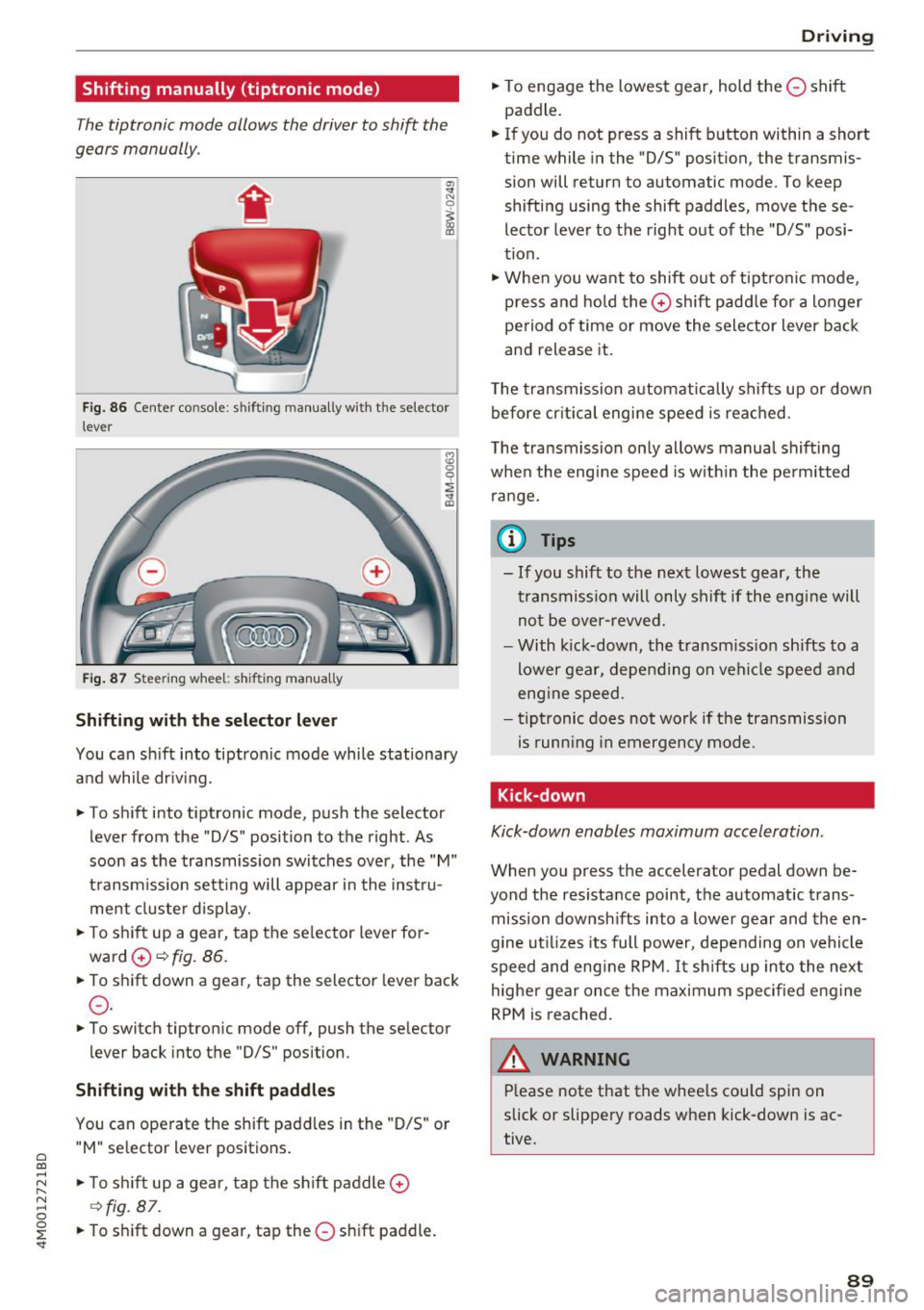
Fig. 86 Center console : sh ifti ng manually with the selector
l ever
Fig. 87 Steeri ng wheel: shifti ng manual ly
Shifting with th e selector leve r
You can shift into tiptronic mode while stationary
and while driv ing.
• To shift into tiptronic mode, push the selector
lever from the "D/S" position to the right . As
soon as the transmission switches over, the "M"
transm iss ion sett ing will appear i n the instru
ment cluster d isplay.
• To sh ift up a gear, tap the se lector lever for
ward
0 ~ fig. 86.
• To shift down a gear, tap the selector lever back
0 -
• To switch tiptron ic mode off, push the selector
lever back into the "D/S" pos ition.
Shifting with th e s hift paddle s
You can operate the shift padd les in the "D/S" or
" M " se lector lever positions.
• To s hift up a gear, tap the sh ift paddle
0
~ fig. 87 .
• To s hift down a gear, tap the 0 shift paddle.
D rivi ng
• To engage the lowest gear, hold the 0 shift
paddle.
• If you do not press a shift button within a short
time while in the "D/S" position, the transmis
sion will return to automatic mode. To keep
shifting using the shift paddles, move these
lector lever to the right out of the "D/S" posi
tion .
• When you want to shift out of tiptronic mode ,
press and hold the
0 shift padd le for a longer
period of time or move the selector lever back
and release it.
T he transmission automatically shifts up or down
before cr itica l engine speed is reached .
T he transmission on ly allows manua l shifting
when the eng ine speed is w ith in the perm itted
range.
(D Tips
- If you shift to the next lowest gear, the
transmission will only shif t if the engine will
not be over-revved.
- With kick-down, the transmission shifts to a
lower gear, depending on vehicle speed and
eng ine speed .
- tiptronic does not work if the transmission
is runn ing in emergency mode .
Kick-down
Kick-down enables maximum acceleration .
When you press the accelerator pedal down be
yond the resista nce point, the automatic trans
mission downsh ifts into a lower gear and the en
gine ut il iz es its full power, depending on vehicle
speed and eng ine RPM.
It sh ifts up into the next
highe r gear once the maximum specified eng ine
RPM is reached .
A WARNING ~
Please note that the whee ls cou ld spin on
slick or slippery roads when kick-down is ac
tive.
89
Page 130 of 398
Ass is tance sy stem s
Switching on/off
Applies to: vehicles with night vision assist
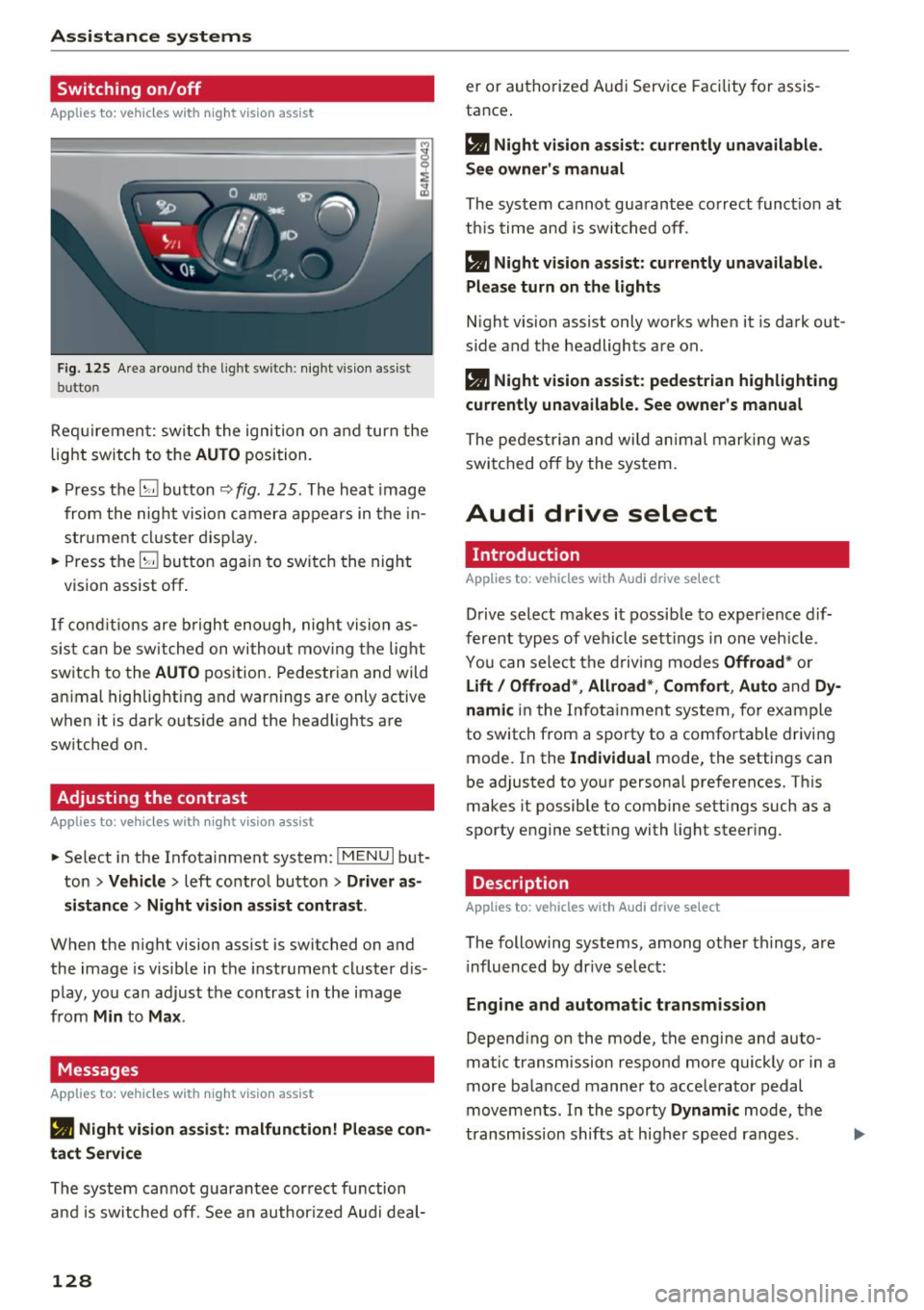
F ig. 125 Are a aro und th e light sw itc h: night vis ion assist
butto n
Requiremen t: sw itch the ignition on and turn the
light switch to the
AUTO position.
.. Press the~ button ~
fig. 125 . The heat image
from the nig ht vision camera appears in the in
str ument cluster d isplay.
.. Press the~ button again to switch the night
vision assist off .
If condit ions are b right enough, night vision as
sis t can be sw itched on withou t mov ing the light
switch to the
AUTO position. Pedestrian and wild
an imal highlighting and warnings are only active
when it is dark outside and the headlights are
sw itched on .
Adjusting the contrast
Applies to: vehicles with night vision assist
.. Select in the Infotainment system: IM ENU I but
ton
> Vehicl e > left control button > Driver a s
si stance
> Nig ht vis ion as sist contra st .
When the night vision assist is switched on and
the image is visible in the instrument cluster d is
p lay , you can adjust the contrast in the image
from
Min to Ma x.
Messages
App lies to: vehicles with night vision assist
• Night vi sion a ssist : malfunction! Plea se con
tact Ser vic e
The system cannot guarantee correct function
and is switched off. See a n author ized Audi deal-
128
er or authori zed Aud i Service Facility fo r assis
tance .
a Night vi sio n assi st: c urrently unav ail able .
See owner's manual
The system cannot guarantee correct funct ion at
th is time and is switched off .
a Night vision ass ist: currently un av ailabl e.
Plea se turn on the lights
Night vision assist only works when it is dark out
side and the headlights are on.
a Night vision ass ist: pedestr ian h ighlighting
curr ent ly unavailable. See owne r's manual
The pedestrian and wi ld animal marki ng was
switched off by the system .
Audi drive select
Introduction
App lies to: vehicles with Aud i drive se lect
Drive select makes it possible to exper ience dif
ferent types of vehicle sett ings in one veh icle .
You can select the d riving modes
Offroad * or
Lift / Offroad *, Allroad *, Comfort , Auto and Dy
namic
in the Infota inment system, for example
to switch from a sporty to a comfo rtable driving
mode. In the
I ndividual mode, the settings can
be adjusted to your personal preferences. This
makes it possible to combine sett ings such as a
sporty engine setting with light steer ing .
Description
Applies to: vehicles with Audi drive select
The following systems, among other th ings, are
i nfluenced by dr ive se lec t:
Engine and automatic tran smis sion
Depend ing on the mode, the engine and auto
matic transmission respond more quickly or in a
more balanced manner to accelerator pedal
movements . In the sporty
Dynam ic mode, the
transm iss ion shifts at higher speed ranges .
Page 132 of 398
Assistance systems
~ Select in the Infotainment system: IMENUI but-
ton
> Vehicle > Audi drive select.
~ Select and confirm the desired setting .
You can change the driving mode when the vehi
cle is stationary or whi le driving. If traffic per
mits, after changing modes, briefly take your
foot off the accelerator pedal so that the recent ly
selected mode is a lso activated for the engine.
Offroad * or Lift/ Offroad* -activates offroad
functions to support driving on rough terrain .
The engine, transmission and steering adjust and
the Start/Stop system* switches off. Applies to
air suspension*: the vehicle also lifts for passing
over obstacles to maintain maximum ground
clearance.
Adjusting the Individual mode
A pp lies to: ve hicles w ith Audi drive select
Allroad * -on ly for air suspension*: the vehicle
li fts to maintain higher ground clearance for dif
ficult stretches of road .
Comfort -provides a comfort-oriented vehicle
setup and is suited fo r long drives on highways.
Auto -provides an overa ll comfortable yet dy
namic driv in g feel and is suited for everyday use.
Dynamic -gives the driver a sporty driving feel
and is suited to a spo rty driving style.
Individual -c::;,page 130.
A WARNING
Pay attention to traffic when operating the
drive select to reduce the risk of an accident .
-
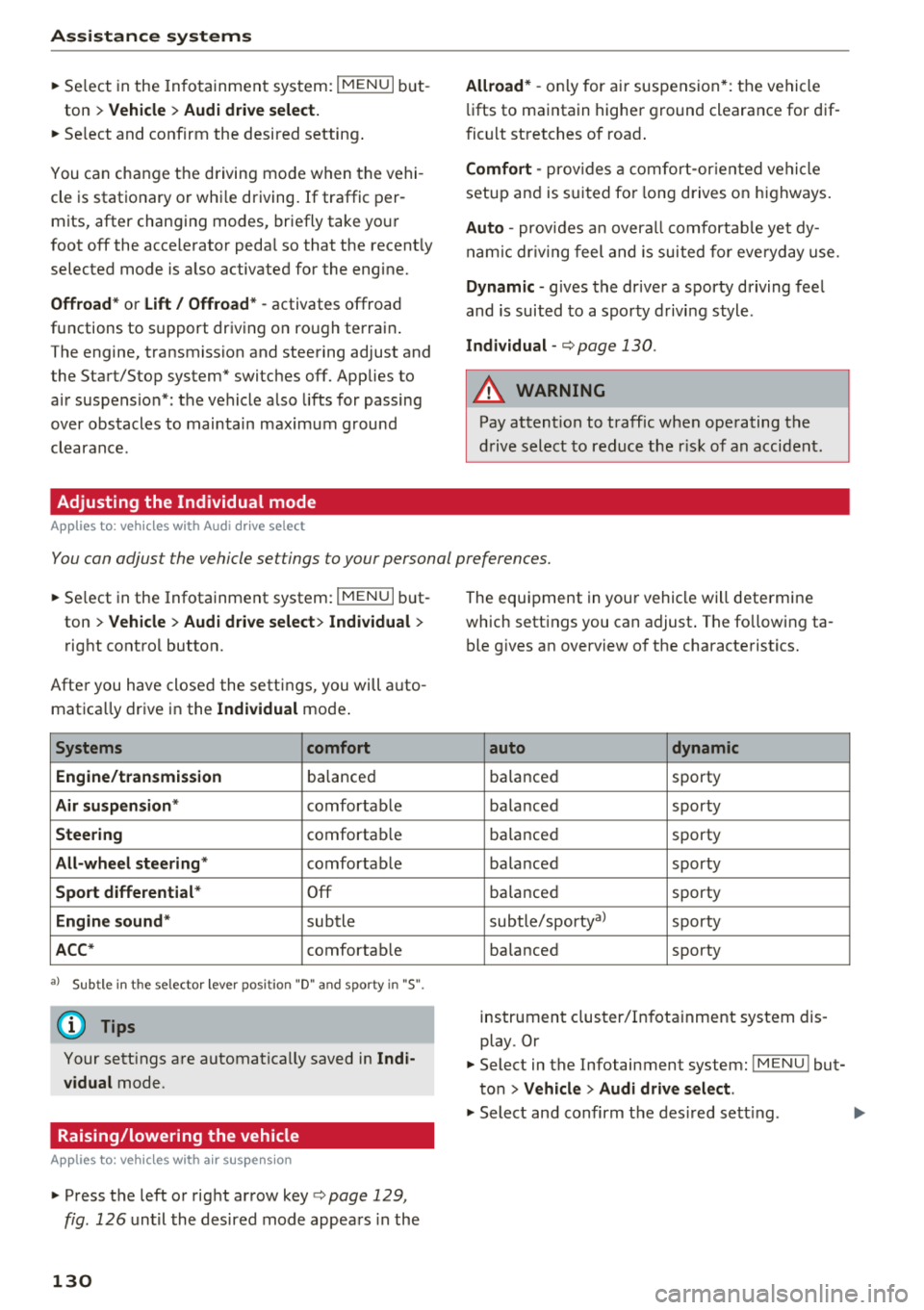
You can adjust the vehicle settings to your personal preferences.
~ Select in the Infotainment system: IMENU I but
ton
> Vehicle > Audi drive select > Individual >
right control button.
Afte r you have closed the settings, you will auto
matica lly drive in the
Individual mode .
Systems comfort
Engine/transmission
ba lanced
Air suspension * comfortable
Steering comfortable
All-wheel steering* comfortable
Sport differential * Off
Engine sound * subtle
ACC* comfortable
a l Sub tle in t he se lecto r lever posit ion "D" and sporty in "S".
(D Tips
Your settings are automatica lly saved in Indi
vidual
mode.
Raising/lowering the vehicle
A pp lies to: ve hicles w ith air susp en sion
~ Press the left or right arrow key c> page 129 ,
fig . 126
until the desired mode appears in the
130
The equipment in your vehicle will determine
which settings you can adjust . The fo llowing ta
ble gives an overview of the characteristics.
auto dynamic
ba
lanced sporty
balanced sporty
ba lanced sporty
ba la nced sporty
ba lanced sporty
subtle/sportyal sporty
ba lanced sporty
instrument cluster/Infotainment system dis
play. Or
~ Select in the Infotainment system: IMENU ! but
ton
> Vehicle > Audi drive select.
~ Select and confirm the desired setting .
Page 203 of 398
a co ...... N r--. N ...... 0
0
:E '
Introduction
Applies to: vehicles with emergency call fu nction
Depending on the country and the vehicle equip
ment, the following functions may be available.
W ith the
emergency call, you can call for he lp in
dangerous situat ions as quickly as possible. Use
this function when help is needed
q page 201.
W ith online roadside assistance, you can request
assistance if there is a breakdown or a minor acci
dent
q page 202 .
(D Tips
-The serv ices are provided through a SIM
card installed in the vehicle . The cost of the
call and data connections is included in the
price for the services. Services are provided
assuming that the cell phone network re
quired for the installed SIM card is function ing and ready to operate . The available serv
ices set by Audi AG are only available within
the cell phone network coverage area for
the cell phone service provider selected by
Audi AG .
- You can find what data will be transferred at www .audiusa .com.
- These services cannot be deactivated using
the settings in the Infotainment system .
Emergency call
Description
Applies to: vehicles with emergency call function
An emergency call is a combination of data trans
mission and a phone call. The data transmission
from your vehicle forwards important informa tion, such as the vehicle and position data, to the
emergency call center .
Emergency call
Making an emergency call
Applies to: vehicles with emergency call function
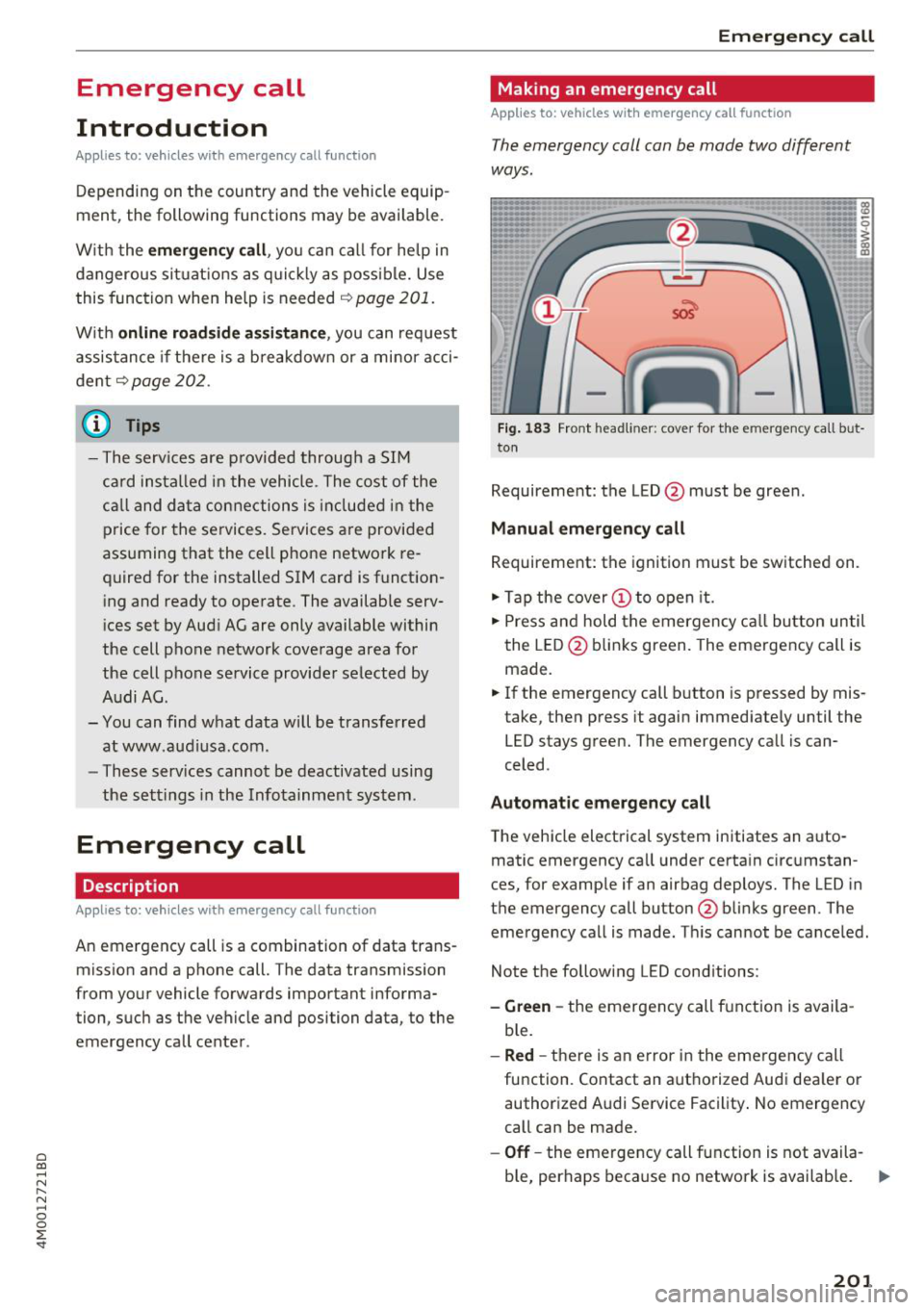
The emergency call can be made two different
ways.
Fig. 183 Front headli ner : cover for the e mergency call but
ton
Requirement: the L ED @ must be green.
Manual emergency call
Requirement: the ignition must be switched on.
.,. Tap the cover(!) to open it.
.,. Press and hold the emergency call button until
the LED @blinks green. The emergency call is
made.
.,. If the emergency call button is pressed by mis
take, then press it again immediately until the
LED stays green. The emergency call is can
celed .
Automatic emergency call
The vehicle electrical system initiates an auto
matic emergency call under certain circumstan
ces, for example if an airbag deploys. The LED in
the emergency call button @blinks green . The
emergency call is made . This cannot be canceled.
Note the following LED conditions :
-Green -the emergency call function is availa
ble.
- Red -there is an e rror in the emergency call
function. Contact an authorized Audi dealer or authorized Audi Service Facility. No emergency
call can be made.
- Off-the emergency call function is not availa-
ble, perhaps because no network is available. .,..
201
Page 362 of 398
Emergency assistance
placing the Automatic Transmission in P
(Park) will
not prevent the vehicle from
moving.
- Before you change a wheel, be sure the
ground is level and firm. If necessary, use a
sturdy board under the jack*.
-Always store the vehicle tool kit, the jack* and the replaced tire in the luggage compartment <=>
page 257.
@ Tips
-Obey all laws.
- Before changing the wheel, you must acti- vate the jacking mode*, so that the automatic controls for the air suspension* do
not make it more difficult to lift the vehicle
with the jack*<=>
page 360 .
Removing the caps
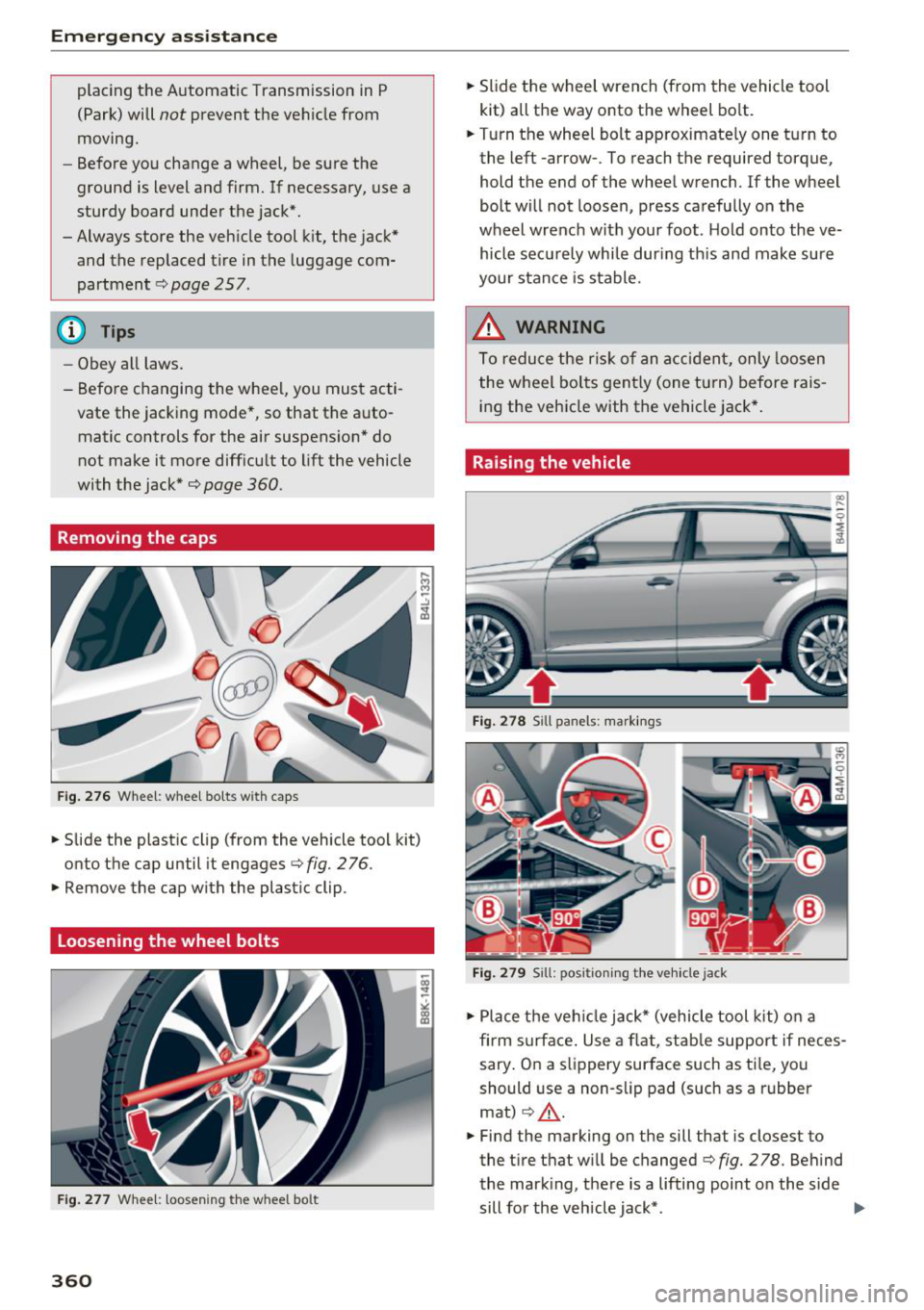
Fig .. 276 Wheel: wheel bo lts wi th caps
.,. Slide the plastic clip (from the vehicle tool kit)
onto the cap until it engages
<=> fig. 276 .
.,. Remove the cap with the plastic clip .
Loosening the wheel bolts
Fig. 277 Whee l: loosen ing the w heel bo lt
360
.,. Slide the wheel wrench (from the vehicle tool
kit) all the way onto the wheel bolt .
.,. Turn the wheel bolt approximately one turn to
the left -arrow- . To reach the required torque,
hold the end of the wheel wrench. lfthe wheel
bolt will not loosen, press carefully on the
wheel wrench with your foot . H old onto the ve
hicle securely whi le during this and make sure
your stance is stable.
_&. WARNING
To reduce the risk of an accident, only loosen
the wheel bolts gently (one turn) before rais
ing the vehicle with the vehicle jack*.
Raising the vehicle
Fig. 278 S ill panels: markings
Fig. 279 Sill: positi on ing the vehicle jack
.,. Place the veh icle jack* (vehicle tool kit) on a
firm s urface. Use a flat, stable support if neces
sary . On a slippery surface such as ti le, you
should use a non-slip pad (such as a rubber
mat)
c> .&_ .
.,. Find the marking on the sill that is closest to
the tire that wi ll be changed<=>
fig. 278. Behind
the mark ing, there is a lifting point o n the side
sill for the vehicle jack* . ..,.